WIRELESS LOCAL
NETWORK AND ITS
USES,NETWORK
ARCHITECTURE
By Batch1(21731A3501- 21731A3510)
CONTENTS
WLAN
USES OF WLAN
NETWORK
ARCHITECTURE
WIRELESS LOCAL
AREA
NETWORK(WLAN)
WHAT IS WLAN?
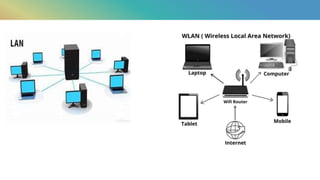
A Wireless local area network(WLAN) is
a group of colocated computers or other
devices that form a network based on radio
transmissions rather than wired connections.
A wi-Fi network is a type of WLAN;anyone
connected to Wi-Fi while reading any
webpage is using WLAN.
Working of WLAN:
Like broadcast media,a WLAN transmits
information over radio waves.Data is sent in
packets.
The packets contain layers with labels and
instructions that along with the unique
MAC(media access control) addresses assigned to
end points ,enable routing to intended
locations.
USES OF WLAN
WLANS are very flexible and can be configured into a variety of
topologies based on the application.
Some of the possible uses of WLAN are:
Users would be able to surf the internet ,check e-mail ,and receive
Instant messages on the move.
In areas affected by earthquakes or other such disasters ,no suitable
infrastructure may be available on the site .WLANs are handy in such
locations to set up networks on the fly.
There are many historic buildings where there has been a need to
set up Computer Networks .In such places ,writing may not be
permitted or the building design may not be conductive to efficient
wiring .WLANs are very good solutions in such places.
 Wireless LANs based on the IEEE 802.11 standards are the
most widely used computer networks in the world.
These are commonly called Wi-Fi, which is a trademark
belonging to the Wi-Fi Alliance.
They are used for home and small office networks that link
together laptop, computers, printers, smartphones, Web
TVs and gaming devices with a wireless router, which links
them to the internet.
Hotspots provided by routers at restaurants, coffee shops,
hotels, libraries, and airports allow consumers to access the
internet with portable wireless devices.
NETWORK
ARCHITECTURE
The architecture of the
Network defines the way
network has to be establish.the
architecture represents the
types of the WLANs&services
offered by WLANs
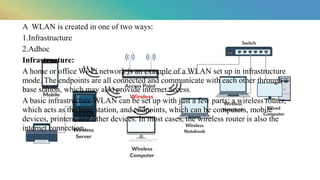
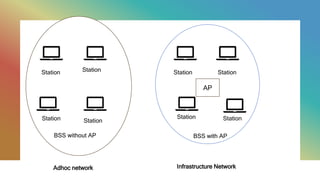
A WLAN is created in one of two ways:
1.Infrastructure
2.Adhoc
Infrastructure:
A home or office Wi-Fi network is an example of a WLAN set up in infrastructure
mode. The endpoints are all connected and communicate with each other through a
base station, which may also provide internet access.
A basic infrastructure WLAN can be set up with just a few parts: a wireless router,
which acts as the base station, and endpoints, which can be computers, mobile
devices, printers, and other devices. In most cases, the wireless router is also the
internet connection.
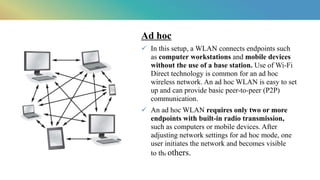
Ad hoc​
 In this setup, a WLAN connects endpoints such
as computer workstations and mobile devices
without the use of a base station. Use of Wi-Fi
Direct technology is common for an ad hoc
wireless network. An ad hoc WLAN is easy to set
up and can provide basic peer-to-peer (P2P)
communication.​
 An ad hoc WLAN requires only two or more
endpoints with built-in radio transmission,
such as computers or mobile devices. After
adjusting network settings for ad hoc mode, one
user initiates the network and becomes visible
to the others.​
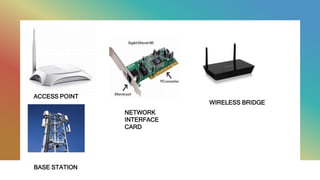
Components of wLAN
• Wireless access points (APs) that provide wireless
coverage and connect to the wired network
• Network interface cards (NICs) or client adaptors that
allow devices to communicate with the APs
• Wireless bridges and repeaters that can extend the
range of the network
ACCESS POINT
NETWORK
INTERFACE
CARD
WIRELESS BRIDGE
BASE STATION
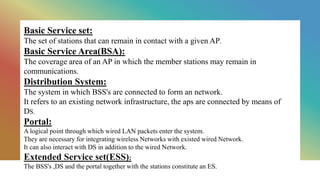
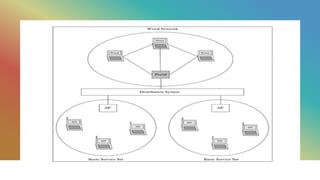
Basic Service set:
The set of stations that can remain in contact with a given AP.
Basic Service Area(BSA):
The coverage area of an AP in which the member stations may remain in
communications.
Distribution System:
The system in which BSS's are connected to form an network.
It refers to an existing network infrastructure, the aps are connected by means of
DS.
Portal:
A logical point through which wired LAN packets enter the system.
They are necessary for integrating wireless Networks with existed wired Network.
It can also interact with DS in addition to the wired Network.
Extended Service set(ESS):
The BSS's ,DS and the portal together with the stations constitute an ES.
Station
Station Station
Station
BSS without AP
Station
Station
Station
Station
AP
BSS with AP
Adhoc network Infrastructure Network
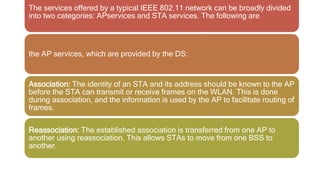
The services offered by a typical IEEE 802.11 network can be broadly divided
into two categories: APservices and STA services. The following are
the AP services, which are provided by the DS:
Association: The identity of an STA and its address should be known to the AP
before the STA can transmit or receive frames on the WLAN. This is done
during association, and the information is used by the AP to facilitate routing of
frames.
Reassociation: The established association is transferred from one AP to
another using reassociation. This allows STAs to move from one BSS to
another.
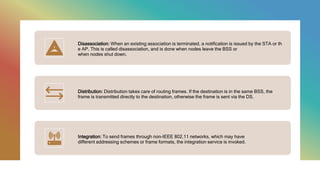
Disassociation: When an existing association is terminated, a notification is issued by the STA or th
e AP. This is called disassociation, and is done when nodes leave the BSS or
when nodes shut down.
Distribution: Distribution takes care of routing frames. If the destination is in the same BSS, the
frame is transmitted directly to the destination, otherwise the frame is sent via the DS.
Integration: To send frames through non-IEEE 802.11 networks, which may have
different addressing schemes or frame formats, the integration service is invoked.
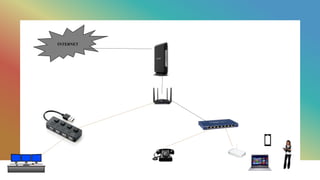
INTERNET
WLAN AND NETWORK ARCHITECTURE.pptx

WLAN AND NETWORK ARCHITECTURE.pptx

  • 1.
    WIRELESS LOCAL NETWORK ANDITS USES,NETWORK ARCHITECTURE By Batch1(21731A3501- 21731A3510)
  • 2.
  • 3.
  • 4.
    WHAT IS WLAN? AWireless local area network(WLAN) is a group of colocated computers or other devices that form a network based on radio transmissions rather than wired connections. A wi-Fi network is a type of WLAN;anyone connected to Wi-Fi while reading any webpage is using WLAN.
  • 6.
    Working of WLAN: Likebroadcast media,a WLAN transmits information over radio waves.Data is sent in packets. The packets contain layers with labels and instructions that along with the unique MAC(media access control) addresses assigned to end points ,enable routing to intended locations.
  • 7.
    USES OF WLAN WLANSare very flexible and can be configured into a variety of topologies based on the application. Some of the possible uses of WLAN are: Users would be able to surf the internet ,check e-mail ,and receive Instant messages on the move. In areas affected by earthquakes or other such disasters ,no suitable infrastructure may be available on the site .WLANs are handy in such locations to set up networks on the fly. There are many historic buildings where there has been a need to set up Computer Networks .In such places ,writing may not be permitted or the building design may not be conductive to efficient wiring .WLANs are very good solutions in such places.
  • 8.
     Wireless LANsbased on the IEEE 802.11 standards are the most widely used computer networks in the world. These are commonly called Wi-Fi, which is a trademark belonging to the Wi-Fi Alliance. They are used for home and small office networks that link together laptop, computers, printers, smartphones, Web TVs and gaming devices with a wireless router, which links them to the internet. Hotspots provided by routers at restaurants, coffee shops, hotels, libraries, and airports allow consumers to access the internet with portable wireless devices.
  • 9.
    NETWORK ARCHITECTURE The architecture ofthe Network defines the way network has to be establish.the architecture represents the types of the WLANs&services offered by WLANs
  • 10.
    A WLAN iscreated in one of two ways: 1.Infrastructure 2.Adhoc Infrastructure: A home or office Wi-Fi network is an example of a WLAN set up in infrastructure mode. The endpoints are all connected and communicate with each other through a base station, which may also provide internet access. A basic infrastructure WLAN can be set up with just a few parts: a wireless router, which acts as the base station, and endpoints, which can be computers, mobile devices, printers, and other devices. In most cases, the wireless router is also the internet connection.
  • 11.
    Ad hoc​  Inthis setup, a WLAN connects endpoints such as computer workstations and mobile devices without the use of a base station. Use of Wi-Fi Direct technology is common for an ad hoc wireless network. An ad hoc WLAN is easy to set up and can provide basic peer-to-peer (P2P) communication.​  An ad hoc WLAN requires only two or more endpoints with built-in radio transmission, such as computers or mobile devices. After adjusting network settings for ad hoc mode, one user initiates the network and becomes visible to the others.​
  • 12.
    Components of wLAN •Wireless access points (APs) that provide wireless coverage and connect to the wired network • Network interface cards (NICs) or client adaptors that allow devices to communicate with the APs • Wireless bridges and repeaters that can extend the range of the network
  • 13.
  • 14.
    Basic Service set: Theset of stations that can remain in contact with a given AP. Basic Service Area(BSA): The coverage area of an AP in which the member stations may remain in communications. Distribution System: The system in which BSS's are connected to form an network. It refers to an existing network infrastructure, the aps are connected by means of DS. Portal: A logical point through which wired LAN packets enter the system. They are necessary for integrating wireless Networks with existed wired Network. It can also interact with DS in addition to the wired Network. Extended Service set(ESS): The BSS's ,DS and the portal together with the stations constitute an ES.
  • 15.
    Station Station Station Station BSS withoutAP Station Station Station Station AP BSS with AP Adhoc network Infrastructure Network
  • 17.
    The services offeredby a typical IEEE 802.11 network can be broadly divided into two categories: APservices and STA services. The following are the AP services, which are provided by the DS: Association: The identity of an STA and its address should be known to the AP before the STA can transmit or receive frames on the WLAN. This is done during association, and the information is used by the AP to facilitate routing of frames. Reassociation: The established association is transferred from one AP to another using reassociation. This allows STAs to move from one BSS to another.
  • 18.
    Disassociation: When anexisting association is terminated, a notification is issued by the STA or th e AP. This is called disassociation, and is done when nodes leave the BSS or when nodes shut down. Distribution: Distribution takes care of routing frames. If the destination is in the same BSS, the frame is transmitted directly to the destination, otherwise the frame is sent via the DS. Integration: To send frames through non-IEEE 802.11 networks, which may have different addressing schemes or frame formats, the integration service is invoked.
  • 19.