Welcome & Instructor Introduction
• Welcome to System Administration and
Maintenance!
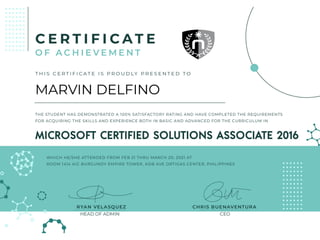
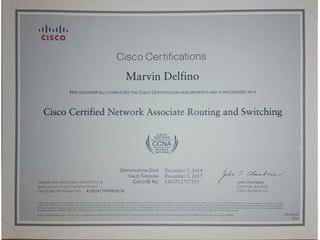
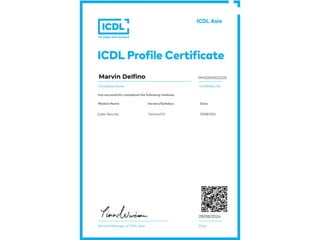
Instructor: Marvin R. Delfino
• 2015-2023: FCPC – IT Technical Support
• 2023-Present: FCPC – OIC for ICT
Infrastructure
Facilities
• Class hours: 8:00 AM to 1:00 PM
• No food and drink allowed
• Let the instructor know if you do not
understand the discussion
• To be able to fully benefit from the
course everyone should perform the
laboratory
Student Introductions
• Let's get to know each other!
• Please share:
• - Your Name
• - Your IT strengths/interests
• - What you expect to learn from this subject
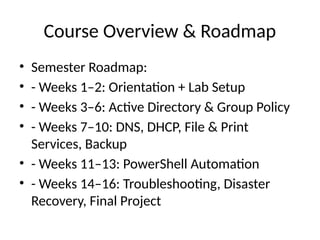
Course Overview & Roadmap
• Semester Roadmap:
• - Weeks 1–2: Orientation + Lab Setup
• - Weeks 3–6: Active Directory & Group Policy
• - Weeks 7–10: DNS, DHCP, File & Print
Services, Backup
• - Weeks 11–13: PowerShell Automation
• - Weeks 14–16: Troubleshooting, Disaster
Recovery, Final Project
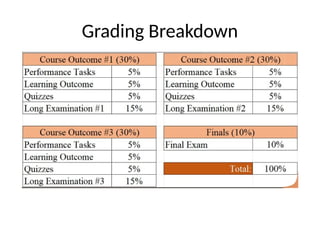
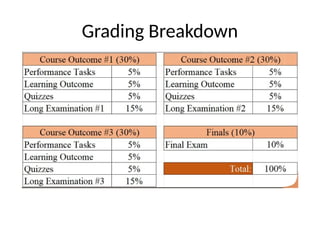
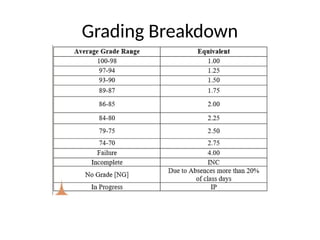
Grading Breakdown
Grading Breakdown
Grading Breakdown
What is System Administration?
• System Administration involves managing IT
systems such as servers, networks, users, and
policies.
• It ensures systems run smoothly and securely.
What is System Administration?
Roles & Responsibilities of a SysAdmin
• SysAdmin Responsibilities:
• - Creating and managing user accounts
• - Controlling access to resources
• - Maintaining server security and performance
Importance of System Administration
• Why System Administration Matters:
• - Keeps business and school operations
running
• - Protects data and networks from disruptions
• - Ensures system reliability and efficiency
Lab Expectations & VM Setup
• Lab Work Overview:
• - Simulate a domain environment
• - 1 Windows Server VM (Domain Controller)
• - 1 Windows 10/11 Client VM
• - All inside Hyper-V isolated network
Hardware Requirements
• Minimum Hardware Requirements:
• - 8GB RAM (16GB recommended)
• - Hyper-V enabled on laptop or lab PC
• Hands-on learning is key to mastering this
course.
Summary & Q&A
• Summary:
• - Welcome and introductions
• - Course roadmap and expectations
• - What is system administration
• - Lab setup overview
• Questions?

Windows Server Windows Server Windows Server

  • 1.
    Welcome & InstructorIntroduction • Welcome to System Administration and Maintenance! Instructor: Marvin R. Delfino • 2015-2023: FCPC – IT Technical Support • 2023-Present: FCPC – OIC for ICT Infrastructure
  • 5.
    Facilities • Class hours:8:00 AM to 1:00 PM • No food and drink allowed • Let the instructor know if you do not understand the discussion • To be able to fully benefit from the course everyone should perform the laboratory
  • 6.
    Student Introductions • Let'sget to know each other! • Please share: • - Your Name • - Your IT strengths/interests • - What you expect to learn from this subject
  • 7.
    Course Overview &Roadmap • Semester Roadmap: • - Weeks 1–2: Orientation + Lab Setup • - Weeks 3–6: Active Directory & Group Policy • - Weeks 7–10: DNS, DHCP, File & Print Services, Backup • - Weeks 11–13: PowerShell Automation • - Weeks 14–16: Troubleshooting, Disaster Recovery, Final Project
  • 8.
  • 9.
  • 10.
  • 11.
    What is SystemAdministration? • System Administration involves managing IT systems such as servers, networks, users, and policies. • It ensures systems run smoothly and securely.
  • 12.
    What is SystemAdministration?
  • 13.
    Roles & Responsibilitiesof a SysAdmin • SysAdmin Responsibilities: • - Creating and managing user accounts • - Controlling access to resources • - Maintaining server security and performance
  • 14.
    Importance of SystemAdministration • Why System Administration Matters: • - Keeps business and school operations running • - Protects data and networks from disruptions • - Ensures system reliability and efficiency
  • 15.
    Lab Expectations &VM Setup • Lab Work Overview: • - Simulate a domain environment • - 1 Windows Server VM (Domain Controller) • - 1 Windows 10/11 Client VM • - All inside Hyper-V isolated network
  • 16.
    Hardware Requirements • MinimumHardware Requirements: • - 8GB RAM (16GB recommended) • - Hyper-V enabled on laptop or lab PC • Hands-on learning is key to mastering this course.
  • 17.
    Summary & Q&A •Summary: • - Welcome and introductions • - Course roadmap and expectations • - What is system administration • - Lab setup overview • Questions?