_____________________________________________
Automatic Programming for NHibernate :
Code That Writes Code for you
_____________________________________________
Deepak Kumar Sahu, Capgemini India
1 Abstract
This white paper explores the power of automatic Programming and its application on NHibernate
Technology, allowing human-programmers to write their code on a higher level of abstraction
ensuring Homogenous and Error-Free code.
Tracking down Redundant code and Implementing a Generic algorithm that generates such code is
the Key factor in Automatic-Programming.
It takes sole discretion and independent judgement of the Developer to trace similar code-patterns
in their application and making all efforts in reducing the overall Project-Development-Time by
automating such process.
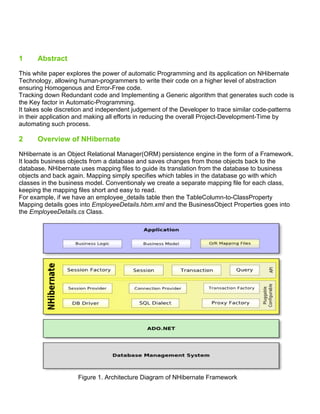
2 Overview of NHibernate
NHibernate is an Object Relational Manager(ORM) persistence engine in the form of a Framework.
It loads business objects from a database and saves changes from those objects back to the
database. NHibernate uses mapping files to guide its translation from the database to business
objects and back again. Mapping simply specifies which tables in the database go with which
classes in the business model. Conventionaly we create a separate mapping file for each class,
keeping the mapping files short and easy to read.
For example, if we have an employee_details table then the TableColumn-to-ClassProperty
Mapping details goes into EmployeeDetails.hbm.xml and the BusinessObject Properties goes into
the EmployeeDetails.cs Class.
Figure 1. Architecture Diagram of NHibernate Framework
3 Overview of Automatic Programming
When computer-programs are written by a machine, the process is called automatic programming.
Artificial Intelligence researchers are interested in studying automatic programming for two basic
reasons:
• First, it would be highly useful to have a powerful automatic programming systems that could
receive casual and imprecise specifications for a desired target program and then correctly
generate that program
• Second, automatic programming is widely believed to be a necessary component of any
intelligent system and is therefore a topic for fundamental research in its own right.
4 Redundant Codes in NHibernate : A pain in the neck
Lets say, you are on a rapid development project which uses NHibernate as its ORM and SQL-
Server as its database.
Your database has around 50 Tables and each Table has around 20 Columns.
For mapping the Business Model to NHibernate one would need the following items for each table :
• A BO class file ( eg: EmployeeDetails.cs )
• A XML Mapping file ( eg: EmployeeDetails.hbm.xml )
So you have to create 50 such BO class files and another 50 XML Mapping files, manually typing-In
every Column-to-Property mapping and keeping Proper Naming Conventions in mind.
Sounds Nightmarish and Error-Prone to every Developer !!
There are many Third-party software vendors providing Licensed code-generator tools for
NHibernate, but they are not always customizable to the project demands.
Why not start coding your own code-generators for your proejct that could be as per your
conventions and thereby saving Time and Money ??
5 Automatic Programming meets NHibernate
Using SQL-Server as coding interface, one can auto-generate codes for the BO class File and the
XML Mapping File required for the DotNet application.
Lets explore more on how it could be done.
5.1 Analysing similar Code Patterns in XML Mapping File
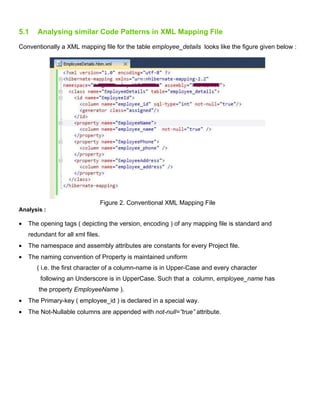
Conventionally a XML mapping file for the table employee_details looks like the figure given below :
Figure 2. Conventional XML Mapping File
Analysis :
• The opening tags ( depicting the version, encoding ) of any mapping file is standard and
redundant for all xml files.
• The namespace and assembly attributes are constants for every Project file.
• The naming convention of Property is maintained uniform
( i.e. the first character of a column-name is in Upper-Case and every character
following an Underscore is in UpperCase. Such that a column, employee_name has
the property EmployeeName ).
• The Primary-key ( employee_id ) is declared in a special way.
• The Not-Nullable columns are appended with not-null=”true” attribute.
5.2 Analysing similar Code Patterns in BO Class File
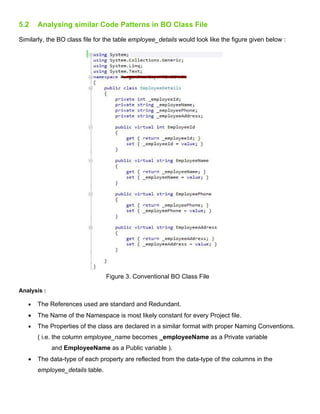
Similarly, the BO class file for the table employee_details would look like the figure given below :
Figure 3. Conventional BO Class File
Analysis :
• The References used are standard and Redundant.
• The Name of the Namespace is most likely constant for every Project file.
• The Properties of the class are declared in a similar format with proper Naming Conventions.
( i.e. the column employee_name becomes _employeeName as a Private variable
and EmployeeName as a Public variable ).
• The data-type of each property are reflected from the data-type of the columns in the
employee_details table.
6 SQL-Server as a Code Generation Platform
All we need is a magical stored-procedure ( each for XML mapping file and BO class file ) that
would take the Table-Name and the Class-Name as its input parameters, spilling out the XML
mapping file and BO class file contents as its Output.
Eg: The mapping file and the BO class generated for employee_details table in the previous figures
were auto-generated by these stored procedures.
Well, lets explore more through the tools of SQL-Server that will make code-generaton possible.
6.1 Printing the Code :
Sql-Server uses the PRINT command functionality to display messages. We could use this
command to print our C# code.
Eg: print '<?xml version="1.0" encoding="utf-8" ?>'
print '<hibernate-mapping xmlns="urn:nhibernate-mapping-2.2"'
print 'using System;'
print 'using System.Collections.Generic;'
print 'using System.Linq;'
print 'using System.Text;'
Note : Remember the times when you run a query and SQL Server Management Studio returned
message like (8 row(s) affected) and (2 row(s) affected) etc. We need to get rid of these messages
while generating our C# code. This could be done by SET NOCOUNT ON command.
6.2 Cursor Usage :
We could use a Cursor to loop through all the columns of a given table, thereby printing xml-
mapping configuration and BO-class property description for each column by browsing through their
underlying properties which includes the data-type of the column, whether the column is nullable,
and whether the column is a Primary Key.
6.3 Finding the Primary Key of the Table :
As you might have noticed, NHibernate’s xml-mapping has a specific syntax for declaring the
Primary-key mapping. We could get hold of the Primary-key by using the below query in our
stored-procedure.
SELECT B.COLUMN_NAME FROM INFORMATION_SCHEMA.TABLE_CONSTRAINTS A,
INFORMATION_SCHEMA.CONSTRAINT_COLUMN_USAGE B WHERE CONSTRAINT_TYPE = 'PRIMARY KEY'
AND A.CONSTRAINT_NAME = B.CONSTRAINT_NAME and A.TABLE_NAME = ‘Table_Name_Comes_Here’
go;
6.4 Translating the Name of column to a Generic Property Name :
Conventionally for a column named employee_name, Its private property should be
_employeeName and its public property should be EmployeeName.
The sql commands that you need are upper , substring and len.
Eg : Lets split the column-name ( employee_name ) by Underscores.
We now have have ‘employee’ and ‘name’ as split items.
For generating the private property, append an Underscore to the first split item
( i.e employee becomes _employee ) and for remaining split items just convert the
first character to upper-case.
Finally joining them together gives _employeeName as output.
NOTE : Keeping code-modularity in mind, one could make use of SQL-Functions that take
Column-name ( employee_name ) as its parameter and return back the
Private / Public property name.
7 Skeletal Framework of Stored Procedure
7.1 Stored Procedure for generating BO Class File :
CREATE PROCEDURE [dbo].[sp_codegen_dynamic_property_generator]
(
@table_name varchar(100),
@class_name varchar(100)
)
AS
BEGIN
print 'using System;'
print 'using System.Collections.Generic;'
print 'using System.Linq;'
print 'using System.Text;'
print 'namespace YourNameSpace'
print '{'
print ' public class ' + @class_name
print '{'
SET NOCOUNT ON
-- Get the Column-Name , Nullable-Type and Data-Type of the Table into a Temporary table
select COLUMN_NAME,IS_NULLABLE,DATA_TYPE into #temp from Information_Schema.Columns
where table_name = @table_name
-- Here we need Two Cursors, one will generate all the Private variables
-- and the other cursor would generate all the Public Variables.
-- dbo.fn_getPrivateName and dbo.fn_getPublicName are the two Functions that convert a -
-- column name to Private and Public Property names respectively.
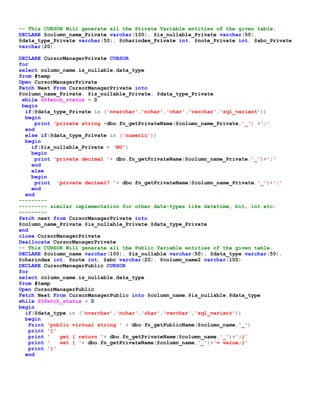
-- This CURSOR Will generate all the Private Variable entities of the given table.
DECLARE @column_name_Private varchar(100), @is_nullable_Private varchar(50),
@data_type_Private varchar(50), @charindex_Private int, @note_Private int, @abc_Private
varchar(20)
DECLARE CursorManagerPrivate CURSOR
for
select column_name,is_nullable,data_type
from #temp
Open CursorManagerPrivate
Fetch Next From CursorManagerPrivate into
@column_name_Private, @is_nullable_Private, @data_type_Private
while @@fetch_status = 0
begin
if(@data_type_Private in ('nvarchar','nchar','char','varchar','sql_variant'))
begin
print 'private string +dbo.fn_getPrivateName(@column_name_Private,'_') +';'
end
else if(@data_type_Private in ('numeric'))
begin
if(@is_nullable_Private = 'NO')
begin
print 'private decimal '+ dbo.fn_getPrivateName(@column_name_Private,'_')+';'
end
else
begin
print 'private decimal? '+ dbo.fn_getPrivateName(@column_name_Private,'_')+';'
end
end
---------
--------- similar implementation for other data-types like datetime, bit, int etc.
---------
fetch next from CursorManagerPrivate into
@column_name_Private,@is_nullable_Private,@data_type_Private
end
close CursorManagerPrivate
Deallocate CursorManagerPrivate
-- This CURSOR Will generate all the Public Variable entities of the given table.
DECLARE @column_name varchar(100), @is_nullable varchar(50), @data_type varchar(50),
@charindex int, @note int, @abc varchar(20), @column_name2 varchar(100)
DECLARE CursorManagerPublic CURSOR
for
select column_name,is_nullable,data_type
from #temp
Open CursorManagerPublic
Fetch Next From CursorManagerPublic into @column_name,@is_nullable,@data_type
while @@fetch_status = 0
begin
if(@data_type in ('nvarchar','nchar','char','varchar','sql_variant'))
begin
Print 'public virtual string ' + dbo.fn_getPublicName(@column_name,'_')
print '{'
print ' get { return '+ dbo.fn_getPrivateName(@column_name,'_')+';}'
print ' set { '+ dbo.fn_getPrivateName(@column_name,'_')+'= value;}'
print '}'
end
else if(@data_type in ('numeric'))
begin
if(@is_nullable = 'NO')
begin
print 'public virtual decimal '+ dbo.fn_getPublicName(@column_name,'_')
print '{'
print ' get { return '+ dbo.fn_getPrivateName(@column_name,'_')+';}'
print ' set { '+ dbo.fn_getPrivateName+'= value;}'
print '}'
end
else
begin
print 'public virtual decimal? '+ dbo.fn_getPublicName(@column_name,'_')
print '{'
print ' get { return '+ dbo.fn_getPrivateName(@column_name,'_') +';}'
print ' set { '+ dbo.fn_getPrivateName(@column_name,'_') +'= value;}'
print '}'
print ''
end
end
---------
--------- similar implementation for other data-types like datetime, bit, int etc.
---------
fetch next from CursorManagerPublic into @column_name,@is_nullable,@data_type
end
close CursorManagerPublic
Deallocate CursorManagerPublic
print '}'
print '}'
SET NOCOUNT OFF
END
7.2 Stored Procedure for generating XML Mapping File :
CREATE PROCEDURE [dbo].[sp_codegen_dynamic_hbm_xml_generator]
(
@table_name varchar(100),
@class_name varchar(100)
)
AS
BEGIN
SET NOCOUNT ON
-- Get the Column-Name , Nullable-Type and Data-Type of the Table into a Temporary table
select COLUMN_NAME,IS_NULLABLE,DATA_TYPE into #temp from Information_Schema.Columns
where table_name = @table_name
-- Get the Primary-key of the Table and store it in a variable @Primary_column
SELECT @Primary_column = B.COLUMN_NAME FROM INFORMATION_SCHEMA.TABLE_CONSTRAINTS A,
INFORMATION_SCHEMA.CONSTRAINT_COLUMN_USAGE B
WHERE CONSTRAINT_TYPE = 'PRIMARY KEY' AND A.CONSTRAINT_NAME = B.CONSTRAINT_NAME
and A.TABLE_NAME = @table_name
-- Get the primary-key details from the Temporary table, #temp, then remove the
-- primary-key entry from #temp since we no longer will be needing it
select @COLUMN_NAME_PRIMARY = COLUMN_NAME, @IS_NULLABLE_PRIMARY = IS_NULLABLE,
@DATA_TYPE_PRIMARY=DATA_TYPE from #temp where COLUMN_NAME = @Primary_column
-- Get the Public property name of the primary-column by
-- using a Function and then store it in a variable @public_name
-- The primary-key mapping should be the first entry in the mapping file
print '<?xml version="1.0" encoding="utf-8" ?>'
print '<hibernate-mapping xmlns="urn:nhibernate-mapping-2.2"'
print 'namespace="YourNameSpace" assembly="YourAssemblyName">'
print '<class name="'+@class_name+'" table="'+@table_name+'">'
print '<id name="'+@public_name+'">'
print '<column name="' + @COLUMN_NAME_PRIMARY + '" sql-type="'
+ @DATA_TYPE_PRIMARY+'" not-null="true"/>'
print '<generator class="assigned"/>'
print '</id>'
-- Start a Cursor ( say CursorManager ) to iterate through the Temporary table( #temp )
-- and foreach column print its corresponding mapping
-- START OF CURSOR
print '<property name="'+@column_name2+'">'
if(@is_nullable = 'NO')
begin
print ' <column name="'+@Initial_column_name+'" not-null="true" />'
end
else
begin
print ' <column name="'+@Initial_column_name+'" />'
end
print '</property>'
fetch next from CursorManager into @column_name,@is_nullable,@data_type
end
close CursorManager
Deallocate CursorManager
-- END OF CURSOR
print '</class>'
print '</hibernate-mapping>'
SET NOCOUNT OFF
END
8 Advantages of such Algorithm
• Code uniformity and Predictable Code
• Reusable
• Development Time saver
• Less prone to manual errors
9 Conclusion
The above process of NHibernate code-generation could be taken to the next level of sophistication
by adding more validations in our stored-procedures, thereby generating Mapping Relationships (
one-to-many, many-to-may etc.) for xml-mapping file etc.
This idea of code-generation can also be implemented upon Silverlight, to generate XAMLs and
ViewModels.
Virtuously, it is highly unlikely that anyone would discover a “golden rule” that could eliminate all the
obstacles in automating a software development life cycle. However we developers could make all
efforts towards chipping away our development work from many directions.
Refrences
- Excerpt from Biermann, A. 1992. Automatic Programming. In Encyclopedia of Artificial
Intelligence. 2nd edition, Stuart C. Shapiro, editor, 18 - 35. New York: John Wiley &
Sons.
- NHibernate architecture:
http://nhforge.org/blogs/nhibernate/archive/2009/06/04/architecture-diagram-
rework.aspx
- Citation: Rich, C.; Waters, R.C., “Approaches to Automatic Programming”, Advances in
Computers, Vol. 37, pp. 1-57, September 1993 ()
- Excerpt from David Veeneman, NHibernate Made Simple
http://www.codeproject.com/Articles/21122/NHibernate-Made-Simple
About the Author :
Deepak Kumar Sahu is an enthusiastic DotNet Web Application Developer
from Orissa, India currently living in Pune, India and working for Capgemini.
He has a Bachelors degree on Computer Engineering from Orissa Engineering College, India.
He enjoys Coding, Music and Food.
The Author can reached at deepak.a.sahu@capgemini.com and gudguy.deepak@gmail.com

Code That Writes Code : Automatic Programming for NHibernate

  • 1.
    _____________________________________________ Automatic Programming forNHibernate : Code That Writes Code for you _____________________________________________ Deepak Kumar Sahu, Capgemini India
  • 2.
    1 Abstract This whitepaper explores the power of automatic Programming and its application on NHibernate Technology, allowing human-programmers to write their code on a higher level of abstraction ensuring Homogenous and Error-Free code. Tracking down Redundant code and Implementing a Generic algorithm that generates such code is the Key factor in Automatic-Programming. It takes sole discretion and independent judgement of the Developer to trace similar code-patterns in their application and making all efforts in reducing the overall Project-Development-Time by automating such process. 2 Overview of NHibernate NHibernate is an Object Relational Manager(ORM) persistence engine in the form of a Framework. It loads business objects from a database and saves changes from those objects back to the database. NHibernate uses mapping files to guide its translation from the database to business objects and back again. Mapping simply specifies which tables in the database go with which classes in the business model. Conventionaly we create a separate mapping file for each class, keeping the mapping files short and easy to read. For example, if we have an employee_details table then the TableColumn-to-ClassProperty Mapping details goes into EmployeeDetails.hbm.xml and the BusinessObject Properties goes into the EmployeeDetails.cs Class. Figure 1. Architecture Diagram of NHibernate Framework
  • 3.
    3 Overview ofAutomatic Programming When computer-programs are written by a machine, the process is called automatic programming. Artificial Intelligence researchers are interested in studying automatic programming for two basic reasons: • First, it would be highly useful to have a powerful automatic programming systems that could receive casual and imprecise specifications for a desired target program and then correctly generate that program • Second, automatic programming is widely believed to be a necessary component of any intelligent system and is therefore a topic for fundamental research in its own right. 4 Redundant Codes in NHibernate : A pain in the neck Lets say, you are on a rapid development project which uses NHibernate as its ORM and SQL- Server as its database. Your database has around 50 Tables and each Table has around 20 Columns. For mapping the Business Model to NHibernate one would need the following items for each table : • A BO class file ( eg: EmployeeDetails.cs ) • A XML Mapping file ( eg: EmployeeDetails.hbm.xml ) So you have to create 50 such BO class files and another 50 XML Mapping files, manually typing-In every Column-to-Property mapping and keeping Proper Naming Conventions in mind. Sounds Nightmarish and Error-Prone to every Developer !! There are many Third-party software vendors providing Licensed code-generator tools for NHibernate, but they are not always customizable to the project demands. Why not start coding your own code-generators for your proejct that could be as per your conventions and thereby saving Time and Money ?? 5 Automatic Programming meets NHibernate Using SQL-Server as coding interface, one can auto-generate codes for the BO class File and the XML Mapping File required for the DotNet application. Lets explore more on how it could be done.
  • 4.
    5.1 Analysing similarCode Patterns in XML Mapping File Conventionally a XML mapping file for the table employee_details looks like the figure given below : Figure 2. Conventional XML Mapping File Analysis : • The opening tags ( depicting the version, encoding ) of any mapping file is standard and redundant for all xml files. • The namespace and assembly attributes are constants for every Project file. • The naming convention of Property is maintained uniform ( i.e. the first character of a column-name is in Upper-Case and every character following an Underscore is in UpperCase. Such that a column, employee_name has the property EmployeeName ). • The Primary-key ( employee_id ) is declared in a special way. • The Not-Nullable columns are appended with not-null=”true” attribute.
  • 5.
    5.2 Analysing similarCode Patterns in BO Class File Similarly, the BO class file for the table employee_details would look like the figure given below : Figure 3. Conventional BO Class File Analysis : • The References used are standard and Redundant. • The Name of the Namespace is most likely constant for every Project file. • The Properties of the class are declared in a similar format with proper Naming Conventions. ( i.e. the column employee_name becomes _employeeName as a Private variable and EmployeeName as a Public variable ). • The data-type of each property are reflected from the data-type of the columns in the employee_details table.
  • 6.
    6 SQL-Server asa Code Generation Platform All we need is a magical stored-procedure ( each for XML mapping file and BO class file ) that would take the Table-Name and the Class-Name as its input parameters, spilling out the XML mapping file and BO class file contents as its Output. Eg: The mapping file and the BO class generated for employee_details table in the previous figures were auto-generated by these stored procedures. Well, lets explore more through the tools of SQL-Server that will make code-generaton possible. 6.1 Printing the Code : Sql-Server uses the PRINT command functionality to display messages. We could use this command to print our C# code. Eg: print '<?xml version="1.0" encoding="utf-8" ?>' print '<hibernate-mapping xmlns="urn:nhibernate-mapping-2.2"' print 'using System;' print 'using System.Collections.Generic;' print 'using System.Linq;' print 'using System.Text;' Note : Remember the times when you run a query and SQL Server Management Studio returned message like (8 row(s) affected) and (2 row(s) affected) etc. We need to get rid of these messages while generating our C# code. This could be done by SET NOCOUNT ON command. 6.2 Cursor Usage : We could use a Cursor to loop through all the columns of a given table, thereby printing xml- mapping configuration and BO-class property description for each column by browsing through their underlying properties which includes the data-type of the column, whether the column is nullable, and whether the column is a Primary Key. 6.3 Finding the Primary Key of the Table : As you might have noticed, NHibernate’s xml-mapping has a specific syntax for declaring the Primary-key mapping. We could get hold of the Primary-key by using the below query in our stored-procedure. SELECT B.COLUMN_NAME FROM INFORMATION_SCHEMA.TABLE_CONSTRAINTS A, INFORMATION_SCHEMA.CONSTRAINT_COLUMN_USAGE B WHERE CONSTRAINT_TYPE = 'PRIMARY KEY' AND A.CONSTRAINT_NAME = B.CONSTRAINT_NAME and A.TABLE_NAME = ‘Table_Name_Comes_Here’ go;
  • 7.
    6.4 Translating theName of column to a Generic Property Name : Conventionally for a column named employee_name, Its private property should be _employeeName and its public property should be EmployeeName. The sql commands that you need are upper , substring and len. Eg : Lets split the column-name ( employee_name ) by Underscores. We now have have ‘employee’ and ‘name’ as split items. For generating the private property, append an Underscore to the first split item ( i.e employee becomes _employee ) and for remaining split items just convert the first character to upper-case. Finally joining them together gives _employeeName as output. NOTE : Keeping code-modularity in mind, one could make use of SQL-Functions that take Column-name ( employee_name ) as its parameter and return back the Private / Public property name. 7 Skeletal Framework of Stored Procedure 7.1 Stored Procedure for generating BO Class File : CREATE PROCEDURE [dbo].[sp_codegen_dynamic_property_generator] ( @table_name varchar(100), @class_name varchar(100) ) AS BEGIN print 'using System;' print 'using System.Collections.Generic;' print 'using System.Linq;' print 'using System.Text;' print 'namespace YourNameSpace' print '{' print ' public class ' + @class_name print '{' SET NOCOUNT ON -- Get the Column-Name , Nullable-Type and Data-Type of the Table into a Temporary table select COLUMN_NAME,IS_NULLABLE,DATA_TYPE into #temp from Information_Schema.Columns where table_name = @table_name -- Here we need Two Cursors, one will generate all the Private variables -- and the other cursor would generate all the Public Variables. -- dbo.fn_getPrivateName and dbo.fn_getPublicName are the two Functions that convert a - -- column name to Private and Public Property names respectively.
  • 8.
    -- This CURSORWill generate all the Private Variable entities of the given table. DECLARE @column_name_Private varchar(100), @is_nullable_Private varchar(50), @data_type_Private varchar(50), @charindex_Private int, @note_Private int, @abc_Private varchar(20) DECLARE CursorManagerPrivate CURSOR for select column_name,is_nullable,data_type from #temp Open CursorManagerPrivate Fetch Next From CursorManagerPrivate into @column_name_Private, @is_nullable_Private, @data_type_Private while @@fetch_status = 0 begin if(@data_type_Private in ('nvarchar','nchar','char','varchar','sql_variant')) begin print 'private string +dbo.fn_getPrivateName(@column_name_Private,'_') +';' end else if(@data_type_Private in ('numeric')) begin if(@is_nullable_Private = 'NO') begin print 'private decimal '+ dbo.fn_getPrivateName(@column_name_Private,'_')+';' end else begin print 'private decimal? '+ dbo.fn_getPrivateName(@column_name_Private,'_')+';' end end --------- --------- similar implementation for other data-types like datetime, bit, int etc. --------- fetch next from CursorManagerPrivate into @column_name_Private,@is_nullable_Private,@data_type_Private end close CursorManagerPrivate Deallocate CursorManagerPrivate -- This CURSOR Will generate all the Public Variable entities of the given table. DECLARE @column_name varchar(100), @is_nullable varchar(50), @data_type varchar(50), @charindex int, @note int, @abc varchar(20), @column_name2 varchar(100) DECLARE CursorManagerPublic CURSOR for select column_name,is_nullable,data_type from #temp Open CursorManagerPublic Fetch Next From CursorManagerPublic into @column_name,@is_nullable,@data_type while @@fetch_status = 0 begin if(@data_type in ('nvarchar','nchar','char','varchar','sql_variant')) begin Print 'public virtual string ' + dbo.fn_getPublicName(@column_name,'_') print '{' print ' get { return '+ dbo.fn_getPrivateName(@column_name,'_')+';}' print ' set { '+ dbo.fn_getPrivateName(@column_name,'_')+'= value;}' print '}' end
  • 9.
    else if(@data_type in('numeric')) begin if(@is_nullable = 'NO') begin print 'public virtual decimal '+ dbo.fn_getPublicName(@column_name,'_') print '{' print ' get { return '+ dbo.fn_getPrivateName(@column_name,'_')+';}' print ' set { '+ dbo.fn_getPrivateName+'= value;}' print '}' end else begin print 'public virtual decimal? '+ dbo.fn_getPublicName(@column_name,'_') print '{' print ' get { return '+ dbo.fn_getPrivateName(@column_name,'_') +';}' print ' set { '+ dbo.fn_getPrivateName(@column_name,'_') +'= value;}' print '}' print '' end end --------- --------- similar implementation for other data-types like datetime, bit, int etc. --------- fetch next from CursorManagerPublic into @column_name,@is_nullable,@data_type end close CursorManagerPublic Deallocate CursorManagerPublic print '}' print '}' SET NOCOUNT OFF END 7.2 Stored Procedure for generating XML Mapping File : CREATE PROCEDURE [dbo].[sp_codegen_dynamic_hbm_xml_generator] ( @table_name varchar(100), @class_name varchar(100) ) AS BEGIN SET NOCOUNT ON -- Get the Column-Name , Nullable-Type and Data-Type of the Table into a Temporary table select COLUMN_NAME,IS_NULLABLE,DATA_TYPE into #temp from Information_Schema.Columns where table_name = @table_name -- Get the Primary-key of the Table and store it in a variable @Primary_column SELECT @Primary_column = B.COLUMN_NAME FROM INFORMATION_SCHEMA.TABLE_CONSTRAINTS A, INFORMATION_SCHEMA.CONSTRAINT_COLUMN_USAGE B WHERE CONSTRAINT_TYPE = 'PRIMARY KEY' AND A.CONSTRAINT_NAME = B.CONSTRAINT_NAME and A.TABLE_NAME = @table_name -- Get the primary-key details from the Temporary table, #temp, then remove the -- primary-key entry from #temp since we no longer will be needing it select @COLUMN_NAME_PRIMARY = COLUMN_NAME, @IS_NULLABLE_PRIMARY = IS_NULLABLE, @DATA_TYPE_PRIMARY=DATA_TYPE from #temp where COLUMN_NAME = @Primary_column
  • 10.
    -- Get thePublic property name of the primary-column by -- using a Function and then store it in a variable @public_name -- The primary-key mapping should be the first entry in the mapping file print '<?xml version="1.0" encoding="utf-8" ?>' print '<hibernate-mapping xmlns="urn:nhibernate-mapping-2.2"' print 'namespace="YourNameSpace" assembly="YourAssemblyName">' print '<class name="'+@class_name+'" table="'+@table_name+'">' print '<id name="'+@public_name+'">' print '<column name="' + @COLUMN_NAME_PRIMARY + '" sql-type="' + @DATA_TYPE_PRIMARY+'" not-null="true"/>' print '<generator class="assigned"/>' print '</id>' -- Start a Cursor ( say CursorManager ) to iterate through the Temporary table( #temp ) -- and foreach column print its corresponding mapping -- START OF CURSOR print '<property name="'+@column_name2+'">' if(@is_nullable = 'NO') begin print ' <column name="'+@Initial_column_name+'" not-null="true" />' end else begin print ' <column name="'+@Initial_column_name+'" />' end print '</property>' fetch next from CursorManager into @column_name,@is_nullable,@data_type end close CursorManager Deallocate CursorManager -- END OF CURSOR print '</class>' print '</hibernate-mapping>' SET NOCOUNT OFF END 8 Advantages of such Algorithm • Code uniformity and Predictable Code • Reusable • Development Time saver • Less prone to manual errors 9 Conclusion The above process of NHibernate code-generation could be taken to the next level of sophistication by adding more validations in our stored-procedures, thereby generating Mapping Relationships ( one-to-many, many-to-may etc.) for xml-mapping file etc. This idea of code-generation can also be implemented upon Silverlight, to generate XAMLs and ViewModels. Virtuously, it is highly unlikely that anyone would discover a “golden rule” that could eliminate all the obstacles in automating a software development life cycle. However we developers could make all efforts towards chipping away our development work from many directions.
  • 11.
    Refrences - Excerpt fromBiermann, A. 1992. Automatic Programming. In Encyclopedia of Artificial Intelligence. 2nd edition, Stuart C. Shapiro, editor, 18 - 35. New York: John Wiley & Sons. - NHibernate architecture: http://nhforge.org/blogs/nhibernate/archive/2009/06/04/architecture-diagram- rework.aspx - Citation: Rich, C.; Waters, R.C., “Approaches to Automatic Programming”, Advances in Computers, Vol. 37, pp. 1-57, September 1993 () - Excerpt from David Veeneman, NHibernate Made Simple http://www.codeproject.com/Articles/21122/NHibernate-Made-Simple About the Author : Deepak Kumar Sahu is an enthusiastic DotNet Web Application Developer from Orissa, India currently living in Pune, India and working for Capgemini. He has a Bachelors degree on Computer Engineering from Orissa Engineering College, India. He enjoys Coding, Music and Food. The Author can reached at deepak.a.sahu@capgemini.com and gudguy.deepak@gmail.com