An Doan
Portland Selenium Users Group
                July 19th, 2012
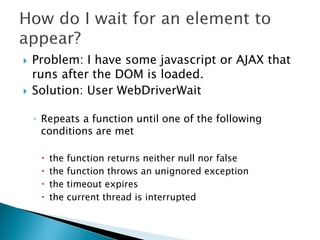
   Problem: I have some javascript or AJAX that
    runs after the DOM is loaded.
   Solution: User WebDriverWait

    ◦ Repeats a function until one of the following
      conditions are met

        the   function returns neither null nor false
        the   function throws an unignored exception
        the   timeout expires
        the   current thread is interrupted
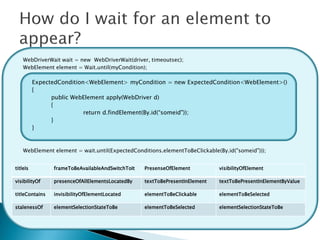
WebDriverWait wait = new WebDriverWait(driver, timeoutsec);
    WebElement element = Wait.until(myCondition);

          ExpectedCondition<WebElement> myCondition = new ExpectedCondition<WebElement>()
          {
                public WebElement apply(WebDriver d)
                {
                           return d.findElement(By.id(“someid"));
                }
          }


    WebElement element = wait.until(ExpectedConditions.elementToBeClickable(By.id("someid")));


titleIs         frameToBeAvailableAndSwitchToIt   PresenseOfElement          visibilityOfElement

visibilityOf    presenceOfAllElementsLocatedBy    textToBePresentInElement   textToBePresentInElementByValue

titleContains   invisibilityOfElementLocated      elementToBeClickable       elementToBeSelected

stalenessOf     elementSelectionStateToBe         elementToBeSelected        elementSelectionStateToBe
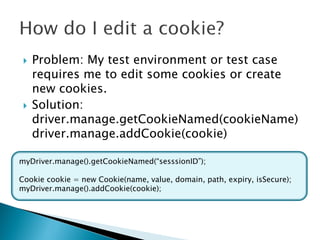
   Problem: My test environment or test case
     requires me to edit some cookies or create
     new cookies.
    Solution:
     driver.manage.getCookieNamed(cookieName)
     driver.manage.addCookie(cookie)

myDriver.manage().getCookieNamed(“sesssionID”);

Cookie cookie = new Cookie(name, value, domain, path, expiry, isSecure);
myDriver.manage().addCookie(cookie);
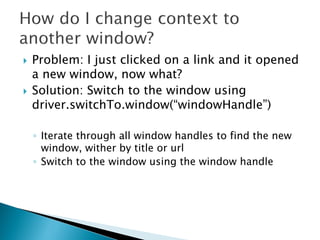
   Problem: I just clicked on a link and it opened
    a new window, now what?
   Solution: Switch to the window using
    driver.switchTo.window(“windowHandle”)

    ◦ Iterate through all window handles to find the new
      window, wither by title or url
    ◦ Switch to the window using the window handle
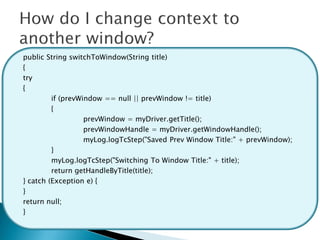
public String switchToWindow(String title)
{
try
{
         if (prevWindow == null || prevWindow != title)
         {
                   prevWindow = myDriver.getTitle();
                   prevWindowHandle = myDriver.getWindowHandle();
                   myLog.logTcStep("Saved Prev Window Title:" + prevWindow);
         }
         myLog.logTcStep("Switching To Window Title:" + title);
         return getHandleByTitle(title);
} catch (Exception e) {
}
return null;
}
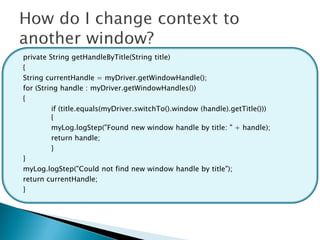
private String getHandleByTitle(String title)
{
String currentHandle = myDriver.getWindowHandle();
for (String handle : myDriver.getWindowHandles())
{
          if (title.equals(myDriver.switchTo().window (handle).getTitle()))
          {
          myLog.logStep("Found new window handle by title: " + handle);
          return handle;
          }
}
myLog.logStep("Could not find new window handle by title");
return currentHandle;
}
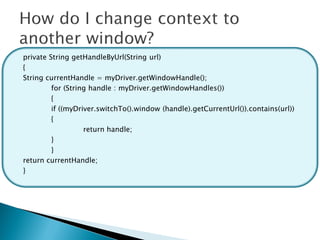
private String getHandleByUrl(String url)
{
String currentHandle = myDriver.getWindowHandle();
         for (String handle : myDriver.getWindowHandles())
         {
         if ((myDriver.switchTo().window (handle).getCurrentUrl()).contains(url))
         {
                   return handle;
         }
         }
return currentHandle;
}
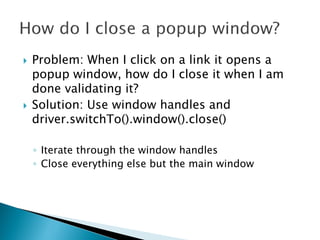
   Problem: When I click on a link it opens a
    popup window, how do I close it when I am
    done validating it?
   Solution: Use window handles and
    driver.switchTo().window().close()

    ◦ Iterate through the window handles
    ◦ Close everything else but the main window
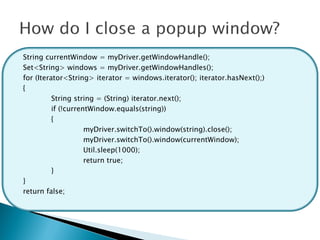
String currentWindow = myDriver.getWindowHandle();
Set<String> windows = myDriver.getWindowHandles();
for (Iterator<String> iterator = windows.iterator(); iterator.hasNext();)
{
          String string = (String) iterator.next();
          if (!currentWindow.equals(string))
          {
                     myDriver.switchTo().window(string).close();
                     myDriver.switchTo().window(currentWindow);
                     Util.sleep(1000);
                     return true;
          }
}
return false;
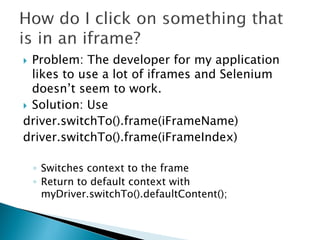
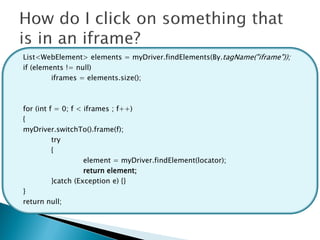
 Problem: The developer for my application
  likes to use a lot of iframes and Selenium
  doesn’t seem to work.
 Solution: Use
driver.switchTo().frame(iFrameName)
driver.switchTo().frame(iFrameIndex)

    ◦ Switches context to the frame
    ◦ Return to default context with
      myDriver.switchTo().defaultContent();
List<WebElement> elements = myDriver.findElements(By.tagName("iframe"));
if (elements != null)
         iframes = elements.size();


for (int f = 0; f < iframes ; f++)
{
myDriver.switchTo().frame(f);
          try
          {
                    element = myDriver.findElement(locator);
                    return element;
          }catch (Exception e) {}
}
return null;
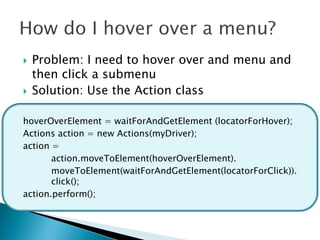
   Problem: I need to hover over and menu and
    then click a submenu
   Solution: Use the Action class

hoverOverElement = waitForAndGetElement (locatorForHover);
Actions action = new Actions(myDriver);
action =
       action.moveToElement(hoverOverElement).
       moveToElement(waitForAndGetElement(locatorForClick)).
       click();
action.perform();
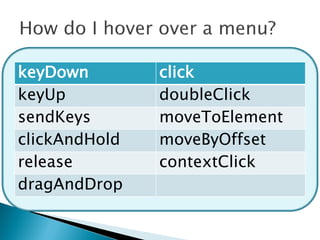
keyDown        click
keyUp          doubleClick
sendKeys       moveToElement
clickAndHold   moveByOffset
release        contextClick
dragAndDrop
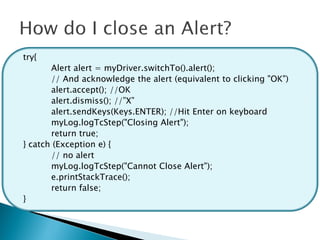
   Problem: An alert window appears and blocks
    the automation.
   Solution: Use the Alert class (works most of
    the time)
try{
       Alert alert = myDriver.switchTo().alert();
       // And acknowledge the alert (equivalent to clicking "OK")
       alert.accept(); //OK
       alert.dismiss(); //”X”
       alert.sendKeys(Keys.ENTER); //Hit Enter on keyboard
       myLog.logTcStep("Closing Alert");
       return true;
} catch (Exception e) {
       // no alert
       myLog.logTcStep("Cannot Close Alert");
       e.printStackTrace();
       return false;
}
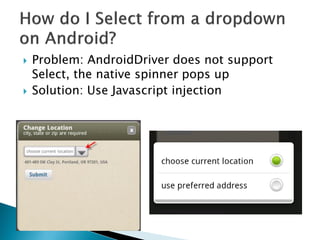
   Problem: AndroidDriver does not support
    Select, the native spinner pops up
   Solution: Use Javascript injection
WebElement select = getElement(locator);
List<WebElement> options = select.findElements(By.tagName("option"));
int optionNum = 0;
for(WebElement option : options){
         if(option.getText().equals(selection)) {
         try {
                   ((JavascriptExecutor) myDriver).executeScript
                   ("document.getElementById("newLocationSource").options["+
                   optionNum + "].selected = true");
                   Util.sleep(2000);
                   return true;
         } catch (Exception e) {}
         break;
         }
optionNum++;
}
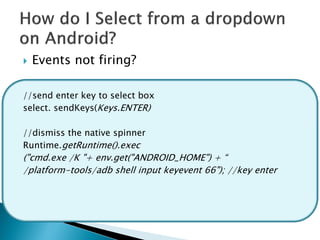
   Events not firing?

//send enter key to select box
select. sendKeys(Keys.ENTER)

//dismiss the native spinner
Runtime.getRuntime().exec
("cmd.exe /K "+ env.get("ANDROID_HOME") + “
/platform-tools/adb shell input keyevent 66"); //key enter
   Aug. 16th
    ◦ Open
   Sept. 13th (Moved from the 20th)
    ◦ Lee Copeland – Topic TBD


Thank You Sponsors!

What the FUF?

  • 1.
    An Doan Portland SeleniumUsers Group July 19th, 2012
  • 2.
    Problem: I have some javascript or AJAX that runs after the DOM is loaded.  Solution: User WebDriverWait ◦ Repeats a function until one of the following conditions are met  the function returns neither null nor false  the function throws an unignored exception  the timeout expires  the current thread is interrupted
  • 3.
    WebDriverWait wait =new WebDriverWait(driver, timeoutsec); WebElement element = Wait.until(myCondition); ExpectedCondition<WebElement> myCondition = new ExpectedCondition<WebElement>() { public WebElement apply(WebDriver d) { return d.findElement(By.id(“someid")); } } WebElement element = wait.until(ExpectedConditions.elementToBeClickable(By.id("someid"))); titleIs frameToBeAvailableAndSwitchToIt PresenseOfElement visibilityOfElement visibilityOf presenceOfAllElementsLocatedBy textToBePresentInElement textToBePresentInElementByValue titleContains invisibilityOfElementLocated elementToBeClickable elementToBeSelected stalenessOf elementSelectionStateToBe elementToBeSelected elementSelectionStateToBe
  • 4.
    Problem: My test environment or test case requires me to edit some cookies or create new cookies.  Solution: driver.manage.getCookieNamed(cookieName) driver.manage.addCookie(cookie) myDriver.manage().getCookieNamed(“sesssionID”); Cookie cookie = new Cookie(name, value, domain, path, expiry, isSecure); myDriver.manage().addCookie(cookie);
  • 5.
    Problem: I just clicked on a link and it opened a new window, now what?  Solution: Switch to the window using driver.switchTo.window(“windowHandle”) ◦ Iterate through all window handles to find the new window, wither by title or url ◦ Switch to the window using the window handle
  • 6.
    public String switchToWindow(Stringtitle) { try { if (prevWindow == null || prevWindow != title) { prevWindow = myDriver.getTitle(); prevWindowHandle = myDriver.getWindowHandle(); myLog.logTcStep("Saved Prev Window Title:" + prevWindow); } myLog.logTcStep("Switching To Window Title:" + title); return getHandleByTitle(title); } catch (Exception e) { } return null; }
  • 7.
    private String getHandleByTitle(Stringtitle) { String currentHandle = myDriver.getWindowHandle(); for (String handle : myDriver.getWindowHandles()) { if (title.equals(myDriver.switchTo().window (handle).getTitle())) { myLog.logStep("Found new window handle by title: " + handle); return handle; } } myLog.logStep("Could not find new window handle by title"); return currentHandle; }
  • 8.
    private String getHandleByUrl(Stringurl) { String currentHandle = myDriver.getWindowHandle(); for (String handle : myDriver.getWindowHandles()) { if ((myDriver.switchTo().window (handle).getCurrentUrl()).contains(url)) { return handle; } } return currentHandle; }
  • 9.
    Problem: When I click on a link it opens a popup window, how do I close it when I am done validating it?  Solution: Use window handles and driver.switchTo().window().close() ◦ Iterate through the window handles ◦ Close everything else but the main window
  • 10.
    String currentWindow =myDriver.getWindowHandle(); Set<String> windows = myDriver.getWindowHandles(); for (Iterator<String> iterator = windows.iterator(); iterator.hasNext();) { String string = (String) iterator.next(); if (!currentWindow.equals(string)) { myDriver.switchTo().window(string).close(); myDriver.switchTo().window(currentWindow); Util.sleep(1000); return true; } } return false;
  • 11.
     Problem: Thedeveloper for my application likes to use a lot of iframes and Selenium doesn’t seem to work.  Solution: Use driver.switchTo().frame(iFrameName) driver.switchTo().frame(iFrameIndex) ◦ Switches context to the frame ◦ Return to default context with myDriver.switchTo().defaultContent();
  • 12.
    List<WebElement> elements =myDriver.findElements(By.tagName("iframe")); if (elements != null) iframes = elements.size(); for (int f = 0; f < iframes ; f++) { myDriver.switchTo().frame(f); try { element = myDriver.findElement(locator); return element; }catch (Exception e) {} } return null;
  • 13.
    Problem: I need to hover over and menu and then click a submenu  Solution: Use the Action class hoverOverElement = waitForAndGetElement (locatorForHover); Actions action = new Actions(myDriver); action = action.moveToElement(hoverOverElement). moveToElement(waitForAndGetElement(locatorForClick)). click(); action.perform();
  • 14.
    keyDown click keyUp doubleClick sendKeys moveToElement clickAndHold moveByOffset release contextClick dragAndDrop
  • 15.
    Problem: An alert window appears and blocks the automation.  Solution: Use the Alert class (works most of the time)
  • 16.
    try{ Alert alert = myDriver.switchTo().alert(); // And acknowledge the alert (equivalent to clicking "OK") alert.accept(); //OK alert.dismiss(); //”X” alert.sendKeys(Keys.ENTER); //Hit Enter on keyboard myLog.logTcStep("Closing Alert"); return true; } catch (Exception e) { // no alert myLog.logTcStep("Cannot Close Alert"); e.printStackTrace(); return false; }
  • 17.
    Problem: AndroidDriver does not support Select, the native spinner pops up  Solution: Use Javascript injection
  • 18.
    WebElement select =getElement(locator); List<WebElement> options = select.findElements(By.tagName("option")); int optionNum = 0; for(WebElement option : options){ if(option.getText().equals(selection)) { try { ((JavascriptExecutor) myDriver).executeScript ("document.getElementById("newLocationSource").options["+ optionNum + "].selected = true"); Util.sleep(2000); return true; } catch (Exception e) {} break; } optionNum++; }
  • 19.
    Events not firing? //send enter key to select box select. sendKeys(Keys.ENTER) //dismiss the native spinner Runtime.getRuntime().exec ("cmd.exe /K "+ env.get("ANDROID_HOME") + “ /platform-tools/adb shell input keyevent 66"); //key enter
  • 21.
    Aug. 16th ◦ Open  Sept. 13th (Moved from the 20th) ◦ Lee Copeland – Topic TBD Thank You Sponsors!