Fetch Statistics from the
Yahoo Finance and save it
into a Google Sheet
document
About me
• An Engineering Student at the International Institute of
Technology
• Article Writer at CodeProject.com
What is Node.js?
•
•
•
•
•

A powerful platform to let you run JS on the server side
How? Uses Google’s V8 Engine
V8 is built in C
V8 is the fatest JS Engine on the planet
Great way to build modern web apps on both Client and
Server side!
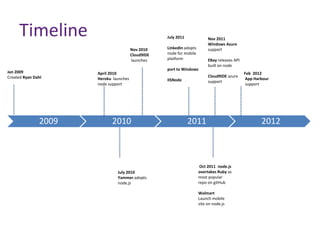
Timeline

July 2011
Nov 2010
Cloud9IDE
launches

Jan 2009
Created Ryan Dahl

2009

April 2010
Heroku launches
node support

2010

July 2010
Yammer adopts
node.js

Nov 2011
Windows Azure
support

LinkedIn adopts
node for mobile
platform
port to Windows

EBay releases API
built on node
Cloud9IDE azure
support

IISNode

2011

Oct 2011 node.js
overtakes Ruby as
most popular
repo on gitHub
Walmart
Launch mobile
site on node.js

Feb 2012
App Harbour
support

2012
Companies support Node.js
•
•
•
•
•
•
•
•

Yahoo!
Microsoft
LinkedIn
Ebay
Fidelizoo
Paypal
CHESS
…
What Can I Do in Node?
•
•
•
•

Anything you want!
Chat servers, Analytics & Crazy fast backends
Socket.io library is a wicked way to build real time apps
Build a social Network! LinkedIn, Dropbox all using Node.js
What Can’t I Do in Node?
• Contradicts previous slide but
 Node.js is not a web framework i.e Sinatra
 Modules for node.js make it into web framework i.e Express
 Node.js is not Multi-threaded
 A single thread to rule them all
Non-Blocking? Blocking? I’m so confused
• By introducing callbacks. Node can move on to
other requests and whenever the callback is
called, node will process is.
• You should read non-blocking code as « put
function and params in queue and fire
callback when you reach the end of the
queue »
• Blocking= return Non-Blocking= no return.
Only callbacks
Fetch Statistics from the Yahoo Finance
• We have to fetch data from the link shown
below:


http://finance.yahoo.com/q/ks?s=LVS

The Company in our example is LVS.
Fetch Statistics from the Yahoo Finance
• You need to install Node.js Of course and it 3 packages:
 npm install request – So we could work with URLs in an easy
way.
 npm install cheerio – jQuery for the server side. This will make
the code 10x shorter.
 npm install edit-google-spreadsheet – to integrate with
Google docs/sheets with 2-3 lines of code.
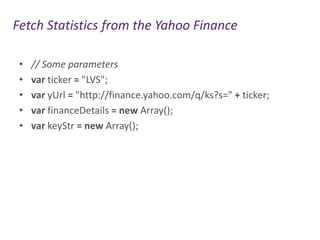
Fetch Statistics from the Yahoo Finance
•
•
•
•
•

// Some parameters
var ticker = "LVS";
var yUrl = "http://finance.yahoo.com/q/ks?s=" + ticker;
var financeDetails = new Array();
var keyStr = new Array();
Fetch Statistics from the Yahoo Finance
•
•
•
•
•
•
•
•
•

// The main call to fetch the data, parse it and work on
it.
request(yUrl, function (error, response, body) {
if (!error && response.statusCode == 200) {
var $ = cheerio.load(body);
// the keys - We get them from a certain class attribute
var td = $('.yfnc_tablehead1');
$(td).each(function(j, val) {
keyStr[j] = $(val).text();
});
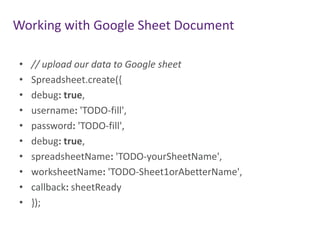
Working with Google Sheet Document
•
•
•
•
•
•
•
•
•
•

// upload our data to Google sheet
Spreadsheet.create({
debug: true,
username: 'TODO-fill',
password: 'TODO-fill',
debug: true,
spreadsheetName: 'TODO-yourSheetName',
worksheetName: 'TODO-Sheet1orAbetterName',
callback: sheetReady
});
Demo
Thank you

hadrichmed@gmail.com

Node

  • 1.
    Fetch Statistics fromthe Yahoo Finance and save it into a Google Sheet document
  • 2.
    About me • AnEngineering Student at the International Institute of Technology • Article Writer at CodeProject.com
  • 3.
    What is Node.js? • • • • • Apowerful platform to let you run JS on the server side How? Uses Google’s V8 Engine V8 is built in C V8 is the fatest JS Engine on the planet Great way to build modern web apps on both Client and Server side!
  • 4.
    Timeline July 2011 Nov 2010 Cloud9IDE launches Jan2009 Created Ryan Dahl 2009 April 2010 Heroku launches node support 2010 July 2010 Yammer adopts node.js Nov 2011 Windows Azure support LinkedIn adopts node for mobile platform port to Windows EBay releases API built on node Cloud9IDE azure support IISNode 2011 Oct 2011 node.js overtakes Ruby as most popular repo on gitHub Walmart Launch mobile site on node.js Feb 2012 App Harbour support 2012
  • 5.
  • 6.
    What Can IDo in Node? • • • • Anything you want! Chat servers, Analytics & Crazy fast backends Socket.io library is a wicked way to build real time apps Build a social Network! LinkedIn, Dropbox all using Node.js
  • 7.
    What Can’t IDo in Node? • Contradicts previous slide but  Node.js is not a web framework i.e Sinatra  Modules for node.js make it into web framework i.e Express  Node.js is not Multi-threaded  A single thread to rule them all
  • 8.
    Non-Blocking? Blocking? I’mso confused • By introducing callbacks. Node can move on to other requests and whenever the callback is called, node will process is. • You should read non-blocking code as « put function and params in queue and fire callback when you reach the end of the queue » • Blocking= return Non-Blocking= no return. Only callbacks
  • 9.
    Fetch Statistics fromthe Yahoo Finance • We have to fetch data from the link shown below:  http://finance.yahoo.com/q/ks?s=LVS The Company in our example is LVS.
  • 10.
    Fetch Statistics fromthe Yahoo Finance • You need to install Node.js Of course and it 3 packages:  npm install request – So we could work with URLs in an easy way.  npm install cheerio – jQuery for the server side. This will make the code 10x shorter.  npm install edit-google-spreadsheet – to integrate with Google docs/sheets with 2-3 lines of code.
  • 11.
    Fetch Statistics fromthe Yahoo Finance • • • • • // Some parameters var ticker = "LVS"; var yUrl = "http://finance.yahoo.com/q/ks?s=" + ticker; var financeDetails = new Array(); var keyStr = new Array();
  • 12.
    Fetch Statistics fromthe Yahoo Finance • • • • • • • • • // The main call to fetch the data, parse it and work on it. request(yUrl, function (error, response, body) { if (!error && response.statusCode == 200) { var $ = cheerio.load(body); // the keys - We get them from a certain class attribute var td = $('.yfnc_tablehead1'); $(td).each(function(j, val) { keyStr[j] = $(val).text(); });
  • 13.
    Working with GoogleSheet Document • • • • • • • • • • // upload our data to Google sheet Spreadsheet.create({ debug: true, username: 'TODO-fill', password: 'TODO-fill', debug: true, spreadsheetName: 'TODO-yourSheetName', worksheetName: 'TODO-Sheet1orAbetterName', callback: sheetReady });
  • 14.
  • 15.