INTRODUCTION TO
OPERATING SYSTEM
OBJECTIVES
• To define the different services provided by the OS.
• Describe the purpose and functions of OS.
• Recognize the components and Managers of OS.
• List and compare the common desktop OS in use
today.
What is Operating
System?
You…, yes you, the gentlemen at
the back wearing white shirt
What is Operating
System?
• A program that acts as an intermediary
between a user of a computer and the
computer hardware
• Operating System is similar to a government….
government ???????
Operating System Goals
1. Execute user programs and make solving user
problems easier
2. Make the computer system convenient to use
3. Use the computer hardware in an efficient
manner.
What Operating Systems
Do?
• Let’s begin our discussion by looking at the operating
system's role in the overall computer system.
• But,,,,, what is the operating system's role in the
overall computer system?
You…, yes you, the lady at my left
side wearing jeans
Operating System Point of
Views
1. User View
2. System View
User View
• The user's view of the computer varies according to
the interface being used.
• Most computer users sit in front of a PC, consisting of
a monitor, keyboard, mouse, and system unit.
• Users want convenience, ease of use
• Don’t care about resource utilization
Is this right!, to be answered by the gentlemen
at the back wearing SCST dept. shirt
System View
• OS is a resource allocator
Manages all resources
Decides between conflicting requests for efficient
and fair resource use
• OS is a control program
Controls execution of programs to prevent errors
and improper use of the computer
Defining Operating
Systems
• In general, we have no completely adequate definition of
an operating system.
• The fundamental goal of computer systems is to execute
user programs and to make solving user problems easier.
• Toward this goal, computer hardware is constructed. Since
bare hardware alone is not particularly easy to use,
application programs are developed.
What is a kernel?
• The one program running at all times on the computer” is the
kernel.
• Everything else is either a system program (ships with the operating
system) or an application program. https://
www.youtube.com/watch?v=IvGdY6luTtU
• Kernel is the core of Operating System that provides basic services
to all parts of the OS
• Kernel loads first into memory when an operating system is loaded
and remains into memory until operating system is shut down again
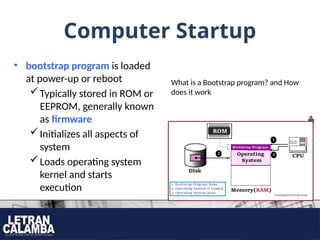
Computer Startup
• bootstrap program is loaded
at power-up or reboot
Typically stored in ROM or
EEPROM, generally known
as firmware
Initializes all aspects of
system
Loads operating system
kernel and starts
execution
What is a Bootstrap program? and How
does it work
Computer System
Organization
• Focuses on how a computer system operates.
Note:
In studying operating system, we need a general
knowledge of the structure of computer system.
Computer-System
Operation
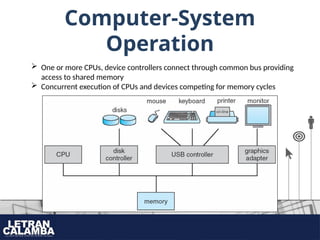
 One or more CPUs, device controllers connect through common bus providing
access to shared memory
 Concurrent execution of CPUs and devices competing for memory cycles
Computer-System
Operation
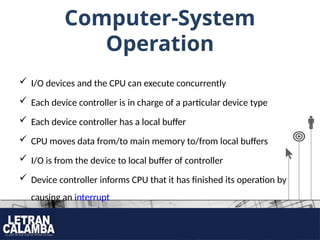
 I/O devices and the CPU can execute concurrently
 Each device controller is in charge of a particular device type
 Each device controller has a local buffer
 CPU moves data from/to main memory to/from local buffers
 I/O is from the device to local buffer of controller
 Device controller informs CPU that it has finished its operation by
causing an interrupt
Storage Structure
• Computer programs must be in main memory (also called random-access
memory or RAM) to be executed. Main memory is the only large storage area
(millions to billions of bytes) that the processor can access directly.
• Ideally, we want the programs and data to reside in main memory permanently.
This arrangement usually is not possible for the following two reasons:
1. Main memory is usually too small to store all needed programs and data
permanently.
2. Main memory is a volatile storage device that loses its contents when power
is turned off or otherwise lost.
Storage Structure
• Main memory – only large storage media that the CPU can
access directly
 Random access
 Typically volatile
• Secondary storage – extension of main memory that
provides large nonvolatile storage capacity.
 Magnetic disks, Flash drive, Magnetic Tape
Storage Hierarchy
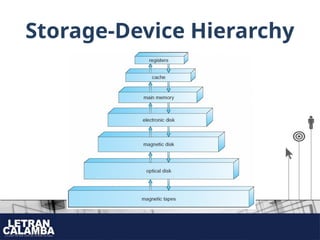
• Storage systems organized in hierarchy
 Speed
 Cost
 Volatility
Did you know that…
The speed of a solid-state drive (SSD) can range from 500 MB/s to over 3,500 MB/s. This is
much faster than a hard disk drive (HDD), which typically has a speed of 30–150 MB/s.
Non-Volatile Memory Express (NVMe) SSDs are faster than SATA SSDs and can be the fastest
available storage. NVMe SSDs can transfer data at speeds of up to 20 gigabytes per second
(Gbps), which is more than three times faster than SATA SSDs
Storage-Device Hierarchy
Questions????
Week1_Introduction to_Operating System - Part 1.pptx

Week1_Introduction to_Operating System - Part 1.pptx

  • 1.
  • 2.
    OBJECTIVES • To definethe different services provided by the OS. • Describe the purpose and functions of OS. • Recognize the components and Managers of OS. • List and compare the common desktop OS in use today.
  • 3.
    What is Operating System? You…,yes you, the gentlemen at the back wearing white shirt
  • 4.
    What is Operating System? •A program that acts as an intermediary between a user of a computer and the computer hardware • Operating System is similar to a government…. government ???????
  • 5.
    Operating System Goals 1.Execute user programs and make solving user problems easier 2. Make the computer system convenient to use 3. Use the computer hardware in an efficient manner.
  • 6.
    What Operating Systems Do? •Let’s begin our discussion by looking at the operating system's role in the overall computer system. • But,,,,, what is the operating system's role in the overall computer system? You…, yes you, the lady at my left side wearing jeans
  • 7.
    Operating System Pointof Views 1. User View 2. System View
  • 8.
    User View • Theuser's view of the computer varies according to the interface being used. • Most computer users sit in front of a PC, consisting of a monitor, keyboard, mouse, and system unit. • Users want convenience, ease of use • Don’t care about resource utilization Is this right!, to be answered by the gentlemen at the back wearing SCST dept. shirt
  • 9.
    System View • OSis a resource allocator Manages all resources Decides between conflicting requests for efficient and fair resource use • OS is a control program Controls execution of programs to prevent errors and improper use of the computer
  • 10.
    Defining Operating Systems • Ingeneral, we have no completely adequate definition of an operating system. • The fundamental goal of computer systems is to execute user programs and to make solving user problems easier. • Toward this goal, computer hardware is constructed. Since bare hardware alone is not particularly easy to use, application programs are developed.
  • 11.
    What is akernel? • The one program running at all times on the computer” is the kernel. • Everything else is either a system program (ships with the operating system) or an application program. https:// www.youtube.com/watch?v=IvGdY6luTtU • Kernel is the core of Operating System that provides basic services to all parts of the OS • Kernel loads first into memory when an operating system is loaded and remains into memory until operating system is shut down again
  • 12.
    Computer Startup • bootstrapprogram is loaded at power-up or reboot Typically stored in ROM or EEPROM, generally known as firmware Initializes all aspects of system Loads operating system kernel and starts execution What is a Bootstrap program? and How does it work
  • 13.
    Computer System Organization • Focuseson how a computer system operates. Note: In studying operating system, we need a general knowledge of the structure of computer system.
  • 14.
    Computer-System Operation  One ormore CPUs, device controllers connect through common bus providing access to shared memory  Concurrent execution of CPUs and devices competing for memory cycles
  • 15.
    Computer-System Operation  I/O devicesand the CPU can execute concurrently  Each device controller is in charge of a particular device type  Each device controller has a local buffer  CPU moves data from/to main memory to/from local buffers  I/O is from the device to local buffer of controller  Device controller informs CPU that it has finished its operation by causing an interrupt
  • 16.
    Storage Structure • Computerprograms must be in main memory (also called random-access memory or RAM) to be executed. Main memory is the only large storage area (millions to billions of bytes) that the processor can access directly. • Ideally, we want the programs and data to reside in main memory permanently. This arrangement usually is not possible for the following two reasons: 1. Main memory is usually too small to store all needed programs and data permanently. 2. Main memory is a volatile storage device that loses its contents when power is turned off or otherwise lost.
  • 17.
    Storage Structure • Mainmemory – only large storage media that the CPU can access directly  Random access  Typically volatile • Secondary storage – extension of main memory that provides large nonvolatile storage capacity.  Magnetic disks, Flash drive, Magnetic Tape
  • 18.
    Storage Hierarchy • Storagesystems organized in hierarchy  Speed  Cost  Volatility Did you know that… The speed of a solid-state drive (SSD) can range from 500 MB/s to over 3,500 MB/s. This is much faster than a hard disk drive (HDD), which typically has a speed of 30–150 MB/s. Non-Volatile Memory Express (NVMe) SSDs are faster than SATA SSDs and can be the fastest available storage. NVMe SSDs can transfer data at speeds of up to 20 gigabytes per second (Gbps), which is more than three times faster than SATA SSDs
  • 19.
  • 20.

Editor's Notes

  • #15 Interrupt is a signal that gets the attention of the CPU.