Web Technologies 
Uniform Resource Locators (URLs) 
http://news.bbc.co.uk/1/hi/education/5341426.stm
URL Defined 
• A Uniform Resource Locator (URL) is 
a standard way developed to specify the 
location of a resource available 
electronically. 
RFC 1738 
Web Technologies
Web Technologies 
What are URLs? 
• URLs make it possible to direct both people 
and software applications to a variety of 
information, available from a number of 
different Internet protocols. 
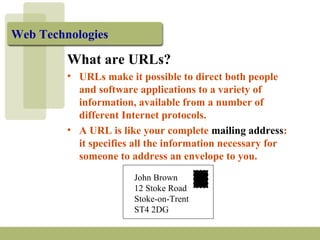
• A URL is like your complete mailing address: 
it specifies all the information necessary for 
someone to address an envelope to you. 
John Brown 
12 Stoke Road 
Stoke-on-Trent 
ST4 2DG
Web Technologies 
What are URLs? (contd.) 
• In short, a URL is a very convenient and 
succinct way to direct people to a file or other 
electronic resource. 
• Learning how to interpret, use and construct 
URLs will assist your exploration of the 
Internet.
Web Technologies 
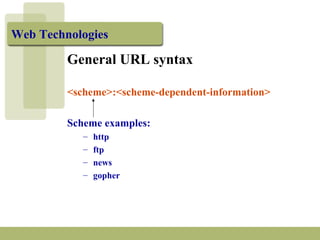
General URL syntax 
<scheme>:<scheme-dependent-information> 
Scheme examples: 
– http 
– ftp 
– news 
– gopher
Web Technologies 
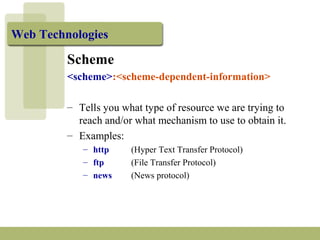
Scheme 
<scheme>:<scheme-dependent-information> 
– Tells you what type of resource we are trying to 
reach and/or what mechanism to use to obtain it. 
– Examples: 
– http (Hyper Text Transfer Protocol) 
– ftp (File Transfer Protocol) 
– news (News protocol)
Web Technologies 
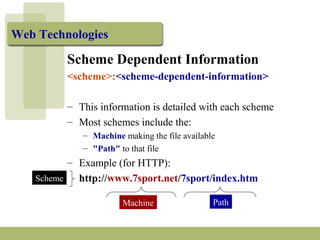
Scheme Dependent Information 
<scheme>:<scheme-dependent-information> 
– This information is detailed with each scheme 
– Most schemes include the: 
– Machine making the file available 
– "Path" to that file 
– Example (for HTTP): 
http://www.7sport.net/7sport/index.htm 
Machine Path 
Scheme
Web Technologies 
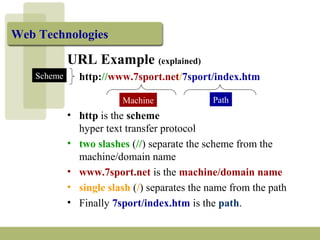
URL Example (explained) 
http://www.7sport.net/7sport/index.htm 
Machine Path 
Scheme 
• http is the scheme 
hyper text transfer protocol 
• two slashes (//) separate the scheme from the 
machine/domain name 
• www.7sport.net is the machine/domain name 
• single slash (/) separates the name from the path 
• Finally 7sport/index.htm is the path.
Web Technologies 
URL Example (explained) 
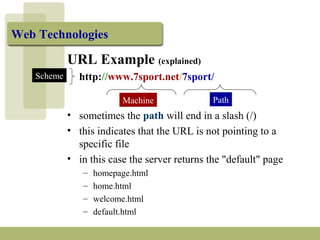
http://www.7sport.net/7sport/ 
Machine Path 
Scheme 
• sometimes the path will end in a slash (/) 
• this indicates that the URL is not pointing to a 
specific file 
• in this case the server returns the "default" page 
– homepage.html 
– home.html 
– welcome.html 
– default.html
Web Technologies 
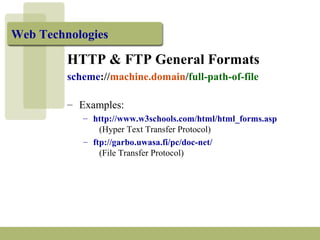
HTTP & FTP General Formats 
scheme://machine.domain/full-path-of-file 
– Examples: 
– http://www.w3schools.com/html/html_forms.asp 
(Hyper Text Transfer Protocol) 
– ftp://garbo.uwasa.fi/pc/doc-net/ 
(File Transfer Protocol)
Web Technologies 
HTTP URL Example (explained) 
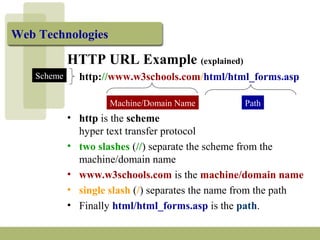
http://www.w3schools.com/html/html_forms.asp 
Machine/Domain Name Path 
Scheme 
• http is the scheme 
hyper text transfer protocol 
• two slashes (//) separate the scheme from the 
machine/domain name 
• www.w3schools.com is the machine/domain name 
• single slash (/) separates the name from the path 
• Finally html/html_forms.asp is the path.
Web Technologies 
FTP URL Example (explained) 
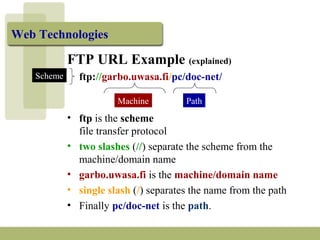
ftp://garbo.uwasa.fi/pc/doc-net/ 
Machine Path 
Scheme 
• ftp is the scheme 
file transfer protocol 
• two slashes (//) separate the scheme from the 
machine/domain name 
• garbo.uwasa.fi is the machine/domain name 
• single slash (/) separates the name from the path 
• Finally pc/doc-net is the path.
Web Technologies 
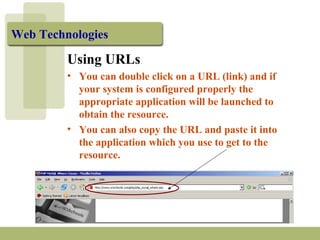
Using URLs 
• You can double click on a URL (link) and if 
your system is configured properly the 
appropriate application will be launched to 
obtain the resource. 
• You can also copy the URL and paste it into 
the application which you use to get to the 
resource.
Web Technologies 
Troubleshooting URLs 
Reasons for not being able to access URLs: 
– the remote machine refuses the connection 
– the site is very busy (e.g. peak hours of use) 
– you have misspelled the URL 
– the file was moved 
– if all else fails you can try looking up the 
hierarchy by sequentially removing the file 
name first, and then the last directory in the 
path.
Web Technologies 
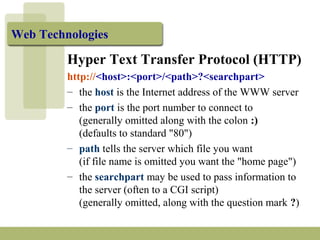
Hyper Text Transfer Protocol (HTTP) 
http://<host>:<port>/<path>?<searchpart> 
– the host is the Internet address of the WWW server 
– the port is the port number to connect to 
(generally omitted along with the colon :) 
(defaults to standard "80") 
– path tells the server which file you want 
(if file name is omitted you want the "home page") 
– the searchpart may be used to pass information to 
the server (often to a CGI script) 
(generally omitted, along with the question mark ?)
Web Technologies 
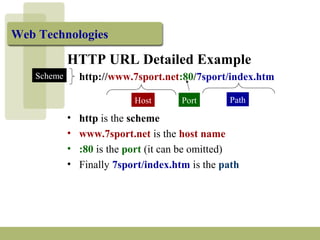
HTTP URL Detailed Example 
http://www.7sport.net:80/7sport/index.htm 
Host Path 
Scheme 
Port 
• http is the scheme 
• www.7sport.net is the host name 
• :80 is the port (it can be omitted) 
• Finally 7sport/index.htm is the path
Web Technologies 
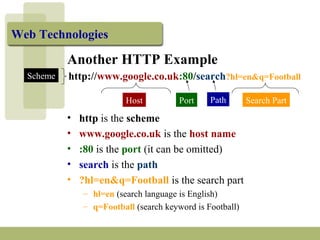
Another HTTP Example 
http://www.google.co.uk:80/search?hl=en&q=Football 
Host Path 
Scheme 
Port Search Part 
• http is the scheme 
• www.google.co.uk is the host name 
• :80 is the port (it can be omitted) 
• search is the path 
• ?hl=en&q=Football is the search part 
– hl=en (search language is English) 
– q=Football (search keyword is Football)

Webtech1b

  • 1.
    Web Technologies UniformResource Locators (URLs) http://news.bbc.co.uk/1/hi/education/5341426.stm
  • 2.
    URL Defined •A Uniform Resource Locator (URL) is a standard way developed to specify the location of a resource available electronically. RFC 1738 Web Technologies
  • 3.
    Web Technologies Whatare URLs? • URLs make it possible to direct both people and software applications to a variety of information, available from a number of different Internet protocols. • A URL is like your complete mailing address: it specifies all the information necessary for someone to address an envelope to you. John Brown 12 Stoke Road Stoke-on-Trent ST4 2DG
  • 4.
    Web Technologies Whatare URLs? (contd.) • In short, a URL is a very convenient and succinct way to direct people to a file or other electronic resource. • Learning how to interpret, use and construct URLs will assist your exploration of the Internet.
  • 5.
    Web Technologies GeneralURL syntax <scheme>:<scheme-dependent-information> Scheme examples: – http – ftp – news – gopher
  • 6.
    Web Technologies Scheme <scheme>:<scheme-dependent-information> – Tells you what type of resource we are trying to reach and/or what mechanism to use to obtain it. – Examples: – http (Hyper Text Transfer Protocol) – ftp (File Transfer Protocol) – news (News protocol)
  • 7.
    Web Technologies SchemeDependent Information <scheme>:<scheme-dependent-information> – This information is detailed with each scheme – Most schemes include the: – Machine making the file available – "Path" to that file – Example (for HTTP): http://www.7sport.net/7sport/index.htm Machine Path Scheme
  • 8.
    Web Technologies URLExample (explained) http://www.7sport.net/7sport/index.htm Machine Path Scheme • http is the scheme hyper text transfer protocol • two slashes (//) separate the scheme from the machine/domain name • www.7sport.net is the machine/domain name • single slash (/) separates the name from the path • Finally 7sport/index.htm is the path.
  • 9.
    Web Technologies URLExample (explained) http://www.7sport.net/7sport/ Machine Path Scheme • sometimes the path will end in a slash (/) • this indicates that the URL is not pointing to a specific file • in this case the server returns the "default" page – homepage.html – home.html – welcome.html – default.html
  • 10.
    Web Technologies HTTP& FTP General Formats scheme://machine.domain/full-path-of-file – Examples: – http://www.w3schools.com/html/html_forms.asp (Hyper Text Transfer Protocol) – ftp://garbo.uwasa.fi/pc/doc-net/ (File Transfer Protocol)
  • 11.
    Web Technologies HTTPURL Example (explained) http://www.w3schools.com/html/html_forms.asp Machine/Domain Name Path Scheme • http is the scheme hyper text transfer protocol • two slashes (//) separate the scheme from the machine/domain name • www.w3schools.com is the machine/domain name • single slash (/) separates the name from the path • Finally html/html_forms.asp is the path.
  • 12.
    Web Technologies FTPURL Example (explained) ftp://garbo.uwasa.fi/pc/doc-net/ Machine Path Scheme • ftp is the scheme file transfer protocol • two slashes (//) separate the scheme from the machine/domain name • garbo.uwasa.fi is the machine/domain name • single slash (/) separates the name from the path • Finally pc/doc-net is the path.
  • 13.
    Web Technologies UsingURLs • You can double click on a URL (link) and if your system is configured properly the appropriate application will be launched to obtain the resource. • You can also copy the URL and paste it into the application which you use to get to the resource.
  • 14.
    Web Technologies TroubleshootingURLs Reasons for not being able to access URLs: – the remote machine refuses the connection – the site is very busy (e.g. peak hours of use) – you have misspelled the URL – the file was moved – if all else fails you can try looking up the hierarchy by sequentially removing the file name first, and then the last directory in the path.
  • 15.
    Web Technologies HyperText Transfer Protocol (HTTP) http://<host>:<port>/<path>?<searchpart> – the host is the Internet address of the WWW server – the port is the port number to connect to (generally omitted along with the colon :) (defaults to standard "80") – path tells the server which file you want (if file name is omitted you want the "home page") – the searchpart may be used to pass information to the server (often to a CGI script) (generally omitted, along with the question mark ?)
  • 16.
    Web Technologies HTTPURL Detailed Example http://www.7sport.net:80/7sport/index.htm Host Path Scheme Port • http is the scheme • www.7sport.net is the host name • :80 is the port (it can be omitted) • Finally 7sport/index.htm is the path
  • 17.
    Web Technologies AnotherHTTP Example http://www.google.co.uk:80/search?hl=en&q=Football Host Path Scheme Port Search Part • http is the scheme • www.google.co.uk is the host name • :80 is the port (it can be omitted) • search is the path • ?hl=en&q=Football is the search part – hl=en (search language is English) – q=Football (search keyword is Football)