

3D MARINE PORT VISUALIZATION
A LITTLE HISTORY
 ECMAScript aka JavaScript
 Created in mid-90s at Netscape
 Called JavaScript as part of a
marketing deal with Sun.
 Standardized by ECMA.
 Version 6 & 7 are in progress
JAVA VS. JAVASCRIPT
 Similarity: a C style syntax
 OO Model
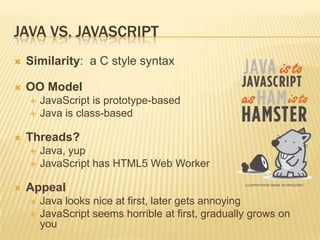
 JavaScript is prototype-based
 Java is class-based
 Threads?
 Java, yup
 JavaScript has HTML5 Web Worker
 Appeal
 Java looks nice at first, later gets annoying
 JavaScript seems horrible at first, gradually grows on
you
THE IDEA
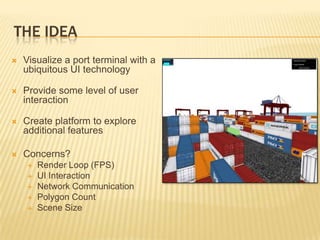
 Visualize a port terminal with a
ubiquitous UI technology
 Provide some level of user
interaction
 Create platform to explore
additional features
 Concerns?
 Render Loop (FPS)
 UI Interaction
 Network Communication
 Polygon Count
 Scene Size
THE DESIGN
 Leverage THREE.js for 3D Library
 Resources
 3D Models
 Textures
 CSS
 HTML
 JavaScript
 Etc.
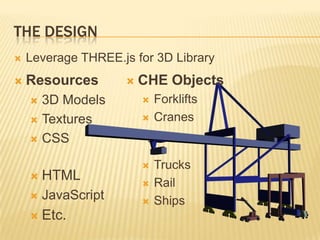
 CHE Objects
 Forklifts
 Cranes
 Trucks
 Rail
 Ships
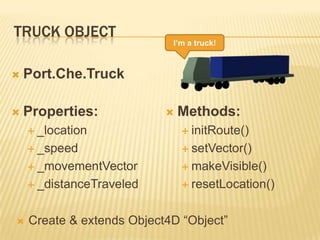
TRUCK OBJECT
 Port.Che.Truck
 Properties:
 _location
 _speed
 _movementVector
 _distanceTraveled
 Methods:
 initRoute()
 setVector()
 makeVisible()
 resetLocation()
I’m a truck!
 Create & extends Object4D “Object”
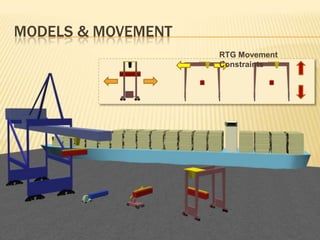
MODELS & MOVEMENT
RTG Movement
Constraints
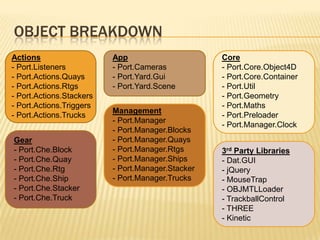
OBJECT BREAKDOWN
Actions
- Port.Listeners
- Port.Actions.Quays
- Port.Actions.Rtgs
- Port.Actions.Stackers
- Port.Actions.Triggers
- Port.Actions.Trucks
App
- Port.Cameras
- Port.Yard.Gui
- Port.Yard.Scene
Gear
- Port.Che.Block
- Port.Che.Quay
- Port.Che.Rtg
- Port.Che.Ship
- Port.Che.Stacker
- Port.Che.Truck
Management
- Port.Manager
- Port.Manager.Blocks
- Port.Manager.Quays
- Port.Manager.Rtgs
- Port.Manager.Ships
- Port.Manager.Stacker
- Port.Manager.Trucks
Core
- Port.Core.Object4D
- Port.Core.Container
- Port.Util
- Port.Geometry
- Port.Maths
- Port.Preloader
- Port.Manager.Clock
3rd Party Libraries
- Dat.GUI
- jQuery
- MouseTrap
- OBJMTLLoader
- TrackballControl
- THREE
- Kinetic
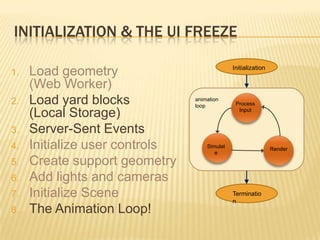
INITIALIZATION & THE UI FREEZE
Initialization
Terminatio
n
Process
Input
Simulat
e
Render
animation
loop
1. Load geometry
(Web Worker)
2. Load yard blocks
(Local Storage)
3. Server-Sent Events
4. Initialize user controls
5. Create support geometry
6. Add lights and cameras
7. Initialize Scene
8. The Animation Loop!
THE ANIMATION LOOP
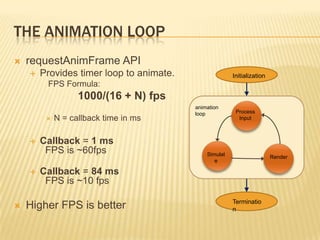
 requestAnimFrame API
 Provides timer loop to animate.
FPS Formula:
1000/(16 + N) fps
 N = callback time in ms
 Callback = 1 ms
FPS is ~60fps
 Callback = 84 ms
FPS is ~10 fps
 Higher FPS is better
Initialization
Terminatio
n
Process
Input
Simulat
e
Render
animation
loop
RENDER CALLBACK
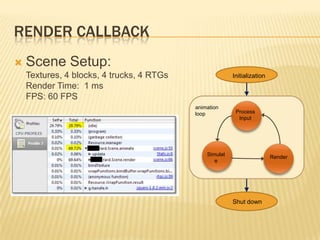
 Scene Setup:
Textures, 4 blocks, 4 trucks, 4 RTGs
Render Time: 1 ms
FPS: 60 FPS
Initialization
Shut down
Process
Input
Simulat
e
Render
animation
loop
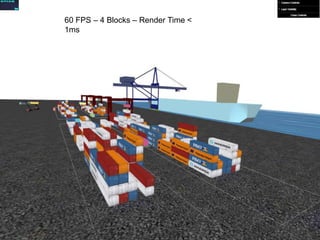
60 FPS – 4 Blocks – Render Time <
1ms
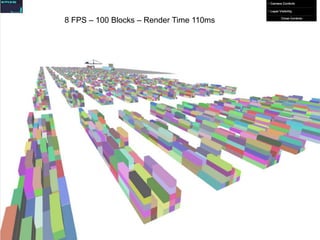
RENDER CALLBACK
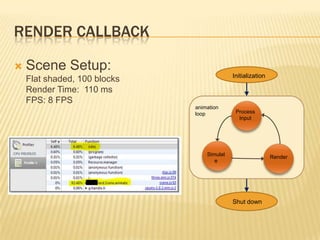
 Scene Setup:
Flat shaded, 100 blocks
Render Time: 110 ms
FPS: 8 FPS
Initialization
Shut down
Process
Input
Simulat
e
Render
animation
loop
8 FPS – 100 Blocks – Render Time 110ms
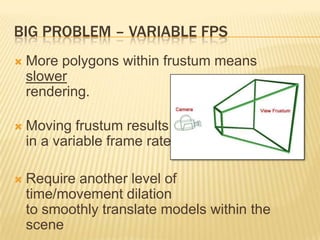
BIG PROBLEM – VARIABLE FPS
 More polygons within frustum means
slower
rendering.
 Moving frustum results
in a variable frame rate
 Require another level of
time/movement dilation
to smoothly translate models within the
scene
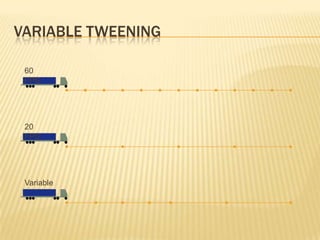
VARIABLE TWEENING
60
FPS
20
FPS
Variable
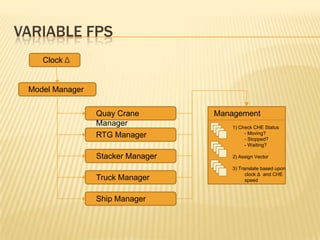
VARIABLE FPS
Model Manager
Clock Δ
Quay Crane
Manager
RTG Manager
Stacker Manager
Truck Manager
Ship Manager
Management
1) Check CHE Status
- Moving?
- Stopped?
- Waiting?
2) Assign Vector
3) Translate based upon
clock Δ and CHE
speed
DEMO
 Questions?

WebGL visualization of a shipping terminal

  • 1.
    3D MARINE PORTVISUALIZATION
  • 2.
    A LITTLE HISTORY ECMAScript aka JavaScript  Created in mid-90s at Netscape  Called JavaScript as part of a marketing deal with Sun.  Standardized by ECMA.  Version 6 & 7 are in progress
  • 3.
    JAVA VS. JAVASCRIPT Similarity: a C style syntax  OO Model  JavaScript is prototype-based  Java is class-based  Threads?  Java, yup  JavaScript has HTML5 Web Worker  Appeal  Java looks nice at first, later gets annoying  JavaScript seems horrible at first, gradually grows on you
  • 4.
    THE IDEA  Visualizea port terminal with a ubiquitous UI technology  Provide some level of user interaction  Create platform to explore additional features  Concerns?  Render Loop (FPS)  UI Interaction  Network Communication  Polygon Count  Scene Size
  • 5.
    THE DESIGN  LeverageTHREE.js for 3D Library  Resources  3D Models  Textures  CSS  HTML  JavaScript  Etc.  CHE Objects  Forklifts  Cranes  Trucks  Rail  Ships
  • 6.
    TRUCK OBJECT  Port.Che.Truck Properties:  _location  _speed  _movementVector  _distanceTraveled  Methods:  initRoute()  setVector()  makeVisible()  resetLocation() I’m a truck!  Create & extends Object4D “Object”
  • 7.
    MODELS & MOVEMENT RTGMovement Constraints
  • 8.
    OBJECT BREAKDOWN Actions - Port.Listeners -Port.Actions.Quays - Port.Actions.Rtgs - Port.Actions.Stackers - Port.Actions.Triggers - Port.Actions.Trucks App - Port.Cameras - Port.Yard.Gui - Port.Yard.Scene Gear - Port.Che.Block - Port.Che.Quay - Port.Che.Rtg - Port.Che.Ship - Port.Che.Stacker - Port.Che.Truck Management - Port.Manager - Port.Manager.Blocks - Port.Manager.Quays - Port.Manager.Rtgs - Port.Manager.Ships - Port.Manager.Stacker - Port.Manager.Trucks Core - Port.Core.Object4D - Port.Core.Container - Port.Util - Port.Geometry - Port.Maths - Port.Preloader - Port.Manager.Clock 3rd Party Libraries - Dat.GUI - jQuery - MouseTrap - OBJMTLLoader - TrackballControl - THREE - Kinetic
  • 9.
    INITIALIZATION & THEUI FREEZE Initialization Terminatio n Process Input Simulat e Render animation loop 1. Load geometry (Web Worker) 2. Load yard blocks (Local Storage) 3. Server-Sent Events 4. Initialize user controls 5. Create support geometry 6. Add lights and cameras 7. Initialize Scene 8. The Animation Loop!
  • 10.
    THE ANIMATION LOOP requestAnimFrame API  Provides timer loop to animate. FPS Formula: 1000/(16 + N) fps  N = callback time in ms  Callback = 1 ms FPS is ~60fps  Callback = 84 ms FPS is ~10 fps  Higher FPS is better Initialization Terminatio n Process Input Simulat e Render animation loop
  • 11.
    RENDER CALLBACK  SceneSetup: Textures, 4 blocks, 4 trucks, 4 RTGs Render Time: 1 ms FPS: 60 FPS Initialization Shut down Process Input Simulat e Render animation loop
  • 12.
    60 FPS –4 Blocks – Render Time < 1ms
  • 13.
    RENDER CALLBACK  SceneSetup: Flat shaded, 100 blocks Render Time: 110 ms FPS: 8 FPS Initialization Shut down Process Input Simulat e Render animation loop
  • 14.
    8 FPS –100 Blocks – Render Time 110ms
  • 15.
    BIG PROBLEM –VARIABLE FPS  More polygons within frustum means slower rendering.  Moving frustum results in a variable frame rate  Require another level of time/movement dilation to smoothly translate models within the scene
  • 16.
  • 17.
    VARIABLE FPS Model Manager ClockΔ Quay Crane Manager RTG Manager Stacker Manager Truck Manager Ship Manager Management 1) Check CHE Status - Moving? - Stopped? - Waiting? 2) Assign Vector 3) Translate based upon clock Δ and CHE speed
  • 18.

Editor's Notes

  • #2 Good afternoon everyone. My name is Joshua Staples and I work in the R&amp;D group of Port a software company here in Oakland. Port provides a software product for shipping terminals around the world. It is considered by many to be the Microsoft of the shipping software industry
  • #3 Called Mocha &amp; LiveScript before JavaScript at NetscapeMicrosoft called it Jscript (andfixed Y2K issues in JavaScripts Date class).ECMA used to stand for European Computer Manufacturers Association. Kinda like Kentucky Fried Chicken is now called KFC.
  • #4 Prototypal Inheritance Prototypes are flexible. Mutable so you can give them new abilities. Lots of utilities do this. In a prototype system, objects inherit from objects. I think its more expressive and can offer more firepower.Classical Inheritance Classes are immutable. You can&apos;t modify or add new methods to them at runtime. Classes may or may not support multiple inheritance. It&apos;s verbose and complicated. You have abstract classes, final classes, interfaces, etc.HTML5 Web Worker operates in its own SandBoxDev Tools Example:Array.prototype.uniq = function () { console.log(&apos;new method!&apos;); }var x = [];x.uniq();
  • #5 Portand Oracle designed a joint 3D demo using JavaFX. Chose to pursue HTML5 because of device ubiquity.Port is the Microsoft of the shipping and rail terminal of the world.
  • #7 No real easing functions.Could result in some overshoot of distance in very low frame rate.Extends Object4D class (name play on THREE.js’ Object3D class).Object4D class has basic methods and properties needed to move an object in a variable FPS environment.
  • #8 For CHE that has hierachical movement (e.g. a RTG or Rubber-Tired Gantry crane), movement is constrained by work orders.Translate gantry crane to correct bay.After 1 has finished, move cab over particular tierLower crane and snag container from particular row.
  • #10 Yard block calculation works in local storage.Server-sent events are initialized and connected with managers for each CHE type.
  • #11 Think of this as an animation metronome.