More Related Content

PDF

PDF

PDF

PDF
Hive undocumented feature 
PDF
誰でも出来るosxでのローカルなウェブ開発環境構築 
PPTX

PDF
2014/11/08 第3回 一撃サーバー構築シェルスクリプト勉強会(懇親会もあるよ!) 発表資料 
ODP
Raspberry Pi 2 誤自宅サーバー移行日記 What's hot

PDF

PDF
2014/11/04 第2回 一撃サーバー構築シェルスクリプト勉強会(さっぽろ!) 発表資料 
PDF

PDF

PPTX
ネットワークエンジニアのための Puppet / Chef 
PDF

PDF

PPTX

PPTX

PDF

PDF

PPTX

PDF
Serverspecを使ってサーバ5000台のBaculaクライアントをテスト 
PDF

PDF

PDF
serverspecでサーバ環境のテストを書いてみよう 
PDF
HTTP/2 in nginx(2016/3/11 社内勉強会) 
PDF

KEY

PDF
Viewers also liked

PDF

PDF
Scaling php - Intercon php 
PPTX

PDF
mod_php vs FastCGI vs FPM vs CLI 
PDF

PDF
最速の言語Lua ~Python Hack-a-thon #3~ 
PPT
Programming言語Lua紹介(Internet版) 
PDF

PDF
MySQL 5.7にやられないためにおぼえておいてほしいこと Similar to Webサーバ勉強会4 nginx で php-fpm を動かしてみた

PDF
PHP-FPMとuWSGI——mod_php以外の選択肢を探る 
PPTX
EC2でNginxを使ってみよう JAWS大阪第9回勉強会資料 
PDF
Word press on conoha このべん #3 
PPTX

PDF
NGINXセミナー(基本編)~いまさら聞けないNGINXコンフィグなど基本がわかる! 
PDF
いまさら聞けないNGINXコンフィグ_F5-NGINX-Community-20200805 
PPTX

PPTX
Re: WebServer BenchMarking 
PPTX

PPTX

PDF

PDF

PDF
「これからはじめるNGINX技術解説~基本編」セミナー (NGINX Back to Basic in JP) 
PPT
LT_小江戸273A.ppt - Raspberry Pi 4 へのツール各種 (^^;;;; インストール 
PPTX

PDF

PDF

KEY

PDF
NGINX Back to Basic 2 Part 2 (Japanese Webinar) 
PPTX
More from do_aki

PPTX
Tritonn から Elasticsearch への移行話 
PPTX

PPTX
PHP と SAPI と ZendEngine3 と 
PPTX

PPTX

PPTX
signal の話 或いは Zend Signals とは何か 
PPTX

PPTX

PPTX
Writing php extensions in golang 
PPTX

PPTX
N対1 レプリケーション + Optimizer Hint 
PPTX

PPTX
MySQL Casual Talks 7 「N:1 レプリケーション ~進捗どうですか?~」 
PPTX

PPTX
20141011 mastering mysqlnd 
PPTX

PPTX
PHP から Groonga を使うにはこんなコードになるよ! 
PPTX
N:1 Replication meets MHA 
PDF

PPTX
php and sapi and zendengine2 and... Webサーバ勉強会4 nginx で php-fpm を動かしてみた
- 1.
- 2.
do_aki (どぅーあき)
• |所属|> 株式会社もしも
(ドロップシッピング・アフィリエイトASP)
• |仕事| > インフラ構築・運用 兼
Webアプリケーション開発・運用
• |出現| > 渋谷・山手線沿線
• |特性| > PHPer
http://do-aki.net/
- 3.
- 4.
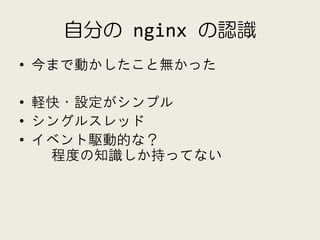
自分の nginx の認識
•今まで動かしたこと無かった
• 軽快・設定がシンプル
• シングルスレッド
• イベント駆動的な?
程度の知識しか持ってない
- 6.
- 7.
- 8.
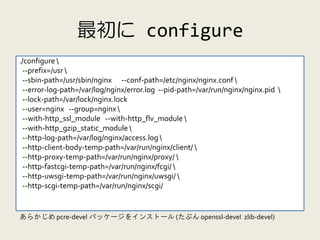
最初に configure
./configure
--prefix=/usr
--sbin-path=/usr/sbin/nginx --conf-path=/etc/nginx/nginx.conf
--error-log-path=/var/log/nginx/error.log --pid-path=/var/run/nginx/nginx.pid
--lock-path=/var/lock/nginx.lock
--user=nginx --group=nginx
--with-http_ssl_module --with-http_flv_module
--with-http_gzip_static_module
--http-log-path=/var/log/nginx/access.log
--http-client-body-temp-path=/var/run/nginx/client/
--http-proxy-temp-path=/var/run/nginx/proxy/
--http-fastcgi-temp-path=/var/run/nginx/fcgi/
--http-uwsgi-temp-path=/var/run/nginx/uwsgi/
--http-scgi-temp-path=/var/run/nginx/scgi/
あらかじめ pcre-devel パッケージをインストール (たぶん openssl-devel zlib-devel)
- 9.
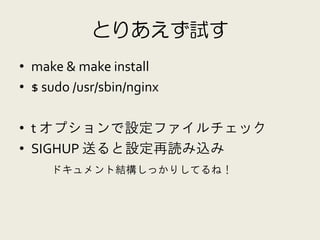
とりあえず試す
• make &make install
• $ sudo /usr/sbin/nginx
• t オプションで設定ファイルチェック
• SIGHUP 送ると設定再読み込み
ドキュメント結構しっかりしてるね!
- 10.
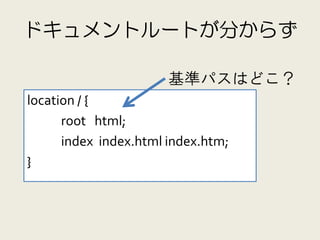
ドキュメントルートが分からず
基準パスはどこ?
location / {
root html;
index index.html index.htm;
}
- 11.
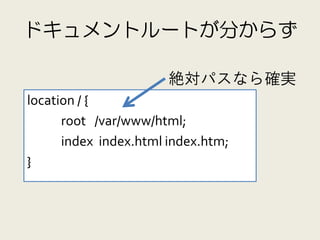
ドキュメントルートが分からず
絶対パスなら確実
location / {
root /var/www/html;
index index.html index.htm;
}
- 12.
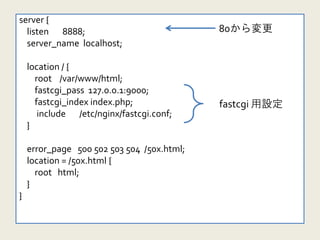
server {
listen 8888; nginx.conf 80から変更
server_name localhost;
location / {
root /var/www/html;
fastcgi_pass 127.0.0.1:9000;
fastcgi_index index.php; fastcgi 用設定
include /etc/nginx/fastcgi.conf;
}
error_page 500 502 503 504 /50x.html;
location = /50x.html {
root html;
}
}
- 13.
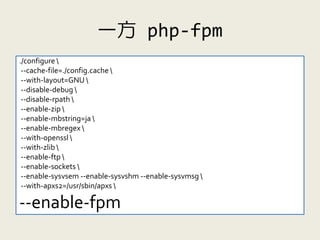
一方 php-fpm
./configure
--cache-file=./config.cache
--with-layout=GNU
--disable-debug
--disable-rpath
--enable-zip
--enable-mbstring=ja
--enable-mbregex
--with-openssl
--with-zlib
--enable-ftp
--enable-sockets
--enable-sysvsem --enable-sysvshm --enable-sysvmsg
--with-apxs2=/usr/sbin/apxs
--enable-fpm
- 14.
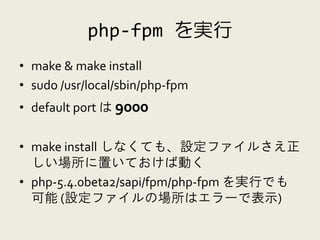
php-fpm を実行
• make& make install
• sudo /usr/local/sbin/php-fpm
• default port は 9000
• make install しなくても、設定ファイルさえ正
しい場所に置いておけば動く
• php-5.4.0beta2/sapi/fpm/php-fpm を実行でも
可能 (設定ファイルの場所はエラーで表示)
- 15.
- 16.
- 17.
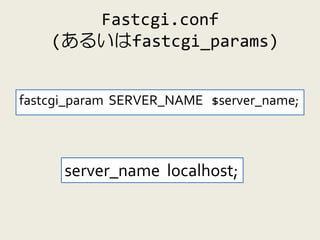
Fastcgi.conf
(あるいはfastcgi_params)
fastcgi_param SERVER_NAME $server_name;
server_name localhost;
- 18.
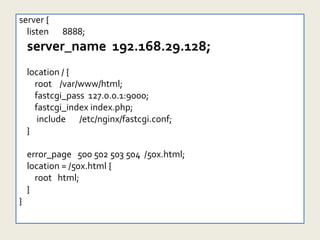
server {
listen 8888; nginx.conf
server_name 192.168.29.128;
location / {
root /var/www/html;
fastcgi_pass 127.0.0.1:9000;
fastcgi_index index.php;
include /etc/nginx/fastcgi.conf;
}
error_page 500 502 503 504 /50x.html;
location = /50x.html {
root html;
}
}
- 19.
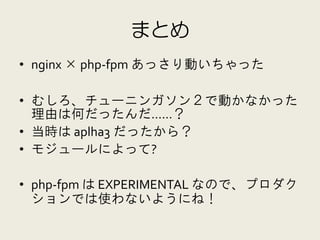
まとめ
• nginx ×php-fpm あっさり動いちゃった
• むしろ、チューニンガソン2で動かなかった
理由は何だったんだ……?
• 当時は aplha3 だったから?
• モジュールによって?
• php-fpm は EXPERIMENTAL なので、プロダク
ションでは使わないようにね!
- 20.



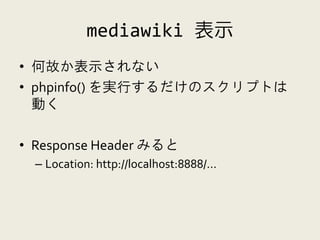
![phpinfo を比較
$_SERVER["SERVER_NAME"]
apache => 192.168.29.128
nginx => localhost](https://image.slidesharecdn.com/20111111web4up-111112074354-phpapp01/85/Web-4-nginx-php-fpm-16-320.jpg)