SUMMER TRAINING REPORT
Web Development with HTML/CSS
Mahatma Jyotiba Phule Rohilkhand University, Bareilly
PRESENTED BY:-
XYZ…………
DEPARTMENT OF COMPUTER SCIENCE AND INFORMATION TECHNOLOGY
WEB DEVELOPMENT
COURSE CONTENTS
 INTRODUCTION OF WEB(world wide web)
 HTML
 CSS
INTRODUCTION OF WEB
“WHAT IS WEB(WWW)”
The world wide web was originally designed in 1991 by Tim Berners-lee in Switzerland
WWW means interlinking of web pages.
Webpages are written in HTML (Hyper Text Markup Language).
WWW is also called the internet or the web. All the webpage, videos, and images are accessed via
a web browser on the internet with the use of URL (Uniform Resource Locator)
CONTENTS OF HTML
 Introduction
 Structure
 Lists
 Images
 Table
 Form
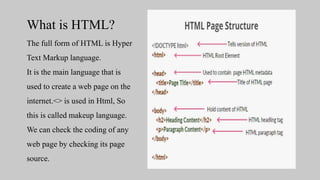
What is HTML?
The full form of HTML is Hyper
Text Markup language.
It is the main language that is
used to create a web page on the
internet.<> is used in Html, So
this is called makeup language.
We can check the coding of any
web page by checking its page
source.
HTML TAGS
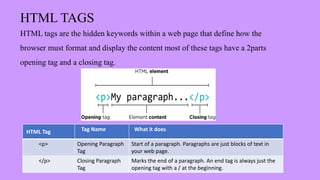
HTML tags are the hidden keywords within a web page that define how the
browser must format and display the content most of these tags have a 2parts
opening tag and a closing tag.
HTML Tag Tag Name What it does
<p> Opening Paragraph
Tag
Start of a paragraph. Paragraphs are just blocks of text in
your web page.
</p> Closing Paragraph
Tag
Marks the end of a paragraph. An end tag is always just the
opening tag with a / at the beginning.
LISTs TAG
• UNORDER LIST <ul>…..</ul>
• ORDER LIST <ol>…..</ol>
• DESCRIPTION LIST <dl>…..</dl>
• NESTING
LINK TAG
Html-Links:-
Html links are defined with the <a> tag
Syntax:-
<a href="https://www.google.com">google</a>
IMAGE TAG
HTML-IMAGES:-
Html images ARE defined with the <img> tag src, width, height, alt, file paths, float, background-image
style="background-image: url('images/2.jpg’);”
SYNTAX:-<img src="images/1.jpg" width="200" height="200" alt="computer-application" style="float :
right">
FORM TAG
HTML forms are used to select different kinds of user input.
Example:
First Name: <input type="text“
placeholder="First-Name" name="first-name">
Last Name:<input type="text“
placeholder="Last-Name" name="Last-name">
Output-
CASCADING STYLE
SHEET (CSS)
 What is CSS?
Cascading Style Sheets (CSS) are used
to format the layout of a webpage.
Using CSS
CSS can be added to HTML
documents in 3 ways:
Inline by using the style attribute
inside HTML elements.
Internal by using a <style>element in
the head> section.
External by using a <link> element to
link to an external CSS file.
CSS
• Inline CSS
• Internal CSS
• External CSS
CSS output
• INLINE CSS • INTERNAL CSS • EXTERNAL CSS
CODE
OUTPUT:-
Benefits
1.Access to learning resources at no cost.
2.Opportunity to acquire new skills and knowledge.
3.Possibility of self-paced learning.
4.Exposure to different educational materials and approaches.
5.Option to explore various coding languages and
technologies.
Future Scope
1.Increased demand for online education.
2.Growing importance of digital skills and technology.
3.More job opportunities requiring technology literacy.
4.Advancements in online learning technology.
5.Continued growth of open-source and online
communities.

WEB DVELOPEMENT

  • 1.
    SUMMER TRAINING REPORT WebDevelopment with HTML/CSS Mahatma Jyotiba Phule Rohilkhand University, Bareilly PRESENTED BY:- XYZ………… DEPARTMENT OF COMPUTER SCIENCE AND INFORMATION TECHNOLOGY
  • 2.
    WEB DEVELOPMENT COURSE CONTENTS INTRODUCTION OF WEB(world wide web)  HTML  CSS
  • 3.
    INTRODUCTION OF WEB “WHATIS WEB(WWW)” The world wide web was originally designed in 1991 by Tim Berners-lee in Switzerland WWW means interlinking of web pages. Webpages are written in HTML (Hyper Text Markup Language). WWW is also called the internet or the web. All the webpage, videos, and images are accessed via a web browser on the internet with the use of URL (Uniform Resource Locator)
  • 5.
    CONTENTS OF HTML Introduction  Structure  Lists  Images  Table  Form
  • 6.
    What is HTML? Thefull form of HTML is Hyper Text Markup language. It is the main language that is used to create a web page on the internet.<> is used in Html, So this is called makeup language. We can check the coding of any web page by checking its page source.
  • 7.
    HTML TAGS HTML tagsare the hidden keywords within a web page that define how the browser must format and display the content most of these tags have a 2parts opening tag and a closing tag. HTML Tag Tag Name What it does <p> Opening Paragraph Tag Start of a paragraph. Paragraphs are just blocks of text in your web page. </p> Closing Paragraph Tag Marks the end of a paragraph. An end tag is always just the opening tag with a / at the beginning.
  • 8.
    LISTs TAG • UNORDERLIST <ul>…..</ul> • ORDER LIST <ol>…..</ol> • DESCRIPTION LIST <dl>…..</dl> • NESTING
  • 9.
    LINK TAG Html-Links:- Html linksare defined with the <a> tag Syntax:- <a href="https://www.google.com">google</a>
  • 10.
    IMAGE TAG HTML-IMAGES:- Html imagesARE defined with the <img> tag src, width, height, alt, file paths, float, background-image style="background-image: url('images/2.jpg’);” SYNTAX:-<img src="images/1.jpg" width="200" height="200" alt="computer-application" style="float : right">
  • 11.
    FORM TAG HTML formsare used to select different kinds of user input. Example: First Name: <input type="text“ placeholder="First-Name" name="first-name"> Last Name:<input type="text“ placeholder="Last-Name" name="Last-name"> Output-
  • 12.
    CASCADING STYLE SHEET (CSS) What is CSS? Cascading Style Sheets (CSS) are used to format the layout of a webpage. Using CSS CSS can be added to HTML documents in 3 ways: Inline by using the style attribute inside HTML elements. Internal by using a <style>element in the head> section. External by using a <link> element to link to an external CSS file.
  • 13.
    CSS • Inline CSS •Internal CSS • External CSS
  • 14.
    CSS output • INLINECSS • INTERNAL CSS • EXTERNAL CSS
  • 15.
  • 16.
  • 17.
    Benefits 1.Access to learningresources at no cost. 2.Opportunity to acquire new skills and knowledge. 3.Possibility of self-paced learning. 4.Exposure to different educational materials and approaches. 5.Option to explore various coding languages and technologies.
  • 18.
    Future Scope 1.Increased demandfor online education. 2.Growing importance of digital skills and technology. 3.More job opportunities requiring technology literacy. 4.Advancements in online learning technology. 5.Continued growth of open-source and online communities.