Web Development Today
(modernizr, boilerplate, bootstrap etc...)


                   By


             Jaydev Gajera
How to apply best practices?

    In today's web development one of the answer is
by using HTML5 Boilerplate.


What is HTML5 Boilerplate?

    It is web’s most popular front-end template.

    HTML5 Boilerplate helps you build fast, robust, and adaptable web
    apps or sites. Kick-start your project with the combined knowledge
    and effort of 100s of developers, all in one little package.
From where I can get it?

    You can download it from html5boilerplate

You can get a custom build also from 3
variations
1) Classic H5BP
        −   This contains classic H5BP files as usual
2) Responsive
        −   This comes with mobile first responsive template and media
            queries in stylesheet
3) Bootstrap
        −   This contains twitter bootstrap files.
H5BP includes normalize.css and helpers

    What is normalize.css ?
        −   It is a modern, HTML5-ready alternative to CSS resets


    What does it do?
        −   Preserves useful defaults, unlike many CSS resets.
        −   Normalizes styles for a wide range of elements.
        −   Corrects bugs and common browser inconsistencies.
        −   Improves usability with subtle improvements.
        −   Explains what code does using detailed comments.
        −   Check out the demo here.
        −   You can get clear idea by reading this
H5BP includes jQuery and Modernizr

    jQuery via Google’s CDN, with local fallback


    What is Modernizr?
        −   Modernizr is a JavaScript library that detects HTML5 and CSS3
        features in the user’s browser.

    How it works?
        −  Modernizr runs quickly on page load to detect features.
        −  It then creates a JavaScript object with the results, and
        adds classes to the html element for you to key your CSS on.
        −  It does not enable HTML5 and CSS3 functionalities in
        browsers that do not support them.
H5BP includes jQuery and Modernizr

    jQuery via Google’s CDN, with local fallback


    What is Modernizr?
        −   Modernizr is a JavaScript library that detects HTML5 and CSS3
        features in the user’s browser.

    How it works?
        −  Modernizr runs quickly on page load to detect features.
        −  It then creates a JavaScript object with the results, and
        adds classes to the html element for you to key your CSS on.
        −  It does not enable HTML5 and CSS3 functionalities in
        browsers that do not support them.
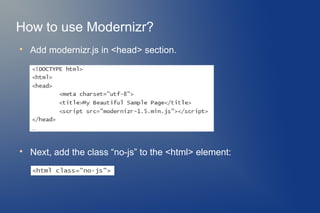
How to use Modernizr?

    Add modernizr.js in <head> section.



    Next, add the class “no-js” to the <html> element:

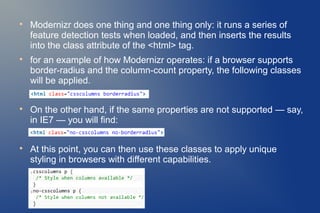
    Modernizr does one thing and one thing only: it runs a series of
    feature detection tests when loaded, and then inserts the results
    into the class attribute of the <html> tag.

    for an example of how Modernizr operates: if a browser supports
    border-radius and the column-count property, the following classes
    will be applied.


    On the other hand, if the same properties are not supported — say,
    in IE7 — you will find:


    At this point, you can then use these classes to apply unique
    styling in browsers with different capabilities.

    When Modernizr runs, it will replace that class with the class “js”
    which allows you to know, in your CSS, whether or not JavaScript
    is enabled.

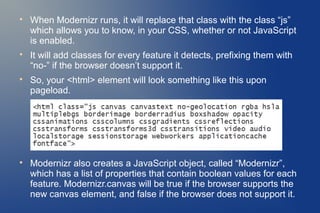
    It will add classes for every feature it detects, prefixing them with
    “no-” if the browser doesn’t support it.

    So, your <html> element will look something like this upon
    pageload.



    Modernizr also creates a JavaScript object, called “Modernizr”,
    which has a list of properties that contain boolean values for each
    feature. Modernizr.canvas will be true if the browser supports the
    new canvas element, and false if the browser does not support it.
Modernizr includes HTML5Shiv

    Excluding the most recent version (IE9), you cannot apply styles to
    elements that the browser does not recognize.

    This is where "html5shiv" (sometimes called html5 shim) comes to
    the rescue.

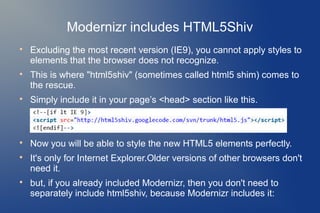
    Simply include it in your page’s <head> section like this.



    Now you will be able to style the new HTML5 elements perfectly.

    It's only for Internet Explorer.Older versions of other browsers don't
    need it.

    but, if you already included Modernizr, then you don't need to
    separately include html5shiv, because Modernizr includes it:

    The conditional comments only load the html5shiv code on the
    condition that the version of Internet Explorer is lower than 9.

    Other browsers, such as Firefox and Chrome, will also ignore this
    tag and won’t execute the script, thus saving bandwidth.

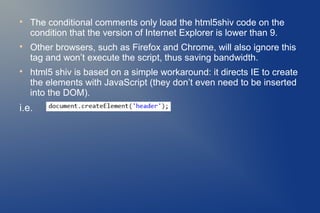
    html5 shiv is based on a simple workaround: it directs IE to create
    the elements with JavaScript (they don’t even need to be inserted
    into the DOM).
i.e.
These things you should defibitely know about
              HTML5 boilerplate
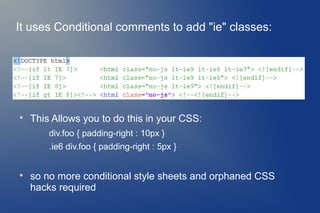
It uses Conditional comments to add "ie" classes:



    This Allows you to do this in your CSS:
        div.foo { padding-right : 10px }
        .ie6 div.foo { padding-right : 5px }



    so no more conditional style sheets and orphaned CSS
    hacks required
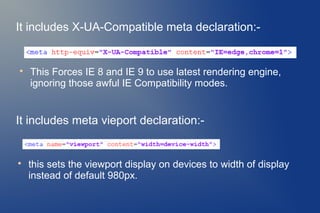
It includes X-UA-Compatible meta declaration:-



    This Forces IE 8 and IE 9 to use latest rendering engine,
    ignoring those awful IE Compatibility modes.


It includes meta vieport declaration:-



    this sets the viewport display on devices to width of display
    instead of default 980px.
For high performance & testing

    Use Google minify.
         −   Minify is a PHP5 app that helps you follow several of Yahoo!'s
         Rules for High Performance Web Sites.
         −   Read more at here

    Use this Mozilla Firefox add-on for accessibility evaluation.
         −   Download from here

    Make the site faster by checking at google page speed

    Load test using - loadimpact

    Test a website's performance by using - webpagetest
Read more


    http://html5boilerplate.com/

    http://www.modernizr.com/

    Conditional stylesheets vs CSS hacks? Answer: Neither!

    The Story of the HTML5 Shiv

    Taking Advantage of HTML5 and CSS3 with Modernizr

    Best practices for speeding up your web site

Web development today

  • 1.
    Web Development Today (modernizr,boilerplate, bootstrap etc...) By Jaydev Gajera
  • 2.
    How to applybest practices?  In today's web development one of the answer is by using HTML5 Boilerplate. What is HTML5 Boilerplate?  It is web’s most popular front-end template.  HTML5 Boilerplate helps you build fast, robust, and adaptable web apps or sites. Kick-start your project with the combined knowledge and effort of 100s of developers, all in one little package.
  • 3.
    From where Ican get it?  You can download it from html5boilerplate You can get a custom build also from 3 variations 1) Classic H5BP − This contains classic H5BP files as usual 2) Responsive − This comes with mobile first responsive template and media queries in stylesheet 3) Bootstrap − This contains twitter bootstrap files.
  • 4.
    H5BP includes normalize.cssand helpers  What is normalize.css ? − It is a modern, HTML5-ready alternative to CSS resets  What does it do? − Preserves useful defaults, unlike many CSS resets. − Normalizes styles for a wide range of elements. − Corrects bugs and common browser inconsistencies. − Improves usability with subtle improvements. − Explains what code does using detailed comments. − Check out the demo here. − You can get clear idea by reading this
  • 5.
    H5BP includes jQueryand Modernizr  jQuery via Google’s CDN, with local fallback  What is Modernizr? − Modernizr is a JavaScript library that detects HTML5 and CSS3 features in the user’s browser.  How it works? − Modernizr runs quickly on page load to detect features. − It then creates a JavaScript object with the results, and adds classes to the html element for you to key your CSS on. − It does not enable HTML5 and CSS3 functionalities in browsers that do not support them.
  • 6.
    H5BP includes jQueryand Modernizr  jQuery via Google’s CDN, with local fallback  What is Modernizr? − Modernizr is a JavaScript library that detects HTML5 and CSS3 features in the user’s browser.  How it works? − Modernizr runs quickly on page load to detect features. − It then creates a JavaScript object with the results, and adds classes to the html element for you to key your CSS on. − It does not enable HTML5 and CSS3 functionalities in browsers that do not support them.
  • 7.
    How to useModernizr?  Add modernizr.js in <head> section.  Next, add the class “no-js” to the <html> element:
  • 8.
    Modernizr does one thing and one thing only: it runs a series of feature detection tests when loaded, and then inserts the results into the class attribute of the <html> tag.  for an example of how Modernizr operates: if a browser supports border-radius and the column-count property, the following classes will be applied.  On the other hand, if the same properties are not supported — say, in IE7 — you will find:  At this point, you can then use these classes to apply unique styling in browsers with different capabilities.
  • 9.
    When Modernizr runs, it will replace that class with the class “js” which allows you to know, in your CSS, whether or not JavaScript is enabled.  It will add classes for every feature it detects, prefixing them with “no-” if the browser doesn’t support it.  So, your <html> element will look something like this upon pageload.  Modernizr also creates a JavaScript object, called “Modernizr”, which has a list of properties that contain boolean values for each feature. Modernizr.canvas will be true if the browser supports the new canvas element, and false if the browser does not support it.
  • 10.
    Modernizr includes HTML5Shiv  Excluding the most recent version (IE9), you cannot apply styles to elements that the browser does not recognize.  This is where "html5shiv" (sometimes called html5 shim) comes to the rescue.  Simply include it in your page’s <head> section like this.  Now you will be able to style the new HTML5 elements perfectly.  It's only for Internet Explorer.Older versions of other browsers don't need it.  but, if you already included Modernizr, then you don't need to separately include html5shiv, because Modernizr includes it:
  • 11.
    The conditional comments only load the html5shiv code on the condition that the version of Internet Explorer is lower than 9.  Other browsers, such as Firefox and Chrome, will also ignore this tag and won’t execute the script, thus saving bandwidth.  html5 shiv is based on a simple workaround: it directs IE to create the elements with JavaScript (they don’t even need to be inserted into the DOM). i.e.
  • 12.
    These things youshould defibitely know about HTML5 boilerplate
  • 13.
    It uses Conditionalcomments to add "ie" classes:  This Allows you to do this in your CSS: div.foo { padding-right : 10px } .ie6 div.foo { padding-right : 5px }  so no more conditional style sheets and orphaned CSS hacks required
  • 14.
    It includes X-UA-Compatiblemeta declaration:-  This Forces IE 8 and IE 9 to use latest rendering engine, ignoring those awful IE Compatibility modes. It includes meta vieport declaration:-  this sets the viewport display on devices to width of display instead of default 980px.
  • 15.
    For high performance& testing  Use Google minify. − Minify is a PHP5 app that helps you follow several of Yahoo!'s Rules for High Performance Web Sites. − Read more at here  Use this Mozilla Firefox add-on for accessibility evaluation. − Download from here  Make the site faster by checking at google page speed  Load test using - loadimpact  Test a website's performance by using - webpagetest
  • 16.
    Read more  http://html5boilerplate.com/  http://www.modernizr.com/  Conditional stylesheets vs CSS hacks? Answer: Neither!  The Story of the HTML5 Shiv  Taking Advantage of HTML5 and CSS3 with Modernizr  Best practices for speeding up your web site