Web Component Development
Using Servlet & JSP Technology
(EE6)
Module-2: Introduction t
PaP)
www.webstackacademy.com
Introduction to Java Server
Pages(JSP)
www.webstackacademy.com
Objectives
Upon completion of this module, you should be able
to:
● Describe a significant weakness in servlets when
used alone.
● Write a simple Java Server Page (JSP)
● Describe the translation of a JSP into a servlet
● Understand the basic goals of MVC
www.webstackacademy.com
Relevance
Discussion – The following questions are relevant to
understanding how to develop a view component:
● How easy would it be to edit HTML that is created by a
Java program?
● What would make a good separation of concerns for a
web application?
www.webstackacademy.com
A Weakness in
Servlets
● Most modern web applications have elegant and complex user
interface designs. The designs are often created by dedicated
web designers, and even if that is not the case, the HTML
pages that implement the designs are frequently created
using “What You See Is What You Get” (WYSIWYG) Graphical
User Interface (GUI) based design tools. Such design tools
work on HTML, not on HTML embedded in Java program code.
● Because of this, the pure servlet approach becomes
unmanageable—often catastrophically—when maintenance is
required on the web pages. Having to re-type all the HTML
code back into out.print(...) statements would be a very time
consuming and error prone process.
www.webstackacademy.com
Addressing the
Problem With JSPs
Soon after the original introduction of servlets, Java
Server Pages, usually called simply JSPs, were introduced
to address this problem.
While a servlet is a Java source file containing embedded
HTML, a JSP might be considered to be an HTML file with
Java embedded in it.
www.webstackacademy.com
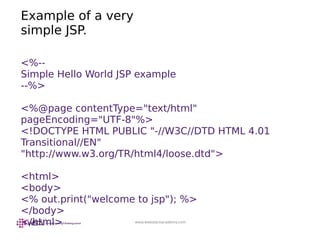
Example of a very
simple JSP.
<%--
Simple Hello World JSP example
--%>
<%@page contentType="text/html"
pageEncoding="UTF-8"%>
<!DOCTYPE HTML PUBLIC "-//W3C//DTD HTML 4.01
Transitional//EN"
"http://www.w3.org/TR/html4/loose.dtd">
<html>
<body>
<% out.print("welcome to jsp"); %>
</body>
</html>
www.webstackacademy.com
Key Elements of
JSPs
Within <% ... %> pairs, three distinct variations are
exemplified.
These are:
● Comments
● A “page directive”
● An “expression”
www.webstackacademy.com
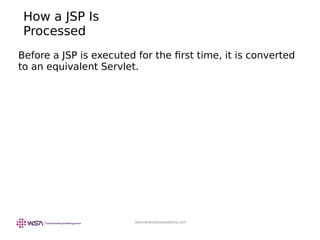
How a JSP Is
Processed
Before a JSP is executed for the first time, it is converted
to an equivalent Servlet.
www.webstackacademy.com
Reading Input
Parameters From the
Browser
<html>
<head>
<meta http-equiv="Content-Type" content="text/html;
charset=UTF-8">
<title>JSP Page</title>
</head>
<body>
<h1>Hello
<%= request.getParameter("customerName") %>
</h1>
</body>
</html>
www.webstackacademy.com
Sending Parameters
in an HTTP GET
Request
http://localhost:8080/SL314m2ex2/index.jsp?
customerName=Corporal+Jones
Note that the space is encoded as a plus sign (+). Other
encodings are required for many other symbols, but such
conversions are beyond the scope of this module.
www.webstackacademy.com
Remaining Problems
With the JSP
Approach
● The JSP approach results in Java code embedded in an
HTML source file. Because of this,programmers and
web-designers must share the same file, and changes
made by one group might cause bugs in the work of
the other group.
● In fact, the root of the problem is that one of the basic
tenets of good software design has been broken. That
tenet states that unrelated concerns should be
separated in the source code.
Web Stack Academy (P) Ltd
#83, Farah Towers,
1st floor,MG Road,
Bangalore – 560001
M: +91-80-4128 9576
T: +91-98862 69112
E: info@www.webstackacademy.com
www.webstackacademy.com

Web Component Development Using Servlet & JSP Technologies (EE6) - Chapter 2 - Introduction to Java Server Pages

  • 1.
    Web Component Development UsingServlet & JSP Technology (EE6) Module-2: Introduction t PaP)
  • 2.
  • 3.
    www.webstackacademy.com Objectives Upon completion ofthis module, you should be able to: ● Describe a significant weakness in servlets when used alone. ● Write a simple Java Server Page (JSP) ● Describe the translation of a JSP into a servlet ● Understand the basic goals of MVC
  • 4.
    www.webstackacademy.com Relevance Discussion – Thefollowing questions are relevant to understanding how to develop a view component: ● How easy would it be to edit HTML that is created by a Java program? ● What would make a good separation of concerns for a web application?
  • 5.
    www.webstackacademy.com A Weakness in Servlets ●Most modern web applications have elegant and complex user interface designs. The designs are often created by dedicated web designers, and even if that is not the case, the HTML pages that implement the designs are frequently created using “What You See Is What You Get” (WYSIWYG) Graphical User Interface (GUI) based design tools. Such design tools work on HTML, not on HTML embedded in Java program code. ● Because of this, the pure servlet approach becomes unmanageable—often catastrophically—when maintenance is required on the web pages. Having to re-type all the HTML code back into out.print(...) statements would be a very time consuming and error prone process.
  • 6.
    www.webstackacademy.com Addressing the Problem WithJSPs Soon after the original introduction of servlets, Java Server Pages, usually called simply JSPs, were introduced to address this problem. While a servlet is a Java source file containing embedded HTML, a JSP might be considered to be an HTML file with Java embedded in it.
  • 7.
    www.webstackacademy.com Example of avery simple JSP. <%-- Simple Hello World JSP example --%> <%@page contentType="text/html" pageEncoding="UTF-8"%> <!DOCTYPE HTML PUBLIC "-//W3C//DTD HTML 4.01 Transitional//EN" "http://www.w3.org/TR/html4/loose.dtd"> <html> <body> <% out.print("welcome to jsp"); %> </body> </html>
  • 8.
    www.webstackacademy.com Key Elements of JSPs Within<% ... %> pairs, three distinct variations are exemplified. These are: ● Comments ● A “page directive” ● An “expression”
  • 9.
    www.webstackacademy.com How a JSPIs Processed Before a JSP is executed for the first time, it is converted to an equivalent Servlet.
  • 10.
    www.webstackacademy.com Reading Input Parameters Fromthe Browser <html> <head> <meta http-equiv="Content-Type" content="text/html; charset=UTF-8"> <title>JSP Page</title> </head> <body> <h1>Hello <%= request.getParameter("customerName") %> </h1> </body> </html>
  • 11.
    www.webstackacademy.com Sending Parameters in anHTTP GET Request http://localhost:8080/SL314m2ex2/index.jsp? customerName=Corporal+Jones Note that the space is encoded as a plus sign (+). Other encodings are required for many other symbols, but such conversions are beyond the scope of this module.
  • 12.
    www.webstackacademy.com Remaining Problems With theJSP Approach ● The JSP approach results in Java code embedded in an HTML source file. Because of this,programmers and web-designers must share the same file, and changes made by one group might cause bugs in the work of the other group. ● In fact, the root of the problem is that one of the basic tenets of good software design has been broken. That tenet states that unrelated concerns should be separated in the source code.
  • 13.
    Web Stack Academy(P) Ltd #83, Farah Towers, 1st floor,MG Road, Bangalore – 560001 M: +91-80-4128 9576 T: +91-98862 69112 E: info@www.webstackacademy.com www.webstackacademy.com