17IT051 IT349: WCMC
CSPIT-IT 1
PRACTICAL: 1
AIM:
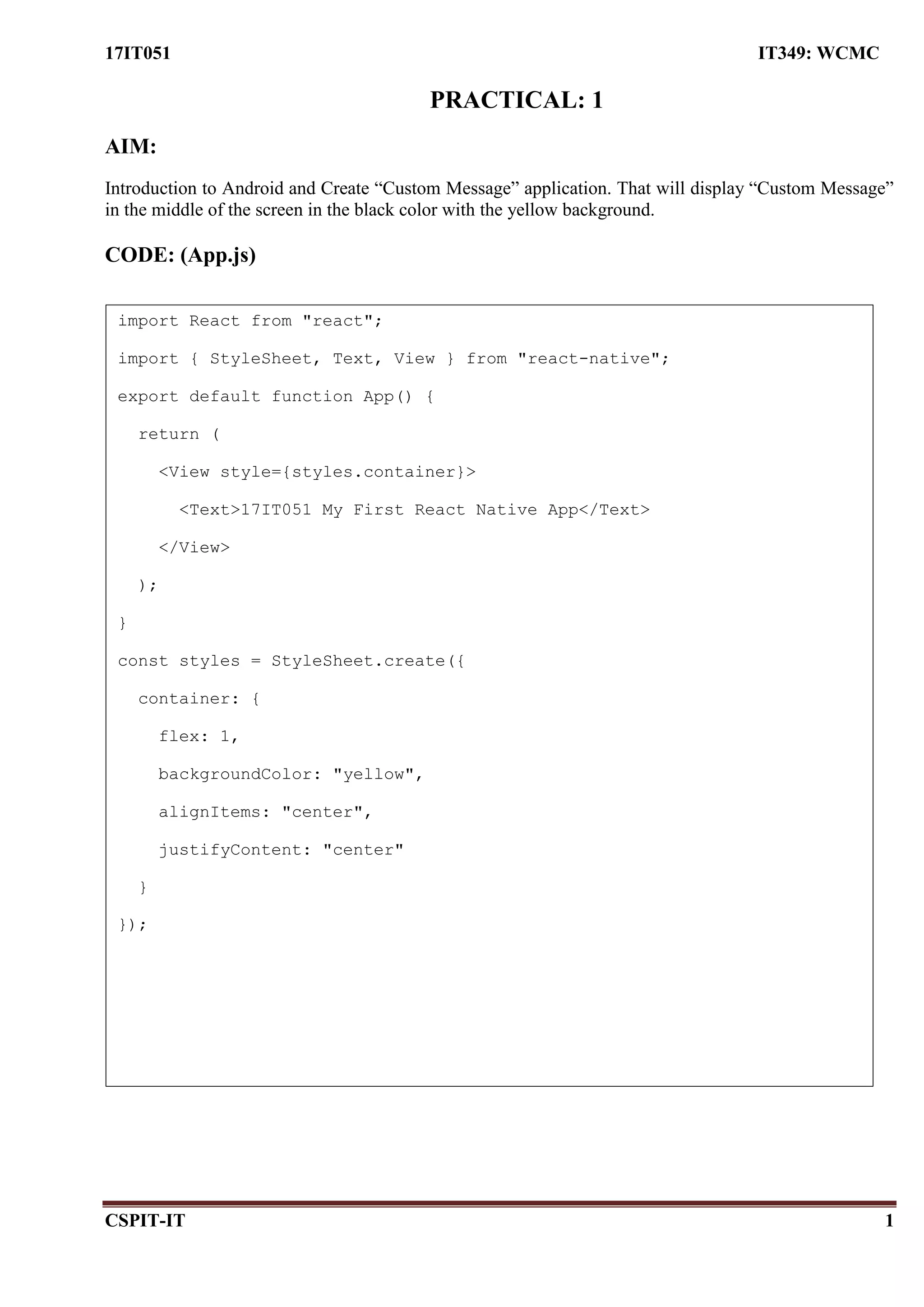
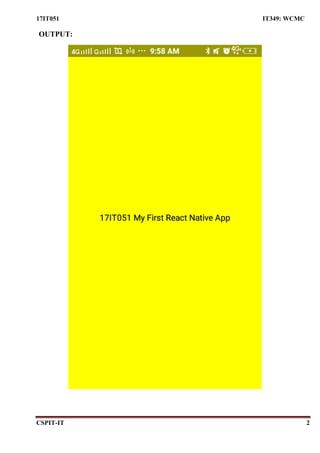
Introduction to Android and Create “Custom Message” application. That will display “Custom Message”
in the middle of the screen in the black color with the yellow background.
CODE: (App.js)
import React from "react";
import { StyleSheet, Text, View } from "react-native";
export default function App() {
return (
<View style={styles.container}>
<Text>17IT051 My First React Native App</Text>
</View>
);
}
const styles = StyleSheet.create({
container: {
flex: 1,
backgroundColor: "yellow",
alignItems: "center",
justifyContent: "center"
}
});
17IT051 IT349: WCMC
CSPIT-IT 2
OUTPUT:
17IT051 IT349: WCMC
CSPIT-IT 3
PRACTICAL: 2
AIM:
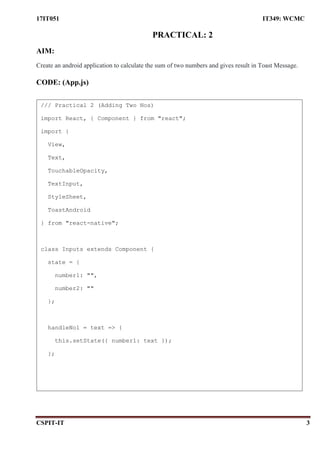
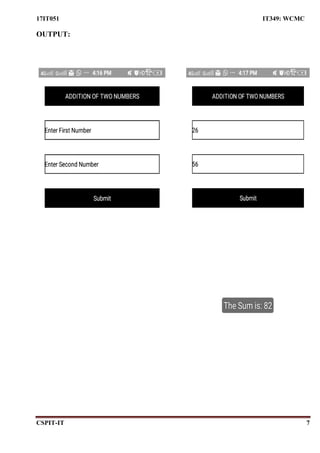
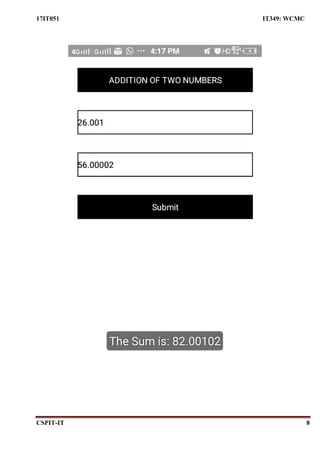
Create an android application to calculate the sum of two numbers and gives result in Toast Message.
CODE: (App.js)
/// Practical 2 (Adding Two Nos)
import React, { Component } from "react";
import {
View,
Text,
TouchableOpacity,
TextInput,
StyleSheet,
ToastAndroid
} from "react-native";
class Inputs extends Component {
state = {
number1: "",
number2: ""
};
handleNo1 = text => {
this.setState({ number1: text });
};
17IT051 IT349: WCMC
CSPIT-IT 4
handleNo2 = text => {
this.setState({ number2: text });
};
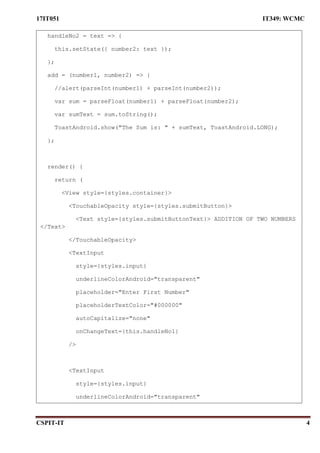
add = (number1, number2) => {
//alert(parseInt(number1) + parseInt(number2));
var sum = parseFloat(number1) + parseFloat(number2);
var sumText = sum.toString();
ToastAndroid.show("The Sum is: " + sumText, ToastAndroid.LONG);
};
render() {
return (
<View style={styles.container}>
<TouchableOpacity style={styles.submitButton}>
<Text style={styles.submitButtonText}> ADDITION OF TWO NUMBERS
</Text>
</TouchableOpacity>
<TextInput
style={styles.input}
underlineColorAndroid="transparent"
placeholder="Enter First Number"
placeholderTextColor="#000000"
autoCapitalize="none"
onChangeText={this.handleNo1}
/>
<TextInput
style={styles.input}
underlineColorAndroid="transparent"
17IT051 IT349: WCMC
CSPIT-IT 5
placeholder="Enter Second Number"
placeholderTextColor="#000000"
autoCapitalize="none"
onChangeText={this.handleNo2}
/>
<TouchableOpacity
style={styles.submitButton}
onPress={() => this.add(this.state.number1,
this.state.number2)}
>
<Text style={styles.submitButtonText}> Submit </Text>
</TouchableOpacity>
</View>
);
}
}
export default Inputs;
const styles = StyleSheet.create({
container: {
paddingTop: 23
},
input: {
margin: 15,
height: 40,
borderColor: "#000000",
borderWidth: 1,
alignItems: "center"
17IT051 IT349: WCMC
CSPIT-IT 6
},
submitButton: {
backgroundColor: "#000000",
padding: 10,
margin: 15,
height: 40,
alignItems: "center"
},
submitButtonText: {
color: "white",
alignItems: "center"
},
textCenter: {
margin: "50%"
}
});
17IT051 IT349: WCMC
CSPIT-IT 7
OUTPUT:
17IT051 IT349: WCMC
CSPIT-IT 8
17IT051 IT349: WCMC
CSPIT-IT 9
PRACTICAL: 3
AIM:
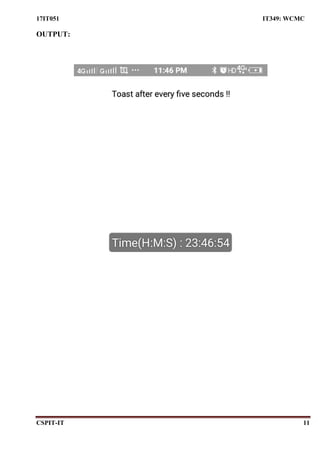
Create an application that will display Toast (Message) on specific interval of time.
CODE: (App.js)
/// Practical 3 (Toast after certain time interval)
import React, { Component } from "react";
import {
View,
Text,
TouchableOpacity,
TextInput,
StyleSheet,
ToastAndroid,
Alert
} from "react-native";
function getTime() {
var hours = new Date().getHours(); //Current Hours
var min = new Date().getMinutes(); //Current Minutes
var sec = new Date().getSeconds(); //Current Seconds
var timeData =
"Time(H:M:S) : " +
hours.toString() +
":" +
min.toString() +
":" +
sec.toString();
ToastAndroid.showWithGravity(
17IT051 IT349: WCMC
CSPIT-IT 10
timeData,
ToastAndroid.SHORT,
ToastAndroid.CENTER
);
}
let timerId = setInterval(() => getTime(), 5000);
class Inputs extends Component {
render() {
return (
<View style={styles.container}>
<Text> Toast after every five seconds !! </Text>
</View>
);
}
}
export default Inputs;
const styles = StyleSheet.create({
container: {
paddingTop: 23,
backgroundColor: "#ffffff",
padding: 10,
margin: 15,
height: 40,
alignItems: "center"
}
});
17IT051 IT349: WCMC
CSPIT-IT 11
OUTPUT:
17IT051 IT349: WCMC
CSPIT-IT 12
PRACTICAL: 4
AIM:
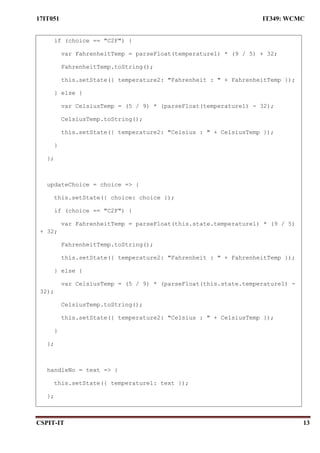
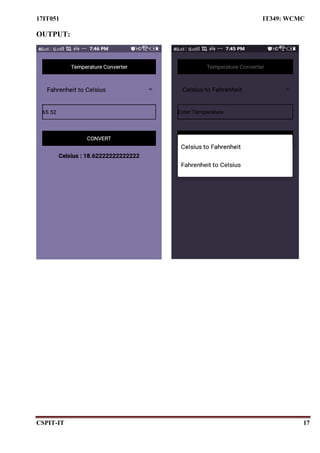
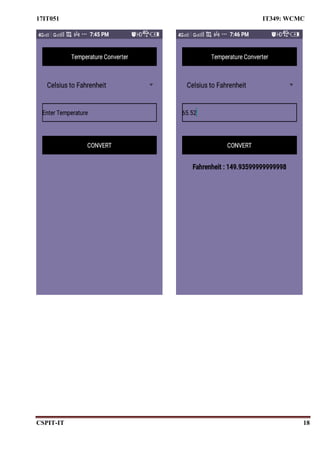
Create a temperature converter Application. (Fahrenheit-Celsius).
CODE: (App.js)
/// Practical 4 (Temperature Converter)
import React, { Component } from "react";
import {
View,
Text,
TouchableOpacity,
TextInput,
StyleSheet,
ToastAndroid,
Picker
} from "react-native";
class Inputs extends Component {
state = {
temperature1: "",
temperature2: "",
choice: "C2F"
};
convert = (
temperature1 = this.state.temperature1,
choice = this.state.choice
) => {
17IT051 IT349: WCMC
CSPIT-IT 13
if (choice == "C2F") {
var FahrenheitTemp = parseFloat(temperature1) * (9 / 5) + 32;
FahrenheitTemp.toString();
this.setState({ temperature2: "Fahrenheit : " + FahrenheitTemp });
} else {
var CelsiusTemp = (5 / 9) * (parseFloat(temperature1) - 32);
CelsiusTemp.toString();
this.setState({ temperature2: "Celsius : " + CelsiusTemp });
}
};
updateChoice = choice => {
this.setState({ choice: choice });
if (choice == "C2F") {
var FahrenheitTemp = parseFloat(this.state.temperature1) * (9 / 5)
+ 32;
FahrenheitTemp.toString();
this.setState({ temperature2: "Fahrenheit : " + FahrenheitTemp });
} else {
var CelsiusTemp = (5 / 9) * (parseFloat(this.state.temperature1) -
32);
CelsiusTemp.toString();
this.setState({ temperature2: "Celsius : " + CelsiusTemp });
}
};
handleNo = text => {
this.setState({ temperature1: text });
};
17IT051 IT349: WCMC
CSPIT-IT 14
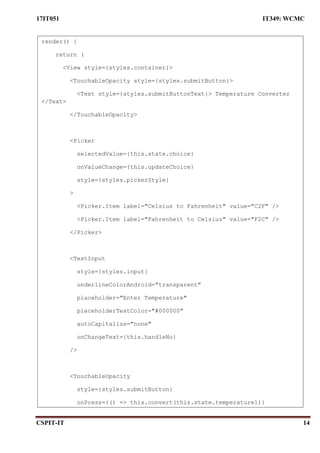
render() {
return (
<View style={styles.container}>
<TouchableOpacity style={styles.submitButton}>
<Text style={styles.submitButtonText}> Temperature Converter
</Text>
</TouchableOpacity>
<Picker
selectedValue={this.state.choice}
onValueChange={this.updateChoice}
style={styles.pickerStyle}
>
<Picker.Item label="Celsius to Fahrenheit" value="C2F" />
<Picker.Item label="Fahrenheit to Celsius" value="F2C" />
</Picker>
<TextInput
style={styles.input}
underlineColorAndroid="transparent"
placeholder="Enter Temperature"
placeholderTextColor="#000000"
autoCapitalize="none"
onChangeText={this.handleNo}
/>
<TouchableOpacity
style={styles.submitButton}
onPress={() => this.convert(this.state.temperature1)}
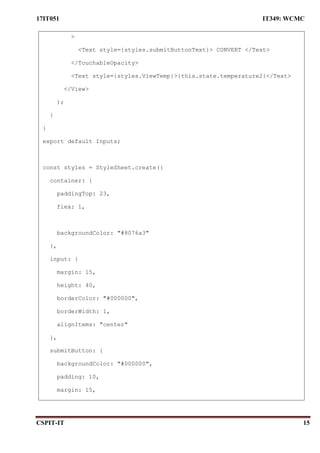
17IT051 IT349: WCMC
CSPIT-IT 15
>
<Text style={styles.submitButtonText}> CONVERT </Text>
</TouchableOpacity>
<Text style={styles.ViewTemp}>{this.state.temperature2}</Text>
</View>
);
}
}
export default Inputs;
const styles = StyleSheet.create({
container: {
paddingTop: 23,
flex: 1,
backgroundColor: "#8076a3"
},
input: {
margin: 15,
height: 40,
borderColor: "#000000",
borderWidth: 1,
alignItems: "center"
},
submitButton: {
backgroundColor: "#000000",
padding: 10,
margin: 15,
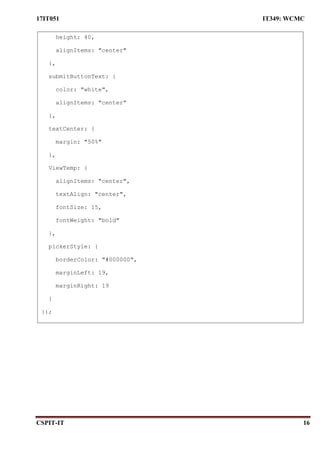
17IT051 IT349: WCMC
CSPIT-IT 16
height: 40,
alignItems: "center"
},
submitButtonText: {
color: "white",
alignItems: "center"
},
textCenter: {
margin: "50%"
},
ViewTemp: {
alignItems: "center",
textAlign: "center",
fontSize: 15,
fontWeight: "bold"
},
pickerStyle: {
borderColor: "#000000",
marginLeft: 19,
marginRight: 19
}
});
17IT051 IT349: WCMC
CSPIT-IT 17
OUTPUT:
17IT051 IT349: WCMC
CSPIT-IT 18
17IT051 IT349: WCMC
CSPIT-IT 19
PRACTICAL: 5
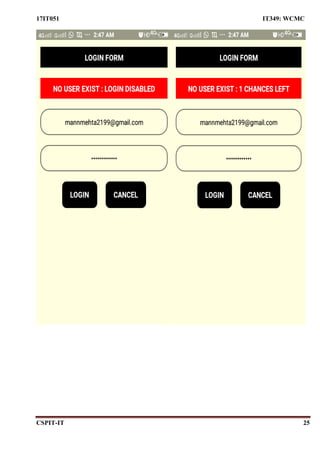
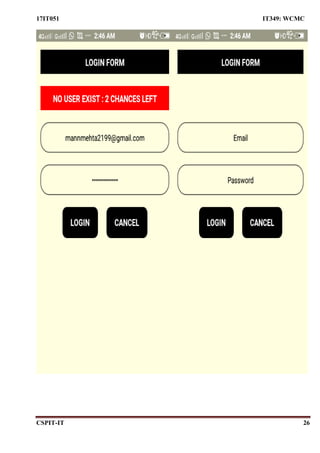
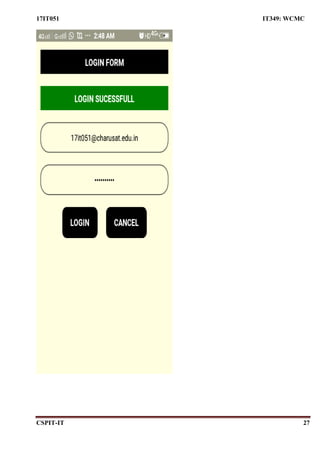
AIM:
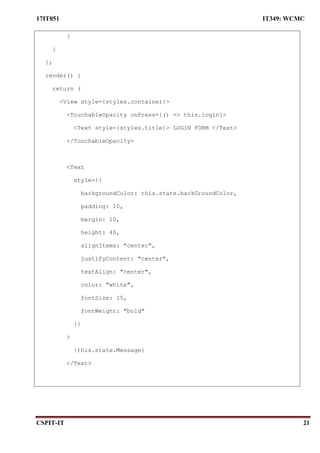
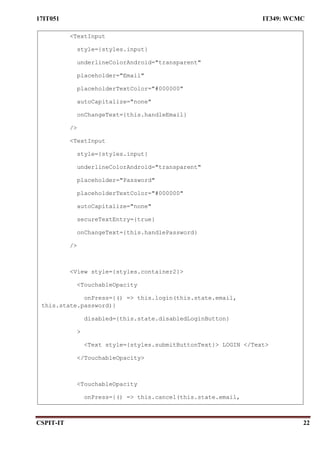
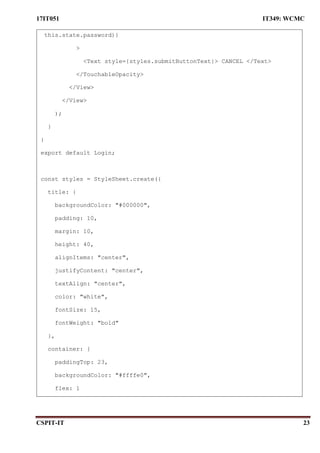
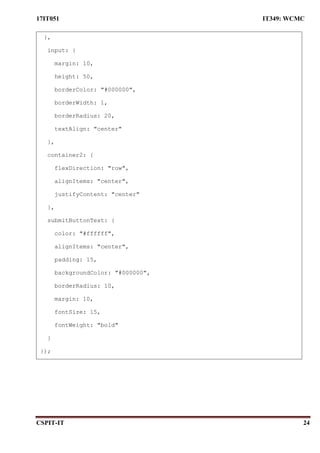
Create a login application with following features:
 Successful login message in TextView with green background if username & password is
correct.
 Failure message in TextView with Red background if username or password is incorrect.
 Disable login button after three wrong login attempts.
 Close application if user selects cancel button.
CODE: (App.js)
import React, { Component } from "react";
import {
StyleSheet,
Text,
View,
TextInput,
TouchableOpacity,
BackHandler
} from "react-native";
class Login extends Component {
state = {
email: "",
password: "",
loginFailCount: 0,
disabledLoginButton: false,
Message: "",
backGroundColor: ""
};
17IT051 IT349: WCMC
CSPIT-IT 20
handleEmail = text => {
this.setState({ email: text });
};
handlePassword = text => {
this.setState({ password: text });
};
cancel = (email, pass) => {
BackHandler.exitApp();
};
login = (email, pass) => {
if (email == "17it051@charusat.edu.in" && pass == "1234567890") {
this.setState({ loginFailCount: 0 });
this.setState({ Message: "LOGIN SUCESSFULL" });
this.setState({ backGroundColor: "green" });
} else {
this.setState({ backGroundColor: "red" });
if (this.state.loginFailCount == 2) {
this.setState({ disabledLoginButton: true });
this.state.loginFailCount == 0;
this.setState({ Message: "NO USER EXIST : LOGIN DISABLED" });
} else {
this.setState({ loginFailCount: this.state.loginFailCount + 1
});
var temp = this.state.loginFailCount;
var leftChances = 3 - temp - 1;
leftChances.toString();
this.setState({
Message: "NO USER EXIST : " + leftChances + " CHANCES LEFT"
});
17IT051 IT349: WCMC
CSPIT-IT 21
}
}
};
render() {
return (
<View style={styles.container}>
<TouchableOpacity onPress={() => this.login}>
<Text style={styles.title}> LOGIN FORM </Text>
</TouchableOpacity>
<Text
style={{
backgroundColor: this.state.backGroundColor,
padding: 10,
margin: 10,
height: 40,
alignItems: "center",
justifyContent: "center",
textAlign: "center",
color: "white",
fontSize: 15,
fontWeight: "bold"
}}
>
{this.state.Message}
</Text>
17IT051 IT349: WCMC
CSPIT-IT 22
<TextInput
style={styles.input}
underlineColorAndroid="transparent"
placeholder="Email"
placeholderTextColor="#000000"
autoCapitalize="none"
onChangeText={this.handleEmail}
/>
<TextInput
style={styles.input}
underlineColorAndroid="transparent"
placeholder="Password"
placeholderTextColor="#000000"
autoCapitalize="none"
secureTextEntry={true}
onChangeText={this.handlePassword}
/>
<View style={styles.container2}>
<TouchableOpacity
onPress={() => this.login(this.state.email,
this.state.password)}
disabled={this.state.disabledLoginButton}
>
<Text style={styles.submitButtonText}> LOGIN </Text>
</TouchableOpacity>
<TouchableOpacity
onPress={() => this.cancel(this.state.email,
this.state.password)}
17IT051 IT349: WCMC
CSPIT-IT 23
this.state.password)}
>
<Text style={styles.submitButtonText}> CANCEL </Text>
</TouchableOpacity>
</View>
</View>
);
}
}
export default Login;
const styles = StyleSheet.create({
title: {
backgroundColor: "#000000",
padding: 10,
margin: 10,
height: 40,
alignItems: "center",
justifyContent: "center",
textAlign: "center",
color: "white",
fontSize: 15,
fontWeight: "bold"
},
container: {
paddingTop: 23,
backgroundColor: "#ffffe0",
flex: 1
17IT051 IT349: WCMC
CSPIT-IT 24
},
input: {
margin: 10,
height: 50,
borderColor: "#000000",
borderWidth: 1,
borderRadius: 20,
textAlign: "center"
},
container2: {
flexDirection: "row",
alignItems: "center",
justifyContent: "center"
},
submitButtonText: {
color: "#ffffff",
alignItems: "center",
padding: 15,
backgroundColor: "#000000",
borderRadius: 10,
margin: 10,
fontSize: 15,
fontWeight: "bold"
}
});
17IT051 IT349: WCMC
CSPIT-IT 25
17IT051 IT349: WCMC
CSPIT-IT 26
17IT051 IT349: WCMC
CSPIT-IT 27
17IT051 IT349 : WCMC
CSPIT-IT 28
PRACTICAL: 6
AIM:
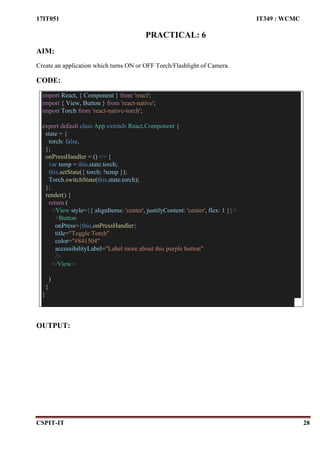
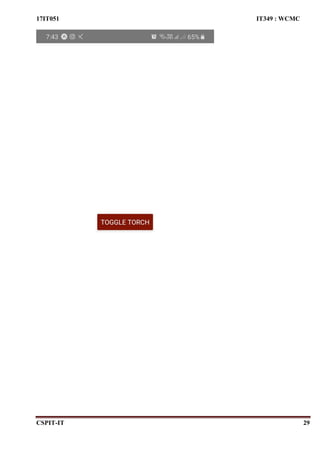
Create an application which turns ON or OFF Torch/Flashlight of Camera.
CODE:
import React, { Component } from 'react';
import { View, Button } from 'react-native';
import Torch from 'react-native-torch';
export default class App extends React.Component {
state = {
torch: false,
};
onPressHandler = () => {
var temp = this.state.torch;
this.setState({ torch: !temp });
Torch.switchState(this.state.torch);
};
render() {
return (
<View style={{ alignItems: 'center', justifyContent: 'center', flex: 1 }}>
<Button
onPress={this.onPressHandler}
title="Toggle Torch"
color="#841504"
accessibilityLabel="Label more about this purple button"
/>
</View>
)
}
}
OUTPUT:
17IT051 IT349 : WCMC
CSPIT-IT 29
17IT051 IT349 : WCMC
CSPIT-IT 30
PRACTICAL: 7
AIM:
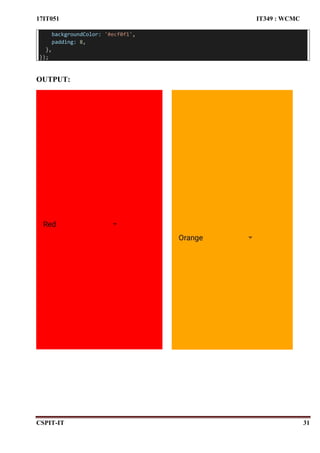
Create an application that will change color of the screen, based on selected options from the menu.
CODE:
import * as React from 'react';
import {Picker,Text, View, StyleSheet } from 'react-native';
import Constants from 'expo-constants';
// You can import from local files
import AssetExample from './components/AssetExample';
// or any pure javascript modules available in npm
import { Card } from 'react-native-paper';
export default class App extends React.Component {
constructor(Props){
super(Props);
this.state={
backgroundColor:'white',
}
}
render() {
return (
<View style={[styles.container,{backgroundColor:this.state.backgroundColor}]}>
<Picker
selectedValue={this.state.backgroundColor}
style={{height: 50, width: '50%'}}
onValueChange={(itemValue, itemIndex) =>
this.setState({backgroundColor: itemValue})
}>
<Picker.Item label="white" value="white" />
<Picker.Item label="Orange" value="orange" />
<Picker.Item label="Blue" value="blue" />
<Picker.Item label="Red" value="red" />
</Picker>
</View>
);
}
}
const styles = StyleSheet.create({
container: {
flex: 1,
justifyContent: 'center',
paddingTop: Constants.statusBarHeight,
17IT051 IT349 : WCMC
CSPIT-IT 31
backgroundColor: '#ecf0f1',
padding: 8,
},
});
OUTPUT:
17IT051 IT349 : WCMC
CSPIT-IT 32
PRACTICAL – 8
AIM:
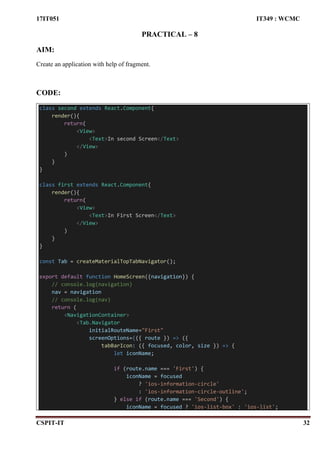
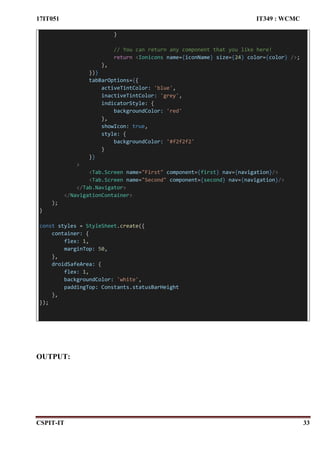
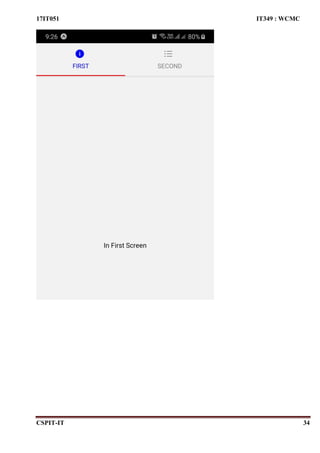
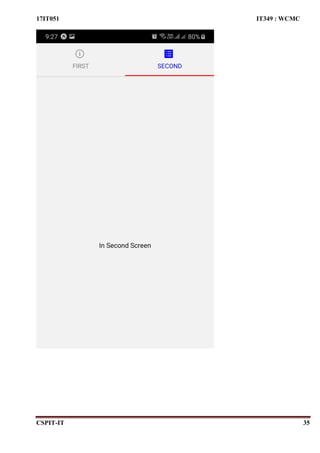
Create an application with help of fragment.
CODE:
class second extends React.Component{
render(){
return(
<View>
<Text>In second Screen</Text>
</View>
)
}
}
class first extends React.Component{
render(){
return(
<View>
<Text>In First Screen</Text>
</View>
)
}
}
const Tab = createMaterialTopTabNavigator();
export default function HomeScreen({navigation}) {
// console.log(navigation)
nav = navigation
// console.log(nav)
return (
<NavigationContainer>
<Tab.Navigator
initialRouteName="First"
screenOptions={({ route }) => ({
tabBarIcon: ({ focused, color, size }) => {
let iconName;
if (route.name === 'First') {
iconName = focused
? 'ios-information-circle'
: 'ios-information-circle-outline';
} else if (route.name === 'Second') {
iconName = focused ? 'ios-list-box' : 'ios-list';
17IT051 IT349 : WCMC
CSPIT-IT 33
}
// You can return any component that you like here!
return <Ionicons name={iconName} size={24} color={color} />;
},
})}
tabBarOptions={{
activeTintColor: 'blue',
inactiveTintColor: 'grey',
indicatorStyle: {
backgroundColor: 'red'
},
showIcon: true,
style: {
backgroundColor: '#f2f2f2'
}
}}
>
<Tab.Screen name="First" component={first} nav={navigation}/>
<Tab.Screen name="Second" component={second} nav={navigation}/>
</Tab.Navigator>
</NavigationContainer>
);
}
const styles = StyleSheet.create({
container: {
flex: 1,
marginTop: 50,
},
droidSafeArea: {
flex: 1,
backgroundColor: 'white',
paddingTop: Constants.statusBarHeight
},
});
OUTPUT:
17IT051 IT349 : WCMC
CSPIT-IT 34
17IT051 IT349 : WCMC
CSPIT-IT 35
17IT051 IT349 : WCMC
CSPIT-IT 36
PRACTICAL – 9
AIM:
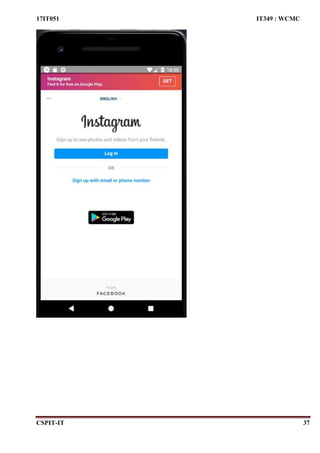
Create an application with help of web view
CODE:
import * as React from 'react';
import { WebView } from 'react-native-webview';
export default class App extends React.Component {
render() {
return <WebView source={{ uri: 'https://Instagram.com' }} style={{ marginTop: 20 }
} />;
}
}
OUTPUT:
17IT051 IT349 : WCMC
CSPIT-IT 37
17IT051 IT349 : WCMC
CSPIT-IT 38
PRACTICAL – 10
AIM:
Create an application with help of database.
CODE:
import React, { Component } from 'react';
import { View } from 'react-native';
import MultiSelect from 'react-native-multiple-select';
import {Text, StyleSheet} from 'react-native';
import { TextInput, TouchableOpacity } from 'react-native-gesture-handler';
import fire from 'firebase'
var firebaseConfig = {
apiKey: "AIzaSyCSNJtalNlaVLmCF13xO37x7NcQbv4UX1Q",
authDomain: "chat-application-1ac4e.firebaseapp.com",
databaseURL: "https://chat-application-1ac4e.firebaseio.com",
projectId: "chat-application-1ac4e",
storageBucket: "chat-application-1ac4e.appspot.com",
messagingSenderId: "241112021009",
appId: "1:241112021009:web:509edee3af6f73aec619b0",
measurementId: "G-2784SJG8QR"
};
// Initialize Firebase
if(!fire.apps.length){
fire.initializeApp(firebaseConfig);
}
export default class Database extends React.Component {
constructor() {
super()
}
state={
name:'',
details:''
}
submitData = () => {
fire.database().ref('data/')
.update({
name:this.state.name,
details:this.state.details
});
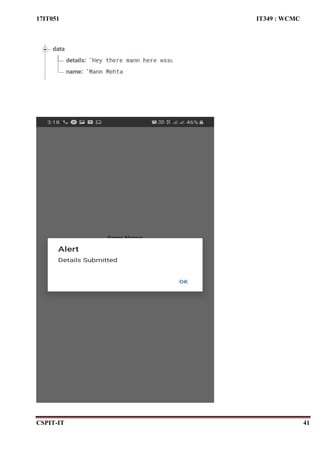
alert('Details Submitted')
}
17IT051 IT349 : WCMC
CSPIT-IT 39
render() {
return (
<View style={{flex:1, justifyContent:'center',alignItems:'center'}}>
<Text>Enter Name</Text>
<TextInput
style={{ borderWidth:1}}
placeholder="
"
onChangeText={name => this.setState({name})}
/>
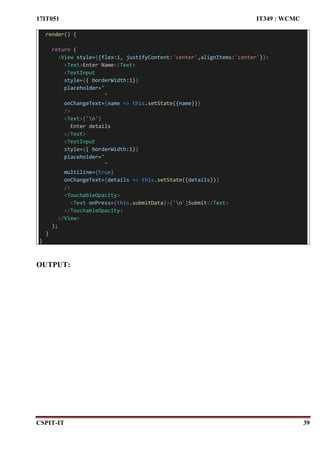
<Text>{'n'}
Enter details
</Text>
<TextInput
style={{ borderWidth:1}}
placeholder="
"
multiline={true}
onChangeText={details => this.setState({details})}
/>
<TouchableOpacity>
<Text onPress={this.submitData}>{'n'}Submit</Text>
</TouchableOpacity>
</View>
);
}
}
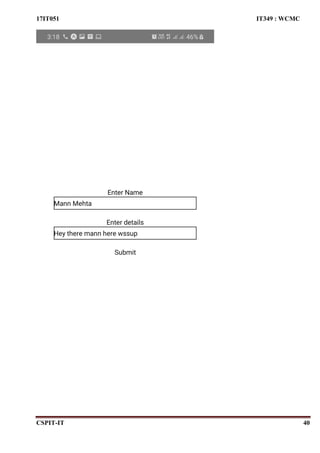
OUTPUT:
17IT051 IT349 : WCMC
CSPIT-IT 40
17IT051 IT349 : WCMC
CSPIT-IT 41
17IT051 IT349 : WCMC
CSPIT-IT 42
PRACTICAL -11
AIM:
Creating an application that provides Single Sign-on(SSO) with Chrome Custom Tabs via the AppAuth
library, and optionally push managed configuration to provide a user login.
CODE:
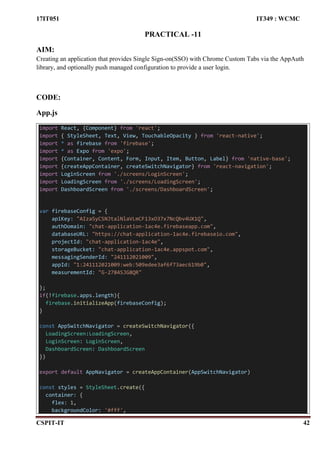
App.js
import React, {Component} from 'react';
import { StyleSheet, Text, View, TouchableOpacity } from 'react-native';
import * as firebase from 'firebase';
import * as Expo from 'expo';
import {Container, Content, Form, Input, Item, Button, Label} from 'native-base';
import {createAppContainer, createSwitchNavigator} from 'react-navigation';
import LoginScreen from './screens/LoginScreen';
import LoadingScreen from './screens/LoadingScreen';
import DashboardScreen from './screens/DashboardScreen';
var firebaseConfig = {
apiKey: "AIzaSyCSNJtalNlaVLmCF13xO37x7NcQbv4UX1Q",
authDomain: "chat-application-1ac4e.firebaseapp.com",
databaseURL: "https://chat-application-1ac4e.firebaseio.com",
projectId: "chat-application-1ac4e",
storageBucket: "chat-application-1ac4e.appspot.com",
messagingSenderId: "241112021009",
appId: "1:241112021009:web:509edee3af6f73aec619b0",
measurementId: "G-2784SJG8QR"
};
if(!firebase.apps.length){
firebase.initializeApp(firebaseConfig);
}
const AppSwitchNavigator = createSwitchNavigator({
LoadingScreen:LoadingScreen,
LoginScreen: LoginScreen,
DashboardScreen: DashboardScreen
})
export default AppNavigator = createAppContainer(AppSwitchNavigator)
const styles = StyleSheet.create({
container: {
flex: 1,
backgroundColor: '#fff',
17IT051 IT349 : WCMC
CSPIT-IT 43
justifyContent: 'center',
padding: 10,
},
});
LoadingScreen.js
import React, {Component} from 'react';
import {View, Text, StyleSheet, ActivityIndicator} from 'react-native';
import firebase from 'firebase';
class LoadingScreen extends React.Component {
componentDidMount(){
this.checkIfLoggedIn();
}
checkIfLoggedIn = () => {
firebase.auth().onAuthStateChanged(function(user){
if(user){
this.props.navigation.navigate("DashboardScreen");
}
else{
this.props.navigation.navigate("LoginScreen");
}
}.bind(this)
);
};
render(){
return(
<View style={styles.container0}>
<ActivityIndicator size="large"/>
</View>
);
}
}
export default LoadingScreen;
const styles = StyleSheet.create({
container0: {
flex: 1,
backgroundColor: '#fff',
justifyContent: 'center',
padding: 10,
},
17IT051 IT349 : WCMC
CSPIT-IT 44
});
LoginScreen.js
import React, { Component } from 'react';
import { View, Text, StyleSheet, Button,ActivityIndicator } from 'react-native';
import * as Google from 'expo-google-app-auth';
import firebase from 'firebase';
import { YellowBox } from 'react-native';
import _ from 'lodash';
class LoginScreen extends React.Component {
constructor() {
super();
YellowBox.ignoreWarnings(['Setting a timer']);
const _console = _.clone(console);
console.warn = message => {
if (message.indexOf('Setting a timer') <= -1) {
_console.warn(message);
}
};
}
isUserEqual = (googleUser, firebaseUser) => {
if (firebaseUser) {
var providerData = firebaseUser.providerData;
for (var i = 0; i < providerData.length; i++) {
if (providerData[i].providerId === firebase.auth.GoogleAuthProvider.PROVIDER_I
D &&
providerData[i].uid === googleUser.getBasicProfile().getId()) {
// We don't need to reauth the Firebase connection.
return true;
}
}
}
return false;
}
onSignIn = googleUser => {
// console.log('Google Auth Response', googleUser);
// We need to register an Observer on Firebase Auth to make sure auth is initializ
ed.
var unsubscribe = firebase.auth().onAuthStateChanged(function (firebaseUser) {
unsubscribe();
// Check if we are already signed-in Firebase with the correct user.
if (!this.isUserEqual(googleUser, firebaseUser)) {
// Build Firebase credential with the Google ID token.
var credential = firebase.auth.GoogleAuthProvider.credential(
googleUser.idToken,
17IT051 IT349 : WCMC
CSPIT-IT 45
googleUser.accessToken
);
// Sign in with credential from the Google user.
firebase.auth().signInWithCredential(credential).then(function (result) {
// console.log('user signed in');
if (result.additionalUserInfo.isNewUser) {
firebase.database().ref('/users/' + result.user.uid)
.set({
gmail: result.user.email,
profile_picture: result.additionalUserInfo.profile.picture,
locale: result.additionalUserInfo.profile.locale,
first_name: result.additionalUserInfo.profile.given_name,
last_name: result.additionalUserInfo.profile.family_name,
created_at: Date.now()
})
.then(function (snapshot) {
});
} else {
firebase.database().ref('/users/' + result.user.uid).update({
last_logged_in: Date.now()
})
}
})
.catch(function (error) {
// Handle Errors here.
var errorCode = error.code;
var errorMessage = error.message;
// The email of the user's account used.
var email = error.email;
// The firebase.auth.AuthCredential type that was used.
var credential = error.credential;
// ...
});
} else {
console.log('User already signed-in Firebase.');
}
}.bind(this));
}
signInWithGoogleAsync = async () => {
try {
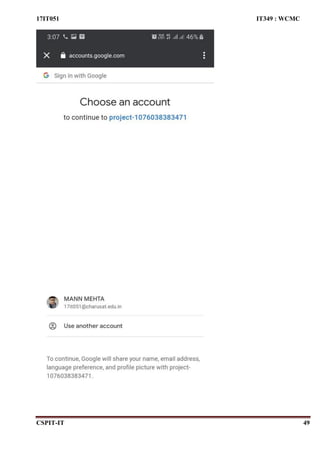
const result = await Google.logInAsync({
// behavior: 'web',
androidClientId: "1076038383471-
4liei8f8fq7br7a67oao69q66tn6bn5v.apps.googleusercontent.com",
// iosClientId: YOUR_CLIENT_ID_HERE,
scopes: ['profile', 'email'],
});
17IT051 IT349 : WCMC
CSPIT-IT 46
if (result.type === 'success') {
const exp = RegExp(/^([a-zA-Z0-9]{0,})@charusat.edu.in$/g);
var ma = result.user.email;
if (!exp.test(ma)) {
alert("please enter charusat mail id")
this.props.navigation.navigate("LoginScreen");
} else {
this.onSignIn(result);
return result.accessToken;
}
} else {
return { cancelled: true };
}
} catch (e) {
return { error: true };
}
}
render() {
return (
<View style={styles.container1}>
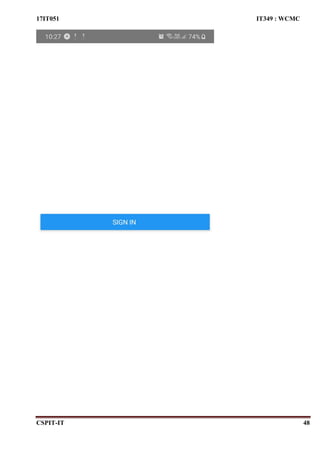
<Button
title="Sign In "
onPress={() => this.signInWithGoogleAsync()}
/>
</View>
);
}
}
export default LoginScreen;
const styles = StyleSheet.create({
container1: {
flex: 1,
backgroundColor: '#fff',
justifyContent: 'center',
padding: 10,
},
});
DashboardScreen.js
import React, {Component} from 'react';
import {View, Text, StyleSheet, Button} from 'react-native';
import firebase from 'firebase';
17IT051 IT349 : WCMC
CSPIT-IT 47
class DashboardScreen extends React.Component {
render(){
return(
<View style={styles.container2}>
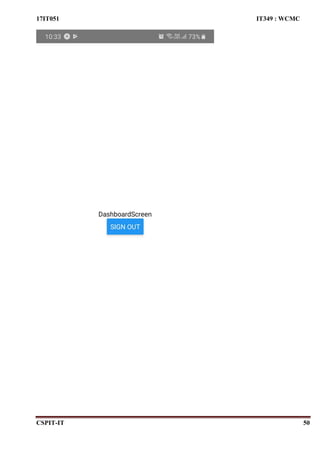
<Text>DashboardScreen</Text>
<Button
title="Sign Out"
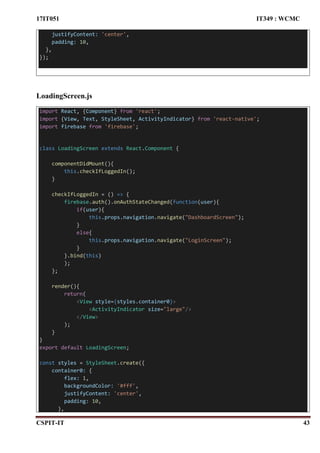
onPress={() => firebase.auth().signOut()}
/>
</View>
);
}
}
export default DashboardScreen;
const styles = StyleSheet.create({
container2: {
flex: 1,
alignItems: 'center',
justifyContent: 'center',
},
});
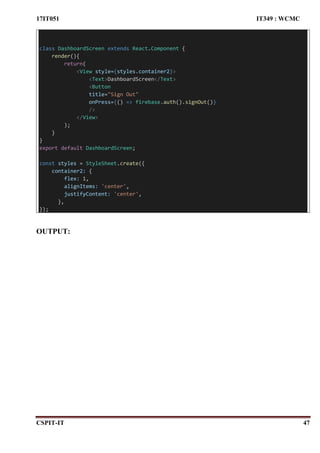
OUTPUT:
17IT051 IT349 : WCMC
CSPIT-IT 48
17IT051 IT349 : WCMC
CSPIT-IT 49
17IT051 IT349 : WCMC
CSPIT-IT 50
17IT051 IT349 : WCMC
CSPIT-IT 51
PRACTICAL – 12
AIM:
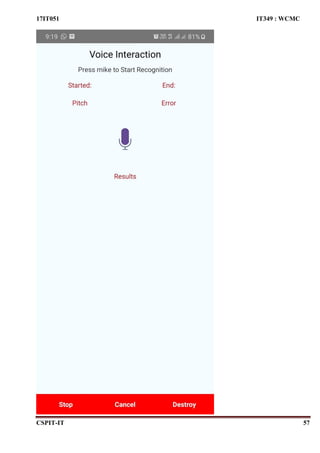
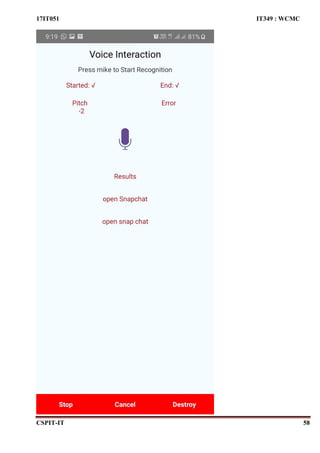
Create an application to handle support voice interaction.
CODE:
import React, { Component } from 'react';
import { StyleSheet, Text, Image, View, SafeAreaView, TouchableHighlight, ScrollView,
Linking } from 'react-native';
import Voice from '@react-native-community/voice';
export default class App extends React.Component {
state = {
pitch: '',
error: '',
end: '',
started: '',
results: [],
partialResults: [],
}
constructor(props) {
super(props);
Voice.onSpeechStart = this.onSpeechStart;
Voice.onSpeechEnd = this.onSpeechEnd;
Voice.onSpeechError = this.onSpeechError;
Voice.onSpeechResults = this.onSpeechResults;
Voice.onSpeechPartialResults = this.onSpeechPartialResults;
Voice.onSpeechVolumeChanged = this.onSpeechVolumeChanged;
}
componentWillUnmount() {
Voice.destroy().then(Voice.removeAllListeners);
}
onSpeechStart = e => {
this.setState({
started: '√',
});
};
onSpeechEnd = e => {
this.setState({
end: '√',
});
17IT051 IT349 : WCMC
CSPIT-IT 52
};
onSpeechError = e => {
console.log('onSpeechError: ', e);
this.setState({
error: JSON.stringify(e.error),
});
};
onSpeechResults = e => {
this.setState({
results: e.value,
});
for (let i=0;i<this.state.results.length;i++){
if(this.state.results[i].toLowerCase() == 'open whatsapp'){
Linking.openURL('whatsapp://chat');
}
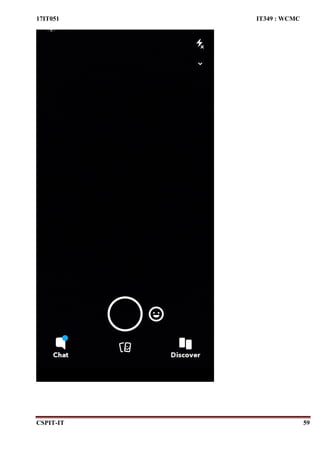
if(this.state.results[i].toLowerCase() == 'open snapchat'){
Linking.openURL('snapchat://status');
}
if(this.state.results[i].toLowerCase() == 'open facebook'){
Linking.openURL('facebook://profile');
}
}
};
onSpeechPartialResults = e => {
this.setState({
partialResults: e.value,
});
};
onSpeechVolumeChanged = e => {
this.setState({
pitch: e.value,
});
};
_startRecognizing = async () => {
this.setState({
pitch: '',
error: '',
started: '',
results: [],
partialResults: [],
end: '',
});
try {
await Voice.start('en-US');
17IT051 IT349 : WCMC
CSPIT-IT 53
} catch (e) {
console.error(e);
}
};
_stopRecognizing = async () => {
try {
await Voice.stop();
} catch (e) {
console.error(e);
}
};
_cancelRecognizing = async () => {
try {
await Voice.cancel();
} catch (e) {
console.error(e);
}
};
_destroyRecognizer = async () => {
try {
await Voice.destroy();
} catch (e) {
console.error(e);
}
this.setState({
pitch: '',
error: '',
started: '',
results: [],
partialResults: [],
end: '',
});
};
render() {
return (
<SafeAreaView style={{ flex: 1 }}>
<View style={styles.container}>
<Text style={styles.welcome}>
Voice Interaction
</Text>
<Text style={styles.instructions}>
Press mike to Start Recognition
</Text>
<View
style={{
flexDirection: 'row',
17IT051 IT349 : WCMC
CSPIT-IT 54
justifyContent: 'space-between',
paddingVertical: 10,
}}
>
<Text
style={{
flex: 1,
textAlign: 'center',
color: '#B0171F',
}}
>{`Started: ${this.state.started}`}</Text>
<Text
style={{
flex: 1,
textAlign: 'center',
color: '#B0171F',
}}
>
{`End: ${this.state.end}`}
</Text>
</View>
<View
style={{
flexDirection: 'row',
justifyContent: 'space-between',
paddingVertical: 10,
}}
>
<Text
style={{
flex: 1,
textAlign: 'center',
color: '#B0171F',
}}>
{`Pitch n ${this.state.pitch}`}
</Text>
<Text
style={{
flex: 1,
textAlign: 'center',
color: '#B0171F',
}}
>
{`Error n ${this.state.error}`}
</Text>
</View>
<TouchableHighlight
onPress={this._startRecognizing}
style={{ marginVertical: 20 }}>
<Image
17IT051 IT349 : WCMC
CSPIT-IT 55
style={styles.button}
source={{
uri:
'https://raw.githubusercontent.com/AboutReact/sampleresource/master/
microphone.png',
}}
/>
</TouchableHighlight>
<Text
style={styles.stat}
>Results</Text>
<ScrollView style={{ marginBottom: 42 }}>
{this.state.results.map((result, index) => {
return (
<Text key={`result-${index}`} style={styles.stat}>{result}</Text>
);
})}
</ScrollView>
<View
style={{
flexDirection: 'row',
alignItems: 'space-between',
position: 'absolute',
bottom: 0,
}}
>
<TouchableHighlight
onPress={this._stopRecognizing}
style={{ flex: 1, backgroundColor: 'red' }}>
<Text style={styles.action}>Stop</Text>
</TouchableHighlight>
<TouchableHighlight
onPress={this._cancelRecognizing}
style={{ flex: 1, backgroundColor: 'red' }}>
<Text style={styles.action}>Cancel</Text>
</TouchableHighlight>
<TouchableHighlight
onPress={this._destroyRecognizer}
style={{ flex: 1, backgroundColor: 'red' }}
>
<Text style={styles.action}>Destroy</Text>
</TouchableHighlight>
</View>
</View>
</SafeAreaView>
);
}
}
17IT051 IT349 : WCMC
CSPIT-IT 56
const styles = StyleSheet.create({
button: {
width: 50,
height: 50,
},
container: {
flex: 1,
flexDirection: 'column',
alignItems: 'center',
backgroundColor: '#F5FCFF',
},
welcome: {
fontSize: 20,
textAlign: 'center',
margin: 10,
},
action: {
width: '100%',
textAlign: 'center',
color: 'white',
paddingVertical: 8,
marginVertical: 5,
fontWeight: 'bold',
},
instructions: {
textAlign: 'center',
color: '#333333',
marginBottom: 5,
},
stat: {
textAlign: 'center',
color: '#B0171F',
marginBottom: 1,
marginTop: 30,
},
});
OUTPUT:
17IT051 IT349 : WCMC
CSPIT-IT 57
17IT051 IT349 : WCMC
CSPIT-IT 58
17IT051 IT349 : WCMC
CSPIT-IT 59
17IT051 IT349 : WCMC
CSPIT-IT 60
PRACTICAL – 13
AIM:
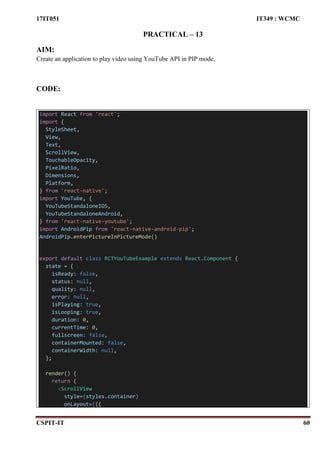
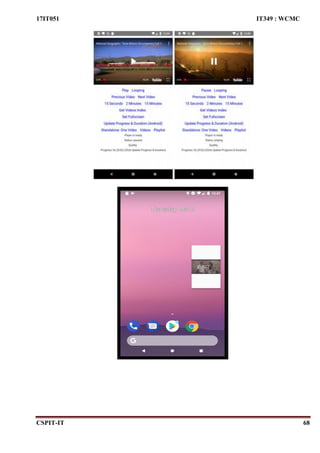
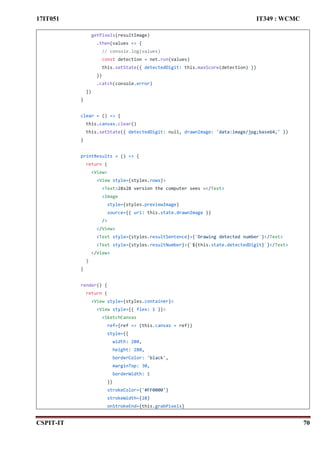
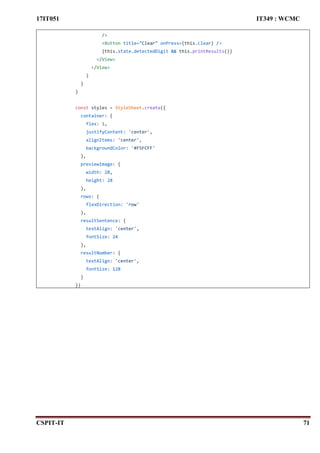
Create an application to play video using YouTube API in PIP mode.
CODE:
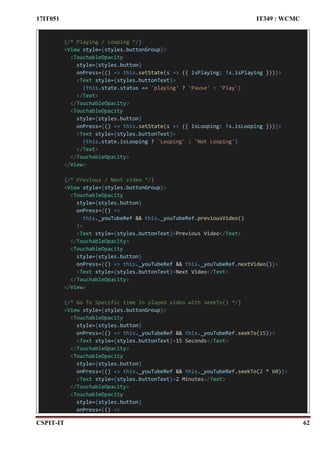
import React from 'react';
import {
StyleSheet,
View,
Text,
ScrollView,
TouchableOpacity,
PixelRatio,
Dimensions,
Platform,
} from 'react-native';
import YouTube, {
YouTubeStandaloneIOS,
YouTubeStandaloneAndroid,
} from 'react-native-youtube';
import AndroidPip from 'react-native-android-pip';
AndroidPip.enterPictureInPictureMode()
export default class RCTYouTubeExample extends React.Component {
state = {
isReady: false,
status: null,
quality: null,
error: null,
isPlaying: true,
isLooping: true,
duration: 0,
currentTime: 0,
fullscreen: false,
containerMounted: false,
containerWidth: null,
};
render() {
return (
<ScrollView
style={styles.container}
onLayout={({
17IT051 IT349 : WCMC
CSPIT-IT 61
nativeEvent: {
layout: { width },
},
}) => {
if (!this.state.containerMounted)
this.setState({ containerMounted: true });
if (this.state.containerWidth !== width)
this.setState({ containerWidth: width });
}}>
{this.state.containerMounted && (
<YouTube
ref={component => {
this._youTubeRef = component;
}}
// You must have an API Key for the player to load in Android
apiKey="AIzaSyAfIdHlIWioKnxWn8P4mYtMUVAoSD72PNE"
// Un-comment one of videoId / videoIds / playlist.
// You can also edit these props while Hot-
Loading in development mode to see how
// it affects the loaded native module
videoId="ncw4ISEU5ik"
// videoIds={['HcXNPI-IPPM', 'XXlZfc1TrD0', 'czcjU1w-c6k', 'uMK0prafzw0']}
// playlistId="PLF797E961509B4EB5"
play={this.state.isPlaying}
loop={this.state.isLooping}
fullscreen={this.state.fullscreen}
controls={1}
style={[
{
height: PixelRatio.roundToNearestPixel(
this.state.containerWidth / (16 / 9)
),
},
styles.player,
]}
onError={e => this.setState({ error: e.error })}
onReady={e => this.setState({ isReady: true })}
onChangeState={e => this.setState({ status: e.state })}
onChangeQuality={e => this.setState({ quality: e.quality })}
onChangeFullscreen={e =>
this.setState({ fullscreen: e.isFullscreen })
}
onProgress={e =>
this.setState({
duration: e.duration,
currentTime: e.currentTime,
})
}
/>
)}
17IT051 IT349 : WCMC
CSPIT-IT 62
{/* Playing / Looping */}
<View style={styles.buttonGroup}>
<TouchableOpacity
style={styles.button}
onPress={() => this.setState(s => ({ isPlaying: !s.isPlaying }))}>
<Text style={styles.buttonText}>
{this.state.status == 'playing' ? 'Pause' : 'Play'}
</Text>
</TouchableOpacity>
<TouchableOpacity
style={styles.button}
onPress={() => this.setState(s => ({ isLooping: !s.isLooping }))}>
<Text style={styles.buttonText}>
{this.state.isLooping ? 'Looping' : 'Not Looping'}
</Text>
</TouchableOpacity>
</View>
{/* Previous / Next video */}
<View style={styles.buttonGroup}>
<TouchableOpacity
style={styles.button}
onPress={() =>
this._youTubeRef && this._youTubeRef.previousVideo()
}>
<Text style={styles.buttonText}>Previous Video</Text>
</TouchableOpacity>
<TouchableOpacity
style={styles.button}
onPress={() => this._youTubeRef && this._youTubeRef.nextVideo()}>
<Text style={styles.buttonText}>Next Video</Text>
</TouchableOpacity>
</View>
{/* Go To Specific time in played video with seekTo() */}
<View style={styles.buttonGroup}>
<TouchableOpacity
style={styles.button}
onPress={() => this._youTubeRef && this._youTubeRef.seekTo(15)}>
<Text style={styles.buttonText}>15 Seconds</Text>
</TouchableOpacity>
<TouchableOpacity
style={styles.button}
onPress={() => this._youTubeRef && this._youTubeRef.seekTo(2 * 60)}>
<Text style={styles.buttonText}>2 Minutes</Text>
</TouchableOpacity>
<TouchableOpacity
style={styles.button}
onPress={() =>
17IT051 IT349 : WCMC
CSPIT-IT 63
this._youTubeRef && this._youTubeRef.seekTo(15 * 60)
}>
<Text style={styles.buttonText}>15 Minutes</Text>
</TouchableOpacity>
</View>
{/* Play specific video in a videoIds array by index */}
{this._youTubeRef &&
this._youTubeRef.props.videoIds &&
Array.isArray(this._youTubeRef.props.videoIds) && (
<View style={styles.buttonGroup}>
{this._youTubeRef.props.videoIds.map((videoId, i) => (
<TouchableOpacity
key={i}
style={styles.button}
onPress={() =>
this._youTubeRef && this._youTubeRef.playVideoAt(i)
}>
<Text
style={[
styles.buttonText,
styles.buttonTextSmall,
]}>{`Video ${i}`}</Text>
</TouchableOpacity>
))}
</View>
)}
{/* Get current played video's position index when playing videoIds*/}
<View style={styles.buttonGroup}>
<TouchableOpacity
style={styles.button}
onPress={() =>
this._youTubeRef &&
this._youTubeRef
.videosIndex()
.then(index => this.setState({ videosIndex: index }))
.catch(errorMessage => this.setState({ error: errorMessage }))
}>
<Text style={styles.buttonText}>
Get Videos Index: {this.state.videosIndex}
</Text>
</TouchableOpacity>
</View>
{/* Fullscreen */}
{!this.state.fullscreen && (
<View style={styles.buttonGroup}>
<TouchableOpacity
style={styles.button}
17IT051 IT349 : WCMC
CSPIT-IT 64
onPress={() => this.setState({ fullscreen: true })}>
<Text style={styles.buttonText}>Set Fullscreen</Text>
</TouchableOpacity>
</View>
)}
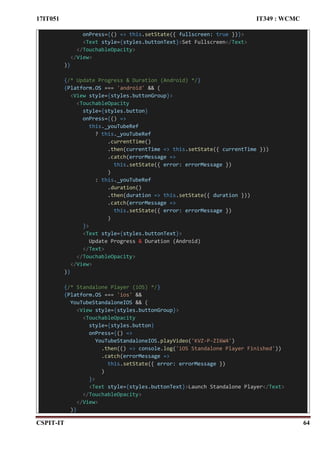
{/* Update Progress & Duration (Android) */}
{Platform.OS === 'android' && (
<View style={styles.buttonGroup}>
<TouchableOpacity
style={styles.button}
onPress={() =>
this._youTubeRef
? this._youTubeRef
.currentTime()
.then(currentTime => this.setState({ currentTime }))
.catch(errorMessage =>
this.setState({ error: errorMessage })
)
: this._youTubeRef
.duration()
.then(duration => this.setState({ duration }))
.catch(errorMessage =>
this.setState({ error: errorMessage })
)
}>
<Text style={styles.buttonText}>
Update Progress & Duration (Android)
</Text>
</TouchableOpacity>
</View>
)}
{/* Standalone Player (iOS) */}
{Platform.OS === 'ios' &&
YouTubeStandaloneIOS && (
<View style={styles.buttonGroup}>
<TouchableOpacity
style={styles.button}
onPress={() =>
YouTubeStandaloneIOS.playVideo('KVZ-P-ZI6W4')
.then(() => console.log('iOS Standalone Player Finished'))
.catch(errorMessage =>
this.setState({ error: errorMessage })
)
}>
<Text style={styles.buttonText}>Launch Standalone Player</Text>
</TouchableOpacity>
</View>
)}
17IT051 IT349 : WCMC
CSPIT-IT 65
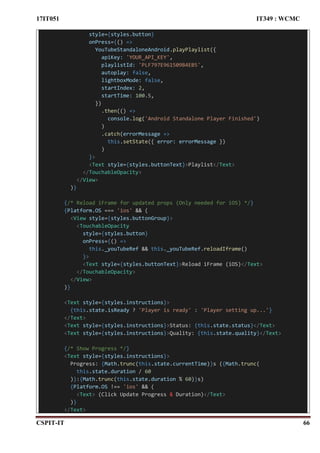
{/* Standalone Player (Android) */}
{Platform.OS === 'android' &&
YouTubeStandaloneAndroid && (
<View style={styles.buttonGroup}>
<TouchableOpacity
style={styles.button}
onPress={() =>
YouTubeStandaloneAndroid.playVideo({
apiKey: 'YOUR_API_KEY',
videoId: 'KVZ-P-ZI6W4',
autoplay: true,
lightboxMode: false,
startTime: 124.5,
})
.then(() =>
console.log('Android Standalone Player Finished')
)
.catch(errorMessage =>
this.setState({ error: errorMessage })
)
}>
<Text style={styles.buttonText}>Standalone: One Video</Text>
</TouchableOpacity>
<TouchableOpacity
style={styles.button}
onPress={() =>
YouTubeStandaloneAndroid.playVideos({
apiKey: 'YOUR_API_KEY',
videoIds: [
'HcXNPI-IPPM',
'XXlZfc1TrD0',
'czcjU1w-c6k',
'uMK0prafzw0',
],
autoplay: false,
lightboxMode: true,
startIndex: 1,
startTime: 99.5,
})
.then(() =>
console.log('Android Standalone Player Finished')
)
.catch(errorMessage =>
this.setState({ error: errorMessage })
)
}>
<Text style={styles.buttonText}>Videos</Text>
</TouchableOpacity>
<TouchableOpacity
17IT051 IT349 : WCMC
CSPIT-IT 66
style={styles.button}
onPress={() =>
YouTubeStandaloneAndroid.playPlaylist({
apiKey: 'YOUR_API_KEY',
playlistId: 'PLF797E961509B4EB5',
autoplay: false,
lightboxMode: false,
startIndex: 2,
startTime: 100.5,
})
.then(() =>
console.log('Android Standalone Player Finished')
)
.catch(errorMessage =>
this.setState({ error: errorMessage })
)
}>
<Text style={styles.buttonText}>Playlist</Text>
</TouchableOpacity>
</View>
)}
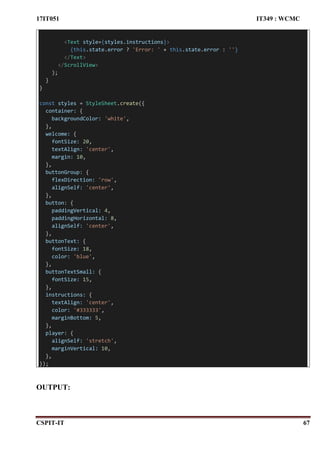
{/* Reload iFrame for updated props (Only needed for iOS) */}
{Platform.OS === 'ios' && (
<View style={styles.buttonGroup}>
<TouchableOpacity
style={styles.button}
onPress={() =>
this._youTubeRef && this._youTubeRef.reloadIframe()
}>
<Text style={styles.buttonText}>Reload iFrame (iOS)</Text>
</TouchableOpacity>
</View>
)}
<Text style={styles.instructions}>
{this.state.isReady ? 'Player is ready' : 'Player setting up...'}
</Text>
<Text style={styles.instructions}>Status: {this.state.status}</Text>
<Text style={styles.instructions}>Quality: {this.state.quality}</Text>
{/* Show Progress */}
<Text style={styles.instructions}>
Progress: {Math.trunc(this.state.currentTime)}s ({Math.trunc(
this.state.duration / 60
)}:{Math.trunc(this.state.duration % 60)}s)
{Platform.OS !== 'ios' && (
<Text> (Click Update Progress & Duration)</Text>
)}
</Text>
17IT051 IT349 : WCMC
CSPIT-IT 67
<Text style={styles.instructions}>
{this.state.error ? 'Error: ' + this.state.error : ''}
</Text>
</ScrollView>
);
}
}
const styles = StyleSheet.create({
container: {
backgroundColor: 'white',
},
welcome: {
fontSize: 20,
textAlign: 'center',
margin: 10,
},
buttonGroup: {
flexDirection: 'row',
alignSelf: 'center',
},
button: {
paddingVertical: 4,
paddingHorizontal: 8,
alignSelf: 'center',
},
buttonText: {
fontSize: 18,
color: 'blue',
},
buttonTextSmall: {
fontSize: 15,
},
instructions: {
textAlign: 'center',
color: '#333333',
marginBottom: 5,
},
player: {
alignSelf: 'stretch',
marginVertical: 10,
},
});
OUTPUT:
17IT051 IT349 : WCMC
CSPIT-IT 68
17IT051 IT349 : WCMC
CSPIT-IT 69
PRACTICAL -14
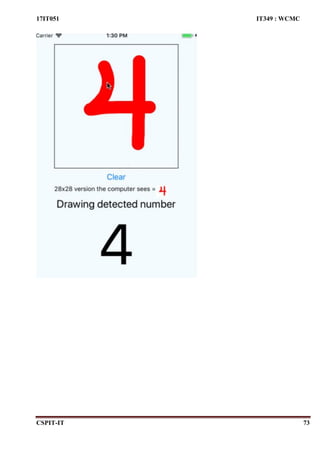
AIM:
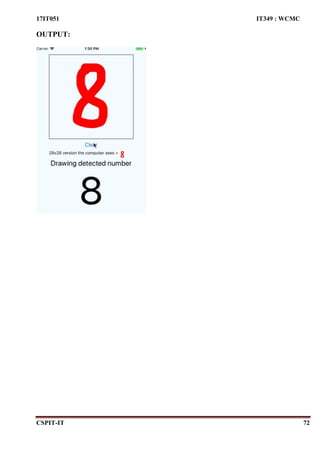
Create an application that uses end-to-end process of training a machine learning model that can
recognize handwritten digit images with TensorFlow and deploy it to an Android App.
CODE:
import
React, {
Component
} from
'react'
import { Button, StyleSheet, View, Text, Image } from 'react-native'
import { getPixels } from './mnist'
import { SketchCanvas } from '@terrylinla/react-native-sketch-canvas'
const modelJSON = require('./trained-model')
const brain = require('brain.js')
let net = new brain.NeuralNetwork()
net.fromJSON(modelJSON)
export default class example extends Component {
state = {
detectedDigit: 100,
drawnImage: 'data:image/jpg;base64,'
}
maxScore(obj) {
let maxKey = 0
let maxValue = 0
Object.entries(obj).forEach(entry => {
const value = entry[1]
if (value > maxValue) {
maxValue = value
maxKey = parseInt(entry[0], 10)
}
})
return maxKey
}
grabPixels = () => {
this.canvas.getBase64('jpg', false, true, false, false, (err, result) => {
const resultImage = `data:image/jpg;base64,${result}`
this.setState({ drawnImage: resultImage })
17IT051 IT349 : WCMC
CSPIT-IT 70
getPixels(resultImage)
.then(values => {
// console.log(values)
const detection = net.run(values)
this.setState({ detectedDigit: this.maxScore(detection) })
})
.catch(console.error)
})
}
clear = () => {
this.canvas.clear()
this.setState({ detectedDigit: null, drawnImage: 'data:image/jpg;base64,' })
}
printResults = () => {
return (
<View>
<View style={styles.rows}>
<Text>28x28 version the computer sees =</Text>
<Image
style={styles.previewImage}
source={{ uri: this.state.drawnImage }}
/>
</View>
<Text style={styles.resultSentence}>{`Drawing detected number`}</Text>
<Text style={styles.resultNumber}>{`${this.state.detectedDigit}`}</Text>
</View>
)
}
render() {
return (
<View style={styles.container}>
<View style={{ flex: 1 }}>
<SketchCanvas
ref={ref => (this.canvas = ref)}
style={{
width: 280,
height: 280,
borderColor: 'black',
marginTop: 30,
borderWidth: 1
}}
strokeColor={'#FF0000'}
strokeWidth={28}
onStrokeEnd={this.grabPixels}
17IT051 IT349 : WCMC
CSPIT-IT 71
/>
<Button title="Clear" onPress={this.clear} />
{this.state.detectedDigit && this.printResults()}
</View>
</View>
)
}
}
const styles = StyleSheet.create({
container: {
flex: 1,
justifyContent: 'center',
alignItems: 'center',
backgroundColor: '#F5FCFF'
},
previewImage: {
width: 28,
height: 28
},
rows: {
flexDirection: 'row'
},
resultSentence: {
textAlign: 'center',
fontSize: 24
},
resultNumber: {
textAlign: 'center',
fontSize: 128
}
})
17IT051 IT349 : WCMC
CSPIT-IT 72
OUTPUT:
17IT051 IT349 : WCMC
CSPIT-IT 73

wcmc_practicals

  • 1.
    17IT051 IT349: WCMC CSPIT-IT1 PRACTICAL: 1 AIM: Introduction to Android and Create “Custom Message” application. That will display “Custom Message” in the middle of the screen in the black color with the yellow background. CODE: (App.js) import React from "react"; import { StyleSheet, Text, View } from "react-native"; export default function App() { return ( <View style={styles.container}> <Text>17IT051 My First React Native App</Text> </View> ); } const styles = StyleSheet.create({ container: { flex: 1, backgroundColor: "yellow", alignItems: "center", justifyContent: "center" } });
  • 2.
  • 3.
    17IT051 IT349: WCMC CSPIT-IT3 PRACTICAL: 2 AIM: Create an android application to calculate the sum of two numbers and gives result in Toast Message. CODE: (App.js) /// Practical 2 (Adding Two Nos) import React, { Component } from "react"; import { View, Text, TouchableOpacity, TextInput, StyleSheet, ToastAndroid } from "react-native"; class Inputs extends Component { state = { number1: "", number2: "" }; handleNo1 = text => { this.setState({ number1: text }); };
  • 4.
    17IT051 IT349: WCMC CSPIT-IT4 handleNo2 = text => { this.setState({ number2: text }); }; add = (number1, number2) => { //alert(parseInt(number1) + parseInt(number2)); var sum = parseFloat(number1) + parseFloat(number2); var sumText = sum.toString(); ToastAndroid.show("The Sum is: " + sumText, ToastAndroid.LONG); }; render() { return ( <View style={styles.container}> <TouchableOpacity style={styles.submitButton}> <Text style={styles.submitButtonText}> ADDITION OF TWO NUMBERS </Text> </TouchableOpacity> <TextInput style={styles.input} underlineColorAndroid="transparent" placeholder="Enter First Number" placeholderTextColor="#000000" autoCapitalize="none" onChangeText={this.handleNo1} /> <TextInput style={styles.input} underlineColorAndroid="transparent"
  • 5.
    17IT051 IT349: WCMC CSPIT-IT5 placeholder="Enter Second Number" placeholderTextColor="#000000" autoCapitalize="none" onChangeText={this.handleNo2} /> <TouchableOpacity style={styles.submitButton} onPress={() => this.add(this.state.number1, this.state.number2)} > <Text style={styles.submitButtonText}> Submit </Text> </TouchableOpacity> </View> ); } } export default Inputs; const styles = StyleSheet.create({ container: { paddingTop: 23 }, input: { margin: 15, height: 40, borderColor: "#000000", borderWidth: 1, alignItems: "center"
  • 6.
    17IT051 IT349: WCMC CSPIT-IT6 }, submitButton: { backgroundColor: "#000000", padding: 10, margin: 15, height: 40, alignItems: "center" }, submitButtonText: { color: "white", alignItems: "center" }, textCenter: { margin: "50%" } });
  • 7.
  • 8.
  • 9.
    17IT051 IT349: WCMC CSPIT-IT9 PRACTICAL: 3 AIM: Create an application that will display Toast (Message) on specific interval of time. CODE: (App.js) /// Practical 3 (Toast after certain time interval) import React, { Component } from "react"; import { View, Text, TouchableOpacity, TextInput, StyleSheet, ToastAndroid, Alert } from "react-native"; function getTime() { var hours = new Date().getHours(); //Current Hours var min = new Date().getMinutes(); //Current Minutes var sec = new Date().getSeconds(); //Current Seconds var timeData = "Time(H:M:S) : " + hours.toString() + ":" + min.toString() + ":" + sec.toString(); ToastAndroid.showWithGravity(
  • 10.
    17IT051 IT349: WCMC CSPIT-IT10 timeData, ToastAndroid.SHORT, ToastAndroid.CENTER ); } let timerId = setInterval(() => getTime(), 5000); class Inputs extends Component { render() { return ( <View style={styles.container}> <Text> Toast after every five seconds !! </Text> </View> ); } } export default Inputs; const styles = StyleSheet.create({ container: { paddingTop: 23, backgroundColor: "#ffffff", padding: 10, margin: 15, height: 40, alignItems: "center" } });
  • 11.
  • 12.
    17IT051 IT349: WCMC CSPIT-IT12 PRACTICAL: 4 AIM: Create a temperature converter Application. (Fahrenheit-Celsius). CODE: (App.js) /// Practical 4 (Temperature Converter) import React, { Component } from "react"; import { View, Text, TouchableOpacity, TextInput, StyleSheet, ToastAndroid, Picker } from "react-native"; class Inputs extends Component { state = { temperature1: "", temperature2: "", choice: "C2F" }; convert = ( temperature1 = this.state.temperature1, choice = this.state.choice ) => {
  • 13.
    17IT051 IT349: WCMC CSPIT-IT13 if (choice == "C2F") { var FahrenheitTemp = parseFloat(temperature1) * (9 / 5) + 32; FahrenheitTemp.toString(); this.setState({ temperature2: "Fahrenheit : " + FahrenheitTemp }); } else { var CelsiusTemp = (5 / 9) * (parseFloat(temperature1) - 32); CelsiusTemp.toString(); this.setState({ temperature2: "Celsius : " + CelsiusTemp }); } }; updateChoice = choice => { this.setState({ choice: choice }); if (choice == "C2F") { var FahrenheitTemp = parseFloat(this.state.temperature1) * (9 / 5) + 32; FahrenheitTemp.toString(); this.setState({ temperature2: "Fahrenheit : " + FahrenheitTemp }); } else { var CelsiusTemp = (5 / 9) * (parseFloat(this.state.temperature1) - 32); CelsiusTemp.toString(); this.setState({ temperature2: "Celsius : " + CelsiusTemp }); } }; handleNo = text => { this.setState({ temperature1: text }); };
  • 14.
    17IT051 IT349: WCMC CSPIT-IT14 render() { return ( <View style={styles.container}> <TouchableOpacity style={styles.submitButton}> <Text style={styles.submitButtonText}> Temperature Converter </Text> </TouchableOpacity> <Picker selectedValue={this.state.choice} onValueChange={this.updateChoice} style={styles.pickerStyle} > <Picker.Item label="Celsius to Fahrenheit" value="C2F" /> <Picker.Item label="Fahrenheit to Celsius" value="F2C" /> </Picker> <TextInput style={styles.input} underlineColorAndroid="transparent" placeholder="Enter Temperature" placeholderTextColor="#000000" autoCapitalize="none" onChangeText={this.handleNo} /> <TouchableOpacity style={styles.submitButton} onPress={() => this.convert(this.state.temperature1)}
  • 15.
    17IT051 IT349: WCMC CSPIT-IT15 > <Text style={styles.submitButtonText}> CONVERT </Text> </TouchableOpacity> <Text style={styles.ViewTemp}>{this.state.temperature2}</Text> </View> ); } } export default Inputs; const styles = StyleSheet.create({ container: { paddingTop: 23, flex: 1, backgroundColor: "#8076a3" }, input: { margin: 15, height: 40, borderColor: "#000000", borderWidth: 1, alignItems: "center" }, submitButton: { backgroundColor: "#000000", padding: 10, margin: 15,
  • 16.
    17IT051 IT349: WCMC CSPIT-IT16 height: 40, alignItems: "center" }, submitButtonText: { color: "white", alignItems: "center" }, textCenter: { margin: "50%" }, ViewTemp: { alignItems: "center", textAlign: "center", fontSize: 15, fontWeight: "bold" }, pickerStyle: { borderColor: "#000000", marginLeft: 19, marginRight: 19 } });
  • 17.
  • 18.
  • 19.
    17IT051 IT349: WCMC CSPIT-IT19 PRACTICAL: 5 AIM: Create a login application with following features:  Successful login message in TextView with green background if username & password is correct.  Failure message in TextView with Red background if username or password is incorrect.  Disable login button after three wrong login attempts.  Close application if user selects cancel button. CODE: (App.js) import React, { Component } from "react"; import { StyleSheet, Text, View, TextInput, TouchableOpacity, BackHandler } from "react-native"; class Login extends Component { state = { email: "", password: "", loginFailCount: 0, disabledLoginButton: false, Message: "", backGroundColor: "" };
  • 20.
    17IT051 IT349: WCMC CSPIT-IT20 handleEmail = text => { this.setState({ email: text }); }; handlePassword = text => { this.setState({ password: text }); }; cancel = (email, pass) => { BackHandler.exitApp(); }; login = (email, pass) => { if (email == "17it051@charusat.edu.in" && pass == "1234567890") { this.setState({ loginFailCount: 0 }); this.setState({ Message: "LOGIN SUCESSFULL" }); this.setState({ backGroundColor: "green" }); } else { this.setState({ backGroundColor: "red" }); if (this.state.loginFailCount == 2) { this.setState({ disabledLoginButton: true }); this.state.loginFailCount == 0; this.setState({ Message: "NO USER EXIST : LOGIN DISABLED" }); } else { this.setState({ loginFailCount: this.state.loginFailCount + 1 }); var temp = this.state.loginFailCount; var leftChances = 3 - temp - 1; leftChances.toString(); this.setState({ Message: "NO USER EXIST : " + leftChances + " CHANCES LEFT" });
  • 21.
    17IT051 IT349: WCMC CSPIT-IT21 } } }; render() { return ( <View style={styles.container}> <TouchableOpacity onPress={() => this.login}> <Text style={styles.title}> LOGIN FORM </Text> </TouchableOpacity> <Text style={{ backgroundColor: this.state.backGroundColor, padding: 10, margin: 10, height: 40, alignItems: "center", justifyContent: "center", textAlign: "center", color: "white", fontSize: 15, fontWeight: "bold" }} > {this.state.Message} </Text>
  • 22.
    17IT051 IT349: WCMC CSPIT-IT22 <TextInput style={styles.input} underlineColorAndroid="transparent" placeholder="Email" placeholderTextColor="#000000" autoCapitalize="none" onChangeText={this.handleEmail} /> <TextInput style={styles.input} underlineColorAndroid="transparent" placeholder="Password" placeholderTextColor="#000000" autoCapitalize="none" secureTextEntry={true} onChangeText={this.handlePassword} /> <View style={styles.container2}> <TouchableOpacity onPress={() => this.login(this.state.email, this.state.password)} disabled={this.state.disabledLoginButton} > <Text style={styles.submitButtonText}> LOGIN </Text> </TouchableOpacity> <TouchableOpacity onPress={() => this.cancel(this.state.email, this.state.password)}
  • 23.
    17IT051 IT349: WCMC CSPIT-IT23 this.state.password)} > <Text style={styles.submitButtonText}> CANCEL </Text> </TouchableOpacity> </View> </View> ); } } export default Login; const styles = StyleSheet.create({ title: { backgroundColor: "#000000", padding: 10, margin: 10, height: 40, alignItems: "center", justifyContent: "center", textAlign: "center", color: "white", fontSize: 15, fontWeight: "bold" }, container: { paddingTop: 23, backgroundColor: "#ffffe0", flex: 1
  • 24.
    17IT051 IT349: WCMC CSPIT-IT24 }, input: { margin: 10, height: 50, borderColor: "#000000", borderWidth: 1, borderRadius: 20, textAlign: "center" }, container2: { flexDirection: "row", alignItems: "center", justifyContent: "center" }, submitButtonText: { color: "#ffffff", alignItems: "center", padding: 15, backgroundColor: "#000000", borderRadius: 10, margin: 10, fontSize: 15, fontWeight: "bold" } });
  • 25.
  • 26.
  • 27.
  • 28.
    17IT051 IT349 :WCMC CSPIT-IT 28 PRACTICAL: 6 AIM: Create an application which turns ON or OFF Torch/Flashlight of Camera. CODE: import React, { Component } from 'react'; import { View, Button } from 'react-native'; import Torch from 'react-native-torch'; export default class App extends React.Component { state = { torch: false, }; onPressHandler = () => { var temp = this.state.torch; this.setState({ torch: !temp }); Torch.switchState(this.state.torch); }; render() { return ( <View style={{ alignItems: 'center', justifyContent: 'center', flex: 1 }}> <Button onPress={this.onPressHandler} title="Toggle Torch" color="#841504" accessibilityLabel="Label more about this purple button" /> </View> ) } } OUTPUT:
  • 29.
    17IT051 IT349 :WCMC CSPIT-IT 29
  • 30.
    17IT051 IT349 :WCMC CSPIT-IT 30 PRACTICAL: 7 AIM: Create an application that will change color of the screen, based on selected options from the menu. CODE: import * as React from 'react'; import {Picker,Text, View, StyleSheet } from 'react-native'; import Constants from 'expo-constants'; // You can import from local files import AssetExample from './components/AssetExample'; // or any pure javascript modules available in npm import { Card } from 'react-native-paper'; export default class App extends React.Component { constructor(Props){ super(Props); this.state={ backgroundColor:'white', } } render() { return ( <View style={[styles.container,{backgroundColor:this.state.backgroundColor}]}> <Picker selectedValue={this.state.backgroundColor} style={{height: 50, width: '50%'}} onValueChange={(itemValue, itemIndex) => this.setState({backgroundColor: itemValue}) }> <Picker.Item label="white" value="white" /> <Picker.Item label="Orange" value="orange" /> <Picker.Item label="Blue" value="blue" /> <Picker.Item label="Red" value="red" /> </Picker> </View> ); } } const styles = StyleSheet.create({ container: { flex: 1, justifyContent: 'center', paddingTop: Constants.statusBarHeight,
  • 31.
    17IT051 IT349 :WCMC CSPIT-IT 31 backgroundColor: '#ecf0f1', padding: 8, }, }); OUTPUT:
  • 32.
    17IT051 IT349 :WCMC CSPIT-IT 32 PRACTICAL – 8 AIM: Create an application with help of fragment. CODE: class second extends React.Component{ render(){ return( <View> <Text>In second Screen</Text> </View> ) } } class first extends React.Component{ render(){ return( <View> <Text>In First Screen</Text> </View> ) } } const Tab = createMaterialTopTabNavigator(); export default function HomeScreen({navigation}) { // console.log(navigation) nav = navigation // console.log(nav) return ( <NavigationContainer> <Tab.Navigator initialRouteName="First" screenOptions={({ route }) => ({ tabBarIcon: ({ focused, color, size }) => { let iconName; if (route.name === 'First') { iconName = focused ? 'ios-information-circle' : 'ios-information-circle-outline'; } else if (route.name === 'Second') { iconName = focused ? 'ios-list-box' : 'ios-list';
  • 33.
    17IT051 IT349 :WCMC CSPIT-IT 33 } // You can return any component that you like here! return <Ionicons name={iconName} size={24} color={color} />; }, })} tabBarOptions={{ activeTintColor: 'blue', inactiveTintColor: 'grey', indicatorStyle: { backgroundColor: 'red' }, showIcon: true, style: { backgroundColor: '#f2f2f2' } }} > <Tab.Screen name="First" component={first} nav={navigation}/> <Tab.Screen name="Second" component={second} nav={navigation}/> </Tab.Navigator> </NavigationContainer> ); } const styles = StyleSheet.create({ container: { flex: 1, marginTop: 50, }, droidSafeArea: { flex: 1, backgroundColor: 'white', paddingTop: Constants.statusBarHeight }, }); OUTPUT:
  • 34.
    17IT051 IT349 :WCMC CSPIT-IT 34
  • 35.
    17IT051 IT349 :WCMC CSPIT-IT 35
  • 36.
    17IT051 IT349 :WCMC CSPIT-IT 36 PRACTICAL – 9 AIM: Create an application with help of web view CODE: import * as React from 'react'; import { WebView } from 'react-native-webview'; export default class App extends React.Component { render() { return <WebView source={{ uri: 'https://Instagram.com' }} style={{ marginTop: 20 } } />; } } OUTPUT:
  • 37.
    17IT051 IT349 :WCMC CSPIT-IT 37
  • 38.
    17IT051 IT349 :WCMC CSPIT-IT 38 PRACTICAL – 10 AIM: Create an application with help of database. CODE: import React, { Component } from 'react'; import { View } from 'react-native'; import MultiSelect from 'react-native-multiple-select'; import {Text, StyleSheet} from 'react-native'; import { TextInput, TouchableOpacity } from 'react-native-gesture-handler'; import fire from 'firebase' var firebaseConfig = { apiKey: "AIzaSyCSNJtalNlaVLmCF13xO37x7NcQbv4UX1Q", authDomain: "chat-application-1ac4e.firebaseapp.com", databaseURL: "https://chat-application-1ac4e.firebaseio.com", projectId: "chat-application-1ac4e", storageBucket: "chat-application-1ac4e.appspot.com", messagingSenderId: "241112021009", appId: "1:241112021009:web:509edee3af6f73aec619b0", measurementId: "G-2784SJG8QR" }; // Initialize Firebase if(!fire.apps.length){ fire.initializeApp(firebaseConfig); } export default class Database extends React.Component { constructor() { super() } state={ name:'', details:'' } submitData = () => { fire.database().ref('data/') .update({ name:this.state.name, details:this.state.details }); alert('Details Submitted') }
  • 39.
    17IT051 IT349 :WCMC CSPIT-IT 39 render() { return ( <View style={{flex:1, justifyContent:'center',alignItems:'center'}}> <Text>Enter Name</Text> <TextInput style={{ borderWidth:1}} placeholder=" " onChangeText={name => this.setState({name})} /> <Text>{'n'} Enter details </Text> <TextInput style={{ borderWidth:1}} placeholder=" " multiline={true} onChangeText={details => this.setState({details})} /> <TouchableOpacity> <Text onPress={this.submitData}>{'n'}Submit</Text> </TouchableOpacity> </View> ); } } OUTPUT:
  • 40.
    17IT051 IT349 :WCMC CSPIT-IT 40
  • 41.
    17IT051 IT349 :WCMC CSPIT-IT 41
  • 42.
    17IT051 IT349 :WCMC CSPIT-IT 42 PRACTICAL -11 AIM: Creating an application that provides Single Sign-on(SSO) with Chrome Custom Tabs via the AppAuth library, and optionally push managed configuration to provide a user login. CODE: App.js import React, {Component} from 'react'; import { StyleSheet, Text, View, TouchableOpacity } from 'react-native'; import * as firebase from 'firebase'; import * as Expo from 'expo'; import {Container, Content, Form, Input, Item, Button, Label} from 'native-base'; import {createAppContainer, createSwitchNavigator} from 'react-navigation'; import LoginScreen from './screens/LoginScreen'; import LoadingScreen from './screens/LoadingScreen'; import DashboardScreen from './screens/DashboardScreen'; var firebaseConfig = { apiKey: "AIzaSyCSNJtalNlaVLmCF13xO37x7NcQbv4UX1Q", authDomain: "chat-application-1ac4e.firebaseapp.com", databaseURL: "https://chat-application-1ac4e.firebaseio.com", projectId: "chat-application-1ac4e", storageBucket: "chat-application-1ac4e.appspot.com", messagingSenderId: "241112021009", appId: "1:241112021009:web:509edee3af6f73aec619b0", measurementId: "G-2784SJG8QR" }; if(!firebase.apps.length){ firebase.initializeApp(firebaseConfig); } const AppSwitchNavigator = createSwitchNavigator({ LoadingScreen:LoadingScreen, LoginScreen: LoginScreen, DashboardScreen: DashboardScreen }) export default AppNavigator = createAppContainer(AppSwitchNavigator) const styles = StyleSheet.create({ container: { flex: 1, backgroundColor: '#fff',
  • 43.
    17IT051 IT349 :WCMC CSPIT-IT 43 justifyContent: 'center', padding: 10, }, }); LoadingScreen.js import React, {Component} from 'react'; import {View, Text, StyleSheet, ActivityIndicator} from 'react-native'; import firebase from 'firebase'; class LoadingScreen extends React.Component { componentDidMount(){ this.checkIfLoggedIn(); } checkIfLoggedIn = () => { firebase.auth().onAuthStateChanged(function(user){ if(user){ this.props.navigation.navigate("DashboardScreen"); } else{ this.props.navigation.navigate("LoginScreen"); } }.bind(this) ); }; render(){ return( <View style={styles.container0}> <ActivityIndicator size="large"/> </View> ); } } export default LoadingScreen; const styles = StyleSheet.create({ container0: { flex: 1, backgroundColor: '#fff', justifyContent: 'center', padding: 10, },
  • 44.
    17IT051 IT349 :WCMC CSPIT-IT 44 }); LoginScreen.js import React, { Component } from 'react'; import { View, Text, StyleSheet, Button,ActivityIndicator } from 'react-native'; import * as Google from 'expo-google-app-auth'; import firebase from 'firebase'; import { YellowBox } from 'react-native'; import _ from 'lodash'; class LoginScreen extends React.Component { constructor() { super(); YellowBox.ignoreWarnings(['Setting a timer']); const _console = _.clone(console); console.warn = message => { if (message.indexOf('Setting a timer') <= -1) { _console.warn(message); } }; } isUserEqual = (googleUser, firebaseUser) => { if (firebaseUser) { var providerData = firebaseUser.providerData; for (var i = 0; i < providerData.length; i++) { if (providerData[i].providerId === firebase.auth.GoogleAuthProvider.PROVIDER_I D && providerData[i].uid === googleUser.getBasicProfile().getId()) { // We don't need to reauth the Firebase connection. return true; } } } return false; } onSignIn = googleUser => { // console.log('Google Auth Response', googleUser); // We need to register an Observer on Firebase Auth to make sure auth is initializ ed. var unsubscribe = firebase.auth().onAuthStateChanged(function (firebaseUser) { unsubscribe(); // Check if we are already signed-in Firebase with the correct user. if (!this.isUserEqual(googleUser, firebaseUser)) { // Build Firebase credential with the Google ID token. var credential = firebase.auth.GoogleAuthProvider.credential( googleUser.idToken,
  • 45.
    17IT051 IT349 :WCMC CSPIT-IT 45 googleUser.accessToken ); // Sign in with credential from the Google user. firebase.auth().signInWithCredential(credential).then(function (result) { // console.log('user signed in'); if (result.additionalUserInfo.isNewUser) { firebase.database().ref('/users/' + result.user.uid) .set({ gmail: result.user.email, profile_picture: result.additionalUserInfo.profile.picture, locale: result.additionalUserInfo.profile.locale, first_name: result.additionalUserInfo.profile.given_name, last_name: result.additionalUserInfo.profile.family_name, created_at: Date.now() }) .then(function (snapshot) { }); } else { firebase.database().ref('/users/' + result.user.uid).update({ last_logged_in: Date.now() }) } }) .catch(function (error) { // Handle Errors here. var errorCode = error.code; var errorMessage = error.message; // The email of the user's account used. var email = error.email; // The firebase.auth.AuthCredential type that was used. var credential = error.credential; // ... }); } else { console.log('User already signed-in Firebase.'); } }.bind(this)); } signInWithGoogleAsync = async () => { try { const result = await Google.logInAsync({ // behavior: 'web', androidClientId: "1076038383471- 4liei8f8fq7br7a67oao69q66tn6bn5v.apps.googleusercontent.com", // iosClientId: YOUR_CLIENT_ID_HERE, scopes: ['profile', 'email'], });
  • 46.
    17IT051 IT349 :WCMC CSPIT-IT 46 if (result.type === 'success') { const exp = RegExp(/^([a-zA-Z0-9]{0,})@charusat.edu.in$/g); var ma = result.user.email; if (!exp.test(ma)) { alert("please enter charusat mail id") this.props.navigation.navigate("LoginScreen"); } else { this.onSignIn(result); return result.accessToken; } } else { return { cancelled: true }; } } catch (e) { return { error: true }; } } render() { return ( <View style={styles.container1}> <Button title="Sign In " onPress={() => this.signInWithGoogleAsync()} /> </View> ); } } export default LoginScreen; const styles = StyleSheet.create({ container1: { flex: 1, backgroundColor: '#fff', justifyContent: 'center', padding: 10, }, }); DashboardScreen.js import React, {Component} from 'react'; import {View, Text, StyleSheet, Button} from 'react-native'; import firebase from 'firebase';
  • 47.
    17IT051 IT349 :WCMC CSPIT-IT 47 class DashboardScreen extends React.Component { render(){ return( <View style={styles.container2}> <Text>DashboardScreen</Text> <Button title="Sign Out" onPress={() => firebase.auth().signOut()} /> </View> ); } } export default DashboardScreen; const styles = StyleSheet.create({ container2: { flex: 1, alignItems: 'center', justifyContent: 'center', }, }); OUTPUT:
  • 48.
    17IT051 IT349 :WCMC CSPIT-IT 48
  • 49.
    17IT051 IT349 :WCMC CSPIT-IT 49
  • 50.
    17IT051 IT349 :WCMC CSPIT-IT 50
  • 51.
    17IT051 IT349 :WCMC CSPIT-IT 51 PRACTICAL – 12 AIM: Create an application to handle support voice interaction. CODE: import React, { Component } from 'react'; import { StyleSheet, Text, Image, View, SafeAreaView, TouchableHighlight, ScrollView, Linking } from 'react-native'; import Voice from '@react-native-community/voice'; export default class App extends React.Component { state = { pitch: '', error: '', end: '', started: '', results: [], partialResults: [], } constructor(props) { super(props); Voice.onSpeechStart = this.onSpeechStart; Voice.onSpeechEnd = this.onSpeechEnd; Voice.onSpeechError = this.onSpeechError; Voice.onSpeechResults = this.onSpeechResults; Voice.onSpeechPartialResults = this.onSpeechPartialResults; Voice.onSpeechVolumeChanged = this.onSpeechVolumeChanged; } componentWillUnmount() { Voice.destroy().then(Voice.removeAllListeners); } onSpeechStart = e => { this.setState({ started: '√', }); }; onSpeechEnd = e => { this.setState({ end: '√', });
  • 52.
    17IT051 IT349 :WCMC CSPIT-IT 52 }; onSpeechError = e => { console.log('onSpeechError: ', e); this.setState({ error: JSON.stringify(e.error), }); }; onSpeechResults = e => { this.setState({ results: e.value, }); for (let i=0;i<this.state.results.length;i++){ if(this.state.results[i].toLowerCase() == 'open whatsapp'){ Linking.openURL('whatsapp://chat'); } if(this.state.results[i].toLowerCase() == 'open snapchat'){ Linking.openURL('snapchat://status'); } if(this.state.results[i].toLowerCase() == 'open facebook'){ Linking.openURL('facebook://profile'); } } }; onSpeechPartialResults = e => { this.setState({ partialResults: e.value, }); }; onSpeechVolumeChanged = e => { this.setState({ pitch: e.value, }); }; _startRecognizing = async () => { this.setState({ pitch: '', error: '', started: '', results: [], partialResults: [], end: '', }); try { await Voice.start('en-US');
  • 53.
    17IT051 IT349 :WCMC CSPIT-IT 53 } catch (e) { console.error(e); } }; _stopRecognizing = async () => { try { await Voice.stop(); } catch (e) { console.error(e); } }; _cancelRecognizing = async () => { try { await Voice.cancel(); } catch (e) { console.error(e); } }; _destroyRecognizer = async () => { try { await Voice.destroy(); } catch (e) { console.error(e); } this.setState({ pitch: '', error: '', started: '', results: [], partialResults: [], end: '', }); }; render() { return ( <SafeAreaView style={{ flex: 1 }}> <View style={styles.container}> <Text style={styles.welcome}> Voice Interaction </Text> <Text style={styles.instructions}> Press mike to Start Recognition </Text> <View style={{ flexDirection: 'row',
  • 54.
    17IT051 IT349 :WCMC CSPIT-IT 54 justifyContent: 'space-between', paddingVertical: 10, }} > <Text style={{ flex: 1, textAlign: 'center', color: '#B0171F', }} >{`Started: ${this.state.started}`}</Text> <Text style={{ flex: 1, textAlign: 'center', color: '#B0171F', }} > {`End: ${this.state.end}`} </Text> </View> <View style={{ flexDirection: 'row', justifyContent: 'space-between', paddingVertical: 10, }} > <Text style={{ flex: 1, textAlign: 'center', color: '#B0171F', }}> {`Pitch n ${this.state.pitch}`} </Text> <Text style={{ flex: 1, textAlign: 'center', color: '#B0171F', }} > {`Error n ${this.state.error}`} </Text> </View> <TouchableHighlight onPress={this._startRecognizing} style={{ marginVertical: 20 }}> <Image
  • 55.
    17IT051 IT349 :WCMC CSPIT-IT 55 style={styles.button} source={{ uri: 'https://raw.githubusercontent.com/AboutReact/sampleresource/master/ microphone.png', }} /> </TouchableHighlight> <Text style={styles.stat} >Results</Text> <ScrollView style={{ marginBottom: 42 }}> {this.state.results.map((result, index) => { return ( <Text key={`result-${index}`} style={styles.stat}>{result}</Text> ); })} </ScrollView> <View style={{ flexDirection: 'row', alignItems: 'space-between', position: 'absolute', bottom: 0, }} > <TouchableHighlight onPress={this._stopRecognizing} style={{ flex: 1, backgroundColor: 'red' }}> <Text style={styles.action}>Stop</Text> </TouchableHighlight> <TouchableHighlight onPress={this._cancelRecognizing} style={{ flex: 1, backgroundColor: 'red' }}> <Text style={styles.action}>Cancel</Text> </TouchableHighlight> <TouchableHighlight onPress={this._destroyRecognizer} style={{ flex: 1, backgroundColor: 'red' }} > <Text style={styles.action}>Destroy</Text> </TouchableHighlight> </View> </View> </SafeAreaView> ); } }
  • 56.
    17IT051 IT349 :WCMC CSPIT-IT 56 const styles = StyleSheet.create({ button: { width: 50, height: 50, }, container: { flex: 1, flexDirection: 'column', alignItems: 'center', backgroundColor: '#F5FCFF', }, welcome: { fontSize: 20, textAlign: 'center', margin: 10, }, action: { width: '100%', textAlign: 'center', color: 'white', paddingVertical: 8, marginVertical: 5, fontWeight: 'bold', }, instructions: { textAlign: 'center', color: '#333333', marginBottom: 5, }, stat: { textAlign: 'center', color: '#B0171F', marginBottom: 1, marginTop: 30, }, }); OUTPUT:
  • 57.
    17IT051 IT349 :WCMC CSPIT-IT 57
  • 58.
    17IT051 IT349 :WCMC CSPIT-IT 58
  • 59.
    17IT051 IT349 :WCMC CSPIT-IT 59
  • 60.
    17IT051 IT349 :WCMC CSPIT-IT 60 PRACTICAL – 13 AIM: Create an application to play video using YouTube API in PIP mode. CODE: import React from 'react'; import { StyleSheet, View, Text, ScrollView, TouchableOpacity, PixelRatio, Dimensions, Platform, } from 'react-native'; import YouTube, { YouTubeStandaloneIOS, YouTubeStandaloneAndroid, } from 'react-native-youtube'; import AndroidPip from 'react-native-android-pip'; AndroidPip.enterPictureInPictureMode() export default class RCTYouTubeExample extends React.Component { state = { isReady: false, status: null, quality: null, error: null, isPlaying: true, isLooping: true, duration: 0, currentTime: 0, fullscreen: false, containerMounted: false, containerWidth: null, }; render() { return ( <ScrollView style={styles.container} onLayout={({
  • 61.
    17IT051 IT349 :WCMC CSPIT-IT 61 nativeEvent: { layout: { width }, }, }) => { if (!this.state.containerMounted) this.setState({ containerMounted: true }); if (this.state.containerWidth !== width) this.setState({ containerWidth: width }); }}> {this.state.containerMounted && ( <YouTube ref={component => { this._youTubeRef = component; }} // You must have an API Key for the player to load in Android apiKey="AIzaSyAfIdHlIWioKnxWn8P4mYtMUVAoSD72PNE" // Un-comment one of videoId / videoIds / playlist. // You can also edit these props while Hot- Loading in development mode to see how // it affects the loaded native module videoId="ncw4ISEU5ik" // videoIds={['HcXNPI-IPPM', 'XXlZfc1TrD0', 'czcjU1w-c6k', 'uMK0prafzw0']} // playlistId="PLF797E961509B4EB5" play={this.state.isPlaying} loop={this.state.isLooping} fullscreen={this.state.fullscreen} controls={1} style={[ { height: PixelRatio.roundToNearestPixel( this.state.containerWidth / (16 / 9) ), }, styles.player, ]} onError={e => this.setState({ error: e.error })} onReady={e => this.setState({ isReady: true })} onChangeState={e => this.setState({ status: e.state })} onChangeQuality={e => this.setState({ quality: e.quality })} onChangeFullscreen={e => this.setState({ fullscreen: e.isFullscreen }) } onProgress={e => this.setState({ duration: e.duration, currentTime: e.currentTime, }) } /> )}
  • 62.
    17IT051 IT349 :WCMC CSPIT-IT 62 {/* Playing / Looping */} <View style={styles.buttonGroup}> <TouchableOpacity style={styles.button} onPress={() => this.setState(s => ({ isPlaying: !s.isPlaying }))}> <Text style={styles.buttonText}> {this.state.status == 'playing' ? 'Pause' : 'Play'} </Text> </TouchableOpacity> <TouchableOpacity style={styles.button} onPress={() => this.setState(s => ({ isLooping: !s.isLooping }))}> <Text style={styles.buttonText}> {this.state.isLooping ? 'Looping' : 'Not Looping'} </Text> </TouchableOpacity> </View> {/* Previous / Next video */} <View style={styles.buttonGroup}> <TouchableOpacity style={styles.button} onPress={() => this._youTubeRef && this._youTubeRef.previousVideo() }> <Text style={styles.buttonText}>Previous Video</Text> </TouchableOpacity> <TouchableOpacity style={styles.button} onPress={() => this._youTubeRef && this._youTubeRef.nextVideo()}> <Text style={styles.buttonText}>Next Video</Text> </TouchableOpacity> </View> {/* Go To Specific time in played video with seekTo() */} <View style={styles.buttonGroup}> <TouchableOpacity style={styles.button} onPress={() => this._youTubeRef && this._youTubeRef.seekTo(15)}> <Text style={styles.buttonText}>15 Seconds</Text> </TouchableOpacity> <TouchableOpacity style={styles.button} onPress={() => this._youTubeRef && this._youTubeRef.seekTo(2 * 60)}> <Text style={styles.buttonText}>2 Minutes</Text> </TouchableOpacity> <TouchableOpacity style={styles.button} onPress={() =>
  • 63.
    17IT051 IT349 :WCMC CSPIT-IT 63 this._youTubeRef && this._youTubeRef.seekTo(15 * 60) }> <Text style={styles.buttonText}>15 Minutes</Text> </TouchableOpacity> </View> {/* Play specific video in a videoIds array by index */} {this._youTubeRef && this._youTubeRef.props.videoIds && Array.isArray(this._youTubeRef.props.videoIds) && ( <View style={styles.buttonGroup}> {this._youTubeRef.props.videoIds.map((videoId, i) => ( <TouchableOpacity key={i} style={styles.button} onPress={() => this._youTubeRef && this._youTubeRef.playVideoAt(i) }> <Text style={[ styles.buttonText, styles.buttonTextSmall, ]}>{`Video ${i}`}</Text> </TouchableOpacity> ))} </View> )} {/* Get current played video's position index when playing videoIds*/} <View style={styles.buttonGroup}> <TouchableOpacity style={styles.button} onPress={() => this._youTubeRef && this._youTubeRef .videosIndex() .then(index => this.setState({ videosIndex: index })) .catch(errorMessage => this.setState({ error: errorMessage })) }> <Text style={styles.buttonText}> Get Videos Index: {this.state.videosIndex} </Text> </TouchableOpacity> </View> {/* Fullscreen */} {!this.state.fullscreen && ( <View style={styles.buttonGroup}> <TouchableOpacity style={styles.button}
  • 64.
    17IT051 IT349 :WCMC CSPIT-IT 64 onPress={() => this.setState({ fullscreen: true })}> <Text style={styles.buttonText}>Set Fullscreen</Text> </TouchableOpacity> </View> )} {/* Update Progress & Duration (Android) */} {Platform.OS === 'android' && ( <View style={styles.buttonGroup}> <TouchableOpacity style={styles.button} onPress={() => this._youTubeRef ? this._youTubeRef .currentTime() .then(currentTime => this.setState({ currentTime })) .catch(errorMessage => this.setState({ error: errorMessage }) ) : this._youTubeRef .duration() .then(duration => this.setState({ duration })) .catch(errorMessage => this.setState({ error: errorMessage }) ) }> <Text style={styles.buttonText}> Update Progress & Duration (Android) </Text> </TouchableOpacity> </View> )} {/* Standalone Player (iOS) */} {Platform.OS === 'ios' && YouTubeStandaloneIOS && ( <View style={styles.buttonGroup}> <TouchableOpacity style={styles.button} onPress={() => YouTubeStandaloneIOS.playVideo('KVZ-P-ZI6W4') .then(() => console.log('iOS Standalone Player Finished')) .catch(errorMessage => this.setState({ error: errorMessage }) ) }> <Text style={styles.buttonText}>Launch Standalone Player</Text> </TouchableOpacity> </View> )}
  • 65.
    17IT051 IT349 :WCMC CSPIT-IT 65 {/* Standalone Player (Android) */} {Platform.OS === 'android' && YouTubeStandaloneAndroid && ( <View style={styles.buttonGroup}> <TouchableOpacity style={styles.button} onPress={() => YouTubeStandaloneAndroid.playVideo({ apiKey: 'YOUR_API_KEY', videoId: 'KVZ-P-ZI6W4', autoplay: true, lightboxMode: false, startTime: 124.5, }) .then(() => console.log('Android Standalone Player Finished') ) .catch(errorMessage => this.setState({ error: errorMessage }) ) }> <Text style={styles.buttonText}>Standalone: One Video</Text> </TouchableOpacity> <TouchableOpacity style={styles.button} onPress={() => YouTubeStandaloneAndroid.playVideos({ apiKey: 'YOUR_API_KEY', videoIds: [ 'HcXNPI-IPPM', 'XXlZfc1TrD0', 'czcjU1w-c6k', 'uMK0prafzw0', ], autoplay: false, lightboxMode: true, startIndex: 1, startTime: 99.5, }) .then(() => console.log('Android Standalone Player Finished') ) .catch(errorMessage => this.setState({ error: errorMessage }) ) }> <Text style={styles.buttonText}>Videos</Text> </TouchableOpacity> <TouchableOpacity
  • 66.
    17IT051 IT349 :WCMC CSPIT-IT 66 style={styles.button} onPress={() => YouTubeStandaloneAndroid.playPlaylist({ apiKey: 'YOUR_API_KEY', playlistId: 'PLF797E961509B4EB5', autoplay: false, lightboxMode: false, startIndex: 2, startTime: 100.5, }) .then(() => console.log('Android Standalone Player Finished') ) .catch(errorMessage => this.setState({ error: errorMessage }) ) }> <Text style={styles.buttonText}>Playlist</Text> </TouchableOpacity> </View> )} {/* Reload iFrame for updated props (Only needed for iOS) */} {Platform.OS === 'ios' && ( <View style={styles.buttonGroup}> <TouchableOpacity style={styles.button} onPress={() => this._youTubeRef && this._youTubeRef.reloadIframe() }> <Text style={styles.buttonText}>Reload iFrame (iOS)</Text> </TouchableOpacity> </View> )} <Text style={styles.instructions}> {this.state.isReady ? 'Player is ready' : 'Player setting up...'} </Text> <Text style={styles.instructions}>Status: {this.state.status}</Text> <Text style={styles.instructions}>Quality: {this.state.quality}</Text> {/* Show Progress */} <Text style={styles.instructions}> Progress: {Math.trunc(this.state.currentTime)}s ({Math.trunc( this.state.duration / 60 )}:{Math.trunc(this.state.duration % 60)}s) {Platform.OS !== 'ios' && ( <Text> (Click Update Progress & Duration)</Text> )} </Text>
  • 67.
    17IT051 IT349 :WCMC CSPIT-IT 67 <Text style={styles.instructions}> {this.state.error ? 'Error: ' + this.state.error : ''} </Text> </ScrollView> ); } } const styles = StyleSheet.create({ container: { backgroundColor: 'white', }, welcome: { fontSize: 20, textAlign: 'center', margin: 10, }, buttonGroup: { flexDirection: 'row', alignSelf: 'center', }, button: { paddingVertical: 4, paddingHorizontal: 8, alignSelf: 'center', }, buttonText: { fontSize: 18, color: 'blue', }, buttonTextSmall: { fontSize: 15, }, instructions: { textAlign: 'center', color: '#333333', marginBottom: 5, }, player: { alignSelf: 'stretch', marginVertical: 10, }, }); OUTPUT:
  • 68.
    17IT051 IT349 :WCMC CSPIT-IT 68
  • 69.
    17IT051 IT349 :WCMC CSPIT-IT 69 PRACTICAL -14 AIM: Create an application that uses end-to-end process of training a machine learning model that can recognize handwritten digit images with TensorFlow and deploy it to an Android App. CODE: import React, { Component } from 'react' import { Button, StyleSheet, View, Text, Image } from 'react-native' import { getPixels } from './mnist' import { SketchCanvas } from '@terrylinla/react-native-sketch-canvas' const modelJSON = require('./trained-model') const brain = require('brain.js') let net = new brain.NeuralNetwork() net.fromJSON(modelJSON) export default class example extends Component { state = { detectedDigit: 100, drawnImage: 'data:image/jpg;base64,' } maxScore(obj) { let maxKey = 0 let maxValue = 0 Object.entries(obj).forEach(entry => { const value = entry[1] if (value > maxValue) { maxValue = value maxKey = parseInt(entry[0], 10) } }) return maxKey } grabPixels = () => { this.canvas.getBase64('jpg', false, true, false, false, (err, result) => { const resultImage = `data:image/jpg;base64,${result}` this.setState({ drawnImage: resultImage })
  • 70.
    17IT051 IT349 :WCMC CSPIT-IT 70 getPixels(resultImage) .then(values => { // console.log(values) const detection = net.run(values) this.setState({ detectedDigit: this.maxScore(detection) }) }) .catch(console.error) }) } clear = () => { this.canvas.clear() this.setState({ detectedDigit: null, drawnImage: 'data:image/jpg;base64,' }) } printResults = () => { return ( <View> <View style={styles.rows}> <Text>28x28 version the computer sees =</Text> <Image style={styles.previewImage} source={{ uri: this.state.drawnImage }} /> </View> <Text style={styles.resultSentence}>{`Drawing detected number`}</Text> <Text style={styles.resultNumber}>{`${this.state.detectedDigit}`}</Text> </View> ) } render() { return ( <View style={styles.container}> <View style={{ flex: 1 }}> <SketchCanvas ref={ref => (this.canvas = ref)} style={{ width: 280, height: 280, borderColor: 'black', marginTop: 30, borderWidth: 1 }} strokeColor={'#FF0000'} strokeWidth={28} onStrokeEnd={this.grabPixels}
  • 71.
    17IT051 IT349 :WCMC CSPIT-IT 71 /> <Button title="Clear" onPress={this.clear} /> {this.state.detectedDigit && this.printResults()} </View> </View> ) } } const styles = StyleSheet.create({ container: { flex: 1, justifyContent: 'center', alignItems: 'center', backgroundColor: '#F5FCFF' }, previewImage: { width: 28, height: 28 }, rows: { flexDirection: 'row' }, resultSentence: { textAlign: 'center', fontSize: 24 }, resultNumber: { textAlign: 'center', fontSize: 128 } })
  • 72.
    17IT051 IT349 :WCMC CSPIT-IT 72 OUTPUT:
  • 73.
    17IT051 IT349 :WCMC CSPIT-IT 73