The document outlines a workshop on the visualization of scientific data in virtual reality (VR), presented by Enrico Baracaglia. It covers the basics of VR, its advantages for data visualization, available tools and software, and includes a guided practical session demonstrating various techniques. Participants learn how to effectively use VR tools to create immersive experiences and visualize models and animations.




![Guided
practical
session
929/08/18 | enricobaracaglia@gmail.com
Sketchfab supports more than 50 3D formats [1]:
3DC point cloud (.3dc, .asc)
3DS (.3ds)
Alias Wavefront (.obj)
Blender (.blend)
Drawing eXchange Format (.dxf)
Autodesk Filmbox, FBX (.fbx)
Generic Tagged Arrays (.gta)
Google Earth, Keyhole Markup Language (.kmz)
LIDAR point clouds (.las)
Open Inventor (.iv)
OpenSceneGraph (.osg, .osgt, .osgb, .osgtgz, .osgx, .ive)
Polygon File Format (.ply)
Valve source engine (.vpk)
Virtual Reality Modeling Language, VRML (.wrl, .wrz)
[1]
https://help.sketchfab.com/hc/en-
us/articles/202508396-3D-File-
Formats?utm_source=website&utm_
campaign=upload_hints](https://image.slidesharecdn.com/workshop1-180906172531/75/VR-Workshop-1-9-2048.jpg)

![Guided
practical
session
1129/08/18 | enricobaracaglia@gmail.com
How to upload a 3D model in A-Frame [2] [3]:
[2]
https://aframe.io/docs/0.8.0/introduc
tion/models.html
<html>
<head>
<script src="https://aframe.io/releases/0.8.0/aframe.min.js"></script>
</head>
<body>
<a-scene>
<a-assets>
<a-asset-item id="object" src="./mayavi_demo_fixed.obj">
</a-asset-item>
<a-asset-item id="material" src="./mayavi_demo_fixed.mtl">
</a-asset-item>
</a-assets>
<a-entity obj-model="obj: #object; mtl: #material" position="0 1 0" rotation="0 0 0“ scale="0.3
0.3 0.3">
</a-entity>
</a-scene>
</body>
</html>
Mozilla Firefox
[3]
https://aframe.io/docs/0.8.0/compon
ents/obj-model.html
https://aframe.io/a-painter/](https://image.slidesharecdn.com/workshop1-180906172531/75/VR-Workshop-1-11-2048.jpg)
![Guided
practical
session
1229/08/18 | enricobaracaglia@gmail.com
[4]
https://www.blend4web.com/doc/e
n/vr_and_ar.html
VR and AR with Blend4Web [4]:
Visualise point cloud (.txt file / .ply file) in VR
using Meshlab and Blend4Web.](https://image.slidesharecdn.com/workshop1-180906172531/75/VR-Workshop-1-12-2048.jpg)
![Guided
practical
session
1329/08/18 | enricobaracaglia@gmail.com
[4]
https://www.blend4web.com/doc/e
n/vr_and_ar.html
Steps:
1) MeshLab → Filters > Point Set > Compute normals for point
sets
2) → Export Mesh as .ply
3) Blender → File > Import > Stanford (.ply)
4) → Set Origin > Geometry to Origin
5) → Add Particle System, Set parameters
6) → Note: you can simplify the object that you want
to duplicate (Add Modifier, Decimate)
7) → Add Modifier > Convert > Parent
8) → Export as .obj (it will automatically export mesh
and material)
9) → Export as .html with B4W](https://image.slidesharecdn.com/workshop1-180906172531/75/VR-Workshop-1-13-2048.jpg)
![Guided
practical
session
1429/08/18 | enricobaracaglia@gmail.com
Unity supports importing Meshes and animation
from two different types of files [5]:
▪ Exported 3D file formats, such as .fbx or .obj. You can
export files from 3D modeling software in generic formats
that can be imported and edited by a wide variety of
different software.
▪ Proprietary 3D or DCC (Digital Content Creation)
application files, such as .max and .blend file formats from
3D Studio Max or Blender, for example. You can only edit
proprietary files in the software that created them.
Proprietary files are generally not directly editable by other
software without first being converted and imported.
▪ Unity can import and use both types of files, and each
come with their own advantages and disadvantages.[5]
https://docs.unity3d.com/Manual/3D
-formats.html](https://image.slidesharecdn.com/workshop1-180906172531/75/VR-Workshop-1-14-2048.jpg)
![Guided
practical
session
1629/08/18 | enricobaracaglia@gmail.com
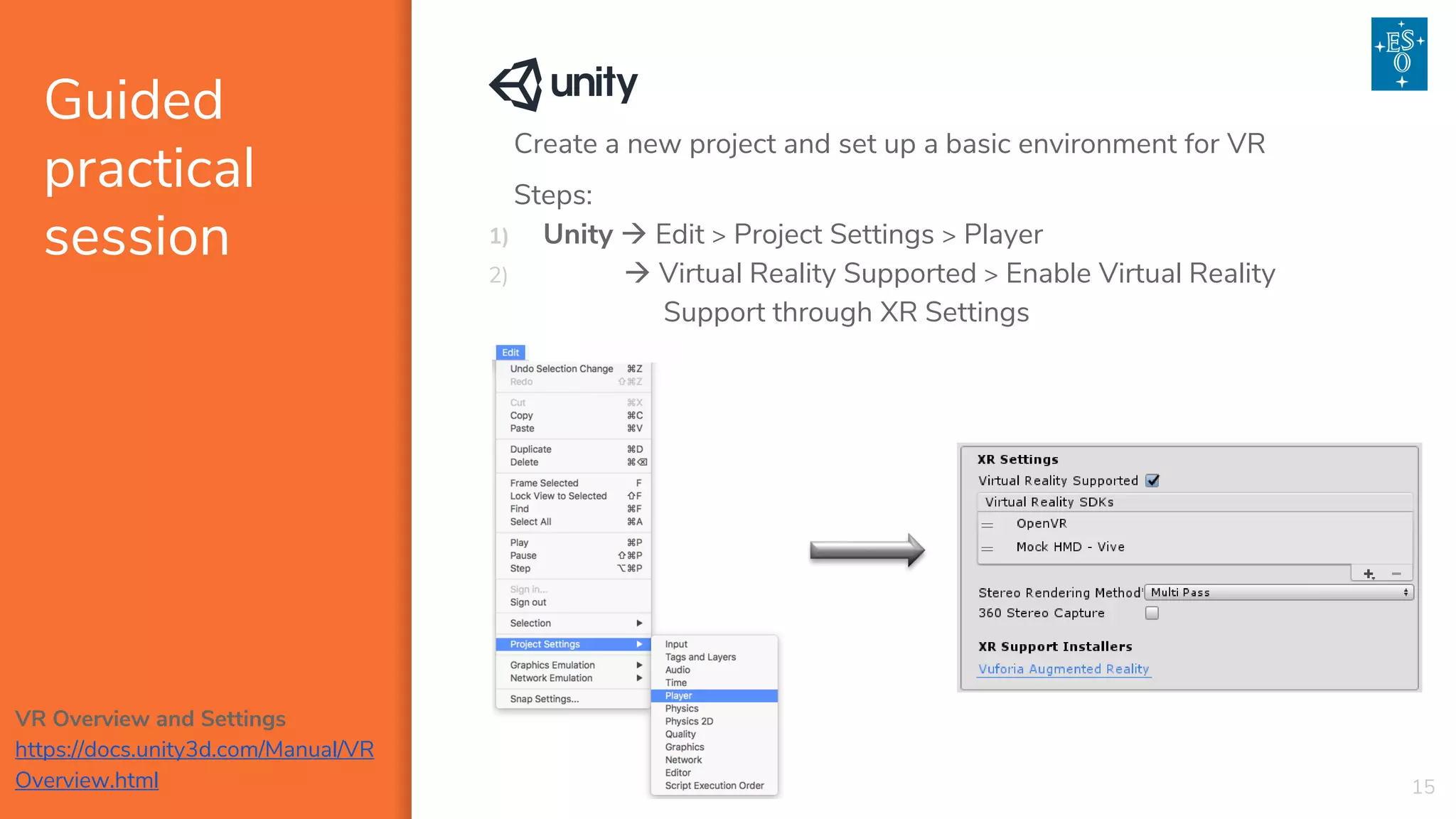
Import our model (.obj + .mtl) into Unity
Import simple animation into Unity [6]
Import SteamVR from the Asset Store [7]
Import Blender animation into Unity [6]
https://www.youtube.com/watch?v=
3CSUxATQVLw
[7]
https://assetstore.unity.com/packag
es/templates/systems/steamvr-
plugin-32647](https://image.slidesharecdn.com/workshop1-180906172531/75/VR-Workshop-1-16-2048.jpg)



![[DSC Europe 25] Behzad Hosseini - AI Agents in the Wild: Deploying Models tha...](https://cdn.slidesharecdn.com/ss_thumbnails/3qtejajvsjqrzwfept2c-10-251212103250-7f2b1068-thumbnail.jpg?width=640&height=640&fit=bounds)
![[DSC Europe 25] Imai Jen-La Plante - The New Generation: AI and the Future of...](https://cdn.slidesharecdn.com/ss_thumbnails/kxi8t2l5rggivgcenyba-1-jenlaplante-dsc-251208152532-d1e076c2-thumbnail.jpg?width=640&height=640&fit=bounds)
![[DSC Europe 25] Marija Vlajkovic & Andrea Radonjanin - Integration of AI tool...](https://cdn.slidesharecdn.com/ss_thumbnails/qf1jrglttoc3bm8s3aop-final-integration-of-ai-tools-251208151905-394f3a6a-thumbnail.jpg?width=640&height=640&fit=bounds)
![[DSC Europe 25] Vladimir Jelic - The AI-Driven Security Shift From Reactive D...](https://cdn.slidesharecdn.com/ss_thumbnails/6g5gj25mtjwayniqem1t-6-251209104645-7a5a5fc6-thumbnail.jpg?width=640&height=640&fit=bounds)
![[DSC Europe 25] Jovan Bogicevic - Legacy to AI-Driven Defense: Transforming D...](https://cdn.slidesharecdn.com/ss_thumbnails/rsarluadt563hntyfc8q-3-251211083849-3e7bc4c0-thumbnail.jpg?width=640&height=640&fit=bounds)

![[DSC Europe 25] Bassam Maharmeh - Artificial Intelligence: Opportunities and ...](https://cdn.slidesharecdn.com/ss_thumbnails/thhfmr2fqpawzj7hsjpg-5-251211083048-2c23204f-thumbnail.jpg?width=640&height=640&fit=bounds)

![[DSC Europe 25] Nikolay Burlutskiy - Best Practices for Building Enterprise M...](https://cdn.slidesharecdn.com/ss_thumbnails/uirvaiuvq8y1w8hzd9tx-7-251212103249-2619edb4-thumbnail.jpg?width=640&height=640&fit=bounds)
![[DSC Europe 25] Marko Krstic - Understanding the AI Threat Landscape - Risks,...](https://cdn.slidesharecdn.com/ss_thumbnails/tiyim1ins5jvbrvzpzla-2-251209104645-c69d3553-thumbnail.jpg?width=640&height=640&fit=bounds)


![[DSC Europe 25] Kaja Kandare - LLM as a judge.pptx](https://cdn.slidesharecdn.com/ss_thumbnails/arxyccaxsdsd1ba99wjw-7-251212104007-2b4e3f64-thumbnail.jpg?width=640&height=640&fit=bounds)


![[DSC Europe 25] Milan Sekuloski - Data, Defence, and Development: Cybersecuri...](https://cdn.slidesharecdn.com/ss_thumbnails/dfrkwwx4qly6atqpbl4z-4-251209104645-c3d4b0ca-thumbnail.jpg?width=640&height=640&fit=bounds)


![[DSC Europe 25] Sara Polak - The Archaeology of Innovation: AI as the Next Cr...](https://cdn.slidesharecdn.com/ss_thumbnails/7ecbscdnt8mlcuqbd2ln-2-sara-polak-ai-creative-industries-251208152533-aa1fcf54-thumbnail.jpg?width=640&height=640&fit=bounds)
