Agenda
1) Virtual Networks(Vnets) & Subnet
2) Public IP Vs Private IP
3) Static IP vs Dynamic IP
4) Network Security Group (NSG)
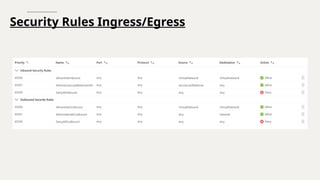
5) Ingress & Egress Security Rules
6) Azure Firewall
7) Nat Gateway
8) Azure DNS
9) Azure Load Balancer
10) Application Gateway
11) Bastion Host
12) Express Route
13) VPN Gateway
3.
Introduction Azure Networking
AzureNetworking is a fundamental part of Microsoft Azure that allows your cloud
resources to securely communicate with each other, with the internet, and with your
on-premises network.
Azure provides a rich set of networking capabilities similar to what you would have in
your own data center—but fully managed and scalable in the cloud.
4.
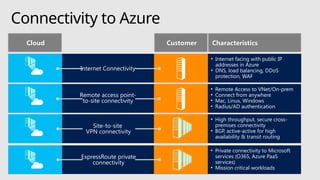
Connectivity to Azure
CloudCustomer Characteristics
Site-to-site
VPN connectivity
• High throughput, secure cross-
premises connectivity
• BGP, active-active for high
availability & transit routing
Remote access point-
to-site connectivity
• Remote Access to VNet/On-prem
• Connect from anywhere
• Mac, Linux, Windows
• Radius/AD authentication
ExpressRoute private
connectivity
• Private connectivity to Microsoft
services (O365, Azure PaaS
services)
• Mission critical workloads
Internet Connectivity
• Internet facing with public IP
addresses in Azure
• DNS, load balancing, DDoS
protection, WAF
5.
5
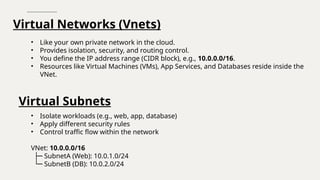
Virtual Networks (Vnets)
•Like your own private network in the cloud.
• Provides isolation, security, and routing control.
• You define the IP address range (CIDR block), e.g., 10.0.0.0/16.
• Resources like Virtual Machines (VMs), App Services, and Databases reside inside the
VNet.
Virtual Subnets
• Isolate workloads (e.g., web, app, database)
• Apply different security rules
• Control traffic flow within the network
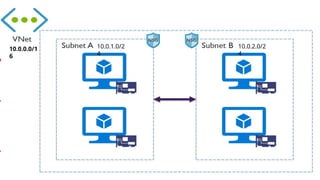
VNet: 10.0.0.0/16
├─ SubnetA (Web): 10.0.1.0/24
└─ SubnetB (DB): 10.0.2.0/24
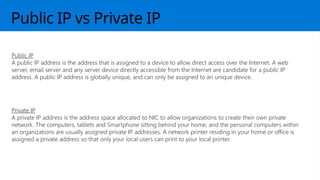
Public IP vsPrivate IP
Public IP
A public IP address is the address that is assigned to a device to allow direct access over the Internet. A web
server, email server and any server device directly accessible from the Internet are candidate for a public IP
address. A public IP address is globally unique, and can only be assigned to an unique device.
Private IP
A private IP address is the address space allocated to NIC to allow organizations to create their own private
network. The computers, tablets and Smartphone sitting behind your home, and the personal computers within
an organizations are usually assigned private IP addresses. A network printer residing in your home or office is
assigned a private address so that only your local users can print to your local printer.
8.
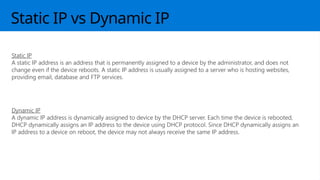
Static IP vsDynamic IP
Static IP
A static IP address is an address that is permanently assigned to a device by the administrator, and does not
change even if the device reboots. A static IP address is usually assigned to a server who is hosting websites,
providing email, database and FTP services.
Dynamic IP
A dynamic IP address is dynamically assigned to device by the DHCP server. Each time the device is rebooted,
DHCP dynamically assigns an IP address to the device using DHCP protocol. Since DHCP dynamically assigns an
IP address to a device on reboot, the device may not always receive the same IP address.
9.
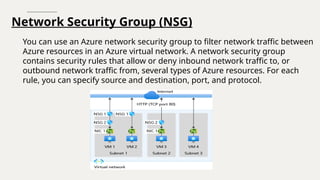
Network Security Group(NSG)
You can use an Azure network security group to filter network traffic between
Azure resources in an Azure virtual network. A network security group
contains security rules that allow or deny inbound network traffic to, or
outbound network traffic from, several types of Azure resources. For each
rule, you can specify source and destination, port, and protocol.
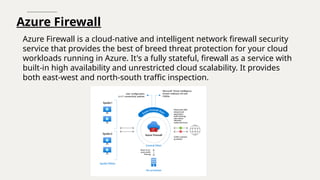
Azure Firewall
Azure Firewallis a cloud-native and intelligent network firewall security
service that provides the best of breed threat protection for your cloud
workloads running in Azure. It's a fully stateful, firewall as a service with
built-in high availability and unrestricted cloud scalability. It provides
both east-west and north-south traffic inspection.
12.
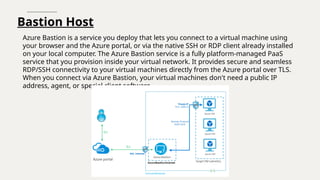
Bastion Host
Azure Bastionis a service you deploy that lets you connect to a virtual machine using
your browser and the Azure portal, or via the native SSH or RDP client already installed
on your local computer. The Azure Bastion service is a fully platform-managed PaaS
service that you provision inside your virtual network. It provides secure and seamless
RDP/SSH connectivity to your virtual machines directly from the Azure portal over TLS.
When you connect via Azure Bastion, your virtual machines don't need a public IP
address, agent, or special client software.
13.
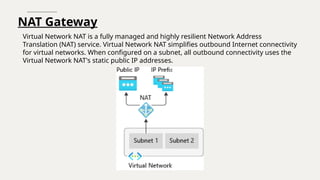
NAT Gateway
Virtual NetworkNAT is a fully managed and highly resilient Network Address
Translation (NAT) service. Virtual Network NAT simplifies outbound Internet connectivity
for virtual networks. When configured on a subnet, all outbound connectivity uses the
Virtual Network NAT's static public IP addresses.
14.
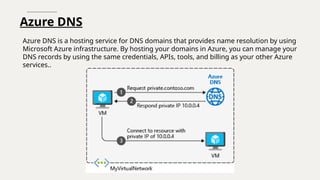
Azure DNS
Azure DNSis a hosting service for DNS domains that provides name resolution by using
Microsoft Azure infrastructure. By hosting your domains in Azure, you can manage your
DNS records by using the same credentials, APIs, tools, and billing as your other Azure
services..
15.
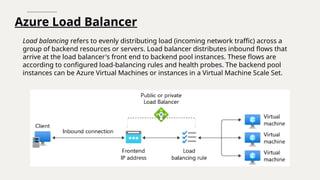
Azure Load Balancer
Loadbalancing refers to evenly distributing load (incoming network traffic) across a
group of backend resources or servers. Load balancer distributes inbound flows that
arrive at the load balancer's front end to backend pool instances. These flows are
according to configured load-balancing rules and health probes. The backend pool
instances can be Azure Virtual Machines or instances in a Virtual Machine Scale Set.
16.
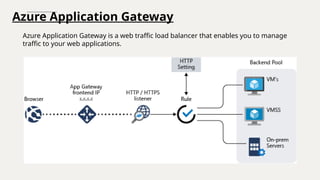
Azure Application Gateway
AzureApplication Gateway is a web traffic load balancer that enables you to manage
traffic to your web applications.
17.
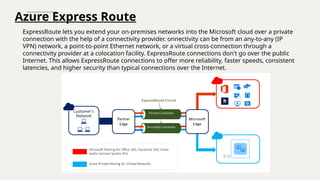
Azure Express Route
ExpressRoutelets you extend your on-premises networks into the Microsoft cloud over a private
connection with the help of a connectivity provider. onnectivity can be from an any-to-any (IP
VPN) network, a point-to-point Ethernet network, or a virtual cross-connection through a
connectivity provider at a colocation facility. ExpressRoute connections don't go over the public
Internet. This allows ExpressRoute connections to offer more reliability, faster speeds, consistent
latencies, and higher security than typical connections over the Internet.
18.
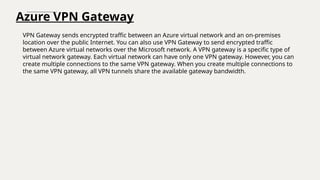
Azure VPN Gateway
VPNGateway sends encrypted traffic between an Azure virtual network and an on-premises
location over the public Internet. You can also use VPN Gateway to send encrypted traffic
between Azure virtual networks over the Microsoft network. A VPN gateway is a specific type of
virtual network gateway. Each virtual network can have only one VPN gateway. However, you can
create multiple connections to the same VPN gateway. When you create multiple connections to
the same VPN gateway, all VPN tunnels share the available gateway bandwidth.
19.
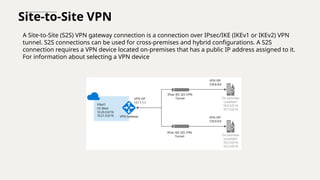
Site-to-Site VPN
A Site-to-Site(S2S) VPN gateway connection is a connection over IPsec/IKE (IKEv1 or IKEv2) VPN
tunnel. S2S connections can be used for cross-premises and hybrid configurations. A S2S
connection requires a VPN device located on-premises that has a public IP address assigned to it.
For information about selecting a VPN device
20.
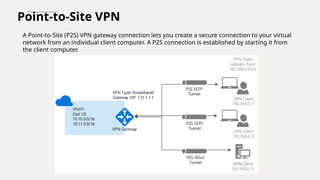
Point-to-Site VPN
A Point-to-Site(P2S) VPN gateway connection lets you create a secure connection to your virtual
network from an individual client computer. A P2S connection is established by starting it from
the client computer.
21.
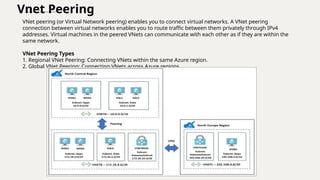
Vnet Peering
VNet peering(or Virtual Network peering) enables you to connect virtual networks. A VNet peering
connection between virtual networks enables you to route traffic between them privately through IPv4
addresses. Virtual machines in the peered VNets can communicate with each other as if they are within the
same network.
VNet Peering Types
1. Regional VNet Peering: Connecting VNets within the same Azure region.
2. Global VNet Peering: Connecting VNets across Azure regions.
#1 IMPORTANT NOTE:
Microsoft Ready will utilize Windows 10 and the new PowerPoint 2016, as well as PowerPoint 2013 on all event machines. Please build your slides utilizing the appropriate Template and utilize the version of PowerPoint that works best.
Windows 10 devices now connect remotely through VPN using the PIN with Passport for Work. Speakers needing to use VPN in a demo, will need to have registered for Phone Authentication at https://phoneregistration.microsoft.com. Additional details are also available here: https://microsoft.sharepoint.com/sites/itweb/securelogon/Pages/FAQ.aspx
#3 Azure Networking adalah sekumpulan layanan fundamental dan fitur di Microsoft Azure yang digunakan untuk mengatur koneksi antar sumber daya cloud, serta koneksi dari cloud ke internet atau jaringan lokal (on-premise).
Tujuan utamanya:
✅ Menghubungkan, ✅ Melindungi, dan ✅ Mengontrol alur data antar sumber daya (VM, database, API, dll).
#5 VNet (Virtual Network) di Azure adalah seperti jaringan lokal (LAN) milikmu sendiri, tapi berada di cloud Azure.
Bayangkan kamu punya kantor sendiri, dan di dalamnya ada jaringan internal yang menghubungkan komputer, server, printer, dll.
#7 IP Public = IP yang bisa diakses melalui internet, contoh web server, email server dll
IP Private = IP yang biasa digunakan untuk jaringan internal, contoh virtual network, jaringan internal dll
#8 Static IP = IP nya tetap dan tidak berubah ubah
Dynamic IP = IP nya berubah-ubah, biasanya diatur oleh system DHCP
#9 NSG adalah fitur keamanan di Azure yang berfungsi seperti firewall, tapi khusus untuk mengatur lalu lintas jaringan
Mengizinkan atau memblokir lalu lintas masuk (inbound) dan keluar (outbound) berdasarkan aturan tertentu
#11 Azure Firewall adalah layanan firewall cloud-native dari Microsoft Azure yang berfungsi untuk melindungi jaringan di Azure. Ini adalah firewall berbasis stateful yang dikelola sepenuhnya oleh Azure.
Melindungi seluruh jaringan (VNet), bukan hanya satu VM
Dibandingkan dengan NSG, Azure Firewall adalah solusi firewall layer lebih tinggi (Layer 4 dan 7).
4 itu transport dan 7 itu aplikasi
#12 Azure Bastion adalah layanan PaaS (Platform as a Service) dari Azure yang memungkinkan kamu untuk mengakses Virtual Machine (VM) secara aman melalui browser (portal Azure) tanpa perlu IP publik dan tanpa VPN.
#13 Azure NAT Gateway (Network Address Translation Gateway) adalah layanan Azure yang memungkinkan resource di dalam VNet (misalnya VM) untuk mengakses internet secara outbound (keluar), tanpa perlu IP publik langsung pada resource tersebut.
Kamu punya 10 VM di subnet tanpa IP publik.
Kamu ingin semua VM bisa update software dari internet dan mengakses API eksternal, tapi tidak bisa diakses dari luar.
✅ Solusinya: Pasang NAT Gateway di subnet-nya.
#14 Azure DNS adalah layanan Domain Name System (DNS) yang dikelola oleh Microsoft di Azure, yang memungkinkan kamu untuk mengelola dan meng-host zona DNS dan menerjemahkan nama domain ke alamat IP dalam jaringan Azure maupun internet.
#15 Azure Load Balancer adalah layanan di Azure yang berfungsi untuk mendistribusikan trafik jaringan secara otomatis ke beberapa Virtual Machine (VM) atau resource backend agar aplikasi kamu tetap tersedia dan skalabel
Misalnya kamu punya 3 VM web server, dan ingin trafik dari internet dibagi merata ke ketiganya agar tidak ada yang kelebihan beban.
#16 Azure Application Gateway adalah layanan load balancer tingkat aplikasi (Layer 7) di Azure yang dirancang khusus untuk mendistribusikan trafik web (HTTP/HTTPS) secara cerdas dan aman ke backend seperti VM, App Service, atau container.
Azure Application Gateway = Load balancer tingkat aplikasi dengan fitur keamanan dan routing canggih khusus untuk trafik web HTTP/HTTPS
#17 Azure ExpressRoute adalah layanan yang menyediakan koneksi privat langsung antara infrastruktur lokal (on-premises) atau data center kamu dengan Azure, tanpa melewati internet publik.
#18 Azure VPN Gateway adalah layanan di Azure yang memungkinkan kamu membuat koneksi VPN (Virtual Private Network) antara jaringan lokal (on-premises) atau client dengan Azure Virtual Network (VNet) secara aman melalui internet.
Menghubungkan jaringan lokal dengan Azure VNet secara private dan terenkripsi lewat internet.
Memungkinkan akses aman untuk karyawan remote atau cabang kantor.
Mendukung berbagai jenis koneksi VPN, seperti site-to-site (S2S) dan point-to-site (P2S)
#19 Site-to-Site VPN adalah koneksi VPN yang menghubungkan dua jaringan lokal (site) secara langsung melalui internet dengan saluran terenkripsi, sehingga kedua jaringan bisa berkomunikasi seolah-olah berada dalam satu jaringan privat yang aman.
#20 Point-to-Site VPN adalah koneksi VPN yang memungkinkan komputer individu atau perangkat remote (seperti laptop karyawan yang bekerja dari rumah) untuk terhubung secara aman ke Azure Virtual Network (VNet) melalui internet.
#21 VNet Peering adalah fitur di Azure yang memungkinkan dua Virtual Network (VNet) untuk terhubung langsung satu sama lain secara privat dan berperforma tinggi, tanpa perlu VPN Gateway atau koneksi publik.