Wolfgang Wiese Web-Technologies I 1
Web-TechnologiesWeb-Technologies
 Chapters
 Client-Side Programming
 Server-Side Programming
 Web-Content-Management
 Web-Services
 Apache Webserver
 Robots, Spiders and Search engines
 Robots and Spiders
 Search engines in general
 Google
Wolfgang Wiese Web-Technologies I 2
Web ServicesWeb Services 11
 What means “Web Service” ?
 Architecture
 Examples
 Current and future use
Wolfgang Wiese Web-Technologies I 3
Web ServicesWeb Services 22
 What means „Web Service“?
A Web service corresponds to the XML based
representation of an application or a software
component. Web services are describing;
Interface and their meta data are separated.
Consumer and service provider of a Web service
communicate by means of XML based messages
over defined interfaces. Details of the
implementation of the Web service remain hidden.
Notice: An equally used definition of „Web Services“
is still in discussion, also if there is a common
understanding about it within the W3C.
Wolfgang Wiese Web-Technologies I 4
Web ServicesWeb Services 33
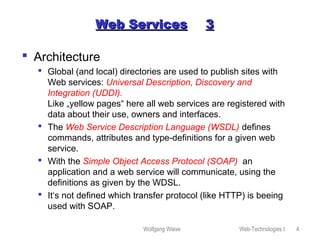
 Architecture
 Global (and local) directories are used to publish sites with
Web services: Universal Description, Discovery and
Integration (UDDI).
Like „yellow pages“ here all web services are registered with
data about their use, owners and interfaces.
 The Web Service Description Language (WSDL) defines
commands, attributes and type-definitions for a given web
service.
 With the Simple Object Access Protocol (SOAP) an
application and a web service will communicate, using the
definitions as given by the WDSL.
 It‘s not defined which transfer protocol (like HTTP) is beeing
used with SOAP.
Wolfgang Wiese Web-Technologies I 5
Web ServicesWeb Services 44
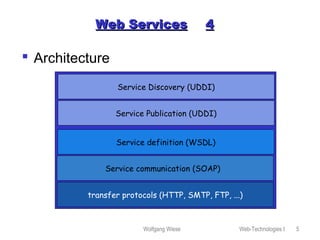
 Architecture
Service Discovery (UDDI)
Service definition (WSDL)
Service Publication (UDDI)
Service communication (SOAP)
transfer protocols (HTTP, SMTP, FTP, ...)
Wolfgang Wiese Web-Technologies I 6
Web ServicesWeb Services 55
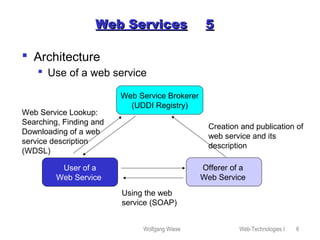
 Architecture
 Use of a web service
Web Service Brokerer
(UDDI Registry)
Offerer of a
Web Service
User of a
Web Service
Creation and publication of
web service and its
description
Web Service Lookup:
Searching, Finding and
Downloading of a web
service description
(WDSL)
Using the web
service (SOAP)
Wolfgang Wiese Web-Technologies I 7
Web ServicesWeb Services 66
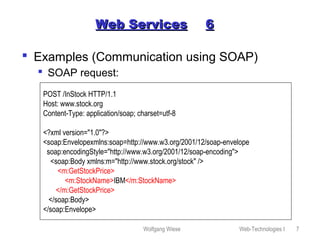
 Examples (Communication using SOAP)
 SOAP request:
POST /InStock HTTP/1.1
Host: www.stock.org
Content-Type: application/soap; charset=utf-8
<?xml version="1.0"?>
<soap:Envelopexmlns:soap=http://www.w3.org/2001/12/soap-envelope
soap:encodingStyle="http://www.w3.org/2001/12/soap-encoding">
<soap:Body xmlns:m="http://www.stock.org/stock" />
<m:GetStockPrice>
<m:StockName>IBM</m:StockName>
</m:GetStockPrice>
</soap:Body>
</soap:Envelope>
Wolfgang Wiese Web-Technologies I 8
Web ServicesWeb Services 77
 Examples (Communication using SOAP)
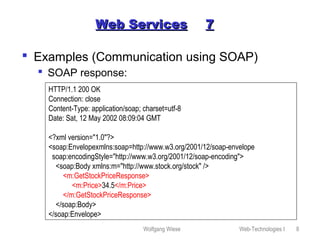
 SOAP response:
HTTP/1.1 200 OK
Connection: close
Content-Type: application/soap; charset=utf-8
Date: Sat, 12 May 2002 08:09:04 GMT
<?xml version="1.0"?>
<soap:Envelopexmlns:soap=http://www.w3.org/2001/12/soap-envelope
soap:encodingStyle="http://www.w3.org/2001/12/soap-encoding">
<soap:Body xmlns:m="http://www.stock.org/stock" />
<m:GetStockPriceResponse>
<m:Price>34.5</m:Price>
</m:GetStockPriceResponse>
</soap:Body>
</soap:Envelope>
Wolfgang Wiese Web-Technologies I 9
Web ServicesWeb Services 88
 Current and future use
 Currently big commercials like Microsoft, SUN, IBM and
others are trying to establish “web services” as a new
innovational service.
 Extensions useable for SOAP and WDSL in e-Business:
Electronic Business Extensible Markup Language (ebXML)
 There are still open questions within the definition of the
architecture. Mostly cause of bad communication between
members of W3C and OASIS (Organization for the
Advancement of Structured Information Standards ) and
cause of marketing aspects
 Several commercials and non-profit organisations are
currently working on applications using “web services”.
Example: Google’s Web Service Interface
 Future of “web services” ? Still unknown; “Application
Service Providing“ was a hype too...
Wolfgang Wiese Web-Technologies I 10
ApacheApache 11
 Apache („a patchy server“)
 Free HTTP server, supports HTTP/1.1 (RFC2616)
 Available on nearly all OS (but not Mac)
 Built upon NCSA httpd (V1.3) since 1994. First
release of Apache: April 1995, V 0.6.2 as beta
 First public version in December 1, 1995
 Developer-Team consists of volunteers – open
source project
 Today the #1 webserver on the internet
 Current version (Jun 2003): 1.3.27 as final and
2.0.46 as current release
 http://www.apache.org
Wolfgang Wiese Web-Technologies I 11
Excurse ApacheExcurse Apache 22
 Apache (cont.)
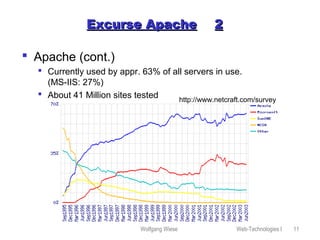
 Currently used by appr. 63% of all servers in use.
(MS-IIS: 27%)
 About 41 Million sites tested http://www.netcraft.com/survey
Wolfgang Wiese Web-Technologies I 12
Excurse ApacheExcurse Apache 33
 Principle:
 After start Apache will listen to requests on port 80
(or any other defined port)
 Configuration is stored within a textfile „httpd.conf“,
which is read by the httpd-process
 On a request it will fork itself;
 The child-process will answer the request, close
the connection and then die
 Before sending an answer, the process will parse the
requesting URL and look it up for errors.
 If the request aims a special filetype (like a server-parsed
SSI-document), needed moduls are dynamically loaded
or called
Wolfgang Wiese Web-Technologies I 13
Excurse ApacheExcurse Apache 44
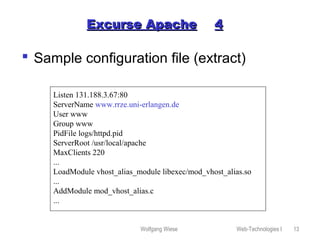
 Sample configuration file (extract)
Listen 131.188.3.67:80
ServerName www.rrze.uni-erlangen.de
User www
Group www
PidFile logs/httpd.pid
ServerRoot /usr/local/apache
MaxClients 220
...
LoadModule vhost_alias_module libexec/mod_vhost_alias.so
...
AddModule mod_vhost_alias.c
...
Wolfgang Wiese Web-Technologies I 14
Excurse ApacheExcurse Apache 55
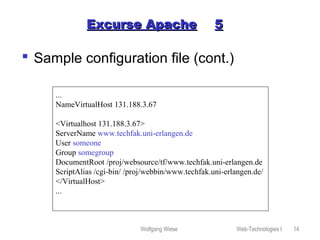
 Sample configuration file (cont.)
...
NameVirtualHost 131.188.3.67
<Virtualhost 131.188.3.67>
ServerName www.techfak.uni-erlangen.de
User someone
Group somegroup
DocumentRoot /proj/websource/tf/www.techfak.uni-erlangen.de
ScriptAlias /cgi-bin/ /proj/webbin/www.techfak.uni-erlangen.de/
</VirtualHost>
...
Wolfgang Wiese Web-Technologies I 15
Excurse ApacheExcurse Apache 66
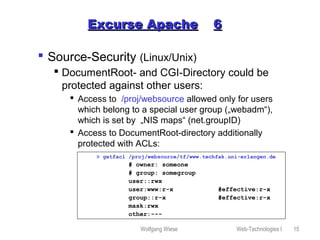
 Source-Security (Linux/Unix)
 DocumentRoot- and CGI-Directory could be
protected against other users:
 Access to /proj/websource allowed only for users
which belong to a special user group („webadm“),
which is set by „NIS maps“ (net.groupID)
 Access to DocumentRoot-directory additionally
protected with ACLs:
> getfacl /proj/websource/tf/www.techfak.uni-erlangen.de
# owner: someone
# group: somegroup
user::rwx
user:www:r-x #effective:r-x
group::r-x #effective:r-x
mask:rwx
other:---
Wolfgang Wiese Web-Technologies I 16
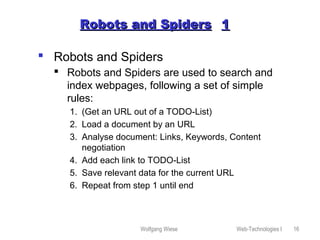
Robots and SpidersRobots and Spiders 11
 Robots and Spiders
 Robots and Spiders are used to search and
index webpages, following a set of simple
rules:
1. (Get an URL out of a TODO-List)
2. Load a document by an URL
3. Analyse document: Links, Keywords, Content
negotiation
4. Add each link to TODO-List
5. Save relevant data for the current URL
6. Repeat from step 1 until end
Wolfgang Wiese Web-Technologies I 17
Robots and SpidersRobots and Spiders 22
 Simple example in Perl:
#!/local/bin/perl
use LWP::UserAgent; use HTML::LinkExtor; use URI::URL;
$ua = LWP::UserAgent->new;
$p = HTML::LinkExtor->new(&callback);
$url = $ARGV[0];
if (not $url) { die("Usage: $0 [URL]n"); }
push(@linkliste,"usert$url");
while(($thiscount < 10) && (@linkliste)) {
$thiscount++;
($origin,$url) = split(/t/,pop(@linkliste),2);
@links = ();
$res = $ua->request(HTTP::Request->new(GET => $url),
sub {$p->parse($_[0])});
my $base = $res->base;
@links = map { $_ = url($_, $base)->abs; } @links;
$title = $res->title;
for ($i=0; $i<=$#links; $i++) { push(@linkliste,"$titlet$links[$i]");}
}
print join("n", @linkliste), "n"; exit;
sub callback { my($tag, %attr) = @_; return if $tag ne 'a'; push(@links, values %attr); }
Wolfgang Wiese Web-Technologies I 18
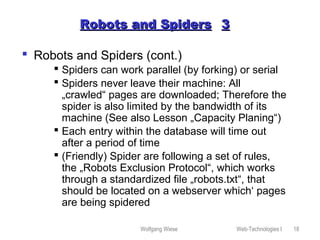
Robots and SpidersRobots and Spiders 33
 Robots and Spiders (cont.)
 Spiders can work parallel (by forking) or serial
 Spiders never leave their machine: All
„crawled“ pages are downloaded; Therefore the
spider is also limited by the bandwidth of its
machine (See also Lesson „Capacity Planing“)
 Each entry within the database will time out
after a period of time
 (Friendly) Spider are following a set of rules,
the „Robots Exclusion Protocol“, which works
through a standardized file „robots.txt“, that
should be located on a webserver which‘ pages
are being spidered
Wolfgang Wiese Web-Technologies I 19
Robots and SpidersRobots and Spiders 44
 Robots and Spiders (cont.)
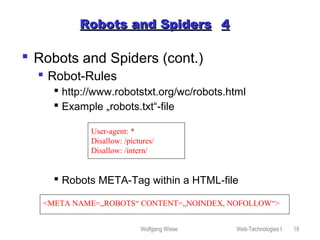
 Robot-Rules
 http://www.robotstxt.org/wc/robots.html
 Example „robots.txt“-file
 Robots META-Tag within a HTML-file
User-agent: *
Disallow: /pictures/
Disallow: /intern/
<META NAME=„ROBOTS“ CONTENT=„NOINDEX, NOFOLLOW“>
Wolfgang Wiese Web-Technologies I 20
Robots and SpidersRobots and Spiders 55
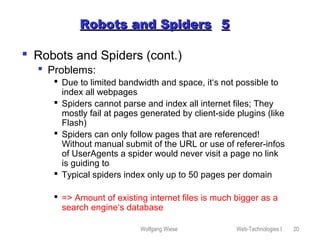
 Robots and Spiders (cont.)
 Problems:
 Due to limited bandwidth and space, it‘s not possible to
index all webpages
 Spiders cannot parse and index all internet files; They
mostly fail at pages generated by client-side plugins (like
Flash)
 Spiders can only follow pages that are referenced!
Without manual submit of the URL or use of referer-infos
of UserAgents a spider would never visit a page no link
is guiding to
 Typical spiders index only up to 50 pages per domain
 => Amount of existing internet files is much bigger as a
search engine‘s database
Wolfgang Wiese Web-Technologies I 21
Search engines in generalSearch engines in general 11
 Overview:
 Local search engines
 Catalogues
 Web search engines
Wolfgang Wiese Web-Technologies I 22
Search engines in generalSearch engines in general 22
 Local search engines
 Real-Time search engines:
 CGI-script, which opens a list of files and greps
it for the searched word:
 Filelist contains out of all files of a special type
(mostly HTML) in a predefined start-directory
 Subdirectories of the start-directory may be
included optionally
 Duration of search dependent of amount of
webfiles, their size and the programming
language;
Wolfgang Wiese Web-Technologies I 23
Search engines in generalSearch engines in general 33
 Local search engines (cont.)
 Index search engines
 Avoids time-consuming real-time search though many
files
 Search only in a prepared index file
 Index file is generated on regular time intervals
 Two types of index files:
 Summarization of all searchable files: Contains as entries
the simple addition of all files without any chance and the
reference to the orginal file
 Parsed index file: Contains as entries only special Meta-
Tag informations, like title, description and keywords of
every file and the reference to the original file
 Index often as textfile.
Wolfgang Wiese Web-Technologies I 24
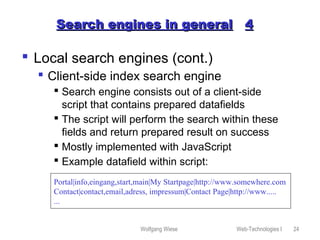
Search engines in generalSearch engines in general 44
 Local search engines (cont.)
 Client-side index search engine
 Search engine consists out of a client-side
script that contains prepared datafields
 The script will perform the search within these
fields and return prepared result on success
 Mostly implemented with JavaScript
 Example datafield within script:
Portal|info,eingang,start,main|My Startpage|http://www.somewhere.com
Contact|contact,email,adress, impressum|Contact Page|http://www.....
...
Wolfgang Wiese Web-Technologies I 25
Search engines in generalSearch engines in general 55
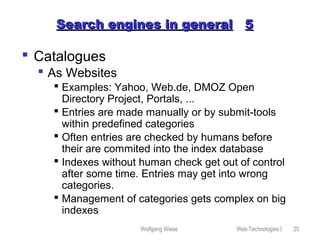
 Catalogues
 As Websites
 Examples: Yahoo, Web.de, DMOZ Open
Directory Project, Portals, ...
 Entries are made manually or by submit-tools
within predefined categories
 Often entries are checked by humans before
their are commited into the index database
 Indexes without human check get out of control
after some time. Entries may get into wrong
categories.
 Management of categories gets complex on big
indexes
Wolfgang Wiese Web-Technologies I 26
Search engines in generalSearch engines in general 66
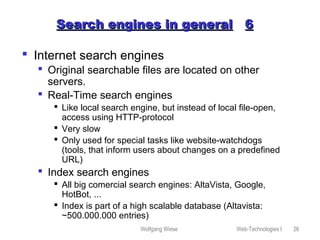
 Internet search engines
 Original searchable files are located on other
servers.
 Real-Time search engines
 Like local search engine, but instead of local file-open,
access using HTTP-protocol
 Very slow
 Only used for special tasks like website-watchdogs
(tools, that inform users about changes on a predefined
URL)
 Index search engines
 All big comercial search engines: AltaVista, Google,
HotBot, ...
 Index is part of a high scalable database (Altavista:
~500.000.000 entries)
Wolfgang Wiese Web-Technologies I 27
Search engines in generalSearch engines in general 77
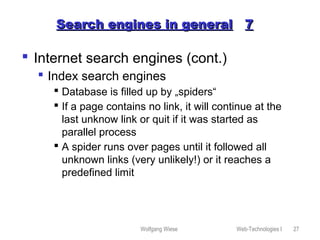
 Internet search engines (cont.)
 Index search engines
 Database is filled up by „spiders“
 If a page contains no link, it will continue at the
last unknow link or quit if it was started as
parallel process
 A spider runs over pages until it followed all
unknown links (very unlikely!) or it reaches a
predefined limit
Wolfgang Wiese Web-Technologies I 28
Search engines in generalSearch engines in general 99
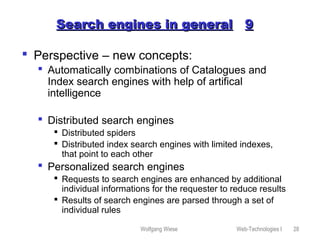
 Perspective – new concepts:
 Automatically combinations of Catalogues and
Index search engines with help of artifical
intelligence
 Distributed search engines
 Distributed spiders
 Distributed index search engines with limited indexes,
that point to each other
 Personalized search engines
 Requests to search engines are enhanced by additional
individual informations for the requester to reduce results
 Results of search engines are parsed through a set of
individual rules
Wolfgang Wiese Web-Technologies I 29
GoogleGoogle 11
 Topics:
 History
 Presentation of results
 Link-Popularity
 PageRank
 Anchor Text Index
 Architecture
 Structure
 Computing Centers & Google Dance
 Commercial aspects
Wolfgang Wiese Web-Technologies I 30
GoogleGoogle 22
 History
 1997 first publication by Brin and Page
 Implemented as „Proof of Concept“ in 1998
Stanford University for several methods of
sorting and searching results. Esp.:
 „PageRank“
 „Anchor Text Indexing”
 Index plus Cache
 Concepts for handling big indices
 Months later Google became popular to
the public
Wolfgang Wiese Web-Technologies I 31
GoogleGoogle 33
 History
 Google‘s enhancement against commercial
search engines in 1998:
 Not based on commercial interests
 First scientific try to use concepts of Information
Retrieval (IR) for hypertexts
 Scaleable concept
 No “Ranking for Cash”
Wolfgang Wiese Web-Technologies I 32
GoogleGoogle 44
 Presentation of Results
 Background
To get a higher position in results, people tried to
use several methods:
 Misuse of keywords
 Misuse of <META>-tags
 Misuse of colors (white colored texts with
keywords onto white background)
 „Doorway-pages“
Wolfgang Wiese Web-Technologies I 33
GoogleGoogle 55
 Presentation of Results
 Link-Popularity
 Made as answer against misuse to get a higher
position
 Idea: An URL is more important as another one
if more links are pointing to it:
 Number of links pointing to an URL is used.
 Pro: Automatic created (commercial) URLs with
no connect to the web get a low rank
 But: Misuse was not stopped: Commercials
now automatically created „Satellit websites“
pointing to an URL
Wolfgang Wiese Web-Technologies I 34
GoogleGoogle 66
 PageRank
(„Page“ as reference to its creator L.
Page). Uses several rules to calculate the
rank of an URL:
 The more links are pointing to an URL, the
more important it is
 The less links are within a document, the more
important is the URL the link is pointing to
 The more important a document is, the more
important are the links
 The more important a link is, the more
important is the URL the link is pointing to
Wolfgang Wiese Web-Technologies I 35
GoogleGoogle 77
 PageRank
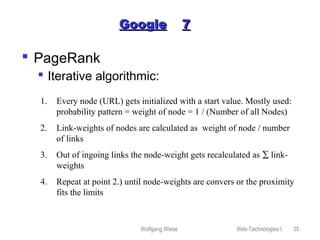
 Iterative algorithmic:
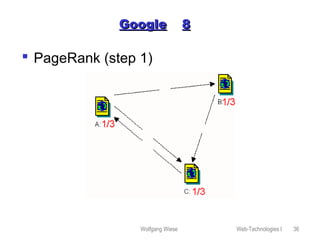
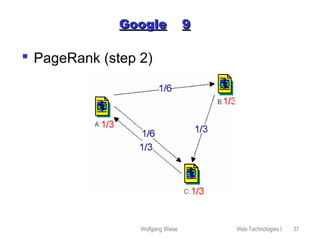
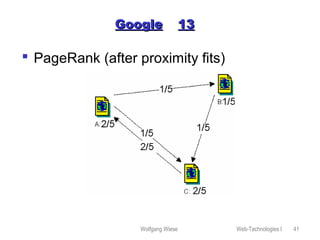
1. Every node (URL) gets initialized with a start value. Mostly used:
probability pattern = weight of node = 1 / (Number of all Nodes)
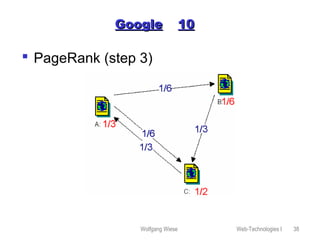
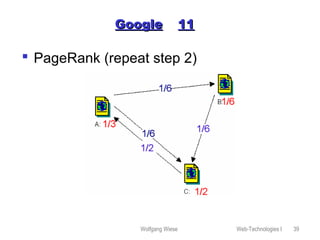
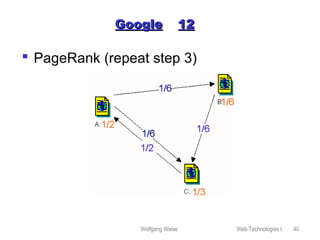
2. Link-weights of nodes are calculated as weight of node / number
of links
3. Out of ingoing links the node-weight gets recalculated as ∑ link-
weights
4. Repeat at point 2.) until node-weights are convers or the proximity
fits the limits
Wolfgang Wiese Web-Technologies I 36
GoogleGoogle 88
 PageRank (step 1)
Wolfgang Wiese Web-Technologies I 37
GoogleGoogle 99
 PageRank (step 2)
Wolfgang Wiese Web-Technologies I 38
GoogleGoogle 1010
 PageRank (step 3)
Wolfgang Wiese Web-Technologies I 39
GoogleGoogle 1111
 PageRank (repeat step 2)
Wolfgang Wiese Web-Technologies I 40
GoogleGoogle 1212
 PageRank (repeat step 3)
Wolfgang Wiese Web-Technologies I 41
GoogleGoogle 1313
 PageRank (after proximity fits)
Wolfgang Wiese Web-Technologies I 42
GoogleGoogle 1414
 PageRank
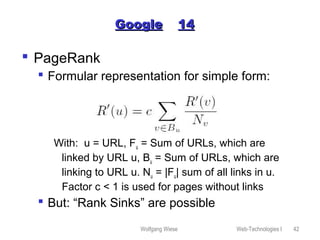
 Formular representation for simple form:
With: u = URL, Fu = Sum of URLs, which are
linked by URL u, Bu = Sum of URLs, which are
linking to URL u. Nu = |Fu| sum of all links in u.
Factor c < 1 is used for pages without links
 But: “Rank Sinks” are possible
Wolfgang Wiese Web-Technologies I 43
Google 15Google 15
 PageRank
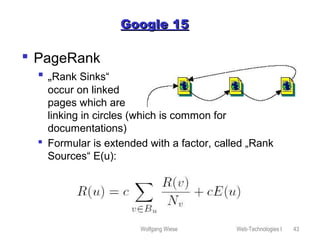
 „Rank Sinks“
occur on linked
pages which are
linking in circles (which is common for
documentations)
 Formular is extended with a factor, called „Rank
Sources“ E(u):
Wolfgang Wiese Web-Technologies I 44
GoogleGoogle 1616
 PageRank
 Cause not all URLs are part of the index,
„Dangling Links“ are defined: „Dangling Links“ are
all links in an URL which are pointing to a
document outside the index.
 Dangling Links will be ignored at the calculation of
PageRank.
 Calculation of PageRank is not depending of
searching patterns. Therfor, the calculation is
made „offline“.
 Algorithms is fast: 25 Mio documents with 75 Mio
links are calculated in one iteration in 6 Minutes,
using a standard workstation (2001 !)
Wolfgang Wiese Web-Technologies I 45
GoogleGoogle 1717
 Anchor Text Indexing
 Link in HTML:
<a href=„URL“>About this
link</a>
 Referencing text is analysed for keywords;
this keywords will be added to the URLs
keyword index
 Needed esp. for pages with graphical
content and few words.
Wolfgang Wiese Web-Technologies I 46
GoogleGoogle 1818
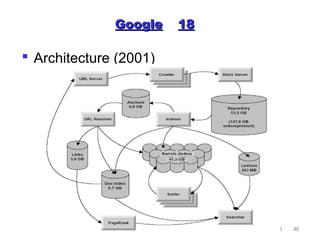
 Architecture (2001)
Wolfgang Wiese Web-Technologies I 47
GoogleGoogle 1919
 Computing Centers & Google Dance
 Google’s index is created by about 10000
workstations (Linux) which are divided onto
(currently) 8 computer-labs wordwide.
 Index gets renewed and recalculated one time a
month.
 Due to aspects of data security and time costs, the
index of all computer labs are updated after each
other: This is called as “Google Dance”.
 In this time, search requests for the same words
can answer with different results, cause different
computer labs may answer.
Wolfgang Wiese Web-Technologies I 48
GoogleGoogle 2020
 Computing Centers & Google Dance
 The answering computer-lab is chosen by the
DNS
 Different IP-adresses are used for the same
servername.
 TimeToLive (TTL) for „google.com“ is set to 5
minutes only.
After this time has passed a local name server has
to request an update by Google‘s name server.
The answer may differ depending on the local
name servers location and other aspects.
Wolfgang Wiese Web-Technologies I 49
GoogleGoogle 2121
 Commercial aspects
 Google makes cash by
 Selling licenses for its technique (for use of
local search engines)
 Placing text ads beneath search results
 Content syndication (!)
Wolfgang Wiese Web-Technologies I 50
GoogleGoogle 2222
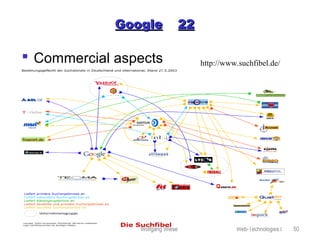
 Commercial aspects http://www.suchfibel.de/

Vorlesung "Web-Technologies"

  • 1.
    Wolfgang Wiese Web-TechnologiesI 1 Web-TechnologiesWeb-Technologies  Chapters  Client-Side Programming  Server-Side Programming  Web-Content-Management  Web-Services  Apache Webserver  Robots, Spiders and Search engines  Robots and Spiders  Search engines in general  Google
  • 2.
    Wolfgang Wiese Web-TechnologiesI 2 Web ServicesWeb Services 11  What means “Web Service” ?  Architecture  Examples  Current and future use
  • 3.
    Wolfgang Wiese Web-TechnologiesI 3 Web ServicesWeb Services 22  What means „Web Service“? A Web service corresponds to the XML based representation of an application or a software component. Web services are describing; Interface and their meta data are separated. Consumer and service provider of a Web service communicate by means of XML based messages over defined interfaces. Details of the implementation of the Web service remain hidden. Notice: An equally used definition of „Web Services“ is still in discussion, also if there is a common understanding about it within the W3C.
  • 4.
    Wolfgang Wiese Web-TechnologiesI 4 Web ServicesWeb Services 33  Architecture  Global (and local) directories are used to publish sites with Web services: Universal Description, Discovery and Integration (UDDI). Like „yellow pages“ here all web services are registered with data about their use, owners and interfaces.  The Web Service Description Language (WSDL) defines commands, attributes and type-definitions for a given web service.  With the Simple Object Access Protocol (SOAP) an application and a web service will communicate, using the definitions as given by the WDSL.  It‘s not defined which transfer protocol (like HTTP) is beeing used with SOAP.
  • 5.
    Wolfgang Wiese Web-TechnologiesI 5 Web ServicesWeb Services 44  Architecture Service Discovery (UDDI) Service definition (WSDL) Service Publication (UDDI) Service communication (SOAP) transfer protocols (HTTP, SMTP, FTP, ...)
  • 6.
    Wolfgang Wiese Web-TechnologiesI 6 Web ServicesWeb Services 55  Architecture  Use of a web service Web Service Brokerer (UDDI Registry) Offerer of a Web Service User of a Web Service Creation and publication of web service and its description Web Service Lookup: Searching, Finding and Downloading of a web service description (WDSL) Using the web service (SOAP)
  • 7.
    Wolfgang Wiese Web-TechnologiesI 7 Web ServicesWeb Services 66  Examples (Communication using SOAP)  SOAP request: POST /InStock HTTP/1.1 Host: www.stock.org Content-Type: application/soap; charset=utf-8 <?xml version="1.0"?> <soap:Envelopexmlns:soap=http://www.w3.org/2001/12/soap-envelope soap:encodingStyle="http://www.w3.org/2001/12/soap-encoding"> <soap:Body xmlns:m="http://www.stock.org/stock" /> <m:GetStockPrice> <m:StockName>IBM</m:StockName> </m:GetStockPrice> </soap:Body> </soap:Envelope>
  • 8.
    Wolfgang Wiese Web-TechnologiesI 8 Web ServicesWeb Services 77  Examples (Communication using SOAP)  SOAP response: HTTP/1.1 200 OK Connection: close Content-Type: application/soap; charset=utf-8 Date: Sat, 12 May 2002 08:09:04 GMT <?xml version="1.0"?> <soap:Envelopexmlns:soap=http://www.w3.org/2001/12/soap-envelope soap:encodingStyle="http://www.w3.org/2001/12/soap-encoding"> <soap:Body xmlns:m="http://www.stock.org/stock" /> <m:GetStockPriceResponse> <m:Price>34.5</m:Price> </m:GetStockPriceResponse> </soap:Body> </soap:Envelope>
  • 9.
    Wolfgang Wiese Web-TechnologiesI 9 Web ServicesWeb Services 88  Current and future use  Currently big commercials like Microsoft, SUN, IBM and others are trying to establish “web services” as a new innovational service.  Extensions useable for SOAP and WDSL in e-Business: Electronic Business Extensible Markup Language (ebXML)  There are still open questions within the definition of the architecture. Mostly cause of bad communication between members of W3C and OASIS (Organization for the Advancement of Structured Information Standards ) and cause of marketing aspects  Several commercials and non-profit organisations are currently working on applications using “web services”. Example: Google’s Web Service Interface  Future of “web services” ? Still unknown; “Application Service Providing“ was a hype too...
  • 10.
    Wolfgang Wiese Web-TechnologiesI 10 ApacheApache 11  Apache („a patchy server“)  Free HTTP server, supports HTTP/1.1 (RFC2616)  Available on nearly all OS (but not Mac)  Built upon NCSA httpd (V1.3) since 1994. First release of Apache: April 1995, V 0.6.2 as beta  First public version in December 1, 1995  Developer-Team consists of volunteers – open source project  Today the #1 webserver on the internet  Current version (Jun 2003): 1.3.27 as final and 2.0.46 as current release  http://www.apache.org
  • 11.
    Wolfgang Wiese Web-TechnologiesI 11 Excurse ApacheExcurse Apache 22  Apache (cont.)  Currently used by appr. 63% of all servers in use. (MS-IIS: 27%)  About 41 Million sites tested http://www.netcraft.com/survey
  • 12.
    Wolfgang Wiese Web-TechnologiesI 12 Excurse ApacheExcurse Apache 33  Principle:  After start Apache will listen to requests on port 80 (or any other defined port)  Configuration is stored within a textfile „httpd.conf“, which is read by the httpd-process  On a request it will fork itself;  The child-process will answer the request, close the connection and then die  Before sending an answer, the process will parse the requesting URL and look it up for errors.  If the request aims a special filetype (like a server-parsed SSI-document), needed moduls are dynamically loaded or called
  • 13.
    Wolfgang Wiese Web-TechnologiesI 13 Excurse ApacheExcurse Apache 44  Sample configuration file (extract) Listen 131.188.3.67:80 ServerName www.rrze.uni-erlangen.de User www Group www PidFile logs/httpd.pid ServerRoot /usr/local/apache MaxClients 220 ... LoadModule vhost_alias_module libexec/mod_vhost_alias.so ... AddModule mod_vhost_alias.c ...
  • 14.
    Wolfgang Wiese Web-TechnologiesI 14 Excurse ApacheExcurse Apache 55  Sample configuration file (cont.) ... NameVirtualHost 131.188.3.67 <Virtualhost 131.188.3.67> ServerName www.techfak.uni-erlangen.de User someone Group somegroup DocumentRoot /proj/websource/tf/www.techfak.uni-erlangen.de ScriptAlias /cgi-bin/ /proj/webbin/www.techfak.uni-erlangen.de/ </VirtualHost> ...
  • 15.
    Wolfgang Wiese Web-TechnologiesI 15 Excurse ApacheExcurse Apache 66  Source-Security (Linux/Unix)  DocumentRoot- and CGI-Directory could be protected against other users:  Access to /proj/websource allowed only for users which belong to a special user group („webadm“), which is set by „NIS maps“ (net.groupID)  Access to DocumentRoot-directory additionally protected with ACLs: > getfacl /proj/websource/tf/www.techfak.uni-erlangen.de # owner: someone # group: somegroup user::rwx user:www:r-x #effective:r-x group::r-x #effective:r-x mask:rwx other:---
  • 16.
    Wolfgang Wiese Web-TechnologiesI 16 Robots and SpidersRobots and Spiders 11  Robots and Spiders  Robots and Spiders are used to search and index webpages, following a set of simple rules: 1. (Get an URL out of a TODO-List) 2. Load a document by an URL 3. Analyse document: Links, Keywords, Content negotiation 4. Add each link to TODO-List 5. Save relevant data for the current URL 6. Repeat from step 1 until end
  • 17.
    Wolfgang Wiese Web-TechnologiesI 17 Robots and SpidersRobots and Spiders 22  Simple example in Perl: #!/local/bin/perl use LWP::UserAgent; use HTML::LinkExtor; use URI::URL; $ua = LWP::UserAgent->new; $p = HTML::LinkExtor->new(&callback); $url = $ARGV[0]; if (not $url) { die("Usage: $0 [URL]n"); } push(@linkliste,"usert$url"); while(($thiscount < 10) && (@linkliste)) { $thiscount++; ($origin,$url) = split(/t/,pop(@linkliste),2); @links = (); $res = $ua->request(HTTP::Request->new(GET => $url), sub {$p->parse($_[0])}); my $base = $res->base; @links = map { $_ = url($_, $base)->abs; } @links; $title = $res->title; for ($i=0; $i<=$#links; $i++) { push(@linkliste,"$titlet$links[$i]");} } print join("n", @linkliste), "n"; exit; sub callback { my($tag, %attr) = @_; return if $tag ne 'a'; push(@links, values %attr); }
  • 18.
    Wolfgang Wiese Web-TechnologiesI 18 Robots and SpidersRobots and Spiders 33  Robots and Spiders (cont.)  Spiders can work parallel (by forking) or serial  Spiders never leave their machine: All „crawled“ pages are downloaded; Therefore the spider is also limited by the bandwidth of its machine (See also Lesson „Capacity Planing“)  Each entry within the database will time out after a period of time  (Friendly) Spider are following a set of rules, the „Robots Exclusion Protocol“, which works through a standardized file „robots.txt“, that should be located on a webserver which‘ pages are being spidered
  • 19.
    Wolfgang Wiese Web-TechnologiesI 19 Robots and SpidersRobots and Spiders 44  Robots and Spiders (cont.)  Robot-Rules  http://www.robotstxt.org/wc/robots.html  Example „robots.txt“-file  Robots META-Tag within a HTML-file User-agent: * Disallow: /pictures/ Disallow: /intern/ <META NAME=„ROBOTS“ CONTENT=„NOINDEX, NOFOLLOW“>
  • 20.
    Wolfgang Wiese Web-TechnologiesI 20 Robots and SpidersRobots and Spiders 55  Robots and Spiders (cont.)  Problems:  Due to limited bandwidth and space, it‘s not possible to index all webpages  Spiders cannot parse and index all internet files; They mostly fail at pages generated by client-side plugins (like Flash)  Spiders can only follow pages that are referenced! Without manual submit of the URL or use of referer-infos of UserAgents a spider would never visit a page no link is guiding to  Typical spiders index only up to 50 pages per domain  => Amount of existing internet files is much bigger as a search engine‘s database
  • 21.
    Wolfgang Wiese Web-TechnologiesI 21 Search engines in generalSearch engines in general 11  Overview:  Local search engines  Catalogues  Web search engines
  • 22.
    Wolfgang Wiese Web-TechnologiesI 22 Search engines in generalSearch engines in general 22  Local search engines  Real-Time search engines:  CGI-script, which opens a list of files and greps it for the searched word:  Filelist contains out of all files of a special type (mostly HTML) in a predefined start-directory  Subdirectories of the start-directory may be included optionally  Duration of search dependent of amount of webfiles, their size and the programming language;
  • 23.
    Wolfgang Wiese Web-TechnologiesI 23 Search engines in generalSearch engines in general 33  Local search engines (cont.)  Index search engines  Avoids time-consuming real-time search though many files  Search only in a prepared index file  Index file is generated on regular time intervals  Two types of index files:  Summarization of all searchable files: Contains as entries the simple addition of all files without any chance and the reference to the orginal file  Parsed index file: Contains as entries only special Meta- Tag informations, like title, description and keywords of every file and the reference to the original file  Index often as textfile.
  • 24.
    Wolfgang Wiese Web-TechnologiesI 24 Search engines in generalSearch engines in general 44  Local search engines (cont.)  Client-side index search engine  Search engine consists out of a client-side script that contains prepared datafields  The script will perform the search within these fields and return prepared result on success  Mostly implemented with JavaScript  Example datafield within script: Portal|info,eingang,start,main|My Startpage|http://www.somewhere.com Contact|contact,email,adress, impressum|Contact Page|http://www..... ...
  • 25.
    Wolfgang Wiese Web-TechnologiesI 25 Search engines in generalSearch engines in general 55  Catalogues  As Websites  Examples: Yahoo, Web.de, DMOZ Open Directory Project, Portals, ...  Entries are made manually or by submit-tools within predefined categories  Often entries are checked by humans before their are commited into the index database  Indexes without human check get out of control after some time. Entries may get into wrong categories.  Management of categories gets complex on big indexes
  • 26.
    Wolfgang Wiese Web-TechnologiesI 26 Search engines in generalSearch engines in general 66  Internet search engines  Original searchable files are located on other servers.  Real-Time search engines  Like local search engine, but instead of local file-open, access using HTTP-protocol  Very slow  Only used for special tasks like website-watchdogs (tools, that inform users about changes on a predefined URL)  Index search engines  All big comercial search engines: AltaVista, Google, HotBot, ...  Index is part of a high scalable database (Altavista: ~500.000.000 entries)
  • 27.
    Wolfgang Wiese Web-TechnologiesI 27 Search engines in generalSearch engines in general 77  Internet search engines (cont.)  Index search engines  Database is filled up by „spiders“  If a page contains no link, it will continue at the last unknow link or quit if it was started as parallel process  A spider runs over pages until it followed all unknown links (very unlikely!) or it reaches a predefined limit
  • 28.
    Wolfgang Wiese Web-TechnologiesI 28 Search engines in generalSearch engines in general 99  Perspective – new concepts:  Automatically combinations of Catalogues and Index search engines with help of artifical intelligence  Distributed search engines  Distributed spiders  Distributed index search engines with limited indexes, that point to each other  Personalized search engines  Requests to search engines are enhanced by additional individual informations for the requester to reduce results  Results of search engines are parsed through a set of individual rules
  • 29.
    Wolfgang Wiese Web-TechnologiesI 29 GoogleGoogle 11  Topics:  History  Presentation of results  Link-Popularity  PageRank  Anchor Text Index  Architecture  Structure  Computing Centers & Google Dance  Commercial aspects
  • 30.
    Wolfgang Wiese Web-TechnologiesI 30 GoogleGoogle 22  History  1997 first publication by Brin and Page  Implemented as „Proof of Concept“ in 1998 Stanford University for several methods of sorting and searching results. Esp.:  „PageRank“  „Anchor Text Indexing”  Index plus Cache  Concepts for handling big indices  Months later Google became popular to the public
  • 31.
    Wolfgang Wiese Web-TechnologiesI 31 GoogleGoogle 33  History  Google‘s enhancement against commercial search engines in 1998:  Not based on commercial interests  First scientific try to use concepts of Information Retrieval (IR) for hypertexts  Scaleable concept  No “Ranking for Cash”
  • 32.
    Wolfgang Wiese Web-TechnologiesI 32 GoogleGoogle 44  Presentation of Results  Background To get a higher position in results, people tried to use several methods:  Misuse of keywords  Misuse of <META>-tags  Misuse of colors (white colored texts with keywords onto white background)  „Doorway-pages“
  • 33.
    Wolfgang Wiese Web-TechnologiesI 33 GoogleGoogle 55  Presentation of Results  Link-Popularity  Made as answer against misuse to get a higher position  Idea: An URL is more important as another one if more links are pointing to it:  Number of links pointing to an URL is used.  Pro: Automatic created (commercial) URLs with no connect to the web get a low rank  But: Misuse was not stopped: Commercials now automatically created „Satellit websites“ pointing to an URL
  • 34.
    Wolfgang Wiese Web-TechnologiesI 34 GoogleGoogle 66  PageRank („Page“ as reference to its creator L. Page). Uses several rules to calculate the rank of an URL:  The more links are pointing to an URL, the more important it is  The less links are within a document, the more important is the URL the link is pointing to  The more important a document is, the more important are the links  The more important a link is, the more important is the URL the link is pointing to
  • 35.
    Wolfgang Wiese Web-TechnologiesI 35 GoogleGoogle 77  PageRank  Iterative algorithmic: 1. Every node (URL) gets initialized with a start value. Mostly used: probability pattern = weight of node = 1 / (Number of all Nodes) 2. Link-weights of nodes are calculated as weight of node / number of links 3. Out of ingoing links the node-weight gets recalculated as ∑ link- weights 4. Repeat at point 2.) until node-weights are convers or the proximity fits the limits
  • 36.
    Wolfgang Wiese Web-TechnologiesI 36 GoogleGoogle 88  PageRank (step 1)
  • 37.
    Wolfgang Wiese Web-TechnologiesI 37 GoogleGoogle 99  PageRank (step 2)
  • 38.
    Wolfgang Wiese Web-TechnologiesI 38 GoogleGoogle 1010  PageRank (step 3)
  • 39.
    Wolfgang Wiese Web-TechnologiesI 39 GoogleGoogle 1111  PageRank (repeat step 2)
  • 40.
    Wolfgang Wiese Web-TechnologiesI 40 GoogleGoogle 1212  PageRank (repeat step 3)
  • 41.
    Wolfgang Wiese Web-TechnologiesI 41 GoogleGoogle 1313  PageRank (after proximity fits)
  • 42.
    Wolfgang Wiese Web-TechnologiesI 42 GoogleGoogle 1414  PageRank  Formular representation for simple form: With: u = URL, Fu = Sum of URLs, which are linked by URL u, Bu = Sum of URLs, which are linking to URL u. Nu = |Fu| sum of all links in u. Factor c < 1 is used for pages without links  But: “Rank Sinks” are possible
  • 43.
    Wolfgang Wiese Web-TechnologiesI 43 Google 15Google 15  PageRank  „Rank Sinks“ occur on linked pages which are linking in circles (which is common for documentations)  Formular is extended with a factor, called „Rank Sources“ E(u):
  • 44.
    Wolfgang Wiese Web-TechnologiesI 44 GoogleGoogle 1616  PageRank  Cause not all URLs are part of the index, „Dangling Links“ are defined: „Dangling Links“ are all links in an URL which are pointing to a document outside the index.  Dangling Links will be ignored at the calculation of PageRank.  Calculation of PageRank is not depending of searching patterns. Therfor, the calculation is made „offline“.  Algorithms is fast: 25 Mio documents with 75 Mio links are calculated in one iteration in 6 Minutes, using a standard workstation (2001 !)
  • 45.
    Wolfgang Wiese Web-TechnologiesI 45 GoogleGoogle 1717  Anchor Text Indexing  Link in HTML: <a href=„URL“>About this link</a>  Referencing text is analysed for keywords; this keywords will be added to the URLs keyword index  Needed esp. for pages with graphical content and few words.
  • 46.
    Wolfgang Wiese Web-TechnologiesI 46 GoogleGoogle 1818  Architecture (2001)
  • 47.
    Wolfgang Wiese Web-TechnologiesI 47 GoogleGoogle 1919  Computing Centers & Google Dance  Google’s index is created by about 10000 workstations (Linux) which are divided onto (currently) 8 computer-labs wordwide.  Index gets renewed and recalculated one time a month.  Due to aspects of data security and time costs, the index of all computer labs are updated after each other: This is called as “Google Dance”.  In this time, search requests for the same words can answer with different results, cause different computer labs may answer.
  • 48.
    Wolfgang Wiese Web-TechnologiesI 48 GoogleGoogle 2020  Computing Centers & Google Dance  The answering computer-lab is chosen by the DNS  Different IP-adresses are used for the same servername.  TimeToLive (TTL) for „google.com“ is set to 5 minutes only. After this time has passed a local name server has to request an update by Google‘s name server. The answer may differ depending on the local name servers location and other aspects.
  • 49.
    Wolfgang Wiese Web-TechnologiesI 49 GoogleGoogle 2121  Commercial aspects  Google makes cash by  Selling licenses for its technique (for use of local search engines)  Placing text ads beneath search results  Content syndication (!)
  • 50.
    Wolfgang Wiese Web-TechnologiesI 50 GoogleGoogle 2222  Commercial aspects http://www.suchfibel.de/