Visual answers to everyday
challenges
Jamie McIndoe / Jaume Durany
@jaumedurany
Fairfax Media
Agile Coach
@jamie_mcindoe
Assurity
Technical Test Lead
Jaume Durany
Who are we?
Jamie McIndoe
This is the story of a product team
Team Lamp Dream
Team
Why visuals?
Visual learners
Immediacy
Engaging
Visual answers
Plan Communicate Collaborate
Visual answers
Plan Communicate Collaborate
Where are we now?
How far are we from our goal?
How will we work to get to our goal?
Visual answers
Plan Communicate Collaborate
What’s our process?What’s our strategy?
Visual answers
Plan Communicate Collaborate
How do we develop shared understanding?
How do we collaborate remotely?
How do we capture team feedback?
Plan - Managing uncertainty
The big picture
The big picture enhanced
Team focus
Showing and sharing progress
Plan - Adapting teams to goals
Mission 1
Mission 2
Visualising the transition path
Team Self-selection
Team agreements
What have we learnt?
Plan Communicate Collaborate
Showing the big picture
Visualise process
Team Self-selection
What have we learnt?
Plan Communicate Collaborate
Showing the big picture
Visualise process
Team Self-selection
Visuals can map out the path for teams to follow
Showing process and gathering feedback during
the process helped us adapt and improve
1 week to completely redefine our teams.
Visuals + Self-selection rocks!
Communicate - a visual strategy
Visual Strategy
Visual Strategy
Communicate - A new process
Personal development
Personal development using Trello
What have we learnt?
Plan Communicate Collaborate
Showing the big picture
Visualise progress
Team Self-selection
Visual strategy
Sharing a new Process
What have we learnt?
Plan Communicate Collaborate
Showing the big picture
Visualise progress
Team Self-selection
The visuals shared enough
information for our teams to
work with the strategy
Video was an engaging
way of communicating
detail effectively
Ideas had to be simple
enough to be
communicated visually
Team understood the
process from the visuals
alone
Visual strategy
Sharing a new Process
COLLABORATE
Shared
understanding
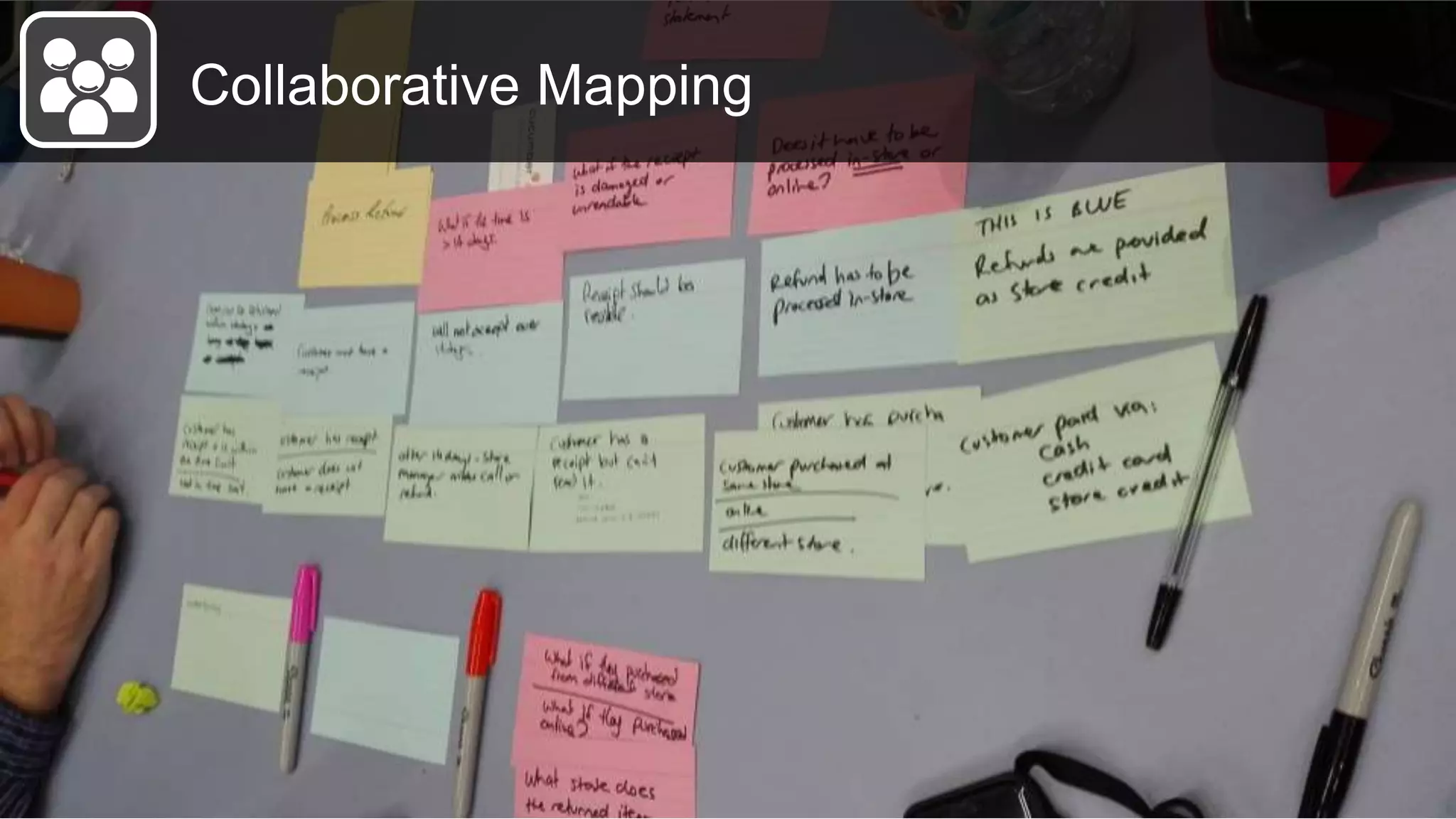
Collaborative Mapping
Remote team collaboration
Remote retrospectives
Regular retrospectives were visual but didn’t
really work
Visuals needed to be part of a shared
scenario
Remote people couldn’t participate in the
same way
Remote retrospectives
What have we learnt?
Plan Communicate Collaborate
Collaborative mapping
Remote retrospectives
Shared understanding &
scenarios
Showing the big picture
Visualise progress
Team Self-selection
Visual strategy
Sharing a new Process
What have we learnt?
Plan Communicate Collaborate
Collaborative mapping
Remote retrospectives
Shared understanding &
scenarios
Showing the big picture
Visualise progress
Team Self-selection
Testing strategy
Sharing a new Process
Personal Development
The whole team collaboratively develops a shared
visual map which tells a story
Remote facilitation needs all participants to have
an even playing field
Shared understanding and ownership emerges
from working on the same canvas
Insights
THE POWER OF VISUALS
to help our teams in planning, communication & collaboration.
Providing clarity and direction to guide our activities
Insights
VISIBLE vs VISUAL
Presenting the information in a way that is engaging and easily
understandable to align our teams and share understanding.
Insights
EXPERIMENT, EXPERIMENT AND EXPERIMENT!
There are visual approaches that you can use in answering your
challenges … try some, learn from their impact and share them!
Thanks!
Jamie McIndoe
@jamie_mcindoe
Jaume Durany
@jaumedurany
… govisual Team is coming soon! http://govisual.team @govisual_team

Visual answers to everyday challenges

Editor's Notes

  • #4 This talk is based mainly around our visualisation work with Fairfax Product Technology. Fairfax Product Technology is the in-house Agile development shop responsible for much of the stuff.co.nz platform, especially the journalists and editors tools for writing and publishing articles After a reset around a year ago, two teams - Dream Team and Team Lamp - came together in a self-selection exercise. Team members selecting which business goals to align t
  • #5 But first, why visualise? Visual Learners Much of our communication is visual and many of us are visual learners who learn best when new ideas and information is presented visually. Immediacy We can often process visual information faster than speech or text, especially where we recognise elements of familiar patterns For example, once we’ve learnt the meaning of traffic lights we can apply the same colour patterns to other area of life. for example, RED alerting us to danger, YELLOW to warn us of risk and ALL THREE COLOURS to indicate progress or status. Engaging And in general, we’ve found the visuals we’ve experimented with are much more engaging for our teams, stakeholders (and beyond) than other forms of communication … and hopefully you’ll see that in a few of our examples. <have changed reasons slightly to: Visual learners Immediacy - we process visual information quickly, especially when the visuals are similar to patterns we already understand Engaging - many people prefer to engage with visual information Memorable - “ Traffic lights … Studies, % is what we see … power of infographics, engage with better … Patterns, colours, images Gustavo Deco … Pukeko, image, wikipedia Famous brands … car logos … how we link a visual to a concept -- http://www.slideshare.net/ethos3/the-power-of-visuals -- Lynne’s visual mojo -- http://blog.wyzowl.com/power-visual-communication-infographic You’ve all heard the saying that “a picture is worth a thousand words” … Some of these pictures you can recognise the meaning without needing to have words (traffic lights, brands, emoticons).
  • #6 All The visual experiments we’ll share in this talk will be based on this simple model that defines the main areas existing in any team environment: Plan, Communicate and Collaborate.
  • #10 To be able to move forward, you need to know where you are and where you need to go to.
  • #11 To understand our location in developing a product we need to see the big picture and how what we’re working on now fits into that Where possible our teams have used whiteboard walls to map out the product we’re delivering, where we are now and how to get to the goal we’re after. This wall covers the path for our Team Lamp to deliver a beta mobile website last year and was drawn by Fairfax’s UX lead Jane.
  • #12 Here’s an example of how we’ve enhanced our visuals to make visible more detail on progress in team planning meetings and showcases with our stakeholders…
  • #13 We can also use visuals to ensure clarity and focus where we are close to delivering a product. In this case we had just over a month until a release date for a product, which as a team we had agreed was an achievable timeline, but only if we had clear direction, were co-ordinated in the work we did and we reduced the noise of low priority work for our team members.
  • #14 And here’s how we used it on a wall by our team area. Simple visual updates of progress for each of our goals, highlighting who was focused on each goal.
  • #15 Another key part when planning is to define and organise our teams to achieve our missions.
  • #16 We prepared the visual on the left to represent the whole transition path we wanted the team to follow. In this visual we captured each step together with a list of expected outcomes
  • #17 The first step was to define our new teams and we really wanted our people to be part of the definition process. We really believe self-organising teams need to be at the core to achieve success. we come up with the idea to use the self-selection experiment Sandy Mamoli presented some time ago. Our product owners pitched their missions and their needs and then we went through an iterative process where everybody could choose the team to join based on three rules that were also visible in the wall: what’s the best choice for the company? where would you be able to be most valuable? where would you grow the most? We used our avatars from the physical board to choose teams and at the end of the first step, in only 1 hour, we had two new teams: Dream Team and Team Lamp.
  • #18 Once we had the two new teams we followed with each of them the rest of the process: definition of the working agreements, definition of the methodology to use and definition of all the team ceremonies to keep alignment with our product owners working from Auckland
  • #21 At Fairfax we implemented a test strategy based upon the central idea of "testing as a team“, which simply-put was about our teams sharing the testing load. The strategy extended “Testing as a team” to collaborating on testing throughout development and beyond.
  • #22 Rather than focus on a written strategy, we were inspired by Lynne Cazaly’s visualisation work to try and visualise the strategy. The visual test strategy captured our guiding principles for testing in a one-page illustration to be displayed on team walls and other shared team spaces, enabling it to be used as a reference in stand-ups and team discussions on testing. The visuals were intended to communicate just enough about each of the principles, so that team members can work with the strategy without having to have read the detail behind it.
  • #23 https://youtu.be/GicfweqCYJk One experiment we tried to communicate the implementation detail behind the strategy was a micro-learning video which showed the Visual Test Strategy emerging with Jaume drawing, as I narrated the strategy detail. We recorded the video one afternoon at work, using my phone and after a few takes got the illustration flow and camera angles right. The narration was captured separately on the same phone and the finished video was built around the narration. I edited the using open-source software, especially a tool called Blender which I highly recommend as a powerful video editor
  • #24 In the communication part we’ve also been experimenting with visuals to minimise the waste of time when sharing new processes or ideas. The idea has been to make use of visuals to share new processes to be followed instead of having a long meeting session to present it to a big group of people and evaluate the outcome of the communication.
  • #25 One of the things we’ve been trying to work on is our personal development process. We’ve defined the way we want to help our people develop in three different steps
  • #26 This is one of the visuals we created to communicate this new personal development process and a specific example using Trello. We sent the visual to everybody with the three steps to follow (define goals / create actions / continuous flow) and we didn’t add any extra meetings to communicate it. All the information was shown in this one-page visual and my own personal development trello board was used as an example to make it really clear.
  • #29 While much of what we have shown so far is visually appealing, being visual doesn’t necessarily have to be artistic, or be created by a single artist In these experiments we looked at ways to involve a whole team in simple visuals, collaborating with colours and patterns to develop a shared understanding.
  • #30 This slide shows an example map, which is a collaborative map breaking down a user story into its acceptance criteria and examples which can be used to verify if the acceptance criteria have been met. It is similar in concept to story or feature mapping, but at a more detailed level. https://cucumber.io/blog/2015/12/08/example-mapping-introduction
  • #31 We can take these mapping ideas to more traditional contexts and challenges On the left we have a detailed strategy being structured collaboratively based upon a group brainstorming exercise. The map created gave us a clear visual on the most complex areas and ideas on how we could split the strategy work On the right we have what started as a basic feature map being collaboratively elaborated on, mapped against timelines and grouped into possible releases, to generate a project. The power of both uses lies in the simplicity of generating the visuals and the greater team ownership of artefacts that might otherwise have been the work of only one or two team members.
  • #32 One of our focuses in collaboration has been around remote collaboration as we’ve got our POs in Auckland together with part of one of our product delivery teams.
  • #34 First retro using google drive, same canvas, same scenario, same postits Send invite at the beginning, all join, use boxes as post its and follow the facilitator. Preparation similar to normal one How this one worked
  • #35 Starfish, other examples from there Normal practice now, even for co-located teams with our product owner in remote same conversation, same boundaries We keep all the feedback, naturally get all the outcomes.