1 October 2014Creative use of cultural contents
Gábor Palkó
AthenaPlus
Creative use of cultural contents
Gábor Palkó
1 October 2014Creative use of cultural contents
Gábor Palkó
• Memory institutions in the XXI. Century:
Communicating to/with very different scope of audiences
• Wide audience
– Exhibitions, events
– example: Petőfi physical and virtual exhibition (Athena Plus)
• Very specific audiences (scholars) [hard to legitimate!]
– Digital Philology (DM2E)
– example: genetic critical edition of a novel by Dezső Kosztolányi
• 3 stages of the genesis of the manuscript
• 4 witnesses of the print editions
• Editorial notes and studies
Petőfi Literary Museum
1 October 2014Creative use of cultural contents
Gábor Palkó
• MOVIO – Virtual exhibitions
• CityQuest http://cityquest.be
– CityQuest allows cultural organisations to easily create a quest online, and publish it to this
mobile app.
• Maps of Europe (under construction)
• Plan your own schooltrip (under construction)
• GIS-application (under construction)
Creative tools
1 October 2014
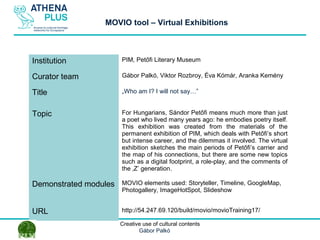
MOVIO tool – Virtual Exhibitions
Institution PIM, Petőfi Literary Museum
Curator team Gábor Palkó, Viktor Rozbroy, Éva Kómár, Aranka Kemény
Title „Who am I? I will not say…”
Topic For Hungarians, Sándor Petőfi means much more than just
a poet who lived many years ago: he embodies poetry itself.
This exhibition was created from the materials of the
permanent exhibition of PIM, which deals with Petőfi’s short
but intense career, and the dilemmas it involved. The virtual
exhibition sketches the main periods of Petőfi’s carrier and
the map of his connections, but there are some new topics
such as a digital footprint, a role-play, and the comments of
the ‚Z’ generation.
Demonstrated modules MOVIO elements used: Storyteller, Timeline, GoogleMap,
Photogallery, ImageHotSpot, Slideshow
URL http://54.247.69.120/build/movio/movioTraining17/
Creative use of cultural contents
Gábor Palkó
1 October 2014Creative use of cultural contents
Gábor Palkó
http://54.247.69.120/build/movio/movioTraining17/it/5/foldal
Walkthrough
1 October 2014Creative use of cultural contents
Gábor Palkó
Evaluation
1 October 2014Creative use of cultural contents
Gábor Palkó
Contact
Gábor Palkó
palkog@pim.hu
Petőfi Literary Museum
Budapest, Károlyi u. 16.
www.athenaplus.eu
Twitter | https://twitter.com/AthenaPlusEU
LinkedIn | http://linkd.in/19XwWOz

Virtual exhibition presentation pim

  • 1.
    1 October 2014Creativeuse of cultural contents Gábor Palkó AthenaPlus Creative use of cultural contents Gábor Palkó
  • 2.
    1 October 2014Creativeuse of cultural contents Gábor Palkó • Memory institutions in the XXI. Century: Communicating to/with very different scope of audiences • Wide audience – Exhibitions, events – example: Petőfi physical and virtual exhibition (Athena Plus) • Very specific audiences (scholars) [hard to legitimate!] – Digital Philology (DM2E) – example: genetic critical edition of a novel by Dezső Kosztolányi • 3 stages of the genesis of the manuscript • 4 witnesses of the print editions • Editorial notes and studies Petőfi Literary Museum
  • 3.
    1 October 2014Creativeuse of cultural contents Gábor Palkó • MOVIO – Virtual exhibitions • CityQuest http://cityquest.be – CityQuest allows cultural organisations to easily create a quest online, and publish it to this mobile app. • Maps of Europe (under construction) • Plan your own schooltrip (under construction) • GIS-application (under construction) Creative tools
  • 4.
    1 October 2014 MOVIOtool – Virtual Exhibitions Institution PIM, Petőfi Literary Museum Curator team Gábor Palkó, Viktor Rozbroy, Éva Kómár, Aranka Kemény Title „Who am I? I will not say…” Topic For Hungarians, Sándor Petőfi means much more than just a poet who lived many years ago: he embodies poetry itself. This exhibition was created from the materials of the permanent exhibition of PIM, which deals with Petőfi’s short but intense career, and the dilemmas it involved. The virtual exhibition sketches the main periods of Petőfi’s carrier and the map of his connections, but there are some new topics such as a digital footprint, a role-play, and the comments of the ‚Z’ generation. Demonstrated modules MOVIO elements used: Storyteller, Timeline, GoogleMap, Photogallery, ImageHotSpot, Slideshow URL http://54.247.69.120/build/movio/movioTraining17/ Creative use of cultural contents Gábor Palkó
  • 5.
    1 October 2014Creativeuse of cultural contents Gábor Palkó http://54.247.69.120/build/movio/movioTraining17/it/5/foldal Walkthrough
  • 6.
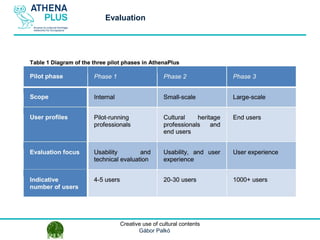
    1 October 2014Creativeuse of cultural contents Gábor Palkó Evaluation
  • 7.
    1 October 2014Creativeuse of cultural contents Gábor Palkó Contact Gábor Palkó palkog@pim.hu Petőfi Literary Museum Budapest, Károlyi u. 16. www.athenaplus.eu Twitter | https://twitter.com/AthenaPlusEU LinkedIn | http://linkd.in/19XwWOz

Editor's Notes

  • #3 Instructions for walkthrough -During the presentation, click the URL in the PowerPoint slide to access your virtual exhibition and begin the walkthrough The walkthough is a part of the presentation where a team member displays to the audience the several interconnected elements of the virtual exhibition As the narration unfolds, the contents displayed in the virtual exhibition can be further explained The purpose is to give an overview of the work done (in-depth explanations needed), and to entice the audience to check out the exhibition more in detail later. Once rehearsed, these demonstrations can be repeated in professional and end user events during pilot phase II
  • #4 Instructions for walkthrough -During the presentation, click the URL in the PowerPoint slide to access your virtual exhibition and begin the walkthrough The walkthough is a part of the presentation where a team member displays to the audience the several interconnected elements of the virtual exhibition As the narration unfolds, the contents displayed in the virtual exhibition can be further explained The purpose is to give an overview of the work done (in-depth explanations needed), and to entice the audience to check out the exhibition more in detail later. Once rehearsed, these demonstrations can be repeated in professional and end user events during pilot phase II
  • #6 Instructions for walkthrough -During the presentation, click the URL in the PowerPoint slide to access your virtual exhibition and begin the walkthrough The walkthough is a part of the presentation where a team member displays to the audience the several interconnected elements of the virtual exhibition As the narration unfolds, the contents displayed in the virtual exhibition can be further explained The purpose is to give an overview of the work done (in-depth explanations needed), and to entice the audience to check out the exhibition more in detail later. Once rehearsed, these demonstrations can be repeated in professional and end user events during pilot phase II
  • #7 Instructions for walkthrough -During the presentation, click the URL in the PowerPoint slide to access your virtual exhibition and begin the walkthrough The walkthough is a part of the presentation where a team member displays to the audience the several interconnected elements of the virtual exhibition As the narration unfolds, the contents displayed in the virtual exhibition can be further explained The purpose is to give an overview of the work done (in-depth explanations needed), and to entice the audience to check out the exhibition more in detail later. Once rehearsed, these demonstrations can be repeated in professional and end user events during pilot phase II