My "Hello, World!"
moments.
aka What I’ve learnt so far…
So what are these concepts…
•Version Control Systems aka CTRL + Z Plus
•Containerization aka Never install locally...
•Low-Code Development aka Build-A-Software
Workshop
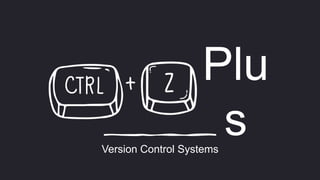
Plu
s
Version Control Systems
Version Control Systems… What
are they?
• A version control system (VCS) is a system that
facilitates the management of multiple revisions
of the same unit of information
• It records changes to a file or set of files over
time so that you can recall specific versions later
• This can apply to various types of items, such as
documents, source files, or other similar items
Benefits of them… i.e. vcs
•History Tracking
•Collaboration
•Code Backup and Recovery
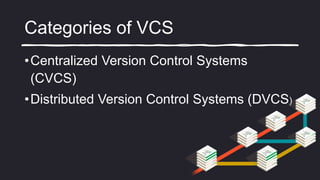
Categories of VCS
•Centralized Version Control Systems
(CVCS)
•Distributed Version Control Systems (DVCS)
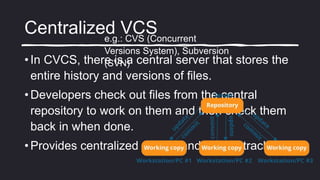
Centralized VCS
• In CVCS, there is a central server that stores the
entire history and versions of files.
• Developers check out files from the central
repository to work on them and then check them
back in when done.
• Provides centralized control and history tracking.
e.g.: CVS (Concurrent
Versions System), Subversion
(SVN)
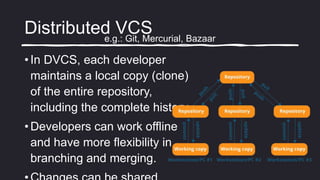
Distributed VCS
• In DVCS, each developer
maintains a local copy (clone)
of the entire repository,
including the complete history.
• Developers can work offline
and have more flexibility in
branching and merging.
e.g.: Git, Mercurial, Bazaar
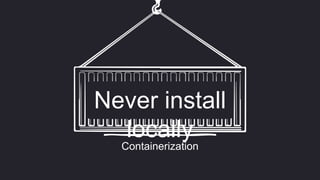
Containerization
Never install
locally
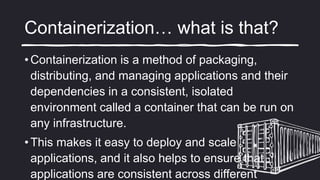
Containerization… what is that?
• Containerization is a method of packaging,
distributing, and managing applications and their
dependencies in a consistent, isolated
environment called a container that can be run on
any infrastructure.
• This makes it easy to deploy and scale
applications, and it also helps to ensure that
applications are consistent across different
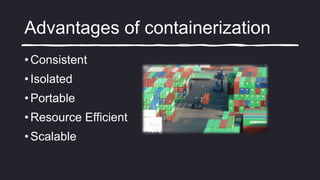
Advantages of containerization
• Consistent
• Isolated
• Portable
• Resource Efficient
• Scalable
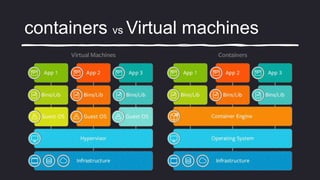
containers vs Virtual machines
• A virtual machine (VM) is like a copy of an actual
physical computer. A virtual server operates in a multi-
tenant environment, meaning that multiple VMs run on
the same physical hardware.
• Containers sit on top of a physical server and its host
OS. Every container shares the host OS kernel and the
binaries and libraries to run the required application.
• Containers and VMs are not mutually exclusive and can
containers vs Virtual machines
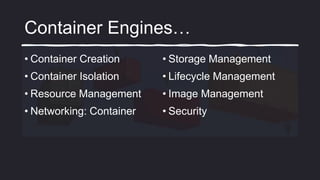
Container Engines…
• Container Creation
• Container Isolation
• Resource Management
• Networking: Container
• Storage Management
• Lifecycle Management
• Image Management
• Security
Container Engines…
• Docker
• Podman
• LXC (Linux Containers)
• containerd
Low Code Development
What is Low code development?
• Software development approach that aims to simplify
and accelerate the process of creating applications.
• It replaces the need to create custom
code with a collection of ready-to-go
components, boilerplate scripts and
integrations, solution blueprints, visual
workflow automation tools, and other
user-friendly features.
Benefits of low code…
• Faster Development
• Reduced Coding Complexity
• Increased Collaboration
• Enhanced Agility
Low-code vs no-code
Development
• Definition
• Target Audience
• Complexity
• Customization
Low Code Platforms…
• OutSystems
• Microsoft Power Apps
• Kissflow
• Quickbase
• Salesforce Inc
Goodbye World!

VCS, Containers & Low-code

  • 1.
    My "Hello, World!" moments. akaWhat I’ve learnt so far…
  • 2.
    So what arethese concepts… •Version Control Systems aka CTRL + Z Plus •Containerization aka Never install locally... •Low-Code Development aka Build-A-Software Workshop
  • 3.
  • 4.
    Version Control Systems…What are they? • A version control system (VCS) is a system that facilitates the management of multiple revisions of the same unit of information • It records changes to a file or set of files over time so that you can recall specific versions later • This can apply to various types of items, such as documents, source files, or other similar items
  • 5.
    Benefits of them…i.e. vcs •History Tracking •Collaboration •Code Backup and Recovery
  • 6.
    Categories of VCS •CentralizedVersion Control Systems (CVCS) •Distributed Version Control Systems (DVCS)
  • 7.
    Centralized VCS • InCVCS, there is a central server that stores the entire history and versions of files. • Developers check out files from the central repository to work on them and then check them back in when done. • Provides centralized control and history tracking. e.g.: CVS (Concurrent Versions System), Subversion (SVN)
  • 8.
    Distributed VCS • InDVCS, each developer maintains a local copy (clone) of the entire repository, including the complete history. • Developers can work offline and have more flexibility in branching and merging. e.g.: Git, Mercurial, Bazaar
  • 9.
  • 10.
    Containerization… what isthat? • Containerization is a method of packaging, distributing, and managing applications and their dependencies in a consistent, isolated environment called a container that can be run on any infrastructure. • This makes it easy to deploy and scale applications, and it also helps to ensure that applications are consistent across different
  • 11.
    Advantages of containerization •Consistent • Isolated • Portable • Resource Efficient • Scalable
  • 12.
    containers vs Virtualmachines • A virtual machine (VM) is like a copy of an actual physical computer. A virtual server operates in a multi- tenant environment, meaning that multiple VMs run on the same physical hardware. • Containers sit on top of a physical server and its host OS. Every container shares the host OS kernel and the binaries and libraries to run the required application. • Containers and VMs are not mutually exclusive and can
  • 13.
  • 14.
    Container Engines… • ContainerCreation • Container Isolation • Resource Management • Networking: Container • Storage Management • Lifecycle Management • Image Management • Security
  • 15.
    Container Engines… • Docker •Podman • LXC (Linux Containers) • containerd
  • 16.
  • 17.
    What is Lowcode development? • Software development approach that aims to simplify and accelerate the process of creating applications. • It replaces the need to create custom code with a collection of ready-to-go components, boilerplate scripts and integrations, solution blueprints, visual workflow automation tools, and other user-friendly features.
  • 18.
    Benefits of lowcode… • Faster Development • Reduced Coding Complexity • Increased Collaboration • Enhanced Agility
  • 19.
    Low-code vs no-code Development •Definition • Target Audience • Complexity • Customization
  • 20.
    Low Code Platforms… •OutSystems • Microsoft Power Apps • Kissflow • Quickbase • Salesforce Inc
  • 21.