Copyright ©2004 and Distribution Rights Held by DotNetTechnology, LLC. This material is exclusively used by DotNetTechnology, LLC Consultants as a teaching aid.  Any unauthorized usage including teaching, copying, and redistribution is strictly prohibited.  .NET Programming with VB.NET  Session 3 Dutch Dasanaike November 2004 VB.Net  Dutch Dasanaike  © 2004  DotNetTechnology.com .  All rights reserved.
Working in Visual  Studio .NET Why Use VS.NET? Features in VS.NET Getting Started with VS.NET VS.NET Options Projects and Solutions in VS.NET Creating Projects in VS.NET VS.NET Solution Environment VS.NET Code Editor VS.NET Project Configuration VS.NET Project Compilation VS.NET Debugging Features Stress Testing Applications with ACT
Section Objectives After completing this section, you will be able to: List the features found in VS.NET Explain how VS.NET can be used to build .NET applications Explain how to create a project using VS.NET Explain how to compile a project using VS.NET  Explain how to perform basic stress testing using VS.NET
Why Use VS.NET? Code management Built-in code compilation Code insight Source control Integrated help Many more features Since both ASP.NET Web Forms and Windows Forms applications can be written in an editor as simple as Notepad, why invest in VS.NET?
Features in VS.NET Visual Studio.NET offers an integrated development environment for creating VB.NET and C#  applications. Important features of VS.NET: Intellisense, code completion, formatting, and quick Info To do and task lists Integrated IDE and code help system Support for solutions and projects Built-in debugging (code and stored procedures) Integrated, visual design environment for Web and client/server applications Visual design environment for wireless applications Integrated database and server support Architectural features Stress Testing with Application Center Test
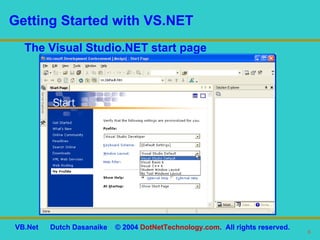
Getting Started with VS.NET The Visual Studio.NET start page
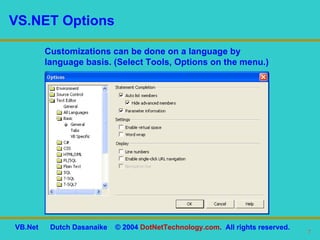
VS.NET Options Customizations can be done on a language by language basis. (Select Tools, Options on the menu.)
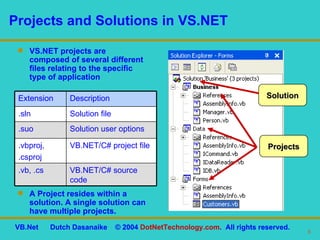
Projects and Solutions in VS.NET VS.NET projects are composed of several different files relating to the specific type of application A Project resides within a solution. A single solution can have multiple projects. Solution Projects VB.NET/C# source code .vb, .cs VB.NET/C# project file .vbproj, .csproj Solution user options .suo Solution file .sln Description Extension
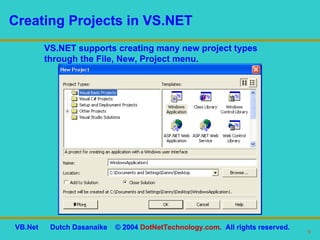
Creating Projects in VS.NET VS.NET supports creating many new project types through the File, New, Project menu.
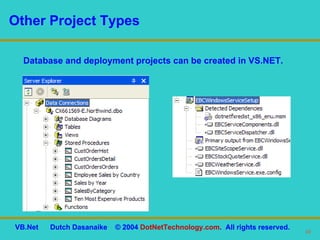
Other Project Types Database and deployment projects can be created in VS.NET.
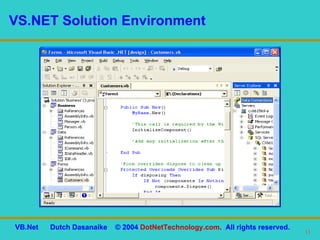
VS.NET Solution Environment
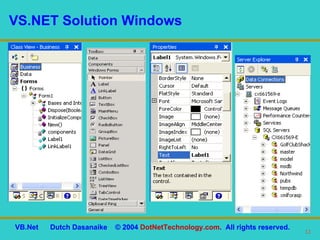
VS.NET Solution Windows
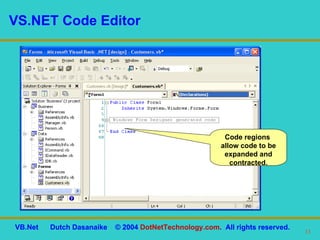
VS.NET Code Editor Code regions  allow code to be expanded and contracted.
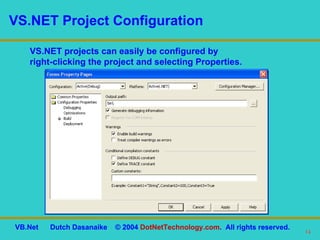
VS.NET Project Configuration VS.NET projects can easily be configured by  right-clicking the project and selecting Properties.
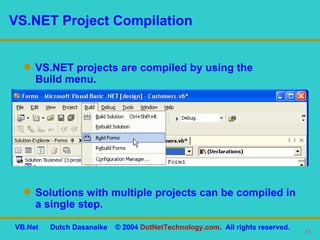
VS.NET Project Compilation VS.NET projects are compiled by using the  Build menu. Solutions with multiple projects can be compiled in a single step.
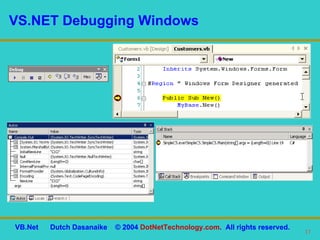
VS.NET Debugging Features VS.NET contains a powerful debugger that allows you to set breakpoints in code and step through code line by line as it executes. The debugger offers several different windows, including: Watch Command Immediate Output Locals Call Stack Breakpoints
VS.NET Debugging Windows
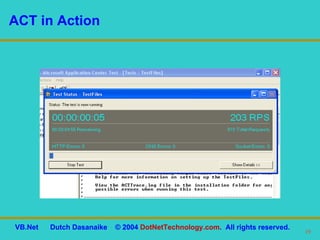
Stress Testing Applications with ACT Visual Studio.NET Enterprise editions  contain ACT: Simulate multiple users creating many connections to a server (long duration, high-load stress testing) Test users sending cookies Simulate different authentication methods to judge scalability (SSL, for example)
ACT in Action
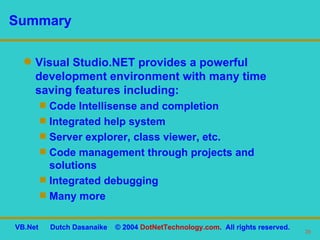
Summary Visual Studio.NET provides a powerful development environment with many time saving features including: Code Intellisense and completion Integrated help system Server explorer, class viewer, etc. Code management through projects and solutions Integrated debugging Many more
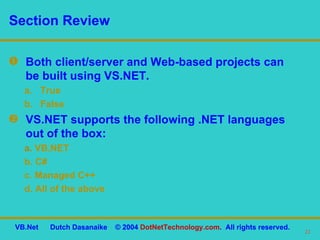
Both client/server and Web-based projects can be built using VS.NET. True False VS.NET supports the following .NET languages out of the box: a.   VB.NET b. C# c. Managed C++ d. All of the above Section Review

Working in Visual Studio.Net

  • 1.
    Copyright ©2004 andDistribution Rights Held by DotNetTechnology, LLC. This material is exclusively used by DotNetTechnology, LLC Consultants as a teaching aid. Any unauthorized usage including teaching, copying, and redistribution is strictly prohibited. .NET Programming with VB.NET Session 3 Dutch Dasanaike November 2004 VB.Net Dutch Dasanaike © 2004 DotNetTechnology.com . All rights reserved.
  • 2.
    Working in Visual Studio .NET Why Use VS.NET? Features in VS.NET Getting Started with VS.NET VS.NET Options Projects and Solutions in VS.NET Creating Projects in VS.NET VS.NET Solution Environment VS.NET Code Editor VS.NET Project Configuration VS.NET Project Compilation VS.NET Debugging Features Stress Testing Applications with ACT
  • 3.
    Section Objectives Aftercompleting this section, you will be able to: List the features found in VS.NET Explain how VS.NET can be used to build .NET applications Explain how to create a project using VS.NET Explain how to compile a project using VS.NET Explain how to perform basic stress testing using VS.NET
  • 4.
    Why Use VS.NET?Code management Built-in code compilation Code insight Source control Integrated help Many more features Since both ASP.NET Web Forms and Windows Forms applications can be written in an editor as simple as Notepad, why invest in VS.NET?
  • 5.
    Features in VS.NETVisual Studio.NET offers an integrated development environment for creating VB.NET and C# applications. Important features of VS.NET: Intellisense, code completion, formatting, and quick Info To do and task lists Integrated IDE and code help system Support for solutions and projects Built-in debugging (code and stored procedures) Integrated, visual design environment for Web and client/server applications Visual design environment for wireless applications Integrated database and server support Architectural features Stress Testing with Application Center Test
  • 6.
    Getting Started withVS.NET The Visual Studio.NET start page
  • 7.
    VS.NET Options Customizationscan be done on a language by language basis. (Select Tools, Options on the menu.)
  • 8.
    Projects and Solutionsin VS.NET VS.NET projects are composed of several different files relating to the specific type of application A Project resides within a solution. A single solution can have multiple projects. Solution Projects VB.NET/C# source code .vb, .cs VB.NET/C# project file .vbproj, .csproj Solution user options .suo Solution file .sln Description Extension
  • 9.
    Creating Projects inVS.NET VS.NET supports creating many new project types through the File, New, Project menu.
  • 10.
    Other Project TypesDatabase and deployment projects can be created in VS.NET.
  • 11.
  • 12.
  • 13.
    VS.NET Code EditorCode regions allow code to be expanded and contracted.
  • 14.
    VS.NET Project ConfigurationVS.NET projects can easily be configured by right-clicking the project and selecting Properties.
  • 15.
    VS.NET Project CompilationVS.NET projects are compiled by using the Build menu. Solutions with multiple projects can be compiled in a single step.
  • 16.
    VS.NET Debugging FeaturesVS.NET contains a powerful debugger that allows you to set breakpoints in code and step through code line by line as it executes. The debugger offers several different windows, including: Watch Command Immediate Output Locals Call Stack Breakpoints
  • 17.
  • 18.
    Stress Testing Applicationswith ACT Visual Studio.NET Enterprise editions contain ACT: Simulate multiple users creating many connections to a server (long duration, high-load stress testing) Test users sending cookies Simulate different authentication methods to judge scalability (SSL, for example)
  • 19.
  • 20.
    Summary Visual Studio.NETprovides a powerful development environment with many time saving features including: Code Intellisense and completion Integrated help system Server explorer, class viewer, etc. Code management through projects and solutions Integrated debugging Many more
  • 21.
    Both client/server andWeb-based projects can be built using VS.NET. True False VS.NET supports the following .NET languages out of the box: a. VB.NET b. C# c. Managed C++ d. All of the above Section Review