Discovering Computers 2012: Chapter 8 1
Discovering Computers 2012: Chapter 8 2
CCLEANER
Discovering Computers 2012: Chapter 8 3
Winzip
Discovering Computers 2012: Chapter 8 4
UNINSTALL TOOL
Discovering Computers 2012: Chapter 8 5
SMART DEFRAG
Discovering Computers 2012: Chapter 8 6
AVAST
Discovering Computers 2012: Chapter 8 7
FILE MANAGER
Discovering Computers 2012: Chapter 8 8
WINDOWS FIREWALL
Discovering Computers 2012: Chapter 8 9
NERO BURNING
SOFTWARE
Discovering Computers 2012: Chapter 8 10
RECYCLE BIN
Discovering Computers 2012: Chapter 8 11
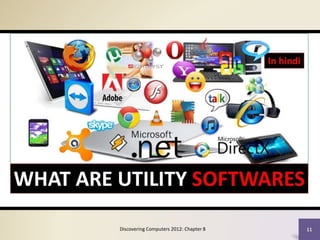
Utility Programs
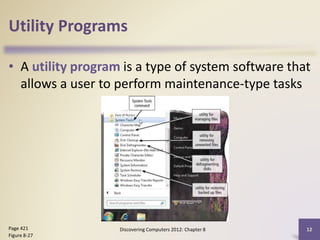
• A utility program is a type of system software that
allows a user to perform maintenance-type tasks
Discovering Computers 2012: Chapter 8 12
Page 421
Figure 8-27
Utility Programs
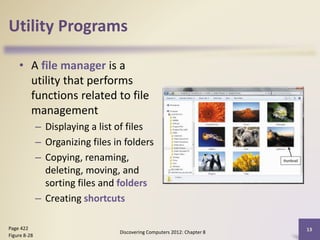
• A file manager is a
utility that performs
functions related to file
management
– Displaying a list of files
– Organizing files in folders
– Copying, renaming,
deleting, moving, and
sorting files and folders
– Creating shortcuts
Discovering Computers 2012: Chapter 8
13
Page 422
Figure 8-28
Utility Programs
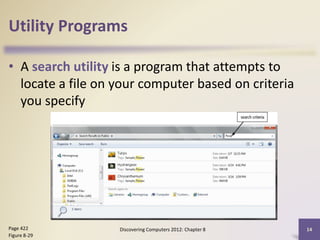
• A search utility is a program that attempts to
locate a file on your computer based on criteria
you specify
Discovering Computers 2012: Chapter 8 14
Page 422
Figure 8-29
Utility Programs
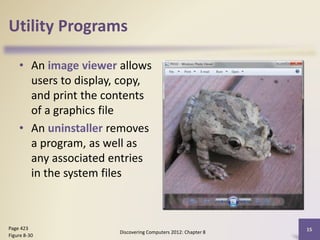
• An image viewer allows
users to display, copy,
and print the contents
of a graphics file
• An uninstaller removes
a program, as well as
any associated entries
in the system files
Discovering Computers 2012: Chapter 8
15
Page 423
Figure 8-30
Utility Programs
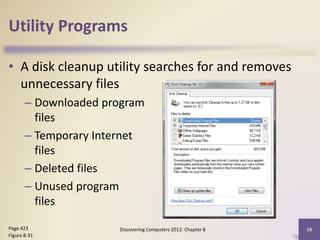
• A disk cleanup utility searches for and removes
unnecessary files
– Downloaded program
files
– Temporary Internet
files
– Deleted files
– Unused program
files
Discovering Computers 2012: Chapter 8 16
Page 423
Figure 8-31
Utility Programs
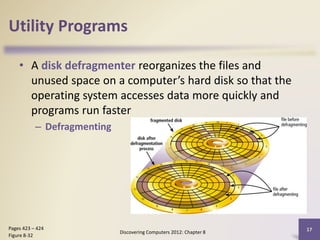
• A disk defragmenter reorganizes the files and
unused space on a computer’s hard disk so that the
operating system accesses data more quickly and
programs run faster
– Defragmenting
Discovering Computers 2012: Chapter 8
17
Pages 423 – 424
Figure 8-32
Utility Programs
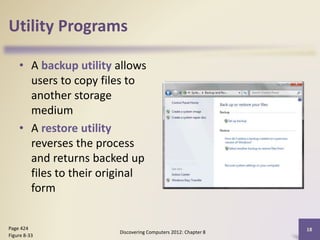
• A backup utility allows
users to copy files to
another storage
medium
• A restore utility
reverses the process
and returns backed up
files to their original
form
Discovering Computers 2012: Chapter 8
18
Page 424
Figure 8-33
Utility Programs
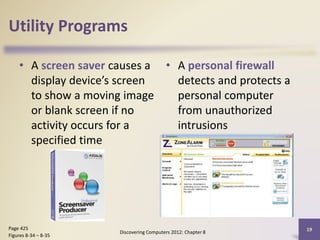
• A screen saver causes a
display device’s screen
to show a moving image
or blank screen if no
activity occurs for a
specified time
• A personal firewall
detects and protects a
personal computer
from unauthorized
intrusions
Discovering Computers 2012: Chapter 8
19
Page 425
Figures 8-34 – 8-35
Utility Programs
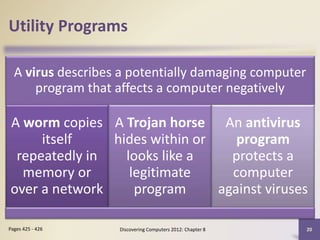
A virus describes a potentially damaging computer
program that affects a computer negatively
A worm copies
itself
repeatedly in
memory or
over a network
A Trojan horse
hides within or
looks like a
legitimate
program
An antivirus
program
protects a
computer
against viruses
Discovering Computers 2012: Chapter 8 20
Pages 425 - 426
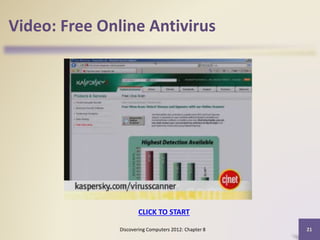
Video: Free Online Antivirus
Discovering Computers 2012: Chapter 8 21
CLICK TO START
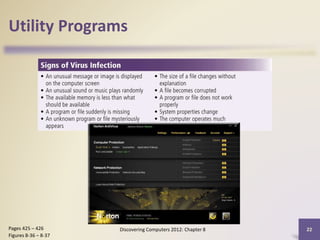
Utility Programs
Discovering Computers 2012: Chapter 8 22
Pages 425 – 426
Figures 8-36 – 8-37
Utility Programs
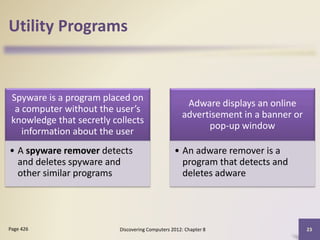
Spyware is a program placed on
a computer without the user’s
knowledge that secretly collects
information about the user
• A spyware remover detects
and deletes spyware and
other similar programs
Adware displays an online
advertisement in a banner or
pop-up window
• An adware remover is a
program that detects and
deletes adware
Discovering Computers 2012: Chapter 8 23
Page 426
Utility Programs
• Filters are programs that remove or block certain
items from being displayed
Discovering Computers 2012: Chapter 8 24
Pages 426 - 427
Web filtering
software
Anti-spam
programs
Phishing
filters
Pop-up
blockers
Utility Programs
• A file compression utility shrinks the size of a file(s)
– Compressing files frees up room on the storage media
– Two types of compression
• Lossy
• Lossless
• Compressed files sometimes are called zipped files
– Can be uncompressed
Discovering Computers 2012: Chapter 8 25
Page 427
Utility Programs
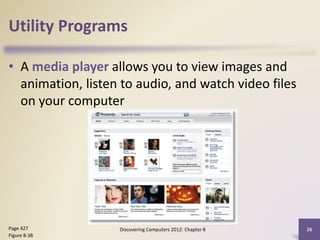
• A media player allows you to view images and
animation, listen to audio, and watch video files
on your computer
Discovering Computers 2012: Chapter 8 26
Page 427
Figure 8-38
Utility Programs
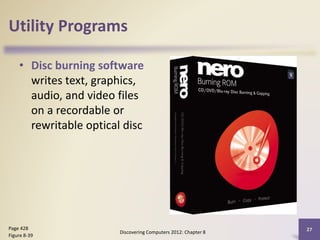
• Disc burning software
writes text, graphics,
audio, and video files
on a recordable or
rewritable optical disc
Discovering Computers 2012: Chapter 8
27
Page 428
Figure 8-39
Utility Programs
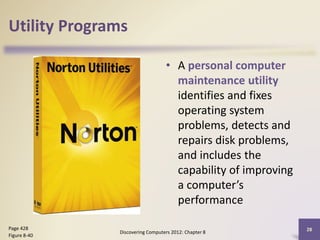
• A personal computer
maintenance utility
identifies and fixes
operating system
problems, detects and
repairs disk problems,
and includes the
capability of improving
a computer’s
performance
Discovering Computers 2012: Chapter 8
28
Page 428
Figure 8-40
Summary
Definition of an
operating system
Functions common to
most operating systems
Variety of stand-alone
operating systems,
server operating
systems, and embedded
operating systems
Several utility programs
Discovering Computers 2012: Chapter 8 29
Page 429
Discovering Computers 2012: Chapter 8 30
Benefits of utility software
•Computers rely heavily on utility software to manage the operations of their
various programs and functions. Some benefits of having this type of software
installed on your computer include:
•File and data management: Proper storage and management of a computer's files
and data allows users to find and access the files they need.
•Storage space management: Managing the amount of storage space available
ensures that the computer can continue to run its existing programs and have new
programs installed on it. This functionality of the utility software also removes
useless or rarely accessed files.
•Enhanced security: Certain functions of the utility software protect the computer
from malicious software and threats, improving its security.
•Customization options: You can use specific utility programs to customize the
interface and desktop of the computer. This option makes it easier to find and
access your files and applications quickly.
•File recovery: In the event of a data loss, the file recovery software can help a user
get access to files and applications that they believed to be lost.
Your Interactive Guide
to the Digital World
Discovering
Computers 2012
Chapter 8 Complete
SYSTEM REQUIREMENTS
Discovering Computers 2012: Chapter 8
32
Page 423
Figure 8-30
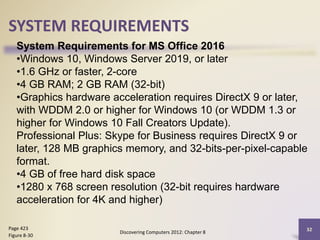
System Requirements for MS Office 2016
•Windows 10, Windows Server 2019, or later
•1.6 GHz or faster, 2-core
•4 GB RAM; 2 GB RAM (32-bit)
•Graphics hardware acceleration requires DirectX 9 or later,
with WDDM 2.0 or higher for Windows 10 (or WDDM 1.3 or
higher for Windows 10 Fall Creators Update).
Professional Plus: Skype for Business requires DirectX 9 or
later, 128 MB graphics memory, and 32-bits-per-pixel-capable
format.
•4 GB of free hard disk space
•1280 x 768 screen resolution (32-bit requires hardware
acceleration for 4K and higher)

Utility-Softwares.pptxgdgfgdgdfgdfggfgfd

  • 1.
  • 2.
    Discovering Computers 2012:Chapter 8 2 CCLEANER
  • 3.
    Discovering Computers 2012:Chapter 8 3 Winzip
  • 4.
    Discovering Computers 2012:Chapter 8 4 UNINSTALL TOOL
  • 5.
    Discovering Computers 2012:Chapter 8 5 SMART DEFRAG
  • 6.
    Discovering Computers 2012:Chapter 8 6 AVAST
  • 7.
    Discovering Computers 2012:Chapter 8 7 FILE MANAGER
  • 8.
    Discovering Computers 2012:Chapter 8 8 WINDOWS FIREWALL
  • 9.
    Discovering Computers 2012:Chapter 8 9 NERO BURNING SOFTWARE
  • 10.
    Discovering Computers 2012:Chapter 8 10 RECYCLE BIN
  • 11.
  • 12.
    Utility Programs • Autility program is a type of system software that allows a user to perform maintenance-type tasks Discovering Computers 2012: Chapter 8 12 Page 421 Figure 8-27
  • 13.
    Utility Programs • Afile manager is a utility that performs functions related to file management – Displaying a list of files – Organizing files in folders – Copying, renaming, deleting, moving, and sorting files and folders – Creating shortcuts Discovering Computers 2012: Chapter 8 13 Page 422 Figure 8-28
  • 14.
    Utility Programs • Asearch utility is a program that attempts to locate a file on your computer based on criteria you specify Discovering Computers 2012: Chapter 8 14 Page 422 Figure 8-29
  • 15.
    Utility Programs • Animage viewer allows users to display, copy, and print the contents of a graphics file • An uninstaller removes a program, as well as any associated entries in the system files Discovering Computers 2012: Chapter 8 15 Page 423 Figure 8-30
  • 16.
    Utility Programs • Adisk cleanup utility searches for and removes unnecessary files – Downloaded program files – Temporary Internet files – Deleted files – Unused program files Discovering Computers 2012: Chapter 8 16 Page 423 Figure 8-31
  • 17.
    Utility Programs • Adisk defragmenter reorganizes the files and unused space on a computer’s hard disk so that the operating system accesses data more quickly and programs run faster – Defragmenting Discovering Computers 2012: Chapter 8 17 Pages 423 – 424 Figure 8-32
  • 18.
    Utility Programs • Abackup utility allows users to copy files to another storage medium • A restore utility reverses the process and returns backed up files to their original form Discovering Computers 2012: Chapter 8 18 Page 424 Figure 8-33
  • 19.
    Utility Programs • Ascreen saver causes a display device’s screen to show a moving image or blank screen if no activity occurs for a specified time • A personal firewall detects and protects a personal computer from unauthorized intrusions Discovering Computers 2012: Chapter 8 19 Page 425 Figures 8-34 – 8-35
  • 20.
    Utility Programs A virusdescribes a potentially damaging computer program that affects a computer negatively A worm copies itself repeatedly in memory or over a network A Trojan horse hides within or looks like a legitimate program An antivirus program protects a computer against viruses Discovering Computers 2012: Chapter 8 20 Pages 425 - 426
  • 21.
    Video: Free OnlineAntivirus Discovering Computers 2012: Chapter 8 21 CLICK TO START
  • 22.
    Utility Programs Discovering Computers2012: Chapter 8 22 Pages 425 – 426 Figures 8-36 – 8-37
  • 23.
    Utility Programs Spyware isa program placed on a computer without the user’s knowledge that secretly collects information about the user • A spyware remover detects and deletes spyware and other similar programs Adware displays an online advertisement in a banner or pop-up window • An adware remover is a program that detects and deletes adware Discovering Computers 2012: Chapter 8 23 Page 426
  • 24.
    Utility Programs • Filtersare programs that remove or block certain items from being displayed Discovering Computers 2012: Chapter 8 24 Pages 426 - 427 Web filtering software Anti-spam programs Phishing filters Pop-up blockers
  • 25.
    Utility Programs • Afile compression utility shrinks the size of a file(s) – Compressing files frees up room on the storage media – Two types of compression • Lossy • Lossless • Compressed files sometimes are called zipped files – Can be uncompressed Discovering Computers 2012: Chapter 8 25 Page 427
  • 26.
    Utility Programs • Amedia player allows you to view images and animation, listen to audio, and watch video files on your computer Discovering Computers 2012: Chapter 8 26 Page 427 Figure 8-38
  • 27.
    Utility Programs • Discburning software writes text, graphics, audio, and video files on a recordable or rewritable optical disc Discovering Computers 2012: Chapter 8 27 Page 428 Figure 8-39
  • 28.
    Utility Programs • Apersonal computer maintenance utility identifies and fixes operating system problems, detects and repairs disk problems, and includes the capability of improving a computer’s performance Discovering Computers 2012: Chapter 8 28 Page 428 Figure 8-40
  • 29.
    Summary Definition of an operatingsystem Functions common to most operating systems Variety of stand-alone operating systems, server operating systems, and embedded operating systems Several utility programs Discovering Computers 2012: Chapter 8 29 Page 429
  • 30.
    Discovering Computers 2012:Chapter 8 30 Benefits of utility software •Computers rely heavily on utility software to manage the operations of their various programs and functions. Some benefits of having this type of software installed on your computer include: •File and data management: Proper storage and management of a computer's files and data allows users to find and access the files they need. •Storage space management: Managing the amount of storage space available ensures that the computer can continue to run its existing programs and have new programs installed on it. This functionality of the utility software also removes useless or rarely accessed files. •Enhanced security: Certain functions of the utility software protect the computer from malicious software and threats, improving its security. •Customization options: You can use specific utility programs to customize the interface and desktop of the computer. This option makes it easier to find and access your files and applications quickly. •File recovery: In the event of a data loss, the file recovery software can help a user get access to files and applications that they believed to be lost.
  • 31.
    Your Interactive Guide tothe Digital World Discovering Computers 2012 Chapter 8 Complete
  • 32.
    SYSTEM REQUIREMENTS Discovering Computers2012: Chapter 8 32 Page 423 Figure 8-30 System Requirements for MS Office 2016 •Windows 10, Windows Server 2019, or later •1.6 GHz or faster, 2-core •4 GB RAM; 2 GB RAM (32-bit) •Graphics hardware acceleration requires DirectX 9 or later, with WDDM 2.0 or higher for Windows 10 (or WDDM 1.3 or higher for Windows 10 Fall Creators Update). Professional Plus: Skype for Business requires DirectX 9 or later, 128 MB graphics memory, and 32-bits-per-pixel-capable format. •4 GB of free hard disk space •1280 x 768 screen resolution (32-bit requires hardware acceleration for 4K and higher)

Editor's Notes

  • #2 Utility software is one such computer programming system. Those who work to configure, analyze, optimize and maintain the computer. We also call it by the name of “Utility” and “Utilities”.
  • #12 Utility software is one such computer programming system. Those who work to configure, analyze, optimize and maintain the computer. We also call it by the name of “Utility” and “Utilities”.
  • #13 Installing from a CD-ROM From the mid-1990s through the late 2000s, the most common way to get new software was to purchase a CD-ROM. You could then insert the disc, and the computer would walk you through the installation. Now, almost all software has moved away from this model. Many new computers no longer include a CD-ROM for this reason. However, if you do need to install software from a CD-ROM, simply insert the disc into your computer, then follow the instructions.
  • #20 Installing from a CD-ROM From the mid-1990s through the late 2000s, the most common way to get new software was to purchase a CD-ROM. You could then insert the disc, and the computer would walk you through the installation. Now, almost all software has moved away from this model. Many new computers no longer include a CD-ROM for this reason. However, if you do need to install software from a CD-ROM, simply insert the disc into your computer, then follow the instructions.
  • #25 A technique for attempting to acquire sensitive data, such as bank account numbers, through a fraudulent solicitation in email or on a web site, in which the perpetrator masquerades as a legitimate business or reputable person.