Android SafetyNet API
ANDROID APP SECURITY AND PRIVACY
​Author : Hitesh Sahu (​http://hiteshsahu.com​)
Date: 27/07/2017
Index
IN THIS DOCUMENT
1. Introduction
2. SafertyNet Attestation API
3. SafetyNet Safe Browsing API
4. SafetyNet reCAPTCHA API (NA)
5. SafetyNet Verify Apps API(NA)
PAGE 1
Introduction
The SafetyNet API is designed to check whether a device has been tampered
with–whether it’s been rooted by a user, is running a custom ROM, or has been infected
with low-level malware, ​bad URLs, potentially harmful apps, and fake users.
SafetyNet provides a set of services and APIs that help protect your app against security
threats as discussed below:
- SafetyNet Attestation API
The SafetyNet Attestation API provides services for determining whether a device running
your app satisfies Android compatibility tests.
- SafetyNet Safe Browsing API
The SafetyNet Safe Browsing API provides services for determining whether a URL has
been marked as a known threat by Google.
- SafetyNet reCAPTCHA API
The SafetyNet reCAPTCHA API protects your app from malicious traffic.
- SafetyNet Verify Apps API
The SafetyNet Verify Apps API protects devices against potentially harmful apps.
PAGE 2
SafetyNet Attestation API
“The SafetyNet Attestation API helps you assess the security
and compatibility of the Android environments in which your
apps run. You can use this API to analyze devices that have
installed your app.”
- The goal of this API is to provide you with confidence about the integrity of a device
running your app.
- The API also uses this software and hardware information to determine whether or not
the particular device has been tampered with or otherwise modified.
IMPLEMENTATION
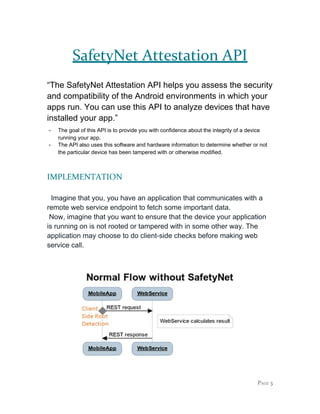
Imagine that you, you have an application that communicates with a
remote web service endpoint to fetch some important data.
Now, imagine that you want to ensure that the device your application
is running on is not rooted or tampered with in some other way. The
application may choose to do client-side checks before making web
service call.
PAGE 3
This basic client-only implementation flow can leave your application
vulnerable to trivial hooking attacks that manipulate the attestation
responses.
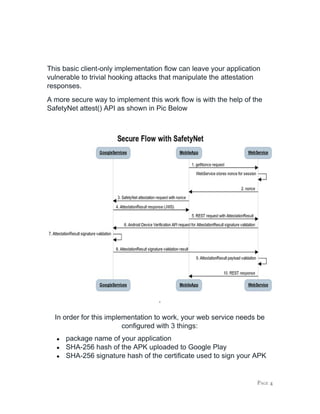
A more secure way to implement this work flow is with the help of the
SafetyNet attest() API as shown in Pic Below
.
In order for this implementation to work, your web service needs be
configured with 3 things:
● package name of your application
● SHA-256 hash of the APK uploaded to Google Play
● SHA-256 signature hash of the certificate used to sign your APK
PAGE 4
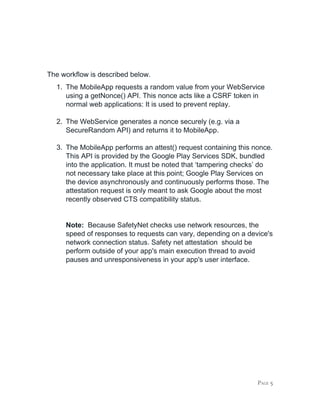
The workflow is described below.
1. The MobileApp requests a random value from your WebService
using a getNonce() API. This nonce acts like a CSRF token in
normal web applications: It is used to prevent replay.
2. The WebService generates a nonce securely (e.g. via a
SecureRandom API) and returns it to MobileApp.
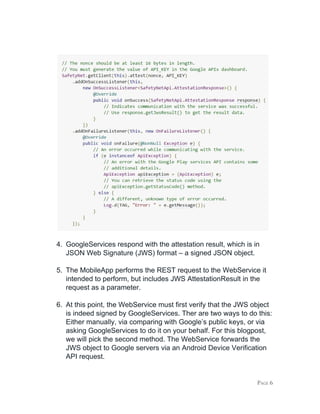
3. The MobileApp performs an attest() request containing this nonce.
This API is provided by the Google Play Services SDK, bundled
into the application. It must be noted that ‘tampering checks’ do
not necessary take place at this point; Google Play Services on
the device asynchronously and continuously performs those. The
attestation request is only meant to ask Google about the most
recently observed CTS compatibility status.
Note: ​Because SafetyNet checks use network resources, the
speed of responses to requests can vary, depending on a device's
network connection status. Safety net attestation should be
perform outside of your app's main execution thread to avoid
pauses and unresponsiveness in your app's user interface.
PAGE 5
4. GoogleServices respond with the attestation result, which is in
JSON Web Signature (JWS) format – a signed JSON object.
5. The MobileApp performs the REST request to the WebService it
intended to perform, but includes JWS AttestationResult in the
request as a parameter.
6. At this point, the WebService must first verify that the JWS object
is indeed signed by GoogleServices. Ther are two ways to do this:
Either manually, via comparing with Google’s public keys, or via
asking GoogleServices to do it on your behalf. For this blogpost,
we will pick the second method. The WebService forwards the
JWS object to Google servers via an Android Device Verification
API request.
PAGE 6
7. GoogleServices check the JWS signature
8. GoogleService respond if the JWS signature was indeed created
by Google, thus the JWS object has not been tampered with.
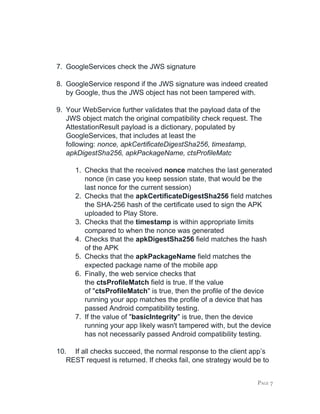
9. Your WebService further validates that the payload data of the
JWS object match the original compatibility check request. The
AttestationResult payload is a dictionary, populated by
GoogleServices, that includes at least the
following: ​nonce, apkCertificateDigestSha256, timestamp,
apkDigestSha256, apkPackageName, ctsProfileMatc
1. Checks that the received ​nonce ​matches the last generated
nonce (in case you keep session state, that would be the
last nonce for the current session)
2. Checks that the ​apkCertificateDigestSha256 ​field matches
the SHA-256 hash of the certificate used to sign the APK
uploaded to Play Store.
3. Checks that the ​timestamp ​is within appropriate limits
compared to when the nonce was generated
4. Checks that the ​apkDigestSha256 ​field matches the hash
of the APK
5. Checks that the ​apkPackageName ​field matches the
expected package name of the mobile app
6. Finally, the web service checks that
the ​ctsProfileMatch​ field is true. If the value
of "​ctsProfileMatch​" is true, then the profile of the device
running your app matches the profile of a device that has
passed Android compatibility testing.
7. If the value of "​basicIntegrity​" is true, then the device
running your app likely wasn't tampered with, but the device
has not necessarily passed Android compatibility testing.
10. If all checks succeed, the normal response to the client app’s
REST request is returned. If checks fail, one strategy would be to
PAGE 7
return an error message for that REST API. Another could be to
log the error and feed it into your fraud detection systems.
Notes:
● Ideally, you should perform this check to protect all critical
actions—including logins, purchase events, and acquisition of
new in-app products—in your app.
● However, lead to latency, mobile data usage, and battery
usage, so it makes sense to find a balance between security
and usability. For example, you might choose to request a
compatibility check upon login and run re-checks at most once
every 30 minutes.
● You can also let your server decide when your app should
request a compatibility check.
● Client server architecture requires verification of​ ​SafetyNet API
response on a server in Java. Thus a server setup is required
for this implementation. A sample server can be found on
Google Samples
https://github.com/googlesamples/android-play-safetynet/tree/master/se
rver/java
PAGE 8
SafetyNet Safe Browsing API
​SafetyNet provides services for determining whether a URL
has been marked as a known threat by Google.
Your app can use this API to determine whether a particular URL has been classified by
Google as a known threat.
SafetyNet implements a client for the Safe Browsing Network Protocol v4 developed by
Google which were designed to preserve users' privacy and keep battery and bandwidth
consumption to a minimum.
​IMPLEMENTATION
The workflow is described below.
1. Client initialize the API by calling ​initSafeBrowsing()​ and waiting
for it to complete.
2. Once the initSafeBrowsing() has finished executing then app can
use ​lookupUri()​ todetermine whether a URL poses a known
threatThe API allows you to choose and specify multiple known
threat types.
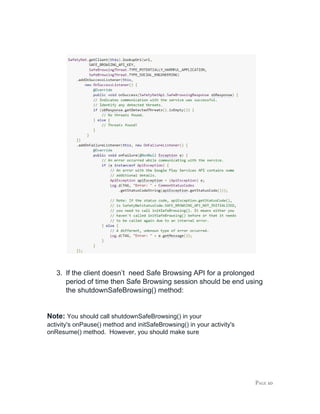
Using the returned ​SafetyNetApi.SafeBrowsingResponse​ object,
call its ​getDetectedThreats()​ method, which returns a list
of ​SafeBrowsingThreat​objects. If the returned list is empty, the
API didn't detect any known threats. If the list isn't empty,
however, call ​getThreatType()​ on each element in the list to
determine which known threats the API detected.
PAGE 9
3. If the client doesn’t need Safe Browsing API for a prolonged
period of time then Safe Browsing session should be end using
the ​shutdownSafeBrowsing()​ method:
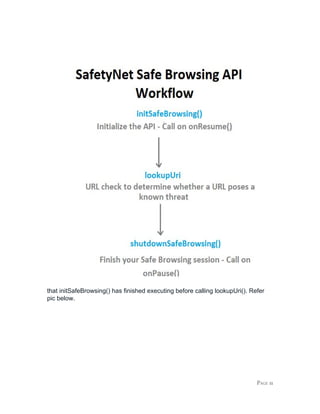
Note:​ ​You should call shutdownSafeBrowsing() in your
activity's ​onPause()​ method and ​initSafeBrowsing()​ in your activity's
onResume()​ method. However, you should make sure
PAGE 10
that initSafeBrowsing() has finished executing before calling ​lookupUri()​.​ ​Refer
pic below.
PAGE 11
References
1) ​https://developer.android.com/training/safetynet/index.html
2) ​https://developer.android.com/training/safetynet/attestation.html
3) ​https://www.synopsys.com/blogs/software-security/using-safetynet
-api/
PAGE 12
PAGE 13

Using the Google SafetyNet API for Banking & Finance

  • 1.
    Android SafetyNet API ANDROIDAPP SECURITY AND PRIVACY ​Author : Hitesh Sahu (​http://hiteshsahu.com​) Date: 27/07/2017
  • 2.
    Index IN THIS DOCUMENT 1.Introduction 2. SafertyNet Attestation API 3. SafetyNet Safe Browsing API 4. SafetyNet reCAPTCHA API (NA) 5. SafetyNet Verify Apps API(NA) PAGE 1
  • 3.
    Introduction The SafetyNet APIis designed to check whether a device has been tampered with–whether it’s been rooted by a user, is running a custom ROM, or has been infected with low-level malware, ​bad URLs, potentially harmful apps, and fake users. SafetyNet provides a set of services and APIs that help protect your app against security threats as discussed below: - SafetyNet Attestation API The SafetyNet Attestation API provides services for determining whether a device running your app satisfies Android compatibility tests. - SafetyNet Safe Browsing API The SafetyNet Safe Browsing API provides services for determining whether a URL has been marked as a known threat by Google. - SafetyNet reCAPTCHA API The SafetyNet reCAPTCHA API protects your app from malicious traffic. - SafetyNet Verify Apps API The SafetyNet Verify Apps API protects devices against potentially harmful apps. PAGE 2
  • 4.
    SafetyNet Attestation API “TheSafetyNet Attestation API helps you assess the security and compatibility of the Android environments in which your apps run. You can use this API to analyze devices that have installed your app.” - The goal of this API is to provide you with confidence about the integrity of a device running your app. - The API also uses this software and hardware information to determine whether or not the particular device has been tampered with or otherwise modified. IMPLEMENTATION Imagine that you, you have an application that communicates with a remote web service endpoint to fetch some important data. Now, imagine that you want to ensure that the device your application is running on is not rooted or tampered with in some other way. The application may choose to do client-side checks before making web service call. PAGE 3
  • 5.
    This basic client-onlyimplementation flow can leave your application vulnerable to trivial hooking attacks that manipulate the attestation responses. A more secure way to implement this work flow is with the help of the SafetyNet attest() API as shown in Pic Below . In order for this implementation to work, your web service needs be configured with 3 things: ● package name of your application ● SHA-256 hash of the APK uploaded to Google Play ● SHA-256 signature hash of the certificate used to sign your APK PAGE 4
  • 6.
    The workflow isdescribed below. 1. The MobileApp requests a random value from your WebService using a getNonce() API. This nonce acts like a CSRF token in normal web applications: It is used to prevent replay. 2. The WebService generates a nonce securely (e.g. via a SecureRandom API) and returns it to MobileApp. 3. The MobileApp performs an attest() request containing this nonce. This API is provided by the Google Play Services SDK, bundled into the application. It must be noted that ‘tampering checks’ do not necessary take place at this point; Google Play Services on the device asynchronously and continuously performs those. The attestation request is only meant to ask Google about the most recently observed CTS compatibility status. Note: ​Because SafetyNet checks use network resources, the speed of responses to requests can vary, depending on a device's network connection status. Safety net attestation should be perform outside of your app's main execution thread to avoid pauses and unresponsiveness in your app's user interface. PAGE 5
  • 7.
    4. GoogleServices respondwith the attestation result, which is in JSON Web Signature (JWS) format – a signed JSON object. 5. The MobileApp performs the REST request to the WebService it intended to perform, but includes JWS AttestationResult in the request as a parameter. 6. At this point, the WebService must first verify that the JWS object is indeed signed by GoogleServices. Ther are two ways to do this: Either manually, via comparing with Google’s public keys, or via asking GoogleServices to do it on your behalf. For this blogpost, we will pick the second method. The WebService forwards the JWS object to Google servers via an Android Device Verification API request. PAGE 6
  • 8.
    7. GoogleServices checkthe JWS signature 8. GoogleService respond if the JWS signature was indeed created by Google, thus the JWS object has not been tampered with. 9. Your WebService further validates that the payload data of the JWS object match the original compatibility check request. The AttestationResult payload is a dictionary, populated by GoogleServices, that includes at least the following: ​nonce, apkCertificateDigestSha256, timestamp, apkDigestSha256, apkPackageName, ctsProfileMatc 1. Checks that the received ​nonce ​matches the last generated nonce (in case you keep session state, that would be the last nonce for the current session) 2. Checks that the ​apkCertificateDigestSha256 ​field matches the SHA-256 hash of the certificate used to sign the APK uploaded to Play Store. 3. Checks that the ​timestamp ​is within appropriate limits compared to when the nonce was generated 4. Checks that the ​apkDigestSha256 ​field matches the hash of the APK 5. Checks that the ​apkPackageName ​field matches the expected package name of the mobile app 6. Finally, the web service checks that the ​ctsProfileMatch​ field is true. If the value of "​ctsProfileMatch​" is true, then the profile of the device running your app matches the profile of a device that has passed Android compatibility testing. 7. If the value of "​basicIntegrity​" is true, then the device running your app likely wasn't tampered with, but the device has not necessarily passed Android compatibility testing. 10. If all checks succeed, the normal response to the client app’s REST request is returned. If checks fail, one strategy would be to PAGE 7
  • 9.
    return an errormessage for that REST API. Another could be to log the error and feed it into your fraud detection systems. Notes: ● Ideally, you should perform this check to protect all critical actions—including logins, purchase events, and acquisition of new in-app products—in your app. ● However, lead to latency, mobile data usage, and battery usage, so it makes sense to find a balance between security and usability. For example, you might choose to request a compatibility check upon login and run re-checks at most once every 30 minutes. ● You can also let your server decide when your app should request a compatibility check. ● Client server architecture requires verification of​ ​SafetyNet API response on a server in Java. Thus a server setup is required for this implementation. A sample server can be found on Google Samples https://github.com/googlesamples/android-play-safetynet/tree/master/se rver/java PAGE 8
  • 10.
    SafetyNet Safe BrowsingAPI ​SafetyNet provides services for determining whether a URL has been marked as a known threat by Google. Your app can use this API to determine whether a particular URL has been classified by Google as a known threat. SafetyNet implements a client for the Safe Browsing Network Protocol v4 developed by Google which were designed to preserve users' privacy and keep battery and bandwidth consumption to a minimum. ​IMPLEMENTATION The workflow is described below. 1. Client initialize the API by calling ​initSafeBrowsing()​ and waiting for it to complete. 2. Once the initSafeBrowsing() has finished executing then app can use ​lookupUri()​ todetermine whether a URL poses a known threatThe API allows you to choose and specify multiple known threat types. Using the returned ​SafetyNetApi.SafeBrowsingResponse​ object, call its ​getDetectedThreats()​ method, which returns a list of ​SafeBrowsingThreat​objects. If the returned list is empty, the API didn't detect any known threats. If the list isn't empty, however, call ​getThreatType()​ on each element in the list to determine which known threats the API detected. PAGE 9
  • 11.
    3. If theclient doesn’t need Safe Browsing API for a prolonged period of time then Safe Browsing session should be end using the ​shutdownSafeBrowsing()​ method: Note:​ ​You should call shutdownSafeBrowsing() in your activity's ​onPause()​ method and ​initSafeBrowsing()​ in your activity's onResume()​ method. However, you should make sure PAGE 10
  • 12.
    that initSafeBrowsing() hasfinished executing before calling ​lookupUri()​.​ ​Refer pic below. PAGE 11
  • 13.
  • 14.