

Using Redmine 
For Project Management at PromptCloud
Managing projects… 
•We use ScrumBut as a project management tool to support Redmine 
•Redmine is open-source and written in Ruby 
•Redmine works on any machine that supports Ruby as long asit is connected to some database 
•Getting started can be troublesome. Redmine is stubborn when it comes to compatibility with Ruby and its gems
Redmine Basics 
•Scrum-based tools will invariably force Scrum on you 
•Not following its word-by-word process, makes it quite useless 
•Redmine is useful because it eliminates bureaucracies 
•It works foryour needs and is independent of team size, process or project types 
•Redmine is self-sufficientin itself despite being open-source. 
•With it you can create as many issues with task types of bug/feature/task and assign it to any member, input start and end dates, estimated time, give it a description, etc.
Redmine Basics (contd.) 
•Track status via simple relevant updates 
•Single page issue-history tracking 
•All issues (and sub-issues) can belong to a project, which itself can be a sub- project to another higher level project in the hierarchy 
•Support multiple users with definite access levels 
•User functioning can be modified by addition to any task in a project either as “assignee” or as “watcher” 
•Add files to a task + track percentage completion 
•Intuitive text formatting within Redmine = any other wiki
Using Redmine @ PromptCloud 
Activities we use Redmine for
I. Planning 
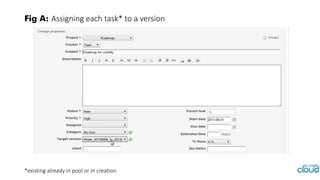
•Leverageingthe “Target Version” component for our weekly planning is important practice 
•We named a version as “pool” which holds all the anticipated tasks in the pipeline 
•During the weekly planning meeting, tasks from “pool” get pulled into the in-progress version which runs for a week 
•Two weeks might look more viable given standard sprint lengths 
•Tasks are self-assigned for the week based on combined notion of roadmap
Fig A: Assigning each task* to a version 
*existing already in pool or in creation
II. Tracking 
•Redmine is a great tracking tool for bugs, feature updates or anything that can be easily missed or is critical to track 
•Once a task / bug is created, it is a perfect reflection of what has been happening w.r.t. that task. 
•Additional options to log time against each task available 
•We use the checklist feature to create a list of items within a task 
•No need to create sub-tasks! 
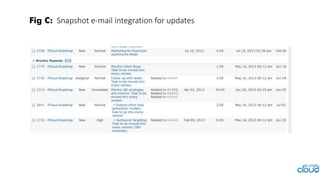
•Watchers receive e-mail notifications as and when updates are made
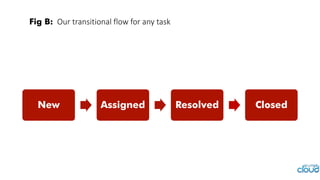
Fig B:Our transitional flow for any task 
New 
Assigned 
Resolved 
Closed
Fig C:Snapshot e-mail integration for updates
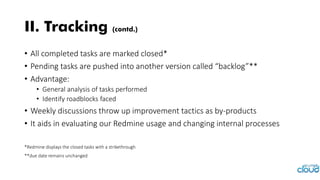
•All completed tasks are marked closed* 
•Pending tasks are pushed into another version called “backlog”** 
•Advantage: 
•General analysis of tasks performed 
•Identify roadblocks faced 
•Weekly discussions throw up improvement tactics as by-products 
•It aids in evaluating our Redmine usage and changing internal processes 
*Redmine displays the closed tasks with a strikethrough 
**due date remains unchanged 
II. Tracking (contd.)
Redmine Essentials 
Features that we use best to our advantage
Wiki 
•Must-use in Redmine is the wiki 
•We use it for all things A to Z –from meeting notes to highlights of strategy discussion and even as a structured training handbook for new members 
•Our complete documentation of our technology stack sits there 
Integration with Gerrit 
•Gitis our code repository 
•Gerritis used for reviews 
•We have customized Redmine to work with Gerrit 
•Here all code reviews related to a task get updated on Redmine via a simple task ID specification while committing our code
Support portal 
•Same instance of Redmine is used as support portal 
•Clients open tickets to assign jobs 
•Tickets are copied for internal tracking. Updates are automatic! 
•Every client operates via a uniquely accessible sub-project 
•Team has access to all sub- projects 
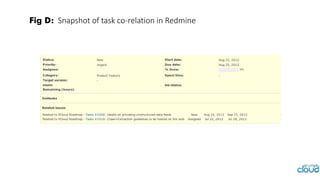
Task co-relation 
•Simple yet powerful feature 
•Easily relate a task to another to keep track 
•Makes it easy to close loops and improve cycle 
•Best used when developing a component and dependent tasks to accomplish exist
Fig D:Snapshot of task co-relation in Redmine
Redmine Deficiencies 
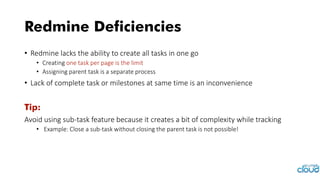
•Redmine lacks the ability to create all tasks in one go 
•Creating one task per page is the limit 
•Assigning parent task is a separate process 
•Lack of complete task or milestones at same time is an inconvenience 
Tip: 
Avoid using sub-task feature because it creates a bit of complexity while tracking 
•Example: Close a sub-task without closing the parent task is not possible!
Redmine Deficiencies (contd.) 
•Not a planning tool! 
•Redmine has never claimed its utility as a planning tool 
•Relevant features hence absent 
Tip: 
Convince yourself with the workarounds 
•Garbled tasks! 
•Failing regular updates, tasks end up as a big blob of irrelevance lists
Say yes to Redmine! 
It only takes practice to keep Redmine updated and tweaking it to suit your needs 
OPEN-SOURCE + 
ZERO PRICE + 
EFFORT + 
TWEAK & CUSTOMIZE 
= GREAT PROJECT MANAGEMENT TOOL
Have you brought Redmine in action in various other ways? 
We are eager to hear.
Using Redmine for Project Management @promptloud

Using Redmine for Project Management @promptloud

  • 2.
    Using Redmine ForProject Management at PromptCloud
  • 3.
    Managing projects… •Weuse ScrumBut as a project management tool to support Redmine •Redmine is open-source and written in Ruby •Redmine works on any machine that supports Ruby as long asit is connected to some database •Getting started can be troublesome. Redmine is stubborn when it comes to compatibility with Ruby and its gems
  • 4.
    Redmine Basics •Scrum-basedtools will invariably force Scrum on you •Not following its word-by-word process, makes it quite useless •Redmine is useful because it eliminates bureaucracies •It works foryour needs and is independent of team size, process or project types •Redmine is self-sufficientin itself despite being open-source. •With it you can create as many issues with task types of bug/feature/task and assign it to any member, input start and end dates, estimated time, give it a description, etc.
  • 5.
    Redmine Basics (contd.) •Track status via simple relevant updates •Single page issue-history tracking •All issues (and sub-issues) can belong to a project, which itself can be a sub- project to another higher level project in the hierarchy •Support multiple users with definite access levels •User functioning can be modified by addition to any task in a project either as “assignee” or as “watcher” •Add files to a task + track percentage completion •Intuitive text formatting within Redmine = any other wiki
  • 6.
    Using Redmine @PromptCloud Activities we use Redmine for
  • 7.
    I. Planning •Leverageingthe“Target Version” component for our weekly planning is important practice •We named a version as “pool” which holds all the anticipated tasks in the pipeline •During the weekly planning meeting, tasks from “pool” get pulled into the in-progress version which runs for a week •Two weeks might look more viable given standard sprint lengths •Tasks are self-assigned for the week based on combined notion of roadmap
  • 8.
    Fig A: Assigningeach task* to a version *existing already in pool or in creation
  • 9.
    II. Tracking •Redmineis a great tracking tool for bugs, feature updates or anything that can be easily missed or is critical to track •Once a task / bug is created, it is a perfect reflection of what has been happening w.r.t. that task. •Additional options to log time against each task available •We use the checklist feature to create a list of items within a task •No need to create sub-tasks! •Watchers receive e-mail notifications as and when updates are made
  • 10.
    Fig B:Our transitionalflow for any task New Assigned Resolved Closed
  • 11.
    Fig C:Snapshot e-mailintegration for updates
  • 12.
    •All completed tasksare marked closed* •Pending tasks are pushed into another version called “backlog”** •Advantage: •General analysis of tasks performed •Identify roadblocks faced •Weekly discussions throw up improvement tactics as by-products •It aids in evaluating our Redmine usage and changing internal processes *Redmine displays the closed tasks with a strikethrough **due date remains unchanged II. Tracking (contd.)
  • 13.
    Redmine Essentials Featuresthat we use best to our advantage
  • 14.
    Wiki •Must-use inRedmine is the wiki •We use it for all things A to Z –from meeting notes to highlights of strategy discussion and even as a structured training handbook for new members •Our complete documentation of our technology stack sits there Integration with Gerrit •Gitis our code repository •Gerritis used for reviews •We have customized Redmine to work with Gerrit •Here all code reviews related to a task get updated on Redmine via a simple task ID specification while committing our code
  • 15.
    Support portal •Sameinstance of Redmine is used as support portal •Clients open tickets to assign jobs •Tickets are copied for internal tracking. Updates are automatic! •Every client operates via a uniquely accessible sub-project •Team has access to all sub- projects Task co-relation •Simple yet powerful feature •Easily relate a task to another to keep track •Makes it easy to close loops and improve cycle •Best used when developing a component and dependent tasks to accomplish exist
  • 16.
    Fig D:Snapshot oftask co-relation in Redmine
  • 17.
    Redmine Deficiencies •Redminelacks the ability to create all tasks in one go •Creating one task per page is the limit •Assigning parent task is a separate process •Lack of complete task or milestones at same time is an inconvenience Tip: Avoid using sub-task feature because it creates a bit of complexity while tracking •Example: Close a sub-task without closing the parent task is not possible!
  • 18.
    Redmine Deficiencies (contd.) •Not a planning tool! •Redmine has never claimed its utility as a planning tool •Relevant features hence absent Tip: Convince yourself with the workarounds •Garbled tasks! •Failing regular updates, tasks end up as a big blob of irrelevance lists
  • 19.
    Say yes toRedmine! It only takes practice to keep Redmine updated and tweaking it to suit your needs OPEN-SOURCE + ZERO PRICE + EFFORT + TWEAK & CUSTOMIZE = GREAT PROJECT MANAGEMENT TOOL
  • 20.
    Have you broughtRedmine in action in various other ways? We are eager to hear.