One Step at a Time
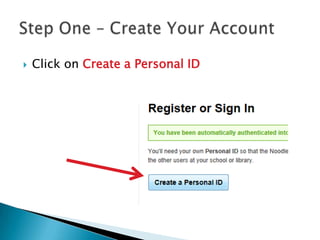
   Click on Create a Personal ID
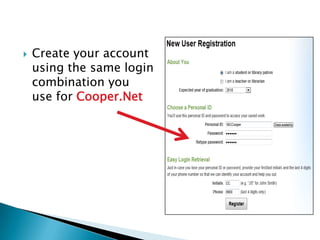
   Create your account
    using the same login
    combination you
    use for Cooper.Net
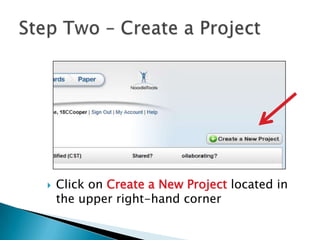
   Click on Create a New Project located in
    the upper right-hand corner
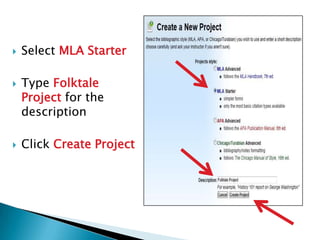
   Select MLA Starter

   Type Folktale
    Project for the
    description

   Click Create Project
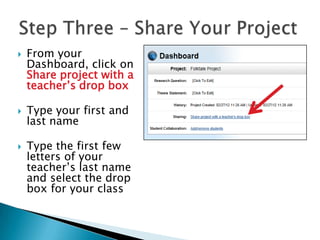
   From your
    Dashboard, click on
    Share project with a
    teacher’s drop box

   Type your first and
    last name

   Type the first few
    letters of your
    teacher’s last name
    and select the drop
    box for your class
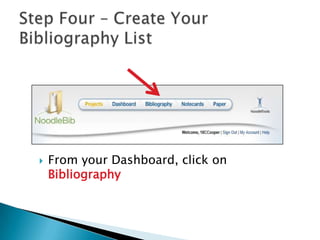
   From your Dashboard, click on
    Bibliography
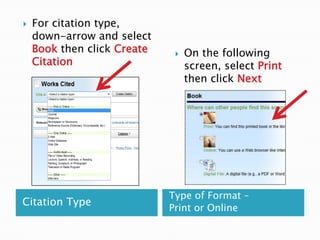
   For citation type,
    down-arrow and select
    Book then click Create       On the following
    Citation                      screen, select Print
                                  then click Next


                             Type of Format –
Citation Type
                             Print or Online
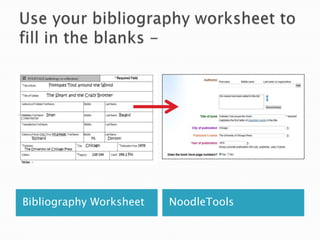
Bibliography Worksheet   NoodleTools
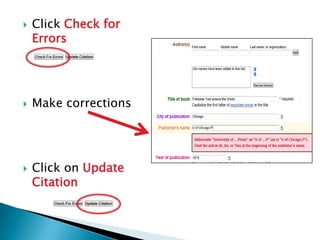
   Click Check for
    Errors


   Make corrections


   Click on Update
    Citation
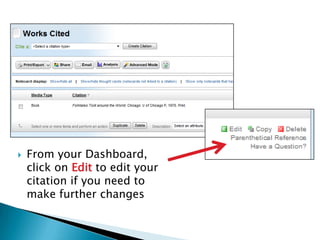
   From your Dashboard,
    click on Edit to edit your
    citation if you need to
    make further changes
You’ve created the first item in your working
  bibliography. Continue by adding all your
          resources. See the library for help.

Using noodle tools basic

  • 1.
  • 2.
    Click on Create a Personal ID
  • 3.
    Create your account using the same login combination you use for Cooper.Net
  • 4.
    Click on Create a New Project located in the upper right-hand corner
  • 5.
    Select MLA Starter  Type Folktale Project for the description  Click Create Project
  • 6.
    From your Dashboard, click on Share project with a teacher’s drop box  Type your first and last name  Type the first few letters of your teacher’s last name and select the drop box for your class
  • 7.
    From your Dashboard, click on Bibliography
  • 8.
    For citation type, down-arrow and select Book then click Create  On the following Citation screen, select Print then click Next Type of Format – Citation Type Print or Online
  • 9.
  • 10.
    Click Check for Errors  Make corrections  Click on Update Citation
  • 11.
    From your Dashboard, click on Edit to edit your citation if you need to make further changes
  • 12.
    You’ve created thefirst item in your working bibliography. Continue by adding all your resources. See the library for help.