EMS Request Approval 
User Study, Profile, Personas 
Version 1.0
Revision History 
Revision Number Date Changed By Summary of changes 
Approvals 
Name Title Date
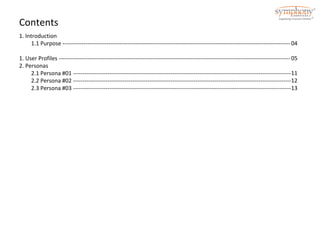
Contents 
1. Introduction 
1.1 Purpose ----------------------------------------------------------------------------------------------------------------------- 
1. User Profiles ------------------------------------------------------------------------------------------------------------------------- 
2. Personas 
2.1 Persona #01 ------------------------------------------------------------------------------------------------------------------ 
2.2 Persona #02 ------------------------------------------------------------------------------------------------------------------ 
2.3 Persona #03 ------------------------------------------------------------------------------------------------------------------ 
04 
05 
11 
12 
13
Purpose 
The purpose of this document is to describe the User Profiles created for this project. It enables: 
• Understanding of the intended users for a new system – this is vital since obtaining knowledge of the users’ 
characteristics is the first step in designing a user interface that meets their needs. 
• Defining User Profiles 
• Compiling Personas 
User Profiles 
User profile describe the user’s tasks or goals when interacting with the application. 
The User Profiles work product defines the characteristics of a typical user in each user category. Each 
user profile includes a description of the user’s prior knowledge and experience, physical characteristics, 
social and physical environment, cognitive characteristics current job characteristics, and goals, as they 
relate to how the user will interact with the system. 
Personas 
Personas are a set of representative profiles for a customer base. As a design tool, they are a powerful 
way to communicate behaviors, goals, wants, needs, and frustrations. 
Effective personas are driven by research data and focus on how a particular profile uses a particular 
application in a given context. The creation of different profiles is based on analysis of behaviors, goals, 
wants, needs, and frustrations of many customers.
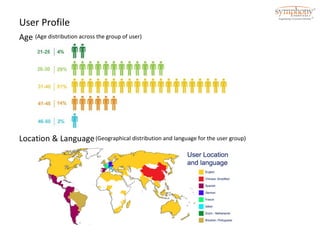
User Profile 
Age (Age distribution across the group of user) 
Location & Language(Geographical distribution and language for the user group)
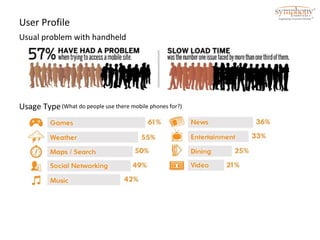
User Profile 
Usual problem with handheld 
Usage Type(What do people use there mobile phones for?)
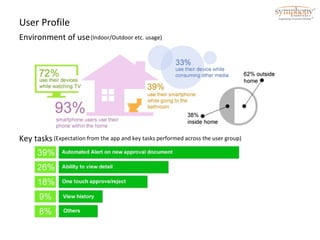
User Profile 
Environment of use 
(Indoor/Outdoor etc. usage) 
Key tasks (Expectation from the app and key tasks performed across the user group)
User Profile 
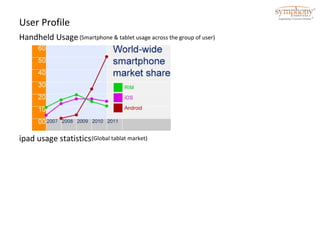
Handheld Usage (Smartphone & tablet usage across the group of user) 
ipad usage statistics(Global tablat market)
User Profile 
Findings 
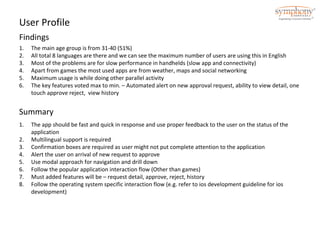
1. The main age group is from 31-40 (51%) 
2. All total 8 languages are there and we can see the maximum number of users are using this in English 
3. Most of the problems are for slow performance in handhelds (slow app and connectivity) 
4. Apart from games the most used apps are from weather, maps and social networking 
5. Maximum usage is while doing other parallel activity 
6. The key features voted max to min. – Automated alert on new approval request, ability to view detail, one 
touch approve reject, view history 
Summary 
1. The app should be fast and quick in response and use proper feedback to the user on the status of the 
application 
2. Multilingual support is required 
3. Confirmation boxes are required as user might not put complete attention to the application 
4. Alert the user on arrival of new request to approve 
5. Use modal approach for navigation and drill down 
6. Follow the popular application interaction flow (Other than games) 
7. Must added features will be – request detail, approve, reject, history 
8. Follow the operating system specific interaction flow (e.g. refer to ios development guideline for ios 
development)
User Profile 
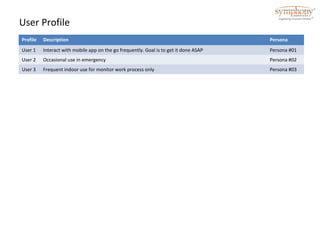
Profile Description Persona 
User 1 Interact with mobile app on the go frequently. Goal is to get it done ASAP Persona #01 
User 2 Occasional use in emergency Persona #02 
User 3 Frequent indoor use for monitor work process only Persona #03
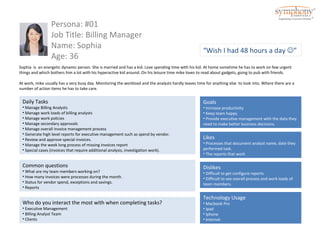
Persona: #01 
Job Title: Billing Manager 
Name: Sophia 
Age: 36 
Sophia is an energetic dynamic person. She is married and has a kid. Love spending time with his kid. At home sometime he has to work on few urgent 
things and which bothers him a lot with his hyperactive kid around. On his leisure time mike loves to read about gadgets, going to pub with friends. 
At work, mike usually has a very busy day. Monitoring the workload and the analysts hardly leaves time for anything else to look into. Where there are a 
number of action items he has to take care. 
Goals 
• Increase productivity 
• Keep team happy 
• Provide executive management with the data they 
need to make better business decisions. 
Daily Tasks 
• Manage Billing Analysts 
• Manage work loads of billing analysts 
• Manage work policies 
• Manage secondary approvals 
• Manage overall invoice management process 
• Generate high level reports for executive management such as spend by vendor. 
• Review and approve special invoices. 
• Manage the week long process of missing invoices report 
• Special cases (invoices that require additional analysis, investigation work). 
Common questions 
• What are my team members working on? 
• How many invoices were processes during the month. 
• Status for vendor spend, exceptions and savings. 
• Reports 
Likes 
• Processes that document analyst name, date they 
performed task. 
• The reports that work 
Dislikes 
• Difficult to get configure reports. 
• Difficult to see overall process and work loads of 
team members. 
Who do you interact the most with when completing tasks? 
• Executive Management 
• Billing Analyst Team 
• Clients 
“Wish I had 48 hours a day ” 
Technology Usage 
• Macbook Pro 
• ipad 
• iphone 
• Internet

User study request approval

  • 1.
    EMS Request Approval User Study, Profile, Personas Version 1.0
  • 2.
    Revision History RevisionNumber Date Changed By Summary of changes Approvals Name Title Date
  • 3.
    Contents 1. Introduction 1.1 Purpose ----------------------------------------------------------------------------------------------------------------------- 1. User Profiles ------------------------------------------------------------------------------------------------------------------------- 2. Personas 2.1 Persona #01 ------------------------------------------------------------------------------------------------------------------ 2.2 Persona #02 ------------------------------------------------------------------------------------------------------------------ 2.3 Persona #03 ------------------------------------------------------------------------------------------------------------------ 04 05 11 12 13
  • 4.
    Purpose The purposeof this document is to describe the User Profiles created for this project. It enables: • Understanding of the intended users for a new system – this is vital since obtaining knowledge of the users’ characteristics is the first step in designing a user interface that meets their needs. • Defining User Profiles • Compiling Personas User Profiles User profile describe the user’s tasks or goals when interacting with the application. The User Profiles work product defines the characteristics of a typical user in each user category. Each user profile includes a description of the user’s prior knowledge and experience, physical characteristics, social and physical environment, cognitive characteristics current job characteristics, and goals, as they relate to how the user will interact with the system. Personas Personas are a set of representative profiles for a customer base. As a design tool, they are a powerful way to communicate behaviors, goals, wants, needs, and frustrations. Effective personas are driven by research data and focus on how a particular profile uses a particular application in a given context. The creation of different profiles is based on analysis of behaviors, goals, wants, needs, and frustrations of many customers.
  • 5.
    User Profile Age(Age distribution across the group of user) Location & Language(Geographical distribution and language for the user group)
  • 6.
    User Profile Usualproblem with handheld Usage Type(What do people use there mobile phones for?)
  • 7.
    User Profile Environmentof use (Indoor/Outdoor etc. usage) Key tasks (Expectation from the app and key tasks performed across the user group)
  • 8.
    User Profile HandheldUsage (Smartphone & tablet usage across the group of user) ipad usage statistics(Global tablat market)
  • 9.
    User Profile Findings 1. The main age group is from 31-40 (51%) 2. All total 8 languages are there and we can see the maximum number of users are using this in English 3. Most of the problems are for slow performance in handhelds (slow app and connectivity) 4. Apart from games the most used apps are from weather, maps and social networking 5. Maximum usage is while doing other parallel activity 6. The key features voted max to min. – Automated alert on new approval request, ability to view detail, one touch approve reject, view history Summary 1. The app should be fast and quick in response and use proper feedback to the user on the status of the application 2. Multilingual support is required 3. Confirmation boxes are required as user might not put complete attention to the application 4. Alert the user on arrival of new request to approve 5. Use modal approach for navigation and drill down 6. Follow the popular application interaction flow (Other than games) 7. Must added features will be – request detail, approve, reject, history 8. Follow the operating system specific interaction flow (e.g. refer to ios development guideline for ios development)
  • 10.
    User Profile ProfileDescription Persona User 1 Interact with mobile app on the go frequently. Goal is to get it done ASAP Persona #01 User 2 Occasional use in emergency Persona #02 User 3 Frequent indoor use for monitor work process only Persona #03
  • 11.
    Persona: #01 JobTitle: Billing Manager Name: Sophia Age: 36 Sophia is an energetic dynamic person. She is married and has a kid. Love spending time with his kid. At home sometime he has to work on few urgent things and which bothers him a lot with his hyperactive kid around. On his leisure time mike loves to read about gadgets, going to pub with friends. At work, mike usually has a very busy day. Monitoring the workload and the analysts hardly leaves time for anything else to look into. Where there are a number of action items he has to take care. Goals • Increase productivity • Keep team happy • Provide executive management with the data they need to make better business decisions. Daily Tasks • Manage Billing Analysts • Manage work loads of billing analysts • Manage work policies • Manage secondary approvals • Manage overall invoice management process • Generate high level reports for executive management such as spend by vendor. • Review and approve special invoices. • Manage the week long process of missing invoices report • Special cases (invoices that require additional analysis, investigation work). Common questions • What are my team members working on? • How many invoices were processes during the month. • Status for vendor spend, exceptions and savings. • Reports Likes • Processes that document analyst name, date they performed task. • The reports that work Dislikes • Difficult to get configure reports. • Difficult to see overall process and work loads of team members. Who do you interact the most with when completing tasks? • Executive Management • Billing Analyst Team • Clients “Wish I had 48 hours a day ” Technology Usage • Macbook Pro • ipad • iphone • Internet