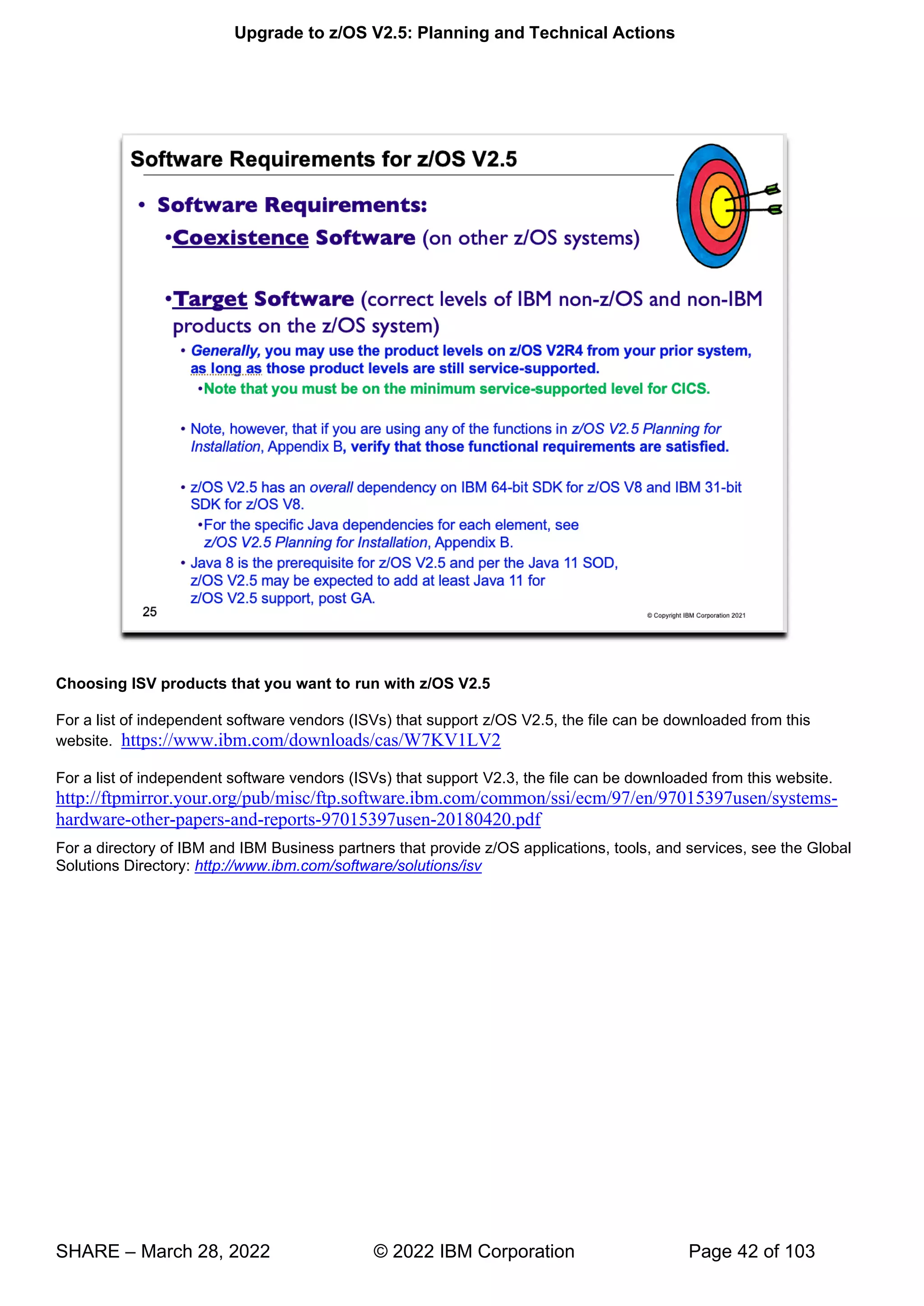
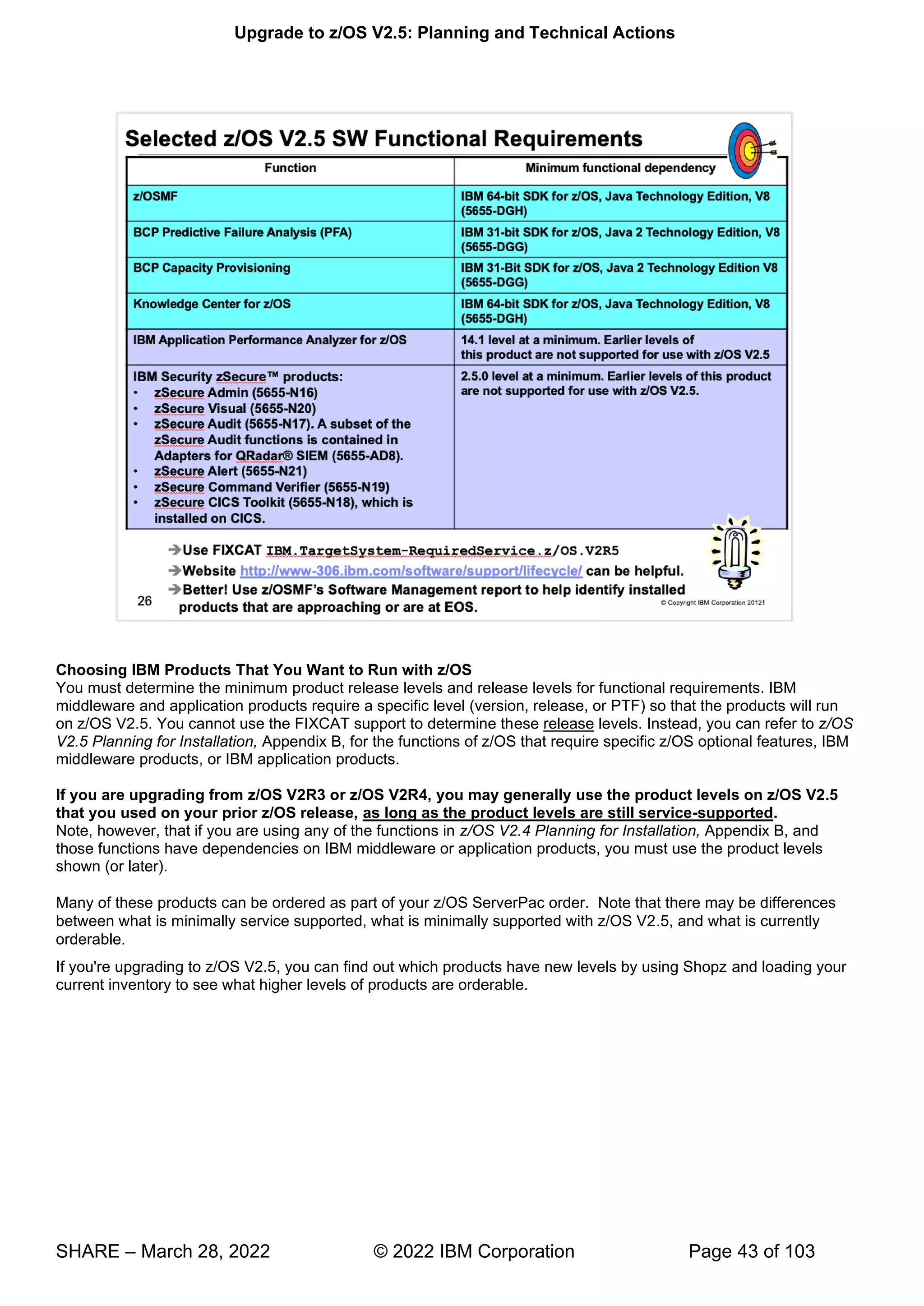
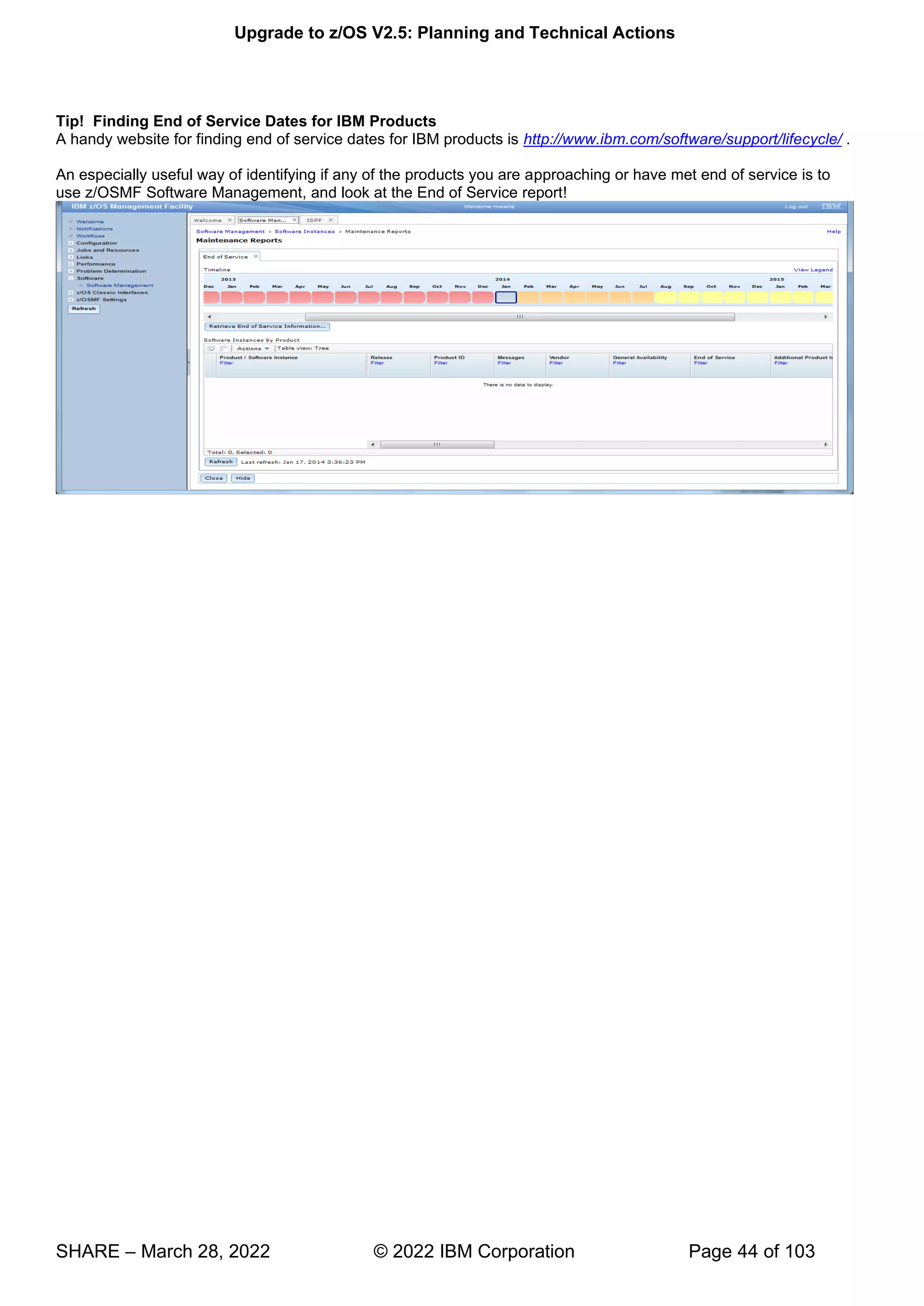
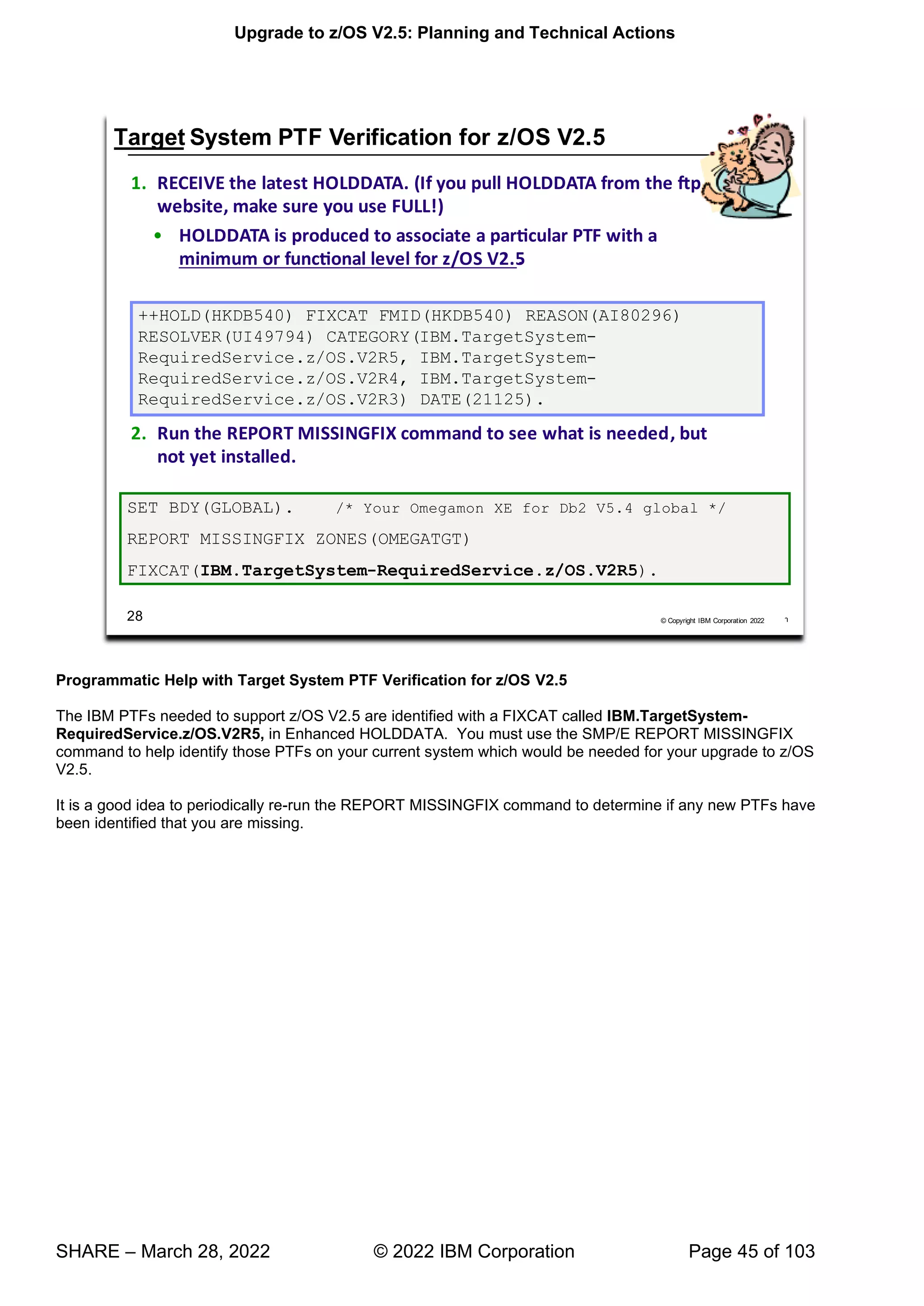
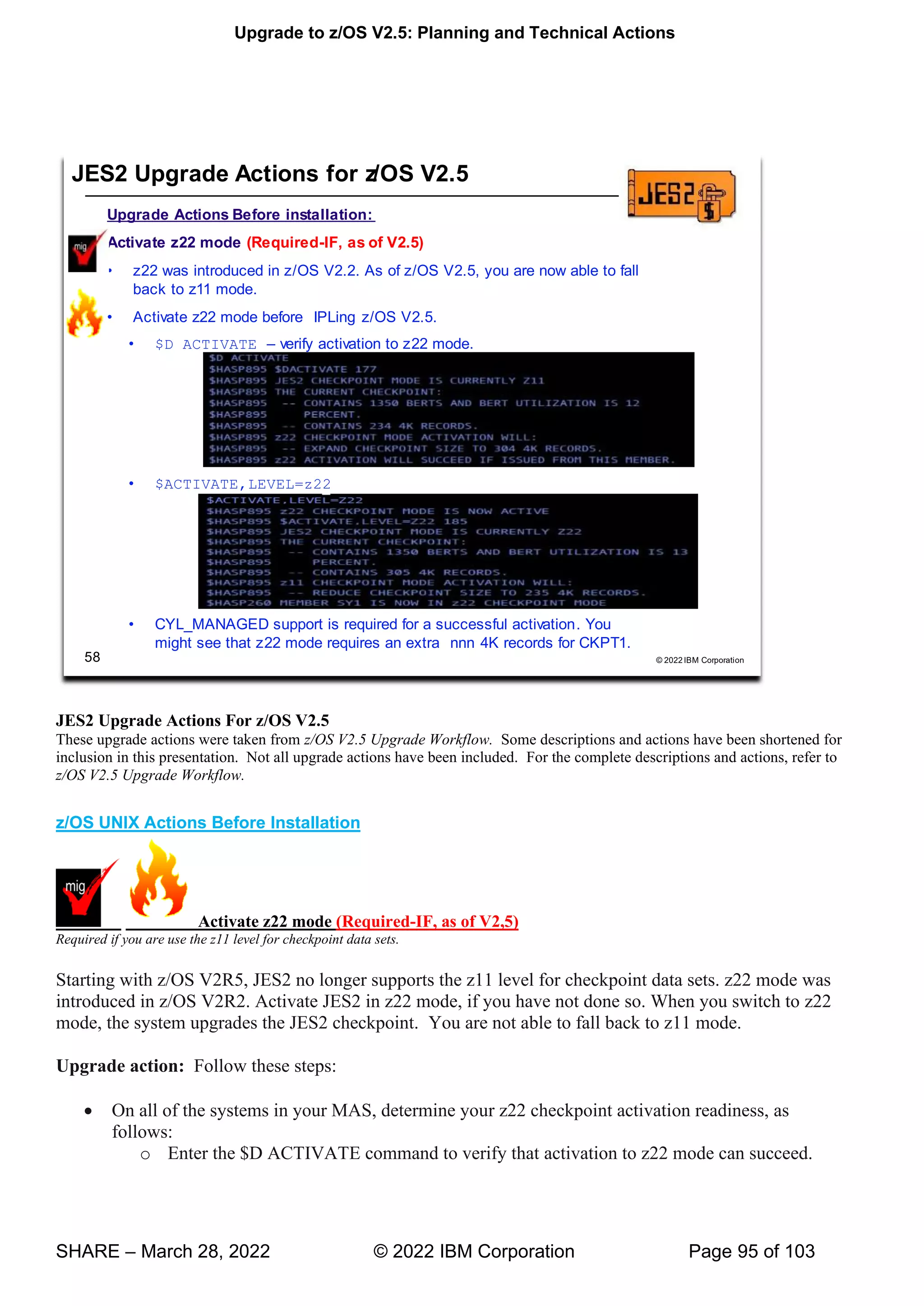
Upgrade to z/OS V2.5: Planning and Technical Actions
SHARE – March 28, 2022 © 2022 IBM Corporation Page 1 of 103
Abstract:
Yes, "upgrade" is the new name for these traditional "migration" sessions! This session will be of interest to System
Programmers and their managers who are upgrading to z/OS 2.5 from either z/OS 2.3 or 2.4. In this sessions, the
speakers will focus on preparing for your z/OS upgrade: changed content, ordering and delivery options,
coexistence, upgrade, fall back, and service policies will be covered. Driving and target system requirements for
both software and hardware will be highlighted along with some upgrade actions you can perform now on your
current z/OS release. It will also cover technical actions to perform, as well as the speaker's personal view on those
changes requiring particular attention.
The general availability date for z/OS V2.5 was September 30, 2021.
Upgrade to z/OS V2.5: Planning and Technical Actions
SHARE – March 28, 2022 © 2022 IBM Corporation Page 2 of 103
Upgrade to z/OS V2.5: Planning and Technical Actions
SHARE – March 28, 2022 © 2022 IBM Corporation Page 3 of 103
IBM Education:
IBM courses are available for z/OS. For schedules and enrollment on the world wide web, IBM Global Campus
URL: http://www.ibm.com/services/learning/ .
Upgrade to z/OS V2.5: Planning and Technical Actions
SHARE – March 28, 2022 © 2022 IBM Corporation Page 4 of 103
Upgrade to z/OS V2.5: Planning and Technical Actions
SHARE – March 28, 2022 © 2022 IBM Corporation Page 5 of 103
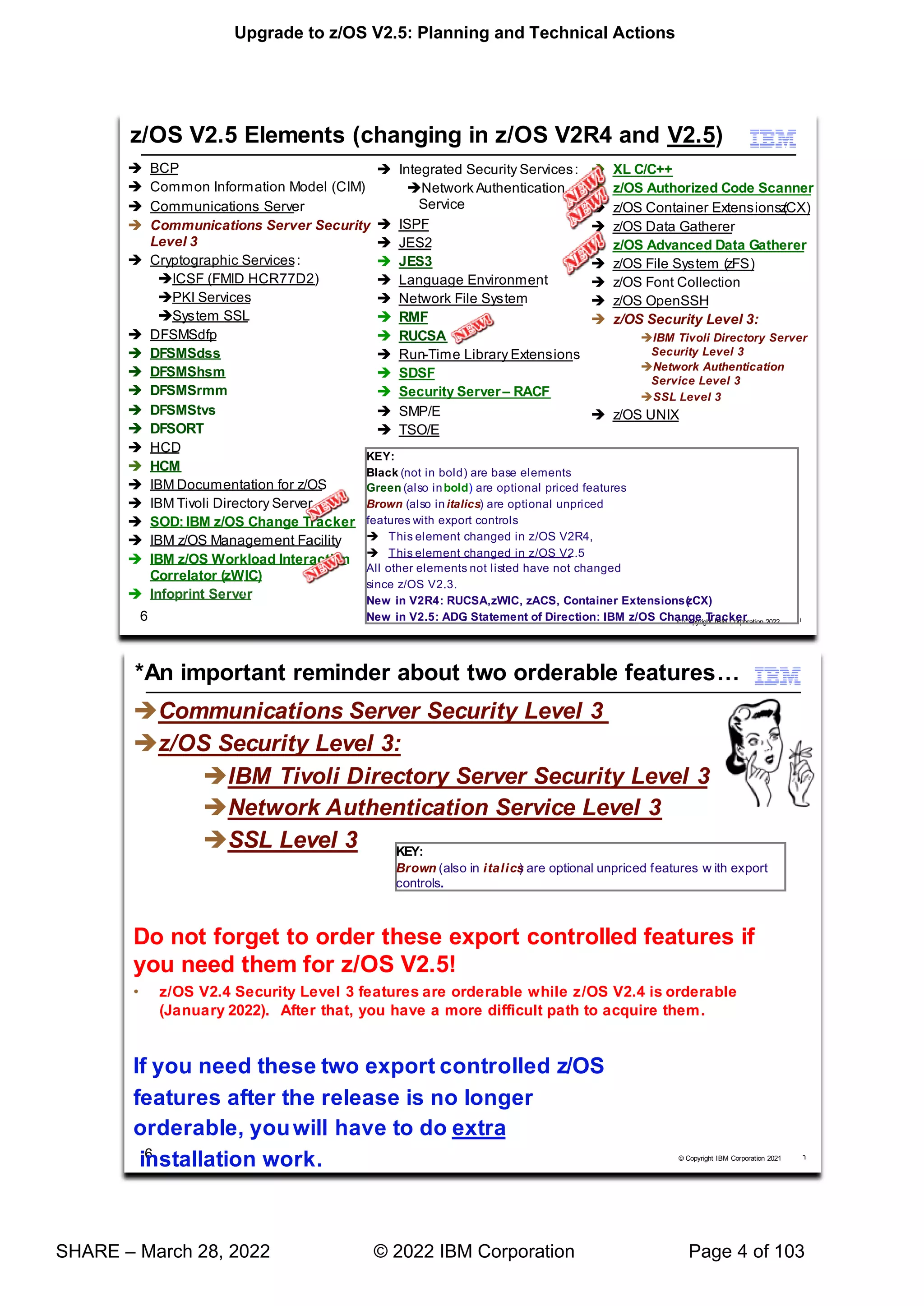
z/OS Elements and Features
z/OS consists of base elements and optional features:
 The base elements (or simply elements) deliver essential operating system functions. When you order z/OS,
you receive all of the base elements.
 The optional features (or simply features) are orderable with z/OS and provide additional operating system
functions. Optional features are unpriced or priced:
Unpriced features are shipped to you only if you order them. If you plan to use any unpriced features, IBM
recommends that you order them when you order your base elements. You must not wait until the next
release becomes available. Once a release's base elements are no longer orderable, usually neither are its
unpriced features.
Priced features are always shipped to you. When IBM packages your order, we enable the priced features
that you ordered. These features are ready to use after you install z/OS (and customize them as needed).
We disable the priced features that you did not order. Although they are installed on your system, you
cannot use them. Later on, if you decide to use them, you notify IBM and you enable them dynamically
(which is known as dynamic enablement). You dynamically enable by updating parmlib member IFAPRDxx
and you notify IBM by contacting your IBM representative.
Elements and features may be exclusive or nonexclusive:
 An element or feature is called exclusive to z/OS if it exists only within z/OS (not also as a separately orderable,
or stand-alone, product) and if future functional enhancements will occur only within z/OS.
 An element or feature is called nonexclusive if it exists both (1) within z/OS and (2) as a stand-alone product.
Listed in the slide above are the changing elements within z/OS V2R5 since z/OS V2R3.
Upgrade to z/OS V2.5: Planning and Technical Actions
SHARE – March 28, 2022 © 2022 IBM Corporation Page 6 of 103
Upgrade to z/OS V2.5: Planning and Technical Actions
SHARE – March 28, 2022 © 2022 IBM Corporation Page 7 of 103
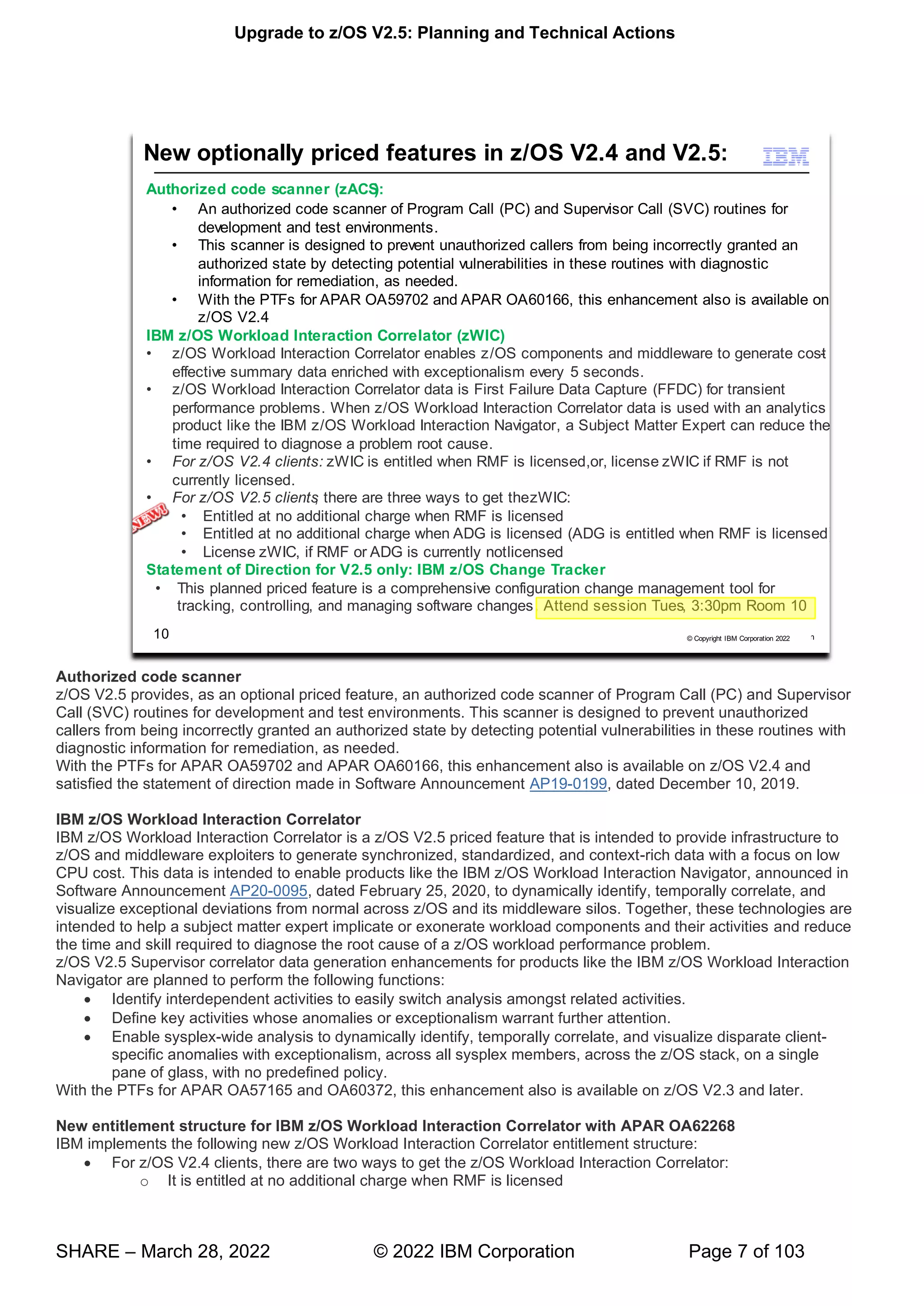
Authorized code scanner
z/OS V2.5 provides, as an optional priced feature, an authorized code scanner of Program Call (PC) and Supervisor
Call (SVC) routines for development and test environments. This scanner is designed to prevent unauthorized
callers from being incorrectly granted an authorized state by detecting potential vulnerabilities in these routines with
diagnostic information for remediation, as needed.
With the PTFs for APAR OA59702 and APAR OA60166, this enhancement also is available on z/OS V2.4 and
satisfied the statement of direction made in Software Announcement AP19-0199, dated December 10, 2019.
IBM z/OS Workload Interaction Correlator
IBM z/OS Workload Interaction Correlator is a z/OS V2.5 priced feature that is intended to provide infrastructure to
z/OS and middleware exploiters to generate synchronized, standardized, and context-rich data with a focus on low
CPU cost. This data is intended to enable products like the IBM z/OS Workload Interaction Navigator, announced in
Software Announcement AP20-0095, dated February 25, 2020, to dynamically identify, temporally correlate, and
visualize exceptional deviations from normal across z/OS and its middleware silos. Together, these technologies are
intended to help a subject matter expert implicate or exonerate workload components and their activities and reduce
the time and skill required to diagnose the root cause of a z/OS workload performance problem.
z/OS V2.5 Supervisor correlator data generation enhancements for products like the IBM z/OS Workload Interaction
Navigator are planned to perform the following functions:
• Identify interdependent activities to easily switch analysis amongst related activities.
• Define key activities whose anomalies or exceptionalism warrant further attention.
• Enable sysplex-wide analysis to dynamically identify, temporally correlate, and visualize disparate client-
specific anomalies with exceptionalism, across all sysplex members, across the z/OS stack, on a single
pane of glass, with no predefined policy.
With the PTFs for APAR OA57165 and OA60372, this enhancement also is available on z/OS V2.3 and later.
New entitlement structure for IBM z/OS Workload Interaction Correlator with APAR OA62268
IBM implements the following new z/OS Workload Interaction Correlator entitlement structure:
• For z/OS V2.4 clients, there are two ways to get the z/OS Workload Interaction Correlator:
o It is entitled at no additional charge when RMF is licensed
Upgrade to z/OS V2.5: Planning and Technical Actions
SHARE – March 28, 2022 © 2022 IBM Corporation Page 8 of 103
o License the z/OS Workload Interaction Correlator, if RMF is currently not licensed
• For z/OS V2.5 clients, there are three ways to get the z/OS Workload Interaction Correlator:
o It is entitled at no additional charge when RMF is licensed
o It is entitled at no additional charge when ADG is licensed
▪ Note: ADG it is entitled at no additional charge when RMF is licensed
o License z/OS Workload Interaction Correlator, if RMF or ADG is currently not licensed
Any client who has not purchased RMF or ADG can still purchase the z/OS Workload Interaction Correlator
independently as a z/OS priced feature, just as they could prior to this new entitlement structure.
Statement of Direction, announced March 15, 2022
z/OS Change Tracker
As IBM continues to provide a suite of robust tools to help system programmers manage z/OS, IBM intends to
offer a new priced feature of z/OS V2.5, IBM z/OS Change Tracker. This feature is a comprehensive
configuration change management tool for tracking, controlling, and managing software changes.
Upgrade to z/OS V2.5: Planning and Technical Actions
SHARE – March 28, 2022 © 2022 IBM Corporation Page 9 of 103
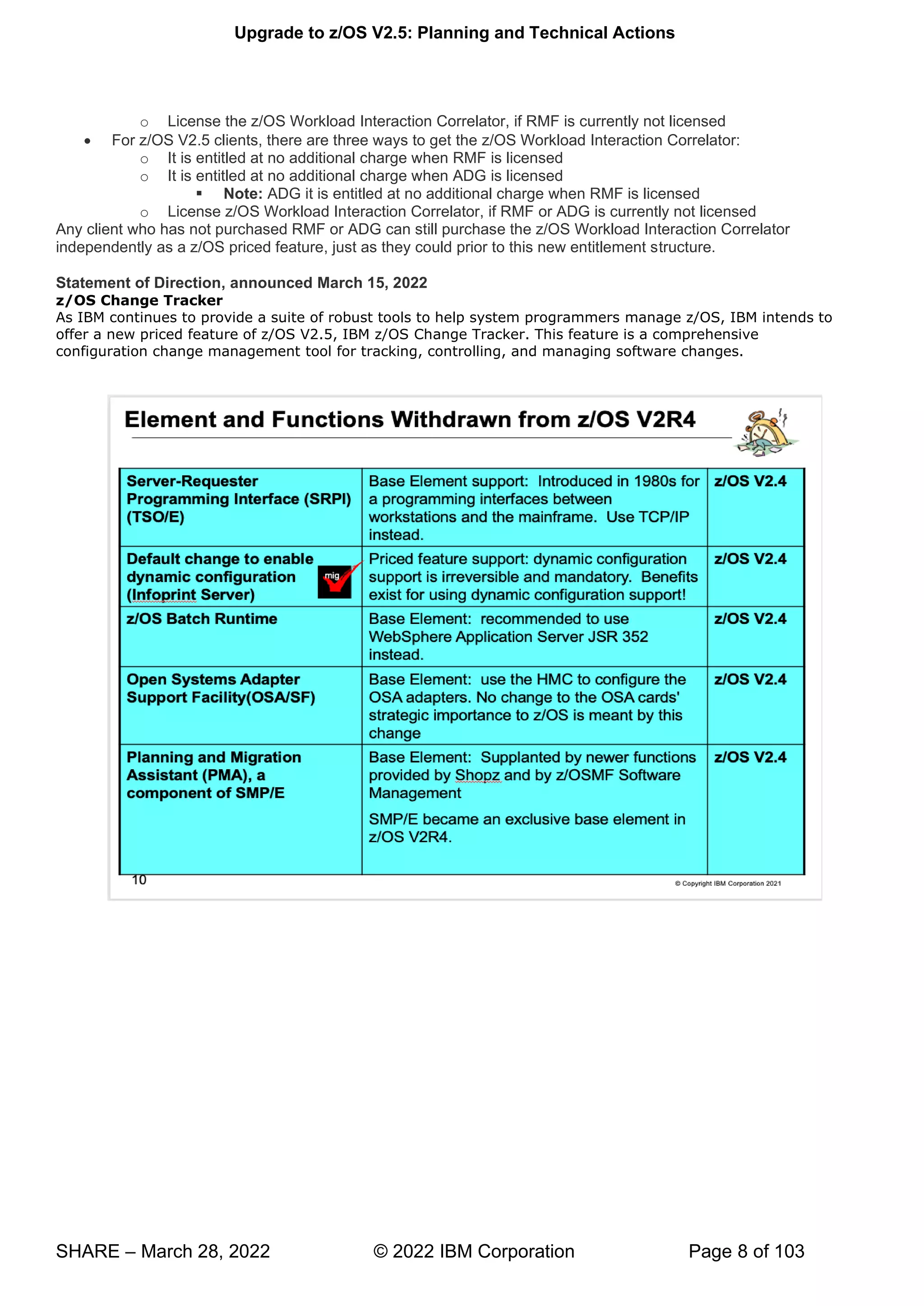
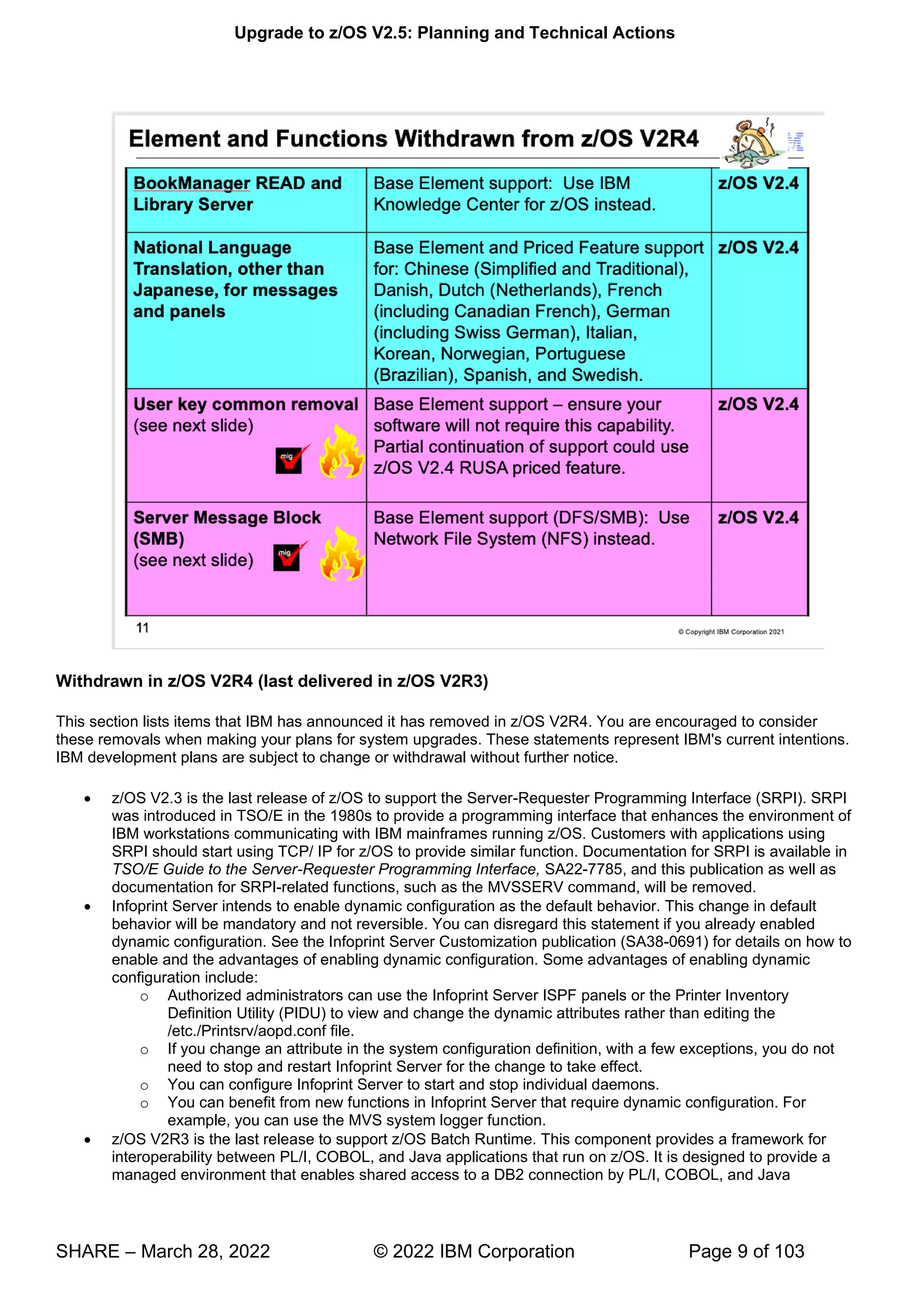
Withdrawn in z/OS V2R4 (last delivered in z/OS V2R3)
This section lists items that IBM has announced it has removed in z/OS V2R4. You are encouraged to consider
these removals when making your plans for system upgrades. These statements represent IBM's current intentions.
IBM development plans are subject to change or withdrawal without further notice.
• z/OS V2.3 is the last release of z/OS to support the Server-Requester Programming Interface (SRPI). SRPI
was introduced in TSO/E in the 1980s to provide a programming interface that enhances the environment of
IBM workstations communicating with IBM mainframes running z/OS. Customers with applications using
SRPI should start using TCP/ IP for z/OS to provide similar function. Documentation for SRPI is available in
TSO/E Guide to the Server-Requester Programming Interface, SA22-7785, and this publication as well as
documentation for SRPI-related functions, such as the MVSSERV command, will be removed.
• Infoprint Server intends to enable dynamic configuration as the default behavior. This change in default
behavior will be mandatory and not reversible. You can disregard this statement if you already enabled
dynamic configuration. See the Infoprint Server Customization publication (SA38-0691) for details on how to
enable and the advantages of enabling dynamic configuration. Some advantages of enabling dynamic
configuration include:
o Authorized administrators can use the Infoprint Server ISPF panels or the Printer Inventory
Definition Utility (PIDU) to view and change the dynamic attributes rather than editing the
/etc./Printsrv/aopd.conf file.
o If you change an attribute in the system configuration definition, with a few exceptions, you do not
need to stop and restart Infoprint Server for the change to take effect.
o You can configure Infoprint Server to start and stop individual daemons.
o You can benefit from new functions in Infoprint Server that require dynamic configuration. For
example, you can use the MVS system logger function.
• z/OS V2R3 is the last release to support z/OS Batch Runtime. This component provides a framework for
interoperability between PL/I, COBOL, and Java applications that run on z/OS. It is designed to provide a
managed environment that enables shared access to a DB2 connection by PL/I, COBOL, and Java
Upgrade to z/OS V2.5: Planning and Technical Actions
SHARE – March 28, 2022 © 2022 IBM Corporation Page 10 of 103
programs. It is recommended that you use IBM WebSphere® Application Server JSR 352 instead. Doing so
might require you to modify and test your programs in a JSR 352 compliant batch container.
• IBM plans to discontinue delivery of z/OS platform products and service on magnetic tape on July 1, 2018.
This fulfills the statement of direction in IBM United States Software Announcement 217-085, "Preview: IBM
z/OS Version 2 Release 3 - Engine for digital transformation," dated February 21, 2017. IBM recommends
downloading products and service over the Internet. However, if you have a requirement for physical
media, products and service remain available on DVD.
• z/OS V2.3 is planned to be the last release of the operating system to provide national language translation
in languages other than Japanese. As such, the handful of z/OS elements that provide message and panel
translation to Chinese (Simplified and Traditional), Danish, Dutch (Netherlands), French (including Canadian
French), German (including Swiss German), Italian, Korean, Norwegian, Portuguese (Brazilian), Spanish,
and Swedish today, will no longer provide translations into these languages in the release after z/OS V2.3.
• z/OS V2.3 is planned as the last release to include the z/OS BookManager READ and Library Server base
elements, the latter of which includes the BookRead API. Over time, IBM's platform for delivering product
documentation to customers has evolved to IBM Knowledge Center technology, and production of
documentation formats that are supported by BookManager Read and Library Server has greatly
diminished. IBM recommends now using IBM Knowledge Center for z/OS (KC4z), which was introduced as
a base element of z/OS in version 2.2, to maintain local repositories of product documentation and serve
content.
• OSA Support Facility (OSA/SF) is an element of z/OS that has been used to configure devices on Open
Systems Adapter (OSA) cards used for the SNA protocol and to support and manage all OSA features.
OSA/SF in z/OS has both a graphical user interface as well as a REXX API. On EC12/BC12 systems, IBM
introduced support to configure these devices on the latest generation OSA adapters (OSA Express5S) and
to support and manage these adapters exclusively using the Hardware Management Console (HMC), with
no capability to configure or manage devices on these adapters provided in the z/OS OSA/SF application.
The OSA/SF on the HMC functionality can be used to configure and manage OSA-Express4S and newer
generation adapters. No change to the OSA cards' strategic importance to z/OS is meant by this change.
z/OS continues to support the networking operational use of OSA adapters.
• z/OS V2.3 is the last release to include the SMP/E Planning and Migration Assistant (PMA). The set of
functions provided by PMA, which was introduced in 1998, has largely been supplanted by newer functions
provided by Shopz and by z/OSMF Software Management or duplicate other functions available in SMP/E.
For those functions, IBM recommends you use the replacements instead. However, no replacements are
planned for the Intermediate Product Migration Changes report or for the PMA ISPF tables. With this
removal and repackaging of SMP/E, it has become as exclusive base element to z/OS.
Upgrade to z/OS V2.5: Planning and Technical Actions
SHARE – March 28, 2022 © 2022 IBM Corporation Page 11 of 103
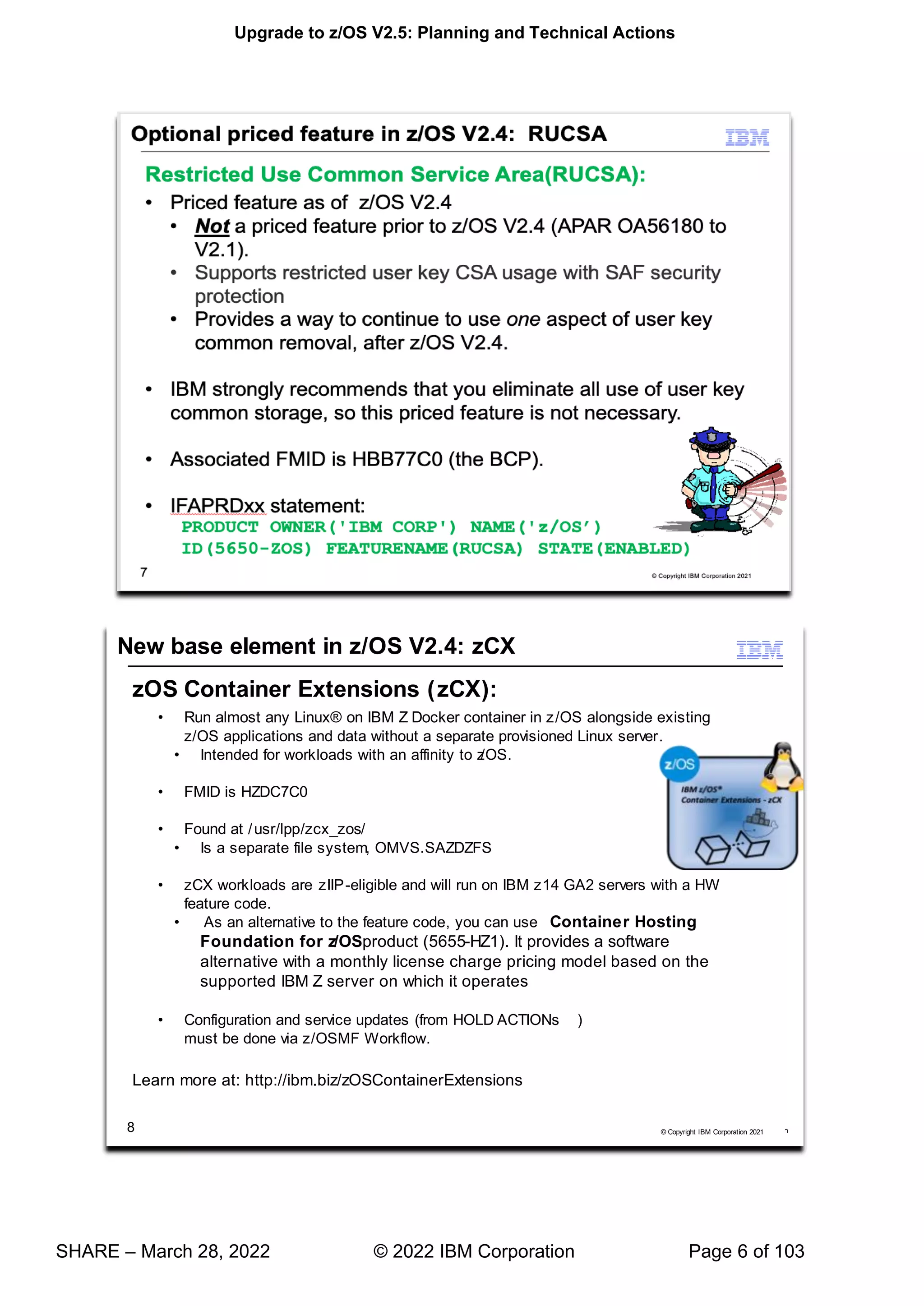
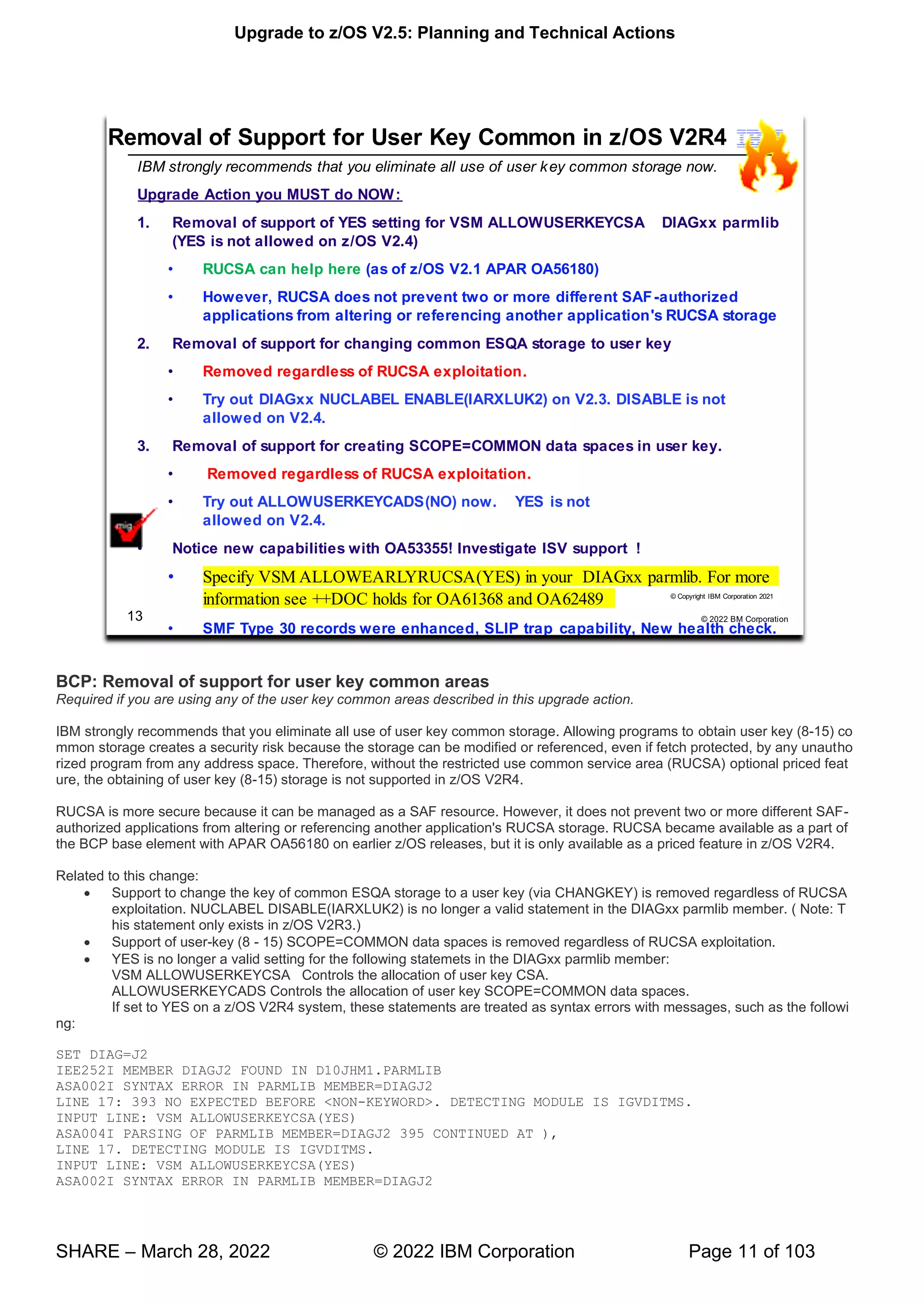
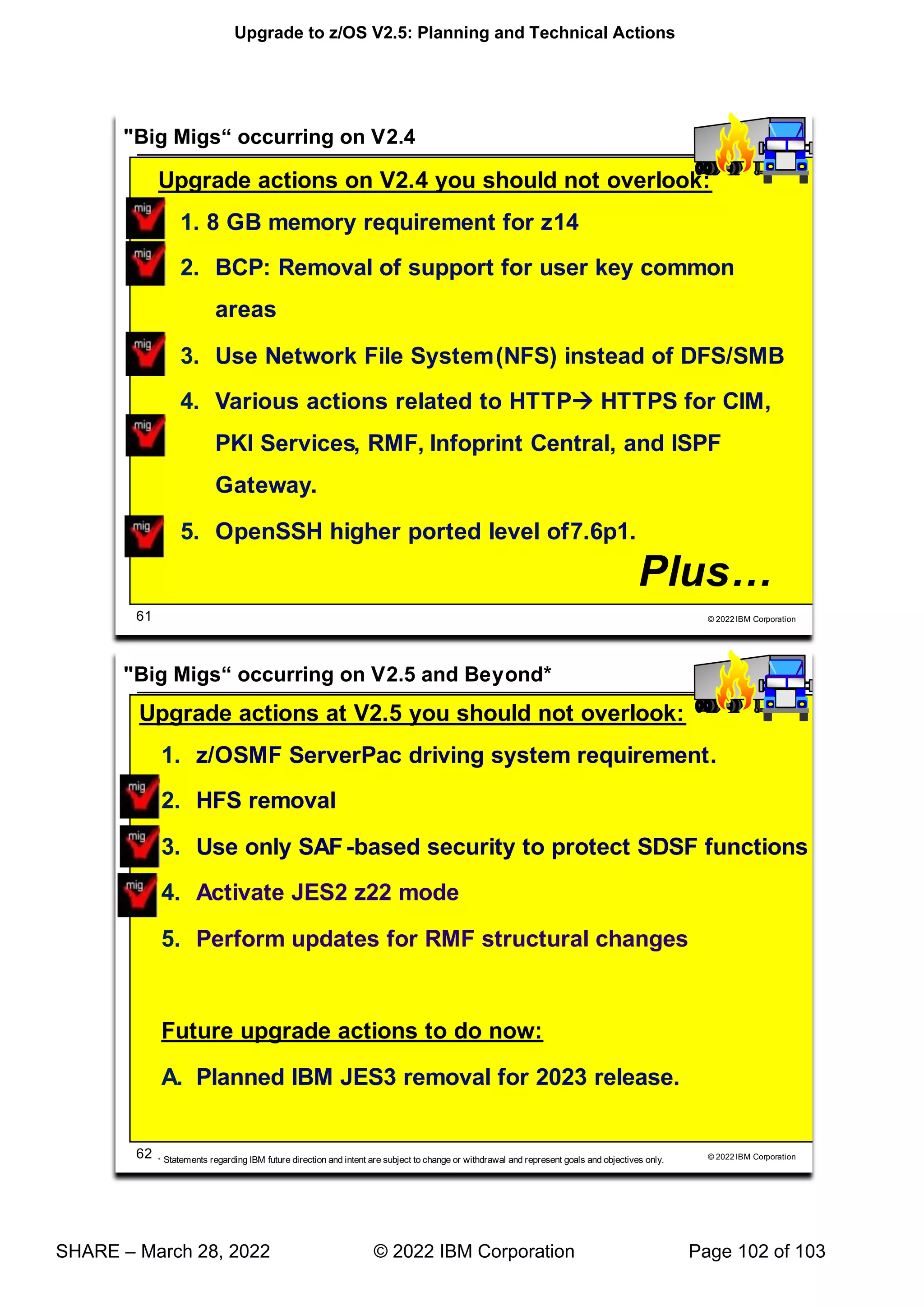
BCP: Removal of support for user key common areas
Required if you are using any of the user key common areas described in this upgrade action.
IBM strongly recommends that you eliminate all use of user key common storage. Allowing programs to obtain user key (8-15) co
mmon storage creates a security risk because the storage can be modified or referenced, even if fetch protected, by any unautho
rized program from any address space. Therefore, without the restricted use common service area (RUCSA) optional priced feat
ure, the obtaining of user key (8-15) storage is not supported in z/OS V2R4.
RUCSA is more secure because it can be managed as a SAF resource. However, it does not prevent two or more different SAF-
authorized applications from altering or referencing another application's RUCSA storage. RUCSA became available as a part of
the BCP base element with APAR OA56180 on earlier z/OS releases, but it is only available as a priced feature in z/OS V2R4.
Related to this change:
• Support to change the key of common ESQA storage to a user key (via CHANGKEY) is removed regardless of RUCSA
exploitation. NUCLABEL DISABLE(IARXLUK2) is no longer a valid statement in the DIAGxx parmlib member. ( Note: T
his statement only exists in z/OS V2R3.)
• Support of user-key (8 - 15) SCOPE=COMMON data spaces is removed regardless of RUCSA exploitation.
• YES is no longer a valid setting for the following statemets in the DIAGxx parmlib member:
VSM ALLOWUSERKEYCSA Controls the allocation of user key CSA.
ALLOWUSERKEYCADS Controls the allocation of user key SCOPE=COMMON data spaces.
If set to YES on a z/OS V2R4 system, these statements are treated as syntax errors with messages, such as the followi
ng:
SET DIAG=J2
IEE252I MEMBER DIAGJ2 FOUND IN D10JHM1.PARMLIB
ASA002I SYNTAX ERROR IN PARMLIB MEMBER=DIAGJ2
LINE 17: 393 NO EXPECTED BEFORE <NON-KEYWORD>. DETECTING MODULE IS IGVDITMS.
INPUT LINE: VSM ALLOWUSERKEYCSA(YES)
ASA004I PARSING OF PARMLIB MEMBER=DIAGJ2 395 CONTINUED AT ),
LINE 17. DETECTING MODULE IS IGVDITMS.
INPUT LINE: VSM ALLOWUSERKEYCSA(YES)
ASA002I SYNTAX ERROR IN PARMLIB MEMBER=DIAGJ2
Upgrade to z/OS V2.5: Planning and Technical Actions
SHARE – March 28, 2022 © 2022 IBM Corporation Page 12 of 103
LINE 18: 396 NO EXPECTED BEFORE <NON-KEYWORD>. DETECTING MODULE IS IGVDITMS.
INPUT LINE: ALLOWUSERKEYCADS(YES)
ASA004I PARSING OF PARMLIB MEMBER=DIAGJ2 397 CONTINUED AT ),
LINE 18. DETECTING MODULE IS IGVDITMS.
INPUT LINE: ALLOWUSERKEYCADS(YES) IEE536I DIAG VALUE J2 NOW IN EFFECT
Upgrade action:
1. On the production system that you are upgrading to z/OS V2.5, determine whether you are using user key common
storage by checking the response to the following operator commands :
o D IPLINFO,RUCSA . If RUCSA was specified with nonzero values, you are already using RUCSA and must do
either of the following:
▪ Upgrade to the z/OS V2.5 priced optional feature. For instructions, see z/OS Planning for Installation. No
other steps are required. However, you might want to see whether you can reduce or possibly eliminate
user key common storage usage by following the additional steps below.
▪ Start with Step 2 below to remove all usage of user key common storage from your current system and
then remove the use of RUCSA before IPLing z/OS V2.5.
o D DIAG . If VSM ALLOWUSERKEYCSA and ALLOWUSERKEYCADS are set to NO and you are not using
RUCSA, no further action is required. You already prevent the use of user key common storage.
2. Query all software vendor products to determine whether any service is required to eliminate the use of user key
common storage.
o If you are running CICS Transaction Server for z/OS, ensure that you are running V5.2 or a later version.
o If you are running Tivoli OMEGAMON XE for DB2 PE/PM, apply APAR PI97225 ("Removed User Key CADS
Creation").
3. Check for usage of user key common areas, such as the following:
o Using the STORAGE, GETMAIN or CPOOL service to obtain common ECSA/CSA storage (subpool 227, 228,
231, 241) that specifies a key of 8-15.
o Using the DSPSERV service to allocate a SCOPE=COMMON data space in a key of 8-15.
o Using the CHANGKEY service to change the storage key of common storage to a key of 8-15.
To aid in finding all instances of user key common usage, apply the PTF for APAR OA53355 on your production
system. Doing so allows you to take one or more of the following actions:
o Enable the following example SLIP trap to produce GTF trace records to help in identifying software that uses
user key common storage:
SLIP SET,IF,A=TRACE,ID=UKEY,NUCEP=(IARXLUK4,0,1),TRDATA=(STD,REGS),END
In the GTF trace record, register 1 contains the address of the program that used user key common storage.
o Activate the ZOSMIGV2R3_NEXT_VSM_USERKEYCOMM health check. This health check issues an
exception message when it detects usage of user key common storage.
o Ensure that SMF Type 30 recording is active. The Storage and Paging section contains flags that indicate
whether user key common storage is used. For information about the SMF30_UserKeyCsaUsage,
SMF30_UserKeyCadsUsage and SMF30_UserKeyChangKeyUsage flags, see z/OS MVS System
Management Facilities (SMF).
4. If the PTF for APAR OA53355 is not applied, you can take one or more of the following actions to help find
instances of user key common usage:
o Set the DIAGxx parmlib statement VSM ALLOWUSERKEYCSA to NO, which is the default. Then, IPL a test
system with the updated setting. Any software on your test system that attempts to obtain user key CSA/ECSA
storage by using the GETMAIN, STORAGE, or CPOOL service will fail. The service receives one of the
following abends: B04-5C, B0A-5C, or B78-5C.
o Specify ALLOWUSERKEYCADS(NO) in your DIAGxx parmlib. Then, IPL a test system with the updated
setting. Any software on your test system that attempts to obtain a user key (8-15) SCOPE=COMMON data
space fails with a 01D-xx0015xx abend.
o On z/OS V2R3 systems and later, specify NUCLABEL ENABLE(IARXLUK2) in your DIAGxx parmlib member.
Then, IPL a test system with the updated setting. Any software on your test system that attempts to use
CHANGKEY to change subpool 247 or 248 common storage to a user key (8-15) will fail with a 08F-1C abend.
o Enable the following example SLIP trap to produce GTF trace records to help in identifying software that
obtains user key CSA/ECSA storage:
SLIP SET,IF,A=TRACE,ID=UCSA,NUCEP=(IGVVSMG2,0,1),END
o Enable the following example SLIP trap to produce GTF trace records to help in identifying software that
allocates user key SCOPE=COMMON data spaces:
SLIP SET,IF,A=TRACE,ID=UCAD,NUCEP=(IAXDKUKY,0,1),END
o Check for usage of the CHANGKEY service to change the storage key of common storage to a key of 8-15.
Upgrade to z/OS V2.5: Planning and Technical Actions
SHARE – March 28, 2022 © 2022 IBM Corporation Page 13 of 103
5. Change the affected software to use a system key rather than a user key. Or, change the affected software to use
storage that is not common to all address spaces. Some alternatives for sharing storage (instead of having storage
common to all address spaces) include the following options:
o Use a SCOPE=ALL data space to share data space storage with specific units of work in specific address
spaces.
o Use IARVSERV SHARE to share below-the-bar storage with specific address spaces.
o Use IARV64 GETSHARED to share above-the-bar storage with specific address spaces.
o Use z/OS UNIX shared memory to share below-the-bar or above-the-bar storage with specific address spaces.
6. For those who cannot immediately eliminate all affected software programs or need more assistance in identifying
the programs that reference user key CSA storage, the more secure restricted use common service area (RUCSA),
an optional priced feature in z/OS V2.5 (and provided in the BCP base element by APAR OA56180 for earlier z/OS
releases) can be used. However, IBM still recommends the elimination of all user key common storage. For more
information about RUCSA and upgrading to it, see z/OS MVS Initialization and Tuning Guide.
Reference information
For more information, see the following references:
• For information about IBM Health Checker, see IBM Health Checker for z/OS User's Guide.
• For information about SMF records, see z/OS MVS System Management Facilities (SMF).
• For information about the z/OS V2R4 RUCSA optional priced feature, see:
o z/OS Introduction and Release Guide
o z/OS Planning for Installation
Upgrade to z/OS V2.5: Planning and Technical Actions
SHARE – March 28, 2022 © 2022 IBM Corporation Page 14 of 103
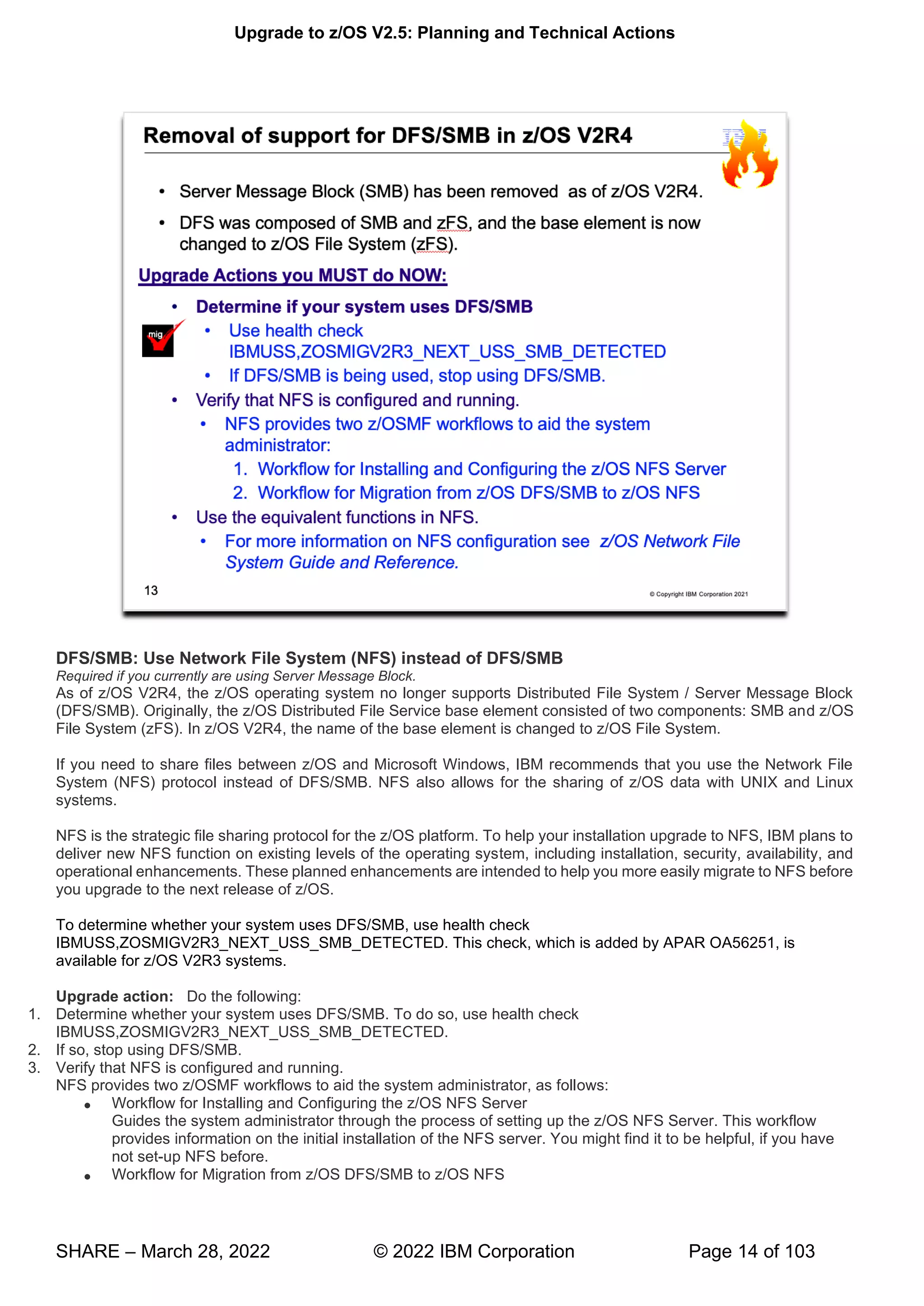
DFS/SMB: Use Network File System (NFS) instead of DFS/SMB
Required if you currently are using Server Message Block.
As of z/OS V2R4, the z/OS operating system no longer supports Distributed File System / Server Message Block
(DFS/SMB). Originally, the z/OS Distributed File Service base element consisted of two components: SMB and z/OS
File System (zFS). In z/OS V2R4, the name of the base element is changed to z/OS File System.
If you need to share files between z/OS and Microsoft Windows, IBM recommends that you use the Network File
System (NFS) protocol instead of DFS/SMB. NFS also allows for the sharing of z/OS data with UNIX and Linux
systems.
NFS is the strategic file sharing protocol for the z/OS platform. To help your installation upgrade to NFS, IBM plans to
deliver new NFS function on existing levels of the operating system, including installation, security, availability, and
operational enhancements. These planned enhancements are intended to help you more easily migrate to NFS before
you upgrade to the next release of z/OS.
To determine whether your system uses DFS/SMB, use health check
IBMUSS,ZOSMIGV2R3_NEXT_USS_SMB_DETECTED. This check, which is added by APAR OA56251, is
available for z/OS V2R3 systems.
Upgrade action: Do the following:
1. Determine whether your system uses DFS/SMB. To do so, use health check
IBMUSS,ZOSMIGV2R3_NEXT_USS_SMB_DETECTED.
2. If so, stop using DFS/SMB.
3. Verify that NFS is configured and running.
NFS provides two z/OSMF workflows to aid the system administrator, as follows:
• Workflow for Installing and Configuring the z/OS NFS Server
Guides the system administrator through the process of setting up the z/OS NFS Server. This workflow
provides information on the initial installation of the NFS server. You might find it to be helpful, if you have
not set-up NFS before.
• Workflow for Migration from z/OS DFS/SMB to z/OS NFS
Upgrade to z/OS V2.5: Planning and Technical Actions
SHARE – March 28, 2022 © 2022 IBM Corporation Page 15 of 103
Describes the steps that the system administrator must perform to have z/OS NFS provide function that is
similar to an existing z/OS DFS/SMB configuration.
For more information about these workflows, see APAR OA56186.
4. Use the equivalent functions in NFS.
Reference information: For more information about NFS, see z/OS Network File System Guide and Reference.
Upgrade to z/OS V2.5: Planning and Technical Actions
SHARE – March 28, 2022 © 2022 IBM Corporation Page 16 of 103
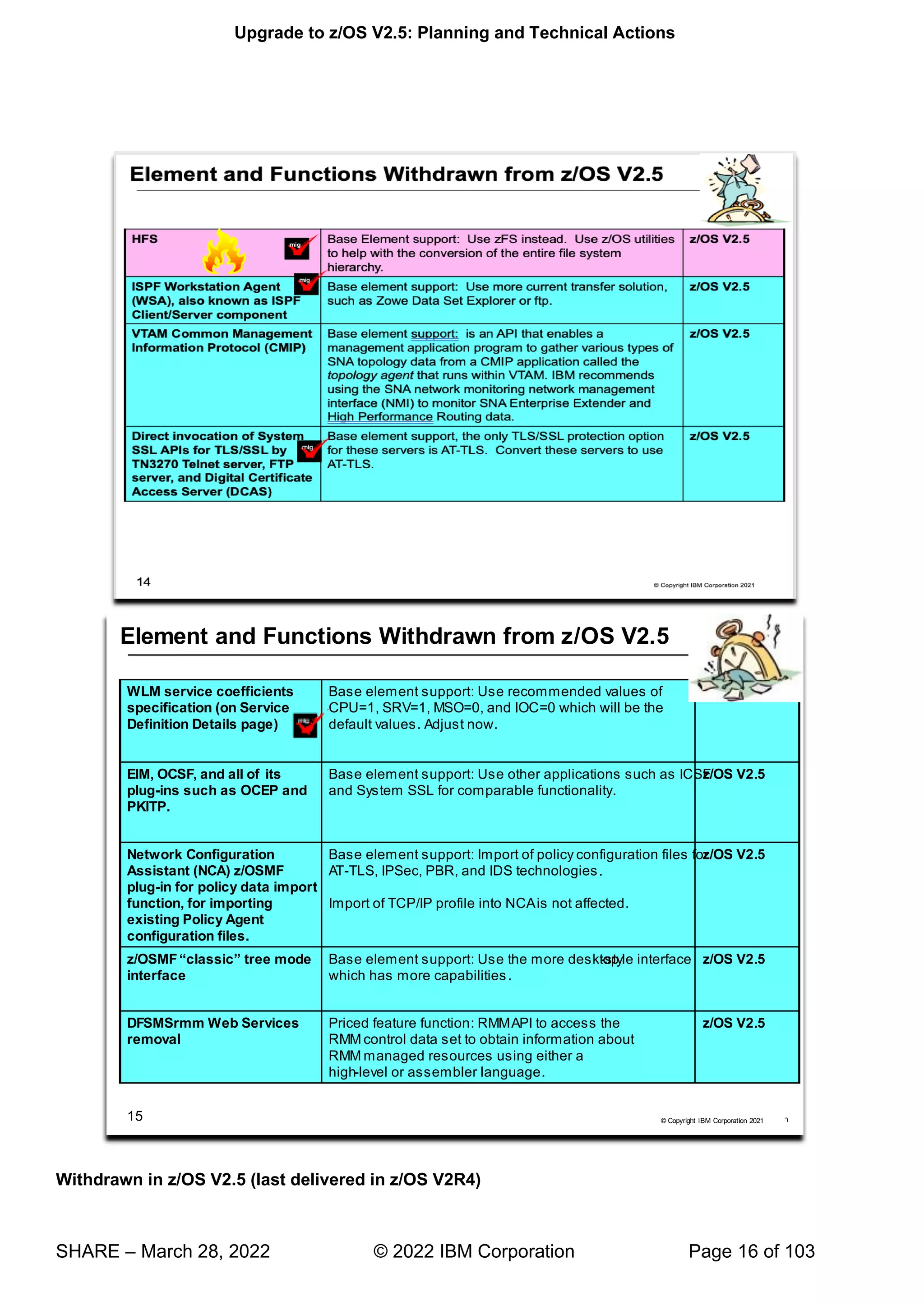
Withdrawn in z/OS V2.5 (last delivered in z/OS V2R4)
Upgrade to z/OS V2.5: Planning and Technical Actions
SHARE – March 28, 2022 © 2022 IBM Corporation Page 17 of 103
This section lists items that were withdrawn in z/OS V2.,5. You should take this into account if you are upgrading
from z/OS V2.3 or V2.4, to z/OS V2.5. The removal of these functions may have upgrade actions which you can
perform now, in preparation for z/OS V2.5
• z/OS 2.4 is the last release of the operating system to support the HFS (Hierarchical File System) data
structure used by the z/OS UNIX environment. IBM has provided equivalent if not superior functionality with
the z/OS File System (zFS). Customers should migrate from HFS to zFS using the utilities provided in the
operating system to convert their entire file system hierarchy.
• z/OS V2.4 is the last release to support the ISPF Workstation Agent (WSA), also known as the ISPF
Client/Server Component. WSA is an application that runs on your local workstation and maintains a
connection between the workstation and the ISPF host. It is primarily used to transfer files between the
workstation and the host. IBM recommends using more current file transfer solutions such as those
provided by the Zowe Dataset Explorer, z/OS FTP, and similar file transfer mechanisms. These solutions
have more capabilities, including the ability to provide secure communications.
• z/OS V2.4 is the last release to support the VTAM Common Management Information Protocol (CMIP).
CMIP services is an API that enables a management application program to gather various types of SNA
topology data from a CMIP application called the topology agent that runs within VTAM. IBM recommends
using the SNA network monitoring network management interface (NMI) to monitor SNA Enterprise
Extender and High Performance Routing data.
• z/OS V2.4 is the last release in which the z/OS TN3270E Telnet server, FTP server, and Digital Certificate
Access Server (DCAS) will support direct invocation of System SSL APIs for TLS/SSL protection. In the
future, the only TLS/SSL protection option for these servers will be Application Transparent Transport Layer
Security (AT-TLS). The direct System SSL support in each of these components is functionally outdated
and only supports TLS protocols up through TLSv1.1. IBM recommends converting your TN3270E Telnet,
FTP server, and DCAS configurations to use AT-TLS, which supports the latest System SSL features,
including the TLSv1.2 and TLSv1.3 protocols and related cipher suites. Note that while native TLS/SSL
support for z/OS FTP client is not being withdrawn at this time, no future enhancements are planned for that
support. IBM recommends using ATTLS to secure FTP client traffic.
• z/OS V2.4 is the last release of z/OS to allow specifying service coefficients in the Workload Manager
(WLM) service definition on the Service Definition Details page. The IBM recommended values are CPU=1,
SRB=1, MSO=0, and IOC=0, which will be the default values in a later release. IBM recommends that you
adjust your service coefficients before upgrading to a later release.
• z/OS V2.4 is the last release to support EIM (Enterprise Identity Mapping) and OCSF (Open Cryptographic
Services Facility), and all of its plug-ins, such as OCEP (Open Cryptographic Enhanced Plug-ins) and
PKITP (PKI Services Trust Policy). These components have not been widely utilized nor enhanced for
several releases of z/OS. IBM recommends using other applications such as ICSF (Integrated
Cryptographic Services Facility) and System SSL for comparable functionality.
• z/OS V2.4 is the last release that the Network Configuration Assistant (NCA) z/OS MF plug-in supports the
policy data import function, which allows you to import existing Policy Agent configuration files into the
Network Configuration Assistant. After z/OS V2.4, import of policy configuration files will no longer be
supported for AT-TLS, IPSec, PBR, and IDS technologies. Import of TCP/IP profiles into NCA is not
affected.
• z/OS V2.4 is the last release to support the z/OS MF classic-style user interface (the tree mode interface)
and in future releases will only support the desktop-style user interface. The z/OS MF desktop-style user
interface supports all the functions that the traditional tree mode interface does, and provides a more
modernized and personalized UI, by displaying the z/OS MF tasks in a desktop style with task icons,
taskbar, and other desktop elements that can be user tailored, which allows users to interact with z/OS
using a familiar interface that is similar to other operating environments. The desktop UI also has more
capabilities, such as the ability to search for data set names, quickly locate a task, group tasks in a folder,
and perform similar actions.
• z/OS V2.4 is the last release of z/OS to support DFSMSrmm Web Services. Today, RMM provides support
for remote JavaTM applications to connect to the RMM application programming interface (API) running on
a z/OS system over the internet via a package that is deployed on a web server such as z/OS
WebSphere(R) Application Server or Apache Tomcat. Use of the RMM API, which accesses the RMM
control data set to obtain information about RMM managed resources, would still be available to
applications using either high-level or assembler languages.
To determine if you are using RMM's Web Services support, verify if you have the following packages
deployed: /usr/lpp/dfsms/rmm/rmmapi.ear for IBM WebSphere and /usr/lpp/dfsms/rmm/rmmapitc.war for
Upgrade to z/OS V2.5: Planning and Technical Actions
SHARE – March 28, 2022 © 2022 IBM Corporation Page 18 of 103
Apache Tomcat. This can also be checked by listing the deployed web applications in the Tomcat Web
application Manager or on the WebSphere Integrated Solutions console.
Upgrade to z/OS V2.5: Planning and Technical Actions
SHARE – March 28, 2022 © 2022 IBM Corporation Page 19 of 103
Planned for removal in the releases following z/OS V2.5
This section lists items that IBM has announced it intends to remove in the releases after z/OS V2.5 and beyond.
You are encouraged to consider these removals when making your plans for system upgrades. These statements
represent IBM's current intentions. IBM development plans are subject to change or withdrawal without further
notice.
• IBM announced that JES2 is the strategic Job Entry Subsystem (JES) for the z/OS Operating System and
that JES3 would continue to be supported and maintained. To date, IBM has made significant investment in
JES2 by delivering unique functions such as email support in JCL, spool migration and merge, and dynamic
checkpoint expansion and tuning to make management easier. In z/OS V2.4, IBM plans to deliver in JES2
Spool Encryption and a new user exit alternative based on defining policies that allow exit programs to be
implemented in a parameterized rule-based approach. To help JES3 to JES2 migration efforts, JES2 has
added functionality, including dependent job control, deadline scheduling, 8-character job classes, and
interpreting JES3 JECL control statements. For z/OS V2.4, additional function to aid in migrations is
planned, including Disk Reader capability and enhanced JES3 JECL support in JES2 (ROUTE XEQ).
Today, as a result of our strategic investment and ongoing commitment to JES2, as well as continuing to
enhance JES3 to JES2 migration aids, IBM is announcing that the release following z/OS V2.4 is planned to
be the last release of z/OS that will include JES3 as a feature. If you are one of the clients who remains on
JES3, IBM encourages you to start planning your migration. For questions, contact jes3q@us.ibm.com.
• z/OS 2.5 will be the last release that BDT is included in z/OS. This applies to both priced features, BDT
SNA NJE and BDT File-to-File (F2F). BDT SNA NJE offers JES3 clients the capability to send information
over SNA networks to other end points. Note that BDT SNA NJE does not apply to JES2 clients because
this function has always been included as part of JES2. The BDT F2F feature offers both JES3 and JES2
clients the capability of managed file copying from one system to another system. Functional replacements
for BDT F2F are IBM MQ Advanced for z/OS ( 5655-AV9), which includes IBM MQ Managed File Transfer
and MQ Ad ™ -X11). Support is
Upgrade to z/OS V2.5: Planning and Technical Actions
SHARE – March 28, 2022 © 2022 IBM Corporation Page 20 of 103
planned to be provided for BDT, BDT SNA NJE, and BDT F2F until the end of support for the next z/OS
release after z/OS V2.4.
• z/OS support for z/OS Global Mirror
For decades, IBM has offered two asynchronous replication strategies, IBM z/
OS Global Mirror, also known as extended remote copy, or XRC, and DS8000
Global Mirror. IBM plans to support and maintain z/OS Global Mirror on z/OS with
its current function only, and z/OS V2.5 will be the last release to provide such
support. This withdrawal aligns with what was previously announced in Hardware
Announcement 920-001, dated January 7, 2020, which indicated the DS8900F
family would be the last platform to support z/OS Global Mirror. New functions to
support asynchronous replication technology are intended to be developed only for
DS8000 Global Mirror, and it is intended that no new z/OS Global Mirror functions
will be provided with DS8900F and z/OS.
10:46
IBM United States Software Announcement
221-057, dated March 2, 2021
IBM United States Software Announcement 221-057 "Preview: IBM z/OS V2.5"
Upgrade to z/OS V2.5: Planning and Technical Actions
SHARE – March 28, 2022 © 2022 IBM Corporation Page 21 of 103
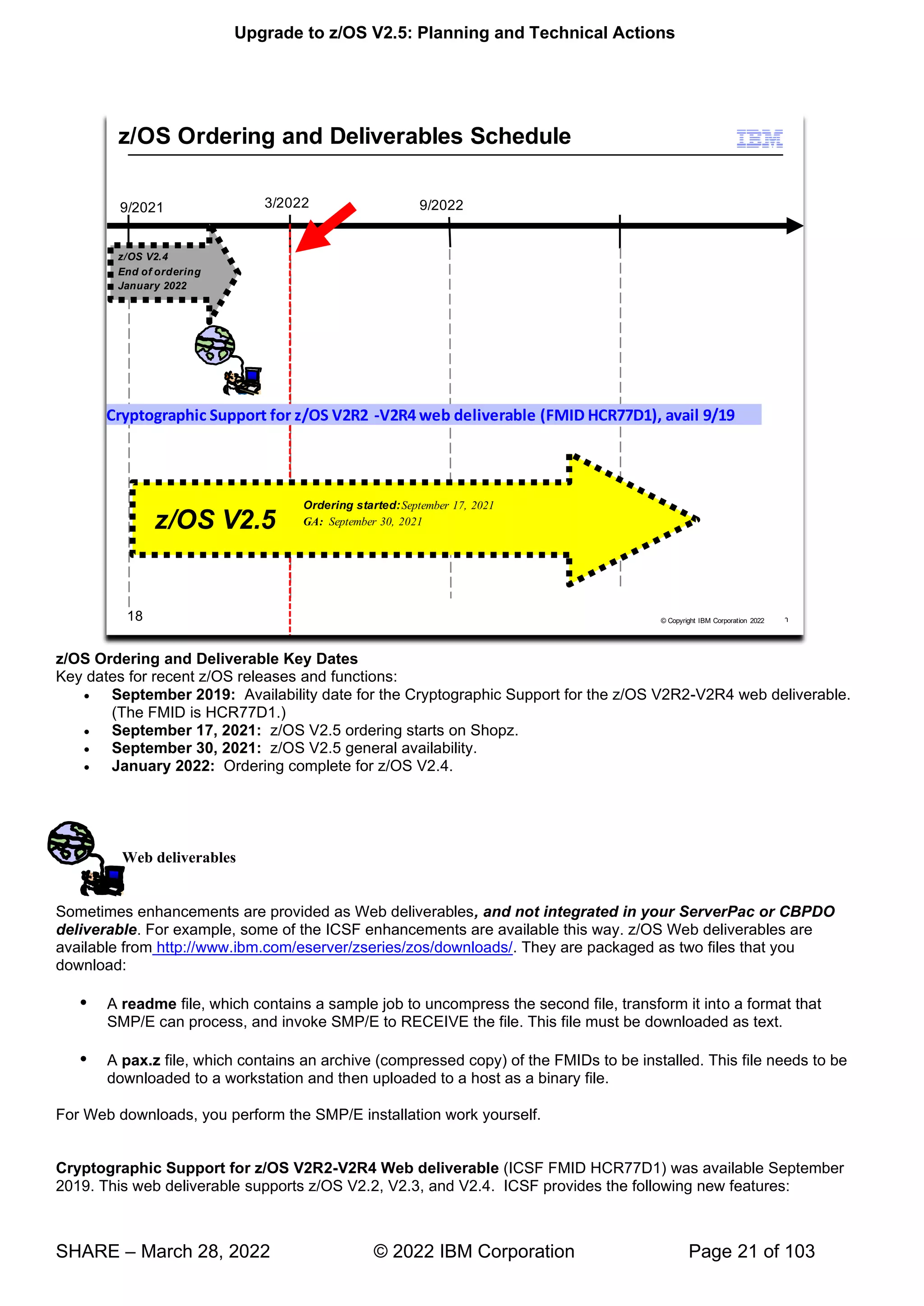
z/OS Ordering and Deliverable Key Dates
Key dates for recent z/OS releases and functions:
• September 2019: Availability date for the Cryptographic Support for the z/OS V2R2-V2R4 web deliverable.
(The FMID is HCR77D1.)
• September 17, 2021: z/OS V2.5 ordering starts on Shopz.
• September 30, 2021: z/OS V2.5 general availability.
• January 2022: Ordering complete for z/OS V2.4.
Web deliverables
Sometimes enhancements are provided as Web deliverables, and not integrated in your ServerPac or CBPDO
deliverable. For example, some of the ICSF enhancements are available this way. z/OS Web deliverables are
available from http://www.ibm.com/eserver/zseries/zos/downloads/. They are packaged as two files that you
download:
 A readme file, which contains a sample job to uncompress the second file, transform it into a format that
SMP/E can process, and invoke SMP/E to RECEIVE the file. This file must be downloaded as text.
 A pax.z file, which contains an archive (compressed copy) of the FMIDs to be installed. This file needs to be
downloaded to a workstation and then uploaded to a host as a binary file.
For Web downloads, you perform the SMP/E installation work yourself.
Cryptographic Support for z/OS V2R2-V2R4 Web deliverable (ICSF FMID HCR77D1) was available September
2019. This web deliverable supports z/OS V2.2, V2.3, and V2.4. ICSF provides the following new features:
Upgrade to z/OS V2.5: Planning and Technical Actions
SHARE – March 28, 2022 © 2022 IBM Corporation Page 22 of 103
• Support for the new Crypto Express7S adapter, configured as a CCA coprocessor, an EP11 coprocessor, or
an accelerator.
• The ability to use CP Assist for Cryptographic Functions (CPACF) for certain clear key ECC operations.
ICSF can now call CPACF instructions to perform ECC key generation, key derivation, and digital signature
generation and verification using a subset of the NIST curves. The CPACF on IBM z15 also supports the
ed448 and ec25519 curves.
• A new SMF record whenever a master key is changed. Certain compliance regulations mandate the
periodic rotation of encryption keys, including the master keys loaded into coprocessors. As part of the
master key change process, an SMF record will now be written every time the new master key is promoted
to the current master key as part of the change master key ceremony.
• A health check that verifies a system's ability to use the NIST recommended PSS signature algorithms. It is
not obvious that the ECC master key is required when generating and using RSA keys enabled for PSS
signatures, so a health check will help clients understand the need for this additional master key so they can
begin to exploit the recommended algorithms.
• New quantum safe algorithms for sign and verify operations. With this release of ICSF, it is now possible to
use quantum safe encryption algorithms for digital signature operations, which also includes the ability to
generate and store new keys. These algorithms will be clear key only and available via the PKCS #11
interfaces.
• Support for CCA Release 5.5 and CCA Release 6.3 including:
o New services in support of ANSI TR-34 Remote Key Loading.
o PCI HSM Compliance for AES and RSA keys.
o Additional AES based financial services.
o Note: These functions were made available on ICSF FMD HCR77D0 with PTFs for APAR
OA57089.
Upgrade to z/OS V2.5: Planning and Technical Actions
SHARE – March 28, 2022 © 2022 IBM Corporation Page 23 of 103
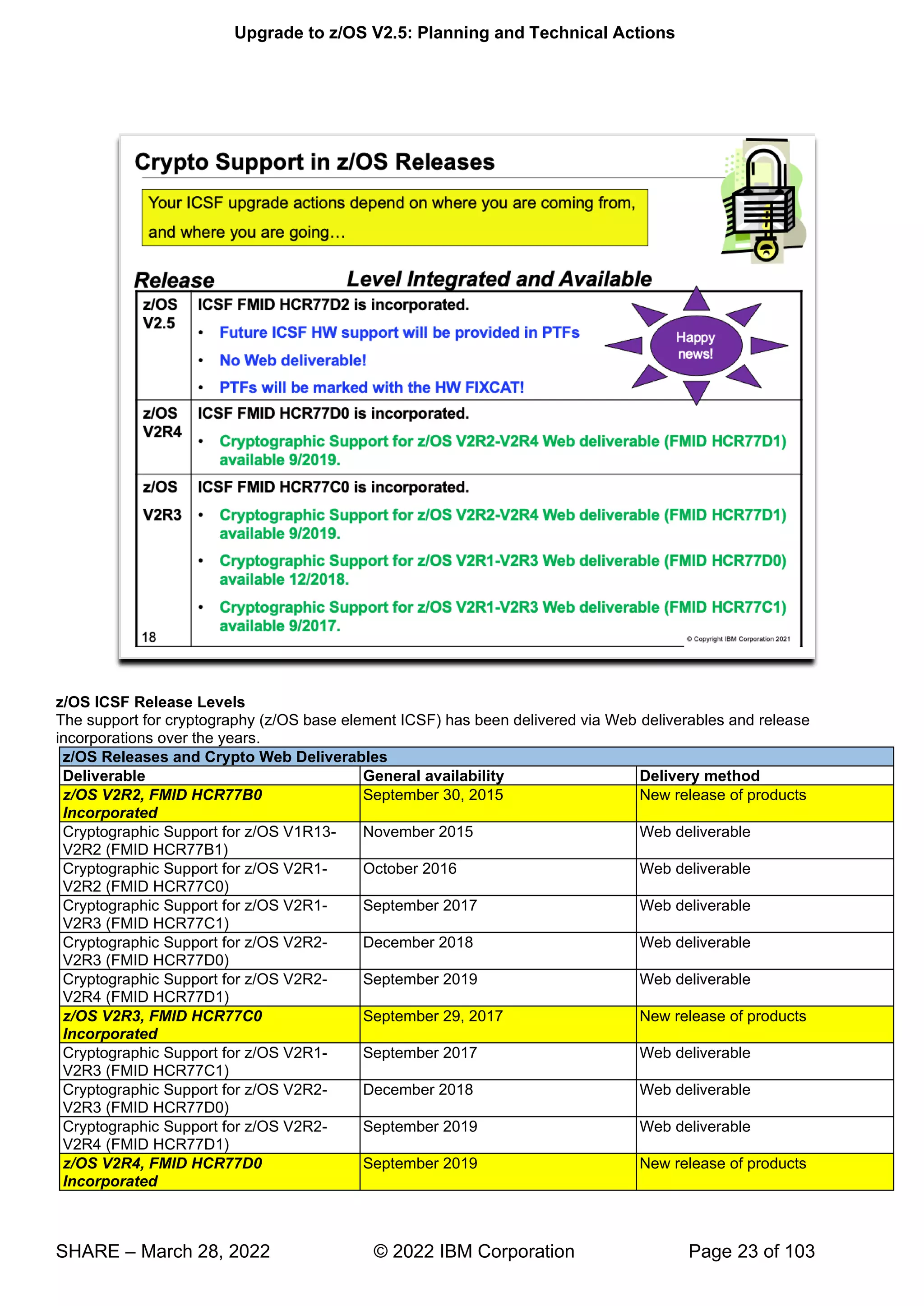
z/OS ICSF Release Levels
The support for cryptography (z/OS base element ICSF) has been delivered via Web deliverables and release
incorporations over the years.
z/OS Releases and Crypto Web Deliverables
Deliverable General availability Delivery method
z/OS V2R2, FMID HCR77B0
Incorporated
September 30, 2015 New release of products
Cryptographic Support for z/OS V1R13-
V2R2 (FMID HCR77B1)
November 2015 Web deliverable
Cryptographic Support for z/OS V2R1-
V2R2 (FMID HCR77C0)
October 2016 Web deliverable
Cryptographic Support for z/OS V2R1-
V2R3 (FMID HCR77C1)
September 2017 Web deliverable
Cryptographic Support for z/OS V2R2-
V2R3 (FMID HCR77D0)
December 2018 Web deliverable
Cryptographic Support for z/OS V2R2-
V2R4 (FMID HCR77D1)
September 2019 Web deliverable
z/OS V2R3, FMID HCR77C0
Incorporated
September 29, 2017 New release of products
Cryptographic Support for z/OS V2R1-
V2R3 (FMID HCR77C1)
September 2017 Web deliverable
Cryptographic Support for z/OS V2R2-
V2R3 (FMID HCR77D0)
December 2018 Web deliverable
Cryptographic Support for z/OS V2R2-
V2R4 (FMID HCR77D1)
September 2019 Web deliverable
z/OS V2R4, FMID HCR77D0
Incorporated
September 2019 New release of products
Upgrade to z/OS V2.5: Planning and Technical Actions
SHARE – March 28, 2022 © 2022 IBM Corporation Page 24 of 103
Cryptographic Support for z/OS V2R2-
V2R4 (FMID HCR77D1)
September 2019 Web deliverable
z/OS V2.5, FMID HCR77D2
Incorporated
September 2021 New release of products
ICSF Support for z/OS V2.5 September 2021 PTFs
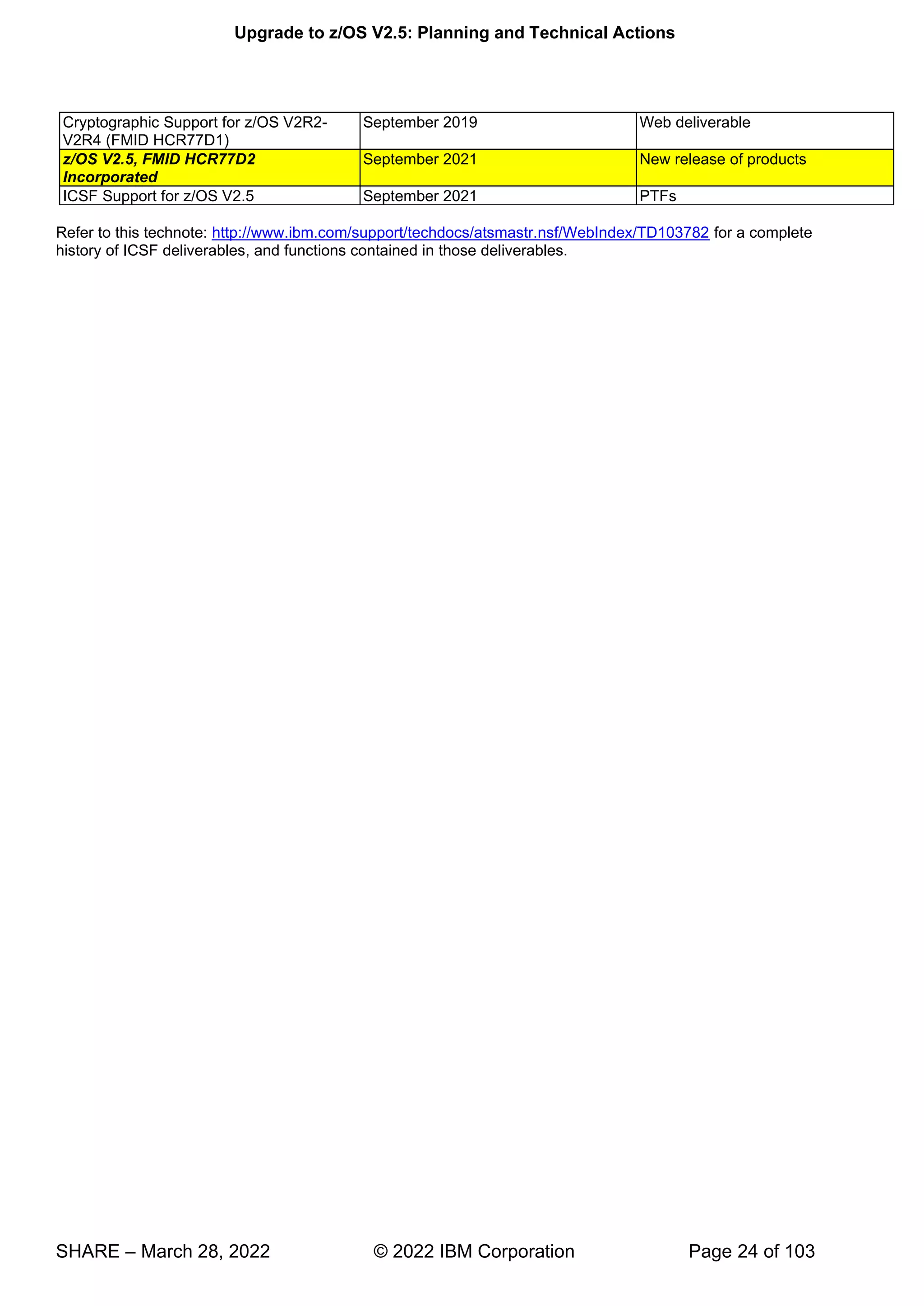
Refer to this technote: http://www.ibm.com/support/techdocs/atsmastr.nsf/WebIndex/TD103782 for a complete
history of ICSF deliverables, and functions contained in those deliverables.
Upgrade to z/OS V2.5: Planning and Technical Actions
SHARE – March 28, 2022 © 2022 IBM Corporation Page 25 of 103
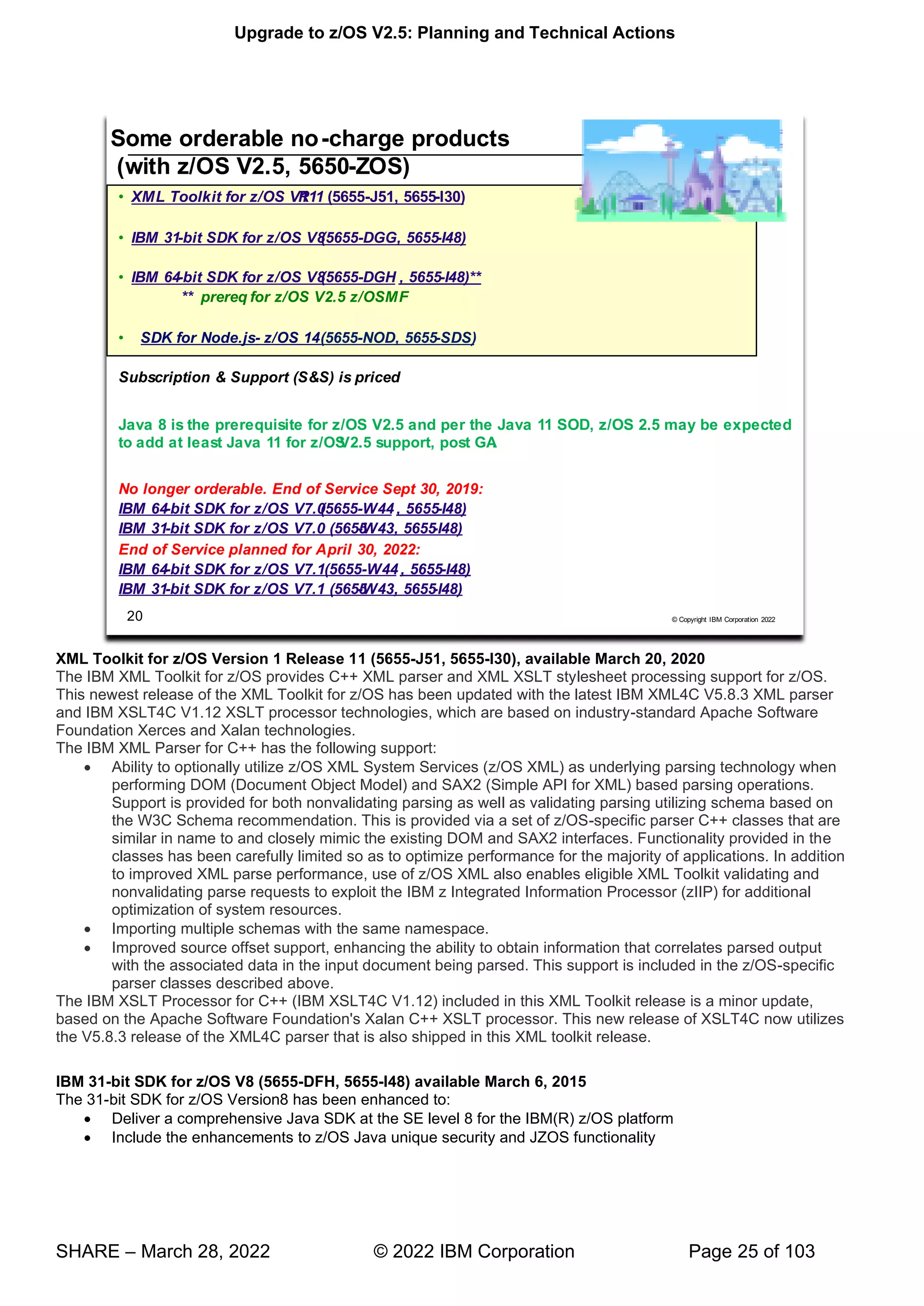
XML Toolkit for z/OS Version 1 Release 11 (5655-J51, 5655-I30), available March 20, 2020
The IBM XML Toolkit for z/OS provides C++ XML parser and XML XSLT stylesheet processing support for z/OS.
This newest release of the XML Toolkit for z/OS has been updated with the latest IBM XML4C V5.8.3 XML parser
and IBM XSLT4C V1.12 XSLT processor technologies, which are based on industry-standard Apache Software
Foundation Xerces and Xalan technologies.
The IBM XML Parser for C++ has the following support:
• Ability to optionally utilize z/OS XML System Services (z/OS XML) as underlying parsing technology when
performing DOM (Document Object Model) and SAX2 (Simple API for XML) based parsing operations.
Support is provided for both nonvalidating parsing as well as validating parsing utilizing schema based on
the W3C Schema recommendation. This is provided via a set of z/OS-specific parser C++ classes that are
similar in name to and closely mimic the existing DOM and SAX2 interfaces. Functionality provided in the
classes has been carefully limited so as to optimize performance for the majority of applications. In addition
to improved XML parse performance, use of z/OS XML also enables eligible XML Toolkit validating and
nonvalidating parse requests to exploit the IBM z Integrated Information Processor (zIIP) for additional
optimization of system resources.
• Importing multiple schemas with the same namespace.
• Improved source offset support, enhancing the ability to obtain information that correlates parsed output
with the associated data in the input document being parsed. This support is included in the z/OS-specific
parser classes described above.
The IBM XSLT Processor for C++ (IBM XSLT4C V1.12) included in this XML Toolkit release is a minor update,
based on the Apache Software Foundation's Xalan C++ XSLT processor. This new release of XSLT4C now utilizes
the V5.8.3 release of the XML4C parser that is also shipped in this XML toolkit release.
IBM 31-bit SDK for z/OS V8 (5655-DFH, 5655-I48) available March 6, 2015
The 31-bit SDK for z/OS Version8 has been enhanced to:
• Deliver a comprehensive Java SDK at the SE level 8 for the IBM(R) z/OS platform
• Include the enhancements to z/OS Java unique security and JZOS functionality
Upgrade to z/OS V2.5: Planning and Technical Actions
SHARE – March 28, 2022 © 2022 IBM Corporation Page 26 of 103
• Exploit new capabilities available with z/OS V2.1 and V2.2, as announced in Software Announcement 215-
006, dated January 14, 2015,and IBM z SystemsTM z13TM, as announced in Hardware Announcement
115-001, dated January 14, 2015.
• Provide improved performance using the Data Access Accelerator API for processing native data records
and types directly from Java code
• Provide enhanced monitoring and diagnostics
• Contain the JZOS and z/OS unique security enhancements of previous z/OS Java SDK products.
IBM 64-bit SDK for z/OS V8 (5655-DGG, 5655-I48) available March 3, 2015
The 64-bit SDK for z/OS Version 8 has been enhanced to (similar to the 31-bit SDK V8):
• Deliver a comprehensive Java SDK at the SE 8 level for the IBM(R) z/OS platform
• Include the enhancements to z/OS Java unique security and JZOS functionality
• Exploit new capabilities available with z/OS V21. and V2.2, as announced in Software Announcement 215-
006, dated January 14, 2015,and IBM z Systems z13, as announced in Hardware Announcement 115-001,
dated January 14, 2015.
• Provide improved performance using the Data Access Accelerator API for processing native data records
and types directly from Java code
• Provide enhanced monitoring and diagnostics
• Contain the JZOS and z/OS unique security enhancements of previous z/OS Java SDK products.
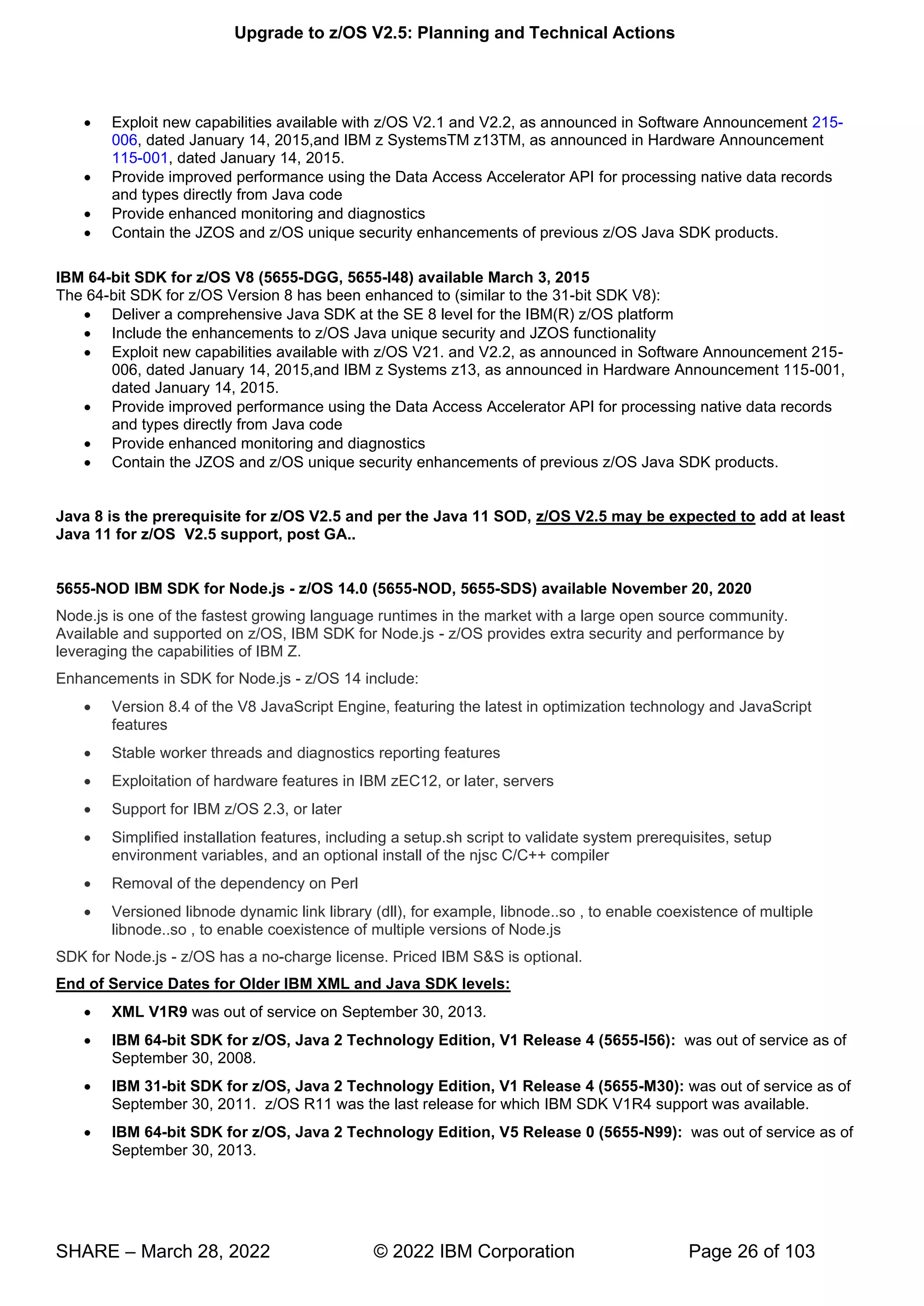
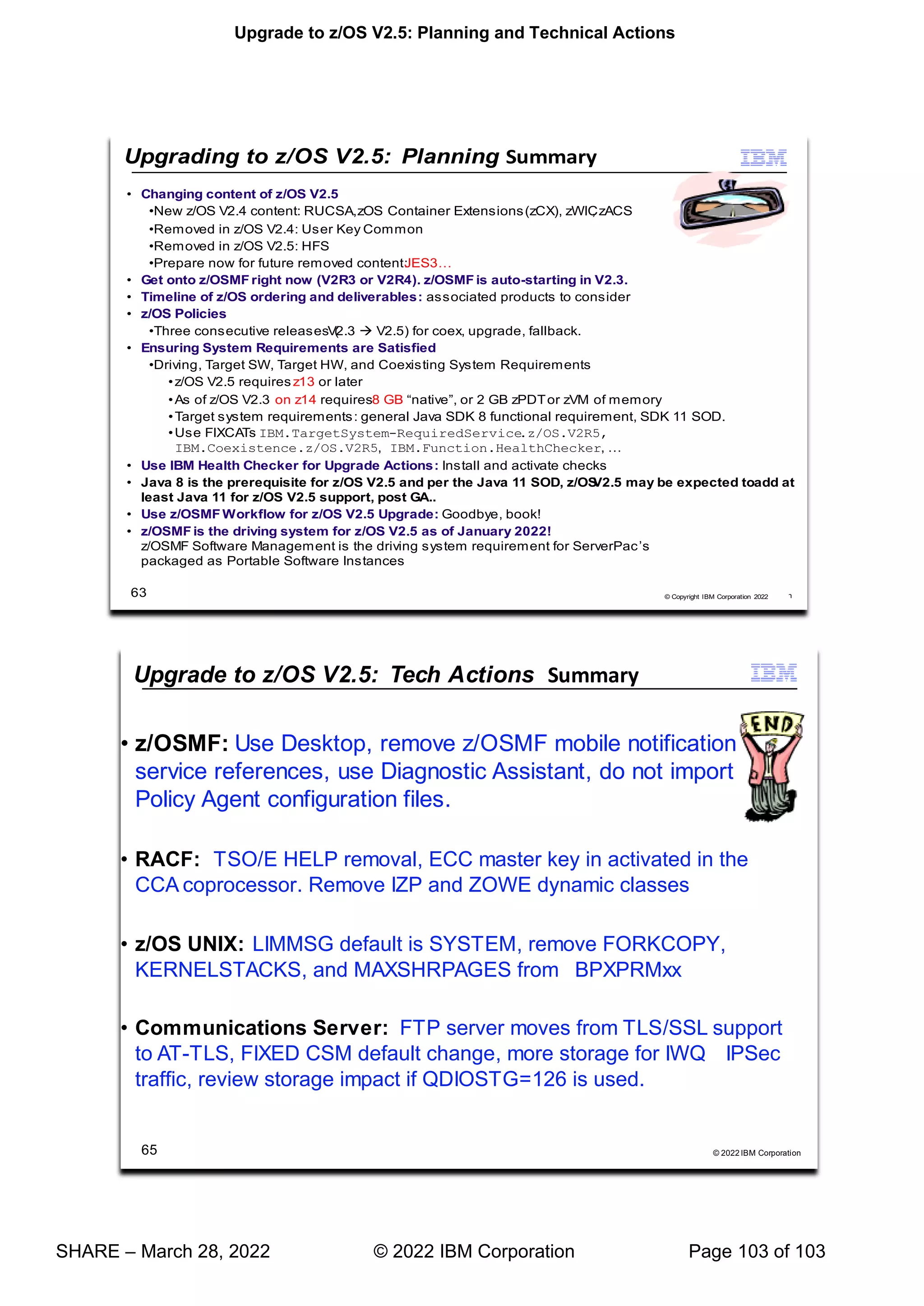
Java 8 is the prerequisite for z/OS V2.5 and per the Java 11 SOD, z/OS V2.5 may be expected to add at least
Java 11 for z/OS V2.5 support, post GA..
5655-NOD IBM SDK for Node.js - z/OS 14.0 (5655-NOD, 5655-SDS) available November 20, 2020
Node.js is one of the fastest growing language runtimes in the market with a large open source community.
Available and supported on z/OS, IBM SDK for Node.js - z/OS provides extra security and performance by
leveraging the capabilities of IBM Z.
Enhancements in SDK for Node.js - z/OS 14 include:
• Version 8.4 of the V8 JavaScript Engine, featuring the latest in optimization technology and JavaScript
features
• Stable worker threads and diagnostics reporting features
• Exploitation of hardware features in IBM zEC12, or later, servers
• Support for IBM z/OS 2.3, or later
• Simplified installation features, including a setup.sh script to validate system prerequisites, setup
environment variables, and an optional install of the njsc C/C++ compiler
• Removal of the dependency on Perl
• Versioned libnode dynamic link library (dll), for example, libnode..so , to enable coexistence of multiple
libnode..so , to enable coexistence of multiple versions of Node.js
SDK for Node.js - z/OS has a no-charge license. Priced IBM S&S is optional.
End of Service Dates for Older IBM XML and Java SDK levels:
• XML V1R9 was out of service on September 30, 2013.
• IBM 64-bit SDK for z/OS, Java 2 Technology Edition, V1 Release 4 (5655-I56): was out of service as of
September 30, 2008.
• IBM 31-bit SDK for z/OS, Java 2 Technology Edition, V1 Release 4 (5655-M30): was out of service as of
September 30, 2011. z/OS R11 was the last release for which IBM SDK V1R4 support was available.
• IBM 64-bit SDK for z/OS, Java 2 Technology Edition, V5 Release 0 (5655-N99): was out of service as of
September 30, 2013.
Upgrade to z/OS V2.5: Planning and Technical Actions
SHARE – March 28, 2022 © 2022 IBM Corporation Page 27 of 103
• IBM 31-bit SDK for z/OS, Java 2 Technology Edition, V5 Release 0 (5655-N98): was out of service as of
September 30, 2013.
• IBM 64-bit SDK for z/OS V6 Release 0 (5655-R32): was out of service as of September 30, 2018.
• IBM 31-bit SDK for z/OS V6 Release 0 (5655-R31): was out of service as of September 30, 2018.
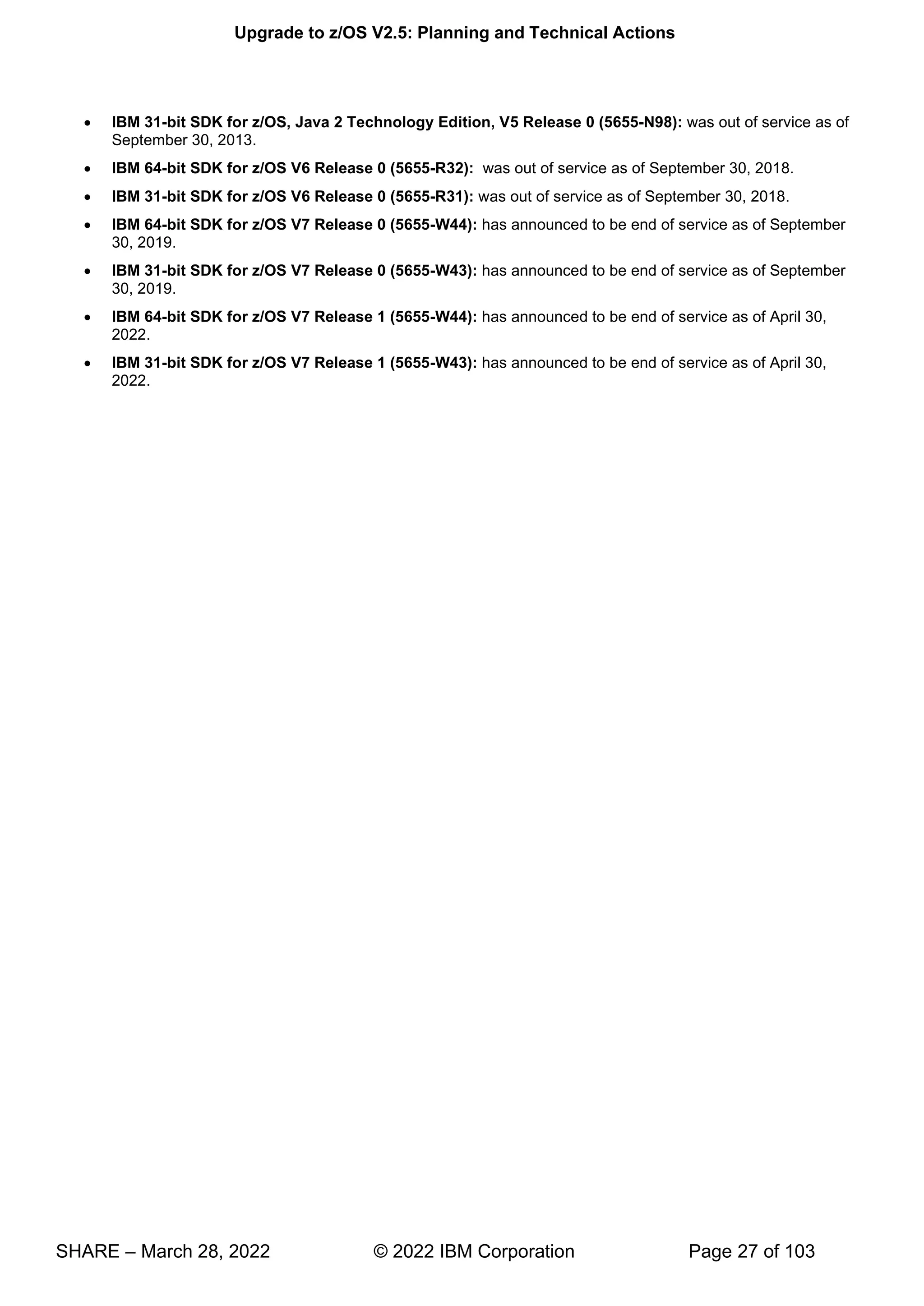
• IBM 64-bit SDK for z/OS V7 Release 0 (5655-W44): has announced to be end of service as of September
30, 2019.
• IBM 31-bit SDK for z/OS V7 Release 0 (5655-W43): has announced to be end of service as of September
30, 2019.
• IBM 64-bit SDK for z/OS V7 Release 1 (5655-W44): has announced to be end of service as of April 30,
2022.
• IBM 31-bit SDK for z/OS V7 Release 1 (5655-W43): has announced to be end of service as of April 30,
2022.
Upgrade to z/OS V2.5: Planning and Technical Actions
SHARE – March 28, 2022 © 2022 IBM Corporation Page 28 of 103
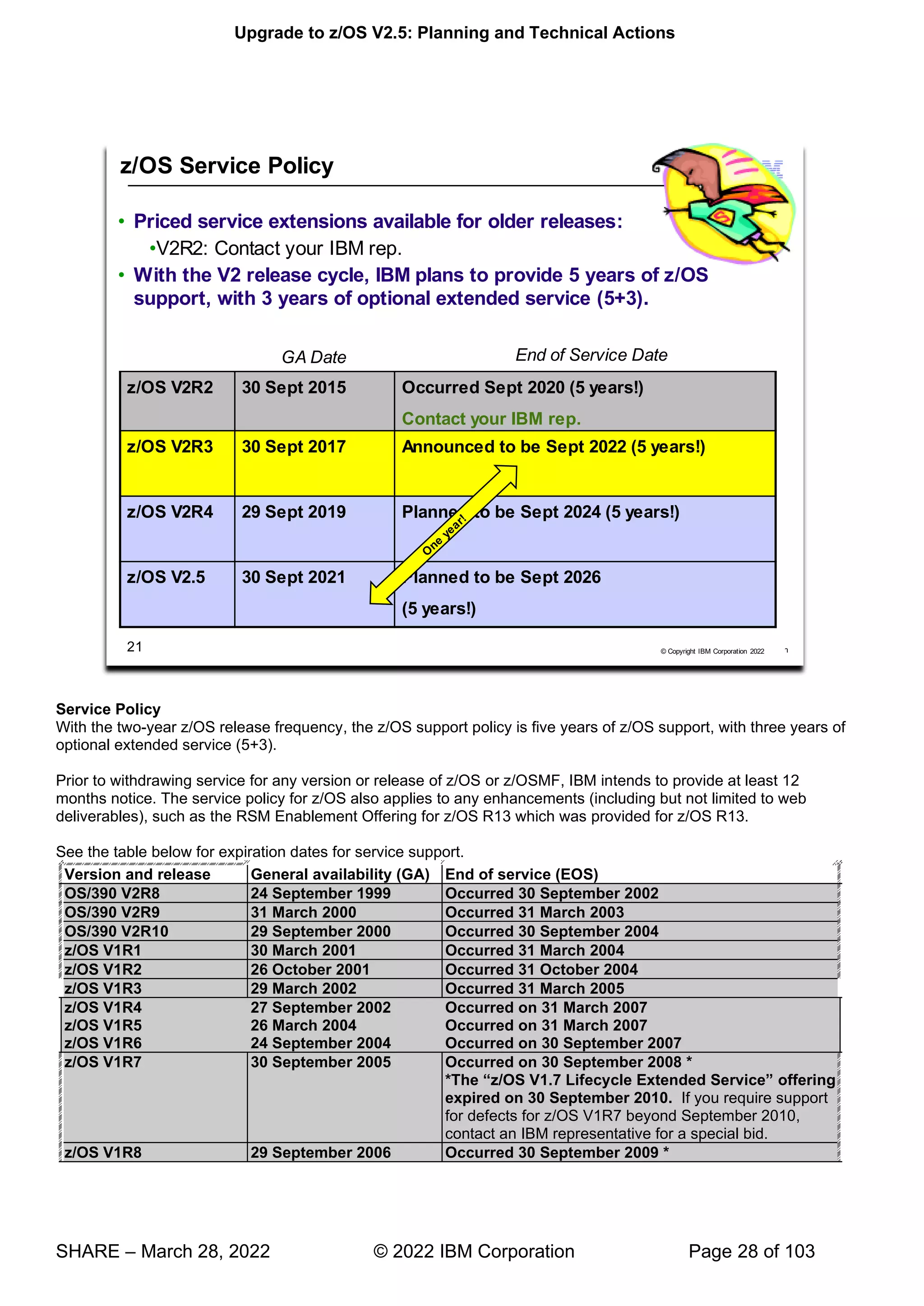
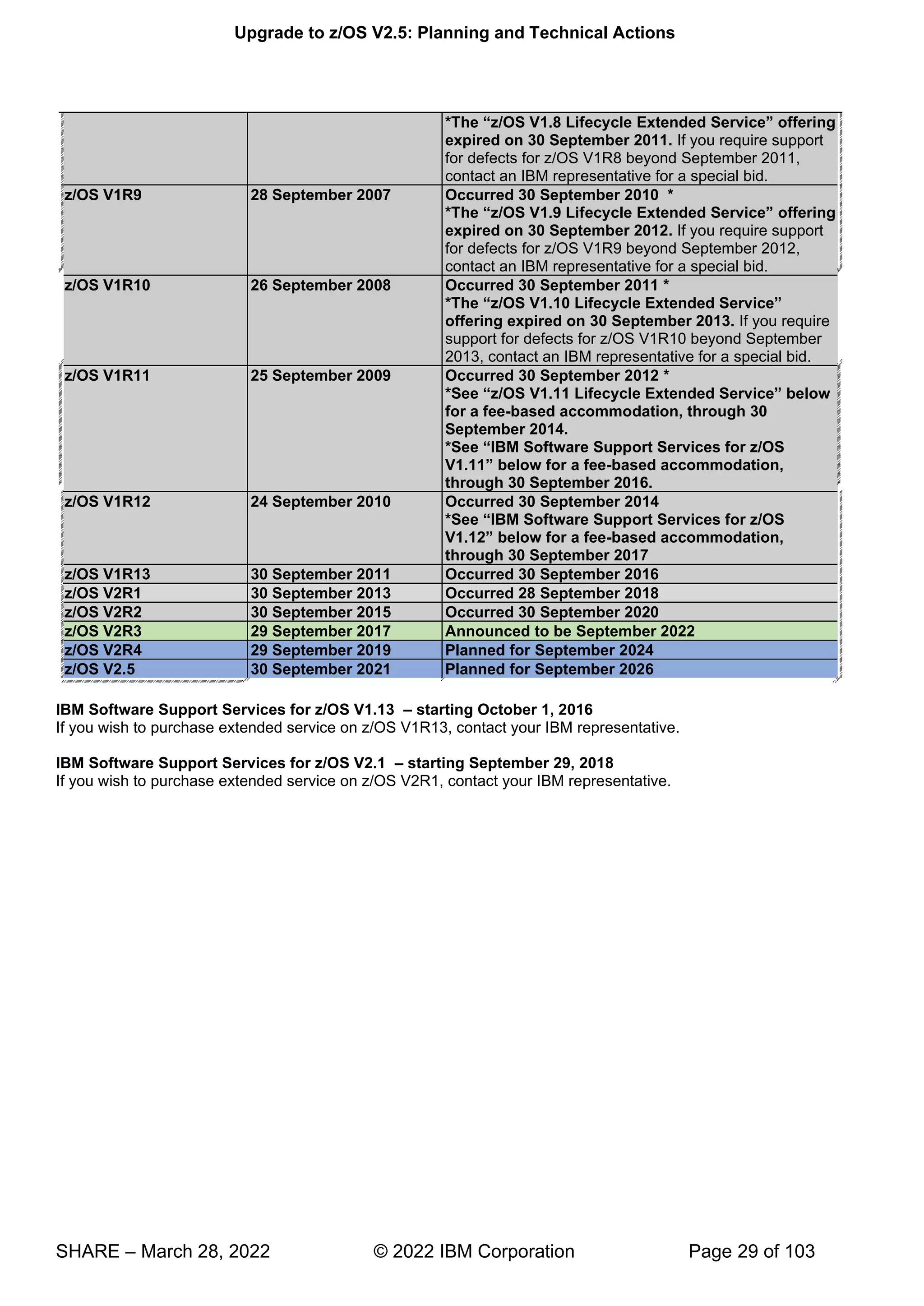
Service Policy
With the two-year z/OS release frequency, the z/OS support policy is five years of z/OS support, with three years of
optional extended service (5+3).
Prior to withdrawing service for any version or release of z/OS or z/OSMF, IBM intends to provide at least 12
months notice. The service policy for z/OS also applies to any enhancements (including but not limited to web
deliverables), such as the RSM Enablement Offering for z/OS R13 which was provided for z/OS R13.
See the table below for expiration dates for service support.
Version and release General availability (GA) End of service (EOS)
OS/390 V2R8 24 September 1999 Occurred 30 September 2002
OS/390 V2R9 31 March 2000 Occurred 31 March 2003
OS/390 V2R10 29 September 2000 Occurred 30 September 2004
z/OS V1R1 30 March 2001 Occurred 31 March 2004
z/OS V1R2 26 October 2001 Occurred 31 October 2004
z/OS V1R3 29 March 2002 Occurred 31 March 2005
z/OS V1R4 27 September 2002 Occurred on 31 March 2007
z/OS V1R5 26 March 2004 Occurred on 31 March 2007
z/OS V1R6 24 September 2004 Occurred on 30 September 2007
z/OS V1R7 30 September 2005 Occurred on 30 September 2008 *
“ 7 ” offering
expired on 30 September 2010. If you require support
for defects for z/OS V1R7 beyond September 2010,
contact an IBM representative for a special bid.
z/OS V1R8 29 September 2006 Occurred 30 September 2009 *
7
Upgrade to z/OS V2.5: Planning and Technical Actions
SHARE – March 28, 2022 © 2022 IBM Corporation Page 29 of 103
“ ”
expired on 30 September 2011. If you require support
for defects for z/OS V1R8 beyond September 2011,
contact an IBM representative for a special bid.
z/OS V1R9 28 September 2007 Occurred 30 September 2010 *
*The “ ” offering
expired on 30 September 2012. If you require support
for defects for z/OS V1R9 beyond September 2012,
contact an IBM representative for a special bid.
z/OS V1R10 26 September 2008 Occurred 30 September 2011 *
*The “ ”
offering expired on 30 September 2013. If you require
support for defects for z/OS V1R10 beyond September
2013, contact an IBM representative for a special bid.
z/OS V1R11 25 September 2009 Occurred 30 September 2012 *
“ ”
for a fee-based accommodation, through 30
September 2014.
“
” -based accommodation,
through 30 September 2016.
z/OS V1R12 24 September 2010 Occurred 30 September 2014
“IBM Software Support Services for z/OS
V1.12” -based accommodation,
through 30 September 2017
z/OS V1R13 30 September 2011 Occurred 30 September 2016
z/OS V2R1 30 September 2013 Occurred 28 September 2018
z/OS V2R2 30 September 2015 Occurred 30 September 2020
z/OS V2R3 29 September 2017 Announced to be September 2022
z/OS V2R4 29 September 2019 Planned for September 2024
z/OS V2.5 30 September 2021 Planned for September 2026
IBM Software Support Services for z/OS V1.13 – starting October 1, 2016
If you wish to purchase extended service on z/OS V1R13, contact your IBM representative.
IBM Software Support Services for z/OS V2.1 – starting September 29, 2018
If you wish to purchase extended service on z/OS V2R1, contact your IBM representative.
Upgrade to z/OS V2.5: Planning and Technical Actions
SHARE – March 28, 2022 © 2022 IBM Corporation Page 30 of 103
z/OS Coexistence
Coexistence occurs when two or more systems at different software levels share resources. The resources could be
shared at the same time by different systems in a multisystem configuration, or they could be shared over a period
of time by the same system in a single-system configuration. Examples of coexistence are two different JES
releases sharing a spool, two different service levels of DFSMSdfp sharing catalogs, multiple levels of SMP/E
processing SYSMODs packaged to exploit the latest enhancements, or an older level of the system using the
updated system control files of a newer level (even if new function has been exploited in the newer level).
The sharing of resources is inherent in multisystem configurations that involve Parallel Sysplex implementations.
But other types of configurations can have resource sharing too. Examples of configurations where resource sharing
can occur are:
• A single processor that is time-sliced to run different levels of the system, such as during different times of
the day
• A single processor running multiple images by means of logical partitions (LPARs)
• Multiple images running on several different processors
• Parallel Sysplex or non-Parallel Sysplex configurations
Note: The term coexistence does not refer to z/OS residing on a single system along with VSE/ESA, VM/ESA, or
z/VM in an LPAR or as a VM guest.
z/OS systems can coexist with specific prior releases. This is important because it gives you flexibility to migrate
systems in a multisystem configuration using rolling IPLs rather than requiring a systems-wide IPL. The way in
which you make it possible for earlier-level systems to coexist with z/OS is to install coexistence service (PTFs) on
the earlier-level systems.
Upgrade to z/OS V2.5: Planning and Technical Actions
SHARE – March 28, 2022 © 2022 IBM Corporation Page 31 of 103
You should complete the upgrade of all earlier-level coexisting systems as soon as you can. Keep in mind that the
objective of coexistence PTFs is to allow existing functions to continue to be used on the earlier-level systems when
run in a mixed environment that contains later-level systems. Coexistence PTFs are not aimed at allowing new
functions provided in later releases to work on earlier-level systems.
Rolling z/OS across a multisystem configuration
A rolling IPL is the IPL of one system at a time in a multisystem configuration. You might stage the IPLs over a few
hours or a few weeks. The use of rolling IPLs allows you to migrate each z/OS system to a later release, one at a
time, while allowing for continuous application availability. For example, data sharing applications offer continuous
availability in a Parallel Sysplex configuration by treating each z/OS system as a resource for processing the
workload. The use of rolling IPLs allows z/OS systems running these applications to be IPLed one at a time, to
migrate to a new release of z/OS, while the applications continue to be processed by the other z/OS systems that
support the workload. By using LPAR technology, you can use rolling IPLs to upgrade your systems without losing
either availability or capacity.
You can use rolling IPLs when both of the following are true:
• The release to which you're migrating falls is supported for coexistence, fallback, and upgrade with the
releases running on the other systems.
• The appropriate coexistence PTFs have been installed on the other systems in the multisystem
configuration.
Even when you're using applications that do not support data sharing, rolling IPLs often make it easier to schedule
z/OS software upgrades. It can be very difficult to schedule a time when all applications running on all the systems
in a multisystem configuration can be taken down to allow for a complex-wide or Parallel Sysplex-wide IPL. The use
of rolling IPLs not only enables continuous availability from an end-user application point of view, but it also
eliminates the work associated with migrating all z/OS systems in a multisystem configuration at the same time.
Understanding fallback
Fallback (backout) is a return to the prior level of a system. Fallback can be appropriate if you upgrade to z/OS V2.5
and, during testing, encounter severe problems that can be resolved by backing out the new release. By applying
fallback PTFs to the "old" system before you migrate, the old system can tolerate changes that were made by the
new system during testing.
Fallback is relevant in all types of configurations, that is, single-system or multisystem, with or without resource
sharing. As an example of fallback, consider a single system that shares data or data structures, such as user
catalogs, as you shift the system image from production (on the "old" release) to test (on the new release) and back
again (to the old release). The later-level test release might make changes that are incompatible with the earlier-
level production release. Fallback PTFs on the earlier-level release can allow it to tolerate changes made by the
later-level release.
As a general reminder, always plan to have a backout path when installing new software by identifying and installing
any service required to support backout.
Fallback is at a system level, rather than an element or feature level.
Fallback and coexistence are alike in that the PTFs that ensure coexistence are the same ones that ensure fallback.
Note: Keep in mind that new functions can require that all systems be at z/OS V2.5 level before the new functions
can be used. Therefore, be careful not to exploit new functions until you are fairly confident that you will not need to
back out your z/OS V2.5 systems, as fallback maintenance is not available in these cases. You should consult the
appropriate element or feature documentation to determine the requirements for using a particular new function.
Which releases are supported for coexistence, fallback, and upgrade?
• IBM plans to continue to support an n-2 (three consecutive release) coexistence, fallback, and upgrade
policy.
• Do note that with the two-year release cycle that z/OS support is intended for five years with three optional
extended service years (5+3). You should plan on completing your upgrade plans during the period of time
while your older z/OS release is still in service.
Upgrade to z/OS V2.5: Planning and Technical Actions
SHARE – March 28, 2022 © 2022 IBM Corporation Page 32 of 103
• Starting with z/OS R6, IBM has aligned the coexistence, fallback, and upgrade policy with the
service policy. IBM intends to continue with the practice of providing coexistence, fallback, and policy
support for those releases which are still in support. As a general rule, this means that:
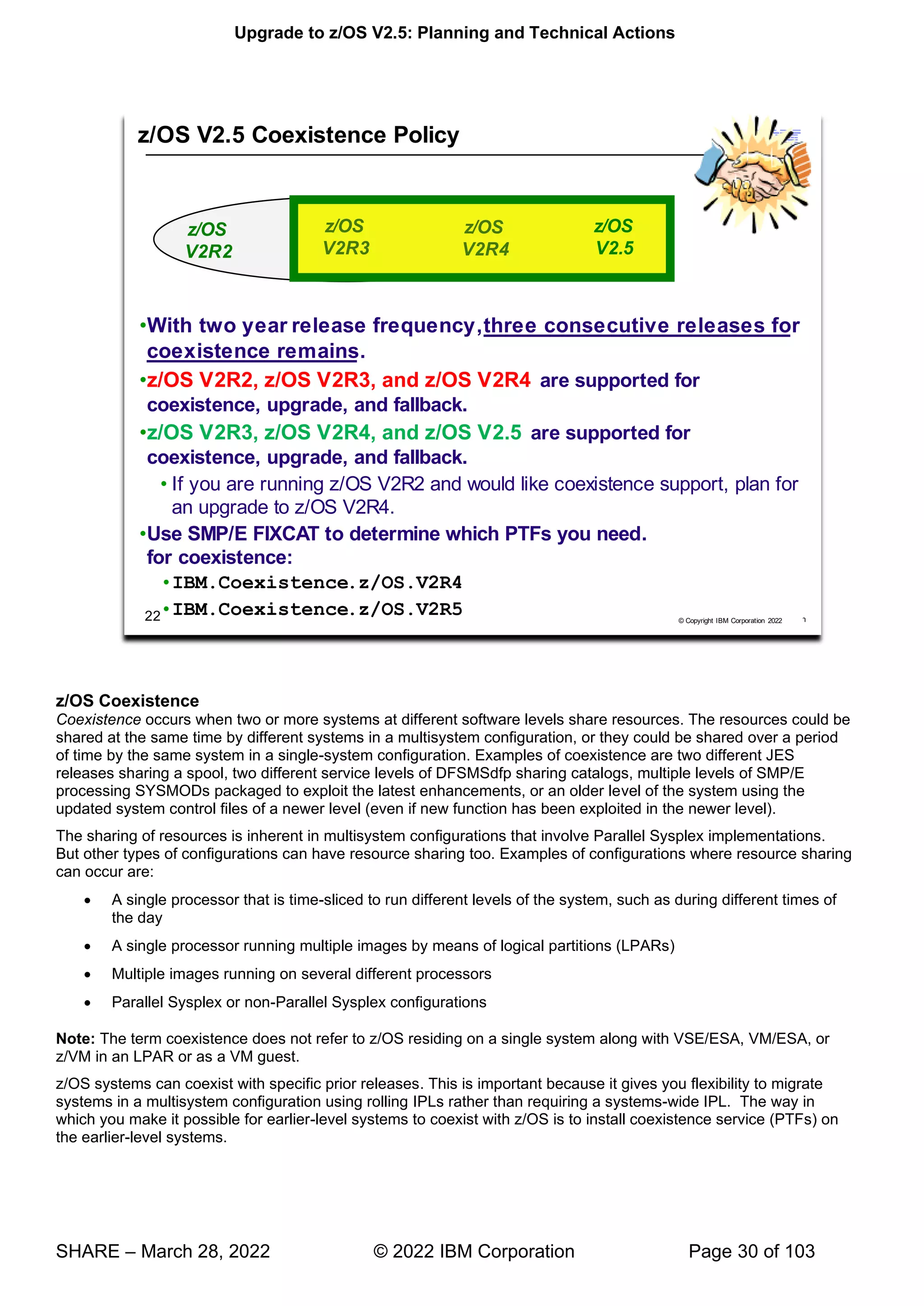
z/OS V2.5 is coexistence, fallback, and upgrade supported with the following two z/OS releases: V2R3 and V2R4.
This means that:
• Coexistence of a V2.5 system with a V2R3 or V2R4 system is supported.
• Fallback from V2.5 to V2R3 or V2R4 is supported.
• Upgrade to V2.5 from V2R3 or V2R4 is supported
The z/OS coexistence, fallback, and upgrade policy applies to the elements and features of z/OS, not to customer-
developed applications, vendor-developed applications, or IBM products that run on z/OS. IBM performs integration
testing and will provide service as necessary to support the z/OS coexistence, fallback, and upgrade policy.
See the table below for a summary of current and planned coexistence, fallback, and upgrade support.
These statements represent IBM's current intentions. IBM reserves the right to change or alter the coexistence,
fallback, and upgrade policy in the future or to exclude certain releases beyond those stated. IBM development
plans are subject to change or withdrawal without further notice. Any reliance on this statement of direction is at the
relying party's sole risk and does not create any liability or obligation for IBM.
Releases that are coexistence, fallback, and upgrade supported as of z/OS R10
z/OS
release
Releases that
are coexistence,
fallback, and
upgrade
supported with
the release in
column Explanation
R10 R10, R9, R8 General availability of R10 was September 26, 2008. R8 is the oldest release that is service
supported at that time and therefore the oldest release that is coexistence, fallback, and
upgrade supported with R10.
R11 R11, R10, R9 General availability of R11 was September 25, 2009. R9 is the oldest release that is service
supported at that time and therefore the oldest release that is coexistence, fallback, and
upgrade supported with R11.
R12 R12, R11, R10 General availability of R12 was September 24, 2010. R10 is the oldest release that is service
supported at that time and therefore the oldest release that is coexistence, fallback, and
upgrade supported with R12.
R13 R13, R12, R11 General availability for R13 was September 30, 2011. R11 is the oldest release that is service
supported at that time and therefore the oldest release that is coexistence, fallback, and
upgrade supported with R13.
V2R1 V2R1, R13, R12 General availability for V2R1 was September 30, 2013. R12 is the oldest release that is
service supported at that time and therefore the oldest release that is coexistence, fallback,
and upgrade supported with V2R1.
V2R2 V2R2, V2R1, R13 General availability for V2R2 was September 30, 2015. R13 is the oldest release that is
service supported at that time and therefore the oldest release that is coexistence, fallback,
and upgrade supported with V2R2.
V2R3 V2R3, V2R2,
V2R1
General availability for V2R3 was September 29, 2017. V2R1 is the oldest release that is
service supported at that time and therefore the oldest release that is coexistence, fallback,
and upgrade supported with V2R3.
V2R4 V2R4, V2R3,
V2R2
General availability for V2R4 was September 2019. V2R2 is the oldest release that is service
supported at that time and therefore the oldest release that is coexistence, fallback, and
upgrade supported with V2R4.
V2.5 V2.5, V2R4,
V2R3
General availability for V2.5 is planned for September 2021. V2R3 is the oldest release that
is service supported at that time and therefore the oldest release that is coexistence, fallback,
and upgrade supported with V2R4.
Upgrade to z/OS V2.5: Planning and Technical Actions
SHARE – March 28, 2022 © 2022 IBM Corporation Page 33 of 103
Upgrade to z/OS V2.5: Planning and Technical Actions
SHARE – March 28, 2022 © 2022 IBM Corporation Page 34 of 103
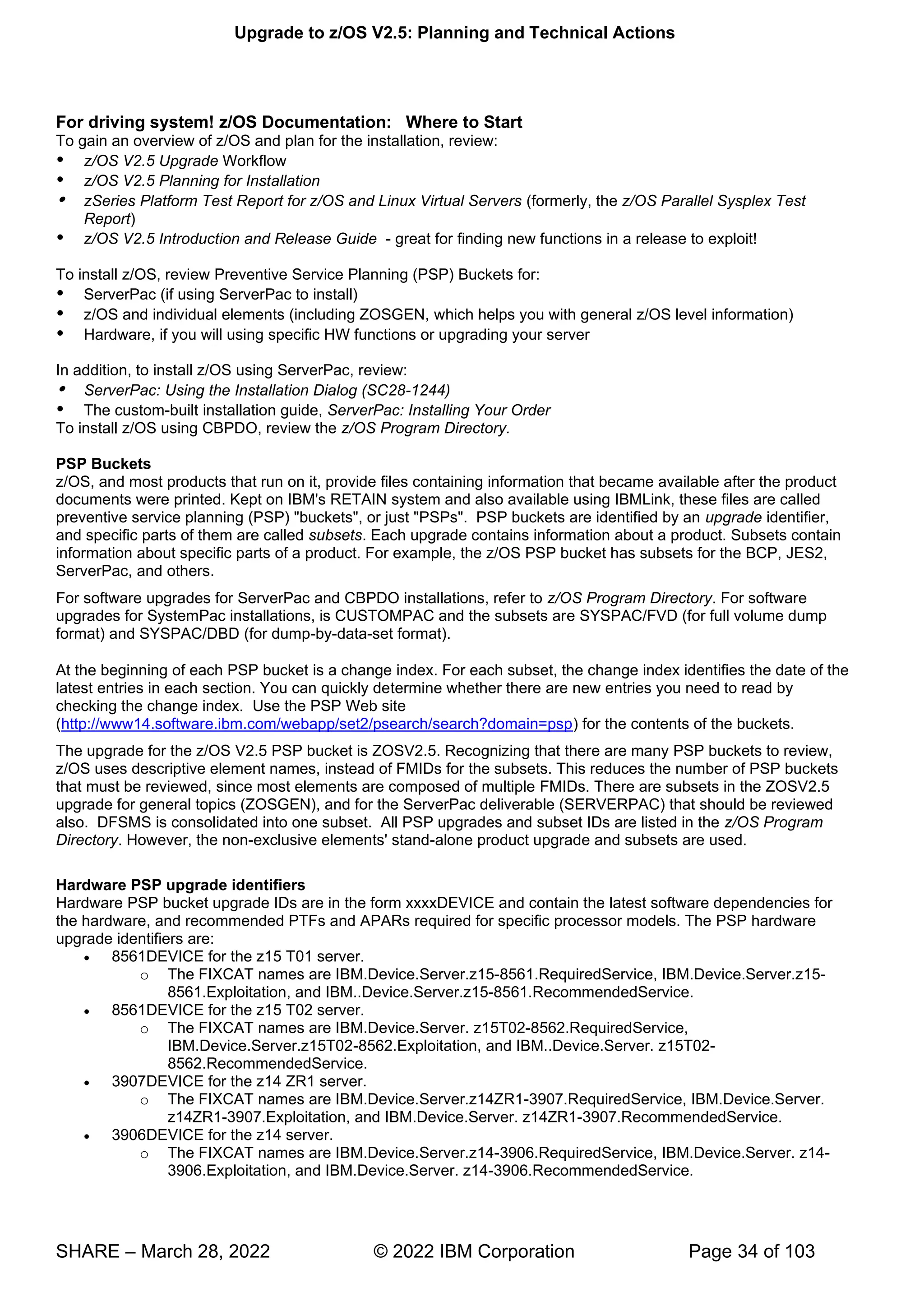
For driving system! z/OS Documentation: Where to Start
To gain an overview of z/OS and plan for the installation, review:
 z/OS V2.5 Upgrade Workflow
 z/OS V2.5 Planning for Installation
 zSeries Platform Test Report for z/OS and Linux Virtual Servers (formerly, the z/OS Parallel Sysplex Test
Report)
 z/OS V2.5 Introduction and Release Guide - great for finding new functions in a release to exploit!
To install z/OS, review Preventive Service Planning (PSP) Buckets for:
 ServerPac (if using ServerPac to install)
 z/OS and individual elements (including ZOSGEN, which helps you with general z/OS level information)
 Hardware, if you will using specific HW functions or upgrading your server
In addition, to install z/OS using ServerPac, review:
 ServerPac: Using the Installation Dialog (SC28-1244)
 The custom-built installation guide, ServerPac: Installing Your Order
To install z/OS using CBPDO, review the z/OS Program Directory.
PSP Buckets
z/OS, and most products that run on it, provide files containing information that became available after the product
documents were printed. Kept on IBM's RETAIN system and also available using IBMLink, these files are called
preventive service planning (PSP) "buckets", or just "PSPs". PSP buckets are identified by an upgrade identifier,
and specific parts of them are called subsets. Each upgrade contains information about a product. Subsets contain
information about specific parts of a product. For example, the z/OS PSP bucket has subsets for the BCP, JES2,
ServerPac, and others.
For software upgrades for ServerPac and CBPDO installations, refer to z/OS Program Directory. For software
upgrades for SystemPac installations, is CUSTOMPAC and the subsets are SYSPAC/FVD (for full volume dump
format) and SYSPAC/DBD (for dump-by-data-set format).
At the beginning of each PSP bucket is a change index. For each subset, the change index identifies the date of the
latest entries in each section. You can quickly determine whether there are new entries you need to read by
checking the change index. Use the PSP Web site
(http://www14.software.ibm.com/webapp/set2/psearch/search?domain=psp) for the contents of the buckets.
The upgrade for the z/OS V2.5 PSP bucket is ZOSV2.5. Recognizing that there are many PSP buckets to review,
z/OS uses descriptive element names, instead of FMIDs for the subsets. This reduces the number of PSP buckets
that must be reviewed, since most elements are composed of multiple FMIDs. There are subsets in the ZOSV2.5
upgrade for general topics (ZOSGEN), and for the ServerPac deliverable (SERVERPAC) that should be reviewed
also. DFSMS is consolidated into one subset. All PSP upgrades and subset IDs are listed in the z/OS Program
Directory. However, the non-exclusive elements' stand-alone product upgrade and subsets are used.
Hardware PSP upgrade identifiers
Hardware PSP bucket upgrade IDs are in the form xxxxDEVICE and contain the latest software dependencies for
the hardware, and recommended PTFs and APARs required for specific processor models. The PSP hardware
upgrade identifiers are:
• 8561DEVICE for the z15 T01 server.
o The FIXCAT names are IBM.Device.Server.z15-8561.RequiredService, IBM.Device.Server.z15-
8561.Exploitation, and IBM..Device.Server.z15-8561.RecommendedService.
• 8561DEVICE for the z15 T02 server.
o The FIXCAT names are IBM.Device.Server. z15T02-8562.RequiredService,
IBM.Device.Server.z15T02-8562.Exploitation, and IBM..Device.Server. z15T02-
8562.RecommendedService.
• 3907DEVICE for the z14 ZR1 server.
o The FIXCAT names are IBM.Device.Server.z14ZR1-3907.RequiredService, IBM.Device.Server.
z14ZR1-3907.Exploitation, and IBM.Device.Server. z14ZR1-3907.RecommendedService.
• 3906DEVICE for the z14 server.
o The FIXCAT names are IBM.Device.Server.z14-3906.RequiredService, IBM.Device.Server. z14-
3906.Exploitation, and IBM.Device.Server. z14-3906.RecommendedService.
Upgrade to z/OS V2.5: Planning and Technical Actions
SHARE – March 28, 2022 © 2022 IBM Corporation Page 35 of 103
• 2965DEVICE for the z13s server.
o The FIXCAT names are IBM.Device.Server.z13S-2965.RequiredService, IBM.Device.Server.z13s-
2965.Exploitation, and IBM.Device.Server.z13s-2966.RecommendedService.
• 2964DEVICE for the z13 server.
o The FIXCAT names are IBM.Device.Server.z13-2964.RequiredService, IBM.Device.Server.z13-
2964.Exploitation, and IBM.Device.Server.z13-2964.RecommendedService.
Specific functions for each server also have corresponding FIXCATs.
Verifying the PTFs in the PSP buckets are installed
• To simplify finding the appropriate PSP bucket and identifying which PTFs listed in the PSP bucket need to
be installed on your system, use the SMP/E REPORT MISSINGFIX command in conjunction with the
FIXCAT type of HOLDDATA. For complete information about the REPORT MISSINGFIX command, see
SMP/E Commands. For a description of what FIXCATs are available, go to
http://www.ibm.com/systems/z/os/zos/smpe/ and click on “Guide to fix category values and descriptions”
DASD Storage Requirements
Keep in mind the DASD required for your z/OS system includes all z/OS elements (per the z/OS Policy). That is, it
includes ALL elements, ALL features that support dynamic enablement, regardless of your order, and ALL unpriced
features that you ordered. This storage is in addition to the storage required by other products you might have
installed. All sizes include 15% freespace to accommodate the installation of maintenance.
The estimated total storage required for z/OS V2.5 data sets is provided below. If you add other products to your
z/OS V2.5 ServerPac, you will need additional space for those other products.
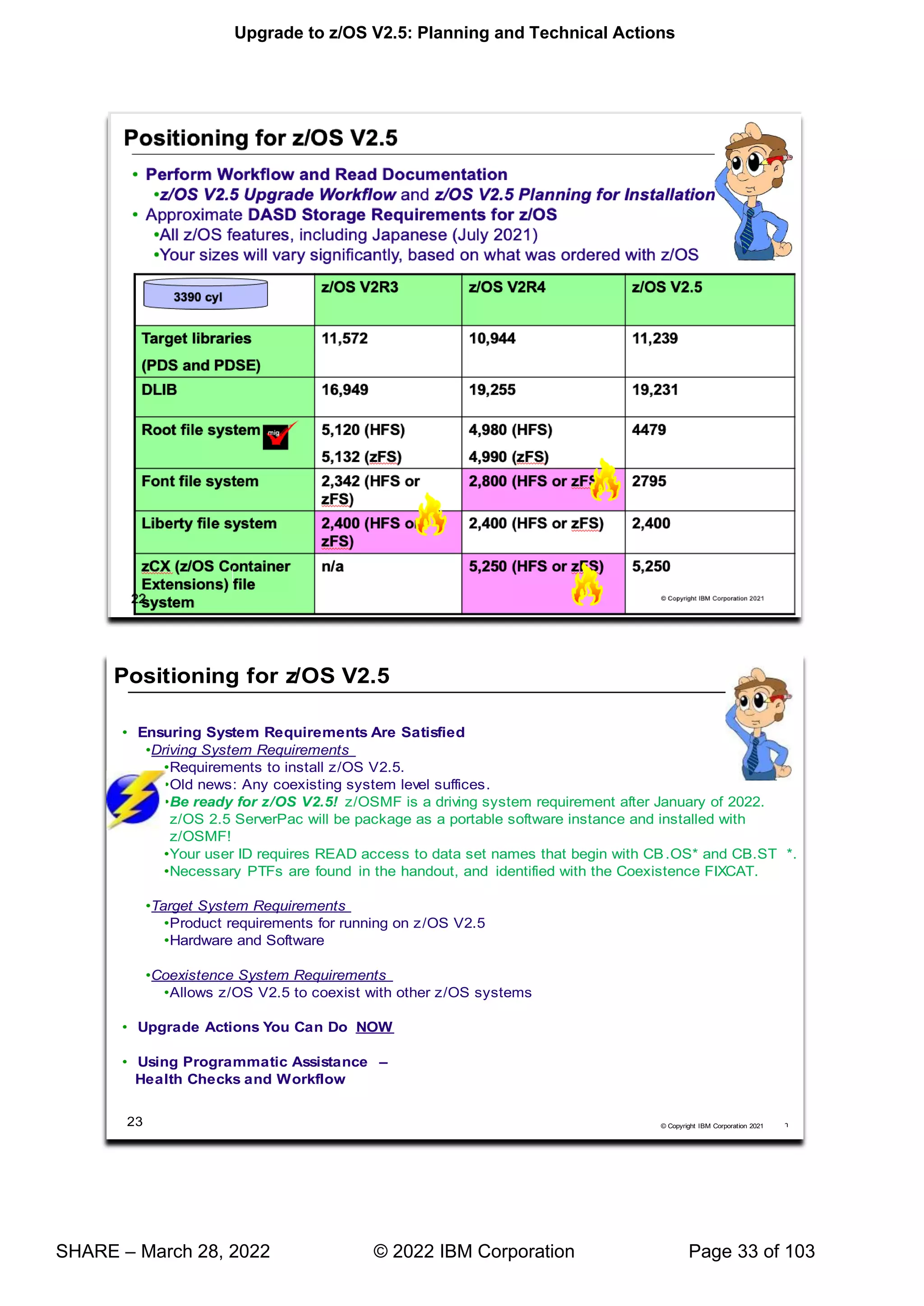
For z/OS z/OS 2.5 (as of July 2021):
 The total storage required for all the target data sets is approximately 11,239 cylinders on a 3390 device. This
total size exceeds the space on a 3390-9.
 The total storage required for all the distribution data sets is approximately 19,231 cylinders on a 3390 device.
 The total executable root file system storage is approximately at 4,4790 cylinders on a 3390 for zFS. Use IBM
Health Checker for z/OS check ZOSMIGREC_ROOT_FS_SIZE to determine whether a volume has enough
space for the z/OS version root file system, available back to z/OS R9 in APARs OA28684 and OA28631.
 z/OS V2.1 introduced the z/OS Font Collection base element. This element installs into a separate file system
“ ”
ServerPac will provide you this file system. The total font file system storage is estimated at 5,500 cylinders on
a 3390 device when it is an HFS or a zFS.
 z/OS V2.3 introduces the IBM z/OS Liberty Embedded base element. This element installs into a separate file
“ ” berty file system separate from other
file systems in case of space fluctuations. ServerPac will provide you this file system. The total Liberty file
system storage is estimated at 2,400 cylinders on a 3390 device when it is an HFS or a zFS.
 z/OS V2.4 introduces the IBM Container Extensions (zCx) base element. This element installs into a separate
“zCX ” zCX file system separate from other file
systems in case of space fluctuations. ServerPac will provide you this file system. The total xCX file system
storage is estimated at 5,250 cylinders on a 3390 device when it is an HFS or a zFS.
 For configuration and execution, additional file system space is needed:
 You will need 50 cylinders for the /etc file system (either HFS or zFS).
 For the CIM element, the space required for the /var VARWBEM file system is 94 cylinders primary, 10
cylinders secondary (either HFS or zFS).
m
i
g
Upgrade to z/OS V2.5: Planning and Technical Actions
SHARE – March 28, 2022 © 2022 IBM Corporation Page 36 of 103
 For Predictive Failure analysis, a separate file system, either HFS or zFS, is created and mounted at
mountpoint the /var/pfa. The total space required for zFS or HFS is 300 cylinders primary; 50 cylinders
secondary.
 For z/OSMF additional file system space is needed for the repositories. Refer to your ServerPac installation
or sample jobs provided.
z/OS Driving System Requirements
The driving system is the system image (hardware and software) that you use to install the target system. The target
system is the system software libraries and other data sets that you are installing. You log on to the driving system
and run jobs there to create or update the target system. Once the target system is built, it can be IPLed on the
same hardware (same LPAR or same processor) or different hardware than that used for the driving system.
If your driving system will share resources with your target system after the target system has been IPLed, be sure
to install applicable coexistence service on the driving system before you IPL the target system. If you don't install
the coexistence service, you will probably experience problems due to incompatible data structures (such as
incompatible data sets, VTOCs, catalog records, GRS tokens, or APPC bind mappings).
Customized Offerings Driver (5751-COD)
The Customized Offerings Driver V3.1 (5751-COD) is an entitled driving system you can use if:
• you don't have an existing system to use as a driving system, or
• your existing system does not meet driving system requirements and you don't want to upgrade it to meet
those requirements.
This driver is currently a subset of a z/OS V2.3 system (with the level of SMP/E at V3R6), and is available on a DVD
or electronically.
The Customized Offerings Driver requires three DASD volumes configured as 3390-9, or larger; a non-Systems
™ ;
for a Time Sharing Option Extended (TSO/E) session. Also, if you select tape media, a tape drive that can read
3590 or 3592 tape is required. The Customized Offerings Driver can also be ordered on DVDs, which removes the
requirement for a tape drive.
The Customized Offerings Driver is intended to run in single-system image and monoplex modes only. Its use in
multisystem configurations is not supported. The Customized Offerings Driver is intended to be used only to install
new levels of z/OS using ServerPac or CBPDO, and to install service on the new software until a copy (clone) of the
new system can be made. The use of the Customized Offerings Driver for other purposes is not supported.
As of z/OS V2R2, the Customized Offerings Driver Installation Guide is no longer shipped in hardcopy format.
Instead, this publication is shipped in PDF format on a separate DVD.
The Customized Offerings Driver includes a zFS file system and the necessary function to use
Communications Server (IP Services), Security Server, and the system-managed storage (SMS) facility of
DFSMSdfp, but these items are not customized. However, existing environments can be connected to, and used
from, the Customized Offerings Driver system.
Identifying Driving System Software Requirements for ServerPac for z/OS V2.5
Driving system requirements for installing z/OS V2.5 by way of ServerPac or dump-by-data-set SystemPac are:
 An operating system: Use either of the following:
 A supported z/OS release (V2R3 or later), with the following PTFs installed:
 z/OSMF Software Management
 z/OS V2.3, HSMA234 - UI75185
 z/OS V2.4, HSMA244 - UI75182
 z/OS V2.5, HSMA254 - UI75180
 z/OSMF Workflows
 z/OS V2.3 (HSMA237) = UI60040
 z/OS V2.2 (HSMA227) = UI60042
 SMP/E
 z/OS V2.3, HMP1J00 - UO01976
Upgrade to z/OS V2.5: Planning and Technical Actions
SHARE – March 28, 2022 © 2022 IBM Corporation Page 37 of 103
 z/OS V2.4, HMP1K00 - UO01975
 The Customized Offerings Driver V3 (5751-COD).
 A terminal: A locally-attached or network-attached terminal that can be used to establish a TSO/E session on the
IPLed system is required.
 Proper authority: Use the RACFDRV installation job as a sample of the security system definitions required so
that you can perform the installation tasks.
 Proper security:
o To deploy a ServerPac Portable Software Instance with z/OSMF Software Management, observe the
following requirements:
– The user ID that you use must have READ access to the SAF (System Authorization Facility)
resource that protects the IBM data sets that are produced during the creation of the ServerPac
portable software instance. That is, your user ID requires READ access to data set names that
begin with CB.OS* and CB.ST*.
In order for you to install into the zFS, the user ID you use must have read access to the
SUPERUSER.FILESYS.PFSCTL resource in the RACF FACILITY class.
In order for you to install the z/OS UNIX files, the following is required:
 The user ID you use must be a superuser (UID=0) or have read access to the
BPX.SUPERUSER resource in the RACF facility class.
 The user ID you use must have read access to facility class resources BPX.FILEATTR.APF,
BPX.FILEATTR.PROGCTL, and BPX.FILEATTR.SHARELIB (or BPX.FILEATTR.* if you
choose to use a generic name for these resources). The commands to define these facility
class resources are in SYS1.SAMPLIB member BPXISEC1.
 Group IDs uucpg and TTY, and user ID uucp, must be defined in your security database. These
IDs must contain OMVS segments with a GID value for each group and a UID value for the user
ID. (For ease of use and manageability, define the names in uppercase.)
The group ID and user ID values assigned to these IDs cannot be used by any other IDs.
They must be unique.
 You must duplicate the required user ID and group names in each security database, including the same user
ID and group ID values in the OMVS segment. This makes it easier to transport the HFS data sets from test
systems to production systems. For example, the group name TTY on System 1 must have the same group ID
value on System 2 and System 3. If it is not possible to synchronize your databases you will need to continue
running the FOMISCHO job against each system after z/OS UNIX is installed.
If names such as uucp, uucpg, and TTY are not allowed on your system, or if they conflict with
existing names, you can create and activate a user ID alias table. For information about defining
these group and user IDs to RACF and about creating a user ID alias table (USERIDALIASTABLE),
see z/OS UNIX System Services Planning. Other sources of information are SYS1.SAMPLIB
member BPXISEC1. (Note: You can use the RACFDRV installation job as a sample of the security
system definitions required to perform the installation tasks.)
 Language Environment run-time options: As of z/OS R7, ServerPac requires that the following Language
environment run-time options are not specified as nonoverrideable (NONOVR) in the CEEDOPT CSECT:
ALL31, ANYHEAP, BELOWHEAP, DEPTHCONDLIMIT, ERRCOUNT, HEAP, HEAPCHK, HEAPPOOLS,
INTERRUPT, LIBSTACK, PLITASKCOUNT, STACK, STORAGE, THREADHEAP, and THREADSTACK .
 Language Environment: The CustomPac Installation Dialog uses the Language Environment run-time library
SCEERUN. If SCEERUN is not in the link list on the driving system, you must edit the ServerPac installation
jobs to add it to the JOBLIB or STEPLIB DD statements.
 OMVS address space active: For ServerPac only (not SystemPac), an activated OMVS address space with
z/OS UNIX kernel services operating in full function mode is required.
 SMS active: The Storage Management Subsystem (SMS) must be active to allocate HFS and PDSE data sets,
whether they are SMS-managed or non-SMS-managed. Also, the use of HFS data sets is supported only when
SMS is active in at least a null configuration, even when the data sets are not SMS-managed. Do either of the
following:
Upgrade to z/OS V2.5: Planning and Technical Actions
SHARE – March 28, 2022 © 2022 IBM Corporation Page 38 of 103
To allocate non-SMS-managed HFS and PDSE data sets, you must activate SMS on the driving system in at
least a null configuration. You must also activate SMS on the target system.
To allocate SMS-managed HFS and PDSE data sets, you must activate SMS on the driving system in at
least a minimal configuration. Then you must define a storage group, create SMS-managed volumes, and
write, translate, and activate a storage class ACS routine that allows the allocation of PDSE and HFS data
sets with the names in the ALLOCDS job. You must also activate SMS on the target system.
• Note that ServerPac supports extended format and extended addressability for zFS data sets. For any zFS
data sets that exceed the 4 GB size limit, you must define an SMS Data Class with extended format and
extended addressability. Doing so will require that you specify an SMS Data Class name (defined with
extended format and extended addressability) in the CustomPac Installation dialog. For information about
providing the Data Class information, see ServerPac: Using the Installation Dialog.
 SMP/E ++JARUPD Support: If your ServerPac order contains any product that uses the ++JARUPD support
introduced in SMP/E V3R2, then your driving system will require IBM SDK for z/OS, Java 2 Technology Edition.
 zFS configuration requirements (optional): If you will specify that you will use a zFS for ServerPac installation,
then you must be sure that the zFS has been installed and configured, as described in z/OS Distributed File
Service zSeries File System Administration.
If you intend to receive your order using Secure FTP (FTPS):
 SMP/E V3R6 or higher
 ICSF configured and active or IBM 31-bit SDK for z/OS, Java Technology Edition V6.0 (5655-R31), or IBM
64-bit SDK for z/OS, Java Technology Edition V6.0 (5655-R32), or higher installed, which enables SMP/E to
calculate SHA-1 hash values to verify the integrity of data being transmitted. If ICSF is not configured and
active, SMP/E will use its Java application class instead for calculating the SHA-1 hash values. IBM
recommends the ICSF method because it is likely to perform better than the SMP/E method. (To find out
how to configure and activate ICSF, see z/OS Cryptographic Services ICSF System Programmer's Guide).
 A download file system. Your order is provided in a compressed format and is saved in a download file
system. The size of this file system should be approximately twice the compressed size of your order to
accommodate the order and workspace to process it.
 Firewall configuration. If your enterprise requires specific commands to allow the download of your order
through a local firewall, you must identify these commands for later use in the CustomPac Installation
Dialog, which manages the download of your order.
 Ensure that the Root 2 - GeoTrust Global CA Certificate is connected to your security manager keyring and
trusted on your system, and that the user ID that executes SMP/E is authorized to use the keyring.
 Ensure that your FTP.DATA data set statements used in the RECEIVE job are set appropriately for your
environment. For example, an FTPKEEPALIVE statement with a value of 0 (the default) can cause an FTP
control connection to time out in some environments. Also, the security manager keyring file specified by the
KEYRING statement in the FTP.DATA file might require certificates to be added. For details about
specifying FTP.DATA statements, see z/OS Network File System Guide and Reference.
If you intend to download your order using HTTP Secure (HTTPS):
 SMP/E V3R6 with PTFs UO01693 (Base), UO01695 (Japanese), and UO01741 (Base) or higher
 SMP/E uses the services of IBM 31-bit SDK for z/OS Java Technology Edition V6.0 (5655-R31), or IBM
64-bit SDK for z/OS Java Technology Edition V6.0 (5655-R32) or higher.
 A download file system. Your order is provided in a compressed format and is saved in a download file
system. The size of this file system should be approximately twice the compressed size of your order to
accommodate the order and workspace to process it.
 Proper level of CustomPac Installation Dialog to support HTTPS downloads. The CustomPac Installation
Dialog must be at a level of 26.20.00 or higher. For further details see "Updating Your Dialogs" and
"required migration step" in ServerPac: Using the Installation Dialog.
 HTTP or SOCKS Proxy Server configuration. If your enterprise requires specific commands to allow the
download of your order through an HTTP or SOCKS Proxy Server, you must identify these commands for
later use in the CustomPac Installation Dialog, which manages the download of your order.
 Ensure that the Root 2 - GeoTrust Global CA Certificate is connected to your security manager keyring or
stored in your default Java keystore file and trusted on your system, and that the user ID that executes
SMP/E is authorized to use the keyring or default Java keystore file.
Upgrade to z/OS V2.5: Planning and Technical Actions
SHARE – March 28, 2022 © 2022 IBM Corporation Page 39 of 103
 For instructions on how to set up and verify that your system can connect to the IBM download servers, see
the Connectivity Test for SW Download Readiness web site.
 For more information about how to set up FTPS or HTTPS, see SMP/E for z/OS User's Guide.
If you intend to receive your order by way of DVD, you need the following:
 Order available on z/OS host system. To make the order available on your z/OS host system, upload the
order to the z/OS host from the DVD(s). Refer to readme.pdf on the first DVD to find the various methods for
making your order available on your z/OS host system.
 Space requirements on z/OS. Ensure you have the required space on your z/OS host system. To get the
actual size of the order, refer to dialog.txt on the first DVD.
 Space requirements on a workstation. If you chose to copy your order from the DVD(s) to a workstation
before uploading the contents to your z/OS host system, ensure you have the required space available on
your workstation.
 Proper level for service: In order for you to install service on the target system that you're building, your driving
system must minimally meet the driving system requirements for CBPDO Wave 1 and must have the current
(latest) levels of the program management binder, SMP/E, and HLASM. The service jobs generated by the
CustomPac Installation Dialog use the target system's (and therefore current) level of the binder, SMP/E, and
HLASM. If you choose to use your own jobs, model them after the jobs provided by ServerPac or dump-by-
data-set SystemPac by adding STEPLIB DD statements to access MIGLIB (for the binder and SMP/E) and
SASMMOD1 (for HLASM). Be sure that the SASMMOD1 and SYS1.MIGLIB data sets are APF authorized.
Another way to install service is from a copy of your target system.
Upgrade to z/OS V2.5: Planning and Technical Actions
SHARE – March 28, 2022 © 2022 IBM Corporation Page 40 of 103
Target System Hardware Requirements
The minimal hardware requirements for z/OS, as well as additional hardware needed by specific z/OS elements and
features, are documented in z/OS Planning for Installation.
Identifying Processor Requirements
z/OS V2.5 supports these System z server models:
• IBM z15 T01 and T02
• IBM z14 and z14 ZR1
• IBM z13 and z13s
The following IBM System z servers, and earlier servers, are not supported with z/OS V2.5 and later releases:
• IBM zEnterprise zBC12 and zEC12
Important: If you IPL z/OS on a server that it does not support, you might receive wait state 07B. The number of
IEA434I messages is limited to 32 during IPL/NIP to avoid exhausting initial ESQA. An IEA444I message will be
reported one time during IPL/NIP to indicate that additional IEA434I messages have been suppressed: IEA444I
NUMBER OF IEA434I MESSAGES EXCEEDS NIP MAXIMUM .
z/OS V2.5 needs these machine facilities to IPL:
• The load/store-on-condition facility
• The load-and-zero-rightmost-byte facility
• The decimal-floating-point packed-conversion facility
• The vector facility for z/Architecture
Identifying Minimum Storage Requirements as of z/OS V2.3
As of IBM z/OS V2.3 with IBM z14 (or z14 ZR1) will require a minimum of 8 GB of memory. When running as a
z/VM guest or on a IBM System z Personal Development Tool, a minimum of 2 GB will be required. If the minimum
is not met, a warning WTOR will be issued at IPL. Continuing with less than the minimum memory could impact
Upgrade to z/OS V2.5: Planning and Technical Actions
SHARE – March 28, 2022 © 2022 IBM Corporation Page 41 of 103
availability. A migration health check has been introduced back to z/OS V2.1 with PTFs to warn you when an LPAR
on a z14 or ZR1 system has been configured with less than 8 GB.
Identifying Coupling Facility Requirements
There are hardware and software requirements related to coupling facility levels (CFLEVELs). See
http://www.ibm.com/systems/z/advantages/pso/cftable.html
When you change coupling facility control code (CFCC) levels, your coupling facility structure sizes might change. If,
as part of your upgrade to a z14 server, you change CFCC levels, you might have larger structure sizes than you
did previously. If your CFCC levels are identical, structure sizes are not expected to change when you migrate from
a previous server to a newer generation server.
In addition, similar to CF Level 17 and later, ensure that the CF LPAR has at least 512MB of storage.
CFCC Level 22, introduced on the z14, supports the Coupling Facility use of Large Memory to improve availability
for larger CF cache structures and data sharing performance with larger DB2 Group Buffer Pools (GBP) with no
DB2 supporting code required. This support removes inhibitors to using large CF cache structures, enabling use of
Large Memory to appropriately scale to larger DB2 Local Buffer Pools (LBP) and Group Buffer Pools (GBP) in data
sharing environments. If you are moving your coupling facilities and the coupling facility structures will be on higher
CFCC levels than they were previously, run the Coupling Facility Structure Sizer (CFSIZER) tool to find out if you
have to increase coupling facility structure sizes. Prepare to make the necessary changes to the CFCC level as
indicated by the tool.
You can download the CFSIZER tool at Coupling Facility sizer (http://www.ibm.com/systems/support/z/cfsizer/).
Note: After you make a coupling facility available on the new hardware, you can run the Sizer utility, an authorized
z/OS program, to evaluate structure size changes. The Sizer utility is distinct from CFSizer, and should be run after
the new hardware (CFLEVEL) is installed, but before any CF LPAR on the new hardware is populated with
structures. You can download the Sizer utility at http://www.ibm.com/systems/support/z/cfsizer/altsize.html.
 IBM z15 servers initially ship with CFCC level 24.
 IBM z14 ZR1 servers initially ship with CFCC level 23.
 IBM z14 servers initially ship with CFCC level 22.
 IBM z13s servers initially ship with CFCC level 21.
 IBM z13 servers initially ship with CFCC level 20.
Identifying z/VM Requirements
If you will be running IBM z/OS V2.5 as a guest under IBM z/VM, the z/VM release must be z/VM 7.1, or later.
Upgrade to z/OS V2.5: Planning and Technical Actions
SHARE – March 28, 2022 © 2022 IBM Corporation Page 42 of 103
Choosing ISV products that you want to run with z/OS V2.5
For a list of independent software vendors (ISVs) that support z/OS V2.5, the file can be downloaded from this
website. https://www.ibm.com/downloads/cas/W7KV1LV2
For a list of independent software vendors (ISVs) that support V2.3, the file can be downloaded from this website.
http://ftpmirror.your.org/pub/misc/ftp.software.ibm.com/common/ssi/ecm/97/en/97015397usen/systems-
hardware-other-papers-and-reports-97015397usen-20180420.pdf
For a directory of IBM and IBM Business partners that provide z/OS applications, tools, and services, see the Global
Solutions Directory: http://www.ibm.com/software/solutions/isv
Upgrade to z/OS V2.5: Planning and Technical Actions
SHARE – March 28, 2022 © 2022 IBM Corporation Page 43 of 103
Choosing IBM Products That You Want to Run with z/OS
You must determine the minimum product release levels and release levels for functional requirements. IBM
middleware and application products require a specific level (version, release, or PTF) so that the products will run
on z/OS V2.5. You cannot use the FIXCAT support to determine these release levels. Instead, you can refer to z/OS
V2.5 Planning for Installation, Appendix B, for the functions of z/OS that require specific z/OS optional features, IBM
middleware products, or IBM application products.
If you are upgrading from z/OS V2R3 or z/OS V2R4, you may generally use the product levels on z/OS V2.5
that you used on your prior z/OS release, as long as the product levels are still service-supported.
Note, however, that if you are using any of the functions in z/OS V2.4 Planning for Installation, Appendix B, and
those functions have dependencies on IBM middleware or application products, you must use the product levels
shown (or later).
Many of these products can be ordered as part of your z/OS ServerPac order. Note that there may be differences
between what is minimally service supported, what is minimally supported with z/OS V2.5, and what is currently
orderable.
If you're upgrading to z/OS V2.5, you can find out which products have new levels by using Shopz and loading your
current inventory to see what higher levels of products are orderable.
Upgrade to z/OS V2.5: Planning and Technical Actions
SHARE – March 28, 2022 © 2022 IBM Corporation Page 44 of 103
Tip! Finding End of Service Dates for IBM Products
A handy website for finding end of service dates for IBM products is http://www.ibm.com/software/support/lifecycle/ .
An especially useful way of identifying if any of the products you are approaching or have met end of service is to
use z/OSMF Software Management, and look at the End of Service report!
Upgrade to z/OS V2.5: Planning and Technical Actions
SHARE – March 28, 2022 © 2022 IBM Corporation Page 45 of 103
Programmatic Help with Target System PTF Verification for z/OS V2.5
The IBM PTFs needed to support z/OS V2.5 are identified with a FIXCAT called IBM.TargetSystem-
RequiredService.z/OS.V2R5, in Enhanced HOLDDATA. You must use the SMP/E REPORT MISSINGFIX
command to help identify those PTFs on your current system which would be needed for your upgrade to z/OS
V2.5.
It is a good idea to periodically re-run the REPORT MISSINGFIX command to determine if any new PTFs have
been identified that you are missing.
Upgrade to z/OS V2.5: Planning and Technical Actions
SHARE – March 28, 2022 © 2022 IBM Corporation Page 46 of 103
Using FIXCAT for coexistence PTFs for z/OS V2.5
For coexistence verification for z/OS V2.5, the fix category of interest is IBM.Coexistence.z/OS.V2R5. You can use
the FIXCAT of ++HOLD statement to identify APARs, their fix categories, and the PTF that resolves the APAR.
Another fix category that is helpful when doing the coexistence verification is IBM.Function.HealthChecker, for
’ lled on your coexisting system.
When FIXCAT HOLDDATA statements are received into a global zone, SMP/E assigns the fix category values as
sourceids to the PTFs that resolve the APARs. These sourceids then simplify selecting and installing required fixes.
During APPLY and ACCEPT command processing you can specify the assigned sourceids on the SOURCEID and
EXSRCID operands to select the SYSMODs associated with a particular fix category.
In addition, for the APPLY and ACCEPT commands you can specify which Fix Categories are of interest using the
new FIXCAT operand. This tells SMP/E to process only FIXCAT HOLDDATA for the categories you specify, and all
others are ignored.
Finally, SMP/E uses the FIXCAT HOLDDATA to identify what required fixes are missing. The REPORT
MISSINGFIX command analyzes the FIXCAT HOLDDATA and determine which fixes (APARs) identified by the
HOLDDATA are not yet installed. Only the fixes associated with the fix categories of interest to you, specified by
you, are analyzed and identified. For example, you can identify only the missing fixes associated with a particular
hardware device or coexistence for a specific new software release.
Note that you can use wildcards in the FIXCAT name in the REPORT MISSINGFIX command. For example, if you
wanted to verify coexistence for z/OS V2R4 as well as z/OS V2.5 on your z/OS V2R3 system, your command could
be:
REPORT MISSINGFIX ZONES(ZOS23T) FIXCAT(IBM.Coexistence.z/OS.V2R*,
IBM.Function.HealthChecker).
Do notice though, that z/OS V2.4 “ ” 5 coexistence, so it is
not necessary to specify interim z/OS releases for coexistence verification in the REPORT MISSINGFIX command.
Upgrade to z/OS V2.5: Planning and Technical Actions
SHARE – March 28, 2022 © 2022 IBM Corporation Page 47 of 103
Prepare for your upgrade to z/OS V2.5!
’ p make
your z/OS V2.5 upgrade smooth. Listed above are a recap of the things that were shown in this presentation, but
make sure you review the upgrade actions (and look at the z/OS Upgrade Workflow) so that you know a more
complete upgrade picture.
Upgrade to z/OS V2.5: Planning and Technical Actions
SHARE – March 28, 2022 © 2022 IBM Corporation Page 48 of 103
Using IBM Health Checker for z/OS for upgrade purposes
Starting in z/OS V1R10, the Health Checker infrastructure is exploited for upgrade purposes. Health Checks that
are helpful for determining upgrade action applicability are provided. These checks ("Migration Health Checks")
should be used prior to your upgrade to the new z/OS release to assist with your upgrade planning, and re-run after
your upgrade to verify that the upgrade action was successfully performed. As with any Health Check, no updates
are performed to the system. Migration Health Checks only report on the applicability of a specific upgrade action
on a system; and only report on the currently active system.
Details on how to run the Migration Health Checks are provided in beginning of the z/OS Upgrade Workflow.
System REXX health check considerations
All exploiters of the System REXX support in z/OS require that the System REXX customization be performed.
Using the IBM Health Checker for z/OS health checks is one example of possible System REXX exploitation. In
particular, any compiled REXX execs must have the proper runtime support available from the Alternate Library for
REXX (available in z/OS since V1R9) or from the IBM Library for REXX on zSeries (5695-014). Several IBM Health
Checker for z/OS migration health checks have been written in compiled System REXX. These health checks rely
upon the System REXX customization and runtime activities being completed. If System REXX (and the security
environment that System REXX requires) have not been properly customized, then System REXX health checks will
not execute successfully.
o For System REXX customization activities, refer to "System REXX" in z/OS MVS Programming: Authorized
Assembler Services Guide.
o For compiled REXX exec runtime availability, see "Alternate Library for REXX Customization
Considerations" in z/OS Program Directory, or refer to product documentation accompanying IBM Library
for REXX on zSeries.
Migration Health Checks and Best Practice Health Checks
Migration Health Checks are not different from other Health Checks, but they do have some characteristics which
allow them to be uniquely identified.
7
7
7
7
Upgrade to z/OS V2.5: Planning and Technical Actions
SHARE – March 28, 2022 © 2022 IBM Corporation Page 49 of 103
For z/OS, the convention is ZOSMIGVvvRrr_component_program_name The names of migration checks begin
with the characters ZOSMIG. Following this prefix is a value to help you plan the timing of the upgrade action, as
follows:
• ZOSMIGVvRr_Next : Upgrade action is recommended, but will become a required upgrade action in the
release after VvRr .
• ZOSMIGVvRr_Next2 : Upgrade action is recommended, but will become a required upgrade action two
releases after VvRr.
• ZOSMIGVvRr : Upgrade action is required in the release indicated by VvRr.
• ZOSMIGVvRrPREV: Upgrade action is required in the release indicated by VvRr and in prior releases, with
the appropriate service.
• ZOSMIGREC : Upgrade action is recommended for the foreseeable future. The upgrade action might never
be required.
• ZOSMIGREQ : Upgrade action that is recommended now, but will be required in a future release.
For the ICSF element, the convention is ICSFMIGnnnn_component_program_name ).
Migration checks have a status of INACTIVE by default. Because you may not want to know about upgrade actions
during non-upgrade periods, Migration Health Checks will not automatically be active.
There are Best Practice Health Checks that can help with upgrade actions, and yet they do not have the Migration
Health Check naming convention. That is because the component owners felt that the practice is recommended for
reasons above and beyond upgrade purposes. All Health Checks (whether they are Migration Health Checks or
Best Practice Health Checks) will be cross-referenced in the z/OS Upgrade Workflow when they can assist with a
specific upgrade action. Be aware, your upgrade assistance is not just limited to the checks that follow the
Migration Health Check naming convention!
For description of the health checks above, which release they run on, and their severity refer to the Health Checker
U ’
Upgrade to z/OS V2.5: Planning and Technical Actions
SHARE – March 28, 2022 © 2022 IBM Corporation Page 50 of 103
Upgrade to z/OS V2.5: Planning and Technical Actions
SHARE – March 28, 2022 © 2022 IBM Corporation Page 51 of 103
Very Important Links:
Exported V2.4 to V2.5 Workflow:
https://www.ibm.com/docs/en/zos/2.4.0?topic=SSLTBW_2.4.0/com.ibm.zos.v2r4.e0zm100/Export_zOS_V2R4_to_V
2R5_Upgrade_Workflow.html
Exported V2.3 to V2.5 Workflow:
https://www.ibm.com/docs/en/zos/2.4.0?topic=SSLTBW_2.4.0/com.ibm.zos.v2r4.e0zm100/Export_zOS_V2R3_to_V
2R5_Upgrade_Workflow.html
Content Solution webpage for learning in an easy way about ServerPac packaged as a z/OSMF Portable Software
Instance:
https://www.ibm.com/support/z-content-solutions/serverpac-install-zosmf/
Continuing the advancement in z/OS upgrade assistance!
We have two z/OS Management Facility (z/OSMF) z/OS Upgrade Workflows. (One for the V2R3 to V2.5 path, one
for the V2R4 to V2.5. path.) Using the z/OSMF workflow, you can go through a z/OS V2.4 upgrade as an
interactive, step-by-step process. Depending on your z/OS V2.5 upgrade path, you select the files you will need. If
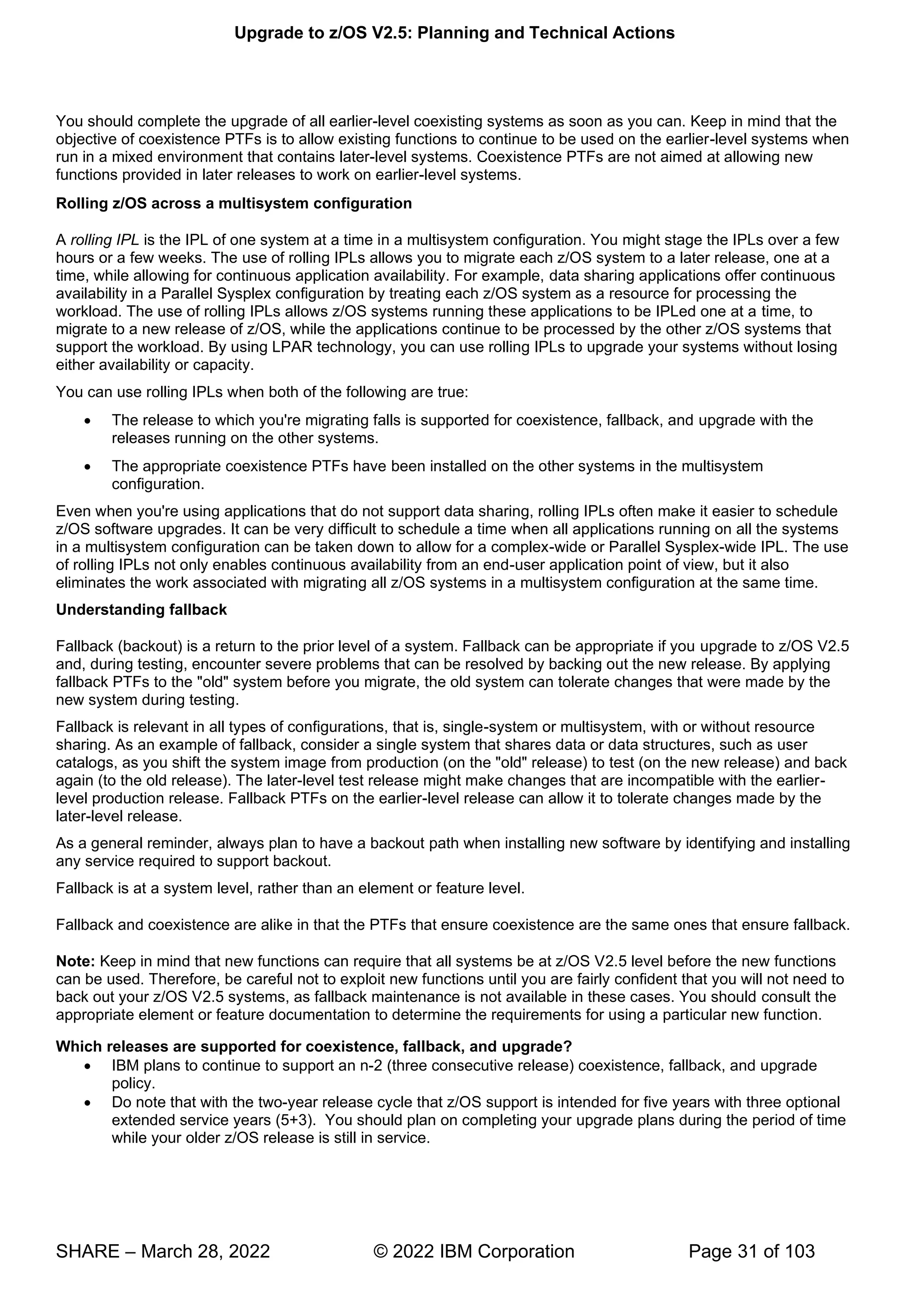
you do not download all necessary files, your workflow cannot be created.
In z/OS V2.5 (continuing what was introduced in V2.2) the z/OS Upgrade Workflow has the capability to invoke IBM
Health Checker for z/OS health checks directly from the step, and also provides the optional capability to give
feedback on your upgrade experience.
The z/OS V2.5 Upgrade Workflow is the ability to discover used z/OS priced features(continuing what was
introduced in V2.3), and some other features, on your system. This is very helpful, because if you are not using a
certain feature, then why have to manually skip those steps yourself? The z/OSMF Workflow can identify many
features that you might not be using, and automatically skip them in the Workflow for you, giving you less steps to
perform.
This tool is not supported by the IBM Service organization but rather by the tool owner on a best-can-do basis.
Please report any problems, suggestions, or comments to zosmig@us.ibm.com. This userid is actively monitored
and assistance is offered, typically within a couple of hours.
If you would like to see a short demo on using the z/OS V2.1 migration workflow, visit IBM® z/OSMF V2.1 Migration
Workflow Demo on YouTube.
Upgrade Workflow Tips
1. Use discovery to help eliminate unnecessary upgrade actions!
a. To be consistent with the former book, the workflows include some upgrade actions shown
as "None" for components that do not have any upgrade action. "None." still counts as a
workflow sub-task to complete, even though there is no upgrade action to perform. To
complete the sub-task, mark the upgrade action sub-tasks with an "Override-complete" to
have them designated as complete. “ ”
b. To allow you to skip prior hardware levels you have already upgraded through, choose to
“ ”
2. The URL links to the documentation in the workflow cannot go to an anchor in the web page. The
URLs will just bring you to the web page, not content that may be further down in the page. You
may have to scroll down on the web page to find the information that you need.
3. Some upgrade actions have associated health checks. For those steps, the health check will be
invoked to determine if the upgrade action is applicable to your system. Read the instructions
carefully on the Perform tab before running the health check, as important information is provided
for each check.
4. For each upgrade action and for the entire upgrade, you can optionally provide your feedback to
IBM. Just follow the instructions you see in z/OSMF. You do not need to provide feedback to
complete each step of the workflow.
Upgrade to z/OS V2.5: Planning and Technical Actions
SHARE – March 28, 2022 © 2022 IBM Corporation Page 52 of 103
z/OS Upgrade Workflow
Starting in z/OS V2.4, IBM no longer provide the z/OS Migration publication, GA32-0889, in its current format. Since
z/OS V2.2, the preferred method for learning about upgrade actions has been the z/OS Upgrade Workflow.
Discovering, performing, and verifying many upgrade actions through the z/OS MF Workflow function instead of a
more traditional book format allows for a tailored and specific upgrade path associated with a particular system.
Starting with the z/OS V2.4 release and later, IBM provides upgrade tasks in a z/OS MF Workflow, as well as a
single exported file. By providing the z/OS V2.4 upgrade materials in both formats, users still can enjoy the
advantages of a z/OSMF Workflow as well as being able to search, browse, and print in a more traditional format.
With the removal of the traditional z/OS publication, GA32-0889, it is strongly recommended that you plan for your
next upgrade by having z/OS MF ready to use in at least one location in your enterprise. Notice that the exported
format of the z/OS upgrade materials that can be easily read or printed for those without any z/OS MF capabilities
will not be tailored for any environment.
Upgrade to z/OS V2.5: Planning and Technical Actions
SHARE – March 28, 2022 © 2022 IBM Corporation Page 53 of 103
Upgrade to z/OS V2.5: Planning and Technical Actions
SHARE – March 28, 2022 © 2022 IBM Corporation Page 54 of 103
Upgrade Definitions and Classifications
Upgrade (formerly, migration) is the first of two stages in upgrading to a new release of z/OS. The two stages are:
 Stage 1: Upgrade. During this stage you install your new system with the objective of making it functionally
compatible with the previous system. After a successful upgrade, the applications and resources on the new
system function the same way (or similar to the way) they did on the old system or, if that is not possible, in a
way that accommodates the new system differences so that existing workloads can continue to run. Upgrade
does not include exploitation of new functions except for new functions that are now required.
 Stage 2: Exploitation. During this stage you do whatever customizing and programming are necessary to take
advantage of (exploit) the enhancements available in the new release. Exploitation follows upgrade.
Upgrade Requirement Classification and Timing
The upgrade actions are classified as to their requirement status:
 Required. The upgrade action is required in all cases.
 Required-IF. The upgrade action is required only in a certain case. Most of the actions in this presentation are
in this category.
 Recommended. The upgrade action is not required but is recommended because it is a good programming
practice, because it will be required in the future, or because it resolves unacceptable system behavior (such as
poor usability or poor performance) even though resolution might require a change in behavior.
To identify the timing of upgrade actions, this presentation uses three types of headings:
 Now. These are upgrade actions that you perform on your current system, either because they require the
current system or because they are possible on the current system. You don’t need the z/OS V2.5 level of code
to make these changes, and the changes don’t require the z/OS V2.5 level of code to run once they are made.
Examples are installing coexistence and fallback PTFs on your current system, discontinuing use of hardware or
software that will no longer be supported, and starting to use existing functions that were optional on prior
releases but required in z/OS V2.5.
Upgrade to z/OS V2.5: Planning and Technical Actions
SHARE – March 28, 2022 © 2022 IBM Corporation Page 55 of 103
 Pre-First IPL. These are upgrade actions that you perform after you’ve installed z/OS V2.5 but before the first
time you IPL. These actions require the z/OS V2.5 level of code to be installed but don’t require it to be active.
That is, you need the z/OS V2.5 programs, utilities, and samples in order to perform the upgrade actions, but
the z/OS V2.5 system does not have to be IPLed in order for the programs to run. Examples are running sysplex
utilities and updating the RACF data base templates.
It is possible to perform some of the upgrade actions in this category even earlier. If you prepare a system on
which you will install z/OS V2.5 by making a clone of your old system, you can perform upgrade actions that
involve customization data on this newly prepared system before installing z/OS V2.5 on it. Examples of such
upgrade actions are updating configuration files and updating automation scripts.
 Post-First IPL. These are upgrade actions that you can perform only after you’ve IPLed z/OS V2.5. You need a
running z/OS V2.5 system to perform these actions. An example is issuing RACF commands related to new
functions. Note that the term “first IPL” does not mean that you have to perform these actions after the very first
IPL, but rather that you need z/OS V2.5 to be active to perform the task. You might perform the task quite a
while after the first IPL.
Icons used in this presentation:
’ v k g
means that an IBM Health Check (using the IBM Health Checker for z/OS function) can help you with this
upgrade action.
means that this is a cleanup item or contains a portion that is a cleanup item. It is associated with something that
is obsolete. It may cause confusion if someone thinks it does something. It is best to perform this action to avoid any
mig
Upgrade to z/OS V2.5: Planning and Technical Actions
SHARE – March 28, 2022 © 2022 IBM Corporation Page 56 of 103
confusion, since it is not needed anymore.
To use the latest version of the z/OS V2.4 Upgrade Workflow, retrieve it from this Github location:
https://github.com/IBM/IBM-Z-zOS/tree/master/zOS-Workflow/zOS%20V2.4%20Upgrade%20Workflow
To use the latest version of the z/OS V2.5 Upgrade Workflow, it is available on z/OS V2.4 and z/OS V2.3 with a PTF marked
with the FIXCAT IBM.Coexistence.z/OS.V2R5. Once the PTF is installed, you will find the workflows in your
/usr/lpp/bcp/upgrade path.
IBM strongly recommends you use the z/OS Upgrade Workflow from z/OSMF in order to have a customized upgrade of your
applicable steps to take.
However, if you wish to use the exported version of any z/OS Upgrade Workflow, you can see it here (at the bottom of the
page):
https://www.ibm.com/support/knowledgecenter/SSLTBW_2.4.0/com.ibm.zos.v2r4.e0zm100/abstract.htm
Upgrade to z/OS V2.5: Planning and Technical Actions
SHARE – March 28, 2022 © 2022 IBM Corporation Page 57 of 103
Upgrade Actions for Elements in z/OS V2.5
When upgrading from z/OS V2.4 to z/OS V2.5, the specified elements in the slide above have new or usual upgrade actions.
If you are upgrading from z/OS V2.3, use the z/OS V2.5 Upgrade Workflow for the z/OS V2.3 path to see the upgrade actions
which were introduced in V2.4. Alternatively, if you wanted to see the upgrade actions, you can also see the exported workflow
on the IBM Documentation website (go to the bottom to click on which upgrade path you are doing).
https://www.ibm.com/docs/en/zos/2.4.0?topic=level-zos-upgrade-workflow
Some upgrade actions for selected elements follow in this presentation. This presentation does not cover all possible upgrade
actions.
Upgrade to z/OS V2.5: Planning and Technical Actions
SHARE – March 28, 2022 © 2022 IBM Corporation Page 58 of 103
Upgrade to z/OS V2.5: Planning and Technical Actions
SHARE – March 28, 2022 © 2022 IBM Corporation Page 59 of 103
General Upgrade Actions For z/OS V2.5
These upgrade actions were taken from z/OS V2.5 Upgrade Workflow. Some descriptions and actions have been shortened for
inclusion in this presentation. Not all upgrade actions have been included. For the complete descriptions and actions, refer to
z/OS V2.5 Upgrade Workflow.
General Upgrade Actions You Can Do Now
Install coexistence and fallback PTFs (Required)
Upgrade action: Install coexistence and fallback PTFs on your systems to allow those systems to coexist with z/OS V2.5
systems during your upgrade, and allow back out from z/OS V2.5 if necessary. Use the SMP/E REPORT MISSINGFIX
command in conjunction with the FIXCAT type of HOLDDATA as follows:
1. Acquire and RECEIVE the latest HOLDDATA onto your pre-z/OS V2.5 systems. Use your normal service acquisition
portals (recommended) or download the HOLDDATA directly from
http://service.software.ibm.com/holdata/390holddata.html. Ensure you select Full from the Download NOW column to
receive the FIXCAT HOLDDATA, as the other files do not contain FIXCATs.
2. Run the SMP/E REPORT MISSINGFIX command on your pre-z/OS V2.5 systems and specify a Fix Category
(FIXCAT) value of “IBM.Coexistence.z/OS.V2R5” T w ll identify any missing coexistence and fallback
PTFs for that system. For complete information about the REPORT MISSINGFIX command, see SMP/E Commands.
3. Periodically, you might want to acquire the latest HOLDDATA and rerun the REPORT MISSINGFIX command to
find out if there are any new coexistence and fallback PTFs.
Use SOFTCAP to identify the effect of capacity changes (Recommended)
Not required, but is recommended to help in assessing processor capacity and available resources when upgrading
to new software levels, and when upgrading to z/Architecture.
Upgrade action:
 Download SoftCap from one of the following Web sites:
 Customers: http://www.ibm.com/support/techdocs/atsmastr.nsf/WebIndex/PRS268
 Business partners: http://partners.boulder.ibm.com/src/atsmastr.nsf/Web/Techdocs. Note that this requires an ID on
PartnerWorld®.Run SoftCap to determine your expected increase in CPU utilization (if any) and to identify
your storage requirements, such as how much storage is needed to IPL.
Reference information: SoftCap User’s Guide, which is provided with the tool.
General Upgrade Actions Pre-First IPL
Migrate /etc /global, and /var system control files (Required)
Upgrade action: The /etc, /global, and /var directories contain system control files: the /etc directory contains
customization data that you maintain and the /global and /var directory contains customization data that IBM
maintains. During installation, subdirectories of /etc , /global, and /var are created. If you install z/OS using
ServerPac, some files are loaded into /etc /global, and /var due to the customization performed in ServerPac. You
have to merge the files in /etc /global, and /var with those on your previous system. If you install z/OS using CBPDO,
you should copy the files from your old system to the z/OS V2.5 /etc and /var subdirectories.
Copy files from your old system to the z/OS V2.5 /etc and /var subdirectories, and then modify the files as
necessary to reflect z/OS V2.5 requirements. If you have other files under your existing /var directory, then you will
have to merge the old and new files under /var. The easiest way to do this is to create a copy of your current /var
files and then copy the new /var files into the copy.
The following elements and features use /etc:
• BCP (Predictive Failure Analysis).
• CIM.
• Communications Server (IP Services component).
• Cryptographic Services (PKI Services and System SSL components).
• DFSMSrmm.
• IBM HTTP Server.
• IBM Tivoli Directory Server (TDS). The LDAP server component uses /etc/ldap.
• Infoprint Server.
• Integrated Security Services. The Network Authentication Service component uses /etc/skrb.
• z/OS UNIX.
Upgrade to z/OS V2.5: Planning and Technical Actions
SHARE – March 28, 2022 © 2022 IBM Corporation Page 60 of 103
The following elements and features use /global:
• IBM Knowledge Center for z/OS
• IBM z/OS Management Facility (z/OSMF).
The following elements and features use /var:
• Cryptographic Services (OCSF component). See OCSF: Migrate the directory structure.
• DFSMSrmm.
• IBM Tivoli Directory Server (TDS). The LDAP server component uses /var/ldap.
• Infoprint Server.
• Integrated Security Services. The Network Authentication Service component uses /var/skrb.
Back virtual storage with real and auxiliary storage (Required)
Upgrade action: As you exploit additional virtual storage by defining additional address spaces or by exploiting
memory objects, ensure that you have defined sufficient real and auxiliary storage. Review real storage
concentration indicators via an RMF report to evaluate if additional real or auxiliary storage is needed:
 Check UIC and average available frames.
 Check demand page rates.
 Check the percentage of auxiliary slots in use.
Reference information: For more information about memory objects, see z/OS MVS Programming: Extended
Addressability Guide and Washington Systems Center flash 10165 at http://www.ibm.com/support/techdocs.
(Search for “flash10165”.)
Remove references to deleted data sets and path (Required)
Upgrade action: Using the tables in z/OS Upgrade Workflow as a guide, remove references to data sets and paths
that no longer exist. Remove the references from the following places:
 Parmlib
 Proclib
 Logon procedures
 Catalogs
 Security definitions, including program control definitions
 DFSMS ACS routines
 /etc/profile
 SMP/E DDDEF entry (if you installed with CBPDO)
 Backup and recovery procedures, as well as any references to them in the table, the high-level qualifiers in the
data set names are the default qualifiers.
Note: Do not remove any data sets, paths, or references that are needed by earlier-level
systems until those systems no longer need them, and you are sure you won’t need them for
fallback.
Reference information: z/OS Upgrade Workflow contains the list of all removed data sets and paths in z/OS
V2R.5 and V2.4.
Add references to new data sets (Required)
Upgrade action: For z/OS V2.5, RMF and z/OS Data Gatherer, had several data sets restructured. Follow the
RMF upgrade action to make the necessary parmlib and SYSPROC changes.
For z/OS V2.4, the following element had a DLIB data set and a path (with a file system) that were added:
• z/OS Container Extensions
Accommodate new address spaces (Recommended)
Not required, but recommended to keep interested personnel aware of changes in the system and to ensure that
your MAXUSER value in parmlib member IEASYSxx is adequate.
Upgrade to z/OS V2.5: Planning and Technical Actions
SHARE – March 28, 2022 © 2022 IBM Corporation Page 61 of 103
The following elements adds new address spaces for z/OS V2.4, which are exploitation support, and are
not upgrade actions:
• z/OS Authorized Code Scanner (zACS) This new priced feature, added post-GA of z/OS V2.4
adds one new address space, BPNZACS. zACS provides the capability of testing PC and SVC
routines to determine if they might result in a security vulnerability.
• z/OS Container Extensions. This a new element in z/OS V2.4. It provides the runtime support to
deploy and run Linux on IBM Z applications that are packaged as Docker Container images on
z/OS. zCX creates one address space for each provisioned server that is started by the user.
The MAXUSER value in parmlib member IEASYSxx specifies a value that the system uses to
limit the number of jobs and started tasks that can run concurrently during a given IPL. You
might want to increase your MAXUSER value to take new address spaces into account. (A
modest overspecification of MAXUSER should not hurt system performance. The number of total address
spaces is the sum of M/S, TS USERS, SYSAS, and INITS. If you change your MAXUSER value, you
must re-IPL to make the change effective.)
Update your check customization for modified IBM Health Checker for z/OS checks (Recommend)
Not required, but recommended to ensure that your checks continue to work as you intend them to work.
Changes that IBM makes to the checks provided by IBM Health Checker for z/OS can affect any updates
you might have made.
The following health checks are new in z/OS V2R5:
• RACF_ADDRESS_SPACE
• RACF_ERASE_ON_SCRATCH
• RACF_PROTECTALL_FAIL
• RACF_PTKTDATA_CLASS
• RACF_SYSPLEX_COMMUNICATION
The following health checks are changed in z/OS V2R5:
• RACF_SENSITIVE_RESOURCES
The following health checks were added by IBM in z/OS V2R4:
• IBMCS,ZOSMIGV2R4_NEXT_CS_OSIMGMT
• IBMCS,ZOSMIGV2R4PREV_CS_IWQSC_tcpipstackname
• IBM_JES2,JES2_UPGRADE_CKPT_LEVEL_JES2
• IBMICSF,ICSF_PKCS_PSS_SUPPORT
• IBMINFOPRINT,INFOPRINT_CENTRAL_SECURE_MODE
• IBMINFOPRINT,ZOSMIGV2R3_NEXT_INFOPRINT_IPCSSL
• IBMISPF,ISPF_WSA
• IBMRSM,RSM_MINIMUM_REAL
• IBMSDSF,SDSF_CLASS_SDSF_ACTIVE
• IBMVSM,ZOSMIGV2R3_NEXT_VSM_USERKEYCOMM
The following health checks were changed by IBM in z/OS V2R4:
• IBMUSS,ZOSMIGV2R3_NEXT_USS_SMB_DETECTED
Upgrade to z/OS V2.5: Planning and Technical Actions
SHARE – March 28, 2022 © 2022 IBM Corporation Page 62 of 103
• IBMCS,CSVTAM_CSM_STG_LIMIT
The following health checks were deleted by IBM in z/OS V2R4:
• ZOSMIGV1R12_INFOPRINT_INVSIZE
Upgrade action:
1. Look at the updated checks in IBM Health Checker for z/OS: User's Guide.
2. Review changes you made for those checks, in HZSPRMxx parmlib members, for example.
3. Make any further updates for the checks to ensure that they continue to work as intended.
Upgrade to z/OS V2.5: Planning and Technical Actions
SHARE – March 28, 2022 © 2022 IBM Corporation Page 63 of 103
Upgrade to z/OS V2.5: Planning and Technical Actions
SHARE – March 28, 2022 © 2022 IBM Corporation Page 64 of 103
BCP Upgrade Actions For z/OS V2.5
These upgrade actions were taken from z/OS V2.5 Upgrade Workflow. Some descriptions and actions have been shortened for
inclusion in this presentation. Not all upgrade actions have been included. For the complete descriptions and actions, refer to
z/OS V2.5 Upgrade Workflow.
BCP Upgrade Actions Pre-First IPL
Accommodate the new DSLIMITNUM default (Required-IF, as of V2.5)
Required if the default is not acceptable on your system.
In the SMFLIMxx parmlib member, the parameter DSLIMITNUM is used to override the maximum
number of data spaces and hiperspaces that can be created by a user-key program. In z/OS V2R5, the
default for DSLIMITNUM is changed to 4096. In previous releases, the default was 4294967295.
Applications that invoke DSPSERV CREATE, especially those applications that loop erroneously, might
fail with the more restrictive DSLIMITNUM default in effect.
Upgrade action: SMF 30 record field SMF30NumberOfDataSpacesHWM indicates the high-water mark
of the number of data spaces that are owned by the unauthorized (problem state and user key) tasks that
are associated with a job. This field is added when you apply APAR OA59137 and APAR OA59126.
If your installation runs jobs that rely on the default for SMFLIMxx DSLIMITNUM or IEFUSI word 7
subword 3, inspect the SMF 30 record field SMF30NumberOfDataSpacesHWM fields for values that
Upgrade to z/OS V2.5: Planning and Technical Actions
SHARE – March 28, 2022 © 2022 IBM Corporation Page 65 of 103
exceed 4096. For jobs that exceed 4096, update SMFLIMxx or IEFUSI to allow the maximum number of
data spaces that are required.
ASCB and WEB are backed in 64-bit real storage by default (Required-IF, as of V2.5)
Required if you have an application that relies on the ASCB or WEB to be backed in 31-bit real storage.
In z/OS 2.5, the address space control block (which is mapped by IHAASCB) and the work element block
(which is mapped by IHAWEB) are backed in 64-bit real storage by default. Previously, these data
structures were backed in 31-bit storage, unless your DIAGxx parmlib member specified CBLOC
REAL31(IHAASCB,IHAWEB).
In z/OS 2.4, the keywords REAL31 and REAL64 were added to the CBLOC statement of parmlib member
DIAGxx. With these keywords, you can specify which data structures are backed in 31-bit real storage or
64-bit real storage.
Upgrade action: Check for programs that issue the load real address (LRA) instruction in 31-bit
addressing mode for the ASCB or WEB data structures. The LRA instruction cannot be used to obtain the
real address of locations backed by real frames above 2 gigabytes in 24-bit or 31-bit addressing mode. For
those situations, use the LRAG instruction instead of LRA. The TPROT instruction can be used to replace
the LRA instruction when a program is using it to verify that the virtual address is translatable and the
page backing it is in real storage. If you have programs that do not tolerate 64-bit real storage backing for
the ASCB or WEB data structures, update the DIAGxx parmlib member to specify CBLOC
REAL31(IHAASCB,IHAWEB).
Accommodate the new CHECKREGIONLOSS default (Recommended, as of V2.5)
Recommended. Enabling the CHECKREGIONLOSS option causes initiator address spaces to be recycled when the maximum obtainable
region size is reduced below a threshold. This change is expected to have a positive impact on the system without requiring any intervention
In the DIAGxx parmlib member, the parameter VSM CHECKREGIONLOSS specifies the amount of
region size loss that can be tolerated in an initiator address space. The initiator remembers the initial
maximum available region size (below and above 16 MB) before it selects its first job. Whenever a job
ends in the initiator, if the maximum available region size (below or above 16MB) is decreased from the
initial value by more than the CHECKREGIONLOSS specification, the initiator ends with message
IEF0931 or IEF094A, depending on whether the subsystem automatically restarts the initiator.
When CHECKREGIONLOSS is enabled, your installation can avoid encountering 822 abends or 878
abends in subsequent jobs that are selected by the initiator. These abends can occur when the available
region size decreases because of storage fragmentation or problems that prevent storage from being freed.
In z/OS V2R5, CHECKREGIONLOSS is enabled by default with a value of (256K,30M). This change
means that when the 24-bit region size decreases by 256K or more, or when the 31-bit region size
decreases by 30M or more, the initiator is ended and restarted, with message IEF0931 or IEF094A.
Upgrade action: Verify that the CHECKREGIONLOSS option is specified in your active DIAGxx
parmlib member:
Upgrade to z/OS V2.5: Planning and Technical Actions
SHARE – March 28, 2022 © 2022 IBM Corporation Page 66 of 103
• If the CHECKREGIONLOSS option is not specified in your active DIAGxx parmlib member,
determine whether you want the option to be disabled on your z/OS V2R5 system. If so, you can
set the CHECKREGIONLOSS to a very high value such as (16M,2046M), which will effectively
disable the option.
• If the CHECKREGIONLOSS option is specified in your active DIAGxx parmlib member, and you
want to continue using your current setting, you have no action to take. Consider using the IBM
default setting CHECKREGIONLOSS(256K,30M).
Stop referencing the ETR parmaters in CLOCKxx (Recommended, as of V2.4)
In z/OS V2R4, the default values of the CLOCKxx parmlib member ETRMODE and ETRZONE parameters are changed from
YES to NO.
The IBM z10 was the last IBM mainframe to support the ETRMODE and ETRZONE parameters in CLOCKxx. Because z/OS
V2R4 requires a zEC12 or later processor to run, the ETRMODE and ETRZONE parameters are now obsolete. They are
deactivated (set to NO) by default.
It is recommended that you set these parameters to NO, or remove them from CLOCKxx. Specifying YES can cause
unexpected behavior if you also specify STPZONE NO. For details, see APAR OA54440.
Upgrade action: Review the CLOCKxx member that you use to IPL your system, and take one of the following actions:
• If CLOCKxx does not specify ETRMODE or ETRZONE, you have no action to take.
• If CLOCKxx specifies ETRMODE YES or ETRZONE YES, set these parameters to NO, or remove them so that they
default to NO.
• If CLOCKxx specifies ETRMODE NO and ETRZONE NO, you have no action to take.
Evaluate the changed default for system logger’s use of IBM zHyperwrite (Required-IF, as of V2.4)
Required if you want system logger to use IBM zHyperwrite data replication.
With the installation of APAR OA57408, the use of IBM zHyperWrite data replication by system logger is changed from
enabled to disabled by default.The IBM zHyperWrite function was originally provided by APAR OA54814.
In parmlib member IXFCNFx, this option is specified, as follows:
MANAGE . . . HYPERWRITE ALLOWACCESS(YESNO)
When IBM zHyperwrite is enabled for use with system logger, it provides data replication for the following types of log stream
data sets:
• Staging data sets for DASDONLY type log streams
• Offload data sets for both the DASDONLY type and Coupling Facility structure-based type log streams.
System logger does not use zHyperwrite for the staging data sets for Coupling Facility structure-based type log streams.
Upgrade action: If you do not want system logger to use IBM zHyperwrite data replication, you have no action to take. When
you install APAR OA57408, the use of IBM zHyperWrite data replication by system logger is disabled by default. To
determine whether system logger on your system uses IBM zHyperwrite data replication, you can query the current setting by
entering the following command:
DISPLAY LOGGER,IXGCNF,MANAGE
In response, message IXG607I identifies the current setting. To enable system logger use of IBM zHyperwrite data replication,
you can do either of the following:
• Enter the command SETLOGR MANAGE,HYPERWRITE,ALLOWUSE(YES)
• Update the IXGCNFxx parmlib member with ALLOWUSE(YES).
Upgrade to z/OS V2.5: Planning and Technical Actions
SHARE – March 28, 2022 © 2022 IBM Corporation Page 67 of 103
Prepare for the removal of support for user key common areas (Required, as of V2.4)
IBM strongly recommends that you eliminate all use of user key common storage. Allowing programs to
obtain user key (8-15) common storage creates a security risk because the storage can be modified or
referenced, even if fetch protected, by any unauthorized program from any address space. Therefore,
without the restricted use common service area (RUCSA) optional priced feature, the obtaining of user key
(8-15) storage is not supported in z/OSV2R4.
RUCSA is more secure because it can be managed as a SAF resource. However, it does not prevent two or
more different SAF-authorized applications from altering or referencing another application's RUCSA
storage. RUCSA became available as a part of the BCP base element with APAR OA56180 on earlier
z/OS releases, but it is only available as a priced feature in z/OS V2R4.
Related to this change:
• Support to change the key of common ESQA storage to a user key (via CHANGKEY) is removed
regardless of RUCSA exploitation.
• NUCLABEL DISABLE(IARXLUK2) is no longer a valid statement in the DIAGxx parmlib
member. ( Note: This statement only exists in z/OS V2R3.)
• Support of user-key (8 - 15) SCOPE=COMMON data spaces is removed regardless of RUCSA
exploitation.
• YES is no longer a valid setting for the following statements in the DIAGxx parmlib member:
VSM ALLOWUSERKEYCSA - controls the allocation of user key CSA.
ALLOWUSERKEYCADS - controls the allocation of user key SCOPE=COMMON data space
Upgrade action:
• See Part 1 (Planning) information for the details on this removal.
Review the list of WTORs in parmlib member AUTOR00 (Required)
As of z/OS V1R12, the DDDEF'd PARMLIB provides an AUTOR00 member. This member should be
found in your parmlib concatenation during IPL and will result in auto-reply processing being activated. If
the WTORs listed in
AUTOR00 are automated by your existing automation product, ensure that the replies in AUTOR00 are
appropriate.
Upgrade action: Examine the WTOR replies in the AUTOR00 parmlib member. If the replies or delay
duration are not desirable, you can create a new AUTORxx parmlib member and make corresponding
changes. Also compare the replies to what your automation product would reply to these WTORs. Make
sure that the AUTOR00 replies are in accordance with the replies from your automation product. IBM
does not recommend making updates to AUTOR00, because updates to AUTOR00 might be made by the
service stream or in new z/OS releases.
There were no updates to AUTOR00 for z/OS V2.5.
There were updates to AUTOR00 for z/OS V2.4.
Upgrade to z/OS V2.5: Planning and Technical Actions
SHARE – March 28, 2022 © 2022 IBM Corporation Page 68 of 103
DFSMS Upgrade Actions For z/OS V2.5
These upgrade actions were taken from z/OS V2.5 Upgrade Workflow. Some descriptions and actions have been shortened for
inclusion in this presentation. Not all upgrade actions have been included. For the complete descriptions and actions, refer to
z/OS V2.5 Upgrade Workflow.
DFSMS Upgrade Actions You Can Do Now
DFSMSdfp: Increase storage for SMS ACDS data sets (Required-IF, as of OA52913)
Required if you use the ACDS and it is reaching full capacity.
With APAR OA52913, the length of the management class definition (MCD) in the SMS active control data set (ACDS) was
increased from 328 to 760 bytes. This change was made in support of automatic migration support for transparent cloud tiering
(TCT). With this change, the values that are used to estimate the size of storage that is needed for an active control data set are
out of date.
If the ACDS data set is full, the follow errors could occur:
• IEC070I 203: Extend was attempted but no secondary space was specified
• IGD058I 6068 ' ’ : Problem could be caused by insufficient space to
extend the data set
Check your utilization of the ACDS. To prevent the ACDS from reaching full, consider reallocating the
ACDS to allow for more space. When you allocate the SCDS and ACDS, specify secondary space
allocations. This action helps to ensure that extends can be performed when:
• New classes, groups, and other structures are added
• Sizes of these structures increase in size.
Upgrade to z/OS V2.5: Planning and Technical Actions
SHARE – March 28, 2022 © 2022 IBM Corporation Page 69 of 103
DFSMS UpgradeActions Pre-First IPL
DFSMSdss: SHARE keyword is ignored for COPY and RESTORE of PDSE (Req-IF, as of V2.4)
Required if your programs open PDSE data set when DFSMSdss is writing to them.
Starting in z/OS V2R4, your programs must close PDSE data sets before these data sets are overwritten by a DFSMSdss COPY
or RESTORE operation. Otherwise, the DFSMSdss COPY or RESTORE operation encounters serialization errors, such as an
ADR412E.
Note: This behavior occurs regardless of whether the SHARE keyword is specified.
For programs that cannot close the PDSE data sets while a COPY or RESTORE operation is in progress, these programs can
specify the TOLERATE(ENQFAILURE) keyword. If so, the program is responsible for ensuring data onsistency. IBM
recommends against using the TOLERATE(ENQFAILURE) keyword; use it at your own risk.
Upgrade action: Applications must now close PDSEs before a copy or restore is to overwrite it. If you do not close down the
application, serialization errors such as an ADR412E occurs on the DFSMSdss copy or restore.
Note: Changing DFSMSdss to ignore the SHARE keyword for output data sets ensure integrity and prevent
DFSMSdss from restoring a PDSE that an application has open. It also prevents an application from opening a PDSE that
DFSMSdss is restoring.
DFSMSdfp: Review XRC parmlib members for use of default values (Recommended, as of V2.4)
Required if your programs open PDSE data set when DFSMSdss is writing to them.
In z/OS V2R4, some XRC (Extended Remote Copy, aka Global Mirror), default settings are changed to match IBM
recommendations. If you depend on the old default, you must explicitly specify the old values in the appropriate parmlib
members.
Upgrade action: Examine parmlib members that are related to XRC for settings with changed defaults:
If the setting is not specified in any of the XRC-related parmlib members, determine whether the old default value needs to be
retained according to the following table. If the value needs to be the old default, it must be specified in the member. Otherwise,
the new default takes effect when XRC is started on the new z/OS release.
If the setting is specified in an XRC-related parmlib member (with any value, but especially with the old default value),
consider whether the new default value is appropriate to use.
Upgrade to z/OS V2.5: Planning and Technical Actions
SHARE – March 28, 2022 © 2022 IBM Corporation Page 70 of 103
HCD Upgrade Actions For z/OS V2.5
These upgrade actions were taken from z/OS V2.5 Upgrade Workflow. Some descriptions and actions have been shortened for
inclusion in this presentation. Not all upgrade actions have been included. For the complete descriptions and actions, refer to
z/OS V2.5 Upgrade Workflow.
HCD Upgrade Actions You Can Do Now
Remove configurations for unsupported processor types (Required-IF, as of V2.5)
Required if you unsupported processors are still defined in your IODF.
In z/OS V2R5, HCD removes support for processor types that are out of service. Specifically, HCD no
longer supports the following processors types:
• IBM z10 EC, processor type 2097, models E12, E26, E40, E56, and E64
• IBM z10 BC, processor type 2098, model E10
• IBM z9 EC, processor type 2094, models S08, S18, S28, S38 and S54
• IBM z9 BC, processor type 2096, models R07 and S07
• IBM z990, processor type 2084, models A08, B16, C24, and D32
• IBM z890, processor type 2086, model A04
z/OS V2R5 does not run on these servers. z/OS V2.3 runs on EC12, BC12 or higher.
Previously, in z/OS V2R4, support was withdrawn for the IBM z900 (processor type 2064) and IBM z800
(processor type 2066).
If your I/O definition file (IODF) contains definitions for these servers, and you use HCD to maintain your
configuration, you must delete the old definitions before moving to z/OS V2R5. HCD cannot validate the
I/O configuration for unsupported processor types.
Steps to take: Check your currently active IODFs to determine whether you have any saved processor
configurations for these out-of-service processors. Foillow these steps:
1. Start HCD.
Upgrade to z/OS V2.5: Planning and Technical Actions
SHARE – March 28, 2022 © 2022 IBM Corporation Page 71 of 103
2. “ , , v w g ”
3. “P ” g .
4. Check the Type column for any of the out-of-service processor types.
5. If you still have any processor configuration for one or more of the out-of-service processor types,
determine whether the processor is still in use. If not, delete the configuration.
Otherwise, if the processor it is still in use, the system that maintains the IODF cannot be upgraded to
z/OS V2R5.
Upgrade to z/OS V2.5: Planning and Technical Actions
SHARE – March 28, 2022 © 2022 IBM Corporation Page 72 of 103
RMF Upgrade Actions For z/OS V2.5
This upgrade action was taken from z/OS V2.5 Upgrade Workflow. Some descriptions and actions have been shortened for
inclusion in this presentation. Not all upgrade actions have been included. For the complete descriptions and actions, refer to
z/OS V2.5 Upgrade Workflow.
RMF Upgrade Actions Pre-First IPL
Determine updates for RMF structural changes (Required, as of V2.5)
When the PTFs for APARs OA58281 and OA58759 are applied to z/OS V2.3 or V2.4, the RMF product is
restructured into the Data Gatherer and Reporter components. In z/OS V2.5, the Data Gatherer component is
packaged and delivered as separate FMID, and a priced feature of Advanced Data Gatherer is added..
With the z/OS Data Gatherer now included in the z/OS base, the RMF installation procedure and licensing model
are changed. RMF consists of two components that work together to provide performance management capabilities,
as follows:
z/OS Data Gatherer
Collects performance measurements from the hardware and operating system and provides access to these
measurements across the sysplex.
RMF Reporter
Uses the collected measurements to report performance statistics in tabular and graphical reports
The term RMF refers to the RMF Reporter component. When you are entitled to RMF, you are also entitled
to the Advanced Data Gatherer priced feature.
In z/OS V2.5, the Data Gatherer base z/OS component (566527401) is shipped within the same FMID as the z/OS
Advanced Data Gatherer priced feature, FMID HRG77D0. The RMF Reporter component (566527404) remains in
the priced RMF feature and is packaged in the existing FMIDs HRM77D0 and JRM77DJ.
The new RMF feature provides the same capabilities as the RMF feature. The RMF feature entitles you to use both
RMF Reporter and z/OS Advanced Data Gatherer.
Upgrade to z/OS V2.5: Planning and Technical Actions
SHARE – March 28, 2022 © 2022 IBM Corporation Page 73 of 103
Upgrade action:
• z/OS Data Gatherer product libraries SYS1.SGRBLINK must be added to the link list and APF list. SYS1.SGRBLPA
must be added to the LPA list.
• RMF users must change SERBLINK to SERBLNKE in the link list.
• IBM supplied procedures RMF and RMFGAT are installed into SYS1.PROCLIB (as in previous releases), but are part
of z/OS Data Gatherer.
• IBM supplied procedures RMFCSC, RMFM3B, GPMSERVE, GPM4CIM are installed into SYS1.PROCLIB and are
owned by RMF, as in previous releases.
• IBM supplied CLISTs ERBS2V, ERBV2S, and REXX execs ERBSCAN, ERBSHOW, ERBVSDEF, are installed into
SYS1.SGRBCLS during z/OS Data Gatherer installation. Make it available to your SYSPROC. If you use RMF, make
SERBCLS available in your SYSPROC.
• Make the follow updates to your RACF program profiles:
' ’
' ’
' ’
' ’ HK)
' ’
' ’
Upgrade to z/OS V2.5: Planning and Technical Actions
SHARE – March 28, 2022 © 2022 IBM Corporation Page 74 of 103
Upgrade to z/OS V2.5: Planning and Technical Actions
SHARE – March 28, 2022 © 2022 IBM Corporation Page 75 of 103
Various element default changes for more secure communications
These upgrade actions were taken from z/OS V2.5 Upgrade Workflow. Some descriptions and actions have been shortened for
inclusion in this presentation. Not all upgrade actions have been included. For the complete descriptions and actions, refer to
z/OS V2.5 Upgrade Workflow.
There were no secure communications default changes in z/OS V2.5.
CIM: Accommodate the default change from HTTP to HTTPS (Required, as of V2.4)
In z/OS V2R4, the common information model (CIM) server is changed to use HTTPS connections by
default. On start-up, the CIM server listens on the HTTPS port, rather than the HTTP port, as was done in
previous releases. The change from HTTP to HTTPS is intended to allow for more secure communication
with the CIM server.
The following CIM server configuration defaults are affected:
• enableHttpConnection=true
• enableHttpsConnection=false
In z/OS V2R4, these defaults are changed to:
• enableHttpConnection=false
• enableHttpsConnection=true
Based on this change, the CIM server opens a listener on port 5989 by default. If a client connection on this port is not secured b
y AT-TLS, the connection is closed and an appropriate error message is issued on the operations console.
It is recommended that you use HTTPS instead of HTTP, which allows the CIM server to use Application
Transparent Layer Security (AT-TLS) functions. Here, the communication between the CIM client and the
CIM server is encrypted.
You must also configure the CIM client applications to use HTTPS. Ensure that the applications run as
CIM clients connected to the CIM server on HTTPS port 5989.
Fall back to HTTP is possible, though it is not secure and therefore not recommended. If you need the
CIM server to use the HTTP protocol on start-up, follow these steps:
• Start the CIM server with the following settings specified in the configuration properties file:
o enableHttpConnection=true
o enableHttpsConnection=false
• Alternatively, you can dynamically change the enableHttpConnection value and restart the CIM server by
entering either of these commands on the operations console:
o cimconfig -s enableHttpConnection= true -p
o F CFZCIM,APPL=CONFIG,enableHttpConnection=true,PLANNED
PKI Services: Ensure that users have the CA root certificate for the PKI web interfaces (Required-IF, as of V
2.4)
Required if you a first-time user of PKI Services web page interfaces. A web browser must have the root CA of the web server, otherwise, the
user cannot access the PKI page.
As of z/OS V2R4, the PKI Services component of z/OS uses the HTTPS protocol for its web page
interfaces. In previous releases, PKI Services presented the first web page by using the HTTP protocol.
Doing so allowed the user to use the link on this page to download the certificate authority (CA) root
Upgrade to z/OS V2.5: Planning and Technical Actions
SHARE – March 28, 2022 © 2022 IBM Corporation Page 76 of 103
certificate of the web server certificate into the web browser. Thereafter, all the subsequent web pages
used HTTPS.
To help ensure strong security, web pages should use HTTPS rather than HTTP. To use HTTPS, the CA
w v ’ w w
Starting with z/OS V2R4, the PKI page that previously used HTTP is now updated to use HTTPS. The
link that is used to deliver the CA root certificate on the first page is removed. Therefore, you must use an
alternative method to distribute the CA root certificate to the appropriate users at your installation.
Upgrade action: For any web browser that is planned to be used to access the PKI web page interface for the first time, your
PKI administrator must distribute the CA root certificate of the web server (HTTP server, WebSphere, or WebSphere Liberty)
to users who require access to the PKI web page interfaces. A possible method is to distribute the CA root certificate is by using
the same communication channel that you use to provide users with the URI of the PKI web page. For example, if you send
email, you can
1. Add the CA root certificate as an attachment or include it as Base64 encoded text in the first email.
2. Send a separate email with the root certificate fingerprint to help users ensure that the correct CA certificate was
received in the previous email.
Refer to PKI Services Guide and Reference topic "Steps for accessing the user web pages" for more
options to distribute the CA root certificate.
Infoprint Central requires SSL connections by default (Required, as of V2.4)
Required if you are running Infoprint Central
Starting with z/OS V2R4, SSL connection is required by default for the Infoprint Central web browser
GUI. In previous releases, the GUI worked with or without SSL.
This change requires your installation to specify enabled SSL for your IBM HTTP Server (IHS) powered
by Apache 31-bit configuration. Doing so causes the httpd.conf.updates file to be updated with a rewrite
directive that converts the HTTP links to HTTPS links. This action saves users from having to update their
Infoprint Central bookmarks.
For users who do not want to change their IHS configurations to use SSL, an Infoprint Server
configuration attribute and new ISPF field are provided. The new option has an attribute name of use-
unencrypted-connection and an ISPF panel field name of “Use unencrypted connection”. Note that this
connection type is less secure than HTTPS.
You are encouraged to set up SSL before upgrading to z/OS V2R4.
Upgrade action: If SSL is not enabled in IHS and you are using Infoprint Central, follow these instructions. To use an SSL
connection for Infoprint Central, do the following:
1. Follow the instructions to enable SSL in IBM HTTP Server on z/OS Migrating from Domino-powered to Apache-
powered, which is available online:http://www.redbooks.ibm.com/redpapers/pdfs/redp4987.pdf.
2. Uncomment the Rewrite directive in the httpd.conf.updates file provided by Infoprint Server before copying the
Infoprint Central directives to the httpd.conf file.
3. Test an Infoprint Central link or bookmark to ensure that Infoprint Central loads in the browser.
If you need to use an unencrypted connection, do the following:
1. Use the Infoprint Server System Configuration ISPF panel or PIDU to set the use-unencrypted-connection attribute
to yes in the printer inventory.
2. Test an Infoprint Central link or bookmark to ensure that Infoprint Central loads in the browser.
Upgrade to z/OS V2.5: Planning and Technical Actions
SHARE – March 28, 2022 © 2022 IBM Corporation Page 77 of 103
RMF: Configure AT-TLS to enable secure communication with the RMF distributed data server (Re
quired, as of V2.4)
Required if you rely on the current default of HTTPS(NO).
With RMF V2R4, the GPMSRVxx parmlib member option HTTPS(ATTLS) is specified by default. As a result, the RMF
distributed data server (DDS) ensures that incoming connections are secured by AT-TLS. If an incoming connection is not
secured by AT-TLS, the connection is refused.
Upgrade action: To allow insecure communication for the DDS, you can specify the option HTTPS(NO) in the GPMSRVxx
parmlib member. However, this setting is not recommended because it allows the DDS to accept insecure connections.
Before you can configure the DDS, you must enable the Policy Agent for AT-TLS. Information about how to set up AT-TLS
communication is provided in z/OS Communications Server: IP Configuration Guide and z/OS Security Server RACF Security
Administrator's Guide. For other security management products, refer to the corresponding security product documentation.
The following example shows a rule that enables secure communication with the DDS:
# RMF Distributed Data Server Rule TTLSRule DDSServerRule { LocalPortRange 8803
Jobname GPMSERVE Direction Inbound Priority 1 TTLSGroupActionRef DDSServerGRP
TTLSEnvironmentActionRef DDSServerENV } TTLSGroupAction DDSServerGRP { TTLSEnabled On
Trace 1 } TTLSEnvironmentAction DDSServerENV { HandshakeRole Server TTLSKeyringParms
{ Keyring DDSServerKeyring } TTLSEnvironmentAdvancedParms { ServerCertificateLabel
RMFDDS } }
The example rule is described, as follows:
TTLSRule: Jobname
The name value specifies the job name of the application. GPMSERVE is the job name of the DDS
TTLSRule: LocalPortRange
The local port the application is bound to for this rule's action to be performed. 8803 is the default
HTTP Port of the DDS.
TTLSRule: Direction
Specifies the direction from which the connection must be initiated for this rule's action to be
performed. In this example, Inbound is specified, which means that the rule applies to connection
requests that arrive inbound to the local host.
TTLSRule: Priority
An integer value in the range 1 -2000000000 represents the priority that is associated with the rule.
The highest priority value is 2000000000. If you use multiple rules for the DDS server, the more
specific a rule is, the higher its priority should be. Generic rules without detail specifications of the
incoming connections should have a low priority.
TTLSEnvironmentAction: HandshakeRole
Specifies the SSL handshake role to be taken for connections in this AT-TLS environment. In this
example, Server is specified which means that the SSL hand shake is performed as a server.
TTLSKeyringParms: Keyring
Specifies the path and file name of the key database z/OS� UNIX file, the ring name of the SAF
key ring, or the name of the z/OS PKCS #11 token. In this example, the RACF key ring
DDSServerKeyring is specified.
TTLSEnvironmentAdvancedParms: ServerCertificateLabel
Specifies the label of the certificate for a server application to authenticate the server. In this
example, the DDS Server certificate with the label RMFDDS is used.
ISPF: Accommodate the ISPF Gateway access change from HTTP to HTTPS (Required-IF, as of V
2.4)
Upgrade to z/OS V2.5: Planning and Technical Actions
SHARE – March 28, 2022 © 2022 IBM Corporation Page 78 of 103
Required if you use ISPF Gateway through the HTTP protocol.
Starting in z/OS V2R4, the ISPF Gateway uses HTTPS connections by default. The change from HTTP to HTTPS is intended
to allow for more secure communication with the ISPF Gateway. One example of a program that accesses the ISPF Gateway is
the installation verification program (IVP) that is included with ISPF.
If you use the ISPF Gateway through the HTTP protocol, you must update your configuration to enable SSL for your ISPF
gateway traffic.
Although not recommended, a configuration option is provided to allow you to override the default, for fall back to non-secure
HTTP if needed.
Upgrade action: Determine whether the ISPF Gateway is being accessed on your system through non-secure HTTP. To do so,
use IBM health check IBMISPF,ZOSMIGV2R3_Next_ISPF_GW_HTTPS. This health check is available for z/OS V2R3 with
the PTFs for APARs OA58151 and OA58450 applied.
Update your configuration to P g w , “ g HTTP
v w ” ISPF Planning and Customizing.
Although not recommended, you can override the default by adding environment variable CGI_SECURECONN to your HTTP
configuration and setting it to FALSE.
Upgrade to z/OS V2.5: Planning and Technical Actions
SHARE – March 28, 2022 © 2022 IBM Corporation Page 79 of 103
ICSF Upgrade Actions For z/OS V2.5
These upgrade actions were taken from z/OS V2.5 Upgrade Workflow. Some descriptions and actions have been shortened for
inclusion in this presentation. Not all upgrade actions have been included. For the complete descriptions and actions, refer to
z/OS V2.5 Upgrade Workflow.
ICSF Upgrade Actions You Can Do Now
Review your CSFPARM DD statement in your ICSF procedure (Required, as of V2.4)
Required, as of HCR77D0 which is z/OS V2.4.
As of z/OS V2.4 ICSF, sequential data sets will no longer be accepted on the CSFPARM DD statement in
the ICSF procedure.
Upgrade action:
Check for the specification of any sequential data sets specified on the CSFPARM DD statement.
Consider using a partitioned data set in place of a sequential data set on the CSFPARM DD statement, for
example:
//ICSF PROC PRM=XX
//ICSF EXEC PGM=CSFINIT,TIME=NOLIMIT,MEMLIMIT=NOLIMIT
//CSFPARM DD DSN=SYS1.ICSFLIB(CSFPRM&PRM),DISP=SHR
You can find a sample ICSF procedure in SYS1.SAMPLIB(CSF), which is:
//* Licensed Materials - Property of IBM
//* 5650-ZOS Copyright IBM Corp. 2009, 2018
//CSF PROC
//CSF EXEC PGM=CSFINIT,REGION=0M,TIME=1440,MEMLIMIT=NOLIMIT
//* When using CSFPARM DD, the installation options data set must be
//* a partitioned data set on systems running HCR77D0 or later.
77
77
Upgrade to z/OS V2.5: Planning and Technical Actions
SHARE – March 28, 2022 © 2022 IBM Corporation Page 80 of 103
//CSFPARM DD DSN=USER.PARMLIB(CSFPRM00),DISP=SHR
Update references to the old ICSF parts (Required-IF, as of V2.4)
Required, if an application that uses the old library, header, or side deck, must be recompiled or relinked.
Or, if an application dynamically loads CSFDLL. Existing application that were built with CSFDLL do
not require any updates.
As of z/OS V2R5, ICSF no longer provides:
• CSFDLL module in CSF.SCSFMOD0
• C header file CSFBEXTH in CSF.SCSFHDRS
• Side deck CSFDLLSD in CSF.SCSFOBJ
Also, the data sets CSF.SCSFHDRS and CSF.SCSFOBJ are no longer created at installation time.
These parts were functionally replaced in z/OS V1R9 by the C header file CSFBEXT in
SYS1.SIEAHDR.H, the library CSFDLL31 in SYS1.SIEALNKE, and the side deck CSFDLL31 in
SYS1.SIEASID.
Existing executable load modules that are already link-edited with CSFDLL will continue to run
unchanged.
Upgrade action: Check your applications on your system for the use of any of the following:
• #include <.csfbexth.h>. or #include "csfbexth.h"
• Use of side deck CSFDLLSD
• Link-edit of CSFDLL into a load module
• References to data sets CSF.SCSFHDRS or CSF.SCSFOBJ
To use the supported interfaces, make the following changes:
• #include <.csfbexth.h>. or #include "csfbexth.h"
o Replace with csfbext.h (note the removed 'h' in the include name) and ensure that the
standard header location SYS1.SIEAHDR.H or ICSF-specific location
/usr/lpp/pkcs11/include is in the include path
• Use of side deck CSFDLLSD
o Replace with CSFDLL31 from the standard side deck location SYS1.SIEASID
• Link-edit of CSFDLL into a load module
o Replace with CSFDLL31 from the standard library location SYS1.SIEALNKE
• References to data sets CSF.SCSFHDRS or CSF.SCSFOBJ
o Replace with SYS1.SIEAHDR.H or SYS1.SIEASID, if not already present in the relevant
data set concatenations
Upgrade to z/OS V2.5: Planning and Technical Actions
SHARE – March 28, 2022 © 2022 IBM Corporation Page 81 of 103
77
Upgrade to z/OS V2.5: Planning and Technical Actions
SHARE – March 28, 2022 © 2022 IBM Corporation Page 82 of 103
z/OSMF Upgrade Actions For z/OS V2.5
These upgrade actions were taken from z/OS V2.5 Upgrade Workflow. Some descriptions and actions have been shortened for
inclusion in this presentation. Not all upgrade actions have been included. For the complete descriptions and actions, refer to
z/OS V2.5 Upgrade Workflow.
z/OSMF Upgrade Actions You Can Do Now
Use the z/OSMF Desktop interface (Req-IF, as of V2.5)
Required because importing Policy Agent configuration files into Network Configuration Assistant is not supported in V2.5.
The z/OSMF desktop is the primary user interface for interacting with z/OSMF. In z/OS V2R5, the older classic or tree-style
interface is removed from z/OSMF.
The z/OSMF desktop provides all of the functions of the classic interface in a more modern and personalized UI. The z/OSMF
desktop includes task icons, a taskbar, and other desktop elements that can be customized by the user. With the z/OSMF
desktop, users can interact with z/OS through a familiar interface that is similar to other operating environments. The z/OSMF
desktop offers additional capabilities, such as:
• Search for z/OS data sets and files
• Ability to group tasks in a folder.
The z/OSMF desktop is displayed to users when they access the z/OSMF welcome page. If the classic interface was saved as a
user preference in a previous release, the z/OSMF desktop is displayed instead.
Remove references to z/OSMF mobile notification service (Req-IF, as of V2.5)
Required if you use the z/OSMF mobile notification service.
z/OS V2R5 removes support for z/OSMF mobile notification service. The other z/OSMF notification services, including the
Notifications task and the email notification services remain available, and can be used in place of the mobile notification
service. Specifically, the following functions are removed from z/OSMF:
• In the z/OSMF graphical user interface (GUI), the following pages are removed from the Notification Settings task:
Mobile Configuration page, and z/OSMF mobile application entry in the User page.
Upgrade to z/OS V2.5: Planning and Technical Actions
SHARE – March 28, 2022 © 2022 IBM Corporation Page 83 of 103
• REST API that was used for z/OSMF mobile notifications: POST /zosmf/notifications/new
• The following request body properties are removed from the z/OSMF notifications REST API:
o " ”
o “ v ”
o “ ”
o “ ”
The change is related to the removal of the IBM zEvent mobile application and the Bluemix based push services.
Upgrade action: Determine whether any of your users or programs use the z/OSMF mobile notification service. If so, use the
z/OSMF Notifications task or the z/OSMF email notification service as a replacement.
Use the Diagnostic Assistant to collect diagnostic data about z/OSMF (Req-IF, as of V2.3/V2.4 with PH18776)
Required because importing Policy Agent configuration files into Network Configuration Assistant is not supported in V2.5.
APAR PH18776 removes the diagnostics page from the z/OSMF General Settings task. The diagnostic page is made obsolete
with the addition of the new z/OSMF Diagnostic Assistant, which is added by APAR PH11606. The new plug-in provides
additional functions for collecting diagnostic data that were not availabe in the older diagnostics page.
Using the z/OSMF Diagnostic Assistant might require you to create user authorizations in your external security manager
(ESM). This workflow step includes a sample RACF definition that you can use as a model for creating the user authorizations.
Upgrade action: Verify that APARs PH18776 (for z/OS V2R3 and V2R4) and PH11606 (for z/OS V2R3) are installed on
your system. z/OS V2R4 included PH11606. If so, the z/OSMF Diagnostic Assistant is available and the older diagnostic page
is removed from General Settings. To see the service level of the z/OSMF plug-ins, check the z/OSMF server "About page."
Verify that APARs PH18776 and PH11606 are installed.
In your external security manager, create the authorizations for users of the z/OSMF Diagnostic Assistant task. The following
example shows sample RACF statements for defining the resource profile and granting authorization to the z/OSMF
administrators group (IZUADMIN):
• RDEFINE ZMFAPLA IZUDFLT.ZOSMF.ADMINTASKS.DIAGNOSTIC_ASSISTANT UACC(NONE)
• PERMIT IZUDFLT.ZOSMF.ADMINTASKS.DIAGNOSTIC_ASSISTANT CLASS(ZMFAPLA)
ID(IZUADMIN) ACCESS(READ)
• SETROPTS RACLIST(ZMFAPLA) REFRESH
Stop using the policy data import function of Network Configuration Assistant (Req-IF, as of V2.5)
Required because importing Policy Agent configuration files into Network Configuration Assistant is not supported in V2.5.
z/OS V2.4 was the last release in which the Network Configuration Assistant (NCA) plug-in of z/OSMF supports the policy
data import function. This function allowed the user to import existing Policy Agent configuration files into the Network
Configuration Assistant.
In z/OS V2.5, it is not be possible to import policy configuration files for AT-TLS, IPSec, PBR, and IDS technologies.
Import of TCP/IP profiles into Network Configuration Assistant is not affected.
Upgrade action: If you plan to import Policy Agent configuration files into the Network Configuration Assistant, perform this
work prior on a pre-V2.5 release of z/OS (V2.3, or V2.4). Otherwise, you have no action to take.
Upgrade to z/OS V2.5: Planning and Technical Actions
SHARE – March 28, 2022 © 2022 IBM Corporation Page 84 of 103
Upgrade to z/OS V2.5: Planning and Technical Actions
SHARE – March 28, 2022 © 2022 IBM Corporation Page 85 of 103
SDSF Upgrade Actions For z/OS V2.5
These upgrade actions were taken from z/OS V2.5 Upgrade Workflow. Some descriptions and actions have been shortened for
inclusion in this presentation. Not all upgrade actions have been included. For the complete descriptions and actions, refer to
z/OS V2.5 Upgrade Workflow.
SDSF Actions You Can Do Now
Use only SAF-based security to protect SDSF functions (Required-IF, as of V2.5)
Required if SDSF on your system uses security definitions in the ISFPARMS assembler source or ISFPRMxx PARMLIB statements.
Starting in z/OS V2R5, only SAF-based security is used to protect SDSF product functions. SDSF no
longer supports the use of legacy internal security, which is provided by definitions in the ISFPARMS
assembler source or ISFPRMxx PARMLIB statements.
The system authorization facility (SAF) is an interface defined by z/OS that enables programs to use
system authorization services to control access to resources, such as data sets and MVS commands. SAF
either processes security authorization requests directly or works with RACF, or other security managers,
to process them.
As of z/OS V2R5, SDSF uses only SAF security profiles in classes, such as SDSF, OPERCMDS and
JESSPOOL, to control the display and command authority in the product.
Non- v “ ” “ ”
ISFUSER are no longer supported.
Upgrade action: If you are already using SAF for SDSF product security, no action is necessary. If you
are using SDSF internal security or the ISFUSER exit to enforce local security decisions, you must
upgrade to SAF security for SDSF before using z/OS V2R5. Converting to SAF security for SDSF can be
performed on any currently supported release of z/OS. For information about how to convert to the SAF
interface, see SDSF Security Migration Guide, SC27-4942.
Update path environment variables to refer to the 64-bit JVM (Required-IF, as of V2.5)
Required if your installation uses SDSF programs that rely on 31-bit Java.
In z/OS V2R5, SDSF removes support for running an SDSF/Java application using the 31-bit Java virtual
machine (JVM). SDSF/Java applications can run unchanged using the 64-bit JVM.
SDSF supplies Java classes (referred to as SDSF/Java) that allow access to SDSF panels and functions
through applications written in Java. Such applications are typically invoked under the z/OS UNIX System
Services shell by running Java and specifying a main class that references the SDSF/Java classes.
In previous releases, an SDSF/Java application could run using either the 31-bit or 64-bit version of the
Java JVM. Effective with SDSF V2R5, the JVM must be running in 64-bit mode.
Upgrade action:
1. Check the PATH environment variable for a reference to the Java 31-bit JVM, such as the
following:
export PATH=/usr/lpp/java/J8.0/bin:$PATH
If so, change the PATH environment variable to refer to the 64-bit JVM:
export PATH=/usr/lpp/java/J8.0_64/bin:$PATH
2. Check the LIBPATH environment variable for a reference to the 31-bit SDSF DLLs, such as the
following:
export LIBPATH=/usr/lib/java_runtime:$LIBPATH
or
export LIBPATH=/usr/lpp/sdsf/java/lib:$LIBPATH
If so, change your LIBPATH environment variable to refer to the SDSF 64-bit DLL:
Upgrade to z/OS V2.5: Planning and Technical Actions
SHARE – March 28, 2022 © 2022 IBM Corporation Page 86 of 103
export LIBPATH=/usr/lib/java_runtime64:$LIBPATH
or
export LIBPATH=/usr/lpp/sdsf/java/lib_64:$LIBPATH
Note that no changes to your application code are necessary. The only difference is the use of the 64-
bit JVM to run the application.
Upgrade to z/OS V2.5: Planning and Technical Actions
SHARE – March 28, 2022 © 2022 IBM Corporation Page 87 of 103
RACF Upgrade Actions For z/OS V2.5
These upgrade actions were taken from z/OS V2.5 Upgrade Workflow. Some descriptions and actions have been shortened for
inclusion in this presentation. Not all upgrade actions have been included. For the complete descriptions and actions, refer to
z/OS V2.5 Upgrade Workflow.
RACF Action Pre-First IPL
Accommodate the removal of RACF TSO/E HELP text (Required-IF, as of V2.5)
Required if you use the TSO/E HELP command for information about RACF command syntax.
As of z/OS V2R5, the RACF TSO/E HELP command is no longer supported. Entering the command "help racf keyword" in
TSO/E results in the message "IKJ56802I HELP NOT AVAILABLE." For information about RACF command syntax, see the
IBM publication z/OS Security Server RACF Command Language Reference.
Upgrade action: Stop using the TSO/E HELP command for information about RACF command syntax.
Ensure that the ECC master key is activated in the CCA coprocessor (Required-IF, as of V2.4)
Required if your installation uses the RACF RACDCERT command with the RSA(PKDS) keyword and you did not activate the ECC master
key in the CCA coprocessor.
In RACF, the RACDCERT command is used to manage RACF digital certificates. When you specify
RACFDCERT with the RSA(PKDS) keyword for an RSA private key, RACF stores the RSA private key in
the ICSF PKA key data set (PKDS).
Starting in z/OS V2R4, the RSA private key is stored in PKDS under a more secure master key that is called
the ECC master key (32 bytes). In previous releases, the RSA private key was stored in PKDS under a 24-
byte master key called the RSA master key. With this change, you must ensure that the ECC master key is
activated in the CCA coprocessor. Otherwise, the RACDCERT command that attempting to store an RSA
key in PKDS fails with an error.
Upgrade to z/OS V2.5: Planning and Technical Actions
SHARE – March 28, 2022 © 2022 IBM Corporation Page 88 of 103
This change is intended to help maintain strong security in your enterprise. It also supports the generation
of a new signature algorithm on certificates that are used for TLS1.3, which is introduced in z/OS V2R4.
To detect an active ECC master key and the availability of a coprocessor CCA-5.3 or above, use health
check IBMICSF,ICSF_PKCS_PSS_SUPPORT. Based on this status, the health check indicates whether
PKCS-PSS algorithms can be used under current conditions. This health check is available with APAR
OA56837.
Upgrade action:
Look for uses of the RACDCERT command specified with the RSA(PKDS) keyword. For example:
RACDCERT GENCERT...RSA(PKDS(...))
RACDCERT REKEY...RSA(PKDS(...))
RACDCERT ADD ...PKDS(...)
If so, verify that the ECC master key is activated before these commands are used on a z/OS V2R4 system.
You can use either of the following approaches:
• Open ICSF panel option 1 and check the CCA coprocessor ECC master keys status.
• Run the ICSF ECC master key health check.
Failure to do this upgrade action will result in RACDCERT command failures with reason code x'00002B08' and the following
message:
IRRRD117I Unexpected ICSF CSNDPKG return code x'00000008 ' and reason
code x'00002B08'. The request is not processed.
RACF Action Post-First IPL
Remove RACF dynamic classes named IZP and ZOWE (Recommended, as of V2.5)
Not required, but recommended to avoid messages that indicate a conflict between the IBM classes and the dynamic classes.
If your installation uses IBM Zowe, its documentation directed you to add the ZOWE class to RACF. In
z/OS V2R5, this class can be deleted after all of the systems that share the RACF database are upgraded to
z/OS V2.5.
If your installation uses IBM Unified Resource Manager, its documentation directed you to add the IZP
class to RACF. In z/OS V2R5, this class can be deleted after all of the systems that share the RACF
database are upgraded to z/OS V2.5. Despite issuing message ICH14079I, RACF functions normally
using the IBM-defined class.
In z/OS V2.5, RACF adds the IZP and ZOWE classes in the supplied class descriptor table.
Warning: If the RACF database is shared with any z/OS release earlier than V2R5, the deletion of
the class will make the profiles in that class unusable on the downlevel system
Otherwise, after you upgrade to z/OS V2R5, RACF identifies the conflict between the dynamic class and
the IBM class by issuing message ICH14079I during IPL and with every subsequent SETROPTS
RACLIST(xxx) REFRESH for the class.
For a list of the new classes that are shipped with RACF, see the topic “Supplied resource classes for
systems” in the IBM publication Security Server RACF Security Administrator's Guide.
Upgrade action: Check for message ICH14079I or the existence of the IZP and ZOWE classes in the
RACF class descriptor table (CDT). For example:
Upgrade to z/OS V2.5: Planning and Technical Actions
SHARE – March 28, 2022 © 2022 IBM Corporation Page 89 of 103
• RLIST CDT IZP CDTINFO
• RLIST CDT ZOWE CDTINFO
Important: Ensure that the dynamic class was defined compatibly with the IBM class, as documented by
Zowe or IBM Unified Resource Manager. Specifically, verify that the POSIT value matches what is
documented for the class in z/OS Security Server RACF Macros and Interfaces (607 for ZOWE, 608 for
IZP). If not, change the POSIT value on your current release before upgrading to V2.5. The Security
Administrator's Guide contains instructions on changing a POSIT number in the topic titled "Changing a
POSIT value for a dynamic class."
When all the systems that share the RACF database are upgraded to z/OS V2.5, delete the classes as
follows:
• RDELETE CDT IZP
• RDELETE CDT ZOWE
• SETROPTS RACLIST(CDT) REFRESH
In the interim, the ICH14079I messages can be ignored. After the classes are deleted from the RACF
CDT class and the RACF CDT class is refreshed, the message is no longer issued. There is no need to alter
any profiles in the IZP or ZOWE class.
Upgrade to z/OS V2.5: Planning and Technical Actions
SHARE – March 28, 2022 © 2022 IBM Corporation Page 90 of 103
z/OS OpennSSH Upgrade Actions For z/OS V2.5
These upgrade actions were taken from z/OS V2.5 Upgrade Workflow. Some descriptions and actions have been shortened for
inclusion in this presentation. Not all upgrade actions have been included. For the complete descriptions and actions, refer to
z/OS V2.5 Upgrade Workflow.
z/OS OpenSSH Upgrade Action Post-First-IPL
Accommodate the OpenSSH ported level (Required-IF, as of V2.4)
Required if you reliant upon any of the changes in the newer ported level..
With z/OS V2.4, OpenSSH is upgraded to include a new level of open source version OpenSSH 7.6p1. (The last
change was in z/OS V2.2 for open source version OpenSSH 6.4p1. With z/OS OpenSSH V2R4, significant new
features are included:
• -curve DSA keys are now supported in Key Rings and FIPS.
• w k g : -ed25519, ssh-ed25519-cert-v01@openssh.com
• -hellman-group14-sha256, diffie-hellman group16-sha512, diffie-
hellman-group18-sha512, curve25519-sha256 and curve25519-sha256@libssh.org.
• w g : chacha20-poly1305@openssh.com
• T T hd connection started) records will include a section that identifies the IP
addresses and ports for the connection.
• w -proxyc is added, which can be used by the ssh client to connect through SOCKS5 proxy servers.
Also with z/OS OpenSSH V2R4, following features are no longer available (since they are deprecated by the Open Source
community in OpenSSH 7.6p1). This had been previously announced as a Statement of Direction in the 4Q2017 z/OS V2.3
7
U
Upgrade to z/OS V2.5: Planning and Technical Actions
SHARE – March 28, 2022 © 2022 IBM Corporation Page 91 of 103
Enhancement Announcement (https://www-01.ibm.com/common/ssi/cgi-
bin/ssialias?infotype=an&subtype=ca&appname=gpateam&supplier=897&letternum=ENUS217-536):
• H H-1).
These options from ssh_config have been removed: Cipher, CompressionLevel, RhostsAuthentication,
RhostsRSAAuthentication, RSAAuthentication.
These options from sshd_config have been removed: KeyRegenerationInteval, RhostsAuthentication,
RhostsRSAAuthentication, RSAAuthentication, ServerKeyBits, UseLogin and PAMAuthenticationViaKbdInt.
• g w v g H
• g v00 H
• -authentication compression by sshd (SSH Daemon). SSH clients will either need to support delayed
compression mode or otherwise compression will not be negotiated.
• w P -MD160 HMAC (Hash Message Authentication Code), specifically:
blowfish-cbc, cast128-cbc, arcfour, arcfour128, arcfour256, hmac-ripemd160, hmac-ripemd160@openssh.com, and
hmac-ripemd160-etm@openssh.com.
• g k 0
With z/OS OpenSSH V2R4, the following features will no longer be enabled by default. This had been previously announced as
a Statement of Direction in the 4Q2017 z/OS V2.3 Enhancement Announcement (https://www-01.ibm.com/common/ssi/cgi-
bin/ssialias?infotype=an&subtype=ca&appname=gpateam&supplier=897&letternum=ENUS217-536):
• 0 -bit Diffie Hellman key exchange, specifically diffie-hellman-group1-sha1
• -dss, ssh-dss-cert-*) host and user keys
• -based and truncated MD5 and SHA1 HMAC algorithms, specifically:
hmac-md5, hmac-md5-96@openssh.com, hmac-sha1-96, hmac-sha1-96@openssh.com, hmac-md5-etm@openssh.com,
hmac-md5-96-etm@openssh.com, hmac-sha1-96-etm@openssh.com,
• T , -cbc, aes128-cbc, aes192-cbc and aes256-cbc.
Upgrade to z/OS V2.5: Planning and Technical Actions
SHARE – March 28, 2022 © 2022 IBM Corporation Page 92 of 103
z/OS UNIX Upgrade Actions For z/OS V2.5
These upgrade actions were taken from z/OS V2.5 Upgrade Workflow. Some descriptions and actions have been shortened for
inclusion in this presentation. Not all upgrade actions have been included. For the complete descriptions and actions, refer to
z/OS V2.5 Upgrade Workflow.
z/OS UNIX Actions Pre-First IPL
Accommodate the new LIMMSG default (Required-IF, as of V2.5)
Required if you use the LIMMSG parameter to limit the display of console messages. .
In the BPXPRMxx parmlib member, the parameter LIMMSG is used to control the display of console
messages that indicate when parmlib limits are reaching critical levels. This option allows you to
determine when certain resources are starting to reach high levels and act upon the issue prior to function
failure.
Additional messages might be seen with the new LIMMSG default. The messages are informational only;
no system function or processing is changed.
In z/OS V2R5, the default setting for the parameter LIMMSG is changed from NONE to SYSTEM. With
this change, console messages are displayed for all processes that reach 85% of system limits.
In addition, messages are displayed for each process limit if either of the following conditions are true:
• The process limit or limits are defined in the OMVS segment of the owning user ID
• The process limit or limits are changed with a SETOMVS PID=pid,process_limit command.
Upgrade action: Examine the LIMMSG setting in your active BPXPRMxx parmlib member:
• If the LIMMSG option is not specified, you are using the old default (NONE). If you want to
continue using the old default, you must add LIMMSG(NONE) to the BPXPRMxx member.
Upgrade to z/OS V2.5: Planning and Technical Actions
SHARE – March 28, 2022 © 2022 IBM Corporation Page 93 of 103
• If the LIMMSG option is specified, and you want to continue using the current setting, you have
no action to take. If LIMMSG is set to SYSTEM, you are already using the new default behavior.
Remove references to the MAXSHAREPAGES option in BPXPRMxx (Recommended, as of V2.5)
Not required, but recommended if you use MAXSHAREPAGES in BPXPRMxx.
In the BPXPRMxx parmlib member, the option MAXSHAREPAGES is used to limit the combined UNIX
System Services usage of shared pages to avoid system storage constraints. Recently, the system storage
constraint associated with shared pages was removed, which eliminates the need to limit shared-page
usage by z/OS UNIX System Services.
In z/OS V2R5, the MAXSHAREPAGES parmlib option will be processed for compatibility reasons, but
the setting is ignored. For clarity, IBM recommends removing the MAXSHAREPAGES option from
BPXPRMxx parmlib members.
z/OS UNIX System Services does not track shared pages or limit their overall usage.
MAXSHAREPAGES is no longer included when options are displayed (DISPLAY OMVS,OPTIONS) or
in any LIMMSG output, including displaying limits (DISPLAY OMVS,LIMITS).
Upgrade action: Remove the MAXSHAREPAGES specification from any BPXPRMxx parmlib
members that include it.
Optionally delete the FORKCOPY(COW) option of BPXPRMxx (Recommended, as of V2.4)
Not required, but recommended for clarity in the BPXPRMxx parmlib member because FORKCOPY(COPY) will always be used even if
FORKCOPY(COW) is specified.
Previously, with the FORKCOPY option in the BPXPRMxx parmlib member, copy-on-write (COW)
mode could be specified for fork processing. The default was FORKCOPY(COW). In z/OS V2R4, the
COW option is disabled. FORKCOPY(COPY) will always be used even if FORKCOPY(COW) is
specified.
Upgrade action:
Determine whether your BPXPRMxx parmlib member specifies FORKCOPY(COW) mode. If so, remove
it. FORKCOPY(COPY) is always used, even when FORKCOPY(COW) is specified.
Use of FORKCOPY(COPY) avoids any additional ESQA use in support of fork. Use of
FORKCOPY(COW) caused the system to use the ESQA to manage page sharing.
Optionally delete the KERNELSTACKS option of BPXPRMxx (Recommended, as of V2.4)
Not required, but recommended for clarity in the BPXPRMxx parmlib member because KERNELSTACKS(BELOW) will not be used.
Previously, with the KERNELSTACK option in the BPXPRMxx parmlib member, stacks could be
allocated either above or below the bar. The default was KERNELSTACKS(BELOW). As of z/OS V2R4,
stacks are always allocated above the bar. If KERNELSTACKS(BELOW) is specified, it is ignored and
the stacks are allocated above the bar.
Upgrade action:
Determine whether your BPXPRMxx parmlib member uses the KERNELSTACK option. If so, remove it.
The stacks will always be allocated above the bar.
Upgrade to z/OS V2.5: Planning and Technical Actions
SHARE – March 28, 2022 © 2022 IBM Corporation Page 94 of 103
When the kernel stacks were allocated from kernel private storage that is below the bar, the number of
threads running in the kernel was limited to about 30,000. KERNELSTACKS(ABOVE) increases thread
limit to a maximum of 500,000; the actual amount will vary, depending on work load and system
configuration. Usage of real storage in the kernel address space is also increased.
Upgrade to z/OS V2.5: Planning and Technical Actions
SHARE – March 28, 2022 © 2022 IBM Corporation Page 95 of 103
JES2 Upgrade Actions For z/OS V2.5
These upgrade actions were taken from z/OS V2.5 Upgrade Workflow. Some descriptions and actions have been shortened for
inclusion in this presentation. Not all upgrade actions have been included. For the complete descriptions and actions, refer to
z/OS V2.5 Upgrade Workflow.
z/OS UNIX Actions Before Installation
Activate z22 mode (Required-IF, as of V2,5)
Required if you are use the z11 level for checkpoint data sets.
Starting with z/OS V2R5, JES2 no longer supports the z11 level for checkpoint data sets. z22 mode was
introduced in z/OS V2R2. Activate JES2 in z22 mode, if you have not done so. When you switch to z22
mode, the system upgrades the JES2 checkpoint. You are not able to fall back to z11 mode.
Upgrade action: Follow these steps:
• On all of the systems in your MAS, determine your z22 checkpoint activation readiness, as
follows:
o Enter the $D ACTIVATE command to verify that activation to z22 mode can succeed.
Upgrade to z/OS V2.5: Planning and Technical Actions
SHARE – March 28, 2022 © 2022 IBM Corporation Page 96 of 103
o If you enter the $ACTIVATE,LEVEL=z22 command, activation of CYL_MANAGED
support is required.
o You might see that z22 mode requires an extra nnn 4K records for CKPT1.
• Enter the JES2 $ACTIVATE command to verify non-configuration changes that must be
accommodated before you go to z22, and to activate z22 mode. See the considerations for this
command in z/OS JES2 Commands.
By default, JES2 restarts in the same mode as the other members of the MAS (if any are active) or the
mode of the last active JES2 member when it was shut down. On a cold start, JES2 starts in z22 mode,
unless overridden by the OPTSDEF COLD_START_MODE or UNACT parameter.
z/OS UNIX Actions Pre-First IPL
Accommodate the changed default for the EXECUTABLE keyword on $GETMAIN (Required-IF, as of
V2,4)
Required if you have any affected JES2 exit routines or user modifications.
z/OS V2R3 added the EXECUTABLE= keyword on the $GETMAIN macro to indicate whether the
obtained storage is marked as executable for systems that run on an IBM z14 server or later. For more
information about non-executable memory, see the description of the EXECUTABLE= keyword on the
STORAGE macro.
When the EXECUTABLE= keyword was added to the $GETMAIN macro in z/OS V2R3, the default
was YES. Starting with z/OS V2R4, the default on $GETMAIN is changed to NO. This change implies that,
by default, any storage that is obtained in a supported subpool does not support executable code on a z14
server. Any attempt to run code in the storage results in an 0C4 abend.
Upgrade action:
Review your exits for instances of the $GETMAIN macro that obtains storage for executable code. In
particular, check for DCB exit stubs that might be obtained and pointed to by the EXLST area. When
appropriate to do so, convert the $GETMAIN and its associated $FREMAIN to specify
EXECUTABLE=YES. On a z/OS V2R3 system, you can perform this change before you upgrade to z/OS
V2R4.
If in doubt, you can change all $GETMAIN and $FREMAIN macros to specify EXECUTABLE=YES.
Checkpoint versions are moving to 64-bit storage (Required-IF, as of V2,4)
Required if your JES2 exit routines or applications use the IAZDSERV macro with an SSI call 71 or the $DSERV macro.
Applications and exits that do not run in the JES2 address space can access checkpoint version data from
the IAZDSERV data area, which provides a stable copy of the data. To access the IAZDSERV data area,
applications can use subsystem interface call (SSI) 71, subfunction SSJIFOBT, and JES2 exits can use the
$DSERV macro.
Before z/OS V2R4, the data returned by these services was in a 31-bit storage data space. Starting in z/OS
V2R4, the returned data might reside in 64-bit storage.
z/OS V2R4 adds version 10 of the IAZDSERV data area, which supports 64-bit pointers and ALETs for use
in accessing the checkpoint version data. Version 10 is the only IAZDSERV version that is supported by
z/OS V2R4.
Upgrade action:
Check for applications and exits that access checkpoint version data from the IAZDSERV data area.
Determine whether this code must access the checkpoint data blocks directly.
Upgrade to z/OS V2.5: Planning and Technical Actions
SHARE – March 28, 2022 © 2022 IBM Corporation Page 97 of 103
As an alternative to using the IAZDSERV data area directly, your code can use an SSI call to access
checkpoint version data. IBM recommends that you evaluate the use of SSI calls, such as SSI 80 (extended
status) or SSI 82 (JES property SSI). Determine whether you can use these services to obtain the data that
you require. Otherwise, you must upgrade your code to accept the 64-bit data pointers that are returned in
the version 10 IAZDSERV data area.
If you use the $DSERV macro in an exit, be aware that the IAZDSERV data area it returns is at the version
10 level and therefore contains 64-bit pointers. All JES2 services that use the $DSERV macro as input are
upgraded in z/OS V2R4 to accept the version 10 of the IAZDSERV data area.
In general, unless your code must reference individual fields in the $DSERV mapping, it should not require
changes. However, it your code references fields in the $DSERV, you must upgrade your code to use the
64-bit fields and run in 64-bit addressing mode.
Accommodate changes in the NJE input phase processing for multi-object job streams (Required-IF, as of
V2,4)
Required if you have JES2 exit routines or processes that are impacted.
Before z/OS V2R4, if an NJE job stream contained more that one job or job group, the stream and all jobs within it would fail
input phase processing. Starting with z/OS V2R4, JES2 now supports multiple job and job group objects in an NJE job
transmission stream. This is done by keeping all the jobs in the stream busy in the INPUT phase of processing until the job
trailer (end of the job stream) is received. When received, the jobs complete input phase processing and are queued to the next
phase. If an error occurs on the connection and the job trailer is not received, all of the jobs are purged from the receiving
system. When the NJE connection is reestablished, the entire job stream is sent again.
This change implies a number of subtle changes in how input phase processing works:
• Multiple jobs and job groups can be marked busy on a job receiver at the same time
• Final processing for the jobs is delayed until the job trailer is received. This includes exits 20 and 50 (end of input
exits) and exit 51 (queue change). As a result, the end of input exit for the first job in the stream is not given control
until all other input exits (job statement, accounting string, JCL statement) are called for all of the jobs. The
environment in which the end of input exit is called is the same as in prior releases, however, the order is changed.
• When a connection drops, because multiple jobs can exist on the NJE job receiver, all of these jobs must be purged.
Prior releases would only have at most one job that needed to be purged.
Upgrade action: Review these changes to NJE input phase processing and evaluate suitable changes to your system. For
example, if you have any exits or procedures that rely on only one job or job group being active on a particular NJE job receiver
at a time, review and update those exits and procedures. Similarly, if you have an end of input exit or a queue change exit that
relies on being called immediately after other input exits for a particular job, review those exits and change them appropriately.
Upgrade to z/OS V2.5: Planning and Technical Actions
SHARE – March 28, 2022 © 2022 IBM Corporation Page 98 of 103
77
U
Upgrade to z/OS V2.5: Planning and Technical Actions
SHARE – March 28, 2022 © 2022 IBM Corporation Page 99 of 103
Communications Server Upgrade Actions For z/OS V2.5
These upgrade actions were taken from z/OS V2.5Upgrade Workflow. Some descriptions and actions have been shortened for
inclusion in this presentation. Not all upgrade actions have been included. For the complete descriptions and actions, refer to
z/OS V2.5 Upgrade Workflow.
Communications Server Actions You Can Do Now
IP Services: Upgrade TLS/SSL support for the FTP server to AT-TLS (Req-IF, as of V2.5)
Required if you are using native TLS/SSL support for the FTP server (TLSMECHANISM FTP).
As of z/OS V2R5, FTP server support for using IBM System SSL for TLS/SSL is removed. You must
configure the FTP server to use AT-TLS policies. FTP configuration error messages are issued if any of
the removed configuration keywords or parameters are configured for FTP servers.
Upgrade action: See the z/OS V2.5 Upgrade Workflow for details – the overview steps are provided here:
1. Configure AT-TLS and Policy Agent.
2. Configure the FTP server to use AT-TLS by coding TLSMECHANISM ATTLS in FTP.DATA.
3. If TLSRFCLEVEL CCCNONOTIFY is configured in FTP.DATA, update TLSRFCLEVEL to
have a valid value for AT-TLS. If your FTP server uses TLSRFCLEVEL CCCNONOTIFY,
change it to TLSRFCLEVEL RFC4217.
4. Migrate existing FTP server configuration to AT-TLS.
5. Migrate existing ciphers coded on CIPHERSUITE statement in FTP.DATA to AT-TLS
TTLSCipherParms statements.
6. ATTLS supports more secure TLS versions and ciphers. Consider enabling TLSv1.2 or TLSV1.3
on the TTLSEnvironmentAdvancedParms or TTLSConnectionAdvancedParms statement.
IP Services: Ensure storage availability for IWQ IPSec traffic (Recommended, as of APAR
PI77649)
Not required, but recommended if you have the WORKLOAD parameter that is specified on the OSA IPAQENET and IPAQENET6
INTERFACE statements, you have IPSec traffic and you have concerns about using additional ECSA or real (fixed) storage.
As of z/OS V2R3 with TCP/IP APAR PI77649, or z/OS V2R2 with TCP/IP APAR PI77649 and SNA
APAR OA52275, the processing of IPAQENET and IPAQENET6 INTERFACE statements is enhanced
when you use OSA-Express6S. If you enabled QDIO inbound workload queuing (WORKLOADQ) and
you have IPSec traffic, an additional ancillary input queue (AIQ) is established for IPSec inbound traffic.
Additional storage is allocated for this input queue.
Each AIQ increases storage utilization in the following two areas:
• Approximately 36 KB of fixed ECSA
• 64-bit CSM HVCOMMON for READSTORAGE
If you are using IPSec, when the first IPSec tunnel is activated (protocols ESP or AH), the new AIQ is
backed with 64-bit CSM HVCOMMON fixed storage. The amount of HVCOMMON storage that is used
is based on the specification of the INTERFACE READSTORAGE parameter.
If you configured QDIO inbound workload queuing (WORKLOADQ), ensure that sufficient fixed ECSA
and fixed (real) 4 KB CSM HVCOMMON storage is available for the AIQ for IPSec traffic.
This upgrade action concerns OSA-Express6S Ethernet features or later in QDIO mode running on IBM
z14 and ZR1. To determine whether sufficient fixed storage is available for IWQ IPSec enabling, use the
following IBM health checks:
Upgrade to z/OS V2.5: Planning and Technical Actions
SHARE – March 28, 2022 © 2022 IBM Corporation Page 100 of 103
• IBMCS,ZOSMIGV2R4PREV_CS_IWQSC_tcpipstackname issues a message if the TCP/IP stack
has inbound workload queuing (IWQ) and IPSec enabled, but the OSA does not support IWQ for
IPSec. Only OSA-Express6S and later support IWQ for IPSec. This health check is shipped
INACTIVE and set to run once.
• IBMCS,CSTCP_IWQ_IPSEC_tcpipstackname issues a message if the TCP/IP stack has IWQ and
IPSec enabled, and the OSA does support IWQ for IPSec. This health check is shipped ACTIVE
and is set to run once.
These health checks are available with PH11837 and OA57525 for V2R3, and PH12005 and OA57560 for
V2R4.
Upgrade action:
1. If you are using or plan to use OSA-Express6S or later, verify that the following conditions are true:
a. WORKLOADQ is specified on the IPAQENET and IPAQENET6 INTERFACE statements.
b. Have IPSec traffic; protocols ESP or AH.
2. If step 1 is applicable, IWQ IPSec uses additional storage. Continue with step 3 - 6. Otherwise, there is
no increase in storage usage, and no further action is required.
3. To calculate the total storage increase, count the total number of IPAQENET and IPAQENET6
INTERFACE statements that are coded with the WORKLOADQ parameter that are associated with
OSA-Express6S or later. Make a note of the number.
4. Verify that sufficient ECSA is available. To calculate this, multiply the total INTERFACE statements
that are counted in step 3 by 36 KB. The resulting number indicates how much additional ECSA is
required.
To determine whether sufficient ECSA is available to enable this function, verify the following ECSA
definitions:
a. D CSM usage (PARMLIB member IVTPRM00, ECSA MAX value)
b. VTAM (Start Options CSALIMIT and CSA24)
c. TCPIP (GLOBALCONFIG ECSALIMIT statement in the TCPIP PROFILE)
5. Verify that sufficient real (fixed) storage is available. 64-bit fixed (CSM HVCOMMON) storage is
used for the IPSec AIQ read buffers. To calculate this value, multiply the total number of
INTERFACE statements that are counted in step 3 by your configured READSTORAGE value (for
example, 4 MB). You can verify how much storage is being used for READSTORAGE by using the D
NET, TRLE command. The resulting number indicates how much additional fixed (64-bit) storage is
required. To verify that the additional fixed storage is not a constraint for your system, take the
following actions:
a. Use the DISPLAY CSM command to verify that sufficient fixed storage is available (CSM
FIXED MAXIMUM defined in IVTPRM00).
b. Verify the actual amount of real storage available to this z/OS system by using D M=STOR or
D M=HIGH.
6. If sufficient ECSA or real storage is not available, increase the available real storage or consider
defining some of the OSA-Express6S (or later) INTERFACE statements with the NOWORKLOADQ
parameter. If your CSM FIXED MAXIMUM is too low, increase this value in IVTPRM00.
Communications Server Actions Pre-First IPL
IP Services: Decide whether to accept the new FIXED CSM default (Required-IF, as of V2.4)
Required if you use the default CSM FIXED MAX value of 200M and you do not want to use the new default of 512M.
In z/OS V2R4, the default amount for communications storage manager (CSM) fixed storage for buffers is
increased from 200 MB to 512 MB. Your installation can specify a value for the CSM fixed storage
amount on the FIXED statement in the IVTPRM00 parmlib member.
Upgrade to z/OS V2.5: Planning and Technical Actions
SHARE – March 28, 2022 © 2022 IBM Corporation Page 101 of 103
Upgrade action: Review your HVCOMMON setting in IVTPRM00 and determine whether you need to increase this value to
account for the fact that the system reserves a larger portion of this storage by default for CSM buffers.
If you did not previously code a value for FIXED in IVTPRM00 and you do not want the new default,
specify FIXED MAX(200M) in your IVTPRM00 parmlib member to retain the value as formerly defaulted.
Tip: You can use the D NET,CSM command to display the "FIXED MAXIMUM" storage specification in
message IVT5538I.
A brief history of FIXED CSM defaults, for those interested: V2.1 – 100M, V2.2 – 200M, V2.4 – 512M.
IP Services: Determine the storage impact if QDIOSTG=126 is in effect (Required, as of V2.4)
If you specify QDIOSTG=126 in your VTAM start options, each OSA-Express QDIO interface that uses
the default READSTORAGE setting of GLOBAL on the INTERFACE or LINK statement gets 8 MB of
fixed CSM for read storage. For any OSA-Express QDIO interfaces that have a bandwidth of at least 10
GbE and use 8 MB of read storage, z/OS V2R4 allocates additional fixed CSM 4K HVCOMMON storage
for work element processing.
The system allocates additional fixed CSM HVCOMMON storage for work element processing for each
OSA-Express QDIO interface that is using 8 MB of read storage.
Upgrade action: See Additional fixed storage for OSA interfaces using 8 MB of read storage in z/OS Communications Server:
IP Configuration Guide to understand how much additional storage z/OS V2R4 allocates for work element processing.
If you do not want the system to allocate this extra storage for a specific interface, update your INTERFACE or LINK statement
to specify a READSTORAGE value other than GLOBAL.
IP Services: Update /etc configuration files (Required-IF)
Required if you have customized a configuration file that IBM has changed.
Some utilities provided by Communications Server require the use of certain configuration files. You are responsible
for providing these files if you expect to use the utilities. IBM provides default configuration files as samples in the
/usr/lpp/tcpip/samples directory. Before the first use of any of these utilities, you should copy these IBM-provided
samples to the /etc directory (in most cases). You can further customize these files to include installation-dependent
information. An example is setting up the /etc/osnmpd.data file by copying the sample file from
/usr/lpp/tcpip/samples/osnmpd.data to /etc/osnmpd.data and then customizing it for the installation.
If you customized any of the configuration files that have changed, then you must incorporate the customization into
the new versions of the configuration files.
Upgrade to z/OS V2.5: Planning and Technical Actions
SHARE – March 28, 2022 © 2022 IBM Corporation Page 102 of 103
7
Upgrade to z/OS V2.5: Planning and Technical Actions
SHARE – March 28, 2022 © 2022 IBM Corporation Page 103 of 103

Upgrade to V2.5 Plan and Tech Actions.pdf

  • 1.
    Upgrade to z/OSV2.5: Planning and Technical Actions SHARE – March 28, 2022 © 2022 IBM Corporation Page 1 of 103 Abstract: Yes, "upgrade" is the new name for these traditional "migration" sessions! This session will be of interest to System Programmers and their managers who are upgrading to z/OS 2.5 from either z/OS 2.3 or 2.4. In this sessions, the speakers will focus on preparing for your z/OS upgrade: changed content, ordering and delivery options, coexistence, upgrade, fall back, and service policies will be covered. Driving and target system requirements for both software and hardware will be highlighted along with some upgrade actions you can perform now on your current z/OS release. It will also cover technical actions to perform, as well as the speaker's personal view on those changes requiring particular attention. The general availability date for z/OS V2.5 was September 30, 2021.
  • 2.
    Upgrade to z/OSV2.5: Planning and Technical Actions SHARE – March 28, 2022 © 2022 IBM Corporation Page 2 of 103
  • 3.
    Upgrade to z/OSV2.5: Planning and Technical Actions SHARE – March 28, 2022 © 2022 IBM Corporation Page 3 of 103 IBM Education: IBM courses are available for z/OS. For schedules and enrollment on the world wide web, IBM Global Campus URL: http://www.ibm.com/services/learning/ .
  • 4.
    Upgrade to z/OSV2.5: Planning and Technical Actions SHARE – March 28, 2022 © 2022 IBM Corporation Page 4 of 103
  • 5.
    Upgrade to z/OSV2.5: Planning and Technical Actions SHARE – March 28, 2022 © 2022 IBM Corporation Page 5 of 103 z/OS Elements and Features z/OS consists of base elements and optional features:  The base elements (or simply elements) deliver essential operating system functions. When you order z/OS, you receive all of the base elements.  The optional features (or simply features) are orderable with z/OS and provide additional operating system functions. Optional features are unpriced or priced: Unpriced features are shipped to you only if you order them. If you plan to use any unpriced features, IBM recommends that you order them when you order your base elements. You must not wait until the next release becomes available. Once a release's base elements are no longer orderable, usually neither are its unpriced features. Priced features are always shipped to you. When IBM packages your order, we enable the priced features that you ordered. These features are ready to use after you install z/OS (and customize them as needed). We disable the priced features that you did not order. Although they are installed on your system, you cannot use them. Later on, if you decide to use them, you notify IBM and you enable them dynamically (which is known as dynamic enablement). You dynamically enable by updating parmlib member IFAPRDxx and you notify IBM by contacting your IBM representative. Elements and features may be exclusive or nonexclusive:  An element or feature is called exclusive to z/OS if it exists only within z/OS (not also as a separately orderable, or stand-alone, product) and if future functional enhancements will occur only within z/OS.  An element or feature is called nonexclusive if it exists both (1) within z/OS and (2) as a stand-alone product. Listed in the slide above are the changing elements within z/OS V2R5 since z/OS V2R3.
  • 6.
    Upgrade to z/OSV2.5: Planning and Technical Actions SHARE – March 28, 2022 © 2022 IBM Corporation Page 6 of 103
  • 7.
    Upgrade to z/OSV2.5: Planning and Technical Actions SHARE – March 28, 2022 © 2022 IBM Corporation Page 7 of 103 Authorized code scanner z/OS V2.5 provides, as an optional priced feature, an authorized code scanner of Program Call (PC) and Supervisor Call (SVC) routines for development and test environments. This scanner is designed to prevent unauthorized callers from being incorrectly granted an authorized state by detecting potential vulnerabilities in these routines with diagnostic information for remediation, as needed. With the PTFs for APAR OA59702 and APAR OA60166, this enhancement also is available on z/OS V2.4 and satisfied the statement of direction made in Software Announcement AP19-0199, dated December 10, 2019. IBM z/OS Workload Interaction Correlator IBM z/OS Workload Interaction Correlator is a z/OS V2.5 priced feature that is intended to provide infrastructure to z/OS and middleware exploiters to generate synchronized, standardized, and context-rich data with a focus on low CPU cost. This data is intended to enable products like the IBM z/OS Workload Interaction Navigator, announced in Software Announcement AP20-0095, dated February 25, 2020, to dynamically identify, temporally correlate, and visualize exceptional deviations from normal across z/OS and its middleware silos. Together, these technologies are intended to help a subject matter expert implicate or exonerate workload components and their activities and reduce the time and skill required to diagnose the root cause of a z/OS workload performance problem. z/OS V2.5 Supervisor correlator data generation enhancements for products like the IBM z/OS Workload Interaction Navigator are planned to perform the following functions: • Identify interdependent activities to easily switch analysis amongst related activities. • Define key activities whose anomalies or exceptionalism warrant further attention. • Enable sysplex-wide analysis to dynamically identify, temporally correlate, and visualize disparate client- specific anomalies with exceptionalism, across all sysplex members, across the z/OS stack, on a single pane of glass, with no predefined policy. With the PTFs for APAR OA57165 and OA60372, this enhancement also is available on z/OS V2.3 and later. New entitlement structure for IBM z/OS Workload Interaction Correlator with APAR OA62268 IBM implements the following new z/OS Workload Interaction Correlator entitlement structure: • For z/OS V2.4 clients, there are two ways to get the z/OS Workload Interaction Correlator: o It is entitled at no additional charge when RMF is licensed
  • 8.
    Upgrade to z/OSV2.5: Planning and Technical Actions SHARE – March 28, 2022 © 2022 IBM Corporation Page 8 of 103 o License the z/OS Workload Interaction Correlator, if RMF is currently not licensed • For z/OS V2.5 clients, there are three ways to get the z/OS Workload Interaction Correlator: o It is entitled at no additional charge when RMF is licensed o It is entitled at no additional charge when ADG is licensed ▪ Note: ADG it is entitled at no additional charge when RMF is licensed o License z/OS Workload Interaction Correlator, if RMF or ADG is currently not licensed Any client who has not purchased RMF or ADG can still purchase the z/OS Workload Interaction Correlator independently as a z/OS priced feature, just as they could prior to this new entitlement structure. Statement of Direction, announced March 15, 2022 z/OS Change Tracker As IBM continues to provide a suite of robust tools to help system programmers manage z/OS, IBM intends to offer a new priced feature of z/OS V2.5, IBM z/OS Change Tracker. This feature is a comprehensive configuration change management tool for tracking, controlling, and managing software changes.
  • 9.
    Upgrade to z/OSV2.5: Planning and Technical Actions SHARE – March 28, 2022 © 2022 IBM Corporation Page 9 of 103 Withdrawn in z/OS V2R4 (last delivered in z/OS V2R3) This section lists items that IBM has announced it has removed in z/OS V2R4. You are encouraged to consider these removals when making your plans for system upgrades. These statements represent IBM's current intentions. IBM development plans are subject to change or withdrawal without further notice. • z/OS V2.3 is the last release of z/OS to support the Server-Requester Programming Interface (SRPI). SRPI was introduced in TSO/E in the 1980s to provide a programming interface that enhances the environment of IBM workstations communicating with IBM mainframes running z/OS. Customers with applications using SRPI should start using TCP/ IP for z/OS to provide similar function. Documentation for SRPI is available in TSO/E Guide to the Server-Requester Programming Interface, SA22-7785, and this publication as well as documentation for SRPI-related functions, such as the MVSSERV command, will be removed. • Infoprint Server intends to enable dynamic configuration as the default behavior. This change in default behavior will be mandatory and not reversible. You can disregard this statement if you already enabled dynamic configuration. See the Infoprint Server Customization publication (SA38-0691) for details on how to enable and the advantages of enabling dynamic configuration. Some advantages of enabling dynamic configuration include: o Authorized administrators can use the Infoprint Server ISPF panels or the Printer Inventory Definition Utility (PIDU) to view and change the dynamic attributes rather than editing the /etc./Printsrv/aopd.conf file. o If you change an attribute in the system configuration definition, with a few exceptions, you do not need to stop and restart Infoprint Server for the change to take effect. o You can configure Infoprint Server to start and stop individual daemons. o You can benefit from new functions in Infoprint Server that require dynamic configuration. For example, you can use the MVS system logger function. • z/OS V2R3 is the last release to support z/OS Batch Runtime. This component provides a framework for interoperability between PL/I, COBOL, and Java applications that run on z/OS. It is designed to provide a managed environment that enables shared access to a DB2 connection by PL/I, COBOL, and Java
  • 10.
    Upgrade to z/OSV2.5: Planning and Technical Actions SHARE – March 28, 2022 © 2022 IBM Corporation Page 10 of 103 programs. It is recommended that you use IBM WebSphere® Application Server JSR 352 instead. Doing so might require you to modify and test your programs in a JSR 352 compliant batch container. • IBM plans to discontinue delivery of z/OS platform products and service on magnetic tape on July 1, 2018. This fulfills the statement of direction in IBM United States Software Announcement 217-085, "Preview: IBM z/OS Version 2 Release 3 - Engine for digital transformation," dated February 21, 2017. IBM recommends downloading products and service over the Internet. However, if you have a requirement for physical media, products and service remain available on DVD. • z/OS V2.3 is planned to be the last release of the operating system to provide national language translation in languages other than Japanese. As such, the handful of z/OS elements that provide message and panel translation to Chinese (Simplified and Traditional), Danish, Dutch (Netherlands), French (including Canadian French), German (including Swiss German), Italian, Korean, Norwegian, Portuguese (Brazilian), Spanish, and Swedish today, will no longer provide translations into these languages in the release after z/OS V2.3. • z/OS V2.3 is planned as the last release to include the z/OS BookManager READ and Library Server base elements, the latter of which includes the BookRead API. Over time, IBM's platform for delivering product documentation to customers has evolved to IBM Knowledge Center technology, and production of documentation formats that are supported by BookManager Read and Library Server has greatly diminished. IBM recommends now using IBM Knowledge Center for z/OS (KC4z), which was introduced as a base element of z/OS in version 2.2, to maintain local repositories of product documentation and serve content. • OSA Support Facility (OSA/SF) is an element of z/OS that has been used to configure devices on Open Systems Adapter (OSA) cards used for the SNA protocol and to support and manage all OSA features. OSA/SF in z/OS has both a graphical user interface as well as a REXX API. On EC12/BC12 systems, IBM introduced support to configure these devices on the latest generation OSA adapters (OSA Express5S) and to support and manage these adapters exclusively using the Hardware Management Console (HMC), with no capability to configure or manage devices on these adapters provided in the z/OS OSA/SF application. The OSA/SF on the HMC functionality can be used to configure and manage OSA-Express4S and newer generation adapters. No change to the OSA cards' strategic importance to z/OS is meant by this change. z/OS continues to support the networking operational use of OSA adapters. • z/OS V2.3 is the last release to include the SMP/E Planning and Migration Assistant (PMA). The set of functions provided by PMA, which was introduced in 1998, has largely been supplanted by newer functions provided by Shopz and by z/OSMF Software Management or duplicate other functions available in SMP/E. For those functions, IBM recommends you use the replacements instead. However, no replacements are planned for the Intermediate Product Migration Changes report or for the PMA ISPF tables. With this removal and repackaging of SMP/E, it has become as exclusive base element to z/OS.
  • 11.
    Upgrade to z/OSV2.5: Planning and Technical Actions SHARE – March 28, 2022 © 2022 IBM Corporation Page 11 of 103 BCP: Removal of support for user key common areas Required if you are using any of the user key common areas described in this upgrade action. IBM strongly recommends that you eliminate all use of user key common storage. Allowing programs to obtain user key (8-15) co mmon storage creates a security risk because the storage can be modified or referenced, even if fetch protected, by any unautho rized program from any address space. Therefore, without the restricted use common service area (RUCSA) optional priced feat ure, the obtaining of user key (8-15) storage is not supported in z/OS V2R4. RUCSA is more secure because it can be managed as a SAF resource. However, it does not prevent two or more different SAF- authorized applications from altering or referencing another application's RUCSA storage. RUCSA became available as a part of the BCP base element with APAR OA56180 on earlier z/OS releases, but it is only available as a priced feature in z/OS V2R4. Related to this change: • Support to change the key of common ESQA storage to a user key (via CHANGKEY) is removed regardless of RUCSA exploitation. NUCLABEL DISABLE(IARXLUK2) is no longer a valid statement in the DIAGxx parmlib member. ( Note: T his statement only exists in z/OS V2R3.) • Support of user-key (8 - 15) SCOPE=COMMON data spaces is removed regardless of RUCSA exploitation. • YES is no longer a valid setting for the following statemets in the DIAGxx parmlib member: VSM ALLOWUSERKEYCSA Controls the allocation of user key CSA. ALLOWUSERKEYCADS Controls the allocation of user key SCOPE=COMMON data spaces. If set to YES on a z/OS V2R4 system, these statements are treated as syntax errors with messages, such as the followi ng: SET DIAG=J2 IEE252I MEMBER DIAGJ2 FOUND IN D10JHM1.PARMLIB ASA002I SYNTAX ERROR IN PARMLIB MEMBER=DIAGJ2 LINE 17: 393 NO EXPECTED BEFORE <NON-KEYWORD>. DETECTING MODULE IS IGVDITMS. INPUT LINE: VSM ALLOWUSERKEYCSA(YES) ASA004I PARSING OF PARMLIB MEMBER=DIAGJ2 395 CONTINUED AT ), LINE 17. DETECTING MODULE IS IGVDITMS. INPUT LINE: VSM ALLOWUSERKEYCSA(YES) ASA002I SYNTAX ERROR IN PARMLIB MEMBER=DIAGJ2
  • 12.
    Upgrade to z/OSV2.5: Planning and Technical Actions SHARE – March 28, 2022 © 2022 IBM Corporation Page 12 of 103 LINE 18: 396 NO EXPECTED BEFORE <NON-KEYWORD>. DETECTING MODULE IS IGVDITMS. INPUT LINE: ALLOWUSERKEYCADS(YES) ASA004I PARSING OF PARMLIB MEMBER=DIAGJ2 397 CONTINUED AT ), LINE 18. DETECTING MODULE IS IGVDITMS. INPUT LINE: ALLOWUSERKEYCADS(YES) IEE536I DIAG VALUE J2 NOW IN EFFECT Upgrade action: 1. On the production system that you are upgrading to z/OS V2.5, determine whether you are using user key common storage by checking the response to the following operator commands : o D IPLINFO,RUCSA . If RUCSA was specified with nonzero values, you are already using RUCSA and must do either of the following: ▪ Upgrade to the z/OS V2.5 priced optional feature. For instructions, see z/OS Planning for Installation. No other steps are required. However, you might want to see whether you can reduce or possibly eliminate user key common storage usage by following the additional steps below. ▪ Start with Step 2 below to remove all usage of user key common storage from your current system and then remove the use of RUCSA before IPLing z/OS V2.5. o D DIAG . If VSM ALLOWUSERKEYCSA and ALLOWUSERKEYCADS are set to NO and you are not using RUCSA, no further action is required. You already prevent the use of user key common storage. 2. Query all software vendor products to determine whether any service is required to eliminate the use of user key common storage. o If you are running CICS Transaction Server for z/OS, ensure that you are running V5.2 or a later version. o If you are running Tivoli OMEGAMON XE for DB2 PE/PM, apply APAR PI97225 ("Removed User Key CADS Creation"). 3. Check for usage of user key common areas, such as the following: o Using the STORAGE, GETMAIN or CPOOL service to obtain common ECSA/CSA storage (subpool 227, 228, 231, 241) that specifies a key of 8-15. o Using the DSPSERV service to allocate a SCOPE=COMMON data space in a key of 8-15. o Using the CHANGKEY service to change the storage key of common storage to a key of 8-15. To aid in finding all instances of user key common usage, apply the PTF for APAR OA53355 on your production system. Doing so allows you to take one or more of the following actions: o Enable the following example SLIP trap to produce GTF trace records to help in identifying software that uses user key common storage: SLIP SET,IF,A=TRACE,ID=UKEY,NUCEP=(IARXLUK4,0,1),TRDATA=(STD,REGS),END In the GTF trace record, register 1 contains the address of the program that used user key common storage. o Activate the ZOSMIGV2R3_NEXT_VSM_USERKEYCOMM health check. This health check issues an exception message when it detects usage of user key common storage. o Ensure that SMF Type 30 recording is active. The Storage and Paging section contains flags that indicate whether user key common storage is used. For information about the SMF30_UserKeyCsaUsage, SMF30_UserKeyCadsUsage and SMF30_UserKeyChangKeyUsage flags, see z/OS MVS System Management Facilities (SMF). 4. If the PTF for APAR OA53355 is not applied, you can take one or more of the following actions to help find instances of user key common usage: o Set the DIAGxx parmlib statement VSM ALLOWUSERKEYCSA to NO, which is the default. Then, IPL a test system with the updated setting. Any software on your test system that attempts to obtain user key CSA/ECSA storage by using the GETMAIN, STORAGE, or CPOOL service will fail. The service receives one of the following abends: B04-5C, B0A-5C, or B78-5C. o Specify ALLOWUSERKEYCADS(NO) in your DIAGxx parmlib. Then, IPL a test system with the updated setting. Any software on your test system that attempts to obtain a user key (8-15) SCOPE=COMMON data space fails with a 01D-xx0015xx abend. o On z/OS V2R3 systems and later, specify NUCLABEL ENABLE(IARXLUK2) in your DIAGxx parmlib member. Then, IPL a test system with the updated setting. Any software on your test system that attempts to use CHANGKEY to change subpool 247 or 248 common storage to a user key (8-15) will fail with a 08F-1C abend. o Enable the following example SLIP trap to produce GTF trace records to help in identifying software that obtains user key CSA/ECSA storage: SLIP SET,IF,A=TRACE,ID=UCSA,NUCEP=(IGVVSMG2,0,1),END o Enable the following example SLIP trap to produce GTF trace records to help in identifying software that allocates user key SCOPE=COMMON data spaces: SLIP SET,IF,A=TRACE,ID=UCAD,NUCEP=(IAXDKUKY,0,1),END o Check for usage of the CHANGKEY service to change the storage key of common storage to a key of 8-15.
  • 13.
    Upgrade to z/OSV2.5: Planning and Technical Actions SHARE – March 28, 2022 © 2022 IBM Corporation Page 13 of 103 5. Change the affected software to use a system key rather than a user key. Or, change the affected software to use storage that is not common to all address spaces. Some alternatives for sharing storage (instead of having storage common to all address spaces) include the following options: o Use a SCOPE=ALL data space to share data space storage with specific units of work in specific address spaces. o Use IARVSERV SHARE to share below-the-bar storage with specific address spaces. o Use IARV64 GETSHARED to share above-the-bar storage with specific address spaces. o Use z/OS UNIX shared memory to share below-the-bar or above-the-bar storage with specific address spaces. 6. For those who cannot immediately eliminate all affected software programs or need more assistance in identifying the programs that reference user key CSA storage, the more secure restricted use common service area (RUCSA), an optional priced feature in z/OS V2.5 (and provided in the BCP base element by APAR OA56180 for earlier z/OS releases) can be used. However, IBM still recommends the elimination of all user key common storage. For more information about RUCSA and upgrading to it, see z/OS MVS Initialization and Tuning Guide. Reference information For more information, see the following references: • For information about IBM Health Checker, see IBM Health Checker for z/OS User's Guide. • For information about SMF records, see z/OS MVS System Management Facilities (SMF). • For information about the z/OS V2R4 RUCSA optional priced feature, see: o z/OS Introduction and Release Guide o z/OS Planning for Installation
  • 14.
    Upgrade to z/OSV2.5: Planning and Technical Actions SHARE – March 28, 2022 © 2022 IBM Corporation Page 14 of 103 DFS/SMB: Use Network File System (NFS) instead of DFS/SMB Required if you currently are using Server Message Block. As of z/OS V2R4, the z/OS operating system no longer supports Distributed File System / Server Message Block (DFS/SMB). Originally, the z/OS Distributed File Service base element consisted of two components: SMB and z/OS File System (zFS). In z/OS V2R4, the name of the base element is changed to z/OS File System. If you need to share files between z/OS and Microsoft Windows, IBM recommends that you use the Network File System (NFS) protocol instead of DFS/SMB. NFS also allows for the sharing of z/OS data with UNIX and Linux systems. NFS is the strategic file sharing protocol for the z/OS platform. To help your installation upgrade to NFS, IBM plans to deliver new NFS function on existing levels of the operating system, including installation, security, availability, and operational enhancements. These planned enhancements are intended to help you more easily migrate to NFS before you upgrade to the next release of z/OS. To determine whether your system uses DFS/SMB, use health check IBMUSS,ZOSMIGV2R3_NEXT_USS_SMB_DETECTED. This check, which is added by APAR OA56251, is available for z/OS V2R3 systems. Upgrade action: Do the following: 1. Determine whether your system uses DFS/SMB. To do so, use health check IBMUSS,ZOSMIGV2R3_NEXT_USS_SMB_DETECTED. 2. If so, stop using DFS/SMB. 3. Verify that NFS is configured and running. NFS provides two z/OSMF workflows to aid the system administrator, as follows: • Workflow for Installing and Configuring the z/OS NFS Server Guides the system administrator through the process of setting up the z/OS NFS Server. This workflow provides information on the initial installation of the NFS server. You might find it to be helpful, if you have not set-up NFS before. • Workflow for Migration from z/OS DFS/SMB to z/OS NFS
  • 15.
    Upgrade to z/OSV2.5: Planning and Technical Actions SHARE – March 28, 2022 © 2022 IBM Corporation Page 15 of 103 Describes the steps that the system administrator must perform to have z/OS NFS provide function that is similar to an existing z/OS DFS/SMB configuration. For more information about these workflows, see APAR OA56186. 4. Use the equivalent functions in NFS. Reference information: For more information about NFS, see z/OS Network File System Guide and Reference.
  • 16.
    Upgrade to z/OSV2.5: Planning and Technical Actions SHARE – March 28, 2022 © 2022 IBM Corporation Page 16 of 103 Withdrawn in z/OS V2.5 (last delivered in z/OS V2R4)
  • 17.
    Upgrade to z/OSV2.5: Planning and Technical Actions SHARE – March 28, 2022 © 2022 IBM Corporation Page 17 of 103 This section lists items that were withdrawn in z/OS V2.,5. You should take this into account if you are upgrading from z/OS V2.3 or V2.4, to z/OS V2.5. The removal of these functions may have upgrade actions which you can perform now, in preparation for z/OS V2.5 • z/OS 2.4 is the last release of the operating system to support the HFS (Hierarchical File System) data structure used by the z/OS UNIX environment. IBM has provided equivalent if not superior functionality with the z/OS File System (zFS). Customers should migrate from HFS to zFS using the utilities provided in the operating system to convert their entire file system hierarchy. • z/OS V2.4 is the last release to support the ISPF Workstation Agent (WSA), also known as the ISPF Client/Server Component. WSA is an application that runs on your local workstation and maintains a connection between the workstation and the ISPF host. It is primarily used to transfer files between the workstation and the host. IBM recommends using more current file transfer solutions such as those provided by the Zowe Dataset Explorer, z/OS FTP, and similar file transfer mechanisms. These solutions have more capabilities, including the ability to provide secure communications. • z/OS V2.4 is the last release to support the VTAM Common Management Information Protocol (CMIP). CMIP services is an API that enables a management application program to gather various types of SNA topology data from a CMIP application called the topology agent that runs within VTAM. IBM recommends using the SNA network monitoring network management interface (NMI) to monitor SNA Enterprise Extender and High Performance Routing data. • z/OS V2.4 is the last release in which the z/OS TN3270E Telnet server, FTP server, and Digital Certificate Access Server (DCAS) will support direct invocation of System SSL APIs for TLS/SSL protection. In the future, the only TLS/SSL protection option for these servers will be Application Transparent Transport Layer Security (AT-TLS). The direct System SSL support in each of these components is functionally outdated and only supports TLS protocols up through TLSv1.1. IBM recommends converting your TN3270E Telnet, FTP server, and DCAS configurations to use AT-TLS, which supports the latest System SSL features, including the TLSv1.2 and TLSv1.3 protocols and related cipher suites. Note that while native TLS/SSL support for z/OS FTP client is not being withdrawn at this time, no future enhancements are planned for that support. IBM recommends using ATTLS to secure FTP client traffic. • z/OS V2.4 is the last release of z/OS to allow specifying service coefficients in the Workload Manager (WLM) service definition on the Service Definition Details page. The IBM recommended values are CPU=1, SRB=1, MSO=0, and IOC=0, which will be the default values in a later release. IBM recommends that you adjust your service coefficients before upgrading to a later release. • z/OS V2.4 is the last release to support EIM (Enterprise Identity Mapping) and OCSF (Open Cryptographic Services Facility), and all of its plug-ins, such as OCEP (Open Cryptographic Enhanced Plug-ins) and PKITP (PKI Services Trust Policy). These components have not been widely utilized nor enhanced for several releases of z/OS. IBM recommends using other applications such as ICSF (Integrated Cryptographic Services Facility) and System SSL for comparable functionality. • z/OS V2.4 is the last release that the Network Configuration Assistant (NCA) z/OS MF plug-in supports the policy data import function, which allows you to import existing Policy Agent configuration files into the Network Configuration Assistant. After z/OS V2.4, import of policy configuration files will no longer be supported for AT-TLS, IPSec, PBR, and IDS technologies. Import of TCP/IP profiles into NCA is not affected. • z/OS V2.4 is the last release to support the z/OS MF classic-style user interface (the tree mode interface) and in future releases will only support the desktop-style user interface. The z/OS MF desktop-style user interface supports all the functions that the traditional tree mode interface does, and provides a more modernized and personalized UI, by displaying the z/OS MF tasks in a desktop style with task icons, taskbar, and other desktop elements that can be user tailored, which allows users to interact with z/OS using a familiar interface that is similar to other operating environments. The desktop UI also has more capabilities, such as the ability to search for data set names, quickly locate a task, group tasks in a folder, and perform similar actions. • z/OS V2.4 is the last release of z/OS to support DFSMSrmm Web Services. Today, RMM provides support for remote JavaTM applications to connect to the RMM application programming interface (API) running on a z/OS system over the internet via a package that is deployed on a web server such as z/OS WebSphere(R) Application Server or Apache Tomcat. Use of the RMM API, which accesses the RMM control data set to obtain information about RMM managed resources, would still be available to applications using either high-level or assembler languages. To determine if you are using RMM's Web Services support, verify if you have the following packages deployed: /usr/lpp/dfsms/rmm/rmmapi.ear for IBM WebSphere and /usr/lpp/dfsms/rmm/rmmapitc.war for
  • 18.
    Upgrade to z/OSV2.5: Planning and Technical Actions SHARE – March 28, 2022 © 2022 IBM Corporation Page 18 of 103 Apache Tomcat. This can also be checked by listing the deployed web applications in the Tomcat Web application Manager or on the WebSphere Integrated Solutions console.
  • 19.
    Upgrade to z/OSV2.5: Planning and Technical Actions SHARE – March 28, 2022 © 2022 IBM Corporation Page 19 of 103 Planned for removal in the releases following z/OS V2.5 This section lists items that IBM has announced it intends to remove in the releases after z/OS V2.5 and beyond. You are encouraged to consider these removals when making your plans for system upgrades. These statements represent IBM's current intentions. IBM development plans are subject to change or withdrawal without further notice. • IBM announced that JES2 is the strategic Job Entry Subsystem (JES) for the z/OS Operating System and that JES3 would continue to be supported and maintained. To date, IBM has made significant investment in JES2 by delivering unique functions such as email support in JCL, spool migration and merge, and dynamic checkpoint expansion and tuning to make management easier. In z/OS V2.4, IBM plans to deliver in JES2 Spool Encryption and a new user exit alternative based on defining policies that allow exit programs to be implemented in a parameterized rule-based approach. To help JES3 to JES2 migration efforts, JES2 has added functionality, including dependent job control, deadline scheduling, 8-character job classes, and interpreting JES3 JECL control statements. For z/OS V2.4, additional function to aid in migrations is planned, including Disk Reader capability and enhanced JES3 JECL support in JES2 (ROUTE XEQ). Today, as a result of our strategic investment and ongoing commitment to JES2, as well as continuing to enhance JES3 to JES2 migration aids, IBM is announcing that the release following z/OS V2.4 is planned to be the last release of z/OS that will include JES3 as a feature. If you are one of the clients who remains on JES3, IBM encourages you to start planning your migration. For questions, contact jes3q@us.ibm.com. • z/OS 2.5 will be the last release that BDT is included in z/OS. This applies to both priced features, BDT SNA NJE and BDT File-to-File (F2F). BDT SNA NJE offers JES3 clients the capability to send information over SNA networks to other end points. Note that BDT SNA NJE does not apply to JES2 clients because this function has always been included as part of JES2. The BDT F2F feature offers both JES3 and JES2 clients the capability of managed file copying from one system to another system. Functional replacements for BDT F2F are IBM MQ Advanced for z/OS ( 5655-AV9), which includes IBM MQ Managed File Transfer and MQ Ad ™ -X11). Support is
  • 20.
    Upgrade to z/OSV2.5: Planning and Technical Actions SHARE – March 28, 2022 © 2022 IBM Corporation Page 20 of 103 planned to be provided for BDT, BDT SNA NJE, and BDT F2F until the end of support for the next z/OS release after z/OS V2.4. • z/OS support for z/OS Global Mirror For decades, IBM has offered two asynchronous replication strategies, IBM z/ OS Global Mirror, also known as extended remote copy, or XRC, and DS8000 Global Mirror. IBM plans to support and maintain z/OS Global Mirror on z/OS with its current function only, and z/OS V2.5 will be the last release to provide such support. This withdrawal aligns with what was previously announced in Hardware Announcement 920-001, dated January 7, 2020, which indicated the DS8900F family would be the last platform to support z/OS Global Mirror. New functions to support asynchronous replication technology are intended to be developed only for DS8000 Global Mirror, and it is intended that no new z/OS Global Mirror functions will be provided with DS8900F and z/OS. 10:46 IBM United States Software Announcement 221-057, dated March 2, 2021 IBM United States Software Announcement 221-057 "Preview: IBM z/OS V2.5"
  • 21.
    Upgrade to z/OSV2.5: Planning and Technical Actions SHARE – March 28, 2022 © 2022 IBM Corporation Page 21 of 103 z/OS Ordering and Deliverable Key Dates Key dates for recent z/OS releases and functions: • September 2019: Availability date for the Cryptographic Support for the z/OS V2R2-V2R4 web deliverable. (The FMID is HCR77D1.) • September 17, 2021: z/OS V2.5 ordering starts on Shopz. • September 30, 2021: z/OS V2.5 general availability. • January 2022: Ordering complete for z/OS V2.4. Web deliverables Sometimes enhancements are provided as Web deliverables, and not integrated in your ServerPac or CBPDO deliverable. For example, some of the ICSF enhancements are available this way. z/OS Web deliverables are available from http://www.ibm.com/eserver/zseries/zos/downloads/. They are packaged as two files that you download:  A readme file, which contains a sample job to uncompress the second file, transform it into a format that SMP/E can process, and invoke SMP/E to RECEIVE the file. This file must be downloaded as text.  A pax.z file, which contains an archive (compressed copy) of the FMIDs to be installed. This file needs to be downloaded to a workstation and then uploaded to a host as a binary file. For Web downloads, you perform the SMP/E installation work yourself. Cryptographic Support for z/OS V2R2-V2R4 Web deliverable (ICSF FMID HCR77D1) was available September 2019. This web deliverable supports z/OS V2.2, V2.3, and V2.4. ICSF provides the following new features:
  • 22.
    Upgrade to z/OSV2.5: Planning and Technical Actions SHARE – March 28, 2022 © 2022 IBM Corporation Page 22 of 103 • Support for the new Crypto Express7S adapter, configured as a CCA coprocessor, an EP11 coprocessor, or an accelerator. • The ability to use CP Assist for Cryptographic Functions (CPACF) for certain clear key ECC operations. ICSF can now call CPACF instructions to perform ECC key generation, key derivation, and digital signature generation and verification using a subset of the NIST curves. The CPACF on IBM z15 also supports the ed448 and ec25519 curves. • A new SMF record whenever a master key is changed. Certain compliance regulations mandate the periodic rotation of encryption keys, including the master keys loaded into coprocessors. As part of the master key change process, an SMF record will now be written every time the new master key is promoted to the current master key as part of the change master key ceremony. • A health check that verifies a system's ability to use the NIST recommended PSS signature algorithms. It is not obvious that the ECC master key is required when generating and using RSA keys enabled for PSS signatures, so a health check will help clients understand the need for this additional master key so they can begin to exploit the recommended algorithms. • New quantum safe algorithms for sign and verify operations. With this release of ICSF, it is now possible to use quantum safe encryption algorithms for digital signature operations, which also includes the ability to generate and store new keys. These algorithms will be clear key only and available via the PKCS #11 interfaces. • Support for CCA Release 5.5 and CCA Release 6.3 including: o New services in support of ANSI TR-34 Remote Key Loading. o PCI HSM Compliance for AES and RSA keys. o Additional AES based financial services. o Note: These functions were made available on ICSF FMD HCR77D0 with PTFs for APAR OA57089.
  • 23.
    Upgrade to z/OSV2.5: Planning and Technical Actions SHARE – March 28, 2022 © 2022 IBM Corporation Page 23 of 103 z/OS ICSF Release Levels The support for cryptography (z/OS base element ICSF) has been delivered via Web deliverables and release incorporations over the years. z/OS Releases and Crypto Web Deliverables Deliverable General availability Delivery method z/OS V2R2, FMID HCR77B0 Incorporated September 30, 2015 New release of products Cryptographic Support for z/OS V1R13- V2R2 (FMID HCR77B1) November 2015 Web deliverable Cryptographic Support for z/OS V2R1- V2R2 (FMID HCR77C0) October 2016 Web deliverable Cryptographic Support for z/OS V2R1- V2R3 (FMID HCR77C1) September 2017 Web deliverable Cryptographic Support for z/OS V2R2- V2R3 (FMID HCR77D0) December 2018 Web deliverable Cryptographic Support for z/OS V2R2- V2R4 (FMID HCR77D1) September 2019 Web deliverable z/OS V2R3, FMID HCR77C0 Incorporated September 29, 2017 New release of products Cryptographic Support for z/OS V2R1- V2R3 (FMID HCR77C1) September 2017 Web deliverable Cryptographic Support for z/OS V2R2- V2R3 (FMID HCR77D0) December 2018 Web deliverable Cryptographic Support for z/OS V2R2- V2R4 (FMID HCR77D1) September 2019 Web deliverable z/OS V2R4, FMID HCR77D0 Incorporated September 2019 New release of products
  • 24.
    Upgrade to z/OSV2.5: Planning and Technical Actions SHARE – March 28, 2022 © 2022 IBM Corporation Page 24 of 103 Cryptographic Support for z/OS V2R2- V2R4 (FMID HCR77D1) September 2019 Web deliverable z/OS V2.5, FMID HCR77D2 Incorporated September 2021 New release of products ICSF Support for z/OS V2.5 September 2021 PTFs Refer to this technote: http://www.ibm.com/support/techdocs/atsmastr.nsf/WebIndex/TD103782 for a complete history of ICSF deliverables, and functions contained in those deliverables.
  • 25.
    Upgrade to z/OSV2.5: Planning and Technical Actions SHARE – March 28, 2022 © 2022 IBM Corporation Page 25 of 103 XML Toolkit for z/OS Version 1 Release 11 (5655-J51, 5655-I30), available March 20, 2020 The IBM XML Toolkit for z/OS provides C++ XML parser and XML XSLT stylesheet processing support for z/OS. This newest release of the XML Toolkit for z/OS has been updated with the latest IBM XML4C V5.8.3 XML parser and IBM XSLT4C V1.12 XSLT processor technologies, which are based on industry-standard Apache Software Foundation Xerces and Xalan technologies. The IBM XML Parser for C++ has the following support: • Ability to optionally utilize z/OS XML System Services (z/OS XML) as underlying parsing technology when performing DOM (Document Object Model) and SAX2 (Simple API for XML) based parsing operations. Support is provided for both nonvalidating parsing as well as validating parsing utilizing schema based on the W3C Schema recommendation. This is provided via a set of z/OS-specific parser C++ classes that are similar in name to and closely mimic the existing DOM and SAX2 interfaces. Functionality provided in the classes has been carefully limited so as to optimize performance for the majority of applications. In addition to improved XML parse performance, use of z/OS XML also enables eligible XML Toolkit validating and nonvalidating parse requests to exploit the IBM z Integrated Information Processor (zIIP) for additional optimization of system resources. • Importing multiple schemas with the same namespace. • Improved source offset support, enhancing the ability to obtain information that correlates parsed output with the associated data in the input document being parsed. This support is included in the z/OS-specific parser classes described above. The IBM XSLT Processor for C++ (IBM XSLT4C V1.12) included in this XML Toolkit release is a minor update, based on the Apache Software Foundation's Xalan C++ XSLT processor. This new release of XSLT4C now utilizes the V5.8.3 release of the XML4C parser that is also shipped in this XML toolkit release. IBM 31-bit SDK for z/OS V8 (5655-DFH, 5655-I48) available March 6, 2015 The 31-bit SDK for z/OS Version8 has been enhanced to: • Deliver a comprehensive Java SDK at the SE level 8 for the IBM(R) z/OS platform • Include the enhancements to z/OS Java unique security and JZOS functionality
  • 26.
    Upgrade to z/OSV2.5: Planning and Technical Actions SHARE – March 28, 2022 © 2022 IBM Corporation Page 26 of 103 • Exploit new capabilities available with z/OS V2.1 and V2.2, as announced in Software Announcement 215- 006, dated January 14, 2015,and IBM z SystemsTM z13TM, as announced in Hardware Announcement 115-001, dated January 14, 2015. • Provide improved performance using the Data Access Accelerator API for processing native data records and types directly from Java code • Provide enhanced monitoring and diagnostics • Contain the JZOS and z/OS unique security enhancements of previous z/OS Java SDK products. IBM 64-bit SDK for z/OS V8 (5655-DGG, 5655-I48) available March 3, 2015 The 64-bit SDK for z/OS Version 8 has been enhanced to (similar to the 31-bit SDK V8): • Deliver a comprehensive Java SDK at the SE 8 level for the IBM(R) z/OS platform • Include the enhancements to z/OS Java unique security and JZOS functionality • Exploit new capabilities available with z/OS V21. and V2.2, as announced in Software Announcement 215- 006, dated January 14, 2015,and IBM z Systems z13, as announced in Hardware Announcement 115-001, dated January 14, 2015. • Provide improved performance using the Data Access Accelerator API for processing native data records and types directly from Java code • Provide enhanced monitoring and diagnostics • Contain the JZOS and z/OS unique security enhancements of previous z/OS Java SDK products. Java 8 is the prerequisite for z/OS V2.5 and per the Java 11 SOD, z/OS V2.5 may be expected to add at least Java 11 for z/OS V2.5 support, post GA.. 5655-NOD IBM SDK for Node.js - z/OS 14.0 (5655-NOD, 5655-SDS) available November 20, 2020 Node.js is one of the fastest growing language runtimes in the market with a large open source community. Available and supported on z/OS, IBM SDK for Node.js - z/OS provides extra security and performance by leveraging the capabilities of IBM Z. Enhancements in SDK for Node.js - z/OS 14 include: • Version 8.4 of the V8 JavaScript Engine, featuring the latest in optimization technology and JavaScript features • Stable worker threads and diagnostics reporting features • Exploitation of hardware features in IBM zEC12, or later, servers • Support for IBM z/OS 2.3, or later • Simplified installation features, including a setup.sh script to validate system prerequisites, setup environment variables, and an optional install of the njsc C/C++ compiler • Removal of the dependency on Perl • Versioned libnode dynamic link library (dll), for example, libnode..so , to enable coexistence of multiple libnode..so , to enable coexistence of multiple versions of Node.js SDK for Node.js - z/OS has a no-charge license. Priced IBM S&S is optional. End of Service Dates for Older IBM XML and Java SDK levels: • XML V1R9 was out of service on September 30, 2013. • IBM 64-bit SDK for z/OS, Java 2 Technology Edition, V1 Release 4 (5655-I56): was out of service as of September 30, 2008. • IBM 31-bit SDK for z/OS, Java 2 Technology Edition, V1 Release 4 (5655-M30): was out of service as of September 30, 2011. z/OS R11 was the last release for which IBM SDK V1R4 support was available. • IBM 64-bit SDK for z/OS, Java 2 Technology Edition, V5 Release 0 (5655-N99): was out of service as of September 30, 2013.
  • 27.
    Upgrade to z/OSV2.5: Planning and Technical Actions SHARE – March 28, 2022 © 2022 IBM Corporation Page 27 of 103 • IBM 31-bit SDK for z/OS, Java 2 Technology Edition, V5 Release 0 (5655-N98): was out of service as of September 30, 2013. • IBM 64-bit SDK for z/OS V6 Release 0 (5655-R32): was out of service as of September 30, 2018. • IBM 31-bit SDK for z/OS V6 Release 0 (5655-R31): was out of service as of September 30, 2018. • IBM 64-bit SDK for z/OS V7 Release 0 (5655-W44): has announced to be end of service as of September 30, 2019. • IBM 31-bit SDK for z/OS V7 Release 0 (5655-W43): has announced to be end of service as of September 30, 2019. • IBM 64-bit SDK for z/OS V7 Release 1 (5655-W44): has announced to be end of service as of April 30, 2022. • IBM 31-bit SDK for z/OS V7 Release 1 (5655-W43): has announced to be end of service as of April 30, 2022.
  • 28.
    Upgrade to z/OSV2.5: Planning and Technical Actions SHARE – March 28, 2022 © 2022 IBM Corporation Page 28 of 103 Service Policy With the two-year z/OS release frequency, the z/OS support policy is five years of z/OS support, with three years of optional extended service (5+3). Prior to withdrawing service for any version or release of z/OS or z/OSMF, IBM intends to provide at least 12 months notice. The service policy for z/OS also applies to any enhancements (including but not limited to web deliverables), such as the RSM Enablement Offering for z/OS R13 which was provided for z/OS R13. See the table below for expiration dates for service support. Version and release General availability (GA) End of service (EOS) OS/390 V2R8 24 September 1999 Occurred 30 September 2002 OS/390 V2R9 31 March 2000 Occurred 31 March 2003 OS/390 V2R10 29 September 2000 Occurred 30 September 2004 z/OS V1R1 30 March 2001 Occurred 31 March 2004 z/OS V1R2 26 October 2001 Occurred 31 October 2004 z/OS V1R3 29 March 2002 Occurred 31 March 2005 z/OS V1R4 27 September 2002 Occurred on 31 March 2007 z/OS V1R5 26 March 2004 Occurred on 31 March 2007 z/OS V1R6 24 September 2004 Occurred on 30 September 2007 z/OS V1R7 30 September 2005 Occurred on 30 September 2008 * “ 7 ” offering expired on 30 September 2010. If you require support for defects for z/OS V1R7 beyond September 2010, contact an IBM representative for a special bid. z/OS V1R8 29 September 2006 Occurred 30 September 2009 * 7
  • 29.
    Upgrade to z/OSV2.5: Planning and Technical Actions SHARE – March 28, 2022 © 2022 IBM Corporation Page 29 of 103 “ ” expired on 30 September 2011. If you require support for defects for z/OS V1R8 beyond September 2011, contact an IBM representative for a special bid. z/OS V1R9 28 September 2007 Occurred 30 September 2010 * *The “ ” offering expired on 30 September 2012. If you require support for defects for z/OS V1R9 beyond September 2012, contact an IBM representative for a special bid. z/OS V1R10 26 September 2008 Occurred 30 September 2011 * *The “ ” offering expired on 30 September 2013. If you require support for defects for z/OS V1R10 beyond September 2013, contact an IBM representative for a special bid. z/OS V1R11 25 September 2009 Occurred 30 September 2012 * “ ” for a fee-based accommodation, through 30 September 2014. “ ” -based accommodation, through 30 September 2016. z/OS V1R12 24 September 2010 Occurred 30 September 2014 “IBM Software Support Services for z/OS V1.12” -based accommodation, through 30 September 2017 z/OS V1R13 30 September 2011 Occurred 30 September 2016 z/OS V2R1 30 September 2013 Occurred 28 September 2018 z/OS V2R2 30 September 2015 Occurred 30 September 2020 z/OS V2R3 29 September 2017 Announced to be September 2022 z/OS V2R4 29 September 2019 Planned for September 2024 z/OS V2.5 30 September 2021 Planned for September 2026 IBM Software Support Services for z/OS V1.13 – starting October 1, 2016 If you wish to purchase extended service on z/OS V1R13, contact your IBM representative. IBM Software Support Services for z/OS V2.1 – starting September 29, 2018 If you wish to purchase extended service on z/OS V2R1, contact your IBM representative.
  • 30.
    Upgrade to z/OSV2.5: Planning and Technical Actions SHARE – March 28, 2022 © 2022 IBM Corporation Page 30 of 103 z/OS Coexistence Coexistence occurs when two or more systems at different software levels share resources. The resources could be shared at the same time by different systems in a multisystem configuration, or they could be shared over a period of time by the same system in a single-system configuration. Examples of coexistence are two different JES releases sharing a spool, two different service levels of DFSMSdfp sharing catalogs, multiple levels of SMP/E processing SYSMODs packaged to exploit the latest enhancements, or an older level of the system using the updated system control files of a newer level (even if new function has been exploited in the newer level). The sharing of resources is inherent in multisystem configurations that involve Parallel Sysplex implementations. But other types of configurations can have resource sharing too. Examples of configurations where resource sharing can occur are: • A single processor that is time-sliced to run different levels of the system, such as during different times of the day • A single processor running multiple images by means of logical partitions (LPARs) • Multiple images running on several different processors • Parallel Sysplex or non-Parallel Sysplex configurations Note: The term coexistence does not refer to z/OS residing on a single system along with VSE/ESA, VM/ESA, or z/VM in an LPAR or as a VM guest. z/OS systems can coexist with specific prior releases. This is important because it gives you flexibility to migrate systems in a multisystem configuration using rolling IPLs rather than requiring a systems-wide IPL. The way in which you make it possible for earlier-level systems to coexist with z/OS is to install coexistence service (PTFs) on the earlier-level systems.
  • 31.
    Upgrade to z/OSV2.5: Planning and Technical Actions SHARE – March 28, 2022 © 2022 IBM Corporation Page 31 of 103 You should complete the upgrade of all earlier-level coexisting systems as soon as you can. Keep in mind that the objective of coexistence PTFs is to allow existing functions to continue to be used on the earlier-level systems when run in a mixed environment that contains later-level systems. Coexistence PTFs are not aimed at allowing new functions provided in later releases to work on earlier-level systems. Rolling z/OS across a multisystem configuration A rolling IPL is the IPL of one system at a time in a multisystem configuration. You might stage the IPLs over a few hours or a few weeks. The use of rolling IPLs allows you to migrate each z/OS system to a later release, one at a time, while allowing for continuous application availability. For example, data sharing applications offer continuous availability in a Parallel Sysplex configuration by treating each z/OS system as a resource for processing the workload. The use of rolling IPLs allows z/OS systems running these applications to be IPLed one at a time, to migrate to a new release of z/OS, while the applications continue to be processed by the other z/OS systems that support the workload. By using LPAR technology, you can use rolling IPLs to upgrade your systems without losing either availability or capacity. You can use rolling IPLs when both of the following are true: • The release to which you're migrating falls is supported for coexistence, fallback, and upgrade with the releases running on the other systems. • The appropriate coexistence PTFs have been installed on the other systems in the multisystem configuration. Even when you're using applications that do not support data sharing, rolling IPLs often make it easier to schedule z/OS software upgrades. It can be very difficult to schedule a time when all applications running on all the systems in a multisystem configuration can be taken down to allow for a complex-wide or Parallel Sysplex-wide IPL. The use of rolling IPLs not only enables continuous availability from an end-user application point of view, but it also eliminates the work associated with migrating all z/OS systems in a multisystem configuration at the same time. Understanding fallback Fallback (backout) is a return to the prior level of a system. Fallback can be appropriate if you upgrade to z/OS V2.5 and, during testing, encounter severe problems that can be resolved by backing out the new release. By applying fallback PTFs to the "old" system before you migrate, the old system can tolerate changes that were made by the new system during testing. Fallback is relevant in all types of configurations, that is, single-system or multisystem, with or without resource sharing. As an example of fallback, consider a single system that shares data or data structures, such as user catalogs, as you shift the system image from production (on the "old" release) to test (on the new release) and back again (to the old release). The later-level test release might make changes that are incompatible with the earlier- level production release. Fallback PTFs on the earlier-level release can allow it to tolerate changes made by the later-level release. As a general reminder, always plan to have a backout path when installing new software by identifying and installing any service required to support backout. Fallback is at a system level, rather than an element or feature level. Fallback and coexistence are alike in that the PTFs that ensure coexistence are the same ones that ensure fallback. Note: Keep in mind that new functions can require that all systems be at z/OS V2.5 level before the new functions can be used. Therefore, be careful not to exploit new functions until you are fairly confident that you will not need to back out your z/OS V2.5 systems, as fallback maintenance is not available in these cases. You should consult the appropriate element or feature documentation to determine the requirements for using a particular new function. Which releases are supported for coexistence, fallback, and upgrade? • IBM plans to continue to support an n-2 (three consecutive release) coexistence, fallback, and upgrade policy. • Do note that with the two-year release cycle that z/OS support is intended for five years with three optional extended service years (5+3). You should plan on completing your upgrade plans during the period of time while your older z/OS release is still in service.
  • 32.
    Upgrade to z/OSV2.5: Planning and Technical Actions SHARE – March 28, 2022 © 2022 IBM Corporation Page 32 of 103 • Starting with z/OS R6, IBM has aligned the coexistence, fallback, and upgrade policy with the service policy. IBM intends to continue with the practice of providing coexistence, fallback, and policy support for those releases which are still in support. As a general rule, this means that: z/OS V2.5 is coexistence, fallback, and upgrade supported with the following two z/OS releases: V2R3 and V2R4. This means that: • Coexistence of a V2.5 system with a V2R3 or V2R4 system is supported. • Fallback from V2.5 to V2R3 or V2R4 is supported. • Upgrade to V2.5 from V2R3 or V2R4 is supported The z/OS coexistence, fallback, and upgrade policy applies to the elements and features of z/OS, not to customer- developed applications, vendor-developed applications, or IBM products that run on z/OS. IBM performs integration testing and will provide service as necessary to support the z/OS coexistence, fallback, and upgrade policy. See the table below for a summary of current and planned coexistence, fallback, and upgrade support. These statements represent IBM's current intentions. IBM reserves the right to change or alter the coexistence, fallback, and upgrade policy in the future or to exclude certain releases beyond those stated. IBM development plans are subject to change or withdrawal without further notice. Any reliance on this statement of direction is at the relying party's sole risk and does not create any liability or obligation for IBM. Releases that are coexistence, fallback, and upgrade supported as of z/OS R10 z/OS release Releases that are coexistence, fallback, and upgrade supported with the release in column Explanation R10 R10, R9, R8 General availability of R10 was September 26, 2008. R8 is the oldest release that is service supported at that time and therefore the oldest release that is coexistence, fallback, and upgrade supported with R10. R11 R11, R10, R9 General availability of R11 was September 25, 2009. R9 is the oldest release that is service supported at that time and therefore the oldest release that is coexistence, fallback, and upgrade supported with R11. R12 R12, R11, R10 General availability of R12 was September 24, 2010. R10 is the oldest release that is service supported at that time and therefore the oldest release that is coexistence, fallback, and upgrade supported with R12. R13 R13, R12, R11 General availability for R13 was September 30, 2011. R11 is the oldest release that is service supported at that time and therefore the oldest release that is coexistence, fallback, and upgrade supported with R13. V2R1 V2R1, R13, R12 General availability for V2R1 was September 30, 2013. R12 is the oldest release that is service supported at that time and therefore the oldest release that is coexistence, fallback, and upgrade supported with V2R1. V2R2 V2R2, V2R1, R13 General availability for V2R2 was September 30, 2015. R13 is the oldest release that is service supported at that time and therefore the oldest release that is coexistence, fallback, and upgrade supported with V2R2. V2R3 V2R3, V2R2, V2R1 General availability for V2R3 was September 29, 2017. V2R1 is the oldest release that is service supported at that time and therefore the oldest release that is coexistence, fallback, and upgrade supported with V2R3. V2R4 V2R4, V2R3, V2R2 General availability for V2R4 was September 2019. V2R2 is the oldest release that is service supported at that time and therefore the oldest release that is coexistence, fallback, and upgrade supported with V2R4. V2.5 V2.5, V2R4, V2R3 General availability for V2.5 is planned for September 2021. V2R3 is the oldest release that is service supported at that time and therefore the oldest release that is coexistence, fallback, and upgrade supported with V2R4.
  • 33.
    Upgrade to z/OSV2.5: Planning and Technical Actions SHARE – March 28, 2022 © 2022 IBM Corporation Page 33 of 103
  • 34.
    Upgrade to z/OSV2.5: Planning and Technical Actions SHARE – March 28, 2022 © 2022 IBM Corporation Page 34 of 103 For driving system! z/OS Documentation: Where to Start To gain an overview of z/OS and plan for the installation, review:  z/OS V2.5 Upgrade Workflow  z/OS V2.5 Planning for Installation  zSeries Platform Test Report for z/OS and Linux Virtual Servers (formerly, the z/OS Parallel Sysplex Test Report)  z/OS V2.5 Introduction and Release Guide - great for finding new functions in a release to exploit! To install z/OS, review Preventive Service Planning (PSP) Buckets for:  ServerPac (if using ServerPac to install)  z/OS and individual elements (including ZOSGEN, which helps you with general z/OS level information)  Hardware, if you will using specific HW functions or upgrading your server In addition, to install z/OS using ServerPac, review:  ServerPac: Using the Installation Dialog (SC28-1244)  The custom-built installation guide, ServerPac: Installing Your Order To install z/OS using CBPDO, review the z/OS Program Directory. PSP Buckets z/OS, and most products that run on it, provide files containing information that became available after the product documents were printed. Kept on IBM's RETAIN system and also available using IBMLink, these files are called preventive service planning (PSP) "buckets", or just "PSPs". PSP buckets are identified by an upgrade identifier, and specific parts of them are called subsets. Each upgrade contains information about a product. Subsets contain information about specific parts of a product. For example, the z/OS PSP bucket has subsets for the BCP, JES2, ServerPac, and others. For software upgrades for ServerPac and CBPDO installations, refer to z/OS Program Directory. For software upgrades for SystemPac installations, is CUSTOMPAC and the subsets are SYSPAC/FVD (for full volume dump format) and SYSPAC/DBD (for dump-by-data-set format). At the beginning of each PSP bucket is a change index. For each subset, the change index identifies the date of the latest entries in each section. You can quickly determine whether there are new entries you need to read by checking the change index. Use the PSP Web site (http://www14.software.ibm.com/webapp/set2/psearch/search?domain=psp) for the contents of the buckets. The upgrade for the z/OS V2.5 PSP bucket is ZOSV2.5. Recognizing that there are many PSP buckets to review, z/OS uses descriptive element names, instead of FMIDs for the subsets. This reduces the number of PSP buckets that must be reviewed, since most elements are composed of multiple FMIDs. There are subsets in the ZOSV2.5 upgrade for general topics (ZOSGEN), and for the ServerPac deliverable (SERVERPAC) that should be reviewed also. DFSMS is consolidated into one subset. All PSP upgrades and subset IDs are listed in the z/OS Program Directory. However, the non-exclusive elements' stand-alone product upgrade and subsets are used. Hardware PSP upgrade identifiers Hardware PSP bucket upgrade IDs are in the form xxxxDEVICE and contain the latest software dependencies for the hardware, and recommended PTFs and APARs required for specific processor models. The PSP hardware upgrade identifiers are: • 8561DEVICE for the z15 T01 server. o The FIXCAT names are IBM.Device.Server.z15-8561.RequiredService, IBM.Device.Server.z15- 8561.Exploitation, and IBM..Device.Server.z15-8561.RecommendedService. • 8561DEVICE for the z15 T02 server. o The FIXCAT names are IBM.Device.Server. z15T02-8562.RequiredService, IBM.Device.Server.z15T02-8562.Exploitation, and IBM..Device.Server. z15T02- 8562.RecommendedService. • 3907DEVICE for the z14 ZR1 server. o The FIXCAT names are IBM.Device.Server.z14ZR1-3907.RequiredService, IBM.Device.Server. z14ZR1-3907.Exploitation, and IBM.Device.Server. z14ZR1-3907.RecommendedService. • 3906DEVICE for the z14 server. o The FIXCAT names are IBM.Device.Server.z14-3906.RequiredService, IBM.Device.Server. z14- 3906.Exploitation, and IBM.Device.Server. z14-3906.RecommendedService.
  • 35.
    Upgrade to z/OSV2.5: Planning and Technical Actions SHARE – March 28, 2022 © 2022 IBM Corporation Page 35 of 103 • 2965DEVICE for the z13s server. o The FIXCAT names are IBM.Device.Server.z13S-2965.RequiredService, IBM.Device.Server.z13s- 2965.Exploitation, and IBM.Device.Server.z13s-2966.RecommendedService. • 2964DEVICE for the z13 server. o The FIXCAT names are IBM.Device.Server.z13-2964.RequiredService, IBM.Device.Server.z13- 2964.Exploitation, and IBM.Device.Server.z13-2964.RecommendedService. Specific functions for each server also have corresponding FIXCATs. Verifying the PTFs in the PSP buckets are installed • To simplify finding the appropriate PSP bucket and identifying which PTFs listed in the PSP bucket need to be installed on your system, use the SMP/E REPORT MISSINGFIX command in conjunction with the FIXCAT type of HOLDDATA. For complete information about the REPORT MISSINGFIX command, see SMP/E Commands. For a description of what FIXCATs are available, go to http://www.ibm.com/systems/z/os/zos/smpe/ and click on “Guide to fix category values and descriptions” DASD Storage Requirements Keep in mind the DASD required for your z/OS system includes all z/OS elements (per the z/OS Policy). That is, it includes ALL elements, ALL features that support dynamic enablement, regardless of your order, and ALL unpriced features that you ordered. This storage is in addition to the storage required by other products you might have installed. All sizes include 15% freespace to accommodate the installation of maintenance. The estimated total storage required for z/OS V2.5 data sets is provided below. If you add other products to your z/OS V2.5 ServerPac, you will need additional space for those other products. For z/OS z/OS 2.5 (as of July 2021):  The total storage required for all the target data sets is approximately 11,239 cylinders on a 3390 device. This total size exceeds the space on a 3390-9.  The total storage required for all the distribution data sets is approximately 19,231 cylinders on a 3390 device.  The total executable root file system storage is approximately at 4,4790 cylinders on a 3390 for zFS. Use IBM Health Checker for z/OS check ZOSMIGREC_ROOT_FS_SIZE to determine whether a volume has enough space for the z/OS version root file system, available back to z/OS R9 in APARs OA28684 and OA28631.  z/OS V2.1 introduced the z/OS Font Collection base element. This element installs into a separate file system “ ” ServerPac will provide you this file system. The total font file system storage is estimated at 5,500 cylinders on a 3390 device when it is an HFS or a zFS.  z/OS V2.3 introduces the IBM z/OS Liberty Embedded base element. This element installs into a separate file “ ” berty file system separate from other file systems in case of space fluctuations. ServerPac will provide you this file system. The total Liberty file system storage is estimated at 2,400 cylinders on a 3390 device when it is an HFS or a zFS.  z/OS V2.4 introduces the IBM Container Extensions (zCx) base element. This element installs into a separate “zCX ” zCX file system separate from other file systems in case of space fluctuations. ServerPac will provide you this file system. The total xCX file system storage is estimated at 5,250 cylinders on a 3390 device when it is an HFS or a zFS.  For configuration and execution, additional file system space is needed:  You will need 50 cylinders for the /etc file system (either HFS or zFS).  For the CIM element, the space required for the /var VARWBEM file system is 94 cylinders primary, 10 cylinders secondary (either HFS or zFS). m i g
  • 36.
    Upgrade to z/OSV2.5: Planning and Technical Actions SHARE – March 28, 2022 © 2022 IBM Corporation Page 36 of 103  For Predictive Failure analysis, a separate file system, either HFS or zFS, is created and mounted at mountpoint the /var/pfa. The total space required for zFS or HFS is 300 cylinders primary; 50 cylinders secondary.  For z/OSMF additional file system space is needed for the repositories. Refer to your ServerPac installation or sample jobs provided. z/OS Driving System Requirements The driving system is the system image (hardware and software) that you use to install the target system. The target system is the system software libraries and other data sets that you are installing. You log on to the driving system and run jobs there to create or update the target system. Once the target system is built, it can be IPLed on the same hardware (same LPAR or same processor) or different hardware than that used for the driving system. If your driving system will share resources with your target system after the target system has been IPLed, be sure to install applicable coexistence service on the driving system before you IPL the target system. If you don't install the coexistence service, you will probably experience problems due to incompatible data structures (such as incompatible data sets, VTOCs, catalog records, GRS tokens, or APPC bind mappings). Customized Offerings Driver (5751-COD) The Customized Offerings Driver V3.1 (5751-COD) is an entitled driving system you can use if: • you don't have an existing system to use as a driving system, or • your existing system does not meet driving system requirements and you don't want to upgrade it to meet those requirements. This driver is currently a subset of a z/OS V2.3 system (with the level of SMP/E at V3R6), and is available on a DVD or electronically. The Customized Offerings Driver requires three DASD volumes configured as 3390-9, or larger; a non-Systems ™ ; for a Time Sharing Option Extended (TSO/E) session. Also, if you select tape media, a tape drive that can read 3590 or 3592 tape is required. The Customized Offerings Driver can also be ordered on DVDs, which removes the requirement for a tape drive. The Customized Offerings Driver is intended to run in single-system image and monoplex modes only. Its use in multisystem configurations is not supported. The Customized Offerings Driver is intended to be used only to install new levels of z/OS using ServerPac or CBPDO, and to install service on the new software until a copy (clone) of the new system can be made. The use of the Customized Offerings Driver for other purposes is not supported. As of z/OS V2R2, the Customized Offerings Driver Installation Guide is no longer shipped in hardcopy format. Instead, this publication is shipped in PDF format on a separate DVD. The Customized Offerings Driver includes a zFS file system and the necessary function to use Communications Server (IP Services), Security Server, and the system-managed storage (SMS) facility of DFSMSdfp, but these items are not customized. However, existing environments can be connected to, and used from, the Customized Offerings Driver system. Identifying Driving System Software Requirements for ServerPac for z/OS V2.5 Driving system requirements for installing z/OS V2.5 by way of ServerPac or dump-by-data-set SystemPac are:  An operating system: Use either of the following:  A supported z/OS release (V2R3 or later), with the following PTFs installed:  z/OSMF Software Management  z/OS V2.3, HSMA234 - UI75185  z/OS V2.4, HSMA244 - UI75182  z/OS V2.5, HSMA254 - UI75180  z/OSMF Workflows  z/OS V2.3 (HSMA237) = UI60040  z/OS V2.2 (HSMA227) = UI60042  SMP/E  z/OS V2.3, HMP1J00 - UO01976
  • 37.
    Upgrade to z/OSV2.5: Planning and Technical Actions SHARE – March 28, 2022 © 2022 IBM Corporation Page 37 of 103  z/OS V2.4, HMP1K00 - UO01975  The Customized Offerings Driver V3 (5751-COD).  A terminal: A locally-attached or network-attached terminal that can be used to establish a TSO/E session on the IPLed system is required.  Proper authority: Use the RACFDRV installation job as a sample of the security system definitions required so that you can perform the installation tasks.  Proper security: o To deploy a ServerPac Portable Software Instance with z/OSMF Software Management, observe the following requirements: – The user ID that you use must have READ access to the SAF (System Authorization Facility) resource that protects the IBM data sets that are produced during the creation of the ServerPac portable software instance. That is, your user ID requires READ access to data set names that begin with CB.OS* and CB.ST*. In order for you to install into the zFS, the user ID you use must have read access to the SUPERUSER.FILESYS.PFSCTL resource in the RACF FACILITY class. In order for you to install the z/OS UNIX files, the following is required:  The user ID you use must be a superuser (UID=0) or have read access to the BPX.SUPERUSER resource in the RACF facility class.  The user ID you use must have read access to facility class resources BPX.FILEATTR.APF, BPX.FILEATTR.PROGCTL, and BPX.FILEATTR.SHARELIB (or BPX.FILEATTR.* if you choose to use a generic name for these resources). The commands to define these facility class resources are in SYS1.SAMPLIB member BPXISEC1.  Group IDs uucpg and TTY, and user ID uucp, must be defined in your security database. These IDs must contain OMVS segments with a GID value for each group and a UID value for the user ID. (For ease of use and manageability, define the names in uppercase.) The group ID and user ID values assigned to these IDs cannot be used by any other IDs. They must be unique.  You must duplicate the required user ID and group names in each security database, including the same user ID and group ID values in the OMVS segment. This makes it easier to transport the HFS data sets from test systems to production systems. For example, the group name TTY on System 1 must have the same group ID value on System 2 and System 3. If it is not possible to synchronize your databases you will need to continue running the FOMISCHO job against each system after z/OS UNIX is installed. If names such as uucp, uucpg, and TTY are not allowed on your system, or if they conflict with existing names, you can create and activate a user ID alias table. For information about defining these group and user IDs to RACF and about creating a user ID alias table (USERIDALIASTABLE), see z/OS UNIX System Services Planning. Other sources of information are SYS1.SAMPLIB member BPXISEC1. (Note: You can use the RACFDRV installation job as a sample of the security system definitions required to perform the installation tasks.)  Language Environment run-time options: As of z/OS R7, ServerPac requires that the following Language environment run-time options are not specified as nonoverrideable (NONOVR) in the CEEDOPT CSECT: ALL31, ANYHEAP, BELOWHEAP, DEPTHCONDLIMIT, ERRCOUNT, HEAP, HEAPCHK, HEAPPOOLS, INTERRUPT, LIBSTACK, PLITASKCOUNT, STACK, STORAGE, THREADHEAP, and THREADSTACK .  Language Environment: The CustomPac Installation Dialog uses the Language Environment run-time library SCEERUN. If SCEERUN is not in the link list on the driving system, you must edit the ServerPac installation jobs to add it to the JOBLIB or STEPLIB DD statements.  OMVS address space active: For ServerPac only (not SystemPac), an activated OMVS address space with z/OS UNIX kernel services operating in full function mode is required.  SMS active: The Storage Management Subsystem (SMS) must be active to allocate HFS and PDSE data sets, whether they are SMS-managed or non-SMS-managed. Also, the use of HFS data sets is supported only when SMS is active in at least a null configuration, even when the data sets are not SMS-managed. Do either of the following:
  • 38.
    Upgrade to z/OSV2.5: Planning and Technical Actions SHARE – March 28, 2022 © 2022 IBM Corporation Page 38 of 103 To allocate non-SMS-managed HFS and PDSE data sets, you must activate SMS on the driving system in at least a null configuration. You must also activate SMS on the target system. To allocate SMS-managed HFS and PDSE data sets, you must activate SMS on the driving system in at least a minimal configuration. Then you must define a storage group, create SMS-managed volumes, and write, translate, and activate a storage class ACS routine that allows the allocation of PDSE and HFS data sets with the names in the ALLOCDS job. You must also activate SMS on the target system. • Note that ServerPac supports extended format and extended addressability for zFS data sets. For any zFS data sets that exceed the 4 GB size limit, you must define an SMS Data Class with extended format and extended addressability. Doing so will require that you specify an SMS Data Class name (defined with extended format and extended addressability) in the CustomPac Installation dialog. For information about providing the Data Class information, see ServerPac: Using the Installation Dialog.  SMP/E ++JARUPD Support: If your ServerPac order contains any product that uses the ++JARUPD support introduced in SMP/E V3R2, then your driving system will require IBM SDK for z/OS, Java 2 Technology Edition.  zFS configuration requirements (optional): If you will specify that you will use a zFS for ServerPac installation, then you must be sure that the zFS has been installed and configured, as described in z/OS Distributed File Service zSeries File System Administration. If you intend to receive your order using Secure FTP (FTPS):  SMP/E V3R6 or higher  ICSF configured and active or IBM 31-bit SDK for z/OS, Java Technology Edition V6.0 (5655-R31), or IBM 64-bit SDK for z/OS, Java Technology Edition V6.0 (5655-R32), or higher installed, which enables SMP/E to calculate SHA-1 hash values to verify the integrity of data being transmitted. If ICSF is not configured and active, SMP/E will use its Java application class instead for calculating the SHA-1 hash values. IBM recommends the ICSF method because it is likely to perform better than the SMP/E method. (To find out how to configure and activate ICSF, see z/OS Cryptographic Services ICSF System Programmer's Guide).  A download file system. Your order is provided in a compressed format and is saved in a download file system. The size of this file system should be approximately twice the compressed size of your order to accommodate the order and workspace to process it.  Firewall configuration. If your enterprise requires specific commands to allow the download of your order through a local firewall, you must identify these commands for later use in the CustomPac Installation Dialog, which manages the download of your order.  Ensure that the Root 2 - GeoTrust Global CA Certificate is connected to your security manager keyring and trusted on your system, and that the user ID that executes SMP/E is authorized to use the keyring.  Ensure that your FTP.DATA data set statements used in the RECEIVE job are set appropriately for your environment. For example, an FTPKEEPALIVE statement with a value of 0 (the default) can cause an FTP control connection to time out in some environments. Also, the security manager keyring file specified by the KEYRING statement in the FTP.DATA file might require certificates to be added. For details about specifying FTP.DATA statements, see z/OS Network File System Guide and Reference. If you intend to download your order using HTTP Secure (HTTPS):  SMP/E V3R6 with PTFs UO01693 (Base), UO01695 (Japanese), and UO01741 (Base) or higher  SMP/E uses the services of IBM 31-bit SDK for z/OS Java Technology Edition V6.0 (5655-R31), or IBM 64-bit SDK for z/OS Java Technology Edition V6.0 (5655-R32) or higher.  A download file system. Your order is provided in a compressed format and is saved in a download file system. The size of this file system should be approximately twice the compressed size of your order to accommodate the order and workspace to process it.  Proper level of CustomPac Installation Dialog to support HTTPS downloads. The CustomPac Installation Dialog must be at a level of 26.20.00 or higher. For further details see "Updating Your Dialogs" and "required migration step" in ServerPac: Using the Installation Dialog.  HTTP or SOCKS Proxy Server configuration. If your enterprise requires specific commands to allow the download of your order through an HTTP or SOCKS Proxy Server, you must identify these commands for later use in the CustomPac Installation Dialog, which manages the download of your order.  Ensure that the Root 2 - GeoTrust Global CA Certificate is connected to your security manager keyring or stored in your default Java keystore file and trusted on your system, and that the user ID that executes SMP/E is authorized to use the keyring or default Java keystore file.
  • 39.
    Upgrade to z/OSV2.5: Planning and Technical Actions SHARE – March 28, 2022 © 2022 IBM Corporation Page 39 of 103  For instructions on how to set up and verify that your system can connect to the IBM download servers, see the Connectivity Test for SW Download Readiness web site.  For more information about how to set up FTPS or HTTPS, see SMP/E for z/OS User's Guide. If you intend to receive your order by way of DVD, you need the following:  Order available on z/OS host system. To make the order available on your z/OS host system, upload the order to the z/OS host from the DVD(s). Refer to readme.pdf on the first DVD to find the various methods for making your order available on your z/OS host system.  Space requirements on z/OS. Ensure you have the required space on your z/OS host system. To get the actual size of the order, refer to dialog.txt on the first DVD.  Space requirements on a workstation. If you chose to copy your order from the DVD(s) to a workstation before uploading the contents to your z/OS host system, ensure you have the required space available on your workstation.  Proper level for service: In order for you to install service on the target system that you're building, your driving system must minimally meet the driving system requirements for CBPDO Wave 1 and must have the current (latest) levels of the program management binder, SMP/E, and HLASM. The service jobs generated by the CustomPac Installation Dialog use the target system's (and therefore current) level of the binder, SMP/E, and HLASM. If you choose to use your own jobs, model them after the jobs provided by ServerPac or dump-by- data-set SystemPac by adding STEPLIB DD statements to access MIGLIB (for the binder and SMP/E) and SASMMOD1 (for HLASM). Be sure that the SASMMOD1 and SYS1.MIGLIB data sets are APF authorized. Another way to install service is from a copy of your target system.
  • 40.
    Upgrade to z/OSV2.5: Planning and Technical Actions SHARE – March 28, 2022 © 2022 IBM Corporation Page 40 of 103 Target System Hardware Requirements The minimal hardware requirements for z/OS, as well as additional hardware needed by specific z/OS elements and features, are documented in z/OS Planning for Installation. Identifying Processor Requirements z/OS V2.5 supports these System z server models: • IBM z15 T01 and T02 • IBM z14 and z14 ZR1 • IBM z13 and z13s The following IBM System z servers, and earlier servers, are not supported with z/OS V2.5 and later releases: • IBM zEnterprise zBC12 and zEC12 Important: If you IPL z/OS on a server that it does not support, you might receive wait state 07B. The number of IEA434I messages is limited to 32 during IPL/NIP to avoid exhausting initial ESQA. An IEA444I message will be reported one time during IPL/NIP to indicate that additional IEA434I messages have been suppressed: IEA444I NUMBER OF IEA434I MESSAGES EXCEEDS NIP MAXIMUM . z/OS V2.5 needs these machine facilities to IPL: • The load/store-on-condition facility • The load-and-zero-rightmost-byte facility • The decimal-floating-point packed-conversion facility • The vector facility for z/Architecture Identifying Minimum Storage Requirements as of z/OS V2.3 As of IBM z/OS V2.3 with IBM z14 (or z14 ZR1) will require a minimum of 8 GB of memory. When running as a z/VM guest or on a IBM System z Personal Development Tool, a minimum of 2 GB will be required. If the minimum is not met, a warning WTOR will be issued at IPL. Continuing with less than the minimum memory could impact
  • 41.
    Upgrade to z/OSV2.5: Planning and Technical Actions SHARE – March 28, 2022 © 2022 IBM Corporation Page 41 of 103 availability. A migration health check has been introduced back to z/OS V2.1 with PTFs to warn you when an LPAR on a z14 or ZR1 system has been configured with less than 8 GB. Identifying Coupling Facility Requirements There are hardware and software requirements related to coupling facility levels (CFLEVELs). See http://www.ibm.com/systems/z/advantages/pso/cftable.html When you change coupling facility control code (CFCC) levels, your coupling facility structure sizes might change. If, as part of your upgrade to a z14 server, you change CFCC levels, you might have larger structure sizes than you did previously. If your CFCC levels are identical, structure sizes are not expected to change when you migrate from a previous server to a newer generation server. In addition, similar to CF Level 17 and later, ensure that the CF LPAR has at least 512MB of storage. CFCC Level 22, introduced on the z14, supports the Coupling Facility use of Large Memory to improve availability for larger CF cache structures and data sharing performance with larger DB2 Group Buffer Pools (GBP) with no DB2 supporting code required. This support removes inhibitors to using large CF cache structures, enabling use of Large Memory to appropriately scale to larger DB2 Local Buffer Pools (LBP) and Group Buffer Pools (GBP) in data sharing environments. If you are moving your coupling facilities and the coupling facility structures will be on higher CFCC levels than they were previously, run the Coupling Facility Structure Sizer (CFSIZER) tool to find out if you have to increase coupling facility structure sizes. Prepare to make the necessary changes to the CFCC level as indicated by the tool. You can download the CFSIZER tool at Coupling Facility sizer (http://www.ibm.com/systems/support/z/cfsizer/). Note: After you make a coupling facility available on the new hardware, you can run the Sizer utility, an authorized z/OS program, to evaluate structure size changes. The Sizer utility is distinct from CFSizer, and should be run after the new hardware (CFLEVEL) is installed, but before any CF LPAR on the new hardware is populated with structures. You can download the Sizer utility at http://www.ibm.com/systems/support/z/cfsizer/altsize.html.  IBM z15 servers initially ship with CFCC level 24.  IBM z14 ZR1 servers initially ship with CFCC level 23.  IBM z14 servers initially ship with CFCC level 22.  IBM z13s servers initially ship with CFCC level 21.  IBM z13 servers initially ship with CFCC level 20. Identifying z/VM Requirements If you will be running IBM z/OS V2.5 as a guest under IBM z/VM, the z/VM release must be z/VM 7.1, or later.
  • 42.
    Upgrade to z/OSV2.5: Planning and Technical Actions SHARE – March 28, 2022 © 2022 IBM Corporation Page 42 of 103 Choosing ISV products that you want to run with z/OS V2.5 For a list of independent software vendors (ISVs) that support z/OS V2.5, the file can be downloaded from this website. https://www.ibm.com/downloads/cas/W7KV1LV2 For a list of independent software vendors (ISVs) that support V2.3, the file can be downloaded from this website. http://ftpmirror.your.org/pub/misc/ftp.software.ibm.com/common/ssi/ecm/97/en/97015397usen/systems- hardware-other-papers-and-reports-97015397usen-20180420.pdf For a directory of IBM and IBM Business partners that provide z/OS applications, tools, and services, see the Global Solutions Directory: http://www.ibm.com/software/solutions/isv
  • 43.
    Upgrade to z/OSV2.5: Planning and Technical Actions SHARE – March 28, 2022 © 2022 IBM Corporation Page 43 of 103 Choosing IBM Products That You Want to Run with z/OS You must determine the minimum product release levels and release levels for functional requirements. IBM middleware and application products require a specific level (version, release, or PTF) so that the products will run on z/OS V2.5. You cannot use the FIXCAT support to determine these release levels. Instead, you can refer to z/OS V2.5 Planning for Installation, Appendix B, for the functions of z/OS that require specific z/OS optional features, IBM middleware products, or IBM application products. If you are upgrading from z/OS V2R3 or z/OS V2R4, you may generally use the product levels on z/OS V2.5 that you used on your prior z/OS release, as long as the product levels are still service-supported. Note, however, that if you are using any of the functions in z/OS V2.4 Planning for Installation, Appendix B, and those functions have dependencies on IBM middleware or application products, you must use the product levels shown (or later). Many of these products can be ordered as part of your z/OS ServerPac order. Note that there may be differences between what is minimally service supported, what is minimally supported with z/OS V2.5, and what is currently orderable. If you're upgrading to z/OS V2.5, you can find out which products have new levels by using Shopz and loading your current inventory to see what higher levels of products are orderable.
  • 44.
    Upgrade to z/OSV2.5: Planning and Technical Actions SHARE – March 28, 2022 © 2022 IBM Corporation Page 44 of 103 Tip! Finding End of Service Dates for IBM Products A handy website for finding end of service dates for IBM products is http://www.ibm.com/software/support/lifecycle/ . An especially useful way of identifying if any of the products you are approaching or have met end of service is to use z/OSMF Software Management, and look at the End of Service report!
  • 45.
    Upgrade to z/OSV2.5: Planning and Technical Actions SHARE – March 28, 2022 © 2022 IBM Corporation Page 45 of 103 Programmatic Help with Target System PTF Verification for z/OS V2.5 The IBM PTFs needed to support z/OS V2.5 are identified with a FIXCAT called IBM.TargetSystem- RequiredService.z/OS.V2R5, in Enhanced HOLDDATA. You must use the SMP/E REPORT MISSINGFIX command to help identify those PTFs on your current system which would be needed for your upgrade to z/OS V2.5. It is a good idea to periodically re-run the REPORT MISSINGFIX command to determine if any new PTFs have been identified that you are missing.
  • 46.
    Upgrade to z/OSV2.5: Planning and Technical Actions SHARE – March 28, 2022 © 2022 IBM Corporation Page 46 of 103 Using FIXCAT for coexistence PTFs for z/OS V2.5 For coexistence verification for z/OS V2.5, the fix category of interest is IBM.Coexistence.z/OS.V2R5. You can use the FIXCAT of ++HOLD statement to identify APARs, their fix categories, and the PTF that resolves the APAR. Another fix category that is helpful when doing the coexistence verification is IBM.Function.HealthChecker, for ’ lled on your coexisting system. When FIXCAT HOLDDATA statements are received into a global zone, SMP/E assigns the fix category values as sourceids to the PTFs that resolve the APARs. These sourceids then simplify selecting and installing required fixes. During APPLY and ACCEPT command processing you can specify the assigned sourceids on the SOURCEID and EXSRCID operands to select the SYSMODs associated with a particular fix category. In addition, for the APPLY and ACCEPT commands you can specify which Fix Categories are of interest using the new FIXCAT operand. This tells SMP/E to process only FIXCAT HOLDDATA for the categories you specify, and all others are ignored. Finally, SMP/E uses the FIXCAT HOLDDATA to identify what required fixes are missing. The REPORT MISSINGFIX command analyzes the FIXCAT HOLDDATA and determine which fixes (APARs) identified by the HOLDDATA are not yet installed. Only the fixes associated with the fix categories of interest to you, specified by you, are analyzed and identified. For example, you can identify only the missing fixes associated with a particular hardware device or coexistence for a specific new software release. Note that you can use wildcards in the FIXCAT name in the REPORT MISSINGFIX command. For example, if you wanted to verify coexistence for z/OS V2R4 as well as z/OS V2.5 on your z/OS V2R3 system, your command could be: REPORT MISSINGFIX ZONES(ZOS23T) FIXCAT(IBM.Coexistence.z/OS.V2R*, IBM.Function.HealthChecker). Do notice though, that z/OS V2.4 “ ” 5 coexistence, so it is not necessary to specify interim z/OS releases for coexistence verification in the REPORT MISSINGFIX command.
  • 47.
    Upgrade to z/OSV2.5: Planning and Technical Actions SHARE – March 28, 2022 © 2022 IBM Corporation Page 47 of 103 Prepare for your upgrade to z/OS V2.5! ’ p make your z/OS V2.5 upgrade smooth. Listed above are a recap of the things that were shown in this presentation, but make sure you review the upgrade actions (and look at the z/OS Upgrade Workflow) so that you know a more complete upgrade picture.
  • 48.
    Upgrade to z/OSV2.5: Planning and Technical Actions SHARE – March 28, 2022 © 2022 IBM Corporation Page 48 of 103 Using IBM Health Checker for z/OS for upgrade purposes Starting in z/OS V1R10, the Health Checker infrastructure is exploited for upgrade purposes. Health Checks that are helpful for determining upgrade action applicability are provided. These checks ("Migration Health Checks") should be used prior to your upgrade to the new z/OS release to assist with your upgrade planning, and re-run after your upgrade to verify that the upgrade action was successfully performed. As with any Health Check, no updates are performed to the system. Migration Health Checks only report on the applicability of a specific upgrade action on a system; and only report on the currently active system. Details on how to run the Migration Health Checks are provided in beginning of the z/OS Upgrade Workflow. System REXX health check considerations All exploiters of the System REXX support in z/OS require that the System REXX customization be performed. Using the IBM Health Checker for z/OS health checks is one example of possible System REXX exploitation. In particular, any compiled REXX execs must have the proper runtime support available from the Alternate Library for REXX (available in z/OS since V1R9) or from the IBM Library for REXX on zSeries (5695-014). Several IBM Health Checker for z/OS migration health checks have been written in compiled System REXX. These health checks rely upon the System REXX customization and runtime activities being completed. If System REXX (and the security environment that System REXX requires) have not been properly customized, then System REXX health checks will not execute successfully. o For System REXX customization activities, refer to "System REXX" in z/OS MVS Programming: Authorized Assembler Services Guide. o For compiled REXX exec runtime availability, see "Alternate Library for REXX Customization Considerations" in z/OS Program Directory, or refer to product documentation accompanying IBM Library for REXX on zSeries. Migration Health Checks and Best Practice Health Checks Migration Health Checks are not different from other Health Checks, but they do have some characteristics which allow them to be uniquely identified. 7 7 7 7
  • 49.
    Upgrade to z/OSV2.5: Planning and Technical Actions SHARE – March 28, 2022 © 2022 IBM Corporation Page 49 of 103 For z/OS, the convention is ZOSMIGVvvRrr_component_program_name The names of migration checks begin with the characters ZOSMIG. Following this prefix is a value to help you plan the timing of the upgrade action, as follows: • ZOSMIGVvRr_Next : Upgrade action is recommended, but will become a required upgrade action in the release after VvRr . • ZOSMIGVvRr_Next2 : Upgrade action is recommended, but will become a required upgrade action two releases after VvRr. • ZOSMIGVvRr : Upgrade action is required in the release indicated by VvRr. • ZOSMIGVvRrPREV: Upgrade action is required in the release indicated by VvRr and in prior releases, with the appropriate service. • ZOSMIGREC : Upgrade action is recommended for the foreseeable future. The upgrade action might never be required. • ZOSMIGREQ : Upgrade action that is recommended now, but will be required in a future release. For the ICSF element, the convention is ICSFMIGnnnn_component_program_name ). Migration checks have a status of INACTIVE by default. Because you may not want to know about upgrade actions during non-upgrade periods, Migration Health Checks will not automatically be active. There are Best Practice Health Checks that can help with upgrade actions, and yet they do not have the Migration Health Check naming convention. That is because the component owners felt that the practice is recommended for reasons above and beyond upgrade purposes. All Health Checks (whether they are Migration Health Checks or Best Practice Health Checks) will be cross-referenced in the z/OS Upgrade Workflow when they can assist with a specific upgrade action. Be aware, your upgrade assistance is not just limited to the checks that follow the Migration Health Check naming convention! For description of the health checks above, which release they run on, and their severity refer to the Health Checker U ’
  • 50.
    Upgrade to z/OSV2.5: Planning and Technical Actions SHARE – March 28, 2022 © 2022 IBM Corporation Page 50 of 103
  • 51.
    Upgrade to z/OSV2.5: Planning and Technical Actions SHARE – March 28, 2022 © 2022 IBM Corporation Page 51 of 103 Very Important Links: Exported V2.4 to V2.5 Workflow: https://www.ibm.com/docs/en/zos/2.4.0?topic=SSLTBW_2.4.0/com.ibm.zos.v2r4.e0zm100/Export_zOS_V2R4_to_V 2R5_Upgrade_Workflow.html Exported V2.3 to V2.5 Workflow: https://www.ibm.com/docs/en/zos/2.4.0?topic=SSLTBW_2.4.0/com.ibm.zos.v2r4.e0zm100/Export_zOS_V2R3_to_V 2R5_Upgrade_Workflow.html Content Solution webpage for learning in an easy way about ServerPac packaged as a z/OSMF Portable Software Instance: https://www.ibm.com/support/z-content-solutions/serverpac-install-zosmf/ Continuing the advancement in z/OS upgrade assistance! We have two z/OS Management Facility (z/OSMF) z/OS Upgrade Workflows. (One for the V2R3 to V2.5 path, one for the V2R4 to V2.5. path.) Using the z/OSMF workflow, you can go through a z/OS V2.4 upgrade as an interactive, step-by-step process. Depending on your z/OS V2.5 upgrade path, you select the files you will need. If you do not download all necessary files, your workflow cannot be created. In z/OS V2.5 (continuing what was introduced in V2.2) the z/OS Upgrade Workflow has the capability to invoke IBM Health Checker for z/OS health checks directly from the step, and also provides the optional capability to give feedback on your upgrade experience. The z/OS V2.5 Upgrade Workflow is the ability to discover used z/OS priced features(continuing what was introduced in V2.3), and some other features, on your system. This is very helpful, because if you are not using a certain feature, then why have to manually skip those steps yourself? The z/OSMF Workflow can identify many features that you might not be using, and automatically skip them in the Workflow for you, giving you less steps to perform. This tool is not supported by the IBM Service organization but rather by the tool owner on a best-can-do basis. Please report any problems, suggestions, or comments to zosmig@us.ibm.com. This userid is actively monitored and assistance is offered, typically within a couple of hours. If you would like to see a short demo on using the z/OS V2.1 migration workflow, visit IBM® z/OSMF V2.1 Migration Workflow Demo on YouTube. Upgrade Workflow Tips 1. Use discovery to help eliminate unnecessary upgrade actions! a. To be consistent with the former book, the workflows include some upgrade actions shown as "None" for components that do not have any upgrade action. "None." still counts as a workflow sub-task to complete, even though there is no upgrade action to perform. To complete the sub-task, mark the upgrade action sub-tasks with an "Override-complete" to have them designated as complete. “ ” b. To allow you to skip prior hardware levels you have already upgraded through, choose to “ ” 2. The URL links to the documentation in the workflow cannot go to an anchor in the web page. The URLs will just bring you to the web page, not content that may be further down in the page. You may have to scroll down on the web page to find the information that you need. 3. Some upgrade actions have associated health checks. For those steps, the health check will be invoked to determine if the upgrade action is applicable to your system. Read the instructions carefully on the Perform tab before running the health check, as important information is provided for each check. 4. For each upgrade action and for the entire upgrade, you can optionally provide your feedback to IBM. Just follow the instructions you see in z/OSMF. You do not need to provide feedback to complete each step of the workflow.
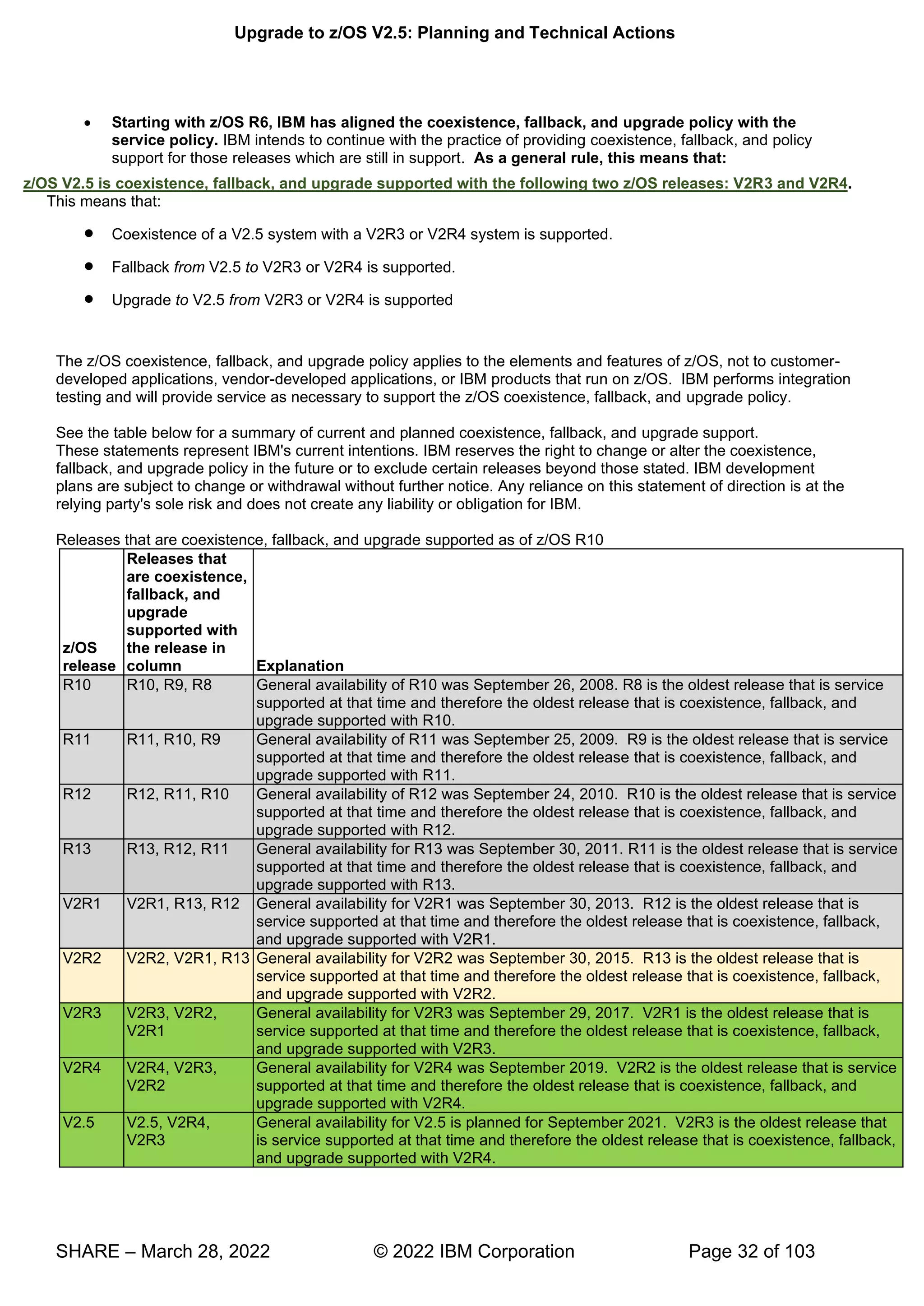
  • 52.
    Upgrade to z/OSV2.5: Planning and Technical Actions SHARE – March 28, 2022 © 2022 IBM Corporation Page 52 of 103 z/OS Upgrade Workflow Starting in z/OS V2.4, IBM no longer provide the z/OS Migration publication, GA32-0889, in its current format. Since z/OS V2.2, the preferred method for learning about upgrade actions has been the z/OS Upgrade Workflow. Discovering, performing, and verifying many upgrade actions through the z/OS MF Workflow function instead of a more traditional book format allows for a tailored and specific upgrade path associated with a particular system. Starting with the z/OS V2.4 release and later, IBM provides upgrade tasks in a z/OS MF Workflow, as well as a single exported file. By providing the z/OS V2.4 upgrade materials in both formats, users still can enjoy the advantages of a z/OSMF Workflow as well as being able to search, browse, and print in a more traditional format. With the removal of the traditional z/OS publication, GA32-0889, it is strongly recommended that you plan for your next upgrade by having z/OS MF ready to use in at least one location in your enterprise. Notice that the exported format of the z/OS upgrade materials that can be easily read or printed for those without any z/OS MF capabilities will not be tailored for any environment.
  • 53.
    Upgrade to z/OSV2.5: Planning and Technical Actions SHARE – March 28, 2022 © 2022 IBM Corporation Page 53 of 103
  • 54.
    Upgrade to z/OSV2.5: Planning and Technical Actions SHARE – March 28, 2022 © 2022 IBM Corporation Page 54 of 103 Upgrade Definitions and Classifications Upgrade (formerly, migration) is the first of two stages in upgrading to a new release of z/OS. The two stages are:  Stage 1: Upgrade. During this stage you install your new system with the objective of making it functionally compatible with the previous system. After a successful upgrade, the applications and resources on the new system function the same way (or similar to the way) they did on the old system or, if that is not possible, in a way that accommodates the new system differences so that existing workloads can continue to run. Upgrade does not include exploitation of new functions except for new functions that are now required.  Stage 2: Exploitation. During this stage you do whatever customizing and programming are necessary to take advantage of (exploit) the enhancements available in the new release. Exploitation follows upgrade. Upgrade Requirement Classification and Timing The upgrade actions are classified as to their requirement status:  Required. The upgrade action is required in all cases.  Required-IF. The upgrade action is required only in a certain case. Most of the actions in this presentation are in this category.  Recommended. The upgrade action is not required but is recommended because it is a good programming practice, because it will be required in the future, or because it resolves unacceptable system behavior (such as poor usability or poor performance) even though resolution might require a change in behavior. To identify the timing of upgrade actions, this presentation uses three types of headings:  Now. These are upgrade actions that you perform on your current system, either because they require the current system or because they are possible on the current system. You don’t need the z/OS V2.5 level of code to make these changes, and the changes don’t require the z/OS V2.5 level of code to run once they are made. Examples are installing coexistence and fallback PTFs on your current system, discontinuing use of hardware or software that will no longer be supported, and starting to use existing functions that were optional on prior releases but required in z/OS V2.5.
  • 55.
    Upgrade to z/OSV2.5: Planning and Technical Actions SHARE – March 28, 2022 © 2022 IBM Corporation Page 55 of 103  Pre-First IPL. These are upgrade actions that you perform after you’ve installed z/OS V2.5 but before the first time you IPL. These actions require the z/OS V2.5 level of code to be installed but don’t require it to be active. That is, you need the z/OS V2.5 programs, utilities, and samples in order to perform the upgrade actions, but the z/OS V2.5 system does not have to be IPLed in order for the programs to run. Examples are running sysplex utilities and updating the RACF data base templates. It is possible to perform some of the upgrade actions in this category even earlier. If you prepare a system on which you will install z/OS V2.5 by making a clone of your old system, you can perform upgrade actions that involve customization data on this newly prepared system before installing z/OS V2.5 on it. Examples of such upgrade actions are updating configuration files and updating automation scripts.  Post-First IPL. These are upgrade actions that you can perform only after you’ve IPLed z/OS V2.5. You need a running z/OS V2.5 system to perform these actions. An example is issuing RACF commands related to new functions. Note that the term “first IPL” does not mean that you have to perform these actions after the very first IPL, but rather that you need z/OS V2.5 to be active to perform the task. You might perform the task quite a while after the first IPL. Icons used in this presentation: ’ v k g means that an IBM Health Check (using the IBM Health Checker for z/OS function) can help you with this upgrade action. means that this is a cleanup item or contains a portion that is a cleanup item. It is associated with something that is obsolete. It may cause confusion if someone thinks it does something. It is best to perform this action to avoid any mig
  • 56.
    Upgrade to z/OSV2.5: Planning and Technical Actions SHARE – March 28, 2022 © 2022 IBM Corporation Page 56 of 103 confusion, since it is not needed anymore. To use the latest version of the z/OS V2.4 Upgrade Workflow, retrieve it from this Github location: https://github.com/IBM/IBM-Z-zOS/tree/master/zOS-Workflow/zOS%20V2.4%20Upgrade%20Workflow To use the latest version of the z/OS V2.5 Upgrade Workflow, it is available on z/OS V2.4 and z/OS V2.3 with a PTF marked with the FIXCAT IBM.Coexistence.z/OS.V2R5. Once the PTF is installed, you will find the workflows in your /usr/lpp/bcp/upgrade path. IBM strongly recommends you use the z/OS Upgrade Workflow from z/OSMF in order to have a customized upgrade of your applicable steps to take. However, if you wish to use the exported version of any z/OS Upgrade Workflow, you can see it here (at the bottom of the page): https://www.ibm.com/support/knowledgecenter/SSLTBW_2.4.0/com.ibm.zos.v2r4.e0zm100/abstract.htm
  • 57.
    Upgrade to z/OSV2.5: Planning and Technical Actions SHARE – March 28, 2022 © 2022 IBM Corporation Page 57 of 103 Upgrade Actions for Elements in z/OS V2.5 When upgrading from z/OS V2.4 to z/OS V2.5, the specified elements in the slide above have new or usual upgrade actions. If you are upgrading from z/OS V2.3, use the z/OS V2.5 Upgrade Workflow for the z/OS V2.3 path to see the upgrade actions which were introduced in V2.4. Alternatively, if you wanted to see the upgrade actions, you can also see the exported workflow on the IBM Documentation website (go to the bottom to click on which upgrade path you are doing). https://www.ibm.com/docs/en/zos/2.4.0?topic=level-zos-upgrade-workflow Some upgrade actions for selected elements follow in this presentation. This presentation does not cover all possible upgrade actions.
  • 58.
    Upgrade to z/OSV2.5: Planning and Technical Actions SHARE – March 28, 2022 © 2022 IBM Corporation Page 58 of 103
  • 59.
    Upgrade to z/OSV2.5: Planning and Technical Actions SHARE – March 28, 2022 © 2022 IBM Corporation Page 59 of 103 General Upgrade Actions For z/OS V2.5 These upgrade actions were taken from z/OS V2.5 Upgrade Workflow. Some descriptions and actions have been shortened for inclusion in this presentation. Not all upgrade actions have been included. For the complete descriptions and actions, refer to z/OS V2.5 Upgrade Workflow. General Upgrade Actions You Can Do Now Install coexistence and fallback PTFs (Required) Upgrade action: Install coexistence and fallback PTFs on your systems to allow those systems to coexist with z/OS V2.5 systems during your upgrade, and allow back out from z/OS V2.5 if necessary. Use the SMP/E REPORT MISSINGFIX command in conjunction with the FIXCAT type of HOLDDATA as follows: 1. Acquire and RECEIVE the latest HOLDDATA onto your pre-z/OS V2.5 systems. Use your normal service acquisition portals (recommended) or download the HOLDDATA directly from http://service.software.ibm.com/holdata/390holddata.html. Ensure you select Full from the Download NOW column to receive the FIXCAT HOLDDATA, as the other files do not contain FIXCATs. 2. Run the SMP/E REPORT MISSINGFIX command on your pre-z/OS V2.5 systems and specify a Fix Category (FIXCAT) value of “IBM.Coexistence.z/OS.V2R5” T w ll identify any missing coexistence and fallback PTFs for that system. For complete information about the REPORT MISSINGFIX command, see SMP/E Commands. 3. Periodically, you might want to acquire the latest HOLDDATA and rerun the REPORT MISSINGFIX command to find out if there are any new coexistence and fallback PTFs. Use SOFTCAP to identify the effect of capacity changes (Recommended) Not required, but is recommended to help in assessing processor capacity and available resources when upgrading to new software levels, and when upgrading to z/Architecture. Upgrade action:  Download SoftCap from one of the following Web sites:  Customers: http://www.ibm.com/support/techdocs/atsmastr.nsf/WebIndex/PRS268  Business partners: http://partners.boulder.ibm.com/src/atsmastr.nsf/Web/Techdocs. Note that this requires an ID on PartnerWorld®.Run SoftCap to determine your expected increase in CPU utilization (if any) and to identify your storage requirements, such as how much storage is needed to IPL. Reference information: SoftCap User’s Guide, which is provided with the tool. General Upgrade Actions Pre-First IPL Migrate /etc /global, and /var system control files (Required) Upgrade action: The /etc, /global, and /var directories contain system control files: the /etc directory contains customization data that you maintain and the /global and /var directory contains customization data that IBM maintains. During installation, subdirectories of /etc , /global, and /var are created. If you install z/OS using ServerPac, some files are loaded into /etc /global, and /var due to the customization performed in ServerPac. You have to merge the files in /etc /global, and /var with those on your previous system. If you install z/OS using CBPDO, you should copy the files from your old system to the z/OS V2.5 /etc and /var subdirectories. Copy files from your old system to the z/OS V2.5 /etc and /var subdirectories, and then modify the files as necessary to reflect z/OS V2.5 requirements. If you have other files under your existing /var directory, then you will have to merge the old and new files under /var. The easiest way to do this is to create a copy of your current /var files and then copy the new /var files into the copy. The following elements and features use /etc: • BCP (Predictive Failure Analysis). • CIM. • Communications Server (IP Services component). • Cryptographic Services (PKI Services and System SSL components). • DFSMSrmm. • IBM HTTP Server. • IBM Tivoli Directory Server (TDS). The LDAP server component uses /etc/ldap. • Infoprint Server. • Integrated Security Services. The Network Authentication Service component uses /etc/skrb. • z/OS UNIX.
  • 60.
    Upgrade to z/OSV2.5: Planning and Technical Actions SHARE – March 28, 2022 © 2022 IBM Corporation Page 60 of 103 The following elements and features use /global: • IBM Knowledge Center for z/OS • IBM z/OS Management Facility (z/OSMF). The following elements and features use /var: • Cryptographic Services (OCSF component). See OCSF: Migrate the directory structure. • DFSMSrmm. • IBM Tivoli Directory Server (TDS). The LDAP server component uses /var/ldap. • Infoprint Server. • Integrated Security Services. The Network Authentication Service component uses /var/skrb. Back virtual storage with real and auxiliary storage (Required) Upgrade action: As you exploit additional virtual storage by defining additional address spaces or by exploiting memory objects, ensure that you have defined sufficient real and auxiliary storage. Review real storage concentration indicators via an RMF report to evaluate if additional real or auxiliary storage is needed:  Check UIC and average available frames.  Check demand page rates.  Check the percentage of auxiliary slots in use. Reference information: For more information about memory objects, see z/OS MVS Programming: Extended Addressability Guide and Washington Systems Center flash 10165 at http://www.ibm.com/support/techdocs. (Search for “flash10165”.) Remove references to deleted data sets and path (Required) Upgrade action: Using the tables in z/OS Upgrade Workflow as a guide, remove references to data sets and paths that no longer exist. Remove the references from the following places:  Parmlib  Proclib  Logon procedures  Catalogs  Security definitions, including program control definitions  DFSMS ACS routines  /etc/profile  SMP/E DDDEF entry (if you installed with CBPDO)  Backup and recovery procedures, as well as any references to them in the table, the high-level qualifiers in the data set names are the default qualifiers. Note: Do not remove any data sets, paths, or references that are needed by earlier-level systems until those systems no longer need them, and you are sure you won’t need them for fallback. Reference information: z/OS Upgrade Workflow contains the list of all removed data sets and paths in z/OS V2R.5 and V2.4. Add references to new data sets (Required) Upgrade action: For z/OS V2.5, RMF and z/OS Data Gatherer, had several data sets restructured. Follow the RMF upgrade action to make the necessary parmlib and SYSPROC changes. For z/OS V2.4, the following element had a DLIB data set and a path (with a file system) that were added: • z/OS Container Extensions Accommodate new address spaces (Recommended) Not required, but recommended to keep interested personnel aware of changes in the system and to ensure that your MAXUSER value in parmlib member IEASYSxx is adequate.
  • 61.
    Upgrade to z/OSV2.5: Planning and Technical Actions SHARE – March 28, 2022 © 2022 IBM Corporation Page 61 of 103 The following elements adds new address spaces for z/OS V2.4, which are exploitation support, and are not upgrade actions: • z/OS Authorized Code Scanner (zACS) This new priced feature, added post-GA of z/OS V2.4 adds one new address space, BPNZACS. zACS provides the capability of testing PC and SVC routines to determine if they might result in a security vulnerability. • z/OS Container Extensions. This a new element in z/OS V2.4. It provides the runtime support to deploy and run Linux on IBM Z applications that are packaged as Docker Container images on z/OS. zCX creates one address space for each provisioned server that is started by the user. The MAXUSER value in parmlib member IEASYSxx specifies a value that the system uses to limit the number of jobs and started tasks that can run concurrently during a given IPL. You might want to increase your MAXUSER value to take new address spaces into account. (A modest overspecification of MAXUSER should not hurt system performance. The number of total address spaces is the sum of M/S, TS USERS, SYSAS, and INITS. If you change your MAXUSER value, you must re-IPL to make the change effective.) Update your check customization for modified IBM Health Checker for z/OS checks (Recommend) Not required, but recommended to ensure that your checks continue to work as you intend them to work. Changes that IBM makes to the checks provided by IBM Health Checker for z/OS can affect any updates you might have made. The following health checks are new in z/OS V2R5: • RACF_ADDRESS_SPACE • RACF_ERASE_ON_SCRATCH • RACF_PROTECTALL_FAIL • RACF_PTKTDATA_CLASS • RACF_SYSPLEX_COMMUNICATION The following health checks are changed in z/OS V2R5: • RACF_SENSITIVE_RESOURCES The following health checks were added by IBM in z/OS V2R4: • IBMCS,ZOSMIGV2R4_NEXT_CS_OSIMGMT • IBMCS,ZOSMIGV2R4PREV_CS_IWQSC_tcpipstackname • IBM_JES2,JES2_UPGRADE_CKPT_LEVEL_JES2 • IBMICSF,ICSF_PKCS_PSS_SUPPORT • IBMINFOPRINT,INFOPRINT_CENTRAL_SECURE_MODE • IBMINFOPRINT,ZOSMIGV2R3_NEXT_INFOPRINT_IPCSSL • IBMISPF,ISPF_WSA • IBMRSM,RSM_MINIMUM_REAL • IBMSDSF,SDSF_CLASS_SDSF_ACTIVE • IBMVSM,ZOSMIGV2R3_NEXT_VSM_USERKEYCOMM The following health checks were changed by IBM in z/OS V2R4: • IBMUSS,ZOSMIGV2R3_NEXT_USS_SMB_DETECTED
  • 62.
    Upgrade to z/OSV2.5: Planning and Technical Actions SHARE – March 28, 2022 © 2022 IBM Corporation Page 62 of 103 • IBMCS,CSVTAM_CSM_STG_LIMIT The following health checks were deleted by IBM in z/OS V2R4: • ZOSMIGV1R12_INFOPRINT_INVSIZE Upgrade action: 1. Look at the updated checks in IBM Health Checker for z/OS: User's Guide. 2. Review changes you made for those checks, in HZSPRMxx parmlib members, for example. 3. Make any further updates for the checks to ensure that they continue to work as intended.
  • 63.
    Upgrade to z/OSV2.5: Planning and Technical Actions SHARE – March 28, 2022 © 2022 IBM Corporation Page 63 of 103
  • 64.
    Upgrade to z/OSV2.5: Planning and Technical Actions SHARE – March 28, 2022 © 2022 IBM Corporation Page 64 of 103 BCP Upgrade Actions For z/OS V2.5 These upgrade actions were taken from z/OS V2.5 Upgrade Workflow. Some descriptions and actions have been shortened for inclusion in this presentation. Not all upgrade actions have been included. For the complete descriptions and actions, refer to z/OS V2.5 Upgrade Workflow. BCP Upgrade Actions Pre-First IPL Accommodate the new DSLIMITNUM default (Required-IF, as of V2.5) Required if the default is not acceptable on your system. In the SMFLIMxx parmlib member, the parameter DSLIMITNUM is used to override the maximum number of data spaces and hiperspaces that can be created by a user-key program. In z/OS V2R5, the default for DSLIMITNUM is changed to 4096. In previous releases, the default was 4294967295. Applications that invoke DSPSERV CREATE, especially those applications that loop erroneously, might fail with the more restrictive DSLIMITNUM default in effect. Upgrade action: SMF 30 record field SMF30NumberOfDataSpacesHWM indicates the high-water mark of the number of data spaces that are owned by the unauthorized (problem state and user key) tasks that are associated with a job. This field is added when you apply APAR OA59137 and APAR OA59126. If your installation runs jobs that rely on the default for SMFLIMxx DSLIMITNUM or IEFUSI word 7 subword 3, inspect the SMF 30 record field SMF30NumberOfDataSpacesHWM fields for values that
  • 65.
    Upgrade to z/OSV2.5: Planning and Technical Actions SHARE – March 28, 2022 © 2022 IBM Corporation Page 65 of 103 exceed 4096. For jobs that exceed 4096, update SMFLIMxx or IEFUSI to allow the maximum number of data spaces that are required. ASCB and WEB are backed in 64-bit real storage by default (Required-IF, as of V2.5) Required if you have an application that relies on the ASCB or WEB to be backed in 31-bit real storage. In z/OS 2.5, the address space control block (which is mapped by IHAASCB) and the work element block (which is mapped by IHAWEB) are backed in 64-bit real storage by default. Previously, these data structures were backed in 31-bit storage, unless your DIAGxx parmlib member specified CBLOC REAL31(IHAASCB,IHAWEB). In z/OS 2.4, the keywords REAL31 and REAL64 were added to the CBLOC statement of parmlib member DIAGxx. With these keywords, you can specify which data structures are backed in 31-bit real storage or 64-bit real storage. Upgrade action: Check for programs that issue the load real address (LRA) instruction in 31-bit addressing mode for the ASCB or WEB data structures. The LRA instruction cannot be used to obtain the real address of locations backed by real frames above 2 gigabytes in 24-bit or 31-bit addressing mode. For those situations, use the LRAG instruction instead of LRA. The TPROT instruction can be used to replace the LRA instruction when a program is using it to verify that the virtual address is translatable and the page backing it is in real storage. If you have programs that do not tolerate 64-bit real storage backing for the ASCB or WEB data structures, update the DIAGxx parmlib member to specify CBLOC REAL31(IHAASCB,IHAWEB). Accommodate the new CHECKREGIONLOSS default (Recommended, as of V2.5) Recommended. Enabling the CHECKREGIONLOSS option causes initiator address spaces to be recycled when the maximum obtainable region size is reduced below a threshold. This change is expected to have a positive impact on the system without requiring any intervention In the DIAGxx parmlib member, the parameter VSM CHECKREGIONLOSS specifies the amount of region size loss that can be tolerated in an initiator address space. The initiator remembers the initial maximum available region size (below and above 16 MB) before it selects its first job. Whenever a job ends in the initiator, if the maximum available region size (below or above 16MB) is decreased from the initial value by more than the CHECKREGIONLOSS specification, the initiator ends with message IEF0931 or IEF094A, depending on whether the subsystem automatically restarts the initiator. When CHECKREGIONLOSS is enabled, your installation can avoid encountering 822 abends or 878 abends in subsequent jobs that are selected by the initiator. These abends can occur when the available region size decreases because of storage fragmentation or problems that prevent storage from being freed. In z/OS V2R5, CHECKREGIONLOSS is enabled by default with a value of (256K,30M). This change means that when the 24-bit region size decreases by 256K or more, or when the 31-bit region size decreases by 30M or more, the initiator is ended and restarted, with message IEF0931 or IEF094A. Upgrade action: Verify that the CHECKREGIONLOSS option is specified in your active DIAGxx parmlib member:
  • 66.
    Upgrade to z/OSV2.5: Planning and Technical Actions SHARE – March 28, 2022 © 2022 IBM Corporation Page 66 of 103 • If the CHECKREGIONLOSS option is not specified in your active DIAGxx parmlib member, determine whether you want the option to be disabled on your z/OS V2R5 system. If so, you can set the CHECKREGIONLOSS to a very high value such as (16M,2046M), which will effectively disable the option. • If the CHECKREGIONLOSS option is specified in your active DIAGxx parmlib member, and you want to continue using your current setting, you have no action to take. Consider using the IBM default setting CHECKREGIONLOSS(256K,30M). Stop referencing the ETR parmaters in CLOCKxx (Recommended, as of V2.4) In z/OS V2R4, the default values of the CLOCKxx parmlib member ETRMODE and ETRZONE parameters are changed from YES to NO. The IBM z10 was the last IBM mainframe to support the ETRMODE and ETRZONE parameters in CLOCKxx. Because z/OS V2R4 requires a zEC12 or later processor to run, the ETRMODE and ETRZONE parameters are now obsolete. They are deactivated (set to NO) by default. It is recommended that you set these parameters to NO, or remove them from CLOCKxx. Specifying YES can cause unexpected behavior if you also specify STPZONE NO. For details, see APAR OA54440. Upgrade action: Review the CLOCKxx member that you use to IPL your system, and take one of the following actions: • If CLOCKxx does not specify ETRMODE or ETRZONE, you have no action to take. • If CLOCKxx specifies ETRMODE YES or ETRZONE YES, set these parameters to NO, or remove them so that they default to NO. • If CLOCKxx specifies ETRMODE NO and ETRZONE NO, you have no action to take. Evaluate the changed default for system logger’s use of IBM zHyperwrite (Required-IF, as of V2.4) Required if you want system logger to use IBM zHyperwrite data replication. With the installation of APAR OA57408, the use of IBM zHyperWrite data replication by system logger is changed from enabled to disabled by default.The IBM zHyperWrite function was originally provided by APAR OA54814. In parmlib member IXFCNFx, this option is specified, as follows: MANAGE . . . HYPERWRITE ALLOWACCESS(YESNO) When IBM zHyperwrite is enabled for use with system logger, it provides data replication for the following types of log stream data sets: • Staging data sets for DASDONLY type log streams • Offload data sets for both the DASDONLY type and Coupling Facility structure-based type log streams. System logger does not use zHyperwrite for the staging data sets for Coupling Facility structure-based type log streams. Upgrade action: If you do not want system logger to use IBM zHyperwrite data replication, you have no action to take. When you install APAR OA57408, the use of IBM zHyperWrite data replication by system logger is disabled by default. To determine whether system logger on your system uses IBM zHyperwrite data replication, you can query the current setting by entering the following command: DISPLAY LOGGER,IXGCNF,MANAGE In response, message IXG607I identifies the current setting. To enable system logger use of IBM zHyperwrite data replication, you can do either of the following: • Enter the command SETLOGR MANAGE,HYPERWRITE,ALLOWUSE(YES) • Update the IXGCNFxx parmlib member with ALLOWUSE(YES).
  • 67.
    Upgrade to z/OSV2.5: Planning and Technical Actions SHARE – March 28, 2022 © 2022 IBM Corporation Page 67 of 103 Prepare for the removal of support for user key common areas (Required, as of V2.4) IBM strongly recommends that you eliminate all use of user key common storage. Allowing programs to obtain user key (8-15) common storage creates a security risk because the storage can be modified or referenced, even if fetch protected, by any unauthorized program from any address space. Therefore, without the restricted use common service area (RUCSA) optional priced feature, the obtaining of user key (8-15) storage is not supported in z/OSV2R4. RUCSA is more secure because it can be managed as a SAF resource. However, it does not prevent two or more different SAF-authorized applications from altering or referencing another application's RUCSA storage. RUCSA became available as a part of the BCP base element with APAR OA56180 on earlier z/OS releases, but it is only available as a priced feature in z/OS V2R4. Related to this change: • Support to change the key of common ESQA storage to a user key (via CHANGKEY) is removed regardless of RUCSA exploitation. • NUCLABEL DISABLE(IARXLUK2) is no longer a valid statement in the DIAGxx parmlib member. ( Note: This statement only exists in z/OS V2R3.) • Support of user-key (8 - 15) SCOPE=COMMON data spaces is removed regardless of RUCSA exploitation. • YES is no longer a valid setting for the following statements in the DIAGxx parmlib member: VSM ALLOWUSERKEYCSA - controls the allocation of user key CSA. ALLOWUSERKEYCADS - controls the allocation of user key SCOPE=COMMON data space Upgrade action: • See Part 1 (Planning) information for the details on this removal. Review the list of WTORs in parmlib member AUTOR00 (Required) As of z/OS V1R12, the DDDEF'd PARMLIB provides an AUTOR00 member. This member should be found in your parmlib concatenation during IPL and will result in auto-reply processing being activated. If the WTORs listed in AUTOR00 are automated by your existing automation product, ensure that the replies in AUTOR00 are appropriate. Upgrade action: Examine the WTOR replies in the AUTOR00 parmlib member. If the replies or delay duration are not desirable, you can create a new AUTORxx parmlib member and make corresponding changes. Also compare the replies to what your automation product would reply to these WTORs. Make sure that the AUTOR00 replies are in accordance with the replies from your automation product. IBM does not recommend making updates to AUTOR00, because updates to AUTOR00 might be made by the service stream or in new z/OS releases. There were no updates to AUTOR00 for z/OS V2.5. There were updates to AUTOR00 for z/OS V2.4.
  • 68.
    Upgrade to z/OSV2.5: Planning and Technical Actions SHARE – March 28, 2022 © 2022 IBM Corporation Page 68 of 103 DFSMS Upgrade Actions For z/OS V2.5 These upgrade actions were taken from z/OS V2.5 Upgrade Workflow. Some descriptions and actions have been shortened for inclusion in this presentation. Not all upgrade actions have been included. For the complete descriptions and actions, refer to z/OS V2.5 Upgrade Workflow. DFSMS Upgrade Actions You Can Do Now DFSMSdfp: Increase storage for SMS ACDS data sets (Required-IF, as of OA52913) Required if you use the ACDS and it is reaching full capacity. With APAR OA52913, the length of the management class definition (MCD) in the SMS active control data set (ACDS) was increased from 328 to 760 bytes. This change was made in support of automatic migration support for transparent cloud tiering (TCT). With this change, the values that are used to estimate the size of storage that is needed for an active control data set are out of date. If the ACDS data set is full, the follow errors could occur: • IEC070I 203: Extend was attempted but no secondary space was specified • IGD058I 6068 ' ’ : Problem could be caused by insufficient space to extend the data set Check your utilization of the ACDS. To prevent the ACDS from reaching full, consider reallocating the ACDS to allow for more space. When you allocate the SCDS and ACDS, specify secondary space allocations. This action helps to ensure that extends can be performed when: • New classes, groups, and other structures are added • Sizes of these structures increase in size.
  • 69.
    Upgrade to z/OSV2.5: Planning and Technical Actions SHARE – March 28, 2022 © 2022 IBM Corporation Page 69 of 103 DFSMS UpgradeActions Pre-First IPL DFSMSdss: SHARE keyword is ignored for COPY and RESTORE of PDSE (Req-IF, as of V2.4) Required if your programs open PDSE data set when DFSMSdss is writing to them. Starting in z/OS V2R4, your programs must close PDSE data sets before these data sets are overwritten by a DFSMSdss COPY or RESTORE operation. Otherwise, the DFSMSdss COPY or RESTORE operation encounters serialization errors, such as an ADR412E. Note: This behavior occurs regardless of whether the SHARE keyword is specified. For programs that cannot close the PDSE data sets while a COPY or RESTORE operation is in progress, these programs can specify the TOLERATE(ENQFAILURE) keyword. If so, the program is responsible for ensuring data onsistency. IBM recommends against using the TOLERATE(ENQFAILURE) keyword; use it at your own risk. Upgrade action: Applications must now close PDSEs before a copy or restore is to overwrite it. If you do not close down the application, serialization errors such as an ADR412E occurs on the DFSMSdss copy or restore. Note: Changing DFSMSdss to ignore the SHARE keyword for output data sets ensure integrity and prevent DFSMSdss from restoring a PDSE that an application has open. It also prevents an application from opening a PDSE that DFSMSdss is restoring. DFSMSdfp: Review XRC parmlib members for use of default values (Recommended, as of V2.4) Required if your programs open PDSE data set when DFSMSdss is writing to them. In z/OS V2R4, some XRC (Extended Remote Copy, aka Global Mirror), default settings are changed to match IBM recommendations. If you depend on the old default, you must explicitly specify the old values in the appropriate parmlib members. Upgrade action: Examine parmlib members that are related to XRC for settings with changed defaults: If the setting is not specified in any of the XRC-related parmlib members, determine whether the old default value needs to be retained according to the following table. If the value needs to be the old default, it must be specified in the member. Otherwise, the new default takes effect when XRC is started on the new z/OS release. If the setting is specified in an XRC-related parmlib member (with any value, but especially with the old default value), consider whether the new default value is appropriate to use.
  • 70.
    Upgrade to z/OSV2.5: Planning and Technical Actions SHARE – March 28, 2022 © 2022 IBM Corporation Page 70 of 103 HCD Upgrade Actions For z/OS V2.5 These upgrade actions were taken from z/OS V2.5 Upgrade Workflow. Some descriptions and actions have been shortened for inclusion in this presentation. Not all upgrade actions have been included. For the complete descriptions and actions, refer to z/OS V2.5 Upgrade Workflow. HCD Upgrade Actions You Can Do Now Remove configurations for unsupported processor types (Required-IF, as of V2.5) Required if you unsupported processors are still defined in your IODF. In z/OS V2R5, HCD removes support for processor types that are out of service. Specifically, HCD no longer supports the following processors types: • IBM z10 EC, processor type 2097, models E12, E26, E40, E56, and E64 • IBM z10 BC, processor type 2098, model E10 • IBM z9 EC, processor type 2094, models S08, S18, S28, S38 and S54 • IBM z9 BC, processor type 2096, models R07 and S07 • IBM z990, processor type 2084, models A08, B16, C24, and D32 • IBM z890, processor type 2086, model A04 z/OS V2R5 does not run on these servers. z/OS V2.3 runs on EC12, BC12 or higher. Previously, in z/OS V2R4, support was withdrawn for the IBM z900 (processor type 2064) and IBM z800 (processor type 2066). If your I/O definition file (IODF) contains definitions for these servers, and you use HCD to maintain your configuration, you must delete the old definitions before moving to z/OS V2R5. HCD cannot validate the I/O configuration for unsupported processor types. Steps to take: Check your currently active IODFs to determine whether you have any saved processor configurations for these out-of-service processors. Foillow these steps: 1. Start HCD.
  • 71.
    Upgrade to z/OSV2.5: Planning and Technical Actions SHARE – March 28, 2022 © 2022 IBM Corporation Page 71 of 103 2. “ , , v w g ” 3. “P ” g . 4. Check the Type column for any of the out-of-service processor types. 5. If you still have any processor configuration for one or more of the out-of-service processor types, determine whether the processor is still in use. If not, delete the configuration. Otherwise, if the processor it is still in use, the system that maintains the IODF cannot be upgraded to z/OS V2R5.
  • 72.
    Upgrade to z/OSV2.5: Planning and Technical Actions SHARE – March 28, 2022 © 2022 IBM Corporation Page 72 of 103 RMF Upgrade Actions For z/OS V2.5 This upgrade action was taken from z/OS V2.5 Upgrade Workflow. Some descriptions and actions have been shortened for inclusion in this presentation. Not all upgrade actions have been included. For the complete descriptions and actions, refer to z/OS V2.5 Upgrade Workflow. RMF Upgrade Actions Pre-First IPL Determine updates for RMF structural changes (Required, as of V2.5) When the PTFs for APARs OA58281 and OA58759 are applied to z/OS V2.3 or V2.4, the RMF product is restructured into the Data Gatherer and Reporter components. In z/OS V2.5, the Data Gatherer component is packaged and delivered as separate FMID, and a priced feature of Advanced Data Gatherer is added.. With the z/OS Data Gatherer now included in the z/OS base, the RMF installation procedure and licensing model are changed. RMF consists of two components that work together to provide performance management capabilities, as follows: z/OS Data Gatherer Collects performance measurements from the hardware and operating system and provides access to these measurements across the sysplex. RMF Reporter Uses the collected measurements to report performance statistics in tabular and graphical reports The term RMF refers to the RMF Reporter component. When you are entitled to RMF, you are also entitled to the Advanced Data Gatherer priced feature. In z/OS V2.5, the Data Gatherer base z/OS component (566527401) is shipped within the same FMID as the z/OS Advanced Data Gatherer priced feature, FMID HRG77D0. The RMF Reporter component (566527404) remains in the priced RMF feature and is packaged in the existing FMIDs HRM77D0 and JRM77DJ. The new RMF feature provides the same capabilities as the RMF feature. The RMF feature entitles you to use both RMF Reporter and z/OS Advanced Data Gatherer.
  • 73.
    Upgrade to z/OSV2.5: Planning and Technical Actions SHARE – March 28, 2022 © 2022 IBM Corporation Page 73 of 103 Upgrade action: • z/OS Data Gatherer product libraries SYS1.SGRBLINK must be added to the link list and APF list. SYS1.SGRBLPA must be added to the LPA list. • RMF users must change SERBLINK to SERBLNKE in the link list. • IBM supplied procedures RMF and RMFGAT are installed into SYS1.PROCLIB (as in previous releases), but are part of z/OS Data Gatherer. • IBM supplied procedures RMFCSC, RMFM3B, GPMSERVE, GPM4CIM are installed into SYS1.PROCLIB and are owned by RMF, as in previous releases. • IBM supplied CLISTs ERBS2V, ERBV2S, and REXX execs ERBSCAN, ERBSHOW, ERBVSDEF, are installed into SYS1.SGRBCLS during z/OS Data Gatherer installation. Make it available to your SYSPROC. If you use RMF, make SERBCLS available in your SYSPROC. • Make the follow updates to your RACF program profiles: ' ’ ' ’ ' ’ ' ’ HK) ' ’ ' ’
  • 74.
    Upgrade to z/OSV2.5: Planning and Technical Actions SHARE – March 28, 2022 © 2022 IBM Corporation Page 74 of 103
  • 75.
    Upgrade to z/OSV2.5: Planning and Technical Actions SHARE – March 28, 2022 © 2022 IBM Corporation Page 75 of 103 Various element default changes for more secure communications These upgrade actions were taken from z/OS V2.5 Upgrade Workflow. Some descriptions and actions have been shortened for inclusion in this presentation. Not all upgrade actions have been included. For the complete descriptions and actions, refer to z/OS V2.5 Upgrade Workflow. There were no secure communications default changes in z/OS V2.5. CIM: Accommodate the default change from HTTP to HTTPS (Required, as of V2.4) In z/OS V2R4, the common information model (CIM) server is changed to use HTTPS connections by default. On start-up, the CIM server listens on the HTTPS port, rather than the HTTP port, as was done in previous releases. The change from HTTP to HTTPS is intended to allow for more secure communication with the CIM server. The following CIM server configuration defaults are affected: • enableHttpConnection=true • enableHttpsConnection=false In z/OS V2R4, these defaults are changed to: • enableHttpConnection=false • enableHttpsConnection=true Based on this change, the CIM server opens a listener on port 5989 by default. If a client connection on this port is not secured b y AT-TLS, the connection is closed and an appropriate error message is issued on the operations console. It is recommended that you use HTTPS instead of HTTP, which allows the CIM server to use Application Transparent Layer Security (AT-TLS) functions. Here, the communication between the CIM client and the CIM server is encrypted. You must also configure the CIM client applications to use HTTPS. Ensure that the applications run as CIM clients connected to the CIM server on HTTPS port 5989. Fall back to HTTP is possible, though it is not secure and therefore not recommended. If you need the CIM server to use the HTTP protocol on start-up, follow these steps: • Start the CIM server with the following settings specified in the configuration properties file: o enableHttpConnection=true o enableHttpsConnection=false • Alternatively, you can dynamically change the enableHttpConnection value and restart the CIM server by entering either of these commands on the operations console: o cimconfig -s enableHttpConnection= true -p o F CFZCIM,APPL=CONFIG,enableHttpConnection=true,PLANNED PKI Services: Ensure that users have the CA root certificate for the PKI web interfaces (Required-IF, as of V 2.4) Required if you a first-time user of PKI Services web page interfaces. A web browser must have the root CA of the web server, otherwise, the user cannot access the PKI page. As of z/OS V2R4, the PKI Services component of z/OS uses the HTTPS protocol for its web page interfaces. In previous releases, PKI Services presented the first web page by using the HTTP protocol. Doing so allowed the user to use the link on this page to download the certificate authority (CA) root
  • 76.
    Upgrade to z/OSV2.5: Planning and Technical Actions SHARE – March 28, 2022 © 2022 IBM Corporation Page 76 of 103 certificate of the web server certificate into the web browser. Thereafter, all the subsequent web pages used HTTPS. To help ensure strong security, web pages should use HTTPS rather than HTTP. To use HTTPS, the CA w v ’ w w Starting with z/OS V2R4, the PKI page that previously used HTTP is now updated to use HTTPS. The link that is used to deliver the CA root certificate on the first page is removed. Therefore, you must use an alternative method to distribute the CA root certificate to the appropriate users at your installation. Upgrade action: For any web browser that is planned to be used to access the PKI web page interface for the first time, your PKI administrator must distribute the CA root certificate of the web server (HTTP server, WebSphere, or WebSphere Liberty) to users who require access to the PKI web page interfaces. A possible method is to distribute the CA root certificate is by using the same communication channel that you use to provide users with the URI of the PKI web page. For example, if you send email, you can 1. Add the CA root certificate as an attachment or include it as Base64 encoded text in the first email. 2. Send a separate email with the root certificate fingerprint to help users ensure that the correct CA certificate was received in the previous email. Refer to PKI Services Guide and Reference topic "Steps for accessing the user web pages" for more options to distribute the CA root certificate. Infoprint Central requires SSL connections by default (Required, as of V2.4) Required if you are running Infoprint Central Starting with z/OS V2R4, SSL connection is required by default for the Infoprint Central web browser GUI. In previous releases, the GUI worked with or without SSL. This change requires your installation to specify enabled SSL for your IBM HTTP Server (IHS) powered by Apache 31-bit configuration. Doing so causes the httpd.conf.updates file to be updated with a rewrite directive that converts the HTTP links to HTTPS links. This action saves users from having to update their Infoprint Central bookmarks. For users who do not want to change their IHS configurations to use SSL, an Infoprint Server configuration attribute and new ISPF field are provided. The new option has an attribute name of use- unencrypted-connection and an ISPF panel field name of “Use unencrypted connection”. Note that this connection type is less secure than HTTPS. You are encouraged to set up SSL before upgrading to z/OS V2R4. Upgrade action: If SSL is not enabled in IHS and you are using Infoprint Central, follow these instructions. To use an SSL connection for Infoprint Central, do the following: 1. Follow the instructions to enable SSL in IBM HTTP Server on z/OS Migrating from Domino-powered to Apache- powered, which is available online:http://www.redbooks.ibm.com/redpapers/pdfs/redp4987.pdf. 2. Uncomment the Rewrite directive in the httpd.conf.updates file provided by Infoprint Server before copying the Infoprint Central directives to the httpd.conf file. 3. Test an Infoprint Central link or bookmark to ensure that Infoprint Central loads in the browser. If you need to use an unencrypted connection, do the following: 1. Use the Infoprint Server System Configuration ISPF panel or PIDU to set the use-unencrypted-connection attribute to yes in the printer inventory. 2. Test an Infoprint Central link or bookmark to ensure that Infoprint Central loads in the browser.
  • 77.
    Upgrade to z/OSV2.5: Planning and Technical Actions SHARE – March 28, 2022 © 2022 IBM Corporation Page 77 of 103 RMF: Configure AT-TLS to enable secure communication with the RMF distributed data server (Re quired, as of V2.4) Required if you rely on the current default of HTTPS(NO). With RMF V2R4, the GPMSRVxx parmlib member option HTTPS(ATTLS) is specified by default. As a result, the RMF distributed data server (DDS) ensures that incoming connections are secured by AT-TLS. If an incoming connection is not secured by AT-TLS, the connection is refused. Upgrade action: To allow insecure communication for the DDS, you can specify the option HTTPS(NO) in the GPMSRVxx parmlib member. However, this setting is not recommended because it allows the DDS to accept insecure connections. Before you can configure the DDS, you must enable the Policy Agent for AT-TLS. Information about how to set up AT-TLS communication is provided in z/OS Communications Server: IP Configuration Guide and z/OS Security Server RACF Security Administrator's Guide. For other security management products, refer to the corresponding security product documentation. The following example shows a rule that enables secure communication with the DDS: # RMF Distributed Data Server Rule TTLSRule DDSServerRule { LocalPortRange 8803 Jobname GPMSERVE Direction Inbound Priority 1 TTLSGroupActionRef DDSServerGRP TTLSEnvironmentActionRef DDSServerENV } TTLSGroupAction DDSServerGRP { TTLSEnabled On Trace 1 } TTLSEnvironmentAction DDSServerENV { HandshakeRole Server TTLSKeyringParms { Keyring DDSServerKeyring } TTLSEnvironmentAdvancedParms { ServerCertificateLabel RMFDDS } } The example rule is described, as follows: TTLSRule: Jobname The name value specifies the job name of the application. GPMSERVE is the job name of the DDS TTLSRule: LocalPortRange The local port the application is bound to for this rule's action to be performed. 8803 is the default HTTP Port of the DDS. TTLSRule: Direction Specifies the direction from which the connection must be initiated for this rule's action to be performed. In this example, Inbound is specified, which means that the rule applies to connection requests that arrive inbound to the local host. TTLSRule: Priority An integer value in the range 1 -2000000000 represents the priority that is associated with the rule. The highest priority value is 2000000000. If you use multiple rules for the DDS server, the more specific a rule is, the higher its priority should be. Generic rules without detail specifications of the incoming connections should have a low priority. TTLSEnvironmentAction: HandshakeRole Specifies the SSL handshake role to be taken for connections in this AT-TLS environment. In this example, Server is specified which means that the SSL hand shake is performed as a server. TTLSKeyringParms: Keyring Specifies the path and file name of the key database z/OS� UNIX file, the ring name of the SAF key ring, or the name of the z/OS PKCS #11 token. In this example, the RACF key ring DDSServerKeyring is specified. TTLSEnvironmentAdvancedParms: ServerCertificateLabel Specifies the label of the certificate for a server application to authenticate the server. In this example, the DDS Server certificate with the label RMFDDS is used. ISPF: Accommodate the ISPF Gateway access change from HTTP to HTTPS (Required-IF, as of V 2.4)
  • 78.
    Upgrade to z/OSV2.5: Planning and Technical Actions SHARE – March 28, 2022 © 2022 IBM Corporation Page 78 of 103 Required if you use ISPF Gateway through the HTTP protocol. Starting in z/OS V2R4, the ISPF Gateway uses HTTPS connections by default. The change from HTTP to HTTPS is intended to allow for more secure communication with the ISPF Gateway. One example of a program that accesses the ISPF Gateway is the installation verification program (IVP) that is included with ISPF. If you use the ISPF Gateway through the HTTP protocol, you must update your configuration to enable SSL for your ISPF gateway traffic. Although not recommended, a configuration option is provided to allow you to override the default, for fall back to non-secure HTTP if needed. Upgrade action: Determine whether the ISPF Gateway is being accessed on your system through non-secure HTTP. To do so, use IBM health check IBMISPF,ZOSMIGV2R3_Next_ISPF_GW_HTTPS. This health check is available for z/OS V2R3 with the PTFs for APARs OA58151 and OA58450 applied. Update your configuration to P g w , “ g HTTP v w ” ISPF Planning and Customizing. Although not recommended, you can override the default by adding environment variable CGI_SECURECONN to your HTTP configuration and setting it to FALSE.
  • 79.
    Upgrade to z/OSV2.5: Planning and Technical Actions SHARE – March 28, 2022 © 2022 IBM Corporation Page 79 of 103 ICSF Upgrade Actions For z/OS V2.5 These upgrade actions were taken from z/OS V2.5 Upgrade Workflow. Some descriptions and actions have been shortened for inclusion in this presentation. Not all upgrade actions have been included. For the complete descriptions and actions, refer to z/OS V2.5 Upgrade Workflow. ICSF Upgrade Actions You Can Do Now Review your CSFPARM DD statement in your ICSF procedure (Required, as of V2.4) Required, as of HCR77D0 which is z/OS V2.4. As of z/OS V2.4 ICSF, sequential data sets will no longer be accepted on the CSFPARM DD statement in the ICSF procedure. Upgrade action: Check for the specification of any sequential data sets specified on the CSFPARM DD statement. Consider using a partitioned data set in place of a sequential data set on the CSFPARM DD statement, for example: //ICSF PROC PRM=XX //ICSF EXEC PGM=CSFINIT,TIME=NOLIMIT,MEMLIMIT=NOLIMIT //CSFPARM DD DSN=SYS1.ICSFLIB(CSFPRM&PRM),DISP=SHR You can find a sample ICSF procedure in SYS1.SAMPLIB(CSF), which is: //* Licensed Materials - Property of IBM //* 5650-ZOS Copyright IBM Corp. 2009, 2018 //CSF PROC //CSF EXEC PGM=CSFINIT,REGION=0M,TIME=1440,MEMLIMIT=NOLIMIT //* When using CSFPARM DD, the installation options data set must be //* a partitioned data set on systems running HCR77D0 or later. 77 77
  • 80.
    Upgrade to z/OSV2.5: Planning and Technical Actions SHARE – March 28, 2022 © 2022 IBM Corporation Page 80 of 103 //CSFPARM DD DSN=USER.PARMLIB(CSFPRM00),DISP=SHR Update references to the old ICSF parts (Required-IF, as of V2.4) Required, if an application that uses the old library, header, or side deck, must be recompiled or relinked. Or, if an application dynamically loads CSFDLL. Existing application that were built with CSFDLL do not require any updates. As of z/OS V2R5, ICSF no longer provides: • CSFDLL module in CSF.SCSFMOD0 • C header file CSFBEXTH in CSF.SCSFHDRS • Side deck CSFDLLSD in CSF.SCSFOBJ Also, the data sets CSF.SCSFHDRS and CSF.SCSFOBJ are no longer created at installation time. These parts were functionally replaced in z/OS V1R9 by the C header file CSFBEXT in SYS1.SIEAHDR.H, the library CSFDLL31 in SYS1.SIEALNKE, and the side deck CSFDLL31 in SYS1.SIEASID. Existing executable load modules that are already link-edited with CSFDLL will continue to run unchanged. Upgrade action: Check your applications on your system for the use of any of the following: • #include <.csfbexth.h>. or #include "csfbexth.h" • Use of side deck CSFDLLSD • Link-edit of CSFDLL into a load module • References to data sets CSF.SCSFHDRS or CSF.SCSFOBJ To use the supported interfaces, make the following changes: • #include <.csfbexth.h>. or #include "csfbexth.h" o Replace with csfbext.h (note the removed 'h' in the include name) and ensure that the standard header location SYS1.SIEAHDR.H or ICSF-specific location /usr/lpp/pkcs11/include is in the include path • Use of side deck CSFDLLSD o Replace with CSFDLL31 from the standard side deck location SYS1.SIEASID • Link-edit of CSFDLL into a load module o Replace with CSFDLL31 from the standard library location SYS1.SIEALNKE • References to data sets CSF.SCSFHDRS or CSF.SCSFOBJ o Replace with SYS1.SIEAHDR.H or SYS1.SIEASID, if not already present in the relevant data set concatenations
  • 81.
    Upgrade to z/OSV2.5: Planning and Technical Actions SHARE – March 28, 2022 © 2022 IBM Corporation Page 81 of 103 77
  • 82.
    Upgrade to z/OSV2.5: Planning and Technical Actions SHARE – March 28, 2022 © 2022 IBM Corporation Page 82 of 103 z/OSMF Upgrade Actions For z/OS V2.5 These upgrade actions were taken from z/OS V2.5 Upgrade Workflow. Some descriptions and actions have been shortened for inclusion in this presentation. Not all upgrade actions have been included. For the complete descriptions and actions, refer to z/OS V2.5 Upgrade Workflow. z/OSMF Upgrade Actions You Can Do Now Use the z/OSMF Desktop interface (Req-IF, as of V2.5) Required because importing Policy Agent configuration files into Network Configuration Assistant is not supported in V2.5. The z/OSMF desktop is the primary user interface for interacting with z/OSMF. In z/OS V2R5, the older classic or tree-style interface is removed from z/OSMF. The z/OSMF desktop provides all of the functions of the classic interface in a more modern and personalized UI. The z/OSMF desktop includes task icons, a taskbar, and other desktop elements that can be customized by the user. With the z/OSMF desktop, users can interact with z/OS through a familiar interface that is similar to other operating environments. The z/OSMF desktop offers additional capabilities, such as: • Search for z/OS data sets and files • Ability to group tasks in a folder. The z/OSMF desktop is displayed to users when they access the z/OSMF welcome page. If the classic interface was saved as a user preference in a previous release, the z/OSMF desktop is displayed instead. Remove references to z/OSMF mobile notification service (Req-IF, as of V2.5) Required if you use the z/OSMF mobile notification service. z/OS V2R5 removes support for z/OSMF mobile notification service. The other z/OSMF notification services, including the Notifications task and the email notification services remain available, and can be used in place of the mobile notification service. Specifically, the following functions are removed from z/OSMF: • In the z/OSMF graphical user interface (GUI), the following pages are removed from the Notification Settings task: Mobile Configuration page, and z/OSMF mobile application entry in the User page.
  • 83.
    Upgrade to z/OSV2.5: Planning and Technical Actions SHARE – March 28, 2022 © 2022 IBM Corporation Page 83 of 103 • REST API that was used for z/OSMF mobile notifications: POST /zosmf/notifications/new • The following request body properties are removed from the z/OSMF notifications REST API: o " ” o “ v ” o “ ” o “ ” The change is related to the removal of the IBM zEvent mobile application and the Bluemix based push services. Upgrade action: Determine whether any of your users or programs use the z/OSMF mobile notification service. If so, use the z/OSMF Notifications task or the z/OSMF email notification service as a replacement. Use the Diagnostic Assistant to collect diagnostic data about z/OSMF (Req-IF, as of V2.3/V2.4 with PH18776) Required because importing Policy Agent configuration files into Network Configuration Assistant is not supported in V2.5. APAR PH18776 removes the diagnostics page from the z/OSMF General Settings task. The diagnostic page is made obsolete with the addition of the new z/OSMF Diagnostic Assistant, which is added by APAR PH11606. The new plug-in provides additional functions for collecting diagnostic data that were not availabe in the older diagnostics page. Using the z/OSMF Diagnostic Assistant might require you to create user authorizations in your external security manager (ESM). This workflow step includes a sample RACF definition that you can use as a model for creating the user authorizations. Upgrade action: Verify that APARs PH18776 (for z/OS V2R3 and V2R4) and PH11606 (for z/OS V2R3) are installed on your system. z/OS V2R4 included PH11606. If so, the z/OSMF Diagnostic Assistant is available and the older diagnostic page is removed from General Settings. To see the service level of the z/OSMF plug-ins, check the z/OSMF server "About page." Verify that APARs PH18776 and PH11606 are installed. In your external security manager, create the authorizations for users of the z/OSMF Diagnostic Assistant task. The following example shows sample RACF statements for defining the resource profile and granting authorization to the z/OSMF administrators group (IZUADMIN): • RDEFINE ZMFAPLA IZUDFLT.ZOSMF.ADMINTASKS.DIAGNOSTIC_ASSISTANT UACC(NONE) • PERMIT IZUDFLT.ZOSMF.ADMINTASKS.DIAGNOSTIC_ASSISTANT CLASS(ZMFAPLA) ID(IZUADMIN) ACCESS(READ) • SETROPTS RACLIST(ZMFAPLA) REFRESH Stop using the policy data import function of Network Configuration Assistant (Req-IF, as of V2.5) Required because importing Policy Agent configuration files into Network Configuration Assistant is not supported in V2.5. z/OS V2.4 was the last release in which the Network Configuration Assistant (NCA) plug-in of z/OSMF supports the policy data import function. This function allowed the user to import existing Policy Agent configuration files into the Network Configuration Assistant. In z/OS V2.5, it is not be possible to import policy configuration files for AT-TLS, IPSec, PBR, and IDS technologies. Import of TCP/IP profiles into Network Configuration Assistant is not affected. Upgrade action: If you plan to import Policy Agent configuration files into the Network Configuration Assistant, perform this work prior on a pre-V2.5 release of z/OS (V2.3, or V2.4). Otherwise, you have no action to take.
  • 84.
    Upgrade to z/OSV2.5: Planning and Technical Actions SHARE – March 28, 2022 © 2022 IBM Corporation Page 84 of 103
  • 85.
    Upgrade to z/OSV2.5: Planning and Technical Actions SHARE – March 28, 2022 © 2022 IBM Corporation Page 85 of 103 SDSF Upgrade Actions For z/OS V2.5 These upgrade actions were taken from z/OS V2.5 Upgrade Workflow. Some descriptions and actions have been shortened for inclusion in this presentation. Not all upgrade actions have been included. For the complete descriptions and actions, refer to z/OS V2.5 Upgrade Workflow. SDSF Actions You Can Do Now Use only SAF-based security to protect SDSF functions (Required-IF, as of V2.5) Required if SDSF on your system uses security definitions in the ISFPARMS assembler source or ISFPRMxx PARMLIB statements. Starting in z/OS V2R5, only SAF-based security is used to protect SDSF product functions. SDSF no longer supports the use of legacy internal security, which is provided by definitions in the ISFPARMS assembler source or ISFPRMxx PARMLIB statements. The system authorization facility (SAF) is an interface defined by z/OS that enables programs to use system authorization services to control access to resources, such as data sets and MVS commands. SAF either processes security authorization requests directly or works with RACF, or other security managers, to process them. As of z/OS V2R5, SDSF uses only SAF security profiles in classes, such as SDSF, OPERCMDS and JESSPOOL, to control the display and command authority in the product. Non- v “ ” “ ” ISFUSER are no longer supported. Upgrade action: If you are already using SAF for SDSF product security, no action is necessary. If you are using SDSF internal security or the ISFUSER exit to enforce local security decisions, you must upgrade to SAF security for SDSF before using z/OS V2R5. Converting to SAF security for SDSF can be performed on any currently supported release of z/OS. For information about how to convert to the SAF interface, see SDSF Security Migration Guide, SC27-4942. Update path environment variables to refer to the 64-bit JVM (Required-IF, as of V2.5) Required if your installation uses SDSF programs that rely on 31-bit Java. In z/OS V2R5, SDSF removes support for running an SDSF/Java application using the 31-bit Java virtual machine (JVM). SDSF/Java applications can run unchanged using the 64-bit JVM. SDSF supplies Java classes (referred to as SDSF/Java) that allow access to SDSF panels and functions through applications written in Java. Such applications are typically invoked under the z/OS UNIX System Services shell by running Java and specifying a main class that references the SDSF/Java classes. In previous releases, an SDSF/Java application could run using either the 31-bit or 64-bit version of the Java JVM. Effective with SDSF V2R5, the JVM must be running in 64-bit mode. Upgrade action: 1. Check the PATH environment variable for a reference to the Java 31-bit JVM, such as the following: export PATH=/usr/lpp/java/J8.0/bin:$PATH If so, change the PATH environment variable to refer to the 64-bit JVM: export PATH=/usr/lpp/java/J8.0_64/bin:$PATH 2. Check the LIBPATH environment variable for a reference to the 31-bit SDSF DLLs, such as the following: export LIBPATH=/usr/lib/java_runtime:$LIBPATH or export LIBPATH=/usr/lpp/sdsf/java/lib:$LIBPATH If so, change your LIBPATH environment variable to refer to the SDSF 64-bit DLL:
  • 86.
    Upgrade to z/OSV2.5: Planning and Technical Actions SHARE – March 28, 2022 © 2022 IBM Corporation Page 86 of 103 export LIBPATH=/usr/lib/java_runtime64:$LIBPATH or export LIBPATH=/usr/lpp/sdsf/java/lib_64:$LIBPATH Note that no changes to your application code are necessary. The only difference is the use of the 64- bit JVM to run the application.
  • 87.
    Upgrade to z/OSV2.5: Planning and Technical Actions SHARE – March 28, 2022 © 2022 IBM Corporation Page 87 of 103 RACF Upgrade Actions For z/OS V2.5 These upgrade actions were taken from z/OS V2.5 Upgrade Workflow. Some descriptions and actions have been shortened for inclusion in this presentation. Not all upgrade actions have been included. For the complete descriptions and actions, refer to z/OS V2.5 Upgrade Workflow. RACF Action Pre-First IPL Accommodate the removal of RACF TSO/E HELP text (Required-IF, as of V2.5) Required if you use the TSO/E HELP command for information about RACF command syntax. As of z/OS V2R5, the RACF TSO/E HELP command is no longer supported. Entering the command "help racf keyword" in TSO/E results in the message "IKJ56802I HELP NOT AVAILABLE." For information about RACF command syntax, see the IBM publication z/OS Security Server RACF Command Language Reference. Upgrade action: Stop using the TSO/E HELP command for information about RACF command syntax. Ensure that the ECC master key is activated in the CCA coprocessor (Required-IF, as of V2.4) Required if your installation uses the RACF RACDCERT command with the RSA(PKDS) keyword and you did not activate the ECC master key in the CCA coprocessor. In RACF, the RACDCERT command is used to manage RACF digital certificates. When you specify RACFDCERT with the RSA(PKDS) keyword for an RSA private key, RACF stores the RSA private key in the ICSF PKA key data set (PKDS). Starting in z/OS V2R4, the RSA private key is stored in PKDS under a more secure master key that is called the ECC master key (32 bytes). In previous releases, the RSA private key was stored in PKDS under a 24- byte master key called the RSA master key. With this change, you must ensure that the ECC master key is activated in the CCA coprocessor. Otherwise, the RACDCERT command that attempting to store an RSA key in PKDS fails with an error.
  • 88.
    Upgrade to z/OSV2.5: Planning and Technical Actions SHARE – March 28, 2022 © 2022 IBM Corporation Page 88 of 103 This change is intended to help maintain strong security in your enterprise. It also supports the generation of a new signature algorithm on certificates that are used for TLS1.3, which is introduced in z/OS V2R4. To detect an active ECC master key and the availability of a coprocessor CCA-5.3 or above, use health check IBMICSF,ICSF_PKCS_PSS_SUPPORT. Based on this status, the health check indicates whether PKCS-PSS algorithms can be used under current conditions. This health check is available with APAR OA56837. Upgrade action: Look for uses of the RACDCERT command specified with the RSA(PKDS) keyword. For example: RACDCERT GENCERT...RSA(PKDS(...)) RACDCERT REKEY...RSA(PKDS(...)) RACDCERT ADD ...PKDS(...) If so, verify that the ECC master key is activated before these commands are used on a z/OS V2R4 system. You can use either of the following approaches: • Open ICSF panel option 1 and check the CCA coprocessor ECC master keys status. • Run the ICSF ECC master key health check. Failure to do this upgrade action will result in RACDCERT command failures with reason code x'00002B08' and the following message: IRRRD117I Unexpected ICSF CSNDPKG return code x'00000008 ' and reason code x'00002B08'. The request is not processed. RACF Action Post-First IPL Remove RACF dynamic classes named IZP and ZOWE (Recommended, as of V2.5) Not required, but recommended to avoid messages that indicate a conflict between the IBM classes and the dynamic classes. If your installation uses IBM Zowe, its documentation directed you to add the ZOWE class to RACF. In z/OS V2R5, this class can be deleted after all of the systems that share the RACF database are upgraded to z/OS V2.5. If your installation uses IBM Unified Resource Manager, its documentation directed you to add the IZP class to RACF. In z/OS V2R5, this class can be deleted after all of the systems that share the RACF database are upgraded to z/OS V2.5. Despite issuing message ICH14079I, RACF functions normally using the IBM-defined class. In z/OS V2.5, RACF adds the IZP and ZOWE classes in the supplied class descriptor table. Warning: If the RACF database is shared with any z/OS release earlier than V2R5, the deletion of the class will make the profiles in that class unusable on the downlevel system Otherwise, after you upgrade to z/OS V2R5, RACF identifies the conflict between the dynamic class and the IBM class by issuing message ICH14079I during IPL and with every subsequent SETROPTS RACLIST(xxx) REFRESH for the class. For a list of the new classes that are shipped with RACF, see the topic “Supplied resource classes for systems” in the IBM publication Security Server RACF Security Administrator's Guide. Upgrade action: Check for message ICH14079I or the existence of the IZP and ZOWE classes in the RACF class descriptor table (CDT). For example:
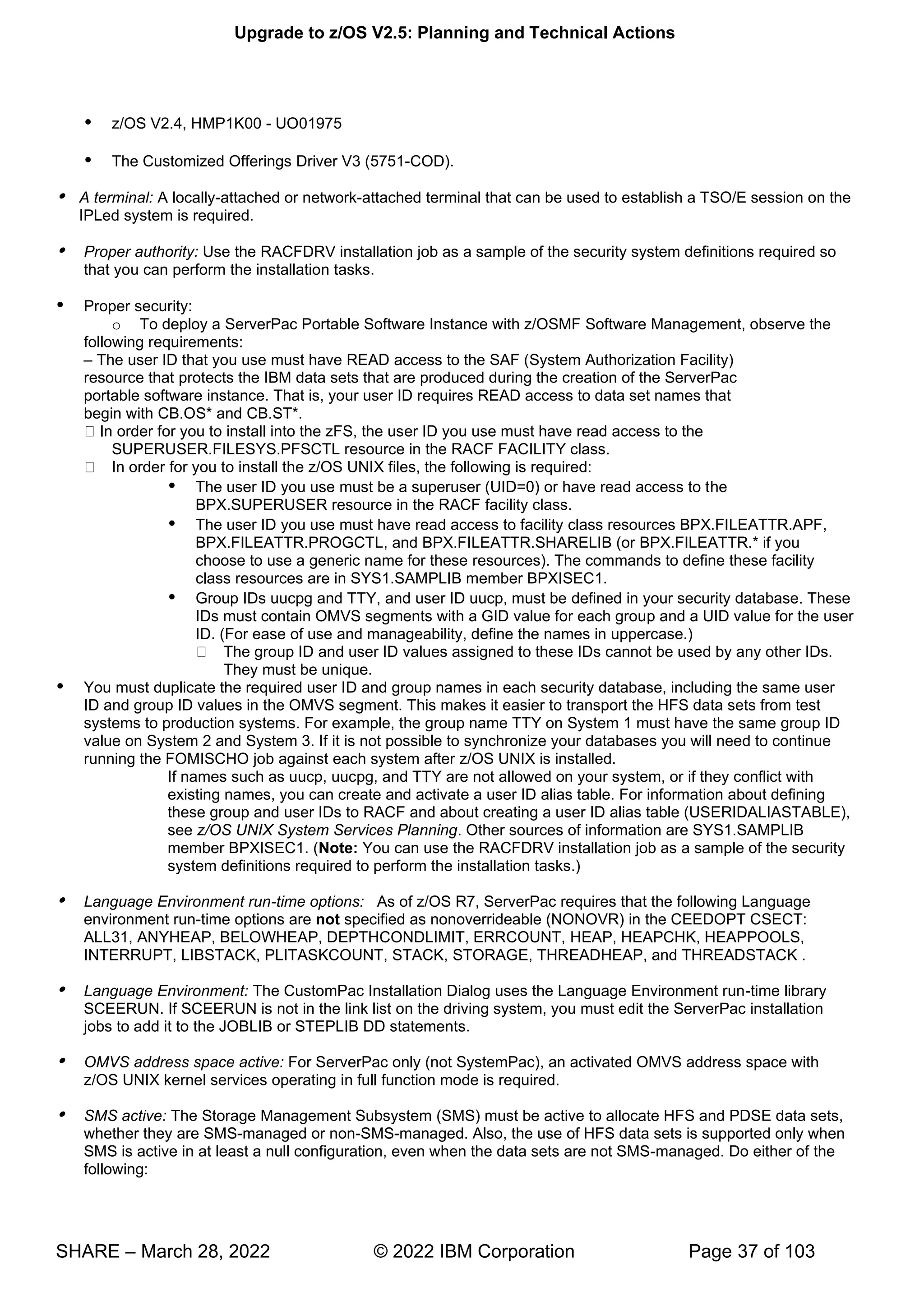
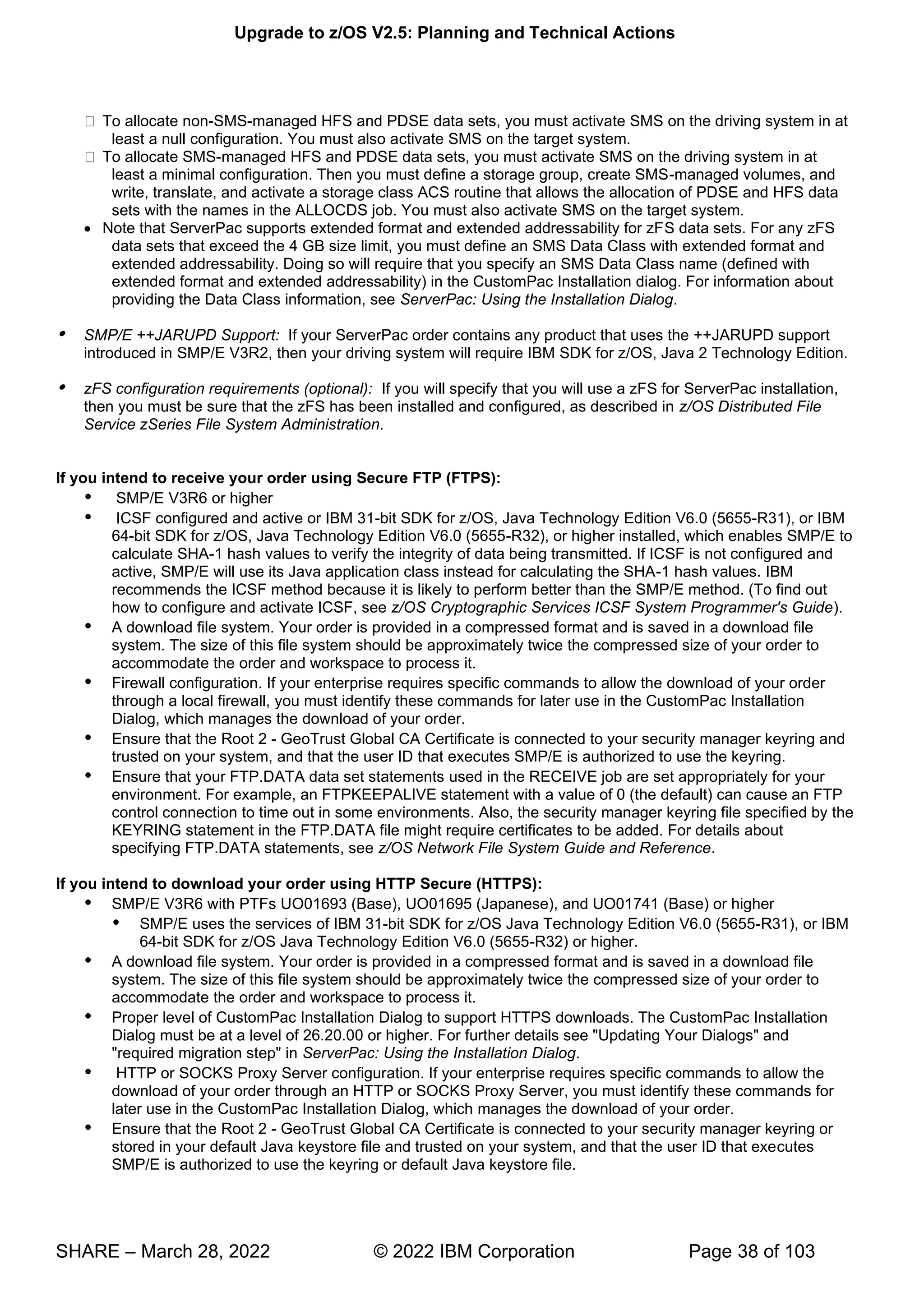
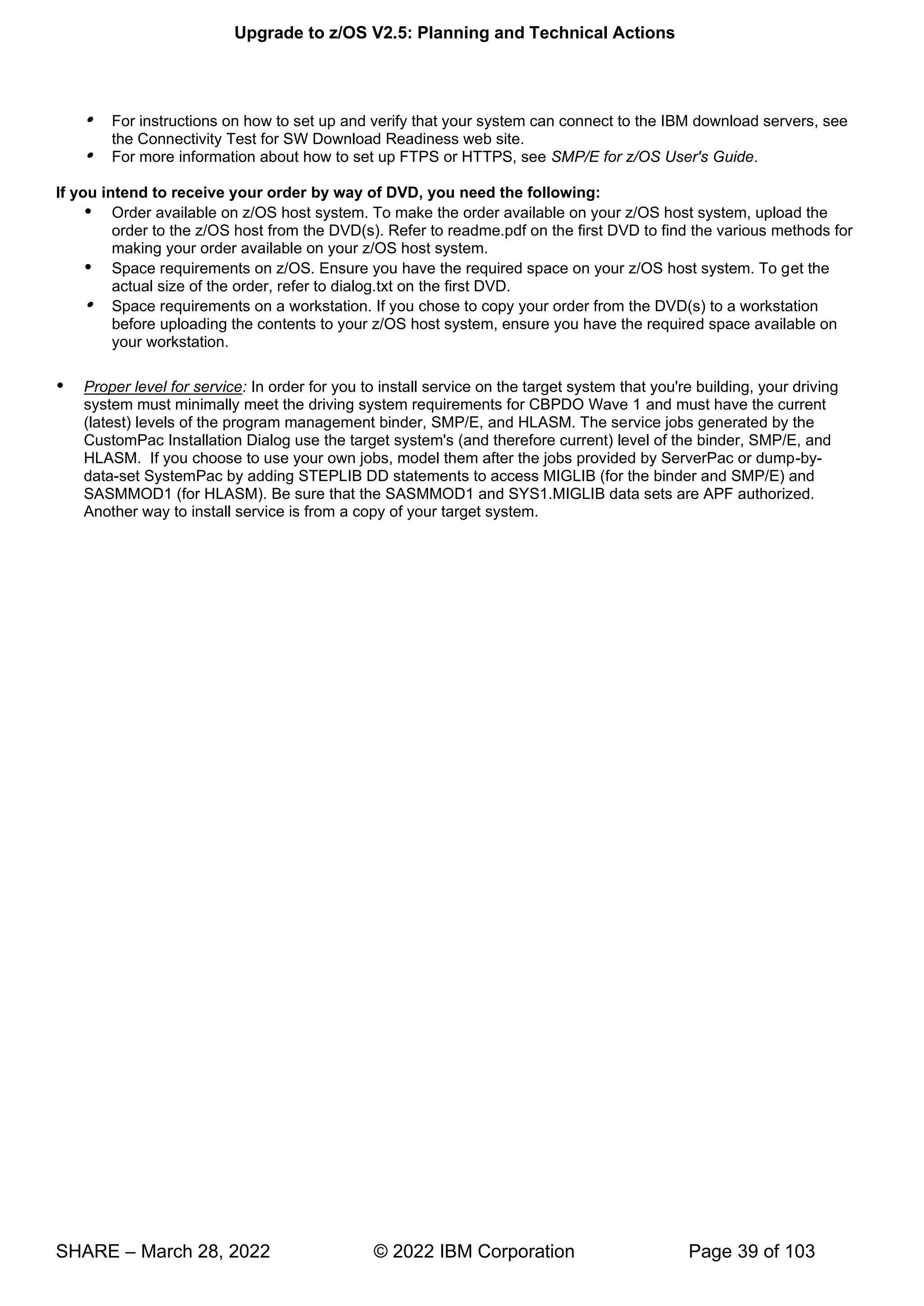
  • 89.
    Upgrade to z/OSV2.5: Planning and Technical Actions SHARE – March 28, 2022 © 2022 IBM Corporation Page 89 of 103 • RLIST CDT IZP CDTINFO • RLIST CDT ZOWE CDTINFO Important: Ensure that the dynamic class was defined compatibly with the IBM class, as documented by Zowe or IBM Unified Resource Manager. Specifically, verify that the POSIT value matches what is documented for the class in z/OS Security Server RACF Macros and Interfaces (607 for ZOWE, 608 for IZP). If not, change the POSIT value on your current release before upgrading to V2.5. The Security Administrator's Guide contains instructions on changing a POSIT number in the topic titled "Changing a POSIT value for a dynamic class." When all the systems that share the RACF database are upgraded to z/OS V2.5, delete the classes as follows: • RDELETE CDT IZP • RDELETE CDT ZOWE • SETROPTS RACLIST(CDT) REFRESH In the interim, the ICH14079I messages can be ignored. After the classes are deleted from the RACF CDT class and the RACF CDT class is refreshed, the message is no longer issued. There is no need to alter any profiles in the IZP or ZOWE class.
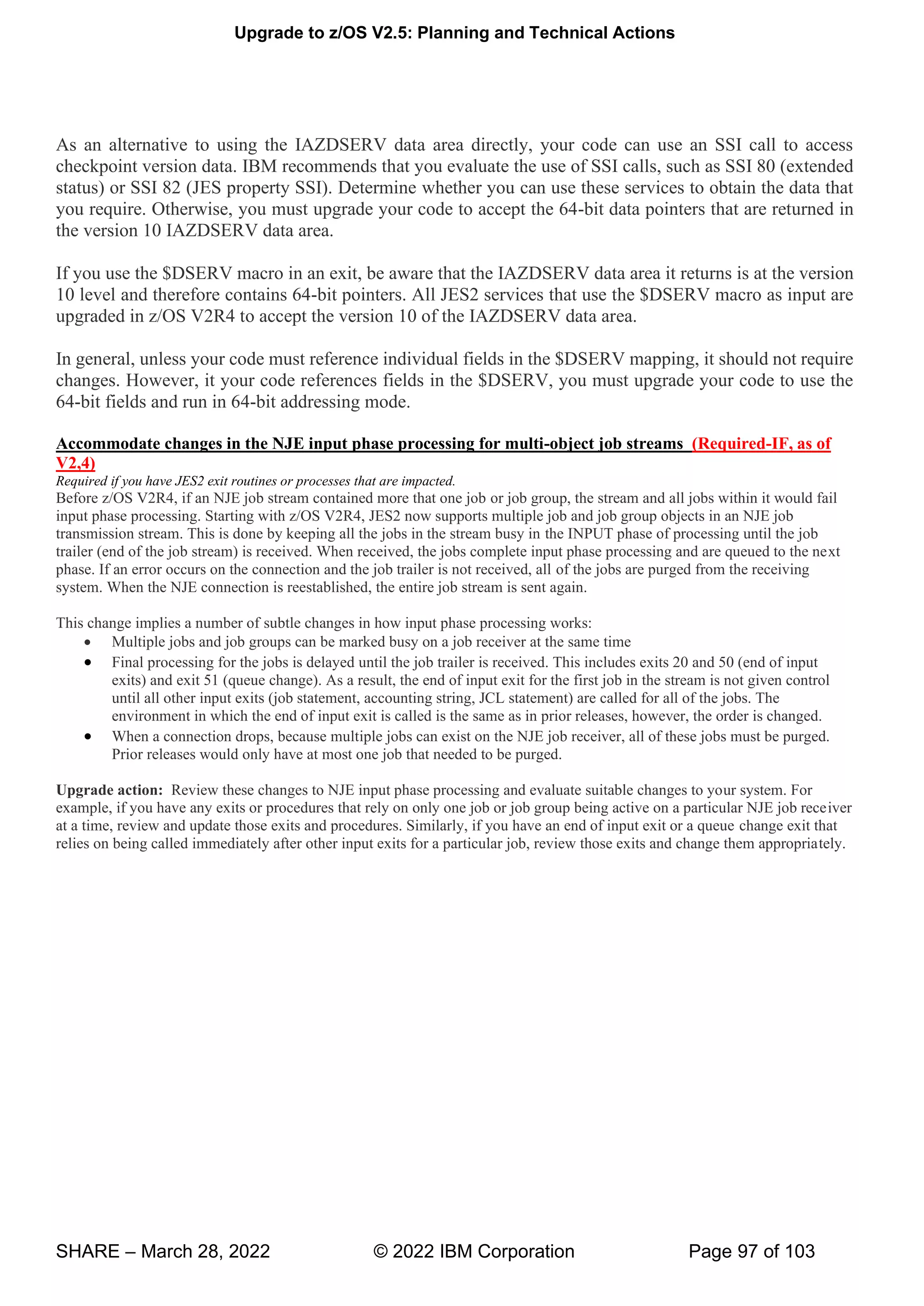
  • 90.
    Upgrade to z/OSV2.5: Planning and Technical Actions SHARE – March 28, 2022 © 2022 IBM Corporation Page 90 of 103 z/OS OpennSSH Upgrade Actions For z/OS V2.5 These upgrade actions were taken from z/OS V2.5 Upgrade Workflow. Some descriptions and actions have been shortened for inclusion in this presentation. Not all upgrade actions have been included. For the complete descriptions and actions, refer to z/OS V2.5 Upgrade Workflow. z/OS OpenSSH Upgrade Action Post-First-IPL Accommodate the OpenSSH ported level (Required-IF, as of V2.4) Required if you reliant upon any of the changes in the newer ported level.. With z/OS V2.4, OpenSSH is upgraded to include a new level of open source version OpenSSH 7.6p1. (The last change was in z/OS V2.2 for open source version OpenSSH 6.4p1. With z/OS OpenSSH V2R4, significant new features are included: • -curve DSA keys are now supported in Key Rings and FIPS. • w k g : -ed25519, ssh-ed25519-cert-v01@openssh.com • -hellman-group14-sha256, diffie-hellman group16-sha512, diffie- hellman-group18-sha512, curve25519-sha256 and curve25519-sha256@libssh.org. • w g : chacha20-poly1305@openssh.com • T T hd connection started) records will include a section that identifies the IP addresses and ports for the connection. • w -proxyc is added, which can be used by the ssh client to connect through SOCKS5 proxy servers. Also with z/OS OpenSSH V2R4, following features are no longer available (since they are deprecated by the Open Source community in OpenSSH 7.6p1). This had been previously announced as a Statement of Direction in the 4Q2017 z/OS V2.3 7 U
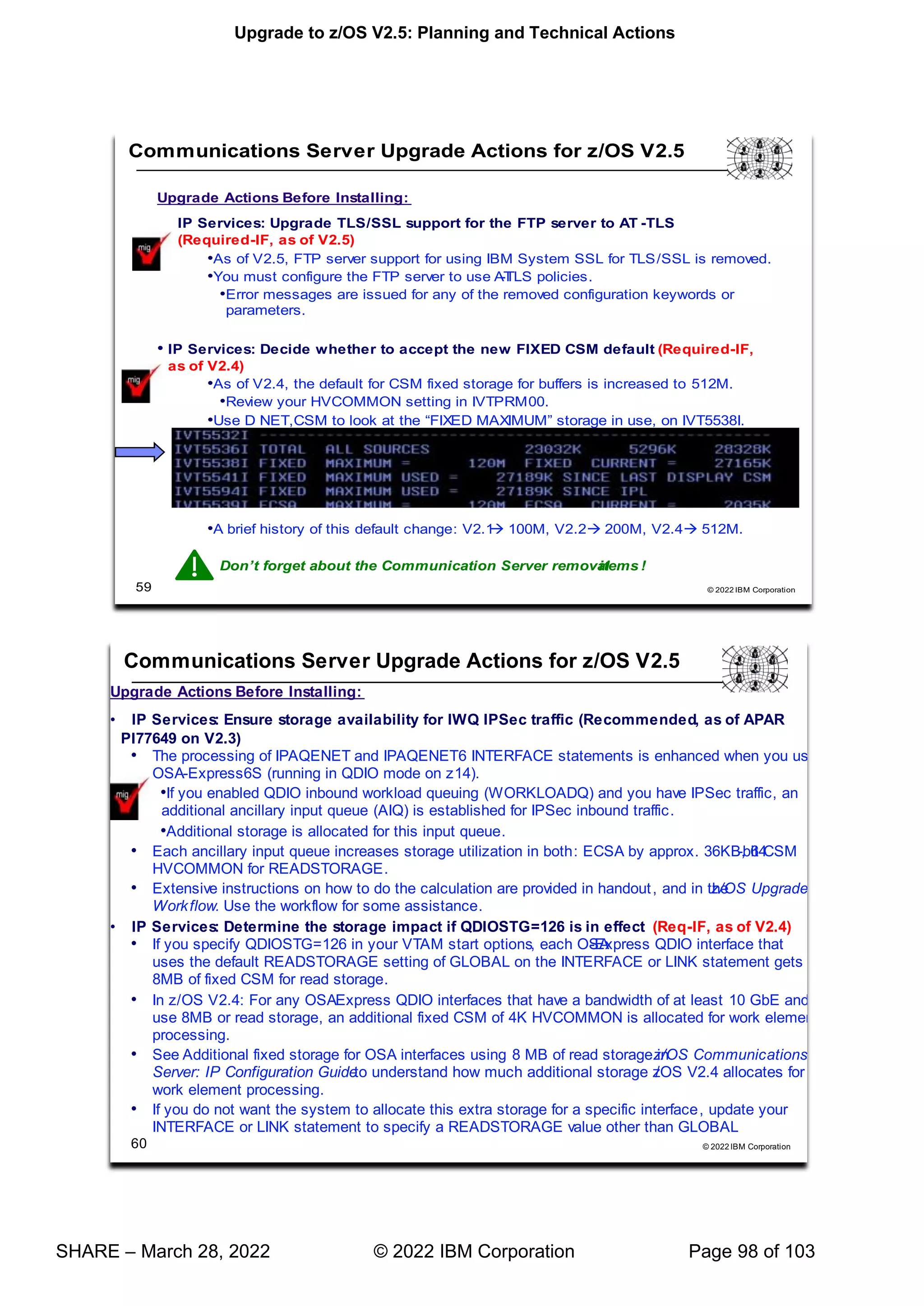
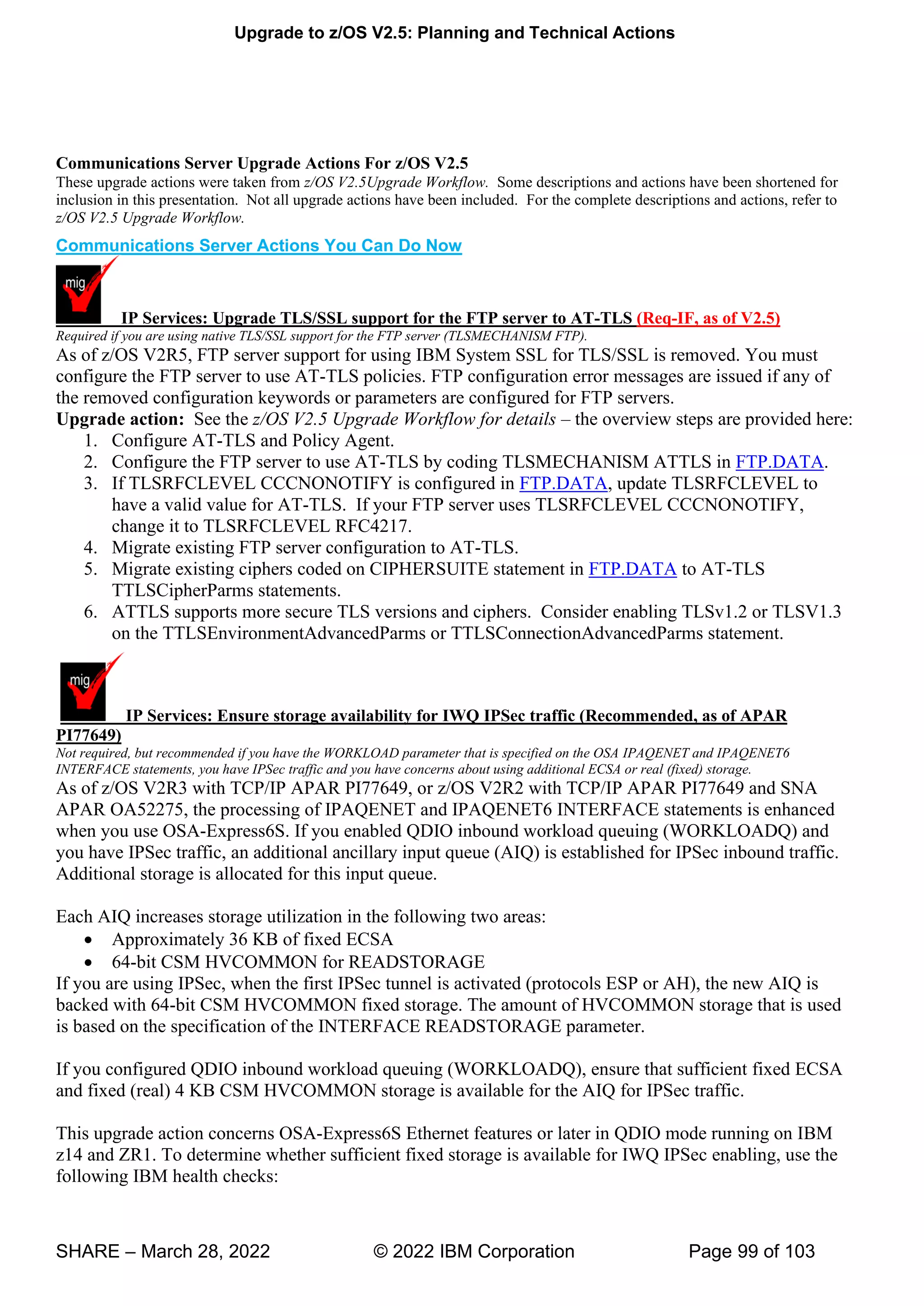
  • 91.
    Upgrade to z/OSV2.5: Planning and Technical Actions SHARE – March 28, 2022 © 2022 IBM Corporation Page 91 of 103 Enhancement Announcement (https://www-01.ibm.com/common/ssi/cgi- bin/ssialias?infotype=an&subtype=ca&appname=gpateam&supplier=897&letternum=ENUS217-536): • H H-1). These options from ssh_config have been removed: Cipher, CompressionLevel, RhostsAuthentication, RhostsRSAAuthentication, RSAAuthentication. These options from sshd_config have been removed: KeyRegenerationInteval, RhostsAuthentication, RhostsRSAAuthentication, RSAAuthentication, ServerKeyBits, UseLogin and PAMAuthenticationViaKbdInt. • g w v g H • g v00 H • -authentication compression by sshd (SSH Daemon). SSH clients will either need to support delayed compression mode or otherwise compression will not be negotiated. • w P -MD160 HMAC (Hash Message Authentication Code), specifically: blowfish-cbc, cast128-cbc, arcfour, arcfour128, arcfour256, hmac-ripemd160, hmac-ripemd160@openssh.com, and hmac-ripemd160-etm@openssh.com. • g k 0 With z/OS OpenSSH V2R4, the following features will no longer be enabled by default. This had been previously announced as a Statement of Direction in the 4Q2017 z/OS V2.3 Enhancement Announcement (https://www-01.ibm.com/common/ssi/cgi- bin/ssialias?infotype=an&subtype=ca&appname=gpateam&supplier=897&letternum=ENUS217-536): • 0 -bit Diffie Hellman key exchange, specifically diffie-hellman-group1-sha1 • -dss, ssh-dss-cert-*) host and user keys • -based and truncated MD5 and SHA1 HMAC algorithms, specifically: hmac-md5, hmac-md5-96@openssh.com, hmac-sha1-96, hmac-sha1-96@openssh.com, hmac-md5-etm@openssh.com, hmac-md5-96-etm@openssh.com, hmac-sha1-96-etm@openssh.com, • T , -cbc, aes128-cbc, aes192-cbc and aes256-cbc.
  • 92.
    Upgrade to z/OSV2.5: Planning and Technical Actions SHARE – March 28, 2022 © 2022 IBM Corporation Page 92 of 103 z/OS UNIX Upgrade Actions For z/OS V2.5 These upgrade actions were taken from z/OS V2.5 Upgrade Workflow. Some descriptions and actions have been shortened for inclusion in this presentation. Not all upgrade actions have been included. For the complete descriptions and actions, refer to z/OS V2.5 Upgrade Workflow. z/OS UNIX Actions Pre-First IPL Accommodate the new LIMMSG default (Required-IF, as of V2.5) Required if you use the LIMMSG parameter to limit the display of console messages. . In the BPXPRMxx parmlib member, the parameter LIMMSG is used to control the display of console messages that indicate when parmlib limits are reaching critical levels. This option allows you to determine when certain resources are starting to reach high levels and act upon the issue prior to function failure. Additional messages might be seen with the new LIMMSG default. The messages are informational only; no system function or processing is changed. In z/OS V2R5, the default setting for the parameter LIMMSG is changed from NONE to SYSTEM. With this change, console messages are displayed for all processes that reach 85% of system limits. In addition, messages are displayed for each process limit if either of the following conditions are true: • The process limit or limits are defined in the OMVS segment of the owning user ID • The process limit or limits are changed with a SETOMVS PID=pid,process_limit command. Upgrade action: Examine the LIMMSG setting in your active BPXPRMxx parmlib member: • If the LIMMSG option is not specified, you are using the old default (NONE). If you want to continue using the old default, you must add LIMMSG(NONE) to the BPXPRMxx member.
  • 93.
    Upgrade to z/OSV2.5: Planning and Technical Actions SHARE – March 28, 2022 © 2022 IBM Corporation Page 93 of 103 • If the LIMMSG option is specified, and you want to continue using the current setting, you have no action to take. If LIMMSG is set to SYSTEM, you are already using the new default behavior. Remove references to the MAXSHAREPAGES option in BPXPRMxx (Recommended, as of V2.5) Not required, but recommended if you use MAXSHAREPAGES in BPXPRMxx. In the BPXPRMxx parmlib member, the option MAXSHAREPAGES is used to limit the combined UNIX System Services usage of shared pages to avoid system storage constraints. Recently, the system storage constraint associated with shared pages was removed, which eliminates the need to limit shared-page usage by z/OS UNIX System Services. In z/OS V2R5, the MAXSHAREPAGES parmlib option will be processed for compatibility reasons, but the setting is ignored. For clarity, IBM recommends removing the MAXSHAREPAGES option from BPXPRMxx parmlib members. z/OS UNIX System Services does not track shared pages or limit their overall usage. MAXSHAREPAGES is no longer included when options are displayed (DISPLAY OMVS,OPTIONS) or in any LIMMSG output, including displaying limits (DISPLAY OMVS,LIMITS). Upgrade action: Remove the MAXSHAREPAGES specification from any BPXPRMxx parmlib members that include it. Optionally delete the FORKCOPY(COW) option of BPXPRMxx (Recommended, as of V2.4) Not required, but recommended for clarity in the BPXPRMxx parmlib member because FORKCOPY(COPY) will always be used even if FORKCOPY(COW) is specified. Previously, with the FORKCOPY option in the BPXPRMxx parmlib member, copy-on-write (COW) mode could be specified for fork processing. The default was FORKCOPY(COW). In z/OS V2R4, the COW option is disabled. FORKCOPY(COPY) will always be used even if FORKCOPY(COW) is specified. Upgrade action: Determine whether your BPXPRMxx parmlib member specifies FORKCOPY(COW) mode. If so, remove it. FORKCOPY(COPY) is always used, even when FORKCOPY(COW) is specified. Use of FORKCOPY(COPY) avoids any additional ESQA use in support of fork. Use of FORKCOPY(COW) caused the system to use the ESQA to manage page sharing. Optionally delete the KERNELSTACKS option of BPXPRMxx (Recommended, as of V2.4) Not required, but recommended for clarity in the BPXPRMxx parmlib member because KERNELSTACKS(BELOW) will not be used. Previously, with the KERNELSTACK option in the BPXPRMxx parmlib member, stacks could be allocated either above or below the bar. The default was KERNELSTACKS(BELOW). As of z/OS V2R4, stacks are always allocated above the bar. If KERNELSTACKS(BELOW) is specified, it is ignored and the stacks are allocated above the bar. Upgrade action: Determine whether your BPXPRMxx parmlib member uses the KERNELSTACK option. If so, remove it. The stacks will always be allocated above the bar.
  • 94.
    Upgrade to z/OSV2.5: Planning and Technical Actions SHARE – March 28, 2022 © 2022 IBM Corporation Page 94 of 103 When the kernel stacks were allocated from kernel private storage that is below the bar, the number of threads running in the kernel was limited to about 30,000. KERNELSTACKS(ABOVE) increases thread limit to a maximum of 500,000; the actual amount will vary, depending on work load and system configuration. Usage of real storage in the kernel address space is also increased.
  • 95.
    Upgrade to z/OSV2.5: Planning and Technical Actions SHARE – March 28, 2022 © 2022 IBM Corporation Page 95 of 103 JES2 Upgrade Actions For z/OS V2.5 These upgrade actions were taken from z/OS V2.5 Upgrade Workflow. Some descriptions and actions have been shortened for inclusion in this presentation. Not all upgrade actions have been included. For the complete descriptions and actions, refer to z/OS V2.5 Upgrade Workflow. z/OS UNIX Actions Before Installation Activate z22 mode (Required-IF, as of V2,5) Required if you are use the z11 level for checkpoint data sets. Starting with z/OS V2R5, JES2 no longer supports the z11 level for checkpoint data sets. z22 mode was introduced in z/OS V2R2. Activate JES2 in z22 mode, if you have not done so. When you switch to z22 mode, the system upgrades the JES2 checkpoint. You are not able to fall back to z11 mode. Upgrade action: Follow these steps: • On all of the systems in your MAS, determine your z22 checkpoint activation readiness, as follows: o Enter the $D ACTIVATE command to verify that activation to z22 mode can succeed.
  • 96.
    Upgrade to z/OSV2.5: Planning and Technical Actions SHARE – March 28, 2022 © 2022 IBM Corporation Page 96 of 103 o If you enter the $ACTIVATE,LEVEL=z22 command, activation of CYL_MANAGED support is required. o You might see that z22 mode requires an extra nnn 4K records for CKPT1. • Enter the JES2 $ACTIVATE command to verify non-configuration changes that must be accommodated before you go to z22, and to activate z22 mode. See the considerations for this command in z/OS JES2 Commands. By default, JES2 restarts in the same mode as the other members of the MAS (if any are active) or the mode of the last active JES2 member when it was shut down. On a cold start, JES2 starts in z22 mode, unless overridden by the OPTSDEF COLD_START_MODE or UNACT parameter. z/OS UNIX Actions Pre-First IPL Accommodate the changed default for the EXECUTABLE keyword on $GETMAIN (Required-IF, as of V2,4) Required if you have any affected JES2 exit routines or user modifications. z/OS V2R3 added the EXECUTABLE= keyword on the $GETMAIN macro to indicate whether the obtained storage is marked as executable for systems that run on an IBM z14 server or later. For more information about non-executable memory, see the description of the EXECUTABLE= keyword on the STORAGE macro. When the EXECUTABLE= keyword was added to the $GETMAIN macro in z/OS V2R3, the default was YES. Starting with z/OS V2R4, the default on $GETMAIN is changed to NO. This change implies that, by default, any storage that is obtained in a supported subpool does not support executable code on a z14 server. Any attempt to run code in the storage results in an 0C4 abend. Upgrade action: Review your exits for instances of the $GETMAIN macro that obtains storage for executable code. In particular, check for DCB exit stubs that might be obtained and pointed to by the EXLST area. When appropriate to do so, convert the $GETMAIN and its associated $FREMAIN to specify EXECUTABLE=YES. On a z/OS V2R3 system, you can perform this change before you upgrade to z/OS V2R4. If in doubt, you can change all $GETMAIN and $FREMAIN macros to specify EXECUTABLE=YES. Checkpoint versions are moving to 64-bit storage (Required-IF, as of V2,4) Required if your JES2 exit routines or applications use the IAZDSERV macro with an SSI call 71 or the $DSERV macro. Applications and exits that do not run in the JES2 address space can access checkpoint version data from the IAZDSERV data area, which provides a stable copy of the data. To access the IAZDSERV data area, applications can use subsystem interface call (SSI) 71, subfunction SSJIFOBT, and JES2 exits can use the $DSERV macro. Before z/OS V2R4, the data returned by these services was in a 31-bit storage data space. Starting in z/OS V2R4, the returned data might reside in 64-bit storage. z/OS V2R4 adds version 10 of the IAZDSERV data area, which supports 64-bit pointers and ALETs for use in accessing the checkpoint version data. Version 10 is the only IAZDSERV version that is supported by z/OS V2R4. Upgrade action: Check for applications and exits that access checkpoint version data from the IAZDSERV data area. Determine whether this code must access the checkpoint data blocks directly.
  • 97.
    Upgrade to z/OSV2.5: Planning and Technical Actions SHARE – March 28, 2022 © 2022 IBM Corporation Page 97 of 103 As an alternative to using the IAZDSERV data area directly, your code can use an SSI call to access checkpoint version data. IBM recommends that you evaluate the use of SSI calls, such as SSI 80 (extended status) or SSI 82 (JES property SSI). Determine whether you can use these services to obtain the data that you require. Otherwise, you must upgrade your code to accept the 64-bit data pointers that are returned in the version 10 IAZDSERV data area. If you use the $DSERV macro in an exit, be aware that the IAZDSERV data area it returns is at the version 10 level and therefore contains 64-bit pointers. All JES2 services that use the $DSERV macro as input are upgraded in z/OS V2R4 to accept the version 10 of the IAZDSERV data area. In general, unless your code must reference individual fields in the $DSERV mapping, it should not require changes. However, it your code references fields in the $DSERV, you must upgrade your code to use the 64-bit fields and run in 64-bit addressing mode. Accommodate changes in the NJE input phase processing for multi-object job streams (Required-IF, as of V2,4) Required if you have JES2 exit routines or processes that are impacted. Before z/OS V2R4, if an NJE job stream contained more that one job or job group, the stream and all jobs within it would fail input phase processing. Starting with z/OS V2R4, JES2 now supports multiple job and job group objects in an NJE job transmission stream. This is done by keeping all the jobs in the stream busy in the INPUT phase of processing until the job trailer (end of the job stream) is received. When received, the jobs complete input phase processing and are queued to the next phase. If an error occurs on the connection and the job trailer is not received, all of the jobs are purged from the receiving system. When the NJE connection is reestablished, the entire job stream is sent again. This change implies a number of subtle changes in how input phase processing works: • Multiple jobs and job groups can be marked busy on a job receiver at the same time • Final processing for the jobs is delayed until the job trailer is received. This includes exits 20 and 50 (end of input exits) and exit 51 (queue change). As a result, the end of input exit for the first job in the stream is not given control until all other input exits (job statement, accounting string, JCL statement) are called for all of the jobs. The environment in which the end of input exit is called is the same as in prior releases, however, the order is changed. • When a connection drops, because multiple jobs can exist on the NJE job receiver, all of these jobs must be purged. Prior releases would only have at most one job that needed to be purged. Upgrade action: Review these changes to NJE input phase processing and evaluate suitable changes to your system. For example, if you have any exits or procedures that rely on only one job or job group being active on a particular NJE job receiver at a time, review and update those exits and procedures. Similarly, if you have an end of input exit or a queue change exit that relies on being called immediately after other input exits for a particular job, review those exits and change them appropriately.
  • 98.
    Upgrade to z/OSV2.5: Planning and Technical Actions SHARE – March 28, 2022 © 2022 IBM Corporation Page 98 of 103 77 U
  • 99.
    Upgrade to z/OSV2.5: Planning and Technical Actions SHARE – March 28, 2022 © 2022 IBM Corporation Page 99 of 103 Communications Server Upgrade Actions For z/OS V2.5 These upgrade actions were taken from z/OS V2.5Upgrade Workflow. Some descriptions and actions have been shortened for inclusion in this presentation. Not all upgrade actions have been included. For the complete descriptions and actions, refer to z/OS V2.5 Upgrade Workflow. Communications Server Actions You Can Do Now IP Services: Upgrade TLS/SSL support for the FTP server to AT-TLS (Req-IF, as of V2.5) Required if you are using native TLS/SSL support for the FTP server (TLSMECHANISM FTP). As of z/OS V2R5, FTP server support for using IBM System SSL for TLS/SSL is removed. You must configure the FTP server to use AT-TLS policies. FTP configuration error messages are issued if any of the removed configuration keywords or parameters are configured for FTP servers. Upgrade action: See the z/OS V2.5 Upgrade Workflow for details – the overview steps are provided here: 1. Configure AT-TLS and Policy Agent. 2. Configure the FTP server to use AT-TLS by coding TLSMECHANISM ATTLS in FTP.DATA. 3. If TLSRFCLEVEL CCCNONOTIFY is configured in FTP.DATA, update TLSRFCLEVEL to have a valid value for AT-TLS. If your FTP server uses TLSRFCLEVEL CCCNONOTIFY, change it to TLSRFCLEVEL RFC4217. 4. Migrate existing FTP server configuration to AT-TLS. 5. Migrate existing ciphers coded on CIPHERSUITE statement in FTP.DATA to AT-TLS TTLSCipherParms statements. 6. ATTLS supports more secure TLS versions and ciphers. Consider enabling TLSv1.2 or TLSV1.3 on the TTLSEnvironmentAdvancedParms or TTLSConnectionAdvancedParms statement. IP Services: Ensure storage availability for IWQ IPSec traffic (Recommended, as of APAR PI77649) Not required, but recommended if you have the WORKLOAD parameter that is specified on the OSA IPAQENET and IPAQENET6 INTERFACE statements, you have IPSec traffic and you have concerns about using additional ECSA or real (fixed) storage. As of z/OS V2R3 with TCP/IP APAR PI77649, or z/OS V2R2 with TCP/IP APAR PI77649 and SNA APAR OA52275, the processing of IPAQENET and IPAQENET6 INTERFACE statements is enhanced when you use OSA-Express6S. If you enabled QDIO inbound workload queuing (WORKLOADQ) and you have IPSec traffic, an additional ancillary input queue (AIQ) is established for IPSec inbound traffic. Additional storage is allocated for this input queue. Each AIQ increases storage utilization in the following two areas: • Approximately 36 KB of fixed ECSA • 64-bit CSM HVCOMMON for READSTORAGE If you are using IPSec, when the first IPSec tunnel is activated (protocols ESP or AH), the new AIQ is backed with 64-bit CSM HVCOMMON fixed storage. The amount of HVCOMMON storage that is used is based on the specification of the INTERFACE READSTORAGE parameter. If you configured QDIO inbound workload queuing (WORKLOADQ), ensure that sufficient fixed ECSA and fixed (real) 4 KB CSM HVCOMMON storage is available for the AIQ for IPSec traffic. This upgrade action concerns OSA-Express6S Ethernet features or later in QDIO mode running on IBM z14 and ZR1. To determine whether sufficient fixed storage is available for IWQ IPSec enabling, use the following IBM health checks:
  • 100.
    Upgrade to z/OSV2.5: Planning and Technical Actions SHARE – March 28, 2022 © 2022 IBM Corporation Page 100 of 103 • IBMCS,ZOSMIGV2R4PREV_CS_IWQSC_tcpipstackname issues a message if the TCP/IP stack has inbound workload queuing (IWQ) and IPSec enabled, but the OSA does not support IWQ for IPSec. Only OSA-Express6S and later support IWQ for IPSec. This health check is shipped INACTIVE and set to run once. • IBMCS,CSTCP_IWQ_IPSEC_tcpipstackname issues a message if the TCP/IP stack has IWQ and IPSec enabled, and the OSA does support IWQ for IPSec. This health check is shipped ACTIVE and is set to run once. These health checks are available with PH11837 and OA57525 for V2R3, and PH12005 and OA57560 for V2R4. Upgrade action: 1. If you are using or plan to use OSA-Express6S or later, verify that the following conditions are true: a. WORKLOADQ is specified on the IPAQENET and IPAQENET6 INTERFACE statements. b. Have IPSec traffic; protocols ESP or AH. 2. If step 1 is applicable, IWQ IPSec uses additional storage. Continue with step 3 - 6. Otherwise, there is no increase in storage usage, and no further action is required. 3. To calculate the total storage increase, count the total number of IPAQENET and IPAQENET6 INTERFACE statements that are coded with the WORKLOADQ parameter that are associated with OSA-Express6S or later. Make a note of the number. 4. Verify that sufficient ECSA is available. To calculate this, multiply the total INTERFACE statements that are counted in step 3 by 36 KB. The resulting number indicates how much additional ECSA is required. To determine whether sufficient ECSA is available to enable this function, verify the following ECSA definitions: a. D CSM usage (PARMLIB member IVTPRM00, ECSA MAX value) b. VTAM (Start Options CSALIMIT and CSA24) c. TCPIP (GLOBALCONFIG ECSALIMIT statement in the TCPIP PROFILE) 5. Verify that sufficient real (fixed) storage is available. 64-bit fixed (CSM HVCOMMON) storage is used for the IPSec AIQ read buffers. To calculate this value, multiply the total number of INTERFACE statements that are counted in step 3 by your configured READSTORAGE value (for example, 4 MB). You can verify how much storage is being used for READSTORAGE by using the D NET, TRLE command. The resulting number indicates how much additional fixed (64-bit) storage is required. To verify that the additional fixed storage is not a constraint for your system, take the following actions: a. Use the DISPLAY CSM command to verify that sufficient fixed storage is available (CSM FIXED MAXIMUM defined in IVTPRM00). b. Verify the actual amount of real storage available to this z/OS system by using D M=STOR or D M=HIGH. 6. If sufficient ECSA or real storage is not available, increase the available real storage or consider defining some of the OSA-Express6S (or later) INTERFACE statements with the NOWORKLOADQ parameter. If your CSM FIXED MAXIMUM is too low, increase this value in IVTPRM00. Communications Server Actions Pre-First IPL IP Services: Decide whether to accept the new FIXED CSM default (Required-IF, as of V2.4) Required if you use the default CSM FIXED MAX value of 200M and you do not want to use the new default of 512M. In z/OS V2R4, the default amount for communications storage manager (CSM) fixed storage for buffers is increased from 200 MB to 512 MB. Your installation can specify a value for the CSM fixed storage amount on the FIXED statement in the IVTPRM00 parmlib member.
  • 101.
    Upgrade to z/OSV2.5: Planning and Technical Actions SHARE – March 28, 2022 © 2022 IBM Corporation Page 101 of 103 Upgrade action: Review your HVCOMMON setting in IVTPRM00 and determine whether you need to increase this value to account for the fact that the system reserves a larger portion of this storage by default for CSM buffers. If you did not previously code a value for FIXED in IVTPRM00 and you do not want the new default, specify FIXED MAX(200M) in your IVTPRM00 parmlib member to retain the value as formerly defaulted. Tip: You can use the D NET,CSM command to display the "FIXED MAXIMUM" storage specification in message IVT5538I. A brief history of FIXED CSM defaults, for those interested: V2.1 – 100M, V2.2 – 200M, V2.4 – 512M. IP Services: Determine the storage impact if QDIOSTG=126 is in effect (Required, as of V2.4) If you specify QDIOSTG=126 in your VTAM start options, each OSA-Express QDIO interface that uses the default READSTORAGE setting of GLOBAL on the INTERFACE or LINK statement gets 8 MB of fixed CSM for read storage. For any OSA-Express QDIO interfaces that have a bandwidth of at least 10 GbE and use 8 MB of read storage, z/OS V2R4 allocates additional fixed CSM 4K HVCOMMON storage for work element processing. The system allocates additional fixed CSM HVCOMMON storage for work element processing for each OSA-Express QDIO interface that is using 8 MB of read storage. Upgrade action: See Additional fixed storage for OSA interfaces using 8 MB of read storage in z/OS Communications Server: IP Configuration Guide to understand how much additional storage z/OS V2R4 allocates for work element processing. If you do not want the system to allocate this extra storage for a specific interface, update your INTERFACE or LINK statement to specify a READSTORAGE value other than GLOBAL. IP Services: Update /etc configuration files (Required-IF) Required if you have customized a configuration file that IBM has changed. Some utilities provided by Communications Server require the use of certain configuration files. You are responsible for providing these files if you expect to use the utilities. IBM provides default configuration files as samples in the /usr/lpp/tcpip/samples directory. Before the first use of any of these utilities, you should copy these IBM-provided samples to the /etc directory (in most cases). You can further customize these files to include installation-dependent information. An example is setting up the /etc/osnmpd.data file by copying the sample file from /usr/lpp/tcpip/samples/osnmpd.data to /etc/osnmpd.data and then customizing it for the installation. If you customized any of the configuration files that have changed, then you must incorporate the customization into the new versions of the configuration files.
  • 102.
    Upgrade to z/OSV2.5: Planning and Technical Actions SHARE – March 28, 2022 © 2022 IBM Corporation Page 102 of 103 7
  • 103.
    Upgrade to z/OSV2.5: Planning and Technical Actions SHARE – March 28, 2022 © 2022 IBM Corporation Page 103 of 103