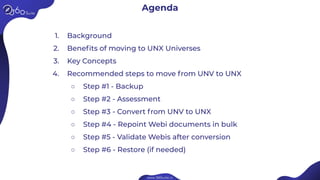
1. Background
2. Benefits of moving to UNX Universes
3. Key Concepts
4. Recommended steps to move from UNV to UNX
○ Step #1 - Backup
○ Step #2 - Assessment
○ Step #3 - Convert from UNV to UNX
○ Step #4 - Repoint Webi documents in bulk
○ Step #5 - Validate Webis after conversion
○ Step #6 - Restore (if needed)
Agenda
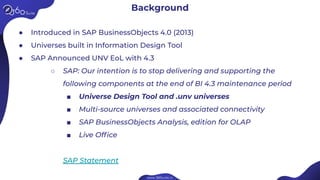
Background
● Introduced in SAP BusinessObjects 4.0 (2013)
● Universes built in Information Design Tool
● SAP Announced UNV EoL with 4.3
○ SAP: Our intention is to stop delivering and supporting the
following components at the end of BI 4.3 maintenance period
■ Universe Design Tool and .unv universes
■ Multi-source universes and associated connectivity
■ SAP BusinessObjects Analysis, edition for OLAP
■ Live Office
SAP Statement
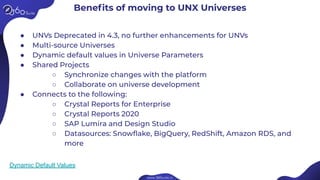
Benefits of moving to UNX Universes
● UNVs Deprecated in 4.3, no further enhancements for UNVs
● Multi-source Universes
● Dynamic default values in Universe Parameters
● Shared Projects
○ Synchronize changes with the platform
○ Collaborate on universe development
● Connects to the following:
○ Crystal Reports for Enterprise
○ Crystal Reports 2020
○ SAP Lumira and Design Studio
○ Datasources: Snowflake, BigQuery, RedShift, Amazon RDS, and
more
Dynamic Default Values
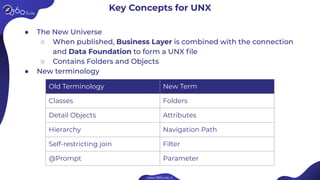
Key Concepts for UNX
● The New Universe
○ When published, Business Layer is combined with the connection
and Data Foundation to form a UNX file
○ Contains Folders and Objects
● New terminology
Old Terminology New Term
Classes Folders
Detail Objects Attributes
Hierarchy Navigation Path
Self-restricting join Filter
@Prompt Parameter
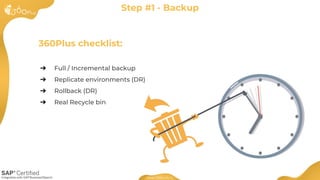
360Plus checklist:
➔ Full / Incremental backup
➔ Replicate environments (DR)
➔ Rollback (DR)
➔ Real Recycle bin
Step #1 - Backup
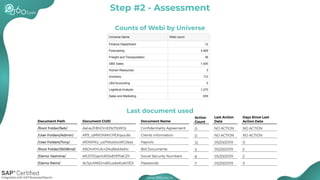
Counts of Webi by Universe
Step #2 - Assessment
Last document used
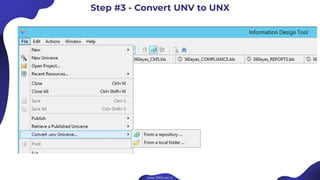
Step #3 - Convert UNV to UNX
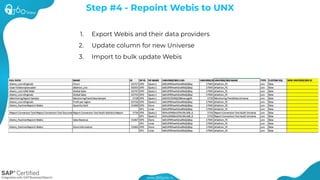
1. Export Webis and their data providers
2. Update column for new Universe
3. Import to bulk update Webis
Step #4 - Repoint Webis to UNX
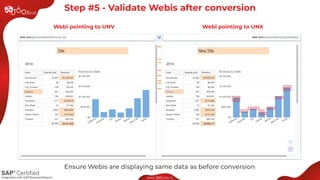
Webi pointing to UNV
Ensure Webis are displaying same data as before conversion
Step #5 - Validate Webis after conversion
Webi pointing to UNX
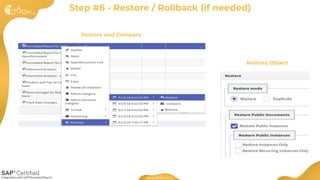
Restore and Compare
Step #6 - Restore / Rollback (if needed)
Restore Object
SAP BusinessObjects Administrator
● Time savings due to Automation of repointing Webi Documents.
● More flexibility, reusability and multiple Business Layers per Data Foundation.
BI Manager
● Reduce maintenance expenditure.
● Facilitate automation.
Business
● Trust Conversion is accurate.
● Do more in your SAP BusinessObjects platform with fewer resources.
Value
● Reduce cost and timeline to convert.
● Document what has been converted and gather KPIs.
● Reduce risks
What’s the Value?
Readings
Readings
The importance of
implementing a Business
Objects data catalog
How to implement and
use tags in Business
Objects
Help yourself: Extending
the reach of self-service
Business Intelligence
BI 4.3 Quiz
Upgrade, Operations
& Maintenance
Backup, Restore
& Disaster Recovery
Metadata, Lineage
& Monitoring
Regression Testing
& QA
Platform Adoption
& Optimization
Self-Service, Catalog
& Versioning
Regulatory, Security,
Compliance & PII
Automation, Bursting,
Cleanup & Archiving
SAP BusinessObjects Solutions
SAP BusinessObjects
Solutions
Visit our virtual booth
http://booth.360suite.io/

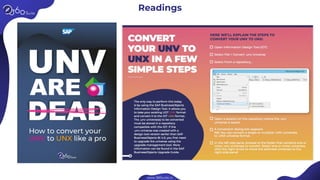
UNV Are Dead. Long Live UNX.

  • 2.
    1. Background 2. Benefitsof moving to UNX Universes 3. Key Concepts 4. Recommended steps to move from UNV to UNX ○ Step #1 - Backup ○ Step #2 - Assessment ○ Step #3 - Convert from UNV to UNX ○ Step #4 - Repoint Webi documents in bulk ○ Step #5 - Validate Webis after conversion ○ Step #6 - Restore (if needed) Agenda
  • 3.
    Background ● Introduced inSAP BusinessObjects 4.0 (2013) ● Universes built in Information Design Tool ● SAP Announced UNV EoL with 4.3 ○ SAP: Our intention is to stop delivering and supporting the following components at the end of BI 4.3 maintenance period ■ Universe Design Tool and .unv universes ■ Multi-source universes and associated connectivity ■ SAP BusinessObjects Analysis, edition for OLAP ■ Live Office SAP Statement
  • 4.
    Benefits of movingto UNX Universes ● UNVs Deprecated in 4.3, no further enhancements for UNVs ● Multi-source Universes ● Dynamic default values in Universe Parameters ● Shared Projects ○ Synchronize changes with the platform ○ Collaborate on universe development ● Connects to the following: ○ Crystal Reports for Enterprise ○ Crystal Reports 2020 ○ SAP Lumira and Design Studio ○ Datasources: Snowflake, BigQuery, RedShift, Amazon RDS, and more Dynamic Default Values
  • 5.
    Key Concepts forUNX ● The New Universe ○ When published, Business Layer is combined with the connection and Data Foundation to form a UNX file ○ Contains Folders and Objects ● New terminology Old Terminology New Term Classes Folders Detail Objects Attributes Hierarchy Navigation Path Self-restricting join Filter @Prompt Parameter
  • 6.
    360Plus checklist: ➔ Full/ Incremental backup ➔ Replicate environments (DR) ➔ Rollback (DR) ➔ Real Recycle bin Step #1 - Backup
  • 7.
    Counts of Webiby Universe Step #2 - Assessment Last document used
  • 8.
    Step #3 -Convert UNV to UNX
  • 9.
    1. Export Webisand their data providers 2. Update column for new Universe 3. Import to bulk update Webis Step #4 - Repoint Webis to UNX
  • 10.
    Webi pointing toUNV Ensure Webis are displaying same data as before conversion Step #5 - Validate Webis after conversion Webi pointing to UNX
  • 11.
    Restore and Compare Step#6 - Restore / Rollback (if needed) Restore Object
  • 12.
    SAP BusinessObjects Administrator ●Time savings due to Automation of repointing Webi Documents. ● More flexibility, reusability and multiple Business Layers per Data Foundation. BI Manager ● Reduce maintenance expenditure. ● Facilitate automation. Business ● Trust Conversion is accurate. ● Do more in your SAP BusinessObjects platform with fewer resources. Value ● Reduce cost and timeline to convert. ● Document what has been converted and gather KPIs. ● Reduce risks What’s the Value?
  • 13.
  • 14.
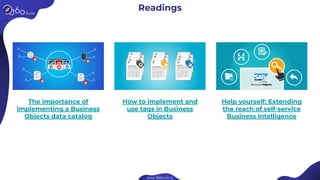
    Readings The importance of implementinga Business Objects data catalog How to implement and use tags in Business Objects Help yourself: Extending the reach of self-service Business Intelligence
  • 15.
  • 16.
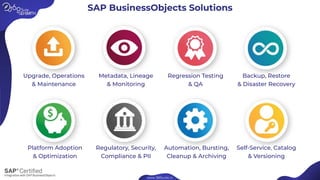
    Upgrade, Operations & Maintenance Backup,Restore & Disaster Recovery Metadata, Lineage & Monitoring Regression Testing & QA Platform Adoption & Optimization Self-Service, Catalog & Versioning Regulatory, Security, Compliance & PII Automation, Bursting, Cleanup & Archiving SAP BusinessObjects Solutions
  • 17.
    SAP BusinessObjects Solutions Visit ourvirtual booth http://booth.360suite.io/