1Nokia Universal Search:Understanding the intent, strategy & needs of mobile search.July 2011Prepared by:Shawn VallereuxFran Thorpe© 2011 Nokia  Company Confidential  Universal Search Diary Study.pptx   v. 0.1  2011-June
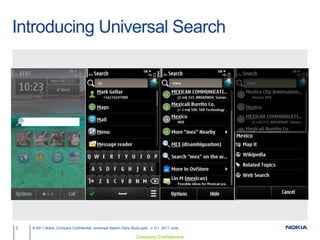
Introducing Universal Search2© 2011 Nokia  Company Confidential  Universal Search Diary Study.pptx   v. 0.1  2011-June
Description of Universal Search beta3© 2011 Nokia  Company Confidential  Filename.pptx   v. 0.1  YYYY-MM-DD   Author  Document ID   [Edit via Insert > Header & Footer]Search your device, the web, or the world around youWebMaps & POIsStoreMessagesCalendarEmailNotes & TextSettingsMusicAppsContactsImages
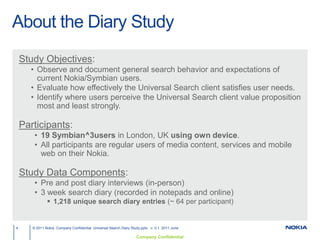
About the Diary StudyStudy Objectives:Observe and document general search behavior and expectations of current Nokia/Symbian users.
Evaluate how effectively the Universal Search client satisfies user needs.
Identify where users perceive the Universal Search client value proposition most and least strongly.Participants:				          	    19 Symbian^3users inLondon, UK using own device.
All participants are regular users of media content, services and mobile web on their Nokia.Study Data Components:Pre and post diary interviews (in-person)
3 week search diary (recorded in notepads and online)
1,218 unique search diary entries (~ 64 per participant)© 2011 Nokia  Company Confidential  Universal Search Diary Study.pptx   v. 0.1  2011-June4
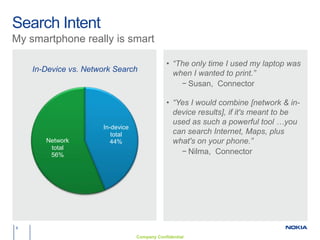
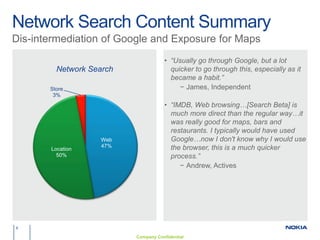
Executive Summary5© 2011 Nokia  Company Confidential  Filename.pptx   v. 0.1  YYYY-MM-DD   Author  Document ID   [Edit via Insert > Header & Footer]58% of all searches during the study were for network content such as webpages, topics, map points of interest and Ovi Store content.In particular, 28% of all searches were for POIs, directions and transit information.42% of all searches during the same period were for in-device content such as contacts, apps, music, messages, settings, etc.Participants opted to use the Universal Search beta to perform 72% of all their searches.Indicative support for Universal Search approach highlighted by an NPS=88% for the beta.“I wouldn’t buy another Nokia that didn’t have it.”“Made the phone a lot more enjoyable honestly, and Ovi Maps…just quick.”
Search Intent6My smartphone really is smart“The only time I used my laptop was when I wanted to print.”Susan,  Connector“Yes I would combine [network & in-device results], if it's meant to be used as such a powerful tool …you can search Internet, Maps, plus what's on your phone.”Nilma,  Connector
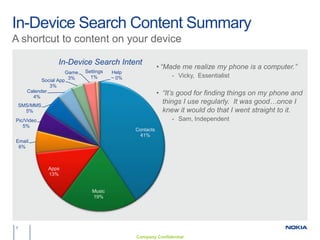
In-Device Search Content Summary7A shortcut to content on your device“Made me realize my phone is a computer.”
Vicky,  Essentialist
“It’s good for finding things on my phone and things I use regularly.  It was good…once I knew it would do that I went straight to it.
Sam, IndependentNetwork Search Content Summary8Dis-intermediation of Google and Exposure for Maps“Usually go through Google, but a lot quicker to go through this, especially as it became a habit.”James, Independent“IMDB, Web browsing…[Search Beta] is much more direct than the regular way…it was really good for maps, bars and restaurants. I typically would have used Google…now I don't know why I would use the browser, this is a much quicker process.”Andrew, Actives
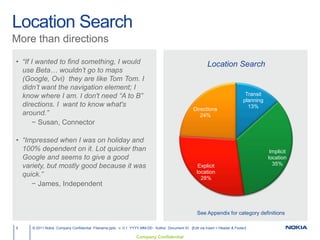
Location Search9© 2011 Nokia  Company Confidential  Filename.pptx   v. 0.1  YYYY-MM-DD   Author  Document ID   [Edit via Insert > Header & Footer]More than directions“If I wanted to find something, I would use Beta… wouldn’t go to maps (Google, Ovi)  they are like Tom Tom. Ididn’t want the navigation element; I know where I am. I don't need “A to B” directions. I  want to know what's around.”Susan, Connector“Impressed when I was on holiday and 100% dependent on it. Lot quicker than Google and seems to give a good variety, but mostly good because it was quick.” James, IndependentSee Appendix for category definitions

Universal search diary study highlights v.1

  • 1.
    1Nokia Universal Search:Understandingthe intent, strategy & needs of mobile search.July 2011Prepared by:Shawn VallereuxFran Thorpe© 2011 Nokia Company Confidential Universal Search Diary Study.pptx v. 0.1 2011-June
  • 2.
    Introducing Universal Search2©2011 Nokia Company Confidential Universal Search Diary Study.pptx v. 0.1 2011-June
  • 3.
    Description of UniversalSearch beta3© 2011 Nokia Company Confidential Filename.pptx v. 0.1 YYYY-MM-DD Author Document ID [Edit via Insert > Header & Footer]Search your device, the web, or the world around youWebMaps & POIsStoreMessagesCalendarEmailNotes & TextSettingsMusicAppsContactsImages
  • 4.
    About the DiaryStudyStudy Objectives:Observe and document general search behavior and expectations of current Nokia/Symbian users.
  • 5.
    Evaluate how effectivelythe Universal Search client satisfies user needs.
  • 6.
    Identify where usersperceive the Universal Search client value proposition most and least strongly.Participants: 19 Symbian^3users inLondon, UK using own device.
  • 7.
    All participants areregular users of media content, services and mobile web on their Nokia.Study Data Components:Pre and post diary interviews (in-person)
  • 8.
    3 week searchdiary (recorded in notepads and online)
  • 9.
    1,218 unique searchdiary entries (~ 64 per participant)© 2011 Nokia Company Confidential Universal Search Diary Study.pptx v. 0.1 2011-June4
  • 10.
    Executive Summary5© 2011Nokia Company Confidential Filename.pptx v. 0.1 YYYY-MM-DD Author Document ID [Edit via Insert > Header & Footer]58% of all searches during the study were for network content such as webpages, topics, map points of interest and Ovi Store content.In particular, 28% of all searches were for POIs, directions and transit information.42% of all searches during the same period were for in-device content such as contacts, apps, music, messages, settings, etc.Participants opted to use the Universal Search beta to perform 72% of all their searches.Indicative support for Universal Search approach highlighted by an NPS=88% for the beta.“I wouldn’t buy another Nokia that didn’t have it.”“Made the phone a lot more enjoyable honestly, and Ovi Maps…just quick.”
  • 11.
    Search Intent6My smartphonereally is smart“The only time I used my laptop was when I wanted to print.”Susan, Connector“Yes I would combine [network & in-device results], if it's meant to be used as such a powerful tool …you can search Internet, Maps, plus what's on your phone.”Nilma, Connector
  • 12.
    In-Device Search ContentSummary7A shortcut to content on your device“Made me realize my phone is a computer.”
  • 13.
  • 14.
    “It’s good forfinding things on my phone and things I use regularly. It was good…once I knew it would do that I went straight to it.
  • 15.
    Sam, IndependentNetwork SearchContent Summary8Dis-intermediation of Google and Exposure for Maps“Usually go through Google, but a lot quicker to go through this, especially as it became a habit.”James, Independent“IMDB, Web browsing…[Search Beta] is much more direct than the regular way…it was really good for maps, bars and restaurants. I typically would have used Google…now I don't know why I would use the browser, this is a much quicker process.”Andrew, Actives
  • 16.
    Location Search9© 2011Nokia Company Confidential Filename.pptx v. 0.1 YYYY-MM-DD Author Document ID [Edit via Insert > Header & Footer]More than directions“If I wanted to find something, I would use Beta… wouldn’t go to maps (Google, Ovi) they are like Tom Tom. Ididn’t want the navigation element; I know where I am. I don't need “A to B” directions. I want to know what's around.”Susan, Connector“Impressed when I was on holiday and 100% dependent on it. Lot quicker than Google and seems to give a good variety, but mostly good because it was quick.” James, IndependentSee Appendix for category definitions

Editor's Notes

  • #7 People trained to enter query and expect relevant response regardless of query type or content sourceRecognized Universal Search home screen icon and search bar as ‘Search’ and assumed the application would do what ‘Google does’ i.e. find what they were looking for
  • #8 People trained to enter query and expect relevant response regardless of query type or content sourceRecognized Universal Search home screen icon and search bar as ‘Search’ and assumed the application would do what ‘Google does’ i.e. find what they were looking for