Unit-VI
Files
Introduction of a File
 A file is nothing but collection of records.
 Record is group of related data items.
 All data items related to students, employees, customers etc is
nothing but records.
 In other words, file is a collection of numbers, symbols & text
placed onto the secondary devices like hard disk, pen drive,
compact disk etc.
 Files are stored permanently on to the disk and one can access
them for further monitoring/ processing if needed.
Introduction of a File(cont..)
 DEFINITION OF FILE:
A file can be considered as a stream of characters. A file can be a set
of records that can be accessed through the set of library functions.
These functions are available in stdio.h.
Introduction of a File(cont..)
 All data stored on the disk is in binary form.
 How this binary data is stored on the disk varies from one OS to
another.
 However, this does not affect the C programmer since she/he has to
use only the library functions written for the particular OS to be able
to perform input/output.
File Operations
i. Opening a File
ii. Reading a File
iii. Closing a File
Opening of File
 A file has to be opened before read and write operations.
 Opening of a file creates a link between the operating system
and the file functions.
 The name of the file and its mode of operation are to be
indicated to the operating system.
 This important task is carried out by the structure FILE that is
defined in stdio.h header file.
 So this file must be included.
Opening of File (cont..)
 When a request is made to the operating system for opening a
file, it does so by granting the request.
 If request is granted then the operating systems points to the
structure FILE.
 The following declaration before opening of the file is to be
made:
FILE *fp
where fp is the file pointer.
Opening of File (cont..)
 Each file that we open has its own FILE structure.
 The information that is there in the file may be its current size, and its
location in memory.
 The only one function to open a file is fopen().
 Syntax:
FILE *fp;
fp=fopen(“data.txt”,”r”);
 Here fp is a pointer variable that contains the address of the structure FILE
that has been defined in the header file stdio.h.
Opening of File (cont..)
 It is necessary to write FILE in the uppercase.
 The function fopen() will open a file ‘data.txt’ in read mode.
 The C compiler reads the contents of the file because it finds the
read mode (“r”).
 Here, “r” is a string and not a character. Hence, it is enclosed with
double quotes and not with single quotes.
fopen() performs the following important tasks:
 1. It searches the disk for opening of the file.
 2. In case the file exists, it loads the file from the disk into
memory. If the file is found with huge contents then it loads the
file part by part.
 3. If the file is not existing this function returns a NULL. NULL is
a macro defined in the header file ‘stdio.h‘. This indicates that it
is unable to open a file. There may be the following reasons for
failure of fopen() functions: (A) when the file is in protected or
hidden mode and (B) the file may be in use by another program.
fopen() performs the following important tasks: (cont..)
 4. It locates a character pointer, which points the first
character of the file. Whenever a file is opened the character
pointer points to the first character of the file.
Reading a File
 Once the file is opened using fopen(), its contents are loaded into
the memory (partly or wholly).
 The pointer points to the very first character of the file.
 The fgetc() function is used to read the contents of the file.
 The syntax for fgetc() is as follows:
ch=fgetc(fp);
 where fgetc() reads the character from current pointer position
and advances the pointer position so that the next character is
pointed.
Closing a File
 The file that is opened from the fopen() should be closed after
the work is over, i.e. we need to close the file after reading and
writing operations.
 In other words, the file must be closed after operations.
 Also, whenever an opened file needs to be reopened in other
mode in such a case also the opened file must be closed first.
 Closing the file enables to wash out all its contents from the RAM
buffer and further the link is disconnected from the file.
Closing a File (cont..)
Example:
The function to close a file is
fclose(fp);
This statement closes the file associated with file pointer fp. This
function closes one file at a time.
In order to close all files function syntax used is as follows:
fcloseall();
This function closes all the opened files and returns the number of
files closed. It does not require any argument.
Text Modes
1. w(write)
 This mode opens a new file on the disk for writing.
 If the file already exists, its contents will be over-written without
confirmation.
 If the concerned file is not found, a new file is created.
 Syntax:
fp=fopen (“data.txt”,“w”);
 Here data.txt is the file name and “w” is the mode.
Text Modes (cont..)
2. r(read)
 This mode searches a file and if it is found the same is loaded into the memory
for reading from the first character of the file.
 The file pointer points to the first character and reading operation begins.
 If the file does not exist then compiler returns NULL to the file pointer.
 Using pointer with the if statement we can prompt the user regarding failure
of operation.
 The syntax of read mode is as follows:
 Syntax:
fp=fopen(“data.txt”,“r”);
if(fp==NULL)
printf(“File does not exist”);
Text Modes (cont..)
 3. a(append)
 This mode opens a pre-existing file for appending data.
 The data appending process starts at the end of the opened file.
 The file pointer points to the last character of the file.
 If the file does not exist, then a new file is opened, i.e. if the file
does not exist then the mode of “a” is the same as “w”.
 Due to some or other reasons if file is not opened in such a case
NULL is returned.
 File opening may be impossible due to insufficient space on to
the disk and some other reasons.
Text Modes (cont..)
3. a(append)(cont…)
 Syntax:
fp=fopen(“data.txt”,“a”);
 Here, if data.txt file already exists, it will be opened. Otherwise a
new file will be opened with the same name.
Text Modes (cont..)
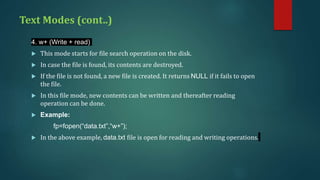
4. w+ (Write + read)
 This mode starts for file search operation on the disk.
 In case the file is found, its contents are destroyed.
 If the file is not found, a new file is created. It returns NULL if it fails to open
the file.
 In this file mode, new contents can be written and thereafter reading
operation can be done.
 Example:
fp=fopen(“data.txt”,“w+”);
 In the above example, data.txt file is open for reading and writing operations.
Text Modes (cont..)
5. a+ (append + read)
 In this file operation mode the contents of the file can be read
and records can be added at the end of file.
 A new file is created in case the concerned file does not exist.
 Due to some or the other reasons if a file is unable to open
then NULL is returned.
 Example:
fp=fopen(“data.txt”,“a+”);
 Here data.txt is opened and records are added at the end of
file without affecting the previous contents.
Text Modes (cont..)
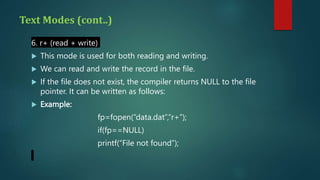
6. r+ (read + write)
 This mode is used for both reading and writing.
 We can read and write the record in the file.
 If the file does not exist, the compiler returns NULL to the file
pointer. It can be written as follows:
 Example:
fp=fopen(“data.dat”,“r+”);
if(fp==NULL)
printf(“File not found”);
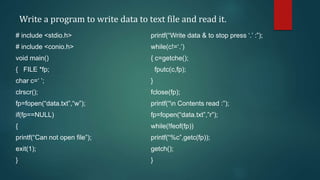
Write a program to write data to text file and read it.
# include <stdio.h>
# include <conio.h>
void main()
{ FILE *fp;
char c=‘ ’;
clrscr();
fp=fopen(“data.txt”,“w”);
if(fp==NULL)
{
printf(“Can not open file”);
exit(1);
}
printf(“Write data & to stop press ‘.’ :”);
while(c!=‘.’)
{ c=getche();
fputc(c,fp);
}
fclose(fp);
printf(“n Contents read :”);
fp=fopen(“data.txt”,”r”);
while(!feof(fp))
printf(“%c”,getc(fp));
getch();
}
Cont…
 In the above program, the file named “data.txt” is opened in
write mode.
 The characters are read from the keyboard and stored in
variable ‘c’.
 Using fputc() the characters are written to a file until ‘.’ (dot) is
pressed.
 The same file is closed and then it is reopened in read mode.
 On reopening of the file, character pointer sets to the beginning
of the file.
 The contents of the file will be displayed on the screen using
getc().
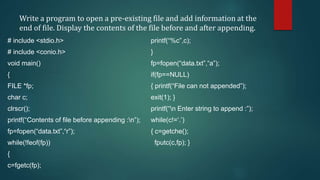
Write a program to open a pre-existing file and add information at the
end of file. Display the contents of the file before and after appending.
# include <stdio.h>
# include <conio.h>
void main()
{
FILE *fp;
char c;
clrscr();
printf(“Contents of file before appending :n”);
fp=fopen(“data.txt”,“r”);
while(!feof(fp))
{
c=fgetc(fp);
printf(“%c”,c);
}
fp=fopen(“data.txt”,“a”);
if(fp==NULL)
{ printf(“File can not appended”);
exit(1); }
printf(“n Enter string to append :”);
while(c!=‘.’)
{ c=getche();
fputc(c,fp); }
Cont…
fclose(fp);
printf(“n Contents of file After appending :n”);
fp=fopen(“data.txt”,“r”);
while(!feof(fp))
{
c=fgetc(fp);
printf(“%c”,c);
}
getch();
}
Write a program to use w+ mode for writing and reading of a
file.
# include <stdio.h>
# include <conio.h>
void main()
{
FILE *fp;
char c=’ ‘;
clrscr();
fp=fopen(“data.txt”,“w+”);
if(fp==NULL)
{
printf(“Can not open file”);
exit(1);
}
printf(“Write data & to stop press ‘.’ :”);
while(c!=‘.’)
{
c=getche();
fputc(c,fp);
}
rewind(fp);
printf(“n Contents read :”);
while(!feof(fp))
printf(“%c”,getc(fp));
getch();
}
Cont..
 Instead of using separate read and write modes, we can use w+
mode to perform both the operations.
 At first writing operation is done. It is not essential to close the
file for reading the contents of it.
 We need to set the character pointer at the beginning.
 Hence, rewind() function is used. The advantage of using w+ is to
reduce the number of statements.
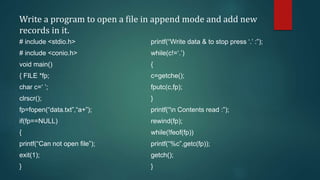
Write a program to open a file in append mode and add new
records in it.
# include <stdio.h>
# include <conio.h>
void main()
{ FILE *fp;
char c=‘ ’;
clrscr();
fp=fopen(“data.txt”,“a+”);
if(fp==NULL)
{
printf(“Can not open file”);
exit(1);
}
printf(“Write data & to stop press ‘.’ :”);
while(c!=‘.’)
{
c=getche();
fputc(c,fp);
}
printf(“n Contents read :”);
rewind(fp);
while(!feof(fp))
printf(“%c”,getc(fp));
getch();
}
Cont…
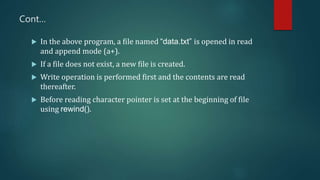
 In the above program, a file named “data.txt” is opened in read
and append mode (a+).
 If a file does not exist, a new file is created.
 Write operation is performed first and the contents are read
thereafter.
 Before reading character pointer is set at the beginning of file
using rewind().
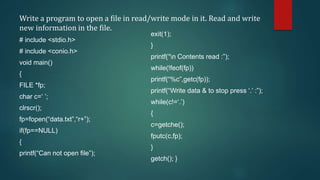
Write a program to open a file in read/write mode in it. Read and write
new information in the file.
# include <stdio.h>
# include <conio.h>
void main()
{
FILE *fp;
char c=‘ ’;
clrscr();
fp=fopen(“data.txt”,“r+”);
if(fp==NULL)
{
printf(“Can not open file”);
exit(1);
}
printf(“n Contents read :”);
while(!feof(fp))
printf(“%c”,getc(fp));
printf(“Write data & to stop press ‘.’ :”);
while(c!=‘.’)
{
c=getche();
fputc(c,fp);
}
getch(); }
Cont..
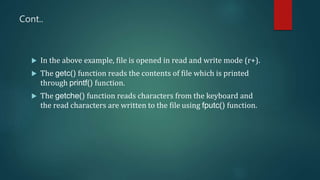
 In the above example, file is opened in read and write mode (r+).
 The getc() function reads the contents of file which is printed
through printf() function.
 The getche() function reads characters from the keyboard and
the read characters are written to the file using fputc() function.
Binary Modes
 A text file contains only textual information like alphabets, digits and
special symbols. In actuality the ASCII codes of these characters are
stored in text files.
 As against this, a binary file is merely a collection of bytes
 When numerical data is to be transferred to disk from RAM, the data
occupies more memory space on disk.
 For example, a number 234567 needs 3 bytes memory space in RAM
and when transferred to disk requires 6 bytes memory space.
 For each numerical digit one byte space is needed.
 Hence, total requirement for the number 234567 would be 6 bytes.
Binary Modes (cont..)
 Thus, text mode is inefficient for storing large amount of
numerical data because space occupation by it is large.
 Only solution to this inefficient memory use is to open a file in
binary mode, which takes lesser space than text mode.

Unit-VI.pptx

  • 1.
  • 2.
    Introduction of aFile  A file is nothing but collection of records.  Record is group of related data items.  All data items related to students, employees, customers etc is nothing but records.  In other words, file is a collection of numbers, symbols & text placed onto the secondary devices like hard disk, pen drive, compact disk etc.  Files are stored permanently on to the disk and one can access them for further monitoring/ processing if needed.
  • 3.
    Introduction of aFile(cont..)  DEFINITION OF FILE: A file can be considered as a stream of characters. A file can be a set of records that can be accessed through the set of library functions. These functions are available in stdio.h.
  • 4.
    Introduction of aFile(cont..)  All data stored on the disk is in binary form.  How this binary data is stored on the disk varies from one OS to another.  However, this does not affect the C programmer since she/he has to use only the library functions written for the particular OS to be able to perform input/output.
  • 5.
    File Operations i. Openinga File ii. Reading a File iii. Closing a File
  • 6.
    Opening of File A file has to be opened before read and write operations.  Opening of a file creates a link between the operating system and the file functions.  The name of the file and its mode of operation are to be indicated to the operating system.  This important task is carried out by the structure FILE that is defined in stdio.h header file.  So this file must be included.
  • 7.
    Opening of File(cont..)  When a request is made to the operating system for opening a file, it does so by granting the request.  If request is granted then the operating systems points to the structure FILE.  The following declaration before opening of the file is to be made: FILE *fp where fp is the file pointer.
  • 8.
    Opening of File(cont..)  Each file that we open has its own FILE structure.  The information that is there in the file may be its current size, and its location in memory.  The only one function to open a file is fopen().  Syntax: FILE *fp; fp=fopen(“data.txt”,”r”);  Here fp is a pointer variable that contains the address of the structure FILE that has been defined in the header file stdio.h.
  • 9.
    Opening of File(cont..)  It is necessary to write FILE in the uppercase.  The function fopen() will open a file ‘data.txt’ in read mode.  The C compiler reads the contents of the file because it finds the read mode (“r”).  Here, “r” is a string and not a character. Hence, it is enclosed with double quotes and not with single quotes.
  • 10.
    fopen() performs thefollowing important tasks:  1. It searches the disk for opening of the file.  2. In case the file exists, it loads the file from the disk into memory. If the file is found with huge contents then it loads the file part by part.  3. If the file is not existing this function returns a NULL. NULL is a macro defined in the header file ‘stdio.h‘. This indicates that it is unable to open a file. There may be the following reasons for failure of fopen() functions: (A) when the file is in protected or hidden mode and (B) the file may be in use by another program.
  • 11.
    fopen() performs thefollowing important tasks: (cont..)  4. It locates a character pointer, which points the first character of the file. Whenever a file is opened the character pointer points to the first character of the file.
  • 12.
    Reading a File Once the file is opened using fopen(), its contents are loaded into the memory (partly or wholly).  The pointer points to the very first character of the file.  The fgetc() function is used to read the contents of the file.  The syntax for fgetc() is as follows: ch=fgetc(fp);  where fgetc() reads the character from current pointer position and advances the pointer position so that the next character is pointed.
  • 13.
    Closing a File The file that is opened from the fopen() should be closed after the work is over, i.e. we need to close the file after reading and writing operations.  In other words, the file must be closed after operations.  Also, whenever an opened file needs to be reopened in other mode in such a case also the opened file must be closed first.  Closing the file enables to wash out all its contents from the RAM buffer and further the link is disconnected from the file.
  • 14.
    Closing a File(cont..) Example: The function to close a file is fclose(fp); This statement closes the file associated with file pointer fp. This function closes one file at a time. In order to close all files function syntax used is as follows: fcloseall(); This function closes all the opened files and returns the number of files closed. It does not require any argument.
  • 15.
    Text Modes 1. w(write) This mode opens a new file on the disk for writing.  If the file already exists, its contents will be over-written without confirmation.  If the concerned file is not found, a new file is created.  Syntax: fp=fopen (“data.txt”,“w”);  Here data.txt is the file name and “w” is the mode.
  • 16.
    Text Modes (cont..) 2.r(read)  This mode searches a file and if it is found the same is loaded into the memory for reading from the first character of the file.  The file pointer points to the first character and reading operation begins.  If the file does not exist then compiler returns NULL to the file pointer.  Using pointer with the if statement we can prompt the user regarding failure of operation.  The syntax of read mode is as follows:  Syntax: fp=fopen(“data.txt”,“r”); if(fp==NULL) printf(“File does not exist”);
  • 17.
    Text Modes (cont..) 3. a(append)  This mode opens a pre-existing file for appending data.  The data appending process starts at the end of the opened file.  The file pointer points to the last character of the file.  If the file does not exist, then a new file is opened, i.e. if the file does not exist then the mode of “a” is the same as “w”.  Due to some or other reasons if file is not opened in such a case NULL is returned.  File opening may be impossible due to insufficient space on to the disk and some other reasons.
  • 18.
    Text Modes (cont..) 3.a(append)(cont…)  Syntax: fp=fopen(“data.txt”,“a”);  Here, if data.txt file already exists, it will be opened. Otherwise a new file will be opened with the same name.
  • 19.
    Text Modes (cont..) 4.w+ (Write + read)  This mode starts for file search operation on the disk.  In case the file is found, its contents are destroyed.  If the file is not found, a new file is created. It returns NULL if it fails to open the file.  In this file mode, new contents can be written and thereafter reading operation can be done.  Example: fp=fopen(“data.txt”,“w+”);  In the above example, data.txt file is open for reading and writing operations.
  • 20.
    Text Modes (cont..) 5.a+ (append + read)  In this file operation mode the contents of the file can be read and records can be added at the end of file.  A new file is created in case the concerned file does not exist.  Due to some or the other reasons if a file is unable to open then NULL is returned.  Example: fp=fopen(“data.txt”,“a+”);  Here data.txt is opened and records are added at the end of file without affecting the previous contents.
  • 21.
    Text Modes (cont..) 6.r+ (read + write)  This mode is used for both reading and writing.  We can read and write the record in the file.  If the file does not exist, the compiler returns NULL to the file pointer. It can be written as follows:  Example: fp=fopen(“data.dat”,“r+”); if(fp==NULL) printf(“File not found”);
  • 22.
    Write a programto write data to text file and read it. # include <stdio.h> # include <conio.h> void main() { FILE *fp; char c=‘ ’; clrscr(); fp=fopen(“data.txt”,“w”); if(fp==NULL) { printf(“Can not open file”); exit(1); } printf(“Write data & to stop press ‘.’ :”); while(c!=‘.’) { c=getche(); fputc(c,fp); } fclose(fp); printf(“n Contents read :”); fp=fopen(“data.txt”,”r”); while(!feof(fp)) printf(“%c”,getc(fp)); getch(); }
  • 23.
    Cont…  In theabove program, the file named “data.txt” is opened in write mode.  The characters are read from the keyboard and stored in variable ‘c’.  Using fputc() the characters are written to a file until ‘.’ (dot) is pressed.  The same file is closed and then it is reopened in read mode.  On reopening of the file, character pointer sets to the beginning of the file.  The contents of the file will be displayed on the screen using getc().
  • 24.
    Write a programto open a pre-existing file and add information at the end of file. Display the contents of the file before and after appending. # include <stdio.h> # include <conio.h> void main() { FILE *fp; char c; clrscr(); printf(“Contents of file before appending :n”); fp=fopen(“data.txt”,“r”); while(!feof(fp)) { c=fgetc(fp); printf(“%c”,c); } fp=fopen(“data.txt”,“a”); if(fp==NULL) { printf(“File can not appended”); exit(1); } printf(“n Enter string to append :”); while(c!=‘.’) { c=getche(); fputc(c,fp); }
  • 25.
    Cont… fclose(fp); printf(“n Contents offile After appending :n”); fp=fopen(“data.txt”,“r”); while(!feof(fp)) { c=fgetc(fp); printf(“%c”,c); } getch(); }
  • 26.
    Write a programto use w+ mode for writing and reading of a file. # include <stdio.h> # include <conio.h> void main() { FILE *fp; char c=’ ‘; clrscr(); fp=fopen(“data.txt”,“w+”); if(fp==NULL) { printf(“Can not open file”); exit(1); } printf(“Write data & to stop press ‘.’ :”); while(c!=‘.’) { c=getche(); fputc(c,fp); } rewind(fp); printf(“n Contents read :”); while(!feof(fp)) printf(“%c”,getc(fp)); getch(); }
  • 27.
    Cont..  Instead ofusing separate read and write modes, we can use w+ mode to perform both the operations.  At first writing operation is done. It is not essential to close the file for reading the contents of it.  We need to set the character pointer at the beginning.  Hence, rewind() function is used. The advantage of using w+ is to reduce the number of statements.
  • 28.
    Write a programto open a file in append mode and add new records in it. # include <stdio.h> # include <conio.h> void main() { FILE *fp; char c=‘ ’; clrscr(); fp=fopen(“data.txt”,“a+”); if(fp==NULL) { printf(“Can not open file”); exit(1); } printf(“Write data & to stop press ‘.’ :”); while(c!=‘.’) { c=getche(); fputc(c,fp); } printf(“n Contents read :”); rewind(fp); while(!feof(fp)) printf(“%c”,getc(fp)); getch(); }
  • 29.
    Cont…  In theabove program, a file named “data.txt” is opened in read and append mode (a+).  If a file does not exist, a new file is created.  Write operation is performed first and the contents are read thereafter.  Before reading character pointer is set at the beginning of file using rewind().
  • 30.
    Write a programto open a file in read/write mode in it. Read and write new information in the file. # include <stdio.h> # include <conio.h> void main() { FILE *fp; char c=‘ ’; clrscr(); fp=fopen(“data.txt”,“r+”); if(fp==NULL) { printf(“Can not open file”); exit(1); } printf(“n Contents read :”); while(!feof(fp)) printf(“%c”,getc(fp)); printf(“Write data & to stop press ‘.’ :”); while(c!=‘.’) { c=getche(); fputc(c,fp); } getch(); }
  • 31.
    Cont..  In theabove example, file is opened in read and write mode (r+).  The getc() function reads the contents of file which is printed through printf() function.  The getche() function reads characters from the keyboard and the read characters are written to the file using fputc() function.
  • 32.
    Binary Modes  Atext file contains only textual information like alphabets, digits and special symbols. In actuality the ASCII codes of these characters are stored in text files.  As against this, a binary file is merely a collection of bytes  When numerical data is to be transferred to disk from RAM, the data occupies more memory space on disk.  For example, a number 234567 needs 3 bytes memory space in RAM and when transferred to disk requires 6 bytes memory space.  For each numerical digit one byte space is needed.  Hence, total requirement for the number 234567 would be 6 bytes.
  • 33.
    Binary Modes (cont..) Thus, text mode is inefficient for storing large amount of numerical data because space occupation by it is large.  Only solution to this inefficient memory use is to open a file in binary mode, which takes lesser space than text mode.