
Investment Readiness Program 2021
User guide for Entrepreneurs
www.babele.co/irp
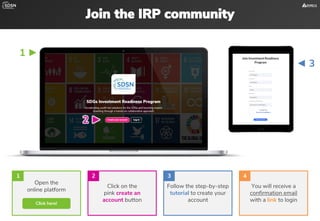
Join the IRP community
Open the
online platform
Click on the
pink create an
account button
Follow the step-by-step
tutorial to create your
account
You will receive a
confirmation email
with a link to login
Click here!
1 2 3 4
◄ 3
1 ►
2 ►
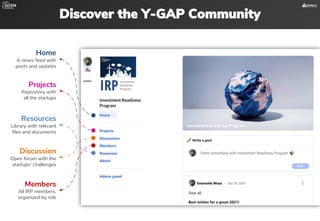
Discover the Y-GAP Community
Home
A news-feed with
posts and updates
Projects
Repository with
all the startups
Discussion
Open forum with the
startups‘ challenges
Resources
Library with relevant
files and documents
Members
All IRP members,
organized by role
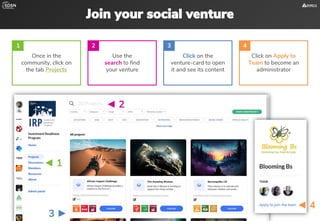
Join your social venture
3 ►
◄ 1
◄ 2
◄ 4
Once in the
community, click on
the tab Projects
Use the
search to find
your venture
Click on the
venture-card to open
it and see its content
Click on Apply to
Team to become an
administrator
1 2 3 4
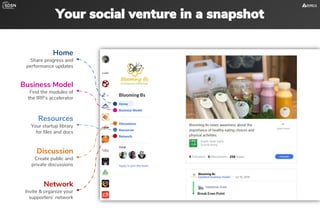
Your social venture in a snapshot
Home
Share progress and
performance updates
Business Model
Find the modules of
the IRP’s accelerator
Discussion
Create public and
private discussions
Resources
Your startup library
for files and docs
Network
Invite & organize your
supporters’ network
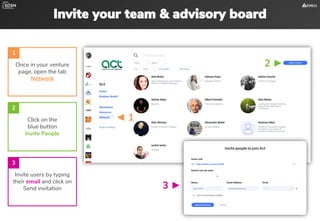
Invite your team & advisory board
Once in your venture
page, open the tab
Network
Invite users by typing
their email and click on
Send invitation
1
Click on the
blue button
Invite People
2
3
2 ►
◄ 1
3 ►
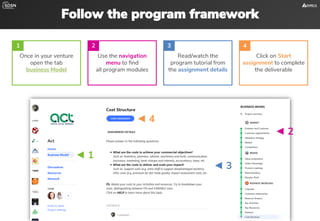
Follow the program framework
◄ 4
Once in your venture
open the tab
business Model
Use the navigation
menu to find
all program modules
Read/watch the
program tutorial from
the assignment details
Click on Start
assignment to complete
the deliverable
1 2 3 4
◄ 1
◄ 2
◄ 3
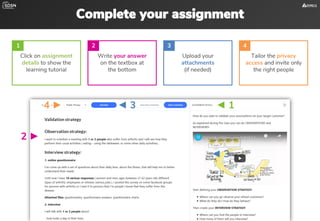
Complete your assignment
Click on assignment
details to show the
learning tutorial
Write your answer
on the textbox at
the bottom
Upload your
attachments
(if needed)
Tailor the privacy
access and invite only
the right people
1 2 3 4
◄ 1
2 ►
◄ 3
◄ 3
4 ►
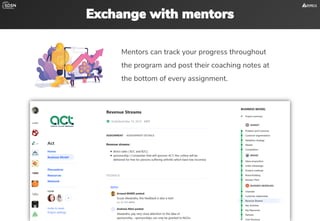
Exchange with mentors
Mentors can track your progress throughout
the program and post their coaching notes at
the bottom of every assignment.
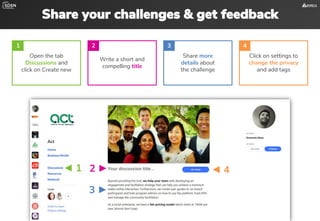
Share your challenges & get feedback
Open the tab
Discussions and
click on Create new
Write a short and
compelling title
Share more
details about
the challenge
Click on settings to
change the privacy
and add tags
1 2 3 4
◄ 1 2 ► ◄ 4
3 ►
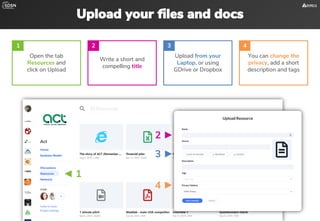
Upload your files and docs
Open the tab
Resources and
click on Upload
Write a short and
compelling title
Upload from your
Laptop, or using
GDrive or Dropbox
You can change the
privacy, add a short
description and tags
1 2 3 4
◄ 1
2 ►
3 ►
4 ►
Investment Readiness Program 2021
Good Luck!
www.babele.co/irp

United Nations SDSN Program - user guide for entrepreneurs

  • 1.
    Investment Readiness Program2021 User guide for Entrepreneurs www.babele.co/irp
  • 2.
    Join the IRPcommunity Open the online platform Click on the pink create an account button Follow the step-by-step tutorial to create your account You will receive a confirmation email with a link to login Click here! 1 2 3 4 ◄ 3 1 ► 2 ►
  • 3.
    Discover the Y-GAPCommunity Home A news-feed with posts and updates Projects Repository with all the startups Discussion Open forum with the startups‘ challenges Resources Library with relevant files and documents Members All IRP members, organized by role
  • 4.
    Join your socialventure 3 ► ◄ 1 ◄ 2 ◄ 4 Once in the community, click on the tab Projects Use the search to find your venture Click on the venture-card to open it and see its content Click on Apply to Team to become an administrator 1 2 3 4
  • 5.
    Your social venturein a snapshot Home Share progress and performance updates Business Model Find the modules of the IRP’s accelerator Discussion Create public and private discussions Resources Your startup library for files and docs Network Invite & organize your supporters’ network
  • 6.
    Invite your team& advisory board Once in your venture page, open the tab Network Invite users by typing their email and click on Send invitation 1 Click on the blue button Invite People 2 3 2 ► ◄ 1 3 ►
  • 7.
    Follow the programframework ◄ 4 Once in your venture open the tab business Model Use the navigation menu to find all program modules Read/watch the program tutorial from the assignment details Click on Start assignment to complete the deliverable 1 2 3 4 ◄ 1 ◄ 2 ◄ 3
  • 8.
    Complete your assignment Clickon assignment details to show the learning tutorial Write your answer on the textbox at the bottom Upload your attachments (if needed) Tailor the privacy access and invite only the right people 1 2 3 4 ◄ 1 2 ► ◄ 3 ◄ 3 4 ►
  • 9.
    Exchange with mentors Mentorscan track your progress throughout the program and post their coaching notes at the bottom of every assignment.
  • 10.
    Share your challenges& get feedback Open the tab Discussions and click on Create new Write a short and compelling title Share more details about the challenge Click on settings to change the privacy and add tags 1 2 3 4 ◄ 1 2 ► ◄ 4 3 ►
  • 11.
    Upload your filesand docs Open the tab Resources and click on Upload Write a short and compelling title Upload from your Laptop, or using GDrive or Dropbox You can change the privacy, add a short description and tags 1 2 3 4 ◄ 1 2 ► 3 ► 4 ►
  • 12.
    Investment Readiness Program2021 Good Luck! www.babele.co/irp