UNIT 1: Introduction To The AutoCAD Interface
Objectives:
•Be able to identify, describe and/or apply…
•The key components of AutoCAD interface
•The AutoCAD help and search tools
•The Quick access toolbar
•The Infocenter toolbar
•The AutoCAD ribbon layout
•AutoCAD command line, drawing aides and
Status bar
•The difference between Model and Layout
space
Assignments/Quizzes/Tests
UNIT 1 Test
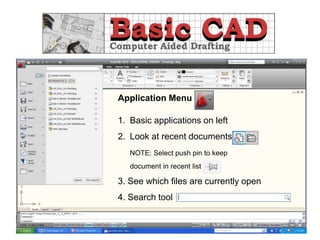
Application Menu
1. Basic applications on left
2. Look at recent documents
NOTE: Select push pin to keep
document in recent list
3. See which files are currently open
4. Search tool
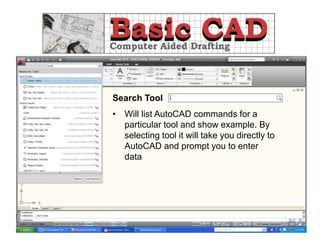
Search Tool
• Will list AutoCAD commands for a
particular tool and show example. By
selecting tool it will take you directly to
AutoCAD and prompt you to enter
data
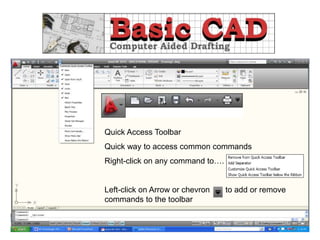
Quick Access Toolbar
Quick way to access common commands
Right-click on any command to….
Left-click on Arrow or chevron to add or remove
commands to the toolbar
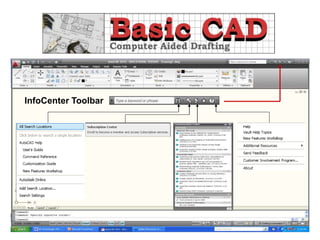
InfoCenter Toolbar
Ribbon………. Interface when accessing the AutoCAD
commands or features. Comprised of three
components.
Tabs
Panels
Commands
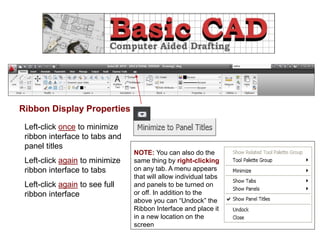
Ribbon Display Properties
Left-click once to minimize
ribbon interface to tabs and
panel titles
Left-click again to minimize
ribbon interface to tabs
Left-click again to see full
ribbon interface
NOTE: You can also do the
same thing by right-clicking
on any tab. A menu appears
that will allow individual tabs
and panels to be turned on
or off. In addition to the
above you can “Undock” the
Ribbon Interface and place it
in a new location on the
screen
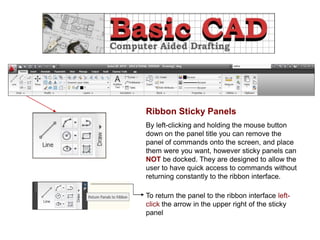
Ribbon Sticky Panels
By left-clicking and holding the mouse button
down on the panel title you can remove the
panel of commands onto the screen, and place
them were you want, however sticky panels can
NOT be docked. They are designed to allow the
user to have quick access to commands without
returning constantly to the ribbon interface.
To return the panel to the ribbon interface left-
click the arrow in the upper right of the sticky
panel
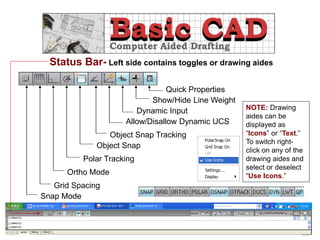
Snap Mode
Grid Spacing
Ortho Mode
Polar Tracking
Object Snap
Object Snap Tracking
Dynamic Input
Allow/Disallow Dynamic UCS
Show/Hide Line Weight
Quick Properties
Status Bar- Left side contains toggles or drawing aides
NOTE: Drawing
aides can be
displayed as
“Icons” or “Text.”
To switch right-
click on any of the
drawing aides and
select or deselect
“Use Icons.”
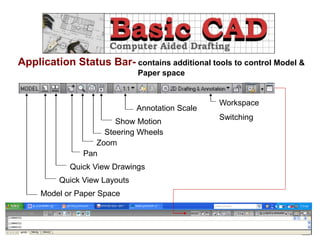
Application Status Bar- contains additional tools to control Model &
Paper space
Model or Paper Space
Quick View Layouts
Quick View Drawings
Zoom
Pan
Show Motion
Annotation Scale
Workspace
Switching
Steering Wheels
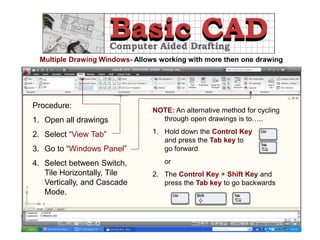
Multiple Drawing Windows- Allows working with more then one drawing
Procedure:
1. Open all drawings
2. Select “View Tab”
3. Go to “Windows Panel”
4. Select between Switch,
Tile Horizontally, Tile
Vertically, and Cascade
Mode.
NOTE: An alternative method for cycling
through open drawings is to…..
1. Hold down the Control Key
and press the Tab key to
go forward
or
2. The Control Key + Shift Key and
press the Tab key to go backwards
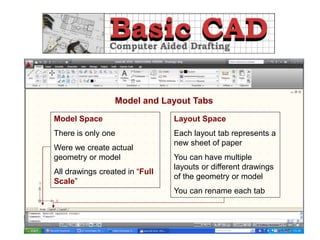
Model and Layout Tabs
Model Space
There is only one
Were we create actual
geometry or model
All drawings created in “Full
Scale”
Layout Space
Each layout tab represents a
new sheet of paper
You can have multiple
layouts or different drawings
of the geometry or model
You can rename each tab
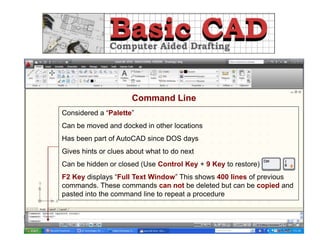
Command Line
Considered a “Palette”
Can be moved and docked in other locations
Has been part of AutoCAD since DOS days
Gives hints or clues about what to do next
Can be hidden or closed (Use Control Key + 9 Key to restore)
F2 Key displays “Full Text Window” This shows 400 lines of previous
commands. These commands can not be deleted but can be copied and
pasted into the command line to repeat a procedure

UNIT_1_Intro_to_AutoCAD_Interface.ppt

  • 1.
    UNIT 1: IntroductionTo The AutoCAD Interface Objectives: •Be able to identify, describe and/or apply… •The key components of AutoCAD interface •The AutoCAD help and search tools •The Quick access toolbar •The Infocenter toolbar •The AutoCAD ribbon layout •AutoCAD command line, drawing aides and Status bar •The difference between Model and Layout space Assignments/Quizzes/Tests UNIT 1 Test
  • 2.
    Application Menu 1. Basicapplications on left 2. Look at recent documents NOTE: Select push pin to keep document in recent list 3. See which files are currently open 4. Search tool
  • 3.
    Search Tool • Willlist AutoCAD commands for a particular tool and show example. By selecting tool it will take you directly to AutoCAD and prompt you to enter data
  • 4.
    Quick Access Toolbar Quickway to access common commands Right-click on any command to…. Left-click on Arrow or chevron to add or remove commands to the toolbar
  • 5.
  • 6.
    Ribbon………. Interface whenaccessing the AutoCAD commands or features. Comprised of three components. Tabs Panels Commands
  • 7.
    Ribbon Display Properties Left-clickonce to minimize ribbon interface to tabs and panel titles Left-click again to minimize ribbon interface to tabs Left-click again to see full ribbon interface NOTE: You can also do the same thing by right-clicking on any tab. A menu appears that will allow individual tabs and panels to be turned on or off. In addition to the above you can “Undock” the Ribbon Interface and place it in a new location on the screen
  • 8.
    Ribbon Sticky Panels Byleft-clicking and holding the mouse button down on the panel title you can remove the panel of commands onto the screen, and place them were you want, however sticky panels can NOT be docked. They are designed to allow the user to have quick access to commands without returning constantly to the ribbon interface. To return the panel to the ribbon interface left- click the arrow in the upper right of the sticky panel
  • 9.
    Snap Mode Grid Spacing OrthoMode Polar Tracking Object Snap Object Snap Tracking Dynamic Input Allow/Disallow Dynamic UCS Show/Hide Line Weight Quick Properties Status Bar- Left side contains toggles or drawing aides NOTE: Drawing aides can be displayed as “Icons” or “Text.” To switch right- click on any of the drawing aides and select or deselect “Use Icons.”
  • 10.
    Application Status Bar-contains additional tools to control Model & Paper space Model or Paper Space Quick View Layouts Quick View Drawings Zoom Pan Show Motion Annotation Scale Workspace Switching Steering Wheels
  • 11.
    Multiple Drawing Windows-Allows working with more then one drawing Procedure: 1. Open all drawings 2. Select “View Tab” 3. Go to “Windows Panel” 4. Select between Switch, Tile Horizontally, Tile Vertically, and Cascade Mode. NOTE: An alternative method for cycling through open drawings is to….. 1. Hold down the Control Key and press the Tab key to go forward or 2. The Control Key + Shift Key and press the Tab key to go backwards
  • 12.
    Model and LayoutTabs Model Space There is only one Were we create actual geometry or model All drawings created in “Full Scale” Layout Space Each layout tab represents a new sheet of paper You can have multiple layouts or different drawings of the geometry or model You can rename each tab
  • 13.
    Command Line Considered a“Palette” Can be moved and docked in other locations Has been part of AutoCAD since DOS days Gives hints or clues about what to do next Can be hidden or closed (Use Control Key + 9 Key to restore) F2 Key displays “Full Text Window” This shows 400 lines of previous commands. These commands can not be deleted but can be copied and pasted into the command line to repeat a procedure