Unit 9: Photography 
Techniques Task 6:
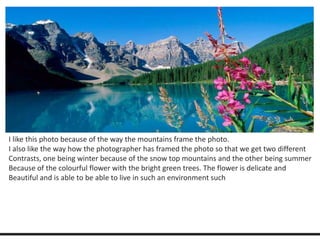
I like this photo because of the way the mountains frame the photo. 
I also like the way how the photographer has framed the photo so that we get two different 
Contrasts, one being winter because of the snow top mountains and the other being summer 
Because of the colourful flower with the bright green trees. The flower is delicate and 
Beautiful and is able to be able to live in such an environment such
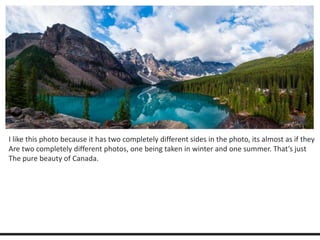
I like this photo because it has two completely different sides in the photo, its almost as if they 
Are two completely different photos, one being taken in winter and one summer. That’s just 
The pure beauty of Canada.
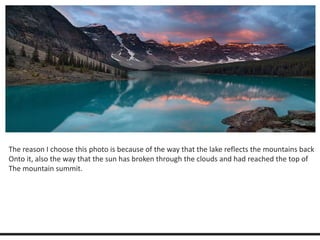
The reason I choose this photo is because of the way that the lake reflects the mountains back 
Onto it, also the way that the sun has broken through the clouds and had reached the top of 
The mountain summit.

Unit 9 photography techniques - task 6

  • 1.
    Unit 9: Photography Techniques Task 6:
  • 3.
    I like thisphoto because of the way the mountains frame the photo. I also like the way how the photographer has framed the photo so that we get two different Contrasts, one being winter because of the snow top mountains and the other being summer Because of the colourful flower with the bright green trees. The flower is delicate and Beautiful and is able to be able to live in such an environment such
  • 4.
    I like thisphoto because it has two completely different sides in the photo, its almost as if they Are two completely different photos, one being taken in winter and one summer. That’s just The pure beauty of Canada.
  • 5.
    The reason Ichoose this photo is because of the way that the lake reflects the mountains back Onto it, also the way that the sun has broken through the clouds and had reached the top of The mountain summit.

Editor's Notes

  • #2 This presentation demonstrates the new capabilities of PowerPoint and it is best viewed in Slide Show. These slides are designed to give you great ideas for the presentations you’ll create in PowerPoint 2010! For more sample templates, click the File tab, and then on the New tab, click Sample Templates.