Unit 01
Fundamental of Software
Engineering
Agenda
• Process Framework
• Prescriptive Process Model
• Classical Waterfall
• Iterative
• Spiral
• Prototype
What is Software?
• Instructions (computer programs) that when executed provide desired features,
function, and performance;
• data structures that enable the programs to adequately manipulate information
and documentation that describes the operation and use of the programs
IEEE definition
• Software engineering is the application of a systematic, disciplined
quantifiable approach to the development, operation and
maintenance of software; i.e. the application of engineering to
software
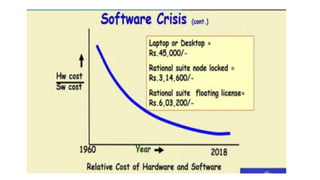
Software crisis
• It is often the case that software product
• Fail to meet user requirement- custom vs generic s/w
• Expensive
• Difficult to alter, debug and enhance
• Often delivered late
• Use resources non optimally
Categories of Software
• System software : is characterized by heavy interaction with computer hardware.e.g. compilers, editors ,
operating system, drivers, telecommunications processors.
• Business Software payroll, accounts receivable/payable, inventory management information system (MIS)
• Engineering/ Scientific software : number crunching algorithm, astronomy, volcanology automotive stress
analysis, space shuttle orbital dynamics, molecular biology, automated manufacturing.
• Embedded Software : fuel control , dashboard displays, keypad control ,microwave oven.
• Web/ Mobile Applications
• AI Software (robotics, neural net, game playing)
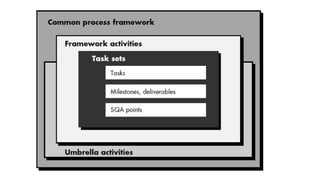
Process Framework
• A common process framework is established by defining a small
number of framework activities that are applicable to all software
projects, regardless of their size or complexity.
• The software process framework is a collection of task sets.
• Task sets consist of a collection of small work tasks, project
milestones, work productivity and software quality assurance points.
Umbrella activities
• Software project tracking and control
• In this activity, the developing team accesses project plan and compares it with the
predefined schedule. If these project plans do not match with the predefined schedule,
then the required actions are taken to maintain the schedule.
• Risk management
• Risk is an event that may or may not occur. If the event occurs, then it causes some
unwanted outcome. Hence, proper risk management is required.
• Software Quality Assurance (SQA)
• SQA is the planned and systematic pattern of activities which are required to
give a guarantee of software quality. For example, during the software
development meetings are conducted at every stage of development to find out
the bugs and suggest improvements to produce good quality software.
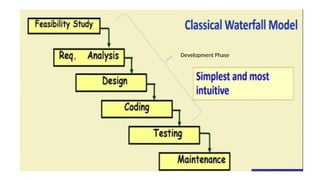
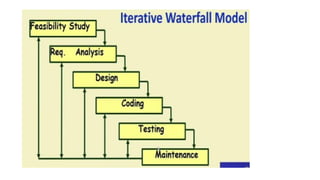
Classical Waterfall Model
• Classical waterfall model divides life cycle into following phases:
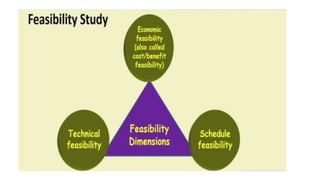
• Feasibility study
• Requirement analysis and specification
• Design
• Coding
• Testing
• Maintenance
Development Phase
Feasibility Analysis
• Main aim of feasibility study is to determine whether developing the
software is
• Financially worthwhile
• Technically feasible
• Roughly understand what customer wants:
• Data which would be input to a system
• Processing needed on those data
• Output data to be produced by system
• Various constrains on the behavior of the system
Case Study
• Special provident fund scheme for coalfield Limited(CFL)
• CFL has large number of employee, more than 50000
• Majority of these are casual labors
• Mining being a risky profession:
• Casualties are high
• Through there is a PF:
• But the settlement time is high
• There is need of SPF
• For faster disbursement of benefits
Feasibility Case study
• Manager visit main office, find out the main functionalities required
• Visits mine site, finds data to be input
• Suggest alternate solutions
• Determine the best solutions
• Present to the CFL officials
• GO/NO - GO decisions
Activities during feasibility study
• Workout an overall understanding of problem
• Formulate different solution strategies
• Examine alternate solution strategies in terms of
• Resource required
• Cost of development
• Development time
Perform cost/benefit analysis
• Determine which solution is the best
• May also find that none of the solution is feasible due to:
• High cost
• Resource constraints
• Technical reasons
Perform cost/benefit analysis
• Identify all cost
• Development cost
• Setup cost
• Operational cost
• Identify the value of benefits
• Check benefits are greater than cost
Requirement analysis and specification
• Aim of this phase
• Understand exact requirement of customer
• Document them properly
• Phase consist of two activity
• Requirement gathering and analysis
• Requirement specification
Requirement analysis and specification
• Gather requirement data from customer
• Analyze collected data to understands what customer wants
• Remove requirement problems which are
• Inconsistencies – contradiction ( all user have common control)
• Anomalies - ambiguity( if( T>100) then (fan on) or (shower on)
• Incompleteness – If(T<90) pass
• Organize into software requirement specification (SRS) documents
Requirement Gathering
• Gathering relevant data
• Usually collected from end user through interview and discussion
• Example : for a business accounting software
• Interview all accountant of the organization to find out their requirements
Design
• During design phase requirements specification is
transformed into
• A form suitable for implementation in some programming
language
• Two commonly used design approach
• Traditional approach
• Object oriented approach
Traditional approach
• Consist of two activity
• Structured analysis( carried out by data flow design)
• Structured design
Structured Design
• High Level Design
• Decompose system into modules
• Represent invocation relationship between module
• Detailed design
• Different modules design in greater details
• Data structure and algorithm for each module are design
Object Oriented Design
• Identify various objects occurring in problem
• Identify relationship among object
• For example, objects in payroll software maybe
• Employee
• Manager
• Department
• Pay-roll register etc.
Object oriented design
• Object structure
• Refine to obtained the detail design
• OOD has several advantages
• Lower development effort
• Lower development time
• Better maintainability
Coding and Unit Testing
• Each module design is coded
• Each module is unit tested
• Tested independently as a stand alone unit and debugged.
• Each module is documented
Integration Testing
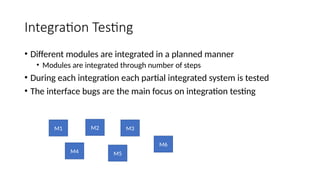
• Different modules are integrated in a planned manner
• Modules are integrated through number of steps
• During each integration each partial integrated system is tested
• The interface bugs are the main focus on integration testing
M1 M2
M4 M5
M3
M6
System Testing
• After all modules are integrated and tested successfully, system
testing is performed
• The goal of system testing is to ensure that the developed system
functions should work as specified in SRS documents
Maintenance
• Maintenance of any software :
• Require much more effort than effort required to develop product
itself.
• Development effort to maintenance effort is typically 40:60
Types of maintenance
• Corrective Maintenance
• Correct error which were not discover during the product development phase
• Perfective Maintenance
Improve implementation of the system( e.g. response time not satisfactory)
Enhance functionalities of the system
• Adaptive maintenance
Port software to a new environment
e.g. to a new computer or to a new operating system
Problems with classical water fall model
• Assume that no defect will introduce during any development activity
• In practice defect do get introduced in almost every phase of the life
cycle.
• For example a design defect might go unnoticed till the coding or
testing phase
• The later the phase in which the defect gets detected, the more
expensive is its removal
( need to rework on result of many phases)
• Needs feedback path in classical waterfall model
Waterfall Strengths
• Easy to understand easy to use
• Provide reference to inexperienced staff
• Milestones are well understood by the team
• Provides requirements stability
• Facilitate strong management control(Plan, staff, track)
Waterfall deficiencies
• All requirement must be known upfront
• Deliverable created for each phases are considered frozen
• Can give a false impression of progress.
• Integration is on big bang at the end
• Little opportunity for customer to preview the system
• Phase overlapping
When to use waterfall model
• Requirements are well known and stable
• Technology is understood
• Experienced development Team
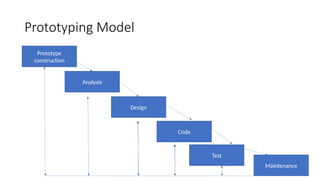
Prototyping Model
• A derivative of waterfall model
• Before starting actual development
• A working prototype of the system should first be build
• A prototype is a toy implementation of the system
• Limited functional capability
• Low reliability
• Inefficient performance
Prototyping Model
Prototype
construction
Analysis
Design
Code
Test
Maintenance
Prototype Model
• A prototype is a toy implementation of the system.
• For restricted input values it will work as we have stored that in a
table & it would have a limited functional capability and may not work
for many inputs.
• We need to develop a prototype because we can show it to the
customer.
• The customer will get a better feeling of how the software will finally
appear and he might suggest changes.
Reason for developing a Prototype
• Illustrate to the customer
• Input data formats, messages, reports or interactive dialogs
• Examine technical issues associated with product development.
• Design decision, response time etc.
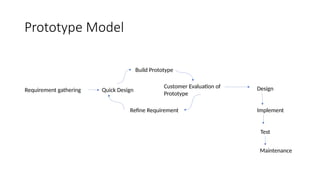
Prototype Model
Requirement gathering Quick Design
Build Prototype
Customer Evaluation of
Prototype
Refine Requirement
Design
Implement
Test
Maintenance
Spiral model
• Spiral model has been proposed by Boehm in 1988.
• This model has features of incremental development and, also evolutionary
development that means it is developed over several iterations or loops which
are similar to increments.
• The innermost loop concerned with system feasibility, the next loop with
requirement definition, then the next one with system design and so on.
• in the spiral model each loop may not result in a deliverable software.
• Each loop is called as a phase here and there are no fixed phases in this model.
• The phases are decided by the team members and each phase some risk is
identified. and, these are resolved using prototype.
Spiral Model
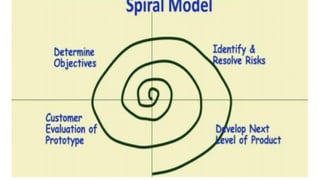
• In the spiral model, there are four quadrants.
• Each loop of the spiral model is called as a phase and over each loop
some risk is identified.
• those risk are resolved through developing prototype.
• Risk is basically any adverse circumstance that might hamper the
successful completion of the software project.
• example, whether the throughput will be sufficient to meet the
customer requirement?
Spiral Model
• Identify and resolve risk
• detailed analysis of the identified feature is carried out.
• and After that the risk is identified through building a prototype.
• Development and Validation
• Develop and validate next level of product
• Review and Planning
• Review the result achieved so far with customer and plan the next iteration
around spiral, with each iteration around the spiral more and more complete
version of the software gets built .
• Also known as meta model
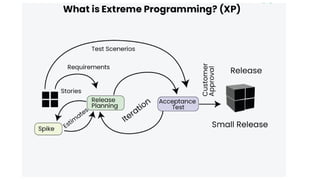
Extreme Programming (XP)
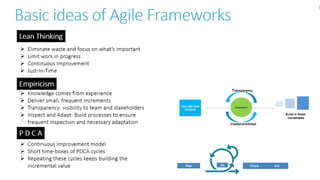
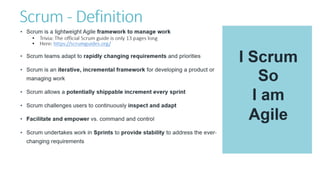
• Agile software development methodology that focuses on delivering
high-quality software through frequent and continuous feedback,
collaboration, and adaptation.
Practices of XP:
• Pair Programming
• Test-Driven Development (TDD)
• Continuous Integration
• Refactoring
• Small Releases
• Sustainable Pace
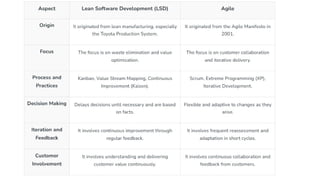
Lean Software Development (LSD)
• Lean Software Development (LSD) is a methodology derived from the
principles of Lean Manufacturing, which originated in Toyota's
production system. It focuses on optimizing efficiency, reducing
waste, and delivering value to the customer as quickly as possible.
LSD emphasizes continuous improvement, customer-centricity, and
adapting to changes in a fast and efficient manner.
Principles of Lean Software Development:
• Eliminate Waste: Identify and remove activities that do not add value to the customer.
Example: Avoid building unnecessary features.
• Build Quality In: Ensure quality at every stage of development, reducing the need for rework.
• Create Knowledge: Encourage learning and experimentation to refine processes and solutions.
Example: Use short iterations to test and validate ideas.
• Commitment: Make decisions at the last responsible moment when more information is
available.
• Deliver Fast: Focus on delivering valuable features quickly to gain feedback from customers.
• Respect People: Empower teams, foster collaboration, and value individual contributions.
• Optimize the Whole: Look at the development process holistically, ensuring all parts of the
system work together efficiently.
UNIT 01 - Fundamental of Software Engineering.pptx

UNIT 01 - Fundamental of Software Engineering.pptx

  • 1.
    Unit 01 Fundamental ofSoftware Engineering
  • 2.
    Agenda • Process Framework •Prescriptive Process Model • Classical Waterfall • Iterative • Spiral • Prototype
  • 3.
    What is Software? •Instructions (computer programs) that when executed provide desired features, function, and performance; • data structures that enable the programs to adequately manipulate information and documentation that describes the operation and use of the programs
  • 4.
    IEEE definition • Softwareengineering is the application of a systematic, disciplined quantifiable approach to the development, operation and maintenance of software; i.e. the application of engineering to software
  • 5.
    Software crisis • Itis often the case that software product • Fail to meet user requirement- custom vs generic s/w • Expensive • Difficult to alter, debug and enhance • Often delivered late • Use resources non optimally
  • 7.
    Categories of Software •System software : is characterized by heavy interaction with computer hardware.e.g. compilers, editors , operating system, drivers, telecommunications processors. • Business Software payroll, accounts receivable/payable, inventory management information system (MIS) • Engineering/ Scientific software : number crunching algorithm, astronomy, volcanology automotive stress analysis, space shuttle orbital dynamics, molecular biology, automated manufacturing. • Embedded Software : fuel control , dashboard displays, keypad control ,microwave oven. • Web/ Mobile Applications • AI Software (robotics, neural net, game playing)
  • 9.
    Process Framework • Acommon process framework is established by defining a small number of framework activities that are applicable to all software projects, regardless of their size or complexity. • The software process framework is a collection of task sets. • Task sets consist of a collection of small work tasks, project milestones, work productivity and software quality assurance points.
  • 10.
    Umbrella activities • Softwareproject tracking and control • In this activity, the developing team accesses project plan and compares it with the predefined schedule. If these project plans do not match with the predefined schedule, then the required actions are taken to maintain the schedule. • Risk management • Risk is an event that may or may not occur. If the event occurs, then it causes some unwanted outcome. Hence, proper risk management is required. • Software Quality Assurance (SQA) • SQA is the planned and systematic pattern of activities which are required to give a guarantee of software quality. For example, during the software development meetings are conducted at every stage of development to find out the bugs and suggest improvements to produce good quality software.
  • 11.
    Classical Waterfall Model •Classical waterfall model divides life cycle into following phases: • Feasibility study • Requirement analysis and specification • Design • Coding • Testing • Maintenance
  • 12.
  • 14.
    Feasibility Analysis • Mainaim of feasibility study is to determine whether developing the software is • Financially worthwhile • Technically feasible • Roughly understand what customer wants: • Data which would be input to a system • Processing needed on those data • Output data to be produced by system • Various constrains on the behavior of the system
  • 15.
    Case Study • Specialprovident fund scheme for coalfield Limited(CFL) • CFL has large number of employee, more than 50000 • Majority of these are casual labors • Mining being a risky profession: • Casualties are high • Through there is a PF: • But the settlement time is high • There is need of SPF • For faster disbursement of benefits
  • 16.
    Feasibility Case study •Manager visit main office, find out the main functionalities required • Visits mine site, finds data to be input • Suggest alternate solutions • Determine the best solutions • Present to the CFL officials • GO/NO - GO decisions
  • 17.
    Activities during feasibilitystudy • Workout an overall understanding of problem • Formulate different solution strategies • Examine alternate solution strategies in terms of • Resource required • Cost of development • Development time
  • 18.
    Perform cost/benefit analysis •Determine which solution is the best • May also find that none of the solution is feasible due to: • High cost • Resource constraints • Technical reasons
  • 19.
    Perform cost/benefit analysis •Identify all cost • Development cost • Setup cost • Operational cost • Identify the value of benefits • Check benefits are greater than cost
  • 20.
    Requirement analysis andspecification • Aim of this phase • Understand exact requirement of customer • Document them properly • Phase consist of two activity • Requirement gathering and analysis • Requirement specification
  • 21.
    Requirement analysis andspecification • Gather requirement data from customer • Analyze collected data to understands what customer wants • Remove requirement problems which are • Inconsistencies – contradiction ( all user have common control) • Anomalies - ambiguity( if( T>100) then (fan on) or (shower on) • Incompleteness – If(T<90) pass • Organize into software requirement specification (SRS) documents
  • 22.
    Requirement Gathering • Gatheringrelevant data • Usually collected from end user through interview and discussion • Example : for a business accounting software • Interview all accountant of the organization to find out their requirements
  • 23.
    Design • During designphase requirements specification is transformed into • A form suitable for implementation in some programming language • Two commonly used design approach • Traditional approach • Object oriented approach
  • 24.
    Traditional approach • Consistof two activity • Structured analysis( carried out by data flow design) • Structured design
  • 25.
    Structured Design • HighLevel Design • Decompose system into modules • Represent invocation relationship between module • Detailed design • Different modules design in greater details • Data structure and algorithm for each module are design
  • 26.
    Object Oriented Design •Identify various objects occurring in problem • Identify relationship among object • For example, objects in payroll software maybe • Employee • Manager • Department • Pay-roll register etc.
  • 27.
    Object oriented design •Object structure • Refine to obtained the detail design • OOD has several advantages • Lower development effort • Lower development time • Better maintainability
  • 28.
    Coding and UnitTesting • Each module design is coded • Each module is unit tested • Tested independently as a stand alone unit and debugged. • Each module is documented
  • 29.
    Integration Testing • Differentmodules are integrated in a planned manner • Modules are integrated through number of steps • During each integration each partial integrated system is tested • The interface bugs are the main focus on integration testing M1 M2 M4 M5 M3 M6
  • 30.
    System Testing • Afterall modules are integrated and tested successfully, system testing is performed • The goal of system testing is to ensure that the developed system functions should work as specified in SRS documents
  • 31.
    Maintenance • Maintenance ofany software : • Require much more effort than effort required to develop product itself. • Development effort to maintenance effort is typically 40:60
  • 32.
    Types of maintenance •Corrective Maintenance • Correct error which were not discover during the product development phase • Perfective Maintenance Improve implementation of the system( e.g. response time not satisfactory) Enhance functionalities of the system • Adaptive maintenance Port software to a new environment e.g. to a new computer or to a new operating system
  • 33.
    Problems with classicalwater fall model • Assume that no defect will introduce during any development activity • In practice defect do get introduced in almost every phase of the life cycle. • For example a design defect might go unnoticed till the coding or testing phase • The later the phase in which the defect gets detected, the more expensive is its removal ( need to rework on result of many phases) • Needs feedback path in classical waterfall model
  • 35.
    Waterfall Strengths • Easyto understand easy to use • Provide reference to inexperienced staff • Milestones are well understood by the team • Provides requirements stability • Facilitate strong management control(Plan, staff, track)
  • 36.
    Waterfall deficiencies • Allrequirement must be known upfront • Deliverable created for each phases are considered frozen • Can give a false impression of progress. • Integration is on big bang at the end • Little opportunity for customer to preview the system • Phase overlapping
  • 37.
    When to usewaterfall model • Requirements are well known and stable • Technology is understood • Experienced development Team
  • 38.
    Prototyping Model • Aderivative of waterfall model • Before starting actual development • A working prototype of the system should first be build • A prototype is a toy implementation of the system • Limited functional capability • Low reliability • Inefficient performance
  • 39.
  • 40.
    Prototype Model • Aprototype is a toy implementation of the system. • For restricted input values it will work as we have stored that in a table & it would have a limited functional capability and may not work for many inputs. • We need to develop a prototype because we can show it to the customer. • The customer will get a better feeling of how the software will finally appear and he might suggest changes.
  • 41.
    Reason for developinga Prototype • Illustrate to the customer • Input data formats, messages, reports or interactive dialogs • Examine technical issues associated with product development. • Design decision, response time etc.
  • 42.
    Prototype Model Requirement gatheringQuick Design Build Prototype Customer Evaluation of Prototype Refine Requirement Design Implement Test Maintenance
  • 43.
    Spiral model • Spiralmodel has been proposed by Boehm in 1988. • This model has features of incremental development and, also evolutionary development that means it is developed over several iterations or loops which are similar to increments. • The innermost loop concerned with system feasibility, the next loop with requirement definition, then the next one with system design and so on. • in the spiral model each loop may not result in a deliverable software. • Each loop is called as a phase here and there are no fixed phases in this model. • The phases are decided by the team members and each phase some risk is identified. and, these are resolved using prototype.
  • 45.
    Spiral Model • Inthe spiral model, there are four quadrants. • Each loop of the spiral model is called as a phase and over each loop some risk is identified. • those risk are resolved through developing prototype. • Risk is basically any adverse circumstance that might hamper the successful completion of the software project. • example, whether the throughput will be sufficient to meet the customer requirement?
  • 46.
    Spiral Model • Identifyand resolve risk • detailed analysis of the identified feature is carried out. • and After that the risk is identified through building a prototype. • Development and Validation • Develop and validate next level of product • Review and Planning • Review the result achieved so far with customer and plan the next iteration around spiral, with each iteration around the spiral more and more complete version of the software gets built . • Also known as meta model
  • 59.
    Extreme Programming (XP) •Agile software development methodology that focuses on delivering high-quality software through frequent and continuous feedback, collaboration, and adaptation.
  • 61.
    Practices of XP: •Pair Programming • Test-Driven Development (TDD) • Continuous Integration • Refactoring • Small Releases • Sustainable Pace
  • 62.
    Lean Software Development(LSD) • Lean Software Development (LSD) is a methodology derived from the principles of Lean Manufacturing, which originated in Toyota's production system. It focuses on optimizing efficiency, reducing waste, and delivering value to the customer as quickly as possible. LSD emphasizes continuous improvement, customer-centricity, and adapting to changes in a fast and efficient manner.
  • 63.
    Principles of LeanSoftware Development: • Eliminate Waste: Identify and remove activities that do not add value to the customer. Example: Avoid building unnecessary features. • Build Quality In: Ensure quality at every stage of development, reducing the need for rework. • Create Knowledge: Encourage learning and experimentation to refine processes and solutions. Example: Use short iterations to test and validate ideas. • Commitment: Make decisions at the last responsible moment when more information is available. • Deliver Fast: Focus on delivering valuable features quickly to gain feedback from customers. • Respect People: Empower teams, foster collaboration, and value individual contributions. • Optimize the Whole: Look at the development process holistically, ensuring all parts of the system work together efficiently.