CLOUD DEPLOYMENT
MODELS
Ms. Yeshodha S
Contents
■ Public Cloud
■ Private Cloud
■ Hybrid Cloud
■ Community Cloud
Cloud Deployment Model
■ A cloud deployment model defines how cloud services are made available to users,
who manages them, and where they are hosted.
■ It determines the specific configuration of cloud resources and infrastructure, such as
ownership, size, and accessibility.
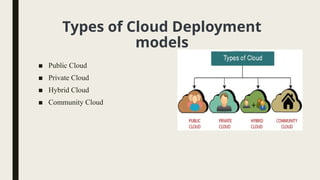
Types of Cloud Deployment
models
■ Public Cloud
■ Private Cloud
■ Hybrid Cloud
■ Community Cloud
Public Cloud
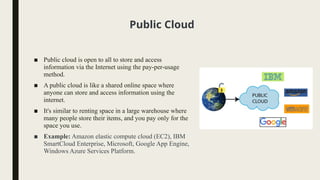
■ Public cloud is open to all to store and access
information via the Internet using the pay-per-usage
method.
■ A public cloud is like a shared online space where
anyone can store and access information using the
internet.
■ It's similar to renting space in a large warehouse where
many people store their items, and you pay only for the
space you use.
■ Example: Amazon elastic compute cloud (EC2), IBM
SmartCloud Enterprise, Microsoft, Google App Engine,
Windows Azure Services Platform.
Advantages of Public Cloud
1. Lower Cost:
Affordable: Public clouds are generally more affordable compared to private and hybrid
clouds because you only pay for what you use.
No Hardware Investment: You don’t need to buy or maintain physical servers, reducing
upfront costs.
2. Maintenance-Free:
Managed by Providers: The cloud service provider (CSP) takes care of all the
maintenance, updates, and security, so you don't have to worry about managing the
infrastructure.
Expert Support: Providers often offer 24/7 support and monitoring to ensure everything
runs smoothly.
3. Easy Integration:
Seamless Connectivity: Public clouds can easily integrate with existing systems and
applications, providing flexibility and ease of use.
Wide Range of Services: Access to a vast array of tools and services that can be quickly
deployed to meet business needs.
Continued…
1. Location Independence:
Access Anywhere: Services are delivered via the internet, making it possible to access data and
applications from anywhere in the world.
Remote Work Support: Ideal for businesses with remote or distributed teams, enabling
collaboration across different locations.
2. High Scalability:
Adaptable Resources: Public clouds offer the ability to scale resources up or down based on
demand, allowing businesses to handle peak loads efficiently.
Automatic Scaling: Many providers offer automatic scaling options to adjust resources without
manual intervention.
3. Unlimited Accessibility:
Open to Everyone: Accessible to the general public, with no limit on the number of users or
devices that can connect.
Global Reach: Provides the potential to reach a global audience, supporting expansion and growth.
Disadvantages of Public Cloud
1. Less Secure:
Shared Resources: Since the public cloud infrastructure is shared among multiple users, there’s a higher risk of
data breaches and cyber-attacks compared to private clouds.
Vulnerability to Threats: Public cloud environments can be more vulnerable to security threats due to their open
nature and multi-tenancy (multiple users sharing the same infrastructure).
2. Performance Depends on Internet Connection:
Network Dependency: Public cloud performance is heavily dependent on a high-speed and reliable internet
connection. Slow or unstable connections can lead to delays and affect application performance.
Latency Issues: Geographic distance from the cloud provider's data centers can cause latency, impacting real-time
data processing and responsiveness.
3. Limited Control Over Data:
Lack of Control: Clients have limited control over their data and how it's managed since the cloud service
provider handles the infrastructure and management.
Data Compliance Challenges: Ensuring compliance with data protection regulations can be challenging, as the
provider’s policies and infrastructure may not always align with specific compliance needs.
Private Cloud
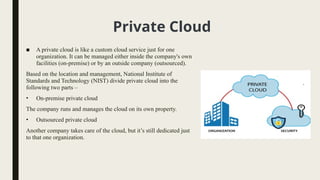
■ A private cloud is like a custom cloud service just for one
organization. It can be managed either inside the company's own
facilities (on-premise) or by an outside company (outsourced).
Based on the location and management, National Institute of
Standards and Technology (NIST) divide private cloud into the
following two parts –
• On-premise private cloud
The company runs and manages the cloud on its own property.
• Outsourced private cloud
Another company takes care of the cloud, but it’s still dedicated just
to that one organization.
Advantages of Private Cloud
■ High security and privacy: A private cloud is dedicated to a single organization, providing
enhanced security and privacy.
■ Better performance: It offers improved speed and space, leading to better performance.
■ Quick resource allocation: The IT team can rapidly allocate and manage resources as needed.
■ Full control: The organization has complete control over the cloud, reducing dependence on
external parties.
■ Ideal for security-focused organizations: It’s perfect for organizations that prioritize data security
and need a dedicated cloud for their own use.
Disadvantages of Private Cloud
■ Requires skilled personnel: Managing and operating a private cloud needs a team with
specialized skills, which can be challenging to find and maintain.
■ Limited accessibility: Since the private cloud is typically confined within the organization, its
accessibility is restricted to that environment, limiting external access.
■ Not ideal for large-scale needs: Private clouds may not be suitable for organizations with a large
user base or those lacking the necessary infrastructure and manpower to support and maintain the
cloud effectively.
Hybrid Cloud
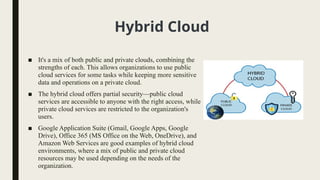
■ It's a mix of both public and private clouds, combining the
strengths of each. This allows organizations to use public
cloud services for some tasks while keeping more sensitive
data and operations on a private cloud.
■ The hybrid cloud offers partial security—public cloud
services are accessible to anyone with the right access, while
private cloud services are restricted to the organization's
users.
■ Google Application Suite (Gmail, Google Apps, Google
Drive), Office 365 (MS Office on the Web, OneDrive), and
Amazon Web Services are good examples of hybrid cloud
environments, where a mix of public and private cloud
resources may be used depending on the needs of the
organization.
Advantages of Hybrid Cloud
■ More Security: Provides better security by combining private and public cloud
resources.
■ Faster Service Delivery: Helps in quickly launching new products and services.
■ Reduced Risk: Balances risk by using both private and public clouds.
■ Flexible and Secure: Offers flexible public cloud resources and secure private cloud
resources.
Disadvantages of Hybrid Cloud
■ Security: The security may not be as robust as a private cloud because it combines
public cloud services, which might be less secure.
■ Complex Management: Managing a hybrid cloud can be complex due to the need to
handle multiple types of cloud environments (public and private).
■ Service Reliability: The reliability of services in a hybrid cloud depends on the
performance and stability of the cloud service providers used.
Community Cloud
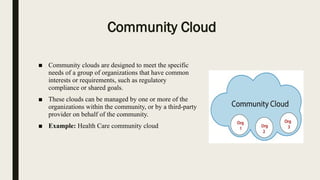
■ Community clouds are designed to meet the specific
needs of a group of organizations that have common
interests or requirements, such as regulatory
compliance or shared goals.
■ These clouds can be managed by one or more of the
organizations within the community, or by a third-party
provider on behalf of the community.
■ Example: Health Care community cloud
Advantages of Community Cloud
■ Cost-Effective: Shared costs among multiple organizations.
■ Enhanced Security: Better security than public clouds.
■ Regulatory Compliance: Tailored to meet specific regulations.
■ Collaboration: Facilitates easy data and resource sharing.
■ Scalability: Flexible scaling of resources based on demand.
■ Shared Responsibility: Reduced burden on individual organizations.
■ Tailored Services: Customized to the community's specific needs.
Disadvantages of Community Cloud
■ Limited Customization: Customization options might be restricted compared to private clouds,
as the environment is shared by multiple organizations.
■ Potential for Conflicts: Differences in requirements or priorities among the organizations can
lead to conflicts in the shared environment.
■ Shared Responsibility: While costs and management are shared, this can also lead to unclear
responsibility if issues arise, making it harder to resolve problems quickly.
■ Performance Issues: If one organization consumes more resources, it could impact the
performance for other members of the community.
■ Complex Governance: Managing and maintaining governance policies across multiple
organizations can be challenging.

Understanding Cloud Deployment Models.pptx

  • 1.
  • 2.
    Contents ■ Public Cloud ■Private Cloud ■ Hybrid Cloud ■ Community Cloud
  • 3.
    Cloud Deployment Model ■A cloud deployment model defines how cloud services are made available to users, who manages them, and where they are hosted. ■ It determines the specific configuration of cloud resources and infrastructure, such as ownership, size, and accessibility.
  • 4.
    Types of CloudDeployment models ■ Public Cloud ■ Private Cloud ■ Hybrid Cloud ■ Community Cloud
  • 5.
    Public Cloud ■ Publiccloud is open to all to store and access information via the Internet using the pay-per-usage method. ■ A public cloud is like a shared online space where anyone can store and access information using the internet. ■ It's similar to renting space in a large warehouse where many people store their items, and you pay only for the space you use. ■ Example: Amazon elastic compute cloud (EC2), IBM SmartCloud Enterprise, Microsoft, Google App Engine, Windows Azure Services Platform.
  • 6.
    Advantages of PublicCloud 1. Lower Cost: Affordable: Public clouds are generally more affordable compared to private and hybrid clouds because you only pay for what you use. No Hardware Investment: You don’t need to buy or maintain physical servers, reducing upfront costs. 2. Maintenance-Free: Managed by Providers: The cloud service provider (CSP) takes care of all the maintenance, updates, and security, so you don't have to worry about managing the infrastructure. Expert Support: Providers often offer 24/7 support and monitoring to ensure everything runs smoothly. 3. Easy Integration: Seamless Connectivity: Public clouds can easily integrate with existing systems and applications, providing flexibility and ease of use. Wide Range of Services: Access to a vast array of tools and services that can be quickly deployed to meet business needs.
  • 7.
    Continued… 1. Location Independence: AccessAnywhere: Services are delivered via the internet, making it possible to access data and applications from anywhere in the world. Remote Work Support: Ideal for businesses with remote or distributed teams, enabling collaboration across different locations. 2. High Scalability: Adaptable Resources: Public clouds offer the ability to scale resources up or down based on demand, allowing businesses to handle peak loads efficiently. Automatic Scaling: Many providers offer automatic scaling options to adjust resources without manual intervention. 3. Unlimited Accessibility: Open to Everyone: Accessible to the general public, with no limit on the number of users or devices that can connect. Global Reach: Provides the potential to reach a global audience, supporting expansion and growth.
  • 8.
    Disadvantages of PublicCloud 1. Less Secure: Shared Resources: Since the public cloud infrastructure is shared among multiple users, there’s a higher risk of data breaches and cyber-attacks compared to private clouds. Vulnerability to Threats: Public cloud environments can be more vulnerable to security threats due to their open nature and multi-tenancy (multiple users sharing the same infrastructure). 2. Performance Depends on Internet Connection: Network Dependency: Public cloud performance is heavily dependent on a high-speed and reliable internet connection. Slow or unstable connections can lead to delays and affect application performance. Latency Issues: Geographic distance from the cloud provider's data centers can cause latency, impacting real-time data processing and responsiveness. 3. Limited Control Over Data: Lack of Control: Clients have limited control over their data and how it's managed since the cloud service provider handles the infrastructure and management. Data Compliance Challenges: Ensuring compliance with data protection regulations can be challenging, as the provider’s policies and infrastructure may not always align with specific compliance needs.
  • 9.
    Private Cloud ■ Aprivate cloud is like a custom cloud service just for one organization. It can be managed either inside the company's own facilities (on-premise) or by an outside company (outsourced). Based on the location and management, National Institute of Standards and Technology (NIST) divide private cloud into the following two parts – • On-premise private cloud The company runs and manages the cloud on its own property. • Outsourced private cloud Another company takes care of the cloud, but it’s still dedicated just to that one organization.
  • 10.
    Advantages of PrivateCloud ■ High security and privacy: A private cloud is dedicated to a single organization, providing enhanced security and privacy. ■ Better performance: It offers improved speed and space, leading to better performance. ■ Quick resource allocation: The IT team can rapidly allocate and manage resources as needed. ■ Full control: The organization has complete control over the cloud, reducing dependence on external parties. ■ Ideal for security-focused organizations: It’s perfect for organizations that prioritize data security and need a dedicated cloud for their own use.
  • 11.
    Disadvantages of PrivateCloud ■ Requires skilled personnel: Managing and operating a private cloud needs a team with specialized skills, which can be challenging to find and maintain. ■ Limited accessibility: Since the private cloud is typically confined within the organization, its accessibility is restricted to that environment, limiting external access. ■ Not ideal for large-scale needs: Private clouds may not be suitable for organizations with a large user base or those lacking the necessary infrastructure and manpower to support and maintain the cloud effectively.
  • 12.
    Hybrid Cloud ■ It'sa mix of both public and private clouds, combining the strengths of each. This allows organizations to use public cloud services for some tasks while keeping more sensitive data and operations on a private cloud. ■ The hybrid cloud offers partial security—public cloud services are accessible to anyone with the right access, while private cloud services are restricted to the organization's users. ■ Google Application Suite (Gmail, Google Apps, Google Drive), Office 365 (MS Office on the Web, OneDrive), and Amazon Web Services are good examples of hybrid cloud environments, where a mix of public and private cloud resources may be used depending on the needs of the organization.
  • 13.
    Advantages of HybridCloud ■ More Security: Provides better security by combining private and public cloud resources. ■ Faster Service Delivery: Helps in quickly launching new products and services. ■ Reduced Risk: Balances risk by using both private and public clouds. ■ Flexible and Secure: Offers flexible public cloud resources and secure private cloud resources.
  • 14.
    Disadvantages of HybridCloud ■ Security: The security may not be as robust as a private cloud because it combines public cloud services, which might be less secure. ■ Complex Management: Managing a hybrid cloud can be complex due to the need to handle multiple types of cloud environments (public and private). ■ Service Reliability: The reliability of services in a hybrid cloud depends on the performance and stability of the cloud service providers used.
  • 15.
    Community Cloud ■ Communityclouds are designed to meet the specific needs of a group of organizations that have common interests or requirements, such as regulatory compliance or shared goals. ■ These clouds can be managed by one or more of the organizations within the community, or by a third-party provider on behalf of the community. ■ Example: Health Care community cloud
  • 16.
    Advantages of CommunityCloud ■ Cost-Effective: Shared costs among multiple organizations. ■ Enhanced Security: Better security than public clouds. ■ Regulatory Compliance: Tailored to meet specific regulations. ■ Collaboration: Facilitates easy data and resource sharing. ■ Scalability: Flexible scaling of resources based on demand. ■ Shared Responsibility: Reduced burden on individual organizations. ■ Tailored Services: Customized to the community's specific needs.
  • 17.
    Disadvantages of CommunityCloud ■ Limited Customization: Customization options might be restricted compared to private clouds, as the environment is shared by multiple organizations. ■ Potential for Conflicts: Differences in requirements or priorities among the organizations can lead to conflicts in the shared environment. ■ Shared Responsibility: While costs and management are shared, this can also lead to unclear responsibility if issues arise, making it harder to resolve problems quickly. ■ Performance Issues: If one organization consumes more resources, it could impact the performance for other members of the community. ■ Complex Governance: Managing and maintaining governance policies across multiple organizations can be challenging.