Introduction
What is cloudcomputing?
Cloud computing refers to the delivery of computing
services over the internet, including storage, processing
power, and software applications.
It allows users to access resources and
services on-demand, without the need for
physical infrastructure or local servers.
3.
Characteristics of CloudComputing
Key Characteristics of Cloud Computing
• On-Demand Self-Service: Users can provision resources
and services as needed, without requiring human
interaction with service providers.
• Broad Network Access: Services are accessible over the
internet via standard protocols and devices.
• Resource Pooling: Computing resources are pooled
together to serve multiple users, allowing for efficient
utilization and scalability.
• Rapid Elasticity: Resources can be scaled up or down
quickly to meet changing demands.
• Measured Service: Cloud service usage is measured,
monitored, and billed based on actual consumption.
Cloud Deployment Models
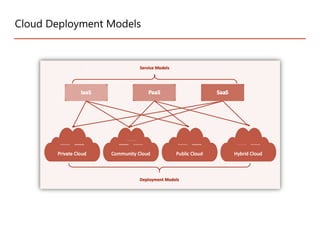
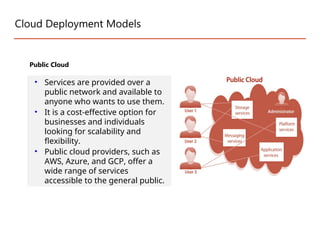
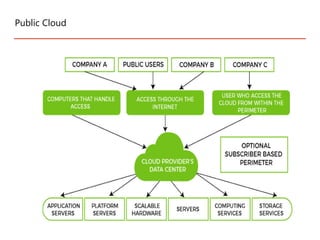
PublicCloud
• Services are provided over a
public network and available to
anyone who wants to use them.
• It is a cost-effective option for
businesses and individuals
looking for scalability and
flexibility.
• Public cloud providers, such as
AWS, Azure, and GCP, offer a
wide range of services
accessible to the general public.
• Minimal Investment- As a pay-per-use service, there is no large upfront cost and
is ideal for businesses who need quick access to resources
• No Hardware Setup - The cloud service providers fully fund the entire
Infrastructure
• Location independency and flexibility
• No Infrastructure Management - This does not require an in-house team to utilize
the public cloud.
• Infrastructure Management is not required: Using the public cloud does not
necessitate infrastructure management.
• No maintenance: The maintenance work is done by the service provider (not
users).
• Dynamic Scalability: To fulfill your company’s needs, on-demand resources are
accessible.
Advantage of Public Cloud
8.
• Data Securityand Privacy Concerns - Since it is accessible to all, it
does not fully protect against cyber-attacks and could lead to
vulnerabilities.
• Reliability Issues - Since the same server network is open to a
wide range of users, it can lead to malfunction and outages
• Low customization:- It is accessed by many public so it can’t be
customized according to personal requirements
Limitations of Public Cloud
9.
Cloud Deployment Models
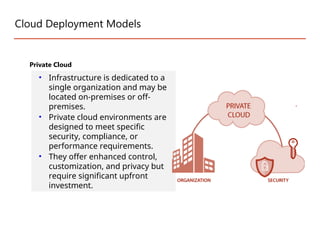
PrivateCloud
• Infrastructure is dedicated to a
single organization and may be
located on-premises or off-
premises.
• Private cloud environments are
designed to meet specific
security, compliance, or
performance requirements.
• They offer enhanced control,
customization, and privacy but
require significant upfront
investment.
10.
Better Control: Youare the sole owner of the property. You gain
complete command over service integration, IT operations, policies,
and user behavior.
Data Security and Privacy: It’s suitable for storing corporate
information to which only authorized staff have access. By
segmenting resources within the same infrastructure, improved
access and security can be achieved.
Improve performance: This approach is designed to work with
legacy systems that are unable to access the public cloud.
Customization: Unlike a public cloud deployment, a private cloud
allows a company to tailor its solution to meet its specific needs.
Advantages of the Private Cloud Model
11.
Costly: Private cloudsare more costly as they provide personalized
facilities.
Restricted area of operation.
Skilled people
Less scalable: Private clouds are scaled within a certain range as
there is less number of clients.
Disadvantages of the Private Cloud Model
12.
Cloud Deployment Models
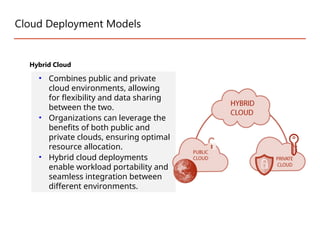
HybridCloud
• Combines public and private
cloud environments, allowing
for flexibility and data sharing
between the two.
• Organizations can leverage the
benefits of both public and
private clouds, ensuring optimal
resource allocation.
• Hybrid cloud deployments
enable workload portability and
seamless integration between
different environments.
13.
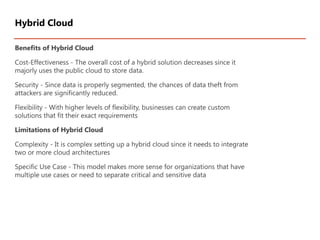
Benefits of HybridCloud
Cost-Effectiveness - The overall cost of a hybrid solution decreases since it
majorly uses the public cloud to store data.
Security - Since data is properly segmented, the chances of data theft from
attackers are significantly reduced.
Flexibility - With higher levels of flexibility, businesses can create custom
solutions that fit their exact requirements
Limitations of Hybrid Cloud
Complexity - It is complex setting up a hybrid cloud since it needs to integrate
two or more cloud architectures
Specific Use Case - This model makes more sense for organizations that have
multiple use cases or need to separate critical and sensitive data
Hybrid Cloud
14.
Cloud Deployment Models
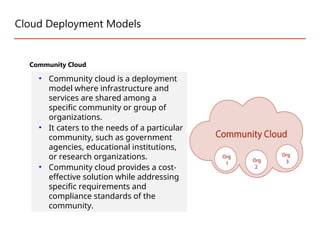
CommunityCloud
• Community cloud is a deployment
model where infrastructure and
services are shared among a
specific community or group of
organizations.
• It caters to the needs of a particular
community, such as government
agencies, educational institutions,
or research organizations.
• Community cloud provides a cost-
effective solution while addressing
specific requirements and
compliance standards of the
community.
15.
Advantages of theCommunity Cloud Model
Cost Effective: It is cost-effective because the cloud is shared by multiple
organizations or communities.
Security: Community cloud provides better security.
Shared resources: It allows you to share resources, infrastructure, etc. with
multiple organizations.
Collaboration and data sharing: It is suitable for both collaboration and data
sharing.
Disadvantages of the Community Cloud Model
Limited Scalability: Community cloud is relatively less scalable as many
organizations share the same resources according to their collaborative
interests.
Community Cloud Model
16.
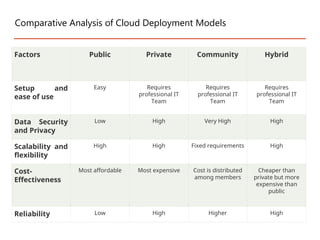
Factors Public PrivateCommunity Hybrid
Setup and
ease of use
Easy Requires
professional IT
Team
Requires
professional IT
Team
Requires
professional IT
Team
Data Security
and Privacy
Low High Very High High
Scalability and
flexibility
High High Fixed requirements High
Cost-
Effectiveness
Most affordable Most expensive Cost is distributed
among members
Cheaper than
private but more
expensive than
public
Reliability Low High Higher High
Comparative Analysis of Cloud Deployment Models
17.
Service Models
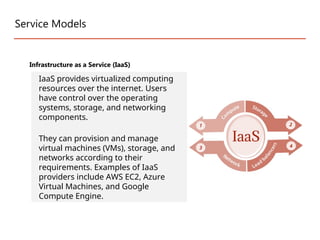
Infrastructure asa Service (IaaS)
IaaS provides virtualized computing
resources over the internet. Users
have control over the operating
systems, storage, and networking
components.
They can provision and manage
virtual machines (VMs), storage, and
networks according to their
requirements. Examples of IaaS
providers include AWS EC2, Azure
Virtual Machines, and Google
Compute Engine.
18.
Resources are availableas a service
Services are highly scalable
Dynamic and flexible
GUI and API-based access
Automated administrative tasks
Example: DigitalOcean, Amazon Web Services (AWS), Microsoft Azure, Google
Compute Engine (GCE)
There are the following characteristics of IaaS -
19.
Cost-Effective: Eliminates capitalexpense and reduces ongoing cost and IaaS
customers pay on a per-user basis, typically by the hour, week, or month.
Website hosting: Running websites using IaaS can be less expensive than
traditional web hosting.
Security: The IaaS Cloud Provider may provide better security than your
existing software.
Maintenance: There is no need to manage the underlying data center or the
introduction of new releases of the development or underlying software. This
is all handled by the IaaS Cloud Provider.
Advantages of IaaS:
20.
Limited control overinfrastructure: IaaS providers typically manage the
underlying infrastructure and take care of maintenance and updates, but
this can also mean that users have less control over the environment and
may not be able to make certain customizations.
Security concerns: Users are responsible for securing their own data and
applications, which can be a significant undertaking.
Limited access: Cloud computing may not be accessible in certain regions
and countries due to legal policies.
Disadvantages of laaS :
21.
Service Models
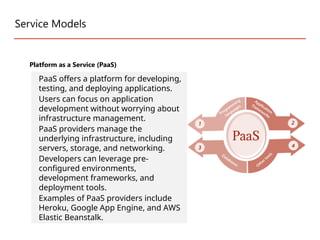
Platform asa Service (PaaS)
PaaS offers a platform for developing,
testing, and deploying applications.
Users can focus on application
development without worrying about
infrastructure management.
PaaS providers manage the
underlying infrastructure, including
servers, storage, and networking.
Developers can leverage pre-
configured environments,
development frameworks, and
deployment tools.
Examples of PaaS providers include
Heroku, Google App Engine, and AWS
Elastic Beanstalk.
22.
PaaS cloud computingplatform is created for the programmer to develop, test,
run, and manage the applications.
Characteristics of PaaS
Accessible to various users via the same development application.
Integrates with web services and databases.
Builds on virtualization technology, so resources can easily be scaled up or down
as per the organization's need.
Support multiple languages and frameworks.
Example: Google App engine, AWS Elastic Beanstalk, Windows Azure, Heroku,
Platform as a Service (PaaS)
23.
Simple and convenientfor users: It provides much of the infrastructure and
other IT services, which users can access anywhere via a web browser.
Cost-Effective: It charges for the services provided on a per-use basis thus
eliminating the expenses one may have for on-premises hardware and
software.
Efficiently managing the lifecycle: It is designed to support the complete
web application lifecycle: building, testing, deploying, managing, and updating.
Efficiency: It allows for higher-level programming with reduced complexity
thus, the overall development of the application can be more effective.
Advantages of PaaS:
24.
Limited control overinfrastructure: PaaS providers typically manage the
underlying infrastructure and take care of maintenance and updates, but this
can also mean that users have less control over the environment and may
not be able to make certain customizations.
Dependence on the provider: Users are dependent on the PaaS provider
for the availability, scalability, and reliability of the platform, which can be a
risk if the provider experiences outages or other issues.
Limited flexibility: PaaS solutions may not be able to accommodate certain
types of workloads or applications, which can limit the value of the solution
for certain organizations.
Disadvantages of Paas:
25.
Service Models
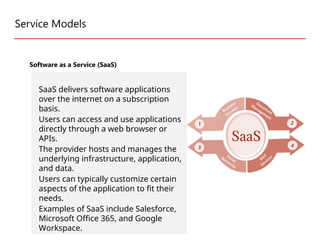
Software asa Service (SaaS)
SaaS delivers software applications
over the internet on a subscription
basis.
Users can access and use applications
directly through a web browser or
APIs.
The provider hosts and manages the
underlying infrastructure, application,
and data.
Users can typically customize certain
aspects of the application to fit their
needs.
Examples of SaaS include Salesforce,
Microsoft Office 365, and Google
Workspace.
26.
There are thefollowing characteristics of SaaS -
Managed from a central location
Hosted on a remote server
Accessible over the internet
Users are not responsible for hardware and software updates. Updates are
applied automatically.
The services are purchased on the pay-as-per-use basis
Example: You tube, email, Zoom, facebook
Characteristics of SaaS
SaaS is also known as "on-demand software". It is a software in which the
applications are hosted by a cloud service provider. Users can access these
applications with the help of internet connection and web browser.
27.
Cost-Effective: Pay onlyfor what you use.
Reduced time: Users can run most SaaS apps directly from their web browser
without needing to download and install any software. This reduces the time spent
in installation and configuration and can reduce the issues that can get in the way
of the software deployment.
Accessibility: We can Access app data from anywhere.
Automatic updates: Rather than purchasing new software, customers rely on a
SaaS provider to automatically perform the updates.
Scalability: It allows the users to access the services and features on-demand.
Advantages of SaaS
28.
Limited customization: SaaSsolutions are typically not as customizable as on-premises
software, meaning that users may have to work within the constraints of the SaaS
provider’s platform and may not be able to tailor the software to their specific needs.
Dependence on internet connectivity: SaaS solutions are typically cloud-based, which
means that they require a stable internet connection to function properly. This can be
problematic for users in areas with poor connectivity or for those who need to access the
software in offline environments.
Security concerns: SaaS providers are responsible for maintaining the security of the data
stored on their servers, but there is still a risk of data breaches or other security incidents.
Limited control over data: SaaS providers may have access to a user’s data, which can be
a concern for organizations that need to maintain strict control over their data for
regulatory or other reasons.
Disadvantages of Saas :
29.
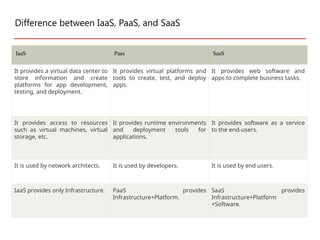
IaaS Paas SaaS
Itprovides a virtual data center to
store information and create
platforms for app development,
testing, and deployment.
It provides virtual platforms and
tools to create, test, and deploy
apps.
It provides web software and
apps to complete business tasks.
It provides access to resources
such as virtual machines, virtual
storage, etc.
It provides runtime environments
and deployment tools for
applications.
It provides software as a service
to the end-users.
It is used by network architects. It is used by developers. It is used by end users.
IaaS provides only Infrastructure. PaaS provides
Infrastructure+Platform.
SaaS provides
Infrastructure+Platform
+Software.
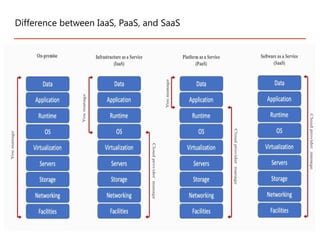
Difference between IaaS, PaaS, and SaaS
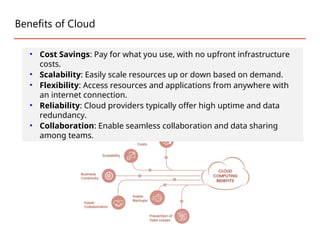
Benefits of Cloud
•Cost Savings: Pay for what you use, with no upfront infrastructure
costs.
• Scalability: Easily scale resources up or down based on demand.
• Flexibility: Access resources and applications from anywhere with
an internet connection.
• Reliability: Cloud providers typically offer high uptime and data
redundancy.
• Collaboration: Enable seamless collaboration and data sharing
among teams.
32.
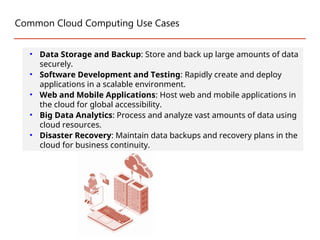
Common Cloud ComputingUse Cases
• Data Storage and Backup: Store and back up large amounts of data
securely.
• Software Development and Testing: Rapidly create and deploy
applications in a scalable environment.
• Web and Mobile Applications: Host web and mobile applications in
the cloud for global accessibility.
• Big Data Analytics: Process and analyze vast amounts of data using
cloud resources.
• Disaster Recovery: Maintain data backups and recovery plans in the
cloud for business continuity.
33.
2011-07-04
Future of Cloud
-Mobile Cloud
33
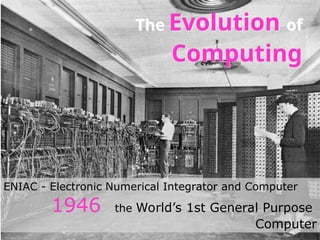
ENIAC - Electronic Numerical Integrator and Computer
1946 the World’s 1st General Purpose
Computer
The Evolution of
Computing
Evolution of CloudComputing
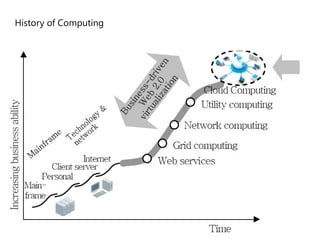
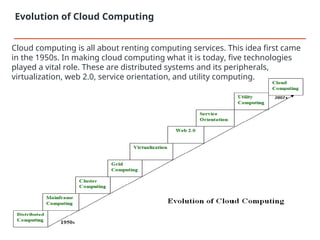
Cloud computing is all about renting computing services. This idea first came
in the 1950s. In making cloud computing what it is today, five technologies
played a vital role. These are distributed systems and its peripherals,
virtualization, web 2.0, service orientation, and utility computing.
36.
• It isa composition of multiple independent systems but all of them are depicted
as a single entity to the users.
• The purpose of distributed systems is to share resources and also use them
effectively and efficiently.
• Distributed systems possess characteristics such as scalability, concurrency,
continuous availability, heterogeneity, and independence in failures.
• But the main problem with this system was that all the systems were required to
be present at the same geographical location.
• Thus to solve this problem, distributed computing led to three more types of
computing and they were-Mainframe computing, cluster computing, and grid
computing.
Distributed Systems:
37.
• Mainframes whichfirst came into existence in 1951 are highly powerful and
reliable computing machines.
• These are responsible for handling large data such as massive input-output
operations. Even today these are used for bulk processing tasks such as
online transactions etc.
• These systems have almost no downtime with high fault tolerance. After
distributed computing, these increased the processing capabilities of the
system.
• But these were very expensive.
• To reduce this cost, cluster computing came as an alternative to mainframe
technology.
Mainframe computing:
38.
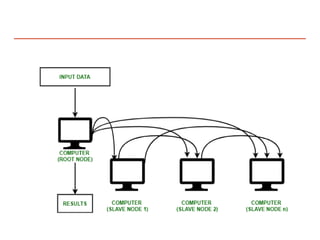
• In 1980s,cluster computing came as an alternative to mainframe
computing.
• Each machine in the cluster was connected to each other by a network with
high bandwidth.
• These were way cheaper than those mainframe systems. These were
equally capable of high computations. Also, new nodes could easily be
added to the cluster if it was required.
• Thus, the problem of the cost was solved to some extent but the problem
related to geographical restrictions still pertained. To solve this, the concept
of grid computing was introduced.
•
Cluster computing:
40.
• In 1990s,the concept of grid computing was introduced. It means that
different systems were placed at entirely different geographical locations
and these all were connected via the internet.
• These systems belonged to different organizations and thus the grid
consisted of heterogeneous nodes. Although it solved some problems but
new problems emerged as the distance between the nodes increased.
• The main problem which was encountered was the low availability of high
bandwidth connectivity and with it other network associated issues.
• Thus. cloud computing is often referred to as “Successor of grid
computing”.
Grid computing:
41.
• It wasintroduced nearly 40 years back. It refers to the process of
creating a virtual layer over the hardware which allows the user to run
multiple instances simultaneously on the hardware.
• It is a key technology used in cloud computing. It is the base on which
major cloud computing services such as Amazon EC2, VMware vCloud,
etc work on. Hardware virtualization is still one of the most common
types of virtualization.
Virtualization:
42.
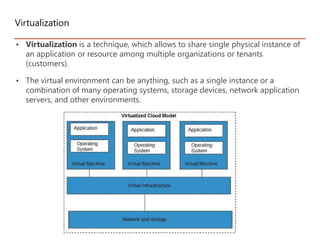
• Virtualization isa technique, which allows to share single physical instance of
an application or resource among multiple organizations or tenants
(customers).
• The virtual environment can be anything, such as a single instance or a
combination of many operating systems, storage devices, network application
servers, and other environments.
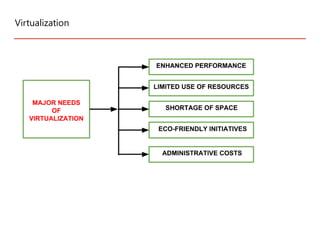
Virtualization
Virtualization
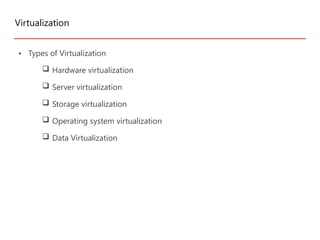
• Types ofVirtualization
Hardware virtualization
Server virtualization
Storage virtualization
Operating system virtualization
Data Virtualization
45.
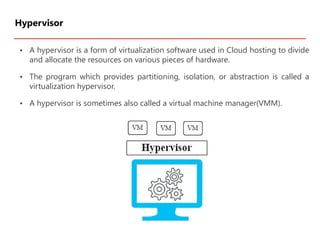
• A hypervisoris a form of virtualization software used in Cloud hosting to divide
and allocate the resources on various pieces of hardware.
• The program which provides partitioning, isolation, or abstraction is called a
virtualization hypervisor.
• A hypervisor is sometimes also called a virtual machine manager(VMM).
Hypervisor
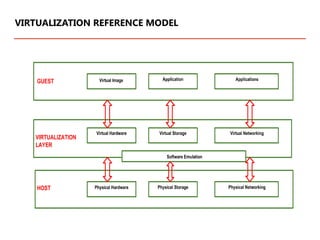
1. GUEST:
The guestrepresents the system component that interacts with the
virtualization layer rather than with the host, as would normally happen. Guests
usually consist of one or more virtual disk files, and a VM definition file. Virtual
Machines are centrally managed by a host application that sees and manages
each virtual machine as a different application.
2. HOST:
The host represents the original environment where the guest is supposed to be
managed. Each guest runs on the host using shared resources donated to it by
the host. The operating system, works as the host and manages the physical
resource management, and the device support.
3. VIRTUALIZATION LAYER:
The virtualization layer is responsible for recreating the same or a different
environment where the guest will operate. It is an additional abstraction layer
between a network and storage hardware, computing, and the application
running on it. Usually it helps to run a single operating system per machine
which can be very inflexible compared to the usage of virtualization.
VIRTUALIZATION REFERENCE MODEL
48.
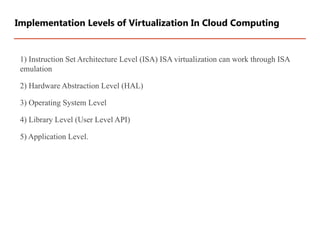
1) Instruction SetArchitecture Level (ISA) ISA virtualization can work through ISA
emulation
2) Hardware Abstraction Level (HAL)
3) Operating System Level
4) Library Level (User Level API)
5) Application Level.
Implementation Levels of Virtualization In Cloud Computing
49.
• At theISA level, virtualization is performed by emulating a given ISA by the ISA of
the host machine. For example, MIPS binary code can run on an x86-based host
machine with the help of ISA emulation.
• With this approach, it is possible to run a large amount of legacy binary code
written for various processors on any given new hardware host machine. Instruction
set emulation leads to virtual ISAs created on any hardware machine.
• The basic emulation method is through code interpretation. An interpreter program
interprets the source instructions to target instructions one by one. One source
instruction may require tens or hundreds of native target instructions to perform its
function.
• Obviously, this process is relatively slow. For better performance, dynamic binary
translation is desired. This approach translates basic blocks of dynamic source
instructions to target instructions. The basic blocks can also be extended to
program traces or super blocks to increase translation efficiency. Instruction set
emulation requires binary translation and optimization. A virtual instruction set
architecture (V-ISA) thus requires adding a processor-specific software translation
layer to the compiler.
•
Instruction Set Architecture Level
50.
• Hardware-level virtualizationis performed right on top of the bare hardware.
On the one hand, this approach generates a virtual hardware environment
for a VM.
• On the other hand, the process manages the underlying hardware through
virtualization. The idea is to virtualize a computer’s resources, such as its
processors, memory, and I/O devices.
Hardware Abstraction Level
51.
• OS-level virtualizationcreates isolated containers on a single physical server and
the OS instances to utilize the hard-ware and software in data centers.
• The containers behave like real servers. OS-level virtualization is commonly used
in creating virtual hosting environments to allocate hardware resources among a
large number of mutually distrusting users.
• It is also used, to a lesser extent, in consolidating server hardware by moving
services on separate hosts into containers or VMs on one server.
Operating System Level
52.
• Most applicationsuse APIs exported by user-level libraries rather
than using lengthy system calls by the OS. Since most systems
provide well-documented APIs, such an interface becomes
another candidate for virtualization.
• Virtualization with library interfaces is possible by controlling the
communication link between applications and the rest of a
system through API hooks.
Library Support Level
53.
• Virtualization atthe application level virtualizes an application as a VM. On a
traditional OS, an application often runs as a process.
• Therefore, application-level virtualization is also known as process-level
virtualization. The most popular approach is to deploy high level language
(HLL)
• VMs. In this scenario, the virtualization layer sits as an application program
on top of the operating system, and the layer exports an abstraction of a VM
that can run programs written and compiled to a particular abstract machine
definition.
• Any program written in the HLL and compiled for this VM will be able to run
on it. The Microsoft .NET CLR and Java Virtual Machine (JVM) are two good
examples of this class of VM.
User-Application Level
54.
• It isthe interface through which the cloud computing services interact
with the clients.
• It is because of Web 2.0 that we have interactive and dynamic web
pages. It also increases flexibility among web pages.
• Popular examples of web 2.0 include Google Maps, Facebook, Twitter,
etc. Needless to say, social media is possible because of this technology
only. It gained major popularity in 2004.
Web 2.0:
55.
• It actsas a reference model for cloud computing.
• It supports low-cost, flexible, and evolvable applications. Two important
concepts were introduced in this computing model.
• These were Quality of Service (QoS) which also includes the SLA (Service
Level Agreement) and Software as a Service (SaaS).
Service orientation:
56.
• A Service-OrientedArchitecture or SOA is a design pattern which is designed
to build distributed systems that deliver services to other applications
through the protocol. It is only a concept and not limited to any
programming language or platform.
• The different characteristics of SOA are as follows :
o Provides interoperability between the services.
o Provides methods for service encapsulation, service discovery, service
composition, service reusability and service integration.
o Facilitates QoS (Quality of Services) through service contract based on
Service Level Agreement (SLA).
o Provides location transparency with better scalability and availability.
o Ease of maintenance with reduced cost of application development and
deployment.
Service-Oriented Architecture (SOA)
57.
• It isa computing model that defines service provisioning techniques for
services such as compute services along with other major services such as
storage, infrastructure, etc which are provisioned on a pay-per-use basis.
Utility computing:
Cloud Architecture
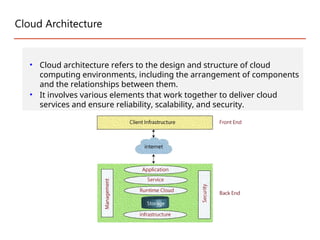
• Cloudarchitecture refers to the design and structure of cloud
computing environments, including the arrangement of components
and the relationships between them.
• It involves various elements that work together to deliver cloud
services and ensure reliability, scalability, and security.
Cont…
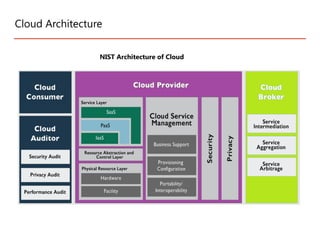
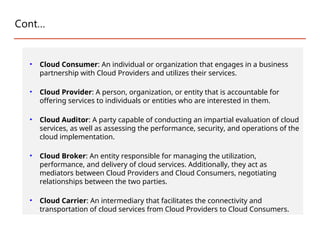
• Cloud Consumer:An individual or organization that engages in a business
partnership with Cloud Providers and utilizes their services.
• Cloud Provider: A person, organization, or entity that is accountable for
offering services to individuals or entities who are interested in them.
• Cloud Auditor: A party capable of conducting an impartial evaluation of cloud
services, as well as assessing the performance, security, and operations of the
cloud implementation.
• Cloud Broker: An entity responsible for managing the utilization,
performance, and delivery of cloud services. Additionally, they act as
mediators between Cloud Providers and Cloud Consumers, negotiating
relationships between the two parties.
• Cloud Carrier: An intermediary that facilitates the connectivity and
transportation of cloud services from Cloud Providers to Cloud Consumers.
62.
Cloud Architecture BestPractices
• Up-front Planning: Prioritize up-front planning to understand capacity needs and
avoid unexpected production glitches. Continuously test performance during the
architecture design phase.
• Security First: Implement robust security measures to protect against
unauthorized access. Safeguard all layers of the cloud infrastructure through data
encryption, patch management, and strict security policies. Consider adopting
zero-trust security models for enhanced protection in hybrid and multi-cloud
environments.
• Disaster Recovery Readiness: Automate recovery processes to minimize costly
downtime and ensure swift recovery from service disruptions. Implement
monitoring mechanisms to track capacity and utilize redundant networks for a
highly available architecture.
• Maximize Performance: Optimize computing resources by continuously
monitoring business demands and technological requirements. Efficiently manage
and allocate resources to maintain optimal performance levels.
• Cost Optimization: Leverage automated processes, managed service providers,
and utilization tracking to reduce unnecessary cloud computing expenses.
Regularly review and optimize resource allocation to ensure cost-effectiveness.
63.
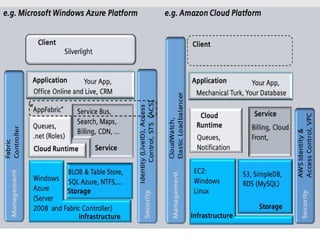
Benefits of CloudComputing Architecture :
•overall cloud computing system should simpler
•Improves data processing requirements
•Providing high security
•Makes it more modularized
•Results in better disaster recovery
•Gives good user accessibility
•Reduces operating costs
•High reliability
•Scalability
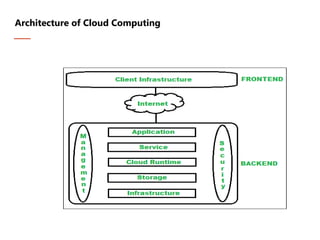
Architecture of Cloud Computing
65.
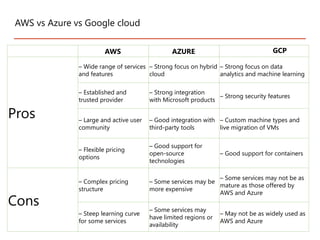
AWS vs Azurevs Google cloud
AWS AZURE GCP
Pros
– Wide range of services
and features
– Strong focus on hybrid
cloud
– Strong focus on data
analytics and machine learning
– Established and
trusted provider
– Strong integration
with Microsoft products
– Strong security features
– Large and active user
community
– Good integration with
third-party tools
– Custom machine types and
live migration of VMs
– Flexible pricing
options
– Good support for
open-source
technologies
– Good support for containers
Cons
– Complex pricing
structure
– Some services may be
more expensive
– Some services may not be as
mature as those offered by
AWS and Azure
– Steep learning curve
for some services
– Some services may
have limited regions or
availability
– May not be as widely used as
AWS and Azure
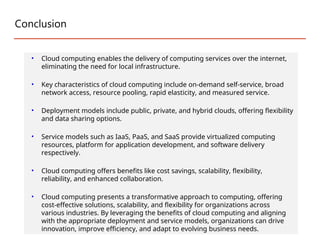
Conclusion
• Cloud computingenables the delivery of computing services over the internet,
eliminating the need for local infrastructure.
• Key characteristics of cloud computing include on-demand self-service, broad
network access, resource pooling, rapid elasticity, and measured service.
• Deployment models include public, private, and hybrid clouds, offering flexibility
and data sharing options.
• Service models such as IaaS, PaaS, and SaaS provide virtualized computing
resources, platform for application development, and software delivery
respectively.
• Cloud computing offers benefits like cost savings, scalability, flexibility,
reliability, and enhanced collaboration.
• Cloud computing presents a transformative approach to computing, offering
cost-effective solutions, scalability, and flexibility for organizations across
various industries. By leveraging the benefits of cloud computing and aligning
with the appropriate deployment and service models, organizations can drive
innovation, improve efficiency, and adapt to evolving business needs.
68.
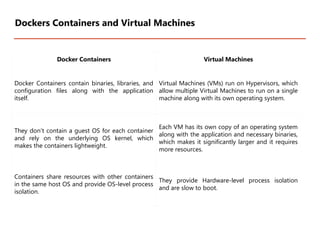
Docker Containers VirtualMachines
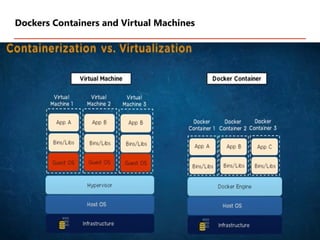
Docker Containers contain binaries, libraries, and
configuration files along with the application
itself.
Virtual Machines (VMs) run on Hypervisors, which
allow multiple Virtual Machines to run on a single
machine along with its own operating system.
They don’t contain a guest OS for each container
and rely on the underlying OS kernel, which
makes the containers lightweight.
Each VM has its own copy of an operating system
along with the application and necessary binaries,
which makes it significantly larger and it requires
more resources.
Containers share resources with other containers
in the same host OS and provide OS-level process
isolation.
They provide Hardware-level process isolation
and are slow to boot.
Dockers Containers and Virtual Machines
There are thefollowing advantages of Docker -
It runs the container in seconds instead of minutes.
It uses less memory.
It provides lightweight virtualization.
It does not a require full operating system to run applications.
It uses application dependencies to reduce the risk.
Docker allows you to use a remote repository to share your container
with others.
It provides continuous deployment and testing environment.
Advantages of Docker
71.
• Hadoop isan open source framework from Apache and is used to store, analyze and
processing large amounts of data in a distributed computing environment.
• Hadoop is commonly used in big data scenarios such as data warehousing, business
intelligence, and machine learning. It’s also used for data processing, data analysis, and
data mining. It enables the distributed processing of large data sets across clusters of
computers using a simple programming model.
• Apache Software Foundation is the developers of Hadoop, and it’s co-founders are
Doug Cutting and Mike Cafarella.
• It’s co-founder Doug Cutting named it on his son’s toy elephant. In October 2003 the
first paper release was Google File System.
• In January 2006, MapReduce development started on the Apache Nutch which
consisted of around 6000 lines coding for it and around 5000 lines coding for HDFS. In
April 2006 Hadoop 0.1.0 was released.
72.
• Its frameworkis based on Java programming with some native code in C and shell
scripts.
• It is being used by Facebook, Yahoo, Google, Twitter, LinkedIn and many more.
• It can be scaled up just by adding nodes in the cluster.
• It is designed to handle big data and is based on the MapReduce programming model,
which allows for the parallel processing of large datasets.
Hadoop has two main components:
• HDFS (Hadoop Distributed File System): This is the storage component of Hadoop,
which allows for the storage of large amounts of data across multiple machines. It is
designed to work with commodity hardware, which makes it cost-effective.
• YARN (Yet Another Resource Negotiator): This is the resource management
component of Hadoop, which manages the allocation of resources (such as CPU and
memory) for processing the data stored in HDFS.
Hadoop
73.
Hadoop has severalkey features that make it well-suited for big data processing:
•Distributed Storage: Hadoop stores large data sets across multiple machines, allowing for
the storage and processing of extremely large amounts of data.
•Scalability: Hadoop can scale from a single server to thousands of machines, making it
easy to add more capacity as needed.
•Fault-Tolerance: Hadoop is designed to be highly fault-tolerant, meaning it can continue to
operate even in the presence of hardware failures.
•Data locality: Hadoop provides data locality feature, where the data is stored on the same
node where it will be processed, this feature helps to reduce the network traffic and
improve the performance
•High Availability: Hadoop provides High Availability feature, which helps to make sure
that the data is always available and is not lost.
Hadoop
74.
Hadoop has severalkey features that make it well-suited for big data processing:
•Flexible Data Processing: Hadoop’s MapReduce programming model allows for the
processing of data in a distributed fashion, making it easy to implement a wide variety of
data processing tasks.
•Data Integrity: Hadoop provides built-in checksum feature, which helps to ensure that the
data stored is consistent and correct.
•Data Replication: Hadoop provides data replication feature, which helps to replicate the
data across the cluster for fault tolerance.
•Data Compression: Hadoop provides built-in data compression feature, which helps to
reduce the storage space and improve the performance.
•YARN: A resource management platform that allows multiple data processing engines like
real-time streaming, batch processing, and interactive SQL, to run and process data stored
in HDFS.
Hadoop
75.
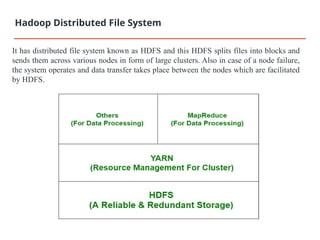
It has distributedfile system known as HDFS and this HDFS splits files into blocks and
sends them across various nodes in form of large clusters. Also in case of a node failure,
the system operates and data transfer takes place between the nodes which are facilitated
by HDFS.
Hadoop Distributed File System
76.
1.Hive- It usesHiveQl for data structuring and for writing complicated MapReduce
in HDFS.
2.Drill- It consists of user-defined functions and is used for data exploration.
3.Storm- It allows real-time processing and streaming of data.
4.Spark- It contains a Machine Learning Library(MLlib) for providing enhanced
machine learning and is widely used for data processing. It also supports Java,
Python, and Scala.
5.Pig- It has Pig Latin, a SQL-Like language and performs data transformation of
unstructured data.
6.Tez- It reduces the complexities of Hive and Pig and helps in the running of their
codes faster.
Some common frameworks of
Hadoop
77.
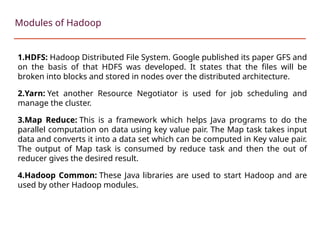
1.HDFS: Hadoop DistributedFile System. Google published its paper GFS and
on the basis of that HDFS was developed. It states that the files will be
broken into blocks and stored in nodes over the distributed architecture.
2.Yarn: Yet another Resource Negotiator is used for job scheduling and
manage the cluster.
3.Map Reduce: This is a framework which helps Java programs to do the
parallel computation on data using key value pair. The Map task takes input
data and converts it into a data set which can be computed in Key value pair.
The output of Map task is consumed by reduce task and then the out of
reducer gives the desired result.
4.Hadoop Common: These Java libraries are used to start Hadoop and are
used by other Hadoop modules.
Modules of Hadoop
78.
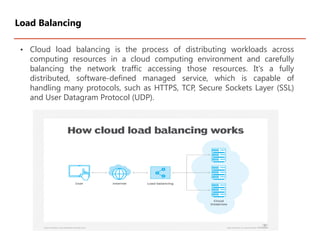
• Cloud loadbalancing is the process of distributing workloads across
computing resources in a cloud computing environment and carefully
balancing the network traffic accessing those resources. It's a fully
distributed, software-defined managed service, which is capable of
handling many protocols, such as HTTPS, TCP, Secure Sockets Layer (SSL)
and User Datagram Protocol (UDP).
Load Balancing
79.
Cloud load balancingplays a crucial role in cloud computing and offers several
benefits. Common benefits of cloud load balancing include the following:
Improved performance. To prevent any one server from becoming overloaded,
load balancing divides incoming traffic across several servers. This keeps any one
server from acting as a bottleneck and optimizes the use of available resources and
also increases response times and overall system performance.
Enhanced scalability. Cloud load balancing facilitates seamless scalability within
cloud environments. As resource demands surge, extra servers can be incorporated
into the server pool, with the load balancer effectively distributing the workload.
This capability empowers the system to manage heightened traffic and meet
expanding user requirements adeptly.
High availability. Load balancing ensures application and service availability by
redirecting traffic to operational servers if one fails, minimizing downtime and
providing uninterrupted service. This is especially beneficial for disaster
recovery scenarios.
Benefits of load balancing in cloud computing
80.
Easier automation. Cloudbalancing enhances automation by enabling businesses
to provide insight into applications in almost real time and apply predictive
analytics to foresee possible bottlenecks.
Reduced costs. Organizations can save money by deploying software-based load
balancing in the cloud as it's cheaper than installing, housing, configuring and
maintaining on-premises load balancing machines.
Improved reliability. Cloud load balancing improves reliability as applications are
hosted across various global hubs. For example, if a snowstorm causes a power
outage to happen in the northeastern U.S., the cloud load balancer can redirect
traffic from cloud resources hosted in that region to resources located in other
parts of the country.
Benefits of load balancing in cloud computing
81.
Health checks. Clouddomain name system (DNS) load balancers automatically
do routine maintenance to ensure that upstream servers are operating properly
and automatically steer traffic toward healthy origin servers.
Enhanced security. Cloud load balancing can lessen the effects of security
attacks by distributing incoming traffic between multiple servers and avoiding
overloading any one server. Furthermore, load balancers can be set up to handle
SSL termination, which decrypts encrypted traffic before passing it on to the
web servers. This can enhance efficiency by preventing the server from
expending extra CPU cycles required for traffic decryption. If the load balancer
happens to be in the same data center as the web servers, then this can reduce
security risks as well.
Benefits of load balancing in cloud computing
82.
While cloud-based loadbalancing provides numerous benefits, it does come with
certain drawbacks. Common disadvantages of cloud load balancing include the
following:
Limited customization. Cloud-based load balancing is generally less customizable
and manageable, requiring businesses to depend on the cloud provider for
management. For example, adjusting or fine-tuning load balancer settings might be
limited for businesses using load balancing in the cloud.
Disadvantages of load balancing in cloud computing
83.
Setup complexity. Itcan be challenging to set up load balancing in cloud
computing, particularly when working with large-scale systems. Careful
preparations and planning might be needed to ensure it functions properly.
Cost. If specialized hardware or software is used for cloud load balancing, it
can add to the overall cost of cloud computing. The traffic volume and
complexity of the setup can also be added to the pricing.
Potential security issues. If not configured properly, load balancing can
introduce security risks such as enabling unauthorized access or exposing
sensitive data of customers.
Lack of visibility. Some load balancing options might provide limited cloud
visibility into the underlying infrastructure of the cloud computing
environment, which can make it difficult to troubleshoot issues and optimize
performance.
Disadvantages of load balancing in cloud computing
84.
Cloud load balancingalgorithms are essential components of cloud computing
environments because they assure optimal resource use. These algorithms are often
divided into two categories: static and dynamic.
Static algorithms
In cloud computing, static load balancing techniques distribute traffic without
considering each server's present condition. These algorithms are usually applied to
systems where load variation is negligible.
Common static algorithms in cloud computing include the following:
Round robin. The round robin algorithm distributes traffic equally among all servers in
a group, either randomly or in a predetermined order.
Weighted round robin. This algorithm distributes weight to servers based on their
capabilities. Servers with higher weights handle a greater share of client requests.
Cloud load balancing techniques and algorithms
85.
Least connection. Toequally balance the workload, this algorithm routes client
requests to the server with the least active connections.
IP hash. The IP hash algorithm determines the server to send the request to
based on the client's IP address. It ensures that the requests from the same clients
are consistently directed to the same server.
Dynamic algorithms
Dynamic load balancing distributes traffic based on the health of each server.
These algorithms are made to adjust to shifting workloads and guarantee
effective use of available resources.
Common dynamic algorithms used in cloud computing include the following:
Least connection. This algorithm sends client requests to the server that has the
fewest active connections at the time of the request as it intends to distribute the
workload evenly among the servers.
Cloud load balancing techniques and algorithms
86.
Round robin withweighted response time. This method weighs
servers according to their response timings. Servers with shorter
response times have greater weights and are more likely to accept
client requests.
Least bandwidth. This algorithm directs requests to servers that
have recently consumed the least amount of bandwidth.
Cloud load balancing techniques and algorithms
87.
A Service LevelAgreement (SLA) is the bond for performance negotiated
between the cloud services provider and the client.
Earlier, in cloud computing all Service Level Agreements were negotiated between
a client and the service consumer.
Nowadays, with the initiation of large utility-like cloud computing providers, most
Service Level Agreements are standardized until a client becomes a large
consumer of cloud services.
Service level agreements are also defined at different levels which are mentioned
below:
•Customer-based SLA
•Service-based SLA
•Multilevel SLA
Service level agreements in Cloud computing
88.
Few Service LevelAgreements are enforceable as contracts, but mostly are agreements
or contracts which are more along the lines of an Operating Level Agreement (OLA) and
may not have the restriction of law.
It is fine to have an attorney review the documents before making a major agreement to
the cloud service provider.
Service Level Agreements usually specify some parameters which are mentioned
below:
•Availability of the Service (uptime)
•Latency or the response time
•Service components reliability
•Each party accountability
•Warranties
Service level agreements in Cloud computing
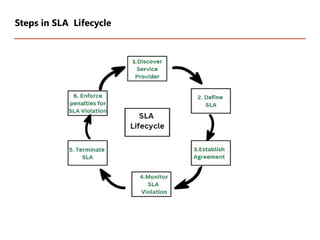
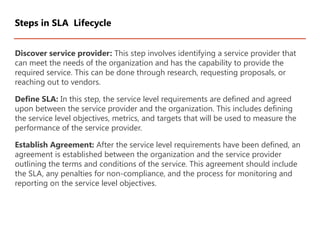
Discover service provider:This step involves identifying a service provider that
can meet the needs of the organization and has the capability to provide the
required service. This can be done through research, requesting proposals, or
reaching out to vendors.
Define SLA: In this step, the service level requirements are defined and agreed
upon between the service provider and the organization. This includes defining
the service level objectives, metrics, and targets that will be used to measure the
performance of the service provider.
Establish Agreement: After the service level requirements have been defined, an
agreement is established between the organization and the service provider
outlining the terms and conditions of the service. This agreement should include
the SLA, any penalties for non-compliance, and the process for monitoring and
reporting on the service level objectives.
Steps in SLA Lifecycle
91.
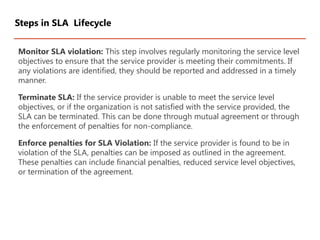
Monitor SLA violation:This step involves regularly monitoring the service level
objectives to ensure that the service provider is meeting their commitments. If
any violations are identified, they should be reported and addressed in a timely
manner.
Terminate SLA: If the service provider is unable to meet the service level
objectives, or if the organization is not satisfied with the service provided, the
SLA can be terminated. This can be done through mutual agreement or through
the enforcement of penalties for non-compliance.
Enforce penalties for SLA Violation: If the service provider is found to be in
violation of the SLA, penalties can be imposed as outlined in the agreement.
These penalties can include financial penalties, reduced service level objectives,
or termination of the agreement.
Steps in SLA Lifecycle
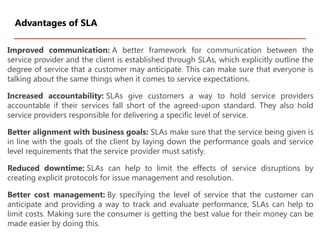
92.
Improved communication: Abetter framework for communication between the
service provider and the client is established through SLAs, which explicitly outline the
degree of service that a customer may anticipate. This can make sure that everyone is
talking about the same things when it comes to service expectations.
Increased accountability: SLAs give customers a way to hold service providers
accountable if their services fall short of the agreed-upon standard. They also hold
service providers responsible for delivering a specific level of service.
Better alignment with business goals: SLAs make sure that the service being given is
in line with the goals of the client by laying down the performance goals and service
level requirements that the service provider must satisfy.
Reduced downtime: SLAs can help to limit the effects of service disruptions by
creating explicit protocols for issue management and resolution.
Better cost management: By specifying the level of service that the customer can
anticipate and providing a way to track and evaluate performance, SLAs can help to
limit costs. Making sure the consumer is getting the best value for their money can be
made easier by doing this.
Advantages of SLA
93.
Complexity: SLAs canbe complex to create and maintain, and may require
significant resources to implement and enforce.
Rigidity: SLAs can be rigid and may not be flexible enough to accommodate
changing business needs or service requirements.
Limited service options: SLAs can limit the service options available to the
customer, as the service provider may only be able to offer the specific services
outlined in the agreement.
Limited liability: SLAs are not legal binding contracts and often limited the liability
of the service provider in case of service failure.
Disadvantages of SLA