
Voice Quality
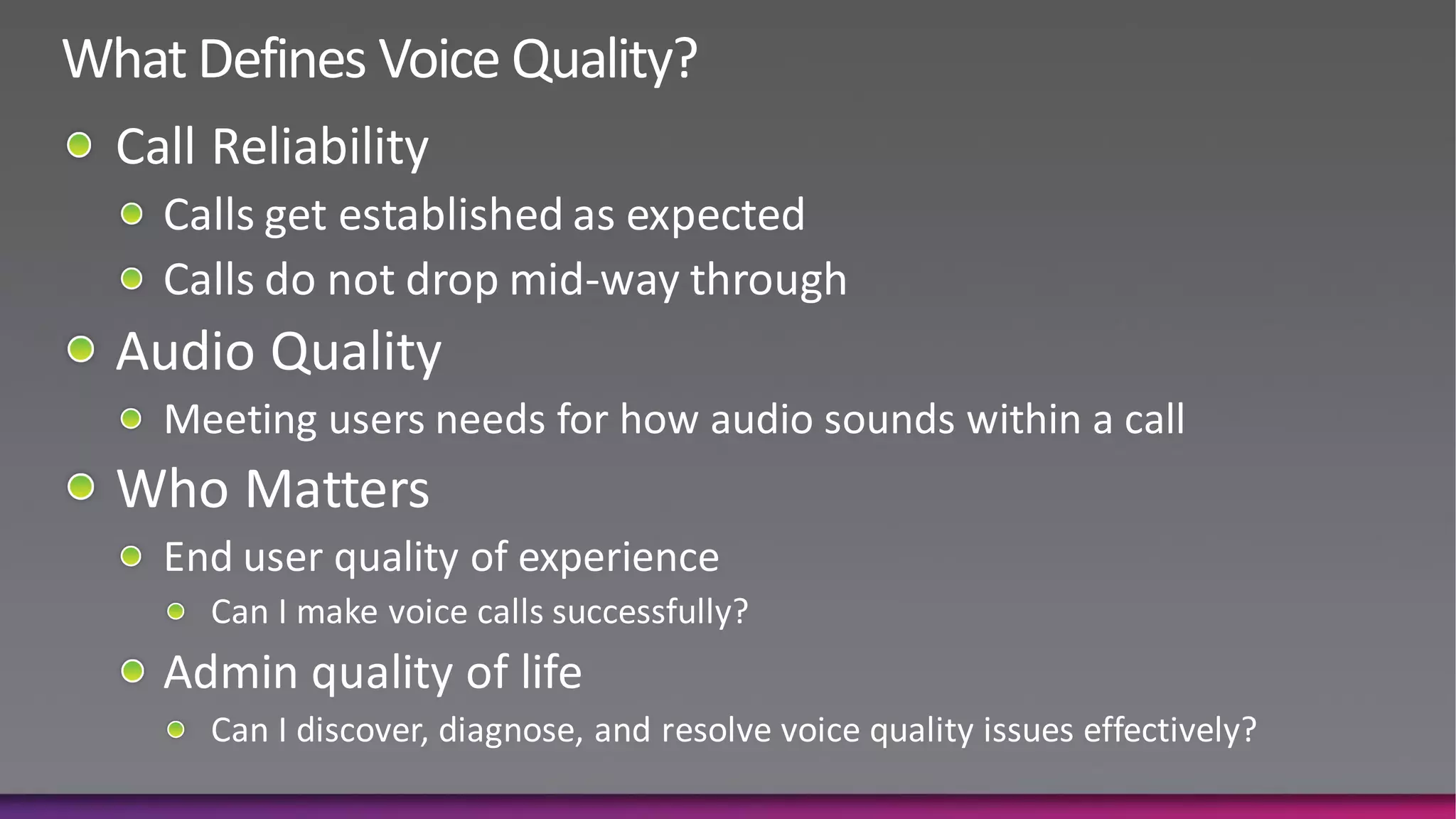
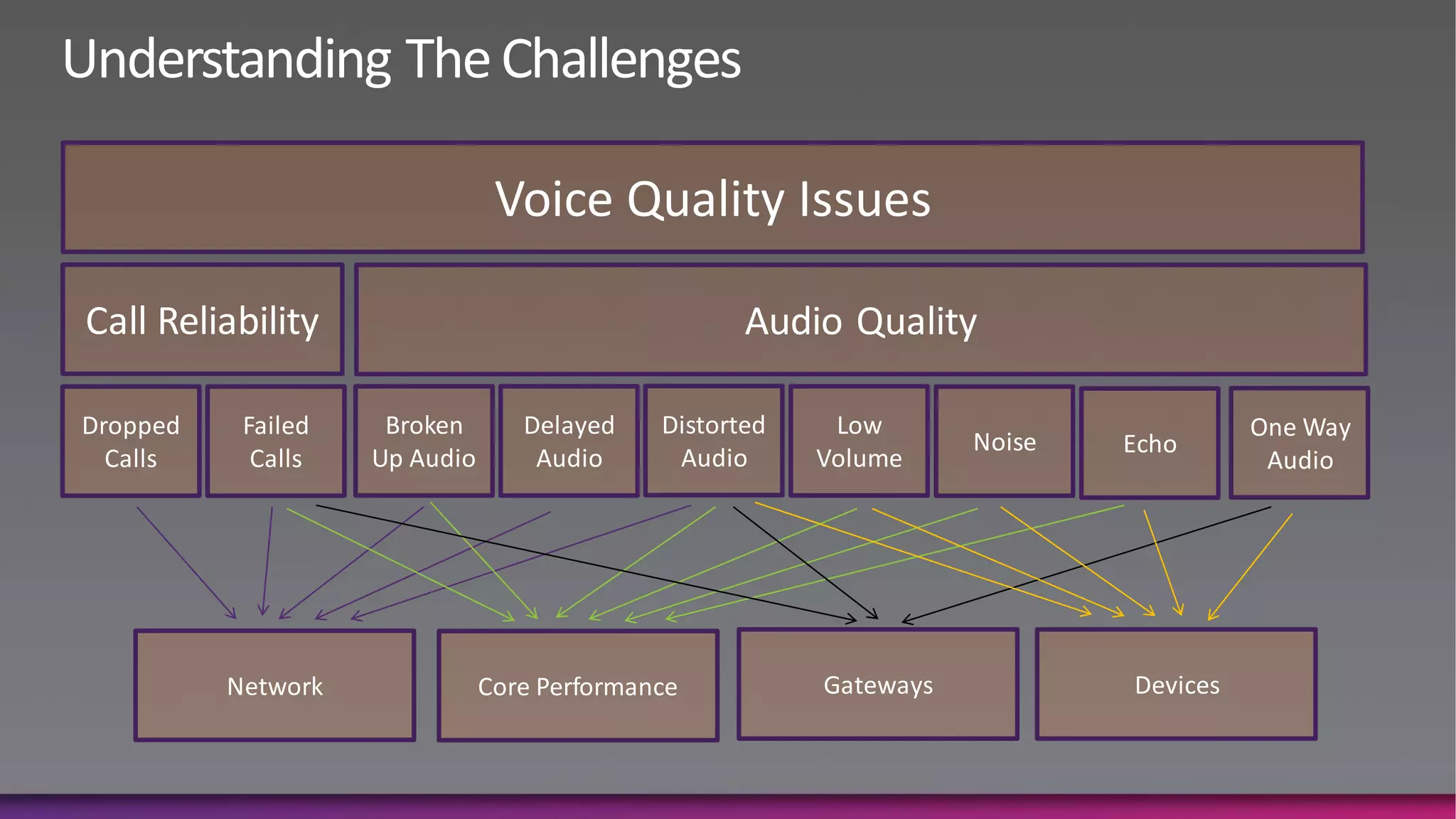
Voice Quality Issues

Call Reliability                                    Audio Quality

Dropped    Failed    Broken       Delayed    Distorted    Low                         One Way
                                                                    Noise   Echo
  Calls     Calls   Up Audio       Audio      Audio      Volume                        Audio


          Network              Core Performance          Gateways           Devices
Network Considerations
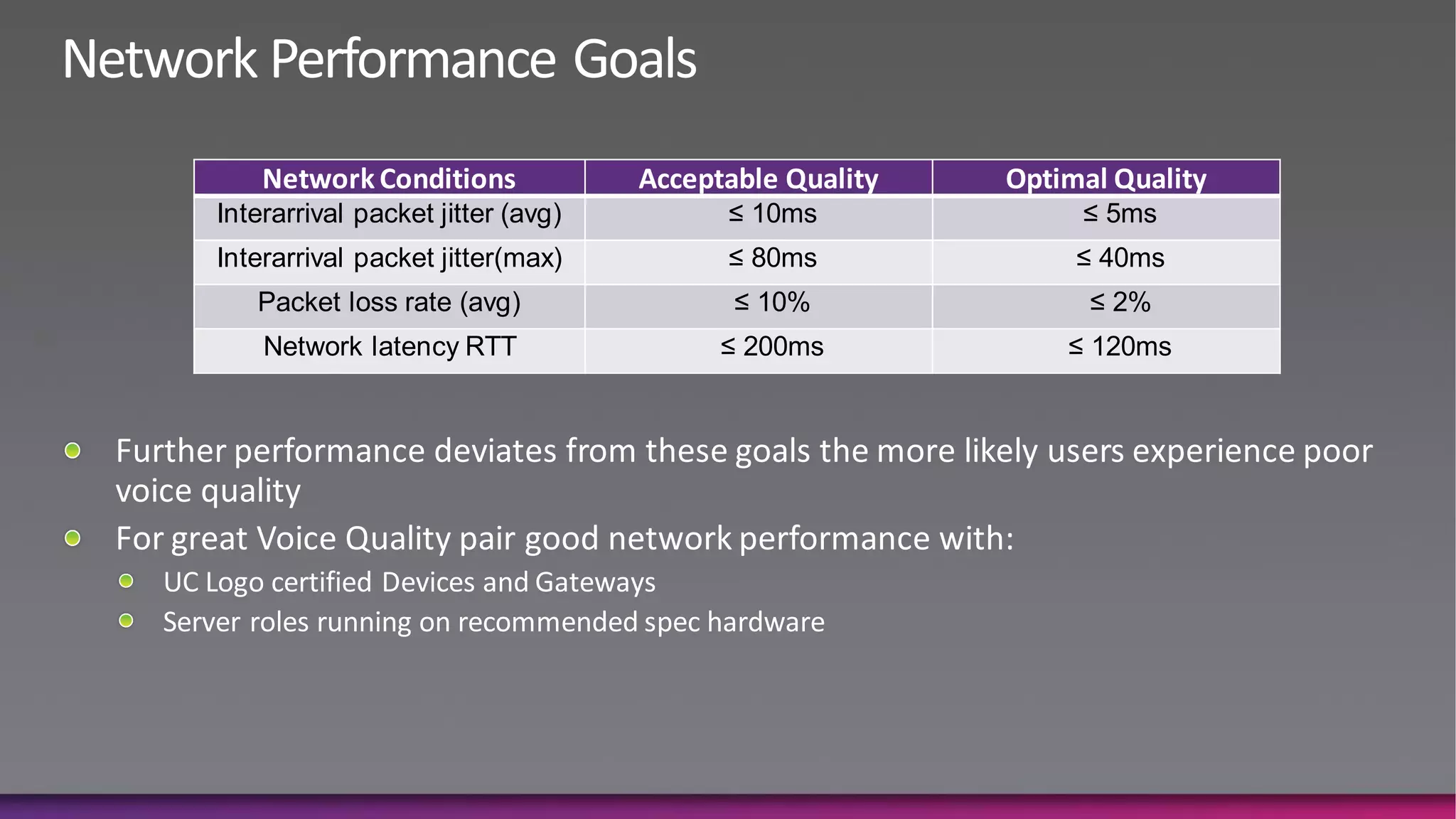
Network Conditions             Acceptable Quality   Optimal Quality
Interarrival packet jitter (avg)         ≤ 10ms              ≤ 5ms
Interarrival packet jitter(max)          ≤ 80ms              ≤ 40ms
   Packet loss rate (avg)                 ≤ 10%               ≤ 2%
    Network latency RTT                  ≤ 200ms            ≤ 120ms
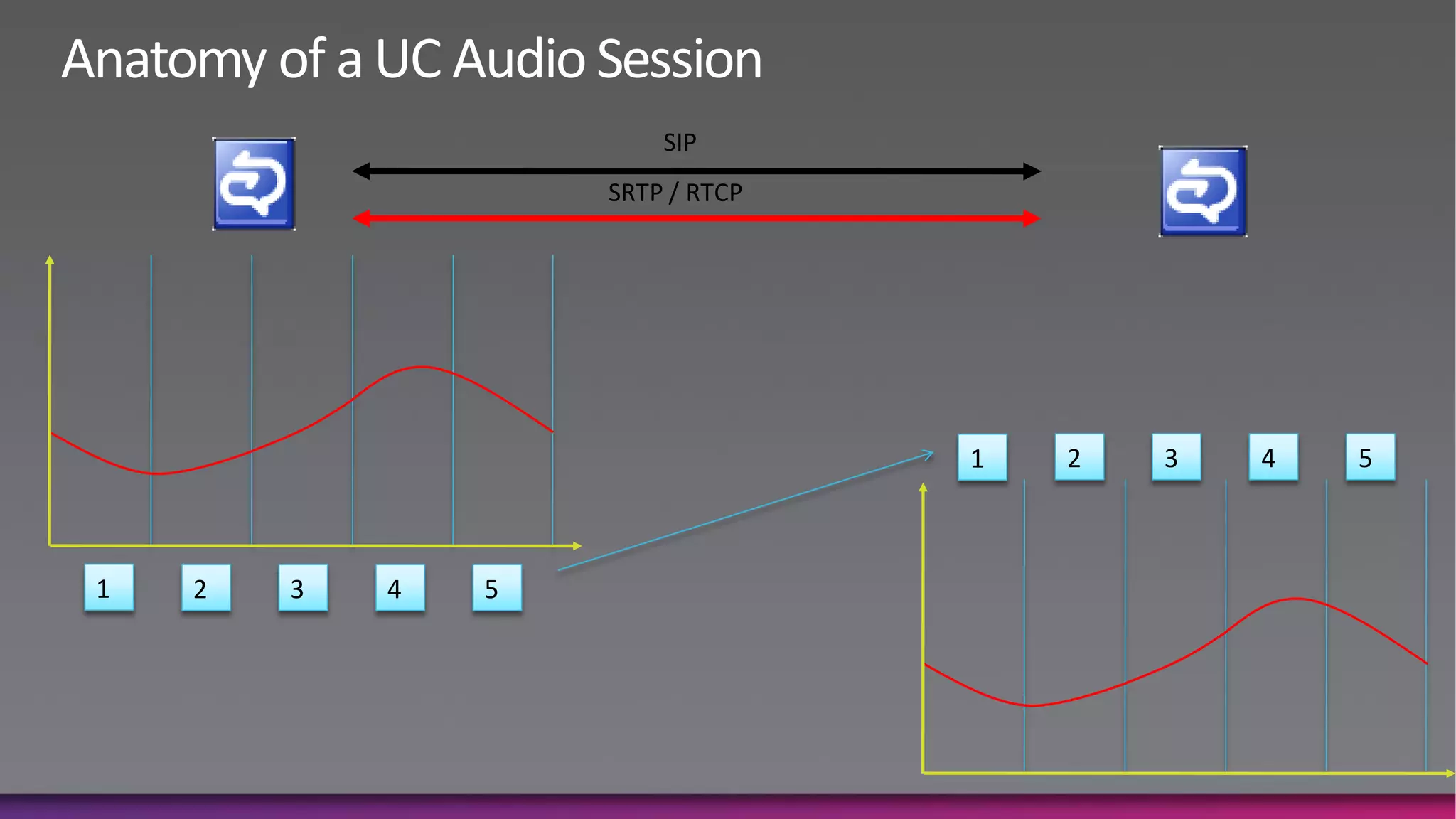
SIP
                    SRTP / RTCP


                                  1   2   3   4   5


1   2   3   4   5
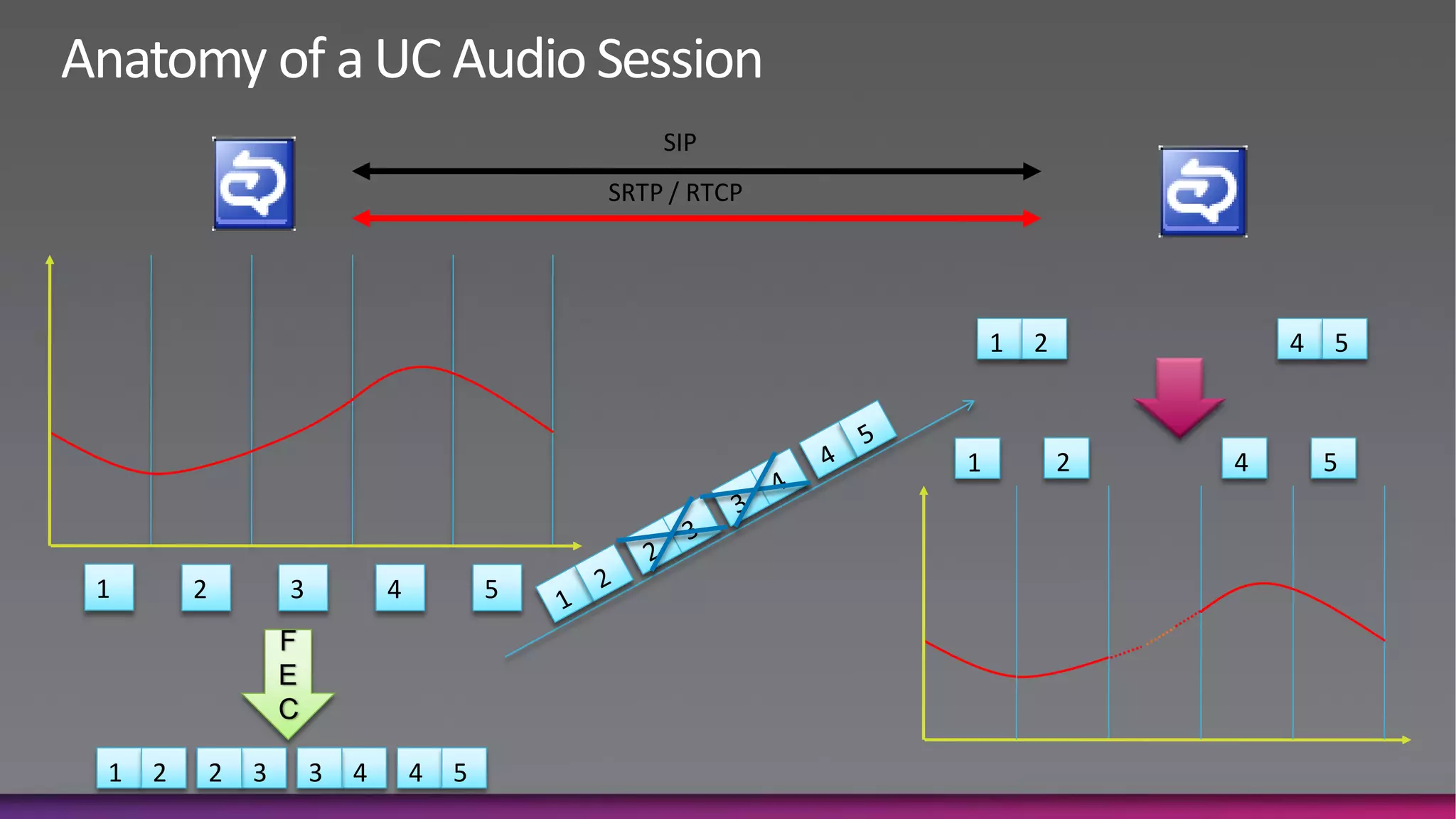
SIP
                                                SRTP / RTCP


                                                                  1   2           4   5


                                                              1           2   4       5


1       2           3           4           5
                    F
                    E
                    C

1   2       2   3       3   4       4   5
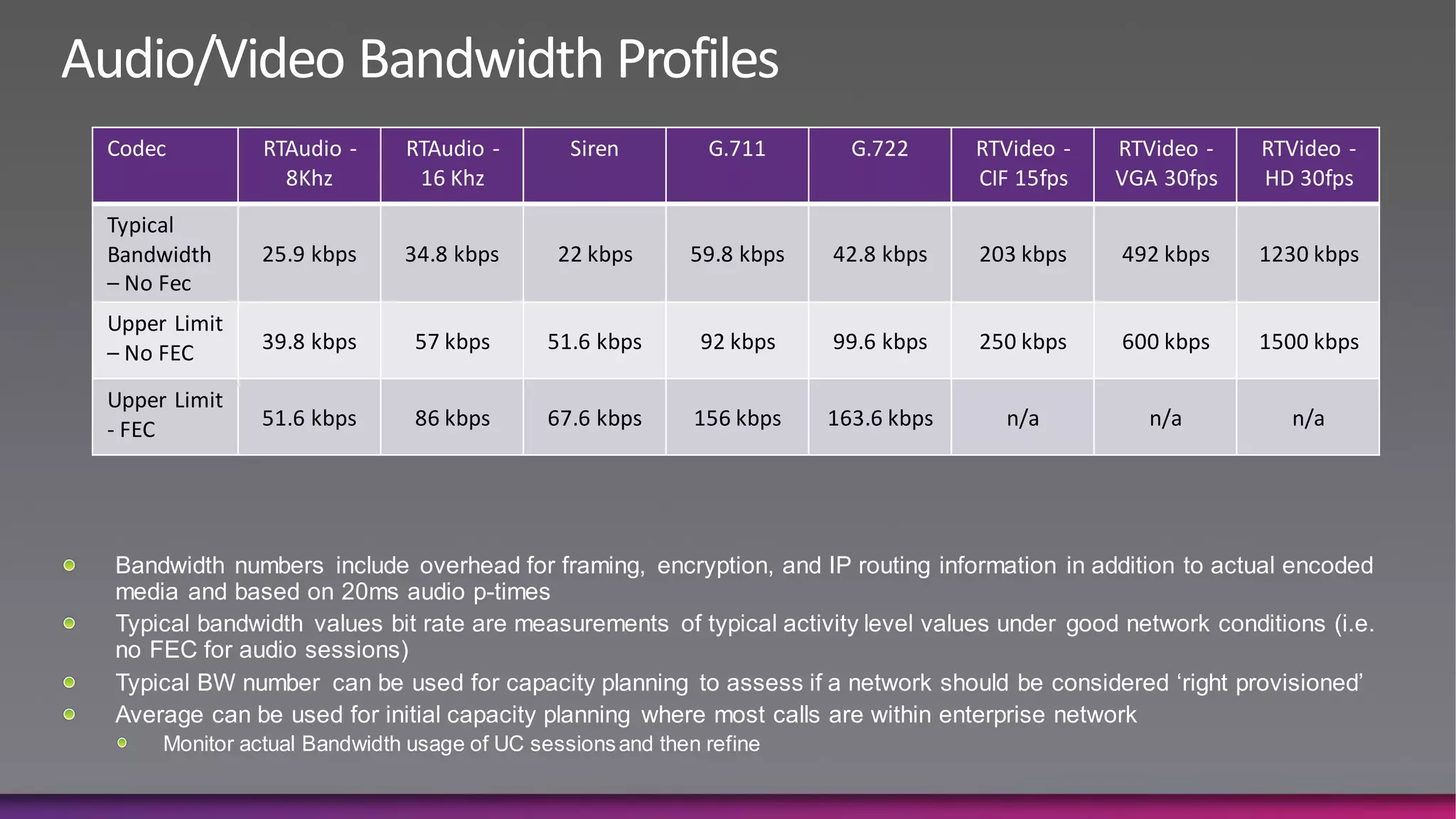
Codec          RTAudio -     RTAudio -        Siren         G.711       G.722      RTVideo -   RTVideo -    RTVideo -
                 8Khz         16 Khz                                               CIF 15fps   VGA 30fps    HD 30fps
Typical
Bandwidth      25.9 kbps     34.8 kbps       22 kbps      59.8 kbps   42.8 kbps    203 kbps    492 kbps     1230 kbps
– No Fec
Upper Limit
– No FEC       39.8 kbps      57 kbps       51.6 kbps      92 kbps    99.6 kbps    250 kbps    600 kbps     1500 kbps

Upper Limit
- FEC          51.6 kbps      86 kbps       67.6 kbps      156 kbps   163.6 kbps     n/a         n/a           n/a


Bandwidth numbers include overhead for framing, encryption, and IP routing information in addition to actual encoded
media and based on 20ms audio p-times
Typical bandwidth values bit rate are measurements of typical activity level values under good network conditions (i.e.
no FEC for audio sessions)
Typical BW number can be used for capacity planning to assess if a network should be considered „right provisioned‟
Average can be used for initial capacity planning where most calls are within enterprise network
     Monitor actual Bandwidth usage of UC sessions and then refine
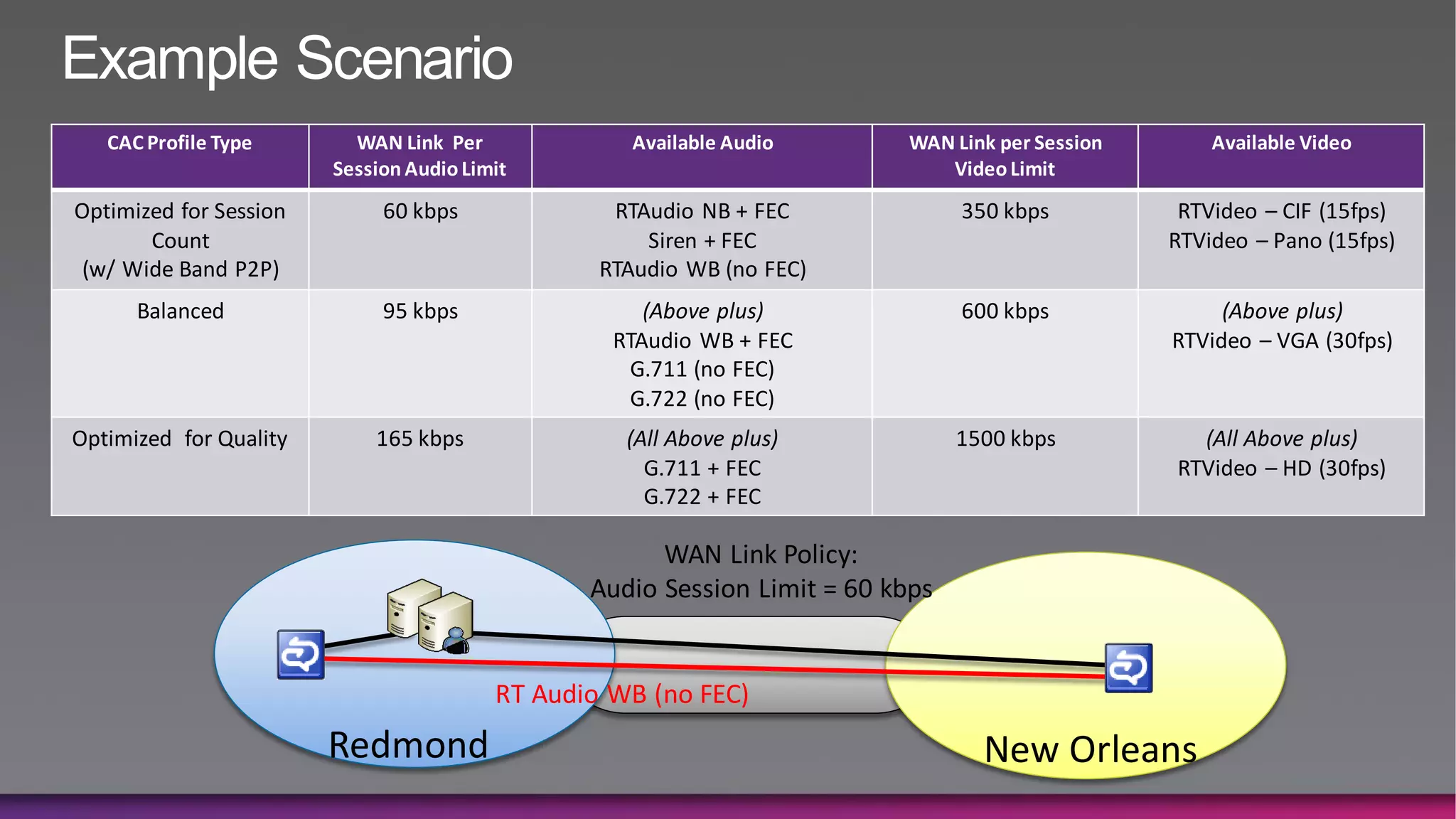
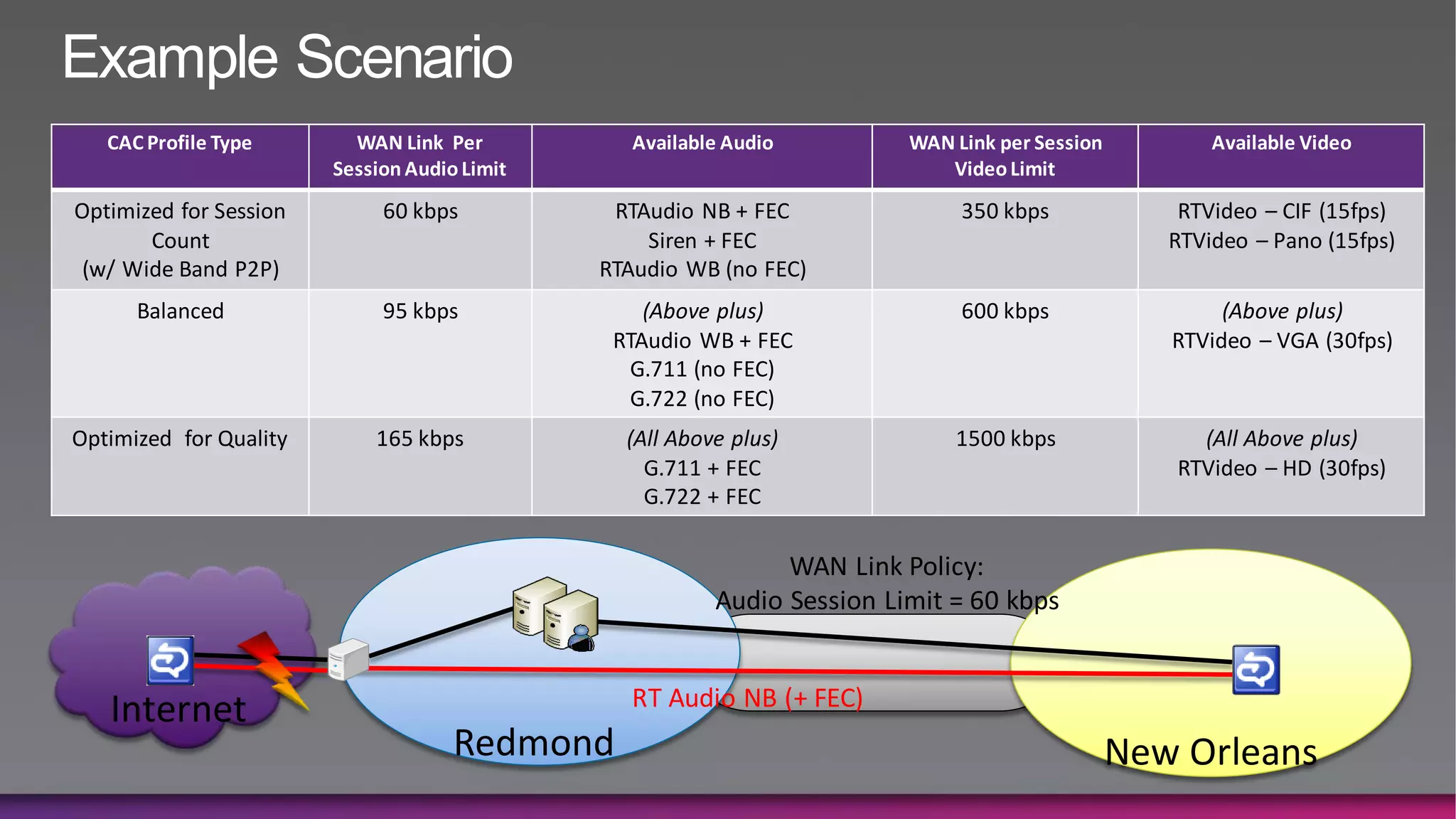
Example Scenario
   CAC Profile Type       WAN Link Per              Available Audio       WAN Link per Session       Available Video
                        Session Audio Limit                                  Video Limit
Optimized for Session        60 kbps              RTAudio NB + FEC              350 kbps          RTVideo – CIF (15fps)
       Count                                         Siren + FEC                                 RTVideo – Pano (15fps)
 (w/ Wide Band P2P)                              RTAudio WB (no FEC)
      Balanced               95 kbps                 (Above plus)               600 kbps              (Above plus)
                                                  RTAudio WB + FEC                               RTVideo – VGA (30fps)
                                                    G.711 (no FEC)
                                                    G.722 (no FEC)
Optimized for Quality       165 kbps               (All Above plus)             1500 kbps          (All Above plus)
                                                     G.711 + FEC                                 RTVideo – HD (30fps)
                                                     G.722 + FEC

                                                      WAN Link Policy:
                                                Audio Session Limit = 60 kbps


                                         RT Audio WB (no FEC)
                        Redmond                                                   New Orleans
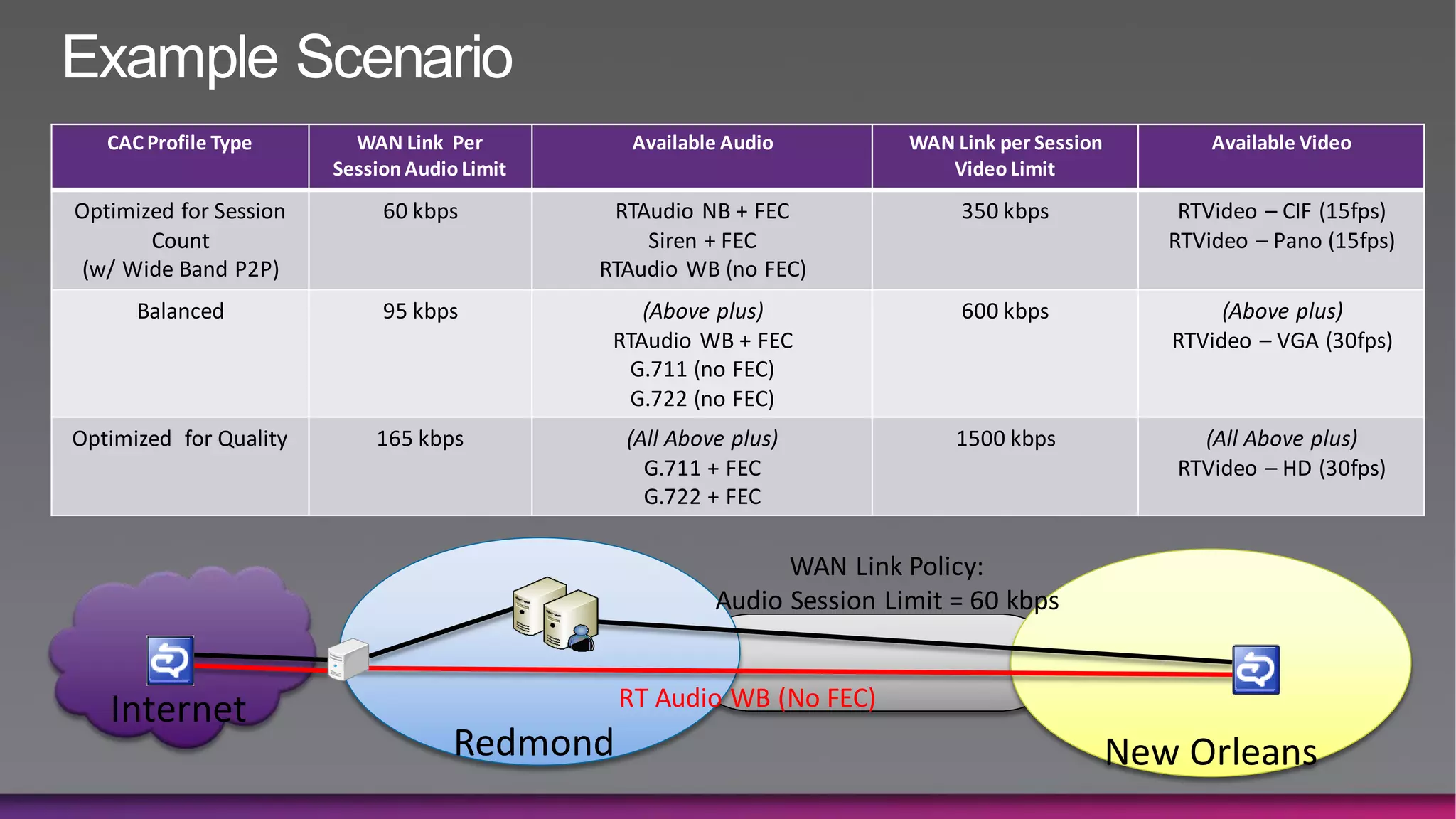
Example Scenario
   CAC Profile Type       WAN Link Per           Available Audio         WAN Link per Session          Available Video
                        Session Audio Limit                                 Video Limit
Optimized for Session        60 kbps           RTAudio NB + FEC               350 kbps              RTVideo – CIF (15fps)
       Count                                      Siren + FEC                                      RTVideo – Pano (15fps)
 (w/ Wide Band P2P)                           RTAudio WB (no FEC)
      Balanced               95 kbps              (Above plus)                600 kbps                  (Above plus)
                                               RTAudio WB + FEC                                    RTVideo – VGA (30fps)
                                                 G.711 (no FEC)
                                                 G.722 (no FEC)
Optimized for Quality       165 kbps            (All Above plus)             1500 kbps               (All Above plus)
                                                  G.711 + FEC                                      RTVideo – HD (30fps)
                                                  G.722 + FEC

                                                               WAN Link Policy:
                                                         Audio Session Limit = 60 kbps


                                               RT Audio WB (No FEC)
   Internet
                                     Redmond                                                    New Orleans
Example Scenario
   CAC Profile Type       WAN Link Per           Available Audio         WAN Link per Session          Available Video
                        Session Audio Limit                                 Video Limit
Optimized for Session        60 kbps           RTAudio NB + FEC               350 kbps              RTVideo – CIF (15fps)
       Count                                      Siren + FEC                                      RTVideo – Pano (15fps)
 (w/ Wide Band P2P)                           RTAudio WB (no FEC)
      Balanced               95 kbps              (Above plus)                600 kbps                  (Above plus)
                                               RTAudio WB + FEC                                    RTVideo – VGA (30fps)
                                                 G.711 (no FEC)
                                                 G.722 (no FEC)
Optimized for Quality       165 kbps            (All Above plus)             1500 kbps               (All Above plus)
                                                  G.711 + FEC                                      RTVideo – HD (30fps)
                                                  G.722 + FEC

                                                               WAN Link Policy:
                                                         Audio Session Limit = 60 kbps


                                                RT Audio NB (+ FEC)
   Internet
                                     Redmond                                                    New Orleans
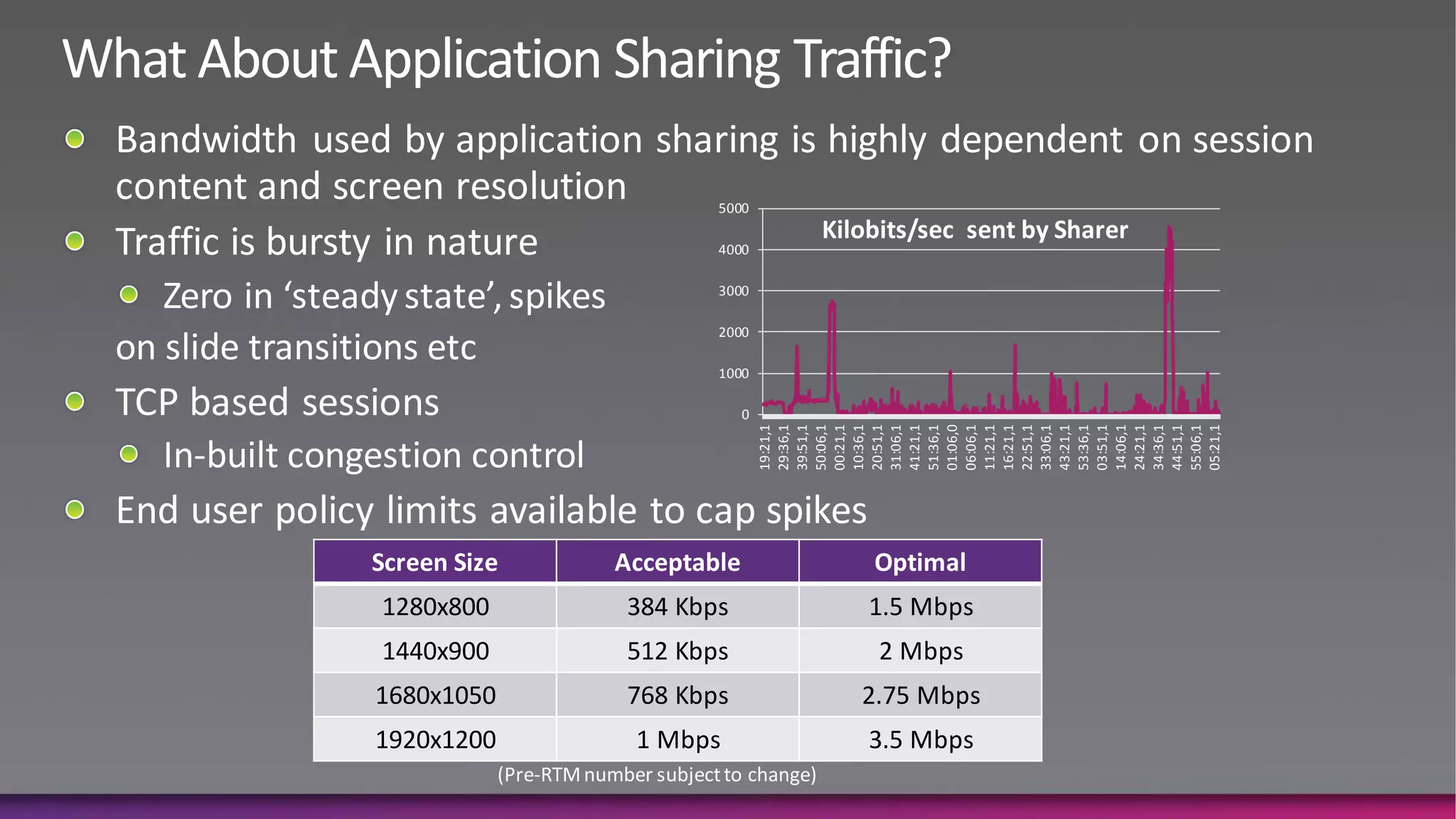
1440x900
                                   1280x800


            1680x1050
1920x1200
                                              Screen Size


1 Mbps
                        512 Kbps
                                   384 Kbps


            768 Kbps
                                              Acceptable
                                                                                 2000
                                                                                                                                5000


                                                                          1000
                                                                                        3000
                                                                                               4000


                                                                      0


                                                            19:21,1
                                                            29:36,1
                                                            39:51,1
                                                            50:06,1
                                                            00:21,1
                                                            10:36,1
                                                            20:51,1
                                                            31:06,1
                                                            41:21,1
                                                            51:36,1
                                                            01:06,0
                        2 Mbps
                                              Optimal
                                   1.5 Mbps


3.5 Mbps


                                                            06:06,1
            2.75 Mbps


                                                            11:21,1
                                                            16:21,1
                                                            22:51,1
                                                            33:06,1
                                                            43:21,1
                                                            53:36,1
                                                            03:51,1
                                                                                                  Kilobits/sec sent by Sharer


                                                            14:06,1
                                                            24:21,1
                                                            34:36,1
                                                            44:51,1
                                                            55:06,1
                                                            05:21,1
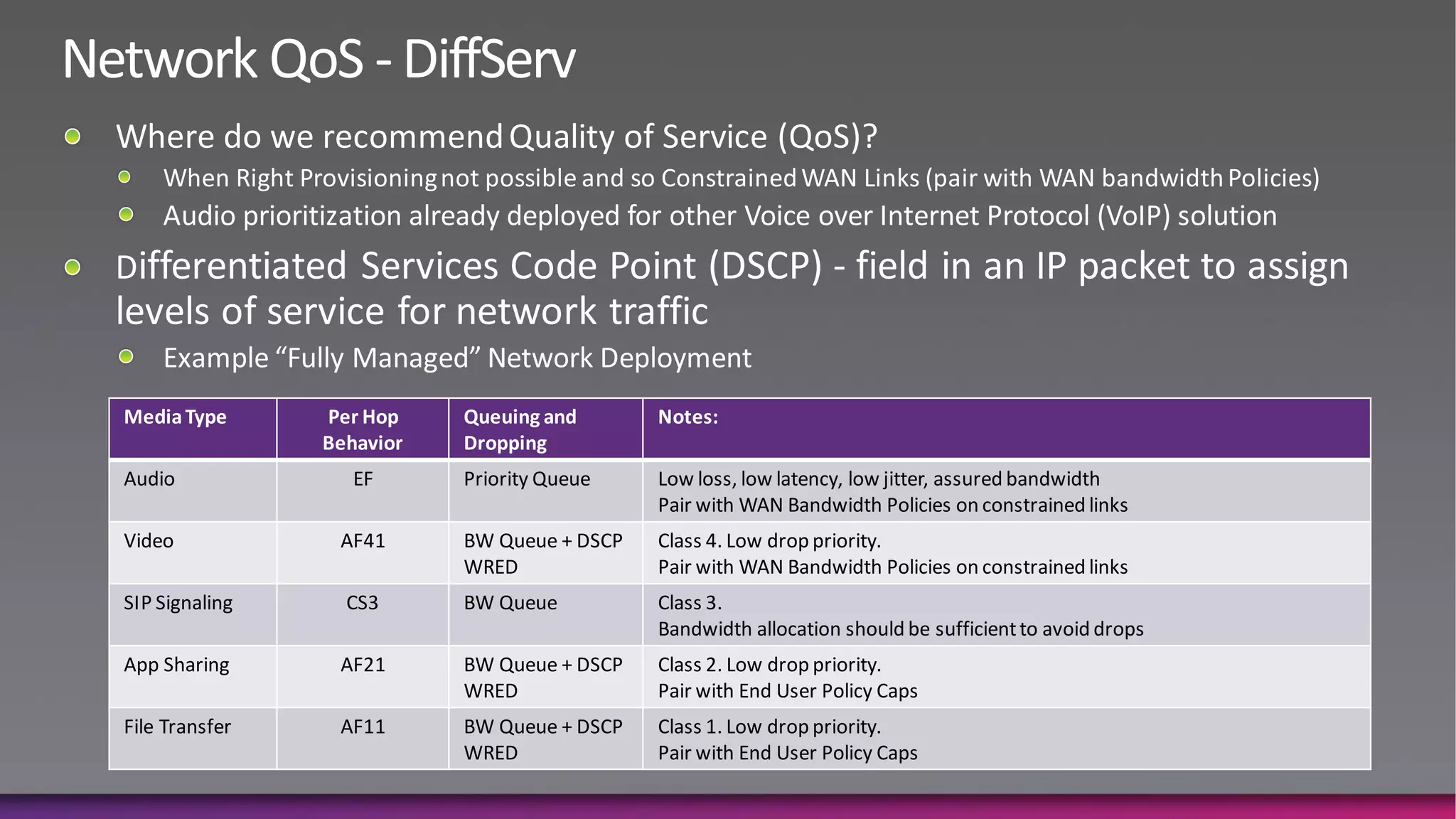
Media Type      Per Hop    Queuing and       Notes:
                Behavior   Dropping
Audio              EF      Priority Queue    Low loss, low latency, low jitter, assured bandwidth
                                             Pair with WAN Bandwidth Policies on constrained links
Video            AF41      BW Queue + DSCP   Class 4. Low drop priority.
                           WRED              Pair with WAN Bandwidth Policies on constrained links
SIP Signaling     CS3      BW Queue          Class 3.
                                             Bandwidth allocation should be sufficient to avoid drops
App Sharing      AF21      BW Queue + DSCP   Class 2. Low drop priority.
                           WRED              Pair with End User Policy Caps
File Transfer    AF11      BW Queue + DSCP   Class 1. Low drop priority.
                           WRED              Pair with End User Policy Caps
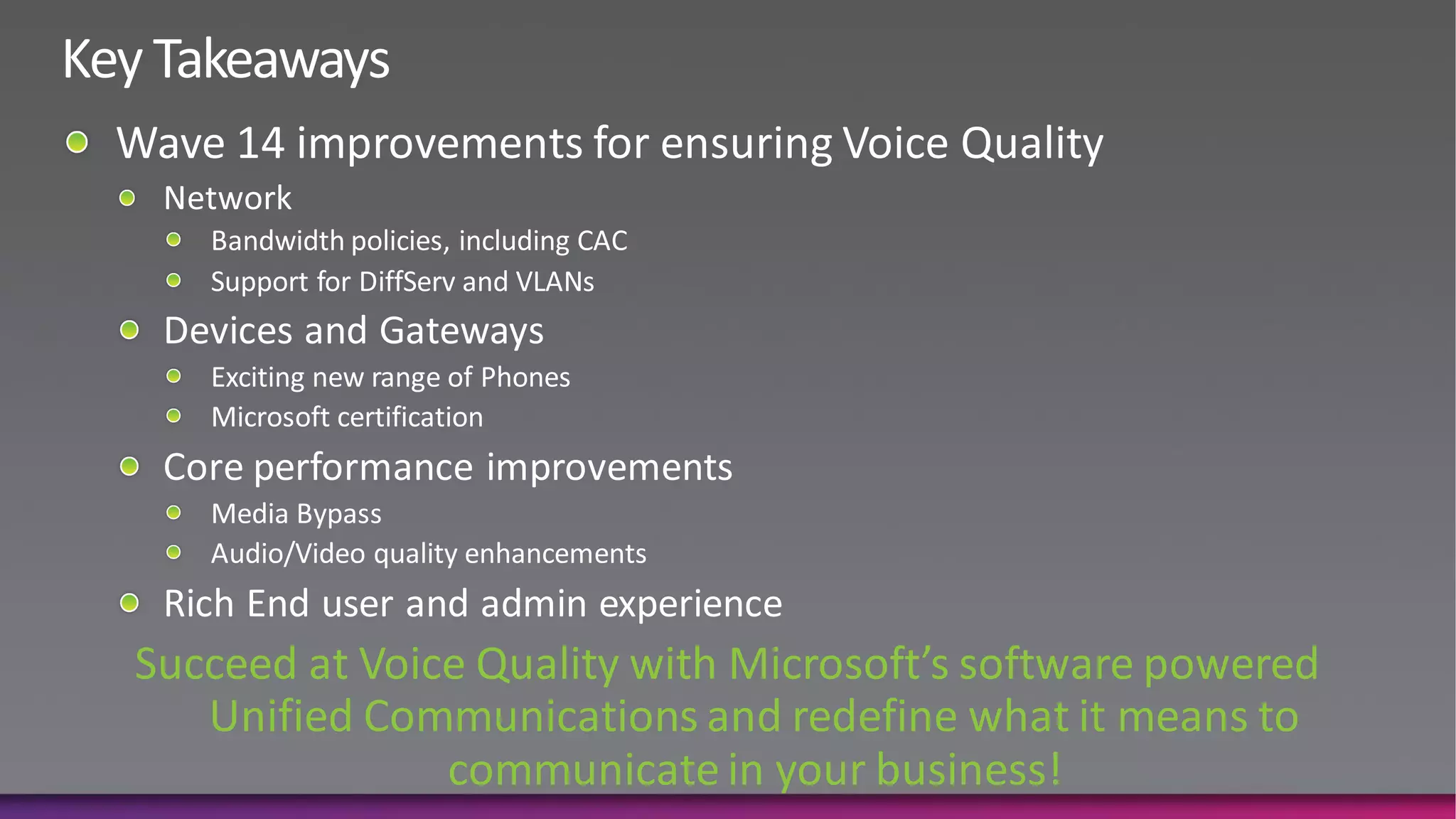
Core Performance, Devices and
          Gateways
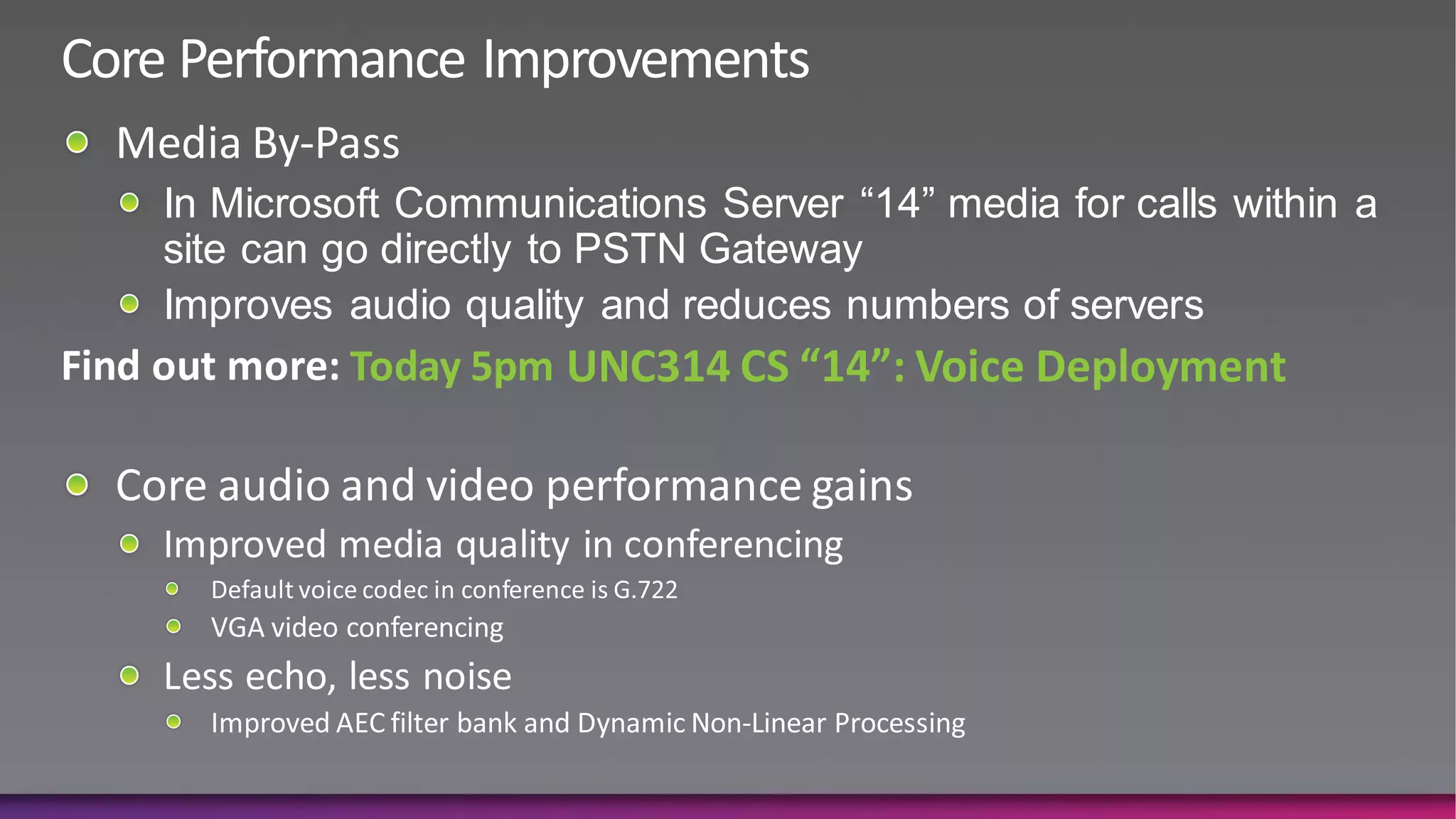
In Microsoft Communications Server “14” media for calls within a
site can go directly to PSTN Gateway
Improves audio quality and reduces numbers of servers
         Today 5pm UNC314 CS “14”: Voice Deployment
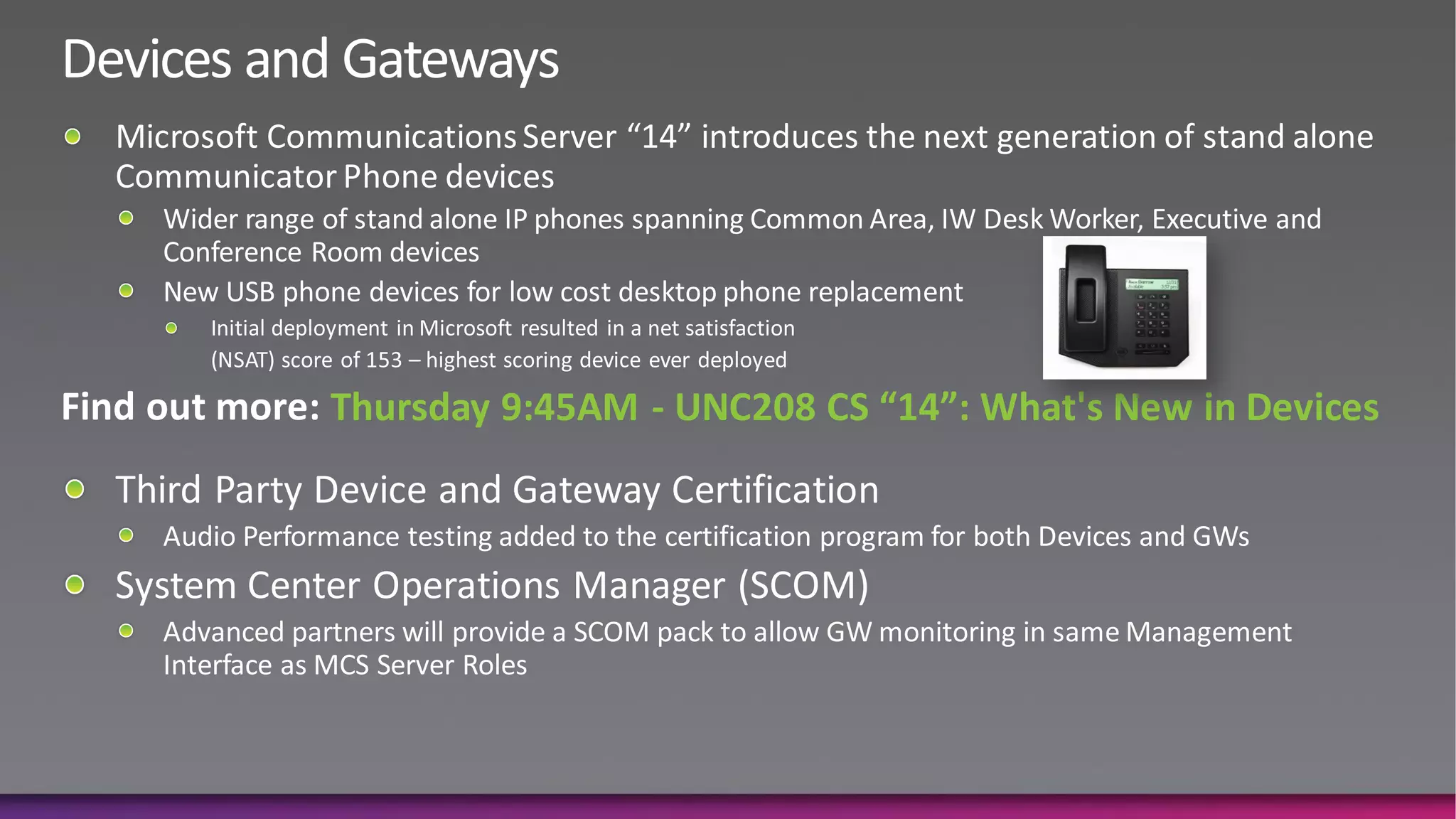
Thursday 9:45AM - UNC208 CS “14”: What's New in Devices
E2E Experiences: Admins
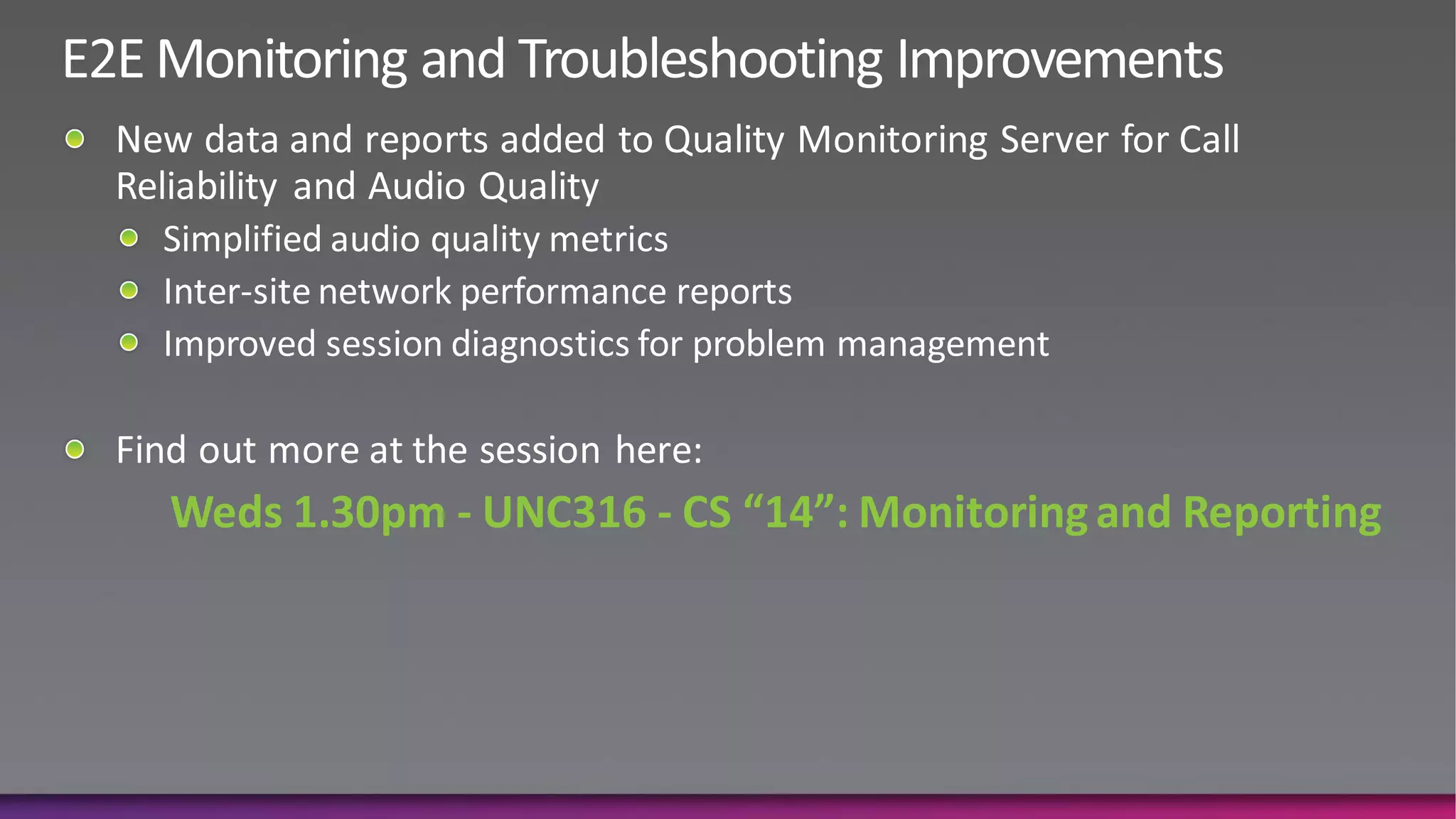
Weds 1.30pm - UNC316 - CS “14”: Monitoring and Reporting
E2E Experiences: End Users
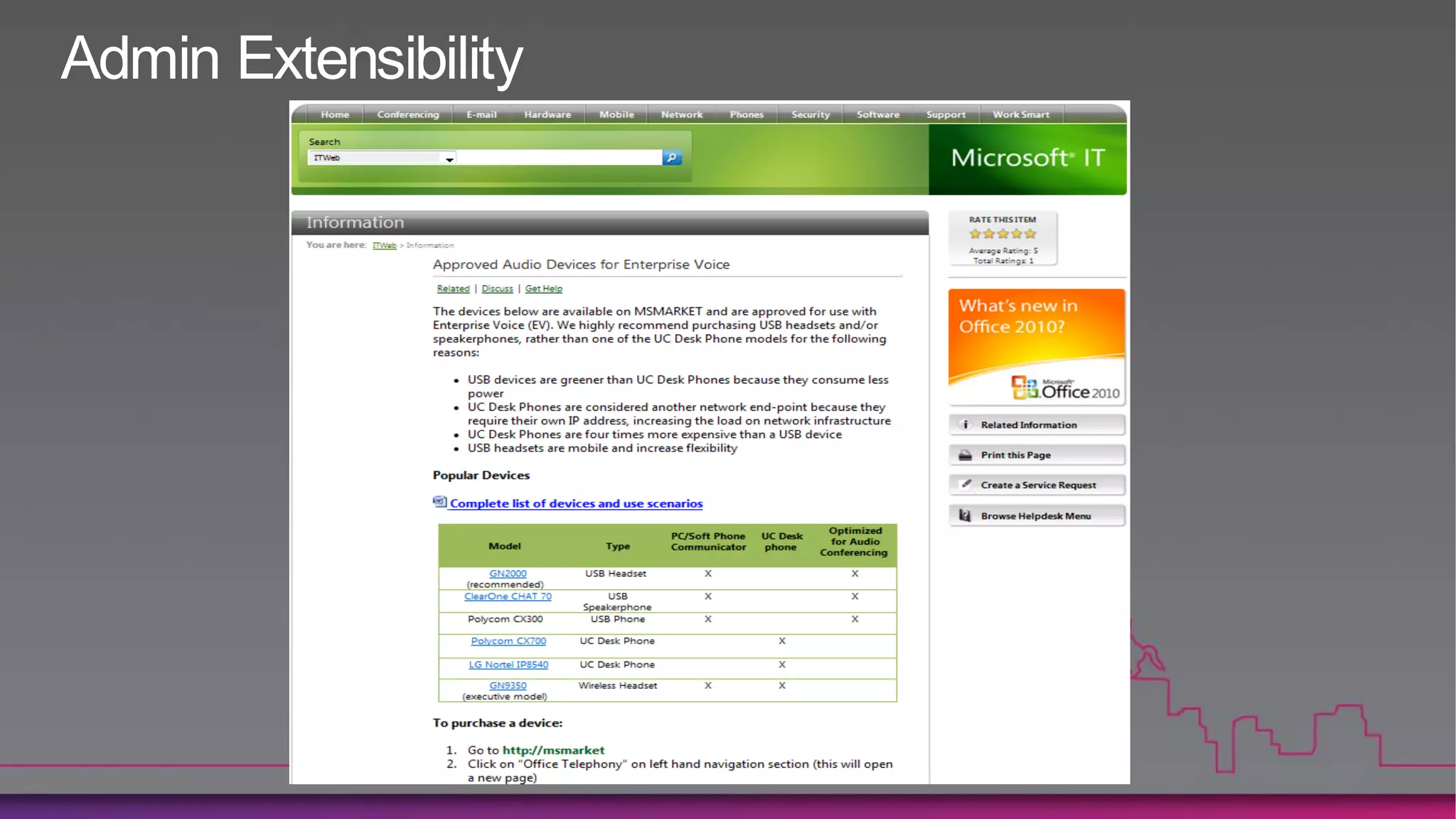
Admin Extensibility
Succeed at Voice Quality with Microsoft’s software powered
   Unified Communications and redefine what it means to
               communicate in your business!
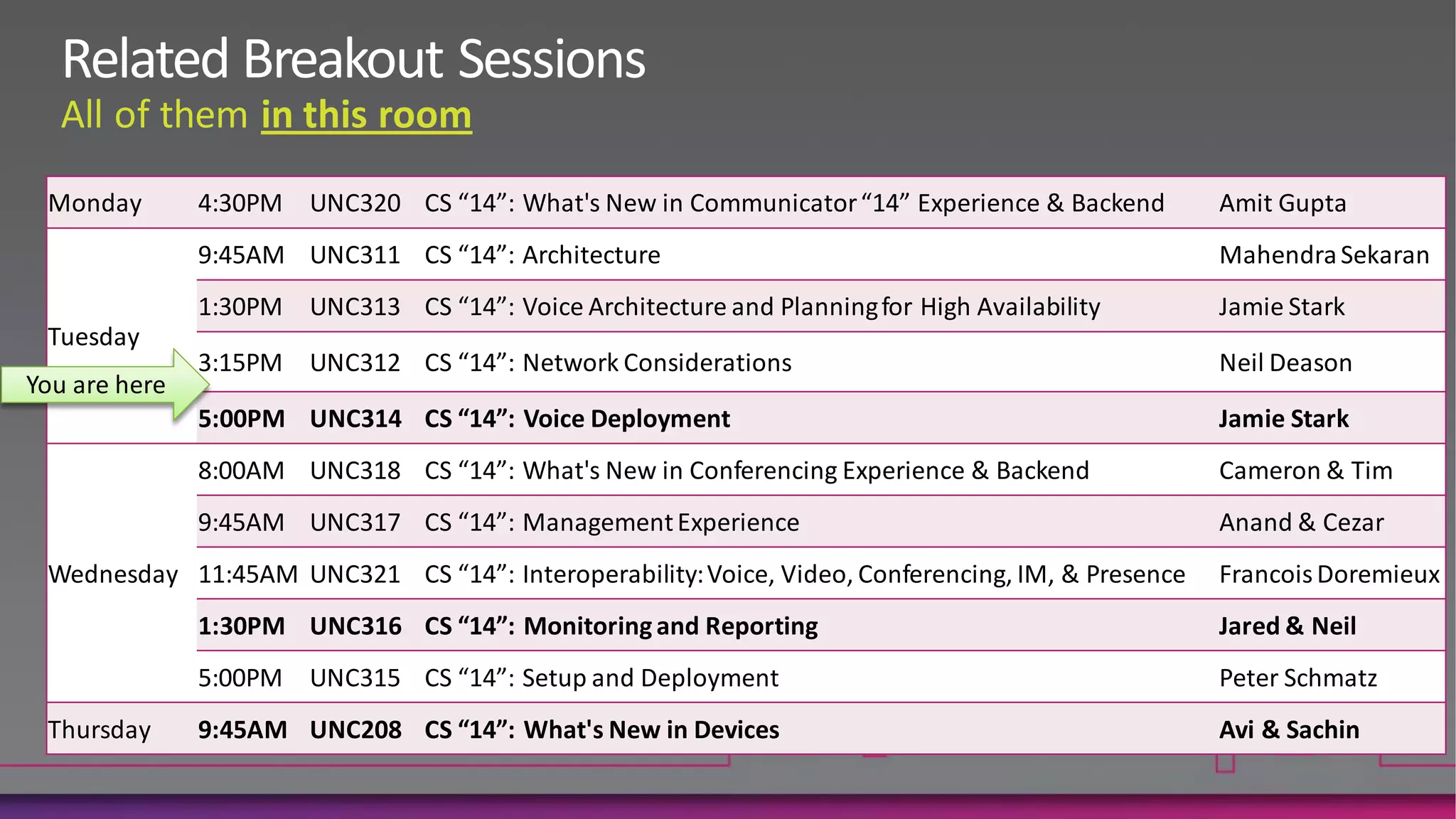
Monday      4:30PM UNC320 CS “14”: What's New in Communicator “14” Experience & Backend          Amit Gupta
            9:45AM UNC311 CS “14”: Architecture                                                  Mahendra Sekaran
            1:30PM UNC313 CS “14”: Voice Architecture and Planning for High Availability         Jamie Stark
Tuesday
            3:15PM UNC312 CS “14”: Network Considerations                                        Neil Deason

            5:00PM UNC314 CS “14”: Voice Deployment                                              Jamie Stark
            8:00AM UNC318 CS “14”: What's New in Conferencing Experience & Backend               Cameron & Tim
            9:45AM UNC317 CS “14”: Management Experience                                         Anand & Cezar
Wednesday 11:45AM UNC321 CS “14”: Interoperability: Voice, Video, Conferencing, IM, & Presence   Francois Doremieux
            1:30PM UNC316 CS “14”: Monitoring and Reporting                                      Jared & Neil
            5:00PM UNC315 CS “14”: Setup and Deployment                                          Peter Schmatz
Thursday    9:45AM UNC208 CS “14”: What's New in Devices                                         Avi & Sachin
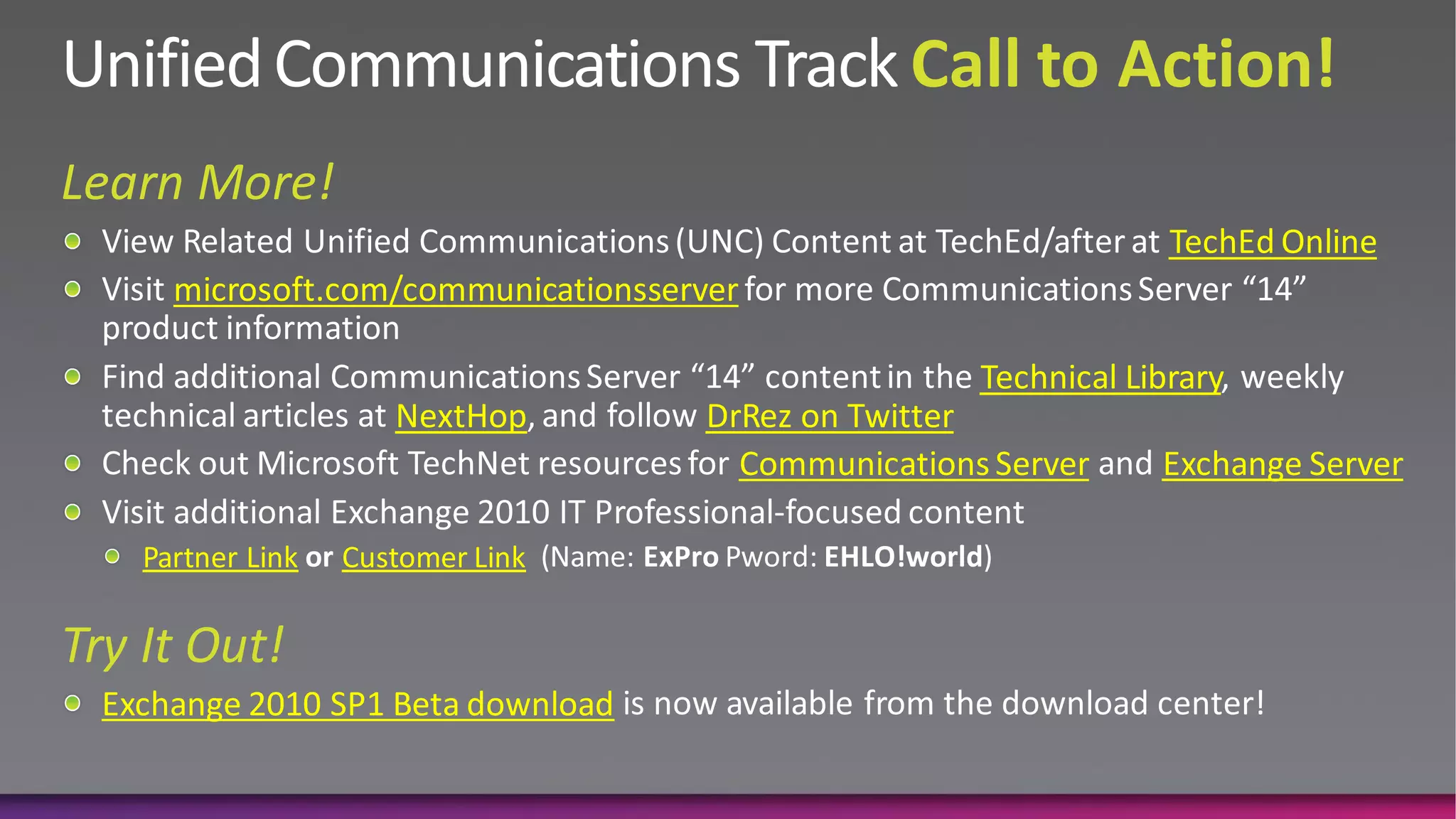
TechEd Online
    microsoft.com/communicationsserver

                                                    Technical Library
                    NextHop         DrRez on Twitter
                                      Communications Server     Exchange Server

  Partner Link   Customer Link


Exchange 2010 SP1 Beta download
www.microsoft.com/teched      www.microsoft.com/learning


http://microsoft.com/technet   http://microsoft.com/msdn
Sign up for Tech·Ed 2011 and save $500
           starting June 8 – June 31st
http://northamerica.msteched.com/registration


             You can also register at the
    North America 2011 kiosk located at registration
             Join us in Atlanta next year
Unc312 microsoft communications server “14” lync 2010 network considerations

Unc312 microsoft communications server “14” lync 2010 network considerations

  • 3.
  • 6.
    Voice Quality Issues CallReliability Audio Quality Dropped Failed Broken Delayed Distorted Low One Way Noise Echo Calls Calls Up Audio Audio Audio Volume Audio Network Core Performance Gateways Devices
  • 7.
  • 8.
    Network Conditions Acceptable Quality Optimal Quality Interarrival packet jitter (avg) ≤ 10ms ≤ 5ms Interarrival packet jitter(max) ≤ 80ms ≤ 40ms Packet loss rate (avg) ≤ 10% ≤ 2% Network latency RTT ≤ 200ms ≤ 120ms
  • 9.
    SIP SRTP / RTCP 1 2 3 4 5 1 2 3 4 5
  • 10.
    SIP SRTP / RTCP 1 2 4 5 1 2 4 5 1 2 3 4 5 F E C 1 2 2 3 3 4 4 5
  • 12.
    Codec RTAudio - RTAudio - Siren G.711 G.722 RTVideo - RTVideo - RTVideo - 8Khz 16 Khz CIF 15fps VGA 30fps HD 30fps Typical Bandwidth 25.9 kbps 34.8 kbps 22 kbps 59.8 kbps 42.8 kbps 203 kbps 492 kbps 1230 kbps – No Fec Upper Limit – No FEC 39.8 kbps 57 kbps 51.6 kbps 92 kbps 99.6 kbps 250 kbps 600 kbps 1500 kbps Upper Limit - FEC 51.6 kbps 86 kbps 67.6 kbps 156 kbps 163.6 kbps n/a n/a n/a Bandwidth numbers include overhead for framing, encryption, and IP routing information in addition to actual encoded media and based on 20ms audio p-times Typical bandwidth values bit rate are measurements of typical activity level values under good network conditions (i.e. no FEC for audio sessions) Typical BW number can be used for capacity planning to assess if a network should be considered „right provisioned‟ Average can be used for initial capacity planning where most calls are within enterprise network Monitor actual Bandwidth usage of UC sessions and then refine
  • 15.
    Example Scenario CAC Profile Type WAN Link Per Available Audio WAN Link per Session Available Video Session Audio Limit Video Limit Optimized for Session 60 kbps RTAudio NB + FEC 350 kbps RTVideo – CIF (15fps) Count Siren + FEC RTVideo – Pano (15fps) (w/ Wide Band P2P) RTAudio WB (no FEC) Balanced 95 kbps (Above plus) 600 kbps (Above plus) RTAudio WB + FEC RTVideo – VGA (30fps) G.711 (no FEC) G.722 (no FEC) Optimized for Quality 165 kbps (All Above plus) 1500 kbps (All Above plus) G.711 + FEC RTVideo – HD (30fps) G.722 + FEC WAN Link Policy: Audio Session Limit = 60 kbps RT Audio WB (no FEC) Redmond New Orleans
  • 16.
    Example Scenario CAC Profile Type WAN Link Per Available Audio WAN Link per Session Available Video Session Audio Limit Video Limit Optimized for Session 60 kbps RTAudio NB + FEC 350 kbps RTVideo – CIF (15fps) Count Siren + FEC RTVideo – Pano (15fps) (w/ Wide Band P2P) RTAudio WB (no FEC) Balanced 95 kbps (Above plus) 600 kbps (Above plus) RTAudio WB + FEC RTVideo – VGA (30fps) G.711 (no FEC) G.722 (no FEC) Optimized for Quality 165 kbps (All Above plus) 1500 kbps (All Above plus) G.711 + FEC RTVideo – HD (30fps) G.722 + FEC WAN Link Policy: Audio Session Limit = 60 kbps RT Audio WB (No FEC) Internet Redmond New Orleans
  • 17.
    Example Scenario CAC Profile Type WAN Link Per Available Audio WAN Link per Session Available Video Session Audio Limit Video Limit Optimized for Session 60 kbps RTAudio NB + FEC 350 kbps RTVideo – CIF (15fps) Count Siren + FEC RTVideo – Pano (15fps) (w/ Wide Band P2P) RTAudio WB (no FEC) Balanced 95 kbps (Above plus) 600 kbps (Above plus) RTAudio WB + FEC RTVideo – VGA (30fps) G.711 (no FEC) G.722 (no FEC) Optimized for Quality 165 kbps (All Above plus) 1500 kbps (All Above plus) G.711 + FEC RTVideo – HD (30fps) G.722 + FEC WAN Link Policy: Audio Session Limit = 60 kbps RT Audio NB (+ FEC) Internet Redmond New Orleans
  • 18.
    1440x900 1280x800 1680x1050 1920x1200 Screen Size 1 Mbps 512 Kbps 384 Kbps 768 Kbps Acceptable 2000 5000 1000 3000 4000 0 19:21,1 29:36,1 39:51,1 50:06,1 00:21,1 10:36,1 20:51,1 31:06,1 41:21,1 51:36,1 01:06,0 2 Mbps Optimal 1.5 Mbps 3.5 Mbps 06:06,1 2.75 Mbps 11:21,1 16:21,1 22:51,1 33:06,1 43:21,1 53:36,1 03:51,1 Kilobits/sec sent by Sharer 14:06,1 24:21,1 34:36,1 44:51,1 55:06,1 05:21,1
  • 19.
    Media Type Per Hop Queuing and Notes: Behavior Dropping Audio EF Priority Queue Low loss, low latency, low jitter, assured bandwidth Pair with WAN Bandwidth Policies on constrained links Video AF41 BW Queue + DSCP Class 4. Low drop priority. WRED Pair with WAN Bandwidth Policies on constrained links SIP Signaling CS3 BW Queue Class 3. Bandwidth allocation should be sufficient to avoid drops App Sharing AF21 BW Queue + DSCP Class 2. Low drop priority. WRED Pair with End User Policy Caps File Transfer AF11 BW Queue + DSCP Class 1. Low drop priority. WRED Pair with End User Policy Caps
  • 24.
  • 25.
    In Microsoft CommunicationsServer “14” media for calls within a site can go directly to PSTN Gateway Improves audio quality and reduces numbers of servers Today 5pm UNC314 CS “14”: Voice Deployment
  • 26.
    Thursday 9:45AM -UNC208 CS “14”: What's New in Devices
  • 27.
  • 28.
    Weds 1.30pm -UNC316 - CS “14”: Monitoring and Reporting
  • 29.
  • 31.
  • 33.
    Succeed at VoiceQuality with Microsoft’s software powered Unified Communications and redefine what it means to communicate in your business!
  • 34.
    Monday 4:30PM UNC320 CS “14”: What's New in Communicator “14” Experience & Backend Amit Gupta 9:45AM UNC311 CS “14”: Architecture Mahendra Sekaran 1:30PM UNC313 CS “14”: Voice Architecture and Planning for High Availability Jamie Stark Tuesday 3:15PM UNC312 CS “14”: Network Considerations Neil Deason 5:00PM UNC314 CS “14”: Voice Deployment Jamie Stark 8:00AM UNC318 CS “14”: What's New in Conferencing Experience & Backend Cameron & Tim 9:45AM UNC317 CS “14”: Management Experience Anand & Cezar Wednesday 11:45AM UNC321 CS “14”: Interoperability: Voice, Video, Conferencing, IM, & Presence Francois Doremieux 1:30PM UNC316 CS “14”: Monitoring and Reporting Jared & Neil 5:00PM UNC315 CS “14”: Setup and Deployment Peter Schmatz Thursday 9:45AM UNC208 CS “14”: What's New in Devices Avi & Sachin
  • 35.
    TechEd Online microsoft.com/communicationsserver Technical Library NextHop DrRez on Twitter Communications Server Exchange Server Partner Link Customer Link Exchange 2010 SP1 Beta download
  • 36.
    www.microsoft.com/teched www.microsoft.com/learning http://microsoft.com/technet http://microsoft.com/msdn
  • 38.
    Sign up forTech·Ed 2011 and save $500 starting June 8 – June 31st http://northamerica.msteched.com/registration You can also register at the North America 2011 kiosk located at registration Join us in Atlanta next year