UI/UX Design
By Ishika Bhattacharjee
Business Impact of high user
Engagement
Increases sales and conversions
Improves customer retention
Builds brand loyalty
Reduces customer acquisition cost
Encourages word-of-mouth marketing
Engaged users are more valuable than new users.
UI/UX DESIGN
Instagram →High engagement
through reels, likes, comments
Amazon →Personalized
recommendations increase repeat
purchases
Zomato / Swiggy →Notifications
at meal times increase orders
Netflix →Auto-play and
recommendations increase watch
time
What is UI?
UI refers to the visual, interactive, and design elements that a user sees
and interacts with on a digital product (app, website, software).
UI is what the user SEES.
It includes:
Colors
Fonts & Typography
Buttons
Icons
Layouts
Images
Spacing
Visual hierarchy
UI/UX DESIGN
EXAMPLE
I NSTAGRAM USES CLEAN WHI TE
BACKGROUNDS, SI MPLE I CONS,
CONSI STENT FONTS → A
VI SUALLY PLEASI NG UI .
What is UX?
UX refers to the overall experience a user has while interacting with a
product.
It is about how the user FEELS.
UX is what the user EXPERIENCES.
It deals with:
Ease of navigation
Smooth flow
Simplicity
Reducing friction
Understanding user needs
Making tasks faster & delightful
UI/UX DESIGN
EXAMPLE
NE TFLI X PROVI DES
PERSONALI ZED
RECOMMENDATI ONS → SMOOTH
NAVI GATI ON → QUI CK SEARCH
→ AUTO-PLAY TRAI LERS →
STRONG UX DESI GN.
Why UI/UX?
Reason 1: First Impressions Can Make
or Break It
Users form an opinion in 0.05 seconds.
A good UI creates trust and credibility
instantly.
UI/UX DESIGN
Reason 2: Better UX = Higher Sales
Amazon reduced page load time by
0.1 seconds → increased revenue by
millions.
Swiggy’s single tap reorder
increases repeat orders.
Reason 3: Customer Loyalty
If users get frustrated, they leave.
If they enjoy the experience, they come
back.
Reason 4: Competitive Advantage
In a world with thousands of apps, good
design differentiates a brand.
Reason 5: Reduces Development Cost
Good UX reduces redesigning and fixes
later.
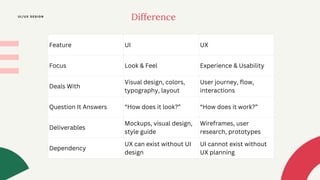
Feature UI UX
Focus Look & Feel Experience & Usability
Deals With
Visual design, colors,
typography, layout
User journey, flow,
interactions
Question It Answers “How does it look?” “How does it work?”
Deliverables
Mockups, visual design,
style guide
Wireframes, user
research, prototypes
Dependency
UX can exist without UI
design
UI cannot exist without
UX planning
Difference
UI/UX DESIGN
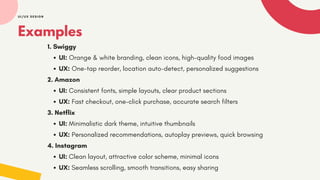
Examples
1. Swiggy
UI: Orange & white branding, clean icons, high-quality food images
UX: One-tap reorder, location auto-detect, personalized suggestions
2. Amazon
UI: Consistent fonts, simple layouts, clear product sections
UX: Fast checkout, one-click purchase, accurate search filters
3. Netflix
UI: Minimalistic dark theme, intuitive thumbnails
UX: Personalized recommendations, autoplay previews, quick browsing
4. Instagram
UI: Clean layout, attractive color scheme, minimal icons
UX: Seamless scrolling, smooth transitions, easy sharing
UI/UX DESIGN
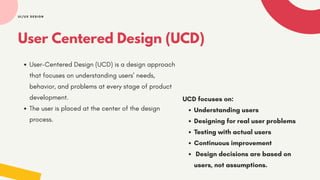
User Centered Design (UCD)
User-Centered Design (UCD) is a design approach
that focuses on understanding users’ needs,
behavior, and problems at every stage of product
development.
The user is placed at the center of the design
process.
UI/UX DESIGN
UCD focuses on:
Understanding users
Designing for real user problems
Testing with actual users
Continuous improvement
Design decisions are based on
users, not assumptions.
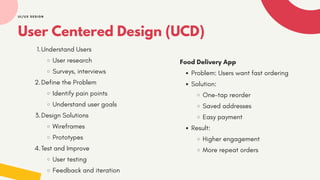
User Centered Design (UCD)
1.Understand Users
User research
Surveys, interviews
2.Define the Problem
Identify pain points
Understand user goals
3.Design Solutions
Wireframes
Prototypes
4.Test and Improve
User testing
Feedback and iteration
UI/UX DESIGN
Food Delivery App
Problem: Users want fast ordering
Solution:
One-tap reorder
Saved addresses
Easy payment
Result:
Higher engagement
More repeat orders
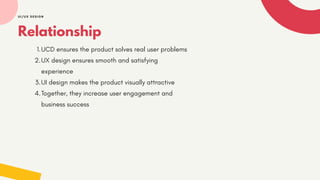
Relationship
1.UCD ensures the product solves real user problems
2.UX design ensures smooth and satisfying
experience
3.UI design makes the product visually attractive
4.Together, they increase user engagement and
business success
UI/UX DESIGN
Principles of UI Design
UI design principles are guidelines that help designers create
interfaces that are:
Clear
Consistent
Beautiful
Easy to navigate
Intuitive
They ensure that users can interact with a product effortlessly.
UI/UX DESIGN
UI/UX DESIGN
1. Clarity (Make Everything Understandable)
Your interface should communicate information
clearly without confusing the user.
Includes:
Readable fonts
Simple words
Clear icons
Easy-to-understand labels
Example (Swiggy)
"Add to Cart" is bold, clear, and visible. No
confusion.
Principles of UI Design
2. Consistency (Uniformity in Design)
Users should feel a sense of familiarity across
the entire app or website.
Includes:
Same color patterns
Same button styles
Same icon design
Predictable layouts
Example (Instagram)
All icons follow a similar style →clean, minimal,
consistent.
UI/UX DESIGN
3. Visual Hierarchy (Guide the User’s Eyes)
Arrange elements so users notice important
things first.
Includes:
Bigger text for headings
Highlighted CTAs
Using color contrast
Example (Amazon)
“Buy Now” button is always highlighted →user
does not need to search for it.
Principles of UI Design
4. Simplicity (Less is More)
Avoid clutter. Show only what is necessary on
each screen.
Includes:
Minimal pages
Fewer steps
Clean layouts
Only relevant information
Example (Google’s homepage)
Just one search bar →simple, powerful.
UI/UX DESIGN
5. Affordance (Showing What Can Be Done)
Affordance means the design tells the user how it
should be used.
Types of Affordance:
Visual Affordance:
Buttons look clickable. Sliders look draggable.
Textual Affordance:
Labels like “Swipe Up,” “Tap Here.”
Physical Affordance:
Scrollbars, toggle switches.
Example (Instagram Reels)
The upward arrow suggests “Swipe Up” for more
content—no instruction needed.
Principles of UI Design
6. Intuitive Navigation (Make Movement Effortless)
Intuitive navigation ensures users can move through the
interface smoothly without thinking, because the
structure matches their expectations.
Characteristics of Intuitive Navigation:
Simple menu structure
Predictable placement of buttons
Clear labels
Tab bars for easy access
Sticky navigation bars
Example (Swiggy)
Home, Search, Cart, and Account tabs are fixed at the
bottom.
Users always know where they are and how to go
back.
THANKYOU
UI/UX DESIGN

UI / UX design, user centered design and principles

  • 1.
  • 2.
    Business Impact ofhigh user Engagement Increases sales and conversions Improves customer retention Builds brand loyalty Reduces customer acquisition cost Encourages word-of-mouth marketing Engaged users are more valuable than new users. UI/UX DESIGN Instagram →High engagement through reels, likes, comments Amazon →Personalized recommendations increase repeat purchases Zomato / Swiggy →Notifications at meal times increase orders Netflix →Auto-play and recommendations increase watch time
  • 3.
    What is UI? UIrefers to the visual, interactive, and design elements that a user sees and interacts with on a digital product (app, website, software). UI is what the user SEES. It includes: Colors Fonts & Typography Buttons Icons Layouts Images Spacing Visual hierarchy UI/UX DESIGN EXAMPLE I NSTAGRAM USES CLEAN WHI TE BACKGROUNDS, SI MPLE I CONS, CONSI STENT FONTS → A VI SUALLY PLEASI NG UI .
  • 4.
    What is UX? UXrefers to the overall experience a user has while interacting with a product. It is about how the user FEELS. UX is what the user EXPERIENCES. It deals with: Ease of navigation Smooth flow Simplicity Reducing friction Understanding user needs Making tasks faster & delightful UI/UX DESIGN EXAMPLE NE TFLI X PROVI DES PERSONALI ZED RECOMMENDATI ONS → SMOOTH NAVI GATI ON → QUI CK SEARCH → AUTO-PLAY TRAI LERS → STRONG UX DESI GN.
  • 5.
    Why UI/UX? Reason 1:First Impressions Can Make or Break It Users form an opinion in 0.05 seconds. A good UI creates trust and credibility instantly. UI/UX DESIGN Reason 2: Better UX = Higher Sales Amazon reduced page load time by 0.1 seconds → increased revenue by millions. Swiggy’s single tap reorder increases repeat orders. Reason 3: Customer Loyalty If users get frustrated, they leave. If they enjoy the experience, they come back. Reason 4: Competitive Advantage In a world with thousands of apps, good design differentiates a brand. Reason 5: Reduces Development Cost Good UX reduces redesigning and fixes later.
  • 6.
    Feature UI UX FocusLook & Feel Experience & Usability Deals With Visual design, colors, typography, layout User journey, flow, interactions Question It Answers “How does it look?” “How does it work?” Deliverables Mockups, visual design, style guide Wireframes, user research, prototypes Dependency UX can exist without UI design UI cannot exist without UX planning Difference UI/UX DESIGN
  • 7.
    Examples 1. Swiggy UI: Orange& white branding, clean icons, high-quality food images UX: One-tap reorder, location auto-detect, personalized suggestions 2. Amazon UI: Consistent fonts, simple layouts, clear product sections UX: Fast checkout, one-click purchase, accurate search filters 3. Netflix UI: Minimalistic dark theme, intuitive thumbnails UX: Personalized recommendations, autoplay previews, quick browsing 4. Instagram UI: Clean layout, attractive color scheme, minimal icons UX: Seamless scrolling, smooth transitions, easy sharing UI/UX DESIGN
  • 8.
    User Centered Design(UCD) User-Centered Design (UCD) is a design approach that focuses on understanding users’ needs, behavior, and problems at every stage of product development. The user is placed at the center of the design process. UI/UX DESIGN UCD focuses on: Understanding users Designing for real user problems Testing with actual users Continuous improvement Design decisions are based on users, not assumptions.
  • 9.
    User Centered Design(UCD) 1.Understand Users User research Surveys, interviews 2.Define the Problem Identify pain points Understand user goals 3.Design Solutions Wireframes Prototypes 4.Test and Improve User testing Feedback and iteration UI/UX DESIGN Food Delivery App Problem: Users want fast ordering Solution: One-tap reorder Saved addresses Easy payment Result: Higher engagement More repeat orders
  • 10.
    Relationship 1.UCD ensures theproduct solves real user problems 2.UX design ensures smooth and satisfying experience 3.UI design makes the product visually attractive 4.Together, they increase user engagement and business success UI/UX DESIGN
  • 11.
    Principles of UIDesign UI design principles are guidelines that help designers create interfaces that are: Clear Consistent Beautiful Easy to navigate Intuitive They ensure that users can interact with a product effortlessly. UI/UX DESIGN
  • 12.
    UI/UX DESIGN 1. Clarity(Make Everything Understandable) Your interface should communicate information clearly without confusing the user. Includes: Readable fonts Simple words Clear icons Easy-to-understand labels Example (Swiggy) "Add to Cart" is bold, clear, and visible. No confusion. Principles of UI Design 2. Consistency (Uniformity in Design) Users should feel a sense of familiarity across the entire app or website. Includes: Same color patterns Same button styles Same icon design Predictable layouts Example (Instagram) All icons follow a similar style →clean, minimal, consistent.
  • 13.
    UI/UX DESIGN 3. VisualHierarchy (Guide the User’s Eyes) Arrange elements so users notice important things first. Includes: Bigger text for headings Highlighted CTAs Using color contrast Example (Amazon) “Buy Now” button is always highlighted →user does not need to search for it. Principles of UI Design 4. Simplicity (Less is More) Avoid clutter. Show only what is necessary on each screen. Includes: Minimal pages Fewer steps Clean layouts Only relevant information Example (Google’s homepage) Just one search bar →simple, powerful.
  • 14.
    UI/UX DESIGN 5. Affordance(Showing What Can Be Done) Affordance means the design tells the user how it should be used. Types of Affordance: Visual Affordance: Buttons look clickable. Sliders look draggable. Textual Affordance: Labels like “Swipe Up,” “Tap Here.” Physical Affordance: Scrollbars, toggle switches. Example (Instagram Reels) The upward arrow suggests “Swipe Up” for more content—no instruction needed. Principles of UI Design 6. Intuitive Navigation (Make Movement Effortless) Intuitive navigation ensures users can move through the interface smoothly without thinking, because the structure matches their expectations. Characteristics of Intuitive Navigation: Simple menu structure Predictable placement of buttons Clear labels Tab bars for easy access Sticky navigation bars Example (Swiggy) Home, Search, Cart, and Account tabs are fixed at the bottom. Users always know where they are and how to go back.
  • 15.