Basic Web Dev
Bertrand Alexander D. Paran
UP ITDC
August 12: UI / UX Principles
August 13 – 22: Basic Web Programming
(HTML/CSS/JAVASCRIPT)
August 26: Evaluation of Websites
Class Schedule
1 PowerPoint demonstrating the
principles f UI/UX
1 website as an exercise using
HTML/CSS and JavaScript due on
the 18th of August
1 website as a final project
due on the 26th
Class Requirements
Bertrand Alexander D. Paran
UP ITDC
UI/UX Principles
UI/UX Principles
• http://www.theworldsworstwebsiteever.com/
• http://www2.warnerbros.com/spacejam/movie/jam.htm
• http://www.sickchirpse.com/10-of-the-worst-websites-
ever/
• http://uglyisnotgood.com/
By the end of this lesson:
• Ascertain a basic understanding of what precisely UI/UX is
• Understand and be able to relate the importance of UX
from a business perspective
• Evaluate designs from a User’s Experience point of view
• Be able to apply this knowledge for all future projects
Outline
•What is UI / UX
•The Scope of UI / UX
•The most Important Principles of UI
/ UX Design
What it UI / UX?
•Why do we need to study UI / UX?
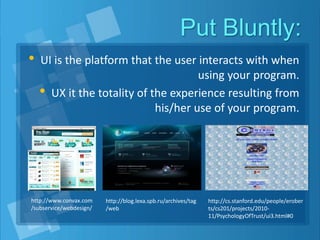
Put Bluntly:
• UI is the platform that the user interacts with when
using your program.
• UX it the totality of the experience resulting from
his/her use of your program.
http://www.convax.com
/subservice/webdesign/
http://blog.lexa.spb.ru/archives/tag
/web
http://cs.stanford.edu/people/erober
ts/cs201/projects/2010-
11/PsychologyOfTrust/ui3.html#0
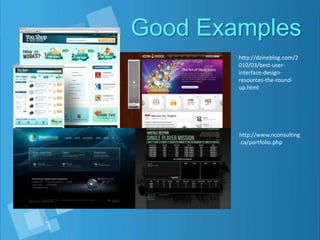
Good Examples
http://dzineblog.com/2
010/03/best-user-
interface-design-
resources-the-round-
up.html
http://www.nconsulting
.ca/portfolio.php
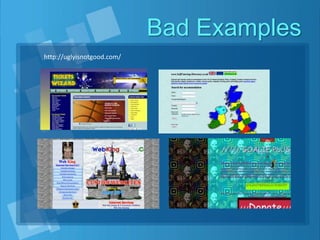
Bad Examples
http://uglyisnotgood.com/
More Examples
• http://pcic.gov.ph/
• http://www.genicap.com/Site/
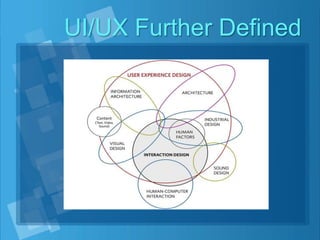
UI/UX Further Defined
It is a form of Engineering
• The practice of approaching the design of anything using
proven and time tested knowledge in pursuit of maximum
efficiency and effectivity
• UI/UX is the practice of designing websites and web
applications pursuant of making the user experience better
using proven and time tested knowledge
• “To study UI/UX is to study the engineering of websites”
Build 1000 cars. Now.
http://www.popularmechanics.com/technology/engineering/gonzo/
4272846
http://www.blog.automotiveaddicts.com/modern-car-construction-
materials
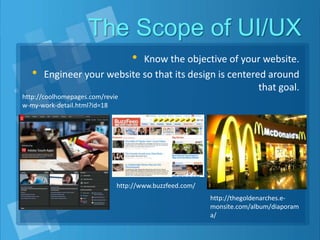
The Scope of UI/UX
• Know the objective of your website.
• Engineer your website so that its design is centered around
that goal.
http://coolhomepages.com/revie
w-my-work-detail.html?id=18
http://www.buzzfeed.com/
http://thegoldenarches.e-
monsite.com/album/diaporam
a/
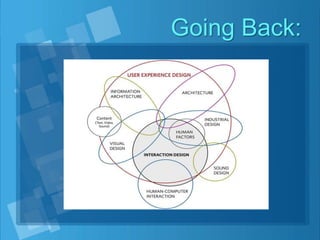
Going Back:
Interlude:
•Watch the following vido to
highlight how UI / UX affects your
business.
• https://www.youtube.com/watch?v=v3f-
2WG7ONc
Design Principles
•The principles of UI Design that
influence the overall UX
• Aesthetics
• Usability
• Affordance
• Responsiveness
• Brand Image
Aesthetics
• Beauty is on the inside? Unfortunately, not
for businesses in a competitive world
• Is the study of how things are known via the
senses
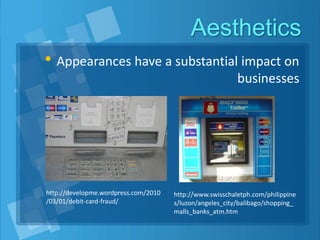
Aesthetics
• Appearances have a substantial impact on
businesses
http://developme.wordpress.com/2010
/03/01/debit-card-fraud/
http://www.swisschaletph.com/philippine
s/luzon/angeles_city/balibago/shopping_
malls_banks_atm.htm
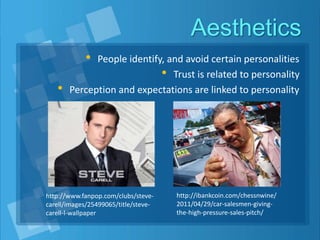
Aesthetics
• People identify, and avoid certain personalities
• Trust is related to personality
• Perception and expectations are linked to personality
http://www.fanpop.com/clubs/steve-
carell/images/25499065/title/steve-
carell-l-wallpaper
http://ibankcoin.com/chessnwine/
2011/04/29/car-salesmen-giving-
the-high-pressure-sales-pitch/
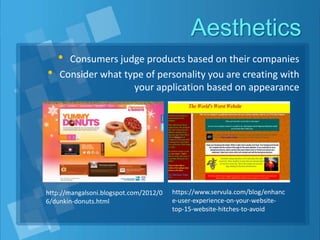
Aesthetics
• Consumers judge products based on their companies
• Consider what type of personality you are creating with
your application based on appearance
http://mangalsoni.blogspot.com/2012/0
6/dunkin-donuts.html
https://www.servula.com/blog/enhanc
e-user-experience-on-your-website-
top-15-website-hitches-to-avoid
Usability
• “The extent of ease that users experience when using your
site”
• Is your site easy or hard to use?
• What are the factors that influence the ease or difficulty of
using your website?
Usability
• Layout
• Is your website cluttered an disorganized, making it difficult
for the user to properly identify the use of it’s elements?
• The lack of form in your website will ultimately give it an
amateurish appearance and detract from the website’s
credibility, regardless of the quality of your product.
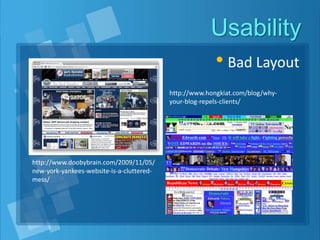
Usability
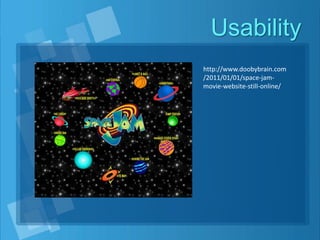
• Bad Layout
http://www.doobybrain.com/2009/11/05/
new-york-yankees-website-is-a-cluttered-
mess/
http://www.hongkiat.com/blog/why-
your-blog-repels-clients/
Usability
• Content
• Is the text misleading, confusing or not properly
representing the elements they are designed to describe?
• Are there crucial elements missing from your site (or just
difficult to find?)
• Avoid putting unnecessary details and distractions in your
website that do not contribute to its function
Usability
http://www.doobybrain.com
/2011/01/01/space-jam-
movie-website-still-online/
Affordance
• Affordance is the science of how the image or functionality
of an object adheres to what is expected of it.
• When effectively executed, a user should be able to know
what to do with it.
• “The 4 second rule” when it comes to Web Design, a user
should be able to identify the purpose of the website and
each individual element within the first 4 seconds of looking
at it.
• This concept applies to entire websites.
Affordance
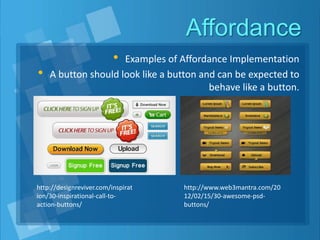
• Examples of Affordance Implementation
• A button should look like a button and can be expected to
behave like a button.
http://designreviver.com/inspirat
ion/30-inspirational-call-to-
action-buttons/
http://www.web3mantra.com/20
12/02/15/30-awesome-psd-
buttons/
Affordance
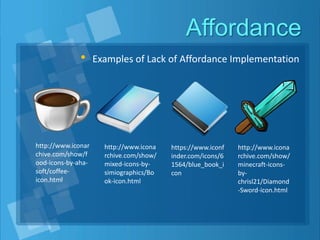
• Examples of Lack of Affordance Implementation
http://www.iconar
chive.com/show/f
ood-icons-by-aha-
soft/coffee-
icon.html
http://www.icona
rchive.com/show/
mixed-icons-by-
simiographics/Bo
ok-icon.html
https://www.iconf
inder.com/icons/6
1564/blue_book_i
con
http://www.icona
rchive.com/show/
minecraft-icons-
by-
chrisl21/Diamond
-Sword-icon.html
Responsiveness
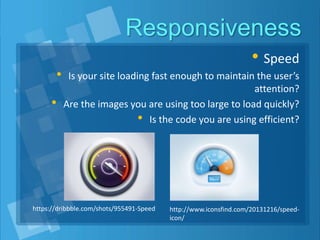
• Speed
• Is your site loading fast enough to maintain the user’s
attention?
• Are the images you are using too large to load quickly?
• Is the code you are using efficient?
https://dribbble.com/shots/955491-Speed http://www.iconsfind.com/20131216/speed-
icon/
Responsiveness
• Feedback
• Denotes the measure of a websites capacity to react with
user input, this contributes greatly to the UX
• Buttons that depress on click
• Loading indicators for processes that take time
• Confirmation messages that appear after actions performed
Responsiveness
• Errors
• The website should be able to provide an avenue to
respond to a user’s needs
• If there are errors, a user should be provided with a way to
contact the developer
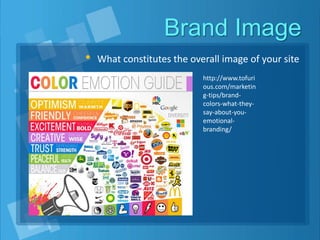
Brand Image
• What constitutes the overall image of your site
http://www.tofuri
ous.com/marketin
g-tips/brand-
colors-what-they-
say-about-you-
emotional-
branding/
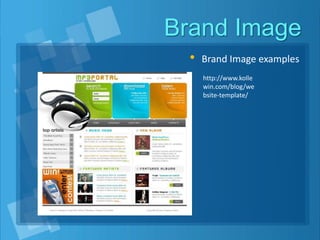
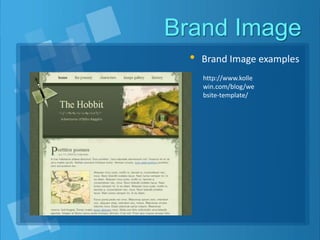
Brand Image
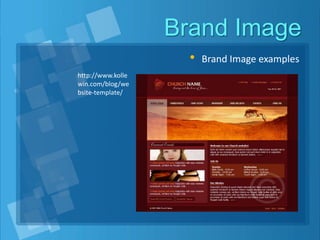
• Brand Image examples
http://www.kolle
win.com/blog/we
bsite-template/
Brand Image
• Brand Image examples
http://www.kolle
win.com/blog/we
bsite-template/
Brand Image
• Brand Image examples
http://www.kolle
win.com/blog/we
bsite-template/
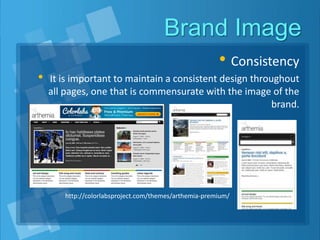
Brand Image
• Consistency
• It is important to maintain a consistent design throughout
all pages, one that is commensurate with the image of the
brand.
http://colorlabsproject.com/themes/arthemia-premium/
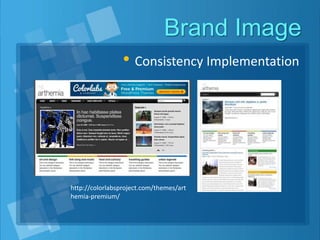
Brand Image
• Consistency Implementation
http://colorlabsproject.com/themes/art
hemia-premium/
Brand Image
• Consistency
• Standards and conventions should be applied all throughout
each page
• If the search bar is at the upper right, then it should be at
the upper right for all pages
• As users move through your site, they should be reassured
that they are still in the same place by a unifying theme
• Applies not only to obvious elements like logos and
navigation, but also content elements like fonts and
backgrounds.
Summary
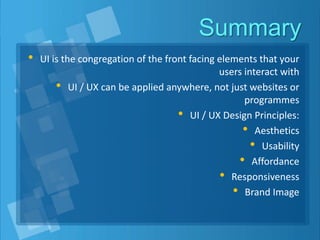
• UI is the congregation of the front facing elements that your
users interact with
• UI / UX can be applied anywhere, not just websites or
programmes
• UI / UX Design Principles:
• Aesthetics
• Usability
• Affordance
• Responsiveness
• Brand Image
Exercise
• Form into 6 groups
• Research about any company website and create a 10
minute PowerPoint presentation explaining how the
website applied the principles discussed in this lesson
• The PowerPoint itself has to exhibit the principles discussed
in this lesson
• At the end of the presentation, create 3 slides
demonstrating bad UI / UX design, be creative with the
ugliness
• You may download any image on the internet to
supplement the graphics you will use, so long as you credit
the source

Ui and ux principles

  • 1.
    Basic Web Dev BertrandAlexander D. Paran UP ITDC
  • 2.
    August 12: UI/ UX Principles August 13 – 22: Basic Web Programming (HTML/CSS/JAVASCRIPT) August 26: Evaluation of Websites Class Schedule
  • 3.
    1 PowerPoint demonstratingthe principles f UI/UX 1 website as an exercise using HTML/CSS and JavaScript due on the 18th of August 1 website as a final project due on the 26th Class Requirements
  • 4.
    Bertrand Alexander D.Paran UP ITDC UI/UX Principles
  • 5.
    UI/UX Principles • http://www.theworldsworstwebsiteever.com/ •http://www2.warnerbros.com/spacejam/movie/jam.htm • http://www.sickchirpse.com/10-of-the-worst-websites- ever/ • http://uglyisnotgood.com/
  • 6.
    By the endof this lesson: • Ascertain a basic understanding of what precisely UI/UX is • Understand and be able to relate the importance of UX from a business perspective • Evaluate designs from a User’s Experience point of view • Be able to apply this knowledge for all future projects
  • 7.
    Outline •What is UI/ UX •The Scope of UI / UX •The most Important Principles of UI / UX Design
  • 8.
    What it UI/ UX? •Why do we need to study UI / UX?
  • 9.
    Put Bluntly: • UIis the platform that the user interacts with when using your program. • UX it the totality of the experience resulting from his/her use of your program. http://www.convax.com /subservice/webdesign/ http://blog.lexa.spb.ru/archives/tag /web http://cs.stanford.edu/people/erober ts/cs201/projects/2010- 11/PsychologyOfTrust/ui3.html#0
  • 10.
  • 11.
  • 12.
    More Examples • http://pcic.gov.ph/ •http://www.genicap.com/Site/
  • 13.
  • 14.
    It is aform of Engineering • The practice of approaching the design of anything using proven and time tested knowledge in pursuit of maximum efficiency and effectivity • UI/UX is the practice of designing websites and web applications pursuant of making the user experience better using proven and time tested knowledge • “To study UI/UX is to study the engineering of websites”
  • 15.
  • 16.
  • 17.
  • 18.
    The Scope ofUI/UX • Know the objective of your website. • Engineer your website so that its design is centered around that goal. http://coolhomepages.com/revie w-my-work-detail.html?id=18 http://www.buzzfeed.com/ http://thegoldenarches.e- monsite.com/album/diaporam a/
  • 19.
  • 20.
    Interlude: •Watch the followingvido to highlight how UI / UX affects your business. • https://www.youtube.com/watch?v=v3f- 2WG7ONc
  • 21.
    Design Principles •The principlesof UI Design that influence the overall UX • Aesthetics • Usability • Affordance • Responsiveness • Brand Image
  • 22.
    Aesthetics • Beauty ison the inside? Unfortunately, not for businesses in a competitive world • Is the study of how things are known via the senses
  • 23.
    Aesthetics • Appearances havea substantial impact on businesses http://developme.wordpress.com/2010 /03/01/debit-card-fraud/ http://www.swisschaletph.com/philippine s/luzon/angeles_city/balibago/shopping_ malls_banks_atm.htm
  • 24.
    Aesthetics • People identify,and avoid certain personalities • Trust is related to personality • Perception and expectations are linked to personality http://www.fanpop.com/clubs/steve- carell/images/25499065/title/steve- carell-l-wallpaper http://ibankcoin.com/chessnwine/ 2011/04/29/car-salesmen-giving- the-high-pressure-sales-pitch/
  • 25.
    Aesthetics • Consumers judgeproducts based on their companies • Consider what type of personality you are creating with your application based on appearance http://mangalsoni.blogspot.com/2012/0 6/dunkin-donuts.html https://www.servula.com/blog/enhanc e-user-experience-on-your-website- top-15-website-hitches-to-avoid
  • 26.
    Usability • “The extentof ease that users experience when using your site” • Is your site easy or hard to use? • What are the factors that influence the ease or difficulty of using your website?
  • 27.
    Usability • Layout • Isyour website cluttered an disorganized, making it difficult for the user to properly identify the use of it’s elements? • The lack of form in your website will ultimately give it an amateurish appearance and detract from the website’s credibility, regardless of the quality of your product.
  • 28.
  • 29.
    Usability • Content • Isthe text misleading, confusing or not properly representing the elements they are designed to describe? • Are there crucial elements missing from your site (or just difficult to find?) • Avoid putting unnecessary details and distractions in your website that do not contribute to its function
  • 30.
  • 31.
    Affordance • Affordance isthe science of how the image or functionality of an object adheres to what is expected of it. • When effectively executed, a user should be able to know what to do with it. • “The 4 second rule” when it comes to Web Design, a user should be able to identify the purpose of the website and each individual element within the first 4 seconds of looking at it. • This concept applies to entire websites.
  • 32.
    Affordance • Examples ofAffordance Implementation • A button should look like a button and can be expected to behave like a button. http://designreviver.com/inspirat ion/30-inspirational-call-to- action-buttons/ http://www.web3mantra.com/20 12/02/15/30-awesome-psd- buttons/
  • 33.
    Affordance • Examples ofLack of Affordance Implementation http://www.iconar chive.com/show/f ood-icons-by-aha- soft/coffee- icon.html http://www.icona rchive.com/show/ mixed-icons-by- simiographics/Bo ok-icon.html https://www.iconf inder.com/icons/6 1564/blue_book_i con http://www.icona rchive.com/show/ minecraft-icons- by- chrisl21/Diamond -Sword-icon.html
  • 34.
    Responsiveness • Speed • Isyour site loading fast enough to maintain the user’s attention? • Are the images you are using too large to load quickly? • Is the code you are using efficient? https://dribbble.com/shots/955491-Speed http://www.iconsfind.com/20131216/speed- icon/
  • 35.
    Responsiveness • Feedback • Denotesthe measure of a websites capacity to react with user input, this contributes greatly to the UX • Buttons that depress on click • Loading indicators for processes that take time • Confirmation messages that appear after actions performed
  • 36.
    Responsiveness • Errors • Thewebsite should be able to provide an avenue to respond to a user’s needs • If there are errors, a user should be provided with a way to contact the developer
  • 37.
    Brand Image • Whatconstitutes the overall image of your site http://www.tofuri ous.com/marketin g-tips/brand- colors-what-they- say-about-you- emotional- branding/
  • 38.
    Brand Image • BrandImage examples http://www.kolle win.com/blog/we bsite-template/
  • 39.
    Brand Image • BrandImage examples http://www.kolle win.com/blog/we bsite-template/
  • 40.
    Brand Image • BrandImage examples http://www.kolle win.com/blog/we bsite-template/
  • 41.
    Brand Image • Consistency •It is important to maintain a consistent design throughout all pages, one that is commensurate with the image of the brand. http://colorlabsproject.com/themes/arthemia-premium/
  • 42.
    Brand Image • ConsistencyImplementation http://colorlabsproject.com/themes/art hemia-premium/
  • 43.
    Brand Image • Consistency •Standards and conventions should be applied all throughout each page • If the search bar is at the upper right, then it should be at the upper right for all pages • As users move through your site, they should be reassured that they are still in the same place by a unifying theme • Applies not only to obvious elements like logos and navigation, but also content elements like fonts and backgrounds.
  • 44.
    Summary • UI isthe congregation of the front facing elements that your users interact with • UI / UX can be applied anywhere, not just websites or programmes • UI / UX Design Principles: • Aesthetics • Usability • Affordance • Responsiveness • Brand Image
  • 45.
    Exercise • Form into6 groups • Research about any company website and create a 10 minute PowerPoint presentation explaining how the website applied the principles discussed in this lesson • The PowerPoint itself has to exhibit the principles discussed in this lesson • At the end of the presentation, create 3 slides demonstrating bad UI / UX design, be creative with the ugliness • You may download any image on the internet to supplement the graphics you will use, so long as you credit the source