Download free for 30 days
Sign in
Upload
Language (EN)
Support
Business
Mobile
Social Media
Marketing
Technology
Art & Photos
Career
Design
Education
Presentations & Public Speaking
Government & Nonprofit
Healthcare
Internet
Law
Leadership & Management
Automotive
Engineering
Software
Recruiting & HR
Retail
Sales
Services
Science
Small Business & Entrepreneurship
Food
Environment
Economy & Finance
Data & Analytics
Investor Relations
Sports
Spiritual
News & Politics
Travel
Self Improvement
Real Estate
Entertainment & Humor
Health & Medicine
Devices & Hardware
Lifestyle
Change Language
Language
English
Español
Português
Français
Deutsche
Cancel
Save
Submit search
EN
Uploaded by
Toshiyuki Hirata
PPTX, PDF
4,800 views
UIテストの実行時間の短縮の方法
iOS Test Night #4(2017/5/22)で発表した資料です。
Technology
◦
Read more
2
Save
Share
Embed
Embed presentation
Download
Download to read offline
1
/ 16
2
/ 16
3
/ 16
4
/ 16
5
/ 16
6
/ 16
7
/ 16
8
/ 16
9
/ 16
10
/ 16
11
/ 16
12
/ 16
13
/ 16
14
/ 16
15
/ 16
16
/ 16
More Related Content
PPTX
Xcodeの管理を楽に - Jenkins編 -
by
Toshiyuki Hirata
PPTX
Pull request時の画面差分取得の自動化
by
Shunsuke Maeda
PPTX
fastlane x iOSアプリのCI
by
Toshiyuki Hirata
PPTX
Bluepillを使ったiOS自動テストの並列化
by
Toshiyuki Hirata
PPTX
バージョンアップの対応を軽減するためのサービスの構築
by
Toshiyuki Hirata
PPTX
iOSアプリにおけるリリースフローとCI環境
by
Toshiyuki Hirata
PPTX
バージョンアップ対応を軽減するサービス:マスティフ
by
Toshiyuki Hirata
PPTX
2017年のiOSアプリ開発におけるCI事情
by
Toshiyuki Hirata
Xcodeの管理を楽に - Jenkins編 -
by
Toshiyuki Hirata
Pull request時の画面差分取得の自動化
by
Shunsuke Maeda
fastlane x iOSアプリのCI
by
Toshiyuki Hirata
Bluepillを使ったiOS自動テストの並列化
by
Toshiyuki Hirata
バージョンアップの対応を軽減するためのサービスの構築
by
Toshiyuki Hirata
iOSアプリにおけるリリースフローとCI環境
by
Toshiyuki Hirata
バージョンアップ対応を軽減するサービス:マスティフ
by
Toshiyuki Hirata
2017年のiOSアプリ開発におけるCI事情
by
Toshiyuki Hirata
What's hot
PPTX
iOSアプリ開発のテスト環境 - テストをはじめる最初の一歩 -
by
Toshiyuki Hirata
PPTX
fastlane snapshotの並列実行についてまとめてみた
by
Toshiyuki Hirata
PPTX
DroidKaigi_devicefarm
by
Shunsuke Maeda
PPTX
DeNAにおけるSWETの役割
by
Toshiyuki Hirata
PPTX
Dangerでpull requestレビューの指摘事項を減らす
by
Shunsuke Maeda
PPTX
DeNAが取り組む Software Engineer in Test
by
Masaki Nakagawa
PPTX
Xcode10での テスト周りの進化をふりかえる
by
Toshiyuki Hirata
PDF
OpenSTFを ECSに乗せてみた話
by
司 知花
PDF
CEDEC2015_スマホゲーム開発を支えろ!〜汗と涙のQAエンジニアリング〜
by
gree_tech
PDF
iOSで利用できるデバイスファームのメリット・デメリットの紹介
by
Shunsuke Maeda
PPTX
アナザーエデンPC版リリースへの道のり 〜WFSにおけるマルチプラットフォーム対応の取り組み〜
by
gree_tech
PPTX
マスティフ (for Xcode beta) - バージョンアップ対応を軽減するためのサービス
by
Toshiyuki Hirata
PPTX
Androidアプリ開発のテスト環境
by
Toshiyuki Hirata
PPTX
コードレビューをより良くする Danger x Android
by
Toshiyuki Hirata
PPTX
iOSアプリの自動テストをはじめよう
by
Toshiyuki Hirata
PPTX
iOSアプリ開発のCI環境 - Jenkins編 -
by
Toshiyuki Hirata
PPTX
JaSST'16 Tokyo モバイルセッション
by
mirer
PDF
iOSにおけるコードレビューを一歩先へ進める
by
Shunsuke Maeda
PPTX
Android e2e testing at mercari
by
Vishal Banthia
PPTX
スマホアプリディレクターが考えていること
by
Kazuaki KURIU
iOSアプリ開発のテスト環境 - テストをはじめる最初の一歩 -
by
Toshiyuki Hirata
fastlane snapshotの並列実行についてまとめてみた
by
Toshiyuki Hirata
DroidKaigi_devicefarm
by
Shunsuke Maeda
DeNAにおけるSWETの役割
by
Toshiyuki Hirata
Dangerでpull requestレビューの指摘事項を減らす
by
Shunsuke Maeda
DeNAが取り組む Software Engineer in Test
by
Masaki Nakagawa
Xcode10での テスト周りの進化をふりかえる
by
Toshiyuki Hirata
OpenSTFを ECSに乗せてみた話
by
司 知花
CEDEC2015_スマホゲーム開発を支えろ!〜汗と涙のQAエンジニアリング〜
by
gree_tech
iOSで利用できるデバイスファームのメリット・デメリットの紹介
by
Shunsuke Maeda
アナザーエデンPC版リリースへの道のり 〜WFSにおけるマルチプラットフォーム対応の取り組み〜
by
gree_tech
マスティフ (for Xcode beta) - バージョンアップ対応を軽減するためのサービス
by
Toshiyuki Hirata
Androidアプリ開発のテスト環境
by
Toshiyuki Hirata
コードレビューをより良くする Danger x Android
by
Toshiyuki Hirata
iOSアプリの自動テストをはじめよう
by
Toshiyuki Hirata
iOSアプリ開発のCI環境 - Jenkins編 -
by
Toshiyuki Hirata
JaSST'16 Tokyo モバイルセッション
by
mirer
iOSにおけるコードレビューを一歩先へ進める
by
Shunsuke Maeda
Android e2e testing at mercari
by
Vishal Banthia
スマホアプリディレクターが考えていること
by
Kazuaki KURIU
Viewers also liked
PPTX
AI and Machine Learning Demystified by Carol Smith at Midwest UX 2017
by
Carol Smith
PDF
20160913 cookpad ios_jp
by
Kazuaki Matsuo
PDF
テストコードをアプリケーションコードと同じ階層に置きたい
by
Hiroshi Kikuchi
PDF
Androidのテストを効率的にするために考えたこと
by
Ataru Osaka
PDF
Stubる - Mockingjayを使ったHTTPクライアントのテスト -
by
Kenji Tanaka
PDF
JavaScript Unit Test Why? What? How?
by
Teppei Sato
AI and Machine Learning Demystified by Carol Smith at Midwest UX 2017
by
Carol Smith
20160913 cookpad ios_jp
by
Kazuaki Matsuo
テストコードをアプリケーションコードと同じ階層に置きたい
by
Hiroshi Kikuchi
Androidのテストを効率的にするために考えたこと
by
Ataru Osaka
Stubる - Mockingjayを使ったHTTPクライアントのテスト -
by
Kenji Tanaka
JavaScript Unit Test Why? What? How?
by
Teppei Sato
Similar to UIテストの実行時間の短縮の方法
PDF
TestFlight自動化でらくらくチームテスト
by
Yoichiro Sakurai
PDF
【Unite Tokyo 2019】Unity Test Runnerを活用して内部品質を向上しよう
by
UnityTechnologiesJapan002
PPTX
大規模ゲーム開発における build 高速化と安定化
by
DeNA
PDF
市場で勝ち続けるための品質とテストの技術①
by
Yahoo!デベロッパーネットワーク
PPTX
ユニットテストを意識して安心しよう
by
Yuta Matsumura
PDF
5分で分かるselenium conference berlin 2017
by
Toshiya Komoda
PDF
ぼくのかんがえた iOSテスト戦略
by
Naoki Umehara
PDF
iOSアプリケーションの Unit Test
by
Katsumi Kishikawa
PPTX
Robotium を使った UI テスト
by
Kenichi Tatsuhama
PDF
レガシーコード改善ガイド 第7章 いつまでたっても変更作業が終わりません
by
Takahiro Okada
PDF
20170625 JXUG Fukuoka 発表資料 : Unit / UI Testing - Xamarin
by
Takeshi Fujimoto
PDF
20140920 CreatorsMeetup20
by
Seigo Tanaka
TestFlight自動化でらくらくチームテスト
by
Yoichiro Sakurai
【Unite Tokyo 2019】Unity Test Runnerを活用して内部品質を向上しよう
by
UnityTechnologiesJapan002
大規模ゲーム開発における build 高速化と安定化
by
DeNA
市場で勝ち続けるための品質とテストの技術①
by
Yahoo!デベロッパーネットワーク
ユニットテストを意識して安心しよう
by
Yuta Matsumura
5分で分かるselenium conference berlin 2017
by
Toshiya Komoda
ぼくのかんがえた iOSテスト戦略
by
Naoki Umehara
iOSアプリケーションの Unit Test
by
Katsumi Kishikawa
Robotium を使った UI テスト
by
Kenichi Tatsuhama
レガシーコード改善ガイド 第7章 いつまでたっても変更作業が終わりません
by
Takahiro Okada
20170625 JXUG Fukuoka 発表資料 : Unit / UI Testing - Xamarin
by
Takeshi Fujimoto
20140920 CreatorsMeetup20
by
Seigo Tanaka
More from Toshiyuki Hirata
PPTX
STFとAppiumをもちいたAndroidアプリの自動テスト
by
Toshiyuki Hirata
PDF
iOSにおける自動テストの並列化
by
Toshiyuki Hirata
PDF
iOSにおけるパフォーマンス計測
by
Toshiyuki Hirata
PDF
UIテストの実行時間を短縮させる方法
by
Toshiyuki Hirata
PDF
レビューのコストを削減するための施策
by
Toshiyuki Hirata
PDF
iOSにおけるパフォーマンス計測
by
Toshiyuki Hirata
PDF
我が家のLINEを中心とした情報共有
by
Toshiyuki Hirata
PDF
UIテスト(Espresso)の高速化をさらにすすめる
by
Toshiyuki Hirata
STFとAppiumをもちいたAndroidアプリの自動テスト
by
Toshiyuki Hirata
iOSにおける自動テストの並列化
by
Toshiyuki Hirata
iOSにおけるパフォーマンス計測
by
Toshiyuki Hirata
UIテストの実行時間を短縮させる方法
by
Toshiyuki Hirata
レビューのコストを削減するための施策
by
Toshiyuki Hirata
iOSにおけるパフォーマンス計測
by
Toshiyuki Hirata
我が家のLINEを中心とした情報共有
by
Toshiyuki Hirata
UIテスト(Espresso)の高速化をさらにすすめる
by
Toshiyuki Hirata
UIテストの実行時間の短縮の方法
1.
Copyright © DeNA
Co.,Ltd. All Rights Reserved. iOS Test Night #4 2017/05/22(Mon) 平田敏之@DeNA UIテストの実行時間の短縮の方法 - test-without-building / bluepill / pxctest / Pomeranian -
2.
Copyright © DeNA
Co.,Ltd. All Rights Reserved. 自己紹介 平田 敏之@DeNA ⁃ SWET (Software Engineer in Test) • 事業サポートチーム / テスト基盤チーム • ミッション ⁃ DeNAサービス全般の品質向上 ⁃ DeNAエンジニアの開発生産性向上 ⁃ 私がやっていること(の一部) • クライアントアプリ周りのテスト戦略、自動テストの開発 • CI/CD環境整備 • テスト基盤環境の開発 • iOS Test Nightの主催
3.
Copyright © DeNA
Co.,Ltd. All Rights Reserved. 今日の発表の流れ はじめに UIテストの実行時間の短縮のための方法 ⁃ [1] テスト実行の並列化 • テストの実行時間の比較 ⁃ [2] テスト実行計画の最適化 まとめ
4.
Copyright © DeNA
Co.,Ltd. All Rights Reserved. はじめに iOSアプリのUIテストの課題(の1つ) ⁃ → テストの実行時間 解決方法の手段(の1つ) ⁃ [1] ビルドとテストの実行を分割して並列化 • 1) テストのためにビルド ⁃ build-for-testingコマンドで実行 • 2) テストを実行 ⁃ test-without-buildingコマンドで実行 ⁃ bluepillを利用 ⁃ pxctestを利用 ⁃ [2] テストの実行時間を元にした並列実行計画
5.
Copyright © DeNA
Co.,Ltd. All Rights Reserved. [1] 実際に実行時間を比較してみる 実行時間を比較する対象一覧 ⁃ (1) fastlane scan (xcodebuild test) • 素のまま ⁃ (2) build-for-testing / test-without-building • ビルドと実行をわける ⁃ (3) bluepill • ツールを利用(1) ⁃ (4) pxctest • ツールを利用(2)
6.
Copyright © DeNA
Co.,Ltd. All Rights Reserved. それぞれの(簡単な)説明 基本機能 ⁃ (1) fastlane scan (xcodebuild test) ⁃ (2) build-for-testing / test-without-building • ビルドとテストの実行を分割 複数iOSシミュレーターを起動させることが出来るツール ※注意※ build-for-testingでビルドしたものがある前提 ⁃ (3) bluepill / inspired by FBSimulatorControl • https://github.com/linkedin/bluepill • 指定したシミュレーター数に応じてテストケースを分割して実行 ⁃ (4) pxctest / using FBSimulatorControl • https://github.com/plu/pxctest • 複数のシミュレーターで同じテストケースを全て実行
7.
Copyright © DeNA
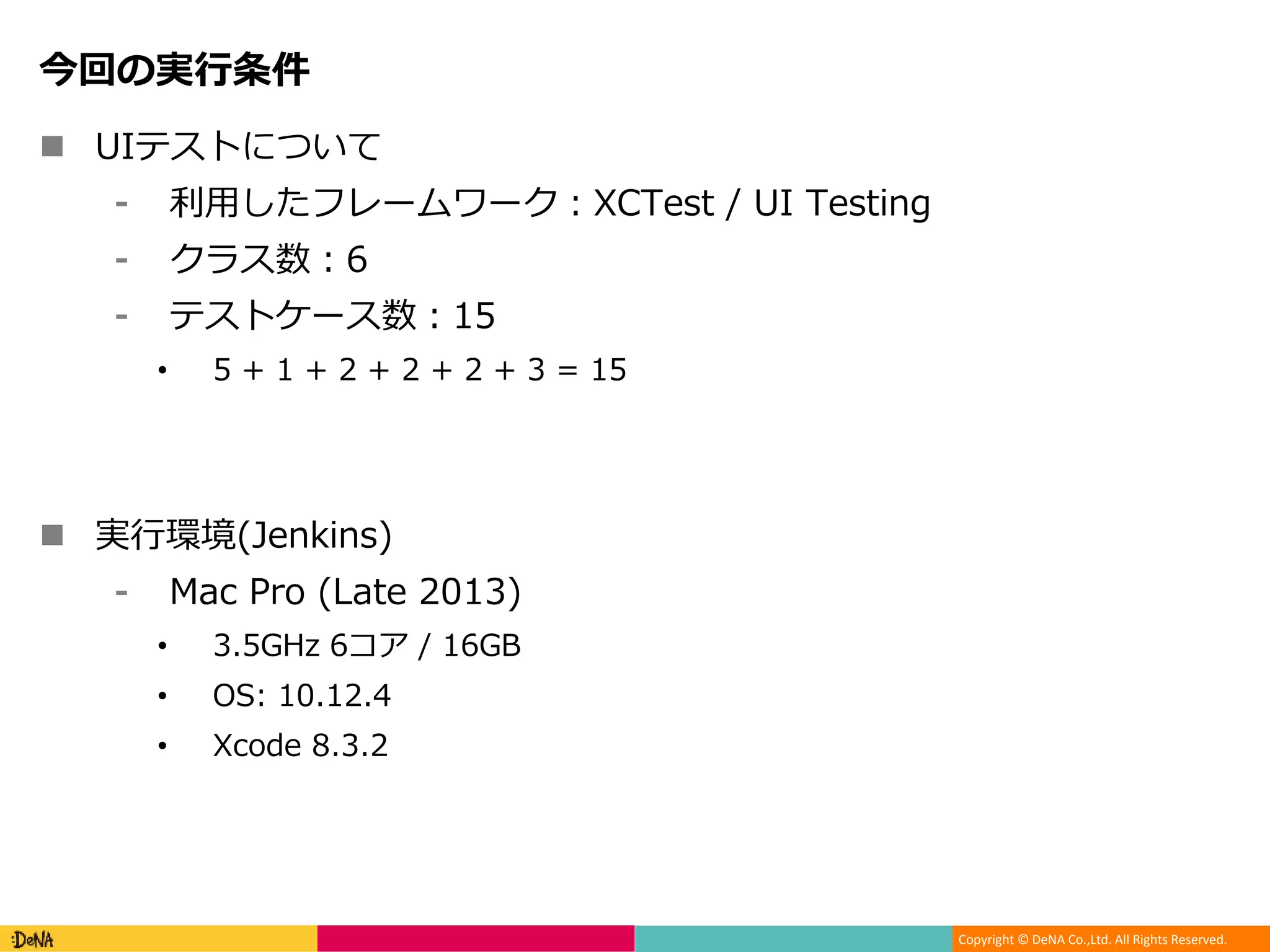
Co.,Ltd. All Rights Reserved. 今回の実行条件 UIテストについて ⁃ 利用したフレームワーク:XCTest / UI Testing ⁃ クラス数:6 ⁃ テストケース数:15 • 5 + 1 + 2 + 2 + 2 + 3 = 15 実行環境(Jenkins) ⁃ Mac Pro (Late 2013) • 3.5GHz 6コア / 16GB • OS: 10.12.4 • Xcode 8.3.2
8.
Copyright © DeNA
Co.,Ltd. All Rights Reserved. (1) fastlane scan (xcodebuild test) の結果 / ベースとなる数値 試行数:10 平均:392.3 最大:405 最小:388 中央値:390 当然ながら一番実行時間がかかっています。 Fastfileでの記述例 scan( sdk: “iphonesimulator”, configuration: "Release", output_directory: “test-report/”, buildlog_path: “test-report/”, output_types: “html,junit”, )
9.
Copyright © DeNA
Co.,Ltd. All Rights Reserved. (2) build-for-testing / test-without-buildingの結果 試行数:10 / ビルド時間:54 平均:284.9 最大:287 最小:284 中央値:285 テストを実行するマシンの数を増やせばもっと早くなる。 Fastfileでの記述例 / test-without-building scan( xctestrun: “path/to/xxx.xctestrun” #このkeyがあるとtest-without-buildingと判断される device: “iPhone 7” output_directory: 'test-report/', buildlog_path: 'test-report/', output_types: 'html,junit', )
10.
Copyright © DeNA
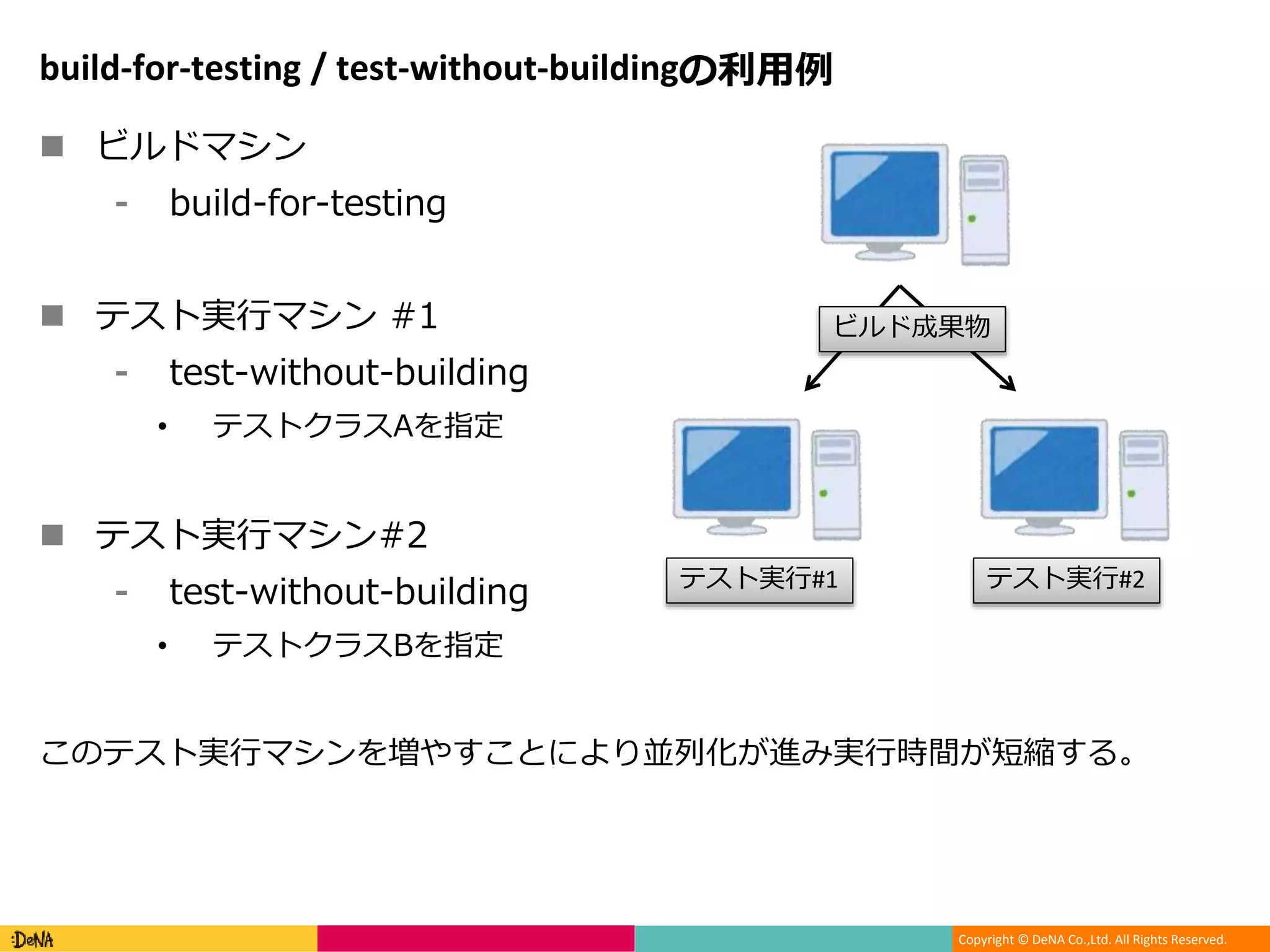
Co.,Ltd. All Rights Reserved. build-for-testing / test-without-buildingの利用例 ビルドマシン ⁃ build-for-testing テスト実行マシン #1 ⁃ test-without-building • テストクラスAを指定 テスト実行マシン#2 ⁃ test-without-building • テストクラスBを指定 このテスト実行マシンを増やすことにより並列化が進み実行時間が短縮する。 ビルド成果物 テスト実行#1 テスト実行#2
11.
Copyright © DeNA
Co.,Ltd. All Rights Reserved. (3) bluepill(v 1.1.0)の結果 試行数:10 / シミュレーター数:3 / ビルド時間:54 平均:165.9 最大:183 最小:162 中央値:164.5 Fastfileでの記述例 / pluginがあります(2つ) ※独自actionを作成しました bluepill( app: “path/to/xxxx.app” scheme: “path/to/xxxx.xcscheme” output_dir: 'test-report/', device: “iPhone 7”, number_of_simulators: 3, ) bluepillのplugin 1) https://github.com/tbrand/fastlane-plugin-bluepill 2) https://github.com/Shashikant86/fastlane-plugin-bluepillar シミュレーター数が4の場合:[平均:165.5] シミュレーター数が5の場合:[平均:134.4]
12.
Copyright © DeNA
Co.,Ltd. All Rights Reserved. (4) pxctest(v 0.3.2)の結果 試行数:10 / シミュレーター数:1 / ビルド時間:54 平均:222.3 最大:224 最小:219 中央値:222.5 Fastfileでの記述例 ※独自actionを作成しました pxctest( testrun: “path/to/xxxx.xctestrun”, output: “test-report”, destinations: destinations ) シミュレーター数が3(テスト数:45)の場合:[平均:285.4]
13.
Copyright © DeNA
Co.,Ltd. All Rights Reserved. テストの実行時間の比較 対象 テストケース数 平均(sec) fastlane scan ( xcodebuild test ) 15 392.3 build-for-testing test-without-building (テスト実行マシン:1) 15 284.9 bluepill (シミュレーター数:3) 15 165.9 bluepill (シミュレーター数:5) 15 134.4 pxctest (シミュレーター数:1) 15 222.3 pxctest (シミュレーター数:3) 45 285.4
14.
Copyright © DeNA
Co.,Ltd. All Rights Reserved. [2] テストの実行時間を元にした並列実行計画 テストの実行時間にはばらつきがあるので最適化する 実行マシンが3つある場合 (1) 113 (2) 10 + 19 + 19 + 31 = 79 (3) 57 実行マシンが2つある場合 (1): 113 + 10 = 123 (2): 19 + 19 + 31 + 57 = 126 113 手動での設定も出来るけどテストは追加・削除されるので自動化したい
15.
Copyright © DeNA
Co.,Ltd. All Rights Reserved. ポメラニアン(SWET製):自動テストをサポートするサービス 機能(の一部) ⁃ 不安定なテストの検出 ⁃ 並列実行の計画の最適化 利用フロー 1. テストの実行結果を送る • 実行時間などの結果が履歴に保存されていく 2. テスト計画を依頼する • 何台のマシンで実行するか 3. 今までの履歴を元に計画を教えてくれる 4. 得た情報を元にテストを実行する • test-without-buildingとテスト実行マシンがあれば出来る ⁃ ※あとはポメラニアンクライアント
16.
Copyright © DeNA
Co.,Ltd. All Rights Reserved. おわりに UIテストの実行時間を短縮させる方法 ⁃ 並列化をおこなってしまおう • 1つのシミュレーターのみでOKなら → bluepill • カバレッジとりたいなら → pxctest ⁃ テストの実行時間のばらつきを最適化する • クラス単位における実行時間に基づきグルーピング 他にも方法はあるはずなので試した内容の発表をお待ちしています!
Download


![Copyright © DeNA Co.,Ltd. All Rights Reserved.
今日の発表の流れ
はじめに
UIテストの実行時間の短縮のための方法
⁃ [1] テスト実行の並列化
• テストの実行時間の比較
⁃ [2] テスト実行計画の最適化
まとめ](https://image.slidesharecdn.com/ui-170522110709/75/UI-3-2048.jpg)
![Copyright © DeNA Co.,Ltd. All Rights Reserved.
はじめに
iOSアプリのUIテストの課題(の1つ)
⁃ → テストの実行時間
解決方法の手段(の1つ)
⁃ [1] ビルドとテストの実行を分割して並列化
• 1) テストのためにビルド
⁃ build-for-testingコマンドで実行
• 2) テストを実行
⁃ test-without-buildingコマンドで実行
⁃ bluepillを利用
⁃ pxctestを利用
⁃ [2] テストの実行時間を元にした並列実行計画](https://image.slidesharecdn.com/ui-170522110709/75/UI-4-2048.jpg)
![Copyright © DeNA Co.,Ltd. All Rights Reserved.
[1] 実際に実行時間を比較してみる
実行時間を比較する対象一覧
⁃ (1) fastlane scan (xcodebuild test)
• 素のまま
⁃ (2) build-for-testing / test-without-building
• ビルドと実行をわける
⁃ (3) bluepill
• ツールを利用(1)
⁃ (4) pxctest
• ツールを利用(2)](https://image.slidesharecdn.com/ui-170522110709/75/UI-5-2048.jpg)



![Copyright © DeNA Co.,Ltd. All Rights Reserved.
(3) bluepill(v 1.1.0)の結果
試行数:10 / シミュレーター数:3 / ビルド時間:54
平均:165.9
最大:183
最小:162
中央値:164.5
Fastfileでの記述例 / pluginがあります(2つ)
※独自actionを作成しました
bluepill(
app: “path/to/xxxx.app”
scheme: “path/to/xxxx.xcscheme”
output_dir: 'test-report/',
device: “iPhone 7”,
number_of_simulators: 3,
)
bluepillのplugin
1) https://github.com/tbrand/fastlane-plugin-bluepill
2) https://github.com/Shashikant86/fastlane-plugin-bluepillar
シミュレーター数が4の場合:[平均:165.5]
シミュレーター数が5の場合:[平均:134.4]](https://image.slidesharecdn.com/ui-170522110709/75/UI-11-2048.jpg)
![Copyright © DeNA Co.,Ltd. All Rights Reserved.
(4) pxctest(v 0.3.2)の結果
試行数:10 / シミュレーター数:1 / ビルド時間:54
平均:222.3
最大:224
最小:219
中央値:222.5
Fastfileでの記述例
※独自actionを作成しました
pxctest(
testrun: “path/to/xxxx.xctestrun”,
output: “test-report”,
destinations: destinations
)
シミュレーター数が3(テスト数:45)の場合:[平均:285.4]](https://image.slidesharecdn.com/ui-170522110709/75/UI-12-2048.jpg)

![Copyright © DeNA Co.,Ltd. All Rights Reserved.
[2] テストの実行時間を元にした並列実行計画
テストの実行時間にはばらつきがあるので最適化する
実行マシンが3つある場合
(1) 113
(2) 10 + 19 + 19 + 31 = 79
(3) 57
実行マシンが2つある場合
(1): 113 + 10 = 123
(2): 19 + 19 + 31 + 57 = 126
113
手動での設定も出来るけどテストは追加・削除されるので自動化したい](https://image.slidesharecdn.com/ui-170522110709/75/UI-14-2048.jpg)