August 2015
Presenting Yourself on the
UC Application for
Undergraduate Admission –
Freshmen
Before Beginning
How Applications are Reviewed
Completing the Application
The Personal Statement
Submitting the Application
Overview
2August 2015
Before Beginning
A
B
C
D E
4
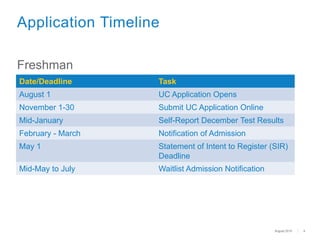
Date/Deadline Task
August 1 UC Application Opens
November 1-30 Submit UC Application Online
Mid-January Self-Report December Test Results
February - March Notification of Admission
May 1 Statement of Intent to Register (SIR)
Deadline
Mid-May to July Waitlist Admission Notification
Application Timeline
Freshman
August 2015
5
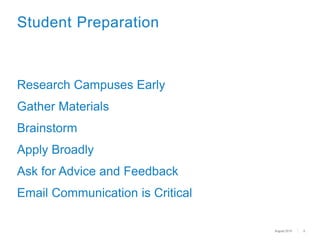
Student Preparation
Research Campuses Early
Gather Materials
Brainstorm
Apply Broadly
Ask for Advice and Feedback
Email Communication is Critical
August 2015
How Applications are
Reviewed
7
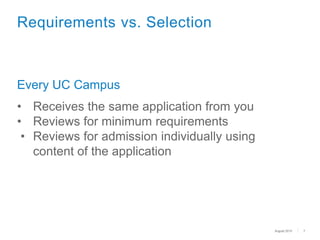
Requirements vs. Selection
Every UC Campus
• Receives the same application from you
• Reviews for minimum requirements
• Reviews for admission individually using
content of the application
August 2015
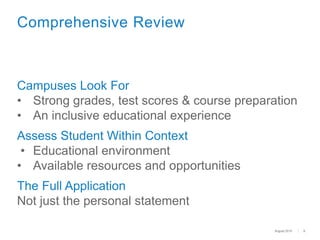
Campuses Look For
• Strong grades, test scores & course preparation
• An inclusive educational experience
Assess Student Within Context
• Educational environment
• Available resources and opportunities
The Full Application
Not just the personal statement
8
Comprehensive Review
August 2015
9
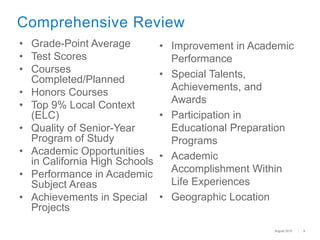
Comprehensive Review
• Grade-Point Average
• Test Scores
• Courses
Completed/Planned
• Honors Courses
• Top 9% Local Context
(ELC)
• Quality of Senior-Year
Program of Study
• Academic Opportunities
in California High Schools
• Performance in Academic
Subject Areas
• Achievements in Special
Projects
• Improvement in Academic
Performance
• Special Talents,
Achievements, and
Awards
• Participation in
Educational Preparation
Programs
• Academic
Accomplishment Within
Life Experiences
• Geographic Location
August 2015
Completing the UC Application
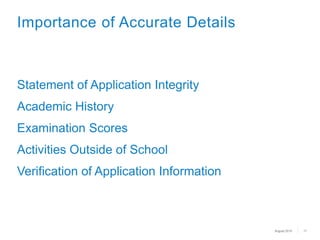
Statement of Application Integrity
Academic History
Examination Scores
Activities Outside of School
Verification of Application Information
11
Importance of Accurate Details
August 2015
12
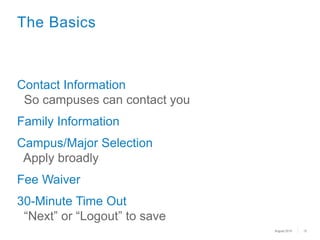
The Basics
Contact Information
So campuses can contact you
Family Information
Campus/Major Selection
Apply broadly
Fee Waiver
30-Minute Time Out
“Next” or “Logout” to save
August 2015
13
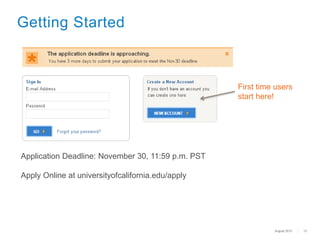
Getting Started
First time users
start here!
Application Deadline: November 30, 11:59 p.m. PST
Apply Online at universityofcalifornia.edu/apply
August 2015
14
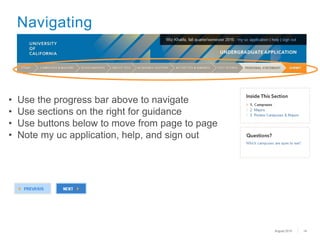
Navigating
• Use the progress bar above to navigate
• Use sections on the right for guidance
• Use buttons below to move from page to page
• Note my uc application, help, and sign out
August 2015
15
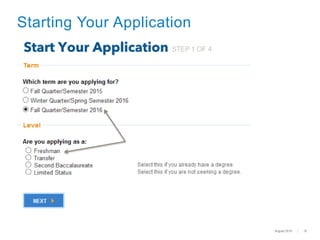
Starting Your Application
August 2015
16
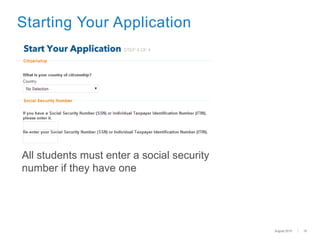
Starting Your Application
All students must enter a social security
number if they have one
August 2015
17
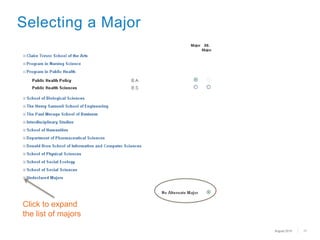
Selecting a Major
Click to expand
the list of majors
August 2015
18
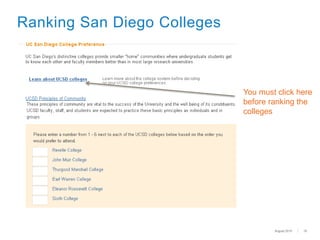
Ranking San Diego Colleges
You must click here
before ranking the
colleges
August 2015
19
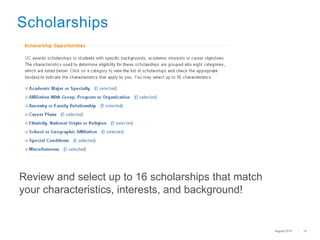
Scholarships
Review and select up to 16 scholarships that match
your characteristics, interests, and background!
August 2015
20
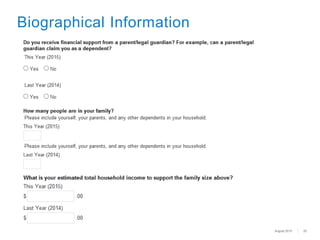
Biographical Information
August 2015
Academic History for
Freshman Applicants
22
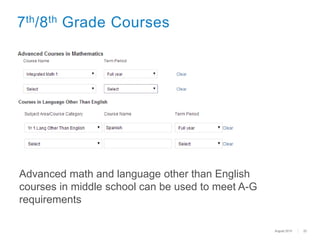
7th/8th Grade Courses
Advanced math and language other than English
courses in middle school can be used to meet A-G
requirements
August 2015
23
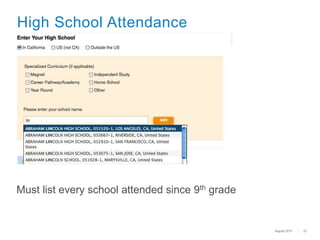
High School Attendance
Must list every school attended since 9th grade
August 2015
24
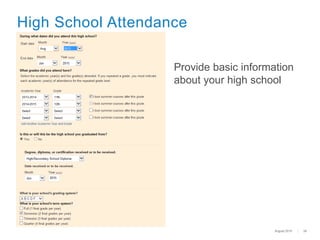
High School Attendance
Provide basic information
about your high school
August 2015
25
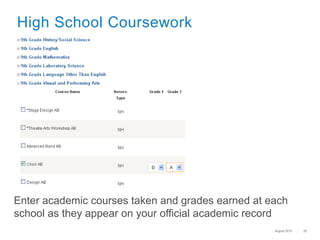
High School Coursework
Enter academic courses taken and grades earned at each
school as they appear on your official academic record
August 2015
26
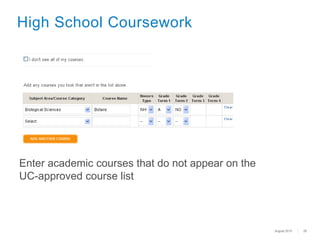
High School Coursework
Enter academic courses that do not appear on the
UC-approved course list
August 2015
27
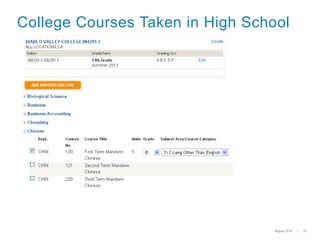
College Courses Taken in High School
August 2015
28
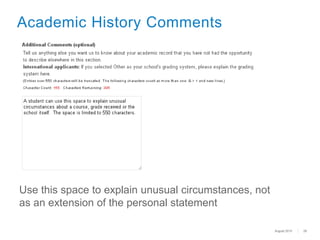
Academic History Comments
Use this space to explain unusual circumstances, not
as an extension of the personal statement
August 2015
29
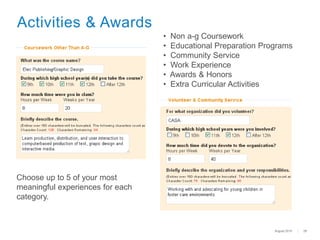
Activities & Awards
Choose up to 5 of your most
meaningful experiences for each
category.
• Non a-g Coursework
• Educational Preparation Programs
• Community Service
• Work Experience
• Awards & Honors
• Extra Curricular Activities
August 2015
30
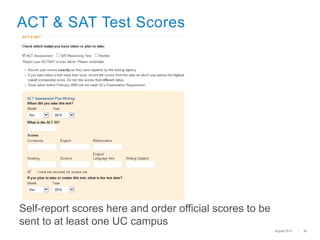
ACT & SAT Test Scores
Self-report scores here and order official scores to be
sent to at least one UC campus
August 2015
31
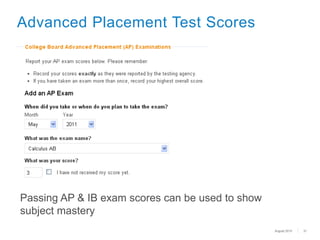
Advanced Placement Test Scores
Passing AP & IB exam scores can be used to show
subject mastery
August 2015
The Personal Statement
Two Prompts
• Must address both
• 1,000 words total maximum
View as a personal interview on paper
Compose outside of application
• Request feedback
• Paste responses in plain text
33
The Personal Statement
August 2015
34
Freshman Statement
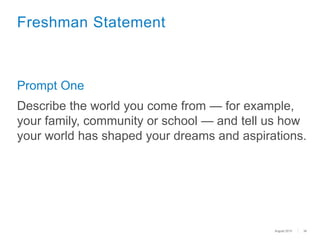
Prompt One
Describe the world you come from — for example,
your family, community or school — and tell us how
your world has shaped your dreams and aspirations.
August 2015
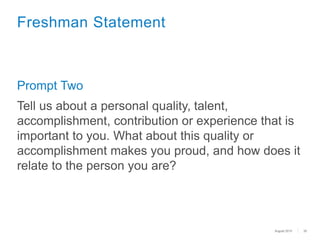
Prompt Two
Tell us about a personal quality, talent,
accomplishment, contribution or experience that is
important to you. What about this quality or
accomplishment makes you proud, and how does it
relate to the person you are?
35
Freshman Statement
August 2015
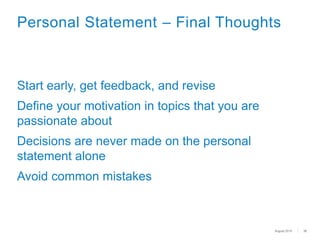
Start early, get feedback, and revise
Define your motivation in topics that you are
passionate about
Decisions are never made on the personal
statement alone
Avoid common mistakes
36
Personal Statement – Final Thoughts
August 2015
Submitting the Application
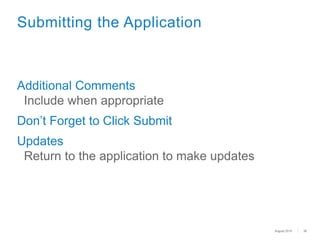
Additional Comments
Include when appropriate
Don’t Forget to Click Submit
Updates
Return to the application to make updates
38
Submitting the Application
August 2015
39
Submitting the Application
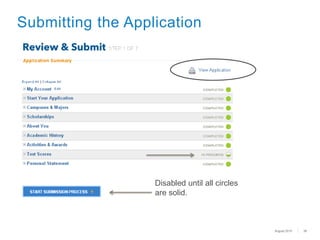
Disabled until all circles
are solid.
August 2015
40
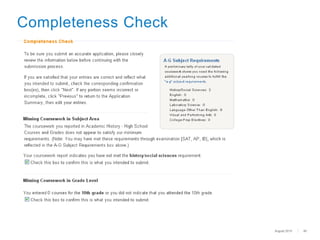
Completeness Check
August 2015
41
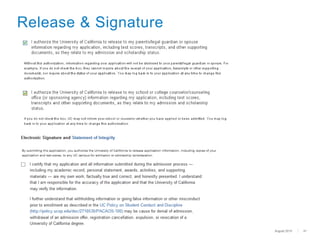
Release & Signature
August 2015
42
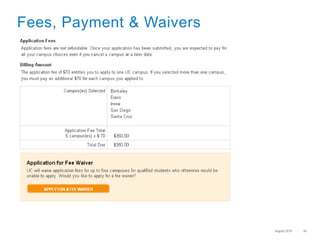
Fees, Payment & Waivers
August 2015
43
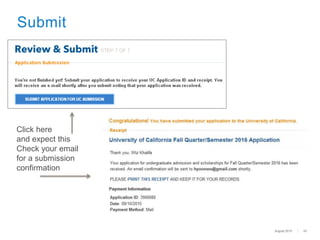
Submit
Click here
and expect this
Check your email
for a submission
confirmation
August 2015
44
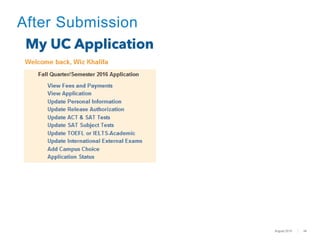
After Submission
August 2015
45
Resources
UC Admissions Home Page
admission.universityofcalifornia.edu/
How to Apply
admission.universityofcalifornia.edu/how-to-apply/index.html
Online Application
admissions.universityofcalifornia.edu/applicant/login.htm
Help Desk
ucinfo@applyucsupport.net
1-800-207-1710 (U.S. only)
1-310-513-2715 (outside U.S.)
UC Application Center
P. O. Box 1432
Bakersfield, CA 93302
August 2015
Submitting the Application

UC Application Tutorial (Freshman)

Editor's Notes

  • #2 Thank you for taking time to learn about the UC admission application and review helpful tips so that applicants can best present themselves. This presentation is for students who are applying as freshmen applicants.
  • #3 This presentation covers the topics indicated above.
  • #4 Before beginning, it is important to understand the application process and what can be done to prepare to complete the application.
  • #5  Applicants can access the application beginning August 1. Applications can only be submitted between November 1 and 30. It is very important to meet the deadline. Late applications are rarely accepted. If students take the SAT and/or the ACT Plus Writing tests (or choose to take SAT Subject Test) in December, they must update UC with December test scores by logging back into their submitted application as soon as possible but preferably no later than January 10. In early to mid January, each campus the student applied to will email them to create a login username and password for access to the campus’ applicant portal. This is the site at which the admission decision will be posted along with other important information—check each campus’ applicant portal frequently. Be sure to safeguard your passwords. Campuses may begin to admit students as early as February 1, but most students will receive notification of admission via the campus’ applicant portal during the month of March. Some students may receive an offer to be placed on a waitlist at one or more campuses. If applicants receive such a message they must be sure to respond by the stated deadline. UC campuses very rarely make exceptions a for late response. In early to mid April, applicants who were identified as being in the Top 9% Statewide or Top 9% Local Context (ELC) and met/will meet all admission requirements, but were not offered admission to any campus at which they applied, will be sent an email message if another campus has available space to offer them a place. May 1 is the deadline to submit the Statement of Intent to Register (SIR) (accept an offer of admission) to ONLY ONE UC campus for all freshman admits who received an offer by April 1. Admit offers received after April 1 will included the SIR deadline. From mid-May to early July , campuses will notify applicants who accepted a place on the waitlist of the final decision on their application.
  • #6 For students, we recommend the following: Begin preparing for the application now – don’t wait until November. Start by researching the campuses now so you know where you will want to apply, and for what major. For majors, it’s a good idea to review the curriculum in the General Catalog for each campus; the courses required/offered for the same/similarly named major might be different from one campus to another; review the course descriptions and ask yourself “Is this a course I would want to take?”. Check for available majors at: admission.universityofcalifornia.edu/how-to-apply/check-majors/index.html. Not all majors are open to freshmen applicants, or for every term. Gather materials that you’ll need: transcripts/academic records, list of current and planned courses, test scores, awards and honors, volunteer program timelines and hours, employment timeline and hours, etc. Brainstorm: take time to remember all the important things you have done throughout secondary/high school, from club involvement, to volunteering, to athletics and leadership, and so much more. UC campuses are selective: Apply to different types of campuses throughout the system for your best chance of being admitted and finding a good match. Information on each UC campus can be found at: admission.universityofcalifornia.edu/campuses/index.html. Your personal statement is important! Write it early, then have family, counselors, and friends review and give feedback. And, remember it’s a Personal Statement—it’s about you. It is not an English essay. Admission staff want to learn about you. What you did and why; what you learned and how you applied what you learned to aspects of your life. Use “I” statements – I did this, I chose to do that, I learned about . . . . Write it, rewrite it and write it again – it’s your one opportunity to ensure we get to know you. Campuses use email to communicate with applicants during the application process: students should create an email account (preferably one that identifies them instead of a “cute” or “non-distinct” name) and be sure that they check it regularly.
  • #7 When an applicant completes the UC admission application, it is important that they understand how their application information will be reviewed by the campuses. This section will provide guidance on the importance of the information provided and how campuses will use the information to understand the context of the applicant’s educational experience.
  • #8 Requirements: All UC campuses have the same minimum requirements for freshmen to ensure that all students are prepared to be academically successful at the University. Selection: Selection is a process at each campus which is necessary when more applicants apply to a campus than a campus can admit and enroll. Each UC campus evaluates applicants beyond just their GPA and test scores in order to select the applicants who would be best suited to their campus. Applicant Pool: Who else is in the applicant pool? Applicants must remember that they are not just applying with students from their school and community, but also with students from all parts of California, the U.S. and from other countries, whose backgrounds may be similar or different from their own. UC’s receives applications from students with a variety of attributes: those living in small rural areas, students from families with low and high incomes and communities that have high and low college-going rates, out-of-state students, etc. Even if students think their background or situation is typical (or not unusual) it is important to explain (not complain) why, so UC admissions staff understand the applicant better. The admissions staff need more than just a school name or city to get a better sense of the applicant. It is also important to note that each UC campus evaluates the application without knowing the status of the same application at another campus. For example, one campus will not admit or deny admission due to the admit or deny decision of another campus.
  • #9  First, it’s important to know how we review applications In general campuses look for: Strong grades & examination scores, courses beyond the minimum requirements, and in some cases, specific course preparation like advanced math and additional science for STEM majors Involvement & leadership – “Well-rounded” doesn’t mean a student has to do everything, but we like to see evidence of students being involved outside of the classroom in activities they are passionate about – an inclusive educational experience Evidence of hard work – Campuses want to know if an applicant can be a successful university student UC looks for students who have challenged themselves in many ways: Students are most successful at our campuses if they have shown academic promise through their courses/grades, test scores and other academic pursuits. Each applicant is reviewed within the context of his or her available opportunities: If a student does well compared to peers within the same situation (school, environment, etc.) and uses the application to explain that context, the applicant will provide UC readers with a better understanding of how they were able to achieve/complete what is presented on the application. We ask many questions as part of the application process so that we can get to know each student. Since there is no opportunity for an interview and because UC does not consider recommendation letters, our goal is get a sense of the applicant’s life, interests and personality through their application. Applicants would do themselves a disservice if they do not thoroughly, accurate, and completely fill out all parts of the application.
  • #10 What is comprehensive review? Process each campus uses to consider applicants ALL campuses conduct a Comprehensive Review The faculty at each campus can determine how to implement Comprehensive Review on their campus Meeting minimum requirements/qualifications does not guarantee admission to a specific campus or program Comprehensive Review: UC evaluates applicants based upon more than GPA and test scores. Each applicant’s academic achievements are considered in light of the opportunities and resources available to them as well as their potential to contribute to a campus Each campus may differ on the relative weight (if any) accorded to any criterion Students should visit each campus’ website for the specific selection process Comprehensive Review Factors: UC faculty have established 14 factors that can be considered; these factors not listed in any priority order “a-g” GPA including additional points for UC-approved AP and IB course, and college/university courses; and for California residents only, UC approved school-based honors courses Examination scores: SAT or ACT Plus Writing (SAT Subject Exams are optional, but may be recommended by some majors on some campuses-for more information, go to: admission.universityofcalifornia.edu/freshman/requirements/examination-requirement/SAT-subject-tests/index.html Number and content of “a-g” courses beyond the minimum Number of UC-approved AP and IB course, and college/university courses; and for California residents only, UC approved school-based honors courses For California Residents only: if the applicant is in the Top 9% Local Context (ELC) of their high school class Quality (rigor and number) of senior year schedule (both classes in progress at the time of application and courses planned for 2nd semester) Quality of academic performance relative to educational opportunities available at the high school Outstanding performance in one or more academic subjects Outstanding performance in one or more special projects in any academic field of study Recent marked improvement in academic performance demonstrated by GPA and quality of coursework Talents, achievements and awards in a particular field, i.e. visual and performing arts, communication, athletics; Special skills i.e. demonstrated written & oral proficiency in other languages Special interests i.e. intensive study & exploration of other cultures Experiences that demonstrate leadership i.e. student government, significant community service, level of responsibility in paid employment Completion of a special project in context of high school curriculum or in conjunction with special school events, projects or programs Academic accomplishments in light of life experiences & circumstances Location of secondary school and residence
  • #11 To complete the UC admission application, go to: https://universityofcalifornia.edu/apply
  • #12 It is very important for students to thoroughly complete all sections of the application and to do so accurately. This is the students opportunity to tell the admissions staff about personal details that make each applicant unique. Begin by reading the statement of Application Integrity. Click on the link on the log-in page for the application, or go to: https://admissions.universityofcalifornia.edu/docs/StatementOfIntegrity.pdf Accurate Details: Academic History: MUST be accurately reported--all enrollment, every school/college, all courses and grades (especially if a course was repeated). If a student accepts an offer of admission, UC requires official academic records to verify the information reported. “Additional Comments” box in the Academic History section can be used to provide detailed information or explanations about specific academic issues – declining grades, course selection issues, etc. Examination scores: report results for exams already completed and dates for planned exams. Students should have official score report(s) sent to ONE UC campus, and they will be shared with all campuses to which the applicant applies; exception: IELTS scores must be sent to each campus. Do not use the College Board’s “score choice” function. Report all scores – UC will only use the highest SAT total score from one test date or the highest composite score from the ACT Plus Writing from one test date – as lower scores will not disadvantage an applicant in the UC review process. As a reminder, SAT Subject Test scores are not required however some campuses/programs recommended specific Subject Tests, to learn which do, go to: admission.universityofcalifornia.edu/freshman/requirements/examination-requirement/SAT-subject-tests/index.html Activities/Awards: Use the Worksheet in the Quick-start guide for applying to UC brochure For California students (U.S. citizens and permanent residents): admission.universityofcalifornia.edu/counselors/files/apply-online-freshman-cal.pdf For Out of State students (U.S. citizens and permanent residents): admission.universityofcalifornia.edu/counselors/files/apply-online-freshman-out-of-state.pdf For International students (non U.S. citizens on with a Visa (or planned Visa) status): admission.universityofcalifornia.edu/counselors/files/apply-online-freshman-international.pdf Don’t use acronyms for names of clubs or awards: Spell them out and explain your level of involvement. Don’t list the same activity in multiple areas (for instance listing Honors Society in “Awards and Honors” and “Extracurricular Activities”), but make sure the most important activities are reflected in some way. If the applicant, for example, takes care of siblings or in other ways support their family which does not allow them to take part in as many activities outside let UC readers know in the personal statement. We understand that students are gaining valuable life experience and consider that as part of our comprehensive review. UC does verify information that students report on the application. It is critical that students do not misrepresent or falsify information as this is a serious offense and will result in serious consequences. Honesty is the best policy.
  • #13  Students must carefully complete the entire application: Contact information --- including an email address which UC will use to communicate with the applicant Students can also provide a phone number where they can receive text messages from the campuses Family background information is optional but may be helpful for UC to understand the context of resources and opportunities available to the student Campus selection: Make decisions wisely, apply broadly. Information on each UC campus can be found at: admission.universityofcalifornia.edu/campuses/index.html. Major selection: Applying with an undeclared/undecided major (where applicable) is perfectly acceptable if an applicant is unsure—perhaps they have many interest that have not yet been narrowed down to one; the personal statement or additional comment box is an appropriate place to discuss. If, on the other hand, an applicant is sure of their intended major, tell us about how the interest developed (courses, activities, volunteer work and/or employment related to the major). In either case, any insight provided helps UC admissions staff to better understand choices the student has made and helps provide context for the student’s achievements or extracurricular activities. A fee waiver to apply to up to four campuses, is available online as part of the application, for applicants who meet the qualification criteria. More information is provided on Slide 42. The application will automatically save information when “next” or “log-out” is clicked, but not when the browser is closed without clicking next or log-out; there is a 30-minute inactivity period after which the application system will automatically log-out.
  • #14 Create Your Account New users must enter a unique e-mail address and password Applicants will use this same account if they apply again in the future If the students family has multiple applicants or has future applicants, different e-mail addresses must be used for each applicant Passwords must be at least eight characters (and must have a combination of uppercase and lowercase letters, numbers and/or symbols) Create a secret question/answer combination that will be easily remembered Be sure to keep login information safe Once “Create An Account” is complete, an e-mail confirming the start of your application will be sent Campuses use e-mail to send critical, time-sensitive correspondence to applicants, so provide an e-mail address that is checked regularly and will be kept until enrolling in college Remember to adjust e-mail filters to accept mail from UC addresses Review Statement of Integrity before starting the application Common questions on each page Open/closed majors Downloadable “Apply Online to UC” brochure Log In First-time users start by clicking “New Account” On return visits, enter e-mail and password information under “Sign In”
  • #15 Navigating the Application The highlighted step on the progress bar shows the current section of the application the student is working on Each page has an “Inside This Section” and “Questions” area Use the “Next” and “Previous” buttons on the bottom of the page to save and move through the application. Don’t use the browser navigation (i.e. Internet Explorer, Firefox, Safari) After the first step has been completed, “Start Application,” click on any of the top navigation boxes or steps in “Inside This Section” to move to the next step or jump ahead Navigating to another page will save your work If account information (e-mail, name, date of birth), needs to be changed/corrected this can be done this in “My UC application” section at the top “Sign Out” stores the information entered
  • #16 Term: Select the term for which you are applying for admission to UC. Note: most campuses and majors are open for the fall term only. It is important to review which programs will be available during the term in which you intend to apply. Level: Be sure to select the appropriate level for which you are applying. You are a freshman applicant if you're currently in high school or have graduated from high school, but not enrolled in a regular session at a college or university after high school graduation (with the exception of the summer term immediately following high school graduation).
  • #17 Citizenship You must select a country of citizenship or “No Selection” in the country drop-down. Applicants who choose a country other than the United States will have follow-up questions on permanent residency and/or visa status (students who choose “No Selection” will not have follow-up questions). Undocumented Students For country of citizenship, select “No Selection” and do not enter a social security number. Social Security Number (SSN) All applicants who have a social security number (SSN) are required to enter it here. Deferred Action for Childhood Arrivals (DACA) Enter a valid SSN, SSN for work purposes, or ITIN if available. Otherwise, leave it blank. If an applicant does not have a SSN, he/she may skip that item. We use the SSN to accurately and reliably merge test scores and the Federal financial aid application with the admission application. SSN, SSN for work purposes and ITIN numbers are encrypted and kept secure.
  • #18 Choosing a Major Applicants must select a major for each campus to which they are applying. The online application displays which majors are open/closed to the specific applicant level. Hovering over certain colleges/majors will cause additional information to appear (e.g. For “major closed,” it might recommend that the major is only open to junior level students and the student should apply to a different major). Examples: At UC Berkeley, freshmen cannot apply directly into the Haas School of Business – select the College of Letters and Science with an undeclared or pre-business major (for either option your application will be reviewed in the same way); At UC Los Angeles, freshmen cannot apply directly to the Film/Television major--select the College of Letters and Science with an undeclared. These programs (and others like them at other UC campuses) are only open to junior level students. Students who enroll at the University can apply for admission into the major program during their sophomore year of college. Select an alternate major, if available (the choice for an alternate major is not available at every campus), or select “No Alternate Major” at bottom of the list if the applicant chooses not to select one. If a campus is unable to offer you a place in your first-choice major, they may consider you for an alternate major—be sure the alternate major is in a subject area that you really want to study. After selecting major/alternate major, scroll to bottom of the page and click “Next”. Repeat steps for each campus you selected. If you find that most of the majors are closed, it may be that you have selected the incorrect applicant level or the open filing period has ended.
  • #19 San Diego Colleges If a student is applying to UC San Diego, they must rank the colleges in order of preference to have the best chance of assignment to the college of their choice The order of ranking of colleges does not affect the chances for admission to UC San Diego Boxes to rank the colleges only appear once the student clicks the “Learn about UCSD colleges” link (opens a pop up window). Students should be sure to carefully read the information provided to understand the “theme” of each college at UC San Diego
  • #20 Scholarship Opportunities “Restricted” scholarships are available to students with backgrounds or career goals that meet the criteria of the scholarship. There are about 230 scholarships, with a dozen new scholarships this year. To be considered for these scholarships, students need to: Open each scholarship category to see the expanded list Review each scholarship and select if a characteristic applies to them Select up to 16 choices Scroll to bottom and click “Next” to save the selections Research other campus-based scholarships in the link provided
  • #21 Family Size and Income Information about a student’s parents/guardian’s education, income, and family size is used to provide contextual information about the home environment and for the application fee waiver. Students can correct income information before the application is submitted (not after), but cannot resubmit for fee waiver based on revised information. This information will not be used to determine residency status or financial aid. Additional Circumstances More information for foster youth is available on the UC Counselor’s website. Applicants interested in the Educational Opportunity Program (EOP) which provides support services while a student is enrolled at UC, will need to provide a brief statement, as well as parent education and income information. To be clear, EOP is not an admission process. If you are offered and accept an offer of admission, you may received information from the campus’ EOP office. Unlike the CSU system, at UC there is no separate admission process for students who are interested in EOP.

  • #22 It is important that students have all transcripts (academic records) from all schools they have attended since the end of high school. The courses/grades entered must exactly match the official academic record. To begin this section, the applicant must have their records in front of them.
  • #23 Seventh/Eighth Grade Students who took advanced math or a language other than English in middle/junior high school, and received a letter grade C or better, can count these courses toward the a-g requirement. Note: A course in geometry (or a series of integrated-style math courses which include geometry content) must be completed; UC honors a geometry course completed in middle/junior high school. More information about the geometry requirement can be found at: admission.universityofcalifornia.edu/counselors/files/geometry-requirement-factsheet.pdf
  • #24 High Schools Attended Select a location – “In California,” “U.S. (not CA)” or “Outside the U.S.” If applicable, indicate specialized curriculum/year-round information Start typing the name of the school. After three characters, matching schools will begin to appear As more characters are entered, the match will become refined Select school name/code/location, click “Add” If no matches are present, complete typing the full name of the school and click “Add” Remember to list every school attended beginning with 9th grade NOTE: Students will be asked for any colleges attended while in high school later in the application
  • #25 High School Attendance (continued) Enter the dates of attendance If this is same school the student is going to graduate from, enter the certificate/diploma information Enter the grading and term system for the school Click “Add” to save the information The school information entered will appear in a table for edit/review
  • #26 High School Coursework Courses are selected or entered by grade level beginning with ninth grade First select the Subject Area/Course Category of the course to be entered (e.g. English, Math, etc.) Next, if student is enrolled in a California high school, select from the course list for the school If courses do not appear on the course list, enter them in the table provided To see the courses, expand each subject area For students not enrolled in a California high school, type in the name of the course as it appears on the student’s academic record. When entries for each grade level are complete, click “Next” to save and continue Repeat this process for each grade level, including 12th grade 12th grade course grades will default to “IP – In Progress” and “PL – Planned”. If you have already graduated and have senior year grades, you must manually enter each grade. For courses that are only one semester long, select “No Course” for the term for which the course was not offered (e.g. Economics offered fall term, for spring term enter “No Course”) Include all original courses/grades and enter repeated courses/grades for courses in which an original grade of with D or F was earned and subsequently repeated Students who attended more than one school should be sure enter courses under the correct school
  • #27 For students who attended high schools in California – Self-Reporting Courses: If you do not see an A-G course that you took listed on the UC-Approved course list, you can self-enter the coursework. For students who attended high schools in outside of California – Self-Reporting Courses: There is no pre-approved course list for schools outside of California. Review the subject area headings for the required “a-g” course pattern: a. History/social science,  b. English (for international students, the language of instruction for composition/literature courses), c. Mathematics, d. Laboratory science, e. Language other than English (for international students the “foreign language”), f. Visual and performing arts and g. College-preparatory elective (courses that not fit into the subject categories of a-g above). Referring to the Doorways website (a database of UC-certified course lists in California schools) can provide guidance on the types of courses that have been UC-approved. Doorways: https://doorways.ucop.edu/list/ For all students: Courses such as physical education and teacher assistantships, yearbook and student government, are not UC-approved courses and should not be entered here. An opportunity to enter these types of courses is provided later in the application.
  • #28 Colleges Attended in High School If any college/university-level courses were completed while in high school, add the college information AFTER the high school information The process is very similar to entering the high school information If courses were taken at a California Community College (CCC), a UC-transferable course list will appear Select the course(s) taken, grade received (IP for In Progress, PL for Planned), and the “a-g” subject area for the course If the CCC course is not UC-transferable enter the courses in the table provided IF college/university courses were not taken at a CCC, enter each course and grade earned as it appears on the official academic record
  • #29 Admission staff will look to this section for an explanation of abnormalities in a student’s academic record. For example, a break in attendance, poor grades in a particular course or year, or explaining something specific about the school environment/policies that affect the academic record and/or choices for classes. The additional comments in the academic history section should not be used as an extension of the Personal Statement.
  • #30 There are six categories of Activities and Awards, each limited to five entries. Here are just a couple of examples of the questions in two of the categories. Coursework Other than A-G - Academic courses that do not fit in the categories “a-g” of history/social science, English, math, laboratory science, language other than English (foreign language), and/or visual and performing art should be reported in this section. For example, leadership course, or religious studies courses. But do not include non-academic courses, such as PE, office/teacher assistant, etc. Choose experiences that have meaning, illustrate interests, and/or demonstrate leadership. Educational preparation programs including but not limited to: AVID, Upward Bound, and Gear Up. A list of common programs appear in a drop menu. If a program is not included, manually enter it. Awards & Honors – significant in nature – county-wide, state-wide and national awards indicate a high level of achievement with significant competition. School-based awards are more meaningful to readers if context is provided, such as: X number of X to earn award, but even “perfect attendance” can be insightful Extra Curricular Activities – depth and time – continued participation over time Community Service – consistent participation over time may indicate commitment and dedication Work Experience – demonstrates time management, responsibility and perhaps leadership. Enter details about each activity. If an applicant did not have the time/opportunity to participate in school and/or community activities, volunteer/paid employment, it is helpful to application readers to know why – how else did the applicant use their time and explain if it was a choice or a requirement for example: caring for siblings, elder-care, commitment to doing homework (research projects, papers, etc.) Applicants should not exaggerate or make things up because the information submitted is subject to verification, and if an applicant is unable to provide proof of the information provided, the application will be cancelled.
  • #31  Reminder: ACT Plus Writing and/or SAT scores (and SAT Subject Test if an applicant chooses to take them although they are not required) must be completed by December of the senior year (last year of secondary school). Report completed test with date(s)/scores or planned test date(s) on the admission application. If an examination was completed more than once, enter highest score. UC only uses SAT subject tests, which are not required, but may be recommended for specific programs at some campuses, as an additional piece of information as a part of the application. SAT Subject Test Recommendations can be found at: admission.universityofcalifornia.edu/freshman/requirements/examination-requirement/SAT-subject-tests/index.html UC does not recommend that applicants use the College Board’s Score Choice function because it delays delivery of test scores. We strongly encourage students to report all official scores although we only use the highest score at a single sitting for admission consideration. Official SAT/ACT/SAT Subject Tests examination scores can be submitted to just one campus to which the student will be applying. Scores will be disseminated to all campuses to which the student applied.  If official scores are/were sent to UC prior to an applicant filing an admission application, please note that the UC system office maintains scores received for three years. So, for example, if official scores were submitted for an examination date for a student’s sophomore year then the student applies during their senior year, the UC system office will still have those scores.
  • #32 In the Test Score section, students report results of their AP, IB, and TOEFL/IELTS exams, if applicable. Official TOEFL scores can be submitted to ONE UC campus and we will share the scores with all campuses to which the applicant applies. NOTE: IELTS scores must be sent to each campus.” The official score report must be submitted no later than January. We have added a new section for international students to report their national or external examination results as well. Just like AP, IB, and TOEFL, if the exam is not applicable to the student, they can just click through the section. Advanced Placement & International Baccalaureate Exams: Scores can demonstrate academic mastery in individual subjects and be used to satisfy freshman admission subject requirements not satisfied with coursework. Scores must be self reported on the application. Don’t worry about “low” scores, UC treats that as neutral but does acknowledge an attempt was made to earn a score for which UC would award credit toward the UC degree. IMPORTANT: Official AP/IB scores are not required until after a student has accepted an offer of admission; do not send scores at time of application submission.
  • #33 The Personal Statement is an integral part of the UC admission application. It is not reviewed as a stand-alone part of the application. It is a statement about the applicant, not an essay. The content of the Personal Statement should add clarity, richness, and meaning to the information presented in other parts of the UC application, enabling the admissions officer to form the best impression of the applicant. The Personal Statement must be about and completed by the applicant.
  • #34 For the Personal Statement, there is a 1,000 words total maximum to be used two answer the two prompts. We recommend that one prompt response be 750 words and the other prompt response be 250 words. There is a word count function. Grammatical and spelling errors, although they do not count against an applicant, can be distracting to the reader; please submit clean, proofread and typo-free responses. Remember this is the applicant’s chance to tell the reader more about themselves. It is the only chance the reader has to get to know the student. Students should think of this as an in-person interview, but on paper. This is not an essay, but rather it’s a personal statement. Personal Statement Tips: Students should… Read each prompt carefully and be sure to respond to all parts of the prompt. They should take time and think about each prompt before starting to write and use details and examples to make their point. Use their words strategically and write to add context and depth, not to fill space. Give themselves time to edit. Start writing to answer each prompt, then go back and review the word count, content, and overall message. They may not have space to tell us everything, so make the words count. Stick to one topic per response. Making a list of accomplishments, activities, awards or work will lessen the impact of their words. Expand on a topic by using examples and facts for maximum impact to an admissions reader. Use specific, concrete examples to support the points made. The statement must be about the applicant, not a family member or friend. For example, if a family member or friend influenced the applicant in some way, briefly state that, but spend more of the allowable words telling the reader about how the influence caused the applicant to do something, start something, expand their horizons, etc. Use “I” statements, for example, “As a result of a (family member or friend’s) influence: I did XYZ; I began to think about XYZ; I now see how I fit in with XYZ; I see myself achieving XYZ by doing XYZ”. This is absolutely the time the applicant must brag (not exaggerate) about themselves and all of the wonderful things they have accomplished thus far in their young life. Statement #1: Readers don’t assume anything, so you must explain to them. Give specific examples of your experiences to back up your claims. Statement #2: What are you most proud of? What are you passionate about? How have you achieved what you have within your context? Additional Comments: - This is NOT a continuation of the personal statement - An example of something that a student may choose to insert here would be something that affected their schooling but wasn’t all encompassing. For instance, if a student had an illness or changed schools during high school with only a small affect on his or her grades, then it might be more appropriate to use the additional comments section than the personal statement. However, in the same instance, if the student feels that an illness or a school change, a move to a different city/state/country, increased work hours, etc. dramatically affected them or if one of these experiences best demonstrates their dreams and aspirations (prompt 1) or their best accomplishment (prompt 2), then for that student it would be appropriate to write about it in the personal statement. Additional information to keep in mind: Who is reading the application? The reader doesn’t know the student, the student doesn’t know them, so they MUST explain what they mean. Students should write like they are speaking to a stranger, or a respected adult, and treat it like an interview. Make sure to explain the whole situation. This is an opportunity to draw connections among all of their experiences and to talk about all the hard work they’ve done. Do not use acronyms, if possible. Relax. This is one of many pieces of information UC considers in reviewing applications. An admissions decision will not be based on the personal statement alone.
  • #35 Many applicants use the 750 word allotment for prompt #1. Admission staff generally find this the most informative of the two personal statements. Be sure to provide specific examples to support the statements made. Applicants are free to choose how to allot the 1,000 word maximum. Tell the reader what was done and why; what was learned; and how the applicant took what was learned and applied it to aspects of their life.
  • #36 For prompt #2, some applicants choose to relate a “sports” or “music” story – this is perfectly acceptable; however, applicants must be sure to go beyond the experience and spend more words on how the experience has “shaped” them.
  • #37  Counselors: If a student wants you to review their application, make sure you ask them for a copy of their full application (or transcripts and a copy of their extracurricular worksheet) so you can: Give feedback within the context they they’ve presented See if there are any gaps that need to be explained or something they listed on their worksheet that might be a inspire a more compelling story than what they have chosen to write. Often young students do not see the value, the “wow” of what they have accomplished given their circumstances. Applicants should avoid common mistakes like: Generalities: Stick to facts and specifics they want us to know about themselves Stretching the truth: Just be honest. The truth is revealed as we review the full application. Inappropriate use of humor. Creative writing (poems, scene setting, or clichés); and quotes, as usually included in an essay, may not be informative about the applicant and uses up some to the limited words allows without providing substance. Other Tips and techniques: Focus on facts Be concrete Prove your points Use vivid, specific details and examples Help the reader gain a visual image Explain how you felt Show your passion!! More tips in detail: Start early Allow plenty of time for reflection, thoughtful preparation, receipt of feedback and revisions. Don’t leave the reader hanging (“I wish the applicant had described X”; “I didn’t clearly understand Y”; “I wondered about Z but the student didn’t address it”) Look critically at the information provided in the application: grades, awards, activities and volunteer and work experience, family and perhaps income. Anticipate questions a reader will have after reading the application. The personal statement is the applicant’s opportunity to answer those questions and shine! Compose the personal statement in a word-processing program. Don't type it directly into the application. This way, the applicant will have the opportunity to print copies for review and feedback from people who may know of them but may not know the wonderful things they have accomplished. When you click the “SAVE” button after you have finished your personal statement, you can then preview how it will display to the admission reader in terms of the formatting. This gives you an opportunity to check for “odd” characters that may appear due to the conversion of your word-processing program. You can then fix the “odd” characters before you submit your application. After submission, you CANNOT go back to fix this issue. Write persuasively. Present information and ideas in a focused, deliberate and meaningful manner. Provide specific, concrete examples to support points made. A personal statement that is simply a list of qualities or accomplishments usually is not persuasive. Proofread . . . spell-check and grammar-check are helpful tools but nothing beats good old fashion proofreading – usually other “errors’” are caught through proofreading. In addition to checking spelling, be sure grammar is correct and the statements flow smoothly. Solicit feedback. The personal statement must reflect the applicant’s own ideas and be written by them alone, but others — family, teachers and friends — can offer valuable suggestions. Ask advice of from a variety of people and several of them, but applicants must not plagiarize from sources in print or online and do not use anyone's published words but their own. Copy and paste; and double-check. Once satisfied with the personal statement, save them in plain text and paste them into the space provided in the application. Proofread once more to make sure no odd characters or line breaks have appeared. Relax. This is one of many pieces of information UC considers in reviewing each application individually. An admission decision is not be based on the personal statement alone. Additional instructions for veterans & their families: Because UC is interested in knowing about the applicant or a family member's military service, a student may choose to use the personal statement to communicate the following: Describe how military service has been instrumental in developing their educational plans. The applicant can indicate if they are entitled to educational benefits as a result of their own military service or the service-connected death or disability of a parent or spouse. And/or the applicant can indicate if they are affiliated with the military, such as the spouse or dependent of someone who is on active duty or a current participant in an ROTC-type program.
  • #38 Now that all of the data and the personal statement sections of the application have been completed --- it’s time to go through the application submission steps.
  • #40 The application is not ready to submit unless all solid green circles are shown on the right. Use the navigation buttons on the top banner to jump to the section(s) that need to be completed. Use the View Application button to see and print the entire application.
  • #41 The application performs a completeness check, drawing attention to any course deficiencies. If an applicant plans to use a test score to meet a subject requirement, they must include in the Test Scores section of the application.
  • #42 Finally, the application cannot be submitted without the electronic signature and acknowledgement of the Statement of Integrity. Students are asked to provide authorization to release information. Without this authorization, UC is not allowed by law to discuss or share information with anyone. So be sure to check off the appropriate box(es). Signature Releases Review and check the release authorizations to share application information with scholarship agencies, parent/guardian, counselors and/or UC organizations and alumni groups. Electronically sign and date the application to verify accuracy and acknowledge that the applicant is the author of their personal statement. The electronic signature also authorizes the release of official examination score(s) to all UC campuses to which the student applied. Official examination scores for the ACT Plus Writing, SAT, SAT Subject Test, and TOEFL only need to be sent to one UC campus. Scores will be provided to all campuses to which you apply. Information in the application is subject to verification. If an applicant is selected for verification, non-compliance will result in cancellation of the application and the application fee will not be refunded. UC feels very strongly about student integrity on the application. The Statement of Integrity is to affirm that all information in the application is accurate and the personal statement was written by the applicant. If information is withheld, such as poor grades, or falsification is detected, the application is subject to cancellation.
  • #43 For U.S. citizens or permanent resident students, the application fee is $70 per campus. For International and non-immigrant applicants the application fee of $80 for each campus selected. If an international or non-immigrant student currently attends school in the U.S., however, they may be eligible to pay the lower application fee of $70 per campus. The application tool will advise of the fee requirement on this page. Payment is required and non-refundable. Payment may be submitted by credit card in the application tool; or by mailing check or fee waiver if a student didn’t qualify for the UC application fee waiver but meet criteria established by the provider. Fee Waiver: For U.S. citizens or permanent residents or students who have attended a CA high school for at least 3 years, if students meet the low-income criteria used to qualify for free and reduced lunch, they will qualify for a UC application fee waiver for up to 4 campus choices but will be responsible for payment for any additional campus to which they choose to apply. The fee waiver application approval section of the application can only be attempted once so be sure the income information is correct before applying for the waiver. If a student is denied the UC online fee waiver, a written request with corrected income and family size information can be submitted to the UC Application Center. UC also accept the College Board fee waiver. Only one waiver can be used.
  • #44 When the applicant is at the “Submit” stage, they must carefully review all information and the personal statement entered into the application. While it may seem like a very simple step, don’t forget to click the submit button. Failure to do so, especially on the last day of application filing period, will lead to disastrous results. Once “submit” is selected, that’s it, the application is gone and applicants will not be able to say “Oh no, I forgot to include X” or “I pasted in the wrong personal statement” or “I made a mistake on one of my courses or grades”.
  • #45 What can be done after submission? If the name, email or password needs updating, go to the Account Information. From “View Application,” a copy of the application can be printed. Address changes are made in Personal Information section. If it’s before November 30th campuses are still open, additional campuses can be added. Under application status, California resident students are notified if they meet the Top 9% Local Context (ELC) status. If a student changes schools, adds or drops a course, or fails to earn a C or better in a course during the current academic year after submission of the application, they must notify the UC Application Center by email or postal mail. Correspondence must include the full name, UC Application ID number and signature (if you mail a letter) of the applicant, and will be made available to all the campuses to which you applied. Email: ucinfo@applyUCsupport.net Mail to: UC Application Center P.O. Box 1432 Bakersfield, CA 93302 Minor changes to your activities, awards, volunteer work, employment or personal statement are unlikely to have an impact on the admission decision. However, if a student have significant updates in any of these areas, they may notify us— by mail — the UC Application Center. 
  • #46 Download the “Apply Online To UC” brochure (“quick-start guide”) California freshman [PDF] admission.universityofcalifornia.edu/counselors/files/apply-online-freshman-cal.pdf Out-of-state freshman [PDF] admission.universityofcalifornia.edu/counselors/files/apply-online-freshman-out-of-state.pdf International freshman [PDF] admission.universityofcalifornia.edu/counselors/files/apply-online-freshman-international.pdf
  • #47 After a student has successfully submitted their UC admission application and printed a copy for their records – they can jump for you – it’s done!