JavaScript Training
Goal Trainers Format
• Lecture
• Exercises
• Ask Questions!
• bitovi/js-training
Data Types, Operators and Primitives
Undefined undefined
Null null
Boolean true
String "hello"
Number 2
Object {name: "value"}
Array [1,2,3]
Date new Date()
RegExp /.*/g,
Function function(){}
Data Types
Primitive
Object
var
new
assignment
delete
member
call
comparison
Operators
var foo
new Foo
foo = {bar: "a value"}
foo.bar = value
delete foo.bar
foo.bar
foo["bar"]
bar()
foo.bar()
==
===
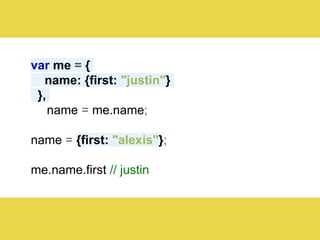
var me = {
name: {first: "justin"}
},
name = me.name;
name = {first: "alexis"};
me.name.first // justin
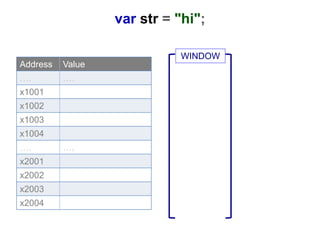
WINDOW
Address Value
…. ….
x1001
x1002
x1003
x1004
…. ….
x2001
x2002
x2003
x2004
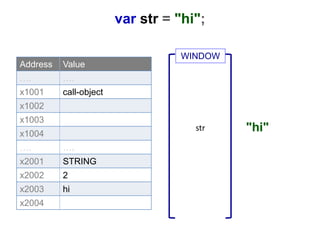
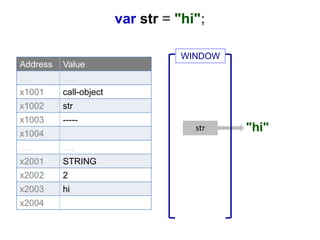
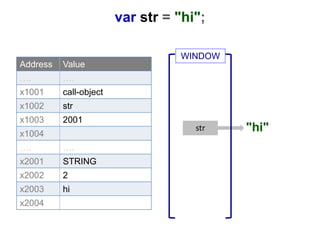
var str = "hi";
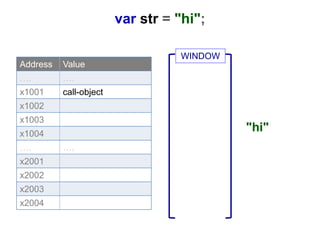
var str = "hi";
Address Value
…. ….
x1001 call-object
x1002
x1003
x1004
…. ….
x2001
x2002
x2003
x2004
WINDOW
"hi"
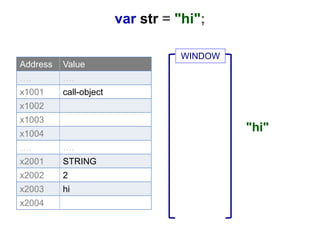
Address Value
…. ….
x1001 call-object
x1002
x1003
x1004
…. ….
x2001 STRING
x2002 2
x2003 hi
x2004
"hi"
WINDOW
var str = "hi";
Address Value
…. ….
x1001 call-object
x1002
x1003
x1004
…. ….
x2001 STRING
x2002 2
x2003 hi
x2004
str "hi"
WINDOW
var str = "hi";
"hi"str
Address Value
…. ….
x1001 call-object
x1002 str
x1003 -----
x1004
…. ….
x2001 STRING
x2002 2
x2003 hi
x2004
WINDOW
var str = "hi";
var str = "hi";
Address Value
…. ….
x1001 call-object
x1002 str
x1003 2001
x1004
…. ….
x2001 STRING
x2002 2
x2003 hi
x2004
"hi"str
WINDOW
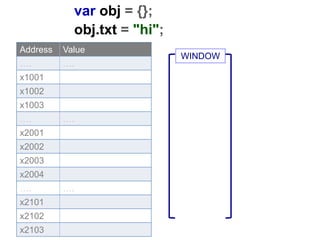
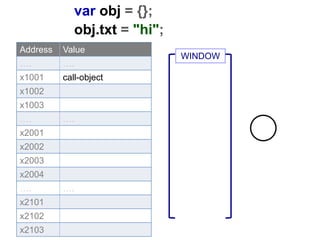
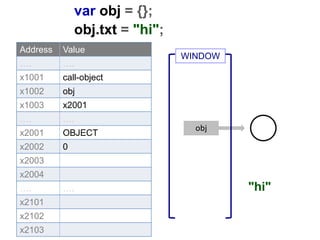
var obj = {};
obj.txt = "hi";
Address Value
…. ….
x1001
x1002
x1003
…. ….
x2001
x2002
x2003
x2004
…. ….
x2101
x2102
x2103
WINDOW
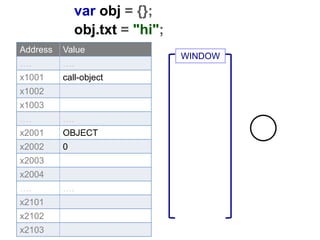
var obj = {};
obj.txt = "hi";
Address Value
…. ….
x1001 call-object
x1002
x1003
…. ….
x2001
x2002
x2003
x2004
…. ….
x2101
x2102
x2103
WINDOW
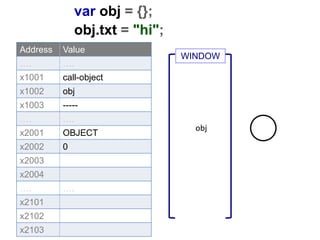
var obj = {};
obj.txt = "hi";
Address Value
…. ….
x1001 call-object
x1002
x1003
…. ….
x2001 OBJECT
x2002 0
x2003
x2004
…. ….
x2101
x2102
x2103
WINDOW
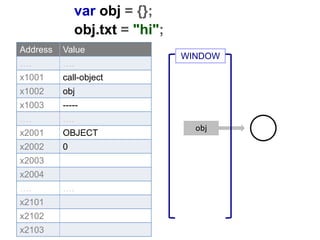
var obj = {};
obj.txt = "hi";
Address Value
…. ….
x1001 call-object
x1002 obj
x1003 -----
…. ….
x2001 OBJECT
x2002 0
x2003
x2004
…. ….
x2101
x2102
x2103
obj
WINDOW
var obj = {};
obj.txt = "hi";
Address Value
…. ….
x1001 call-object
x1002 obj
x1003 -----
…. ….
x2001 OBJECT
x2002 0
x2003
x2004
…. ….
x2101
x2102
x2103
obj
WINDOW
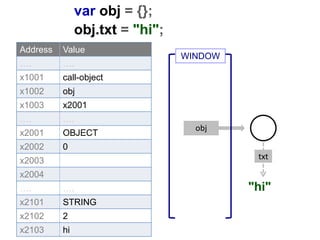
var obj = {};
obj.txt = "hi";
Address Value
…. ….
x1001 call-object
x1002 obj
x1003 x2001
…. ….
x2001 OBJECT
x2002 0
x2003
x2004
…. ….
x2101
x2102
x2103
"hi"
obj
WINDOW
var obj = {};
obj.txt = "hi";
Address Value
…. ….
x1001 call-object
x1002 obj
x1003 x2001
…. ….
x2001 OBJECT
x2002 0
x2003
x2004
…. ….
x2101 STRING
x2102 2
x2103 hi
"hi"
obj
txt
WINDOW
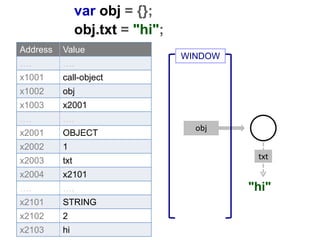
var obj = {};
obj.txt = "hi";
"hi"
obj
txt
Address Value
…. ….
x1001 call-object
x1002 obj
x1003 x2001
…. ….
x2001 OBJECT
x2002 1
x2003 txt
x2004 x2101
…. ….
x2101 STRING
x2102 2
x2103 hi
WINDOW
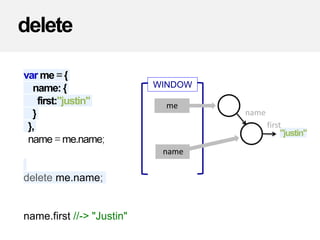
delete
var me ={
name: {
first:"justin"
}
},
name = me.name;
delete me.name;
name.first //-> "Justin"
WINDOW
name
name
"justin"
me
first
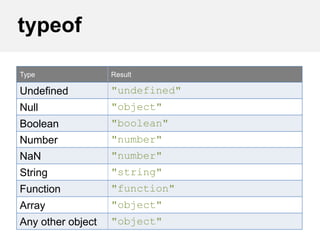
typeof
Type Result
Undefined "undefined"
Null "object"
Boolean "boolean"
Number "number"
NaN "number"
String "string"
Function "function"
Array "object"
Any other object "object"
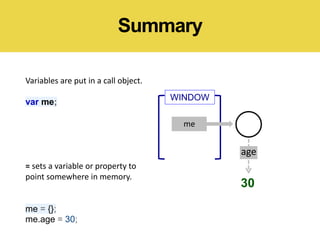
Summary
Variables are put in a call object.
var me;
= sets a variable or property to
point somewhere in memory.
me = {};
me.age = 30;
WINDOW
me
30
age
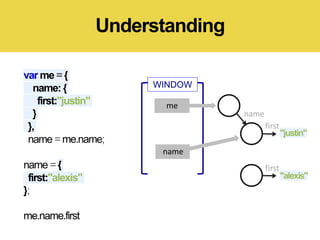
var me ={
name: {
first:"justin"
}
},
name = me.name;
name = {
first:"alexis"
};
me.name.first
Understanding
WINDOW
name
"alexis"
first
name
"justin"
me
first
var me ={
name: {
first:"justin"
}
},
name = me.name;
name = {
first:"alexis"
};
me.name.first
Understanding
WINDOW
name
"alexis"
first
name
"justin"
me
first

Types, Operators and Primitives

  • 1.
    JavaScript Training Goal TrainersFormat • Lecture • Exercises • Ask Questions! • bitovi/js-training
  • 2.
    Data Types, Operatorsand Primitives
  • 3.
    Undefined undefined Null null Booleantrue String "hello" Number 2 Object {name: "value"} Array [1,2,3] Date new Date() RegExp /.*/g, Function function(){} Data Types Primitive Object
  • 4.
    var new assignment delete member call comparison Operators var foo new Foo foo= {bar: "a value"} foo.bar = value delete foo.bar foo.bar foo["bar"] bar() foo.bar() == ===
  • 5.
    var me ={ name: {first: "justin"} }, name = me.name; name = {first: "alexis"}; me.name.first // justin
  • 6.
    WINDOW Address Value …. …. x1001 x1002 x1003 x1004 ….…. x2001 x2002 x2003 x2004 var str = "hi";
  • 7.
    var str ="hi"; Address Value …. …. x1001 call-object x1002 x1003 x1004 …. …. x2001 x2002 x2003 x2004 WINDOW "hi"
  • 8.
    Address Value …. …. x1001call-object x1002 x1003 x1004 …. …. x2001 STRING x2002 2 x2003 hi x2004 "hi" WINDOW var str = "hi";
  • 9.
    Address Value …. …. x1001call-object x1002 x1003 x1004 …. …. x2001 STRING x2002 2 x2003 hi x2004 str "hi" WINDOW var str = "hi";
  • 10.
    "hi"str Address Value …. …. x1001call-object x1002 str x1003 ----- x1004 …. …. x2001 STRING x2002 2 x2003 hi x2004 WINDOW var str = "hi";
  • 11.
    var str ="hi"; Address Value …. …. x1001 call-object x1002 str x1003 2001 x1004 …. …. x2001 STRING x2002 2 x2003 hi x2004 "hi"str WINDOW
  • 12.
    var obj ={}; obj.txt = "hi"; Address Value …. …. x1001 x1002 x1003 …. …. x2001 x2002 x2003 x2004 …. …. x2101 x2102 x2103 WINDOW
  • 13.
    var obj ={}; obj.txt = "hi"; Address Value …. …. x1001 call-object x1002 x1003 …. …. x2001 x2002 x2003 x2004 …. …. x2101 x2102 x2103 WINDOW
  • 14.
    var obj ={}; obj.txt = "hi"; Address Value …. …. x1001 call-object x1002 x1003 …. …. x2001 OBJECT x2002 0 x2003 x2004 …. …. x2101 x2102 x2103 WINDOW
  • 15.
    var obj ={}; obj.txt = "hi"; Address Value …. …. x1001 call-object x1002 obj x1003 ----- …. …. x2001 OBJECT x2002 0 x2003 x2004 …. …. x2101 x2102 x2103 obj WINDOW
  • 16.
    var obj ={}; obj.txt = "hi"; Address Value …. …. x1001 call-object x1002 obj x1003 ----- …. …. x2001 OBJECT x2002 0 x2003 x2004 …. …. x2101 x2102 x2103 obj WINDOW
  • 17.
    var obj ={}; obj.txt = "hi"; Address Value …. …. x1001 call-object x1002 obj x1003 x2001 …. …. x2001 OBJECT x2002 0 x2003 x2004 …. …. x2101 x2102 x2103 "hi" obj WINDOW
  • 18.
    var obj ={}; obj.txt = "hi"; Address Value …. …. x1001 call-object x1002 obj x1003 x2001 …. …. x2001 OBJECT x2002 0 x2003 x2004 …. …. x2101 STRING x2102 2 x2103 hi "hi" obj txt WINDOW
  • 19.
    var obj ={}; obj.txt = "hi"; "hi" obj txt Address Value …. …. x1001 call-object x1002 obj x1003 x2001 …. …. x2001 OBJECT x2002 1 x2003 txt x2004 x2101 …. …. x2101 STRING x2102 2 x2103 hi WINDOW
  • 20.
    delete var me ={ name:{ first:"justin" } }, name = me.name; delete me.name; name.first //-> "Justin" WINDOW name name "justin" me first
  • 21.
    typeof Type Result Undefined "undefined" Null"object" Boolean "boolean" Number "number" NaN "number" String "string" Function "function" Array "object" Any other object "object"
  • 22.
    Summary Variables are putin a call object. var me; = sets a variable or property to point somewhere in memory. me = {}; me.age = 30; WINDOW me 30 age
  • 23.
    var me ={ name:{ first:"justin" } }, name = me.name; name = { first:"alexis" }; me.name.first Understanding WINDOW name "alexis" first name "justin" me first
  • 24.
    var me ={ name:{ first:"justin" } }, name = me.name; name = { first:"alexis" }; me.name.first Understanding WINDOW name "alexis" first name "justin" me first

Editor's Notes

  • #3 I think the key to JavaScript is really understanding what’s going on in memory. And the key to understanding what’s going on in memory is understanding what JS’s basic data types look like in memory and how JS’s operators are used to manipulate those data structures.
  • #6 Here I’ve created an object with an age property of 30. I create a variable to hold that person’s age and update it to 31, but if I read me.age, I get back 30 .. why?