Twitterplug How to Tweet the energy usage of your  home of office with the Current Cost meter
What You Need Current Cost Meter ( http://www.currentcost.com ) Mac or Linux PC* *NB. Mac and Linux have different instructions
Linux Before we start you will need to install James Smith's ( http://www.floppy.org.uk ) rb232 Ruby gem ( http://github.com/Floppy/rb232/tree/master ) Then put your Current Cost meter together
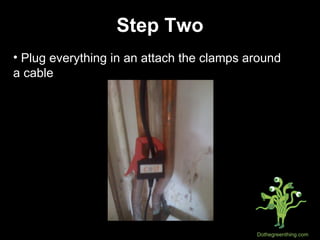
Step Two Plug everything in an attach the clamps around  a cable
Step Three Download James' daemon from here: http://github.com/Floppy/currentcost-daemon/tree/master
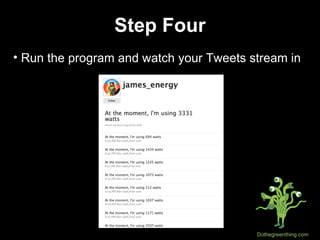
Step Four Run the program and watch your Tweets stream in
Mac OS X We couldn't get James' rb232   code to work, so we're going to go a different route... First install PL2302 drivers for your mac http://www.apple.com/downloads/macosx/drivers/pl2303usbtoserialdriver.html
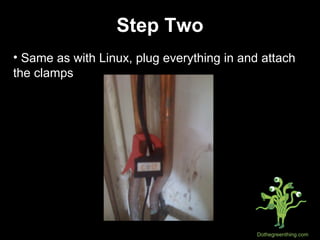
Step Two Same as with Linux, plug everything in and attach the clamps
Step Three - Oops, A Problem Unfortunately, we couldn't get James' rb 232 code to work on OSX, but we found another way... The plan is to:  Have the data sent off to Pachube (using a  Pachube app) Have a script that will pull the data off Pachube  and then post this on Twitter
Step Four Sign up to Pachube ( http://www.pachube.com ) Create a Feed
Step Five Download this app  http://community.pachube.com/?q=node/100
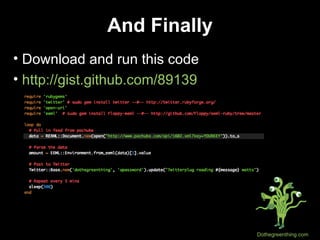
And Finally Download and run this code http://gist.github.com/89139
Good luck, happy Twitterplugging and  let us know how you get on [email_address] .com

Twitterplug

  • 1.
    Twitterplug How toTweet the energy usage of your home of office with the Current Cost meter
  • 2.
    What You NeedCurrent Cost Meter ( http://www.currentcost.com ) Mac or Linux PC* *NB. Mac and Linux have different instructions
  • 3.
    Linux Before westart you will need to install James Smith's ( http://www.floppy.org.uk ) rb232 Ruby gem ( http://github.com/Floppy/rb232/tree/master ) Then put your Current Cost meter together
  • 4.
    Step Two Plugeverything in an attach the clamps around a cable
  • 5.
    Step Three DownloadJames' daemon from here: http://github.com/Floppy/currentcost-daemon/tree/master
  • 6.
    Step Four Runthe program and watch your Tweets stream in
  • 7.
    Mac OS XWe couldn't get James' rb232 code to work, so we're going to go a different route... First install PL2302 drivers for your mac http://www.apple.com/downloads/macosx/drivers/pl2303usbtoserialdriver.html
  • 8.
    Step Two Sameas with Linux, plug everything in and attach the clamps
  • 9.
    Step Three -Oops, A Problem Unfortunately, we couldn't get James' rb 232 code to work on OSX, but we found another way... The plan is to: Have the data sent off to Pachube (using a Pachube app) Have a script that will pull the data off Pachube and then post this on Twitter
  • 10.
    Step Four Signup to Pachube ( http://www.pachube.com ) Create a Feed
  • 11.
    Step Five Downloadthis app http://community.pachube.com/?q=node/100
  • 12.
    And Finally Downloadand run this code http://gist.github.com/89139
  • 13.
    Good luck, happyTwitterplugging and let us know how you get on [email_address] .com