Darwin
Information
Typing
Architecture
(DITA)
TWC 445/545 Spring 2015
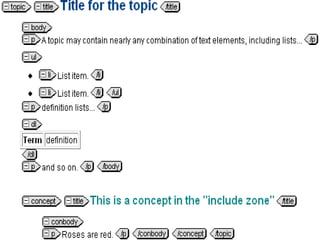
It is a modular model for encoding
documents into topics within a single file that
can be reused in multiple locations for
different audiences, focused on diverse
tasks, and looks a bit like this...
What is DITA?
● It is an XML data model
● What is XML?
DITA Fundamentals
Make sure to
click the video
before
proceeding to the
next slide!
DITA was created in March 2001 by a cross-
company working group at IBM for internal
use for documenting its own software
engineering processes. The reason why they
put so much effort into creating DITA is that
because prior to its inception technical
communication and documentation existed in
a variety of forms--many of which lacked
critical features for making documentation
production more effective and efficient.
DITA’s History
Click here to learn
more about DITA’s
history!
DITA was created to replace IBM's internal
documentation system, IBM ID Doc. In large
part due to the internal success of DITA, the
Organization for the Advancement of
Structured Information Standards (OASIS)
began to work on creating a DITA standard
in 2004, and by 2005, DITA 1.0 was
approved and released for use by the greater
community.
DITA’s History
Click the logo to visit the
OASIS-DITA site
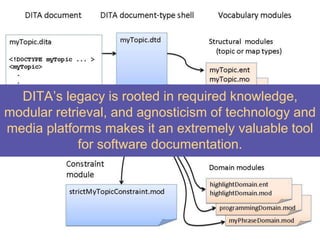
DITA’s legacy is rooted in required knowledge,
modular retrieval, and agnosticism of technology and
media platforms makes it an extremely valuable tool
for software documentation.
For ease in formating, DITA facilitates the
structuring of documents through the use of
different XML tags. A few examples of DITA
tags are shown on the next slide...
DITA Makes it Easy
DITA Makes it Easy
For ease in formating, DITA facilitates the
structuring of documents through the use
of different XML tags. A few examples of
DITA tags are shown on the next slide...
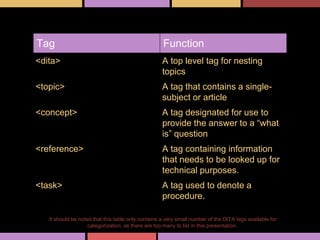
It should be noted that this table only contains a very small number of the DITA tags available for
categorization, as there are too many to list in this presentation..
Tag Function
<dita> A top level tag for nesting
topics
<topic> A tag that contains a single-
subject or article
<concept> A tag designated for use to
provide the answer to a “what
is” question
<reference> A tag containing information
that needs to be looked up for
technical purposes.
<task> A tag used to denote a
procedure.
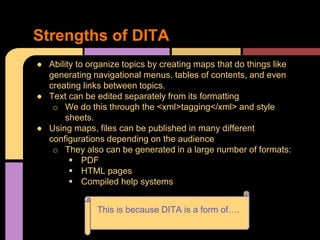
● Ability to organize topics by creating maps that do things like
generating navigational menus, tables of contents, and even
creating links between topics.
● Text can be edited separately from its formatting
o We do this through the <xml>tagging</xml> and style
sheets.
● Using maps, files can be published in many different
configurations depending on the audience
o They also can be generated in a large number of formats:
 PDF
 HTML pages
 Compiled help systems
Strengths of DITA
This is because DITA is a form of….
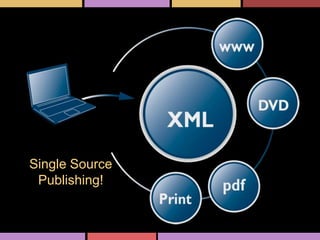
Single Source
Publishing!
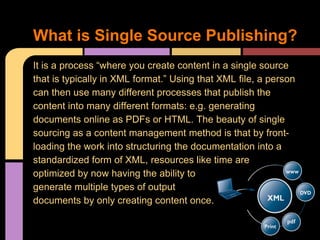
It is a process “where you create content in a single source
that is typically in XML format.” Using that XML file, a person
can then use many different processes that publish the
content into many different formats: e.g. generating
documents online as PDFs or HTML. The beauty of single
sourcing as a content management method is that by front-
loading the work into structuring the documentation into a
standardized form of XML, resources like time are
optimized by now having the ability to
generate multiple types of output
documents by only creating content once.
What is Single Source Publishing?
● DITA is a type of Single Sourcing!
o This XML schema gives us the ability to
keep a coherent marketing message.
 It becomes considerably easier to
maintain a focus on a specific
audience, user, or task, avoiding
confusion for users.
Why Use DITA for TechComm?
● DITA facilitates content reuse.
o Reusing content facilitates increased:
o Quality and consistency
o Reduced time and costs for development and
maintenance
o Reduced cost of translation
o Reduction of potential errors in documentation.
● Because DITA is an XML standard, it capitalizes on the
strengths inherent to structured writing: e.g. authoring
time is reduced and analysis of authored content
increased.
● DITA is also useful due to its minimalism.
o Reducing cognitive overload in users
Find out more
advantages of
DITA adoption
by clicking here.
Why Use DITA for TechComm?
● A basic understanding of structured markup languages
(e.g. XML or HTML) and information architecture to get
started with DITA and single sourcing to create the texts.
● For manipulation and usability of DITA documents, it
would be best to have some experience or knowledge of
an XML parsing language like XSLT--or even any other
programming language that can parse structured data:
e.g. perl, python, ruby.
○ If learning a transformational language is not
something a person really has the ability to do, the
other option is to become familiar with the DITA Open
Toolkit
What skills do you need to use DITA?
1. Develop an understanding of the topic-based architecture underlying
the DITA model. This is a critical step in the process, as if a person
does not comprehend DITA’s topic-oriented nature, she cannot fully
utilize its modular nature as made possible through DITA maps.
2. Create an informational model. The only way to really understand and
implement DITA is to get your hands dirty and try it out by creating
your own informational model.
3. Take a moment to read the DITA Architecture and Language
Specification to understand how the model works. In order to do this,
you need to understand XML (Step 1).
4. Assess your own content and transform it into topics through DITA
encoding.
5. Download the DITA Open Toolkit and processing information.
Understanding how to implement DITA is a multi-step process.
An easy tutorial at the level of "what you need to know to get started
A high-level intro
A short case study/interview
A very short and high-level intro to the architecture
An hour-long CAMTASIA video intro adapted from a recording of a live workshop
Michael gave on DITA a few years ago - this is the first part, which has a high-level
overview of DITA's history and capabilities
DITA Overview Resources (Taken
from dita.xml.org )
http://dita.xml.org/
OASIS's community web site for DITA. Has blogs, a Wiki,
lists of adopters, vendors, presentations etc.
http://xml.coverpages.org/dita.html
Robin Cover's list of DITA resources. Includes a lot of
presentations, news, etc. in chronological order.
http://www.oasis-
open.org/committees/tc_home.php?wg_
abbrev=dita
Official OASIS DITA Technical Committee site
http://docs.oasis-
open.org/dita/v1.1/OS/overview/overvie
w.html
DITA 1.1 Specification overview - including links to
architectural spec and language spec. The architectural
spec in particular is designed to be generally readable, and
http://dita-ot.sourceforge.net
DITA Open Toolkit site - go through the intro PDF cited
above before going here.
http://www.ditainfocenter.com
The architectural and language specs, plus the Open
Toolkit User Guide in an online Help (Eclipse) format wioth
index, search, and table of contents.
http://www.ditanews.com
Listing of 50 DITA Tools, dozens of presentations and
tutorials, communities, conferences, mailing lists, and a
monthly DITA Newsletter.
http://www.ditausers.org
The international community with personal online
workspace folders, a web-based DITA Storm editor, and an
online Open Toolkit. Author, build, and publish your first
DITA Topics and DITA Maps without installiing anything.
General Resources for DITA
(Taken from dita.xml.org )
Click this
star to view
our
complete
report

TWC 545 Presentation-DITA

  • 1.
  • 2.
    It is amodular model for encoding documents into topics within a single file that can be reused in multiple locations for different audiences, focused on diverse tasks, and looks a bit like this... What is DITA?
  • 4.
    ● It isan XML data model ● What is XML? DITA Fundamentals Make sure to click the video before proceeding to the next slide!
  • 5.
    DITA was createdin March 2001 by a cross- company working group at IBM for internal use for documenting its own software engineering processes. The reason why they put so much effort into creating DITA is that because prior to its inception technical communication and documentation existed in a variety of forms--many of which lacked critical features for making documentation production more effective and efficient. DITA’s History Click here to learn more about DITA’s history!
  • 6.
    DITA was createdto replace IBM's internal documentation system, IBM ID Doc. In large part due to the internal success of DITA, the Organization for the Advancement of Structured Information Standards (OASIS) began to work on creating a DITA standard in 2004, and by 2005, DITA 1.0 was approved and released for use by the greater community. DITA’s History Click the logo to visit the OASIS-DITA site
  • 7.
    DITA’s legacy isrooted in required knowledge, modular retrieval, and agnosticism of technology and media platforms makes it an extremely valuable tool for software documentation.
  • 8.
    For ease informating, DITA facilitates the structuring of documents through the use of different XML tags. A few examples of DITA tags are shown on the next slide... DITA Makes it Easy
  • 9.
    DITA Makes itEasy For ease in formating, DITA facilitates the structuring of documents through the use of different XML tags. A few examples of DITA tags are shown on the next slide...
  • 10.
    It should benoted that this table only contains a very small number of the DITA tags available for categorization, as there are too many to list in this presentation.. Tag Function <dita> A top level tag for nesting topics <topic> A tag that contains a single- subject or article <concept> A tag designated for use to provide the answer to a “what is” question <reference> A tag containing information that needs to be looked up for technical purposes. <task> A tag used to denote a procedure.
  • 11.
    ● Ability toorganize topics by creating maps that do things like generating navigational menus, tables of contents, and even creating links between topics. ● Text can be edited separately from its formatting o We do this through the <xml>tagging</xml> and style sheets. ● Using maps, files can be published in many different configurations depending on the audience o They also can be generated in a large number of formats:  PDF  HTML pages  Compiled help systems Strengths of DITA This is because DITA is a form of….
  • 12.
  • 13.
    It is aprocess “where you create content in a single source that is typically in XML format.” Using that XML file, a person can then use many different processes that publish the content into many different formats: e.g. generating documents online as PDFs or HTML. The beauty of single sourcing as a content management method is that by front- loading the work into structuring the documentation into a standardized form of XML, resources like time are optimized by now having the ability to generate multiple types of output documents by only creating content once. What is Single Source Publishing?
  • 14.
    ● DITA isa type of Single Sourcing! o This XML schema gives us the ability to keep a coherent marketing message.  It becomes considerably easier to maintain a focus on a specific audience, user, or task, avoiding confusion for users. Why Use DITA for TechComm?
  • 15.
    Why Use DITAfor TechComm? ● DITA facilitates content reuse. o Reusing content facilitates increased: o Quality and consistency o Reduced time and costs for development and maintenance o Reduced cost of translation o Reduction of potential errors in documentation.
  • 16.
    ● Because DITAis an XML standard, it capitalizes on the strengths inherent to structured writing: e.g. authoring time is reduced and analysis of authored content increased. ● DITA is also useful due to its minimalism. o Reducing cognitive overload in users Find out more advantages of DITA adoption by clicking here. Why Use DITA for TechComm?
  • 17.
    ● A basicunderstanding of structured markup languages (e.g. XML or HTML) and information architecture to get started with DITA and single sourcing to create the texts. ● For manipulation and usability of DITA documents, it would be best to have some experience or knowledge of an XML parsing language like XSLT--or even any other programming language that can parse structured data: e.g. perl, python, ruby. ○ If learning a transformational language is not something a person really has the ability to do, the other option is to become familiar with the DITA Open Toolkit What skills do you need to use DITA?
  • 18.
    1. Develop anunderstanding of the topic-based architecture underlying the DITA model. This is a critical step in the process, as if a person does not comprehend DITA’s topic-oriented nature, she cannot fully utilize its modular nature as made possible through DITA maps. 2. Create an informational model. The only way to really understand and implement DITA is to get your hands dirty and try it out by creating your own informational model. 3. Take a moment to read the DITA Architecture and Language Specification to understand how the model works. In order to do this, you need to understand XML (Step 1). 4. Assess your own content and transform it into topics through DITA encoding. 5. Download the DITA Open Toolkit and processing information. Understanding how to implement DITA is a multi-step process.
  • 19.
    An easy tutorialat the level of "what you need to know to get started A high-level intro A short case study/interview A very short and high-level intro to the architecture An hour-long CAMTASIA video intro adapted from a recording of a live workshop Michael gave on DITA a few years ago - this is the first part, which has a high-level overview of DITA's history and capabilities DITA Overview Resources (Taken from dita.xml.org )
  • 20.
    http://dita.xml.org/ OASIS's community website for DITA. Has blogs, a Wiki, lists of adopters, vendors, presentations etc. http://xml.coverpages.org/dita.html Robin Cover's list of DITA resources. Includes a lot of presentations, news, etc. in chronological order. http://www.oasis- open.org/committees/tc_home.php?wg_ abbrev=dita Official OASIS DITA Technical Committee site http://docs.oasis- open.org/dita/v1.1/OS/overview/overvie w.html DITA 1.1 Specification overview - including links to architectural spec and language spec. The architectural spec in particular is designed to be generally readable, and http://dita-ot.sourceforge.net DITA Open Toolkit site - go through the intro PDF cited above before going here. http://www.ditainfocenter.com The architectural and language specs, plus the Open Toolkit User Guide in an online Help (Eclipse) format wioth index, search, and table of contents. http://www.ditanews.com Listing of 50 DITA Tools, dozens of presentations and tutorials, communities, conferences, mailing lists, and a monthly DITA Newsletter. http://www.ditausers.org The international community with personal online workspace folders, a web-based DITA Storm editor, and an online Open Toolkit. Author, build, and publish your first DITA Topics and DITA Maps without installiing anything. General Resources for DITA (Taken from dita.xml.org )
  • 21.
    Click this star toview our complete report