Welcome To 
Trendz Academy
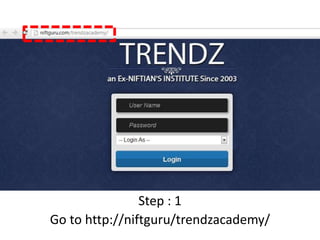
Step : 1 
Go to http://niftguru/trendzacademy/
Step 2 : Enter Username and Password
Step 3 : Login as student (as shown)
Step 4 : Click Login
Step : 5 Go to E-Learning Exercise and select 
Student Topic/comment
Step : 6 Select subject (from drop down)
Step : 7 Select chapter (from drop down)
Step : 8 Select Topic (from drop down)
Step : 9 Click Submit
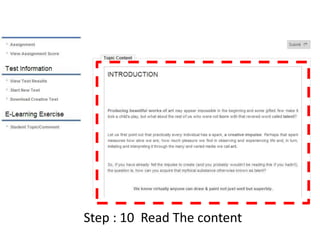
Step : 10 Read The content
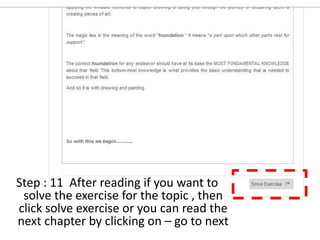
Step : 11 After reading if you want to 
solve the exercise for the topic , then 
click solve exercise or you can read the 
next chapter by clicking on – go to next
Step : 12 Solve the exercise
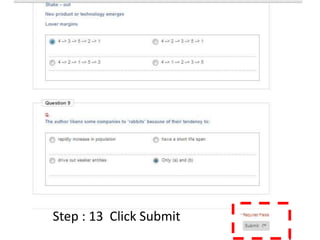
Step : 13 Click Submit
7 
2 
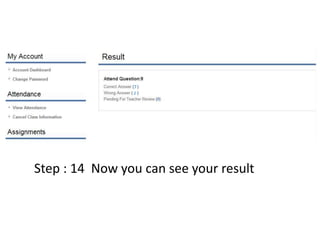
Step : 14 Now you can see your result

Trendz academy

  • 1.
  • 2.
    Step : 1 Go to http://niftguru/trendzacademy/
  • 3.
    Step 2 :Enter Username and Password
  • 4.
    Step 3 :Login as student (as shown)
  • 5.
    Step 4 :Click Login
  • 6.
    Step : 5Go to E-Learning Exercise and select Student Topic/comment
  • 7.
    Step : 6Select subject (from drop down)
  • 8.
    Step : 7Select chapter (from drop down)
  • 9.
    Step : 8Select Topic (from drop down)
  • 10.
    Step : 9Click Submit
  • 11.
    Step : 10Read The content
  • 12.
    Step : 11After reading if you want to solve the exercise for the topic , then click solve exercise or you can read the next chapter by clicking on – go to next
  • 13.
    Step : 12Solve the exercise
  • 14.
    Step : 13Click Submit
  • 15.
    7 2 Step: 14 Now you can see your result