TRANSFORMING
THE LIBRARY
The Impact and Implication of Technology
SECOND HALF By
Najma Yaqoob
Iqra Tahir
Rubab Afzal
Technological innovations transforming library function
The Evolving Collection/Collection
Development
• Collection development refers to the systematic process of acquiring, organizing, and maintaining
materials in a library or information center to meet the needs of its users.
• This process involves selecting and acquiring materials
The Evolving
Collection/Collection
Development
Digital Libraries
• A new type of library emerged with the growth and
expansion of the internet—the digital library
• Their most primitive form in the 1990s as collections
of photos posted on web home pages.
• At that time there were no standards for their
creation
• NO way to effectively search them, no way to
support the wide variety of digital materials
• With the development of metadata standards,
additional software advances, and search engines,
these issues were resolved.
• Digital libraries grew rapidly in the first decade of the
twenty-first century
• Like public libraries, digital libraries should provide
democratic and egalitarian service
The Evolving Collection/
Collection Development
Calhoun (2014) identified four key elements
required for achieving a next-generation digital
library :
• They must be interoperable.
• Here must be community engagement.
• Intellectual property issues must be addressed
• The library must be sustainable
Electronic Books (E-books)
• As digital devices have become more sophisticated
• E-books have increasingly gained in popularity
• E-books are popular and have become staples of
libraries
• There are many reasons for this popularity such as
searchable text, cross-referencing with hyperlinks,
etc.
• The method of acquiring access to e-books raises
many issues for libraries
• Although print collections will remain an integral
part of library collections, there is no doubt that e-
books will be an increasingly important part of many
library collections
Electronic Resource
Management
Systems (ERMSs)
• ERM refers “to the processes associated with the
acquisition and maintenance of library resources
in electronic format
• As digital content proliferated, librarians quickly
recognized that managing digital content required
different strategies than managing print
collections.
• Electronics resources involve new and at times,
complex acquisition models
• Many of the ERMS were developed for individual
libraries
Patron-Driven
Acquisition (PDA)
• A book-purchasing model in which selection
decisions are based on input from
library patrons
• MARC records for books, often matching a
profile determined by the library, are
loaded into the library’s catalog
• A library subsequently purchases e-book is
based on “trigger activity,”
• Many librarians remain skeptical about
allowing patrons to determine acquisitions
• The weight of the PDA evidence to date is
that library users are in fact better
predictors of subsequent circulation than
either librarians or vendor profiles
Radio Frequency
Identification
(RFID)
• Radio frequency identification (RFID) is among
the many technological developments affecting
circulation and control of the library collection.
• RFID was first employed in the 1980s, mostly in
the transportation industry including toll roads
and railroads
• Today RFID is used widely in business and
industry for a variety of purposes
• RFID has been used in libraries for a variety of
purposes since 1999
• Larson (2019) identified several advantages to
RFID tagging in libraries such as streamlined
inventory management, simplified self-checkout
• There are barriers to RFID adoption
The Evolving
Search Process
1.Discovery System
2.Virtual Reference Services(VRS)
3.Social Question and Answering
Services(SQA)
4.Virtual Augmented and Mixed Reality
Discovery System
•In the first decade of the twenty-first century,
libraries began to reconfigure and redesign
•This innovation was known as a Discovery
System, a discovery layer or a Discovery platform.
•Discovery interfaces generally exceeded the
capabilities of traditional ILS System
Burke and Tumbleson
(2016) identified:
what may be included
in a discovery system
•Library catalog records
•Indexes and databases
•Open-access content
•Institutional repository records
•Local digital collections
•Library research guides
•Library web pages
Some basic concepts used in discovery
system
According to Breeding (2018) there is some basic
concepts :
 Discovery: describes the activity of locating
library resources, primarily by its users or
numbers.
 Discoverability: involves techniques that
enable library resources to be more optimally
found in the search or discovery environments
of organization outside the library.
Some basic concepts used in
discovery system
 Delivery or Access: describes the
mechanisms or process to enable item found
through an act of discovery to be made
available to the user.
 Discovery interface: describes applications
created to enable users to discover and gain
access to library resources. Typical feature of
a discovery interface include core search and
retrieval features for accessing library
resources.
Web Scale
• Web generally applies to ‘’the discovery
services that aim to represent the full body
of library content.
• Web scale discovery layers maximize the
ability of the user to identify, locate and
receive delivery of any content regardless
of format or location.
• Venders offering web scale discovery
services are OCLC’s WorldCat discovery
services, Summon from Ex Libris, EBSCO
discovery services.
• Some open-sources ILS/Discovery system
are Koha, Evergreen etc.
World Cat's
features provide
a good
description for
typical discovery
layers;
• System enables searching across multiple
formats and collections through a single
search
• Searches can be filtered by format, date,
location, and other qualifiers
• System can be accessed by many
different types of devices
• Access is anytime, anywhere to full-text
resources
• The system provides access to
approximately 23 million e-books from
major e-book provider
• The system offers access to more than 50
million open access resources such as
HathiTrust and Project Gutenberg
Virtual Reference
Service (VRS)
Virtual reference is reference service initiated
electronically for which patrons employ technology
to communicate with public services staff
without being physically present. Communication
channels used frequently in virtual reference include
chat videoconferencing, voice over-IP, e-mail, instant
messaging and text.
In implementing and
maintaining VRS
there is issues
addressed;
• VRS must be carefully integrated into
current reference service as a long-term
commitment.
• The clientele for the service must be
identified
• Appropriate institutional policies must be
adopted and levels of services defined
• Opportunities must be provided for
training and on software
• The appropriate software must be
selected
• The library’s digital collection must be
evaluated
Some suggestion
to improve VRS
• Promote VRS services
• Ensure that sufficient support is provided
assist patrons
• Provide 24/7 services if possible
• Design catalog interface and database
• Provide access from mobile devices
• Increase convenience by integrating other
library services
• Be sensitive especially to teenagers
Some suggestion
to improve VRS
• Library training and programs about VRS
services
• Use clarification techniques to ensure that the
right question is being addressed
• Provide specific and accurate answers, always
act with courtesy, be patient and do not appear
hurried
Social Question
and Answer
Service (SQA)
Social question and answer sites are
one of the major information and
knowledge sources that have emerged
from Internet-mediated social practice.
(SQA): Ask Model
 Accuracy Question: the aim of an
accuracy question is to receive
answers based on some factual or
prescriptive knowledge.
 Social Question: the aim of a
social is to request either
companionship or coordination
support from others.
 Knowledge Question: the aim of a
knowledge question is to receive
responses reflecting the answer’s
personal opinions, advice,
preferences, or experience.
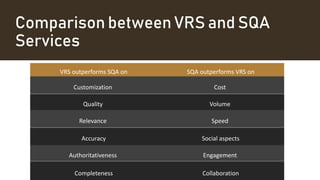
Comparison between VRS and SQA
Services
VRS outperforms SQA on SQA outperforms VRS on
Customization Cost
Quality Volume
Relevance Speed
Accuracy Social aspects
Authoritativeness Engagement
Completeness Collaboration
Virtual,
Augmented, and
Mixed Reality
The suite of technologies encompassed by
virtual, augmented, and mixed reality stands
to open vast opportunities for new services,
expand the way library materials can be
accessed and integrated into non library
venues, and alter the way we, as a society,
interact with information.
Virtual,
Augmented, and
Mixed Reality
VAR is actually comprised of three related
concepts:
 Augmented Reality (AR): is enhanced
reality, usually in a limited way.
 Virtual Reality (VR): is the computer-
created counterpart to actual reality.
 Mixed Reality (MR): is the entire
continuum between the two, spanning the
range from just a bit of computer-
augmented information or presentation of
objects.
Uses of VR in
libraries
• Creating virtual tours to help users navigate
the Physical library
• Creating information literacy experiences to
help users
• Serving as a host for users to play games
• Providing unique virtual experience such as
ocean and space exploration
• Providing digital tours of historic places,
schools etc.
• Providing virtual training and team-building
activities for staff
The library’s Evolving
Space
• A library building is more than a container for
content, digital or print.
• The library become has synonym with reading and
literacy
• Library’s space is different from that of a
warehouse, as it has values, a philosophy, a spirit,
and a soul.
• Technology has affected library spaces
dramatically.
The library’s Evolving
Space
Historically, the library space for users was
primarily devoted to two aspects of library
service;
(1) the physical collection and access to it
(2) reference services
Today’s libraries recognize that spaces
emphasizing book collections and the
reference desk do not reflect the changes in
how twenty-first-century users seek and use
information.
The library’s Evolving
Space
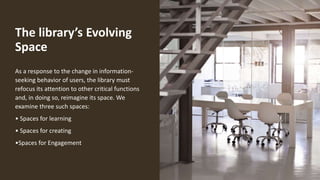
As a response to the change in information-
seeking behavior of users, the library must
refocus its attention to other critical functions
and, in doing so, reimagine its space. We
examine three such spaces:
• Spaces for learning
• Spaces for creating
•Spaces for Engagement
Spaces for learning
• Although libraries continue to provide space
that supports individual learning, many
libraries also create places where people can
use appropriate technologies to work
collaboratively to complete school assignments
or personal projects.
• These spaces reflect the greater emphasis now
placed on collaborative learning in schools and
higher education.
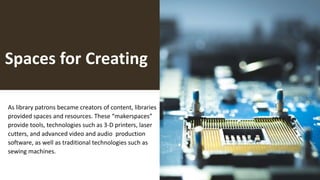
Spaces for Creating
As library patrons became creators of content, libraries
provided spaces and resources. These “makerspaces”
provide tools, technologies such as 3-D printers, laser
cutters, and advanced video and audio production
software, as well as traditional technologies such as
sewing machines.
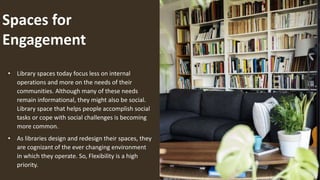
Spaces for
Engagement
• Library spaces today focus less on internal
operations and more on the needs of their
communities. Although many of these needs
remain informational, they might also be social.
Library space that helps people accomplish social
tasks or cope with social challenges is becoming
more common.
• As libraries design and redesign their spaces, they
are cognizant of the ever changing environment
in which they operate. So, Flexibility is a high
priority.
The Evolving Technological Infrastructure
Cloud-Based Computing
• Breeding(2017b), has observed that a significant shift is
occurring;
“from deploying library systems on equipment housed
on-premises to some type of hosted infrastructure”.
• Breeding (2018a) provided a less technical but more
accessible description:
''The term “cloud computing” tends to be used loosely to
describe almost any form of computing in which the
hardware or the services provided are accessed via the
internet rather than installed on a local computer or housed
in the institution’s own data center''.
Features of
Cloud Computing
• An abstract technology platform
that involves generalized access to
remote computing resources rather than
locally owned and managed discrete services
• A utility model of computing involving fees
charged for levels of use rather than capital
investment in hardware or permanent
software licenses
• Computing that’s provisioned on demand,
with resources allocated as needed
Features of
Cloud Computing
• Elastic quantity and power of the computing
resources that increases at times of peak use and
scales down when demand is lower
• Highly clustered and distributed computing
infrastructure that spreads computing tasks across
many devices to maximize performance with high
fault tolerance for the failure of individual
components
Types of clouds
1. Public cloud
2. Private Cloud
3. Community Cloud
4. Hybrid Cloud
5. Federated Cloud
Cloud service
Models
• Infrastructure as a Service (IaaS)
Supplies the hardware capabilities(such as
storage, network computers) to deploy a complete
IT offering in the cloud. It is ideal for those who
want to avoid maintaining hardware and have little
knowledge of configuring software.
• Platform as a Service (PaaS)
Offers complete computing platforms (operating
systems, tools, and applications) in the cloud. It enables
users to develop, test, deploy, update, and host services
in the cloud landscape.
Cloud service
Models
• Software as a Service (SaaS)
offers users the capability to use software
which is running on cloud infrastructure. The
user accesses this software through web
browsers. Social networking services, web
based conferencing, and web analytics are all
examples of SaaS.
Benefits of cloud service
• Efficiency: Cloud computing maximizes use
of server time and energy, and results in
minimal downtime.
• Improved access: Cloud computing
permits simultaneous access to multiple
applications on the web.
• Flexibility: Services can be expanded
immediately to meet changes in demand.
• Improved system security
Benefits of cloud service
• Cost savings: The computing time is paid for incrementally
on an as-needed basis; staff are not needed for
implementation, maintenance, and upgrading of
equipment and software
• Mobility: Cloud-based systems can be accessed by mobile
devices.
• Storage: Storage capacity can be increased on demand.
• Ease of operations: IT responsibilities are shifted to the
cloud provider.
• Improved morale: IT personnel are engaged in more
satisfying, higher level work.
Benefits of cloud
service
• Mission focus: Cloud-based activities
reduce the time spent on IT activities and
allow staff and administration to focus on
meeting the goals and mission of the
organization
library
services platforms
(LSPs)
• According to Gallagher:
LSPs are designed to be more user friendly, work
more effectively with academic learning
management systems, and make more efficient use
of library staff and resources.​
• According to Breeding:​
LSPs are designed for web technologies and are
able “to offer consistent user interfaces among
modules or apps, and to manage diverse types of
data”.​
Library services platfor
ms (LSPs)
• There is a strong trend to move services
such as integrated library systems to the
cloud, although the trend is much stronger
in academic libraries.
• Whenever there is a choice, and despite
the distinctive advantages of cloud
computing, these advantages must still be
weighed against fees and other costs,
including transition costs and backup
storage costs.
• The LSP environment is dynamic and
changing rapidly, and migrating an
integrated library system to an LSP
requires that a library take a bird’s-eye
view of its entire digital infrastructure.
Conclusion
Ask question ?

Transformation of Library - Technological innovations transforming library function

  • 1.
    TRANSFORMING THE LIBRARY The Impactand Implication of Technology SECOND HALF By Najma Yaqoob Iqra Tahir Rubab Afzal
  • 2.
  • 3.
    The Evolving Collection/Collection Development •Collection development refers to the systematic process of acquiring, organizing, and maintaining materials in a library or information center to meet the needs of its users. • This process involves selecting and acquiring materials
  • 4.
    The Evolving Collection/Collection Development Digital Libraries •A new type of library emerged with the growth and expansion of the internet—the digital library • Their most primitive form in the 1990s as collections of photos posted on web home pages. • At that time there were no standards for their creation • NO way to effectively search them, no way to support the wide variety of digital materials • With the development of metadata standards, additional software advances, and search engines, these issues were resolved. • Digital libraries grew rapidly in the first decade of the twenty-first century • Like public libraries, digital libraries should provide democratic and egalitarian service
  • 5.
    The Evolving Collection/ CollectionDevelopment Calhoun (2014) identified four key elements required for achieving a next-generation digital library : • They must be interoperable. • Here must be community engagement. • Intellectual property issues must be addressed • The library must be sustainable
  • 6.
    Electronic Books (E-books) •As digital devices have become more sophisticated • E-books have increasingly gained in popularity • E-books are popular and have become staples of libraries • There are many reasons for this popularity such as searchable text, cross-referencing with hyperlinks, etc. • The method of acquiring access to e-books raises many issues for libraries • Although print collections will remain an integral part of library collections, there is no doubt that e- books will be an increasingly important part of many library collections
  • 7.
    Electronic Resource Management Systems (ERMSs) •ERM refers “to the processes associated with the acquisition and maintenance of library resources in electronic format • As digital content proliferated, librarians quickly recognized that managing digital content required different strategies than managing print collections. • Electronics resources involve new and at times, complex acquisition models • Many of the ERMS were developed for individual libraries
  • 8.
    Patron-Driven Acquisition (PDA) • Abook-purchasing model in which selection decisions are based on input from library patrons • MARC records for books, often matching a profile determined by the library, are loaded into the library’s catalog • A library subsequently purchases e-book is based on “trigger activity,” • Many librarians remain skeptical about allowing patrons to determine acquisitions • The weight of the PDA evidence to date is that library users are in fact better predictors of subsequent circulation than either librarians or vendor profiles
  • 9.
    Radio Frequency Identification (RFID) • Radiofrequency identification (RFID) is among the many technological developments affecting circulation and control of the library collection. • RFID was first employed in the 1980s, mostly in the transportation industry including toll roads and railroads • Today RFID is used widely in business and industry for a variety of purposes • RFID has been used in libraries for a variety of purposes since 1999 • Larson (2019) identified several advantages to RFID tagging in libraries such as streamlined inventory management, simplified self-checkout • There are barriers to RFID adoption
  • 10.
    The Evolving Search Process 1.DiscoverySystem 2.Virtual Reference Services(VRS) 3.Social Question and Answering Services(SQA) 4.Virtual Augmented and Mixed Reality
  • 11.
    Discovery System •In thefirst decade of the twenty-first century, libraries began to reconfigure and redesign •This innovation was known as a Discovery System, a discovery layer or a Discovery platform. •Discovery interfaces generally exceeded the capabilities of traditional ILS System
  • 12.
    Burke and Tumbleson (2016)identified: what may be included in a discovery system •Library catalog records •Indexes and databases •Open-access content •Institutional repository records •Local digital collections •Library research guides •Library web pages
  • 13.
    Some basic conceptsused in discovery system According to Breeding (2018) there is some basic concepts :  Discovery: describes the activity of locating library resources, primarily by its users or numbers.  Discoverability: involves techniques that enable library resources to be more optimally found in the search or discovery environments of organization outside the library.
  • 14.
    Some basic conceptsused in discovery system  Delivery or Access: describes the mechanisms or process to enable item found through an act of discovery to be made available to the user.  Discovery interface: describes applications created to enable users to discover and gain access to library resources. Typical feature of a discovery interface include core search and retrieval features for accessing library resources.
  • 15.
    Web Scale • Webgenerally applies to ‘’the discovery services that aim to represent the full body of library content. • Web scale discovery layers maximize the ability of the user to identify, locate and receive delivery of any content regardless of format or location. • Venders offering web scale discovery services are OCLC’s WorldCat discovery services, Summon from Ex Libris, EBSCO discovery services. • Some open-sources ILS/Discovery system are Koha, Evergreen etc.
  • 16.
    World Cat's features provide agood description for typical discovery layers; • System enables searching across multiple formats and collections through a single search • Searches can be filtered by format, date, location, and other qualifiers • System can be accessed by many different types of devices • Access is anytime, anywhere to full-text resources • The system provides access to approximately 23 million e-books from major e-book provider • The system offers access to more than 50 million open access resources such as HathiTrust and Project Gutenberg
  • 17.
    Virtual Reference Service (VRS) Virtualreference is reference service initiated electronically for which patrons employ technology to communicate with public services staff without being physically present. Communication channels used frequently in virtual reference include chat videoconferencing, voice over-IP, e-mail, instant messaging and text.
  • 18.
    In implementing and maintainingVRS there is issues addressed; • VRS must be carefully integrated into current reference service as a long-term commitment. • The clientele for the service must be identified • Appropriate institutional policies must be adopted and levels of services defined • Opportunities must be provided for training and on software • The appropriate software must be selected • The library’s digital collection must be evaluated
  • 19.
    Some suggestion to improveVRS • Promote VRS services • Ensure that sufficient support is provided assist patrons • Provide 24/7 services if possible • Design catalog interface and database • Provide access from mobile devices • Increase convenience by integrating other library services • Be sensitive especially to teenagers
  • 20.
    Some suggestion to improveVRS • Library training and programs about VRS services • Use clarification techniques to ensure that the right question is being addressed • Provide specific and accurate answers, always act with courtesy, be patient and do not appear hurried
  • 21.
    Social Question and Answer Service(SQA) Social question and answer sites are one of the major information and knowledge sources that have emerged from Internet-mediated social practice.
  • 22.
    (SQA): Ask Model Accuracy Question: the aim of an accuracy question is to receive answers based on some factual or prescriptive knowledge.  Social Question: the aim of a social is to request either companionship or coordination support from others.  Knowledge Question: the aim of a knowledge question is to receive responses reflecting the answer’s personal opinions, advice, preferences, or experience.
  • 23.
    Comparison between VRSand SQA Services VRS outperforms SQA on SQA outperforms VRS on Customization Cost Quality Volume Relevance Speed Accuracy Social aspects Authoritativeness Engagement Completeness Collaboration
  • 24.
    Virtual, Augmented, and Mixed Reality Thesuite of technologies encompassed by virtual, augmented, and mixed reality stands to open vast opportunities for new services, expand the way library materials can be accessed and integrated into non library venues, and alter the way we, as a society, interact with information.
  • 25.
    Virtual, Augmented, and Mixed Reality VARis actually comprised of three related concepts:  Augmented Reality (AR): is enhanced reality, usually in a limited way.  Virtual Reality (VR): is the computer- created counterpart to actual reality.  Mixed Reality (MR): is the entire continuum between the two, spanning the range from just a bit of computer- augmented information or presentation of objects.
  • 26.
    Uses of VRin libraries • Creating virtual tours to help users navigate the Physical library • Creating information literacy experiences to help users • Serving as a host for users to play games • Providing unique virtual experience such as ocean and space exploration • Providing digital tours of historic places, schools etc. • Providing virtual training and team-building activities for staff
  • 27.
    The library’s Evolving Space •A library building is more than a container for content, digital or print. • The library become has synonym with reading and literacy • Library’s space is different from that of a warehouse, as it has values, a philosophy, a spirit, and a soul. • Technology has affected library spaces dramatically.
  • 28.
    The library’s Evolving Space Historically,the library space for users was primarily devoted to two aspects of library service; (1) the physical collection and access to it (2) reference services Today’s libraries recognize that spaces emphasizing book collections and the reference desk do not reflect the changes in how twenty-first-century users seek and use information.
  • 29.
    The library’s Evolving Space Asa response to the change in information- seeking behavior of users, the library must refocus its attention to other critical functions and, in doing so, reimagine its space. We examine three such spaces: • Spaces for learning • Spaces for creating •Spaces for Engagement
  • 30.
    Spaces for learning •Although libraries continue to provide space that supports individual learning, many libraries also create places where people can use appropriate technologies to work collaboratively to complete school assignments or personal projects. • These spaces reflect the greater emphasis now placed on collaborative learning in schools and higher education.
  • 31.
    Spaces for Creating Aslibrary patrons became creators of content, libraries provided spaces and resources. These “makerspaces” provide tools, technologies such as 3-D printers, laser cutters, and advanced video and audio production software, as well as traditional technologies such as sewing machines.
  • 32.
    Spaces for Engagement • Libraryspaces today focus less on internal operations and more on the needs of their communities. Although many of these needs remain informational, they might also be social. Library space that helps people accomplish social tasks or cope with social challenges is becoming more common. • As libraries design and redesign their spaces, they are cognizant of the ever changing environment in which they operate. So, Flexibility is a high priority.
  • 33.
    The Evolving TechnologicalInfrastructure Cloud-Based Computing • Breeding(2017b), has observed that a significant shift is occurring; “from deploying library systems on equipment housed on-premises to some type of hosted infrastructure”. • Breeding (2018a) provided a less technical but more accessible description: ''The term “cloud computing” tends to be used loosely to describe almost any form of computing in which the hardware or the services provided are accessed via the internet rather than installed on a local computer or housed in the institution’s own data center''.
  • 34.
    Features of Cloud Computing •An abstract technology platform that involves generalized access to remote computing resources rather than locally owned and managed discrete services • A utility model of computing involving fees charged for levels of use rather than capital investment in hardware or permanent software licenses • Computing that’s provisioned on demand, with resources allocated as needed
  • 35.
    Features of Cloud Computing •Elastic quantity and power of the computing resources that increases at times of peak use and scales down when demand is lower • Highly clustered and distributed computing infrastructure that spreads computing tasks across many devices to maximize performance with high fault tolerance for the failure of individual components
  • 36.
    Types of clouds 1.Public cloud 2. Private Cloud 3. Community Cloud 4. Hybrid Cloud 5. Federated Cloud
  • 37.
    Cloud service Models • Infrastructureas a Service (IaaS) Supplies the hardware capabilities(such as storage, network computers) to deploy a complete IT offering in the cloud. It is ideal for those who want to avoid maintaining hardware and have little knowledge of configuring software. • Platform as a Service (PaaS) Offers complete computing platforms (operating systems, tools, and applications) in the cloud. It enables users to develop, test, deploy, update, and host services in the cloud landscape.
  • 38.
    Cloud service Models • Softwareas a Service (SaaS) offers users the capability to use software which is running on cloud infrastructure. The user accesses this software through web browsers. Social networking services, web based conferencing, and web analytics are all examples of SaaS.
  • 39.
    Benefits of cloudservice • Efficiency: Cloud computing maximizes use of server time and energy, and results in minimal downtime. • Improved access: Cloud computing permits simultaneous access to multiple applications on the web. • Flexibility: Services can be expanded immediately to meet changes in demand. • Improved system security
  • 40.
    Benefits of cloudservice • Cost savings: The computing time is paid for incrementally on an as-needed basis; staff are not needed for implementation, maintenance, and upgrading of equipment and software • Mobility: Cloud-based systems can be accessed by mobile devices. • Storage: Storage capacity can be increased on demand. • Ease of operations: IT responsibilities are shifted to the cloud provider. • Improved morale: IT personnel are engaged in more satisfying, higher level work.
  • 41.
    Benefits of cloud service •Mission focus: Cloud-based activities reduce the time spent on IT activities and allow staff and administration to focus on meeting the goals and mission of the organization
  • 42.
    library services platforms (LSPs) • Accordingto Gallagher: LSPs are designed to be more user friendly, work more effectively with academic learning management systems, and make more efficient use of library staff and resources.​ • According to Breeding:​ LSPs are designed for web technologies and are able “to offer consistent user interfaces among modules or apps, and to manage diverse types of data”.​
  • 43.
    Library services platfor ms(LSPs) • There is a strong trend to move services such as integrated library systems to the cloud, although the trend is much stronger in academic libraries. • Whenever there is a choice, and despite the distinctive advantages of cloud computing, these advantages must still be weighed against fees and other costs, including transition costs and backup storage costs. • The LSP environment is dynamic and changing rapidly, and migrating an integrated library system to an LSP requires that a library take a bird’s-eye view of its entire digital infrastructure.
  • 44.
  • 45.