Presentation to “ ABC” School “ Month” 2008
Taecanet – first steps  Please connect to the internet  & log on to   http://springboard.taecanet.com/student
Introduction to Taecanet Using Taecanet as a Student Using Taecanet as a Teacher Hands on Demonstrations Questions & Answers Next Steps Agenda
Taecanet  is a unique e-learning services concept combining expertise and knowledge from schools / subject teachers with individual student / teacher account web based delivery Taecanet  is working with the SSAT, schools and other  partners to address the following issues: inclusion at both ends of the ability range independent / personalised learning agenda primary / secondary school transition assessment for learning Introduction to Taecanet
Most useful source of e-learning material is the  Internet  * BUT …five BIG problems for teachers… No time - to find the best authentic material No time - to create valid learning experiences No time - for additional marking Issues over open Internet access Confidence in the use of ICT to teach the curriculum Solve these and the Internet becomes a great learning resource Issues faced by Teachers * Source DfES
Access to rich and diverse internet content   3,500+  learning journeys  today  & unlimited potential Ease of use   Teachers learn within 30 minutes Modern, fun and motivating material - curriculum related   Covers all QCA objectives and students enjoy & engage Safe & controlled access   Teachers define “journey paths” Access to the service anytime, anywhere   School, home, library, ICT suite, or any internet point A service that is adaptable to different teaching styles   Whiteboard, 1:1, class work, homework, revision, exploration Reduced teaching workload   Built in assessment and marking E-learning that compliments other teaching methods   Blends and integrates ICT into teaching and learning Taecanet’s response to teachers’ needs
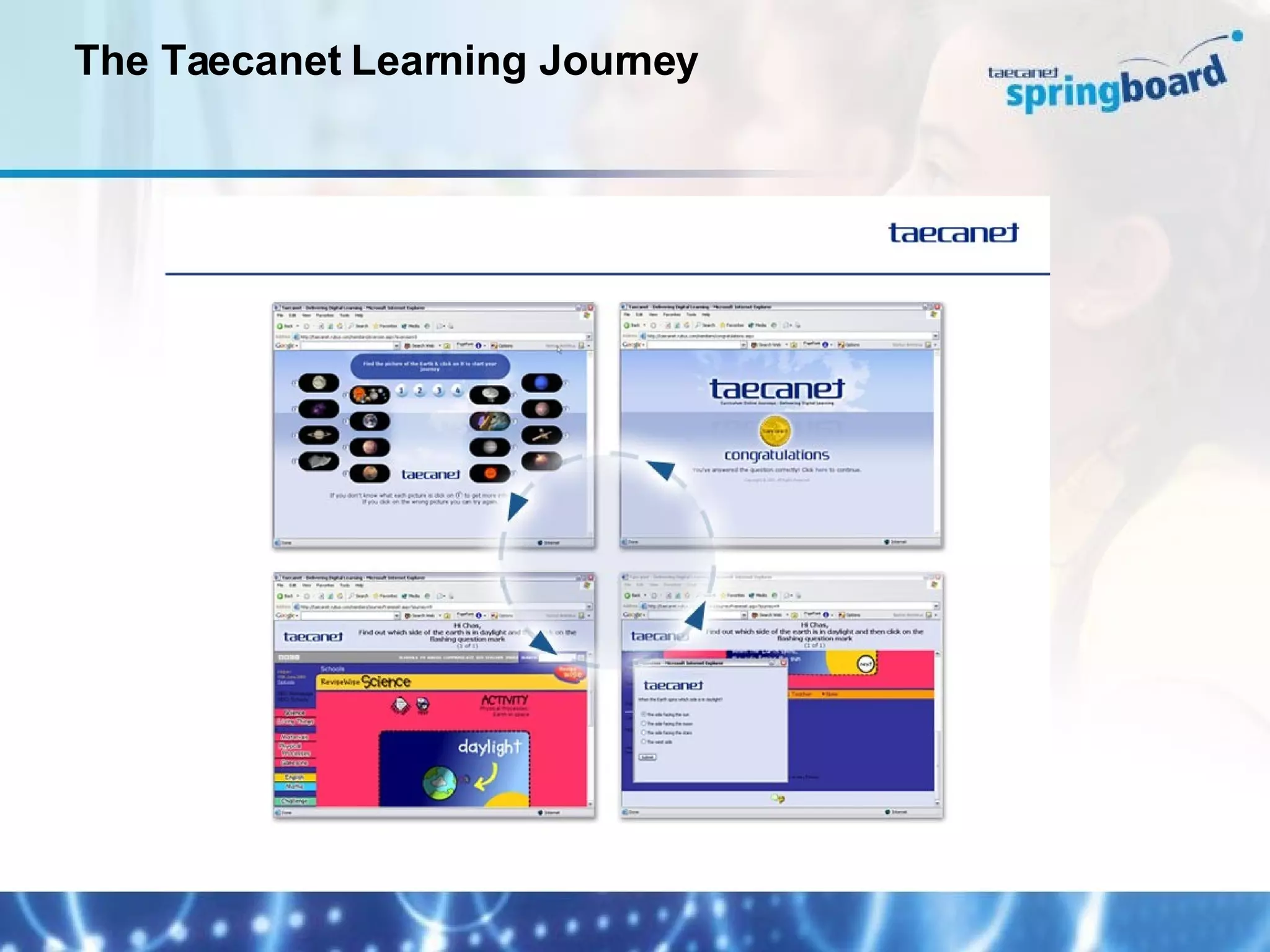
The Taecanet Learning Journey
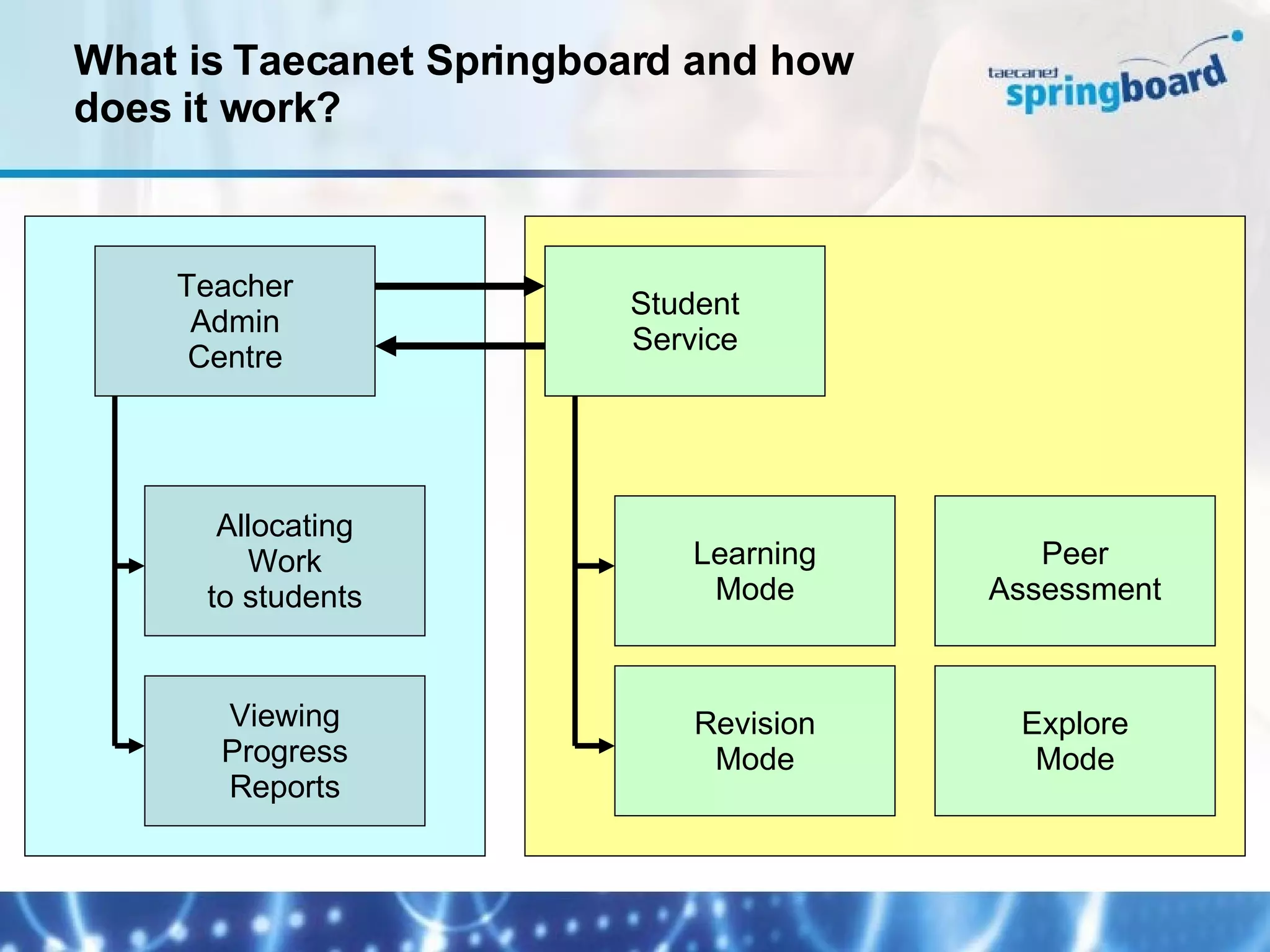
What is Taecanet Springboard and how does it work? Teacher Admin Centre Student Service Allocating Work to students Viewing Progress Reports Revision Mode Peer Assessment Explore Mode Learning Mode
Taecanet Demonstrations & hands on experience a) as a student b) as a teacher
Questions and Answers
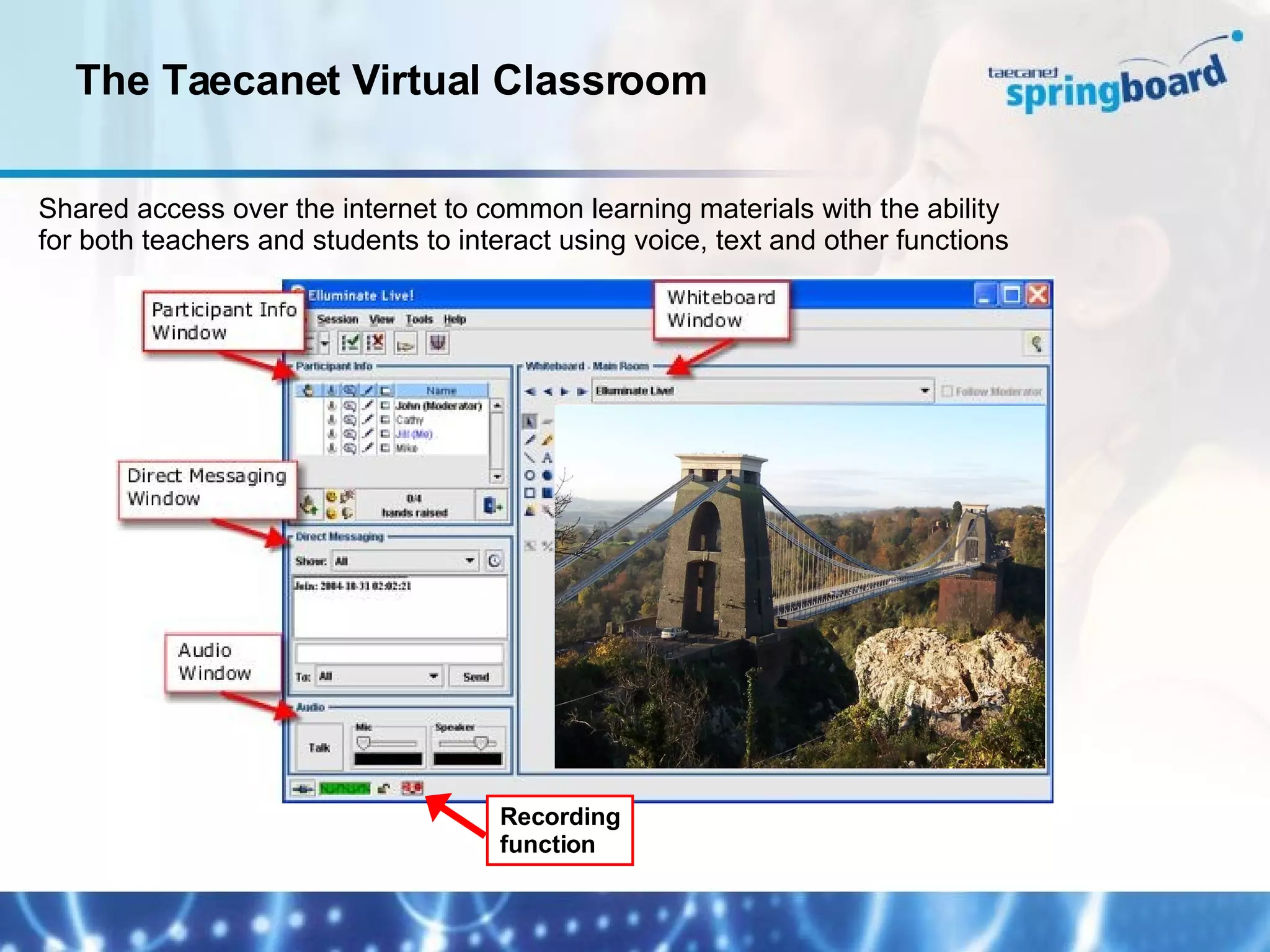
The Taecanet Virtual Classroom Shared access over the internet to common learning materials with the ability for both teachers and students to interact using voice, text and other functions Recording function
Please make sure you and your teaching colleagues change their passwords Discuss & agree plans for Taecanet  implementation within your school Start using the service with your students and the first unit that you have allocated Next Steps

Training Presentation Generic 2008

  • 1.
    Presentation to “ABC” School “ Month” 2008
  • 2.
    Taecanet – firststeps Please connect to the internet & log on to http://springboard.taecanet.com/student
  • 3.
    Introduction to TaecanetUsing Taecanet as a Student Using Taecanet as a Teacher Hands on Demonstrations Questions & Answers Next Steps Agenda
  • 4.
    Taecanet isa unique e-learning services concept combining expertise and knowledge from schools / subject teachers with individual student / teacher account web based delivery Taecanet is working with the SSAT, schools and other partners to address the following issues: inclusion at both ends of the ability range independent / personalised learning agenda primary / secondary school transition assessment for learning Introduction to Taecanet
  • 5.
    Most useful sourceof e-learning material is the Internet * BUT …five BIG problems for teachers… No time - to find the best authentic material No time - to create valid learning experiences No time - for additional marking Issues over open Internet access Confidence in the use of ICT to teach the curriculum Solve these and the Internet becomes a great learning resource Issues faced by Teachers * Source DfES
  • 6.
    Access to richand diverse internet content 3,500+ learning journeys today & unlimited potential Ease of use Teachers learn within 30 minutes Modern, fun and motivating material - curriculum related Covers all QCA objectives and students enjoy & engage Safe & controlled access Teachers define “journey paths” Access to the service anytime, anywhere School, home, library, ICT suite, or any internet point A service that is adaptable to different teaching styles Whiteboard, 1:1, class work, homework, revision, exploration Reduced teaching workload Built in assessment and marking E-learning that compliments other teaching methods Blends and integrates ICT into teaching and learning Taecanet’s response to teachers’ needs
  • 7.
  • 8.
    What is TaecanetSpringboard and how does it work? Teacher Admin Centre Student Service Allocating Work to students Viewing Progress Reports Revision Mode Peer Assessment Explore Mode Learning Mode
  • 9.
    Taecanet Demonstrations &hands on experience a) as a student b) as a teacher
  • 10.
  • 11.
    The Taecanet VirtualClassroom Shared access over the internet to common learning materials with the ability for both teachers and students to interact using voice, text and other functions Recording function
  • 12.
    Please make sureyou and your teaching colleagues change their passwords Discuss & agree plans for Taecanet implementation within your school Start using the service with your students and the first unit that you have allocated Next Steps

Editor's Notes

  • #2 Good Afternoon and thank you for coming to this Taecanet Awareness event. My name is Ian Nairn and I am the founder and operations director of Taecanet and I am very pleased to be able to talk to you this afternoon. I would also like to introduce my colleagues from Taecanet – Pauline Guest – Training & Support Manager & Steven Yong – Development Engineer together with Matthew Nice from MGL who have added Taecanet to the range of services they now support. Taecanet is a new web based personalised e-learning service covering KS2 and KS3 History, Science and Geography that Knowsley LEA have subscribed to on behalf of all the schools in Knowsley.