Learning How to Add in the Kindergarten
Classroom using Touch Math Skills
Created by: Brenda Mushlock
Touchy, Touch Math
Ms. Mushlock’s Classroom Use
 First used as whole group instruction unit
 Teacher will walk students through adding and
subtracting (single and double digits)
 Introduce mathematics center activities to be
used with TouchMath
 Incorporate TouchMath worksheets (already
purchased by district) with each Unit in the
program
About Touch Math
 Makes Math FUN!
 Adding Objects
 Gives meaning to numbers that students come to school
having memorized with no actual meaning for
 TouchPoints on the numbers engage students in their own
learning regardless of learning ability or style.
 “2 is not just a number; it is a concept, a quantity” states
Lisa Beck, founder of TouchMath.
“Touch Math: The Alphabet of Mathematics”. Innovative
Learning Concepts Inc. 2000.
http://www.touchmath.com/index.cfm?fuseaction=kinderga
rten.welcome . Viewed on June 25, 2013.
How to Use it
 Students begin by
entering Unit 1
 Easy steps of counting,
adding and subtracting
only up to 5
 Unit 2 consists of
progressing with skills up
to the number 9
 Unit 3 helps give meaning
to the numbers 1-20
 Unit 4 helps students with
measuring, data collection
and beginning geometry
skills
 Students are given index
cards with various
numbers on them
 The “3” will have three
objects or “dots” at each
reference point to
represent the number.
 Shows students a
concrete representation of
what the number stands
for.
 “Touch Math: The
Alphabet of Mathematics”.
Innovative Learning
Concepts Inc. 2000.
http://www.touchmath.com
/index.cfm?fuseaction=fre
estuff.welcome&gPage=5
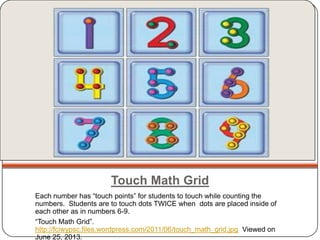
Touch Math Grid
Each number has “touch points” for students to touch while counting the
numbers. Students are to touch dots TWICE when dots are placed inside of
each other as in numbers 6-9.
“Touch Math Grid”.
http://fciwypsc.files.wordpress.com/2011/06/touch_math_grid.jpg Viewed on
June 25, 2013.
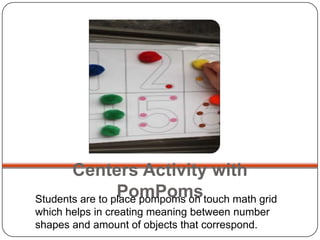
Centers Activity with
PomPomsStudents are to place pompoms on touch math grid
which helps in creating meaning between number
shapes and amount of objects that correspond.
Touch Math Uses
Covers all Common
Core Standards for
Kindergarten Level!
Used for:
1. Counting (1-100)
2. One-to-One
Correspondence
3. Greater
Than/Less Than
4. Number
Sequencing
5. Adding with
Objects/Touch
Point Objects
Touch Math Addition Videos
 Touch Math Touching/Counting Patterns Video:
http://www.youtube.com/watch?v=-H_fdf-odsc
 Touch Math Addition Video:
http://www.youtube.com/watch?v=q59Si-Uor2Q
Addition Practice
Addition Examples
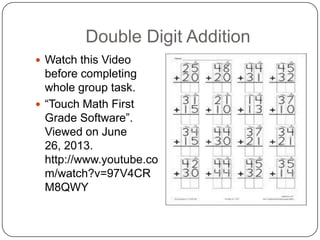
Double Digit Addition
 Watch this Video
before completing
whole group task.
 “Touch Math First
Grade Software”.
Viewed on June
26, 2013.
http://www.youtube.co
m/watch?v=97V4CR
M8QWY
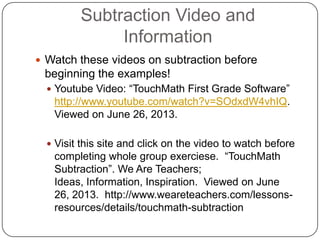
Subtraction Video and
Information
 Watch these videos on subtraction before
beginning the examples!
 Youtube Video: “TouchMath First Grade Software”
http://www.youtube.com/watch?v=SOdxdW4vhIQ.
Viewed on June 26, 2013.
 Visit this site and click on the video to watch before
completing whole group exerciese. “TouchMath
Subtraction”. We Are Teachers;
Ideas, Information, Inspiration. Viewed on June
26, 2013. http://www.weareteachers.com/lessons-
resources/details/touchmath-subtraction
Subtraction with Touch Math:
Examples
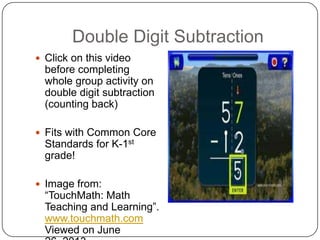
Double Digit Subtraction
 Click on this video
before completing
whole group activity on
double digit subtraction
(counting back)
 Fits with Common Core
Standards for K-1st
grade!
 Image from:
“TouchMath: Math
Teaching and Learning”.
www.touchmath.com
Viewed on June
Measuring with Touch Math
 View the site on TouchMath measuring using the
Teddy Bear Measurement activity. There are 10
questions for the students to go through! Have
fun!
 After viewing see centers activity in math centers
area. Use Bears, worms and marshmellows to
measure various items around classroom. Record
on printout.
 “Kids Maths Games- Elementary”.
http://www.apples4theteacher.com/measure.html
Interactive Sites with TouchMath
 Now lets put what you have learned to the test.
View these sites to add, subtract and measure
using the skills you have learned. Remember to
count on, count back and touch the designated
areas on the numbers if you need to. HAVE FUN!
 http://www.ixl.com/math/kindergarte
 Cool-math Games: Numbers http://www.coolmath-
games.com/1-number-games-addition-
subtraction.html
Additional Resources
 Touch Math Uses Page: Picture courtesy of “Touch Math:
The Alphabet of Mathematics”.
https://www.touchmath.com/index.cfm?fuseaction=allother
s.products&CATID=90&Pid=197. Viewed on June
25, 2013.
 Centers Activity Picture courtesy of: Brim, Shelee. “Math-
Touch Points”. Pinterest.
http://pinterest.com/pin/101331060337976515/. Viewed
on June 25, 2013.
 Addition Practice: “2 + 1”.
http://specializedreadingmathprograms.providence.wikispa
ces.net/file/view/Picture_3.png/102655529/Picture_3.png.
Viewed on June 26, 2013.
 Subtraction Practice: “Specialized Reading and Math
Programs”.
specializedreadingmathprograms.providence.wikispaces.n
et Viewed on June 26, 2013.

Touchy, touch math

  • 1.
    Learning How toAdd in the Kindergarten Classroom using Touch Math Skills Created by: Brenda Mushlock Touchy, Touch Math
  • 2.
    Ms. Mushlock’s ClassroomUse  First used as whole group instruction unit  Teacher will walk students through adding and subtracting (single and double digits)  Introduce mathematics center activities to be used with TouchMath  Incorporate TouchMath worksheets (already purchased by district) with each Unit in the program
  • 3.
    About Touch Math Makes Math FUN!  Adding Objects  Gives meaning to numbers that students come to school having memorized with no actual meaning for  TouchPoints on the numbers engage students in their own learning regardless of learning ability or style.  “2 is not just a number; it is a concept, a quantity” states Lisa Beck, founder of TouchMath. “Touch Math: The Alphabet of Mathematics”. Innovative Learning Concepts Inc. 2000. http://www.touchmath.com/index.cfm?fuseaction=kinderga rten.welcome . Viewed on June 25, 2013.
  • 4.
    How to Useit  Students begin by entering Unit 1  Easy steps of counting, adding and subtracting only up to 5  Unit 2 consists of progressing with skills up to the number 9  Unit 3 helps give meaning to the numbers 1-20  Unit 4 helps students with measuring, data collection and beginning geometry skills  Students are given index cards with various numbers on them  The “3” will have three objects or “dots” at each reference point to represent the number.  Shows students a concrete representation of what the number stands for.  “Touch Math: The Alphabet of Mathematics”. Innovative Learning Concepts Inc. 2000. http://www.touchmath.com /index.cfm?fuseaction=fre estuff.welcome&gPage=5
  • 5.
    Touch Math Grid Eachnumber has “touch points” for students to touch while counting the numbers. Students are to touch dots TWICE when dots are placed inside of each other as in numbers 6-9. “Touch Math Grid”. http://fciwypsc.files.wordpress.com/2011/06/touch_math_grid.jpg Viewed on June 25, 2013.
  • 6.
    Centers Activity with PomPomsStudentsare to place pompoms on touch math grid which helps in creating meaning between number shapes and amount of objects that correspond.
  • 7.
    Touch Math Uses Coversall Common Core Standards for Kindergarten Level! Used for: 1. Counting (1-100) 2. One-to-One Correspondence 3. Greater Than/Less Than 4. Number Sequencing 5. Adding with Objects/Touch Point Objects
  • 8.
    Touch Math AdditionVideos  Touch Math Touching/Counting Patterns Video: http://www.youtube.com/watch?v=-H_fdf-odsc  Touch Math Addition Video: http://www.youtube.com/watch?v=q59Si-Uor2Q
  • 9.
  • 10.
  • 11.
    Double Digit Addition Watch this Video before completing whole group task.  “Touch Math First Grade Software”. Viewed on June 26, 2013. http://www.youtube.co m/watch?v=97V4CR M8QWY
  • 12.
    Subtraction Video and Information Watch these videos on subtraction before beginning the examples!  Youtube Video: “TouchMath First Grade Software” http://www.youtube.com/watch?v=SOdxdW4vhIQ. Viewed on June 26, 2013.  Visit this site and click on the video to watch before completing whole group exerciese. “TouchMath Subtraction”. We Are Teachers; Ideas, Information, Inspiration. Viewed on June 26, 2013. http://www.weareteachers.com/lessons- resources/details/touchmath-subtraction
  • 13.
    Subtraction with TouchMath: Examples
  • 14.
    Double Digit Subtraction Click on this video before completing whole group activity on double digit subtraction (counting back)  Fits with Common Core Standards for K-1st grade!  Image from: “TouchMath: Math Teaching and Learning”. www.touchmath.com Viewed on June
  • 15.
    Measuring with TouchMath  View the site on TouchMath measuring using the Teddy Bear Measurement activity. There are 10 questions for the students to go through! Have fun!  After viewing see centers activity in math centers area. Use Bears, worms and marshmellows to measure various items around classroom. Record on printout.  “Kids Maths Games- Elementary”. http://www.apples4theteacher.com/measure.html
  • 16.
    Interactive Sites withTouchMath  Now lets put what you have learned to the test. View these sites to add, subtract and measure using the skills you have learned. Remember to count on, count back and touch the designated areas on the numbers if you need to. HAVE FUN!  http://www.ixl.com/math/kindergarte  Cool-math Games: Numbers http://www.coolmath- games.com/1-number-games-addition- subtraction.html
  • 17.
    Additional Resources  TouchMath Uses Page: Picture courtesy of “Touch Math: The Alphabet of Mathematics”. https://www.touchmath.com/index.cfm?fuseaction=allother s.products&CATID=90&Pid=197. Viewed on June 25, 2013.  Centers Activity Picture courtesy of: Brim, Shelee. “Math- Touch Points”. Pinterest. http://pinterest.com/pin/101331060337976515/. Viewed on June 25, 2013.  Addition Practice: “2 + 1”. http://specializedreadingmathprograms.providence.wikispa ces.net/file/view/Picture_3.png/102655529/Picture_3.png. Viewed on June 26, 2013.  Subtraction Practice: “Specialized Reading and Math Programs”. specializedreadingmathprograms.providence.wikispaces.n et Viewed on June 26, 2013.