IT Strategy Plan
Draft for discussion purposes only
Page 1 of 217
Executive Summary
RNR Consulting developed an Information Technology Strategic Plan for the Antelope Valley
Transit Authority to support the organization’s objective of utilizing information technology to
execute organizational and business processes. The Information Technology Strategic Plan
serves as a road map to provide AVTA with a methodology to achieve not only this objective,
but also to help it achieve its overall vision of being the “best transit authority in the United
States, serving the community with safe and secure rides, and providing the best service possible
to the community.” The IT Strategic Plan includes the initiation of information technology-
related activities that focus on supporting all agency departments by implementing efficient
systems, providing seamless integration, and dispensing accurate information throughout the
agency. The IT Strategic Plan aims to enhance the efficiency of current processes and
applications by automating processes and implementing information technology initiatives and
systems that will help AVTA maximize customer satisfaction and achieve its vision.
Currently, the Authority faces a number of critical issues that directly impact the operations of
the organization and its ability to serve the community efficiently including manual processes, a
lack of documented procedures and policies, the underutilization of existing technology and
systems within the organization, and the lack of information technology staff and IT-related
policies for the organization. The Authority currently executes a number of processes manually,
which results in redundancy of efforts, increases the probability of errors and inaccurate data,
and contributes to inefficiency in the utilization of human and technological resources.
Furthermore, a number of procedures and policies are not documented. This could potentially
result in loss of knowledge if there is turnover within the organization or lead to employees
executing processes in disparate methods, which may lead to incongruent data or inconsistent
information being collected. The combination of manual processes and the lack of documented
procedures contribute to a lack of tangible audit trails, which further lead to a lack of
accountability among employees within the organization (AVTA & MV). Furthermore, existing
technology and software applications currently existing within the organization are underutilized.
Applications such as Collective Data and Fuel Force are only being utilized from 4 to 9% of their
Draft for discussion purposes only
Page 2 of 217
full capability. This further exacerbates the inefficiency of the execution of processes within the
organization and hinders the delivery of timely information and reports to management, which
impinges upon management’s informed decision making capabilities. Also, there is a lack of
information technology policies and procedures as well as a lack of information technology staff
that could serve the organization which further contributes to the underutilization of technology.
If the staff could refer to an in-house expert on information technology, existing technology
systems could be better utilized by the staff because they would have a resource whom they
could immediately contact for help with the system. Also, information technology systems could
be maintained and upgraded more readily by an IT Director or database administrator.
Furthermore, this individual (IT Director or database administrator) could develop a clear set of
IT-related policies and procedures for AVTA employees to follow. This would help establish
how information technology is to be used within the organization and the protocol for such
utilization of technology within the organization.
Thus, RNR Consulting formulated the IT Strategic Plan to help address these issues and
delineate the steps necessary to achieving the overall goals and objectives of the organization.
The implementation of automated and integrated systems would allow AVTA to eliminate
manual and redundant processes, provide detailed audit trails to management which would
increase accountability of staff, generate real-time data and reports to management which would
enhance their decision-making ability, more effectively utilize existing technology available in
the marketplace, and provide the technological infrastructure necessary to serve the community
more efficiently and effectively. Furthermore, the presence of information technology staff and
IT-related procedures would help facilitate the implementation of these systems and provide
assistance to the staff as these systems ‘Go Live’ throughout the Authority. Therefore, an IT
Strategic Plan illustrates not only the benefits which could be derived from the automation of
systems, but also understand specifically how such a plan could improve the infrastructure
necessary to better serve the community.
Draft for discussion purposes only
Page 3 of 217
Activities Conducted
The activities conducted helped formulate a comprehensive view of the Information Technology
Strategic Plan from a people, process, and technology perspective. Interviews, FTE analysis,
shadowing activities, and organizational structure analysis delineated how people are being
utilized to execute the processes of the Authority. These activities also highlighted potential
areas for reallocation of resources. “As-Is” and “To-Be” process maps helped analyze how
processes are currently executed and areas for potential streamlining, automation, and efficiency
gains. The development of IT policies and procedures, systems audit, hardware infrastructure,
mapping of network architecture, application architecture, and gap analysis of IT systems and
processes helped depict how technology is currently utilized by the Authority and where
technology could most impact the functions and business processes of the organization. Overall,
benchmarking, SWOT analysis, and the formulation of the action plan then supplemented the
findings of the individual activities to help RNR Consulting develop the IT Strategic Plan for the
organization. The individual activities conducted included the following:
1. Conducting interviews with key managerial personnel and employees
2. Conducting FTE analysis of management at AVTA and MV transportation
3. Developing “As-Is” process maps for critical processes
4. Conducting shadowing activities to identify actual operations and processes and further
understand how people are utilized to execute such organizational business processes
5. Proposing “To-Be” process maps for critical processes
6. Developing IT policies and procedures
7. Analyzing organizational structure
8. Performing systems audit of critical existing applications
9. Delineating hardware infrastructure
10. Mapping network architecture
11. Depicting application architecture
12. Performing gap analysis of IT systems and processes
13. Conducting benchmarking activities across similar sized organizations
14. Conducting SWOT analyses
15. Developing IT Strategic Plan and action plan
Draft for discussion purposes only
Page 4 of 217
1. Interviews
RNR Consulting conducted interviews with the management and staff of AVTA and MV
Transportation. The interviews with AVTA management provided insight about employee views
and opinions of the mission/vision of AVTA, the issues faced by different departments, and MV
Transportation’s performance at different levels of service, operations, and maintenance. The
overall perception of AVTA employees regarding processes, procedures, and MV
Transportation’s performance were similar. This helped RNR Consulting initially obtain
qualitative data regarding employee viewpoints about the current state of AVTA and the
utilization of information technology, what they wished to have in terms of information
technology systems, and initially identify and review the personnel involved in processes.
(Please review the Interviews tab for more detail.)
2. FTE Analysis
FTE analysis of AVTA and MV Transportation management personnel were conducted to
delineate the current resource utilization and work efficiency within the agency and compare the
actual job duties performed versus their published job duties and responsibilities. FTE analysis
depicts what percentage of a typical eight hour day is allocated to various job tasks. This activity
helped us understand how time is currently allocated to the processes executed on a daily basis.
Furthermore, these analyses provided data on how new systems could potentially lead to
efficiency gains by reducing the amount of time allocated to manual processes. (Please review
the FTE analysis tab for more detail.)
3. “As-Is” process maps
In order to systematically review and evaluate current processes, RNR Consulting developed
“As-Is” process maps describing key processes conducted by various departments of AVTA. A
process map graphically illustrates the sequential steps involved with each process as well as the
personnel and documents involved in executing various processes. The process maps not only
depict current processes, but also help identify bottlenecks and redundancies in the process. We
developed “As-Is” process maps for key processes across the agency including bus pass
ordering, processing complaints, DVI, grants, inventory management, invoicing, operations with
and without road calls, paratransit dispatching, pass sales, payroll, human resources, scheduling,
Draft for discussion purposes only
Page 5 of 217
and servicing and detailing process. (Please review the “As-Is” process maps tab for more
detail.)
4. Conducting shadowing activities
Shadowing activities were conducted to identify gaps between stated procedures and actual
procedures performed by MV employees. RNR Consulting shadowed employees in order to
further analyze how employees are utilized by the organization to execute business processes.
This activity helped delineate the reasons why policies and procedures may not be followed. This
helped us understand further the reasons for the breakdown in processes and redundancies in
existing processes. The findings of the shadowing activities have been depicted on the “As-Is
process maps.
5. “To-Be” process maps
RNR Consulting analyzed the “As-Is” process maps extensively to develop the “To-Be” process
maps. We formulated “To-Be” process maps to illustrate how processes currently executed by
various departments could be potentially streamlined by eliminating redundancies and
automating processes. “To-Be” maps not only simplify the process but also make the processes
more efficient and cost effective by eliminating redundant steps and repetitive manual entry.
Furthermore, “To-Be” process maps ensure that adequate audit checks and controls are put in
place from a control standpoint. “To-Be” maps illustrate how the process will be compressed
with the help of an automated new system/application as compared to the current processes. We
developed “To-Be” maps for processes such as the inventory level process, requisition request,
operations with/without road calls, payroll, bus pass ordering, inventory management, and
invoicing. These maps allow management to evaluate and visualize how the prospective system
will measurably streamline existing processes. (Please review the “To-Be” process maps tab for
more detail.)
6. Information Technology Policies and Procedures
Currently, AVTA does not have IT policies and procedures in place. The current lack of
documentation of IT policies and procedures hinders the ability of staff and/or new hires to
receive information on procedures or policies. This may lead to increased training time for the
Draft for discussion purposes only
Page 6 of 217
most basic of operations thereby utilizing manpower and IT resources. As AVTA is in the midst
of various technological upgrades and implementations, we believe that it is imperative for the
agency to have defined policies and procedures that would aid the transition of the Authority to
multiple integrated systems. The information technology policies and procedures for AVTA
detail development and implementation of information security policies, standards, controls,
procedures, and practices defined in information technology resources in order to protect AVTA
IT resources. RNR Consulting formulated IT polices and procedures for E-mail management,
archiving, configuration, account administration, password integrity, Internet usage policy,
hardware/software procurement, system and data integrity, data backup policy, wireless
networking policy, and license management procedures. In order to safeguard significant agency
information and set standards across the agency, AVTA needs to implement these policies and
procedures in the short term and update them on a regular basis. (Please review the IT policies
and procedures tab for more detail.)
7. Organizational Structure Analysis
Based upon the interviews, job time studies, and ‘As-Is’ process maps, RNR Consulting
critically evaluated the human resource needs of the agency from an IT perspective and how the
current organizational structure is utilized to achieve organizational goals and objectives.
Currently, the organization lacks an IT staff. We believe that AVTA needs one new full time
employee (an IT Director and/or a database administrator) to handle IT-related activities in the
short term and may be another after two to three years depending upon the execution of the IT
Strategy Plan. This would also eliminate the current IT duties of the Contract Compliance
Manager and Facilities Engineer and help them perform their current duties more effectively and
efficiently.
8. Systems Audit
The systems audit compares the potential usage and current usage of existing software
applications in AVTA. RNR Consulting conducted a comprehensive review of existing systems
currently utilized by department and assessed their functionality. This activity highlighted which
specific functionalities of the current systems are utilized and not utilized. It also helped us
identify why certain functionalities and modules in certain applications are not utilized. We also
Draft for discussion purposes only
Page 7 of 217
identified and reviewed key systems used by the departments to determine any potential
interfaces with other systems. (Please review the systems audit tab for more detail.)
9. Hardware Infrastructure
The hardware infrastructure provides a detailed inventory of the existing IT equipment used by
AVTA, including the operating system, RAM capacity, hard disk capacity, type of monitor,
server configuration, type of printer, fax machine, and copier. This activity helped us analyze
how the existing infrastructure would have to be modified to implement new systems.
Additionally, this helped us determine if there is efficient utilization of IT resources within the
Authority. This activity also helped us identify outdated computers and recommend upgrades
that would be compatible with the technology AVTA plans to implement. (Please review the
hardware infrastructure tab for more detail.)
10. Network Architecture
RNR Consulting developed a detailed network architecture diagram to understand the network
topology in place at AVTA. The network architecture diagram depicts how each department and
workstation in each office is connected to existing servers and the type of wiring and switches
currently used. This activity was undertaken to understand networking issues that AVTA might
currently face and potential networking problems AVTA may face with new systems and
applications being implemented. Furthermore, it is starting point for potential vendors of new
systems to analyze how their systems will affect AVTA’s network. (Please review the network
architecture tab for more detail.)
11. Application Architecture
RNR Consulting developed an application architecture diagram to understand the various types
of applications used by the different departments in the agency. This activity helped us
understand if the applications used were stand-alone systems or if they were interfaced with each
other. It further helped us understand if the same information was manually entered in different
departments due to the lack of interfaces among applications. The application architecture
diagram also depicted which department relies on which applications. (Please review the
application architecture for more detail.)
Draft for discussion purposes only
Page 8 of 217
12. Gap Analysis
RNR Consulting conducted a detailed gap analysis of the existing applications used at AVTA.
The analysis identified areas in each department where processes were manually performed. This
helped us identify potential areas where activities could be automated. The gap analysis also
identifies functionalities in existing applications that are not effective and recommending
appropriate action steps. (Please review the gap analysis tab for more detail.)
13. Benchmarking
RNR Consulting conducted benchmarking activities to compare and analyze where AVTA was
in terms of technology applications in relation to similar sized transit authorities in the United
States. The benchmarking activity conducted helped elucidate how technology is currently being
utilized by other similarly sized transit authorities to accomplish business processes. (Please
review the benchmarking tab for more detail.)
14. SWOT Analysis
RNR Consulting developed a Strengths, Weakness, Opportunities and Threats matrix based on
the analysis of AVTA operations and procedures. It explains the weaknesses and threats AVTA
currently faces which are to be eliminated. This activity explains how the strengths could be used
to leverage and capitalize on the opportunities present at AVTA in consideration of the IT
strategy plan. (Please review the SWOT analysis tab for more detail.)
15. Information Technology Strategic Plan and Project Profiles
Based on the interviews, job time studies, analyzing the processes, and current systems and
network at AVTA, RNR Consulting developed an information technology strategy plan, which
delineates the various initiatives AVTA needs to undertake in the short, medium and long term.
The strategy plan depicts the different software systems that need to be implemented, and the
project profiles provide a detailed explanation of each project’s scope, rational & benefits,
potential risk associated with each project, the action steps that need to be followed for
successful implementation of the project, and the factors to be considered during implementation
of the project. The project profiles provide an estimated time line for completion of each project.
The IT strategy plan and project profiles were created in conjunction with achieving the ultimate
Draft for discussion purposes only
Page 9 of 217
vision and goal of the Antelope Valley Transit Authority. (Please review the project profiles tab
for more detail.)
Draft for discussion purposes only
Page 10 of 217
INTERVIEW TRENDS
Interview Trends
RNR Consulting conducted interviews with the management and staff of AVTA to evaluate their understanding of the vision/mission
of the organization as well as their views on areas such as management, MV Transportation, employee morale, utilization of
resources, and processes. The interview trends delineate the views of AVTA employees across the organization. Sample quotes are
also detailed to provide a representation of the range of comments raised during the interview process.
Number Area Finding Sample employee testimonials and quotes
1 Management The management of AVTA is directed
towards the mission of making AVTA the
best transit authority in United States. They
believe that since AVTA is a small transit
authority it is easier to achieve this goal.
“Some problems are policy driven; they need to be
rethought on.”
“Every area is a grey area, since the company has
grown organically; they have provided solutions to the
problems as the needs arose.”
“AVTA has very good customer service; management
has really promoted to have the absolute best.”
2 Mission/Vision Management also believes that AVTA’s
mission is to serve the community and aid
commuters by providing daily transportation
in a safe and secure manner.
“We want to make AVTA the best transit authority in
United States, being a small transit authority it is even
more possible.”
“AVTA’s goal is to serve the community.”
3 AVTA’s view
of MV
Transportation
AVTA’s staff also believes that MV
Transportation does not perform per the
requirements stated in the contract
agreement. The differences include areas
such as operation level, maintenance level,
and proper data delivery.
“AVTA has not been pleased with MV in the last six
to seven months—in respect to maintenance, drivers,
and dispatches.”
“It is a combination of management and line staff that
is a problem. The biggest problem is that they (MV
transportation) don’t follow up.”
Draft for discussion purposes only
Page 12 of 217
Number Area Finding Sample employee testimonials and quotes
“MV is driven by the bottom line not by the quality of
service.”
“It would be ideal if they have a contract like Phoenix
and ATC.”
“Most of the times the data received from MV is not
accurate, there has to be a procedure in place to tackle
that.”
“Most of the times the rider data from MV is incorrect,
most of the time goes in correcting the data.”
4 Employee
morale
All of AVTA’s employees believe that
AVTA is a close knit organization. Though
employees carry different positions in the
organization, each of them performs tasks
beyond the area of their job responsibility.
Basically when it comes to do a task, the
attitude is to “do what it takes to get the job
done.”
“I can also inspect the buses to make sure that buses
are set to hit the road. It is not in the job description
but I will do it because it is a small organization and
everybody does everything.”
“The group (AVTA) has the highest level of
dedication, do what it takes to be done.”
“The staff at AVTA is as committed as there can be.”
“AVTA is like a teenager (14 years) with growth
prospects.”
5 Utilization of
technical
resources
Employees believe that technical resources
are not being utilized to an optimum level.
“APC would be a dream”
6 Process The staff believes that processes need to be “Interface between dispatch and maintenance is really
Draft for discussion purposes only
Page 13 of 217
Number Area Finding Sample employee testimonials and quotes
automated; currently, there are a significant
number of processes which are manually
executed.
an issue now. The ultimate aim is to provide the best
customer service.”
“As far as purchasing is concerned, they purchase as it
goes.”
“There is no fixed/standard purchase vendor.”
“They buy expensive stuff than cheaper. On contractor
(MV) side they prefer to buy cheaper stuff.”
Draft for discussion purposes only
Page 14 of 217
• There is a disconnect between AVTA and MV Transportation.
• MV is a for-profit organization versus AVTA, which is a not-for-profit organization driven by its goal to achieve a high
level of service to the community.
Vision
D
i
f
f
e
r
e
n
c
e
i
n
f
o
c
u
s
FTE ANALYSIS
Draft for discussion purposes only
Page 16 of 217
FTE Analysis: Administrative Assistant
Administrative Assistant
75.00%
18.75%
6.25%
Administrative
Customer Service
Planning
Subdivision of activities mentioned above
• The Administrative Assistant allocates considerable amount time everyday in handling
bus pass requests and customer complaints. This job function should be delegated to the
customer service department as they are ultimately responsible for ensuring timely bus
pass delivery and good customer service.
• The Administrative Assistant could re-allocate this time to planning, coordinating, and
managing on-going projects and programs.
24%
8%
13%
5%
14%
11%
9%
6%
10%
Assisting Executive Director
Scheduling daily meetings
Generating reports
Handling correspondences
Processing bus passes
Handling complaints
Filing paperwork
Board meeting arrangement
Managing office supplies
Draft for discussion purposes only
Page 17 of 217
Analysis:
To be performed activities Activities not originally planned
1. Plan, coordinate, and manage special and
on-going projects and programs
1. Process and filing bus pass paperwork
2. Record and follow up customer complaints
Duty Functionality Duration
Office work for Executive
Director
• Assisting Executive
Director
• Scheduling daily
meetings/schedules
• Generating reports
• Corresponding and
filing
Administrative 4.5 Hours
Bus passes/customer
complaints
• Processing bus passes
• Filing bus pass
paperwork
• Recording complaints
• Following up on
complaints
Customer Service 1.5 Hours
Board Meeting arrangement
• Working on board
packet
• Managing logistics for
board/TAC meeting
Administrative 1.5 Hours
General office work
• Managing office
supplies
Planning 0.5 Hours
Draft for discussion purposes only
Page 18 of 217
FTE Analysis: Public Information Officer
Public Information Officer
25.0%
37.5%
12.5%
25.0%
Planning & Development
Marketing
Personal relations
Website management
Subdivision of activities mentioned above
• The job time study of the Public Information Officer depends on the time of the year
and the priority of the job function. The tasks cited above entail the Public Information
Officer’s scope of duties and responsibilities.
• The Public Information Officer meets the safety team and bus operators once a month to
provide guidelines to the bus operators on how to interact effectively/politely with
customers.
14%
10%
14%
9%
15%
5%
8%
15%
10%
Developing marketing
budget
Special projects
Advertising: Radio/TV
Creating scripts
Preparing brochures/flyers
Public spokesperson
Attending meetings
Website management
File management
Draft for discussion purposes only
Page 19 of 217
• The Public Information Officer performs website management on a regular basis which
does not entail her job description. This time could be utilized to provide assistance to
improve the service and marketing efforts of AVTA.
Analysis:
To be performed activities Activities not originally planned
1. Coordinate the sale and maintenance of
AVTA advertisement bus panels
1. Work on website update from time to time.
2. Update data files and add new information
on the website
Duty Functionality Duration
• Develop marketing
budget for the year
• Work on special
projects
Planning and development 2 Hours
Advertising & Press Releases
• Radio
• Television
• Brochures, flyers and
other sources
• Write commercials and
scripts
Marketing 3 Hours
Public Relations
• Work as a public
information officer
• Represent AVTA in
public meetings and
social events
Personal relations 1 Hour*
Design and web management
• Work on website
update occasionally
• Updating data files
• Adding new
information to the
website
Website management 2 Hours
* This activity takes precedence when there is a social event or public meeting, and the time
frame could exceed the specified hours.
Draft for discussion purposes only
Page 20 of 217
FTE Analysis: Finance Assistant
Finance Assistant
45.00%
17.50%
37.50%
Administrative
Human resources
Accounting and Finance
Subdivision of activities mentioned above
• The Finance Assistant conducts a number of financial activities daily that are manually
driven and take considerable time. If processes were automated, significant time could
be saved or allocated to other duties or responsibilities.
10%
8%
13%
14%
17%
15%
13%
10%
Manage employee benefits
Special projects
Review Policies
Research for grants
Reporting and file management
Pass sales and invoicing
Accounting activities
Vendor Management
Draft for discussion purposes only
Page 21 of 217
Analysis:
To be performed activities Activities not originally planned
2. Procure office supplies at or below a set
dollar rate
Duty Functionality Duration
Human resources duties
• Manage payroll
operations
• Compensation and
employee benefits
• Special projects
Human Resources 1.4 Hours
Administrative and operative
policies
• Update and review of
policies
• Assist Finance
Manager in finance-
related activities
• Update and file reports
• Research for grants
Administrative 3.6 Hours
Accounting and Finance
• Research various
accounting software
• Coordinate with MV
customer service and
pass sales vendors with
regards to pass sales
• Update, review, and
finalize purchase log
information, and make
payment to vendors
• Check and review
invoices received from
MV transportation
• Work with external
accountants for reports
and accounting issues
Accounting and Finance 3 Hours
Draft for discussion purposes only
Page 22 of 217
FTE Analysis: Senior Analyst
Senior Analyst
25.00%
31.25%
43.75% Administrative
Research and development
Analysis and auditing
Sub division of activities mentioned above:
• Note: The Senior Analyst is the representative for AVTA at MTA. She attends MTA
meetings once a month.
• The Senior Analyst allocates significant time everyday resolving the discrepancy in data
provided by MV transportation. This job function can be eliminated if data is generated
and verified using a software application. This will also streamline the process and save
time for AVTA as well as MV transportation.
19%
19%
6%
24%
6%
13%
13%
Invoice Analysis
Data Analysis
Coordination with MV
Transportation
Project Assistance
Outreach program representation
Meetings
Administrative paperwork
Draft for discussion purposes only
Page 23 of 217
Analysis:
To be performed activities Activities not originally planned
1. Manage staff engaged in monitoring
operational contract compliance of
operator, monitoring efficiency of transit
system and customer service
2. Develop and oversee the distribution of
discount and courtesy passes to increase
ridership by targeted areas
3. Maintain bus stop sign and amenity log
4. Oversee periodic system inventory of bus
stops
1. Proofread papers and reports for AVTA
staff
Duty Functionality Duration
Invoices and receipts
• Reviewing all reports
and invoices for
transit, para-transit,
and commuters sent by
MV transportation
• Reviewing service log
• Resolving issues
related to discrepancy
of data with MV
transportation
Analysis and Auditing 3.5 Hours
Projects
• Reviewing new and
existing projects:
o Assisting in
Route Match
upgrade
o Marketing and
public
information
about GFI
system and
swipe cards
o Outreach
program:
Research and development 2.5 Hours
Draft for discussion purposes only
Page 24 of 217
Extending user
community for
the paratransit
program
• Co-coordinating and
assisting colleagues at
AVTA in different
projects, such as
assisting in developing
brochures, assisting in
ITS implementation
Management
• Attending daily
meetings
• Analyzing, auditing
and proofreading
papers and reports for
AVTA staff
Administrative 2 Hours
Draft for discussion purposes only
Page 25 of 217
FTE Analysis: Facilities Engineer
Facilities Engineer
12.50%
25.00%
50.00%
12.50%
Administrative
Supervisory
Information Technology
Support
Procurement
Subdivision of activities mentioned above
• The Facilities Engineer allocates considerable time to troubleshooting IT-related issues,
repairing hardware systems, and updating software across the organization, which is not a
part of his job description. This time could be utilized in performing facilities
maintenance and repair.
6%
6%
14%
11%
15%
22%
13%
8%
5%
Generating reports
Documenting assets
Updating facilities record
Inspecting facility
Software management
Troubleshooting equipment
Monitoring system
performance
Vendor management
Hardware/Software
procurement
Draft for discussion purposes only
Page 26 of 217
Analysis:
To be performed activities Activities not originally planned
2. Troubleshoot equipment
3. Load software in systems
4. Monitor on-time systems performance
5. Repair hardware systems
Duty Functionality Duration
Administrative
• Generating reports on
daily IT operations of
the agency
• Documenting asset
inventory
• Documentation of IT
hardware/software,
such as software
updates, hardware
purchases, etc
Administrative 1 Hour
Inspection
• Inspecting the facility
• Writing reports in case
of any findings related
to the facility
• Taking pictures and
uploading them for
records
Supervisory 2 Hours
Information Technology
• Fixing broken systems
• Loading software
• Monitoring systems
performance
• Troubleshooting
equipment
Information Technology
support
4 Hours
Management
• Communicating with
vendors
• Purchasing IT
Hardware/Software
Procurement 1 Hour
Draft for discussion purposes only
Page 27 of 217
FTE Analysis: Contract Compliance Manager
Contract Complaince Manager
37.50%
25.00%
18.75%
12.50%
0.63%
Administrative
Research and development
Contract complaince
Information Technology
Managerial
Subdivision of activities mentioned above
• The Contract Compliance Manager performs bus inspections every two weeks which
last up to 5 hours.
• The Contract Compliance Manager also represents AVTA in outside meetings and
conferences.
10%
9%
11%
8%
14%
14%
11%
6%
8%
9%
Service log review
Vendor management
Facility inspection
Documents review
Project research
Implementation: special
projects
Analysis: real time efficiency
Hardware/software
management
Troubleshoot: IT issues
Supervise Facilities Engineer
Draft for discussion purposes only
Page 28 of 217
• The Contract Compliance Manager has to troubleshoot IT related issues on a daily basis
which is not a part of his job description. This time could be re-allocated to perform
contract compliance activities to inspect and improve operations performed by MV
transportation.
Analysis:
To be performed activities Activities not originally planned
1. Monitor and verify all necessary safety and
training activities. Verify contractor
maintains a sensitivity and empathy-
training program
2. Coordinate with the Planning Manager to
establish a five and ten year plan for
vehicle procurement
6. Install update and review
hardware/software
7. Troubleshoot equipments and other IT
related problems
Duty Functionality Duration
Administrative
• Review service log
everyday to collect data
for previous day’s
switched out buses
• Review documentation on
road calls/pull outs
• Inspect the reports in the
event of issues/problems
• Communicate with
vendors and contractors
regarding different
proposals
Administrative 3 Hours
Projects
• Research and analyze
upcoming projects
• Implementation of special
projects (e.g. ITS)
Research and development 2 Hours
Contract compliance
• Security check of the
facility
• Inspect/analyze real time
efficiency and
performance of MV
Contract compliance 1.5 Hours
Draft for discussion purposes only
Page 29 of 217
transportation
IT management
• Install, update and review
hardware/software
• Troubleshoot IT issues
Information technology
support
1 Hour
Operations
• Supervise the Facility
Engineer in his activities
• Coordinate job functions
with Facility Engineer,
for e.g. software updates,
hardware/software
procurement, etc.
Managerial .5 Hours
Draft for discussion purposes only
Page 30 of 217
FTE Analysis: General Manager, MV Transportation
General Manager
50.00%
12.50%
25.00%
12.50%
Administrative
Managerial
Planning
Team building
• Currently, the General Manager allocates 50% of his time or approximately four hours
per day to administrative duties.
Draft for discussion purposes only
Page 31 of 217
Duty Functionality Duration
Administrative
• Contact dispatch
regarding issues/problems
that they may have
encountered in the
previous shift
• Perform overview of the
payroll process
• Review timesheets of all
departments, and cross
check with department
heads to note any issues
or flags
• Communicate via emails
- 80% corporate
- 20% AVTA
• Attend meetings
- Organizational, board
- Staff
• Conference call with
corporate office regarding
projects and issues
Administrative 4 Hours
Managerial
• Monitor the functioning
of processes under
operations, dispatch and
maintenance
• Meet department heads to
discuss issues
• Review reports from
departments: invoices,
personnel issues
Managerial 1 Hour
Budgeting
• Prepare budget for the
fiscal year
• Conduct cost analysis by
breaking cost into dollars
and cents
• Prepare task list
- 5 things to accomplish for
the day
Planning 2 Hours
Draft for discussion purposes only
Page 32 of 217
• Review and update
policies
• Motivating employees
• Interact with staff
regarding issues and
problems
Team building 1 Hour
Draft for discussion purposes only
Page 33 of 217
FTE Analysis: Paratransit Manager, MV Transportation
Paratransit Manager
37.50%
18.75%
25.00%
18.75%
Administrative
Managerial
Planning
Troubleshooting
Currently, the Paratransit Manager allocates 18.75% of his time or approximately 1.5 hours/day
to troubleshooting, which represents significant time spent on troubleshooting.
Draft for discussion purposes only
Page 34 of 217
Duty Functionality Duration
Administrative
• Review time sheets
and manifests
• Review previous day’s
data for verification.
Reporting
• Create reports through
route match
• Perform trend analysis
• Create new user
defined reports in route
match to aid in
reporting and analysis
• Generate four daily
reports to monitor ‘on-
time’ performance
Administrative 3 Hours
Meetings
• Meetings with
departmental heads
regarding current
issues and procedures
Planning 1.5 Hours
Managerial
• Monitoring paratransit
crew performance
• Dealing with
paratransit time-off
requests and overtime
• Daily performance
evaluation of
paratransit crew
Managerial 2 Hours
Troubleshooting
• Teach/guide the
paratransit crew to deal
with no shows and
other paratransit issues
Troubleshooting 1.5 Hours
Draft for discussion purposes only
Page 35 of 217
FTE Analysis: Maintenance Manager, MV Transportation
Maintenance Manager
43.75%
25.00%
18.75%
12.50%
Administrative
Managerial
Planning
Troubleshooting
• Currently, the Maintenance Manager allocates 12.50% of his time to troubleshooting.
Draft for discussion purposes only
Page 36 of 217
Duty Functionality Duration
Administrative
• Review DVIs from
previous day
• Review deferred DVIs to
make sure any serious
defect needs to be
addressed
• Review work orders from
previous day
• Inspect buses to check on
repairs and defects
• Respond to emails
• Handle employee
complaints
• Deal with ‘parts’
department issues
• Review timesheets from
previous days to check
the labor hour used
Administrative 3.5 Hours
Managerial
• Inspect the shop floor at
the start of the shift
regarding activities/issues
during last shift
• Inspect the facility to
make sure physical
infrastructure is in order
• Supervise preparation
work for afternoon
pullout
• Supervise utilities and
maintenance crew
Managerial 2 Hours
Planning
• Meet with the General
Manager to review any
issues regarding
maintenance from
AVTA’s side
• Update General Manager
with regards to issues on
Planning 1.5 Hours
Draft for discussion purposes only
Page 37 of 217
the shop floor and
maintenance department
Troubleshooting
• Help troubleshoot repair
jobs
• Help troubleshoot utility
crews job
Troubleshooting 1 Hour
Draft for discussion purposes only
Page 38 of 217
“As- Is” Process Maps
Draft for discussion purposes only
Page 39 of 217
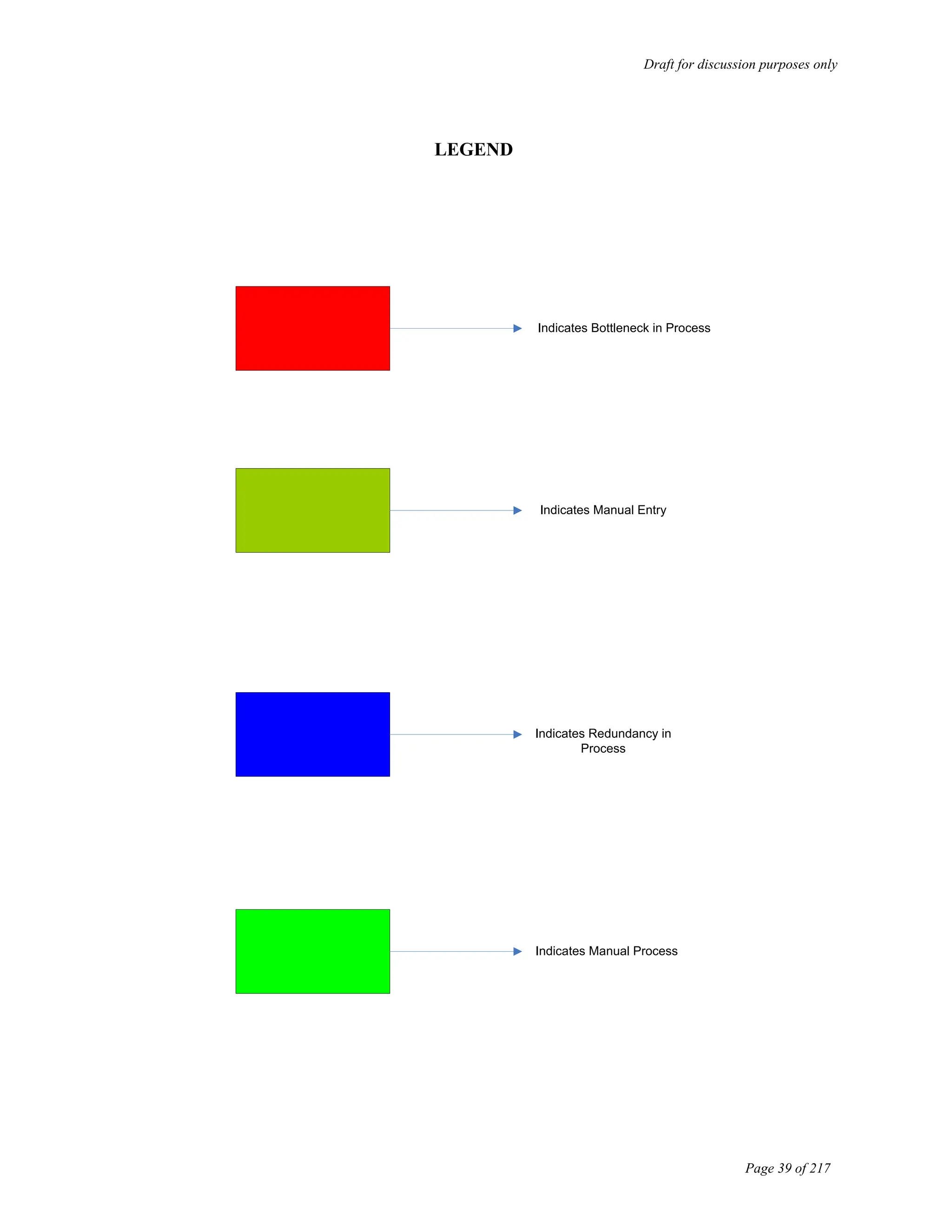
LEGEND
Indicates Bottleneck in Process
Indicates Manual Entry
Indicates Redundancy in
Process
Indicates Manual Process
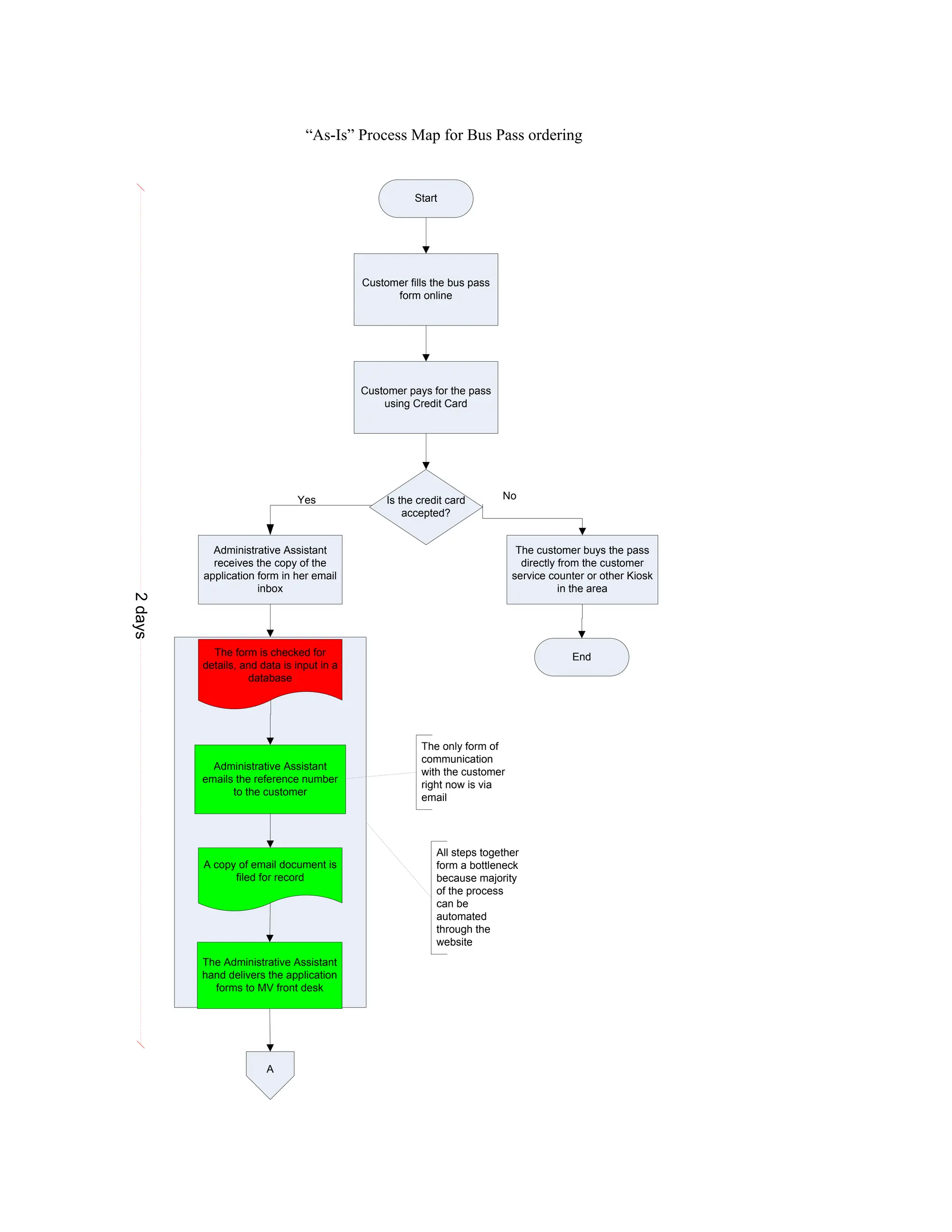
Customer fills the bus pass
form online
Customer pays for the pass
using Credit Card
Is the credit card
accepted?
Yes No
Administrative Assistant
receives the copy of the
application form in her email
inbox
The form is checked for
details, and data is input in a
database
A copy of email document is
filed for record
The Administrative Assistant
hand delivers the application
forms to MV front desk
Start
2
days
End
The only form of
communication
with the customer
right now is via
email
“As-Is” Process Map for Bus Pass ordering
A
The customer buys the pass
directly from the customer
service counter or other Kiosk
in the area
Administrative Assistant
emails the reference number
to the customer
All steps together
form a bottleneck
because majority
of the process
can be
automated
through the
website
Draft for discussion purposes only
Page 41 of 217
The customer service
department in MV mails the
buss pass to the customer
End
2
days
A
“As-Is” Process Map for Bus Pass ordering
Draft for discussion purposes only
Page 42 of 217
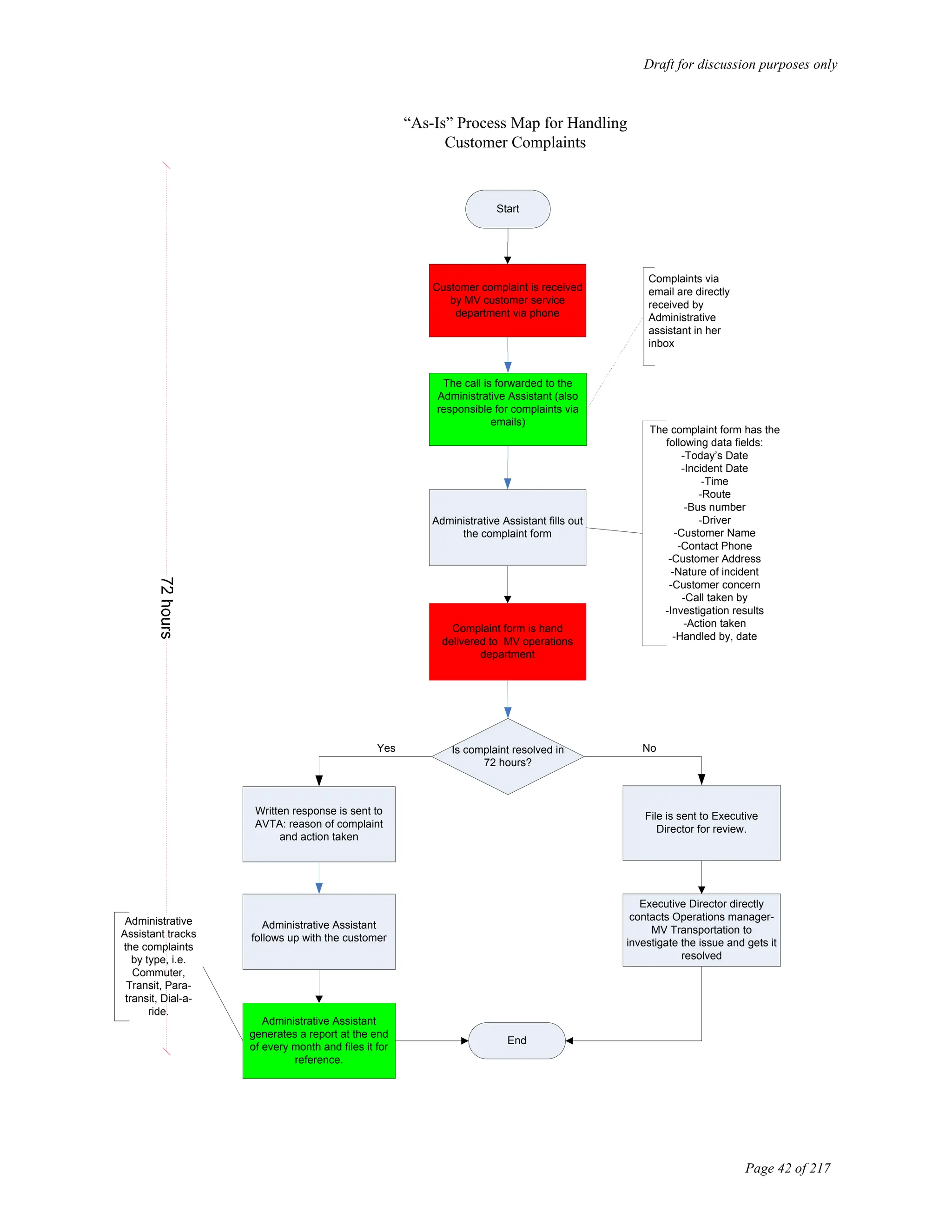
Customer complaint is received
by MV customer service
department via phone
Administrative Assistant fills out
the complaint form
Complaint form is hand
delivered to MV operations
department
Is complaint resolved in
72 hours?
File is sent to Executive
Director for review.
“As-Is” Process Map for Handling
Customer Complaints
Complaints via
email are directly
received by
Administrative
assistant in her
inbox
No
Yes
Start
Written response is sent to
AVTA: reason of complaint
and action taken
Administrative Assistant
follows up with the customer
The call is forwarded to the
Administrative Assistant (also
responsible for complaints via
emails)
The complaint form has the
following data fields:
-Today’s Date
-Incident Date
-Time
-Route
-Bus number
-Driver
-Customer Name
-Contact Phone
-Customer Address
-Nature of incident
-Customer concern
-Call taken by
-Investigation results
-Action taken
-Handled by, date
Executive Director directly
contacts Operations manager-
MV Transportation to
investigate the issue and gets it
resolved
Administrative Assistant
generates a report at the end
of every month and files it for
reference.
Administrative
Assistant tracks
the complaints
by type, i.e.
Commuter,
Transit, Para-
transit, Dial-a-
ride.
End
Draft for discussion purposes only
Page 43 of 217
Start
Finance Manager collates
information about the grant
money for next fiscal year
Finance Manager along with
Finance Assistant calculates
the budget for upcoming
projects
Grants are usually obtained
from two sources of 5307
money
Local Lancaster
UZA can provide
the grants
Grants are also
obtained from LA
UZA
Finance Manager applies
online for grants
FTA sends the grant
application file to the
Department of Labor for
review
Department of Labor sends
the file to Union
Organizations for approval
“As-Is” Grant approval process map
This information is obtained
from FTA in advance
Other possible sources are
‘BOS’ and ‘MTA’ call for
projects. The chances for
approval of grants from
these sources are slim.
A
They calculate cost and
allocate the budget for
different projects.
The application is sent
back and forth for
preliminary reviews,
checks and
verifications. This is
done through local FTA
administration in LA
Does Department of Labor
approve the grant?
No
Yes
1
30-40
days
Draft for discussion purposes only
Page 44 of 217
A
Once the unions approve the
grant, the file is sent to
Department of Labor to send
it to FTA
The grant is approved and
the organization is informed
by the local administrative
FTA office
Finance Department files
reimbursement for the
expenses already incurred.
Reimbursement can be
submitted only 3 days after
the grant is executed. FTA
requires this time period for
file processing
End
Do Union Organizations
approve the grant?
1
No
Yes
Finance Manager manually
matches the line items with
the grants allocated before
sending the expense
reimbursement file.
30-40
days
“As-Is” Grant approval process map
Draft for discussion purposes only
Page 45 of 217
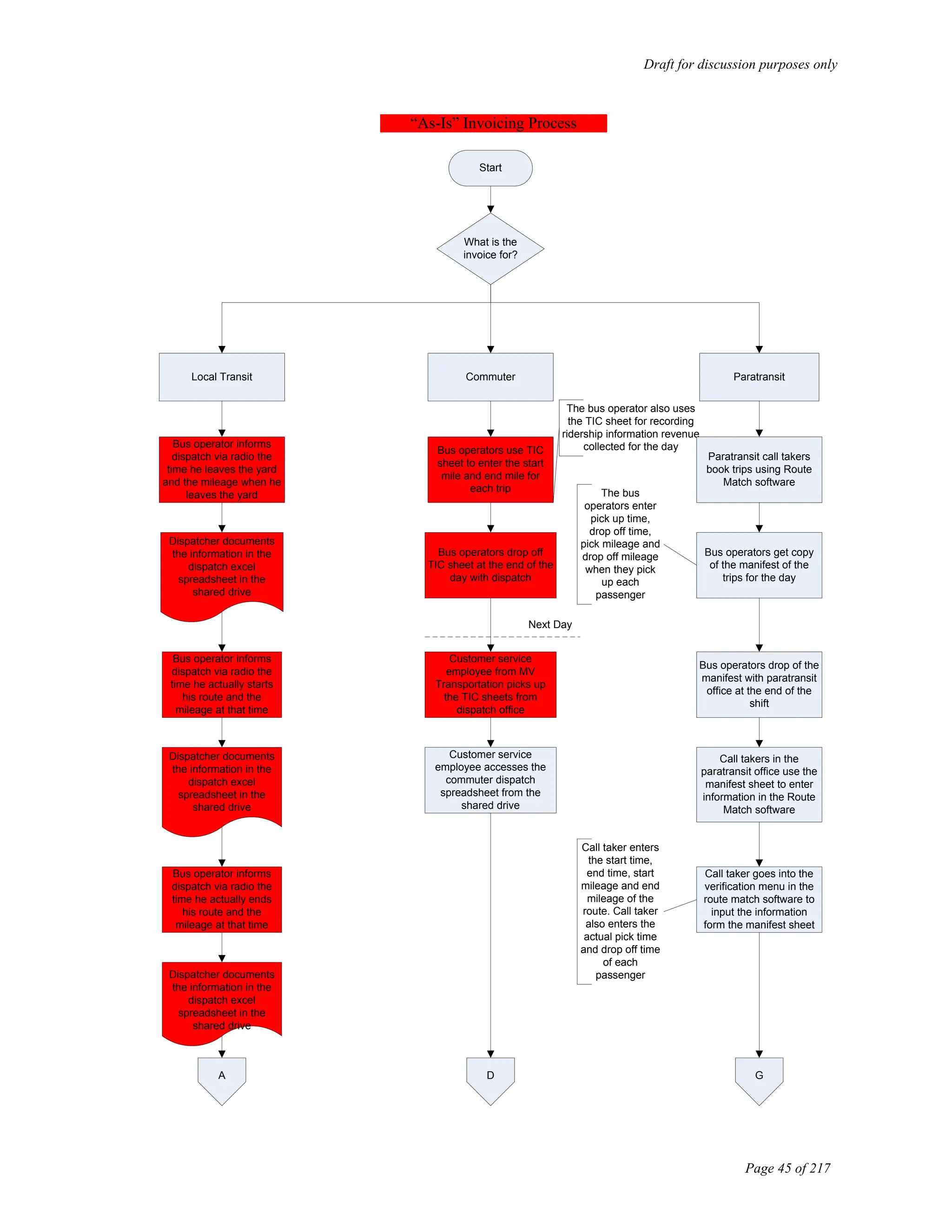
Start
What is the
invoice for?
Local Transit Commuter Paratransit
Bus operator informs
dispatch via radio the
time he leaves the yard
and the mileage when he
leaves the yard
Bus operator informs
dispatch via radio the
time he actually starts
his route and the
mileage at that time
Dispatcher documents
the information in the
dispatch excel
spreadsheet in the
shared drive
Bus operator informs
dispatch via radio the
time he actually ends
his route and the
mileage at that time
A
Bus operators use TIC
sheet to enter the start
mile and end mile for
each trip
The bus operator also uses
the TIC sheet for recording
ridership information revenue
collected for the day
Bus operators drop off
TIC sheet at the end of the
day with dispatch
Customer service
employee from MV
Transportation picks up
the TIC sheets from
dispatch office
Next Day
Customer service
employee accesses the
commuter dispatch
spreadsheet from the
shared drive
D
“As-Is” Invoicing Process
Dispatcher documents
the information in the
dispatch excel
spreadsheet in the
shared drive
Dispatcher documents
the information in the
dispatch excel
spreadsheet in the
shared drive
Paratransit call takers
book trips using Route
Match software
Bus operators get copy
of the manifest of the
trips for the day
Bus operators drop of the
manifest with paratransit
office at the end of the
shift
The bus
operators enter
pick up time,
drop off time,
pick mileage and
drop off mileage
when they pick
up each
passenger
Call takers in the
paratransit office use the
manifest sheet to enter
information in the Route
Match software
Call taker goes into the
verification menu in the
route match software to
input the information
form the manifest sheet
G
Call taker enters
the start time,
end time, start
mileage and end
mileage of the
route. Call taker
also enters the
actual pick time
and drop off time
of each
passenger
Draft for discussion purposes only
Page 46 of 217
A
Bus operator informs
dispatch via radio the
time he reaches the yard
and the mileage when he
reaches the yard
MV Transportation’s
customer service
employee accesses the
spreadsheet from the
shared drive
Next Day
Customer service
employee reviews and
cross checks if the
information entered was
accurate
Customer service
employee accesses the
service log spreadsheet
Customer service
employee manually totals
the number of hours from
dispatch spreadsheet for
each route and enters it
in the service log
spreadsheet
Was the
information
entered
correctly?
Customer
service
employee
makes the
changes
B
YES
NO
D
Customer service
employee manually
enters the information
from the TIC sheets into
the commuter dispatch
spreadsheet
The customer service
employee enters the mileage
information and time
information in the commuter
dispatch spreadsheet
Customer service
employee accesses the
commuter service log
spreadsheet from the
shared drive
Customer service
employee manually totals
the number of hours from
commuter dispatch
spreadsheet for each
route and enters it in the
service log spreadsheet
Customer service
employee manually
enters the revenue
information form the TIC
sheet into the service log
spreadsheet
At the end of the month
the customer service
employee prints out
reports from the Service
log spreadsheet
The employee hand
delivers the reports to
MV Transportations
office manager
The office manager
reviews the reports
E
“As-Is” Invoicing Process
Dispatcher documents
the information in the
dispatch excel
spreadsheet in the
shared drive
G
Call taker finishes
entering all the
information in Route
Match and initials the
manifest
Call taker supervisor
cross verifies if all the
information was entered
correctly
Was the
information
entered
correctly?
Call taker
supervisor
makes the
required
changes in the
route match
software
YES
Call taker supervisor
initials the manifest sheet
and leaves it for
customer service
employee from MV
Transportation to pick it
up
Next Day
MV Transportation
customer service
employee enters
information from manifest
sheet into an excel
spreadsheet in the
shared drive
Customer service
employee hand delivers
the manifest sheet to
AVTA’s Senior Analyst
H
NO
Draft for discussion purposes only
Page 47 of 217
Customer service
employee manually
enters the information
from the GFI report into
the service log
spreadsheet
B
Customer service
employee accesses GFI
computer
The employee prints out the
GFI report for the day which
gives the ridership and
revenue information for the
day
The employee enters this
information for each route
every day
At the end of the month
the customer service
employee prints out
reports from the Service
log spreadsheet
The employee prints out
reports of the vehicle miles
and revenue miles for the
month and the revenue
generated for the month
The employee hand
delivers the reports to
MV Transportations
office manager
The office manager
reviews the reports
Is all
information
entered
correct?
office manager
makes the
necessary
changes in the
service log
spreadsheet
NO
Finance assistant from
AVTA access the service
log spreadsheet from the
shared drive
C
E
Is the
information
entered
correct?
Finance assistant from
AVTA accesses the
service log spreadsheet
office manager
makes the
necessary
changes in the
service log
spreadsheet
NO
F
“As-Is” Invoicing Process
H
Senior Analyst uses
route match and
reviews the information
Senior Analyst
goes into the
verification menu
in route match
software to verify
the inputted
information
Was the
information
entered
correctly?
Senior Analyst
contacts the call
taker supervisor
to rectify the
error
Senior Analyst finalizes
the number of hours
and mileage and enters
it in the excel
spreadsheet in the
shared drive
NO
I
Finance assistant from
AVTA accesses the
excel spreadsheet from
the shared drive
Draft for discussion purposes only
Page 48 of 217
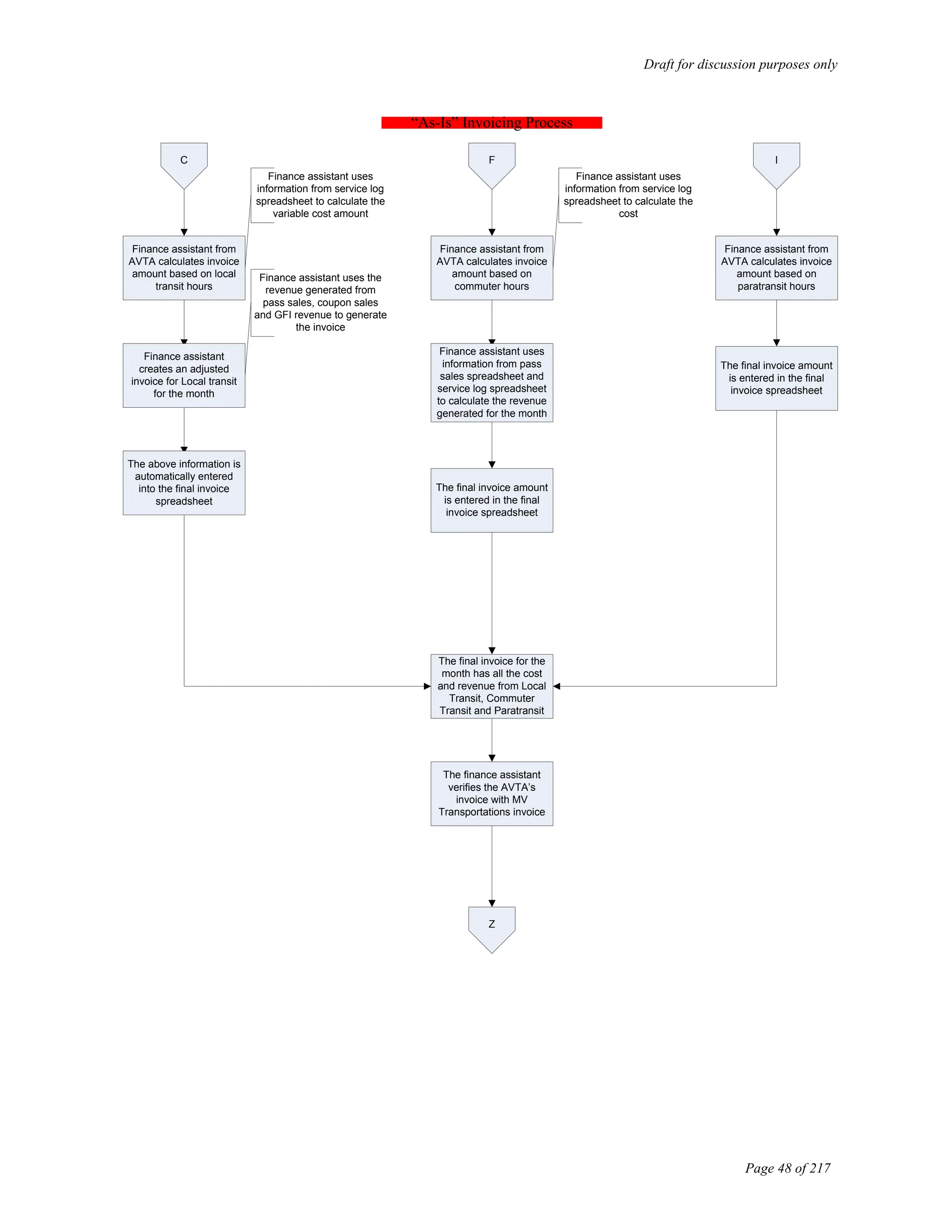
C F
Finance assistant from
AVTA calculates invoice
amount based on local
transit hours
Finance assistant
creates an adjusted
invoice for Local transit
for the month
Finance assistant uses
information from service log
spreadsheet to calculate the
variable cost amount
Finance assistant uses the
revenue generated from
pass sales, coupon sales
and GFI revenue to generate
the invoice
The above information is
automatically entered
into the final invoice
spreadsheet
Finance assistant from
AVTA calculates invoice
amount based on
commuter hours
Finance assistant uses
information from service log
spreadsheet to calculate the
cost
Finance assistant uses
information from pass
sales spreadsheet and
service log spreadsheet
to calculate the revenue
generated for the month
The final invoice amount
is entered in the final
invoice spreadsheet
The final invoice for the
month has all the cost
and revenue from Local
Transit, Commuter
Transit and Paratransit
The finance assistant
verifies the AVTA’s
invoice with MV
Transportations invoice
Z
“As-Is” Invoicing Process
I
Finance assistant from
AVTA calculates invoice
amount based on
paratransit hours
The final invoice amount
is entered in the final
invoice spreadsheet
Draft for discussion purposes only
Page 49 of 217
Z
Do both invoice
amounts match?
Finance Assistant cross
verifies with MV
Transportation’s office
manager to find out the
discrepancy
Finance Assistant makes
the payment to MV
Transportation
YES
NO
Finance Assistant fixes
the discrepancy
End
“As-Is” Invoicing Process
Draft for discussion purposes only
Page 50 of 217
Start
Finance Assistant gives passes to be sold for the
following month to MV Transportation
The finance assistant uses
an excel spread sheet to
track the number of passes
given out each month
MV Transportation collects the passes to be sold
Passes are sold through
Kiosks
Passes are sold through
Vendors
Passes are sold at the counter
in AVTA
Passes are sold by MV
Transportation employees in
different Kiosks
Kiosk salesman enters the
money collected from pass
sales and number of passes
sold in a sheet and gives it to
MV Transportation customer
service employee
Passes are sold during the
first three days of the month
and the last day of the
month
Customer Service employee
enter the information in a
separate excel spreadsheet
MV Transportation gives
passes to vendors to be sold
MV Transportation Office
Manager receives total
number of passes sold by
each vendor and enters it into
a separate excel spreadsheet
Customer buys passes
directly from AVTA office
MV Customer Service
employee enters the
information in a separate
excel spreadsheet
A B C
“As-Is” Process map for Pass Sales
Draft for discussion purposes only
Page 51 of 217
A
Customer service employee
forwards the excel spreadsheet to
the Office Manager
C
Customer service employee
forwards the excel spreadsheet to
the Office Manager
Office Manager combines all the
information and comes up with
total pass sales and revenue for
the month
B
End
“As-Is” Process map for Pass Sales
MV Transportation Office
Manager forwards the
spreadsheet to the Finance
Assistant
Draft for discussion purposes only
Page 52 of 217
Start
“As-Is” Payroll Process
A
Employees submit time
sheet to the Finance
Assistant
Finance Assistant manually
enters the information in an
excel spreadsheet
Finance Assistant e-mails
the spreadsheet to external
accountants
External Accountants
process payroll checks
External Accountants mail
pay stub to AVTA and await
approval from AVTA Finance
Manager for direct deposit of
pay
Finance
Assistant
enters the
vacation
information for
each employee
in an Excel
spredsheet
Finance Manager approves
direct deposit
Draft for discussion purposes only
Page 53 of 217
A
“As-Is” Payroll Process
Finance Assistant gives the
employees the pay stub and
vacation information stub
End
Draft for discussion purposes only
Page 54 of 217
Bus operator arrives at yard
and proceeds to assigned
bus
Start
The routes for bus operators
are fixed, however, the
buses are assigned by the
dispatcher
Bus operator performs pre
DVI inspection
Bus operator uses DVI
checklist and checks of each
item in the list after
inspection
Bus operator begins
scheduled route
Bus operator continues with
scheduled route
Bus operator completes
scheduled route and returns
back to yard
Bus operator completes post
DVI report
“As-Is” Operations without road calls
Bus operator leaves yellow
copy of DVI report in the bus
A
Operations Department
Utilities Department
Bus operator drops white
copy of DVI report with
dispatch
Draft for discussion purposes only
Page 55 of 217
1.
A
Service employee drives the
bus to the fuel lane for
refueling the bus
Service employee refuels the
bus using fuel force system
Service employee enters the
following information in the
fuel force system:
-Bus Number
-Mileage
-Employees last four digits of
social security number
- Pump number
Does the system accept
the information?
Employee starts fueling the
bus
Service employee places the
system on bypass
YES
NO
Service employee also
enters the date and mileage
of the bus in a vehicle fuel
log sheet
X
“As-Is” Operations without road calls
Draft for discussion purposes only
Page 56 of 217
X
Employee starts to clean the
bus
A check list of the cleaning
activity to be done is posted
outside the utility
supervisor's room which is
not followed by the
employees
Employee re- fuels and
cleans the bus
Employee based on his/her
own judgment decides
whether or not to take the
bus for washing
Is the bus taken
for a wash?
YES
NO
The employee drives the bus
to the bus wash facility
The employee drives the bus
to the yard, parks it facing
north
Bus is washed
“As-Is” Operations without road calls
Maintenance Department
Utilities Department
Y
The bus wash
system needs
be adjusted to
fit the specific
mode of transit
bus. This is
almost never
followed by the
utility crew
Draft for discussion purposes only
Page 57 of 217
Y
Assistant Maintenance
Manager (AMM) picks up all
DVI reports from dispatch at
the end of the day
AMM reviews all DVI reports
AMM based on experience
decides if bus needs to be
repaired immediately
Is the bus to be
repaired
immediately?
Are any problems listed by
the bus operator in the DVI
report?
YES
NO
AMM signs and files the
report
AMM schedules the bus to
be repaired at a future date
AMM manually creates a
work order based on the DVI
report
YES
NO
End C
“As-Is” Operations without road calls
Lack of tracking
mechanism to follow
up on the repair
Collective
data
application is
not used to
generate
work order
Draft for discussion purposes only
Page 58 of 217
C
Assigns a mechanic to the
work order and leaves the
work order in the front office
of the shop floor
Mechanic collects the work
order and proceeds to pick
up the bus from the yard
Mechanic brings the bus to
the shop floor
Mechanic starts repair/
maintenance work on the
bus
Are parts
needed?
E D
YES
NO
“As-Is” Operations without road calls
Attaches the white
DVI report to the
work order
Draft for discussion purposes only
Page 59 of 217
D
Mechanic fills out a parts
sign out sheet in the
inventory room and picks the
parts he needs from the bins
E
Mechanic continues repair/
maintenance work with the
bus
Is the repair work
completed?
Mechanic hands over the
work order to assistant
maintenance manager
Mechanic hands over the
work order to the assistant
maintenance manager
AMM enters the time he
received the work order in a
log
YES
NO
AMM signs the work order
and DVI and keeps it for the
Maintenance Clerk to pick up
Maintenance Clerk picks up
all the DVI’s from previous
night from the shop floor
Maintenance Clerk inputs
the information in an excel
spreadsheet and files the
hard copies of DVIs and
work orders
AMM enters in the work
order for work to be
completed in the next shift or
the following day
End
End
“As-Is” Operations without road calls
Next Day
Maintenance Department
Accurate time spent by the
mechanic on a job cannot be
recorded
Maintenance clerk does not
use collective data to enter
the information
Draft for discussion purposes only
Page 60 of 217
“As-Is” Operations with road calls
Bus operator arrives at yard
and proceeds to assigned
bus
Start
The routes for bus operators
are fixed, however, the
buses are assigned by the
dispatcher
Bus operator does pre DVI
inspection
Bus operator uses DVI
checklist and checks of each
item in the list after
inspection
Bus operator begins
scheduled route
Does bus operator
experience problems
with the bus?
Bus operator contacts
dispatch via radio
YES
Bus operator continues with
scheduled route
Dispatcher asks the bus
operator the nature of the
problem and his/her current
location
Dispatcher fills in the
information in a road call
information sheet
NO
A
End
Draft for discussion purposes only
Page 61 of 217
A
Dispatcher calls the
maintenance department
and informs them of the road
call and the nature of the
problem
Maintenance department
assigns a mechanic to
handle the road call
The mechanic may or may
not pick up the road call
information sheet from the
dispatch office before leaving
to attend the road call
Most of the times the
mechanics do not pick up the
road call information sheet
from the dispatch office
Mechanic evaluates the
nature of the problem
Can the
mechanic repair
the bus?
Mechanic repairs the bus
and informs dispatch via
radio after the repair is
completed
Mechanic informs dispatch
via radio that bus cannot be
repaired on road
YES
Bus operator continues with
schedule route
End
NO
Dispatcher records the
information in a service
interruption log
B
“As-Is” Operations with road calls
Draft for discussion purposes only
Page 62 of 217
B
Dispatcher sends a tow truck
to the road call location to
tow the bus back to the yard
Tow truck tows the bus back
to the yard
Mechanic takes the bus to
the shop floor for repair
End
“As-Is” Operations with road calls
Dispatcher also
sends a switch out
bus and the bus
operator continues
with the scheduled
route
Draft for discussion purposes only
Page 63 of 217
“As-Is” Process for Paratransit dispatch
Start
Customer calls paratransit
customer service
Call taker answers the call
and asks the customer if he/
she needs DAR or Access
service
Does customer know
type of service he/she
requires?
Customer informs the call
taker the type of service he/
she requires
YES
NO
Call taker asks the
customers first and last
name to look up the type of
service in the Route Match
Software
Can the call taker identify
the type of service from
Route Match software?
A
B
Draft for discussion purposes only
Page 64 of 217
“As-Is” Process for Paratransit dispatch
A
Call taker reviews the
eligibility file to identify if the
customer has applied for the
service
Call taker pulls up
customer’s information in the
Route Match software
YES
NO
Has the customer
applied for the service?
Call taker enters the
customer information in the
Route Match software
Call taker informs the
customer to apply for the
service
YES
NO
Call taker mails an
application form to the
customer
End
Call taker accesses the Trips
module in the Route Match
software
B
Call taker asks the customer
the time and location he/she
wants to be picked up
Call taker enters the
information in the software
Call taker clicks the
recommendation button to
view recommended times
given by the software
C
Draft for discussion purposes only
Page 65 of 217
C
“As-Is” Process for Paratransit dispatch
Call taker informs the
customer of the available
times
Does the software
display recommended
times for pick up?
Call taker manually check for
available times
YES
NO
Based on the customers
preference the call taker
confirms trip
Call taker gives the customer
a confirmation number
Does the call taker
find any available
time for pick up?
YES
DAR customers are informed
about unavailability of time
and are asked to try a
different date
NO
Call taker books the
customer for the requested
time
Even though there are no
available times the call taker
books the trip as ADA
regulations does not allow a
Access customer to be
denied a ride
Scheduling employee
towards the end of day
accesses the scheduling
module
The employee manually
checks if the Access
customer’s time can be
accommodated
D
Employee manually checks if
multiple passengers can be
picked up around the same
time
Is this an Access
customer?
Customer is declined a ride
End
NO
YES
End
Draft for discussion purposes only
Page 66 of 217
“As-Is” Process for Paratransit dispatch
D
Can the
employee
allocate a
time?
The ride is left unscheduled
The employee finalizes the
time for the Access customer
YES
NO
The following
day, if there
are any
cancellations
the Access
riders trip is
covered, or
the Access
rider is picked
up late
The employee reviews all the
trips confirmed during the
day
The employee manually
makes changes to the
schedule to optimize the trips
The employee
calls the
concerned
customer and
gets their
approval
before
changing the
trip times for
optimization
The employee prints out a
manifest sheet and places it
in the bin
Each operator
receives a
manifest sheet
with the days
schedule in it
Bus operators pick up the
sheet and begin their
scheduled route
End
Draft for discussion purposes only
Page 67 of 217
“As-Is” Process for Paratransit dispatch
D
Can the
employee
allocate a
time?
The ride is left unscheduled
The employee finalizes the
time for the Access customer
YES
NO
The following
day, if there
are any
cancellations
the Access
riders trip is
covered, or
the Access
rider is picked
up late
The employee reviews all the
trips confirmed during the
day
The employee manually
makes changes to the
schedule to optimize the trips
The employee
calls the
concerned
customer and
gets their
approval
before
changing the
trip times for
optimization
The employee prints out a
manifest sheet and places it
in the bin
Each operator
receives a
manifest sheet
with the days
schedule in it
Bus operators pick up the
sheet and begin their
scheduled route
End
Draft for discussion purposes only
Page 68 of 217
A need for part arises
He enters the number of
parts taken and signs the
sheet
Parts Manager takes a count
of the parts signed out from
the bin
Parts Manager enters the
parts count on the daily parts
list
Mechanic goes to the parts
room
Parts Manager collects all
signed out sheets from the
parts room
This is done on a excel
spreadsheet
Start
“As-Is” Inventory management process map
A
Next Day
Mechanic signs for the part
in the sign out sheet
These steps delineate a lack
of control in the inventory
process
Draft for discussion purposes only
Page 69 of 217
Parts Manager contacts
multiple vendors to get the
lowest price quote
After the price and
specifications are finalized,
the Parts Manager submits
the Purchase Order
Parts are placed in the
shelves
Parts are recorded in the
master parts spreadsheet
B
This can be a
vendor with
whom the
maintenance
department has
purchased before
or a new vendor
Parts are given
bin number for
inventory
management
Are the ordered parts
received?
Yes No
Parts Manager calls the
vendor to ship the parts
At times parts are
back ordered and
are shipped in 2nd
or 3rd
shipment.
Vendor ships the parts
A
Parts Manager subtracts the
daily count of parts with the
master parts list
Parts are ordered at Parts
Managers discretion
“As-Is” Inventory management process map
Draft for discussion purposes only
Page 70 of 217
B
Parts Manager checks the
invoice against the packing
list
Invoices are coded with
accounting codes
Invoices are recorded for
weekly expense reports
The parts manager manually
hands the weekly expense
report to maintenance clerk
for report generation
The report is sent to
Maintenance Manager for
review
Reports are filed for records
and future references
End
Usually the invoice
is received 2-3
days after the parts
are delivered
“As-Is” Inventory management process map
Control issue: Same employee is responsible for
ordering, receiving and approving parts
Draft for discussion purposes only
Page 71 of 217
Start
Operations Manager stores
the scheduling information
on the shared drive in excel
spreadsheet
Bus operators continue on
scheduled routes
Routes are prepared every
six months
Bus operators bid for routes
on the basis of seniority
“As-Is” process map for fixed route
scheduling & dispatching
Bidding is done in the
presence of operations
manager and union
representative
Does a need for
vacation arise?
Bus operators submit time
off request to operations
manager
A
No Yes Time-off request
should be
submitted by
Wednesday
before noon, one
week in advance
Operations Manager
prepares the schedule of all
routes using excel
spreadsheet
The schedule is hand
delivered to dispatch
Draft for discussion purposes only
Page 72 of 217
A
Operations Manager collects
the time off requests
The Operations Manager
reviews the schedule
Two stand by
drivers are
present. Existing
drivers are paid
overtime if they
are assigned shift
“As-Is” process map for fixed route
scheduling & dispatching
Operations Manager
approves the time off request
Can Operations
Manager allocate time
off request?
Time off request is not
approved
No Yes
End
End
Bus operators continue on
scheduled routes
Operations Manager
forwards the shift
acknowledgement receipt to
dispatch
Bus operators do
not check their
mail boxes most
of the times
Operations Manager
reschedules using excel
spreadsheet
Shift acknowledgement
forms are placed in the bus
operators mail boxes
Draft for discussion purposes only
Page 73 of 217
Start
The bus operator performs a pre-
trip inspection and records the
findings in DVI book
Bus operator informs dispatch
about the problem and the bus is
not scheduled for service
The bus operator writes any
defects during the post-trip
inspection on the DVI log
The bottom copy of DVI is left in
the bus for repair.
At the end of the shift the bus
operator parks the bus in the
waiting service area.
The buses are cleaned and fueled
and parked on the running rows
facing south. The buses with
defects are parked in the “out of
service” area.
A
DVI Process-Maintenance Manual
Is there are problem with
the bus?
Bus operator continues with the
route
End
No Yes
The manual does not
specify the owner of the
top copy of the DVI in the
Operations Department
The manual does not specify
what the bus operator
records in the DVI
The top copy is delivered to
operations department
Draft for discussion purposes only
Page 74 of 217
A
The Foreman or Supervisor picks
up the DVI forms from dispatch
The Foreman or Supervisor
checks the vehicle to verify the
defects. Findings of the defect are
noted in the DVI log
The Foreman or Supervisor
issues a work order and attaches
the DVI
The mechanic signs both
copies of DVI once the repair
is done
Is the bus repaired?
If the repair is deferred, the
Foreman records the defect and
files a copy of the report in the
pending file. The bus is now
returned to the ready line
The Assistant Maintenance
Manager (AMM) reviews all DVIs
at the end of the shift to make
sure that all defects have been
addressed
No Yes
The foreman/
supervisor signs
off both DVI
forms to show the
actions taken
Are all the defects in the
buses repaired?
B
The bus is assigned to a
mechanic for repair
1
End
Though the repair
is deferred, the
bus is returned to
the ready line.
DVI Process-Maintenance Manual
The manual does not specify
how a work order is issued,
from where it is issued and
the data fields that need to
be completed before issuing
a work order
Draft for discussion purposes only
Page 75 of 217
B
The AMM includes all the
paperwork for the day including
the DVIs, and his/her work log for
the maintenance manager for
review
If all the repairs are not fixed then
the bus is scheduled to be
repaired in the next shift
No Yes
The Maintenance Manager
reviews all the DVIs on a daily
basis including the assistant
managers log to follow up on
open DVIs
Are all the repairs
completed?
The reviewed DVIs for the day are
filed
The deferred repairs are
completed, the work order and
DVI copy are filed
All DVI reports are kept in the bus
file for the life of the contract. The
remaining files are stored by year,
and kept in storage
Bus files consists of a
current file which holds
the current six months
and history file that
contains previous six
months
End
No Yes
1
DVI Process-Maintenance Manual
The manual does not
specify if the work order
should be closed
Draft for discussion purposes only
Page 76 of 217
Start
Bus operator reports a road
call to dispatch
Dispatcher asks the driver a
series of questions to
complete the road call report
Once the report is completed
the call is transferred to the
Maintenance Department
A representative from the
Maintenance Department
immediately picks up a copy
of road call report
A mechanic is dispatched to
the bus within 15 minutes of
the bus operator reporting
the road call
The dispatcher at the same
time enters the information
onto a service interruption
log
The dispatcher will try to
assist the bus operator to
bring the bus safely to the
shop; however, if this is not
possible the maintenance
department is contacted
Road Call Process Map--Maintenance Manual
The mechanic will do one of
the following three things
once he reaches the bus
A
Mechanic will work with
dispatch and maintenance to
decide the best course of
action
In the case of
major accident
the maintenance
department
follows Safety
Department’s
accident
response
processes
Draft for discussion purposes only
Page 77 of 217
A
Repair and return the
bus to service
Repair but return the
bus to the shop for
further repairs
Have the bus towed
back to the shop
When the bus is returned to the
yard, the maintenance team
inspects to ensure the problem is
corrected.
A repair order showing the
findings is attached to the
road call report
No report is
issued because
the bus remained
in service, that is
noted on the work
order
At the end of the shift the
Assistant Maintenance
Manager(AMM) reviews the
service interruption log
AMM ensures thatall the buses
noted on the log have been
repaired, if not then the bus is
assigned to a mechanic for repair
If the buses are not repaired by
the end of the shift, they are
turned over to the next shift
All the switch-outs documents are
accounted and submitted to the
Maintenance Manager
B
Road Call Process Map--Maintenance Manual
Bus continues with its
route
End
Draft for discussion purposes only
Page 78 of 217
B
The switch-out documents are
presented to Contract Compliance
Manager at AVTA on a weekly
basis
End
Road Call Process Map--Maintenance Manual
Draft for discussion purposes only
Page 79 of 217
Start
Vehicle servicing and
detailing duties are
performed two times a day
Mid day servicing
and detailing
Evening servicing
and detailing
Vehicle servicing and
detailing duties are
performed by a team of
service and detailing
personnel
Monday thru
Friday shifts
consist of both
service and detail
crew. Saturday
and Sunday there
is limited service
crew
Monday thru Friday shifts are
supervised by the Service
Supervisor
The Service Supervisor
assigns the buses to the
detailing crew based on
schedule
The crew has to follow the
check list that consists of:
-Sweeping
-Mopping
-Wiping dashboard
-Wiping grab rails
-Checking oil, transmission
and coolant
-Fueling
-Servicing the lavatory
-Wiping bus interior
-Washing bus exterior based
on schedule
-Vaulting Fare box
-Recording mileage, fuel and
fluids
The detailing check list
consists of:
-Checking vehicles for
damage--inside and outside
-Pressure washing the bus
-Hand washing the exterior
including wheels
-Washing the ceiling
-Washing all the walls
-Cleaning all the windows
-Cleaning driver area, seats,
and wheelchair
-Clean the floor and the
steps,
-Clean the inside of all
passenger doors.
The utility crew services and
details the bus
A
B
Servicing and Detailing process-Maintenance manual
Draft for discussion purposes only
Page 80 of 217
A B
The bus is parked in the ”out
of service” area. The
Maintenance department is
also informed about any
exterior damages found
during servicing.
The bus is parked in the
ready lines with all the doors
and windows closed facing
south.
The Service Supervisor
monitors the servicing and
detailing process, inspects
and signs off on the buses
throughout the shift
At the end of the shift the
Service Supervisor checks
that all buses have been
serviced, recorded properly
and parked according to their
service status
The service
supervisor is
responsible to
ensure that the
assigned duties
are performed
properly.
Does the bus have a
DVI report with write-
ups?
Yes No
End
The utility crew services and
details the bus
The crew has to follow
servicing the check list that
consists of:
-Removing trash
-Checking fluids
-Fueling buses
-Wiping windshield and
mirrors
-Washing exterior if time
allows
The detailing check list
consists of:
-Checking vehicles for
damage--inside and outside
-Pressure washing the bus
-Hand washing the exterior
including wheels
-Washing the ceiling
-Washing all the walls
-Cleaning all the windows
-Cleaning driver area, seats,
and wheelchair
-Clean the floor and the
steps,
-Clean the inside of all
passenger doors.
The Service Supervisor
signs off indicating the
service completion and
returns bus to ready line
A log is kept of buses that
were serviced midday
The log is handed to the
Foreman at the end of the
midday servicing shift
Servicing and Detailing process-Maintenance manual
Draft for discussion purposes only
Page 81 of 217
“To-Be” Process Maps
Draft for discussion purposes only
Page 82 of 217
Start
Invoices are for three modes
of transportation
Local Transit Commuter Paratransit
“To-Be” Invoicing Process
ITS systems populates the
route start time and mileage
A
Bus
Operators for
verification of
data record
start/end time
in a sheet.
Commuter
buses have GFI
systems
installed in it.
Paratransit Call Takers book
trips using Route Match
software
Bus operator logs in the
system and receives his
schedule
ITS populates the database
with the days activities
C
ITS systems populates the
route end time and mileage
ITS systems populates the
time and mileage when the
bus enters the yard
ITS database is populated
with the information
Revenue figure is audited
through the interface
between GFI and APCs
AVTA’s Senior Analyst
verifies the report at the end
of every month through the
application software
Finance Assistant accesses
the software application
while making a payment
Draft for discussion purposes only
Page 83 of 217
A
Office Manager verifies the
reports
Next Day
Are reports correct
Office Manager cross checks
the information with system
No
“To-Be” Invoicing Process
Finance Assistant at the end
of the month accesses the
application software
Is the information
accuratet?
Finance Assistant makes the
payment to MV
Transportation
Contacts MV
department to
correct the
information
No
End
C
Finance Assistant makes the
payment to MV
Transportation
Draft for discussion purposes only
Page 84 of 217
“To-Be” Pay Roll Process
Start
Security system generates
bi-weekly payroll information
Time and attendance system
is integrated with security
system
Finance Assistant based on
the payroll information
generated pay stubs and
vacation stubs
Finance Manager authorizes
direct deposit
End
Draft for discussion purposes only
Page 85 of 217
Start
Need for part arises
Maintenance Manager
creates parts request
Are parts in inventory?
Parts requisition is sent to
the Parts Manager
Parts are issued to
Maintenance department
End
Parts Manager creates a
purchase order
Yes
No
There is a
specified list of
Vendors from
whom the parts
are purchased
Parts are received by the
Shift Manager
“To-Be” Parts requisition process map
Parts department bar codes
the parts
Bar codes are scanned and
parts are automatically
recorded in the inventory
A
Draft for discussion purposes only
Page 86 of 217
A
Inventory is automatically
updated with new parts
End
“To-Be” Parts requisition process map
Draft for discussion purposes only
Page 87 of 217
Start
Parts are used for bus
repairs
Is inventory below
specified level?
Inventory count is
automatically updated when
the parts are checked out
A purchase order is
generated
End
Purchase order is issued to
the Vendor
Vendor receives the
purchase order
Vendor ships the parts
A
Manual order is placed for
rarely used parts
“To-Be” Inventory level process map
Purchase order is generated
by the software application
Purchase order is approved
by the Parts Manager
No Yes
Draft for discussion purposes only
Page 88 of 217
A
P.O., invoice and packing
slip is verified
Bar codes are scanned and
parts are entered in the
inventory
Inventory is automatically
updated with new parts
End
“To Be” Inventory level process map
Parts are received by the
Parts department
Draft for discussion purposes only
Page 89 of 217
Start
A need for part arises
The Mechanic hands the
parts request to the Parts
Supervisor
Parts Supervisor goes to the
parts room
Parts Supervisor scans the
parts through the scanner
and hands them to the
Mechanic
The information is
transferred from the scanner
to inventory database
Parts information is
automatically updated in the
inventory database
For night shift, parts request
is handed to the Shift
Incharge
“To-Be” process map for Inventory Management
Scanner is a part of
Inventory management
application
A
1
Draft for discussion purposes only
Page 90 of 217
A
“To-Be” process map for Inventory Management
Are parts below
specified inventory
level?
The application will only
update the inventory count
No Yes
For common parts the
application generates a
purchase order for
specified vendor. For parts
that are rarely used, the
Parts Manager has to
place an order
The application updates the
database with a new
inventory count
Parts Manager reviews the
inventory count at the end of
the day
The Parts Manager can view/print the
following reports
-Name and number of parts used.
-Purchase Orders generated
-Low inventory count of rarely used
parts
-Inventory balance
Parts Manager orders any
‘rare’ parts for which a
purchase order has not been
generated
Parts Manager emails all the
reports of the day to the
Maintenance Manager
End
A purchase order is
automatically generated
Is the purchase order
sent to the Vendor?
Vendor receives the
purchase order
No Yes
Vendor ships the parts
Parts are received by the
Parts department
Parts department bar codes
the parts
Bar codes are scanned and
parts are automatically
entered in the inventory
The inventory is
automatically updated with
the new parts
1
Maintenance
Manager can also
access the reports
using the inventory
management
application
Draft for discussion purposes only
Page 91 of 217
“To-Be” Operations without road calls
Bus Operator arrives at yard
and proceeds to assigned
bus
Start
The routes for Bus Operators
are fixed, however, the
buses are assigned by the
Dispatcher
Bus Operator does pre DVI
inspection
Bus Operator uses DVI
checklist and checks of each
item in the list after
inspection
Bus Operator begins
scheduled route
Bus Operator continues with
scheduled route
Bus Operator completes
scheduled route and returns
bus to yard
Bus Operator completes post
DVI report
Bus Operator leaves yellow
copy of DVI report in the bus
and drops off white copy of
DVI report in Dispatch office
A
Draft for discussion purposes only
Page 92 of 217
“To-Be” Operations without road calls
A
Service employee drives the
bus to the fuel lane for
refueling the bus
Service employee refuels the
bus using fuel force system
Service employee enters the
following information in the
fuel force system:
-Bus Number
-Mileage
-Employees last four digits of
social security number
- Pump number
Does the system
accept the
information?
Employee starts fueling the
bus
YES
NO
Service employee also
enters the date and mileage
of the bus in a vehicle fuel
log sheet
X
Service employee contacts
Utility Supervisor to
troubleshoot the problem
Utility Supervisor
troubleshoots the problem
Draft for discussion purposes only
Page 93 of 217
“To-Be” Operations without road calls
X
Employee starts to clean the
bus
A check list of all cleaning
activities to be performed is
given to the service
employee
Employee checks of each
activity in the check list once
he/she completes them
Employee finishes fueling
and cleaning the bus
Employee leaves the check
list in the bus with their
initials
Employee takes the bus to
bus wash facility
Bus is washed
The employee drives the bus
to the yard, parks it in Quality
Assurance Service Line
C
Draft for discussion purposes only
Page 94 of 217
“To-Be” Operations without road calls
C
Utility Supervisor does a
quality assurance check on
all the buses parked in the
quality assurance line
Utility Supervisor reviews the
checklist and inspects if all
the said activities were
completed
Does the bus pass Quality
Assurance Check?
Utility Supervisor fails the
bus for quality assurance
Utility Supervisor initials the
checklist and keeps it for
filing
YES
NO
Utility Supervisor writes
down the reason in the
check list for failing the bus
for quality assurance
Utility Supervisor informs the
concerned service employee
of the problem
Service employee picks up
the bus from the quality
assurance line and rectifies
the problem
D
Maintenance Clerk picks up
all the check lists and files
them
End
1
Utility Supervisor based on a
pre defined disciplinary
action manual, decides if the
concerned employee needs
disciplinary action or if he
requires additional training.
The action taken is recorded
in a disciplinary action sheet
and forwarded to HR
department.
Draft for discussion purposes only
Page 95 of 217
“To-Be” Operations without road calls
D
Service employee parks the
bus in the quality assurance
line
Utility Supervisor inspects
the bus again for quality
assurance and initials the
check list
1
Maintenance Shift
Supervisor picks up all DVI
reports from dispatch at the
end of the day
Shift Supervisor reviews all
DVI reports
Are there any problems
listed by the bus operator in
the DVI report?
E
Draft for discussion purposes only
Page 96 of 217
“To-Be” Operations without road calls
E
Shift Supervisor based on
repair priority list decides if
the bus needs to be repaired
immediately
Is the bus to be
repaired
immediately?
Shift Supervisor generates a
work order using the
maintenance application
YES
Shift Supervisor enters the
nature of the problem and
future date of repair in the
maintenance application
NO
DVI copy is kept for filing
Maintenance application
automatically sends an E-
Mail to the Maintenance
Manger and the Shift
Supervisors a week before
the repair is due
End
Shift Supervisor assigns a
mechanic to the job using
the maintenance application
Mechanic accesses the
maintenance application and
finds out the nature of the
problem
Mechanic brings the bus to
shop floor
F
YES
Shift Supervisor keeps the
DVI’s for Maintenance Clerk
to pick up
NO
3
Draft for discussion purposes only
Page 97 of 217
F
Mechanic conducts repair
work on the bus
Are parts
needed?
Mechanic fills out parts
request sheet and gives to
Parts Supervisor
Mechanic continues with
repair work
Parts Supervisor hands the
Mechanic the requested part
Is the repair
work
completed?
Mechanic enters in the
maintenance application the
time he finished the job and
notes if any about the job
YES
Mechanic informs Shift
Supervisor about job not
being completed
NO
Shift Supervisor makes a
note in the maintenance
application and assigns the
job to the next shift
G
Shift Supervisor prints a
copy of the completed work
order attaches it to the DVI
Maintenance Clerk picks up
all information from previous
night and files them
End
“To-Be” Operations without road calls
3
Next Day
YES
NO
Draft for discussion purposes only
Page 98 of 217
G
Next Shift Supervisor
accesses the maintenance
application to find out about
outstanding repair jobs
Shift Supervisor assigns jobs
to Mechanics in the
maintenance application who
complete the job
End
“To-Be” Operations without road calls
Note: There are a lot of process breaks currently in the operations without road calls. The To-Be map
delineates step by step how each activity in the process needs to be performed.
Draft for discussion purposes only
Page 99 of 217
“To-Be” Operations with road calls
Bus Operator arrives at yard
and proceeds to assigned
bus
Start
The routes for Bus Operators
are fixed, however, the
buses are assigned by the
Dispatcher
Bus Operator does pre DVI
inspection
Bus Operator uses DVI
checklist and checks off
each item in the list after
inspection
Bus Operator begins
scheduled route
Does Bus Operator
experience problems
with the bus?
Bus Operator contacts
Dispatch via radio
YES
Bus Operator continues with
scheduled route
Dispatcher asks the bus
operator the nature of the
problem and his/her current
location
NO
A
End
Dispatcher enters the
information in the
Maintenance Software
The information is
entered in the
‘road calls’ module
of maintenance
software
Draft for discussion purposes only
Page 100 of 217
A
Dispatcher calls the
Maintenance department
and informs them of the road
call and the nature of the
problem
Maintenance department
prints out the road call
information from the
maintenance software
Mechanic evaluates the
nature of the problem
Can the
Mechanic repair
the bus?
Mechanic repairs the bus
and informs dispatch via
radio after the repair is
completed
Mechanic informs dispatch
via radio that bus cannot be
repaired on road
YES
Bus operator continues with
schedule route
End
NO
B
“To-Be” Operations with road calls
Dispatch records the
information in the
maintenance software
A Mechanic is sent to attend
the road call
Dispatchers enters
the information in
maintenance
software
Draft for discussion purposes only
Page 101 of 217
B
Dispatcher sends a tow truck
to the road call location to
tow the bus back to the yard
Tow truck tows the bus back
to the yard
“To-Be” Operations with road calls
Dispatcher also
sends a switch out
bus and the bus
operator continues
with the scheduled
route
Maintenance team inspects
the bus
A repair order is generated
and the bus is assigned to
the Mechanic for repair
Shift Supervisor inspects all
the buses
Repair order is
generated using
the maintenance
software
Are all the buses
repaired?
Buses are assigned to the
next shift for repair
Maintenance Manager
reviews road call/repair
information for the day using
maintenance software
YES
NO
Maintenance Manager mails
the report for road calls to
the Contract Compliance
Manager on a daily basis
Contract Compliance
Manager can also
access the maintenance
software for updated
reports anytime
End
Shift Supervisor enters the
repair information in the
maintenance software
Draft for discussion purposes only
Page 102 of 217
IT Policies and Procedures
Draft for discussion purposes only
Page 103 of 217
Antelope Valley Transit Authority
Information Technology Strategic Plan
Information Technology Policies and Procedures
The information technology policies and procedures for AVTA detail development and
implementation of information security policies, standards, controls, procedures, and practices
defined in Information Technology Resources in order to protect AVTA IT resources. It is
essential for AVTA to have IT polices and procedures for:
• E-mail management, archiving, configuration, account administration, and
password integrity
• Internet usage policy
• Hardware/software procurement
• System and data integrity
• Data backup policy
• Wireless networking policy
• License Management Procedure
A. E-mail management, archiving, configuration, account administration, and password
integrity:
The purpose of this policy is to ensure the proper use of e-mail system by the management, staff
and employees of AVTA. Users have the responsibility to use this resource in an efficient,
effective, ethical and lawful manner. Use of the AVTA's e-mail system confirms the user's
agreement to be bound by this policy. Violations of the policy may result in restriction of access
to AVTA’s e-mail system and/or other appropriate disciplinary action. Further, AVTA reserves
the right to amend this policy at its discretion. In case of amendments, users will be informed
appropriately.
It is strictly prohibited:
• If you send emails with any libelous, defamatory, offensive, racist or obscene remarks,
you and AVTA can be held liable.
• If you forward emails with any libelous, defamatory, offensive, racist or obscene
remarks, you and AVTA can be held liable.
• If you unlawfully forward confidential information, you and AVTA can be held liable.
• If you unlawfully forward or copy messages without permission, you and AVTA can be
held liable for copyright infringement.
• If you send an attachment that contains a virus, you and AVTA can be held liable.
-Account Creation
E-mail accounts will be created based on the official name of the staff and management as
reflected in Human Resource and Payroll. The account ID will be created by taking the first
initial of the first name followed by the last name. In case of same names--numeric digits (1, 2,
Draft for discussion purposes only
Page 104 of 217
etc) will be used after the last name. For e.g. the account ID for Harold Williams will be
hwilliams@avta.com
Requests for mail aliases will be based on name preference, middle name, nicknames, etc.,
cannot be accommodated.
-Personal Use
Although the company’s email system is meant for business use, AVTA allows personal usage if
it is reasonable and does not interfere with work.
-Disclaimer
All messages will be appended with the following disclaimer: ‘This message is intended only for
the named recipient. If you are not the intended recipient you are notified that disclosing,
copying, distributing or taking any action in reliance on the contents of this information is strictly
prohibited.’
-Email retention
All emails related to AVTA have to be retained. Further, emails will be archived based on the
standards set by AVTA management.
-Email Accounts
All email accounts maintained in the system are property of AVTA. Passwords should not be
given to other people and should be changed once a month. Email accounts not used for 60 days
will be deactivated and possibly deleted.
-Privacy
Users expressly waive any right of privacy in anything they create, store, send or receive on the
company’s computer system. AVTA can, but is not obliged to, monitor emails without prior
notification. If there is evidence that you are not adhering to the guidelines set out in this policy,
AVTA reserves the right to take disciplinary action, including termination and/or legal action.
-Questions
If you have any questions or comments about this Email Policy, please contact [Name], [Tel],
and [Email]. If you do not have any questions AVTA presumes that you understand and are
aware of the rules and guidelines in this Email Policy and will adhere to them.
- Declaration
I have read, understand and acknowledge receipt of the Email policy. I will comply with the
guidelines set out in this policy and understand that failure to do so might result in disciplinary or
legal action.
Signature: ______________ Date: _____________________
Printed Name: ___________
Draft for discussion purposes only
Page 105 of 217
B. Internet Usage Policy:
Access to the internet has been provided to staff member for the benefit of AVTA and its
customers. It allows employees to connect to information resources around the world. Every staff
member has the responsibility to maintain and enhance the public image of AVTA, and use the
internet in a productive manner. To ensure that all employees are responsible, productive internet
users and are protecting the public image of AVTA, the following guidelines have been
established for using the internet.
-Responsible Official:
It is the responsibility of the IT department, Human resources and managers or supervisors to
ensure timely and effective intake, processing, and resolution of all matter and/or issues related
to the internet.
-Uses of Internet:
a. Acceptable uses of Internet
Employees accessing the internet are representing AVTA. All communications should be for
professional reasons. Employees are responsible for seeing that the internet is used in an
effective, ethical and lawful manner. Internet relay chat channels may be used to conduct
official agency business, or to gain technical and analytical advice. Databases may be
accessed for information as needed.
b. Unacceptable uses of Internet
The internet should not be used for personal gain or advancement of individual views.
Solicitation of non-agency business, or any use of the internet for personal gain is strictly
prohibited and will result in disciplinary action, up to and including termination. Use of the
internet must not disrupt the operation of the agency network or networks of other users. It
must not interfere in your productivity. Further, employees are strictly prohibited to browsing
of adult pornographic websites, and downloading unwanted programs and games.
-Communications:
Each employee is responsible for the content of all text or images that they place or send over the
internet. Fraudulent, harassing or obscene messages are prohibited and will result in disciplinary
action, up to including termination. All messages communicated on the internet should have your
name attached. No messages will be transmitted under an assumed name. Users may not attempt
to obscure the origin of any message. Information published on the internet should not violate or
infringe upon the rights of others. No abusive, profane or offensive language is transmitted
through the system. Employees who wish to express personal opinions on the internet are
encouraged to obtain their own user names on internet systems.
-Software
To prevent computer viruses from being transmitted through the system there will be no
unauthorized downloading of software. All software downloads will be done by IT department.
Draft for discussion purposes only
Page 106 of 217
-Copyright Issues:
Copyrighted materials belonging to entities other than AVTA may not be transmitted by staff
members on the internet. Users are not permitted to copy, transfer, rename, add, or delete
information or programs belonging to other users unless given express permission to do so by the
owner. Failure to observe copyright or license agreements may result in disciplinary action from
the agency and/or legal action of the copyright owner.
-Security:
All messages created, sent or retrieved over the internet are the property of AVTA, and should be
considered public information. AVTA reserves the right to access and monitor all messages and
files on the computer system as deemed necessary and appropriate. Internet messages are public
communication and are not private. All communications including text and images can be
disclosed to law enforcement or the third parties without prior consent of the sender or the
receiver.
-Harassment
Harassment of any kind is prohibited. No messages with derogatory or inflammatory remarks
about the individual or group’s race, religion, national origin, physical attributes, or sexual
preference will be transmitted.
-Violations:
Violations of any guidelines listed above may result in disciplinary action and up to and
including termination. In addition, if necessary AVTA will advise appropriate legal officials of
any illegal violations.
- Declaration
I have read, understand and acknowledge receipt of the Internet usage policy. I will comply with
the guidelines set out in this policy and understand that failure to do so might result in
disciplinary or legal action.
Signature: ______________ Date: _____________________
Printed Name: ___________
Draft for discussion purposes only
Page 107 of 217
C. Hardware/Software Procurement:
- Purpose:
The purpose of this policy is to provide requirements for the acquisition of information
technology (IT) resources which:
• Meet Departments' functional & business needs while providing timeliness, cost
efficiency and flexibility in the acquisition process.
• Allow Departments to obtain the best value for money by considering multiple
alternatives, giving consideration to a range of technical factors, functional & business
requirements and the quality.
- General IT Procurement:
A contract, Service Level Agreement (SLA) or Statement of Work (SOW), as appropriate,
will be in place for every significant purchase of IT goods and services or ongoing relationship
with a supplier. All IT services and assets procurement will follow AVTA’s managed acquisition
process for IT.
-Procurement of IT Infrastructure:
AVTA shall establish sole supplier and panel contracts with approved vendors to provide IT
infrastructure on an ongoing basis. The effectiveness of each contract will be reviewed annually
and a major review shall be undertaken on a triennial basis.
-Procurement of Application Packages:
Where practicable, application packages will be acquired from reputable suppliers in market who
have an established, local support presence. Where procurement does not meet this basic
requirement, and the value of the acquisition is deemed to be significant, an exemption shall be
sought from the AVTA IT department to be approved by the Executive director.
-Procurement of IT Services:
All IT services, where practicable, will be acquired from reputable service providers in
the market that have an established, local support presence. All external IT contractors and
consultants will:
• Sign AVTA’s non-disclosure agreement before commencing work;
• Sign and adhere to AVTA’s Information Security Policy;
• Provide services under an agreed service contract or project statement of work.
Management and Enforcement: All procurement related processes, practices, standards and
guidelines must be derived from and compliant with, the policies stated in this document.
Compliance: All AVTA employees who procure IT related products and services for AVTA
shall comply with these policies.
Draft for discussion purposes only
Page 108 of 217
D. System and data integrity:
Data and Information stored and maintained on AVTA's computers belongs to AVTA and its
distribution and use should comply with policies set by AVTA.
AVTA recognizes that access to information facilitates better and faster decision making,
improves effectiveness, saves time, and most importantly provides all AVTA constituents with
consistent and up-to-date information. Therefore AVTA encourages access to information by all
its constituents as long as it's doesn't violate required security, doesn't jeopardize the integrity
and accuracy of the data, and protects individuals' right to privacy.
Users with permission to access any part of AVTA’s information repository may not distribute
any information to non authorized users within AVTA or to outside persons or organizations
without the prior permission of the IT department.
While AVTA is the owner of the information stored on its computers, the IT department is
responsible for specific components of the information repository. The IT department has
responsibility for operating computer systems that manipulate logical entities of the AVTA's data
base. Their responsibilities include
• to authorize data access to users
• to enforce data security
• to prevent unauthorized dissemination of data
• to ensure data accuracy
• to authorize update, add, and delete data access privileges
Data users are responsible for notifying data custodians when they suspect or realize that the data
they are retrieving is incorrect.
Draft for discussion purposes only
Page 109 of 217
E. Data backup policy
1. Policy Statement:
AVTA believes that data is ‘everything’ to the Information Economy of the agency and will
ensure that AVTA’s data, which represents all levels of activities within the entire authority
through networks, software applications, multi-media applications, individual files, emails, and
mission-critical business systems such as financials, human resource, operations, customer
service, and maintenance, are protected adequately.
2. Policy Objective:
The objective of the backup policy is to adopt and implement data backup best practices to the
data environment, including hardware, software, operating systems, multi-media applications
and all business process applications to ensure that costly data losses are reduced to the
minimum, and if possible avoided entirely in the likelihood of a disaster. The policy is also to
provide information to help users of AVTA’s systems understand the nature of the backup
procedures and enforce accountability amongst AVTA personnel.
3. Backup Rotation Policy:
To ensure that AVTA maintains backup best practices while minimizing costs, it is imperative to
prioritize data protection, which is based upon consideration of the right level rather than best
level of importance, which means that the technical process of data backup and AVTA’s
business processes must be coordinated. The key focus of data backup and recovery operations is
protection of data from loss and speedy restoration of data in the event of data loss.
AVTA implements tape back ups every night which are checked every 3-4 days. The same
procedure is followed for virus protection. For proper backup of data AVTA can follow a back
policy that comprises of the following routine:
• Four tapes labeled for Monday, Tuesday, Wednesday, and Thursday. Each tape is
recalled for use and rotated for their respective labeled day for the whole year.
• One tape for the first, second and third Friday of every month for the whole year.
• Only the tape for the fourth Friday of every month is permanently archived.
• All data at AVTA servers are to be backed up onto backup tapes on a nightly basis
• All backup tapes are to be taken offsite every morning to a secure building or property
trusted by AVTA.
• Only IT Personnel and senior management have access to the tapes.
4. Backup Retention Policy
AVTA, by resolution of the Board of members, can adopt and follow a retention schedule. Per
retention schedule, system backup files, copies of master files or databases, application software,
logs, directories, and other records, needed to restore a system in case of disaster or inadvertent
destruction will be retained for a minimum of three (3) years. After the three years, the
Draft for discussion purposes only
Page 110 of 217
Information technology department shall consider each document for further action. Based on
best practices, most backup media shall be retained for a period of 7 years and will be image
refreshed every 3.5 years.
All data assets are prioritized and categorized based on business operation needs of AVTA and
ease of deploying systems to full functionality in the event of a system failure.
I. Category 1 – Mission-Critical Data
• This class of data is critical to the continual operations of the Authority such that their
absence could bring a halt to the operations of AVTA; it has the highest priority.
Examples include systems that host most of the AVTA’s critical operations such as
financials and dispatch systems.
II. Category 2 – Business-Critical Data
• Business-Critical data though important are not considered “show-stoppers” in that
ongoing business operations will not come to a halt when lost. Hence, does not justify the
highest level of redundancy, and can bear longer restoration timeframes as compared to
Mission-Critical Data.
• Example of business-critical data can be data found in e-mail servers.
III. Category 3 – Employee-Level Data
• These sets of data are unique to the employee. Though such data is considered to be the
property of AVTA, the responsibility rests with the respective employee.
• Examples include employee e-mails, spreadsheets, word documents, etc.
I & II: Mission-Critical and Business Critical Backup Policy
AVTA’s policy is to perform Weekly Full Backup on operating system data, Backup and
Restoration data, content data, configuration files, registry files and application software data.
Weekly data will be retained through the end of the month. Any changes made to files since the
last full backup will be backed up on a daily basis. Daily incremental data will be retained
through the end of the week.
Annual Full Backup operations will be performed on all data contents and files. The media
should be returned for image refresh after 3.5 years. In case of all media, manufacturers
recommended finite shelf life will be followed. When there are instances of significant hardware
upgrade, AVTA will retain sufficient legacy hardware components, such as tape drives,
interconnects, computers, and backup software, to perform data restoration in the future.
III: Employee-Level Backup Policy:
• Backups of the user file systems should run on a daily basis, usually starting around
midnight and finishing a couple of hours after that. Certain systems/disks may be backed
up earlier and/or take longer to finish.
Draft for discussion purposes only
Page 111 of 217
• Each daily backup saves the contents of files and directories at the time the backup was
performed. Therefore the backups do not potentially record all activities or contents of
users' files throughout the day or week. A backup is simply a snapshot in time of the data
present on the system at the time the backup ran. Therefore it is completely possible for a
user to create and delete a file during the course of a day which will never appear on a
backup. This is also true of e-mail messages; a user may receive, read and delete an email
message without the daily backup of the e-mail storage ever recording that message
(although there would normally be a record of who sent and received an email message
(without the contents) in the system mail server logs).
• Daily backups of user files are retained for 5 days and weekly backups are retained for 1
year 30 days. Therefore daily backups can be retrieved for up to 5 consecutive days
before the tapes are rotated. Users are urged to back up any critical information
themselves for archival purposes.
• For better control, retention for corporately managed data, such as project files, and some
e-mails should be managed at the server level.
5. Backup Procedures:
The general rule pertaining to backing up databases and systems is to ensure that situations will
not arise in which data will be rendered unrecoverable. Consequently, all backup steps should
guarantee the following:
• Prevent Data Corruption through viruses – Stringent steps must be taken to ensure that
during backup routines, the impacts of viruses are not transferred from one media to
another.
• Adhere to Media usage and shelf life – IT Personnel must review all tape/media
manufacturers’ recommendations regarding appropriate usage (e.g. the maximum number
of times the tape could be read / written upon) and shelf life to maximize effective tape
longevity.
• Prevent Loss of Vaulted Media – IT Personnel must continually monitor upgrades of
hardware and/or software to ensure that if older versions become mooted, compatible
devices such as; tape drives, backup/recovery software, operating system versions, and
application packages would be found.
• Prevent Poor Handling of Media – All backup actions must prevent media becoming
broken or corrupted through poor treatment.
Draft for discussion purposes only
Page 112 of 217
F. Wireless networking policy
-Purpose
The purpose of this policy is to provide reliable and secure wireless network access at AVTA.
Wireless networking uses the shared resource of the unlicensed radio frequencies in AVTA.
Careful planning is required to support the implementation of wireless access across AVTA
property.
A wireless networking policy is needed:
• To support the mission of AVTA
• To limit interference with the AVTA's network infrastructure
• To promote greater security in AVTA networking
-Scope
This policy applies to all wireless network users at AVTA.
-Policy
Ownership and Management of wireless network
• AVTA is the owner of the wireless network on AVTA property. The IT department of
AVTA is responsible for managing this wireless network for the benefit of AVTA staff
and management. The IT department at AVTA may restrict use of any devices that can
cause interference in the wireless frequencies ranges. These include cordless phones,
microwave ovens, high voltage audio speakers, etc.
• AVTA is solely responsible for providing wireless networking services on the property.
No other individual/business entity may deploy wireless network access points or other
wireless service on the property.
• AVTA is responsible for maintaining a secure network and will deploy adequate security
procedures to support wireless networking on site.
• AVTA will deploy a site wireless network, based on the 802.11 standards. AVTA will
work with departments to accommodate special needs, where technically feasible.
• AVTA will develop a procedure for the temporary use of a wireless access point to
support on-site events.
-Wireless Service Considerations
• Wireless networking has bandwidth limitations compared to the wired network. The
wireless network should be viewed as augmenting the wired network, to provide more
flexible network use. Applications that require large amounts of bandwidth, or are
sensitive to changes in signal quality and strength may not be appropriate for wireless
access.
-Standards supported
• IEEE 802.11a and/or 802.11b is the preferred wireless networking standard.
• AVTA will require the use of specific hardware or software vendors (applies to the
network infrastructure) that are known to function well with AVTA's wireless network.
Draft for discussion purposes only
Page 113 of 217
-Status
• This policy will be reviewed on a regular basis. Changes to be made to this document
must be approved by the AVTA's IT department.
AVTA will create procedures to execute this document, and inform AVTA’s staff and
management of its existence and importance.
Draft for discussion purposes only
Page 114 of 217
G. License Management:
1. Centralize License Management
• AVTA should centralize all license management and assign clear responsibility for all
software licensing issues in one location, namely within IT department.
• Network Administrator must maintain and manage licenses within the authority
• Each department within the authority should inform the Network Administrator of purchase
of new applications and changes in existing application licenses.
2. Develop a software library
AVTA should create a software library for each software application that will include the
following:
• Original installation media;
• Purchasing documentation (purchase order, interdepartmental requisition, credit card
receipts, documentation of number of licenses purchased); and
• Copy of the License agreement.
3. Develop a software register
AVTA should create a software register (e.g.: MS Excel) that will include the following:
• Title and publisher of the software;
• Date and the acquisition source of the software acquisition;
• Number of licenses owned;
• Physical location of computer on which the software is installed;
• Serial number of the computer on which each copy of software is installed;
• License key; and
• Location of back up copies.
4. Outline specific licensing procedures throughout institution
AVTA must outline and clearly articulate procedures to prevent future licensing issues and
should include, but not necessarily be limited to, the following issues:
• Don’t use one licensed copy to install a program on multiple computers;
• Don’t copy disks for installation and distribution;
• Don’t take advantage of upgrade offers without having a legal copy of an earlier,
upgradeable version of software;
• Don’t swap disks in or outside of the workplace;
• Don’t use software after the expiration of the license; and
• Don’t use software on external computers.
5. Regular Reviews
AVTA must institute a policy of regular reviews to ensure that AVTA and its various
departments maintain compliance with license management. Moreover AVTA must ensure that
a disciplined process of cataloging all existing/installed software and purchased software licenses
across users, groups, and departments remains in force.
Draft for discussion purposes only
Page 115 of 217
References:
-www.email-policy.com
-http://www.rmit.edu.au/ITS
-www.itsecurity.com/
- http://rucs.rutgers.edu/wireless-policy.html
- http://unit.villanova.edu/policies/policy/wireless.html
Draft for discussion purposes only
Page 116 of 217
Hardware Infrastructure
Draft for discussion purposes only
Page 117 of 217
1 software server, 1 data
server, 1 email server,
plus 4 phone system
servers
2 switches
1 Phone
2 Gateways
2 Firewalls
2 Fiber Optic boxes
`
1 CPU and 1 monitor
`
11 CPU’s and 11 Monitors 3 printer and scanners 8 printers
10 phones
1 Color Copier and Printer
1 Laminate machine
1 Picture camera 1 ID card print machine
`
1 CPU and 8 Monitors 1 Projector
1 Fax machine
2 Conference phone
stations
Data Communication Room
Board room
Conference Room
AVTA Management Offices
Printer/Copier Room
1 Modem
HARDWARE INFRASTRUCTURE- AVTA
2 Ports
2 Battery Back-ups
4 Laptops
Draft for discussion purposes only
Page 118 of 217
Draft for discussion purposes only
Page 119 of 217
Hardware Infrastructure Analysis
Antelope Valley Transit Authority
Information Technology Strategic Plan
Hardware Infrastructure and Analysis Systems Configuration
RNR Consulting conducted a detailed inventory audit of the current hardware infrastructure present in AVTA, including MV
Transportation. Based on the analysis of the infrastructure, RNR Consulting documented the following issues and findings for AVTA
Management and MV Transportation:
AVTA Management
Number Issue Recommendation
1 The current printer/copier in the printer room is
often utilized for printing brochures/flyers for
AVTA.
AVTA should purchase a new printer/copier for staff members in
the event that the first printer/copier is busy. Also, the second
printer/copier could be utilized as a back-up printer in the event the
first printer does not function properly.
2 AVTA has a printer for each employee in the
administrative office, which is not a necessary
requirement.
Employees should utilize the central printers.
3 AVTA purchases new printers for each new
employee when he/she is hired.
AVTA should not purchase new printers for each new employee.
New employees should utilize the central printers.
4 AVTA currently does not possess a document
shredder.
AVTA should purchase a document shredder to dispose of
confidential documents. This would help ensure that important
information is safeguarded.
Draft for discussion purposes only
Page 121 of 217
MV Transportation
Number Issue Recommendation
1 Document Scanners are not currently being utilized. MV Transportation should utilize a central scanner in the future, and
re-allocate unused scanners to departments or functional areas
which could utilize such scanners. Thus, optimum resource
allocation would aid MV Transportation in more effectively
allocating existing resources and facilitate more effective
procurement strategies.
2 Currently, there is not one central printer/copier
serving the General Manager’s office, training
department, and the operations department.
There should be one central printer/copier shared by the General
Manager’s office, training department and operations department.
Furthermore, dispatch should have one central printer/copier which
should be used by the dispatcher, call takers, and paratransit
manager.
3 The maintenance department currently does not
possess one central printer/copier.
The maintenance department should have one central printer/copier
shared among the maintenance manager’s office, shift supervisor’s
office and parts manager’s office.
Overall AVTA should adopt a standard hardware procurement policy that would aid the Authority in getting better hardware deals and
also simplify the maintenance of hardware across the Authority.
Draft for discussion purposes only
Page 122 of 217
Systems Configuration
AVTA Management (Desktops):
Room # Computer
Type
Processor RAM Disc
Capacity
Monitor Replace/Upgrade:
Yes/No
Comments
#114
Senior Analyst
Gateway E-
Series
Pentium 4,
2.6Ghz,
XP Pro
512 Mb 80Gb Gateway No
#113
Contract
Compliance
Manager
Gateway E-
Series
Pentium 4,
2.6Ghz,
XP Pro
512 Mb 80Gb Gateway No
#124 NA P4, 2.00 GHz 256 Mb 80Gb Dell No
#123
Facilities
Engineer
Dell P4, 2.8GHz,
XP Pro
512 Mb 80Gb Gateway No
#120
Finance
Manager
Gateway E-
Series
Pentium 4,
2.6Ghz,
XP Pro
512 Mb 80Gb Gateway No
#131 Dell
Precision 330
P4, 1500Mhz
MS Windows
2000
392,208 KB 20Gb Dell Yes Upgrade the
operating system
to XP Pro
#119, Public
Information
Officer
Gateway E Pentium 4,
2.6Ghz,
XP Pro
512 Mb 80Gb Gateway No
Draft for discussion purposes only
Page 123 of 217
Room # Computer
Type
Processor RAM Disc
Capacity
Monitor Replace/Upgrade:
Yes/No
Comments
#116
Planning room
Dell P4, 1.7Ghz 256 Mb 20Gb Gateway No
#115
Planning
Manager
Dell P4, 1.8 GHz
Windows XP
Pro
512 Mb 40Gb Gateway No
Administrative
Assistant
Gateway E P4, 2.6 GHz,
XP Pro
512 Mb 80Gb Gateway No
#118
Executive
Director
Gateway E P4, 2.6 GHz,
XP Pro
512 Mb 80Gb Gateway No
#122 Finance
Assistant
Gateway E P4, 2.6 GHz,
XP Pro
512 Mb 80Gb Gateway No
Board Room Dell P4, 1.6 GHz,
XP Pro
512 Mb 80Gb N/A No
Draft for discussion purposes only
Page 124 of 217
AVTA Management (Laptops):
Room # Computer
Type
Processor RAM Disc
Capacity
Monitor Replace/Upgrade:
Yes/No
Comments
Contract
Compliance
Manager-
(machine 1)
Dell P(M), XP
Pro, 1300
MHz
512 Mb 40Gb N/A No
Contract
Compliance
Manager-
(machine 2)
Compaq
Presario
P(r), MS
windows 98
64 Mb 5Gb N/A Yes Outdated operating
system and
minimal disc
capacity
Facilities
Engineer-
(machine 1)
Dell P3, MS
windows
2000
533,736 Kb 10Gb N/A Yes Outdated operating
system and slow
processor
Facilities
Engineer-
(machine 2)
Sony VAIO Athlon,500
MHz
256 Mb 10Gb N/A Yes Slow processor
Draft for discussion purposes only
Page 125 of 217
MV Transportation (Desktops):
Room # Computer
type
Processor RAM Disc
Capacity
Monitor Replace/Upgrade:
Yes/No
Comments
Customer
Service
Customer
Service
Representative
I
Compaq Athlon,
Windows NT
129,456 Kb 20Gb KDS Yes Outdated operating
system
Customer
Service
Representative
II
Gateway E P4, 2.60 GHz 244,464 Kb 40Gb Gateway No
System for
GFI
Compaq P4, 2.00GHz 523,696 Kb 80Gb Compaq No
#213
Front Office
Manager
Gateway P4, 1.9 GHz
XP Pro
256Mb 80Gb Gateway No
#223
General
Manager
Gateway E P4, 2.6GHz
XP pro
240Mb 40Gb Dell No
Training
Department
#224
Safety and
training
supervisors
room
(machine 1)
Compaq Athlon,
Windows NT
129,332 Kb 2Gb Compaq Yes Outdated operating
system
Draft for discussion purposes only
Page 126 of 217
Room # Computer
type
Processor RAM Disc
Capacity
Monitor Replace/Upgrade:
Yes/No
Comments
#224
Safety and
training
supervisors
room
(machine 2)
Gateway E P4, 2.6Ghz,
XP Pro
512Mb 80Gb Gateway No
#225 Training
Manager
Gateway E P4, 2.6 GHz,
XP Pro
240Mb 40Gb Gateway No
#227
Training
classroom
Gateway P3, Windows
98
64Mb 13Gb N/A Yes Slow processor (P4
required)
Operations
Department
#215
Operations
Manager
Gateway E P4, 2.6Ghz
XP Pro
240Mb 40Gb Dell No
#216
Road
Supervisor
(machine 1)
Compaq Athlon,
Windows
2000
129,456 Kb 20Gb Gateway Yes Outdated processor
#216
Road
Supervisor
(machine 2)
Dell P4, 2.8GHz
XP Pro
512Mb 80Gb Dell No
Dispatch
Dispatcher
(main)
Gateway E P4, 2.6 GHz
MS Windows
2000
522,992 Kb 40Gb Gateway No
Draft for discussion purposes only
Page 127 of 217
Room # Computer
type
Processor RAM Disc
Capacity
Monitor Replace/Upgrade:
Yes/No
Comments
Cube 1 Gateway E P4, 2.6 GHz
MS Windows
2000
522,992 Kb 40Gb Gateway No
Cube 2 Gateway E P4, 2.6 GHz
MS Windows
2000
522,992 Kb 40Gb Gateway No
Cube 3 Gateway E P4, 2.6 GHz
MS Windows
2000
522,992 Kb 40Gb Gateway No
Cube 4 Gateway E P4, 2.6 GHz
MS Windows
2000
522,992 Kb 40Gb Gateway No
Cube 5 Gateway E P4, 2.6 GHz
MS Windows
2000
522,992 Kb 40Gb Gateway No
Cube 6 Gateway E P4, 2.6 GHz
MS Windows
2000
522,992 KB 40Gb Gateway No
Cube 7 Gateway E P4, 2.6 GHz
MS Windows
2000
522,992 Kb 40Gb Gateway No
# 231
Paratransit
Manager
Gateway E P4, 2.6 GHz
MS Windows
2000
522,992 Kb 40Gb Gateway No
Maintenance
Department
Parts Manager Dell P4, 1.7 GHz 512 Mb 20Gb Gateway No
Maintenance
Manager
Gateway E P4, 2.6 GHz,
MS 2000
244,464 Kb 40Gb Gateway Yes Outdated operating
system
Draft for discussion purposes only
Page 128 of 217
Room # Computer
type
Processor RAM Disc
Capacity
Monitor Replace/Upgrade:
Yes/No
Comments
Maintenance
Clerk
Gateway E P4, 2.6 GHz
XP Pro
512 Mb 80Gb Dell No
Fuel Force
system
HP Pavilion
XT 938
Athlon, 1.3
GHz,
XP Home
112 Mb 60Gb HP
Pavilion,
mx70
Yes Outdated operating
system
Supervisor’s
office, shop
floor, #1
Dell P4, 1.8 GHz,
XP Home
512 Mb 30Gb KDS No
Supervisor’s
office, shop
floor, #2
Compaq P3,
931 MHz,
XP Pro
256Mb 40Gb Compaq Yes Slow processor
Supervisor’s
office, shop
floor, #3
Compaq Athlon, MS
Windows
2000
129,456Kb 20Gb Dell Yes Slow processor and
outdated operating
system
GFI room Compaq Athlon,
Windows 98
319Mb 20Gb NEC Yes
Fuel Force
Money Room Compaq P4, 2.00GHz,
MS Windows
2000
523,696Kb 80Gb Dell No
Bus Wash
Bus wash
maintenance
Compaq P4, 1500Mhz,
MS Windows
2000
130, 480 Kb 20Gb Dell
No
Draft for discussion purposes only
Page 129 of 217
MV Transportation (Laptops):
Room # Computer
type
Processor RAM Disc
Capacity
Monitor Replace/Upgrade:
Yes/No
Comments
Safety Vision
laptop
Dell P(M), XP
Pro, 1300
MHz
512Mb 40Gb N/A No
MV
Administration
Dell P(M), XP
Pro, 1300
MHz
512Mb 40Gb N/A No
Draft for discussion purposes only
Page 130 of 217
Servers:
Area Description
Operating System Microsoft Windows 2000 server 10 pack license
Processor Intel Xeon 2.4GHz with 512K L2 cache and 533MHz FSB (dual processor upgradeable)
Memory 1024MB PC2100 DDR ECC SDRAM (4-256MB modules)
Hard Drive RAID Cage – (2) 36GB Ultra 320 SCSI SCA 10K rpm hot swappable hard drives
Tape Backup 20/40GB TR-40 IDE TBU with media tape and 1 cleaning cartridge
Tapes 5 TRS tape cartridges
RAID Card LSI Mega RAID U320-2 two channels Ultra 320 SCSI RAID controller with 128MB cache
RAID Level Raid Level-1 mirroring
Standard Disk Controller Integrated dual channel Ultra 320 SCSI
Floppy Drive 3.5” 1.44MB diskette drive
Optical Drive 20Xmin/48X max. IDE CD-ROM
Server Management Server manager
Monitor 15” color monitor
Keyboard and mouse 104+keyboard & PS/2 Mouse & Pad
Video Integrated PCI graphics- 8MB
Power Supply 450 watt PS2 power supply
Modem 56K PCI data/fax modem
Network Card Integrated PCI 10/100/1000 twisted pair Ethernet
Extended and On-site Service
Program
4 Yr Parts, Labor, 4 Yr/4 our Onsite 7X24, Limited HW&SW Tech Support for as long as it is
owned
Power Protection APC Smart-UPS 1000RM 2U
“Network Architecture”
Maintenance Shop
Floor-MV
Transportation
Fuel Force Area
MV Transportation
Main building
Bush Wash Area
Fiber Optic Fiber Optic
Antelope Valley Transit Authority-Network
Topology
CENTRAL HUB
INTERNET/PHONE
SYSTEM
AVTA Main building
Draft for discussion purposes only
Page 133 of 217
MV Server
`
Internet
Email Server
Route match Server
Phone System Servers
Firewall
DATA COM ROOM 106-AVTA
2 Fiber Optic boxes
A
Fiber Optic
D
MV maintenance #306
MV operations # 208
Fiber Optic
C
F
i
b
e
r
O
p
t
i
c
F
u
e
l
F
o
r
c
e
#
5
0
3
Antelope Valley Transit Authority-Network Architecture
B
F
i
b
e
r
O
p
t
i
c
S
e
c
u
r
i
t
y
R
o
o
m
#
2
1
0
CAT 6
2 stackable switches
CAT 6
CAT 6
CAT 6
CAT 6
` `
` `
`
`
`
`
Executive Director Administrative Assistant Public Information Officer Finance Manager Finance Assistant
Facilities
Engineer
Contract
Compliance
Manager
Senior
Analyst
`
`
`
Planning
Manager
Planning
#124
CAT 6
CAT
6
CAT 6
2 Gateways
2 Ports
Draft for discussion purposes only
Page 134 of 217
T
o
A
V
T
A
#
1
0
6
Draft for discussion purposes only
Page 135 of 217
`
2 Computers
2 Ports-Maintenance Data com # 326
CAT 6
2 Ports
Fiber Optic box
A
To AVTA # 106
Maintenance Data com #306
Antelope Valley Transit Authority-Network Architecture
CAT 6
1 Switch
` `
Maintenance Office
Maintenance Supervisor
Office
Parts Manager
3 Computers
CAT 6
Wireless receiver
E
Wireless
Draft for discussion purposes only
Page 136 of 217
`
Money Room
Utility Supervisor’s room
Fiber Optics
To AVTA #106
C
Fuel Force - Data Centre #503
Bus Wash # 403
Antelope Valley Transit Authority-Network Architecture
CAT 6
CAT 6
1 Port
1 Switch
1 Port
CAT 6
`
W
i
r
e
l
e
s
s
E
Antenna
Draft for discussion purposes only
Page 137 of 217
Antelope Valley Transit Authority
Information Technology Strategic Plan
Network Architecture
RNR Consulting analyzed the IT network architecture of AVTA. A careful analysis of the
network identified the following:
• AVTA does not have a detailed network diagram; this impinges on the Authority’s ability
to troubleshoot network issues and recover connectivity efficiently during network
outages
• The firewall at AVTA seems to be mis-configured, it allows access to Adult sites and we
also observed an instance when a virus breached the firewall
• The wireless network in AVTA is not secure
We believe that it will be crucial for AVTA to have a detailed network diagram to assist AVTA
in the midst of technology upgrade. We developed a detailed network architecture diagram to
understand the network topology in place at AVTA. The network architecture diagram depicts
how each department and workstations in each office are connected to the servers and the type of
wiring and switches used to connect them. In case of any upgrades/changes demanded, the
network architecture can be used to evaluate the areas where the changes are to be made by
analyzing the hardware/network infrastructure. Also, this activity was undertaken to understand
about any networking issues that AVTA might currently face and potential networking problems
AVTA might face in the light of new systems and applications being implemented.
Further, based on the network analysis RNR Consulting proposes the following:
• AVTA should conduct a detailed network analysis using tools such as:
- Sniffers
- Etherpeek
Draft for discussion purposes only
Page 138 of 217
• AVTA should conduct an analysis to identify and rectify bottlenecks and mis-
configurations in an attempt to optimize network capabilities.
• AVTA should secure its wireless networks with minimum 128 bit encryption.
Draft for discussion purposes only
Page 139 of 217
Application Architecture
Draft for discussion purposes only
Page 140 of 217
Current electronic interfaces
Potential Interfaces
Stand Alone Systems
LEGEND
Draft for discussion purposes only
Page 141 of 217
Draft for discussion purposes only
Page 142 of 217
Systems Audit
Draft for discussion purposes only
Page 143 of 217
Antelope Valley Transit Authority
Information Technology Strategic Plan
Systems Audit
RNR Consulting conducted a systems audit of the existing systems currently utilized at AVTA in
order to gauge the functionalities offered by the existing system and to measure the extent to
which these functionalities are being utilized by the staff of AVTA and MV. We have identified
the areas where the software is not being used effectively and delineate potential reasons why the
software is not being used effectively. For each system, we have compared the potential usage of
the system to the current usage. The potential usage represents maximum utilization of all
functions of the system (i.e. 100% usage). The current usage is calculated by the number of
functions currently utilized divided by the total functions available. Thus, for the Collective
Data system for example, the potential usage is 100%, while the current usage is 4.34% (i.e., the
total number of functions of the Collective Data system is 46, while the functions utilized is 2.
Thus, 2/46=4.3%) The following graphs provide a snapshot of the current usage of the existing
systems as compared to their potential usage.
Collective Data
100%
4.34%
0%
20%
40%
60%
80%
100%
120%
Potential Usage Current Usage
Draft for discussion purposes only
Page 144 of 217
Route Match
100%
76.08%
0%
20%
40%
60%
80%
100%
120%
Potential Usage Current Usage
Fuel Force
100%
9.52%
0%
20%
40%
60%
80%
100%
120%
Potential Usage Current Usage
Draft for discussion purposes only
Page 145 of 217
Software Functionality Y = Software
used effectively
N = Software
not used
effectively)
Why are
functions not
being used
effectively?
COMMENTS
Collective Data
Set Up—Employee Information
Enter and maintain employee information
within the company
N Training needed
Add employee job titles N Training needed
Enter employee details N Training needed
Enter employee additional pictures N Training needed
Create the employee evaluation form N Training needed
Enter employee evaluations N Training needed
Release an employee from employment N Training needed
Track employee incidents N Training needed
Set Up-Equipment
Track alternative fuel usage N Training needed
Use equipment scheduling N Training needed
Use equipment quick meter update view N Training needed
Set Up-Vendors and Suppliers
Use vendor and supplier main view N Training needed
Use vendor services tab N Training needed
Set Up-Loan Information
Use loan main view N Training needed
Use loan equipment main tab N Training needed
Make a loan payment N Training needed
Set Up- Insurance Information
Use insurance main view N Training needed
Use insurance equipment main tab N Training needed
Use insurance equipment coverage tab N Training needed
Use insurance loans tab N Training needed
Set Up- Parts Inventory
Use CollectiveFleet pro parts inventory
module
N Training needed
Draft for discussion purposes only
Page 146 of 217
Software Functionality Y = Software
used effectively
N = Software
not used
effectively)
Why are
functions not
being used
effectively?
COMMENTS
Entering and Managing Tires
Manage tires using CollectiveFleet N Training needed
Set Up- Manage PM schedules
Set up PM services N Training needed
Set up inspections N Training needed
Set up PM categories N Training needed
Work Order
Add items to the work order detail tab Y Additional training
required
Use parts and labor poll history N Training needed
Use the work order purchase order tab N Training needed
Use work order warranty tab N Training needed
Create work order invoice Y Additional training
required
Managing Fuel Logs for Equipment
Enter fuel information N Training needed
Enter fluids information N Training needed
Managing Trip Logs
Manage trips log N Training needed
Manage expense logs N Training needed
Managing Traffic Violations
Use traffic violations main view N Training needed
Use traffic violations/violations tab N Training needed
Maintenance Request System
Use options for assigning request to work
orders
N Training needed
Creating and Managing Recalls
Recall work orders N Training needed
Complete a recall N Training needed
Draft for discussion purposes only
Page 147 of 217
Software Functionality Y = Software
used effectively
N = Software
not used
effectively)
Why are
functions not
being used
effectively?
COMMENTS
Managing Motor Pool
Assign equipment to motor pool N Training needed
Schedule motor pool equipment N Training needed
Create Manage and Print Reports
Use report view N Training needed
Use query view N Training needed
Report Editor
Add a new report N Training needed
Security Group Editor/Security User
Editor
Set up the administrator user account N Training needed
Route Match
Address Window and Geocoding
Configure address options Y
Utilize address details Y
Utilize address window map Y
Add geocoded address to the system Y
Find a location on the map Y
Save a non-geocode address Y
Utilize batch Geocoding Y
Funding Sources
Utilize new billing rule window N Training needed
Merge funding source window functions
and features N
Training needed
Customers
Configure customer options N Not accessible
by call takers
Utilize customer trip information window Y
Draft for discussion purposes only
Page 148 of 217
Software Functionality Y = Software
used effectively
N = Software
not used
effectively)
Why are
functions not
being used
effectively?
COMMENTS
Drivers
Configure the driver option N Not used Use Excel
spreadsheet for
driver schedule
Use drivers weekly schedule tab N Training needed
Use drivers emergency contact tab N Training needed
Vehicles
Configure vehicle setting options Y Only Paratransit
manager has access
to this function
Use vehicle pools Y
Use vehicle types Y
Utilize vehicle window functions/features Y
Services Only AVTA
management and
Paratransit manager
have access to this
function
Configure global settings for service Y
Utilize merge service window
functions/features
Y
Trips
Configure trip options Y
Scheduling
Configure scheduling options Y
Create a schedule Y
Create a run Y
Add trip to schedule Y
Schedule using optimization Y
Change a schedule Y
Draft for discussion purposes only
Page 149 of 217
Software Functionality Y = Software
used effectively
N = Software
not used
effectively)
Why are
functions not
being used
effectively?
COMMENTS
Pre-Verification Reports
Use driving directions Y
Use driver manifest Y
Schedule trips summary Y
Dispatching
Move trips in dispatching Y
Show recommendations in dispatching Y
Add trip verification information in
dispatching
Y
Add trip in dispatching Y
Verification
Add new trip in verification Y
Reassign vehicles Y
Use break verification Y
Calculate trip cost in verification window Y
Post Verification Reports
Detail Invoice N Paratransit
manager does
not trust the
validity of the
reports generated
Summary Invoice N Paratransit
manager does
not trust the
validity of the
reports generated
Utilize operating statistics report Y
Utilize trips by funding source Y
Create run productivity report Y
Create cancellations and no show reports Y
Draft for discussion purposes only
Page 150 of 217
Software Functionality Y = Software
used effectively
N = Software
not used
effectively)
Why are
functions not
being used
effectively?
COMMENTS
User Defined Reports
Use the Ad Hoc report wizard Y Paratransit manager
uses this report
FuelForce
Basics
Utilize fueling procedure N Training needed
Utilize site polling procedure N Training needed
Utilize communications procedure N Training needed
File Menu
Use File menu for new record in the
current table
N Training needed
View Bar
Use the Poll Dialog for polling remote
sites
N Training needed
Display the Update SCP Dialog to update
the site(s) with the entire contents of the
current table
Y
Database Menu
Add and modify vehicle records N Training needed
Add and modify driver records N Training needed
Add and modify product reports N Training needed
Use Product Groups Form for adding and
modifying product group records
N Training needed
Use Spec Groups Form for adding and
modifying specification group records
N Training needed
Use Site Groups Form for adding and
modifying site group records
N Training needed
Draft for discussion purposes only
Page 151 of 217
Software Functionality Y = Software
used effectively
N = Software
not used
effectively)
Why are
functions not
being used
effectively?
COMMENTS
Use Sites Form for adding and modifying
site records
N Training needed
Use Tanks Form for adding and
modifying tank records
N Training needed
Use Hoses Form for adding and
modifying hose records
N Training needed
Utilities Menu
Utilize Report Setup Form for adding and
modifying reports
N Training needed
Utilize Fuel Log Form for reviewing fuel
transactions
N Training needed
Utilize Alarm Log Form for reviewing
alarm transactions
N Training needed
Poll Remote Sites Dialog
Utilize Remote Site Selection List Y
Update SCP Dialog
Utilize Last Modified Time Stamp Field N Training needed
Utilize Include All Records Check Box N Training needed
Draft for discussion purposes only
Page 152 of 217
Gap Analysis
Draft for discussion purposes only
Page 153 of 217
Antelope Valley Transit Authority
Information Technology Strategic Plan
Gap Analysis
Current Gaps Recommendations Action Steps
1. Invoicing for MV
Transportation is performed
manually in Excel.
Additionally, there is
significant redundancy of
work before the final
invoice is prepared.
Select and implement a
comprehensive finance
software that would
integrate with other systems
and would track the revenue
miles for all modes of
transits
1. Identify interface
needs amongst
systems
2. Identify finance
system for AVTA
3. Select finance
system
4. Develop and test
system and
interfaces
5. Implement system
and interfaces
I
2. Grant funds from
different jurisdictions have
to be manually allocated to
different modes of transit.
Implement a finance
software system that would
allocate grant money to the
different modes of transit
1. Conduct needs
assessment to
determine detailed
requirements of the
authority in terms of
grants allocation
2. Select finance
system that will
meet authority’s
needs
3. Implement new
finance system and
related policies and
procedures
3. Budgeting for the fiscal
year is done manually in
Excel.
Implement a finance
software that would aid in
the budgeting process and
reduce manual entry
1. Conduct needs
assessment to
determine detailed
requirements of the
authority in terms of
budget requirements
2. Select finance
system that will
meet authority’s
needs
3. Implement new
finance system
Draft for discussion purposes only
Page 154 of 217
4. The Fuel Force
application is not integrated
with the Collective Data
application, and thus
information has to be
manually inputted into
Excel to track preventive
maintenance information.
Explore ways to interface
the Fuel Force application
with the Collective Data
application so mileage
information flows through
and aids in preventive
maintenance
1. Conduct needs
assessment for
developing interface
between systems
2. Determine interface
requirements and
specifications
3. Develop and test
interface
4. Implement interface
5. Parts information is
manually tracked in Excel,
and reordering of parts is
done based on judgment
rather than based on
Economic Order Quantity
(EOQ) or min/max levels
for example.
Explore the opportunity of
utilizing the Collective Data
application to track and
manage parts
1. Assess the needs of
AVTA
2. Review
functionality of
inventory module in
Collective Data
application
3. Determine if the
module offers ABC
or XYZ analysis of
inventory
4. Determine if the
module offers
Economic Order
Quantity
6. Route scheduling is
performed manually in
Excel every 6 months.
Select and implement a
fixed route software that
would aid in scheduling and
tracking route information
and reduce manual entry
1. Conduct needs
assessment to
determine required
functionality of
system
2. Select route
scheduling system
that will meet needs
of agency
3. Implement route
scheduling system
and related policies
and procedures
7. The Finance Assistant
manually calculates payroll
information by collecting
timesheets.
Select and implement time
and attendance system that
would interface with the
HR/Payroll system
1. Conduct needs
assessment to
determine required
functionality of
system
2. Select time and
Draft for discussion purposes only
Page 155 of 217
attendance system
that will meet needs
of agency
3. Implement new time
and attendance
system and related
policies and
procedures
8. Information from GFI
system has to be manually
inputted into Excel to
calculate ridership
information.
Explore the possibility of
interfacing the GFI system
with the finance software
1. Review the
functionalities of
the GFI system
2. Review the
functionality of the
finance system
3. Explore the
possibility of
interface between
the two systems
9. Numerous applications
are not interfaced, which
increases the need for
manual and paper-based
processes.
AVTA should strongly
consider implementing a
software application
management initiative that
is largely based on
integrated systems, which
would reduce the amount of
manual and paper-based
processes.
1. Review current
application
architecture
2. Identify avenues of
creating interfaces
between systems
3. Identify systems that
can be replaced and
include in IT
Strategic Plan
4. Develop and test
interfaces and select
appropriate systems
5. Implement
interfaces and
systems
10. There is currently no
procedure to track and
maintain usage of licenses
throughout the authority.
AVTA should implement
and maintain a
comprehensive license
management procedure
1. Conduct a thorough
and comprehensive
IT audit,
documenting the
number of
applications used
within AVTA
2. Document software
user and number of
licenses
3. Formalize procedure
for in-house license
Draft for discussion purposes only
Page 156 of 217
management
4. Develop a software
library for each
application
including original
installation media,
purchasing
documentation, and
a copy of the license
agreement
5. Develop a software
register
documenting the
title and publisher of
software, number of
licenses owned, date
and acquisition
source of software,
physical location of
computer on which
each copy of
software is installed,
license key and
location of back-up
copies
6. Conduct regular
reviews, test checks
and updates
11. Lack of documented IT
policies and procedures for:
E-Mail management
Wireless security
Hardware and software
purchases
Data back-up
Internet usage.
AVTA should clearly
define and document the
policies and ensure that all
the departments in the
authority follow them
1. Review the areas
where new policies
need to be
developed
2. Develop and
implement new IT
Policies and
Procedures
12. The Collective Data
application is not being
used by the maintenance
department employees.
There should be training
provided to employees on
the application.
1. Review total
functionality of
Collective Data
application
2. Conduct module
based training for
the concerned
employees
Draft for discussion purposes only
Page 157 of 217
13. The Route Match
software does not provide
live updates.
Review the functionality of
Route Match software and
explore the possibility of
creating live updates in
Route Match
1. Review
functionality of
Route Match
application
2. Work with Route
Match developers to
explore the
possibility of
customizing the
software to provide
live updates
14. Route Match software
does not always provide
accurate information about
travel time between two
destinations. This leads to
an employee having to
manually reschedule trips.
Review the geo coding
functionality and the data in
Route Match to verify
accurate information is
provided
1. Review the geo
coding functionality
of Route Match
2. Review if the data
entered by call
takers is accurate
3. Work with Route
Match developers to
troubleshoot the
problem with geo
coding
15. Route Match software
does not provide accurate
and reliable reports. As a
result, the paratransit
manager has to manually
create user defined reports.
Review the canned reports
in the software and ensure
that the information
reported is accurate
1. Review the reports
module in Route
Match software
2. Verify that
information is
accurate
16. Route Match software
does not allow you to edit
scheduled paratransit trips
once they are saved. As a
result, if there is a request in
change of time, the old
request has to be cancelled
and a new one has to be
created.
Explore the possibility of
customizing the edit
scheduled paratransit trips
functionality
1. Work with route
match developers to
explore the
possibility of
customizing an edit
functionality
2. Evaluate security
access and
privileges for editing
trips
Draft for discussion purposes only
Page 158 of 217
17. Work orders are
manually created, which
increases paperwork and
manual entry.
Adequate training needs to
be provided on the
maintenance application in
order to allow employees to
generate work orders
1. Review the
functionality of the
work order module
in the maintenance
software
2. Identify employees
who will be using
the work order
module
3. Conduct extensive
user training
Draft for discussion purposes only
Page 159 of 217
“SWOT Analysis”
Draft for discussion purposes only
Page 160 of 217
Antelope Valley Transit Authority
Information Technology Strategic Plan
SWOT Analysis
RNR Consulting conducted a SWOT analysis to delineate and identify the various issues that
affect AVTA with reference to Information Technology and infrastructure. We have classified
these into Strengths, Weakness, Opportunities and Threats.
• Strengths (S) – Activities that are efficient in terms of time and/or resources utilization.
• Weaknesses (W) – Activities that are inefficient in terms of time and/or resources utilization.
• Opportunities (O) – Activities that are currently not in practice by AVTA or which are not
emphasized enough. These activities are seen as opportunities for growth, development and
cost-reduction.
• Threats (T) – Activities that are currently not in AVTA’s radar or which are not emphasized
upon; the difference between threats and opportunities being that if threats are not tackled in
the near future, they can definitely affect the smooth functioning of the business. Threats can
be classified as obstacles to the process.
The following is a table of Strengths, Weakness, Opportunities and Threats for AVTA:
Draft for discussion purposes only
Page 161 of 217
Draft for discussion purposes only
Page 162 of 217
SWOT Analysis:
POSITIVE NEGATIVE
Strengths
1. AVTA has one of the best infrastructure facilities
and resources. The management recognizes this
and envisions AVTA as the best transit authority
in the region
2. Management foresees Information Technology as
an enabler that will help make AVTA more
efficient and better serve its customers
3. AVTA has a very positive work culture composed
of highly dedicated, motivated, and competent
administrators who exhibit a high level of
camaraderie
4. The management and staff of AVTA share the
same vision of making AVTA the best transit
authority in the country
5. AVTA is firmly committed to allocating necessary
resources to develop an IT strategy initiative that
will improve the overall efficiencies of AVTA as
an institution, which will, in turn, allow AVTA to
continue to provide superior service
6. AVTA has a new fleet of buses thus reducing the
cost of maintenance and helps in providing better
service to the community
Weaknesses
1. There is a lack of expertise in staff both in-house and
contracted to exploit the Information Technology
resources of the agency
2. Inadequate staff training manuals in place to train the
staff on new softwares and programs
3. All the operations are outsourced to MV which gives
AVTA little control on productivity and quality of
service
4. There are no IT policies and procedures set in place
to guide and support IT related activities
5. AVTA should have a HR department in place to
make finance department more efficient by
delegating HR activities to HR department.
6. AVTA has a lot of processes that are driven
manually despite of the fact that the agency has
adequate technology and resources for automated
processes
7. Lack of license management makes it difficult to
track software usage
8. There is break in processes in most of the processes
in all departments
9. Many accounting activities are outsourced, and
finance department does not have immediate access
to all information
10. No accountability on the part of the contractor if
there is a break in processes
Opportunities
1. AVTA should make effective and efficient use of
existing hardware and software resources for e.g.
Route Match, Collective Data and Fuel force
2. Implementation of ERP/Agency-wide systems can
lead to better interfaces and integration.
3. Implement new policies and procedures for
efficient functioning of all departments
4. Develop new process procedures to avoid breaks
in processes
Threats
1. No IT policies and procedure set in place to guide
work procedures and act as standards to the agency
2. Non aligned interests and vision between MV and
AVTA
3. Lack of documented back-up procedures for various
systems could have an adverse effect on agency
operations
4. Lack of an effective “filtering” procedure regarding
troubleshooting/ help desk functions increase strain
upon facilities engineer and contract compliance
manager
Draft for discussion purposes only
Page 163 of 217
SWOT Strategy:
TOWS Matrix1
Strengths Weakness
Opportunities S-O Strategies W-O Strategies
Threats S-T Strategies W-T Strategies
S-O Strategies pursue opportunities that are a good fit to the organizations strengths
W-O Strategies overcome weakness to pursue opportunities
S-T Strategies identify ways that the organization can use its strengths to reduce its vulnerability
to external threats
W-T Strategies establish a defensive plan to prevent the organization’s weakness from making it
highly susceptible to external threats
Based on the above Matrix, AVTA should adopt a combination of S-O and S-T strategy. AVTA
should utilize its strengths to leverage on the opportunities available to it to enable all the
departments to function effectively and efficiently. By using the strengths to leverage the
available opportunities, AVTA would indirectly address the threats that it faces currently.
One of the strengths of AVTA is that it has good infrastructure facilities and human resources.
AVTA should utilize this to develop procedures so that existing software applications are used
effectively by all the employees.
With the strong commitment from the management of AVTA to ensure that Information
Technology is an enabler to conduct business rather than a hindrance, AVTA should implement
Agency wide systems that would lead to better interfaces and integration.
1
Reference from Quick MBA- Knowledge to power your business
Draft for discussion purposes only
Page 164 of 217
With the dedicated team AVTA has, an employee should be charged to ensure that the new
policies and procedures developed are properly enforced and followed across all departments.
Draft for discussion purposes only
Page 165 of 217
Benchmarking
Draft for discussion purposes only
Page 166 of 217
Antelope Valley Transit Authority
Information Technology Strategic Plan
Benchmarking
As AVTA is in a midst of a technology upgrade, RNR Consulting conducted benchmarking
activities to understand and compare the types of software applications used by similar sized
transit authorities in the country. The rationale behind the benchmarking activity stemmed from
the very basic vision of AVTA to become the best transit in the country by utilizing information
technology as a business enabler. Benchmarking of AVTA with other similar sized transits in
terms of software applications is one of the first steps in aiding AVTA to achieving its vision.
Furthermore, we chose to benchmark software applications as it is the crux of the information
technology strategic plan we are developing for the authority.
We researched the Federal Transit Administration resource database and based on our past
experiences in the transit industry, chose a random sample of similar sized transit authorities in
terms of fleet size and number of routes served to compare AVTA to other transits in terms of
use of important software applications. In order to compare transit authorities, we compiled a list
of applications that a transit organization should optimally possess to execute organizational
functions. The information technology system(s) of various transits were evaluated on the basis
of whether the transit possessed systems or modules such as financial software, payroll, time and
attendance, human resources, maintenance/inventory (for example, parts, fuel management),
operations/dispatch (for example, fixed route and para-transit), fleet-oriented systems
(intelligence and security systems) and building security systems such as proximity card readers.
This allowed us to then compare AVTA to other transit authorities in terms of the number of
systems utilized. The study highlighted which systems are currently being utilized by these
transit organizations. The benchmarking activity delineates how those transit organizations are
utilizing technology to enable their business processes, what systems or applications they are
using, and illustrates how those applications could be potentially incorporated into the
information technology strategic plan. We asked the selected random samples if they had the
following software applications to capture the areas cited above in order to compare the transit
authorities:
Draft for discussion purposes only
Page 167 of 217
• Maintenance software
• Fixed route software
• Para-transit software
• Fuel tracking software
• Finance software
• HR software
• Payroll software
• Intelligent transit system
The following chart depicts where AVTA stands with respect to other transits in terms of number
applications/software systems utilized and how AVTA compares to other transits in terms of its
goal to be technologically superior in the industry with regard to software applications.
Draft for discussion purposes only
Page 168 of 217
Transit Applications Used
Lane Transit District
Eugene, OR
HASTUS - Fixed route scheduling software
MIDAS BD- Para-transit application
ABRA- Payroll, HR software
Informgold- Finance application
Fleet watch- Maintenance Application
Transit Master- ITS System-Includes APC, AVL,
Annunciators and CAD
Intercity Transit
Olympia, WA
Schedule Master- Fixed route software
Trapeze Pass- Para-transit software
Fleet Net- Tracks Maintenance, HR, Payroll and financials
Southeastern Regional
Transit Authority
New Bedford, MA
Trapeze Pass- Para-transit software
Fleet ware- Maintenance software
Gas BOI- Fuel Tracking software
Great Plains- Financials, HR and Payroll
Draft for discussion purposes only
Page 169 of 217
Greater Hartford Transit
Authority
Hartford, CT
Trapeze Pass- Para-transit software
Salem Area Mass Transit
District
Salem, OR
Trapeze Fx, OPS- Fixed route software
Fleet Net- Maintenance, HR and financials
Fuel Force- Fuel Tracking software
DRI- Intelligent transit system
Peninsula Corridor Joint
Powers Board (PCJPB)
San Carlos, CA
Sphere- Inventory Software
People soft- Financials, HR, Budgeting and Procurement
HASTUS- Fixed route software
Trapeze Pass- Para-transit software
ACS- Intelligent Transit System
Conductor- Grants Allocation
First Transit, Inc
Pomona, CA
RTA- Maintenance software
Fuel Force- Fuel tracking software
HASTUS- Fixed route software
Fund ware- Only financials
Whatcom Transportation
Authority
Bellingham, WA
RTA- Maintenance software
MAS 90- Finance and Payroll software
ABRA- HR software
MIDAS- Paratransit software
ARCGTS- Bus shelter maintenance software
Transit Applications Used
Topeka Metropolitan
Transit Authority -
Topeka Transit (TMTA)
Topeka, KS
RTA- Maintenance software (Fuel Force included)
GFI fare boxes are used in buses
SOLOMON- Finance, HR and Payroll
MULTISYSTEMS- Paratransit software
StarTran
Street Lincoln, NE
RTA- Maintenance software, fuel tracking included
JD Edwards- Finance, HR and payroll included
RouteMatch- Para-transit software
VPSI, Inc.
Troy, MI
Great Plains-Finance and accounting
Maintenance and Para-transit-Customized
Wichita Transit (WT)
Wichita, KS
Datastream- Maintenance software
Tier- Finance, HR and Payroll
StrataGen- Para-transit
StrataGen- Fixed route
Draft for discussion purposes only
Page 170 of 217
IT Strategy Plan
Draft for discussion purposes only
Page 171 of 217
Integrated
departments
–
IT
Enabled
I
n
f
o
r
m
e
d
d
e
c
i
s
i
o
n
s
E
n
h
a
n
c
e
d
m
o
r
a
l
e
IT
Initiatives
Customer
focused
Internal
`
External
Draft for discussion purposes only
Page 172 of 217
1
Project Profiles - Legend
Project Name: Name of the project.
Priority: A- Depicts High priority. The projects with A priority should be implemented in the short term.
These projects directly affect the efficiency levels of people and effectiveness of processes that take place in
AVTA. These projects form the infrastructure backbone of AVTA. Priority A projects take precedence to
other projects in terms of budget allocation in a particular year.
Priority: B- Depicts Medium priority. The projects with B priority should be implemented in the medium
term. These projects are important to the authority, but will not immediately affect AVTA’s business
processes. Furthermore, AVTA may already have an application that could be utilized in the short term.
These projects should be implemented after A priority projects have been successfully implemented.
Priority: C- Depicts Low priority. The projects with C priority should be implemented in the long term. These
projects are not a business necessity. If and when funds become available these projects should be
implemented, after all A priority and B priority projects have been implemented.
Complexity: H- Depicts High complexity. These are high complexity projects because multiple departments
are involved, cost of the project, project risk and the number of end users to be trained are high. They also
have longer project durations.
Complexity: M- Depicts Medium complexity. These are medium complexity projects because the number of
end users to be trained is not high, the cost in comparison to high complexity projects is low, and have shorter
project durations when compared to high complexity projects.
Project Duration: The approximate time period from start to finish of the project.
Lead: The department in charge of the project
Draft for discussion purposes only
Page 173 of 217
2
Project Name: Re- Implementation of Collective Data Maintenance Application
Priority: A
Complexity: M
Project Duration: Mar ’05- Apr ‘05
Project Scope:
Re-Implementing the Collective Data Maintenance Application and effectively training the end
users to use the implemented software.
Project Rationale & Benefits:
1. Currently the Collective Data application is
not being used as majority of the end users
have not been trained on the application.
2. Currently all data and reports are generated
using Excel as employees lack the training to
use Collective Data.
3. Some of the reports generated currently
using Excel are not accurate.
4. Re-implementing Collective Data and
training the end users would provide the
authority with accurate and reliable reports.
5. Re-implementing Collective Data would save
time and cost for the agency as manual and
redundant data entry would be reduced
considerably.
Potential Risks:
1. Initial employee buy-in may be low due to past
unsatisfactory experience with the Collective
Data Implementation.
2. Co-operation from MV Transportation
Management to allow all the concerned
employees to attend training classes during
working hours.
3. Customization and integration with Fuel Force
application and Route Match application.
Lead: Maintenance (AVTA)
Draft for discussion purposes only
Page 174 of 217
3
Project Name: Re- Implementation of Collective Data Maintenance Application
Priority: A
Complexity: M Lead: Maintenance (AVTA)
Action Steps:
1. Develop project work plan
2. System set up and design
3. Perform data clean up activities
4. Perform data validation activities
5. Develop training schedules
6. Conduct detailed end user training
7. Roll out
Implementation Considerations:
1. Ensure all data is converted accurately
2. Ensure that Fuel Force and Route Match
applications interface with Collective
Data.
Project Duration: Mar ’05- Apr ‘05
Draft for discussion purposes only
Page 175 of 217
4
Project Name: Re- Implementation of Collective Data Maintenance Application
Priority: A
Complexity: M Lead: Maintenance (AVTA)
Project Cost:
Software and Training: $15,000
Cost Benefit Analysis:
Qualitative Benefits:
•Will allow the management to accurately track the Miles/Gallon statistic of all the vehicles in
the agency
• Accurately provide information to the management about the when Preventive Maintenance is
due on a vehicle
• Can provide the management with accurate and reliable data for contract compliance
purposes
• Data can be effectively retrieved for CHP audit purposes
• Enhanced worker efficiency and productivity
Project Duration: Mar ’05- Apr ‘05
Draft for discussion purposes only
Page 176 of 217
5
Project Name: Selection & Implementation of Enterprise Resource Planning Software
Priority: A
Complexity: H
Project Rationale & Benefits:
1. AVTA is currently outsourcing finance
functions such as payroll, A/P, tax reporting,
final GL, etc. The new ERP application will
provide AVTA and the finance department
with greater flexibility and real-time access to
information and reports.
2. Currently, the finance department is using
various excel spreadsheets for budgeting
purposes. The new ERP application will have
a budgeting module which would help the
finance department budget for the fiscal year
more efficiently.
3. The finance department currently manually
allocates grant money from different
jurisdictions to different modes of transit. The
allocation module in the new ERP
application will help reduce manual entry
and increase the efficiency of the finance
department.
Potential Risks:
1. Integration with the maintenance application
2. Integration with the Intelligent Transit System
to track ridership information and generating
invoices
3. Training additional users if the operations are
performed within the Authority
4. Additional cost for training users and
additional hardware costs associated with the
new system
5. Lack of employee buy-in and resistance to
change by employee.
6. Customizing the software to replicate current
processes that would increase the cost of
implementation and AVTA will not realize
the full benefit of the system.
Project Duration: May ’05- Dec ‘05
Lead: Finance (AVTA)
Project Scope:
The project involves selection of a finance application which will aid the Authority in performing the
accounting function directly rather than having to contract with an outside firm. The finance application to be
selected will have a module specifically utilized for allocation accounting and aid in the budgeting process.
The application will also support functions such as payroll , HR and purchasing functions for AVTA.
Draft for discussion purposes only
Page 177 of 217
6
Priority: A
Complexity: H
Project Rationale & Benefits:
4. Currently, the finance assistant manually
creates vacation stubs for employees. The new
ERP system will help eliminate manual
processes and will be more cost effective as it
would automatically generate pay stub and
vacation stub information.
5. The finance department currently uses various
excel spreadsheets to calculate the invoice
amounts for MV Transportation. The new ERP
application will eliminate manual entry and
redundancies in the process.
6. Currently, purchasing is performed manually
via a purchase log book. An ERP application
would reduce the amount of paperwork and
would automatically generate a work order
and would be interfaced to the Accounts
Payable module, where the invoice will be
generated.
7. The new ERP system can track employee
information for both new hires and existing
employees, which would greatly aid the
human resources department.
Lead: Finance (AVTA)
Project Name: Selection & Implementation of Enterprise Resource Planning Software
Project Duration: May ’05- Dec ‘05
Draft for discussion purposes only
Page 178 of 217
7
Action Steps:
Requirements Definition:
1. Document current information systems
2. Streamline information flow: Develop “As-Is”
process maps, data flow maps, and functional
maps
3. Gauge future requirements and resource
constraints
System Selection:
1. Determine evaluation criteria
2. Analyze potential interface issues and
current
processes
3. Develop RFP and vendor information
packet
4. Determine training requirements
5. Quantitative and qualitative cost-benefit
analyses
6. Address change management issues
7. Demonstration sessions
8. Selection of new system
Pre-Implementation:
1. Develop project work plan
Implementation Considerations:
1. System needs to interface with maintenance
application to transfer work order information
on a daily basis.
2. System needs to interface with Maintenance
application to provide information on parts
used for vehicle maintenance and repair
3. System needs to interface with fuel tracking
application to provide cost per gallon
information for each vehicle
4. System needs to interface with maintenance
application to track cost and value of each
vehicle over time
5. System needs to interface with time and
attendance system to calculate payroll
information
6. System needs to interface to the document
management system in order to facilitate the
electronic retrieval and storage of
information/documents
Priority: A
Complexity: H Lead: Finance (AVTA)
Project Name: Selection & Implementation of Enterprise Resource Planning Software
Project Duration: May ’05- Dec ‘05
Draft for discussion purposes only
Page 179 of 217
8
Action Steps:
2. Software:
- Installation
- Set up global parameters
- Define chart of accounts
- Develop GL account codes
- Accounts Payable payment options
- 1099 information
- Set up profiles
- Set up master flags
- Acceptance testing
3. Training:
- Concepts
- Software overview/ Issues identification
- Executive level: Super users,
departmental heads and executive
management
4. Data Analysis and Import:
- Collect and organize data
- Data verification and data clean up
- Obtain sign-offs on data
- Import data into new system
Priority: A
Complexity: H Lead: Finance (AVTA)
Project Name: Selection & Implementation of Enterprise Resource Planning Software
Project Duration: May ’05- Dec ‘05
Draft for discussion purposes only
Page 180 of 217
9
Action Steps:
Design:
1. Conduct application training
2. Design pilot script
3. Build files and conduct pilot
4. Design modifications
5. Management review
Rollout:
1. Build/Test interface modifications: Test
interface with maintenance application, fuel
tracking application and Intelligent Transit
System
2. Build/ Test software modifications
3. Conduct integrated pilot
4. Conduct user training: Systems training,
Module and department based training, and
train the trainer sessions
5. Administer user certification tests
6. Convert data
7. Perform post conversion review
Priority: A
Complexity: H Lead: Finance (AVTA)
Project Name: Selection & Implementation of Enterprise Resource Planning Software
Project Duration: May ’05- Dec ‘05
Draft for discussion purposes only
Page 181 of 217
10
Priority: A
Complexity: H Lead: Finance (AVTA)
Project Cost:
Software- $80,000-$120,000
Implementation cost- $150,000-$200,000
Cost Benefit Analysis:
$ 11, 529
$ 45.39
254*1= 254
1 Hours
Finance
Manager
$ 16, 870
$ 22.14
254*3= 762
3 Hours
Finance
Assistant
Yearly Cost
Savings
Pay Rate
(Hourly)
Hours/ year
Hours/Day
Designation
Currently, AVTA outsources a variety of its central accounting functions to an external accounting
firm. The cost of the service is approximately $700 per month. After the software is implemented,
the potential cost savings by not outsourcing the accounting functions is approximately $8,400 per
year.
The finance department will also be able to access reports without having to contact the external
accounting company. The new application would also aid the agency in processing payroll.
Total potential cost savings/ year: $ 36,799
Project Name: Selection & Implementation of Enterprise Resource Planning Software
Project Duration: May ’05- Dec ‘05
Draft for discussion purposes only
Page 182 of 217
11
Priority: A
Complexity: H Lead: Finance (AVTA)
Cost- Benefit Analysis:
Qualitative Benefits:
• Real time access to data and information for analysis
•Enhanced work efficiency and productivity
• Better grant accounting and FTA reporting leading to more grants for AVTA
• Streamlined processes, leading to a proactive department
• Enhanced financial reporting will lead to informed decision making by the management
•The system will form the administrative infrastructure backbone and will help in transition
if AVTA decides to bring operations in house
•The system will provide budget controls
•The ERP system will lead to better financial audit checks and controls and provide audit
trails for all financial activities
•The new system will provide comprehensive HR and Payroll benefits as it would aid in
calculating salary information, vacation information, sick time and employee benefits
Project Name: Selection & Implementation of Enterprise Resource Planning Software
Project Duration: May ’05- Dec ‘05
Draft for discussion purposes only
Page 183 of 217
12
Project Scope:
Project involves selection and implementation of ITS. This includes APC, Annunciators and AVL/CAD. This
will enable AVTA to get accurate passenger counts, ensure that customers get information on stops and aid
dispatch in finding the precise location of the bus, thus improving the efficiency of operations.
Project Rationale & Benefits:
1. Currently, AVTA has to rely on data
provided by bus operators and the GFI
system for passenger counts. The new system
would provide AVTA with accurate and
reliable passenger count information
automatically generated by the system.
2. Accurate passenger count information from
APC can be effectively used for reporting to
NTD and thus help AVTA procure grants.
3. Currently, ridership information is manually
calculated using excel spreadsheets. The new
system will automatically generate ridership
information for all modes of transit, and thus
expedite the process of invoicing and
eliminate manual entry.
4. Customers will know the name of each stop
and will not have to rely on the bus operators
to announce stop information.
Potential Risks:
1. Change management issues
2. Initial capital investment
3. The large size and the complexity of the
project
4. Technological changes in the transit industry
5. Implementing new technology (cheaper) as
offered by new vendors or utilizing industry
standards (More expensive)
6. Compliance with national ITS standards
Project Name: Selection and Implementation of Intelligent Transit System
Priority: A
Complexity: H Lead: Operations (AVTA)
Project Duration: Feb ’05- Aug ’05( Phase I)
Draft for discussion purposes only
Page 184 of 217
13
Priority: A
Complexity: H
Project Rationale & Benefits:
5. The new system will aid the dispatchers to
identify the exact location of the bus, and
thus help them dispatch buses more
effectively.
6. The new system will provide real-time
information on bus locations, which will aid
customer service employees in providing
accurate information to customers regarding
bus schedules and arrival/departure times.
7. Currently, trips are booked for paratransit
customers the previous day and manifests
are printed out and manually forwarded to
bus operators. The new system would allow
this information to be electronically
forwarded to paratransit operators
electronically in real time, and allow
operators to pick up customers on the fly.
This would increase the number of customer
pick ups drastically.
Potential Risks:
Lead: Operations (AVTA)
Project Duration: Feb ’05- Aug ’05( Phase I)
Project Name: Selection and Implementation of Intelligent Transit System
Draft for discussion purposes only
Page 185 of 217
14
Implementation Considerations:
1. Ensure ITS interfaces with the fixed route
dispatch software and the paratransit
dispatch software
2. ITS should be ADA compliant
3. ITS should interface with the ERP application
to create invoices for the three modes of
transits
4. ITS should interface with maintenance
application to capture road call/ pull out
information
Priority: A
Complexity: M Lead: Operations (AVTA)
Action Steps:
Contracting
• Develop negotiations document
• Negotiate contract in conjunction with AVTA
• Signed ACS Contract
Conceive and Plan
• Construct ITS design drawings
• Develop system integration plan
• Define roles and communication plan
• Create risk mitigation and contingency plan
• Develop “wins” document for FTA
• Develop project administration plans
• Develop workplans
• Determine system performance measures and
audit controls
Diagnostic
• Develop testing plans
• Execute equipment testing trails at
manufacturer location
Project Duration: Feb ’05- Aug ’05( Phase I)
Project Name: Selection and Implementation of Intelligent Transit System
Draft for discussion purposes only
Page 186 of 217
15
Priority: A
Complexity: M Lead: Operations (AVTA)
Action Steps:
Commission
- System setup and installation
- Perform site inspection
- Analyze training needs
- Prepare training plan
- Ensure vendor provides adequate training
- Develop training manuals
- Produce user and maintenance manuals
- Prepare for system changeover
- Confirm acceptance testing
- “Go-Live”
Project Duration: Feb ’05- Aug ’05( Phase I)
Project Name: Selection and Implementation of Intelligent Transit System
Draft for discussion purposes only
Page 187 of 217
16
Priority: A
Complexity: M Lead: Operations (AVTA)
Project Cost:
Software and Hardware Cost: $1,500,000 - $2,000,000 (Entire project)
Implementation Cost: $500,000 - $800,000 (Entire project)
Cost Benefit Analysis:
$ 12, 371
32.47
254*1.5= 381
1.5
Senior Analyst
$ 7,620
10
254*3= 762
3
Customer Service
$ 6,096
12
254*2= 508
2
Call taker
Yearly Cost Savings
Pay Rate
(Hourly)
Hours/Year
Hours/Day
Designation
Total potential cost savings/ year: $ 26,087
Project Duration: Feb ’05- Aug ’05( Phase I)
Project Name: Selection and Implementation of Intelligent Transit System
Draft for discussion purposes only
Page 188 of 217
17
Priority: A
Complexity: M Lead: Operations (AVTA)
Cost Benefit Analysis:
Implementation of the ITS would provide AVTA other qualitative benefits such as:
• Improved scheduling of drivers
• Accurate ridership data to report to NTD
• More grants due to better reporting
• Enhanced productivity and efficiency across the operations department
• Efficient dispatching as the dispatcher would know the exact location of the bus
• Improve the efficiency and expediency of paratransit services to the community
• Improved customer service response as representatives would know the exact location of the
bus and the time required to arrive and depart locations
• Fewer road calls as vehicle health will be monitored in real time that will aid better preventive maintenance
• AVTA will be ADA compliant reducing the risk of lawsuits
• Enhanced incident and emergency management
Project Duration: Feb ’05- Aug ’05( Phase I)
Project Name: Selection and Implementation of Intelligent Transit System
Draft for discussion purposes only
Page 189 of 217
18
Priority: A
Complexity: M
Project Scope:
Selection and implementation of a dispatch software which would aid in development of fixed routes and
assigning bus operator schedules. Furthermore, we will also assess the paratransit dispatch software within
this initiative because Route Match application does not fulfill AVTA’s business needs.
Project Rationale & Benefits:
1. AVTA (MV) currently manually develops route
schedules every 6 months.
2. AVTA (MV) utilizes Excel spreadsheets to
develop routes and timing.
3. Vacation time and requests for time off are
manually entered into Excel spreadsheets and
new bus operators are assigned manually
based on availability.
4. The new software application would aid in
efficient and effective development of route
schedules and bus operator bid schedules.
5. Requests for time off could be entered in the
system, and the system could then
automatically generate a schedule based on
the availability of bus operators.
6. The dispatch software would streamline
operations, automate routine tasks, coordinate
between departments, and eliminate confusion
about schedules.
Potential Risks:
1. User acceptance of the new system
2. Resistance to change
3. Initial capital investment
4. Integration with the ITS system
5. Users reluctance to utilize IT to enhance their
job profiles
6. Lack of inherent skill sets to utilize the system
Project Duration: Feb ’06- Sept ‘06
Project Name: Selection and Implementation of Dispatch Software
Lead: Operations (AVTA)
Draft for discussion purposes only
Page 190 of 217
19
Action Steps:
Requirements definition:
1. Measure current resource allocation
2. Streamline information flow
3. Gauge future requirements and resource
constraints
System Selection:
1. Determine evaluation criteria
2. Develop RFP
3. Evaluate vendor responses
4. Determine training requirements
5. Quantitative and qualitative cost-benefit
analysis
6. Address change management issues
7. Selection of new system
Pre-Implementation:
1. Finalize project scope
2. Develop project work plan
3. Software:
- Installation and set up of global parameters
- Set up profiles
- Set up master flags
- Acceptance testing
Implementation Considerations:
1. Ensure that the system interfaces to other
systems utilized by the Authority such as the
HR and Payroll system as this system would
track bus operator absences and availability
2. Interface with the ITS system to tie drivers to
schedules and schedule adherence
3. Accuracy of historical and current data to
ensure that the new system works efficiently
Priority: A
Complexity: M Lead: Operations (AVTA)
Project Duration: Feb ’06- Sept ‘06
Project Name: Selection and Implementation of Dispatch Software
Draft for discussion purposes only
Page 191 of 217
20
Action Steps:
• Training:
- Concepts
- Software overview/ Issues identification
- Executive level
5. Data Analysis:
- Collect data
- Verify and clean up data
- Obtain sign-offs on data
- Import data into system
Design:
1. Conduct application training and testing
2. Design pilot script
3. Build files and conduct pilot
4. Design modifications
5. Management review
Roll out:
1. Build/Test software modifications
2. Conduct integrated pilot
3. Conduct user training
4. Administer user certification tests
5. Perform post conversion review
Priority: A
Complexity: M Lead: Operations (AVTA)
Project Duration: Feb ’06- Sept ‘06
Project Name: Selection and Implementation of Dispatch Software
Draft for discussion purposes only
Page 192 of 217
21
Project Cost:
Software Costs: $100,000 - $150,000
Implementation Costs: $150,000- $250,000
Priority: A
Complexity: M
Cost Benefit Analysis:
Currently, the routes schedule and bids schedule are prepared every six months by two road supervisors
manually in Excel spreadsheets.
The operations manager manually reschedules bus operators based on their vacation requests every week.
$ 1,794
$ 23
26 Hours
104 Hours
Operations Manger
$ 3,000
$ 15
0 Hours
200 Hours
Road Supervisor II
$ 2,850
$ 15
10 Hours
200 Hours
Road Supervisor I
Annual Cost Savings
Pay Rate
(Hourly)
Time to be spent
yearly on activity
after dispatch software
is implemented
Time spent on
activity currently
(hours per year)
Designation
Lead: Operations (AVTA)
Total potential cost savings/ year: $ 7,644
Project Duration: Feb ’06- Sept ‘06
Project Name: Selection and Implementation of Dispatch Software
Draft for discussion purposes only
Page 193 of 217
22
Priority: A
Complexity: M Lead: Operations (AVTA)
Cost Benefit Analysis:
The implementation of the fixed route dispatch software would offer qualitative benefits such as
• Optimal vehicle and employee deployment
• Fewer dead runs
• Fast, automatic duty generation and rostering
• Accurate scheduling and routing
• Increase efficiency of providing expedient and efficient service to the community
Project Duration: Feb ’06- Sept ‘06
Project Name: Selection and Implementation of Dispatch Software
Draft for discussion purposes only
Page 194 of 217
23
Project Name: Selection and Implementation of Time and Attendance System
Priority: A
Complexity: M Lead: HR (AVTA)
Project Scope:
Selection and implementation of a time and attendance system to track the attendance of Bus
Operators, Mechanics and Administrative employees, capture labor time, eliminate current manual
and duplicative data entry, and integrate/automate processes across departments
Project Rationale & Benefits:
1. Current process is manually driven and
hence very paper and labor intensive.
2. Accurately capturing attendance
information would allow AVTA to more
efficiently utilize agency resources and
realize significant cost savings.
3. Increased efficiency in tracking employee
time and payroll.
4. The new system would interface with the
payroll system, and thus help facilitate
accurate and timely payroll information.
Potential Risks:
1. Resistance to change
2. Interfacing the current proximity card
reader system with the time and
attendance system
Project Duration: May’05- Sep ‘05
Draft for discussion purposes only
Page 195 of 217
24
Implementation Considerations:
1. This system must adequately interface with HR
and Payroll systems
2. Compatibility with the existing security system
to enable use of one access control card for both
security and time & attendance functions
Action Steps:
System Selection:
1. Determine system requirements and needs
2. Develop RFP and vendor information packet
3. Determine training requirements
4. Quantitative and qualitative cost benefit
analysis
5. Address change management issues
6. Selection of new system
Pre-Implementation:
1. Develop project work plan
2. Software:
- Install
- Set up global parameters
- Set up profiles
- Set up master flags
- Acceptance testing
3. Training:
- Concepts
- Software overview/ Issues identification
- Executive level
Priority: A
Complexity: M Lead: HR (AVTA)
Project Name: Selection and Implementation of Time and Attendance System
Project Duration: May’05- Sep ‘05
Draft for discussion purposes only
Page 196 of 217
25
Action Steps:
5. Data Analysis:
- Collect data
- Verify and clean up data
- Obtain sign-offs on data
- Import data into system
Design:
1. Conduct application training
2. Design pilot script
3. Build files and conduct pilot session
4. Design modifications
5. Management review
Roll out:
1. Build/Test interface modifications
2. Build/Test software modifications
3. Conduct integrated pilot
4. Conduct user training
5. Administer user certification tests
6. Perform post conversion review
Priority: A
Complexity: M Lead: HR (AVTA)
Project Name: Selection and Implementation of Time and Attendance System
Project Duration: May’05- Sep ‘05
Draft for discussion purposes only
Page 197 of 217
26
Priority: A
Complexity: M Lead: HR (AVTA)
Project Cost:
Software Costs: $25,000 - $40,000
Implementation Costs: $30,000 - $45,000
Cost Benefit Analysis:
$ 9,652
$19
254*2= 508
2
Office Manager
$ 11,247
$22.14
254*2= 508
2
Finance Assistant
Yearly Cost Savings
Pay Rate
(Hourly)
Hours/Year
Hours/Day
Designation
Total yearly cost savings if system is implemented is $ 20,899
Project Name: Selection and Implementation of Time and Attendance System
Project Duration: May’05- Sep ‘05
Draft for discussion purposes only
Page 198 of 217
27
Project Scope:
The project involves the upgrade of the Cisco Interactive Voice Response system. This system will aid the
customer service and paratransit dispatch department in more effectively serving the community.
Project Rationale & Benefits:
1. The AVTA rider community will get timely
response to all their questions and queries.
2. The system will reduce the workload of
paratransit call takers as the system would
provide automated responses to callers.
3. The system would provide automated
reminder calls to paratransit customers
before the paratransit vehicle arrives.
4. The system would aid in recording customer
complaints, and thus aid in reduced waiting
time for customers.
Potential Risks:
1. There may be segments of the community
population who may not prefer to use an
automated response system and would rather
speak to a live customer service
representative.
2. Training the users to work with the IVR
system.
3. Customers might get frustrated waiting to
select their option and thus abandon the call.
Priority: A
Complexity: M Lead: Customer Service (AVTA)
Project Duration: April ’05- May ‘05
Project Name: Upgrade of Interactive Voice Response System
Draft for discussion purposes only
Page 199 of 217
28
Project Name: Upgrade of Interactive Voice Response System
Priority: A
Complexity: M
Action Steps:
Software Upgrade:
1. Identify the type of software Cisco offers
with regard to interactive voice response
system.
2. Customize the software based on the needs
of AVTA.
3. Select the software
4. End user training
5. Implement the software
Implementation Considerations:
1. Ensure that accurate data is entered for each
mode of transport
2. Calling trees should be set up in an orderly
fashion and should not have excessive options
3. The calling pattern of incoming calls must be
mapped and analyzed to determine the most
frequent call reasons and setting up
appropriate automated responses. An
appropriate call hierarchy should be
established.
Lead: Customer Service (AVTA)
Project Duration: April ’05- May ‘05
Draft for discussion purposes only
Page 200 of 217
29
Project Name: Upgrade of Interactive Voice Response System
Priority: A
Complexity: M Lead: Customer Service (AVTA)
Project Duration: April ’05- May ‘05
Project Cost: $ 50,000- $ 75,000
The above cost is based on the industry average and is not conclusive.
Cost Benefit Analysis:
The implementation of a Interactive Voice Response system would offer qualitative
benefits such as:
•Increased customer satisfaction
•Speeding response times to callers
•Automating routine tasks thereby freeing agents to concentrate on more complex service
requests
•Reducing the cost of call center agent turnover
Draft for discussion purposes only
Page 201 of 217
30
Project Name: Selection and Implementation of Document Management System
Priority: A
Complexity: M Lead: Finance ( AVTA)
Project Scope: Select and implement a document management system which could
automatically scan and maintain all files and documents in a central database and could be
retrieved anytime electronically.
Project Rationale & Benefits:
1. Easy access to past data.
2. Centralized document management and
streamlined processes reduce document
duplication, reducing likelihood of error.
3. Significantly reduces paper, toner, and
storage costs.
4. Past data and files can be searched quickly
and efficiently.
5. Employees will have to allocate significantly
less time to retrieving documents and
information.
6. Creation of a knowledge-sharing culture
7. Ability to establish an agency-wide naming
convention.
Potential Risks:
1. Initial capital costs
2. End user training
3. Resistance to change: employees would have
to become accustomed to finding information
electronically rather than manually
4. Errors in document management and loss of
data would affect agency rather than
individual user, project, or department.
Project Duration: Mar ’05- Apr ‘05
Draft for discussion purposes only
Page 202 of 217
31
Project Name: Selection and Implementation of Document Management System
Priority: A
Complexity: M Lead: Finance ( AVTA)
Action Steps:
1. Identify the needs of AVTA
2. Select the software
3. Customize software, if necessary, to AVTA’s
specifications
4. End user training
5. Implement the software
Implementation Considerations:
1. Ensure that all data is converted and stored
department wide
2. Evaluate search capabilities of the system
3. Interface the Document Management system
with the ERP system
Project Duration: Mar ’05- Apr ‘05
Draft for discussion purposes only
Page 203 of 217
32
Project Name: Selection and Implementation of Document Management System
Priority: A
Complexity: M Lead: Finance ( AVTA)
Cost Benefit Analysis:
The implementation of a document management system would offer qualitative benefits such as:
• Enhanced worker productivity
• Faster document processing and cycle times
• Agency-wide cost savings from document sharing and retrieval
• Simplification of systems process
• Improved security management on documents
• Savings on desk space
• Improved utilization of existing office space
• Help reduce incidence of lost records
Project Cost:
$ 75,000- $ 100,000 Software Only
Project Duration: Mar ’05- Apr ‘05
Draft for discussion purposes only
Page 204 of 217
33
Project Name: Maintenance Application
Priority: B
Complexity: H Lead: Maintenance (AVTA)
Project Scope:
Review the current Collective Data Maintenance application in conjunction with the needs of AVTA and with
the functionalities a maintenance application should possess. Select and implement a new maintenance
application if the current application does not meet the needs of AVTA.
Project Rationale & Benefits:
1. The current system is not performing to the
expectations of the maintenance department as
it is slow and the employees have to utilize
multiple screens before entering data in the
system.
2. The inventory module in the maintenance
application would help save money for AVTA
as currently there is no documented process to
re-order parts. The system would calculate re-
order level based on Min-Max levels, and
would help in efficient utilization of inventory
based on ABC analysis or XYZ analysis.
3. Currently the maintenance department has
challenges to maintain accurate
documentation, due to significant paperwork.
If the maintenance application is utilized,
paperwork would be reduced considerably,
thus leading to efficient maintenance of
records, and would aid maintenance audits.
Potential Risks:
1. Initial employee buy-in may be low due to
past unsatisfactory experience with the
maintenance application
2. Training end users may be challenging due to
resistance to change and learning new
software systems in the past
3. The project involves significant complexity,
and the maintenance application needs to be
interfaced to other systems
4. Customization and integration with other
systems in AVTA
Project Duration: Jan ’07- Aug ’07
Draft for discussion purposes only
Page 205 of 217
34
Project Rationale & Benefits:
4. Currently, mileage information is entered in an
excel spreadsheet to track preventive
maintenance. A maintenance application that is
interfaced with the fuel tracking system could
potentially automatically generate E-mail alerts
to the maintenance manager and shift
supervisors when preventive maintenance on a
bus is due.
5. Maintenance software will help track vehicle
history and miles. It would automatically
provide an alert when the vehicle needs to be
replaced.
6. The maintenance application will capture the
exact amount of time a mechanic spends on a
repair job. This will aid in trend analysis and
aid the management in determining the
amount of time to be spent on a particular
repair job.
7. The inventory module would also track the
number of parts used on a daily basis and
would help provide audit trails with respect to
areas such as the specific parts and quantity of
parts utilized by a mechanic.
Project Name: Maintenance Application
Priority: B
Complexity: H Lead: Maintenance (AVTA)
Project Duration: Jan ’07- Aug ’07
Draft for discussion purposes only
Page 206 of 217
35
Project Rationale & Benefits:
8. Currently, work orders are created manually
by shift supervisors. This involves significant
paperwork. A maintenance application would
automatically generate a work order when the
shift supervisor enters the information.
9. Currently, road call information is entered in a
road call information sheet manually by the
dispatcher and is not always collected by
mechanics before they attend the road call. A
maintenance application would allow the
dispatcher to enter the road call information in
the maintenance software, and the mechanics
would be able to print out the report before
they attend the road call.
10. The maintenance application would aid in
effective and efficient contract compliance as
the information would be stored electronically
and the contract compliance manager would
have ready access to the information.
Project Name: Maintenance Application
Priority: B
Complexity: H Lead: Maintenance (AVTA)
Project Duration: Jan ’07- Aug ’07
Draft for discussion purposes only
Page 207 of 217
36
Action Steps:
System Selection:
1. Determine evaluation criteria
2. Analyze potential interface issues and current
processes
3. Develop RFP and vendor information packet
4. Determine training requirements
5. Quantitative and qualitative cost-benefit
analyses
6. Address change management issues
7. Demonstration sessions
8. Selection of new system
Pre- Implementation:
1. Develop project work plan
2. Software:
- Install
- Set up global parameters: Set up repair
codes, labor codes, vendor codes, transit
bus codes, etc
- Set up profiles
- Set up business alerts: Preventive
maintenance due dates, E-Mail alerts,
Inventory re-order level alerts, vehicle
replacement alerts, warranty expiration
alerts, work order follow-up alerts
- Acceptance testing
Implementation Considerations:
1. Ensure that all data is converted properly to the
new system
2. Ensure that vendor meets contract
specifications and meets AVTA’s needs
3. Ensure that the maintenance application
interfaces with the fuel tracking system to help
facilitate preventive maintenance
4. Ensure that the maintenance application
interfaces with the finance system, as it would
aid in estimating the cost and value of each
vehicle over time
5. Ensure that maintenance application interfaces
with the ITS system that would aid in real time
vehicle health monitoring and preventive
maintenance
Project Name: Maintenance Application
Priority: B
Complexity: H Lead: Maintenance (AVTA)
Project Duration: Jan ’07- Aug ’07
Draft for discussion purposes only
Page 208 of 217
37
Action Steps:
3. Training:
- Concepts
- Software overview/ Issues identification
- Executive level
4. Data Analysis:
- Begin data clean-up activities
Design:
1. Conduct application training
2. Design pilot script
3. Build files and conduct pilot session
4. Design modifications
5. Management review
Rollout:
1. Build/ Test interface modifications: Test
interface with fuel tracking system, ERP
application and Intelligent Transit System
Project Name: Maintenance Application
Priority: B
Complexity: H Lead: Maintenance (AVTA)
Project Duration: Jan ’07- Aug ’07
Draft for discussion purposes only
Page 209 of 217
38
Action Steps:
2. Build/ Test software modifications
3. Conduct integrated pilot
4. Conduct user training: Super user training,
train the trainer approach, systems training
5. Administer user certification tests
6. Convert data
7. Perform post conversion review
Project Name: Maintenance Application
Priority: B
Complexity: H Lead: Maintenance (AVTA)
Project Duration: Jan ’07- Aug ’07
Draft for discussion purposes only
Page 210 of 217
39
Project Name: Maintenance Application
Priority: B
Complexity: H Lead: Maintenance (AVTA)
Cost:
Software: $100,000- $125,000 (Includes interface with financial and fuel tracking systems)
Implementation Costs: $175,000-$225,000
Cost- Benefit Analysis:
Currently, the parts manager spends two hours per day verifying the number of parts used for repairs the
previous day. He spends another hour on manually creating purchase orders and shopping for prices. The
yearly cost savings on salary alone if an inventory management system is in place would be approximately
$9,906/year.
$12,192
$16
254*3= 762
3
Yearly Cost
Savings
Pay Rate
(Hourly)
Hours/Year
Hours/Day
The maintenance clerk I currently spends four hours per day inputting mileage information and work
order information in Excel spreadsheets. If an maintenance application is utilized, manual entry of data
would be eliminated and the approximate cost savings would be $11,287/year.
Project Duration: Jan ’07- Aug ’07
Draft for discussion purposes only
Page 211 of 217
40
Project Name: Maintenance Application
Priority: B
Complexity: H Lead: Maintenance (AVTA)
Cost- Benefit Analysis:
The current average inventory stock level is approximately $417,000. Currently, parts are ordered based
on the judgment of the parts manager and not based on Economic Order Quantity or a pre-set re-order
level. An inventory management system could potentially help maintain the average stock level at a
minimum of 40% of the current cost. This would save approximately at least $292,000 a year in inventory
costs.
Total approximate cost savings/year if an maintenance application is implemented is $ 315, 480.
The other benefits that would accrue to the agency by implementing a maintenance application include:
•Reduced stock out of parts
•Maintaining buses on the road
$11,287.76
$11.11
254*4= 1016
4
Yearly Cost Savings
Pay Rate
(Hourly)
Hours/Year
Hours/Day
Project Duration: Jan ’07- Aug ’07
Draft for discussion purposes only
Page 212 of 217
41
Project Name: Maintenance Application
Priority: B
Complexity: H Lead: Maintenance (AVTA)
Cost- Benefit Analysis:
Qualitative Benefits:
• Enhanced work efficiency and productivity
• Fewer stock out situations, hence ensuring that the buses are on the road more often than
not, providing enhanced service to the community
• Enhanced control of processes and operations
• The maintenance department will become proactive rather than reactive
• The system will form the infrastructure backbone and will help in transition if AVTA
decides to bring operations in house
Project Duration: Jan ’07- Aug ’07
Draft for discussion purposes only
Page 213 of 217
42
Project Name: Selection and Implementation of Training Simulator
Priority: C
Complexity: M
Project Scope:
Implementing a training simulator and creating a virtual classroom with a high level of “event modeling” that
simulates the actual sights, sounds, and motions that are the equivalent of those experienced in the actual
operation of buses.
Project Rationale & Benefits:
1. Substantial cost savings by reducing the
likelihood of future operator incidents.
2. Provide operators with a more authentic
simulated experience.
3. Increased safety
4. Reduced training costs
Project Duration: Sept ’07- Jan ‘08
Lead: Safety and Training (AVTA)
Potential Risks:
1. Increased maintenance of system.
2. Improper training regarding system operation
and functionality.
3. Bus operators may be resistant to utilizing the
system, and training the bus operators could be
a challenge
Draft for discussion purposes only
Page 214 of 217
43
Project Name: Selection and Implementation of Training Simulator
Priority: C
Complexity: M
Action Steps:
Requirements definition:
1. Measure current resource allocation
2. Streamline information flow
3. Gauge future requirements and resource
constraints
System Selection:
1. Determine evaluation criteria
2. Develop RFP and vendor information packet
3. Determine training requirements
4. Quantitative and qualitative cost benefit
analysis
5. Address change management issues
6. Selection of new system
Pre-Implementation:
1. Develop project work plan
2. Software:
- Install
- Set up global parameters
- Set up profiles
- Acceptance testing
Lead: Safety and Training (AVTA)
Implementation Considerations:
1. Verify network infrastructure is in place to
install and implement system
Project Duration: Sept ’07- Jan ‘08
Draft for discussion purposes only
Page 215 of 217
44
Project Name: Selection and Implementation of Training Simulator
Priority: C
Complexity: M Lead: Safety and Training (AVTA)
Action Steps:
4. Training:
- Concepts
- Software overview/ Issues identification
- Executive level
5. Data Analysis:
- Collect data
- Verify and clean up data
- Obtain sign-offs on data
- Import data into system
Design:
1. Conduct application training
2. Design pilot script
3. Build files and conduct pilot session
4. Design modifications
5. Management review
Roll out:
1. Build/Test software modifications
2. Conduct integrated pilot
3. Conduct user training
4. Administer user certification tests
5. Convert data
6. Perform post conversion review
Project Duration: Sept ’07- Jan ‘08
Draft for discussion purposes only
Page 216 of 217
45
Project Name: Selection and Implementation of Training Simulator
Priority: C
Complexity: M Lead: Safety and Training (AVTA)
Project Cost:
$ 400,000- $ 475,000
Cost Benefit Analysis:
The implementation of a training simulator would offer qualitative benefits such as:
•The training cost per student will reduce as much as 40%
•Reduced insurance costs due to reduction in liability exposure
•Reduced maintenance costs since learners/operators spend less time in actual vehicles
•Reduced accident rates and accident damages and reduced vehicle repairs
•Reduced capital investment for vehicles
•Reduced fuel usage
•The new system will reduce the number of training days when compared to actual on the road
training
•Student and instructor time can be scheduled more efficiently
Project Duration: Sept ’07- Jan ‘08
- End of Report -

Total_IT_Strategy_Plan_Sample for IT Manager

  • 1.
  • 2.
    Draft for discussionpurposes only Page 1 of 217 Executive Summary RNR Consulting developed an Information Technology Strategic Plan for the Antelope Valley Transit Authority to support the organization’s objective of utilizing information technology to execute organizational and business processes. The Information Technology Strategic Plan serves as a road map to provide AVTA with a methodology to achieve not only this objective, but also to help it achieve its overall vision of being the “best transit authority in the United States, serving the community with safe and secure rides, and providing the best service possible to the community.” The IT Strategic Plan includes the initiation of information technology- related activities that focus on supporting all agency departments by implementing efficient systems, providing seamless integration, and dispensing accurate information throughout the agency. The IT Strategic Plan aims to enhance the efficiency of current processes and applications by automating processes and implementing information technology initiatives and systems that will help AVTA maximize customer satisfaction and achieve its vision. Currently, the Authority faces a number of critical issues that directly impact the operations of the organization and its ability to serve the community efficiently including manual processes, a lack of documented procedures and policies, the underutilization of existing technology and systems within the organization, and the lack of information technology staff and IT-related policies for the organization. The Authority currently executes a number of processes manually, which results in redundancy of efforts, increases the probability of errors and inaccurate data, and contributes to inefficiency in the utilization of human and technological resources. Furthermore, a number of procedures and policies are not documented. This could potentially result in loss of knowledge if there is turnover within the organization or lead to employees executing processes in disparate methods, which may lead to incongruent data or inconsistent information being collected. The combination of manual processes and the lack of documented procedures contribute to a lack of tangible audit trails, which further lead to a lack of accountability among employees within the organization (AVTA & MV). Furthermore, existing technology and software applications currently existing within the organization are underutilized. Applications such as Collective Data and Fuel Force are only being utilized from 4 to 9% of their
  • 3.
    Draft for discussionpurposes only Page 2 of 217 full capability. This further exacerbates the inefficiency of the execution of processes within the organization and hinders the delivery of timely information and reports to management, which impinges upon management’s informed decision making capabilities. Also, there is a lack of information technology policies and procedures as well as a lack of information technology staff that could serve the organization which further contributes to the underutilization of technology. If the staff could refer to an in-house expert on information technology, existing technology systems could be better utilized by the staff because they would have a resource whom they could immediately contact for help with the system. Also, information technology systems could be maintained and upgraded more readily by an IT Director or database administrator. Furthermore, this individual (IT Director or database administrator) could develop a clear set of IT-related policies and procedures for AVTA employees to follow. This would help establish how information technology is to be used within the organization and the protocol for such utilization of technology within the organization. Thus, RNR Consulting formulated the IT Strategic Plan to help address these issues and delineate the steps necessary to achieving the overall goals and objectives of the organization. The implementation of automated and integrated systems would allow AVTA to eliminate manual and redundant processes, provide detailed audit trails to management which would increase accountability of staff, generate real-time data and reports to management which would enhance their decision-making ability, more effectively utilize existing technology available in the marketplace, and provide the technological infrastructure necessary to serve the community more efficiently and effectively. Furthermore, the presence of information technology staff and IT-related procedures would help facilitate the implementation of these systems and provide assistance to the staff as these systems ‘Go Live’ throughout the Authority. Therefore, an IT Strategic Plan illustrates not only the benefits which could be derived from the automation of systems, but also understand specifically how such a plan could improve the infrastructure necessary to better serve the community.
  • 4.
    Draft for discussionpurposes only Page 3 of 217 Activities Conducted The activities conducted helped formulate a comprehensive view of the Information Technology Strategic Plan from a people, process, and technology perspective. Interviews, FTE analysis, shadowing activities, and organizational structure analysis delineated how people are being utilized to execute the processes of the Authority. These activities also highlighted potential areas for reallocation of resources. “As-Is” and “To-Be” process maps helped analyze how processes are currently executed and areas for potential streamlining, automation, and efficiency gains. The development of IT policies and procedures, systems audit, hardware infrastructure, mapping of network architecture, application architecture, and gap analysis of IT systems and processes helped depict how technology is currently utilized by the Authority and where technology could most impact the functions and business processes of the organization. Overall, benchmarking, SWOT analysis, and the formulation of the action plan then supplemented the findings of the individual activities to help RNR Consulting develop the IT Strategic Plan for the organization. The individual activities conducted included the following: 1. Conducting interviews with key managerial personnel and employees 2. Conducting FTE analysis of management at AVTA and MV transportation 3. Developing “As-Is” process maps for critical processes 4. Conducting shadowing activities to identify actual operations and processes and further understand how people are utilized to execute such organizational business processes 5. Proposing “To-Be” process maps for critical processes 6. Developing IT policies and procedures 7. Analyzing organizational structure 8. Performing systems audit of critical existing applications 9. Delineating hardware infrastructure 10. Mapping network architecture 11. Depicting application architecture 12. Performing gap analysis of IT systems and processes 13. Conducting benchmarking activities across similar sized organizations 14. Conducting SWOT analyses 15. Developing IT Strategic Plan and action plan
  • 5.
    Draft for discussionpurposes only Page 4 of 217 1. Interviews RNR Consulting conducted interviews with the management and staff of AVTA and MV Transportation. The interviews with AVTA management provided insight about employee views and opinions of the mission/vision of AVTA, the issues faced by different departments, and MV Transportation’s performance at different levels of service, operations, and maintenance. The overall perception of AVTA employees regarding processes, procedures, and MV Transportation’s performance were similar. This helped RNR Consulting initially obtain qualitative data regarding employee viewpoints about the current state of AVTA and the utilization of information technology, what they wished to have in terms of information technology systems, and initially identify and review the personnel involved in processes. (Please review the Interviews tab for more detail.) 2. FTE Analysis FTE analysis of AVTA and MV Transportation management personnel were conducted to delineate the current resource utilization and work efficiency within the agency and compare the actual job duties performed versus their published job duties and responsibilities. FTE analysis depicts what percentage of a typical eight hour day is allocated to various job tasks. This activity helped us understand how time is currently allocated to the processes executed on a daily basis. Furthermore, these analyses provided data on how new systems could potentially lead to efficiency gains by reducing the amount of time allocated to manual processes. (Please review the FTE analysis tab for more detail.) 3. “As-Is” process maps In order to systematically review and evaluate current processes, RNR Consulting developed “As-Is” process maps describing key processes conducted by various departments of AVTA. A process map graphically illustrates the sequential steps involved with each process as well as the personnel and documents involved in executing various processes. The process maps not only depict current processes, but also help identify bottlenecks and redundancies in the process. We developed “As-Is” process maps for key processes across the agency including bus pass ordering, processing complaints, DVI, grants, inventory management, invoicing, operations with and without road calls, paratransit dispatching, pass sales, payroll, human resources, scheduling,
  • 6.
    Draft for discussionpurposes only Page 5 of 217 and servicing and detailing process. (Please review the “As-Is” process maps tab for more detail.) 4. Conducting shadowing activities Shadowing activities were conducted to identify gaps between stated procedures and actual procedures performed by MV employees. RNR Consulting shadowed employees in order to further analyze how employees are utilized by the organization to execute business processes. This activity helped delineate the reasons why policies and procedures may not be followed. This helped us understand further the reasons for the breakdown in processes and redundancies in existing processes. The findings of the shadowing activities have been depicted on the “As-Is process maps. 5. “To-Be” process maps RNR Consulting analyzed the “As-Is” process maps extensively to develop the “To-Be” process maps. We formulated “To-Be” process maps to illustrate how processes currently executed by various departments could be potentially streamlined by eliminating redundancies and automating processes. “To-Be” maps not only simplify the process but also make the processes more efficient and cost effective by eliminating redundant steps and repetitive manual entry. Furthermore, “To-Be” process maps ensure that adequate audit checks and controls are put in place from a control standpoint. “To-Be” maps illustrate how the process will be compressed with the help of an automated new system/application as compared to the current processes. We developed “To-Be” maps for processes such as the inventory level process, requisition request, operations with/without road calls, payroll, bus pass ordering, inventory management, and invoicing. These maps allow management to evaluate and visualize how the prospective system will measurably streamline existing processes. (Please review the “To-Be” process maps tab for more detail.) 6. Information Technology Policies and Procedures Currently, AVTA does not have IT policies and procedures in place. The current lack of documentation of IT policies and procedures hinders the ability of staff and/or new hires to receive information on procedures or policies. This may lead to increased training time for the
  • 7.
    Draft for discussionpurposes only Page 6 of 217 most basic of operations thereby utilizing manpower and IT resources. As AVTA is in the midst of various technological upgrades and implementations, we believe that it is imperative for the agency to have defined policies and procedures that would aid the transition of the Authority to multiple integrated systems. The information technology policies and procedures for AVTA detail development and implementation of information security policies, standards, controls, procedures, and practices defined in information technology resources in order to protect AVTA IT resources. RNR Consulting formulated IT polices and procedures for E-mail management, archiving, configuration, account administration, password integrity, Internet usage policy, hardware/software procurement, system and data integrity, data backup policy, wireless networking policy, and license management procedures. In order to safeguard significant agency information and set standards across the agency, AVTA needs to implement these policies and procedures in the short term and update them on a regular basis. (Please review the IT policies and procedures tab for more detail.) 7. Organizational Structure Analysis Based upon the interviews, job time studies, and ‘As-Is’ process maps, RNR Consulting critically evaluated the human resource needs of the agency from an IT perspective and how the current organizational structure is utilized to achieve organizational goals and objectives. Currently, the organization lacks an IT staff. We believe that AVTA needs one new full time employee (an IT Director and/or a database administrator) to handle IT-related activities in the short term and may be another after two to three years depending upon the execution of the IT Strategy Plan. This would also eliminate the current IT duties of the Contract Compliance Manager and Facilities Engineer and help them perform their current duties more effectively and efficiently. 8. Systems Audit The systems audit compares the potential usage and current usage of existing software applications in AVTA. RNR Consulting conducted a comprehensive review of existing systems currently utilized by department and assessed their functionality. This activity highlighted which specific functionalities of the current systems are utilized and not utilized. It also helped us identify why certain functionalities and modules in certain applications are not utilized. We also
  • 8.
    Draft for discussionpurposes only Page 7 of 217 identified and reviewed key systems used by the departments to determine any potential interfaces with other systems. (Please review the systems audit tab for more detail.) 9. Hardware Infrastructure The hardware infrastructure provides a detailed inventory of the existing IT equipment used by AVTA, including the operating system, RAM capacity, hard disk capacity, type of monitor, server configuration, type of printer, fax machine, and copier. This activity helped us analyze how the existing infrastructure would have to be modified to implement new systems. Additionally, this helped us determine if there is efficient utilization of IT resources within the Authority. This activity also helped us identify outdated computers and recommend upgrades that would be compatible with the technology AVTA plans to implement. (Please review the hardware infrastructure tab for more detail.) 10. Network Architecture RNR Consulting developed a detailed network architecture diagram to understand the network topology in place at AVTA. The network architecture diagram depicts how each department and workstation in each office is connected to existing servers and the type of wiring and switches currently used. This activity was undertaken to understand networking issues that AVTA might currently face and potential networking problems AVTA may face with new systems and applications being implemented. Furthermore, it is starting point for potential vendors of new systems to analyze how their systems will affect AVTA’s network. (Please review the network architecture tab for more detail.) 11. Application Architecture RNR Consulting developed an application architecture diagram to understand the various types of applications used by the different departments in the agency. This activity helped us understand if the applications used were stand-alone systems or if they were interfaced with each other. It further helped us understand if the same information was manually entered in different departments due to the lack of interfaces among applications. The application architecture diagram also depicted which department relies on which applications. (Please review the application architecture for more detail.)
  • 9.
    Draft for discussionpurposes only Page 8 of 217 12. Gap Analysis RNR Consulting conducted a detailed gap analysis of the existing applications used at AVTA. The analysis identified areas in each department where processes were manually performed. This helped us identify potential areas where activities could be automated. The gap analysis also identifies functionalities in existing applications that are not effective and recommending appropriate action steps. (Please review the gap analysis tab for more detail.) 13. Benchmarking RNR Consulting conducted benchmarking activities to compare and analyze where AVTA was in terms of technology applications in relation to similar sized transit authorities in the United States. The benchmarking activity conducted helped elucidate how technology is currently being utilized by other similarly sized transit authorities to accomplish business processes. (Please review the benchmarking tab for more detail.) 14. SWOT Analysis RNR Consulting developed a Strengths, Weakness, Opportunities and Threats matrix based on the analysis of AVTA operations and procedures. It explains the weaknesses and threats AVTA currently faces which are to be eliminated. This activity explains how the strengths could be used to leverage and capitalize on the opportunities present at AVTA in consideration of the IT strategy plan. (Please review the SWOT analysis tab for more detail.) 15. Information Technology Strategic Plan and Project Profiles Based on the interviews, job time studies, analyzing the processes, and current systems and network at AVTA, RNR Consulting developed an information technology strategy plan, which delineates the various initiatives AVTA needs to undertake in the short, medium and long term. The strategy plan depicts the different software systems that need to be implemented, and the project profiles provide a detailed explanation of each project’s scope, rational & benefits, potential risk associated with each project, the action steps that need to be followed for successful implementation of the project, and the factors to be considered during implementation of the project. The project profiles provide an estimated time line for completion of each project. The IT strategy plan and project profiles were created in conjunction with achieving the ultimate
  • 10.
    Draft for discussionpurposes only Page 9 of 217 vision and goal of the Antelope Valley Transit Authority. (Please review the project profiles tab for more detail.)
  • 11.
    Draft for discussionpurposes only Page 10 of 217 INTERVIEW TRENDS
  • 12.
    Interview Trends RNR Consultingconducted interviews with the management and staff of AVTA to evaluate their understanding of the vision/mission of the organization as well as their views on areas such as management, MV Transportation, employee morale, utilization of resources, and processes. The interview trends delineate the views of AVTA employees across the organization. Sample quotes are also detailed to provide a representation of the range of comments raised during the interview process. Number Area Finding Sample employee testimonials and quotes 1 Management The management of AVTA is directed towards the mission of making AVTA the best transit authority in United States. They believe that since AVTA is a small transit authority it is easier to achieve this goal. “Some problems are policy driven; they need to be rethought on.” “Every area is a grey area, since the company has grown organically; they have provided solutions to the problems as the needs arose.” “AVTA has very good customer service; management has really promoted to have the absolute best.” 2 Mission/Vision Management also believes that AVTA’s mission is to serve the community and aid commuters by providing daily transportation in a safe and secure manner. “We want to make AVTA the best transit authority in United States, being a small transit authority it is even more possible.” “AVTA’s goal is to serve the community.” 3 AVTA’s view of MV Transportation AVTA’s staff also believes that MV Transportation does not perform per the requirements stated in the contract agreement. The differences include areas such as operation level, maintenance level, and proper data delivery. “AVTA has not been pleased with MV in the last six to seven months—in respect to maintenance, drivers, and dispatches.” “It is a combination of management and line staff that is a problem. The biggest problem is that they (MV transportation) don’t follow up.”
  • 13.
    Draft for discussionpurposes only Page 12 of 217 Number Area Finding Sample employee testimonials and quotes “MV is driven by the bottom line not by the quality of service.” “It would be ideal if they have a contract like Phoenix and ATC.” “Most of the times the data received from MV is not accurate, there has to be a procedure in place to tackle that.” “Most of the times the rider data from MV is incorrect, most of the time goes in correcting the data.” 4 Employee morale All of AVTA’s employees believe that AVTA is a close knit organization. Though employees carry different positions in the organization, each of them performs tasks beyond the area of their job responsibility. Basically when it comes to do a task, the attitude is to “do what it takes to get the job done.” “I can also inspect the buses to make sure that buses are set to hit the road. It is not in the job description but I will do it because it is a small organization and everybody does everything.” “The group (AVTA) has the highest level of dedication, do what it takes to be done.” “The staff at AVTA is as committed as there can be.” “AVTA is like a teenager (14 years) with growth prospects.” 5 Utilization of technical resources Employees believe that technical resources are not being utilized to an optimum level. “APC would be a dream” 6 Process The staff believes that processes need to be “Interface between dispatch and maintenance is really
  • 14.
    Draft for discussionpurposes only Page 13 of 217 Number Area Finding Sample employee testimonials and quotes automated; currently, there are a significant number of processes which are manually executed. an issue now. The ultimate aim is to provide the best customer service.” “As far as purchasing is concerned, they purchase as it goes.” “There is no fixed/standard purchase vendor.” “They buy expensive stuff than cheaper. On contractor (MV) side they prefer to buy cheaper stuff.”
  • 15.
    Draft for discussionpurposes only Page 14 of 217 • There is a disconnect between AVTA and MV Transportation. • MV is a for-profit organization versus AVTA, which is a not-for-profit organization driven by its goal to achieve a high level of service to the community. Vision D i f f e r e n c e i n f o c u s
  • 16.
  • 17.
    Draft for discussionpurposes only Page 16 of 217 FTE Analysis: Administrative Assistant Administrative Assistant 75.00% 18.75% 6.25% Administrative Customer Service Planning Subdivision of activities mentioned above • The Administrative Assistant allocates considerable amount time everyday in handling bus pass requests and customer complaints. This job function should be delegated to the customer service department as they are ultimately responsible for ensuring timely bus pass delivery and good customer service. • The Administrative Assistant could re-allocate this time to planning, coordinating, and managing on-going projects and programs. 24% 8% 13% 5% 14% 11% 9% 6% 10% Assisting Executive Director Scheduling daily meetings Generating reports Handling correspondences Processing bus passes Handling complaints Filing paperwork Board meeting arrangement Managing office supplies
  • 18.
    Draft for discussionpurposes only Page 17 of 217 Analysis: To be performed activities Activities not originally planned 1. Plan, coordinate, and manage special and on-going projects and programs 1. Process and filing bus pass paperwork 2. Record and follow up customer complaints Duty Functionality Duration Office work for Executive Director • Assisting Executive Director • Scheduling daily meetings/schedules • Generating reports • Corresponding and filing Administrative 4.5 Hours Bus passes/customer complaints • Processing bus passes • Filing bus pass paperwork • Recording complaints • Following up on complaints Customer Service 1.5 Hours Board Meeting arrangement • Working on board packet • Managing logistics for board/TAC meeting Administrative 1.5 Hours General office work • Managing office supplies Planning 0.5 Hours
  • 19.
    Draft for discussionpurposes only Page 18 of 217 FTE Analysis: Public Information Officer Public Information Officer 25.0% 37.5% 12.5% 25.0% Planning & Development Marketing Personal relations Website management Subdivision of activities mentioned above • The job time study of the Public Information Officer depends on the time of the year and the priority of the job function. The tasks cited above entail the Public Information Officer’s scope of duties and responsibilities. • The Public Information Officer meets the safety team and bus operators once a month to provide guidelines to the bus operators on how to interact effectively/politely with customers. 14% 10% 14% 9% 15% 5% 8% 15% 10% Developing marketing budget Special projects Advertising: Radio/TV Creating scripts Preparing brochures/flyers Public spokesperson Attending meetings Website management File management
  • 20.
    Draft for discussionpurposes only Page 19 of 217 • The Public Information Officer performs website management on a regular basis which does not entail her job description. This time could be utilized to provide assistance to improve the service and marketing efforts of AVTA. Analysis: To be performed activities Activities not originally planned 1. Coordinate the sale and maintenance of AVTA advertisement bus panels 1. Work on website update from time to time. 2. Update data files and add new information on the website Duty Functionality Duration • Develop marketing budget for the year • Work on special projects Planning and development 2 Hours Advertising & Press Releases • Radio • Television • Brochures, flyers and other sources • Write commercials and scripts Marketing 3 Hours Public Relations • Work as a public information officer • Represent AVTA in public meetings and social events Personal relations 1 Hour* Design and web management • Work on website update occasionally • Updating data files • Adding new information to the website Website management 2 Hours * This activity takes precedence when there is a social event or public meeting, and the time frame could exceed the specified hours.
  • 21.
    Draft for discussionpurposes only Page 20 of 217 FTE Analysis: Finance Assistant Finance Assistant 45.00% 17.50% 37.50% Administrative Human resources Accounting and Finance Subdivision of activities mentioned above • The Finance Assistant conducts a number of financial activities daily that are manually driven and take considerable time. If processes were automated, significant time could be saved or allocated to other duties or responsibilities. 10% 8% 13% 14% 17% 15% 13% 10% Manage employee benefits Special projects Review Policies Research for grants Reporting and file management Pass sales and invoicing Accounting activities Vendor Management
  • 22.
    Draft for discussionpurposes only Page 21 of 217 Analysis: To be performed activities Activities not originally planned 2. Procure office supplies at or below a set dollar rate Duty Functionality Duration Human resources duties • Manage payroll operations • Compensation and employee benefits • Special projects Human Resources 1.4 Hours Administrative and operative policies • Update and review of policies • Assist Finance Manager in finance- related activities • Update and file reports • Research for grants Administrative 3.6 Hours Accounting and Finance • Research various accounting software • Coordinate with MV customer service and pass sales vendors with regards to pass sales • Update, review, and finalize purchase log information, and make payment to vendors • Check and review invoices received from MV transportation • Work with external accountants for reports and accounting issues Accounting and Finance 3 Hours
  • 23.
    Draft for discussionpurposes only Page 22 of 217 FTE Analysis: Senior Analyst Senior Analyst 25.00% 31.25% 43.75% Administrative Research and development Analysis and auditing Sub division of activities mentioned above: • Note: The Senior Analyst is the representative for AVTA at MTA. She attends MTA meetings once a month. • The Senior Analyst allocates significant time everyday resolving the discrepancy in data provided by MV transportation. This job function can be eliminated if data is generated and verified using a software application. This will also streamline the process and save time for AVTA as well as MV transportation. 19% 19% 6% 24% 6% 13% 13% Invoice Analysis Data Analysis Coordination with MV Transportation Project Assistance Outreach program representation Meetings Administrative paperwork
  • 24.
    Draft for discussionpurposes only Page 23 of 217 Analysis: To be performed activities Activities not originally planned 1. Manage staff engaged in monitoring operational contract compliance of operator, monitoring efficiency of transit system and customer service 2. Develop and oversee the distribution of discount and courtesy passes to increase ridership by targeted areas 3. Maintain bus stop sign and amenity log 4. Oversee periodic system inventory of bus stops 1. Proofread papers and reports for AVTA staff Duty Functionality Duration Invoices and receipts • Reviewing all reports and invoices for transit, para-transit, and commuters sent by MV transportation • Reviewing service log • Resolving issues related to discrepancy of data with MV transportation Analysis and Auditing 3.5 Hours Projects • Reviewing new and existing projects: o Assisting in Route Match upgrade o Marketing and public information about GFI system and swipe cards o Outreach program: Research and development 2.5 Hours
  • 25.
    Draft for discussionpurposes only Page 24 of 217 Extending user community for the paratransit program • Co-coordinating and assisting colleagues at AVTA in different projects, such as assisting in developing brochures, assisting in ITS implementation Management • Attending daily meetings • Analyzing, auditing and proofreading papers and reports for AVTA staff Administrative 2 Hours
  • 26.
    Draft for discussionpurposes only Page 25 of 217 FTE Analysis: Facilities Engineer Facilities Engineer 12.50% 25.00% 50.00% 12.50% Administrative Supervisory Information Technology Support Procurement Subdivision of activities mentioned above • The Facilities Engineer allocates considerable time to troubleshooting IT-related issues, repairing hardware systems, and updating software across the organization, which is not a part of his job description. This time could be utilized in performing facilities maintenance and repair. 6% 6% 14% 11% 15% 22% 13% 8% 5% Generating reports Documenting assets Updating facilities record Inspecting facility Software management Troubleshooting equipment Monitoring system performance Vendor management Hardware/Software procurement
  • 27.
    Draft for discussionpurposes only Page 26 of 217 Analysis: To be performed activities Activities not originally planned 2. Troubleshoot equipment 3. Load software in systems 4. Monitor on-time systems performance 5. Repair hardware systems Duty Functionality Duration Administrative • Generating reports on daily IT operations of the agency • Documenting asset inventory • Documentation of IT hardware/software, such as software updates, hardware purchases, etc Administrative 1 Hour Inspection • Inspecting the facility • Writing reports in case of any findings related to the facility • Taking pictures and uploading them for records Supervisory 2 Hours Information Technology • Fixing broken systems • Loading software • Monitoring systems performance • Troubleshooting equipment Information Technology support 4 Hours Management • Communicating with vendors • Purchasing IT Hardware/Software Procurement 1 Hour
  • 28.
    Draft for discussionpurposes only Page 27 of 217 FTE Analysis: Contract Compliance Manager Contract Complaince Manager 37.50% 25.00% 18.75% 12.50% 0.63% Administrative Research and development Contract complaince Information Technology Managerial Subdivision of activities mentioned above • The Contract Compliance Manager performs bus inspections every two weeks which last up to 5 hours. • The Contract Compliance Manager also represents AVTA in outside meetings and conferences. 10% 9% 11% 8% 14% 14% 11% 6% 8% 9% Service log review Vendor management Facility inspection Documents review Project research Implementation: special projects Analysis: real time efficiency Hardware/software management Troubleshoot: IT issues Supervise Facilities Engineer
  • 29.
    Draft for discussionpurposes only Page 28 of 217 • The Contract Compliance Manager has to troubleshoot IT related issues on a daily basis which is not a part of his job description. This time could be re-allocated to perform contract compliance activities to inspect and improve operations performed by MV transportation. Analysis: To be performed activities Activities not originally planned 1. Monitor and verify all necessary safety and training activities. Verify contractor maintains a sensitivity and empathy- training program 2. Coordinate with the Planning Manager to establish a five and ten year plan for vehicle procurement 6. Install update and review hardware/software 7. Troubleshoot equipments and other IT related problems Duty Functionality Duration Administrative • Review service log everyday to collect data for previous day’s switched out buses • Review documentation on road calls/pull outs • Inspect the reports in the event of issues/problems • Communicate with vendors and contractors regarding different proposals Administrative 3 Hours Projects • Research and analyze upcoming projects • Implementation of special projects (e.g. ITS) Research and development 2 Hours Contract compliance • Security check of the facility • Inspect/analyze real time efficiency and performance of MV Contract compliance 1.5 Hours
  • 30.
    Draft for discussionpurposes only Page 29 of 217 transportation IT management • Install, update and review hardware/software • Troubleshoot IT issues Information technology support 1 Hour Operations • Supervise the Facility Engineer in his activities • Coordinate job functions with Facility Engineer, for e.g. software updates, hardware/software procurement, etc. Managerial .5 Hours
  • 31.
    Draft for discussionpurposes only Page 30 of 217 FTE Analysis: General Manager, MV Transportation General Manager 50.00% 12.50% 25.00% 12.50% Administrative Managerial Planning Team building • Currently, the General Manager allocates 50% of his time or approximately four hours per day to administrative duties.
  • 32.
    Draft for discussionpurposes only Page 31 of 217 Duty Functionality Duration Administrative • Contact dispatch regarding issues/problems that they may have encountered in the previous shift • Perform overview of the payroll process • Review timesheets of all departments, and cross check with department heads to note any issues or flags • Communicate via emails - 80% corporate - 20% AVTA • Attend meetings - Organizational, board - Staff • Conference call with corporate office regarding projects and issues Administrative 4 Hours Managerial • Monitor the functioning of processes under operations, dispatch and maintenance • Meet department heads to discuss issues • Review reports from departments: invoices, personnel issues Managerial 1 Hour Budgeting • Prepare budget for the fiscal year • Conduct cost analysis by breaking cost into dollars and cents • Prepare task list - 5 things to accomplish for the day Planning 2 Hours
  • 33.
    Draft for discussionpurposes only Page 32 of 217 • Review and update policies • Motivating employees • Interact with staff regarding issues and problems Team building 1 Hour
  • 34.
    Draft for discussionpurposes only Page 33 of 217 FTE Analysis: Paratransit Manager, MV Transportation Paratransit Manager 37.50% 18.75% 25.00% 18.75% Administrative Managerial Planning Troubleshooting Currently, the Paratransit Manager allocates 18.75% of his time or approximately 1.5 hours/day to troubleshooting, which represents significant time spent on troubleshooting.
  • 35.
    Draft for discussionpurposes only Page 34 of 217 Duty Functionality Duration Administrative • Review time sheets and manifests • Review previous day’s data for verification. Reporting • Create reports through route match • Perform trend analysis • Create new user defined reports in route match to aid in reporting and analysis • Generate four daily reports to monitor ‘on- time’ performance Administrative 3 Hours Meetings • Meetings with departmental heads regarding current issues and procedures Planning 1.5 Hours Managerial • Monitoring paratransit crew performance • Dealing with paratransit time-off requests and overtime • Daily performance evaluation of paratransit crew Managerial 2 Hours Troubleshooting • Teach/guide the paratransit crew to deal with no shows and other paratransit issues Troubleshooting 1.5 Hours
  • 36.
    Draft for discussionpurposes only Page 35 of 217 FTE Analysis: Maintenance Manager, MV Transportation Maintenance Manager 43.75% 25.00% 18.75% 12.50% Administrative Managerial Planning Troubleshooting • Currently, the Maintenance Manager allocates 12.50% of his time to troubleshooting.
  • 37.
    Draft for discussionpurposes only Page 36 of 217 Duty Functionality Duration Administrative • Review DVIs from previous day • Review deferred DVIs to make sure any serious defect needs to be addressed • Review work orders from previous day • Inspect buses to check on repairs and defects • Respond to emails • Handle employee complaints • Deal with ‘parts’ department issues • Review timesheets from previous days to check the labor hour used Administrative 3.5 Hours Managerial • Inspect the shop floor at the start of the shift regarding activities/issues during last shift • Inspect the facility to make sure physical infrastructure is in order • Supervise preparation work for afternoon pullout • Supervise utilities and maintenance crew Managerial 2 Hours Planning • Meet with the General Manager to review any issues regarding maintenance from AVTA’s side • Update General Manager with regards to issues on Planning 1.5 Hours
  • 38.
    Draft for discussionpurposes only Page 37 of 217 the shop floor and maintenance department Troubleshooting • Help troubleshoot repair jobs • Help troubleshoot utility crews job Troubleshooting 1 Hour
  • 39.
    Draft for discussionpurposes only Page 38 of 217 “As- Is” Process Maps
  • 40.
    Draft for discussionpurposes only Page 39 of 217 LEGEND Indicates Bottleneck in Process Indicates Manual Entry Indicates Redundancy in Process Indicates Manual Process
  • 41.
    Customer fills thebus pass form online Customer pays for the pass using Credit Card Is the credit card accepted? Yes No Administrative Assistant receives the copy of the application form in her email inbox The form is checked for details, and data is input in a database A copy of email document is filed for record The Administrative Assistant hand delivers the application forms to MV front desk Start 2 days End The only form of communication with the customer right now is via email “As-Is” Process Map for Bus Pass ordering A The customer buys the pass directly from the customer service counter or other Kiosk in the area Administrative Assistant emails the reference number to the customer All steps together form a bottleneck because majority of the process can be automated through the website
  • 42.
    Draft for discussionpurposes only Page 41 of 217 The customer service department in MV mails the buss pass to the customer End 2 days A “As-Is” Process Map for Bus Pass ordering
  • 43.
    Draft for discussionpurposes only Page 42 of 217 Customer complaint is received by MV customer service department via phone Administrative Assistant fills out the complaint form Complaint form is hand delivered to MV operations department Is complaint resolved in 72 hours? File is sent to Executive Director for review. “As-Is” Process Map for Handling Customer Complaints Complaints via email are directly received by Administrative assistant in her inbox No Yes Start Written response is sent to AVTA: reason of complaint and action taken Administrative Assistant follows up with the customer The call is forwarded to the Administrative Assistant (also responsible for complaints via emails) The complaint form has the following data fields: -Today’s Date -Incident Date -Time -Route -Bus number -Driver -Customer Name -Contact Phone -Customer Address -Nature of incident -Customer concern -Call taken by -Investigation results -Action taken -Handled by, date Executive Director directly contacts Operations manager- MV Transportation to investigate the issue and gets it resolved Administrative Assistant generates a report at the end of every month and files it for reference. Administrative Assistant tracks the complaints by type, i.e. Commuter, Transit, Para- transit, Dial-a- ride. End
  • 44.
    Draft for discussionpurposes only Page 43 of 217 Start Finance Manager collates information about the grant money for next fiscal year Finance Manager along with Finance Assistant calculates the budget for upcoming projects Grants are usually obtained from two sources of 5307 money Local Lancaster UZA can provide the grants Grants are also obtained from LA UZA Finance Manager applies online for grants FTA sends the grant application file to the Department of Labor for review Department of Labor sends the file to Union Organizations for approval “As-Is” Grant approval process map This information is obtained from FTA in advance Other possible sources are ‘BOS’ and ‘MTA’ call for projects. The chances for approval of grants from these sources are slim. A They calculate cost and allocate the budget for different projects. The application is sent back and forth for preliminary reviews, checks and verifications. This is done through local FTA administration in LA Does Department of Labor approve the grant? No Yes 1 30-40 days
  • 45.
    Draft for discussionpurposes only Page 44 of 217 A Once the unions approve the grant, the file is sent to Department of Labor to send it to FTA The grant is approved and the organization is informed by the local administrative FTA office Finance Department files reimbursement for the expenses already incurred. Reimbursement can be submitted only 3 days after the grant is executed. FTA requires this time period for file processing End Do Union Organizations approve the grant? 1 No Yes Finance Manager manually matches the line items with the grants allocated before sending the expense reimbursement file. 30-40 days “As-Is” Grant approval process map
  • 46.
    Draft for discussionpurposes only Page 45 of 217 Start What is the invoice for? Local Transit Commuter Paratransit Bus operator informs dispatch via radio the time he leaves the yard and the mileage when he leaves the yard Bus operator informs dispatch via radio the time he actually starts his route and the mileage at that time Dispatcher documents the information in the dispatch excel spreadsheet in the shared drive Bus operator informs dispatch via radio the time he actually ends his route and the mileage at that time A Bus operators use TIC sheet to enter the start mile and end mile for each trip The bus operator also uses the TIC sheet for recording ridership information revenue collected for the day Bus operators drop off TIC sheet at the end of the day with dispatch Customer service employee from MV Transportation picks up the TIC sheets from dispatch office Next Day Customer service employee accesses the commuter dispatch spreadsheet from the shared drive D “As-Is” Invoicing Process Dispatcher documents the information in the dispatch excel spreadsheet in the shared drive Dispatcher documents the information in the dispatch excel spreadsheet in the shared drive Paratransit call takers book trips using Route Match software Bus operators get copy of the manifest of the trips for the day Bus operators drop of the manifest with paratransit office at the end of the shift The bus operators enter pick up time, drop off time, pick mileage and drop off mileage when they pick up each passenger Call takers in the paratransit office use the manifest sheet to enter information in the Route Match software Call taker goes into the verification menu in the route match software to input the information form the manifest sheet G Call taker enters the start time, end time, start mileage and end mileage of the route. Call taker also enters the actual pick time and drop off time of each passenger
  • 47.
    Draft for discussionpurposes only Page 46 of 217 A Bus operator informs dispatch via radio the time he reaches the yard and the mileage when he reaches the yard MV Transportation’s customer service employee accesses the spreadsheet from the shared drive Next Day Customer service employee reviews and cross checks if the information entered was accurate Customer service employee accesses the service log spreadsheet Customer service employee manually totals the number of hours from dispatch spreadsheet for each route and enters it in the service log spreadsheet Was the information entered correctly? Customer service employee makes the changes B YES NO D Customer service employee manually enters the information from the TIC sheets into the commuter dispatch spreadsheet The customer service employee enters the mileage information and time information in the commuter dispatch spreadsheet Customer service employee accesses the commuter service log spreadsheet from the shared drive Customer service employee manually totals the number of hours from commuter dispatch spreadsheet for each route and enters it in the service log spreadsheet Customer service employee manually enters the revenue information form the TIC sheet into the service log spreadsheet At the end of the month the customer service employee prints out reports from the Service log spreadsheet The employee hand delivers the reports to MV Transportations office manager The office manager reviews the reports E “As-Is” Invoicing Process Dispatcher documents the information in the dispatch excel spreadsheet in the shared drive G Call taker finishes entering all the information in Route Match and initials the manifest Call taker supervisor cross verifies if all the information was entered correctly Was the information entered correctly? Call taker supervisor makes the required changes in the route match software YES Call taker supervisor initials the manifest sheet and leaves it for customer service employee from MV Transportation to pick it up Next Day MV Transportation customer service employee enters information from manifest sheet into an excel spreadsheet in the shared drive Customer service employee hand delivers the manifest sheet to AVTA’s Senior Analyst H NO
  • 48.
    Draft for discussionpurposes only Page 47 of 217 Customer service employee manually enters the information from the GFI report into the service log spreadsheet B Customer service employee accesses GFI computer The employee prints out the GFI report for the day which gives the ridership and revenue information for the day The employee enters this information for each route every day At the end of the month the customer service employee prints out reports from the Service log spreadsheet The employee prints out reports of the vehicle miles and revenue miles for the month and the revenue generated for the month The employee hand delivers the reports to MV Transportations office manager The office manager reviews the reports Is all information entered correct? office manager makes the necessary changes in the service log spreadsheet NO Finance assistant from AVTA access the service log spreadsheet from the shared drive C E Is the information entered correct? Finance assistant from AVTA accesses the service log spreadsheet office manager makes the necessary changes in the service log spreadsheet NO F “As-Is” Invoicing Process H Senior Analyst uses route match and reviews the information Senior Analyst goes into the verification menu in route match software to verify the inputted information Was the information entered correctly? Senior Analyst contacts the call taker supervisor to rectify the error Senior Analyst finalizes the number of hours and mileage and enters it in the excel spreadsheet in the shared drive NO I Finance assistant from AVTA accesses the excel spreadsheet from the shared drive
  • 49.
    Draft for discussionpurposes only Page 48 of 217 C F Finance assistant from AVTA calculates invoice amount based on local transit hours Finance assistant creates an adjusted invoice for Local transit for the month Finance assistant uses information from service log spreadsheet to calculate the variable cost amount Finance assistant uses the revenue generated from pass sales, coupon sales and GFI revenue to generate the invoice The above information is automatically entered into the final invoice spreadsheet Finance assistant from AVTA calculates invoice amount based on commuter hours Finance assistant uses information from service log spreadsheet to calculate the cost Finance assistant uses information from pass sales spreadsheet and service log spreadsheet to calculate the revenue generated for the month The final invoice amount is entered in the final invoice spreadsheet The final invoice for the month has all the cost and revenue from Local Transit, Commuter Transit and Paratransit The finance assistant verifies the AVTA’s invoice with MV Transportations invoice Z “As-Is” Invoicing Process I Finance assistant from AVTA calculates invoice amount based on paratransit hours The final invoice amount is entered in the final invoice spreadsheet
  • 50.
    Draft for discussionpurposes only Page 49 of 217 Z Do both invoice amounts match? Finance Assistant cross verifies with MV Transportation’s office manager to find out the discrepancy Finance Assistant makes the payment to MV Transportation YES NO Finance Assistant fixes the discrepancy End “As-Is” Invoicing Process
  • 51.
    Draft for discussionpurposes only Page 50 of 217 Start Finance Assistant gives passes to be sold for the following month to MV Transportation The finance assistant uses an excel spread sheet to track the number of passes given out each month MV Transportation collects the passes to be sold Passes are sold through Kiosks Passes are sold through Vendors Passes are sold at the counter in AVTA Passes are sold by MV Transportation employees in different Kiosks Kiosk salesman enters the money collected from pass sales and number of passes sold in a sheet and gives it to MV Transportation customer service employee Passes are sold during the first three days of the month and the last day of the month Customer Service employee enter the information in a separate excel spreadsheet MV Transportation gives passes to vendors to be sold MV Transportation Office Manager receives total number of passes sold by each vendor and enters it into a separate excel spreadsheet Customer buys passes directly from AVTA office MV Customer Service employee enters the information in a separate excel spreadsheet A B C “As-Is” Process map for Pass Sales
  • 52.
    Draft for discussionpurposes only Page 51 of 217 A Customer service employee forwards the excel spreadsheet to the Office Manager C Customer service employee forwards the excel spreadsheet to the Office Manager Office Manager combines all the information and comes up with total pass sales and revenue for the month B End “As-Is” Process map for Pass Sales MV Transportation Office Manager forwards the spreadsheet to the Finance Assistant
  • 53.
    Draft for discussionpurposes only Page 52 of 217 Start “As-Is” Payroll Process A Employees submit time sheet to the Finance Assistant Finance Assistant manually enters the information in an excel spreadsheet Finance Assistant e-mails the spreadsheet to external accountants External Accountants process payroll checks External Accountants mail pay stub to AVTA and await approval from AVTA Finance Manager for direct deposit of pay Finance Assistant enters the vacation information for each employee in an Excel spredsheet Finance Manager approves direct deposit
  • 54.
    Draft for discussionpurposes only Page 53 of 217 A “As-Is” Payroll Process Finance Assistant gives the employees the pay stub and vacation information stub End
  • 55.
    Draft for discussionpurposes only Page 54 of 217 Bus operator arrives at yard and proceeds to assigned bus Start The routes for bus operators are fixed, however, the buses are assigned by the dispatcher Bus operator performs pre DVI inspection Bus operator uses DVI checklist and checks of each item in the list after inspection Bus operator begins scheduled route Bus operator continues with scheduled route Bus operator completes scheduled route and returns back to yard Bus operator completes post DVI report “As-Is” Operations without road calls Bus operator leaves yellow copy of DVI report in the bus A Operations Department Utilities Department Bus operator drops white copy of DVI report with dispatch
  • 56.
    Draft for discussionpurposes only Page 55 of 217 1. A Service employee drives the bus to the fuel lane for refueling the bus Service employee refuels the bus using fuel force system Service employee enters the following information in the fuel force system: -Bus Number -Mileage -Employees last four digits of social security number - Pump number Does the system accept the information? Employee starts fueling the bus Service employee places the system on bypass YES NO Service employee also enters the date and mileage of the bus in a vehicle fuel log sheet X “As-Is” Operations without road calls
  • 57.
    Draft for discussionpurposes only Page 56 of 217 X Employee starts to clean the bus A check list of the cleaning activity to be done is posted outside the utility supervisor's room which is not followed by the employees Employee re- fuels and cleans the bus Employee based on his/her own judgment decides whether or not to take the bus for washing Is the bus taken for a wash? YES NO The employee drives the bus to the bus wash facility The employee drives the bus to the yard, parks it facing north Bus is washed “As-Is” Operations without road calls Maintenance Department Utilities Department Y The bus wash system needs be adjusted to fit the specific mode of transit bus. This is almost never followed by the utility crew
  • 58.
    Draft for discussionpurposes only Page 57 of 217 Y Assistant Maintenance Manager (AMM) picks up all DVI reports from dispatch at the end of the day AMM reviews all DVI reports AMM based on experience decides if bus needs to be repaired immediately Is the bus to be repaired immediately? Are any problems listed by the bus operator in the DVI report? YES NO AMM signs and files the report AMM schedules the bus to be repaired at a future date AMM manually creates a work order based on the DVI report YES NO End C “As-Is” Operations without road calls Lack of tracking mechanism to follow up on the repair Collective data application is not used to generate work order
  • 59.
    Draft for discussionpurposes only Page 58 of 217 C Assigns a mechanic to the work order and leaves the work order in the front office of the shop floor Mechanic collects the work order and proceeds to pick up the bus from the yard Mechanic brings the bus to the shop floor Mechanic starts repair/ maintenance work on the bus Are parts needed? E D YES NO “As-Is” Operations without road calls Attaches the white DVI report to the work order
  • 60.
    Draft for discussionpurposes only Page 59 of 217 D Mechanic fills out a parts sign out sheet in the inventory room and picks the parts he needs from the bins E Mechanic continues repair/ maintenance work with the bus Is the repair work completed? Mechanic hands over the work order to assistant maintenance manager Mechanic hands over the work order to the assistant maintenance manager AMM enters the time he received the work order in a log YES NO AMM signs the work order and DVI and keeps it for the Maintenance Clerk to pick up Maintenance Clerk picks up all the DVI’s from previous night from the shop floor Maintenance Clerk inputs the information in an excel spreadsheet and files the hard copies of DVIs and work orders AMM enters in the work order for work to be completed in the next shift or the following day End End “As-Is” Operations without road calls Next Day Maintenance Department Accurate time spent by the mechanic on a job cannot be recorded Maintenance clerk does not use collective data to enter the information
  • 61.
    Draft for discussionpurposes only Page 60 of 217 “As-Is” Operations with road calls Bus operator arrives at yard and proceeds to assigned bus Start The routes for bus operators are fixed, however, the buses are assigned by the dispatcher Bus operator does pre DVI inspection Bus operator uses DVI checklist and checks of each item in the list after inspection Bus operator begins scheduled route Does bus operator experience problems with the bus? Bus operator contacts dispatch via radio YES Bus operator continues with scheduled route Dispatcher asks the bus operator the nature of the problem and his/her current location Dispatcher fills in the information in a road call information sheet NO A End
  • 62.
    Draft for discussionpurposes only Page 61 of 217 A Dispatcher calls the maintenance department and informs them of the road call and the nature of the problem Maintenance department assigns a mechanic to handle the road call The mechanic may or may not pick up the road call information sheet from the dispatch office before leaving to attend the road call Most of the times the mechanics do not pick up the road call information sheet from the dispatch office Mechanic evaluates the nature of the problem Can the mechanic repair the bus? Mechanic repairs the bus and informs dispatch via radio after the repair is completed Mechanic informs dispatch via radio that bus cannot be repaired on road YES Bus operator continues with schedule route End NO Dispatcher records the information in a service interruption log B “As-Is” Operations with road calls
  • 63.
    Draft for discussionpurposes only Page 62 of 217 B Dispatcher sends a tow truck to the road call location to tow the bus back to the yard Tow truck tows the bus back to the yard Mechanic takes the bus to the shop floor for repair End “As-Is” Operations with road calls Dispatcher also sends a switch out bus and the bus operator continues with the scheduled route
  • 64.
    Draft for discussionpurposes only Page 63 of 217 “As-Is” Process for Paratransit dispatch Start Customer calls paratransit customer service Call taker answers the call and asks the customer if he/ she needs DAR or Access service Does customer know type of service he/she requires? Customer informs the call taker the type of service he/ she requires YES NO Call taker asks the customers first and last name to look up the type of service in the Route Match Software Can the call taker identify the type of service from Route Match software? A B
  • 65.
    Draft for discussionpurposes only Page 64 of 217 “As-Is” Process for Paratransit dispatch A Call taker reviews the eligibility file to identify if the customer has applied for the service Call taker pulls up customer’s information in the Route Match software YES NO Has the customer applied for the service? Call taker enters the customer information in the Route Match software Call taker informs the customer to apply for the service YES NO Call taker mails an application form to the customer End Call taker accesses the Trips module in the Route Match software B Call taker asks the customer the time and location he/she wants to be picked up Call taker enters the information in the software Call taker clicks the recommendation button to view recommended times given by the software C
  • 66.
    Draft for discussionpurposes only Page 65 of 217 C “As-Is” Process for Paratransit dispatch Call taker informs the customer of the available times Does the software display recommended times for pick up? Call taker manually check for available times YES NO Based on the customers preference the call taker confirms trip Call taker gives the customer a confirmation number Does the call taker find any available time for pick up? YES DAR customers are informed about unavailability of time and are asked to try a different date NO Call taker books the customer for the requested time Even though there are no available times the call taker books the trip as ADA regulations does not allow a Access customer to be denied a ride Scheduling employee towards the end of day accesses the scheduling module The employee manually checks if the Access customer’s time can be accommodated D Employee manually checks if multiple passengers can be picked up around the same time Is this an Access customer? Customer is declined a ride End NO YES End
  • 67.
    Draft for discussionpurposes only Page 66 of 217 “As-Is” Process for Paratransit dispatch D Can the employee allocate a time? The ride is left unscheduled The employee finalizes the time for the Access customer YES NO The following day, if there are any cancellations the Access riders trip is covered, or the Access rider is picked up late The employee reviews all the trips confirmed during the day The employee manually makes changes to the schedule to optimize the trips The employee calls the concerned customer and gets their approval before changing the trip times for optimization The employee prints out a manifest sheet and places it in the bin Each operator receives a manifest sheet with the days schedule in it Bus operators pick up the sheet and begin their scheduled route End
  • 68.
    Draft for discussionpurposes only Page 67 of 217 “As-Is” Process for Paratransit dispatch D Can the employee allocate a time? The ride is left unscheduled The employee finalizes the time for the Access customer YES NO The following day, if there are any cancellations the Access riders trip is covered, or the Access rider is picked up late The employee reviews all the trips confirmed during the day The employee manually makes changes to the schedule to optimize the trips The employee calls the concerned customer and gets their approval before changing the trip times for optimization The employee prints out a manifest sheet and places it in the bin Each operator receives a manifest sheet with the days schedule in it Bus operators pick up the sheet and begin their scheduled route End
  • 69.
    Draft for discussionpurposes only Page 68 of 217 A need for part arises He enters the number of parts taken and signs the sheet Parts Manager takes a count of the parts signed out from the bin Parts Manager enters the parts count on the daily parts list Mechanic goes to the parts room Parts Manager collects all signed out sheets from the parts room This is done on a excel spreadsheet Start “As-Is” Inventory management process map A Next Day Mechanic signs for the part in the sign out sheet These steps delineate a lack of control in the inventory process
  • 70.
    Draft for discussionpurposes only Page 69 of 217 Parts Manager contacts multiple vendors to get the lowest price quote After the price and specifications are finalized, the Parts Manager submits the Purchase Order Parts are placed in the shelves Parts are recorded in the master parts spreadsheet B This can be a vendor with whom the maintenance department has purchased before or a new vendor Parts are given bin number for inventory management Are the ordered parts received? Yes No Parts Manager calls the vendor to ship the parts At times parts are back ordered and are shipped in 2nd or 3rd shipment. Vendor ships the parts A Parts Manager subtracts the daily count of parts with the master parts list Parts are ordered at Parts Managers discretion “As-Is” Inventory management process map
  • 71.
    Draft for discussionpurposes only Page 70 of 217 B Parts Manager checks the invoice against the packing list Invoices are coded with accounting codes Invoices are recorded for weekly expense reports The parts manager manually hands the weekly expense report to maintenance clerk for report generation The report is sent to Maintenance Manager for review Reports are filed for records and future references End Usually the invoice is received 2-3 days after the parts are delivered “As-Is” Inventory management process map Control issue: Same employee is responsible for ordering, receiving and approving parts
  • 72.
    Draft for discussionpurposes only Page 71 of 217 Start Operations Manager stores the scheduling information on the shared drive in excel spreadsheet Bus operators continue on scheduled routes Routes are prepared every six months Bus operators bid for routes on the basis of seniority “As-Is” process map for fixed route scheduling & dispatching Bidding is done in the presence of operations manager and union representative Does a need for vacation arise? Bus operators submit time off request to operations manager A No Yes Time-off request should be submitted by Wednesday before noon, one week in advance Operations Manager prepares the schedule of all routes using excel spreadsheet The schedule is hand delivered to dispatch
  • 73.
    Draft for discussionpurposes only Page 72 of 217 A Operations Manager collects the time off requests The Operations Manager reviews the schedule Two stand by drivers are present. Existing drivers are paid overtime if they are assigned shift “As-Is” process map for fixed route scheduling & dispatching Operations Manager approves the time off request Can Operations Manager allocate time off request? Time off request is not approved No Yes End End Bus operators continue on scheduled routes Operations Manager forwards the shift acknowledgement receipt to dispatch Bus operators do not check their mail boxes most of the times Operations Manager reschedules using excel spreadsheet Shift acknowledgement forms are placed in the bus operators mail boxes
  • 74.
    Draft for discussionpurposes only Page 73 of 217 Start The bus operator performs a pre- trip inspection and records the findings in DVI book Bus operator informs dispatch about the problem and the bus is not scheduled for service The bus operator writes any defects during the post-trip inspection on the DVI log The bottom copy of DVI is left in the bus for repair. At the end of the shift the bus operator parks the bus in the waiting service area. The buses are cleaned and fueled and parked on the running rows facing south. The buses with defects are parked in the “out of service” area. A DVI Process-Maintenance Manual Is there are problem with the bus? Bus operator continues with the route End No Yes The manual does not specify the owner of the top copy of the DVI in the Operations Department The manual does not specify what the bus operator records in the DVI The top copy is delivered to operations department
  • 75.
    Draft for discussionpurposes only Page 74 of 217 A The Foreman or Supervisor picks up the DVI forms from dispatch The Foreman or Supervisor checks the vehicle to verify the defects. Findings of the defect are noted in the DVI log The Foreman or Supervisor issues a work order and attaches the DVI The mechanic signs both copies of DVI once the repair is done Is the bus repaired? If the repair is deferred, the Foreman records the defect and files a copy of the report in the pending file. The bus is now returned to the ready line The Assistant Maintenance Manager (AMM) reviews all DVIs at the end of the shift to make sure that all defects have been addressed No Yes The foreman/ supervisor signs off both DVI forms to show the actions taken Are all the defects in the buses repaired? B The bus is assigned to a mechanic for repair 1 End Though the repair is deferred, the bus is returned to the ready line. DVI Process-Maintenance Manual The manual does not specify how a work order is issued, from where it is issued and the data fields that need to be completed before issuing a work order
  • 76.
    Draft for discussionpurposes only Page 75 of 217 B The AMM includes all the paperwork for the day including the DVIs, and his/her work log for the maintenance manager for review If all the repairs are not fixed then the bus is scheduled to be repaired in the next shift No Yes The Maintenance Manager reviews all the DVIs on a daily basis including the assistant managers log to follow up on open DVIs Are all the repairs completed? The reviewed DVIs for the day are filed The deferred repairs are completed, the work order and DVI copy are filed All DVI reports are kept in the bus file for the life of the contract. The remaining files are stored by year, and kept in storage Bus files consists of a current file which holds the current six months and history file that contains previous six months End No Yes 1 DVI Process-Maintenance Manual The manual does not specify if the work order should be closed
  • 77.
    Draft for discussionpurposes only Page 76 of 217 Start Bus operator reports a road call to dispatch Dispatcher asks the driver a series of questions to complete the road call report Once the report is completed the call is transferred to the Maintenance Department A representative from the Maintenance Department immediately picks up a copy of road call report A mechanic is dispatched to the bus within 15 minutes of the bus operator reporting the road call The dispatcher at the same time enters the information onto a service interruption log The dispatcher will try to assist the bus operator to bring the bus safely to the shop; however, if this is not possible the maintenance department is contacted Road Call Process Map--Maintenance Manual The mechanic will do one of the following three things once he reaches the bus A Mechanic will work with dispatch and maintenance to decide the best course of action In the case of major accident the maintenance department follows Safety Department’s accident response processes
  • 78.
    Draft for discussionpurposes only Page 77 of 217 A Repair and return the bus to service Repair but return the bus to the shop for further repairs Have the bus towed back to the shop When the bus is returned to the yard, the maintenance team inspects to ensure the problem is corrected. A repair order showing the findings is attached to the road call report No report is issued because the bus remained in service, that is noted on the work order At the end of the shift the Assistant Maintenance Manager(AMM) reviews the service interruption log AMM ensures thatall the buses noted on the log have been repaired, if not then the bus is assigned to a mechanic for repair If the buses are not repaired by the end of the shift, they are turned over to the next shift All the switch-outs documents are accounted and submitted to the Maintenance Manager B Road Call Process Map--Maintenance Manual Bus continues with its route End
  • 79.
    Draft for discussionpurposes only Page 78 of 217 B The switch-out documents are presented to Contract Compliance Manager at AVTA on a weekly basis End Road Call Process Map--Maintenance Manual
  • 80.
    Draft for discussionpurposes only Page 79 of 217 Start Vehicle servicing and detailing duties are performed two times a day Mid day servicing and detailing Evening servicing and detailing Vehicle servicing and detailing duties are performed by a team of service and detailing personnel Monday thru Friday shifts consist of both service and detail crew. Saturday and Sunday there is limited service crew Monday thru Friday shifts are supervised by the Service Supervisor The Service Supervisor assigns the buses to the detailing crew based on schedule The crew has to follow the check list that consists of: -Sweeping -Mopping -Wiping dashboard -Wiping grab rails -Checking oil, transmission and coolant -Fueling -Servicing the lavatory -Wiping bus interior -Washing bus exterior based on schedule -Vaulting Fare box -Recording mileage, fuel and fluids The detailing check list consists of: -Checking vehicles for damage--inside and outside -Pressure washing the bus -Hand washing the exterior including wheels -Washing the ceiling -Washing all the walls -Cleaning all the windows -Cleaning driver area, seats, and wheelchair -Clean the floor and the steps, -Clean the inside of all passenger doors. The utility crew services and details the bus A B Servicing and Detailing process-Maintenance manual
  • 81.
    Draft for discussionpurposes only Page 80 of 217 A B The bus is parked in the ”out of service” area. The Maintenance department is also informed about any exterior damages found during servicing. The bus is parked in the ready lines with all the doors and windows closed facing south. The Service Supervisor monitors the servicing and detailing process, inspects and signs off on the buses throughout the shift At the end of the shift the Service Supervisor checks that all buses have been serviced, recorded properly and parked according to their service status The service supervisor is responsible to ensure that the assigned duties are performed properly. Does the bus have a DVI report with write- ups? Yes No End The utility crew services and details the bus The crew has to follow servicing the check list that consists of: -Removing trash -Checking fluids -Fueling buses -Wiping windshield and mirrors -Washing exterior if time allows The detailing check list consists of: -Checking vehicles for damage--inside and outside -Pressure washing the bus -Hand washing the exterior including wheels -Washing the ceiling -Washing all the walls -Cleaning all the windows -Cleaning driver area, seats, and wheelchair -Clean the floor and the steps, -Clean the inside of all passenger doors. The Service Supervisor signs off indicating the service completion and returns bus to ready line A log is kept of buses that were serviced midday The log is handed to the Foreman at the end of the midday servicing shift Servicing and Detailing process-Maintenance manual
  • 82.
    Draft for discussionpurposes only Page 81 of 217 “To-Be” Process Maps
  • 83.
    Draft for discussionpurposes only Page 82 of 217 Start Invoices are for three modes of transportation Local Transit Commuter Paratransit “To-Be” Invoicing Process ITS systems populates the route start time and mileage A Bus Operators for verification of data record start/end time in a sheet. Commuter buses have GFI systems installed in it. Paratransit Call Takers book trips using Route Match software Bus operator logs in the system and receives his schedule ITS populates the database with the days activities C ITS systems populates the route end time and mileage ITS systems populates the time and mileage when the bus enters the yard ITS database is populated with the information Revenue figure is audited through the interface between GFI and APCs AVTA’s Senior Analyst verifies the report at the end of every month through the application software Finance Assistant accesses the software application while making a payment
  • 84.
    Draft for discussionpurposes only Page 83 of 217 A Office Manager verifies the reports Next Day Are reports correct Office Manager cross checks the information with system No “To-Be” Invoicing Process Finance Assistant at the end of the month accesses the application software Is the information accuratet? Finance Assistant makes the payment to MV Transportation Contacts MV department to correct the information No End C Finance Assistant makes the payment to MV Transportation
  • 85.
    Draft for discussionpurposes only Page 84 of 217 “To-Be” Pay Roll Process Start Security system generates bi-weekly payroll information Time and attendance system is integrated with security system Finance Assistant based on the payroll information generated pay stubs and vacation stubs Finance Manager authorizes direct deposit End
  • 86.
    Draft for discussionpurposes only Page 85 of 217 Start Need for part arises Maintenance Manager creates parts request Are parts in inventory? Parts requisition is sent to the Parts Manager Parts are issued to Maintenance department End Parts Manager creates a purchase order Yes No There is a specified list of Vendors from whom the parts are purchased Parts are received by the Shift Manager “To-Be” Parts requisition process map Parts department bar codes the parts Bar codes are scanned and parts are automatically recorded in the inventory A
  • 87.
    Draft for discussionpurposes only Page 86 of 217 A Inventory is automatically updated with new parts End “To-Be” Parts requisition process map
  • 88.
    Draft for discussionpurposes only Page 87 of 217 Start Parts are used for bus repairs Is inventory below specified level? Inventory count is automatically updated when the parts are checked out A purchase order is generated End Purchase order is issued to the Vendor Vendor receives the purchase order Vendor ships the parts A Manual order is placed for rarely used parts “To-Be” Inventory level process map Purchase order is generated by the software application Purchase order is approved by the Parts Manager No Yes
  • 89.
    Draft for discussionpurposes only Page 88 of 217 A P.O., invoice and packing slip is verified Bar codes are scanned and parts are entered in the inventory Inventory is automatically updated with new parts End “To Be” Inventory level process map Parts are received by the Parts department
  • 90.
    Draft for discussionpurposes only Page 89 of 217 Start A need for part arises The Mechanic hands the parts request to the Parts Supervisor Parts Supervisor goes to the parts room Parts Supervisor scans the parts through the scanner and hands them to the Mechanic The information is transferred from the scanner to inventory database Parts information is automatically updated in the inventory database For night shift, parts request is handed to the Shift Incharge “To-Be” process map for Inventory Management Scanner is a part of Inventory management application A 1
  • 91.
    Draft for discussionpurposes only Page 90 of 217 A “To-Be” process map for Inventory Management Are parts below specified inventory level? The application will only update the inventory count No Yes For common parts the application generates a purchase order for specified vendor. For parts that are rarely used, the Parts Manager has to place an order The application updates the database with a new inventory count Parts Manager reviews the inventory count at the end of the day The Parts Manager can view/print the following reports -Name and number of parts used. -Purchase Orders generated -Low inventory count of rarely used parts -Inventory balance Parts Manager orders any ‘rare’ parts for which a purchase order has not been generated Parts Manager emails all the reports of the day to the Maintenance Manager End A purchase order is automatically generated Is the purchase order sent to the Vendor? Vendor receives the purchase order No Yes Vendor ships the parts Parts are received by the Parts department Parts department bar codes the parts Bar codes are scanned and parts are automatically entered in the inventory The inventory is automatically updated with the new parts 1 Maintenance Manager can also access the reports using the inventory management application
  • 92.
    Draft for discussionpurposes only Page 91 of 217 “To-Be” Operations without road calls Bus Operator arrives at yard and proceeds to assigned bus Start The routes for Bus Operators are fixed, however, the buses are assigned by the Dispatcher Bus Operator does pre DVI inspection Bus Operator uses DVI checklist and checks of each item in the list after inspection Bus Operator begins scheduled route Bus Operator continues with scheduled route Bus Operator completes scheduled route and returns bus to yard Bus Operator completes post DVI report Bus Operator leaves yellow copy of DVI report in the bus and drops off white copy of DVI report in Dispatch office A
  • 93.
    Draft for discussionpurposes only Page 92 of 217 “To-Be” Operations without road calls A Service employee drives the bus to the fuel lane for refueling the bus Service employee refuels the bus using fuel force system Service employee enters the following information in the fuel force system: -Bus Number -Mileage -Employees last four digits of social security number - Pump number Does the system accept the information? Employee starts fueling the bus YES NO Service employee also enters the date and mileage of the bus in a vehicle fuel log sheet X Service employee contacts Utility Supervisor to troubleshoot the problem Utility Supervisor troubleshoots the problem
  • 94.
    Draft for discussionpurposes only Page 93 of 217 “To-Be” Operations without road calls X Employee starts to clean the bus A check list of all cleaning activities to be performed is given to the service employee Employee checks of each activity in the check list once he/she completes them Employee finishes fueling and cleaning the bus Employee leaves the check list in the bus with their initials Employee takes the bus to bus wash facility Bus is washed The employee drives the bus to the yard, parks it in Quality Assurance Service Line C
  • 95.
    Draft for discussionpurposes only Page 94 of 217 “To-Be” Operations without road calls C Utility Supervisor does a quality assurance check on all the buses parked in the quality assurance line Utility Supervisor reviews the checklist and inspects if all the said activities were completed Does the bus pass Quality Assurance Check? Utility Supervisor fails the bus for quality assurance Utility Supervisor initials the checklist and keeps it for filing YES NO Utility Supervisor writes down the reason in the check list for failing the bus for quality assurance Utility Supervisor informs the concerned service employee of the problem Service employee picks up the bus from the quality assurance line and rectifies the problem D Maintenance Clerk picks up all the check lists and files them End 1 Utility Supervisor based on a pre defined disciplinary action manual, decides if the concerned employee needs disciplinary action or if he requires additional training. The action taken is recorded in a disciplinary action sheet and forwarded to HR department.
  • 96.
    Draft for discussionpurposes only Page 95 of 217 “To-Be” Operations without road calls D Service employee parks the bus in the quality assurance line Utility Supervisor inspects the bus again for quality assurance and initials the check list 1 Maintenance Shift Supervisor picks up all DVI reports from dispatch at the end of the day Shift Supervisor reviews all DVI reports Are there any problems listed by the bus operator in the DVI report? E
  • 97.
    Draft for discussionpurposes only Page 96 of 217 “To-Be” Operations without road calls E Shift Supervisor based on repair priority list decides if the bus needs to be repaired immediately Is the bus to be repaired immediately? Shift Supervisor generates a work order using the maintenance application YES Shift Supervisor enters the nature of the problem and future date of repair in the maintenance application NO DVI copy is kept for filing Maintenance application automatically sends an E- Mail to the Maintenance Manger and the Shift Supervisors a week before the repair is due End Shift Supervisor assigns a mechanic to the job using the maintenance application Mechanic accesses the maintenance application and finds out the nature of the problem Mechanic brings the bus to shop floor F YES Shift Supervisor keeps the DVI’s for Maintenance Clerk to pick up NO 3
  • 98.
    Draft for discussionpurposes only Page 97 of 217 F Mechanic conducts repair work on the bus Are parts needed? Mechanic fills out parts request sheet and gives to Parts Supervisor Mechanic continues with repair work Parts Supervisor hands the Mechanic the requested part Is the repair work completed? Mechanic enters in the maintenance application the time he finished the job and notes if any about the job YES Mechanic informs Shift Supervisor about job not being completed NO Shift Supervisor makes a note in the maintenance application and assigns the job to the next shift G Shift Supervisor prints a copy of the completed work order attaches it to the DVI Maintenance Clerk picks up all information from previous night and files them End “To-Be” Operations without road calls 3 Next Day YES NO
  • 99.
    Draft for discussionpurposes only Page 98 of 217 G Next Shift Supervisor accesses the maintenance application to find out about outstanding repair jobs Shift Supervisor assigns jobs to Mechanics in the maintenance application who complete the job End “To-Be” Operations without road calls Note: There are a lot of process breaks currently in the operations without road calls. The To-Be map delineates step by step how each activity in the process needs to be performed.
  • 100.
    Draft for discussionpurposes only Page 99 of 217 “To-Be” Operations with road calls Bus Operator arrives at yard and proceeds to assigned bus Start The routes for Bus Operators are fixed, however, the buses are assigned by the Dispatcher Bus Operator does pre DVI inspection Bus Operator uses DVI checklist and checks off each item in the list after inspection Bus Operator begins scheduled route Does Bus Operator experience problems with the bus? Bus Operator contacts Dispatch via radio YES Bus Operator continues with scheduled route Dispatcher asks the bus operator the nature of the problem and his/her current location NO A End Dispatcher enters the information in the Maintenance Software The information is entered in the ‘road calls’ module of maintenance software
  • 101.
    Draft for discussionpurposes only Page 100 of 217 A Dispatcher calls the Maintenance department and informs them of the road call and the nature of the problem Maintenance department prints out the road call information from the maintenance software Mechanic evaluates the nature of the problem Can the Mechanic repair the bus? Mechanic repairs the bus and informs dispatch via radio after the repair is completed Mechanic informs dispatch via radio that bus cannot be repaired on road YES Bus operator continues with schedule route End NO B “To-Be” Operations with road calls Dispatch records the information in the maintenance software A Mechanic is sent to attend the road call Dispatchers enters the information in maintenance software
  • 102.
    Draft for discussionpurposes only Page 101 of 217 B Dispatcher sends a tow truck to the road call location to tow the bus back to the yard Tow truck tows the bus back to the yard “To-Be” Operations with road calls Dispatcher also sends a switch out bus and the bus operator continues with the scheduled route Maintenance team inspects the bus A repair order is generated and the bus is assigned to the Mechanic for repair Shift Supervisor inspects all the buses Repair order is generated using the maintenance software Are all the buses repaired? Buses are assigned to the next shift for repair Maintenance Manager reviews road call/repair information for the day using maintenance software YES NO Maintenance Manager mails the report for road calls to the Contract Compliance Manager on a daily basis Contract Compliance Manager can also access the maintenance software for updated reports anytime End Shift Supervisor enters the repair information in the maintenance software
  • 103.
    Draft for discussionpurposes only Page 102 of 217 IT Policies and Procedures
  • 104.
    Draft for discussionpurposes only Page 103 of 217 Antelope Valley Transit Authority Information Technology Strategic Plan Information Technology Policies and Procedures The information technology policies and procedures for AVTA detail development and implementation of information security policies, standards, controls, procedures, and practices defined in Information Technology Resources in order to protect AVTA IT resources. It is essential for AVTA to have IT polices and procedures for: • E-mail management, archiving, configuration, account administration, and password integrity • Internet usage policy • Hardware/software procurement • System and data integrity • Data backup policy • Wireless networking policy • License Management Procedure A. E-mail management, archiving, configuration, account administration, and password integrity: The purpose of this policy is to ensure the proper use of e-mail system by the management, staff and employees of AVTA. Users have the responsibility to use this resource in an efficient, effective, ethical and lawful manner. Use of the AVTA's e-mail system confirms the user's agreement to be bound by this policy. Violations of the policy may result in restriction of access to AVTA’s e-mail system and/or other appropriate disciplinary action. Further, AVTA reserves the right to amend this policy at its discretion. In case of amendments, users will be informed appropriately. It is strictly prohibited: • If you send emails with any libelous, defamatory, offensive, racist or obscene remarks, you and AVTA can be held liable. • If you forward emails with any libelous, defamatory, offensive, racist or obscene remarks, you and AVTA can be held liable. • If you unlawfully forward confidential information, you and AVTA can be held liable. • If you unlawfully forward or copy messages without permission, you and AVTA can be held liable for copyright infringement. • If you send an attachment that contains a virus, you and AVTA can be held liable. -Account Creation E-mail accounts will be created based on the official name of the staff and management as reflected in Human Resource and Payroll. The account ID will be created by taking the first initial of the first name followed by the last name. In case of same names--numeric digits (1, 2,
  • 105.
    Draft for discussionpurposes only Page 104 of 217 etc) will be used after the last name. For e.g. the account ID for Harold Williams will be hwilliams@avta.com Requests for mail aliases will be based on name preference, middle name, nicknames, etc., cannot be accommodated. -Personal Use Although the company’s email system is meant for business use, AVTA allows personal usage if it is reasonable and does not interfere with work. -Disclaimer All messages will be appended with the following disclaimer: ‘This message is intended only for the named recipient. If you are not the intended recipient you are notified that disclosing, copying, distributing or taking any action in reliance on the contents of this information is strictly prohibited.’ -Email retention All emails related to AVTA have to be retained. Further, emails will be archived based on the standards set by AVTA management. -Email Accounts All email accounts maintained in the system are property of AVTA. Passwords should not be given to other people and should be changed once a month. Email accounts not used for 60 days will be deactivated and possibly deleted. -Privacy Users expressly waive any right of privacy in anything they create, store, send or receive on the company’s computer system. AVTA can, but is not obliged to, monitor emails without prior notification. If there is evidence that you are not adhering to the guidelines set out in this policy, AVTA reserves the right to take disciplinary action, including termination and/or legal action. -Questions If you have any questions or comments about this Email Policy, please contact [Name], [Tel], and [Email]. If you do not have any questions AVTA presumes that you understand and are aware of the rules and guidelines in this Email Policy and will adhere to them. - Declaration I have read, understand and acknowledge receipt of the Email policy. I will comply with the guidelines set out in this policy and understand that failure to do so might result in disciplinary or legal action. Signature: ______________ Date: _____________________ Printed Name: ___________
  • 106.
    Draft for discussionpurposes only Page 105 of 217 B. Internet Usage Policy: Access to the internet has been provided to staff member for the benefit of AVTA and its customers. It allows employees to connect to information resources around the world. Every staff member has the responsibility to maintain and enhance the public image of AVTA, and use the internet in a productive manner. To ensure that all employees are responsible, productive internet users and are protecting the public image of AVTA, the following guidelines have been established for using the internet. -Responsible Official: It is the responsibility of the IT department, Human resources and managers or supervisors to ensure timely and effective intake, processing, and resolution of all matter and/or issues related to the internet. -Uses of Internet: a. Acceptable uses of Internet Employees accessing the internet are representing AVTA. All communications should be for professional reasons. Employees are responsible for seeing that the internet is used in an effective, ethical and lawful manner. Internet relay chat channels may be used to conduct official agency business, or to gain technical and analytical advice. Databases may be accessed for information as needed. b. Unacceptable uses of Internet The internet should not be used for personal gain or advancement of individual views. Solicitation of non-agency business, or any use of the internet for personal gain is strictly prohibited and will result in disciplinary action, up to and including termination. Use of the internet must not disrupt the operation of the agency network or networks of other users. It must not interfere in your productivity. Further, employees are strictly prohibited to browsing of adult pornographic websites, and downloading unwanted programs and games. -Communications: Each employee is responsible for the content of all text or images that they place or send over the internet. Fraudulent, harassing or obscene messages are prohibited and will result in disciplinary action, up to including termination. All messages communicated on the internet should have your name attached. No messages will be transmitted under an assumed name. Users may not attempt to obscure the origin of any message. Information published on the internet should not violate or infringe upon the rights of others. No abusive, profane or offensive language is transmitted through the system. Employees who wish to express personal opinions on the internet are encouraged to obtain their own user names on internet systems. -Software To prevent computer viruses from being transmitted through the system there will be no unauthorized downloading of software. All software downloads will be done by IT department.
  • 107.
    Draft for discussionpurposes only Page 106 of 217 -Copyright Issues: Copyrighted materials belonging to entities other than AVTA may not be transmitted by staff members on the internet. Users are not permitted to copy, transfer, rename, add, or delete information or programs belonging to other users unless given express permission to do so by the owner. Failure to observe copyright or license agreements may result in disciplinary action from the agency and/or legal action of the copyright owner. -Security: All messages created, sent or retrieved over the internet are the property of AVTA, and should be considered public information. AVTA reserves the right to access and monitor all messages and files on the computer system as deemed necessary and appropriate. Internet messages are public communication and are not private. All communications including text and images can be disclosed to law enforcement or the third parties without prior consent of the sender or the receiver. -Harassment Harassment of any kind is prohibited. No messages with derogatory or inflammatory remarks about the individual or group’s race, religion, national origin, physical attributes, or sexual preference will be transmitted. -Violations: Violations of any guidelines listed above may result in disciplinary action and up to and including termination. In addition, if necessary AVTA will advise appropriate legal officials of any illegal violations. - Declaration I have read, understand and acknowledge receipt of the Internet usage policy. I will comply with the guidelines set out in this policy and understand that failure to do so might result in disciplinary or legal action. Signature: ______________ Date: _____________________ Printed Name: ___________
  • 108.
    Draft for discussionpurposes only Page 107 of 217 C. Hardware/Software Procurement: - Purpose: The purpose of this policy is to provide requirements for the acquisition of information technology (IT) resources which: • Meet Departments' functional & business needs while providing timeliness, cost efficiency and flexibility in the acquisition process. • Allow Departments to obtain the best value for money by considering multiple alternatives, giving consideration to a range of technical factors, functional & business requirements and the quality. - General IT Procurement: A contract, Service Level Agreement (SLA) or Statement of Work (SOW), as appropriate, will be in place for every significant purchase of IT goods and services or ongoing relationship with a supplier. All IT services and assets procurement will follow AVTA’s managed acquisition process for IT. -Procurement of IT Infrastructure: AVTA shall establish sole supplier and panel contracts with approved vendors to provide IT infrastructure on an ongoing basis. The effectiveness of each contract will be reviewed annually and a major review shall be undertaken on a triennial basis. -Procurement of Application Packages: Where practicable, application packages will be acquired from reputable suppliers in market who have an established, local support presence. Where procurement does not meet this basic requirement, and the value of the acquisition is deemed to be significant, an exemption shall be sought from the AVTA IT department to be approved by the Executive director. -Procurement of IT Services: All IT services, where practicable, will be acquired from reputable service providers in the market that have an established, local support presence. All external IT contractors and consultants will: • Sign AVTA’s non-disclosure agreement before commencing work; • Sign and adhere to AVTA’s Information Security Policy; • Provide services under an agreed service contract or project statement of work. Management and Enforcement: All procurement related processes, practices, standards and guidelines must be derived from and compliant with, the policies stated in this document. Compliance: All AVTA employees who procure IT related products and services for AVTA shall comply with these policies.
  • 109.
    Draft for discussionpurposes only Page 108 of 217 D. System and data integrity: Data and Information stored and maintained on AVTA's computers belongs to AVTA and its distribution and use should comply with policies set by AVTA. AVTA recognizes that access to information facilitates better and faster decision making, improves effectiveness, saves time, and most importantly provides all AVTA constituents with consistent and up-to-date information. Therefore AVTA encourages access to information by all its constituents as long as it's doesn't violate required security, doesn't jeopardize the integrity and accuracy of the data, and protects individuals' right to privacy. Users with permission to access any part of AVTA’s information repository may not distribute any information to non authorized users within AVTA or to outside persons or organizations without the prior permission of the IT department. While AVTA is the owner of the information stored on its computers, the IT department is responsible for specific components of the information repository. The IT department has responsibility for operating computer systems that manipulate logical entities of the AVTA's data base. Their responsibilities include • to authorize data access to users • to enforce data security • to prevent unauthorized dissemination of data • to ensure data accuracy • to authorize update, add, and delete data access privileges Data users are responsible for notifying data custodians when they suspect or realize that the data they are retrieving is incorrect.
  • 110.
    Draft for discussionpurposes only Page 109 of 217 E. Data backup policy 1. Policy Statement: AVTA believes that data is ‘everything’ to the Information Economy of the agency and will ensure that AVTA’s data, which represents all levels of activities within the entire authority through networks, software applications, multi-media applications, individual files, emails, and mission-critical business systems such as financials, human resource, operations, customer service, and maintenance, are protected adequately. 2. Policy Objective: The objective of the backup policy is to adopt and implement data backup best practices to the data environment, including hardware, software, operating systems, multi-media applications and all business process applications to ensure that costly data losses are reduced to the minimum, and if possible avoided entirely in the likelihood of a disaster. The policy is also to provide information to help users of AVTA’s systems understand the nature of the backup procedures and enforce accountability amongst AVTA personnel. 3. Backup Rotation Policy: To ensure that AVTA maintains backup best practices while minimizing costs, it is imperative to prioritize data protection, which is based upon consideration of the right level rather than best level of importance, which means that the technical process of data backup and AVTA’s business processes must be coordinated. The key focus of data backup and recovery operations is protection of data from loss and speedy restoration of data in the event of data loss. AVTA implements tape back ups every night which are checked every 3-4 days. The same procedure is followed for virus protection. For proper backup of data AVTA can follow a back policy that comprises of the following routine: • Four tapes labeled for Monday, Tuesday, Wednesday, and Thursday. Each tape is recalled for use and rotated for their respective labeled day for the whole year. • One tape for the first, second and third Friday of every month for the whole year. • Only the tape for the fourth Friday of every month is permanently archived. • All data at AVTA servers are to be backed up onto backup tapes on a nightly basis • All backup tapes are to be taken offsite every morning to a secure building or property trusted by AVTA. • Only IT Personnel and senior management have access to the tapes. 4. Backup Retention Policy AVTA, by resolution of the Board of members, can adopt and follow a retention schedule. Per retention schedule, system backup files, copies of master files or databases, application software, logs, directories, and other records, needed to restore a system in case of disaster or inadvertent destruction will be retained for a minimum of three (3) years. After the three years, the
  • 111.
    Draft for discussionpurposes only Page 110 of 217 Information technology department shall consider each document for further action. Based on best practices, most backup media shall be retained for a period of 7 years and will be image refreshed every 3.5 years. All data assets are prioritized and categorized based on business operation needs of AVTA and ease of deploying systems to full functionality in the event of a system failure. I. Category 1 – Mission-Critical Data • This class of data is critical to the continual operations of the Authority such that their absence could bring a halt to the operations of AVTA; it has the highest priority. Examples include systems that host most of the AVTA’s critical operations such as financials and dispatch systems. II. Category 2 – Business-Critical Data • Business-Critical data though important are not considered “show-stoppers” in that ongoing business operations will not come to a halt when lost. Hence, does not justify the highest level of redundancy, and can bear longer restoration timeframes as compared to Mission-Critical Data. • Example of business-critical data can be data found in e-mail servers. III. Category 3 – Employee-Level Data • These sets of data are unique to the employee. Though such data is considered to be the property of AVTA, the responsibility rests with the respective employee. • Examples include employee e-mails, spreadsheets, word documents, etc. I & II: Mission-Critical and Business Critical Backup Policy AVTA’s policy is to perform Weekly Full Backup on operating system data, Backup and Restoration data, content data, configuration files, registry files and application software data. Weekly data will be retained through the end of the month. Any changes made to files since the last full backup will be backed up on a daily basis. Daily incremental data will be retained through the end of the week. Annual Full Backup operations will be performed on all data contents and files. The media should be returned for image refresh after 3.5 years. In case of all media, manufacturers recommended finite shelf life will be followed. When there are instances of significant hardware upgrade, AVTA will retain sufficient legacy hardware components, such as tape drives, interconnects, computers, and backup software, to perform data restoration in the future. III: Employee-Level Backup Policy: • Backups of the user file systems should run on a daily basis, usually starting around midnight and finishing a couple of hours after that. Certain systems/disks may be backed up earlier and/or take longer to finish.
  • 112.
    Draft for discussionpurposes only Page 111 of 217 • Each daily backup saves the contents of files and directories at the time the backup was performed. Therefore the backups do not potentially record all activities or contents of users' files throughout the day or week. A backup is simply a snapshot in time of the data present on the system at the time the backup ran. Therefore it is completely possible for a user to create and delete a file during the course of a day which will never appear on a backup. This is also true of e-mail messages; a user may receive, read and delete an email message without the daily backup of the e-mail storage ever recording that message (although there would normally be a record of who sent and received an email message (without the contents) in the system mail server logs). • Daily backups of user files are retained for 5 days and weekly backups are retained for 1 year 30 days. Therefore daily backups can be retrieved for up to 5 consecutive days before the tapes are rotated. Users are urged to back up any critical information themselves for archival purposes. • For better control, retention for corporately managed data, such as project files, and some e-mails should be managed at the server level. 5. Backup Procedures: The general rule pertaining to backing up databases and systems is to ensure that situations will not arise in which data will be rendered unrecoverable. Consequently, all backup steps should guarantee the following: • Prevent Data Corruption through viruses – Stringent steps must be taken to ensure that during backup routines, the impacts of viruses are not transferred from one media to another. • Adhere to Media usage and shelf life – IT Personnel must review all tape/media manufacturers’ recommendations regarding appropriate usage (e.g. the maximum number of times the tape could be read / written upon) and shelf life to maximize effective tape longevity. • Prevent Loss of Vaulted Media – IT Personnel must continually monitor upgrades of hardware and/or software to ensure that if older versions become mooted, compatible devices such as; tape drives, backup/recovery software, operating system versions, and application packages would be found. • Prevent Poor Handling of Media – All backup actions must prevent media becoming broken or corrupted through poor treatment.
  • 113.
    Draft for discussionpurposes only Page 112 of 217 F. Wireless networking policy -Purpose The purpose of this policy is to provide reliable and secure wireless network access at AVTA. Wireless networking uses the shared resource of the unlicensed radio frequencies in AVTA. Careful planning is required to support the implementation of wireless access across AVTA property. A wireless networking policy is needed: • To support the mission of AVTA • To limit interference with the AVTA's network infrastructure • To promote greater security in AVTA networking -Scope This policy applies to all wireless network users at AVTA. -Policy Ownership and Management of wireless network • AVTA is the owner of the wireless network on AVTA property. The IT department of AVTA is responsible for managing this wireless network for the benefit of AVTA staff and management. The IT department at AVTA may restrict use of any devices that can cause interference in the wireless frequencies ranges. These include cordless phones, microwave ovens, high voltage audio speakers, etc. • AVTA is solely responsible for providing wireless networking services on the property. No other individual/business entity may deploy wireless network access points or other wireless service on the property. • AVTA is responsible for maintaining a secure network and will deploy adequate security procedures to support wireless networking on site. • AVTA will deploy a site wireless network, based on the 802.11 standards. AVTA will work with departments to accommodate special needs, where technically feasible. • AVTA will develop a procedure for the temporary use of a wireless access point to support on-site events. -Wireless Service Considerations • Wireless networking has bandwidth limitations compared to the wired network. The wireless network should be viewed as augmenting the wired network, to provide more flexible network use. Applications that require large amounts of bandwidth, or are sensitive to changes in signal quality and strength may not be appropriate for wireless access. -Standards supported • IEEE 802.11a and/or 802.11b is the preferred wireless networking standard. • AVTA will require the use of specific hardware or software vendors (applies to the network infrastructure) that are known to function well with AVTA's wireless network.
  • 114.
    Draft for discussionpurposes only Page 113 of 217 -Status • This policy will be reviewed on a regular basis. Changes to be made to this document must be approved by the AVTA's IT department. AVTA will create procedures to execute this document, and inform AVTA’s staff and management of its existence and importance.
  • 115.
    Draft for discussionpurposes only Page 114 of 217 G. License Management: 1. Centralize License Management • AVTA should centralize all license management and assign clear responsibility for all software licensing issues in one location, namely within IT department. • Network Administrator must maintain and manage licenses within the authority • Each department within the authority should inform the Network Administrator of purchase of new applications and changes in existing application licenses. 2. Develop a software library AVTA should create a software library for each software application that will include the following: • Original installation media; • Purchasing documentation (purchase order, interdepartmental requisition, credit card receipts, documentation of number of licenses purchased); and • Copy of the License agreement. 3. Develop a software register AVTA should create a software register (e.g.: MS Excel) that will include the following: • Title and publisher of the software; • Date and the acquisition source of the software acquisition; • Number of licenses owned; • Physical location of computer on which the software is installed; • Serial number of the computer on which each copy of software is installed; • License key; and • Location of back up copies. 4. Outline specific licensing procedures throughout institution AVTA must outline and clearly articulate procedures to prevent future licensing issues and should include, but not necessarily be limited to, the following issues: • Don’t use one licensed copy to install a program on multiple computers; • Don’t copy disks for installation and distribution; • Don’t take advantage of upgrade offers without having a legal copy of an earlier, upgradeable version of software; • Don’t swap disks in or outside of the workplace; • Don’t use software after the expiration of the license; and • Don’t use software on external computers. 5. Regular Reviews AVTA must institute a policy of regular reviews to ensure that AVTA and its various departments maintain compliance with license management. Moreover AVTA must ensure that a disciplined process of cataloging all existing/installed software and purchased software licenses across users, groups, and departments remains in force.
  • 116.
    Draft for discussionpurposes only Page 115 of 217 References: -www.email-policy.com -http://www.rmit.edu.au/ITS -www.itsecurity.com/ - http://rucs.rutgers.edu/wireless-policy.html - http://unit.villanova.edu/policies/policy/wireless.html
  • 117.
    Draft for discussionpurposes only Page 116 of 217 Hardware Infrastructure
  • 118.
    Draft for discussionpurposes only Page 117 of 217 1 software server, 1 data server, 1 email server, plus 4 phone system servers 2 switches 1 Phone 2 Gateways 2 Firewalls 2 Fiber Optic boxes ` 1 CPU and 1 monitor ` 11 CPU’s and 11 Monitors 3 printer and scanners 8 printers 10 phones 1 Color Copier and Printer 1 Laminate machine 1 Picture camera 1 ID card print machine ` 1 CPU and 8 Monitors 1 Projector 1 Fax machine 2 Conference phone stations Data Communication Room Board room Conference Room AVTA Management Offices Printer/Copier Room 1 Modem HARDWARE INFRASTRUCTURE- AVTA 2 Ports 2 Battery Back-ups 4 Laptops
  • 119.
    Draft for discussionpurposes only Page 118 of 217
  • 120.
    Draft for discussionpurposes only Page 119 of 217 Hardware Infrastructure Analysis
  • 121.
    Antelope Valley TransitAuthority Information Technology Strategic Plan Hardware Infrastructure and Analysis Systems Configuration RNR Consulting conducted a detailed inventory audit of the current hardware infrastructure present in AVTA, including MV Transportation. Based on the analysis of the infrastructure, RNR Consulting documented the following issues and findings for AVTA Management and MV Transportation: AVTA Management Number Issue Recommendation 1 The current printer/copier in the printer room is often utilized for printing brochures/flyers for AVTA. AVTA should purchase a new printer/copier for staff members in the event that the first printer/copier is busy. Also, the second printer/copier could be utilized as a back-up printer in the event the first printer does not function properly. 2 AVTA has a printer for each employee in the administrative office, which is not a necessary requirement. Employees should utilize the central printers. 3 AVTA purchases new printers for each new employee when he/she is hired. AVTA should not purchase new printers for each new employee. New employees should utilize the central printers. 4 AVTA currently does not possess a document shredder. AVTA should purchase a document shredder to dispose of confidential documents. This would help ensure that important information is safeguarded.
  • 122.
    Draft for discussionpurposes only Page 121 of 217 MV Transportation Number Issue Recommendation 1 Document Scanners are not currently being utilized. MV Transportation should utilize a central scanner in the future, and re-allocate unused scanners to departments or functional areas which could utilize such scanners. Thus, optimum resource allocation would aid MV Transportation in more effectively allocating existing resources and facilitate more effective procurement strategies. 2 Currently, there is not one central printer/copier serving the General Manager’s office, training department, and the operations department. There should be one central printer/copier shared by the General Manager’s office, training department and operations department. Furthermore, dispatch should have one central printer/copier which should be used by the dispatcher, call takers, and paratransit manager. 3 The maintenance department currently does not possess one central printer/copier. The maintenance department should have one central printer/copier shared among the maintenance manager’s office, shift supervisor’s office and parts manager’s office. Overall AVTA should adopt a standard hardware procurement policy that would aid the Authority in getting better hardware deals and also simplify the maintenance of hardware across the Authority.
  • 123.
    Draft for discussionpurposes only Page 122 of 217 Systems Configuration AVTA Management (Desktops): Room # Computer Type Processor RAM Disc Capacity Monitor Replace/Upgrade: Yes/No Comments #114 Senior Analyst Gateway E- Series Pentium 4, 2.6Ghz, XP Pro 512 Mb 80Gb Gateway No #113 Contract Compliance Manager Gateway E- Series Pentium 4, 2.6Ghz, XP Pro 512 Mb 80Gb Gateway No #124 NA P4, 2.00 GHz 256 Mb 80Gb Dell No #123 Facilities Engineer Dell P4, 2.8GHz, XP Pro 512 Mb 80Gb Gateway No #120 Finance Manager Gateway E- Series Pentium 4, 2.6Ghz, XP Pro 512 Mb 80Gb Gateway No #131 Dell Precision 330 P4, 1500Mhz MS Windows 2000 392,208 KB 20Gb Dell Yes Upgrade the operating system to XP Pro #119, Public Information Officer Gateway E Pentium 4, 2.6Ghz, XP Pro 512 Mb 80Gb Gateway No
  • 124.
    Draft for discussionpurposes only Page 123 of 217 Room # Computer Type Processor RAM Disc Capacity Monitor Replace/Upgrade: Yes/No Comments #116 Planning room Dell P4, 1.7Ghz 256 Mb 20Gb Gateway No #115 Planning Manager Dell P4, 1.8 GHz Windows XP Pro 512 Mb 40Gb Gateway No Administrative Assistant Gateway E P4, 2.6 GHz, XP Pro 512 Mb 80Gb Gateway No #118 Executive Director Gateway E P4, 2.6 GHz, XP Pro 512 Mb 80Gb Gateway No #122 Finance Assistant Gateway E P4, 2.6 GHz, XP Pro 512 Mb 80Gb Gateway No Board Room Dell P4, 1.6 GHz, XP Pro 512 Mb 80Gb N/A No
  • 125.
    Draft for discussionpurposes only Page 124 of 217 AVTA Management (Laptops): Room # Computer Type Processor RAM Disc Capacity Monitor Replace/Upgrade: Yes/No Comments Contract Compliance Manager- (machine 1) Dell P(M), XP Pro, 1300 MHz 512 Mb 40Gb N/A No Contract Compliance Manager- (machine 2) Compaq Presario P(r), MS windows 98 64 Mb 5Gb N/A Yes Outdated operating system and minimal disc capacity Facilities Engineer- (machine 1) Dell P3, MS windows 2000 533,736 Kb 10Gb N/A Yes Outdated operating system and slow processor Facilities Engineer- (machine 2) Sony VAIO Athlon,500 MHz 256 Mb 10Gb N/A Yes Slow processor
  • 126.
    Draft for discussionpurposes only Page 125 of 217 MV Transportation (Desktops): Room # Computer type Processor RAM Disc Capacity Monitor Replace/Upgrade: Yes/No Comments Customer Service Customer Service Representative I Compaq Athlon, Windows NT 129,456 Kb 20Gb KDS Yes Outdated operating system Customer Service Representative II Gateway E P4, 2.60 GHz 244,464 Kb 40Gb Gateway No System for GFI Compaq P4, 2.00GHz 523,696 Kb 80Gb Compaq No #213 Front Office Manager Gateway P4, 1.9 GHz XP Pro 256Mb 80Gb Gateway No #223 General Manager Gateway E P4, 2.6GHz XP pro 240Mb 40Gb Dell No Training Department #224 Safety and training supervisors room (machine 1) Compaq Athlon, Windows NT 129,332 Kb 2Gb Compaq Yes Outdated operating system
  • 127.
    Draft for discussionpurposes only Page 126 of 217 Room # Computer type Processor RAM Disc Capacity Monitor Replace/Upgrade: Yes/No Comments #224 Safety and training supervisors room (machine 2) Gateway E P4, 2.6Ghz, XP Pro 512Mb 80Gb Gateway No #225 Training Manager Gateway E P4, 2.6 GHz, XP Pro 240Mb 40Gb Gateway No #227 Training classroom Gateway P3, Windows 98 64Mb 13Gb N/A Yes Slow processor (P4 required) Operations Department #215 Operations Manager Gateway E P4, 2.6Ghz XP Pro 240Mb 40Gb Dell No #216 Road Supervisor (machine 1) Compaq Athlon, Windows 2000 129,456 Kb 20Gb Gateway Yes Outdated processor #216 Road Supervisor (machine 2) Dell P4, 2.8GHz XP Pro 512Mb 80Gb Dell No Dispatch Dispatcher (main) Gateway E P4, 2.6 GHz MS Windows 2000 522,992 Kb 40Gb Gateway No
  • 128.
    Draft for discussionpurposes only Page 127 of 217 Room # Computer type Processor RAM Disc Capacity Monitor Replace/Upgrade: Yes/No Comments Cube 1 Gateway E P4, 2.6 GHz MS Windows 2000 522,992 Kb 40Gb Gateway No Cube 2 Gateway E P4, 2.6 GHz MS Windows 2000 522,992 Kb 40Gb Gateway No Cube 3 Gateway E P4, 2.6 GHz MS Windows 2000 522,992 Kb 40Gb Gateway No Cube 4 Gateway E P4, 2.6 GHz MS Windows 2000 522,992 Kb 40Gb Gateway No Cube 5 Gateway E P4, 2.6 GHz MS Windows 2000 522,992 Kb 40Gb Gateway No Cube 6 Gateway E P4, 2.6 GHz MS Windows 2000 522,992 KB 40Gb Gateway No Cube 7 Gateway E P4, 2.6 GHz MS Windows 2000 522,992 Kb 40Gb Gateway No # 231 Paratransit Manager Gateway E P4, 2.6 GHz MS Windows 2000 522,992 Kb 40Gb Gateway No Maintenance Department Parts Manager Dell P4, 1.7 GHz 512 Mb 20Gb Gateway No Maintenance Manager Gateway E P4, 2.6 GHz, MS 2000 244,464 Kb 40Gb Gateway Yes Outdated operating system
  • 129.
    Draft for discussionpurposes only Page 128 of 217 Room # Computer type Processor RAM Disc Capacity Monitor Replace/Upgrade: Yes/No Comments Maintenance Clerk Gateway E P4, 2.6 GHz XP Pro 512 Mb 80Gb Dell No Fuel Force system HP Pavilion XT 938 Athlon, 1.3 GHz, XP Home 112 Mb 60Gb HP Pavilion, mx70 Yes Outdated operating system Supervisor’s office, shop floor, #1 Dell P4, 1.8 GHz, XP Home 512 Mb 30Gb KDS No Supervisor’s office, shop floor, #2 Compaq P3, 931 MHz, XP Pro 256Mb 40Gb Compaq Yes Slow processor Supervisor’s office, shop floor, #3 Compaq Athlon, MS Windows 2000 129,456Kb 20Gb Dell Yes Slow processor and outdated operating system GFI room Compaq Athlon, Windows 98 319Mb 20Gb NEC Yes Fuel Force Money Room Compaq P4, 2.00GHz, MS Windows 2000 523,696Kb 80Gb Dell No Bus Wash Bus wash maintenance Compaq P4, 1500Mhz, MS Windows 2000 130, 480 Kb 20Gb Dell No
  • 130.
    Draft for discussionpurposes only Page 129 of 217 MV Transportation (Laptops): Room # Computer type Processor RAM Disc Capacity Monitor Replace/Upgrade: Yes/No Comments Safety Vision laptop Dell P(M), XP Pro, 1300 MHz 512Mb 40Gb N/A No MV Administration Dell P(M), XP Pro, 1300 MHz 512Mb 40Gb N/A No
  • 131.
    Draft for discussionpurposes only Page 130 of 217 Servers: Area Description Operating System Microsoft Windows 2000 server 10 pack license Processor Intel Xeon 2.4GHz with 512K L2 cache and 533MHz FSB (dual processor upgradeable) Memory 1024MB PC2100 DDR ECC SDRAM (4-256MB modules) Hard Drive RAID Cage – (2) 36GB Ultra 320 SCSI SCA 10K rpm hot swappable hard drives Tape Backup 20/40GB TR-40 IDE TBU with media tape and 1 cleaning cartridge Tapes 5 TRS tape cartridges RAID Card LSI Mega RAID U320-2 two channels Ultra 320 SCSI RAID controller with 128MB cache RAID Level Raid Level-1 mirroring Standard Disk Controller Integrated dual channel Ultra 320 SCSI Floppy Drive 3.5” 1.44MB diskette drive Optical Drive 20Xmin/48X max. IDE CD-ROM Server Management Server manager Monitor 15” color monitor Keyboard and mouse 104+keyboard & PS/2 Mouse & Pad Video Integrated PCI graphics- 8MB Power Supply 450 watt PS2 power supply Modem 56K PCI data/fax modem Network Card Integrated PCI 10/100/1000 twisted pair Ethernet Extended and On-site Service Program 4 Yr Parts, Labor, 4 Yr/4 our Onsite 7X24, Limited HW&SW Tech Support for as long as it is owned Power Protection APC Smart-UPS 1000RM 2U
  • 132.
  • 133.
    Maintenance Shop Floor-MV Transportation Fuel ForceArea MV Transportation Main building Bush Wash Area Fiber Optic Fiber Optic Fiber Optic Fiber Optic Antelope Valley Transit Authority-Network Topology CENTRAL HUB INTERNET/PHONE SYSTEM AVTA Main building
  • 134.
    Draft for discussionpurposes only Page 133 of 217 MV Server ` Internet Email Server Route match Server Phone System Servers Firewall DATA COM ROOM 106-AVTA 2 Fiber Optic boxes A Fiber Optic D MV maintenance #306 MV operations # 208 Fiber Optic C F i b e r O p t i c F u e l F o r c e # 5 0 3 Antelope Valley Transit Authority-Network Architecture B F i b e r O p t i c S e c u r i t y R o o m # 2 1 0 CAT 6 2 stackable switches CAT 6 CAT 6 CAT 6 CAT 6 ` ` ` ` ` ` ` ` Executive Director Administrative Assistant Public Information Officer Finance Manager Finance Assistant Facilities Engineer Contract Compliance Manager Senior Analyst ` ` ` Planning Manager Planning #124 CAT 6 CAT 6 CAT 6 2 Gateways 2 Ports
  • 135.
    Draft for discussionpurposes only Page 134 of 217 T o A V T A # 1 0 6
  • 136.
    Draft for discussionpurposes only Page 135 of 217 ` 2 Computers 2 Ports-Maintenance Data com # 326 CAT 6 2 Ports Fiber Optic box A To AVTA # 106 Maintenance Data com #306 Antelope Valley Transit Authority-Network Architecture CAT 6 1 Switch ` ` Maintenance Office Maintenance Supervisor Office Parts Manager 3 Computers CAT 6 Wireless receiver E Wireless
  • 137.
    Draft for discussionpurposes only Page 136 of 217 ` Money Room Utility Supervisor’s room Fiber Optics To AVTA #106 C Fuel Force - Data Centre #503 Bus Wash # 403 Antelope Valley Transit Authority-Network Architecture CAT 6 CAT 6 1 Port 1 Switch 1 Port CAT 6 ` W i r e l e s s E Antenna
  • 138.
    Draft for discussionpurposes only Page 137 of 217 Antelope Valley Transit Authority Information Technology Strategic Plan Network Architecture RNR Consulting analyzed the IT network architecture of AVTA. A careful analysis of the network identified the following: • AVTA does not have a detailed network diagram; this impinges on the Authority’s ability to troubleshoot network issues and recover connectivity efficiently during network outages • The firewall at AVTA seems to be mis-configured, it allows access to Adult sites and we also observed an instance when a virus breached the firewall • The wireless network in AVTA is not secure We believe that it will be crucial for AVTA to have a detailed network diagram to assist AVTA in the midst of technology upgrade. We developed a detailed network architecture diagram to understand the network topology in place at AVTA. The network architecture diagram depicts how each department and workstations in each office are connected to the servers and the type of wiring and switches used to connect them. In case of any upgrades/changes demanded, the network architecture can be used to evaluate the areas where the changes are to be made by analyzing the hardware/network infrastructure. Also, this activity was undertaken to understand about any networking issues that AVTA might currently face and potential networking problems AVTA might face in the light of new systems and applications being implemented. Further, based on the network analysis RNR Consulting proposes the following: • AVTA should conduct a detailed network analysis using tools such as: - Sniffers - Etherpeek
  • 139.
    Draft for discussionpurposes only Page 138 of 217 • AVTA should conduct an analysis to identify and rectify bottlenecks and mis- configurations in an attempt to optimize network capabilities. • AVTA should secure its wireless networks with minimum 128 bit encryption.
  • 140.
    Draft for discussionpurposes only Page 139 of 217 Application Architecture
  • 141.
    Draft for discussionpurposes only Page 140 of 217 Current electronic interfaces Potential Interfaces Stand Alone Systems LEGEND
  • 142.
    Draft for discussionpurposes only Page 141 of 217
  • 143.
    Draft for discussionpurposes only Page 142 of 217 Systems Audit
  • 144.
    Draft for discussionpurposes only Page 143 of 217 Antelope Valley Transit Authority Information Technology Strategic Plan Systems Audit RNR Consulting conducted a systems audit of the existing systems currently utilized at AVTA in order to gauge the functionalities offered by the existing system and to measure the extent to which these functionalities are being utilized by the staff of AVTA and MV. We have identified the areas where the software is not being used effectively and delineate potential reasons why the software is not being used effectively. For each system, we have compared the potential usage of the system to the current usage. The potential usage represents maximum utilization of all functions of the system (i.e. 100% usage). The current usage is calculated by the number of functions currently utilized divided by the total functions available. Thus, for the Collective Data system for example, the potential usage is 100%, while the current usage is 4.34% (i.e., the total number of functions of the Collective Data system is 46, while the functions utilized is 2. Thus, 2/46=4.3%) The following graphs provide a snapshot of the current usage of the existing systems as compared to their potential usage. Collective Data 100% 4.34% 0% 20% 40% 60% 80% 100% 120% Potential Usage Current Usage
  • 145.
    Draft for discussionpurposes only Page 144 of 217 Route Match 100% 76.08% 0% 20% 40% 60% 80% 100% 120% Potential Usage Current Usage Fuel Force 100% 9.52% 0% 20% 40% 60% 80% 100% 120% Potential Usage Current Usage
  • 146.
    Draft for discussionpurposes only Page 145 of 217 Software Functionality Y = Software used effectively N = Software not used effectively) Why are functions not being used effectively? COMMENTS Collective Data Set Up—Employee Information Enter and maintain employee information within the company N Training needed Add employee job titles N Training needed Enter employee details N Training needed Enter employee additional pictures N Training needed Create the employee evaluation form N Training needed Enter employee evaluations N Training needed Release an employee from employment N Training needed Track employee incidents N Training needed Set Up-Equipment Track alternative fuel usage N Training needed Use equipment scheduling N Training needed Use equipment quick meter update view N Training needed Set Up-Vendors and Suppliers Use vendor and supplier main view N Training needed Use vendor services tab N Training needed Set Up-Loan Information Use loan main view N Training needed Use loan equipment main tab N Training needed Make a loan payment N Training needed Set Up- Insurance Information Use insurance main view N Training needed Use insurance equipment main tab N Training needed Use insurance equipment coverage tab N Training needed Use insurance loans tab N Training needed Set Up- Parts Inventory Use CollectiveFleet pro parts inventory module N Training needed
  • 147.
    Draft for discussionpurposes only Page 146 of 217 Software Functionality Y = Software used effectively N = Software not used effectively) Why are functions not being used effectively? COMMENTS Entering and Managing Tires Manage tires using CollectiveFleet N Training needed Manage tires using CollectiveFleet N Training needed Set Up- Manage PM schedules Set up PM services N Training needed Set up inspections N Training needed Set up PM categories N Training needed Work Order Add items to the work order detail tab Y Additional training required Use parts and labor poll history N Training needed Use the work order purchase order tab N Training needed Use work order warranty tab N Training needed Create work order invoice Y Additional training required Managing Fuel Logs for Equipment Enter fuel information N Training needed Enter fluids information N Training needed Managing Trip Logs Manage trips log N Training needed Manage expense logs N Training needed Managing Traffic Violations Use traffic violations main view N Training needed Use traffic violations/violations tab N Training needed Maintenance Request System Use options for assigning request to work orders N Training needed Creating and Managing Recalls Recall work orders N Training needed Complete a recall N Training needed
  • 148.
    Draft for discussionpurposes only Page 147 of 217 Software Functionality Y = Software used effectively N = Software not used effectively) Why are functions not being used effectively? COMMENTS Managing Motor Pool Assign equipment to motor pool N Training needed Schedule motor pool equipment N Training needed Create Manage and Print Reports Use report view N Training needed Use query view N Training needed Report Editor Add a new report N Training needed Security Group Editor/Security User Editor Set up the administrator user account N Training needed Route Match Address Window and Geocoding Configure address options Y Utilize address details Y Utilize address window map Y Add geocoded address to the system Y Find a location on the map Y Save a non-geocode address Y Utilize batch Geocoding Y Funding Sources Utilize new billing rule window N Training needed Merge funding source window functions and features N Training needed Customers Configure customer options N Not accessible by call takers Utilize customer trip information window Y
  • 149.
    Draft for discussionpurposes only Page 148 of 217 Software Functionality Y = Software used effectively N = Software not used effectively) Why are functions not being used effectively? COMMENTS Drivers Configure the driver option N Not used Use Excel spreadsheet for driver schedule Use drivers weekly schedule tab N Training needed Use drivers emergency contact tab N Training needed Vehicles Configure vehicle setting options Y Only Paratransit manager has access to this function Use vehicle pools Y Use vehicle types Y Utilize vehicle window functions/features Y Services Only AVTA management and Paratransit manager have access to this function Configure global settings for service Y Utilize merge service window functions/features Y Trips Configure trip options Y Scheduling Configure scheduling options Y Create a schedule Y Create a run Y Add trip to schedule Y Schedule using optimization Y Change a schedule Y
  • 150.
    Draft for discussionpurposes only Page 149 of 217 Software Functionality Y = Software used effectively N = Software not used effectively) Why are functions not being used effectively? COMMENTS Pre-Verification Reports Use driving directions Y Use driver manifest Y Schedule trips summary Y Dispatching Move trips in dispatching Y Show recommendations in dispatching Y Add trip verification information in dispatching Y Add trip in dispatching Y Verification Add new trip in verification Y Reassign vehicles Y Use break verification Y Calculate trip cost in verification window Y Post Verification Reports Detail Invoice N Paratransit manager does not trust the validity of the reports generated Summary Invoice N Paratransit manager does not trust the validity of the reports generated Utilize operating statistics report Y Utilize trips by funding source Y Create run productivity report Y Create cancellations and no show reports Y
  • 151.
    Draft for discussionpurposes only Page 150 of 217 Software Functionality Y = Software used effectively N = Software not used effectively) Why are functions not being used effectively? COMMENTS User Defined Reports Use the Ad Hoc report wizard Y Paratransit manager uses this report FuelForce Basics Utilize fueling procedure N Training needed Utilize site polling procedure N Training needed Utilize communications procedure N Training needed File Menu Use File menu for new record in the current table N Training needed View Bar Use the Poll Dialog for polling remote sites N Training needed Display the Update SCP Dialog to update the site(s) with the entire contents of the current table Y Database Menu Add and modify vehicle records N Training needed Add and modify driver records N Training needed Add and modify product reports N Training needed Use Product Groups Form for adding and modifying product group records N Training needed Use Spec Groups Form for adding and modifying specification group records N Training needed Use Site Groups Form for adding and modifying site group records N Training needed
  • 152.
    Draft for discussionpurposes only Page 151 of 217 Software Functionality Y = Software used effectively N = Software not used effectively) Why are functions not being used effectively? COMMENTS Use Sites Form for adding and modifying site records N Training needed Use Tanks Form for adding and modifying tank records N Training needed Use Hoses Form for adding and modifying hose records N Training needed Utilities Menu Utilize Report Setup Form for adding and modifying reports N Training needed Utilize Fuel Log Form for reviewing fuel transactions N Training needed Utilize Alarm Log Form for reviewing alarm transactions N Training needed Poll Remote Sites Dialog Utilize Remote Site Selection List Y Update SCP Dialog Utilize Last Modified Time Stamp Field N Training needed Utilize Include All Records Check Box N Training needed
  • 153.
    Draft for discussionpurposes only Page 152 of 217 Gap Analysis
  • 154.
    Draft for discussionpurposes only Page 153 of 217 Antelope Valley Transit Authority Information Technology Strategic Plan Gap Analysis Current Gaps Recommendations Action Steps 1. Invoicing for MV Transportation is performed manually in Excel. Additionally, there is significant redundancy of work before the final invoice is prepared. Select and implement a comprehensive finance software that would integrate with other systems and would track the revenue miles for all modes of transits 1. Identify interface needs amongst systems 2. Identify finance system for AVTA 3. Select finance system 4. Develop and test system and interfaces 5. Implement system and interfaces I 2. Grant funds from different jurisdictions have to be manually allocated to different modes of transit. Implement a finance software system that would allocate grant money to the different modes of transit 1. Conduct needs assessment to determine detailed requirements of the authority in terms of grants allocation 2. Select finance system that will meet authority’s needs 3. Implement new finance system and related policies and procedures 3. Budgeting for the fiscal year is done manually in Excel. Implement a finance software that would aid in the budgeting process and reduce manual entry 1. Conduct needs assessment to determine detailed requirements of the authority in terms of budget requirements 2. Select finance system that will meet authority’s needs 3. Implement new finance system
  • 155.
    Draft for discussionpurposes only Page 154 of 217 4. The Fuel Force application is not integrated with the Collective Data application, and thus information has to be manually inputted into Excel to track preventive maintenance information. Explore ways to interface the Fuel Force application with the Collective Data application so mileage information flows through and aids in preventive maintenance 1. Conduct needs assessment for developing interface between systems 2. Determine interface requirements and specifications 3. Develop and test interface 4. Implement interface 5. Parts information is manually tracked in Excel, and reordering of parts is done based on judgment rather than based on Economic Order Quantity (EOQ) or min/max levels for example. Explore the opportunity of utilizing the Collective Data application to track and manage parts 1. Assess the needs of AVTA 2. Review functionality of inventory module in Collective Data application 3. Determine if the module offers ABC or XYZ analysis of inventory 4. Determine if the module offers Economic Order Quantity 6. Route scheduling is performed manually in Excel every 6 months. Select and implement a fixed route software that would aid in scheduling and tracking route information and reduce manual entry 1. Conduct needs assessment to determine required functionality of system 2. Select route scheduling system that will meet needs of agency 3. Implement route scheduling system and related policies and procedures 7. The Finance Assistant manually calculates payroll information by collecting timesheets. Select and implement time and attendance system that would interface with the HR/Payroll system 1. Conduct needs assessment to determine required functionality of system 2. Select time and
  • 156.
    Draft for discussionpurposes only Page 155 of 217 attendance system that will meet needs of agency 3. Implement new time and attendance system and related policies and procedures 8. Information from GFI system has to be manually inputted into Excel to calculate ridership information. Explore the possibility of interfacing the GFI system with the finance software 1. Review the functionalities of the GFI system 2. Review the functionality of the finance system 3. Explore the possibility of interface between the two systems 9. Numerous applications are not interfaced, which increases the need for manual and paper-based processes. AVTA should strongly consider implementing a software application management initiative that is largely based on integrated systems, which would reduce the amount of manual and paper-based processes. 1. Review current application architecture 2. Identify avenues of creating interfaces between systems 3. Identify systems that can be replaced and include in IT Strategic Plan 4. Develop and test interfaces and select appropriate systems 5. Implement interfaces and systems 10. There is currently no procedure to track and maintain usage of licenses throughout the authority. AVTA should implement and maintain a comprehensive license management procedure 1. Conduct a thorough and comprehensive IT audit, documenting the number of applications used within AVTA 2. Document software user and number of licenses 3. Formalize procedure for in-house license
  • 157.
    Draft for discussionpurposes only Page 156 of 217 management 4. Develop a software library for each application including original installation media, purchasing documentation, and a copy of the license agreement 5. Develop a software register documenting the title and publisher of software, number of licenses owned, date and acquisition source of software, physical location of computer on which each copy of software is installed, license key and location of back-up copies 6. Conduct regular reviews, test checks and updates 11. Lack of documented IT policies and procedures for: E-Mail management Wireless security Hardware and software purchases Data back-up Internet usage. AVTA should clearly define and document the policies and ensure that all the departments in the authority follow them 1. Review the areas where new policies need to be developed 2. Develop and implement new IT Policies and Procedures 12. The Collective Data application is not being used by the maintenance department employees. There should be training provided to employees on the application. 1. Review total functionality of Collective Data application 2. Conduct module based training for the concerned employees
  • 158.
    Draft for discussionpurposes only Page 157 of 217 13. The Route Match software does not provide live updates. Review the functionality of Route Match software and explore the possibility of creating live updates in Route Match 1. Review functionality of Route Match application 2. Work with Route Match developers to explore the possibility of customizing the software to provide live updates 14. Route Match software does not always provide accurate information about travel time between two destinations. This leads to an employee having to manually reschedule trips. Review the geo coding functionality and the data in Route Match to verify accurate information is provided 1. Review the geo coding functionality of Route Match 2. Review if the data entered by call takers is accurate 3. Work with Route Match developers to troubleshoot the problem with geo coding 15. Route Match software does not provide accurate and reliable reports. As a result, the paratransit manager has to manually create user defined reports. Review the canned reports in the software and ensure that the information reported is accurate 1. Review the reports module in Route Match software 2. Verify that information is accurate 16. Route Match software does not allow you to edit scheduled paratransit trips once they are saved. As a result, if there is a request in change of time, the old request has to be cancelled and a new one has to be created. Explore the possibility of customizing the edit scheduled paratransit trips functionality 1. Work with route match developers to explore the possibility of customizing an edit functionality 2. Evaluate security access and privileges for editing trips
  • 159.
    Draft for discussionpurposes only Page 158 of 217 17. Work orders are manually created, which increases paperwork and manual entry. Adequate training needs to be provided on the maintenance application in order to allow employees to generate work orders 1. Review the functionality of the work order module in the maintenance software 2. Identify employees who will be using the work order module 3. Conduct extensive user training
  • 160.
    Draft for discussionpurposes only Page 159 of 217 “SWOT Analysis”
  • 161.
    Draft for discussionpurposes only Page 160 of 217 Antelope Valley Transit Authority Information Technology Strategic Plan SWOT Analysis RNR Consulting conducted a SWOT analysis to delineate and identify the various issues that affect AVTA with reference to Information Technology and infrastructure. We have classified these into Strengths, Weakness, Opportunities and Threats. • Strengths (S) – Activities that are efficient in terms of time and/or resources utilization. • Weaknesses (W) – Activities that are inefficient in terms of time and/or resources utilization. • Opportunities (O) – Activities that are currently not in practice by AVTA or which are not emphasized enough. These activities are seen as opportunities for growth, development and cost-reduction. • Threats (T) – Activities that are currently not in AVTA’s radar or which are not emphasized upon; the difference between threats and opportunities being that if threats are not tackled in the near future, they can definitely affect the smooth functioning of the business. Threats can be classified as obstacles to the process. The following is a table of Strengths, Weakness, Opportunities and Threats for AVTA:
  • 162.
    Draft for discussionpurposes only Page 161 of 217
  • 163.
    Draft for discussionpurposes only Page 162 of 217 SWOT Analysis: POSITIVE NEGATIVE Strengths 1. AVTA has one of the best infrastructure facilities and resources. The management recognizes this and envisions AVTA as the best transit authority in the region 2. Management foresees Information Technology as an enabler that will help make AVTA more efficient and better serve its customers 3. AVTA has a very positive work culture composed of highly dedicated, motivated, and competent administrators who exhibit a high level of camaraderie 4. The management and staff of AVTA share the same vision of making AVTA the best transit authority in the country 5. AVTA is firmly committed to allocating necessary resources to develop an IT strategy initiative that will improve the overall efficiencies of AVTA as an institution, which will, in turn, allow AVTA to continue to provide superior service 6. AVTA has a new fleet of buses thus reducing the cost of maintenance and helps in providing better service to the community Weaknesses 1. There is a lack of expertise in staff both in-house and contracted to exploit the Information Technology resources of the agency 2. Inadequate staff training manuals in place to train the staff on new softwares and programs 3. All the operations are outsourced to MV which gives AVTA little control on productivity and quality of service 4. There are no IT policies and procedures set in place to guide and support IT related activities 5. AVTA should have a HR department in place to make finance department more efficient by delegating HR activities to HR department. 6. AVTA has a lot of processes that are driven manually despite of the fact that the agency has adequate technology and resources for automated processes 7. Lack of license management makes it difficult to track software usage 8. There is break in processes in most of the processes in all departments 9. Many accounting activities are outsourced, and finance department does not have immediate access to all information 10. No accountability on the part of the contractor if there is a break in processes Opportunities 1. AVTA should make effective and efficient use of existing hardware and software resources for e.g. Route Match, Collective Data and Fuel force 2. Implementation of ERP/Agency-wide systems can lead to better interfaces and integration. 3. Implement new policies and procedures for efficient functioning of all departments 4. Develop new process procedures to avoid breaks in processes Threats 1. No IT policies and procedure set in place to guide work procedures and act as standards to the agency 2. Non aligned interests and vision between MV and AVTA 3. Lack of documented back-up procedures for various systems could have an adverse effect on agency operations 4. Lack of an effective “filtering” procedure regarding troubleshooting/ help desk functions increase strain upon facilities engineer and contract compliance manager
  • 164.
    Draft for discussionpurposes only Page 163 of 217 SWOT Strategy: TOWS Matrix1 Strengths Weakness Opportunities S-O Strategies W-O Strategies Threats S-T Strategies W-T Strategies S-O Strategies pursue opportunities that are a good fit to the organizations strengths W-O Strategies overcome weakness to pursue opportunities S-T Strategies identify ways that the organization can use its strengths to reduce its vulnerability to external threats W-T Strategies establish a defensive plan to prevent the organization’s weakness from making it highly susceptible to external threats Based on the above Matrix, AVTA should adopt a combination of S-O and S-T strategy. AVTA should utilize its strengths to leverage on the opportunities available to it to enable all the departments to function effectively and efficiently. By using the strengths to leverage the available opportunities, AVTA would indirectly address the threats that it faces currently. One of the strengths of AVTA is that it has good infrastructure facilities and human resources. AVTA should utilize this to develop procedures so that existing software applications are used effectively by all the employees. With the strong commitment from the management of AVTA to ensure that Information Technology is an enabler to conduct business rather than a hindrance, AVTA should implement Agency wide systems that would lead to better interfaces and integration. 1 Reference from Quick MBA- Knowledge to power your business
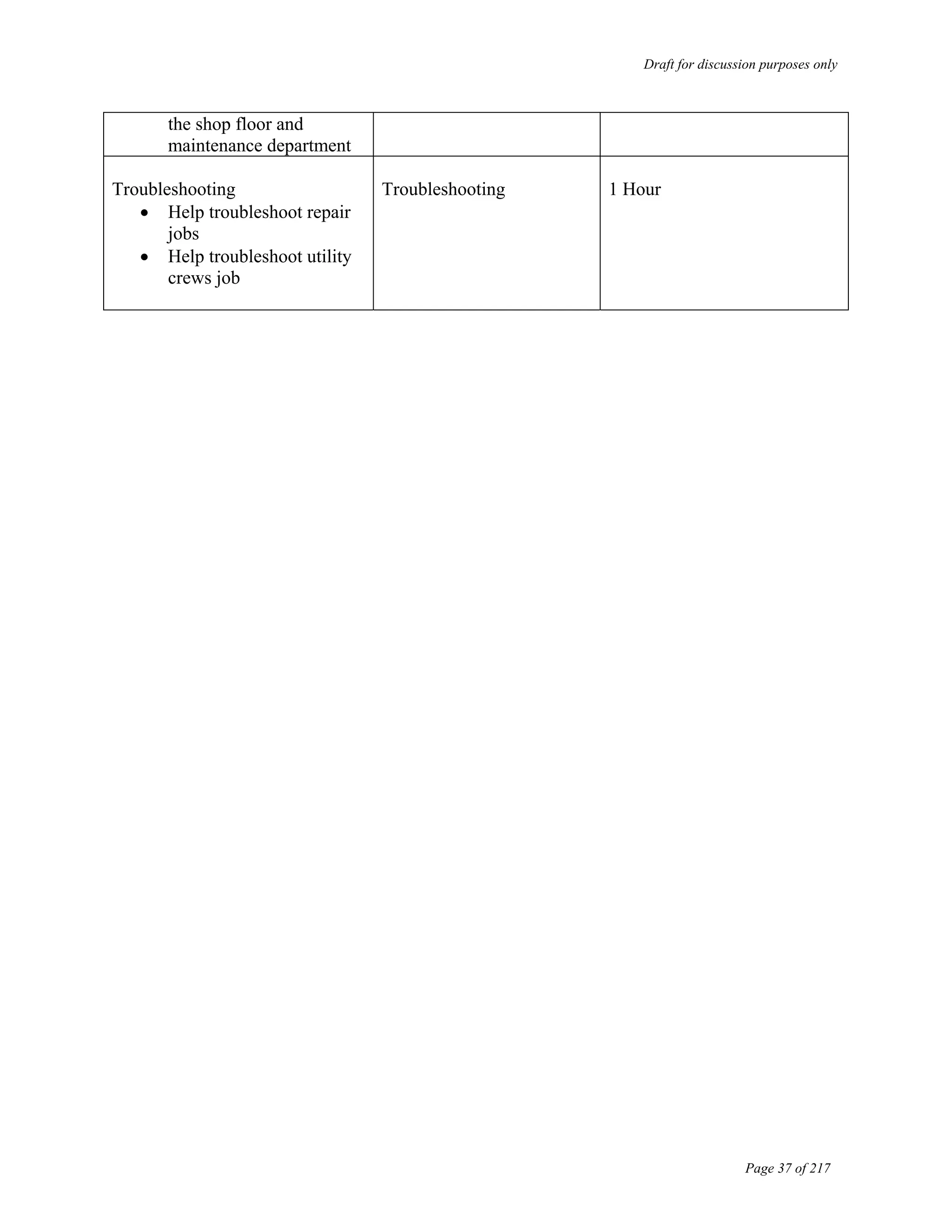
  • 165.
    Draft for discussionpurposes only Page 164 of 217 With the dedicated team AVTA has, an employee should be charged to ensure that the new policies and procedures developed are properly enforced and followed across all departments.
  • 166.
    Draft for discussionpurposes only Page 165 of 217 Benchmarking
  • 167.
    Draft for discussionpurposes only Page 166 of 217 Antelope Valley Transit Authority Information Technology Strategic Plan Benchmarking As AVTA is in a midst of a technology upgrade, RNR Consulting conducted benchmarking activities to understand and compare the types of software applications used by similar sized transit authorities in the country. The rationale behind the benchmarking activity stemmed from the very basic vision of AVTA to become the best transit in the country by utilizing information technology as a business enabler. Benchmarking of AVTA with other similar sized transits in terms of software applications is one of the first steps in aiding AVTA to achieving its vision. Furthermore, we chose to benchmark software applications as it is the crux of the information technology strategic plan we are developing for the authority. We researched the Federal Transit Administration resource database and based on our past experiences in the transit industry, chose a random sample of similar sized transit authorities in terms of fleet size and number of routes served to compare AVTA to other transits in terms of use of important software applications. In order to compare transit authorities, we compiled a list of applications that a transit organization should optimally possess to execute organizational functions. The information technology system(s) of various transits were evaluated on the basis of whether the transit possessed systems or modules such as financial software, payroll, time and attendance, human resources, maintenance/inventory (for example, parts, fuel management), operations/dispatch (for example, fixed route and para-transit), fleet-oriented systems (intelligence and security systems) and building security systems such as proximity card readers. This allowed us to then compare AVTA to other transit authorities in terms of the number of systems utilized. The study highlighted which systems are currently being utilized by these transit organizations. The benchmarking activity delineates how those transit organizations are utilizing technology to enable their business processes, what systems or applications they are using, and illustrates how those applications could be potentially incorporated into the information technology strategic plan. We asked the selected random samples if they had the following software applications to capture the areas cited above in order to compare the transit authorities:
  • 168.
    Draft for discussionpurposes only Page 167 of 217 • Maintenance software • Fixed route software • Para-transit software • Fuel tracking software • Finance software • HR software • Payroll software • Intelligent transit system The following chart depicts where AVTA stands with respect to other transits in terms of number applications/software systems utilized and how AVTA compares to other transits in terms of its goal to be technologically superior in the industry with regard to software applications.
  • 169.
    Draft for discussionpurposes only Page 168 of 217 Transit Applications Used Lane Transit District Eugene, OR HASTUS - Fixed route scheduling software MIDAS BD- Para-transit application ABRA- Payroll, HR software Informgold- Finance application Fleet watch- Maintenance Application Transit Master- ITS System-Includes APC, AVL, Annunciators and CAD Intercity Transit Olympia, WA Schedule Master- Fixed route software Trapeze Pass- Para-transit software Fleet Net- Tracks Maintenance, HR, Payroll and financials Southeastern Regional Transit Authority New Bedford, MA Trapeze Pass- Para-transit software Fleet ware- Maintenance software Gas BOI- Fuel Tracking software Great Plains- Financials, HR and Payroll
  • 170.
    Draft for discussionpurposes only Page 169 of 217 Greater Hartford Transit Authority Hartford, CT Trapeze Pass- Para-transit software Salem Area Mass Transit District Salem, OR Trapeze Fx, OPS- Fixed route software Fleet Net- Maintenance, HR and financials Fuel Force- Fuel Tracking software DRI- Intelligent transit system Peninsula Corridor Joint Powers Board (PCJPB) San Carlos, CA Sphere- Inventory Software People soft- Financials, HR, Budgeting and Procurement HASTUS- Fixed route software Trapeze Pass- Para-transit software ACS- Intelligent Transit System Conductor- Grants Allocation First Transit, Inc Pomona, CA RTA- Maintenance software Fuel Force- Fuel tracking software HASTUS- Fixed route software Fund ware- Only financials Whatcom Transportation Authority Bellingham, WA RTA- Maintenance software MAS 90- Finance and Payroll software ABRA- HR software MIDAS- Paratransit software ARCGTS- Bus shelter maintenance software Transit Applications Used Topeka Metropolitan Transit Authority - Topeka Transit (TMTA) Topeka, KS RTA- Maintenance software (Fuel Force included) GFI fare boxes are used in buses SOLOMON- Finance, HR and Payroll MULTISYSTEMS- Paratransit software StarTran Street Lincoln, NE RTA- Maintenance software, fuel tracking included JD Edwards- Finance, HR and payroll included RouteMatch- Para-transit software VPSI, Inc. Troy, MI Great Plains-Finance and accounting Maintenance and Para-transit-Customized Wichita Transit (WT) Wichita, KS Datastream- Maintenance software Tier- Finance, HR and Payroll StrataGen- Para-transit StrataGen- Fixed route
  • 171.
    Draft for discussionpurposes only Page 170 of 217 IT Strategy Plan
  • 172.
    Draft for discussionpurposes only Page 171 of 217 Integrated departments – IT Enabled I n f o r m e d d e c i s i o n s E n h a n c e d m o r a l e IT Initiatives Customer focused Internal ` External
  • 173.
    Draft for discussionpurposes only Page 172 of 217 1 Project Profiles - Legend Project Name: Name of the project. Priority: A- Depicts High priority. The projects with A priority should be implemented in the short term. These projects directly affect the efficiency levels of people and effectiveness of processes that take place in AVTA. These projects form the infrastructure backbone of AVTA. Priority A projects take precedence to other projects in terms of budget allocation in a particular year. Priority: B- Depicts Medium priority. The projects with B priority should be implemented in the medium term. These projects are important to the authority, but will not immediately affect AVTA’s business processes. Furthermore, AVTA may already have an application that could be utilized in the short term. These projects should be implemented after A priority projects have been successfully implemented. Priority: C- Depicts Low priority. The projects with C priority should be implemented in the long term. These projects are not a business necessity. If and when funds become available these projects should be implemented, after all A priority and B priority projects have been implemented. Complexity: H- Depicts High complexity. These are high complexity projects because multiple departments are involved, cost of the project, project risk and the number of end users to be trained are high. They also have longer project durations. Complexity: M- Depicts Medium complexity. These are medium complexity projects because the number of end users to be trained is not high, the cost in comparison to high complexity projects is low, and have shorter project durations when compared to high complexity projects. Project Duration: The approximate time period from start to finish of the project. Lead: The department in charge of the project
  • 174.
    Draft for discussionpurposes only Page 173 of 217 2 Project Name: Re- Implementation of Collective Data Maintenance Application Priority: A Complexity: M Project Duration: Mar ’05- Apr ‘05 Project Scope: Re-Implementing the Collective Data Maintenance Application and effectively training the end users to use the implemented software. Project Rationale & Benefits: 1. Currently the Collective Data application is not being used as majority of the end users have not been trained on the application. 2. Currently all data and reports are generated using Excel as employees lack the training to use Collective Data. 3. Some of the reports generated currently using Excel are not accurate. 4. Re-implementing Collective Data and training the end users would provide the authority with accurate and reliable reports. 5. Re-implementing Collective Data would save time and cost for the agency as manual and redundant data entry would be reduced considerably. Potential Risks: 1. Initial employee buy-in may be low due to past unsatisfactory experience with the Collective Data Implementation. 2. Co-operation from MV Transportation Management to allow all the concerned employees to attend training classes during working hours. 3. Customization and integration with Fuel Force application and Route Match application. Lead: Maintenance (AVTA)
  • 175.
    Draft for discussionpurposes only Page 174 of 217 3 Project Name: Re- Implementation of Collective Data Maintenance Application Priority: A Complexity: M Lead: Maintenance (AVTA) Action Steps: 1. Develop project work plan 2. System set up and design 3. Perform data clean up activities 4. Perform data validation activities 5. Develop training schedules 6. Conduct detailed end user training 7. Roll out Implementation Considerations: 1. Ensure all data is converted accurately 2. Ensure that Fuel Force and Route Match applications interface with Collective Data. Project Duration: Mar ’05- Apr ‘05
  • 176.
    Draft for discussionpurposes only Page 175 of 217 4 Project Name: Re- Implementation of Collective Data Maintenance Application Priority: A Complexity: M Lead: Maintenance (AVTA) Project Cost: Software and Training: $15,000 Cost Benefit Analysis: Qualitative Benefits: •Will allow the management to accurately track the Miles/Gallon statistic of all the vehicles in the agency • Accurately provide information to the management about the when Preventive Maintenance is due on a vehicle • Can provide the management with accurate and reliable data for contract compliance purposes • Data can be effectively retrieved for CHP audit purposes • Enhanced worker efficiency and productivity Project Duration: Mar ’05- Apr ‘05
  • 177.
    Draft for discussionpurposes only Page 176 of 217 5 Project Name: Selection & Implementation of Enterprise Resource Planning Software Priority: A Complexity: H Project Rationale & Benefits: 1. AVTA is currently outsourcing finance functions such as payroll, A/P, tax reporting, final GL, etc. The new ERP application will provide AVTA and the finance department with greater flexibility and real-time access to information and reports. 2. Currently, the finance department is using various excel spreadsheets for budgeting purposes. The new ERP application will have a budgeting module which would help the finance department budget for the fiscal year more efficiently. 3. The finance department currently manually allocates grant money from different jurisdictions to different modes of transit. The allocation module in the new ERP application will help reduce manual entry and increase the efficiency of the finance department. Potential Risks: 1. Integration with the maintenance application 2. Integration with the Intelligent Transit System to track ridership information and generating invoices 3. Training additional users if the operations are performed within the Authority 4. Additional cost for training users and additional hardware costs associated with the new system 5. Lack of employee buy-in and resistance to change by employee. 6. Customizing the software to replicate current processes that would increase the cost of implementation and AVTA will not realize the full benefit of the system. Project Duration: May ’05- Dec ‘05 Lead: Finance (AVTA) Project Scope: The project involves selection of a finance application which will aid the Authority in performing the accounting function directly rather than having to contract with an outside firm. The finance application to be selected will have a module specifically utilized for allocation accounting and aid in the budgeting process. The application will also support functions such as payroll , HR and purchasing functions for AVTA.
  • 178.
    Draft for discussionpurposes only Page 177 of 217 6 Priority: A Complexity: H Project Rationale & Benefits: 4. Currently, the finance assistant manually creates vacation stubs for employees. The new ERP system will help eliminate manual processes and will be more cost effective as it would automatically generate pay stub and vacation stub information. 5. The finance department currently uses various excel spreadsheets to calculate the invoice amounts for MV Transportation. The new ERP application will eliminate manual entry and redundancies in the process. 6. Currently, purchasing is performed manually via a purchase log book. An ERP application would reduce the amount of paperwork and would automatically generate a work order and would be interfaced to the Accounts Payable module, where the invoice will be generated. 7. The new ERP system can track employee information for both new hires and existing employees, which would greatly aid the human resources department. Lead: Finance (AVTA) Project Name: Selection & Implementation of Enterprise Resource Planning Software Project Duration: May ’05- Dec ‘05
  • 179.
    Draft for discussionpurposes only Page 178 of 217 7 Action Steps: Requirements Definition: 1. Document current information systems 2. Streamline information flow: Develop “As-Is” process maps, data flow maps, and functional maps 3. Gauge future requirements and resource constraints System Selection: 1. Determine evaluation criteria 2. Analyze potential interface issues and current processes 3. Develop RFP and vendor information packet 4. Determine training requirements 5. Quantitative and qualitative cost-benefit analyses 6. Address change management issues 7. Demonstration sessions 8. Selection of new system Pre-Implementation: 1. Develop project work plan Implementation Considerations: 1. System needs to interface with maintenance application to transfer work order information on a daily basis. 2. System needs to interface with Maintenance application to provide information on parts used for vehicle maintenance and repair 3. System needs to interface with fuel tracking application to provide cost per gallon information for each vehicle 4. System needs to interface with maintenance application to track cost and value of each vehicle over time 5. System needs to interface with time and attendance system to calculate payroll information 6. System needs to interface to the document management system in order to facilitate the electronic retrieval and storage of information/documents Priority: A Complexity: H Lead: Finance (AVTA) Project Name: Selection & Implementation of Enterprise Resource Planning Software Project Duration: May ’05- Dec ‘05
  • 180.
    Draft for discussionpurposes only Page 179 of 217 8 Action Steps: 2. Software: - Installation - Set up global parameters - Define chart of accounts - Develop GL account codes - Accounts Payable payment options - 1099 information - Set up profiles - Set up master flags - Acceptance testing 3. Training: - Concepts - Software overview/ Issues identification - Executive level: Super users, departmental heads and executive management 4. Data Analysis and Import: - Collect and organize data - Data verification and data clean up - Obtain sign-offs on data - Import data into new system Priority: A Complexity: H Lead: Finance (AVTA) Project Name: Selection & Implementation of Enterprise Resource Planning Software Project Duration: May ’05- Dec ‘05
  • 181.
    Draft for discussionpurposes only Page 180 of 217 9 Action Steps: Design: 1. Conduct application training 2. Design pilot script 3. Build files and conduct pilot 4. Design modifications 5. Management review Rollout: 1. Build/Test interface modifications: Test interface with maintenance application, fuel tracking application and Intelligent Transit System 2. Build/ Test software modifications 3. Conduct integrated pilot 4. Conduct user training: Systems training, Module and department based training, and train the trainer sessions 5. Administer user certification tests 6. Convert data 7. Perform post conversion review Priority: A Complexity: H Lead: Finance (AVTA) Project Name: Selection & Implementation of Enterprise Resource Planning Software Project Duration: May ’05- Dec ‘05
  • 182.
    Draft for discussionpurposes only Page 181 of 217 10 Priority: A Complexity: H Lead: Finance (AVTA) Project Cost: Software- $80,000-$120,000 Implementation cost- $150,000-$200,000 Cost Benefit Analysis: $ 11, 529 $ 45.39 254*1= 254 1 Hours Finance Manager $ 16, 870 $ 22.14 254*3= 762 3 Hours Finance Assistant Yearly Cost Savings Pay Rate (Hourly) Hours/ year Hours/Day Designation Currently, AVTA outsources a variety of its central accounting functions to an external accounting firm. The cost of the service is approximately $700 per month. After the software is implemented, the potential cost savings by not outsourcing the accounting functions is approximately $8,400 per year. The finance department will also be able to access reports without having to contact the external accounting company. The new application would also aid the agency in processing payroll. Total potential cost savings/ year: $ 36,799 Project Name: Selection & Implementation of Enterprise Resource Planning Software Project Duration: May ’05- Dec ‘05
  • 183.
    Draft for discussionpurposes only Page 182 of 217 11 Priority: A Complexity: H Lead: Finance (AVTA) Cost- Benefit Analysis: Qualitative Benefits: • Real time access to data and information for analysis •Enhanced work efficiency and productivity • Better grant accounting and FTA reporting leading to more grants for AVTA • Streamlined processes, leading to a proactive department • Enhanced financial reporting will lead to informed decision making by the management •The system will form the administrative infrastructure backbone and will help in transition if AVTA decides to bring operations in house •The system will provide budget controls •The ERP system will lead to better financial audit checks and controls and provide audit trails for all financial activities •The new system will provide comprehensive HR and Payroll benefits as it would aid in calculating salary information, vacation information, sick time and employee benefits Project Name: Selection & Implementation of Enterprise Resource Planning Software Project Duration: May ’05- Dec ‘05
  • 184.
    Draft for discussionpurposes only Page 183 of 217 12 Project Scope: Project involves selection and implementation of ITS. This includes APC, Annunciators and AVL/CAD. This will enable AVTA to get accurate passenger counts, ensure that customers get information on stops and aid dispatch in finding the precise location of the bus, thus improving the efficiency of operations. Project Rationale & Benefits: 1. Currently, AVTA has to rely on data provided by bus operators and the GFI system for passenger counts. The new system would provide AVTA with accurate and reliable passenger count information automatically generated by the system. 2. Accurate passenger count information from APC can be effectively used for reporting to NTD and thus help AVTA procure grants. 3. Currently, ridership information is manually calculated using excel spreadsheets. The new system will automatically generate ridership information for all modes of transit, and thus expedite the process of invoicing and eliminate manual entry. 4. Customers will know the name of each stop and will not have to rely on the bus operators to announce stop information. Potential Risks: 1. Change management issues 2. Initial capital investment 3. The large size and the complexity of the project 4. Technological changes in the transit industry 5. Implementing new technology (cheaper) as offered by new vendors or utilizing industry standards (More expensive) 6. Compliance with national ITS standards Project Name: Selection and Implementation of Intelligent Transit System Priority: A Complexity: H Lead: Operations (AVTA) Project Duration: Feb ’05- Aug ’05( Phase I)
  • 185.
    Draft for discussionpurposes only Page 184 of 217 13 Priority: A Complexity: H Project Rationale & Benefits: 5. The new system will aid the dispatchers to identify the exact location of the bus, and thus help them dispatch buses more effectively. 6. The new system will provide real-time information on bus locations, which will aid customer service employees in providing accurate information to customers regarding bus schedules and arrival/departure times. 7. Currently, trips are booked for paratransit customers the previous day and manifests are printed out and manually forwarded to bus operators. The new system would allow this information to be electronically forwarded to paratransit operators electronically in real time, and allow operators to pick up customers on the fly. This would increase the number of customer pick ups drastically. Potential Risks: Lead: Operations (AVTA) Project Duration: Feb ’05- Aug ’05( Phase I) Project Name: Selection and Implementation of Intelligent Transit System
  • 186.
    Draft for discussionpurposes only Page 185 of 217 14 Implementation Considerations: 1. Ensure ITS interfaces with the fixed route dispatch software and the paratransit dispatch software 2. ITS should be ADA compliant 3. ITS should interface with the ERP application to create invoices for the three modes of transits 4. ITS should interface with maintenance application to capture road call/ pull out information Priority: A Complexity: M Lead: Operations (AVTA) Action Steps: Contracting • Develop negotiations document • Negotiate contract in conjunction with AVTA • Signed ACS Contract Conceive and Plan • Construct ITS design drawings • Develop system integration plan • Define roles and communication plan • Create risk mitigation and contingency plan • Develop “wins” document for FTA • Develop project administration plans • Develop workplans • Determine system performance measures and audit controls Diagnostic • Develop testing plans • Execute equipment testing trails at manufacturer location Project Duration: Feb ’05- Aug ’05( Phase I) Project Name: Selection and Implementation of Intelligent Transit System
  • 187.
    Draft for discussionpurposes only Page 186 of 217 15 Priority: A Complexity: M Lead: Operations (AVTA) Action Steps: Commission - System setup and installation - Perform site inspection - Analyze training needs - Prepare training plan - Ensure vendor provides adequate training - Develop training manuals - Produce user and maintenance manuals - Prepare for system changeover - Confirm acceptance testing - “Go-Live” Project Duration: Feb ’05- Aug ’05( Phase I) Project Name: Selection and Implementation of Intelligent Transit System
  • 188.
    Draft for discussionpurposes only Page 187 of 217 16 Priority: A Complexity: M Lead: Operations (AVTA) Project Cost: Software and Hardware Cost: $1,500,000 - $2,000,000 (Entire project) Implementation Cost: $500,000 - $800,000 (Entire project) Cost Benefit Analysis: $ 12, 371 32.47 254*1.5= 381 1.5 Senior Analyst $ 7,620 10 254*3= 762 3 Customer Service $ 6,096 12 254*2= 508 2 Call taker Yearly Cost Savings Pay Rate (Hourly) Hours/Year Hours/Day Designation Total potential cost savings/ year: $ 26,087 Project Duration: Feb ’05- Aug ’05( Phase I) Project Name: Selection and Implementation of Intelligent Transit System
  • 189.
    Draft for discussionpurposes only Page 188 of 217 17 Priority: A Complexity: M Lead: Operations (AVTA) Cost Benefit Analysis: Implementation of the ITS would provide AVTA other qualitative benefits such as: • Improved scheduling of drivers • Accurate ridership data to report to NTD • More grants due to better reporting • Enhanced productivity and efficiency across the operations department • Efficient dispatching as the dispatcher would know the exact location of the bus • Improve the efficiency and expediency of paratransit services to the community • Improved customer service response as representatives would know the exact location of the bus and the time required to arrive and depart locations • Fewer road calls as vehicle health will be monitored in real time that will aid better preventive maintenance • AVTA will be ADA compliant reducing the risk of lawsuits • Enhanced incident and emergency management Project Duration: Feb ’05- Aug ’05( Phase I) Project Name: Selection and Implementation of Intelligent Transit System
  • 190.
    Draft for discussionpurposes only Page 189 of 217 18 Priority: A Complexity: M Project Scope: Selection and implementation of a dispatch software which would aid in development of fixed routes and assigning bus operator schedules. Furthermore, we will also assess the paratransit dispatch software within this initiative because Route Match application does not fulfill AVTA’s business needs. Project Rationale & Benefits: 1. AVTA (MV) currently manually develops route schedules every 6 months. 2. AVTA (MV) utilizes Excel spreadsheets to develop routes and timing. 3. Vacation time and requests for time off are manually entered into Excel spreadsheets and new bus operators are assigned manually based on availability. 4. The new software application would aid in efficient and effective development of route schedules and bus operator bid schedules. 5. Requests for time off could be entered in the system, and the system could then automatically generate a schedule based on the availability of bus operators. 6. The dispatch software would streamline operations, automate routine tasks, coordinate between departments, and eliminate confusion about schedules. Potential Risks: 1. User acceptance of the new system 2. Resistance to change 3. Initial capital investment 4. Integration with the ITS system 5. Users reluctance to utilize IT to enhance their job profiles 6. Lack of inherent skill sets to utilize the system Project Duration: Feb ’06- Sept ‘06 Project Name: Selection and Implementation of Dispatch Software Lead: Operations (AVTA)
  • 191.
    Draft for discussionpurposes only Page 190 of 217 19 Action Steps: Requirements definition: 1. Measure current resource allocation 2. Streamline information flow 3. Gauge future requirements and resource constraints System Selection: 1. Determine evaluation criteria 2. Develop RFP 3. Evaluate vendor responses 4. Determine training requirements 5. Quantitative and qualitative cost-benefit analysis 6. Address change management issues 7. Selection of new system Pre-Implementation: 1. Finalize project scope 2. Develop project work plan 3. Software: - Installation and set up of global parameters - Set up profiles - Set up master flags - Acceptance testing Implementation Considerations: 1. Ensure that the system interfaces to other systems utilized by the Authority such as the HR and Payroll system as this system would track bus operator absences and availability 2. Interface with the ITS system to tie drivers to schedules and schedule adherence 3. Accuracy of historical and current data to ensure that the new system works efficiently Priority: A Complexity: M Lead: Operations (AVTA) Project Duration: Feb ’06- Sept ‘06 Project Name: Selection and Implementation of Dispatch Software
  • 192.
    Draft for discussionpurposes only Page 191 of 217 20 Action Steps: • Training: - Concepts - Software overview/ Issues identification - Executive level 5. Data Analysis: - Collect data - Verify and clean up data - Obtain sign-offs on data - Import data into system Design: 1. Conduct application training and testing 2. Design pilot script 3. Build files and conduct pilot 4. Design modifications 5. Management review Roll out: 1. Build/Test software modifications 2. Conduct integrated pilot 3. Conduct user training 4. Administer user certification tests 5. Perform post conversion review Priority: A Complexity: M Lead: Operations (AVTA) Project Duration: Feb ’06- Sept ‘06 Project Name: Selection and Implementation of Dispatch Software
  • 193.
    Draft for discussionpurposes only Page 192 of 217 21 Project Cost: Software Costs: $100,000 - $150,000 Implementation Costs: $150,000- $250,000 Priority: A Complexity: M Cost Benefit Analysis: Currently, the routes schedule and bids schedule are prepared every six months by two road supervisors manually in Excel spreadsheets. The operations manager manually reschedules bus operators based on their vacation requests every week. $ 1,794 $ 23 26 Hours 104 Hours Operations Manger $ 3,000 $ 15 0 Hours 200 Hours Road Supervisor II $ 2,850 $ 15 10 Hours 200 Hours Road Supervisor I Annual Cost Savings Pay Rate (Hourly) Time to be spent yearly on activity after dispatch software is implemented Time spent on activity currently (hours per year) Designation Lead: Operations (AVTA) Total potential cost savings/ year: $ 7,644 Project Duration: Feb ’06- Sept ‘06 Project Name: Selection and Implementation of Dispatch Software
  • 194.
    Draft for discussionpurposes only Page 193 of 217 22 Priority: A Complexity: M Lead: Operations (AVTA) Cost Benefit Analysis: The implementation of the fixed route dispatch software would offer qualitative benefits such as • Optimal vehicle and employee deployment • Fewer dead runs • Fast, automatic duty generation and rostering • Accurate scheduling and routing • Increase efficiency of providing expedient and efficient service to the community Project Duration: Feb ’06- Sept ‘06 Project Name: Selection and Implementation of Dispatch Software
  • 195.
    Draft for discussionpurposes only Page 194 of 217 23 Project Name: Selection and Implementation of Time and Attendance System Priority: A Complexity: M Lead: HR (AVTA) Project Scope: Selection and implementation of a time and attendance system to track the attendance of Bus Operators, Mechanics and Administrative employees, capture labor time, eliminate current manual and duplicative data entry, and integrate/automate processes across departments Project Rationale & Benefits: 1. Current process is manually driven and hence very paper and labor intensive. 2. Accurately capturing attendance information would allow AVTA to more efficiently utilize agency resources and realize significant cost savings. 3. Increased efficiency in tracking employee time and payroll. 4. The new system would interface with the payroll system, and thus help facilitate accurate and timely payroll information. Potential Risks: 1. Resistance to change 2. Interfacing the current proximity card reader system with the time and attendance system Project Duration: May’05- Sep ‘05
  • 196.
    Draft for discussionpurposes only Page 195 of 217 24 Implementation Considerations: 1. This system must adequately interface with HR and Payroll systems 2. Compatibility with the existing security system to enable use of one access control card for both security and time & attendance functions Action Steps: System Selection: 1. Determine system requirements and needs 2. Develop RFP and vendor information packet 3. Determine training requirements 4. Quantitative and qualitative cost benefit analysis 5. Address change management issues 6. Selection of new system Pre-Implementation: 1. Develop project work plan 2. Software: - Install - Set up global parameters - Set up profiles - Set up master flags - Acceptance testing 3. Training: - Concepts - Software overview/ Issues identification - Executive level Priority: A Complexity: M Lead: HR (AVTA) Project Name: Selection and Implementation of Time and Attendance System Project Duration: May’05- Sep ‘05
  • 197.
    Draft for discussionpurposes only Page 196 of 217 25 Action Steps: 5. Data Analysis: - Collect data - Verify and clean up data - Obtain sign-offs on data - Import data into system Design: 1. Conduct application training 2. Design pilot script 3. Build files and conduct pilot session 4. Design modifications 5. Management review Roll out: 1. Build/Test interface modifications 2. Build/Test software modifications 3. Conduct integrated pilot 4. Conduct user training 5. Administer user certification tests 6. Perform post conversion review Priority: A Complexity: M Lead: HR (AVTA) Project Name: Selection and Implementation of Time and Attendance System Project Duration: May’05- Sep ‘05
  • 198.
    Draft for discussionpurposes only Page 197 of 217 26 Priority: A Complexity: M Lead: HR (AVTA) Project Cost: Software Costs: $25,000 - $40,000 Implementation Costs: $30,000 - $45,000 Cost Benefit Analysis: $ 9,652 $19 254*2= 508 2 Office Manager $ 11,247 $22.14 254*2= 508 2 Finance Assistant Yearly Cost Savings Pay Rate (Hourly) Hours/Year Hours/Day Designation Total yearly cost savings if system is implemented is $ 20,899 Project Name: Selection and Implementation of Time and Attendance System Project Duration: May’05- Sep ‘05
  • 199.
    Draft for discussionpurposes only Page 198 of 217 27 Project Scope: The project involves the upgrade of the Cisco Interactive Voice Response system. This system will aid the customer service and paratransit dispatch department in more effectively serving the community. Project Rationale & Benefits: 1. The AVTA rider community will get timely response to all their questions and queries. 2. The system will reduce the workload of paratransit call takers as the system would provide automated responses to callers. 3. The system would provide automated reminder calls to paratransit customers before the paratransit vehicle arrives. 4. The system would aid in recording customer complaints, and thus aid in reduced waiting time for customers. Potential Risks: 1. There may be segments of the community population who may not prefer to use an automated response system and would rather speak to a live customer service representative. 2. Training the users to work with the IVR system. 3. Customers might get frustrated waiting to select their option and thus abandon the call. Priority: A Complexity: M Lead: Customer Service (AVTA) Project Duration: April ’05- May ‘05 Project Name: Upgrade of Interactive Voice Response System
  • 200.
    Draft for discussionpurposes only Page 199 of 217 28 Project Name: Upgrade of Interactive Voice Response System Priority: A Complexity: M Action Steps: Software Upgrade: 1. Identify the type of software Cisco offers with regard to interactive voice response system. 2. Customize the software based on the needs of AVTA. 3. Select the software 4. End user training 5. Implement the software Implementation Considerations: 1. Ensure that accurate data is entered for each mode of transport 2. Calling trees should be set up in an orderly fashion and should not have excessive options 3. The calling pattern of incoming calls must be mapped and analyzed to determine the most frequent call reasons and setting up appropriate automated responses. An appropriate call hierarchy should be established. Lead: Customer Service (AVTA) Project Duration: April ’05- May ‘05
  • 201.
    Draft for discussionpurposes only Page 200 of 217 29 Project Name: Upgrade of Interactive Voice Response System Priority: A Complexity: M Lead: Customer Service (AVTA) Project Duration: April ’05- May ‘05 Project Cost: $ 50,000- $ 75,000 The above cost is based on the industry average and is not conclusive. Cost Benefit Analysis: The implementation of a Interactive Voice Response system would offer qualitative benefits such as: •Increased customer satisfaction •Speeding response times to callers •Automating routine tasks thereby freeing agents to concentrate on more complex service requests •Reducing the cost of call center agent turnover
  • 202.
    Draft for discussionpurposes only Page 201 of 217 30 Project Name: Selection and Implementation of Document Management System Priority: A Complexity: M Lead: Finance ( AVTA) Project Scope: Select and implement a document management system which could automatically scan and maintain all files and documents in a central database and could be retrieved anytime electronically. Project Rationale & Benefits: 1. Easy access to past data. 2. Centralized document management and streamlined processes reduce document duplication, reducing likelihood of error. 3. Significantly reduces paper, toner, and storage costs. 4. Past data and files can be searched quickly and efficiently. 5. Employees will have to allocate significantly less time to retrieving documents and information. 6. Creation of a knowledge-sharing culture 7. Ability to establish an agency-wide naming convention. Potential Risks: 1. Initial capital costs 2. End user training 3. Resistance to change: employees would have to become accustomed to finding information electronically rather than manually 4. Errors in document management and loss of data would affect agency rather than individual user, project, or department. Project Duration: Mar ’05- Apr ‘05
  • 203.
    Draft for discussionpurposes only Page 202 of 217 31 Project Name: Selection and Implementation of Document Management System Priority: A Complexity: M Lead: Finance ( AVTA) Action Steps: 1. Identify the needs of AVTA 2. Select the software 3. Customize software, if necessary, to AVTA’s specifications 4. End user training 5. Implement the software Implementation Considerations: 1. Ensure that all data is converted and stored department wide 2. Evaluate search capabilities of the system 3. Interface the Document Management system with the ERP system Project Duration: Mar ’05- Apr ‘05
  • 204.
    Draft for discussionpurposes only Page 203 of 217 32 Project Name: Selection and Implementation of Document Management System Priority: A Complexity: M Lead: Finance ( AVTA) Cost Benefit Analysis: The implementation of a document management system would offer qualitative benefits such as: • Enhanced worker productivity • Faster document processing and cycle times • Agency-wide cost savings from document sharing and retrieval • Simplification of systems process • Improved security management on documents • Savings on desk space • Improved utilization of existing office space • Help reduce incidence of lost records Project Cost: $ 75,000- $ 100,000 Software Only Project Duration: Mar ’05- Apr ‘05
  • 205.
    Draft for discussionpurposes only Page 204 of 217 33 Project Name: Maintenance Application Priority: B Complexity: H Lead: Maintenance (AVTA) Project Scope: Review the current Collective Data Maintenance application in conjunction with the needs of AVTA and with the functionalities a maintenance application should possess. Select and implement a new maintenance application if the current application does not meet the needs of AVTA. Project Rationale & Benefits: 1. The current system is not performing to the expectations of the maintenance department as it is slow and the employees have to utilize multiple screens before entering data in the system. 2. The inventory module in the maintenance application would help save money for AVTA as currently there is no documented process to re-order parts. The system would calculate re- order level based on Min-Max levels, and would help in efficient utilization of inventory based on ABC analysis or XYZ analysis. 3. Currently the maintenance department has challenges to maintain accurate documentation, due to significant paperwork. If the maintenance application is utilized, paperwork would be reduced considerably, thus leading to efficient maintenance of records, and would aid maintenance audits. Potential Risks: 1. Initial employee buy-in may be low due to past unsatisfactory experience with the maintenance application 2. Training end users may be challenging due to resistance to change and learning new software systems in the past 3. The project involves significant complexity, and the maintenance application needs to be interfaced to other systems 4. Customization and integration with other systems in AVTA Project Duration: Jan ’07- Aug ’07
  • 206.
    Draft for discussionpurposes only Page 205 of 217 34 Project Rationale & Benefits: 4. Currently, mileage information is entered in an excel spreadsheet to track preventive maintenance. A maintenance application that is interfaced with the fuel tracking system could potentially automatically generate E-mail alerts to the maintenance manager and shift supervisors when preventive maintenance on a bus is due. 5. Maintenance software will help track vehicle history and miles. It would automatically provide an alert when the vehicle needs to be replaced. 6. The maintenance application will capture the exact amount of time a mechanic spends on a repair job. This will aid in trend analysis and aid the management in determining the amount of time to be spent on a particular repair job. 7. The inventory module would also track the number of parts used on a daily basis and would help provide audit trails with respect to areas such as the specific parts and quantity of parts utilized by a mechanic. Project Name: Maintenance Application Priority: B Complexity: H Lead: Maintenance (AVTA) Project Duration: Jan ’07- Aug ’07
  • 207.
    Draft for discussionpurposes only Page 206 of 217 35 Project Rationale & Benefits: 8. Currently, work orders are created manually by shift supervisors. This involves significant paperwork. A maintenance application would automatically generate a work order when the shift supervisor enters the information. 9. Currently, road call information is entered in a road call information sheet manually by the dispatcher and is not always collected by mechanics before they attend the road call. A maintenance application would allow the dispatcher to enter the road call information in the maintenance software, and the mechanics would be able to print out the report before they attend the road call. 10. The maintenance application would aid in effective and efficient contract compliance as the information would be stored electronically and the contract compliance manager would have ready access to the information. Project Name: Maintenance Application Priority: B Complexity: H Lead: Maintenance (AVTA) Project Duration: Jan ’07- Aug ’07
  • 208.
    Draft for discussionpurposes only Page 207 of 217 36 Action Steps: System Selection: 1. Determine evaluation criteria 2. Analyze potential interface issues and current processes 3. Develop RFP and vendor information packet 4. Determine training requirements 5. Quantitative and qualitative cost-benefit analyses 6. Address change management issues 7. Demonstration sessions 8. Selection of new system Pre- Implementation: 1. Develop project work plan 2. Software: - Install - Set up global parameters: Set up repair codes, labor codes, vendor codes, transit bus codes, etc - Set up profiles - Set up business alerts: Preventive maintenance due dates, E-Mail alerts, Inventory re-order level alerts, vehicle replacement alerts, warranty expiration alerts, work order follow-up alerts - Acceptance testing Implementation Considerations: 1. Ensure that all data is converted properly to the new system 2. Ensure that vendor meets contract specifications and meets AVTA’s needs 3. Ensure that the maintenance application interfaces with the fuel tracking system to help facilitate preventive maintenance 4. Ensure that the maintenance application interfaces with the finance system, as it would aid in estimating the cost and value of each vehicle over time 5. Ensure that maintenance application interfaces with the ITS system that would aid in real time vehicle health monitoring and preventive maintenance Project Name: Maintenance Application Priority: B Complexity: H Lead: Maintenance (AVTA) Project Duration: Jan ’07- Aug ’07
  • 209.
    Draft for discussionpurposes only Page 208 of 217 37 Action Steps: 3. Training: - Concepts - Software overview/ Issues identification - Executive level 4. Data Analysis: - Begin data clean-up activities Design: 1. Conduct application training 2. Design pilot script 3. Build files and conduct pilot session 4. Design modifications 5. Management review Rollout: 1. Build/ Test interface modifications: Test interface with fuel tracking system, ERP application and Intelligent Transit System Project Name: Maintenance Application Priority: B Complexity: H Lead: Maintenance (AVTA) Project Duration: Jan ’07- Aug ’07
  • 210.
    Draft for discussionpurposes only Page 209 of 217 38 Action Steps: 2. Build/ Test software modifications 3. Conduct integrated pilot 4. Conduct user training: Super user training, train the trainer approach, systems training 5. Administer user certification tests 6. Convert data 7. Perform post conversion review Project Name: Maintenance Application Priority: B Complexity: H Lead: Maintenance (AVTA) Project Duration: Jan ’07- Aug ’07
  • 211.
    Draft for discussionpurposes only Page 210 of 217 39 Project Name: Maintenance Application Priority: B Complexity: H Lead: Maintenance (AVTA) Cost: Software: $100,000- $125,000 (Includes interface with financial and fuel tracking systems) Implementation Costs: $175,000-$225,000 Cost- Benefit Analysis: Currently, the parts manager spends two hours per day verifying the number of parts used for repairs the previous day. He spends another hour on manually creating purchase orders and shopping for prices. The yearly cost savings on salary alone if an inventory management system is in place would be approximately $9,906/year. $12,192 $16 254*3= 762 3 Yearly Cost Savings Pay Rate (Hourly) Hours/Year Hours/Day The maintenance clerk I currently spends four hours per day inputting mileage information and work order information in Excel spreadsheets. If an maintenance application is utilized, manual entry of data would be eliminated and the approximate cost savings would be $11,287/year. Project Duration: Jan ’07- Aug ’07
  • 212.
    Draft for discussionpurposes only Page 211 of 217 40 Project Name: Maintenance Application Priority: B Complexity: H Lead: Maintenance (AVTA) Cost- Benefit Analysis: The current average inventory stock level is approximately $417,000. Currently, parts are ordered based on the judgment of the parts manager and not based on Economic Order Quantity or a pre-set re-order level. An inventory management system could potentially help maintain the average stock level at a minimum of 40% of the current cost. This would save approximately at least $292,000 a year in inventory costs. Total approximate cost savings/year if an maintenance application is implemented is $ 315, 480. The other benefits that would accrue to the agency by implementing a maintenance application include: •Reduced stock out of parts •Maintaining buses on the road $11,287.76 $11.11 254*4= 1016 4 Yearly Cost Savings Pay Rate (Hourly) Hours/Year Hours/Day Project Duration: Jan ’07- Aug ’07
  • 213.
    Draft for discussionpurposes only Page 212 of 217 41 Project Name: Maintenance Application Priority: B Complexity: H Lead: Maintenance (AVTA) Cost- Benefit Analysis: Qualitative Benefits: • Enhanced work efficiency and productivity • Fewer stock out situations, hence ensuring that the buses are on the road more often than not, providing enhanced service to the community • Enhanced control of processes and operations • The maintenance department will become proactive rather than reactive • The system will form the infrastructure backbone and will help in transition if AVTA decides to bring operations in house Project Duration: Jan ’07- Aug ’07
  • 214.
    Draft for discussionpurposes only Page 213 of 217 42 Project Name: Selection and Implementation of Training Simulator Priority: C Complexity: M Project Scope: Implementing a training simulator and creating a virtual classroom with a high level of “event modeling” that simulates the actual sights, sounds, and motions that are the equivalent of those experienced in the actual operation of buses. Project Rationale & Benefits: 1. Substantial cost savings by reducing the likelihood of future operator incidents. 2. Provide operators with a more authentic simulated experience. 3. Increased safety 4. Reduced training costs Project Duration: Sept ’07- Jan ‘08 Lead: Safety and Training (AVTA) Potential Risks: 1. Increased maintenance of system. 2. Improper training regarding system operation and functionality. 3. Bus operators may be resistant to utilizing the system, and training the bus operators could be a challenge
  • 215.
    Draft for discussionpurposes only Page 214 of 217 43 Project Name: Selection and Implementation of Training Simulator Priority: C Complexity: M Action Steps: Requirements definition: 1. Measure current resource allocation 2. Streamline information flow 3. Gauge future requirements and resource constraints System Selection: 1. Determine evaluation criteria 2. Develop RFP and vendor information packet 3. Determine training requirements 4. Quantitative and qualitative cost benefit analysis 5. Address change management issues 6. Selection of new system Pre-Implementation: 1. Develop project work plan 2. Software: - Install - Set up global parameters - Set up profiles - Acceptance testing Lead: Safety and Training (AVTA) Implementation Considerations: 1. Verify network infrastructure is in place to install and implement system Project Duration: Sept ’07- Jan ‘08
  • 216.
    Draft for discussionpurposes only Page 215 of 217 44 Project Name: Selection and Implementation of Training Simulator Priority: C Complexity: M Lead: Safety and Training (AVTA) Action Steps: 4. Training: - Concepts - Software overview/ Issues identification - Executive level 5. Data Analysis: - Collect data - Verify and clean up data - Obtain sign-offs on data - Import data into system Design: 1. Conduct application training 2. Design pilot script 3. Build files and conduct pilot session 4. Design modifications 5. Management review Roll out: 1. Build/Test software modifications 2. Conduct integrated pilot 3. Conduct user training 4. Administer user certification tests 5. Convert data 6. Perform post conversion review Project Duration: Sept ’07- Jan ‘08
  • 217.
    Draft for discussionpurposes only Page 216 of 217 45 Project Name: Selection and Implementation of Training Simulator Priority: C Complexity: M Lead: Safety and Training (AVTA) Project Cost: $ 400,000- $ 475,000 Cost Benefit Analysis: The implementation of a training simulator would offer qualitative benefits such as: •The training cost per student will reduce as much as 40% •Reduced insurance costs due to reduction in liability exposure •Reduced maintenance costs since learners/operators spend less time in actual vehicles •Reduced accident rates and accident damages and reduced vehicle repairs •Reduced capital investment for vehicles •Reduced fuel usage •The new system will reduce the number of training days when compared to actual on the road training •Student and instructor time can be scheduled more efficiently Project Duration: Sept ’07- Jan ‘08 - End of Report -