serverware|CONSULTING
Core VMware products supported:
VMware vSphere
*and all product sub components
VMware vRealize Operations Insight
*and all product sub components
NW9 Business Centre
116 Colindale Avenue
Colindale
London, NW9 5GX
+44 (0) 20 3086 9665
info@serverware.com | www.serverware.com
serverware|CONSULTING
www.serverware.com
Whenever you are upgrading there is always an element of risk involved. If not planned and investigated properly it can
lead to downtime, failure and reduced functionality. This white paper looks at the pitfalls and provides a checklist to help
make any upgrade more likely to succeed.
WHITEPAPER
To upgrade or not to upgrade that is the Virtual Question
Alan Stretton
serverware|CONSULTING
The process of upgrading any product can be a virtual
nightmare and fraught with many issues that can lead to
a loss of functionality or even worse a complete failure
and the subsequent need to rollback to the last known
state. On the other hand it can also be a great success,
fix existing issues, increase functionality and ultimately
improve the ROI.
If you are considering an upgrade of any product there are
a few Golden Rules that are worth following.
Firstly you should answer some questions on the need to
upgrade from the perspective of the business:
•	 Is there anything that the upgrade will provide that
the business needs?
•	 Is there a cost to the business that can be translated
as a ROI?
•	 Is the upgrade cost budgeted for?
You should also review the technical implications:
•	 Will it fix a known issue?
•	 Does it provide additional required functionality?
•	 Does the upgrade provide a better working
experience?
•	 Will it enable you to work more efficiently?
•	 Will it make the system more secure and less
vulnerable to attack?
•	 Is the current version going end of life?
If the answer to all of the above is no, then you probably
have no need to upgrade at this point.
However, if the answers to the above points are positive
and suggest a need to upgrade then there are a number
of checks and safeguards that you should consider:
Latest Version/Upgrade
Read the information provided regarding the latest
version/upgrade. Understand the additional features that
it delivers and make sure they support at least one of the
questions above.
Check the Readme
The supplied readme file is probably the most important
document to check. Not only does it list new features
but it also tells you what’s been fixed in the new version.
More importantly it also outlines any issues with the
new version/upgrade. These could be issues that were
not issues previously and could impact on existing
functionality and requirements.
Check the compatibility web site
The product you are updating could be interacting with
a number of other products. The current version of one
product may not work with the upgraded version of
another. Sometimes the readme file of the documentation
supplied with the product does not have the latest
information so it is worth checking the latest information
at the vendors compatibility web site. A great starting
point is https://www.vmware.com/resources/compatibility/
search.php
Read the upgrade procedures carefully
This document is key to the success of the upgrade.
Watch out for little gotcha’s that can cause an upgrade to
fail. Sometimes one small line in the upgrade procedure
can mean a whole new thought process on how it should
or can be done. An upgrade of one product may mean that
you have to upgrade a number of associated products.
Understand the new functionality
When reading about the new functionality of an upgrade
take time to understand how it will be used operationally
and if there is any impact on the current functionality.
There may also be impact on the other interactions with
other products or solutions.
Training
Get trained on how to use the new functionality of the
version/upgrade. Sometimes the new features enables
entirely new ways of doing things. Make sure you get the
best out of what the new version/upgrade has to offer.
Conduct a health check/audit
Before undertaking an upgrade consider performing a
complete health check and audit of the existing system.
Is it working okay? Are there any issues that need to be
serverware|CONSULTING
Planned downtime rollback recovery
Understanding the impact any upgrade process will have
on the business is key. Create a plan and run it through
your change Control process. Have a plan B!
Take snapshots!
The beauty of virtual is the ability to create snapshots.
Use these to your advantage so that if all else fails you
can get back to where you started.
Upgrading is something we all need to do at some point
during the product lifecycle. The steps above will help
make your upgrade a safer and more predictable outcome.
The more you read about the new version/upgrade and
understand the current installation the more likely you are
to be successful.
resolved that aren’t addressed in the update?
Check existing functionality
Ensure that the existing product is working correctly.
Once the upgrade has taken place ensure that the same
functionality is still working
Understand pre-requisites sizing and scaling
Check that the systems you are upgrading meet the
requirements of the new upgrade. Do they need to be
resized? Is this a good time to rescale based on the
current usage and metrics? Does the ROI add up if you
have to do this?
Existing customisations
Will existing customisations still function with the new
upgrade? You may have to run up a test lab to confirm
that they really still do.
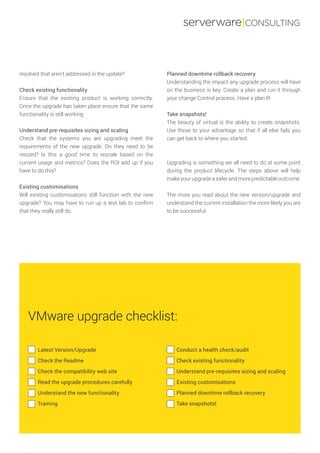
Latest Version/Upgrade
Check the Readme
Check the compatibility web site
Read the upgrade procedures carefully
Understand the new functionality
Training
Conduct a health check/audit
Check existing functionality
Understand pre-requisites sizing and scaling
Existing customisations
Planned downtime rollback recovery
Take snapshots!
VMware upgrade checklist:
Core VMware products supported:
VMware vSphere
*and all product sub components
VMware vRealize Operations Insight
*and all product sub components
NW9 Business Centre
116 Colindale Avenue
Colindale
London, NW9 5GX
+44 (0) 20 3086 9665
info@serverware.com | www.serverware.com
serverware|CONSULTING
If you’d like to discuss your requirements, why not get in touch today?
email us at info@serverware.com or call now on 020 3086 9665
serverware|CONSULTING
About the Author
Alan Stretton is one of the founders of Serverware and joined them in 1995 as Product Manager. With more than 30 years
of technology experience, Alan is responsible for the technical direction of the company.
Alan initially joined Serverware to run the Microsoft Add on tools partnership around Windows NT and since then has
held multiple roles ranging from Product Manager to CTO. In addition to being one of the lead originators of various
Serverware products Alan has also designed unique add on software for VMware products on behalf a number of Blue
chip companies.
Prior to his work at Serverware, Alan was a Software design and implementation specialist for a music rights organisation
and also contracted for a number of blue chip companies around the server management space.

To upgrade or not to upgrade that is the Virtual Question_V2.1

  • 1.
    serverware|CONSULTING Core VMware productssupported: VMware vSphere *and all product sub components VMware vRealize Operations Insight *and all product sub components NW9 Business Centre 116 Colindale Avenue Colindale London, NW9 5GX +44 (0) 20 3086 9665 info@serverware.com | www.serverware.com serverware|CONSULTING www.serverware.com Whenever you are upgrading there is always an element of risk involved. If not planned and investigated properly it can lead to downtime, failure and reduced functionality. This white paper looks at the pitfalls and provides a checklist to help make any upgrade more likely to succeed. WHITEPAPER To upgrade or not to upgrade that is the Virtual Question Alan Stretton
  • 2.
    serverware|CONSULTING The process ofupgrading any product can be a virtual nightmare and fraught with many issues that can lead to a loss of functionality or even worse a complete failure and the subsequent need to rollback to the last known state. On the other hand it can also be a great success, fix existing issues, increase functionality and ultimately improve the ROI. If you are considering an upgrade of any product there are a few Golden Rules that are worth following. Firstly you should answer some questions on the need to upgrade from the perspective of the business: • Is there anything that the upgrade will provide that the business needs? • Is there a cost to the business that can be translated as a ROI? • Is the upgrade cost budgeted for? You should also review the technical implications: • Will it fix a known issue? • Does it provide additional required functionality? • Does the upgrade provide a better working experience? • Will it enable you to work more efficiently? • Will it make the system more secure and less vulnerable to attack? • Is the current version going end of life? If the answer to all of the above is no, then you probably have no need to upgrade at this point. However, if the answers to the above points are positive and suggest a need to upgrade then there are a number of checks and safeguards that you should consider: Latest Version/Upgrade Read the information provided regarding the latest version/upgrade. Understand the additional features that it delivers and make sure they support at least one of the questions above. Check the Readme The supplied readme file is probably the most important document to check. Not only does it list new features but it also tells you what’s been fixed in the new version. More importantly it also outlines any issues with the new version/upgrade. These could be issues that were not issues previously and could impact on existing functionality and requirements. Check the compatibility web site The product you are updating could be interacting with a number of other products. The current version of one product may not work with the upgraded version of another. Sometimes the readme file of the documentation supplied with the product does not have the latest information so it is worth checking the latest information at the vendors compatibility web site. A great starting point is https://www.vmware.com/resources/compatibility/ search.php Read the upgrade procedures carefully This document is key to the success of the upgrade. Watch out for little gotcha’s that can cause an upgrade to fail. Sometimes one small line in the upgrade procedure can mean a whole new thought process on how it should or can be done. An upgrade of one product may mean that you have to upgrade a number of associated products. Understand the new functionality When reading about the new functionality of an upgrade take time to understand how it will be used operationally and if there is any impact on the current functionality. There may also be impact on the other interactions with other products or solutions. Training Get trained on how to use the new functionality of the version/upgrade. Sometimes the new features enables entirely new ways of doing things. Make sure you get the best out of what the new version/upgrade has to offer. Conduct a health check/audit Before undertaking an upgrade consider performing a complete health check and audit of the existing system. Is it working okay? Are there any issues that need to be
  • 3.
    serverware|CONSULTING Planned downtime rollbackrecovery Understanding the impact any upgrade process will have on the business is key. Create a plan and run it through your change Control process. Have a plan B! Take snapshots! The beauty of virtual is the ability to create snapshots. Use these to your advantage so that if all else fails you can get back to where you started. Upgrading is something we all need to do at some point during the product lifecycle. The steps above will help make your upgrade a safer and more predictable outcome. The more you read about the new version/upgrade and understand the current installation the more likely you are to be successful. resolved that aren’t addressed in the update? Check existing functionality Ensure that the existing product is working correctly. Once the upgrade has taken place ensure that the same functionality is still working Understand pre-requisites sizing and scaling Check that the systems you are upgrading meet the requirements of the new upgrade. Do they need to be resized? Is this a good time to rescale based on the current usage and metrics? Does the ROI add up if you have to do this? Existing customisations Will existing customisations still function with the new upgrade? You may have to run up a test lab to confirm that they really still do. Latest Version/Upgrade Check the Readme Check the compatibility web site Read the upgrade procedures carefully Understand the new functionality Training Conduct a health check/audit Check existing functionality Understand pre-requisites sizing and scaling Existing customisations Planned downtime rollback recovery Take snapshots! VMware upgrade checklist:
  • 4.
    Core VMware productssupported: VMware vSphere *and all product sub components VMware vRealize Operations Insight *and all product sub components NW9 Business Centre 116 Colindale Avenue Colindale London, NW9 5GX +44 (0) 20 3086 9665 info@serverware.com | www.serverware.com serverware|CONSULTING If you’d like to discuss your requirements, why not get in touch today? email us at info@serverware.com or call now on 020 3086 9665 serverware|CONSULTING About the Author Alan Stretton is one of the founders of Serverware and joined them in 1995 as Product Manager. With more than 30 years of technology experience, Alan is responsible for the technical direction of the company. Alan initially joined Serverware to run the Microsoft Add on tools partnership around Windows NT and since then has held multiple roles ranging from Product Manager to CTO. In addition to being one of the lead originators of various Serverware products Alan has also designed unique add on software for VMware products on behalf a number of Blue chip companies. Prior to his work at Serverware, Alan was a Software design and implementation specialist for a music rights organisation and also contracted for a number of blue chip companies around the server management space.