What the heck is ClickHouse
tiered storage?
Robert Hodges
Altinity Engineering
Brief Intros
www.altinity.com
Leading software and services
provider for ClickHouse
Major committer and community
sponsor in US and Western Europe
Robert Hodges - CEO
30+ years on DBMS plus
virtualization and security.
ClickHouse is DBMS #20
Data Storage in
ClickHouse
(And how to improve it)
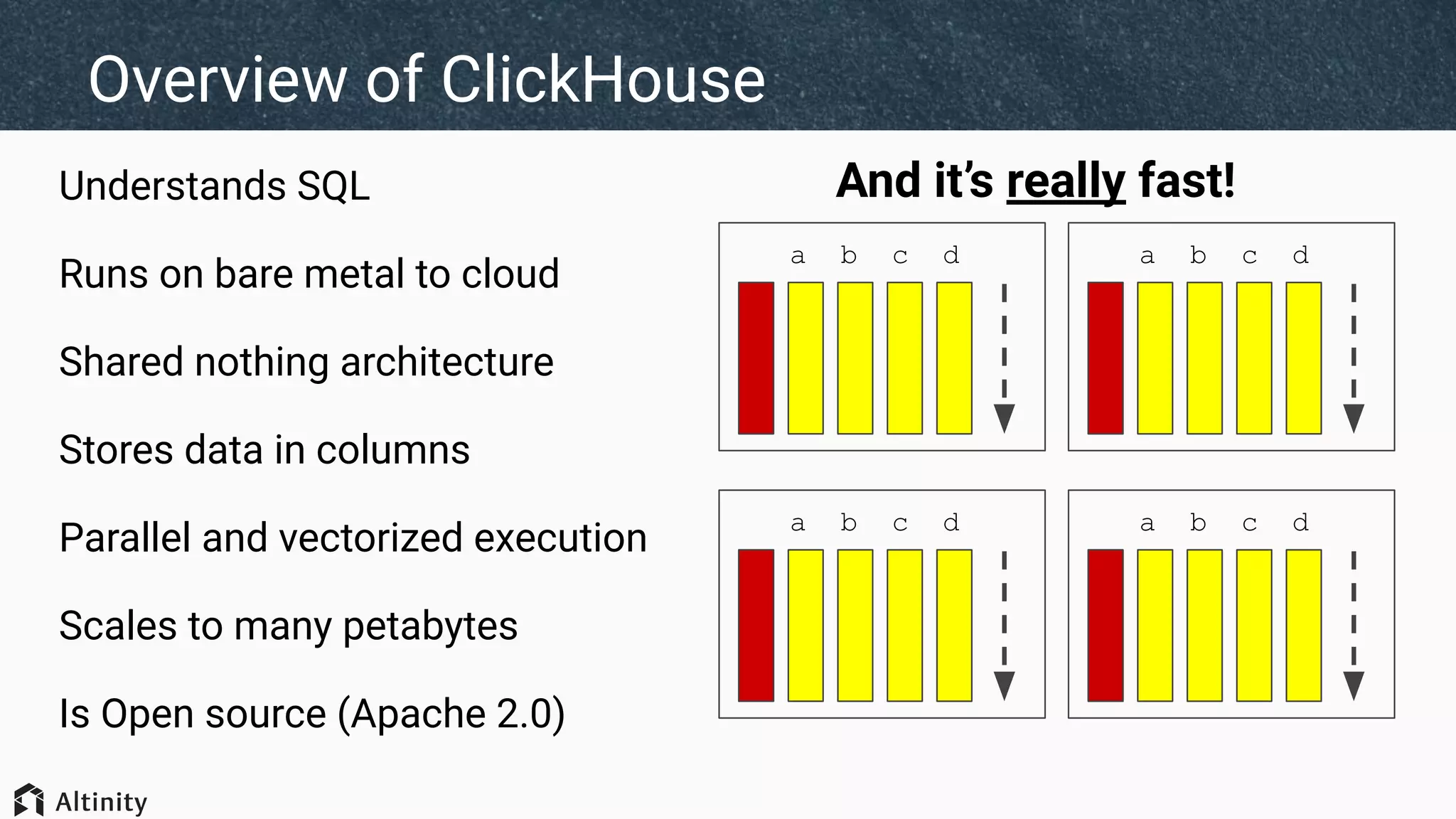
Overview of ClickHouse
Understands SQL
Runs on bare metal to cloud
Shared nothing architecture
Stores data in columns
Parallel and vectorized execution
Scales to many petabytes
Is Open source (Apache 2.0)
a b c d
a b c d
a b c d
a b c d
And it’s really fast!
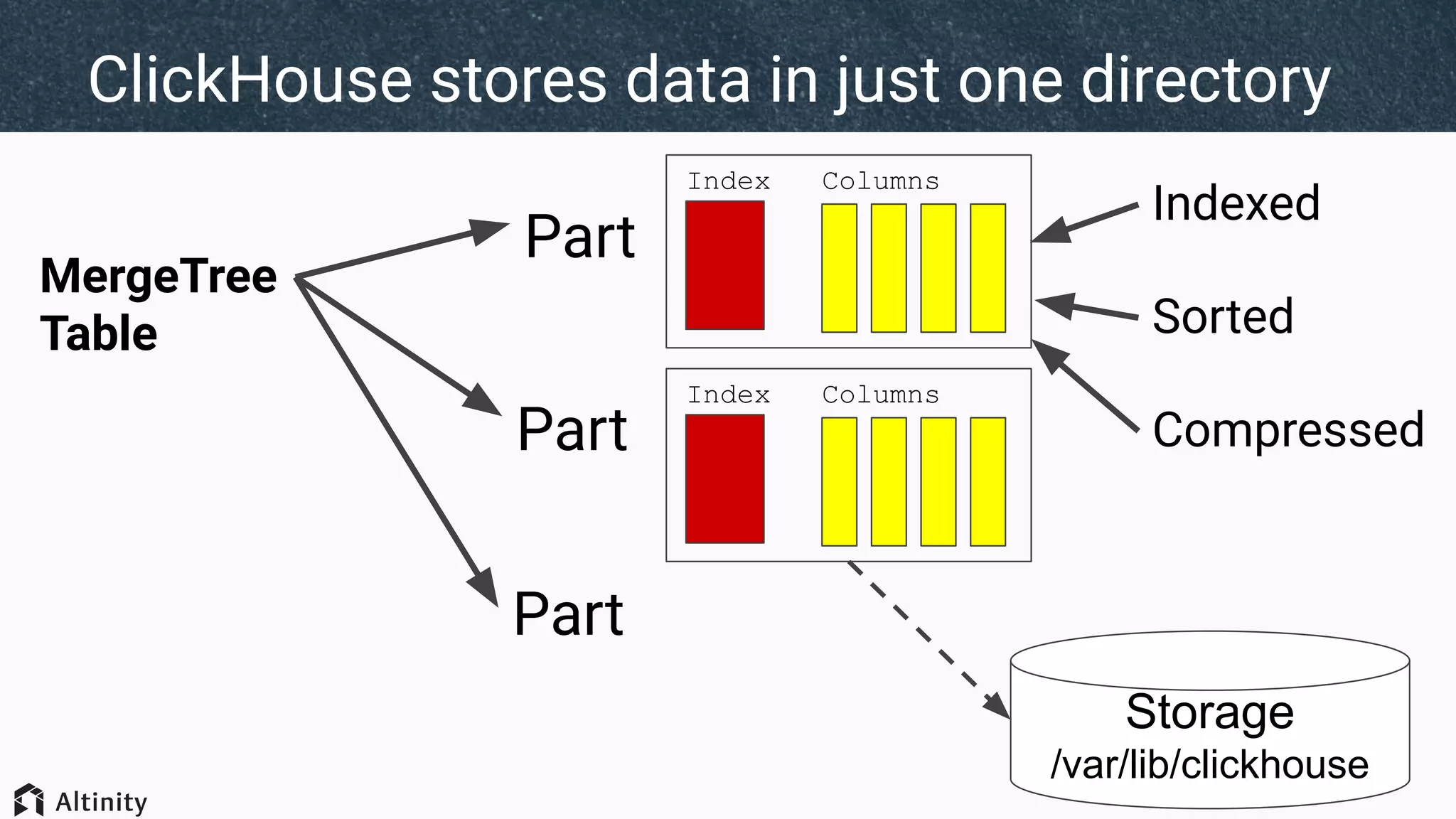
ClickHouse stores data in just one directory
MergeTree
Table
Part
Index Columns
Indexed
Sorted
CompressedPart
Index Columns
Part
Storage
/var/lib/clickhouse
Downsides of a single mount for data
Time Series Data
95% of queries
Last day
Last month
Last year
4% of queries
1% of queries
?
High density?High IOPS?
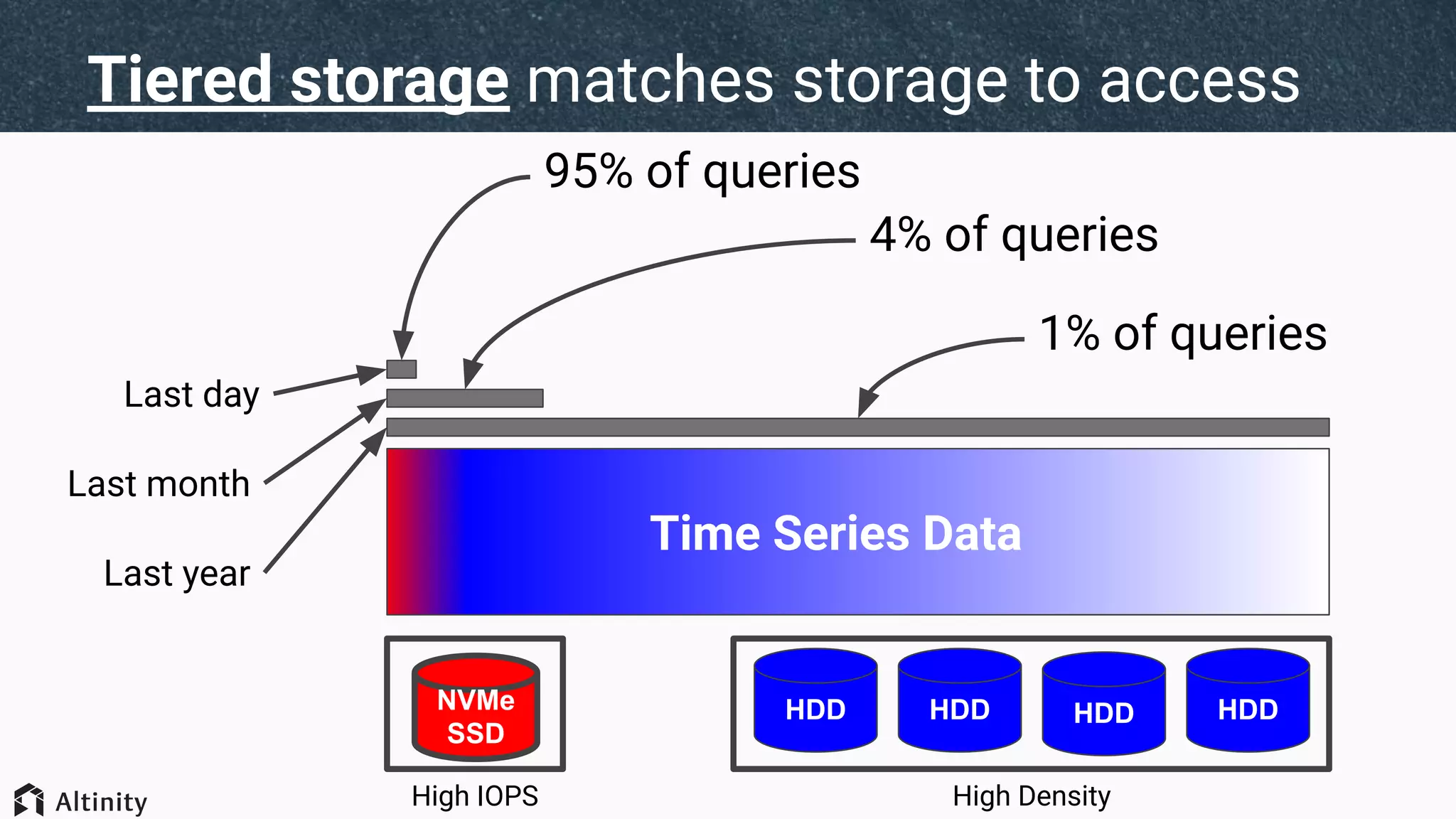
Tiered storage matches storage to access
Time Series Data
95% of queries
Last day
Last month
Last year
4% of queries
1% of queries
High IOPS
NVMe
SSD
HDD HDD HDD HDD
High Density
Introducing
Storage
Configurations
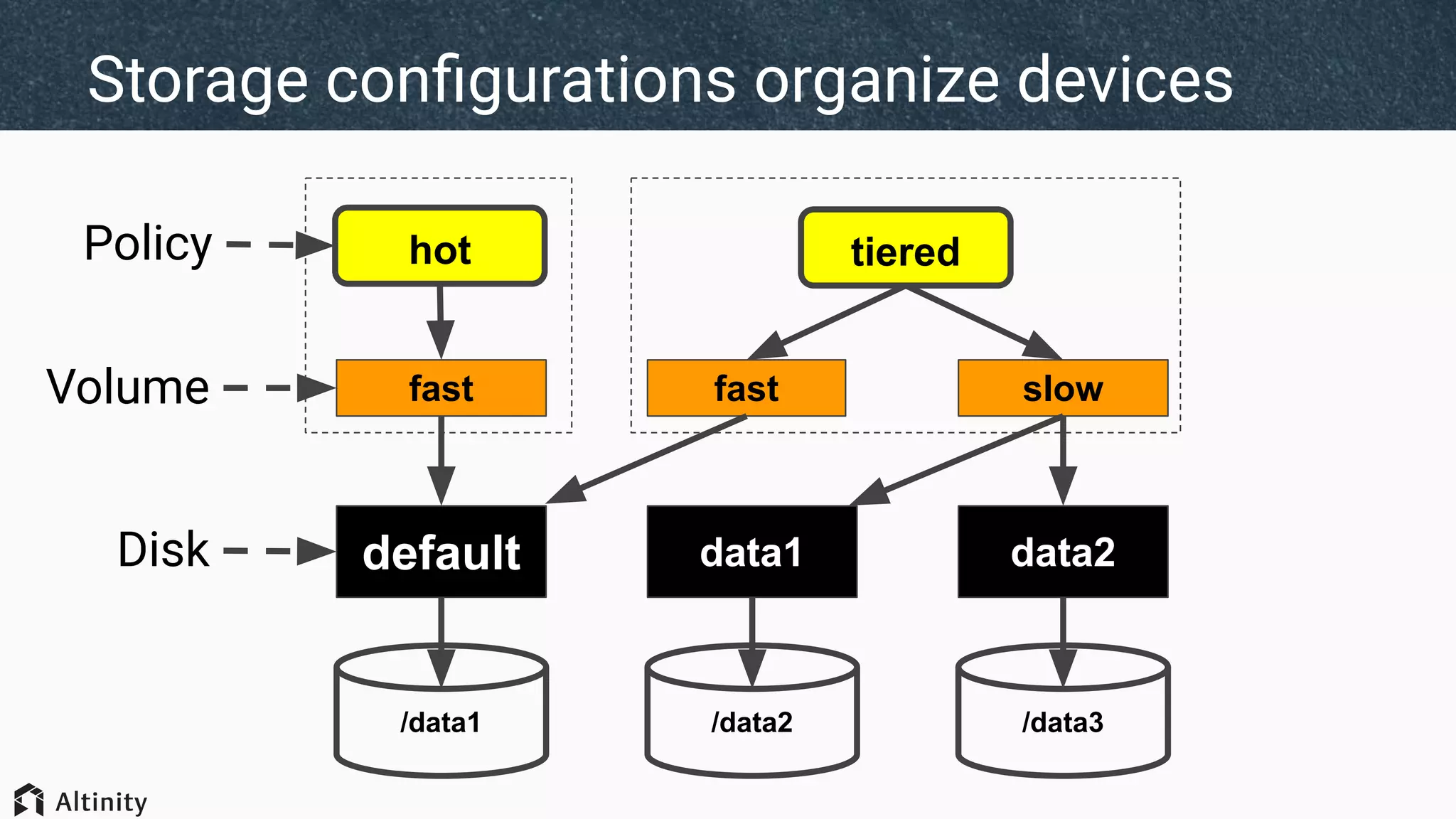
Storage configurations organize devices
/data1 /data2 /data3
default data2data1Disk
hot tieredPolicy
fast slowfastVolume
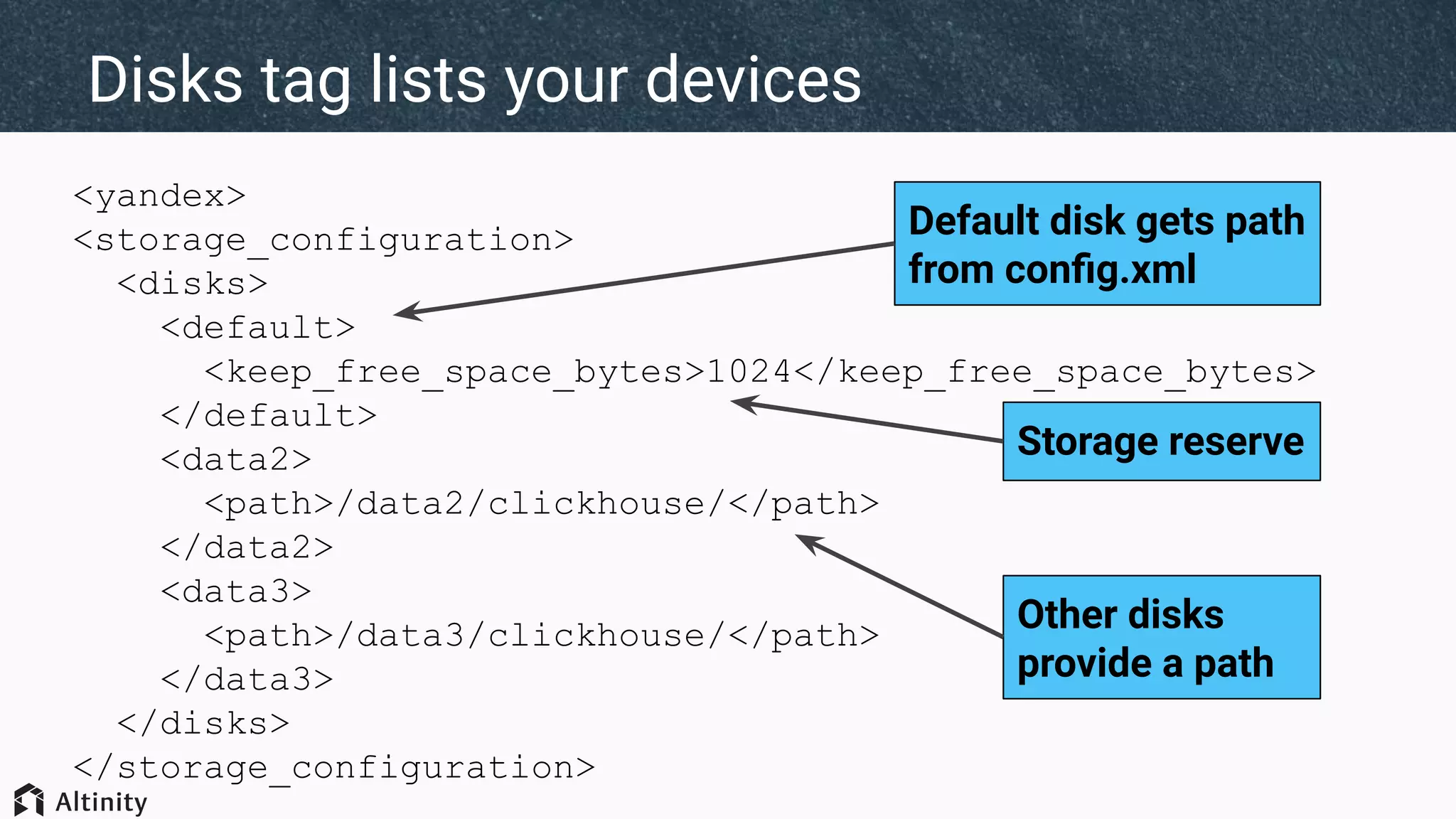
<yandex>
<storage_configuration>
<disks>
<default>
<keep_free_space_bytes>1024</keep_free_space_bytes>
</default>
<data2>
<path>/data2/clickhouse/</path>
</data2>
<data3>
<path>/data3/clickhouse/</path>
</data3>
</disks>
</storage_configuration>
Disks tag lists your devices
Default disk gets path
from config.xml
Other disks
provide a path
Storage reserve
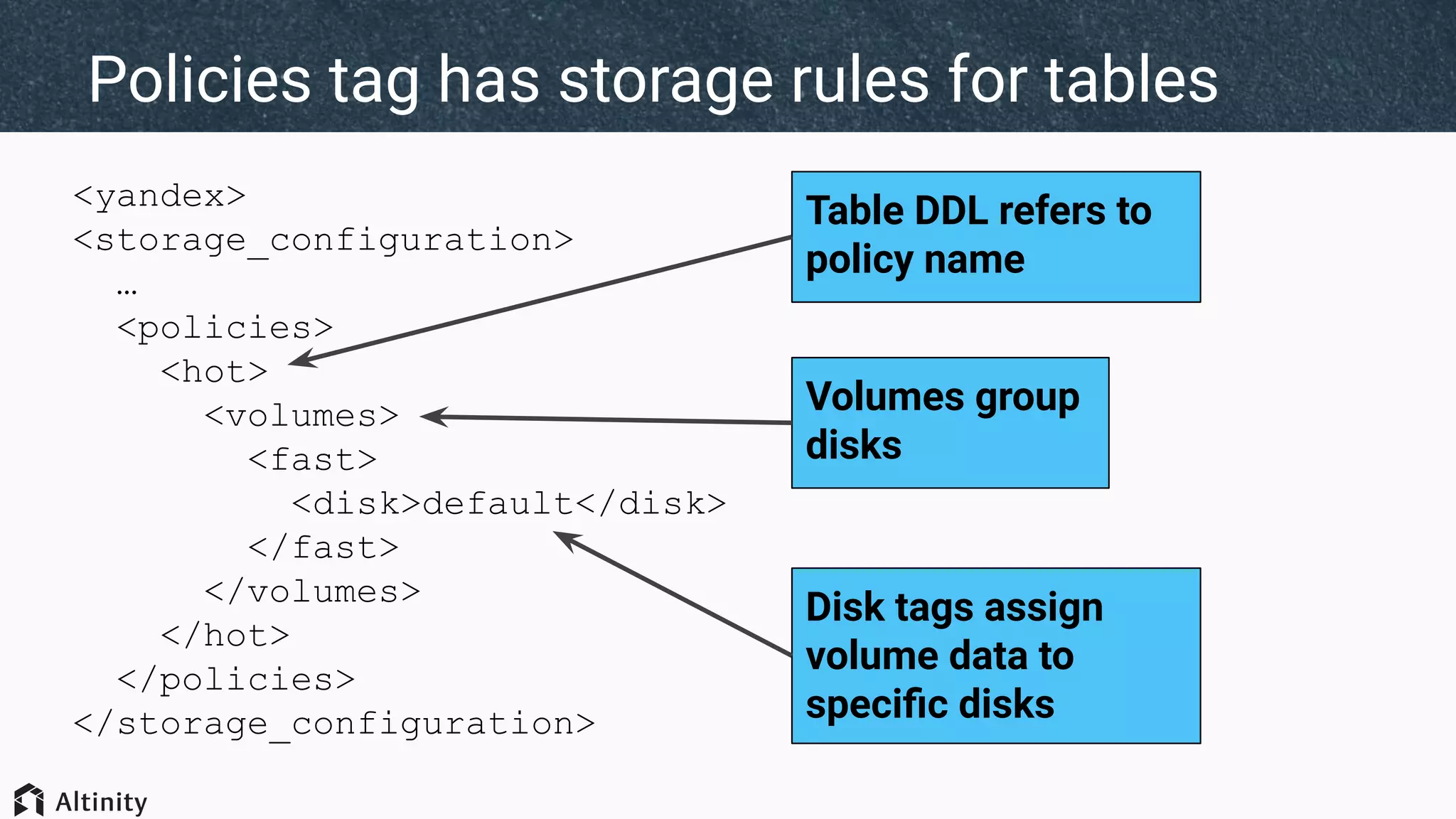
<yandex>
<storage_configuration>
…
<policies>
<hot>
<volumes>
<fast>
<disk>default</disk>
</fast>
</volumes>
</hot>
</policies>
</storage_configuration>
Policies tag has storage rules for tables
Disk tags assign
volume data to
specific disks
Volumes group
disks
Table DDL refers to
policy name
SELECT name, path,
formatReadableSize(free_space) AS free,
formatReadableSize(total_space) AS total,
formatReadableSize(keep_free_space) AS reserved
FROM system.disks
┌─name────┬─path───────────────┬─free───────┬─total──────┬─reserved─┐
│ data2 │ /data2/clickhouse/ │ 933.21 GiB │ 983.30 GiB │ 0.00 B │
│ data3 │ /data3/clickhouse/ │ 933.21 GiB │ 983.30 GiB │ 0.00 B │
│ default │ /data1/clickhouse/ │ 41.19 GiB │ 274.01 GiB │ 1.00 KiB │
└─────────┴────────────────────┴────────────┴────────────┴──────────┘
There is a new system table to see disks
SELECT
policy_name,
volume_name,
volume_priority,
disks
FROM system.storage_policies
┌─policy_name─┬─volume_name─┬─volume_priority─┬─disks─────────────┐
│ cold │ slow │ 1 │ ['data2','data3'] │
│ default │ default │ 1 │ ['default'] │
│ hot │ fast │ 1 │ ['default'] │
│ tiered_auto │ fast │ 1 │ ['default'] │
│ tiered_auto │ slow │ 2 │ ['data2','data3'] │
│ tiered_ttl │ fast │ 1 │ ['default'] │
│ tiered_ttl │ slow │ 2 │ ['data2','data3'] │
└─────────────┴─────────────┴─────────────────┴───────────────────┘
...And another to see storage policies
Building up to
tiered storage
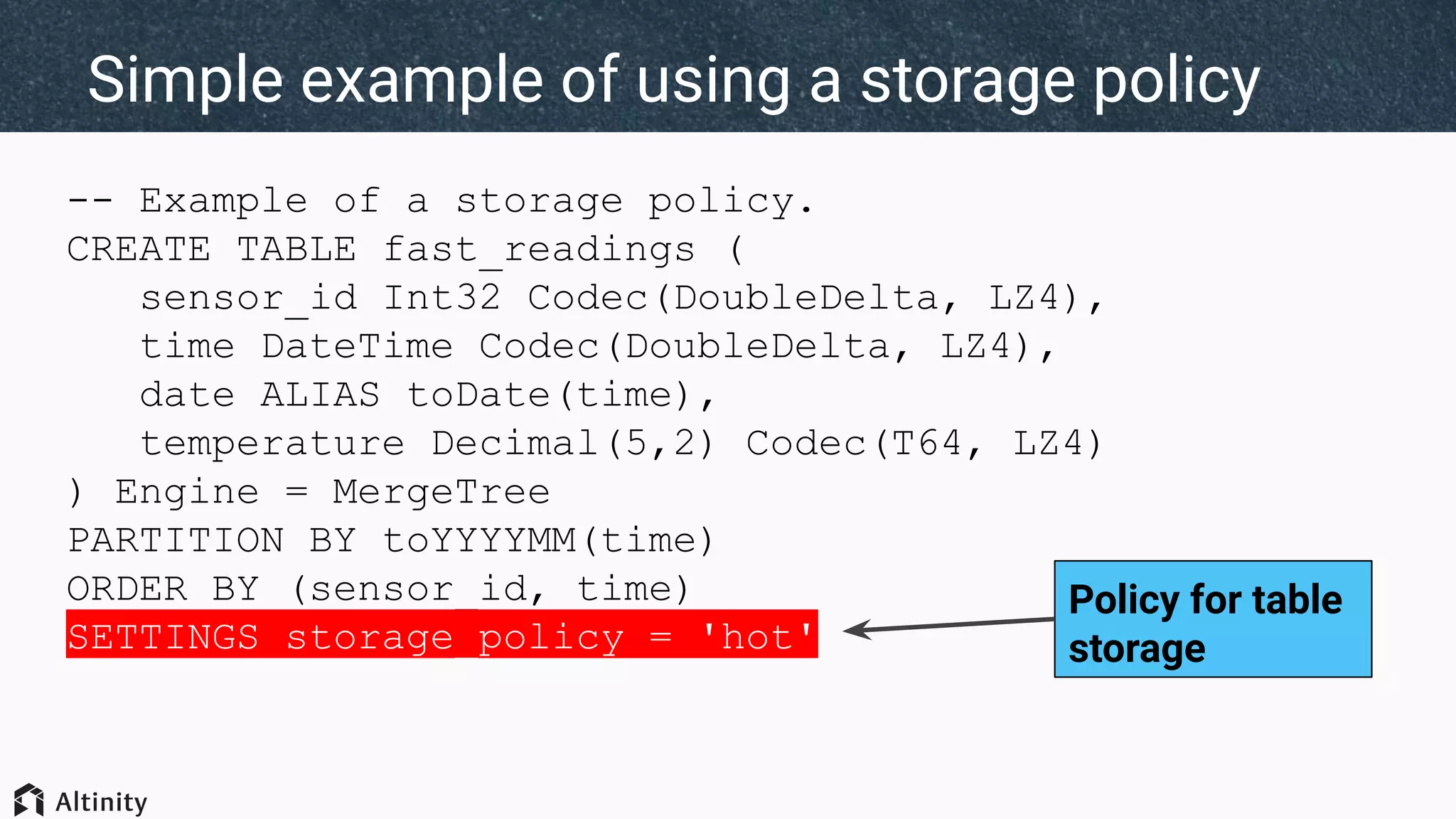
-- Example of a storage policy.
CREATE TABLE fast_readings (
sensor_id Int32 Codec(DoubleDelta, LZ4),
time DateTime Codec(DoubleDelta, LZ4),
date ALIAS toDate(time),
temperature Decimal(5,2) Codec(T64, LZ4)
) Engine = MergeTree
PARTITION BY toYYYYMM(time)
ORDER BY (sensor_id, time)
SETTINGS storage_policy = 'hot'
Simple example of using a storage policy
Policy for table
storage
-- Load data ...
INSERT ...
-- Look at parts.
SELECT table, disk_name, count() AS parts,
formatReadableSize(sum(bytes_on_disk)) AS total_size,
formatReadableSize(avg(bytes_on_disk)) AS avg_size
FROM system.parts
WHERE (database = currentDatabase()) AND active
GROUP BY table, disk_name ORDER BY table ASC, disk_name ASC
┌─table─────────┬─disk_name─┬─parts─┬─total_size─┬─avg_size──┐
│ fast_readings │ default │ 4 │ 318.47 MiB │ 79.62 MiB │
└───────────────┴───────────┴───────┴────────────┴─────────── ┘
Simple example of using ‘hot’ storage policy
Add data
on one
disk
<yandex>
<storage_configuration>
...
<policies>
<cold>
<volumes>
<slow>
<disk>data2</disk>
<disk>data3</disk>
</slow>
</volumes>
</cold>
<policies>
...
Storage policy to spread data across disks
Inserts go to
either disk
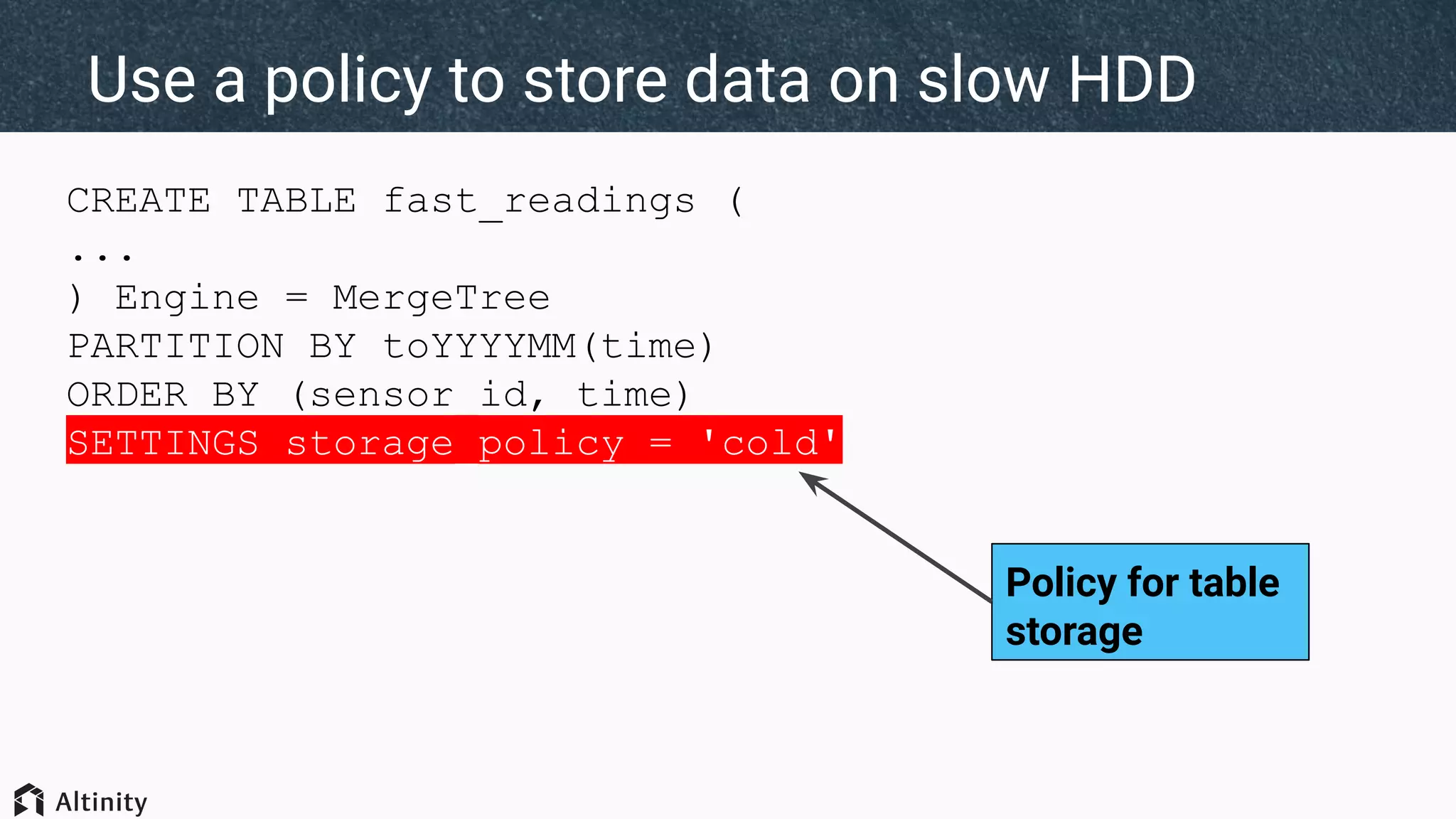
CREATE TABLE fast_readings (
...
) Engine = MergeTree
PARTITION BY toYYYYMM(time)
ORDER BY (sensor_id, time)
SETTINGS storage_policy = 'cold'
Use a policy to store data on slow HDD
Policy for table
storage
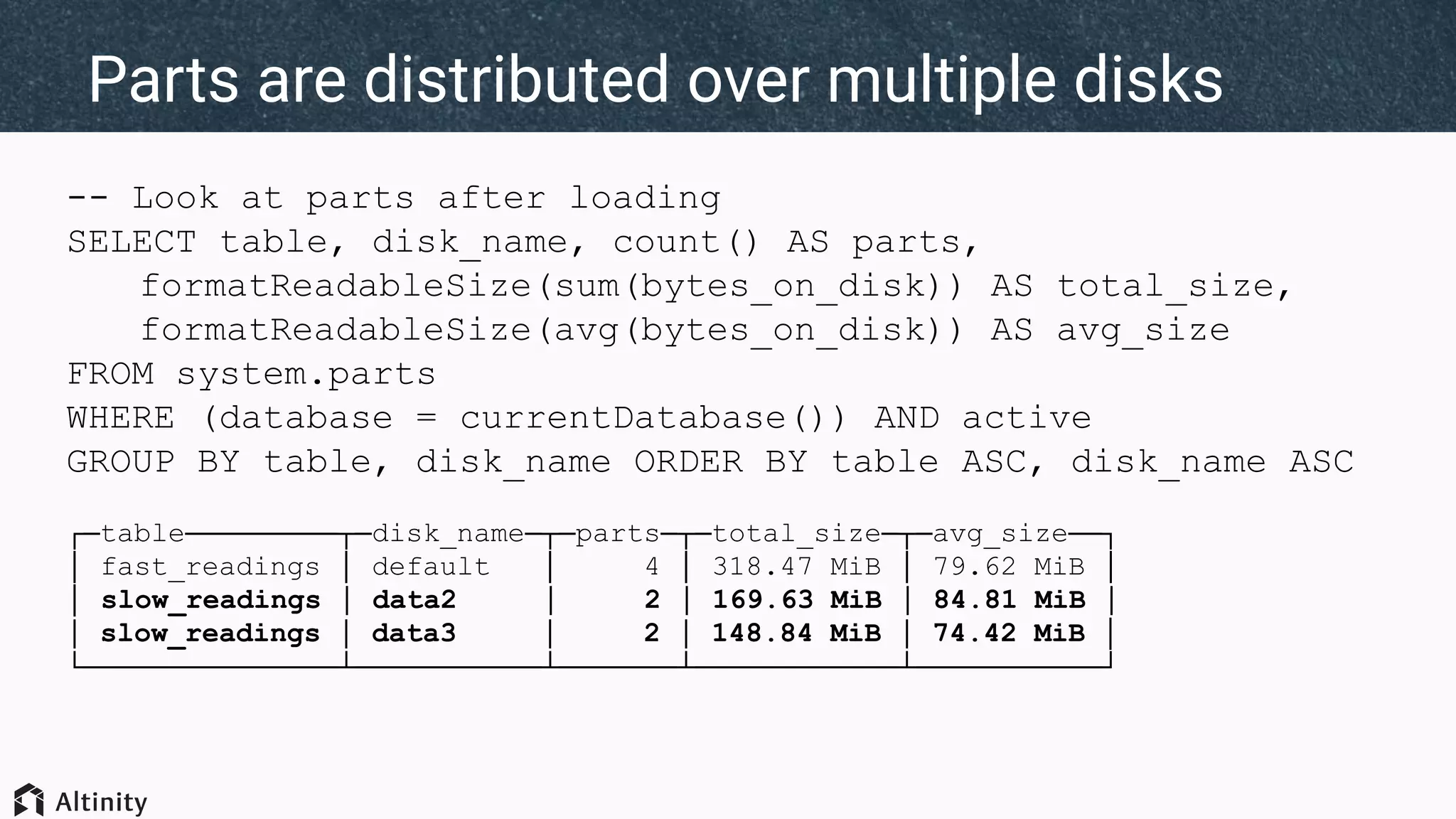
-- Look at parts after loading
SELECT table, disk_name, count() AS parts,
formatReadableSize(sum(bytes_on_disk)) AS total_size,
formatReadableSize(avg(bytes_on_disk)) AS avg_size
FROM system.parts
WHERE (database = currentDatabase()) AND active
GROUP BY table, disk_name ORDER BY table ASC, disk_name ASC
┌─table─────────┬─disk_name─┬─parts─┬─total_size─┬─avg_size──┐
│ fast_readings │ default │ 4 │ 318.47 MiB │ 79.62 MiB │
│ slow_readings │ data2 │ 2 │ 169.63 MiB │ 84.81 MiB │
│ slow_readings │ data3 │ 2 │ 148.84 MiB │ 74.42 MiB │
└───────────────┴───────────┴───────┴────────────┴───────────┘
Parts are distributed over multiple disks
<yandex>
<storage_configuration>
<policies>
<tiered_auto>
<volumes>
<fast>
<disk>default</disk>
<priority>1</priority>
<max_data_part_size_bytes>200000000</max_data_part_size_bytes>
</fast>
<slow>
<disk>data2</disk>
<disk>data3</disk>
<priority>2</priority>
<max_data_part_size_bytes>0</max_data_part_size_bytes>
</slow>
</volumes>
</tiered_auto>
<policies>
Tiered policies move data between volumes
Writes initially go to this
volume (prio = 1)
Move to priority 2
volume if disk
exceeds reserve or
part > 200M bytes
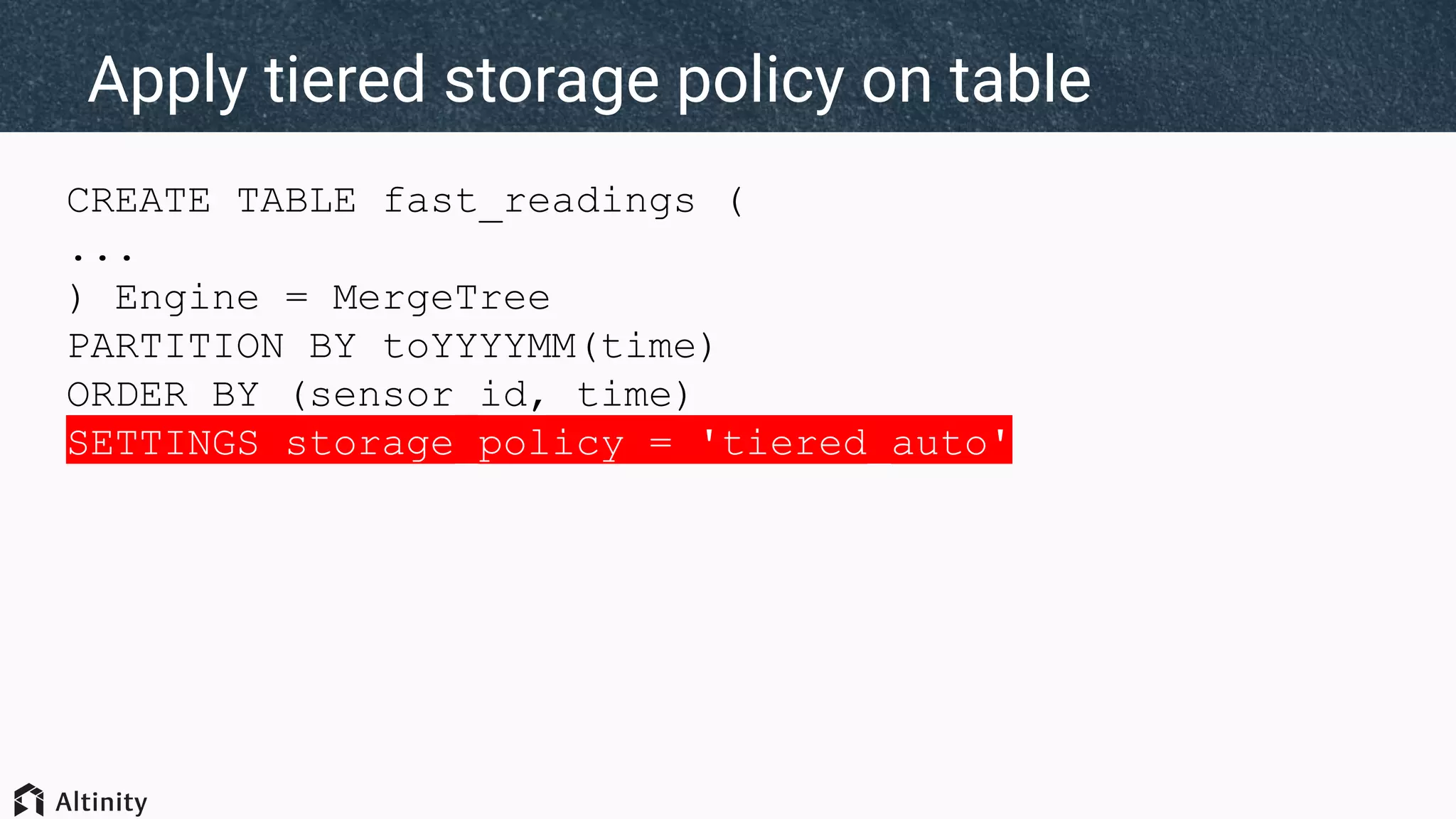
CREATE TABLE fast_readings (
...
) Engine = MergeTree
PARTITION BY toYYYYMM(time)
ORDER BY (sensor_id, time)
SETTINGS storage_policy = 'tiered_auto'
Apply tiered storage policy on table
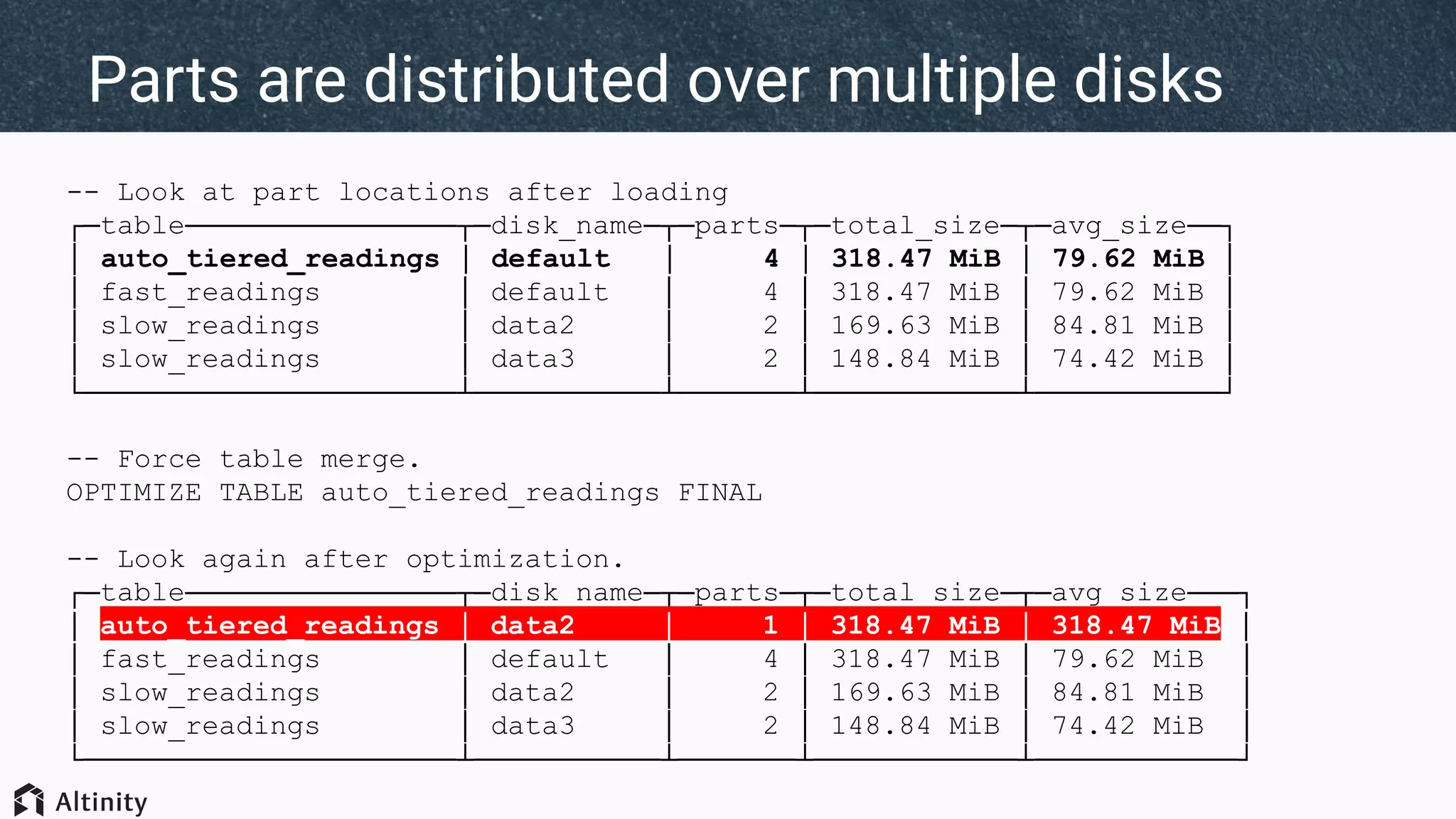
-- Look at part locations after loading
┌─table────────────────┬─disk_name─┬─parts─┬─total_size─┬─avg_size──┐
│ auto_tiered_readings │ default │ 4 │ 318.47 MiB │ 79.62 MiB │
│ fast_readings │ default │ 4 │ 318.47 MiB │ 79.62 MiB │
│ slow_readings │ data2 │ 2 │ 169.63 MiB │ 84.81 MiB │
│ slow_readings │ data3 │ 2 │ 148.84 MiB │ 74.42 MiB │
└──────────────────────┴───────────┴───────┴────────────┴───────────┘
-- Force table merge.
OPTIMIZE TABLE auto_tiered_readings FINAL
-- Look again after optimization.
┌─table────────────────┬─disk_name─┬─parts─┬─total_size─┬─avg_size───┐
│ auto_tiered_readings │ data2 │ 1 │ 318.47 MiB │ 318.47 MiB │
│ fast_readings │ default │ 4 │ 318.47 MiB │ 79.62 MiB │
│ slow_readings │ data2 │ 2 │ 169.63 MiB │ 84.81 MiB │
│ slow_readings │ data3 │ 2 │ 148.84 MiB │ 74.42 MiB │
└──────────────────────┴───────────┴───────┴────────────┴────────────┘
Parts are distributed over multiple disks
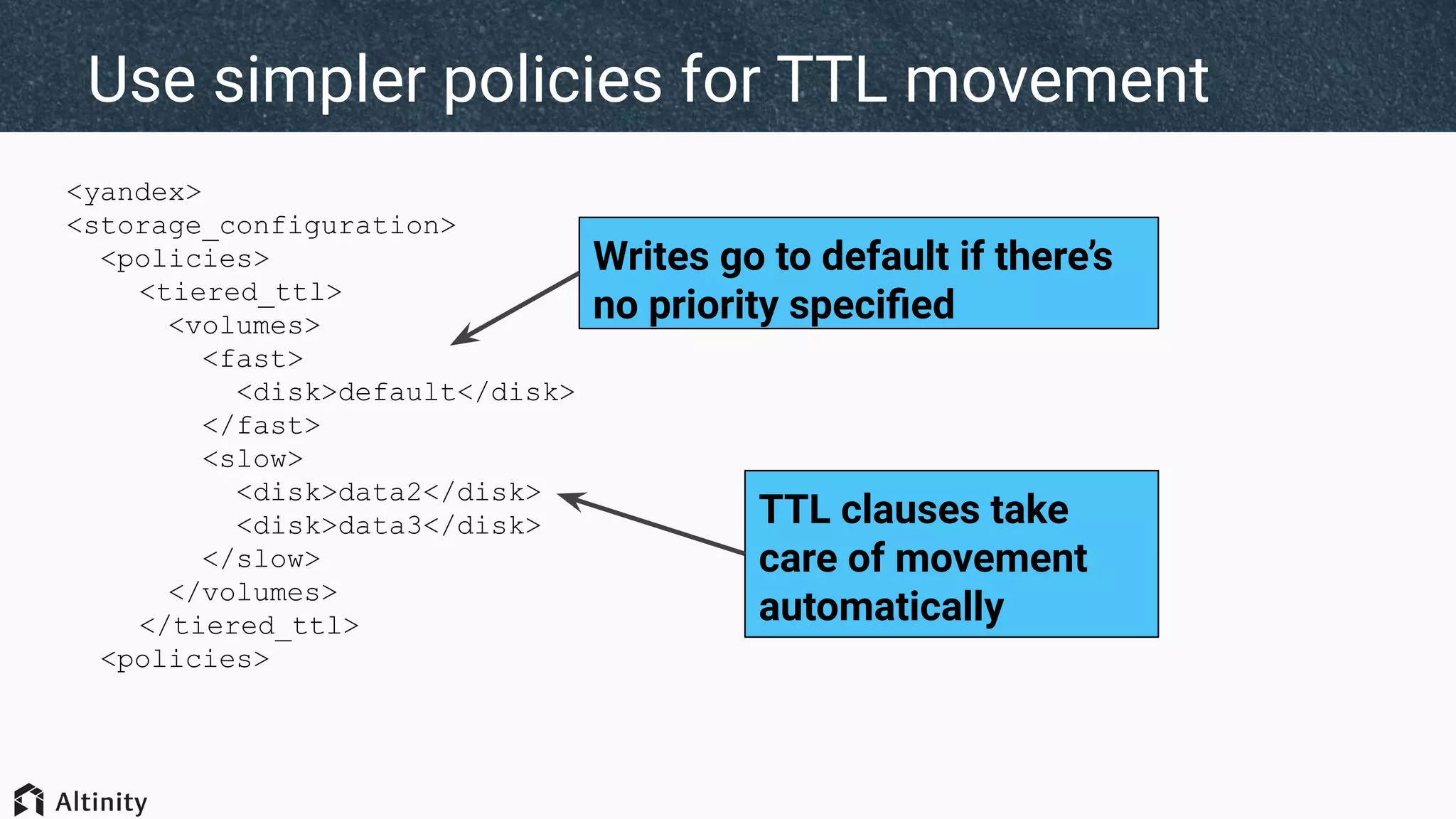
<yandex>
<storage_configuration>
<policies>
<tiered_ttl>
<volumes>
<fast>
<disk>default</disk>
</fast>
<slow>
<disk>data2</disk>
<disk>data3</disk>
</slow>
</volumes>
</tiered_ttl>
<policies>
Use simpler policies for TTL movement
Writes go to default if there’s
no priority specified
TTL clauses take
care of movement
automatically
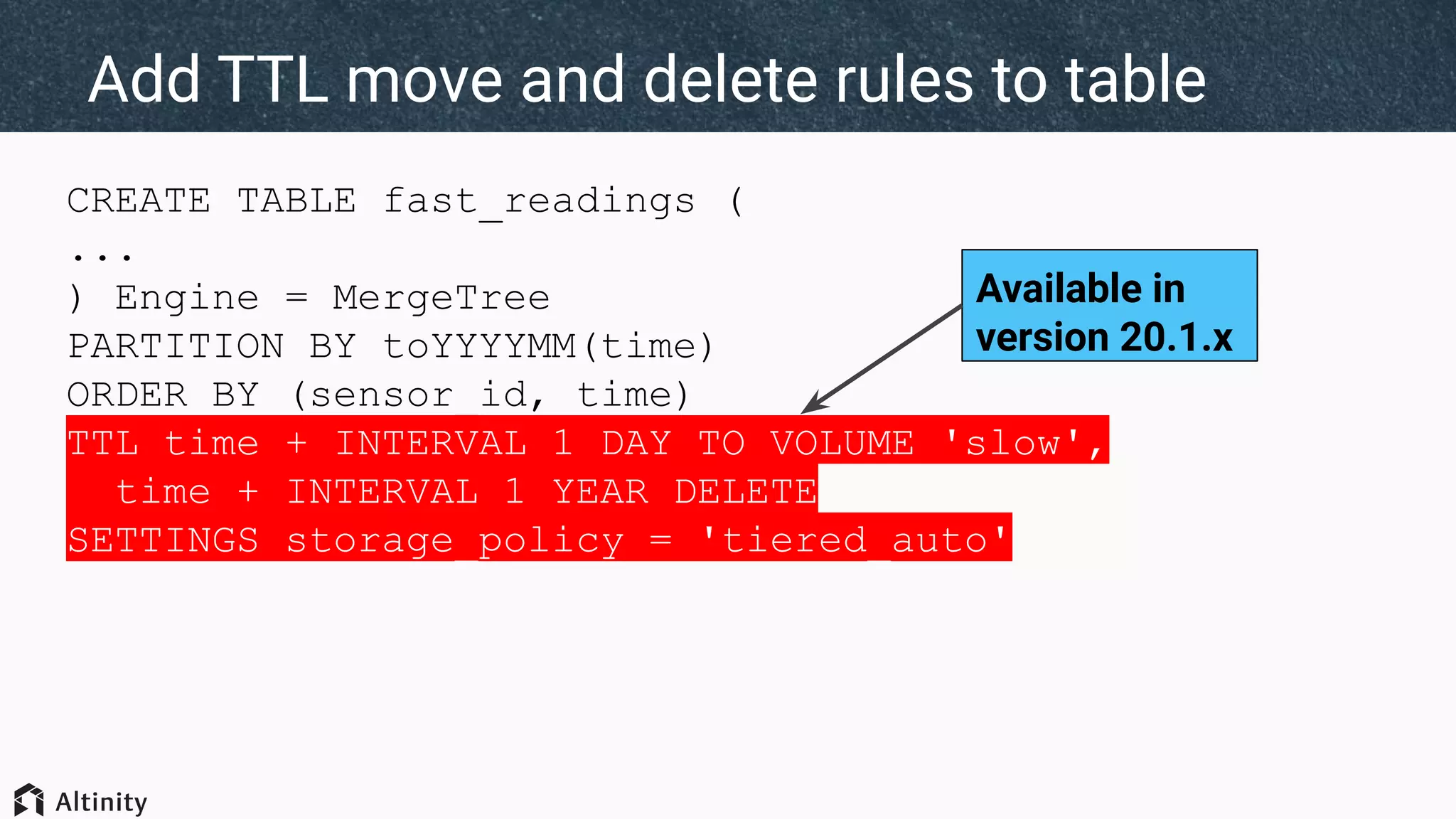
CREATE TABLE fast_readings (
...
) Engine = MergeTree
PARTITION BY toYYYYMM(time)
ORDER BY (sensor_id, time)
TTL time + INTERVAL 1 DAY TO VOLUME 'slow',
time + INTERVAL 1 YEAR DELETE
SETTINGS storage_policy = 'tiered_auto'
Add TTL move and delete rules to table
Available in
version 20.1.x
-- Load data...
-- Check parts after merge
┌─table────────────────┬─disk_name─┬─parts─┬─total_size─┬─avg_size───┐
│ ttl_tiered_readings │ data2 │ 4 │ 414.24 MiB │ 103.56 MiB │
│ ttl_tiered_readings │ data3 │ 4 │ 207.52 MiB │ 51.88 MiB │
│ ttl_tiered_readings │ default │ 1 │ 7.81 MiB │ 7.81 MiB │
└──────────────────────┴───────────┴───────┴────────────┴────────────┘
Load data and check distribution
TTL rules are
applied on load
Hot volume contains
only data from today
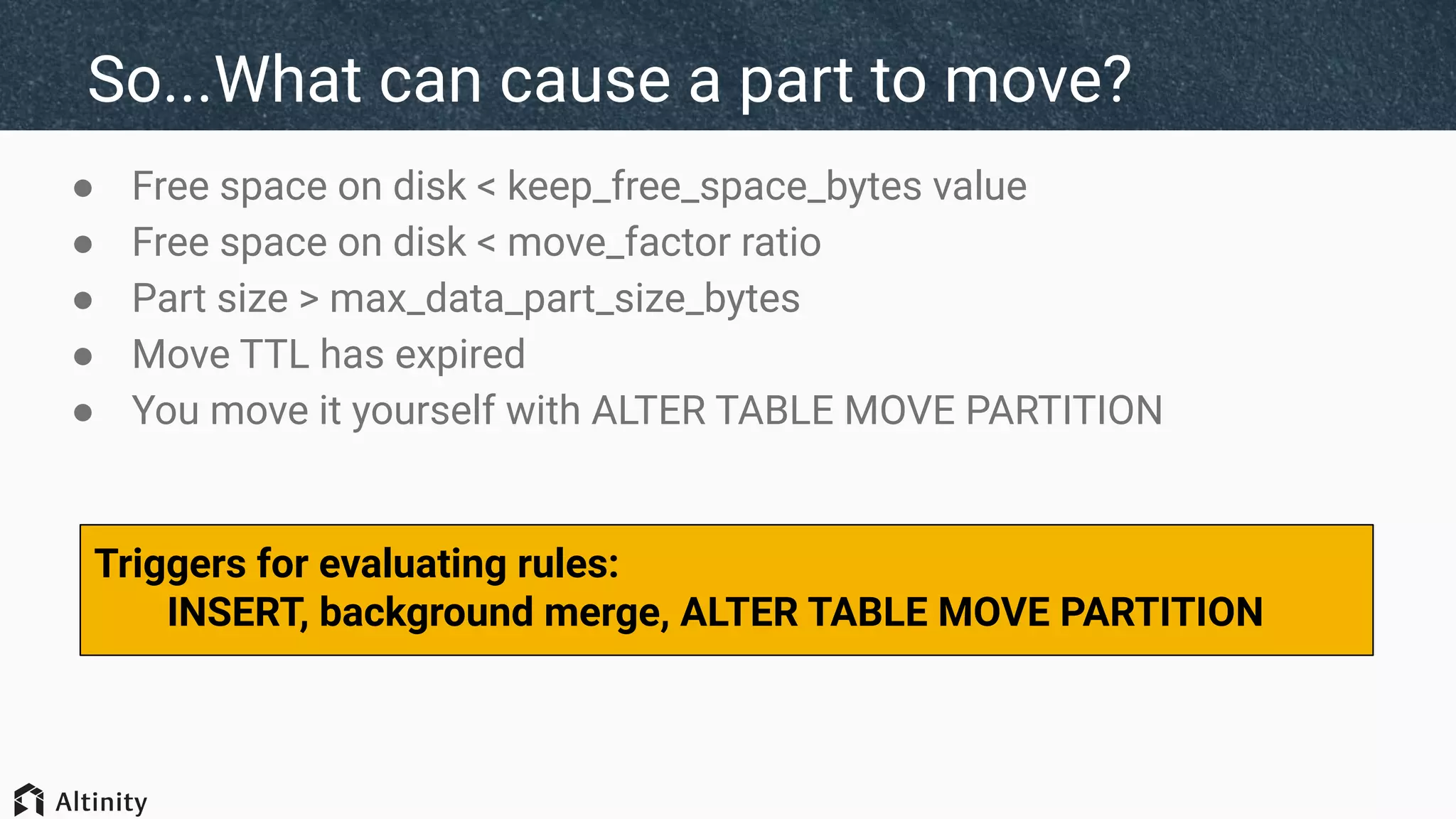
So...What can cause a part to move?
● Free space on disk < keep_free_space_bytes value
● Free space on disk < move_factor ratio
● Part size > max_data_part_size_bytes
● Move TTL has expired
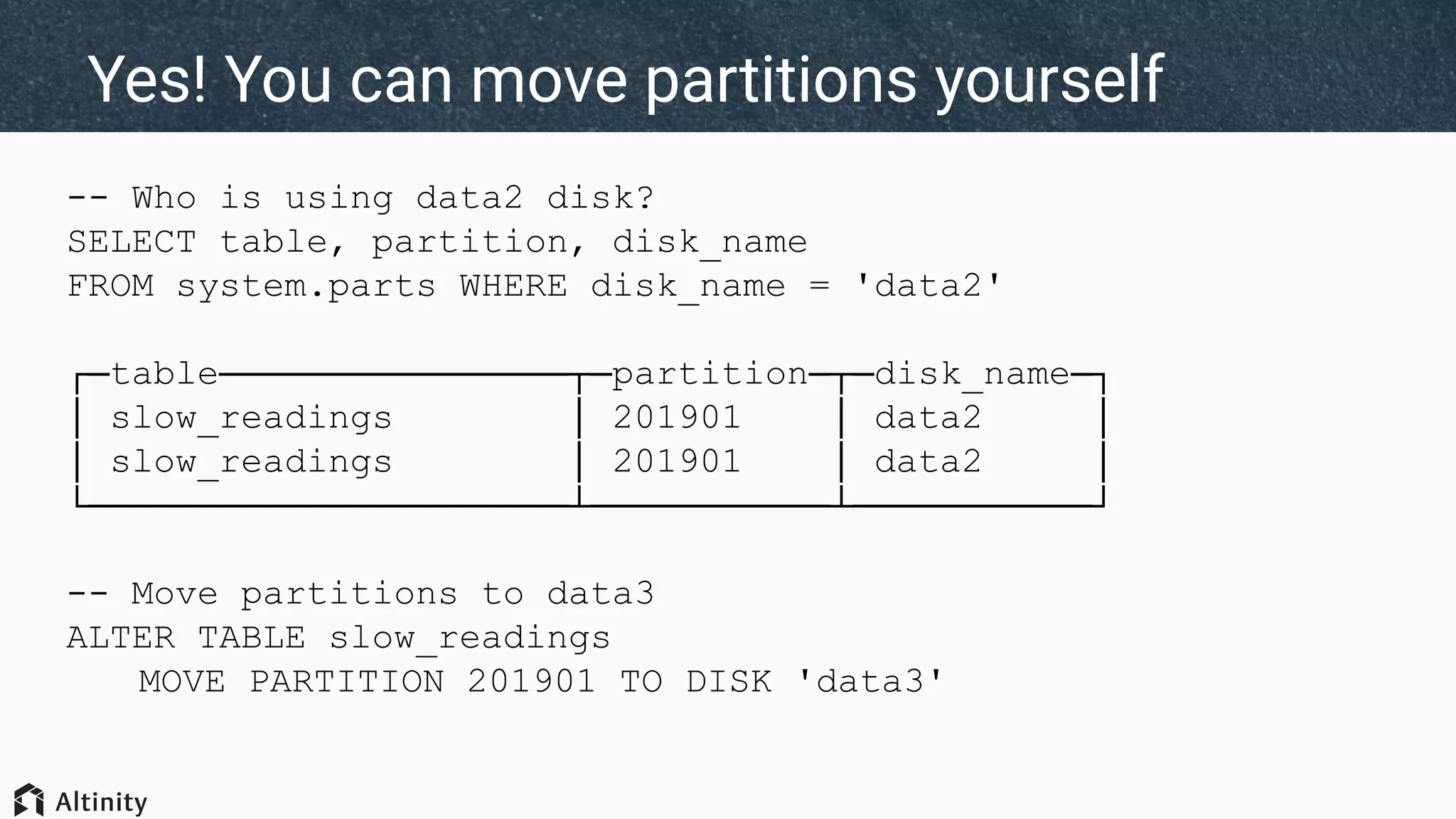
● You move it yourself with ALTER TABLE MOVE PARTITION
Triggers for evaluating rules:
INSERT, background merge, ALTER TABLE MOVE PARTITION
-- Who is using data2 disk?
SELECT table, partition, disk_name
FROM system.parts WHERE disk_name = 'data2'
┌─table────────────────┬─partition─┬─disk_name─┐
│ slow_readings │ 201901 │ data2 │
└──────────────────────┴───────────┴───────────┘
-- Move partitions to data3
ALTER TABLE slow_readings
MOVE PARTITION 201901 TO DISK 'data3'
Yes! You can move partitions yourself
Roadmap
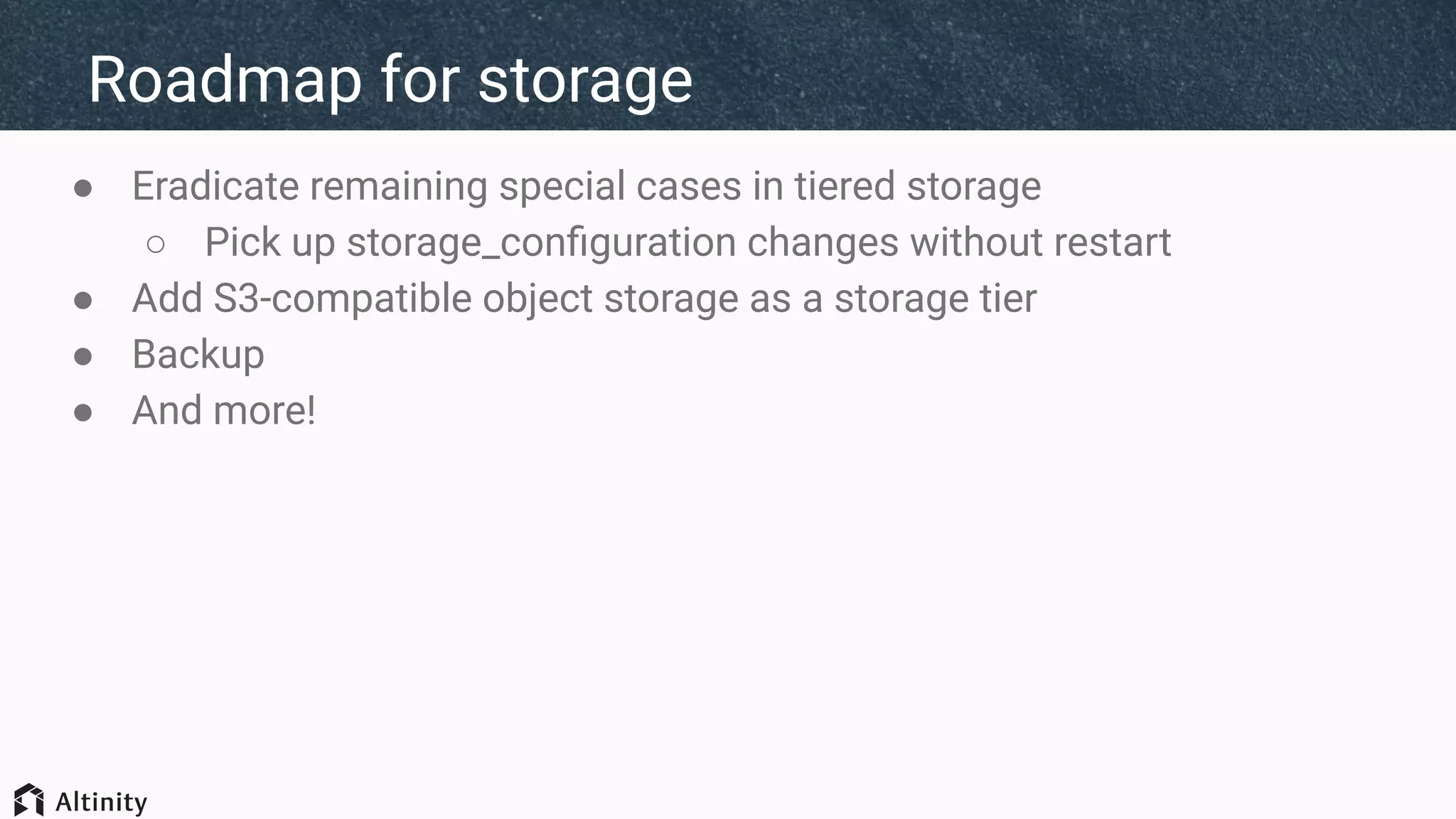
Roadmap for storage
● Eradicate remaining special cases in tiered storage
○ Pick up storage_configuration changes without restart
● Add S3-compatible object storage as a storage tier
● Backup
● And more!
Thank you!
We’re hiring!
Presenter:
rhodges@altinity.com
ClickHouse:
https://github.com/yandex/ClickHouse
Altinity Blog:
https://www.altinity.com/blog
INSERT INTO ttl_tiered_readings (sensor_id, time, temperature)
WITH
toDateTime(toDate('2020-01-01')) as start_time,
10000 as num_sensors,
365 as num_days,
24*60 as num_minutes,
num_days * num_minutes as total_minutes
SELECT
intDiv(number, num_minutes) % num_sensors as sensor_id,
start_time + (intDiv(number, num_minutes*num_sensors) as day)*24*60*60 + (number % num_minutes
as minute)*60 time,
60 + 20*sin(cityHash64(sensor_id)) /* median deviation */
+ 15*sin(2*pi()/num_days*day) /* seasonal deviation */
+ 10*sin(2*pi()/num_minutes*minute)*(1 + rand(1)%100/2000) /* daily deviation */
+ if(sensor_id = 473869 and
time between '2019-08-27 13:00:00' and '2019-08-27 13:05:00', -50 + rand(2)%100, 0)
/* sensor outage, generates huge error on 2019-08-27 */
as temperature
FROM numbers_mt( 500000000)
SETTINGS max_block_size=1048576;
SQL script to load tables
(Change table name)
(Change table size)

Tiered storage intro. By Robert Hodges, Altinity CEO

  • 1.
    What the heckis ClickHouse tiered storage? Robert Hodges Altinity Engineering
  • 2.
    Brief Intros www.altinity.com Leading softwareand services provider for ClickHouse Major committer and community sponsor in US and Western Europe Robert Hodges - CEO 30+ years on DBMS plus virtualization and security. ClickHouse is DBMS #20
  • 3.
  • 4.
    Overview of ClickHouse UnderstandsSQL Runs on bare metal to cloud Shared nothing architecture Stores data in columns Parallel and vectorized execution Scales to many petabytes Is Open source (Apache 2.0) a b c d a b c d a b c d a b c d And it’s really fast!
  • 5.
    ClickHouse stores datain just one directory MergeTree Table Part Index Columns Indexed Sorted CompressedPart Index Columns Part Storage /var/lib/clickhouse
  • 6.
    Downsides of asingle mount for data Time Series Data 95% of queries Last day Last month Last year 4% of queries 1% of queries ? High density?High IOPS?
  • 7.
    Tiered storage matchesstorage to access Time Series Data 95% of queries Last day Last month Last year 4% of queries 1% of queries High IOPS NVMe SSD HDD HDD HDD HDD High Density
  • 8.
  • 9.
    Storage configurations organizedevices /data1 /data2 /data3 default data2data1Disk hot tieredPolicy fast slowfastVolume
  • 10.
  • 11.
    <yandex> <storage_configuration> … <policies> <hot> <volumes> <fast> <disk>default</disk> </fast> </volumes> </hot> </policies> </storage_configuration> Policies tag hasstorage rules for tables Disk tags assign volume data to specific disks Volumes group disks Table DDL refers to policy name
  • 12.
    SELECT name, path, formatReadableSize(free_space)AS free, formatReadableSize(total_space) AS total, formatReadableSize(keep_free_space) AS reserved FROM system.disks ┌─name────┬─path───────────────┬─free───────┬─total──────┬─reserved─┐ │ data2 │ /data2/clickhouse/ │ 933.21 GiB │ 983.30 GiB │ 0.00 B │ │ data3 │ /data3/clickhouse/ │ 933.21 GiB │ 983.30 GiB │ 0.00 B │ │ default │ /data1/clickhouse/ │ 41.19 GiB │ 274.01 GiB │ 1.00 KiB │ └─────────┴────────────────────┴────────────┴────────────┴──────────┘ There is a new system table to see disks
  • 13.
    SELECT policy_name, volume_name, volume_priority, disks FROM system.storage_policies ┌─policy_name─┬─volume_name─┬─volume_priority─┬─disks─────────────┐ │ cold│ slow │ 1 │ ['data2','data3'] │ │ default │ default │ 1 │ ['default'] │ │ hot │ fast │ 1 │ ['default'] │ │ tiered_auto │ fast │ 1 │ ['default'] │ │ tiered_auto │ slow │ 2 │ ['data2','data3'] │ │ tiered_ttl │ fast │ 1 │ ['default'] │ │ tiered_ttl │ slow │ 2 │ ['data2','data3'] │ └─────────────┴─────────────┴─────────────────┴───────────────────┘ ...And another to see storage policies
  • 14.
  • 15.
    -- Example ofa storage policy. CREATE TABLE fast_readings ( sensor_id Int32 Codec(DoubleDelta, LZ4), time DateTime Codec(DoubleDelta, LZ4), date ALIAS toDate(time), temperature Decimal(5,2) Codec(T64, LZ4) ) Engine = MergeTree PARTITION BY toYYYYMM(time) ORDER BY (sensor_id, time) SETTINGS storage_policy = 'hot' Simple example of using a storage policy Policy for table storage
  • 16.
    -- Load data... INSERT ... -- Look at parts. SELECT table, disk_name, count() AS parts, formatReadableSize(sum(bytes_on_disk)) AS total_size, formatReadableSize(avg(bytes_on_disk)) AS avg_size FROM system.parts WHERE (database = currentDatabase()) AND active GROUP BY table, disk_name ORDER BY table ASC, disk_name ASC ┌─table─────────┬─disk_name─┬─parts─┬─total_size─┬─avg_size──┐ │ fast_readings │ default │ 4 │ 318.47 MiB │ 79.62 MiB │ └───────────────┴───────────┴───────┴────────────┴─────────── ┘ Simple example of using ‘hot’ storage policy Add data on one disk
  • 17.
  • 18.
    CREATE TABLE fast_readings( ... ) Engine = MergeTree PARTITION BY toYYYYMM(time) ORDER BY (sensor_id, time) SETTINGS storage_policy = 'cold' Use a policy to store data on slow HDD Policy for table storage
  • 19.
    -- Look atparts after loading SELECT table, disk_name, count() AS parts, formatReadableSize(sum(bytes_on_disk)) AS total_size, formatReadableSize(avg(bytes_on_disk)) AS avg_size FROM system.parts WHERE (database = currentDatabase()) AND active GROUP BY table, disk_name ORDER BY table ASC, disk_name ASC ┌─table─────────┬─disk_name─┬─parts─┬─total_size─┬─avg_size──┐ │ fast_readings │ default │ 4 │ 318.47 MiB │ 79.62 MiB │ │ slow_readings │ data2 │ 2 │ 169.63 MiB │ 84.81 MiB │ │ slow_readings │ data3 │ 2 │ 148.84 MiB │ 74.42 MiB │ └───────────────┴───────────┴───────┴────────────┴───────────┘ Parts are distributed over multiple disks
  • 20.
  • 21.
    CREATE TABLE fast_readings( ... ) Engine = MergeTree PARTITION BY toYYYYMM(time) ORDER BY (sensor_id, time) SETTINGS storage_policy = 'tiered_auto' Apply tiered storage policy on table
  • 22.
    -- Look atpart locations after loading ┌─table────────────────┬─disk_name─┬─parts─┬─total_size─┬─avg_size──┐ │ auto_tiered_readings │ default │ 4 │ 318.47 MiB │ 79.62 MiB │ │ fast_readings │ default │ 4 │ 318.47 MiB │ 79.62 MiB │ │ slow_readings │ data2 │ 2 │ 169.63 MiB │ 84.81 MiB │ │ slow_readings │ data3 │ 2 │ 148.84 MiB │ 74.42 MiB │ └──────────────────────┴───────────┴───────┴────────────┴───────────┘ -- Force table merge. OPTIMIZE TABLE auto_tiered_readings FINAL -- Look again after optimization. ┌─table────────────────┬─disk_name─┬─parts─┬─total_size─┬─avg_size───┐ │ auto_tiered_readings │ data2 │ 1 │ 318.47 MiB │ 318.47 MiB │ │ fast_readings │ default │ 4 │ 318.47 MiB │ 79.62 MiB │ │ slow_readings │ data2 │ 2 │ 169.63 MiB │ 84.81 MiB │ │ slow_readings │ data3 │ 2 │ 148.84 MiB │ 74.42 MiB │ └──────────────────────┴───────────┴───────┴────────────┴────────────┘ Parts are distributed over multiple disks
  • 23.
  • 24.
    CREATE TABLE fast_readings( ... ) Engine = MergeTree PARTITION BY toYYYYMM(time) ORDER BY (sensor_id, time) TTL time + INTERVAL 1 DAY TO VOLUME 'slow', time + INTERVAL 1 YEAR DELETE SETTINGS storage_policy = 'tiered_auto' Add TTL move and delete rules to table Available in version 20.1.x
  • 25.
    -- Load data... --Check parts after merge ┌─table────────────────┬─disk_name─┬─parts─┬─total_size─┬─avg_size───┐ │ ttl_tiered_readings │ data2 │ 4 │ 414.24 MiB │ 103.56 MiB │ │ ttl_tiered_readings │ data3 │ 4 │ 207.52 MiB │ 51.88 MiB │ │ ttl_tiered_readings │ default │ 1 │ 7.81 MiB │ 7.81 MiB │ └──────────────────────┴───────────┴───────┴────────────┴────────────┘ Load data and check distribution TTL rules are applied on load Hot volume contains only data from today
  • 26.
    So...What can causea part to move? ● Free space on disk < keep_free_space_bytes value ● Free space on disk < move_factor ratio ● Part size > max_data_part_size_bytes ● Move TTL has expired ● You move it yourself with ALTER TABLE MOVE PARTITION Triggers for evaluating rules: INSERT, background merge, ALTER TABLE MOVE PARTITION
  • 27.
    -- Who isusing data2 disk? SELECT table, partition, disk_name FROM system.parts WHERE disk_name = 'data2' ┌─table────────────────┬─partition─┬─disk_name─┐ │ slow_readings │ 201901 │ data2 │ │ slow_readings │ 201901 │ data2 │ └──────────────────────┴───────────┴───────────┘ -- Move partitions to data3 ALTER TABLE slow_readings MOVE PARTITION 201901 TO DISK 'data3' Yes! You can move partitions yourself
  • 28.
  • 29.
    Roadmap for storage ●Eradicate remaining special cases in tiered storage ○ Pick up storage_configuration changes without restart ● Add S3-compatible object storage as a storage tier ● Backup ● And more!
  • 30.
  • 31.
    INSERT INTO ttl_tiered_readings(sensor_id, time, temperature) WITH toDateTime(toDate('2020-01-01')) as start_time, 10000 as num_sensors, 365 as num_days, 24*60 as num_minutes, num_days * num_minutes as total_minutes SELECT intDiv(number, num_minutes) % num_sensors as sensor_id, start_time + (intDiv(number, num_minutes*num_sensors) as day)*24*60*60 + (number % num_minutes as minute)*60 time, 60 + 20*sin(cityHash64(sensor_id)) /* median deviation */ + 15*sin(2*pi()/num_days*day) /* seasonal deviation */ + 10*sin(2*pi()/num_minutes*minute)*(1 + rand(1)%100/2000) /* daily deviation */ + if(sensor_id = 473869 and time between '2019-08-27 13:00:00' and '2019-08-27 13:05:00', -50 + rand(2)%100, 0) /* sensor outage, generates huge error on 2019-08-27 */ as temperature FROM numbers_mt( 500000000) SETTINGS max_block_size=1048576; SQL script to load tables (Change table name) (Change table size)